


Project Files of Raspberry Pi Pico W MicroPython Library for Proteus: main.py, Wi-Fi
 Libraries
 Code
Code Projects
 Simulation
raspberry-pi-pico-w-micropython-tep-v1-0-cbcf0008950e495ca545f8bfa0053771.zip

Pico W MicroPython Library for Proteus V1.0
Pico W MicroPython Library for Proteus V1.0 comes as a ZIP archive of 144 files (14.0 MB, 27.4 MB unpacked) holding Proteus library files, simulation model DLLs, a Proteus simulation, source code and a nested archive.
- LIBProteus library
- DLLProteus model
- DSNProteus simulation
- SRCSource code
- ZIPNested archive
Description
Raspberry-Pi-Pico-W-MicroPython-Library-for-Proteus-v1.0.zip with the Raspberry Pi Pico W in Proteus running your main.py in MicroPython (machine, network, socket, time, dht, framebuf and the REPL; TEPPICOWMPY.LIB, TEPNET.DLL and the TEPPi folder with Python 3.11), the DHT22, SSD1306 OLED, SG90 and LDR libraries, the Laptop / Mobile WiFi Monitor symbols, the weather station demo with main.py and ssd1306.py, and a README.

File Structure
 File Structure
594 B5.1 KB5.2 KB155.3 KB39.5 KB289.8 KB13.1 KB112.4 KB129.4 KB28.5 KB3.3 MB34.3 KB620.8 KB36 KB169.8 KB628.1 KB99.3 KB65.3 KB4.8 MB4.1 MB80 B97.8 KB26.8 KB1.2 MB1.1 MB88.9 KB27.3 KB55.8 KB79.8 KB105.8 KB193.8 KB113.8 KB48.8 KB145.8 KB36.8 KB29.3 KB42.3 KB28.8 KB67.3 KB89.3 KB153.8 KB22.8 KB38.8 KB2.1 KB9.9 KB4.1 KB1.3 KB4.7 KB431 B2.5 KB17.5 KB283 B6.5 KB37.9 KB11.1 KB5.5 KB885 B13.6 KB9 KB878 B1.5 KB4 KB1004 B10 B110 B2.6 KB1.1 KB8.9 KB58.5 KB12.4 KB6.6 KB18.5 KB20.7 KB27.8 KB21.1 KB7.1 KB7.7 KB2.7 KB51.2 KB100.9 KB1.2 KB24.3 KB7.4 KB53.6 KB26.1 KB20.5 KB60.5 KB19.6 KB1.6 KB8.4 KB20.9 KB2.6 KB539 B1.4 KB9.7 KB2.8 KB21 B92 B7.9 KB264 B3.4 KB3.8 KB17.5 KB55.2 KB3.3 KB10.8 KB1.5 KB4.2 KB7.3 KB2.5 KB32.6 KB14.5 KB283 B17.4 KB257 B691 B14.5 KB12.8 KB3.6 KB1.7 KB37 KB418 B6.2 KB7 KB37.3 KB10.6 KB23.7 KB28.7 KB8.8 KB16.9 KB306.5 KB420 KB2.6 MB323 KB323 KB5.1 KB35 KB5.2 KB306.5 KB420 KB2.6 MB323 KB323 KB23.5 KBGallery12 images from the tutorialOpen the tutorial
 Gallery12 images from the tutorial
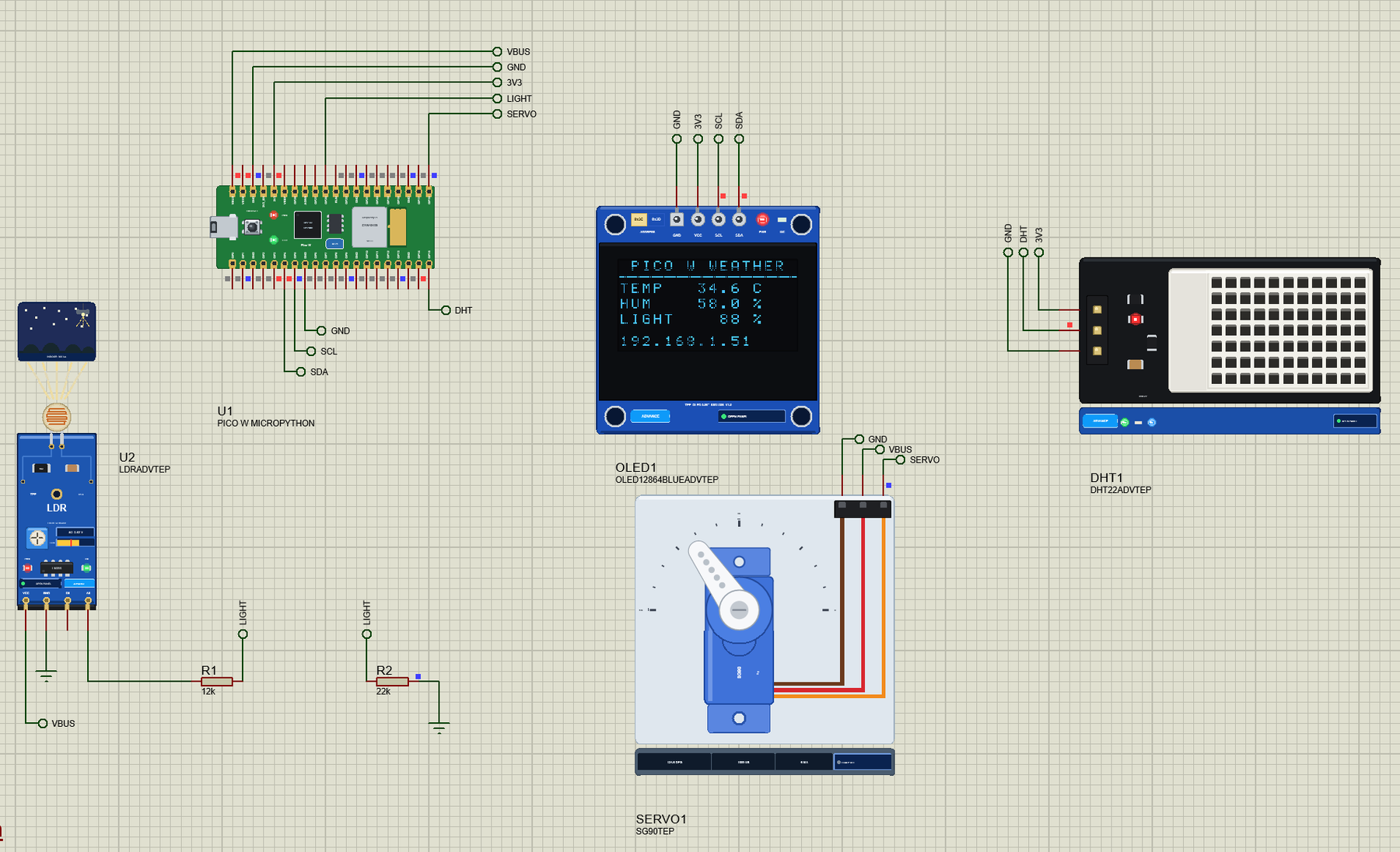
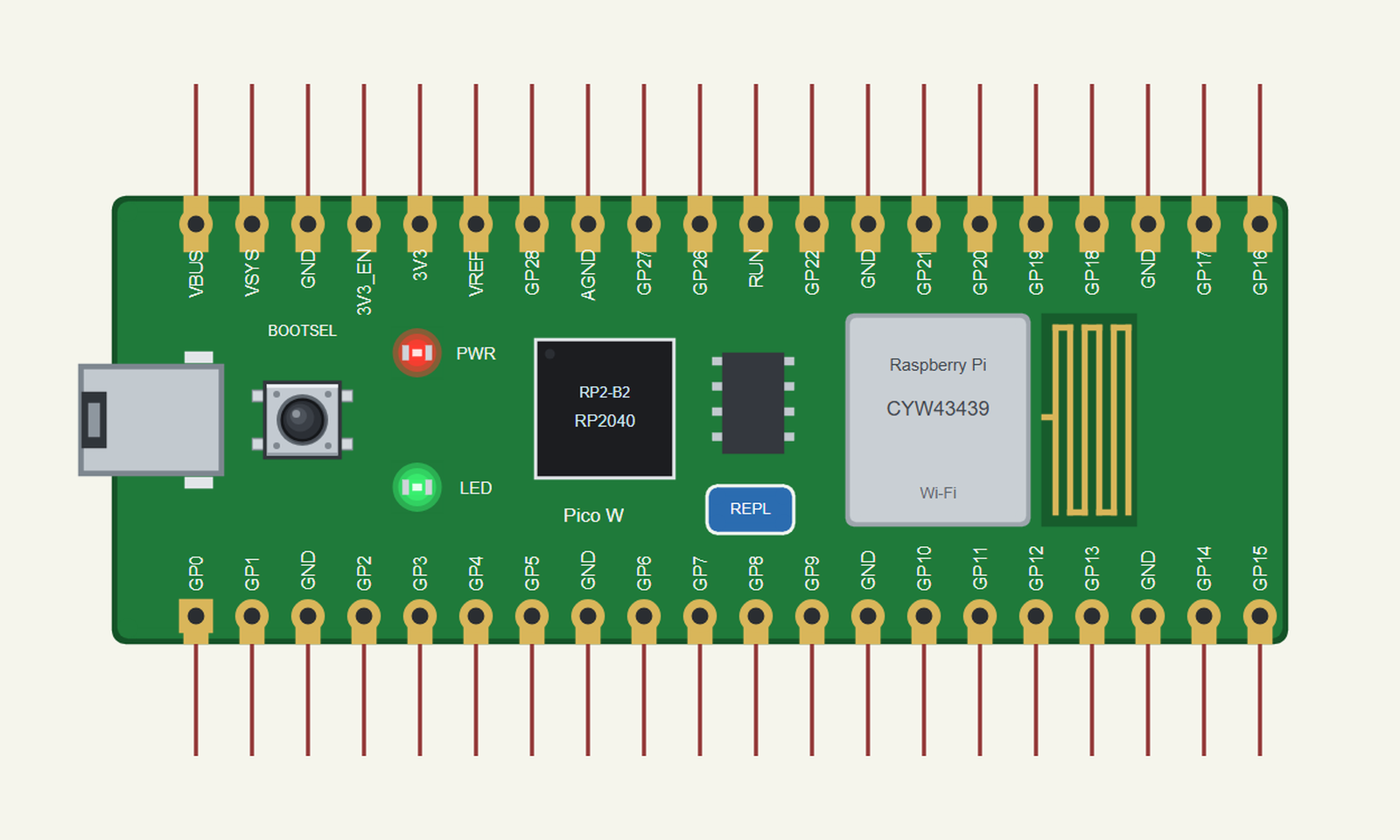
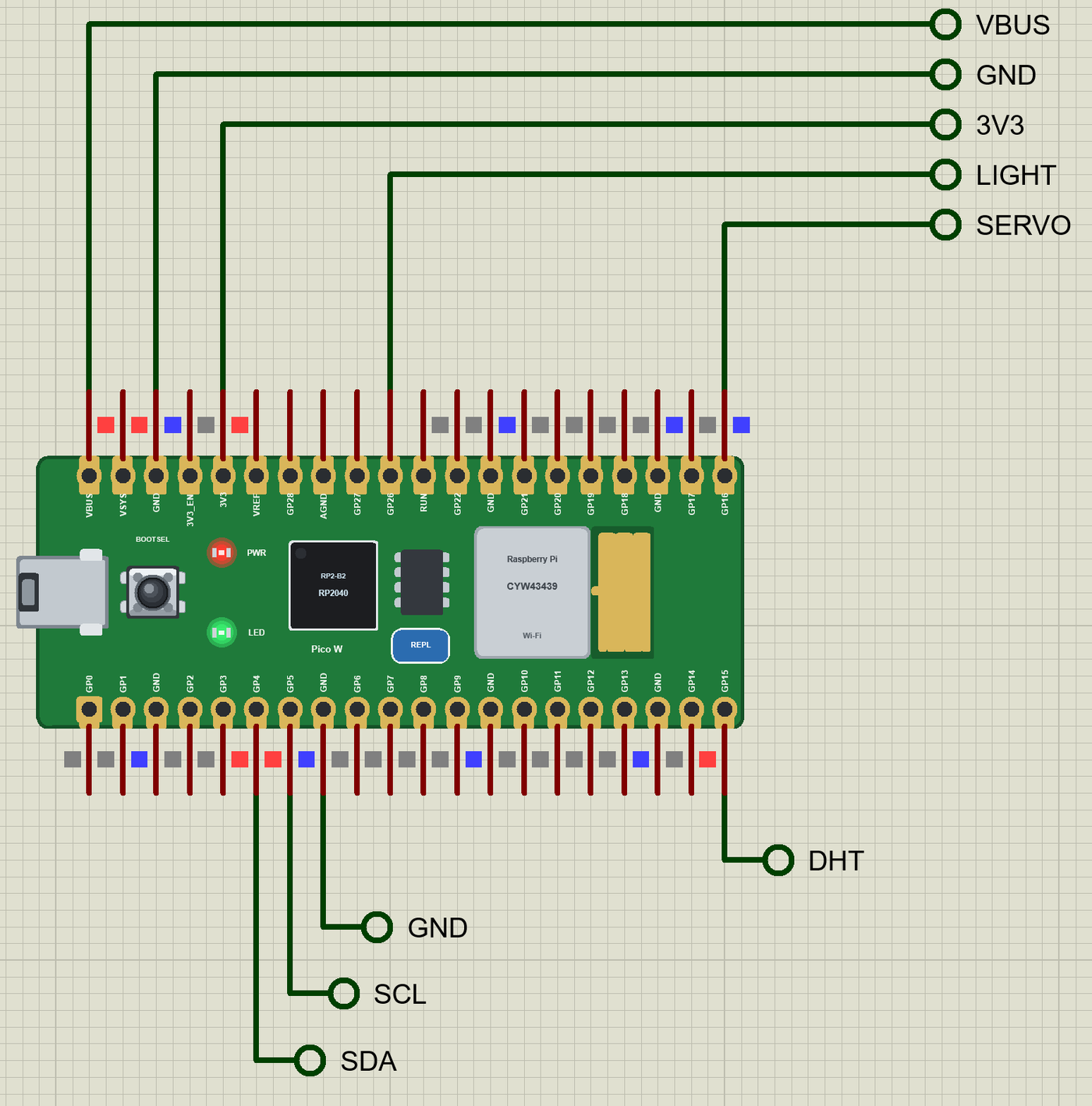
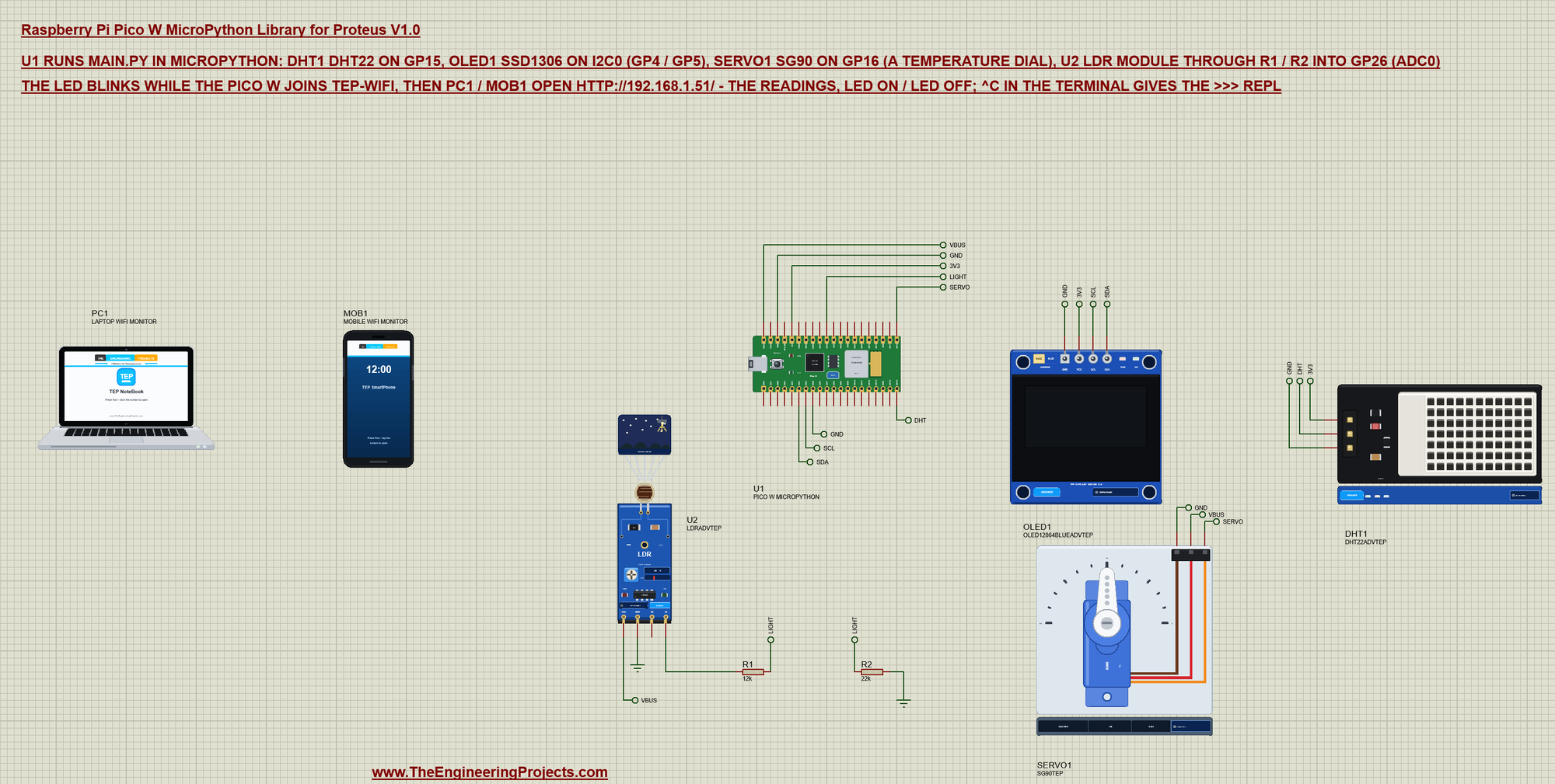
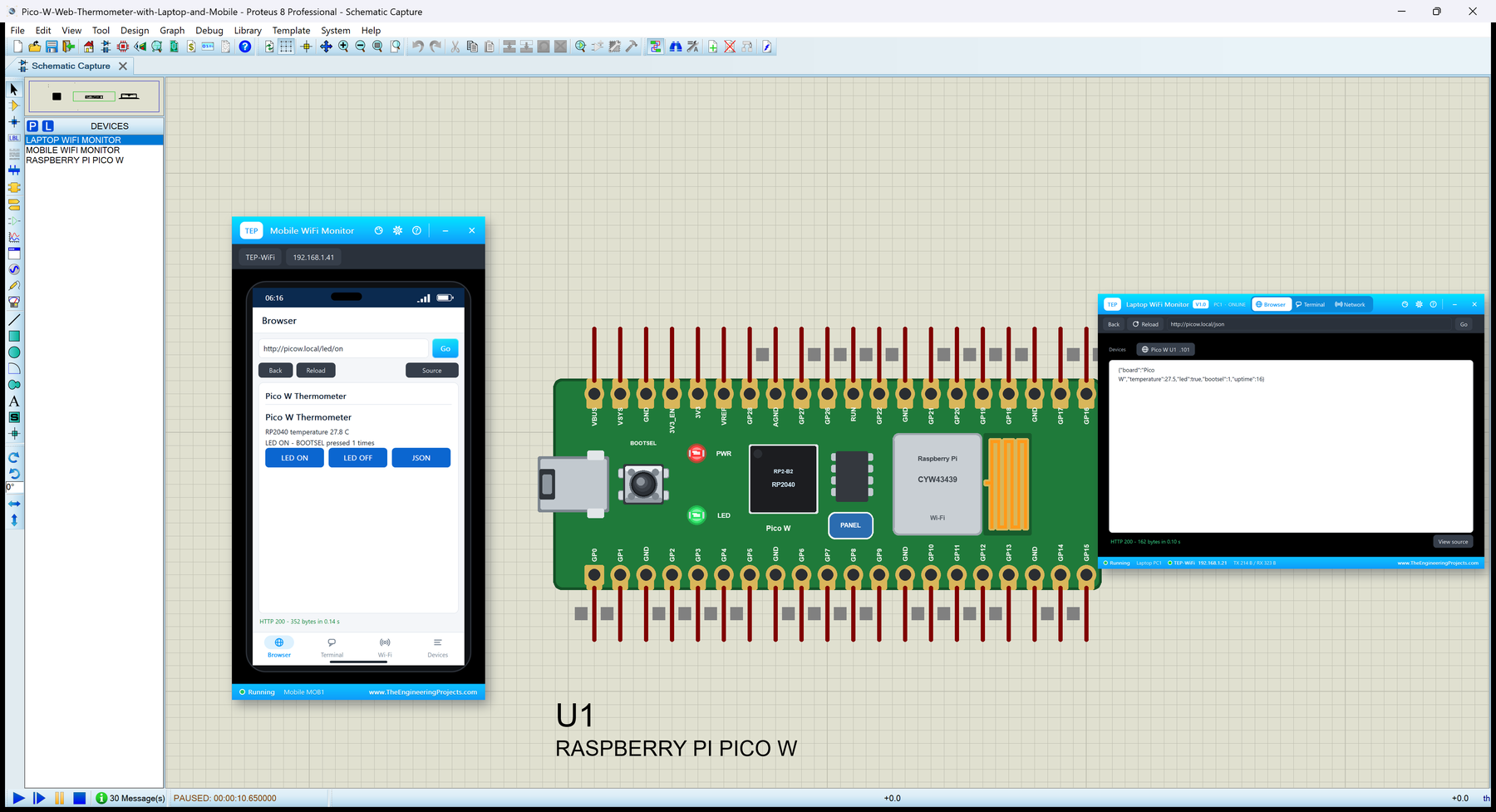
The circuit, the board and the results as they appear in Raspberry Pi Pico W MicroPython Library for Proteus: main.py, Wi-Fi. Open an image for its full size.
README
 README
RASPBERRY PI PICO W MICROPYTHON LIBRARY FOR PROTEUS - V1.0 (RP2040, CYW43439 WI-FI, YOUR MAIN.PY IN MICROPYTHON)
DEMO: A WEATHER STATION - DHT22, SSD1306 OLED, SG90 DIAL, LDR ON THE ADC, A WEB PAGE OVER WI-FI, THE >>> REPL
Designed by The Engineering Projects www.TheEngineeringProjects.com
IMPORTANT LINKS
Article (read it first - pictures, step by step, every feature explained):
https://www.theengineeringprojects.com/2026/10/raspberry-pi-pico-w-micropython-library-for-proteus.html
Report a bug or suggest a feature (our forum):
https://www.theengineeringprojects.com/forum/category/raspberry-pi-pico-w-micropython-proteus-library
The demo's parts are our libraries (included) - their articles:
DHT22: https://www.theengineeringprojects.com/2026/10/dht11-dht22-library-for-proteus-v1-0.html
OLED: https://www.theengineeringprojects.com/2026/10/oled-ssd1306-library-for-proteus-v1-0.html
SG90: https://www.theengineeringprojects.com/2026/10/pca9685-servo-driver-library-for-proteus-v1-0.html
LDR: https://www.theengineeringprojects.com/2026/10/ldr-sensor-library-for-proteus.html
Laptop: https://www.theengineeringprojects.com/2026/10/laptop-wifi-monitor-library-for-proteus.html
Phone: https://www.theengineeringprojects.com/2026/10/mobile-wifi-monitor-library-for-proteus.html
The same Pico W running an Arduino sketch instead (our other Pico W library), and the Linux boards of this series:
https://www.theengineeringprojects.com/2026/10/raspberry-pi-pico-w-library-for-proteus.html
https://www.theengineeringprojects.com/2026/10/raspberry-pi-model-b-library-for-proteus.html
Support us (the libraries are free):
https://www.theengineeringprojects.com/donate
FILE STRUCTURE
Raspberry-Pi-Pico-W-MicroPython-TEP-v1.0/
|-- Proteus Library Files/
| |-- TEPDHT.LIB 155.3 KB the DHT22 (demo), to LIBRARY
| |-- TEPLAPTOP.LIB 39.5 KB the laptop (demo), to LIBRARY
| |-- TEPLDR.LIB 289.8 KB the LDR module (demo), to LIBRARY
| |-- TEPMOBILE.LIB 13.1 KB the phone (demo), to LIBRARY
| |-- TEPOLED12864.LIB 112.4 KB the SSD1306 OLED (demo), to LIBRARY
| |-- TEPPCA9685.LIB 129.4 KB the SG90 servo (demo), to LIBRARY
| |-- TEPPICOWMPY.LIB 28.5 KB the Pico W (MicroPython), to LIBRARY
|-- Proteus Model Files/
| |-- TEPDHT.DLL 306.5 KB the DHT22, to MODELS
| |-- TEPLDR.DLL 420.0 KB the LDR module, to MODELS
| |-- TEPNET.DLL 2.64 MB the board + monitors + network, to MODELS
| |-- TEPOLED.DLL 323.0 KB the SSD1306 OLED, to MODELS
| |-- TEPPCA9685.DLL 323.0 KB the SG90 servo, to MODELS
| |-- TEPPi/python/ 17.54 MB Python 3.11.9 embeddable (33 files)
| |-- TEPPi/runtime/ 1.11 MB TEP Pi runtime + its MicroPython modules (87 files)
|-- MicroPython Code/
| |-- blink.py 0.6 KB the LED and a line every 0.5 s
| |-- main.py 5.1 KB the demo
| |-- ssd1306.py 5.2 KB the OLED driver
|-- Proteus Simulation/
| |-- main.py 5.1 KB the program of the demo
| |-- Pico-W-MicroPython-Weather-Station.pdsprj 35.0 KB the demo: a weather station
| |-- ssd1306.py 5.2 KB its OLED driver
| |-- TEPDHT.DLL 306.5 KB copy of the model
| |-- TEPLDR.DLL 420.0 KB copy of the model
| |-- TEPNET.DLL 2.64 MB copy of the model
| |-- TEPOLED.DLL 323.0 KB copy of the model
| |-- TEPPCA9685.DLL 323.0 KB copy of the model
|-- README.txt ~20.9 KB this file
Total: 27.44 MB (unzipped). The source code of the models and of the TEP Pi runtime is not included.
WHAT IS IT?
The Raspberry Pi Pico W as one Proteus part that runs MicroPython programs - your main.py, the file you would save on
the Pico with Thonny. The Pico W (Raspberry Pi, 2022) is the RP2040 (two Arm Cortex-M0+ cores at 133 MHz, 264 KB of
SRAM), 2 MB of flash, the Infineon CYW43439 for 2.4 GHz Wi-Fi with its PCB antenna, micro-USB, the BOOTSEL button, a
green LED (wired to the Wi-Fi chip) and 40 castellated pins on a 51 x 21 mm board.
Proteus cannot run the MicroPython firmware, so this library does not emulate the RP2040. It does what matters for a
MicroPython project: the board runs YOUR MAIN.PY against the circuit on the sheet, with the modules MicroPython gives a
Pico W - machine, network, socket, time, dht, onewire, ds18x20, framebuf, ntptime, requests - working on the real pins.
* At Run the board starts Python 3.11 (included: the TEPPi folder) with our TEP Pi runtime in MicroPython mode, runs
boot.py (if there is one) and main.py, and when main.py ends (or stops with an error, or you type ^C) it gives you
the >>> REPL in the terminal, as a Pico does.
The program and Proteus work in lockstep: while the program runs, Proteus waits; while it sleeps, waits for a pin,
a bus or the network, Proteus runs. So time.sleep_ms(500) is 0.5 s of simulation, a busy loop still moves the clock
(about 6 us per Pin call, ticks_ms() included, as MicroPython on the RP2040), and every edge is on time.
* machine:
Pin GP0 - GP22 and Pin("LED"): IN / OUT / OPEN_DRAIN, PULL_UP / PULL_DOWN, value(), on(), off(),
toggle(), irq() with IRQ_RISING / IRQ_FALLING handlers; Signal
PWM PWM(Pin(16), freq=50): freq(), duty_u16(), duty_ns(), deinit() - the board makes the waveform, so it
keeps its timing while the program sleeps (servos, LEDs, buzzers)
ADC ADC(26) / ADC(Pin(27)) / ADC(2): read_u16() on GP26 - GP28 (ADC0 - ADC2, 12 bits, 0 - 3.3 V, the
node's real voltage); ADC(4) = the RP2040's temperature sensor (27 C = 0.706 V); ADC(3) = VSYS / 3
I2C I2C(0, sda=Pin(4), scl=Pin(5), freq=400000) and SoftI2C on any two pins: scan(), writeto(),
readfrom(), writevto(), readfrom_mem(), writeto_mem() - a device that does not answer: OSError
[Errno 5] EIO
SPI SPI(0, baudrate, polarity, phase, sck, mosi, miso) and SoftSPI: write(), read(), readinto(),
write_readinto(); the chip select is your own Pin, as in MicroPython
UART UART(0, 9600, tx=Pin(0), rx=Pin(1)) / UART(1, ...): write(), read(), readline(), any(), timeouts
Timer Timer(period=500, mode=Timer.PERIODIC, callback=...) and ONE_SHOT (soft timers)
also RTC().datetime(), WDT(timeout).feed(), time_pulse_us(), freq(), unique_id(), reset(), idle(),
lightsleep(), deepsleep()
The hardware buses take the pins MicroPython allows for that bus id (the rp2 pin table: I2C0 SDA on GP0 / 4 / 8 /
12 / 16 / 20 ...): other pins give "ValueError: bad SCL pin" as on a Pico. The defaults are MicroPython's: I2C0
GP8 / GP9, I2C1 GP6 / GP7, SPI0 GP18 / 19 / 16, SPI1 GP10 / 11 / 8, UART0 GP0 / GP1, UART1 GP4 / GP5.
* network: WLAN(network.STA_IF) - active(True), connect(ssid, password), status() (STAT_GOT_IP = 3,
STAT_WRONG_PASSWORD, STAT_NO_AP_FOUND), isconnected(), ifconfig(), config('mac'), scan(), disconnect(). The Pico W
joins when YOUR PROGRAM calls connect(): our router is "TEP-WiFi", password 12345678 (the network of our ESP32 /
Arduino Wi-Fi parts and the Laptop / Mobile WiFi Monitors). DHCP gives it 192.168.1.51 (192.168.1.(50 + the part's
number)), host name PicoW. A wrong password or network name fails as on the Pico.
* socket: MicroPython's - getaddrinfo, socket(), bind / listen / accept, connect, send() and write() (a str is
fine), recv(), read(), readline(), makefile(), settimeout(); requests (urequests) for http:// GETs and POSTs.
* time: sleep, sleep_ms, sleep_us, ticks_ms, ticks_us, ticks_diff, ticks_add, time(), localtime() (8 values),
mktime(); the RTC starts at the PC's local time (as Thonny sets it); ntptime.settime() sets UTC on the Wi-Fi.
* dht (DHT11 / DHT22: measure(), temperature(), humidity()), onewire + ds18x20 (DS18B20), framebuf (FrameBuffer
with text(), line(), rect(), ellipse(), blit() ... in every MicroPython format), micropython (const, mem_info),
gc.mem_free(), os (the board's flash = the folder of main.py: listdir, open, uname, statvfs), _thread (the second
core: start_new_thread), sys.implementation.name = 'micropython', the u-names (utime, ujson, usocket ...).
* The terminal (our TEP window, no Windows title bar) is Thonny's shell: print(), errors as MicroPython prints them
(Traceback ... File "main.py", line 12 ... OSError: [Errno 5] EIO), ^C to stop main.py, the >>> REPL ("... " for
a block, help(), the variables of main.py), ^D for a soft reset ("MPY: soft reboot"). Its Board tab shows GP0 -
GP22, ADC0 - ADC2 in volts, the LEDs and RESTART PROGRAM. Click the micro-USB socket or the REPL pad to open it.
* The LEDs: the green LED is Pin("LED") - your program's; the red PWR LED (a TEP addition: the real Pico W has
none) is lit while the board runs.
* The supply pins power the modules wired to them: VBUS (5 V), VSYS and 3V3 HIGH and the GNDs LOW as logic levels
(an analog VCC reading sees 5 V on either); ADC_VREF is a 3.3 V source and AGND the analog ground.
The board is drawn our way from the real Pico W, as our Pico W library draws it: the green board with micro-USB on the
left, BOOTSEL, the RP2040, the flash chip, the CYW43439's metal can with "Raspberry Pi", the PCB antenna, the two rows
of castellated pads with the GP names printed inside, and our REPL pad. The pins leave the long edges on the 100 thou
grid.
ONE DEVICE (search "MICROPYTHON" or "PICO" in Pick Devices):
PICO W MICROPYTHON "Raspberry Pi Pico W (MicroPython)" V1.0 (category Microprocessor ICs > Raspberry Pi), prefix U,
model TEPNET.DLL (with the TEPPi folder)
The same TEPNET.DLL also runs our Raspberry Pi boards, the Jetson Nano, the BeagleBone Black, the Orange Pi Zero 2W, our
Arduino / ESP32 / Pico W sketch boards, Ethernet and Wi-Fi modules and the Laptop / Mobile WiFi Monitors; it replaces
any older TEPNET.DLL (keep only this newest one in MODELS). The TEPPi folder is shared by all those boards too.
TEST STATUS
V1.0: verified in Proteus 8.5 on 27 Oct 2026 with the demo project as shipped. What the Proteus run showed:
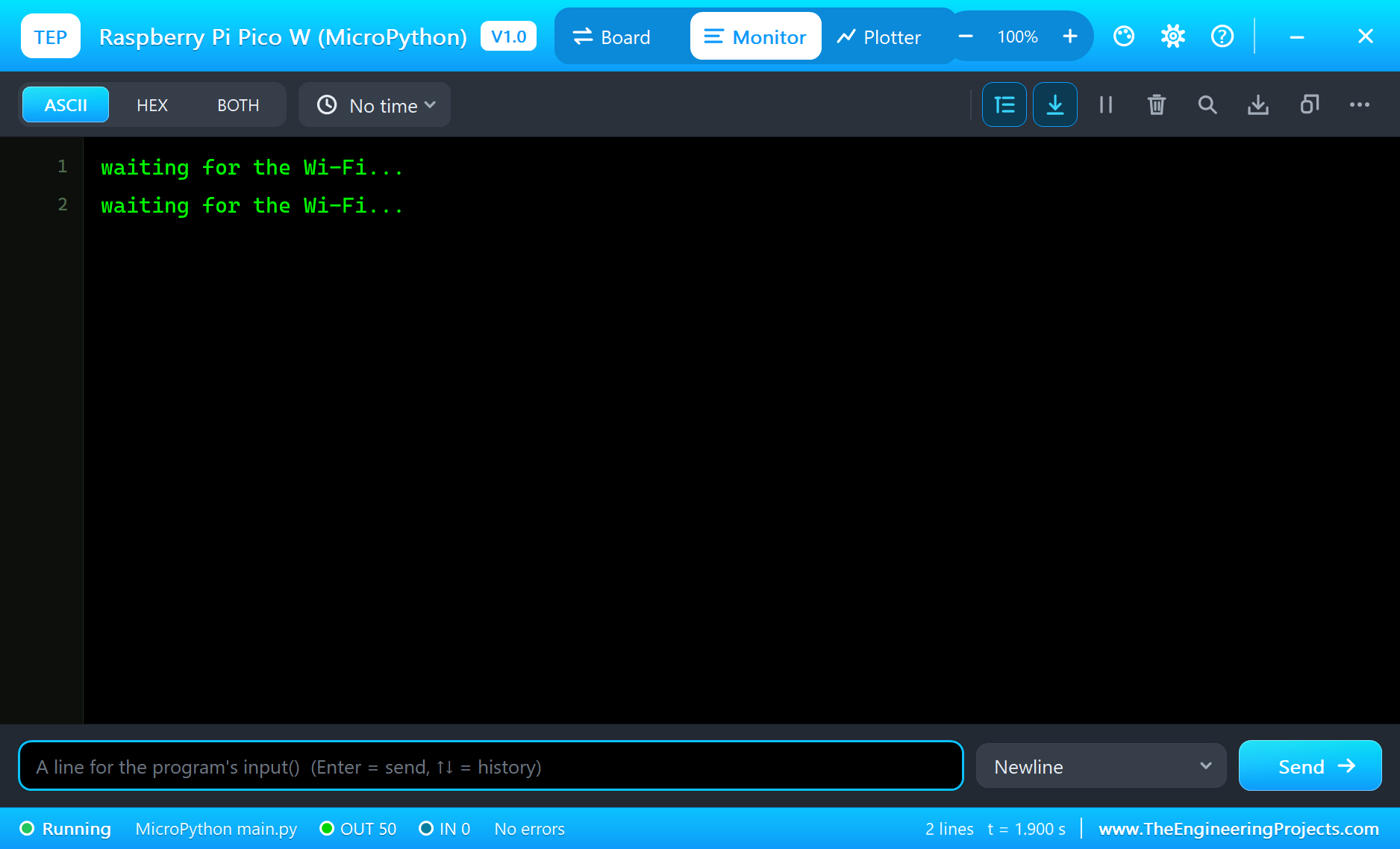
* At Run the terminal shows "waiting for the Wi-Fi..." while the LED blinks (a machine.Timer every 250 ms), then
"Connected to TEP-WiFi - http://192.168.1.51/" at 3.5 s of simulation; the LED stays on.
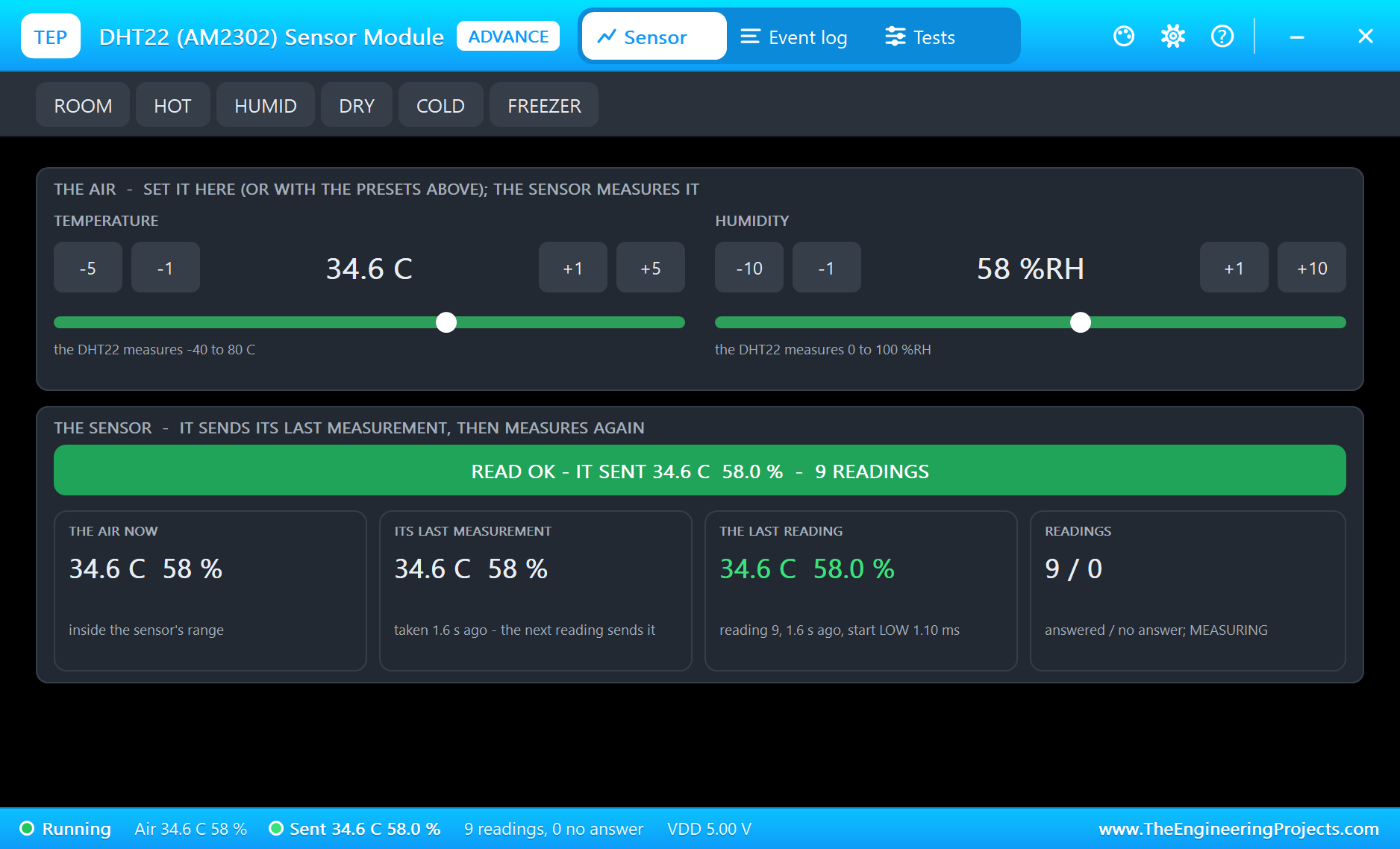
* Every 2 s main.py prints a line such as "T 24.6 C RH 58.0 % light 88 % dial 89 deg RP2040 27.0 C": the DHT22
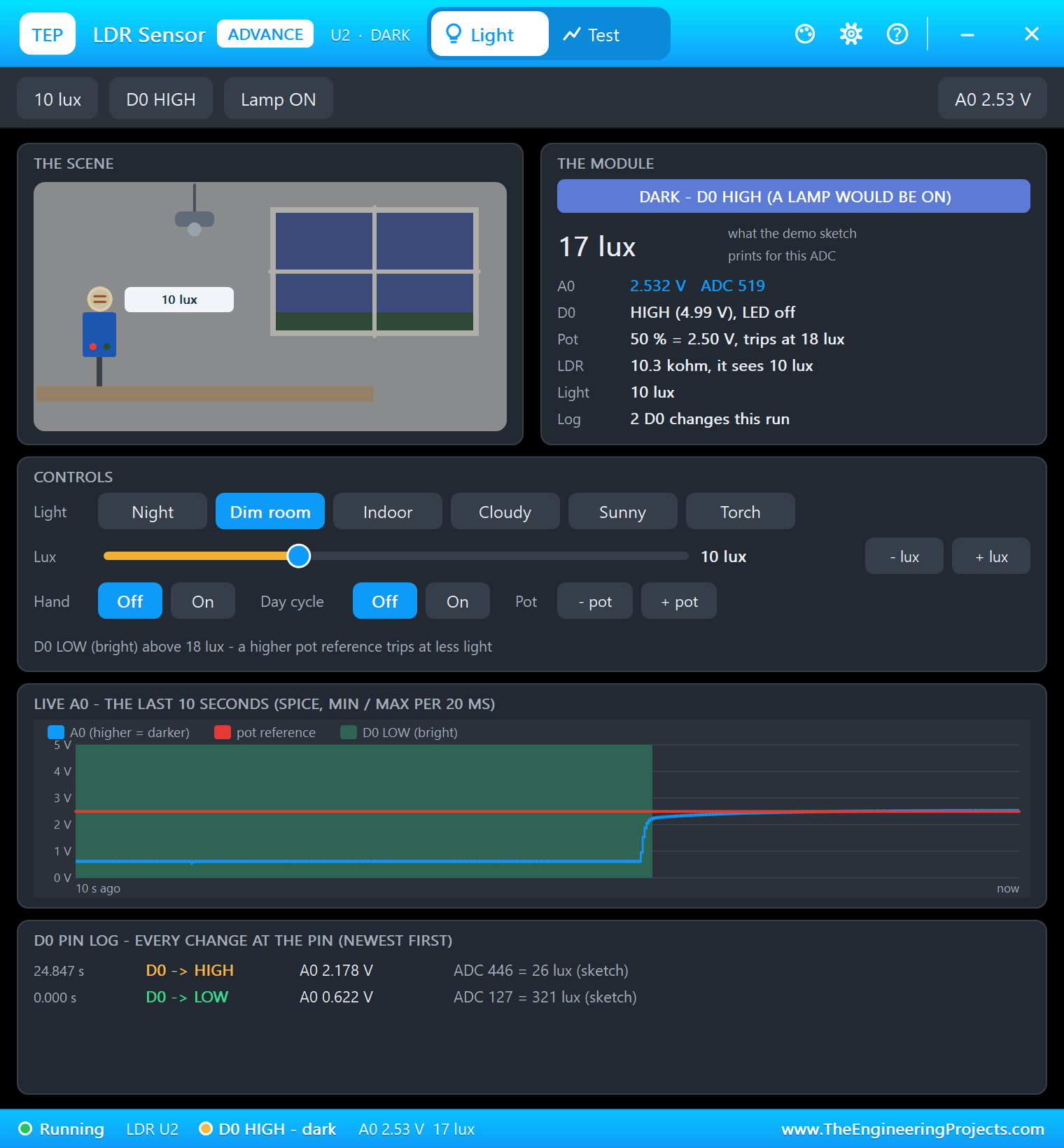
on GP15 (24.6 C, 58 %), the LDR module in an indoor room (300 lux: A0 0.62 V, 0.40 V at GP26), the servo at 89
degrees and the RP2040's own sensor (ADC4, 27.0 to 28.0 C in 0.5 degree steps - the 12-bit ADC's resolution).
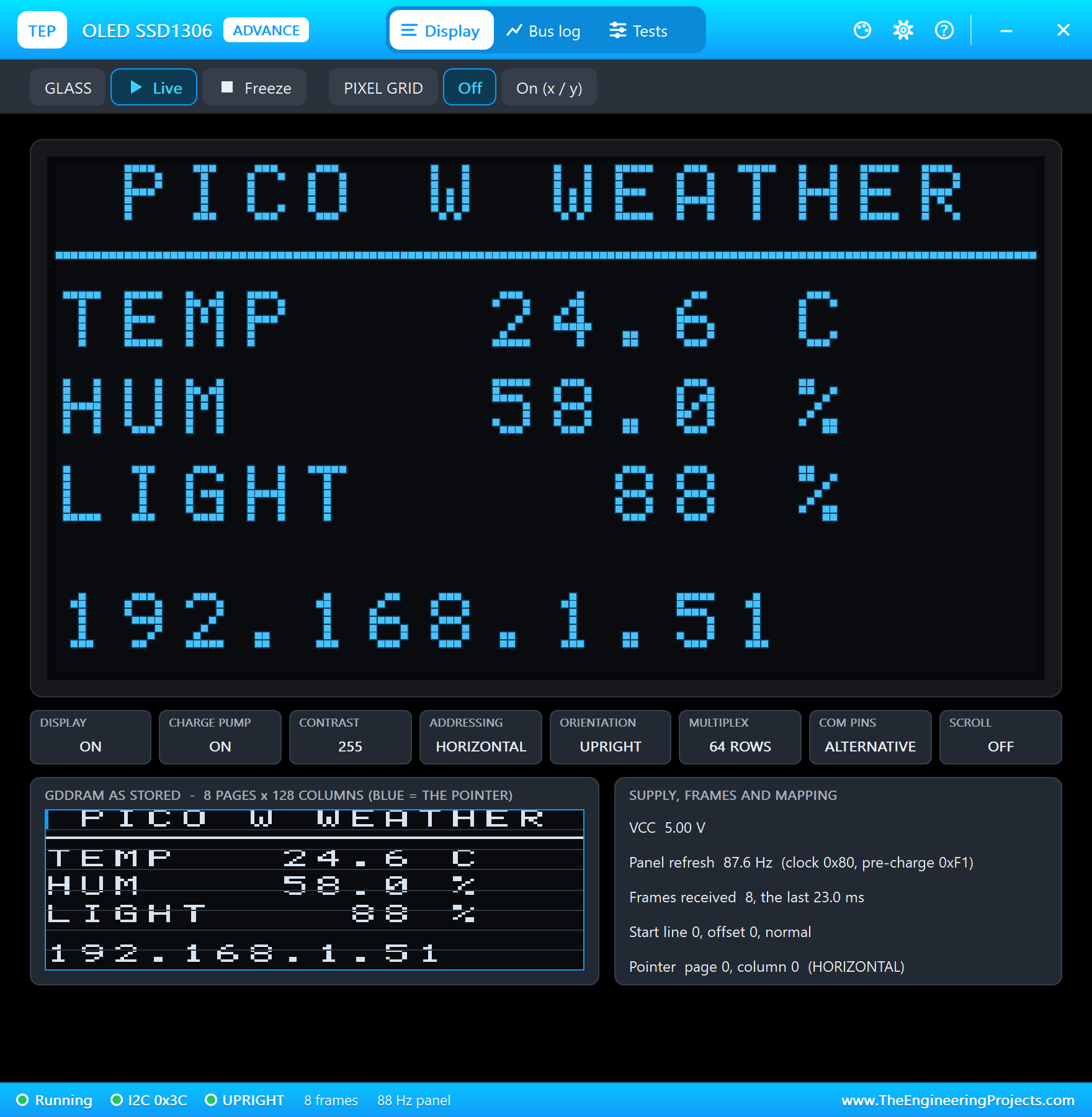
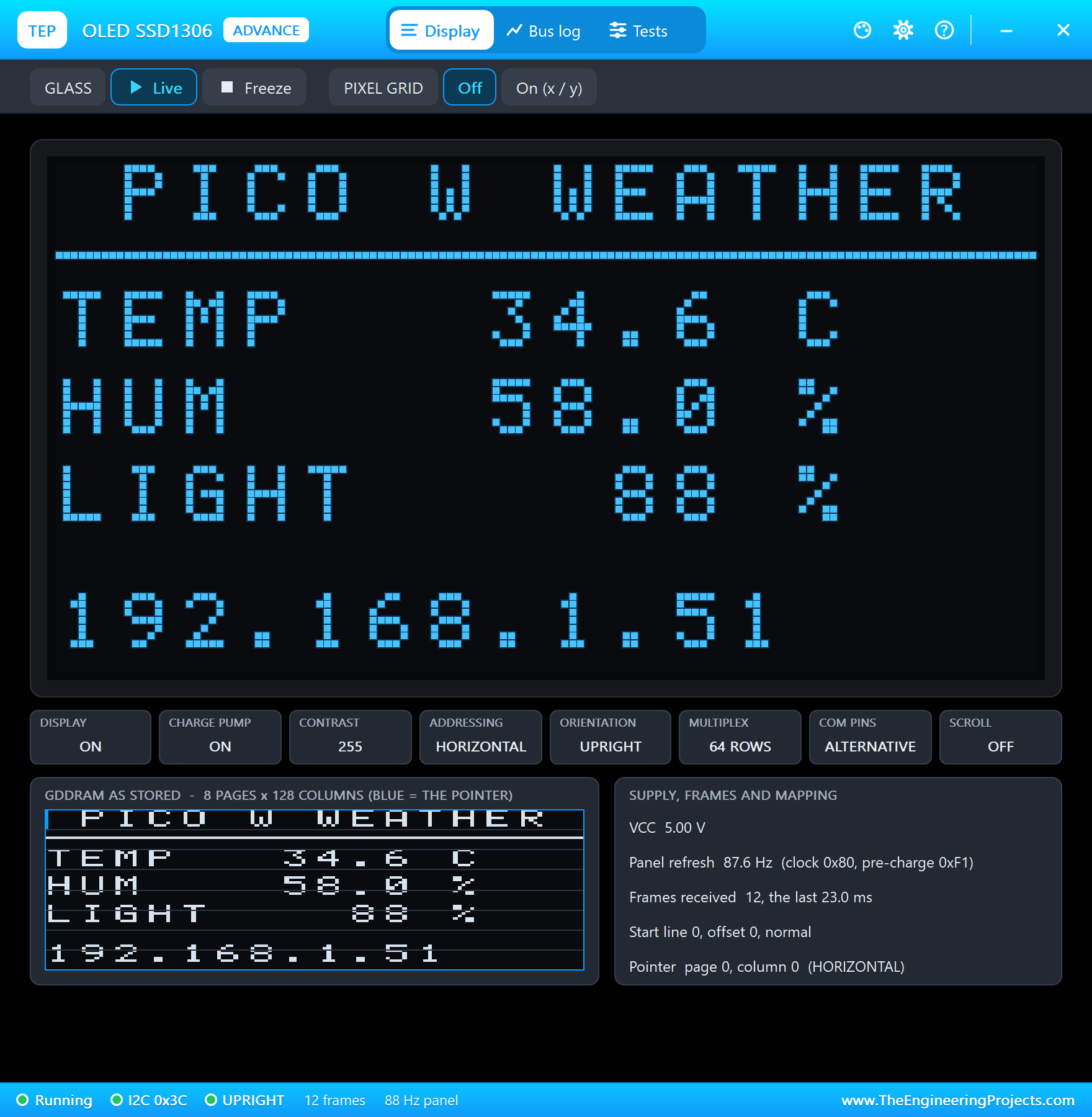
* OLED1 shows PICO W WEATHER, TEMP, HUM, LIGHT and 192.168.1.51 (one frame of 1,024 bytes every 2 s over I2C0 at
400 kHz, about 23 ms each).
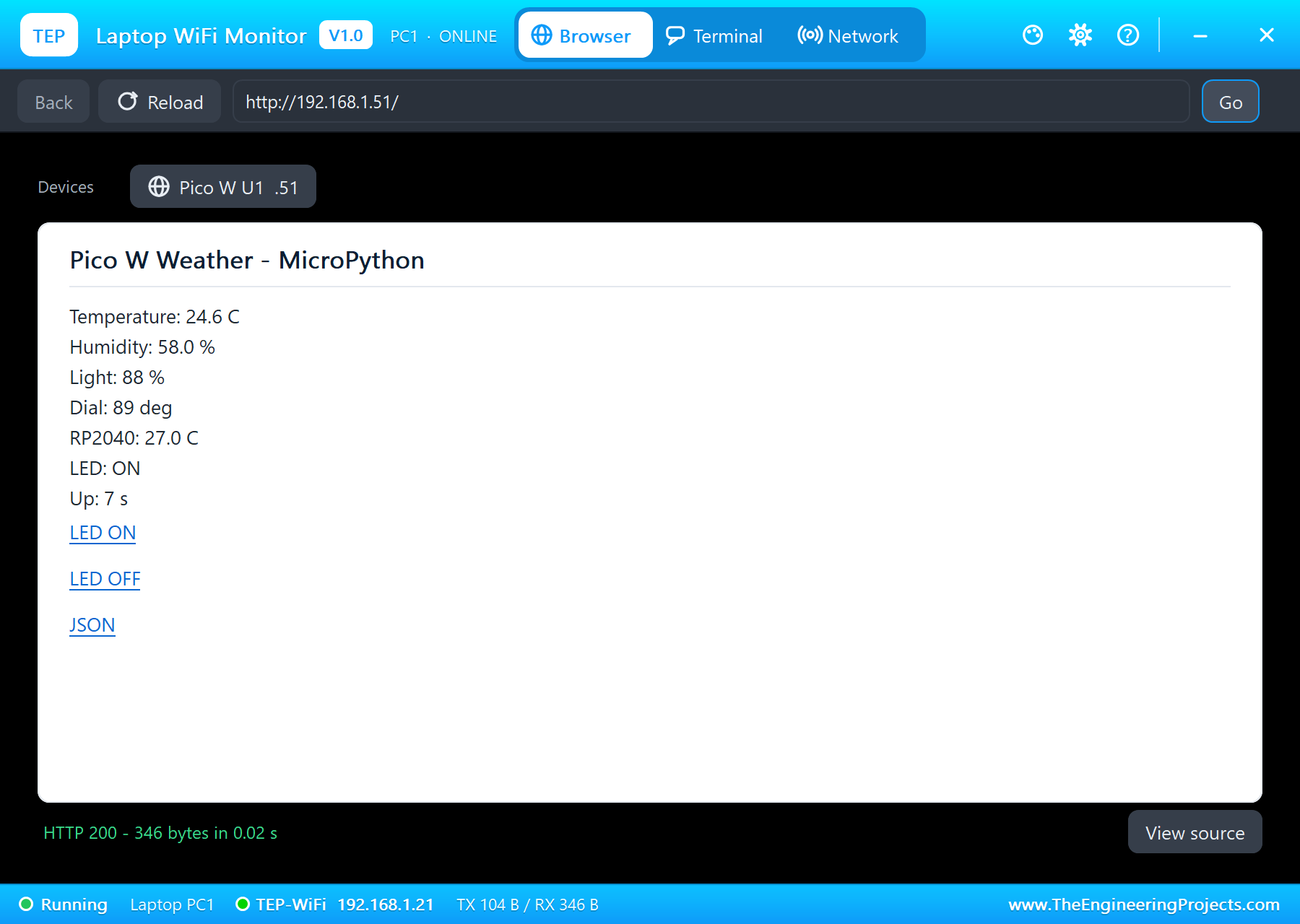
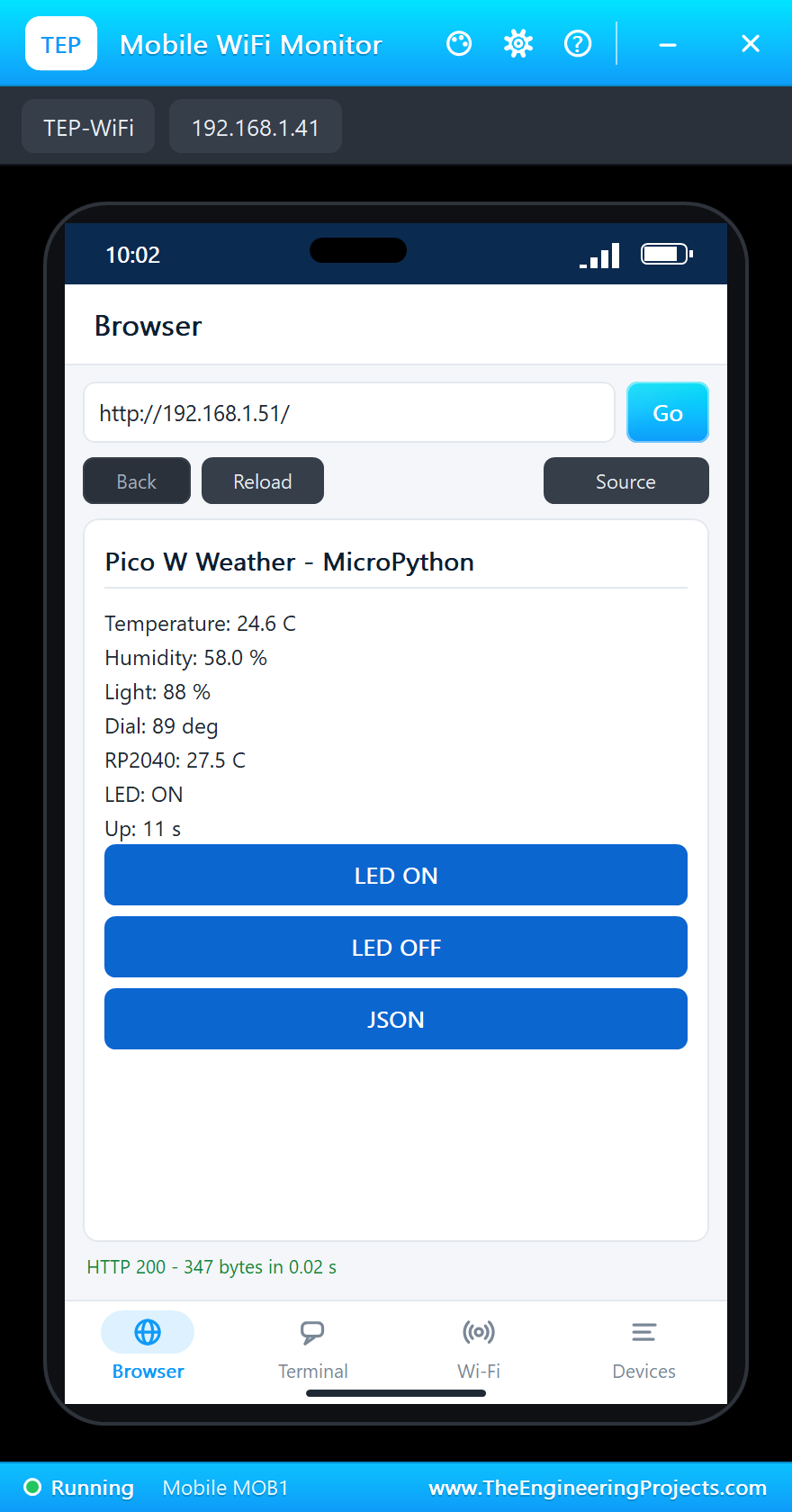
* The laptop (192.168.1.21) and the phone (192.168.1.41) open http://192.168.1.51/: the seven readings, LED ON, LED
OFF and JSON. /json gives {"temperature": 34.6, "humidity": 58.0, "light": 49, ...}.
* The DHT22's pop-up 10 degrees warmer (+5 twice): "T 34.6 C ... dial 125 deg" at the next reading - the SG90 turns
from 89 to 125 degrees (a 1.89 ms pulse at 50 Hz); the OLED and the page follow.
* The LDR's pop-up set to Dim room (10 lux): light 88 % falls to 49 % (A0 2.54 V, 1.64 V at GP26).
* LED OFF on the phone: "192.168.1.41 asks for /led/off", the LED goes out and the page says LED: OFF; LED ON
lights it again.
* ^C typed in the terminal: "KeyboardInterrupt" at main.py line 105, then the MicroPython banner and >>>. At the
REPL, wlan.ifconfig() gave ('192.168.1.51', '255.255.255.0', '192.168.1.1', '192.168.1.1'), data printed the
readings and os.uname().machine 'Raspberry Pi Pico W with RP2040'.
* 49 s of simulation took about 5 minutes with every pop-up open and the shots taken (the Board tab: about 40 % of
real time while it runs).
INSTALLATION (about 3 minutes)
1. Close Proteus. Extract the WHOLE ZIP to a normal folder (e.g. Desktop).
2. Copy everything in "Proteus Library Files" to the LIBRARY folder of Proteus, for example:
C:\Program Files (x86)\Labcenter Electronics\Proteus 8 Professional\LIBRARY
(on some PCs: C:\ProgramData\Labcenter Electronics\Proteus 8 Professional\LIBRARY - use the folder that already holds
Proteus's own .LIB files). TEPPICOWMPY.LIB is the board; TEPDHT.LIB, TEPOLED12864.LIB, TEPPCA9685.LIB (the SG90),
TEPLDR.LIB, TEPLAPTOP.LIB and TEPMOBILE.LIB are the demo's parts.
3. Copy everything in "Proteus Model Files" - the DLLs AND the TEPPi folder - to the MODELS folder:
C:\Program Files (x86)\Labcenter Electronics\Proteus 8 Professional\MODELS
TEPPi holds Python 3.11 and the TEP Pi runtime (with its MicroPython modules); the board finds it next to TEPNET.DLL,
in MODELS or next to your project. Replace an older TEPNET.DLL and TEPPi folder (these are the newest).
4. Delete TEPPICOWMPY.IDX (and the .IDX of a part library you replaced) from the LIBRARY folder if it is there.
5. Start Proteus. In Pick Devices (P) search "MICROPYTHON".
Nothing else to install: Python is in TEPPi (no Python or MicroPython on the PC needed, none is changed).
RUN THE DEMO
Keep main.py, ssd1306.py and the DLLs beside the project in "Proteus Simulation" (the TEPPi folder in MODELS).
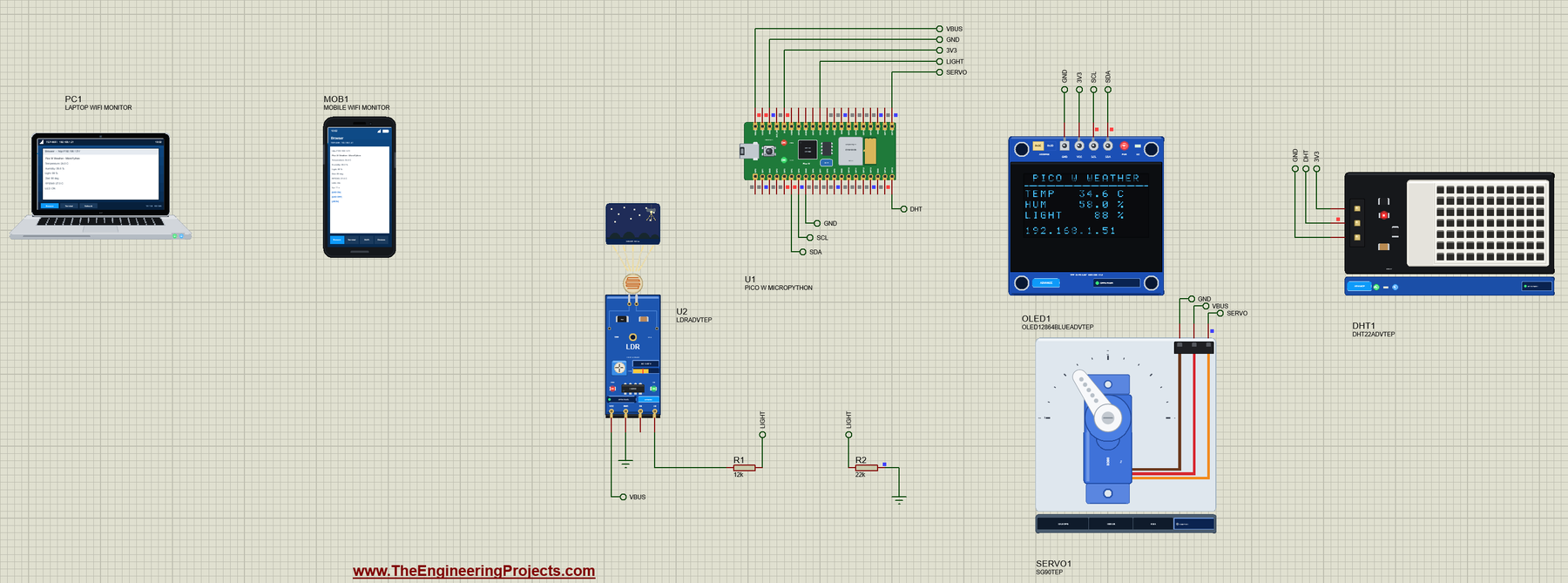
Pico-W-MicroPython-Weather-Station.pdsprj - U1 runs main.py. DHT1 = a DHT22 on GP15 (VCC from the Pico's 3V3). OLED1
= an SSD1306 128x64 OLED on I2C0: SDA on GP4, SCL on GP5 (address 0x3C), VCC from 3V3. SERVO1 = an SG90 on GP16 (V+
from VBUS): the temperature dial, 0 C at 0 degrees, 50 C at 180 degrees (a 0.5 - 2.5 ms pulse at 50 Hz). U2 = the
LDR light module, powered from VBUS (5 V): its A0 goes through R1 12k and R2 22k to GP26 (ADC0), so 5 V becomes 3.24 V
at most - inside the Pico's 3.3 V ADC range. PC1 = the Laptop WiFi Monitor and MOB1 = the Mobile WiFi Monitor on the
same network. The DHT22, the OLED and the LDR are the Advance parts: their pop-up windows open at Run.
Press Run: the LED blinks while main.py joins TEP-WiFi ("waiting for the Wi-Fi..."), then "Connected to TEP-WiFi -
http://192.168.1.51/" (about 3.5 s) and the LED stays on. Every 2 s: a line in the terminal (T, RH, light, dial,
RP2040), the OLED page, the dial. On the laptop or the phone open http://192.168.1.51/ (Browser, the address, Go):
the readings with LED ON, LED OFF and JSON (/json gives them as JSON for other programs).
Try: +5 on the DHT22's pop-up (the dial turns, the OLED and the page follow); Night, Dim room or Sunny on the LDR's
pop-up (the light %); LED OFF on the phone; then type ^C in the terminal and, at >>>, wlan.ifconfig(), data or
led.toggle() - main.py's variables are still there. ^D (or RESTART PROGRAM on the Board tab) runs main.py again.
ssd1306.py is the OLED driver (the same API as MicroPython's own driver): on a real Pico W save it next to main.py.
YOUR OWN PROGRAMS
Write the program in Thonny (or any editor), save it as main.py next to your project - or set the board's PROGRAM
property to its name or a full path - and press Run. Start from MicroPython Code\blink.py (the LED and a line every half
second). The board's flash is the folder of main.py: put the modules your program imports (drivers such as
ssd1306.py) there, and the files it writes appear there ('/data.csv' is that folder's data.csv). A boot.py in the same
folder runs first, as on the Pico. The same files run on a real Pico W.
A program that never sleeps and never calls a pin, ticks or socket function for 3 real seconds is left running on its
own (the simulation goes on); input() waits for a line typed in the terminal.
THE PINS (the real Pico W's numbers, seen from the top with USB on the left)
PIN NAME FUNCTIONS | PIN NAME FUNCTIONS
1 GP0 UART0 TX, I2C0 SDA, SPI0 RX | 40 VBUS 5 V from USB (HIGH)
2 GP1 UART0 RX, I2C0 SCL, SPI0 CS | 39 VSYS the system supply (HIGH)
3 GND | 38 GND
4 GP2 I2C1 SDA, SPI0 SCK | 37 3V3_EN drawn, not modelled
5 GP3 I2C1 SCL, SPI0 TX | 36 3V3 3.3 V out (HIGH)
6 GP4 UART1 TX, I2C0 SDA, SPI0 RX | 35 ADC_VREF 3.3 V reference (analog)
7 GP5 UART1 RX, I2C0 SCL, SPI0 CS | 34 GP28 ADC2
8 GND | 33 AGND the ADC's ground
9 GP6 I2C1 SDA, SPI0 SCK | 32 GP27 ADC1
10 GP7 I2C1 SCL, SPI0 TX | 31 GP26 ADC0
11 GP8 UART1 TX, I2C0 SDA, SPI1 RX | 30 RUN drawn (RESTART PROGRAM is the reset)
12 GP9 UART1 RX, I2C0 SCL, SPI1 CS | 29 GP22 I2C1 SDA, SPI0 SCK
13 GND | 28 GND
14 GP10 I2C1 SDA, SPI1 SCK | 27 GP21 UART1 RX, I2C0 SCL, SPI0 CS
15 GP11 I2C1 SCL, SPI1 TX | 26 GP20 UART1 TX, I2C0 SDA, SPI0 RX
16 GP12 UART0 TX, I2C0 SDA, SPI1 RX | 25 GP19 I2C1 SCL, SPI0 TX
17 GP13 UART0 RX, I2C0 SCL, SPI1 CS | 24 GP18 I2C1 SDA, SPI0 SCK
18 GND | 23 GND
19 GP14 I2C1 SDA, SPI1 SCK | 22 GP17 UART0 RX, I2C0 SCL, SPI0 CS
20 GP15 I2C1 SCL, SPI1 TX | 21 GP16 UART0 TX, I2C0 SDA, SPI0 RX
3.3 V logic. Every GP pin does PWM. GP26 - GP28 are the ADC inputs in this library (their digital use is not
modelled). The LED is Pin("LED") (the CYW43439's WL_GPIO0), not GP25 as on the plain Pico.
PROPERTIES (double-click the board > Edit Properties)
PROGRAM the MicroPython program (default main.py; a name next to the project or a full path)
AUTOOPEN the terminal at Run: YES (default) or NO
PYTHON a python.exe of your own (empty: TEPPi's)
RUNTIME the TEP Pi runtime folder (empty: TEPPi's)
The Wi-Fi network and password are in your program (wlan.connect), as on the real Pico W.
TROUBLESHOOTING
* "TEP Pi: the TEPPi folder ... was not found": copy the TEPPi folder from "Proteus Model Files" into MODELS (or next
to the project).
* "MicroPython: no main.py to run": the PROGRAM file is not next to the project - put it there or give a full path.
* "ImportError: no module named 'ssd1306'" (or another driver): copy the driver next to main.py, as on the Pico.
* "ValueError: bad SCL pin" / "bad TX pin": that pin cannot carry this bus id on an RP2040 - see THE PINS (I2C0 or
I2C1, UART0 or UART1).
* "OSError: [Errno 5] EIO" from the I2C: the address (scan() lists the devices), the SDA / SCL wiring, the module's
power.
* "Wi-Fi failed" / status -3 or -2: the password or the network name in your program (TEP-WiFi / 12345678).
* The page does not open: the address is http://192.168.1.51/ and the program must have printed "Connected to"; a
monitor sometimes needs Go a second time.
* The REPL does not answer: main.py is still running - type ^C first. A blocking call without a timeout (accept()
forever) sees ^C only when it returns: give it a timeout.
* A paused simulation shows the SIMULATION LOG: click the Schematic Capture tab.
BUG REPORTS AND FEATURE REQUESTS
Please post them in our forum with a screenshot, the program, the terminal's text and the simulation log:
https://www.theengineeringprojects.com/forum/category/raspberry-pi-pico-w-micropython-proteus-library
SUPPORT US
This library is free. If it saves you time, please support our work:
https://www.theengineeringprojects.com/donate
WEBSITE
https://www.theengineeringprojects.com/
LICENCES AND THIRD-PARTY NOTES
* The board model, the TEP Pi runtime with its MicroPython modules (machine, network, framebuf, dht, onewire, ds18x20,
ntptime, requests, micropython, rp2 - compiled .pyc files in TEPPi\runtime), the terminal and the network
(TEPNET.DLL), the symbol and artwork (TEPPICOWMPY.LIB), the part models (TEPDHT, TEPOLED, TEPPCA9685 and TEPLDR .DLL /
.LIB, the Laptop and Mobile WiFi Monitors' TEPLAPTOP.LIB / TEPMOBILE.LIB in TEPNET.DLL) and the demo programs are made
by The Engineering Projects. Our modules follow MicroPython's documented APIs; no MicroPython code is copied.
ssd1306.py follows the layout and command sequence of MicroPython's ssd1306 driver (micropython-lib, MIT licence). The
source code of the models is not included (nor the runtime's: it ships compiled for the included Python 3.11).
* TEPPi\python is the official embeddable Python 3.11.9 for Windows (32-bit) from python.org, unchanged, under the
Python Software Foundation License (TEPPi\python\LICENSE.txt).
* TEPPi\runtime\gpiozero is gpiozero 2.0.1.post3 and TEPPi\runtime\colorzero is colorzero 2.0, unchanged, under the BSD
3-Clause licence (their LICENSE files in the dist-info folders) - the same TEPPi folder runs our Raspberry Pi boards;
the Pico W in MicroPython does not offer them.
* Proteus is a product of Labcenter Electronics and is not included. Raspberry Pi and Pico are trademarks of Raspberry
Pi Ltd; MicroPython is a trademark of George Robotics Limited; Infineon makes the CYW43439. This library is not made
or endorsed by Raspberry Pi Ltd, George Robotics, Infineon or Labcenter.
MODEL SCOPE AND LIMITS
Modelled: GP0 - GP22 (inputs, outputs, open drain, pull-ups / pull-downs, edges and pin interrupts, PWM on every pin),
the LED, ADC0 - ADC2 on GP26 - GP28 and the temperature sensor, the hardware I2C / SPI / UART on the pins the rp2 table
allows (one bus of a kind active at a time - a second I2C on other pins takes the bus over at its next call; one UART
receives at a time), the software timers, the RTC, the watchdog, Wi-Fi as a station (the join with your SSID and
password, DHCP, TCP and UDP to every TEP network part, the scan), MicroPython's socket and time, the REPL with ^C / ^D,
the supply pins, the terminal.
Not modelled: the MicroPython firmware itself (your program runs in Python 3.11 with our modules: a few error texts
differ, e.g. "name 'x' is not defined", and C-only features such as @micropython.viper speed or asm_thumb do not
exist), the PIO state machines (rp2.PIO, rp2.StateMachine) and the DMA, NeoPixels (the neopixel module and
machine.bitstream), the access point (network.AP_IF), Bluetooth, TLS (https), asyncio, the second core as real
parallel code (_thread threads take turns in simulation time), USB (the board's micro-USB is the terminal only), the
BOOTSEL button (rp2.bootsel_button() reads 0) and the RPI-RP2 drive, sleep currents, GP26 - GP28 as digital pins,
RUN and 3V3_EN, the real CPU's speed (each Pin / ticks call takes about 6 us; pure Python code takes no simulation
time), real-time jitter. The model's own choices: the IP address (192.168.1.51 for U1), the router, a 0.5 s start;
the simulation runs below real time.
VERSION
TEP Raspberry Pi Pico W MicroPython library V1.0 (Oct 2026). Device PICO W MICROPYTHON (TEPPICOWMPY.LIB / TEPNET.DLL
with TEPPi: Python 3.11.9 and the TEP Pi runtime 0.2 with its MicroPython mode). Demo program main.py V1.0 with
ssd1306.py, blink.py.Development1 release
 Development1 release
-
V1.0Pico W MicroPython Library for Proteus V1.0this page
V1.0 is the only release in the Download Center so far. When a newer version is published, it appears above with its own download page.
Installation7 steps
 Installation7 steps
From the download to a working project, in order. The steps follow what the package contains.
You will need
- Proteus Design SuiteProteus 8 or newer (Labcenter), on Windows
- Pythonto build the source files into firmware
- Any archive toolWindows, macOS and Linux extract ZIP files on their own

Steps
- 1
Extract the archive
Right-click raspberry-pi-pico-w-micropython-tep-v1-0-cbcf0008950e495ca545f8bfa0053771.zip and choose Extract All (or open it with 7-Zip or WinRAR) into a folder you can find again. Keep its folder structure (Raspberry-Pi-Pico-W-MicroPython-TEP-v1.0) as it is.
- 2
Copy the library files into Proteus
Move TEPDHT.LIB, TEPLAPTOP.LIB and TEPLDR.LIB and 4 more and the files into the LIBRARY folder of your Proteus installation: C:\Program Files (x86)\Labcenter Electronics\Proteus 8 Professional\LIBRARY for Proteus 8, or the matching Proteus 7 folder. Older versions keep it under ProgramData\Labcenter Electronics. If Proteus is open, close it first.
- 3
Add the simulation model
Copy TEPDHT.DLL, TEPLDR.DLL and TEPNET.DLL and 9 more into the MODELS folder next to LIBRARY, so the component can run, not only be drawn.
- 4
Restart Proteus and place the component
Start Proteus, open a schematic, press P (Pick Devices) and search for the component by the name used in the tutorial. It appears with its pins ready to wire.
- 5
Build the source code
Open blink.py, main.py and ssd1306.py and 30 more in the compiler named in the tutorial (MikroC, Keil, MPLAB, Code Composer or the Arduino IDE) and build it to get the firmware.
- 6
Open the example simulation
Open Pico-W-MicroPython-Weather-Station.pdsprj in Proteus to see the wiring exactly as in the tutorial. Check the controller's Program File path, then press Play.
- 7
Follow the tutorial
Raspberry Pi Pico W MicroPython Library for Proteus: main.py, Wi-Fi explains every connection and setting in order; keep it open beside the files while you build.
FAQs8 questionsContact TEP
 FAQs8 questions
How do I download Pico W MicroPython Library for Proteus V1.0?
Wait for the 30-second guest countdown on this page, then press the download button; the file comes straight from our storage. Members who are logged in skip the wait. If the browser opens the file instead of saving it, use its Save as option. The download link is made for you when the countdown ends and works for 15 minutes; a saved or shared link stops working, so share this page instead.
What is inside the archive?
Pico W MicroPython Library for Proteus V1.0 comes as a ZIP archive of 144 files (14.0 MB, 27.4 MB unpacked) holding Proteus library files, simulation model DLLs, a Proteus simulation, source code and a nested archive. Open the File Structure tab for the full list of 144 files.
What should I do if the download does not start?
Check the browser's download list first; an ad blocker or a company firewall can also hold it back, so try another browser or network. If the file arrives incomplete, download it again. For an installation problem, read the Install tab or tell us in the comments with your software version and the exact error message.
Is this file free?
Yes. Every file in the TEP Download Center is free for learning, personal and student projects. If you share it, link back to this page or the tutorial so others find the latest version.
How do I check that the file arrived complete?
Compare its SHA-256 with the one on this page, 588bc56d6aa496c26fe3d12919465dc2a29ecd90373750d980fd4dd573d1659b. In PowerShell run Get-FileHash "raspberry-pi-pico-w-micropython-tep-v1-0-cbcf0008950e495ca545f8bfa0053771.zip"; on macOS or Linux run shasum -a 256 "raspberry-pi-pico-w-micropython-tep-v1-0-cbcf0008950e495ca545f8bfa0053771.zip". The same value means the file is exactly the one in our storage; a different one means the download broke off, so download it again.
Do I need WinRAR to open the ZIP file?
No. Windows, macOS and Linux open ZIP archives on their own (Extract All, or double-click). WinRAR and 7-Zip work too. Extract the whole archive before using the files.
Where do I put the LIB and IDX files?
Both files go into the LIBRARY folder of your Proteus installation (Proteus 8: C:\Program Files (x86)\Labcenter Electronics\Proteus 8 Professional\LIBRARY; Proteus 7 has the same folder under its own name). Restart Proteus afterwards and search for the component with P.
Which Proteus version does the library need?
The tutorial names the Proteus version the library was made and tested with. Most TEP libraries work in Proteus 7 and Proteus 8; if the component does not appear after a restart, check that both the LIB and the IDX file were copied and that Proteus was fully closed while copying.
Members skip the wait. Log in or join TEP.

- 0Total downloads
- 4%Popularity
- ProteusCategory
- 0Comments
- ssyedzainnasirUploaded by
- 28 Oct 2026Uploaded at


 SHA-256
588bc56d6aa496c26fe3d12919465dc2a29ecd90373750d980fd4dd573d1659b


 Need help with this file?
 Tags
TagsRelated Proteus
All Proteus tutorials


More Raspberry Pi Pico project files
All Raspberry Pi Pico tutorials


Comments
0