


Project Files of Orange Pi Zero 2W Library for Proteus: SIM800L GSM + PIR Alarm
 Libraries
 Code
Code Projects
 Simulation
orange-pi-zero-2w-tep-v1-0-e8df8456a2fe4c2cbba4a52a39e0d36c.zip

Orange Pi Zero 2W Library for Proteus V1.0
Orange Pi Zero 2W Library for Proteus V1.0 comes as a ZIP archive of 125 files (13.2 MB, 25.8 MB unpacked) holding Proteus library files, simulation model DLLs, a Proteus simulation, source code and a nested archive.
- LIBProteus library
- DLLProteus model
- DSNProteus simulation
- SRCSource code
- ZIPNested archive
Description
Orange-Pi-Zero-2W-Library-for-Proteus-v1.0.zip with the Orange Pi Zero 2W in Proteus (your Python program on the board - wiringpi, OPi.GPIO, pyserial, smbus2, spidev, sockets over Wi-Fi; TEPOPI02W.LIB, TEPNET.DLL and the TEPPi folder with Python 3.11), the SIM800L and HC-SR501 PIR libraries, the Laptop / Mobile WiFi Monitor symbols, the GSM + PIR alarm demo with its program and a README.

File Structure
 File Structure
391.6 KB39.5 KB13.1 KB48.3 KB53.1 KB3.3 MB34.3 KB620.8 KB36 KB169.8 KB628.1 KB99.3 KB65.3 KB4.8 MB4.1 MB80 B97.8 KB26.8 KB1.2 MB1.1 MB88.9 KB27.3 KB55.8 KB79.8 KB105.8 KB193.8 KB113.8 KB48.8 KB145.8 KB36.8 KB29.3 KB42.3 KB28.8 KB67.3 KB89.3 KB153.8 KB22.8 KB38.8 KB2.1 KB9.9 KB4.1 KB1.3 KB4.7 KB431 B2.5 KB17.5 KB283 B6.5 KB37.9 KB11.1 KB5.5 KB885 B13.6 KB9 KB878 B1.5 KB4 KB1004 B10 B110 B2.6 KB1.1 KB8.9 KB58.5 KB12.4 KB6.6 KB18.5 KB20.7 KB27.8 KB21.1 KB7.1 KB7.7 KB2.7 KB51.2 KB100.9 KB1.2 KB24.3 KB7.4 KB53.6 KB26.1 KB20.5 KB60.5 KB19.6 KB1.6 KB8.4 KB20.9 KB2.6 KB539 B1.4 KB9.7 KB2.8 KB21 B92 B7.9 KB264 B14.5 KB283 B17.4 KB257 B691 B14.5 KB12.8 KB3.6 KB1.7 KB37 KB418 B6.2 KB7 KB36.8 KB10.2 KB23.5 KB28.7 KB8.8 KB16.9 KB400 KB2.5 MB439 KB13.6 KB34.7 KB400 KB2.5 MB439 KB524 B13.6 KB21.5 KBGallery12 images from the tutorialOpen the tutorial
 Gallery12 images from the tutorial
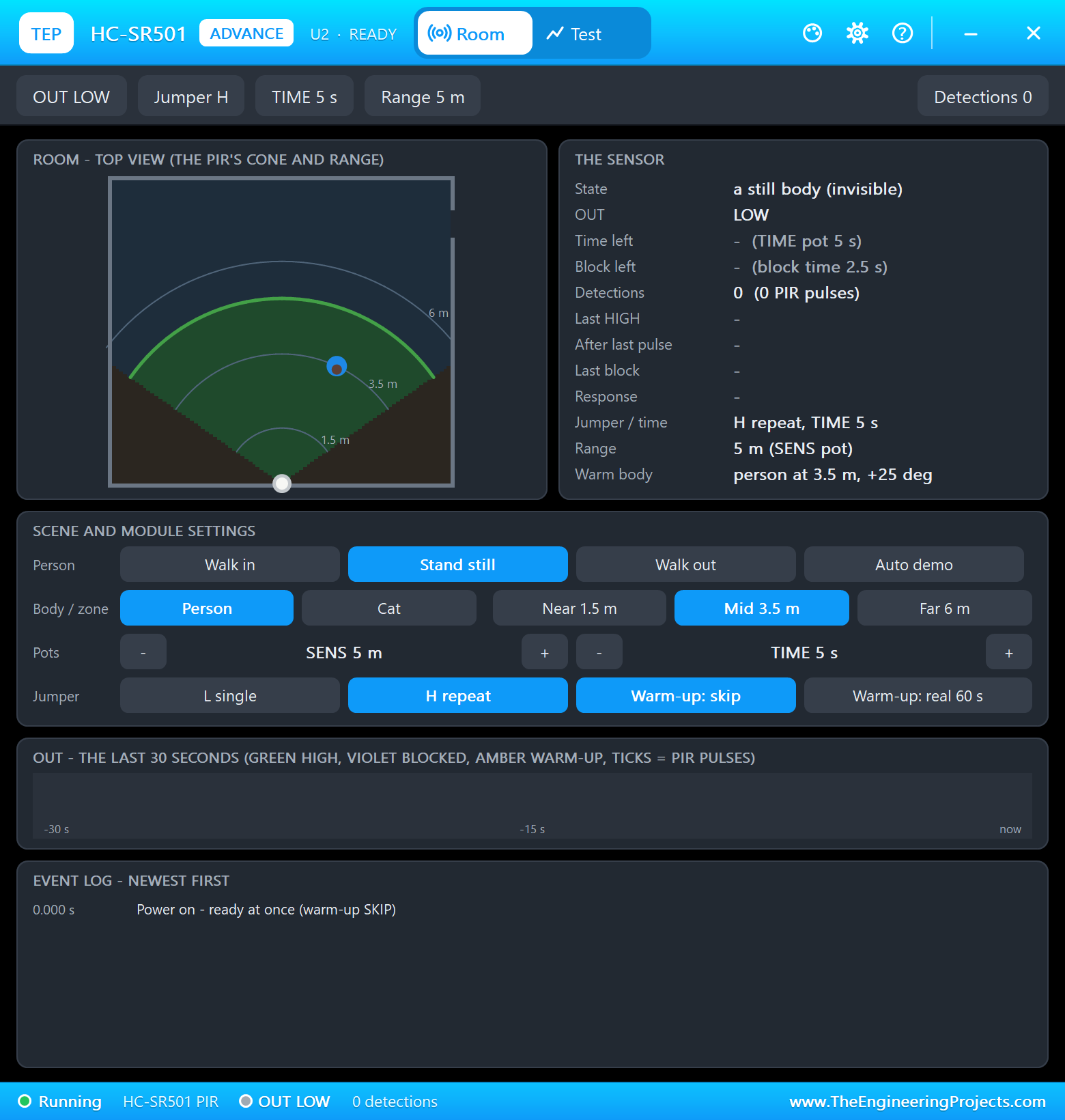
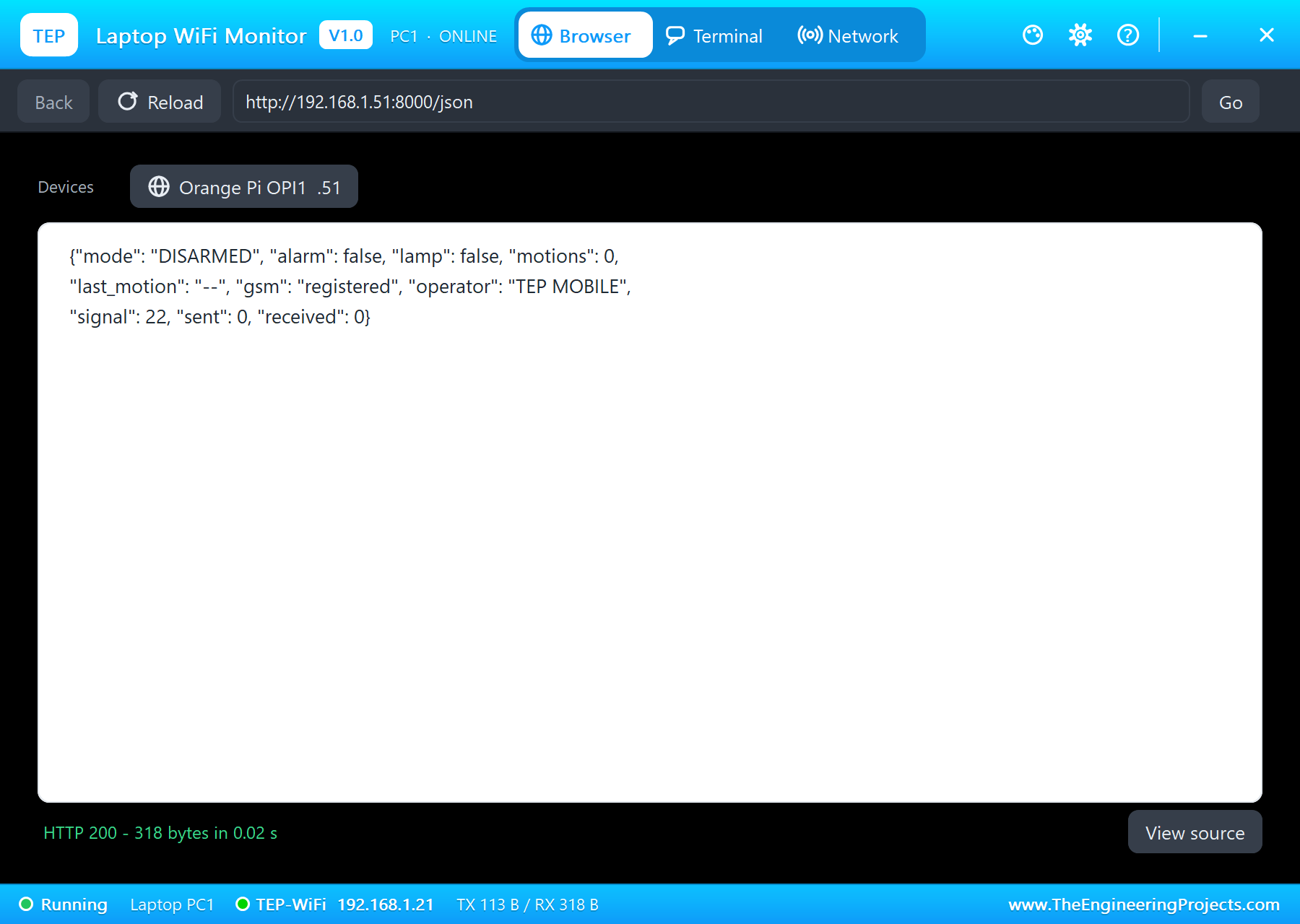
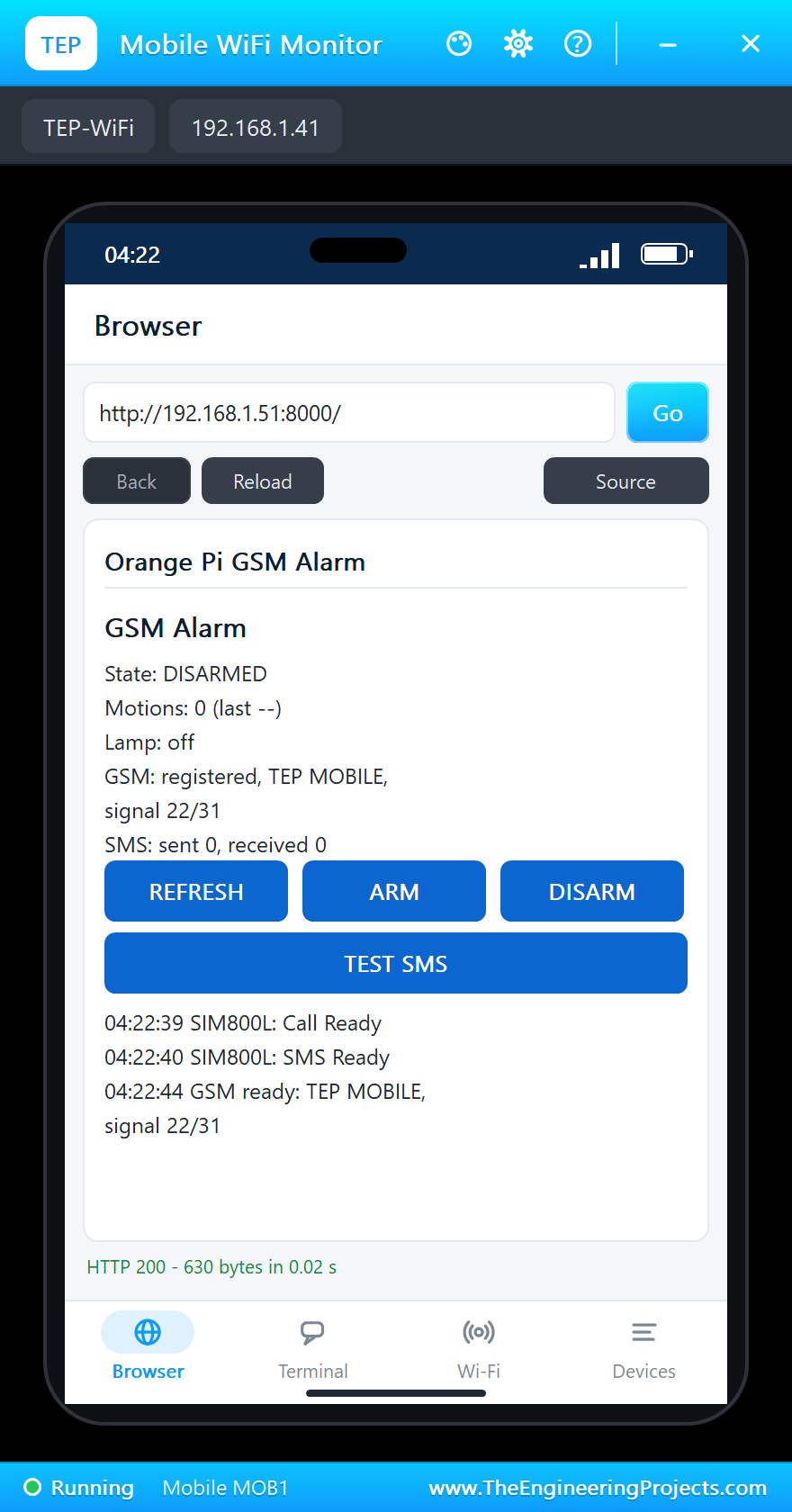
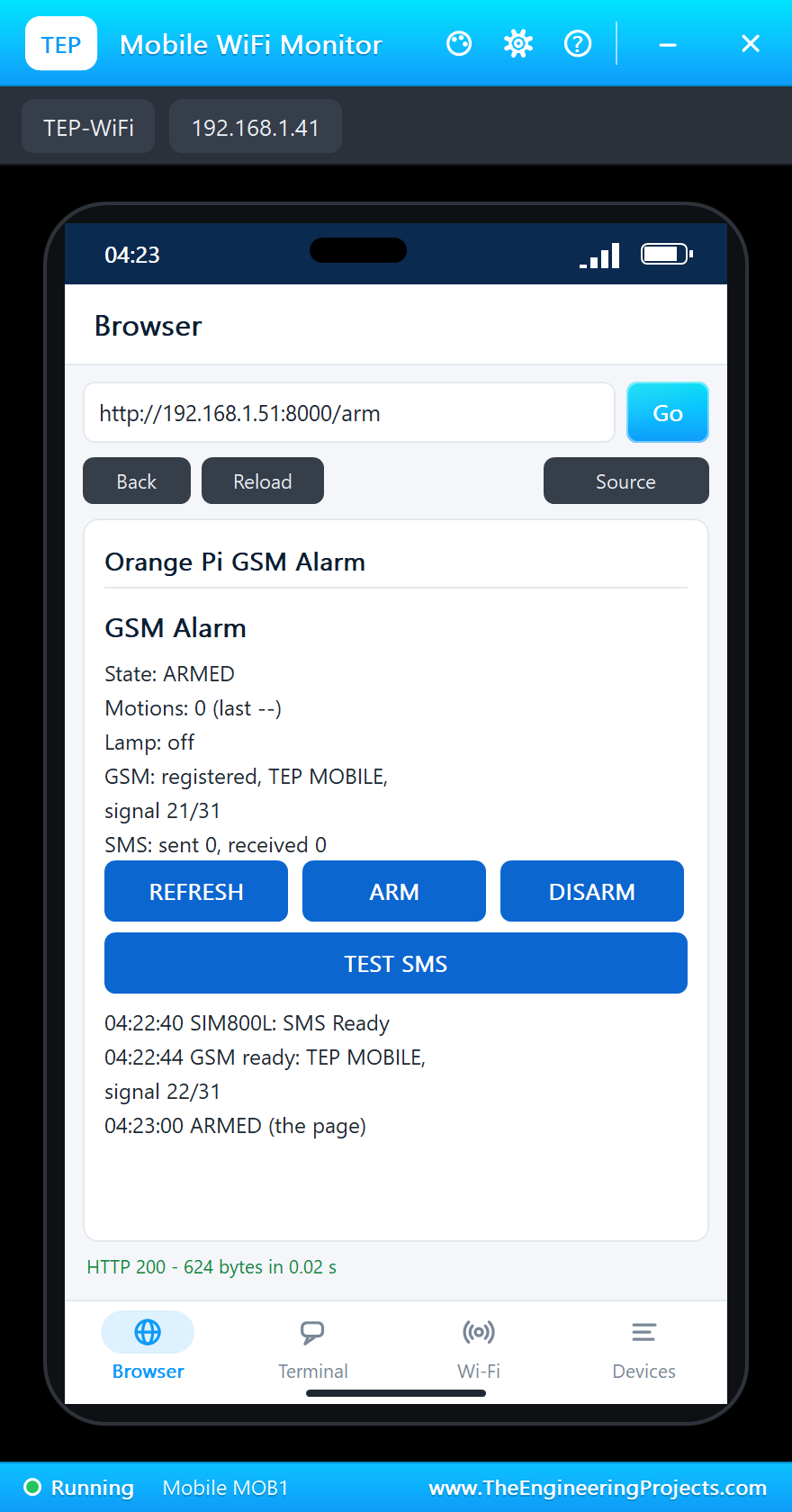
The circuit, the board and the results as they appear in Orange Pi Zero 2W Library for Proteus: SIM800L GSM + PIR Alarm. Open an image for its full size.
README
 README
ORANGE PI ZERO 2W LIBRARY FOR PROTEUS - V1.0 (ALLWINNER H618: QUAD CORTEX-A53 1.5 GHZ, 1 GB, WI-FI 5, 40-PIN HEADER)
YOUR PYTHON PROGRAM RUNS ON THE BOARD - DEMO: A GSM + PIR ALARM (SIM800L ON UART5, HC-SR501, SMS COMMANDS, A WEB PAGE)
Designed by The Engineering Projects www.TheEngineeringProjects.com
IMPORTANT LINKS
Article (read it first - pictures, step by step, every feature explained):
https://www.theengineeringprojects.com/2026/10/orange-pi-zero-2w-library-for-proteus.html
Report a bug or suggest a feature (our forum):
https://www.theengineeringprojects.com/forum/category/orange-pi-zero-2w-proteus-library
The demo's parts are our libraries (included) - their articles:
SIM800L: https://www.theengineeringprojects.com/2026/10/sim800l-library-for-proteus.html
HC-SR501: https://www.theengineeringprojects.com/2026/10/pir-sensor-library-for-proteus-v4-0.html
Laptop: https://www.theengineeringprojects.com/2026/10/laptop-wifi-monitor-library-for-proteus.html
Phone: https://www.theengineeringprojects.com/2026/10/mobile-wifi-monitor-library-for-proteus.html
The single-board computers of this series that run your Python the same way:
https://www.theengineeringprojects.com/2026/10/raspberry-pi-model-b-library-for-proteus.html
https://www.theengineeringprojects.com/2026/10/raspberry-pi-zero-2-w-library-for-proteus.html
https://www.theengineeringprojects.com/2026/10/jetson-nano-library-for-proteus.html
https://www.theengineeringprojects.com/2026/10/beaglebone-black-library-for-proteus.html
Support us (the libraries are free):
https://www.theengineeringprojects.com/donate
FILE STRUCTURE
Orange-Pi-Zero-2W-TEP-v1.0/
|-- Proteus Library Files/
| |-- TEPHCSR501.LIB 391.6 KB the HC-SR501 PIR (demo), to LIBRARY
| |-- TEPLAPTOP.LIB 39.5 KB the laptop (demo), to LIBRARY
| |-- TEPMOBILE.LIB 13.1 KB the phone (demo), to LIBRARY
| |-- TEPOPI02W.LIB 48.3 KB the Orange Pi Zero 2W, to LIBRARY
| |-- TEPSIM800L.LIB 53.1 KB the SIM800L GSM module (demo), to LIBRARY
|-- Proteus Model Files/
| |-- TEPHCSR501.DLL 400.0 KB the HC-SR501 PIR, to MODELS
| |-- TEPNET.DLL 2.52 MB the board + monitors + network, to MODELS
| |-- TEPSIM800L.DLL 439.0 KB the SIM800L GSM module, to MODELS
| |-- TEPPi/python/ 17.54 MB Python 3.11.9 embeddable (33 files)
| |-- TEPPi/runtime/ 993.3 KB TEP Pi runtime, wiringpi, OPi.GPIO (76 files)
|-- Python Code/
| |-- blink.py 0.5 KB an LED on pin 7 (the default)
| |-- gsm_alarm.py 13.6 KB the demo
|-- Proteus Simulation/
| |-- gsm_alarm.py 13.6 KB the program of the demo
| |-- OPi-Zero-2W-GSM-Alarm.pdsprj 34.7 KB the demo: GSM + PIR alarm
| |-- TEPHCSR501.DLL 400.0 KB copy of the model
| |-- TEPNET.DLL 2.52 MB copy of the model
| |-- TEPSIM800L.DLL 439.0 KB copy of the model
|-- README.txt ~20.2 KB this file
Total: 25.80 MB (unzipped). The source code of the models and of the TEP Pi runtime is not included.
WHAT IS IT?
The Orange Pi Zero 2W (Shenzhen Xunlong, 2023) as one Proteus part - and a way to run Orange Pi programs in Proteus 8.5.
It is a Linux computer of the Raspberry Pi Zero's size (65 x 30 mm): the Allwinner H618 with four Cortex-A53 cores at
1.5 GHz and a Mali-G31 MP2 GPU, 1 GB of LPDDR4 (there are 1.5, 2 and 4 GB versions too), 16 MB of SPI flash, a microSD
(TF) slot, dual-band Wi-Fi 5 + Bluetooth 5.0 (a Cdtech 20U5622 module with an antenna socket), a mini-HDMI, two USB-C
(either one takes the 5 V supply), a 24-pin connector for the expansion board (100M Ethernet, two USB, audio, IR,
buttons) and the 40-pin header.
Proteus cannot run Debian or Ubuntu, so this library does not emulate Linux. It does what matters for electronics: the
board runs YOUR PYTHON PROGRAM (a .py file, the PROGRAM property) against the circuit on the sheet, with the Python
libraries an Orange Pi uses for its pins, its I2C / SPI / UART buses and its network.
* At Run the board starts Python 3.11 (included: the TEPPi folder) with our TEP Pi runtime, then your program.
The program and Proteus work in lockstep: while the program runs, Proteus waits; while the program sleeps, waits
for a pin, a bus or the network, Proteus runs. So time.sleep(0.5) is 0.5 s of simulation, a busy loop still moves
the clock (about 2.4 us per GPIO call, as Python on the H618's 1.5 GHz Cortex-A53), and every edge is on time.
time.time(), time.monotonic(), time.strftime() and datetime.now() follow the simulation's clock too.
* The network: wlan0 joins the network in the WIFISSID / WIFIPASS properties (default: our router "TEP-WiFi",
password 12345678 - the network of our ESP32 / Arduino Wi-Fi parts and the Laptop / Mobile WiFi Monitors) about
2.5 s after Run. The board is 192.168.1.51 (192.168.1.(50 + the part's number)), the host name orangepi.
* Threads work (your own threading.Thread, Timer, Queue, Lock): every wait is in simulation time; an error in a thread
is printed as Python prints it ("Exception in thread ...").
* The Python libraries for the pins - the ones Orange Pi's own images use, not the Raspberry Pi's:
wiringpi Orange Pi's wiringOP-Python ("import wiringpi"): wiringPiSetup (wPi numbers), wiringPiSetupGpio /
wiringPiSetupSys (the GPIO NO. column: PI13 = 269), wiringPiSetupPhys (the header's pin numbers),
pinMode, digitalWrite, digitalRead, pullUpDnControl, wiringPiISR, softPwmCreate / softPwmWrite,
delay, millis, micros; serialOpen / serialPuts / serialPutchar / serialDataAvail / serialGetchar
/ serialFlush / serialClose; wiringPiI2CSetup and the I2C reads and writes; wiringPiSPISetup /
wiringPiSPIDataRW; the GPIO class with its constants (GPIO.OUTPUT, GPIO.HIGH, GPIO.PUD_UP ...)
OPi.GPIO the RPi.GPIO-style API of OPi.GPIO 0.5 with this board's header (as the OPi.GPIO-ex fork maps it):
setmode BOARD, SUNXI ('PI13') or BCM, setup / output / input / cleanup, add_event_detect with
callbacks, wait_for_edge, software PWM
smbus2 / smbus TWI1 on pins 3 (PI8, SDA) / 5 (PI7, SCL) as /dev/i2c-1, 100 kHz; a device that does not answer
gives OSError [Errno 121] Remote I/O error
spidev SPI1 on pins 19 (PH7, MOSI), 21 (PH8, MISO), 23 (PH6, CLK): /dev/spidev1.0 (CS0, pin 24, PH5) and
/dev/spidev1.1 (CS1, pin 26, PH9), modes 0 to 3, up to 8 MHz
serial pyserial on /dev/ttyS5 = UART5: TX on pin 11 (PH2), RX on pin 13 (PH3); /dev/ttyAS5 (Orange Pi's
Linux 5.4 images) is accepted too
socket TCP and UDP on wlan0, http.server / socketserver, urllib.request, select
The Raspberry Pi packages (RPi.GPIO, gpiozero, lgpio) are not on this board, as on a real Orange Pi image: "import
RPi.GPIO" gives "No module named 'RPi'".
* The board's own files: /proc/cpuinfo (four ARMv8 processors), /proc/device-tree/model ("OrangePi Zero 2W"),
/proc/device-tree/compatible ("xunlong,orangepi-zero2w", "allwinner,sun50i-h618"), /proc/meminfo (1 GB), the CPU
temperature in /sys/class/thermal.
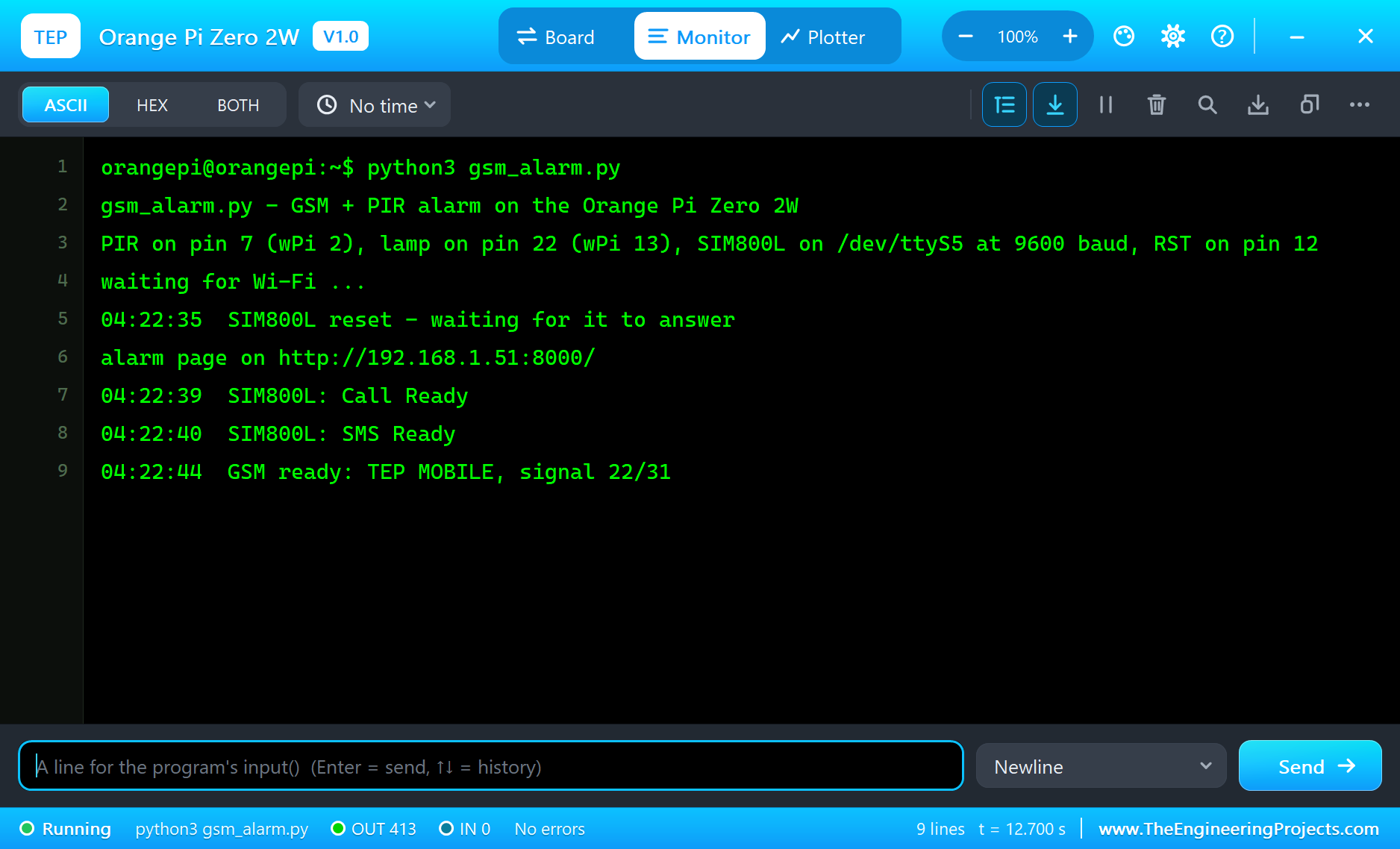
* The terminal (our TEP window, no Windows title bar): the shell prompt (orangepi@orangepi:~$ python3 ...), the
program's output (OUT) and errors (ERR, as Python prints them), a line for input() (IN); its Board tab shows the
GPIOs by their Allwinner names, the LEDs, the supply pins and RESTART PROGRAM. Click the mini-HDMI socket or the
H618 to open it.
* The LEDs: the red power LED, lit while the board runs, and the green status LED, which flickers while the program
prints (on a real board the kernel blinks it; /sys/class/leds/green_led is not modelled).
* The header's supply pins power the modules wired to them, as on the bench: 5V, 3V3 and GND as logic levels (an
analog VCC reading sees 5 V on either rail).
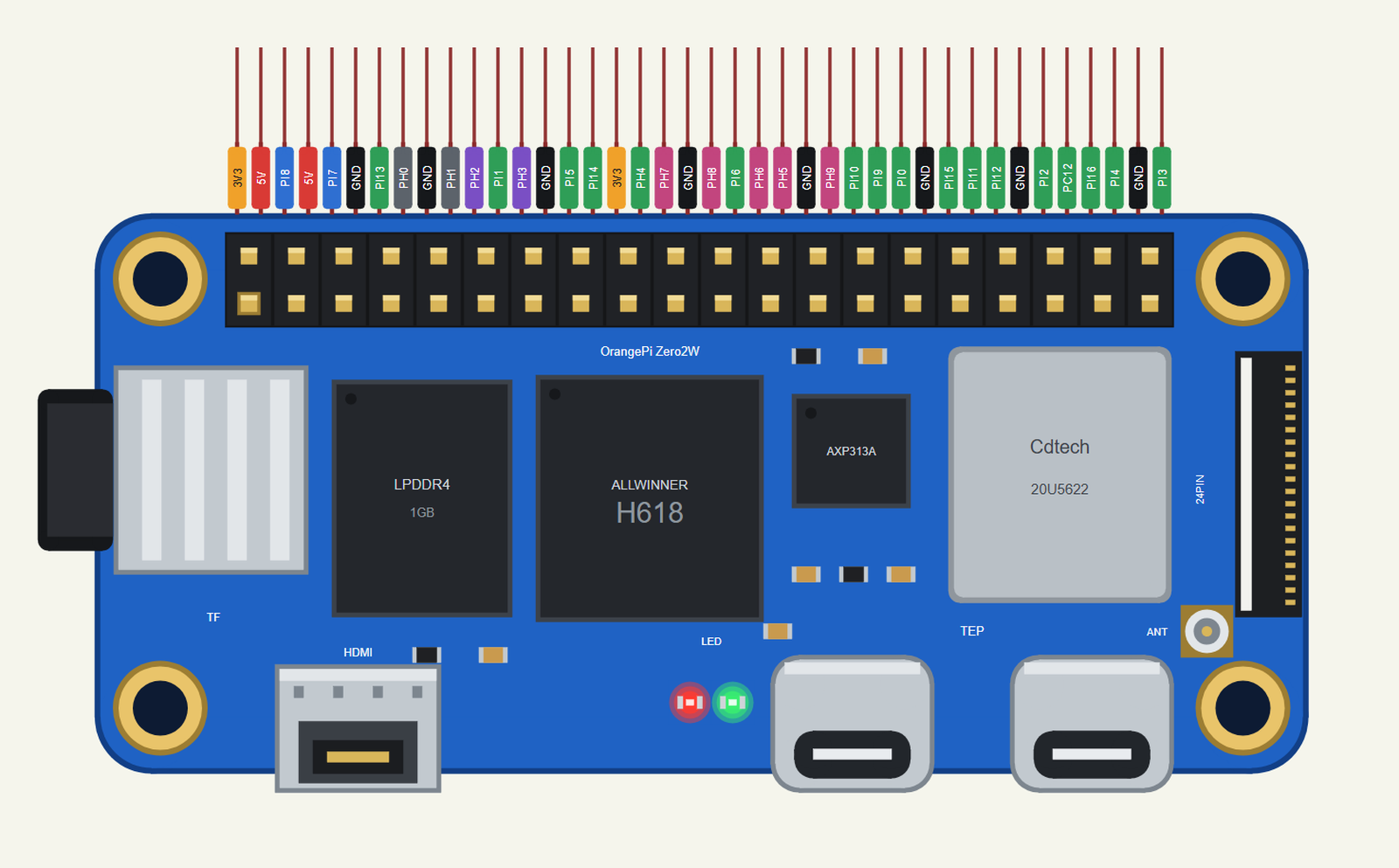
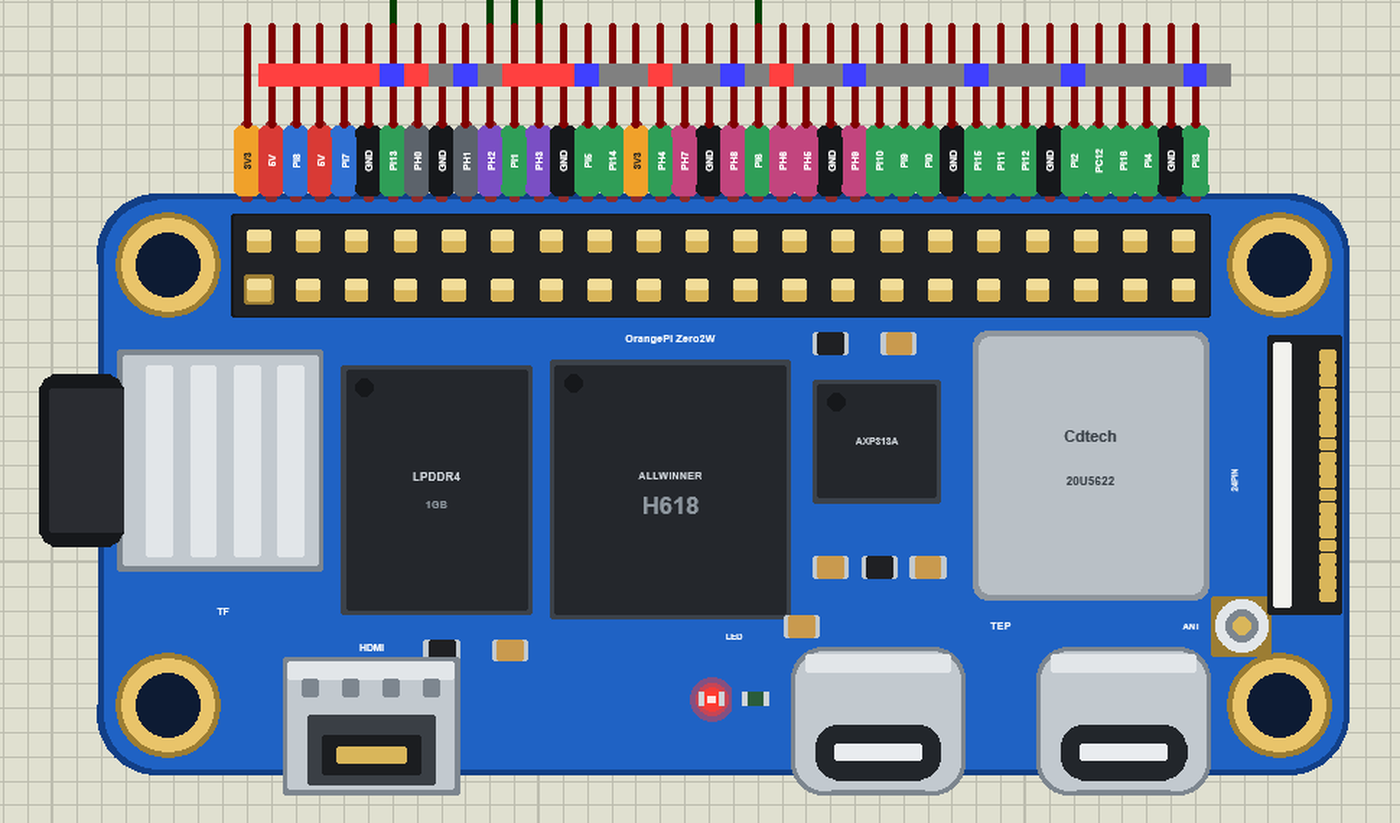
The board is drawn our way at its real size (65 x 30 mm, four 3 mm mounting holes on the Raspberry Pi Zero's footprint)
from Orange Pi's top view, turned half a turn so that the 40-pin header runs along the top edge like every board of the
series: the blue board, the microSD slot at the left edge, the LPDDR4, the H618, the AXP313A power chip, the Wi-Fi
module's shield can, the antenna socket and the 24-pin connector at the right edge, and along the bottom the mini-HDMI,
the two LEDs and the two USB-C sockets. The 40 pins leave the top edge as one comb 50 thou apart, each with a
colour-coded tag: 5V red, 3V3 orange, GND black, GPIO green, I2C blue, SPI pink, UART5 purple, UART0 grey.
ONE DEVICE (search "ORANGE" in Pick Devices):
ORANGE PI ZERO 2W "Orange Pi Zero 2W" V1.0 (category Microprocessor ICs > Orange Pi), prefix OPI, model TEPNET.DLL
(with the TEPPi folder)
The same TEPNET.DLL also runs our Raspberry Pi boards, the Jetson Nano and the BeagleBone Black, our Ethernet and
Wi-Fi shields, modules and boards and the Laptop / Mobile WiFi Monitors; it replaces any older TEPNET.DLL (keep only
this newest one in MODELS).
TEST STATUS
V1.0: verified in Proteus 8.5 on 27 Oct 2026 with the demo project as shipped. What the Proteus run showed:
* OPi-Zero-2W-GSM-Alarm: OPI1 printed "PIR on pin 7 (wPi 2), lamp on pin 22 (wPi 13), SIM800L on /dev/ttyS5 at 9600
baud, RST on pin 12"; wlan0 joined TEP-WiFi and "alarm page on http://192.168.1.51:8000/" followed 2.5 s after Run;
the SIM800L answered AT after its reset, sent Call Ready and SMS Ready, registered on TEP MOBILE: "GSM ready: TEP
MOBILE, signal 22/31" 9 s after Run. The power LED on; the PIR's pop-up READY.
* The laptop (192.168.1.21) opened http://192.168.1.51:8000/json and the phone (192.168.1.41) the page (HTTP 200).
* ARM on the phone: "ARMED (the page)". Walk in on the PIR's pop-up: OUT HIGH 0.10 s after the person was seen,
"motion #1 - ALARM", the lamp flashing, and 2 s later "SMS to +15555550191 sent: ALARM! Motion at ... (event 1).
Reply DISARM." - the text on the owner's phone in the SIM800L's pop-up.
* STATUS from that phone: "Alarm ARMED (ALARM!), motions 1 (last ...), lamp off" came back. DISARM on the page:
"DISARMED (the page)". LED ON from the phone: "lamp ON (SMS)", D1 lit, the answer "Alarm DISARMED, motions 1 (last
...), lamp ON". HELLO: "Commands: ARM, DISARM, STATUS, LED ON, LED OFF".
* The SIM800L's counters: 4 SMS sent, 3 received, 26 AT commands, 0 ERROR. About 77 s of simulation in 324 s on our
PC with the two pop-ups, the two monitors and the terminal open; no errors.
INSTALLATION (about 3 minutes)
1. Close Proteus. Extract the WHOLE ZIP to a normal folder (e.g. Desktop).
2. Copy everything in "Proteus Library Files" to the LIBRARY folder of Proteus, for example:
C:\Program Files (x86)\Labcenter Electronics\Proteus 8 Professional\LIBRARY
(on some PCs: C:\ProgramData\Labcenter Electronics\Proteus 8 Professional\LIBRARY - use the folder that already holds
Proteus's own .LIB files). TEPOPI02W.LIB is the board; TEPSIM800L.LIB (the GSM module), TEPHCSR501.LIB (the PIR),
TEPLAPTOP.LIB and TEPMOBILE.LIB are the demo's parts.
3. Copy everything in "Proteus Model Files" - the DLLs AND the TEPPi folder - to the MODELS folder:
C:\Program Files (x86)\Labcenter Electronics\Proteus 8 Professional\MODELS
TEPPi holds Python 3.11 and the TEP Pi runtime; the board finds it next to TEPNET.DLL, in MODELS or next to your
project. Replace an older TEPNET.DLL and TEPPi folder (these are the newest).
4. Delete TEPOPI02W.IDX (and the .IDX of a part library you replaced) from the LIBRARY folder if it is there.
5. Start Proteus. In Pick Devices (P) search "ORANGE".
Nothing else to install: Python is in TEPPi (no Python on the PC needed, none is changed).
RUN THE DEMO
Keep the .py file and the DLLs beside the project in "Proteus Simulation" (the TEPPi folder in MODELS).
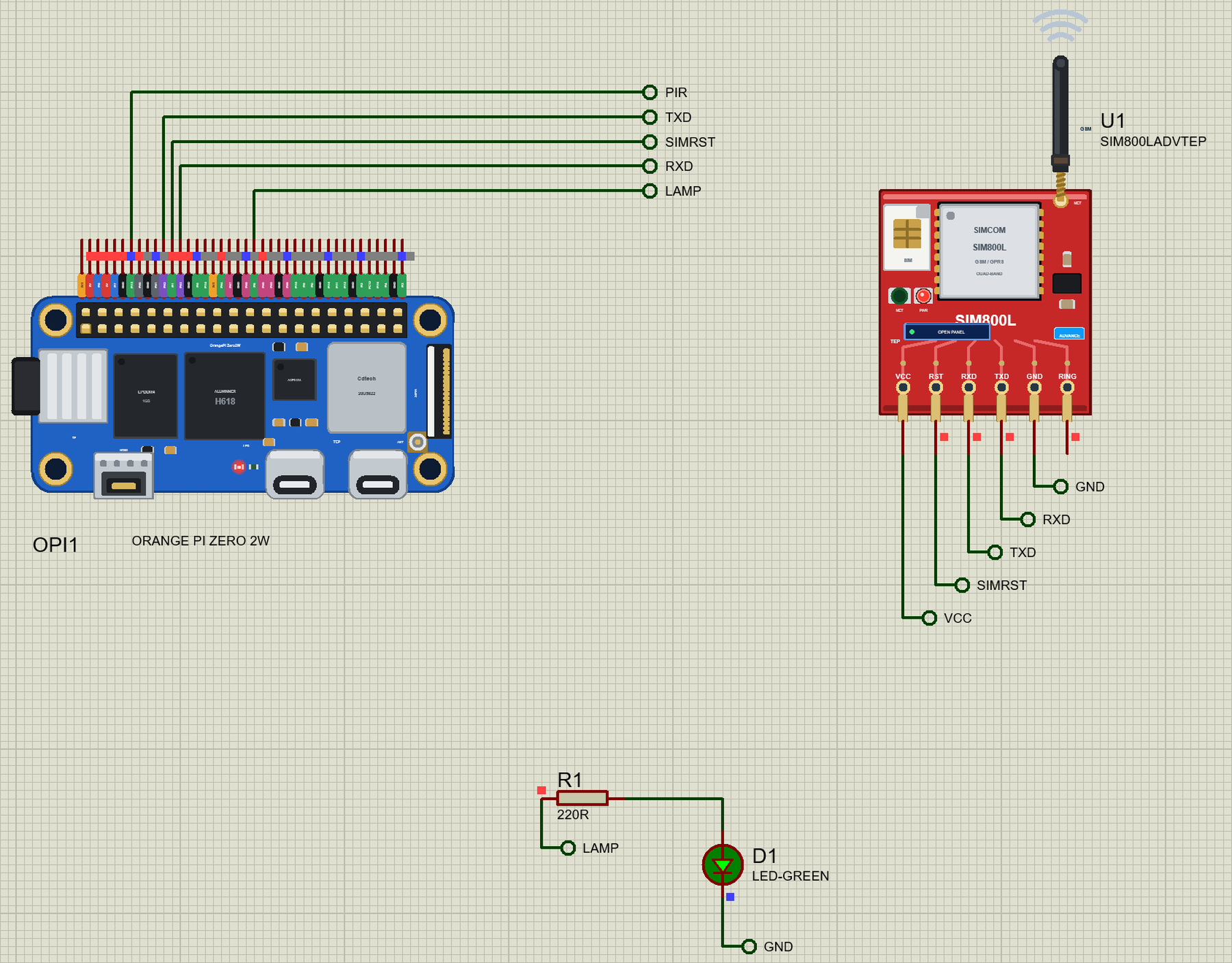
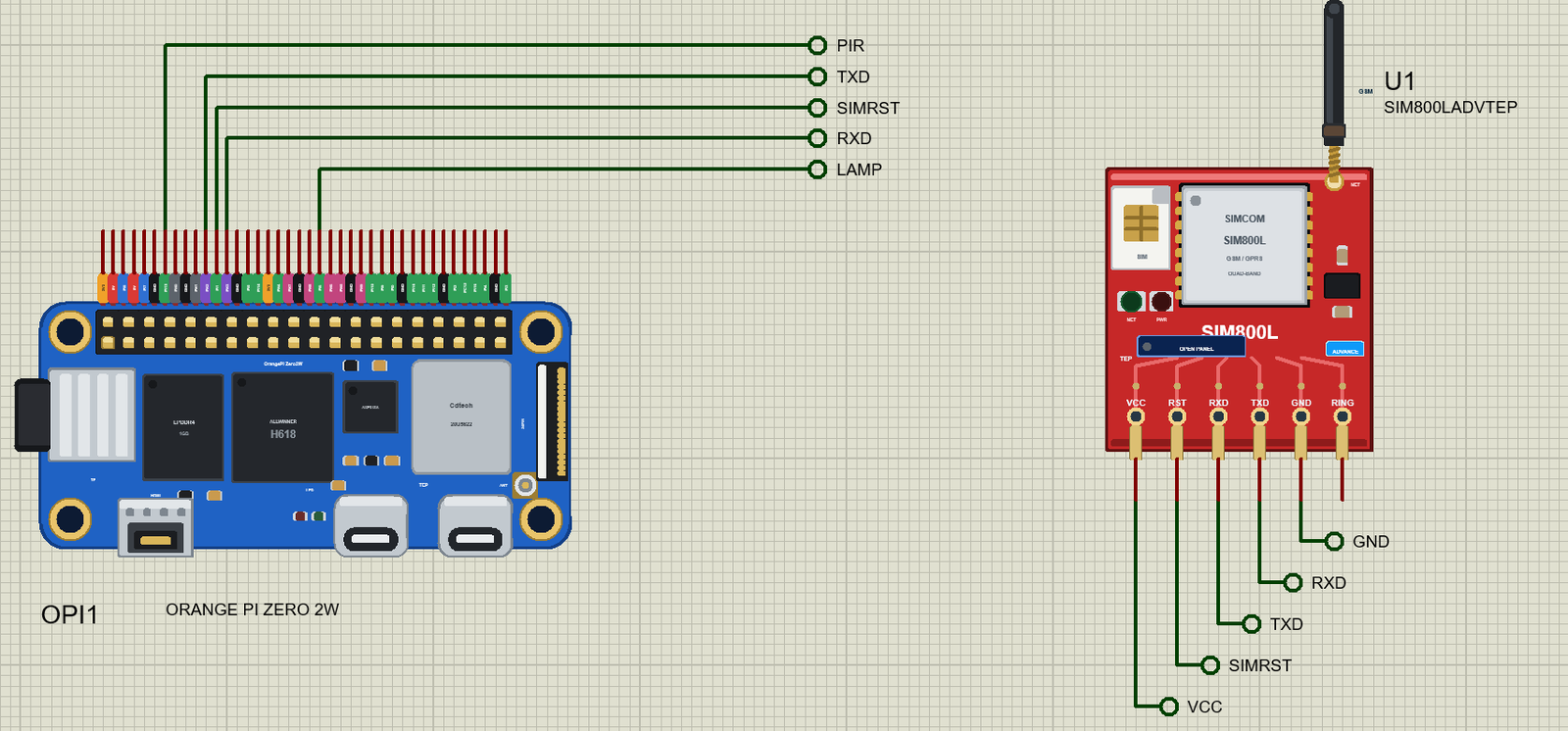
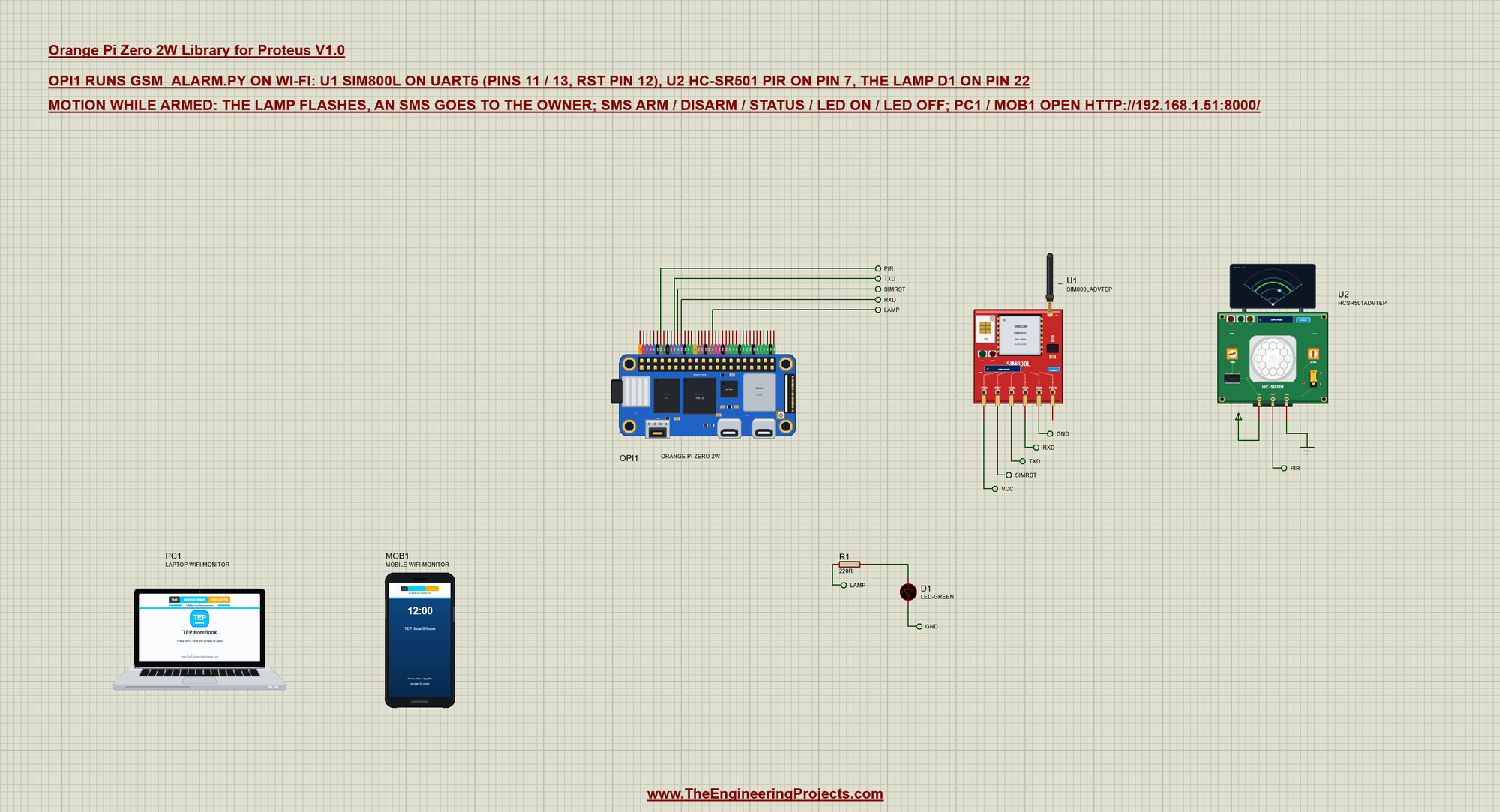
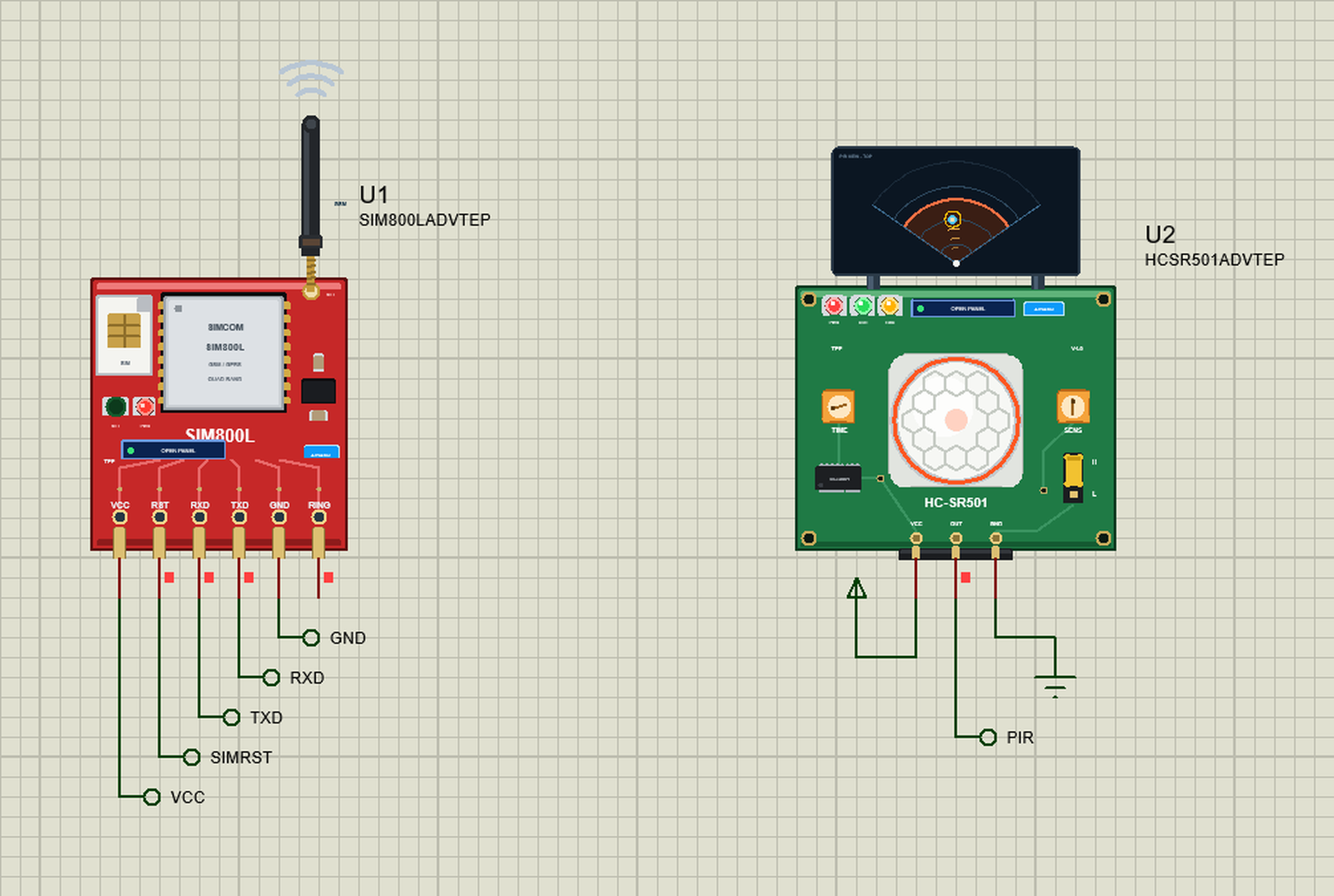
OPi-Zero-2W-GSM-Alarm.pdsprj - OPI1 runs gsm_alarm.py on Wi-Fi. U1 = a SIM800L GSM module on UART5: its RXD on pin 11
(PH2, the board's TX), its TXD on pin 13 (PH3, RX), its RST on pin 12 (PI1). U2 = an HC-SR501 PIR on pin 7 (PI13, wPi
2), powered from the VCC rail. D1 (R1 220R) on pin 22 (PI6, wPi 13) is the lamp. PC1 = the Laptop WiFi Monitor and
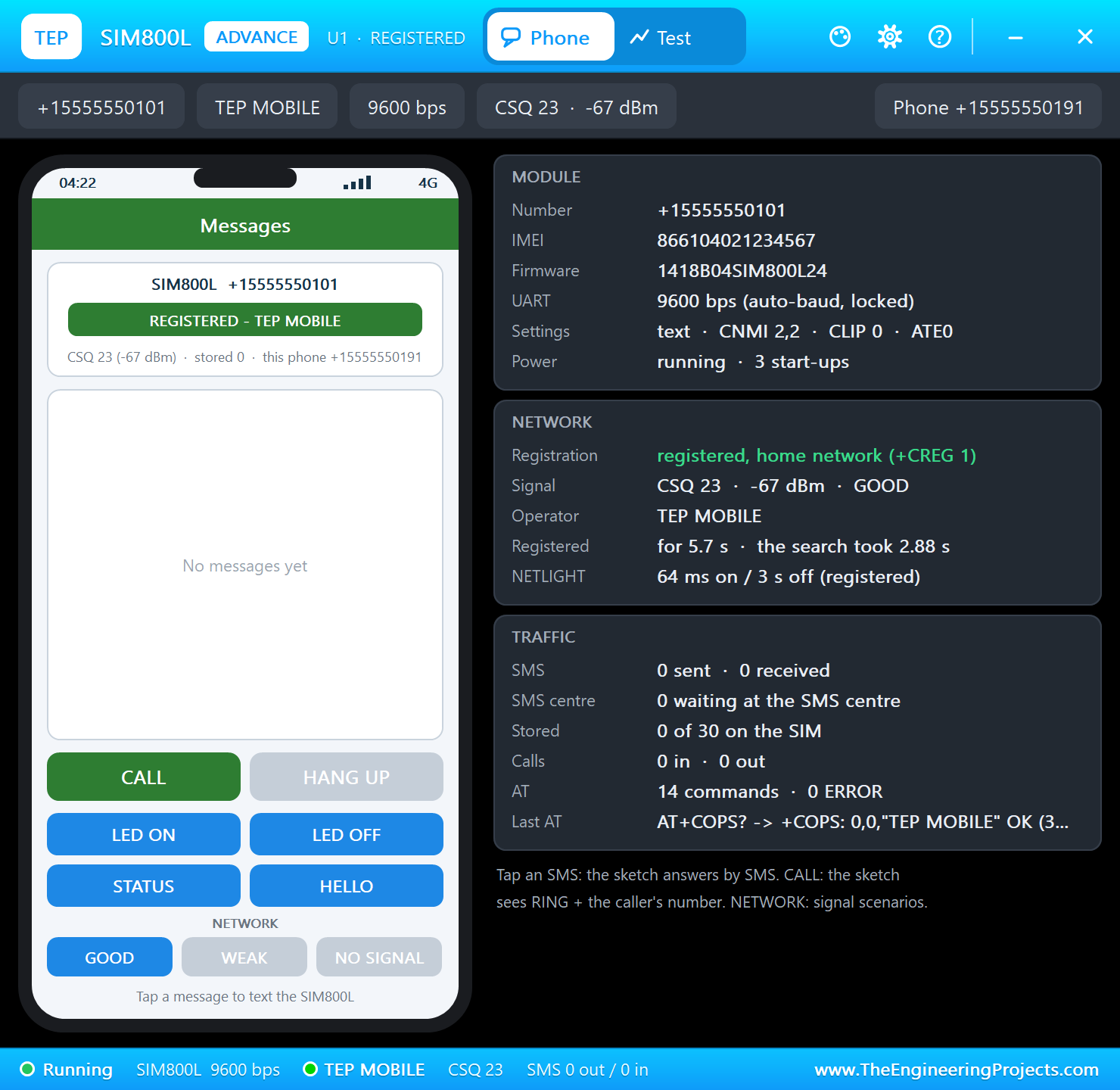
MOB1 = the Mobile WiFi Monitor on the same network. The SIM800L and the PIR are the Advance parts: their pop-up
windows open at Run - the SIM800L's shows the owner's phone (+15555550191), the PIR's the room.
The program uses wiringpi, as Orange Pi's manual does: wPi numbers for the pins, wiringPiISR for the PIR's rising
edge, serialOpen("/dev/ttyS5", 9600) for the SIM800L. It pulses RST, sends AT until the module answers (it finds the
baud rate), ATE0, waits for AT+CREG? to say registered (0,1), sets text mode (AT+CMGF=1) and AT+CNMI=2,2,0,0,0 so an
incoming SMS comes straight to the UART as +CMT. An SMS goes out with AT+CMGS="<number>", the "> " prompt, the text
and Ctrl-Z.
Press Run: Wi-Fi is up in about 2.5 s ("alarm page on http://192.168.1.51:8000/"), the SIM800L registers on TEP
MOBILE ("GSM ready"). On the laptop or the phone open http://192.168.1.51:8000/ (Browser, the address, Go): the
state, the motions, the lamp, the GSM network and the log, with ARM, DISARM and TEST SMS; /json gives the same as
JSON. Tap ARM, then Walk in on the PIR's pop-up: "motion #1 - ALARM", the lamp flashes and the owner's phone gets
"ALARM! Motion at ... Reply DISARM." (one alarm SMS a minute at most; the alarm ends 30 s after the last motion).
The owner's phone (the buttons on the SIM800L's pop-up) texts commands: STATUS (the state), LED ON / LED OFF (the
lamp), HELLO (the list of commands); ARM and DISARM work by SMS as well. Every command is answered by SMS; texts from
other numbers are ignored.
Note for a real build: enable UART5 with orangepi-config (System, Hardware, ph-uart5). Feed the SIM800L 3.4 to 4.4 V
that can deliver 2 A bursts (a buck converter set to 4.0 V or a Li-ion cell), not the 5V pin directly; its RXD
expects 2.8 V logic, so put a divider on the board's TX. The HC-SR501 runs on 5 V and its OUT is 3.3 V - safe for
the board. For a real siren use a relay module or a transistor on pin 22.
YOUR OWN PROGRAMS
Write the program with any editor, put the .py next to your project and set the board's PROGRAM property to its name
(or a full path). Start from Python Code\blink.py (an LED on pin 7 with wiringpi). Python's standard library is there;
other pure-Python packages work when you copy them next to your program. wiringpi numbers the header's 28 GPIOs from
pin 3 (wPi 0) to pin 40 (wPi 27), as wiringOP's "gpio readall" prints them.
A program that never sleeps and never touches a pin for 3 real seconds is left running on its own (the simulation
goes on); input() waits for a line typed in the terminal.
THE 40-PIN HEADER (the Allwinner names - the tags on the board; wPi = wiringOP's number)
PIN NAME FUNCTION wPi | PIN NAME FUNCTION wPi
1 3V3 | 2 5V
3 PI8 TWI1-SDA 0 | 4 5V
5 PI7 TWI1-SCL 1 | 6 GND
7 PI13 2 | 8 PH0 UART0-TX 3
9 GND | 10 PH1 UART0-RX 4
11 PH2 UART5-TX 5 | 12 PI1 6
13 PH3 UART5-RX 7 | 14 GND
15 PI5 8 | 16 PI14 9
17 3V3 | 18 PH4 10
19 PH7 SPI1-MOSI 11 | 20 GND
21 PH8 SPI1-MISO 12 | 22 PI6 13
23 PH6 SPI1-CLK 14 | 24 PH5 SPI1-CS0 15
25 GND | 26 PH9 SPI1-CS1 16
27 PI10 17 | 28 PI9 18
29 PI0 19 | 30 GND
31 PI15 20 | 32 PI11 21
33 PI12 22 | 34 GND
35 PI2 23 | 36 PC12 24
37 PI16 25 | 38 PI4 26
39 GND | 40 PI3 27
3.3 V logic. UART0 (pins 8 / 10) is the debug console on a real board - use UART5 (pins 11 / 13). The Linux GPIO
number is the bank's letter (A = 0) times 32 plus the pin: PH2 = 226, PI13 = 269, PC12 = 76.
PROPERTIES (double-click the board > Edit Properties)
PROGRAM the Python program (default blink.py; a name next to the project or a full path)
AUTOOPEN the terminal at Run: YES (default) or NO
WIFISSID the Wi-Fi network wlan0 joins (default TEP-WiFi)
WIFIPASS its password (default 12345678)
PYTHON a python.exe of your own (empty: TEPPi's)
RUNTIME the TEP Pi runtime folder (empty: TEPPi's)
TROUBLESHOOTING
* "TEP Pi: the TEPPi folder ... was not found": copy the TEPPi folder from "Proteus Model Files" into MODELS (or next
to the project).
* "python3: can't open file": the PROGRAM file is not next to the project - put it there or give a full path.
* "No module named 'RPi'": this board has wiringpi and OPi.GPIO instead of RPi.GPIO / gpiozero.
* The SIM800L never answers AT: its RXD on pin 11 (PH2), its TXD on pin 13 (PH3), the port /dev/ttyS5, 9600 baud. The
pop-up's MODULE card shows the AT commands it received.
* "SIM800L: no network": the SIGNAL buttons of the pop-up (GOOD / WEAK / NO SIGNAL) - NO SIGNAL keeps it searching.
* The PIR's pop-up says NO POWER: its VCC must come from a power terminal (the VCC rail), its GND from a ground.
* No alarm: the page must say ARMED; the PIR's OUT stays HIGH while the person keeps moving (H repeat), so a new
motion needs OUT to go LOW first.
* The page does not open: the address is http://192.168.1.51:8000/ and the program must have printed "alarm page on".
A monitor sometimes needs Go a second time.
* A paused simulation shows the SIMULATION LOG: click the Schematic Capture tab.
BUG REPORTS AND FEATURE REQUESTS
Please post them in our forum with a screenshot, the program, the terminal's text and the simulation log:
https://www.theengineeringprojects.com/forum/category/orange-pi-zero-2w-proteus-library
SUPPORT US
This library is free. If it saves you time, please support our work:
https://www.theengineeringprojects.com/donate
WEBSITE
https://www.theengineeringprojects.com/
LICENCES AND THIRD-PARTY NOTES
* The board model, the TEP Pi runtime, the terminal and the network (TEPNET.DLL, the compiled .pyc files in
TEPPi\runtime with the stand-ins wiringpi, OPi, smbus2, smbus, spidev, serial and the rest), the symbols and artwork
(TEPOPI02W.LIB), the part models (TEPSIM800L and TEPHCSR501 .DLL / .LIB, the Laptop and Mobile WiFi Monitors'
TEPLAPTOP.LIB / TEPMOBILE.LIB in TEPNET.DLL) and the demo program are made by The Engineering Projects. Our stand-ins
follow the APIs of wiringOP-Python (LGPL), OPi.GPIO (MIT), smbus2, py-spidev and pyserial; none of their code is
copied. The source code of the models is not included (nor the runtime's: it ships compiled for the included Python
3.11).
* TEPPi\python is the official embeddable Python 3.11.9 for Windows (32-bit) from python.org, unchanged, under the
Python Software Foundation License (TEPPi\python\LICENSE.txt).
* TEPPi\runtime\gpiozero is gpiozero 2.0.1.post3 and TEPPi\runtime\colorzero is colorzero 2.0, unchanged, under the BSD
3-Clause licence (their LICENSE files in the dist-info folders) - the same TEPPi folder runs our Raspberry Pi boards;
this board does not offer them.
* Proteus is a product of Labcenter Electronics and is not included. Orange Pi is a brand of Shenzhen Xunlong Software
Co., Limited; Allwinner is a trademark of Allwinner Technology; SIM800L is a SIMCom part. This library is not made or
endorsed by Xunlong, Allwinner, SIMCom or Labcenter.
MODEL SCOPE AND LIMITS
Modelled: the 28 GPIOs of the 40-pin header (inputs, outputs, pull-ups / pull-downs, edges, software PWM), TWI1, SPI1
and UART5 as the drivers drive them, the supply pins, Wi-Fi (wlan0: the join, DHCP, TCP and UDP to every TEP network
part), the two LEDs, a 0.5 s boot before the program starts, the board's /proc and /sys files above, the terminal.
Not modelled: Debian / Ubuntu (no desktop, no shell commands, no apt, no orangepi-config: every header bus is simply
on), the kernel's drivers and device-tree overlays, UART0 (the debug console), UART2 / 3 / 4, TWI0 / TWI2, hardware
PWM, the 24-pin expansion connector (its Ethernet, USB, IR, audio and buttons), USB-C data, the mini-HDMI output, the
microSD card's and the SPI flash's files, Bluetooth, the 5 GHz band, the GPU, the AXP313A, the four cores (one
program, its threads take turns), the green LED's sysfs control, C programs and C extensions (the real wiringpi is a C
extension: here it is pure Python), the real CPU's speed (each GPIO call takes about 2.4 us; pure Python code takes no
simulation time), real-time jitter. The model's own choices: the board's IP address (192.168.1.51 for OPI1), the boot
time, the router; the simulation runs below real time.
VERSION
TEP Orange Pi Zero 2W library V1.0 (Oct 2026). Device ORANGE PI ZERO 2W (TEPOPI02W.LIB / TEPNET.DLL with TEPPi: Python
3.11.9 and the TEP Pi runtime 0.2 with wiringpi and OPi.GPIO). Demo program gsm_alarm.py V1.0, blink.py.Development1 release
 Development1 release
-
V1.0Orange Pi Zero 2W Library for Proteus V1.0this page
V1.0 is the only release in the Download Center so far. When a newer version is published, it appears above with its own download page.
Installation7 steps
 Installation7 steps
From the download to a working project, in order. The steps follow what the package contains.
You will need
- Proteus Design SuiteProteus 8 or newer (Labcenter), on Windows
- Pythonto build the source files into firmware
- Any archive toolWindows, macOS and Linux extract ZIP files on their own

Steps
- 1
Extract the archive
Right-click orange-pi-zero-2w-tep-v1-0-e8df8456a2fe4c2cbba4a52a39e0d36c.zip and choose Extract All (or open it with 7-Zip or WinRAR) into a folder you can find again. Keep its folder structure (Orange-Pi-Zero-2W-TEP-v1.0) as it is.
- 2
Copy the library files into Proteus
Move TEPHCSR501.LIB, TEPLAPTOP.LIB and TEPMOBILE.LIB and 2 more and the files into the LIBRARY folder of your Proteus installation: C:\Program Files (x86)\Labcenter Electronics\Proteus 8 Professional\LIBRARY for Proteus 8, or the matching Proteus 7 folder. Older versions keep it under ProgramData\Labcenter Electronics. If Proteus is open, close it first.
- 3
Add the simulation model
Copy TEPHCSR501.DLL, TEPNET.DLL and TEPSIM800L.DLL and 7 more into the MODELS folder next to LIBRARY, so the component can run, not only be drawn.
- 4
Restart Proteus and place the component
Start Proteus, open a schematic, press P (Pick Devices) and search for the component by the name used in the tutorial. It appears with its pins ready to wire.
- 5
Build the source code
Open gsm_alarm.py, blink.py and attr.py and 29 more in the compiler named in the tutorial (MikroC, Keil, MPLAB, Code Composer or the Arduino IDE) and build it to get the firmware.
- 6
Open the example simulation
Open OPi-Zero-2W-GSM-Alarm.pdsprj in Proteus to see the wiring exactly as in the tutorial. Check the controller's Program File path, then press Play.
- 7
Follow the tutorial
Orange Pi Zero 2W Library for Proteus: SIM800L GSM + PIR Alarm explains every connection and setting in order; keep it open beside the files while you build.
FAQs8 questionsContact TEP
 FAQs8 questions
How do I download Orange Pi Zero 2W Library for Proteus V1.0?
Wait for the 30-second guest countdown on this page, then press the download button; the file comes straight from our storage. Members who are logged in skip the wait. If the browser opens the file instead of saving it, use its Save as option. The download link is made for you when the countdown ends and works for 15 minutes; a saved or shared link stops working, so share this page instead.
What is inside the archive?
Orange Pi Zero 2W Library for Proteus V1.0 comes as a ZIP archive of 125 files (13.2 MB, 25.8 MB unpacked) holding Proteus library files, simulation model DLLs, a Proteus simulation, source code and a nested archive. Open the File Structure tab for the full list of 125 files.
What should I do if the download does not start?
Check the browser's download list first; an ad blocker or a company firewall can also hold it back, so try another browser or network. If the file arrives incomplete, download it again. For an installation problem, read the Install tab or tell us in the comments with your software version and the exact error message.
Is this file free?
Yes. Every file in the TEP Download Center is free for learning, personal and student projects. If you share it, link back to this page or the tutorial so others find the latest version.
How do I check that the file arrived complete?
Compare its SHA-256 with the one on this page, f3296b66821f12f742aaca90036ecc48635eff7af8b099968db796432bbf72b3. In PowerShell run Get-FileHash "orange-pi-zero-2w-tep-v1-0-e8df8456a2fe4c2cbba4a52a39e0d36c.zip"; on macOS or Linux run shasum -a 256 "orange-pi-zero-2w-tep-v1-0-e8df8456a2fe4c2cbba4a52a39e0d36c.zip". The same value means the file is exactly the one in our storage; a different one means the download broke off, so download it again.
Do I need WinRAR to open the ZIP file?
No. Windows, macOS and Linux open ZIP archives on their own (Extract All, or double-click). WinRAR and 7-Zip work too. Extract the whole archive before using the files.
Where do I put the LIB and IDX files?
Both files go into the LIBRARY folder of your Proteus installation (Proteus 8: C:\Program Files (x86)\Labcenter Electronics\Proteus 8 Professional\LIBRARY; Proteus 7 has the same folder under its own name). Restart Proteus afterwards and search for the component with P.
Which Proteus version does the library need?
The tutorial names the Proteus version the library was made and tested with. Most TEP libraries work in Proteus 7 and Proteus 8; if the component does not appear after a restart, check that both the LIB and the IDX file were copied and that Proteus was fully closed while copying.
Members skip the wait. Log in or join TEP.

- 1Total downloads
- 4%Popularity
- ProteusCategory
- 0Comments
- ssyedzainnasirUploaded by
- 28 Oct 2026Uploaded at


 SHA-256
f3296b66821f12f742aaca90036ecc48635eff7af8b099968db796432bbf72b3


 Need help with this file?
 Tags
TagsRelated Proteus
All Proteus tutorials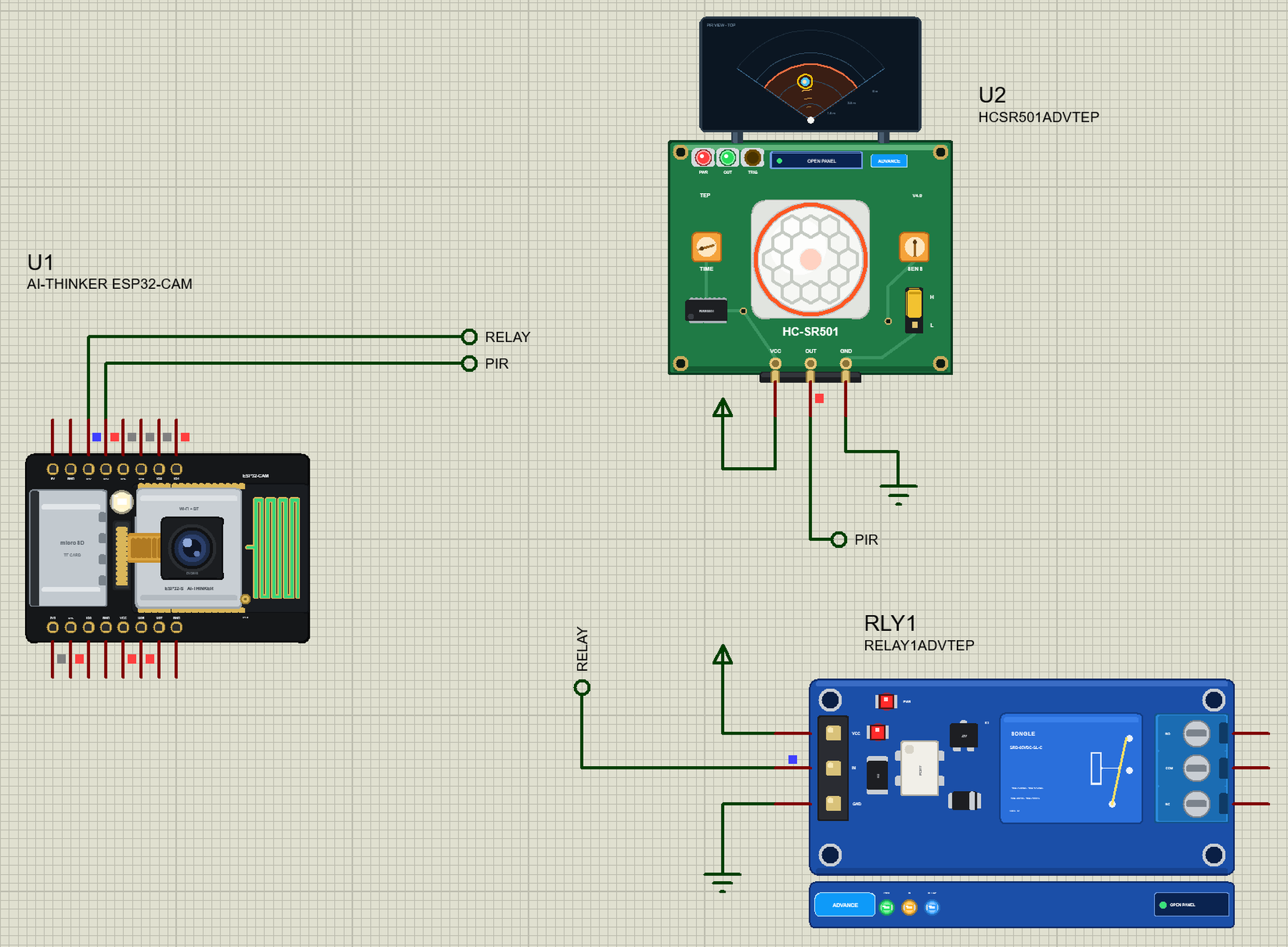

More GSM project files
All GSM tutorials



Comments
0