Hello friends, I hope you all are doing great. Today, I am going to share the new Analog Panel Meter Library for Proteus V1.0. Before digital displays took over, every power supply, battery charger and test bench showed its volts and amps with a needle. Those meters are still everywhere in the maker world: they are cheap, they need no code to read, and a needle swinging across a scale tells you at a glance what a row of digits cannot - whether a value is rising, falling or trembling.
Analog Panel Meter Library for Proteus
Latest version: V1.0 (October 2026, this tutorial)
Other motors: SG90 Servo · TT Gear Motor · 28BYJ-48 Stepper · NEMA 17 Stepper · MG996R Servo · N20 Encoder Motor · JGA25-370 Encoder Motor · FS90R 360 Servo · 130 DC Motor · A2212 Brushless · X27.168 Gauge · DC Tachogenerator · LM393 Speed Sensor · MG90S Servo · DS3218 Servo · L12 Linear Servo · JGB37-520 Motor · RS-775 Motor · JGY-370 Worm Motor · 12V Linear Actuator · Coin Vibration Motor · Mini Submersible Water Pump · 12V Peristaltic Pump · 4-Pin PC Fan · 12V Push-Pull Solenoid · NEMA 23 Stepper Motor · Micro Linear Stepper · TYJ50 Synchronous Motor · Quartz Clock Movement · Air-Core Gauge · Electromechanical Counter · Split-Flap Display · Electric Bell · Wind Turbine · 8520 Coreless Motor · Car Wiper Motor · Car Door Lock Actuator · 12V Solenoid Water Valve · 12V Holding Electromagnet
Motor drivers: L298 · L9110S · TB6612FNG · BTS7960 · A4988 / DRV8825 · 28BYJ-48 + ULN2003 · PCA9685 Servo · Relay Module · 30A Brushless ESC · TB6600 Stepper Driver
Helping Tools
- Serial Monitor Advance: a serial terminal window for the UART of your board
- Serial Monitor Expert: the serial monitor with extra debugging tools
- LCD Library for Proteus V3.0: 16x2, 20x4 and I2C LCDs to show your readings
This library adds the classic 85C1-style moving-coil panel meter to Proteus. It is not a probe with a picture: its terminals are the real meter's resistance in your circuit, and its needle is a small motor turning against a spring, with inertia and damping. So it does what a real meter does with an Arduino: it averages a PWM, swings a little past the value and settles, shakes when the PWM is too slow, pegs on its end stop when you go over the range and pushes the wrong way when the wires are swapped. The demo runs on our Arduino UNO V4.0, with a potentiometer that sets the needle.
NOTICE: a needle meter looks like the simplest part on any bench, yet the way it moves - the swing, the overshoot, the calm average of a buzzing PWM - is pure physics. We wanted that physics in Proteus, not just a number. It took our team a lot of hard work. Your feedback is the fuel that keeps us going, so please tell us what you think in the comments below or in the Motor Driver board of our forum. And if our free libraries help you, you can buy us a coffee. So, let's get started with the Analog Panel Meter Library for Proteus V1.0:
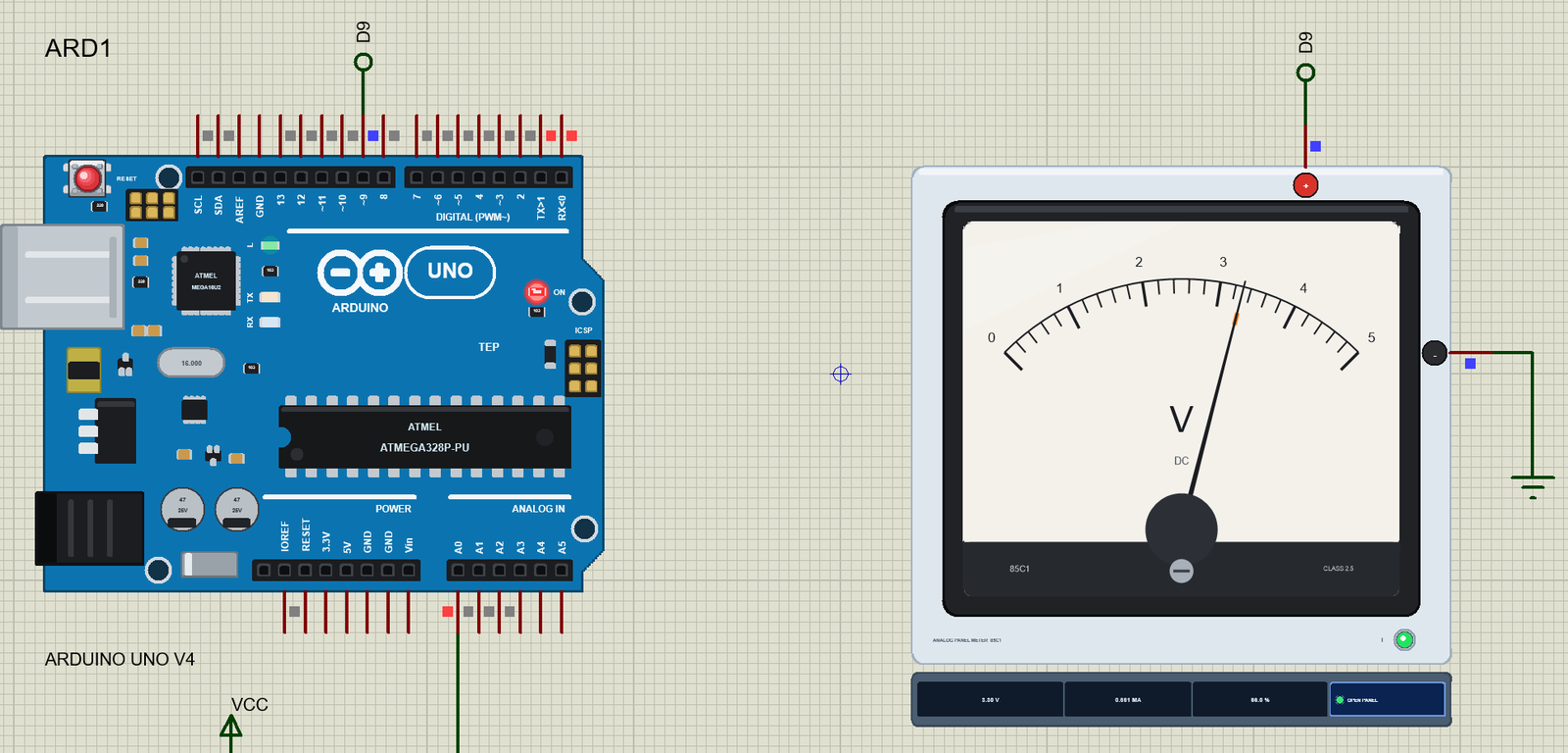
What is an Analog Panel Meter?
An analog panel meter is a moving-coil meter, also called a d'Arsonval movement. A light rectangular coil of fine wire hangs on two jewel pivots in the gap of a permanent magnet. When a current flows through the coil, the magnet's field pushes on it and makes a torque that turns the coil and the needle fixed to it. Two hair springs push back, harder the further the needle turns. The needle stops where the two torques balance, so the angle is proportional to the current. It is, in effect, a tiny motor that turns against a spring.
The 85C1 is the common square meter of hobby kits and bench supplies: a black case about 64 mm wide, a cream scale behind a clear front, a 90 degree arc and a zero screw under the needle. Inside is usually a 1 mA movement, and the scale printed on the plate decides what it measures.
| 85C1-style panel meter (the model) | |
|---|---|
| Movement | a moving coil on pivots, two hair springs, a 90 degree scale |
| Full scale | 1 mA through the movement |
| As a voltmeter | the movement + a series resistor: 1000 ohm per volt (0 - 5 V = 5000 ohm) |
| As an ammeter | the movement + a shunt: 100 mV across it at full scale (75 mV for amps) |
| Accuracy class | 2.5 (2.5 % of full scale) |
| Response | about 10 % overshoot, settled in about 1 s |
Voltmeter or Ammeter: the Same Movement
The movement itself only measures current, and a small one: 1 mA swings the needle to full scale. To read 0 - 5 V, the maker puts a resistor in series so that 5 V drives exactly 1 mA through both: 5000 ohm in all, which is why a voltmeter is rated in 1000 ohm per volt. To read larger currents, a shunt - a resistor of a fraction of an ohm - goes across the movement and carries most of the current, so only 1 mA passes through the coil at full scale. Our library does the same with two properties, RANGE and UNIT.
Why a Needle Averages
The coil, the needle and the springs have mass, and the aluminium former the coil is wound on moves in the magnet's field, so eddy currents brake every movement. Together they make a heavily filtered, second-order system with a natural frequency of about one hertz. Feed it a current that switches on and off hundreds of times a second and the needle simply cannot follow: it settles at the average. That is the reason a cheap meter on an Arduino's PWM pin works as an analog output - and why it stops working when the PWM is slow.
What's New in Analog Panel Meter Library for Proteus V1.0
- A real moving-coil meter: the 85C1 face, a needle with inertia, springs, damping and end stops.
- Real terminals: 1000 ohm per volt as a voltmeter, a shunt as an ammeter, chosen with RANGE and UNIT (V, mA, uA or A).
- PWM averaging: the needle shows 5 V times the duty of analogWrite(), and shakes on a PWM that is too slow.
- It reads the terminals: the PWM's frequency and duty, each move's overshoot and settling time, the needle's ripple, pegged, reversed and overloaded meters.
- The zero screw and a tap on the glass, as on the bench.
- A pop-up window with four pages - Meter, Graphs, Event log and Check - and the terminal voltage drawn live.
- A full release: the zip with the library, our Arduino UNO V4.0 and an A4 demo, tested in Proteus.
The Panel Meter in Proteus
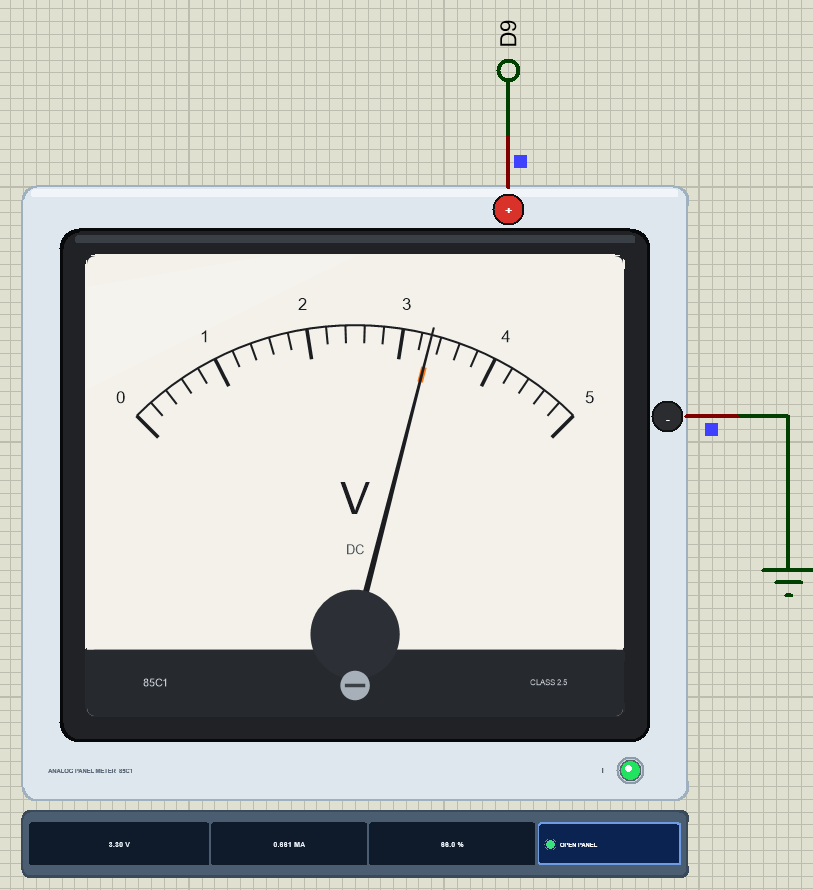
Search PANELMETER in Pick Devices; the device PANELMETERTEP is in TEPMETER.LIB (category Electromechanical, Panel Meters) and its model is TEPMETER.DLL. It is drawn as the real 85C1 from the front: the black case, the cream scale behind the glass numbered from 0 to RANGE with five small divisions between the numbers, the unit, the black needle coming out from under the dark nose, and the zero screw. The + terminal is the red stud on top, the - terminal the black stud on the right.
While the simulation runs, the needle turns to the simulated angle and a small orange mark inside the scale shows the value the current asks for - the two part company while the needle swings, and when the PWM is too slow. The LED I lights green while the current flows into + and red when it flows into -. Under the plate the strip shows the reading, the average current and the percentage of the scale, and the OPEN PANEL button. The plate, the LED and the strip are TEP additions; the real meter has none of them.
The Pins and the Properties
| Pin | What the model does with it |
|---|---|
| + (PLUS) | the positive terminal: the meter's resistance runs from here to - |
| - (MINUS) | the negative terminal: GND in the demo |
| Property | Default | What it does |
|---|---|---|
| RANGE | 5 | the full-scale value; the scale's numbers follow it |
| UNIT | V | V makes a voltmeter of 1000 ohm per volt; mA, uA or A an ammeter with 100 mV across it at full scale (75 mV for A) |
A good exercise: set RANGE to 3 in the demo. Now the pin's 5 V is too much for the scale, and above 60 % of the pot the needle sits on its end stop - the pop-up calls it PEGGED.
Download Analog Panel Meter Library for Proteus
Click the button below to download Analog-Panel-Meter-Library-for-Proteus-v1.0.zip (about 1.2 MB, without the source code of the models):
Analog Panel Meter Library for Proteus V1.0- README.txt: installation, the demo, the wiring, the properties, real hardware, troubleshooting and the limits.
- Proteus Library Files:
TEPMETER.LIBandArduinoV4TEP.LIBfrom our Arduino Library for Proteus V4.0. - Proteus Model Files:
TEPMETER.DLLandTEPARDUINO.DLL. - Proteus Simulation:
Analog-Panel-Meter-ArduinoUnoV4.pdsprj,Panel_Meter_Demo.hexand copies of the two DLLs. - Arduino Code:
Panel_Meter_Demo.ino(no library needed).
No Proteus yet? Read How to Download and Install Proteus 7 and 8. New to libraries? Follow How to Install a New Library in Proteus.
How to Install Analog Panel Meter Library for Proteus
- Close Proteus and extract the whole zip file, for example to your Desktop.
- Copy
TEPMETER.LIBandArduinoV4TEP.LIBfrom Proteus Library Files into the LIBRARY folder of Proteus (usuallyC:\Program Files (x86)\Labcenter Electronics\Proteus 8 Professional\LIBRARY). - Copy
TEPMETER.DLLandTEPARDUINO.DLLfrom Proteus Model Files into the MODELS folder. The two Arduino files are the ones of our Arduino Library V4.0; if you have it, they are the same. - Delete
TEPMETER.IDXfrom the LIBRARY folder if it is there. - Start Proteus, press P and search for PANELMETER.
Tip: keep the Proteus Simulation folder together, because the project needs its .hex file and the DLLs beside it. The library is tested in Proteus 8.5; Proteus 7 is not supported.
The Demo Circuit
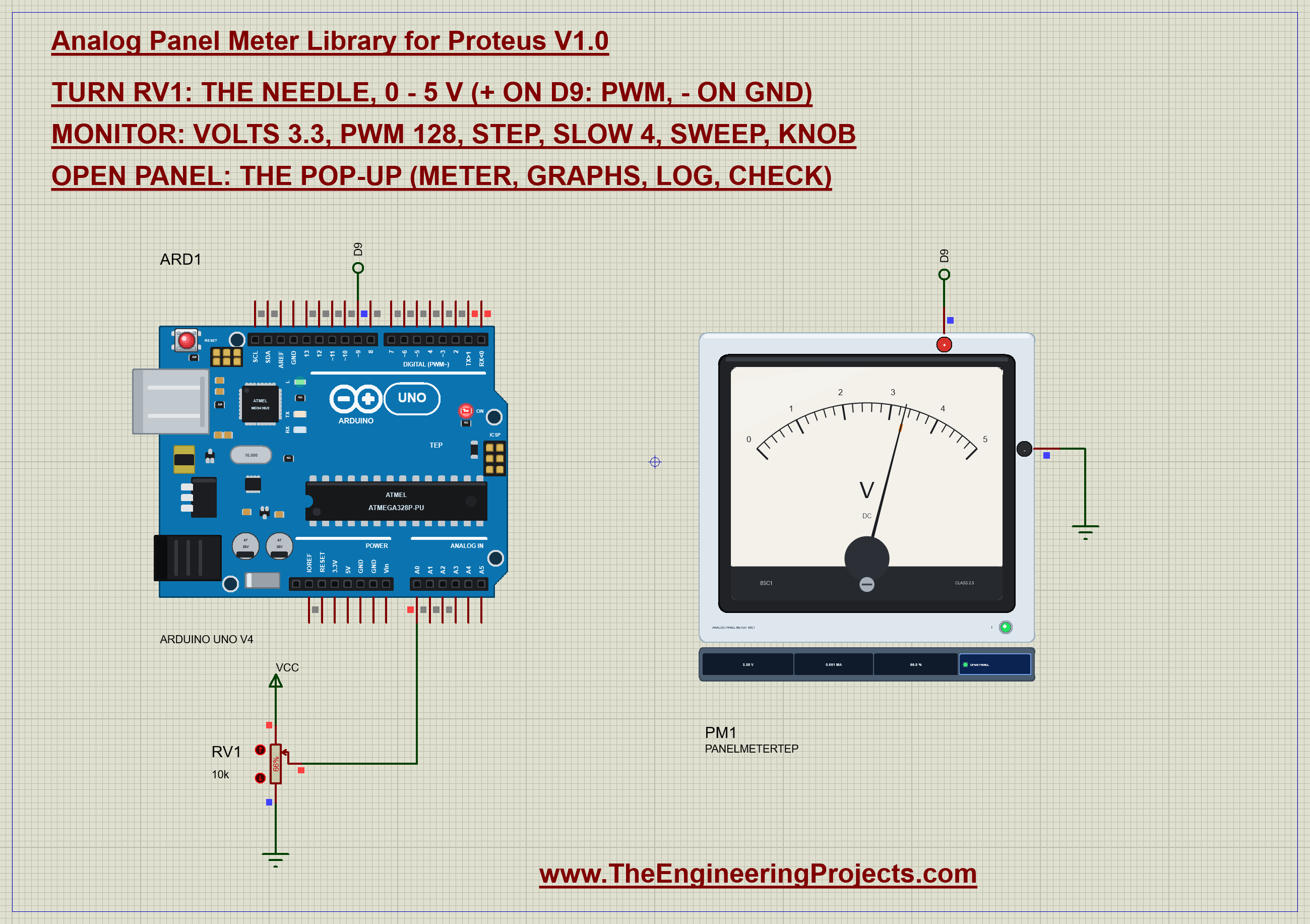
Open Analog-Panel-Meter-ArduinoUnoV4.pdsprj. ARD1 is an Arduino UNO V4.0 from our Arduino UNO Library for Proteus V4.0, running Panel_Meter_Demo.hex with its serial monitor built in. PM1 is the 0 - 5 V panel meter, and RV1 is a 10k potentiometer on A0 that sets the needle.
| Panel meter | Arduino UNO | Note |
|---|---|---|
| + | D9 | a PWM pin: analogWrite gives 490 Hz here |
| - | GND | |
| RV1 ends / wiper | 5V, GND / A0 | the setting |
That is all: no transistor, no filter. A 0 - 5 V meter is 5000 ohm, so at full scale it takes 1 mA - an easy load for an AVR pin. In Proteus the meter's + runs up to the net label D9 and the UNO's D9 climbs to the same label, while - runs to a ground terminal on the right.
The Arduino Code
The demo needs no library: analogWrite() does the work. New to Arduino? Start with Arduino Tutorial for Beginners and Introduction to Arduino UNO. The pins and the full scale come first:
const int METER_PIN = 9;                                 // Timer1 PWM, 490 Hz
const int POT_PIN = A0;
const float FULL_SCALE = 5.0;                            // the meter's range (V) = the pin's HIGH
One function sets the needle: a duty from 0 to 255 on the PWM pin. The meter will show 5 V times duty / 255:
void show(int d) {
  duty = constrain(d, 0, 255);
  slow = false;
  analogWrite(METER_PIN, duty);
}
A voltage becomes a duty with one line, rounded to the nearest step. Each step of the 8-bit PWM is about 20 mV on a 5 V meter - finer than the needle can show:
  if (!strncmp(s, "volts", 5)) {
    const float v = constrain(atof(s + 5), 0.0, FULL_SCALE);
    knob = false; show((int)(v / FULL_SCALE * 255 + 0.5));
Every 50 ms the loop reads the pot. Only a change of 8 counts or more moves the needle, so the noise of the analog input does not make it tremble:
      const int raw = analogRead(POT_PIN);
      if (abs(raw - lastRaw) >= 8) {
        lastRaw = raw; show(raw / 4);
The step command shows the meter's character: 0 V for a moment, then full scale at once:
void step() {
  Serial.println(F("Step: 0 V, then 5 V at once - the needle overshoots and settles"));
  show(0); delay(1500);
  show(255); report();
}
And slow makes the mistake on purpose: a software PWM with the same duty, but at a few hertz instead of 490. Writing the pin with digitalWrite() also switches the hardware PWM off:
void slowPwm() {
  const unsigned long period = (unsigned long)(1000.0 / slowHz);
  const unsigned long on = period * (unsigned long)duty / 255;
  digitalWrite(METER_PIN, (millis() % period) < on ? HIGH : LOW);
}
Finally sweep runs the needle up and down the scale, 8 ms a step:
void sweep() {
  Serial.println(F("Sweep: 0 to 5 V and back"));
  for (int d = 0; d <= 255; d++) { show(d); delay(8); }
  for (int d = 255; d >= 0; d--) { show(d); delay(8); }
}
void setup() {
Serial.begin(9600);
pinMode(METER_PIN, OUTPUT);The HEX file is in the package. To change the sketch, open it in the Arduino IDE and export the compiled binary, as in How to get the HEX file from Arduino. It needs 8,004 bytes of flash (25 % of the UNO) and 289 bytes of RAM.
Running the Demo
Press Run. The UNO's serial monitor and the meter's pop-up open over the schematic; move them aside. RV1 starts at 66 %:
Analog panel meter demo - The Engineering Projects
Meter + on D9 (PWM), - on GND: 0 - 5 V. The pot on A0 sets the needle.
Commands: volts 3.3 | pwm 128 | step | slow 4 | sweep | knob | help
Pot 676 -> PWM 169/255 = 3.31 V
The needle swings up, a little past the mark, and settles at 3.30 V - 66.0 % of the scale - in 0.96 s with a 9.1 % overshoot. The LED I is green. Note the small difference with the monitor's 3.31 V: the sketch prints the ideal value of its duty, the meter shows what the pin really delivers on average.
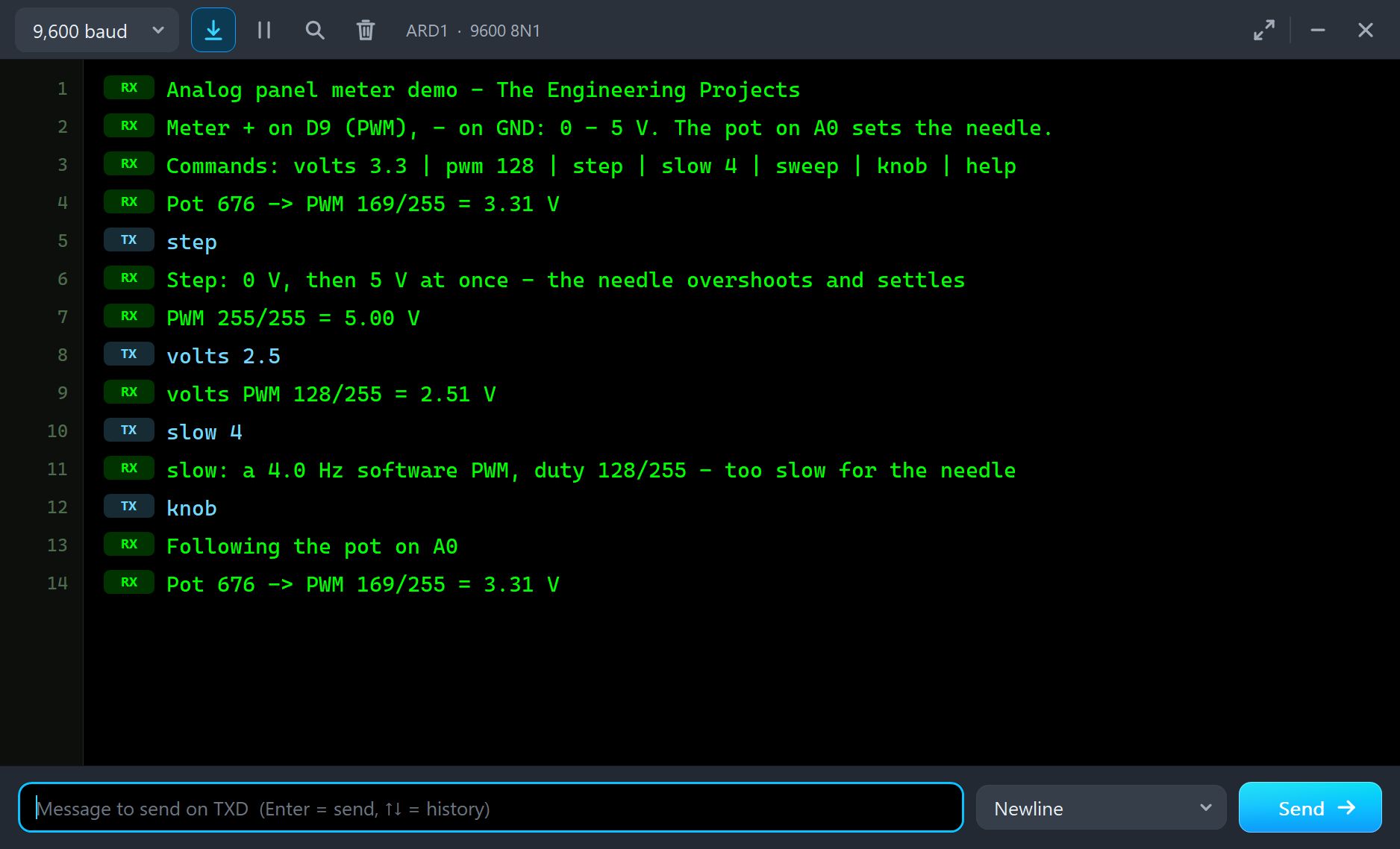
| Type | What it does | What the run showed |
|---|---|---|
| volts 3.3 | show that voltage (0 - 5 V) and stay; the pot is ignored until knob | volts 2.5: PWM 128/255, the needle at 2.50 V |
| pwm 128 | analogWrite(9, 128) directly (0 - 255) | |
| step | 0 V for 1.5 s, then 5 V at once | 4.98 V, settled in 0.79 s |
| slow 4 | the same duty as a 4 Hz software PWM | SHAKING: the needle swings 0.39 V |
| sweep | 0 to 5 V and back in about 4 s | |
| knob | follow the pot on A0 again | back to 3.30 V |
The Pop-Up Window
At Run the meter opens TEP Analog Panel Meter, a window in the look of our TEP Serial Monitor Advance for Proteus. It has four tabs - Meter, Graphs, Event log and Check - plus Settings and Help behind the gear and question mark icons; the palette icon switches between the dark and the light theme. If you close it, the OPEN PANEL button on the strip brings it back.
Meter
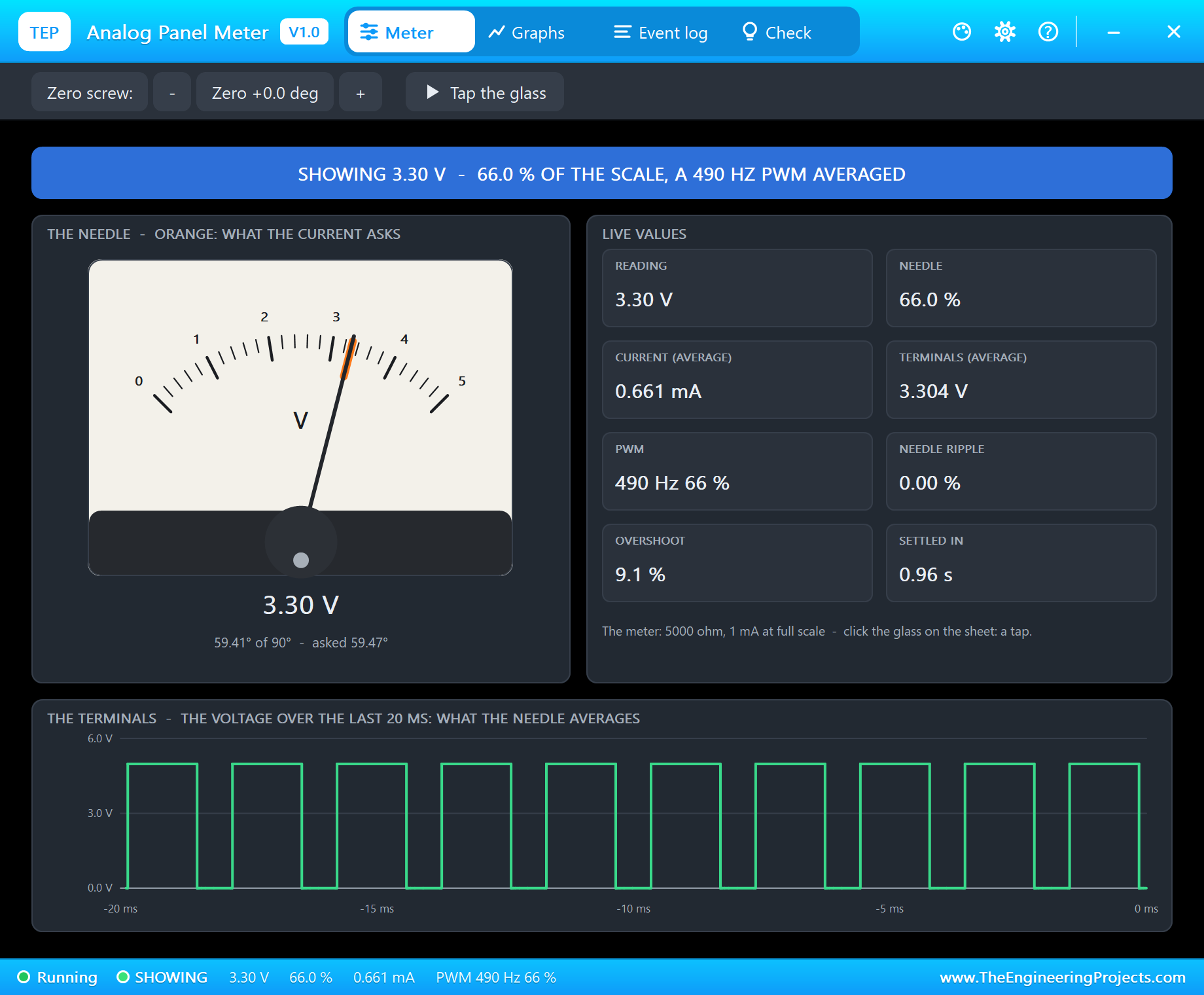
The banner gives the state: SHOWING the reading, MOVING, SHAKING, PEGGED, REVERSED or NO CURRENT. The dial on the left repeats the meter's face with the orange mark of what the current asks for, and the reading under it. On the right are the live values: the reading, the needle in percent, the average current and voltage at the terminals, the PWM, the needle's ripple, and the last move's overshoot and settling time.
At the bottom you see what the meter really receives: the terminal voltage over the last 20 milliseconds. It is not 3.30 V at all - it is a square wave jumping between 0 and 5 V, ten pulses in 20 ms, high two thirds of the time. The needle turns that into a calm 3.30 V. That picture is the whole idea of PWM in one chart.
The Step Response
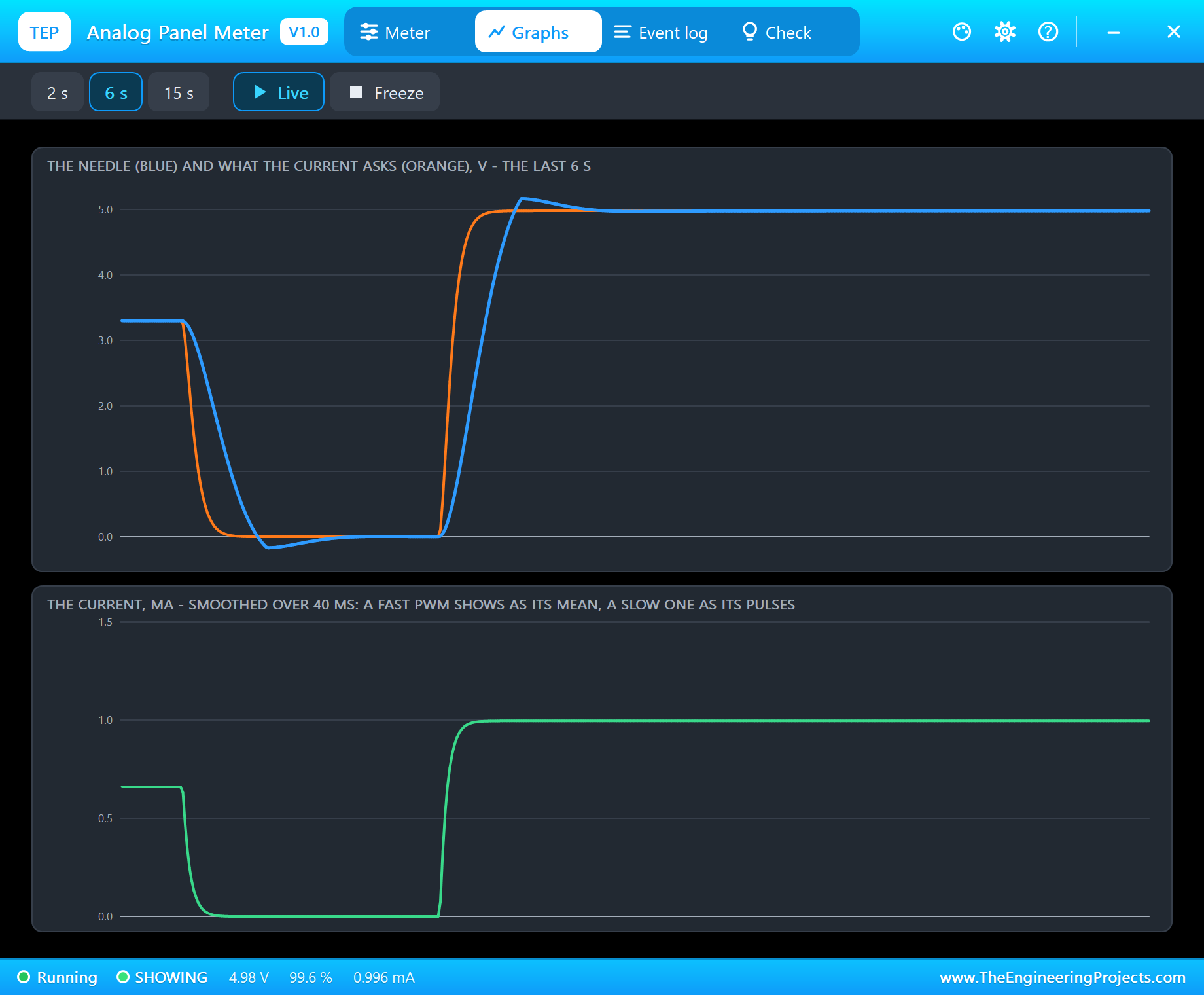
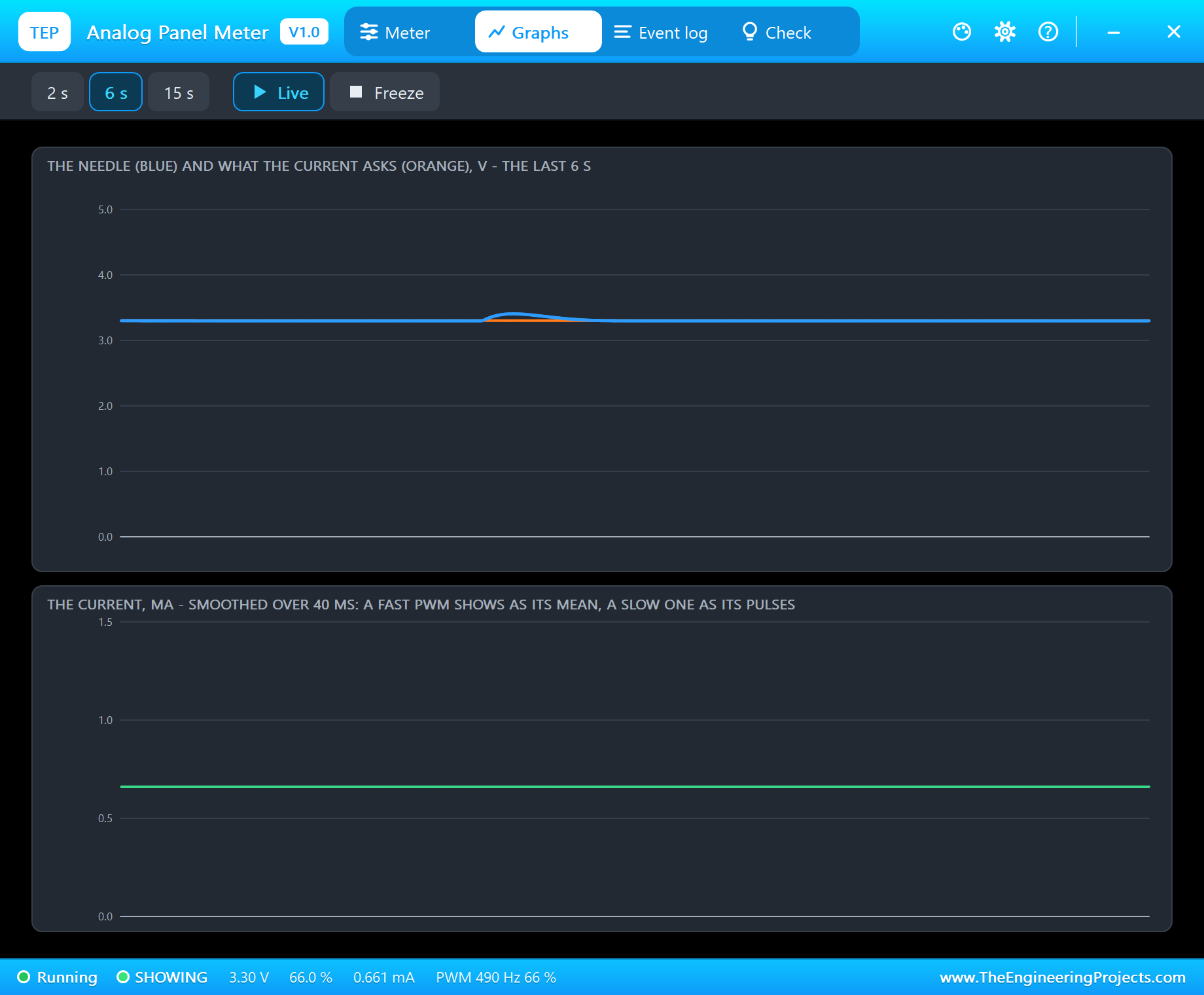
Graphs draws the needle (blue) and what the current asks for (orange) over the last 2, 6 or 15 seconds, and the current itself. Type step:
step
Step: 0 V, then 5 V at once - the needle overshoots and settles
PWM 255/255 = 5.00 V
The orange line jumps, the blue needle follows a moment later, swings a little past and settles. On the way down it even taps its 0 stop. On the way up it reached 4.98 V in 0.79 s, but the overshoot was only 3.8 %: a 9 % swing above full scale would need 98 degrees, and the needle runs into its 93 degree end stop first. Real meters do exactly this, which is why makers leave a few degrees of room past the last mark.
A PWM Too Slow for the Needle
Now the classic mistake. Type volts 2.5 and then slow 4:
volts 2.5
volts PWM 128/255 = 2.51 V
slow 4
slow: a 4.0 Hz software PWM, duty 128/255 - too slow for the needle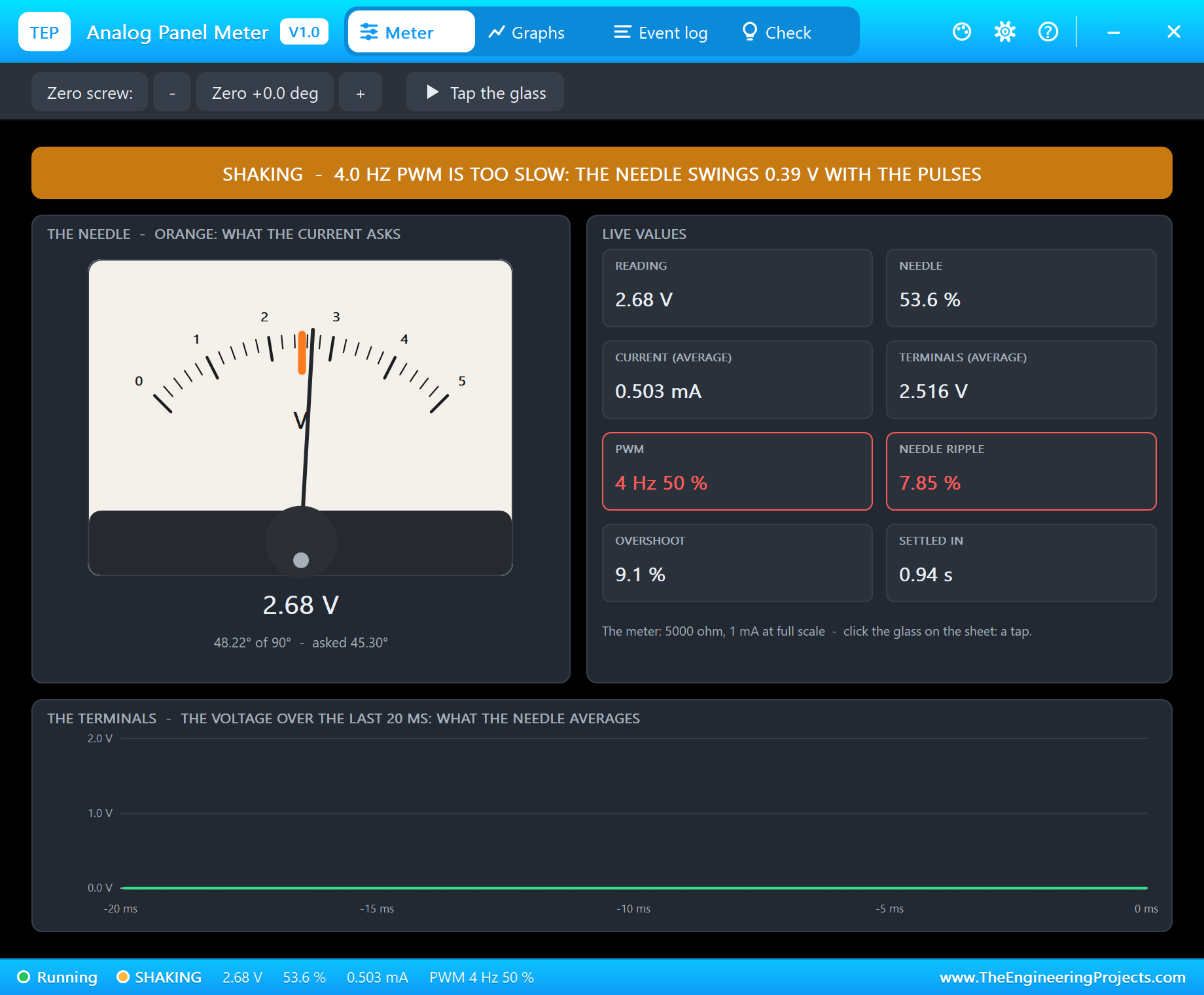
The duty is the same 50 %, but the pin now switches only four times a second. That is close to the movement's own natural frequency, so the needle can follow each pulse: it swings up and down by about 0.39 V, 7.85 % of the scale. The banner turns amber - SHAKING - and the PWM and ripple boxes turn red.
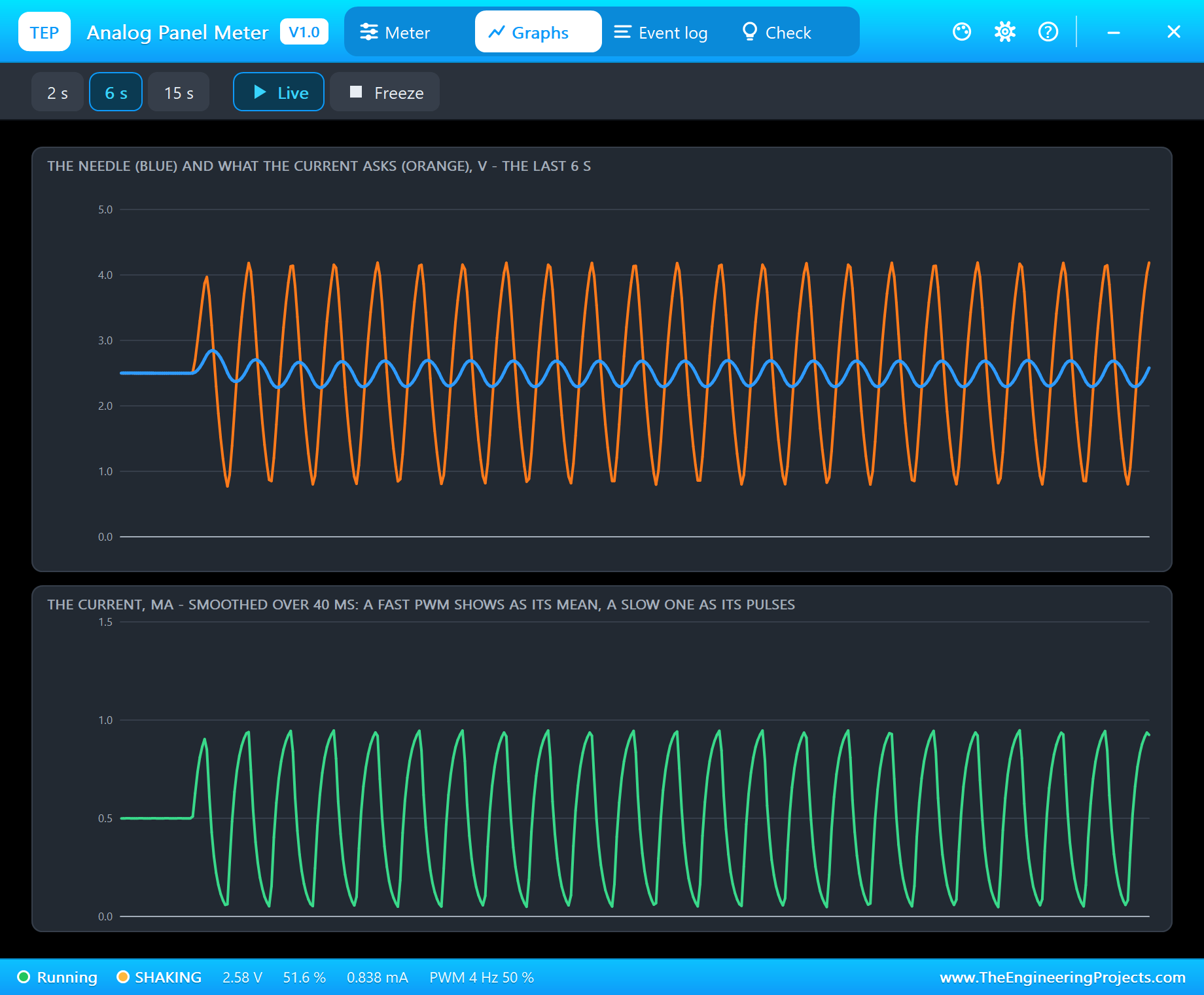
The Graphs page shows why. The current (green) is no longer a flat line but a train of pulses, and the orange line of what it asks for swings between them. The needle's inertia smooths the pulses only partly. The cure is simple: a PWM of 50 Hz or more, and analogWrite() on the UNO already gives 490 Hz. Type knob and the needle is calm again at 3.30 V.
The Zero Screw and a Tap on the Glass
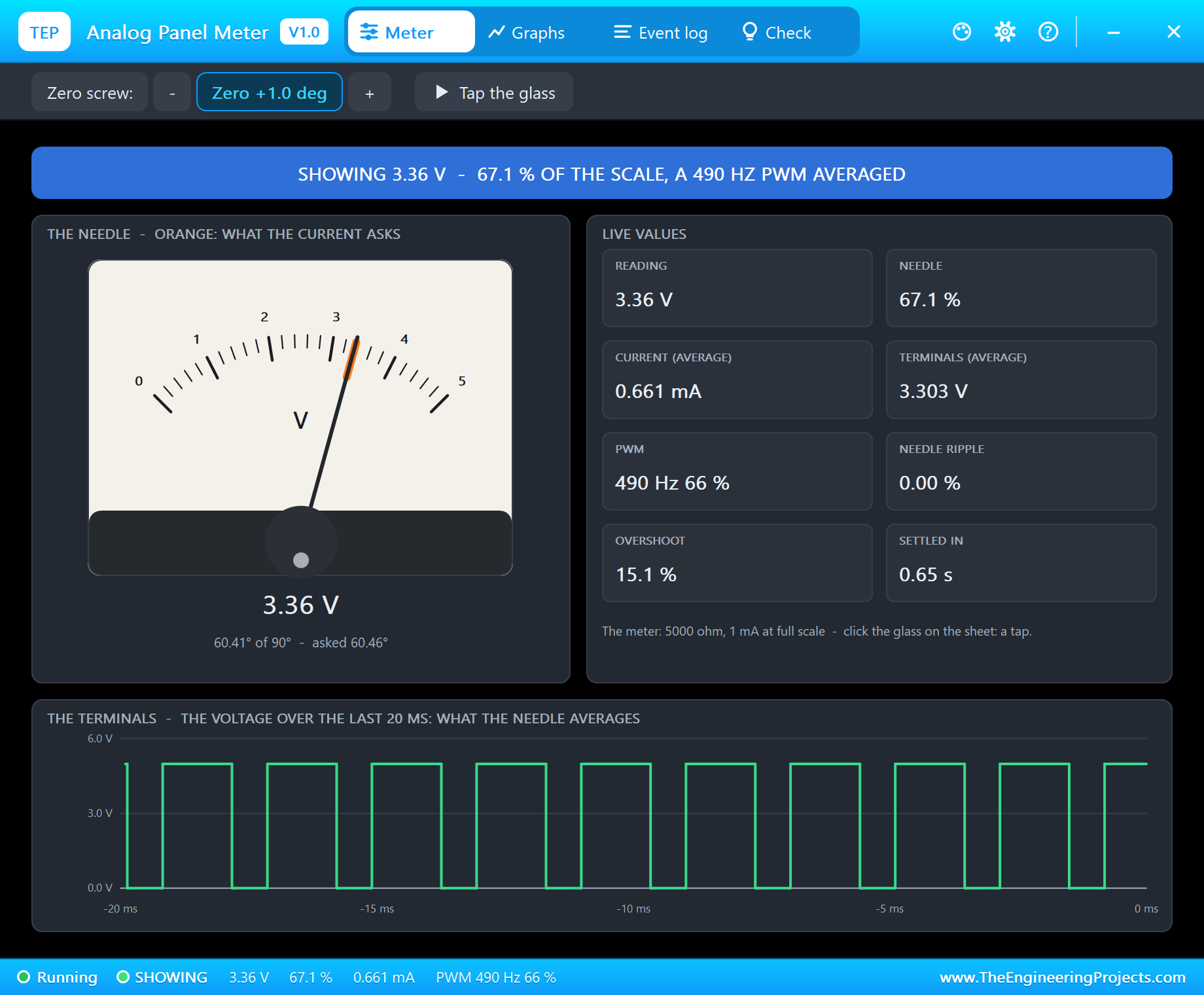
Every analog meter has a zero screw under the needle, and every analog meter drifts a little with time, temperature and position. On the pop-up's toolbar the Zero screw chips turn it in half-degree steps. Two clicks of + put the zero at +1.0 degree: the needle now shows 3.36 V while the terminals still carry 3.30 V - an error of 1.11 % of the scale that no amount of careful code will fix. Set the zero before you trust the reading.
Tap the glass - the chip on the pop-up, or a click on the meter's face on the schematic - gives the needle a small kick, as an engineer's finger does on a real panel. The needle jumps and the damping pulls it back to 3.30 V within about a second. On a real meter a tap also frees a needle that sticks on its pivots.
Event Log and Check
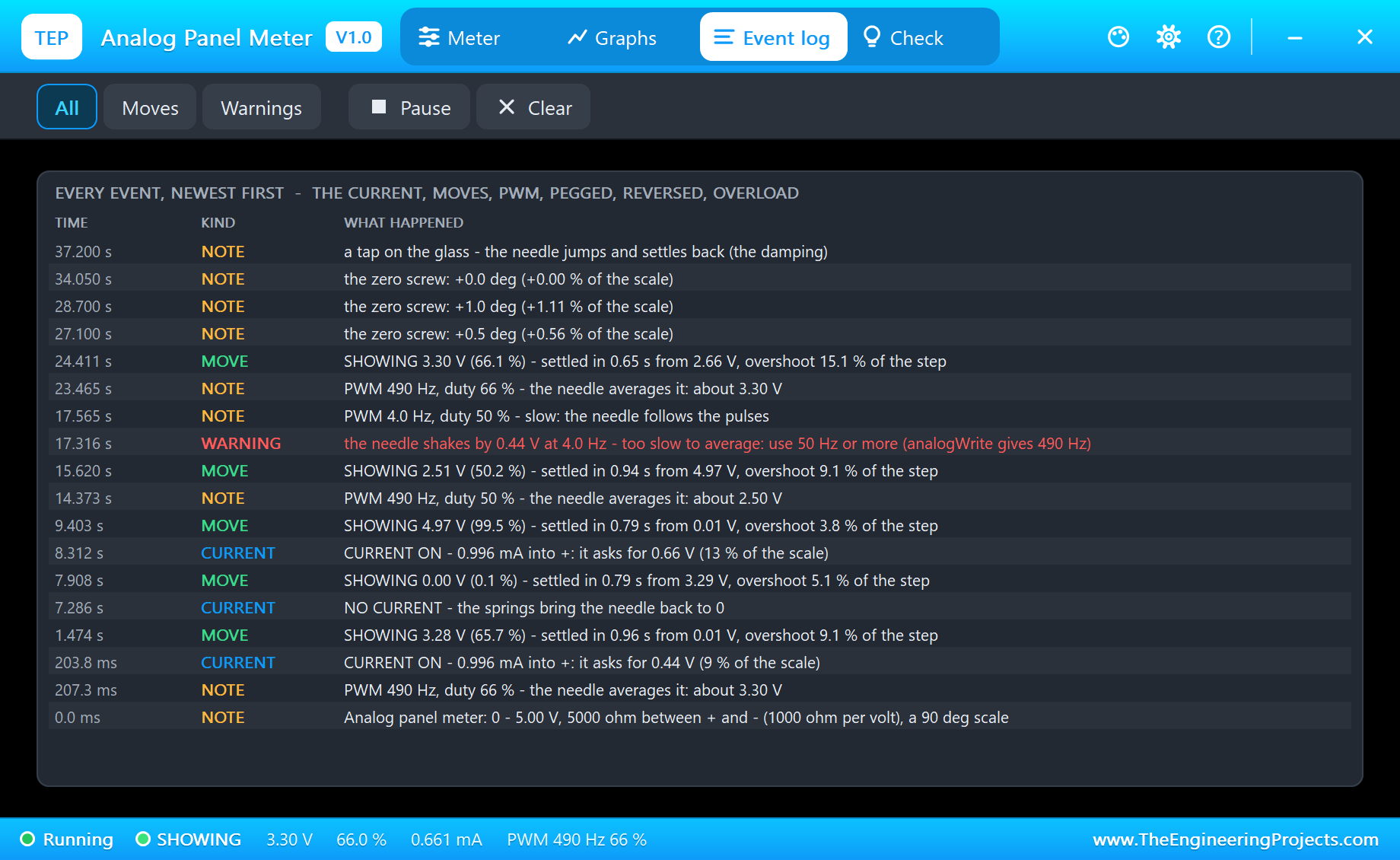
The Event log keeps the run with the simulation time: CURRENT ON and NO CURRENT, the PWM seen ("PWM 490 Hz, duty 66 % - the needle averages it: about 3.30 V"), every move as it settles ("SHOWING 3.28 V (65.7 %) - settled in 0.96 s from 0.01 V, overshoot 9.1 % of the step"), the shaking warning, the zero screw and the taps. Filter it by moves or warnings, pause it or clear it.
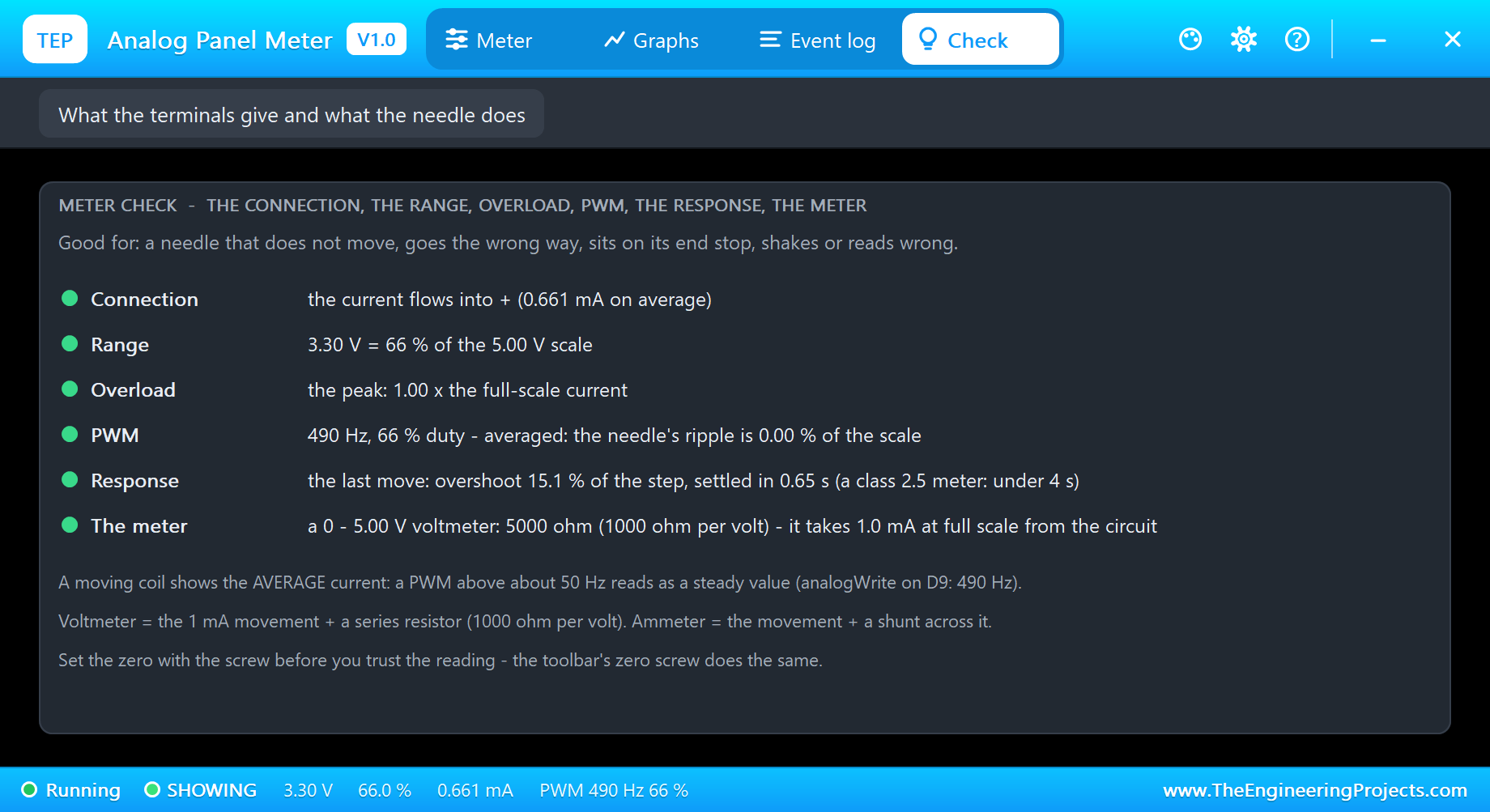
The Check page answers the forum questions in one look, each row with a verdict - green for fine, amber to check, red for wrong: the connection (is the current flowing into +, or reversed?), the range (inside the scale, too low to read well, or pegged?), overload, the PWM (averaged or shaking), the response of the last move, and the meter itself with its resistance and the current it takes from your circuit.
How the Model Works
The terminals are a plain resistance in the analog circuit - 5000 ohm for the 0 - 5 V meter - so Proteus solves the current together with whatever drives it. At every accepted analog point the needle follows that current in 0.2 ms steps: the torque of the current, the springs, the inertia, the damping, a little pivot friction and the two end stops. The analog step is held to 2 ms while the needle moves and 10 ms at rest; a PWM's edges add their own points.
The model then reads its own terminals. The current's average is what the needle is asked to show. The edges give the PWM's frequency and duty. Each move is timed from its start until the needle stays inside 1 % of the scale, and its overshoot measured against the step. Nothing in the model looks at the sketch; it knows only its two terminals, exactly like the real meter.
We checked it on a PC with 16 automatic tests: a 3.3 V step behind a pin's 25 ohm reads 3.283 V with a 9.2 % overshoot - the ideal second-order value is 9.5 % - and settles in 0.97 s; analogWrite 168 at 490 Hz reads 3.278 V with a ripple of 0.011 %; a 4 Hz PWM shakes the needle; 6 V on the 5 V meter pegs it; -2 V reverses it; 11 V is an overload; and a 0 - 20 mA ammeter is 5 ohm and reads 10 mA. Three more tests render the pop-up pages, and the demo project is read back from disk with 48 checks.
Troubleshooting
- The needle never moves (NO CURRENT): + or - is not connected, or the pin is not an output or never written.
- The needle pushes left against its stop (REVERSED): + and - are swapped.
- The needle sits on the right stop (PEGGED): the value is over RANGE - a bigger RANGE, or a divider in front of the meter.
- The needle shakes (SHAKING): the PWM is too slow for it - use analogWrite or anything above about 50 Hz.
- The reading is a little off: check the zero and the PWM's duty; the Check page shows both.
- No needle, no UNO or no monitor:
TEPMETER.DLLorTEPARDUINO.DLLis missing from MODELS and the project folder; a closed monitor opens again with a click on the UNO's USB port.
Things to Know Before Using a Real Panel Meter
- Check what is inside: a "0 - 5 V" meter has its resistor built in; a bare 1 mA or 100 uA movement needs a series resistor, or the needle slams into its stop and the coil can burn.
- Ammeters have a shunt of a fraction of an ohm: never put one straight across a supply.
- Use a fast PWM: analogWrite is fine; a slow software PWM makes the needle shake.
- Mount it as the dial says (upright or flat) and set the zero with the screw before you trust it.
- Want a stepper-driven needle instead? Our X27.168 Speedometer Gauge Library for Proteus moves a car-style gauge needle with the X27.168 stepper.
Limitations of the Simulation
- Not modelled: AC meters (moving-iron or rectifier movements), the scale's own non-linearity, temperature, the movement's back-EMF and the spread from meter to meter.
- The plate, the LED, the strip, the zero-screw chips and the tap are TEP additions.
- The model is our own, written from the typical data of moving-coil panel meters; this library is not made or endorsed by any meter maker, Arduino or Labcenter.
- Licences: the demo HEX contains the Arduino AVR core 1.8.6 (LGPL); the sketch is included and the README gives the source link. The potentiometer is Proteus's own.
- Tested in Proteus 8.5 in October 2026 with the demo as shipped: the pot, step, volts 2.5, slow 4, knob, the zero screw, a tap and all four pages of the pop-up. Proteus 7 is not supported.
So, that was all about the Analog Panel Meter Library for Proteus V1.0. I hope it helps you put a real needle on your next power supply, battery tester or retro dashboard - and see in Proteus first why the PWM must be fast, why the zero matters and how a needle swings. If you have any questions, ask in the comments and I will help you out. Till the next tutorial, take care and have fun!