Hello friends, I hope you all are doing great. Today, I am going to share the new X27.168 Speedometer Gauge Library for Proteus V1.0. Look at the dashboard of almost any car built in the last twenty years: behind each needle of the speedometer, the rev counter, the fuel gauge and the temperature gauge sits a tiny stepper motor the size of a coin. The X27.168 is the version of that motor makers sell to the rest of us, and it has become the favourite way to put a real needle on an Arduino project.
X27.168 Speedometer Gauge Library for Proteus
Latest version: V1.0 (October 2026, this tutorial)
Other motors: SG90 Servo · TT Gear Motor · 28BYJ-48 Stepper · NEMA 17 Stepper · MG996R Servo · N20 Encoder Motor · JGA25-370 Encoder Motor · FS90R 360 Servo · 130 DC Motor · A2212 Brushless · Analog Panel Meter · DC Tachogenerator · LM393 Speed Sensor · MG90S Servo · DS3218 Servo · L12 Linear Servo · JGB37-520 Motor · RS-775 Motor · JGY-370 Worm Motor · 12V Linear Actuator · Coin Vibration Motor · Mini Submersible Water Pump · 12V Peristaltic Pump · 4-Pin PC Fan · 12V Push-Pull Solenoid · NEMA 23 Stepper Motor · Micro Linear Stepper · TYJ50 Synchronous Motor · Quartz Clock Movement · Air-Core Gauge · Electromechanical Counter · Split-Flap Display · Electric Bell · Wind Turbine · 8520 Coreless Motor · Car Wiper Motor · Car Door Lock Actuator · 12V Solenoid Water Valve · 12V Holding Electromagnet
Motor drivers: L298 · L9110S · TB6612FNG · BTS7960 · A4988 / DRV8825 · 28BYJ-48 + ULN2003 · PCA9685 Servo · Relay Module · 30A Brushless ESC · TB6600 Stepper Driver
Helping Tools
- Serial Monitor Advance: a serial terminal window for the UART of your board
- Serial Monitor Expert: the serial monitor with extra debugging tools
- LCD Library for Proteus V3.0: 16x2, 20x4 and I2C LCDs to show your readings
This library brings the X27.168 into Proteus with a speedometer dial on top. Its two coils sit in your circuit with their resistance, inductance and back-EMF, so four Arduino pins drive it directly, just like on the bench. The needle turns to the simulated angle on your schematic, it stops at its real end stops, it needs the zeroing every gauge sketch does at power-up, and, if you step it too fast or hold the needle with a finger, it loses steps and shows the wrong speed. A pop-up window explains everything it sees. The demo runs on our Arduino UNO V4.0 with a potentiometer as the speed of the car.
NOTICE: a gauge looks simple - a needle that points at a number - but the motor behind it has no idea where its needle is. We built a model that knows only what the real one knows: the currents in its two coils. Everything else, from the zeroing to the lost steps, follows from that. It took our team a lot of hard work. Your feedback is the fuel that keeps us going, so please tell us what you think in the comments below or in the Motor Driver board of our forum. And if our free libraries help you, you can buy us a coffee. So, let's get started with the X27.168 Speedometer Gauge Library for Proteus V1.0:
What is the X27.168 Gauge Stepper?
The X27.168 belongs to the Switec X25 family of instrument-cluster motors. Inside one small case are a two-coil stepper motor and a 180 : 1 gear train: the rotor is a small two-pole magnet that turns 180 times for one turn of the needle shaft. Because the gear is so high and the coils have 260 ohm each, the motor needs only a few milliamps and can be driven straight from microcontroller pins, with no driver chip at all. The needle swings over 315 degrees between two built-in end stops.
| X27.168 (the model) | |
|---|---|
| Type | two-coil stepper motor with a 180 : 1 gear train in one case |
| Coils | two, 260 ohm each, their axes 60 degrees apart |
| Drive | four microcontroller pins, about 19 mA a coil at 5 V |
| Step | 1/3 degree of the needle per partial step (the 6-state sequence) |
| Sweep | 315 degrees between two end stops = 945 steps |
| Pins | 1 = A+, 2 = A- (coil A), 3 = B+, 4 = B- (coil B) |
Two Coils 60 Degrees Apart
A normal two-phase stepper such as the NEMA 17 has its coils 90 degrees apart. The X27.168 places them only 60 degrees apart. That small change allows a neat trick: with each coil either forward, off or reversed, there are exactly six combinations whose magnetic field points in six directions, 60 degrees apart, and with the same strength every time. Step through them in order and the field turns smoothly round the circle; the magnet rotor follows it.
The Six-State Partial Step
Those six combinations are the famous 6-state partial-step sequence of the SwitecX25 Arduino library. Each state is a pattern of the four pins - bit 0 is A+, bit 1 is A-, bit 2 is B+ and bit 3 is B-. When both pins of one coil are equal, that coil carries no current:
| State | A+ A- B+ B- | Coil A | Coil B | Field |
|---|---|---|---|---|
| 0x9 | 1 0 0 1 | forward | reversed | -60 degrees |
| 0x1 | 1 0 0 0 | forward | off | 0 degrees |
| 0x7 | 1 1 1 0 | off | forward | 60 degrees |
| 0x6 | 0 1 1 0 | reversed | forward | 120 degrees |
| 0xE | 0 1 1 1 | reversed | off | 180 degrees |
| 0x8 | 0 0 0 1 | off | reversed | 240 degrees |
One state turns the field, and so the rotor, by 60 degrees. Through the 180 : 1 gear that is 1/3 degree of the needle. Three steps make one degree, and the full sweep of 315 degrees takes 945 steps. Going up means the next state in the list, going down the one before.
A Gauge Never Knows Where Its Needle Is
The motor has no sensor. When the power comes on, the needle can be anywhere - wherever it was left. That is why every gauge sketch starts with the zeroing: it sends more steps down than the whole scale, so whatever the needle showed, it ends pressed against its 0 stop. The extra steps are simply lost against the stop, and from there the sketch counts. A real car cluster does the same thing when you switch on the ignition, and then often sweeps all its needles to the end and back as a self-test. Our demo does both.
What's New in X27.168 Speedometer Gauge Library for Proteus V1.0
- A gauge motor of its own: the X27.168 with a speedometer dial, driven straight from four pins - no driver, no extra library.
- Coils in the circuit: 260 ohm, 30 mH and the back-EMF of each coil, solved by Proteus together with the pins.
- The physics of the rotor: the torque of both coils on the magnet, the 180 : 1 gear, inertia, friction and the end stops at 0 and 315.4 degrees. It follows a ramp, and it loses steps when you step it too fast or hold the needle.
- It reads the coils: the position in steps, the step rate, the zeroing, lost steps, one coil missing and the current against a pin's 20 mA.
- A needle that turns on the schematic, an orange mark where the coils ask it to be, and two coil LEDs that show the direction of each current.
- A finger on the needle: click the dial and the needle is held, so you can watch the steps get lost.
- A pop-up window with four pages - Gauge, Graphs, Event log and Check.
- A full release: the zip with the library, our Arduino UNO V4.0 and an A4 demo, tested in Proteus.
The X27.168 in Proteus
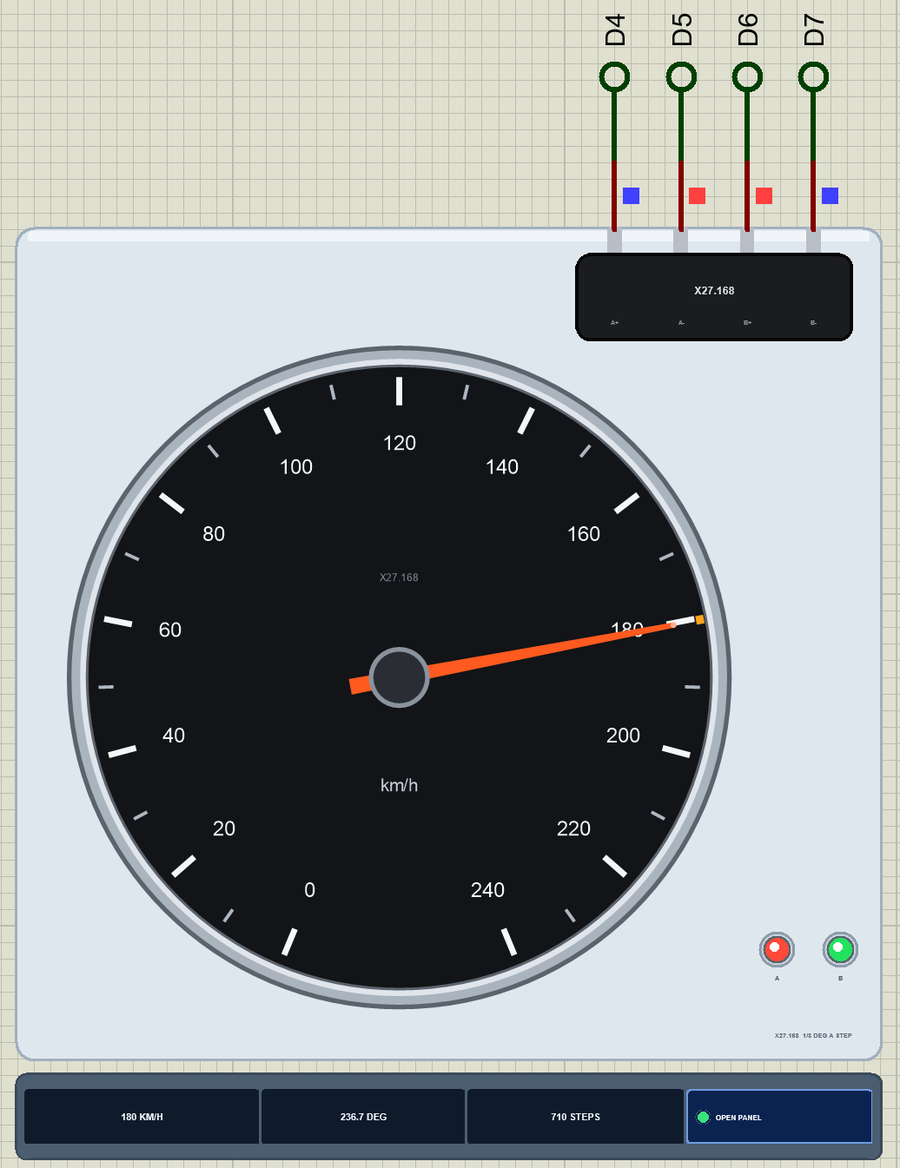
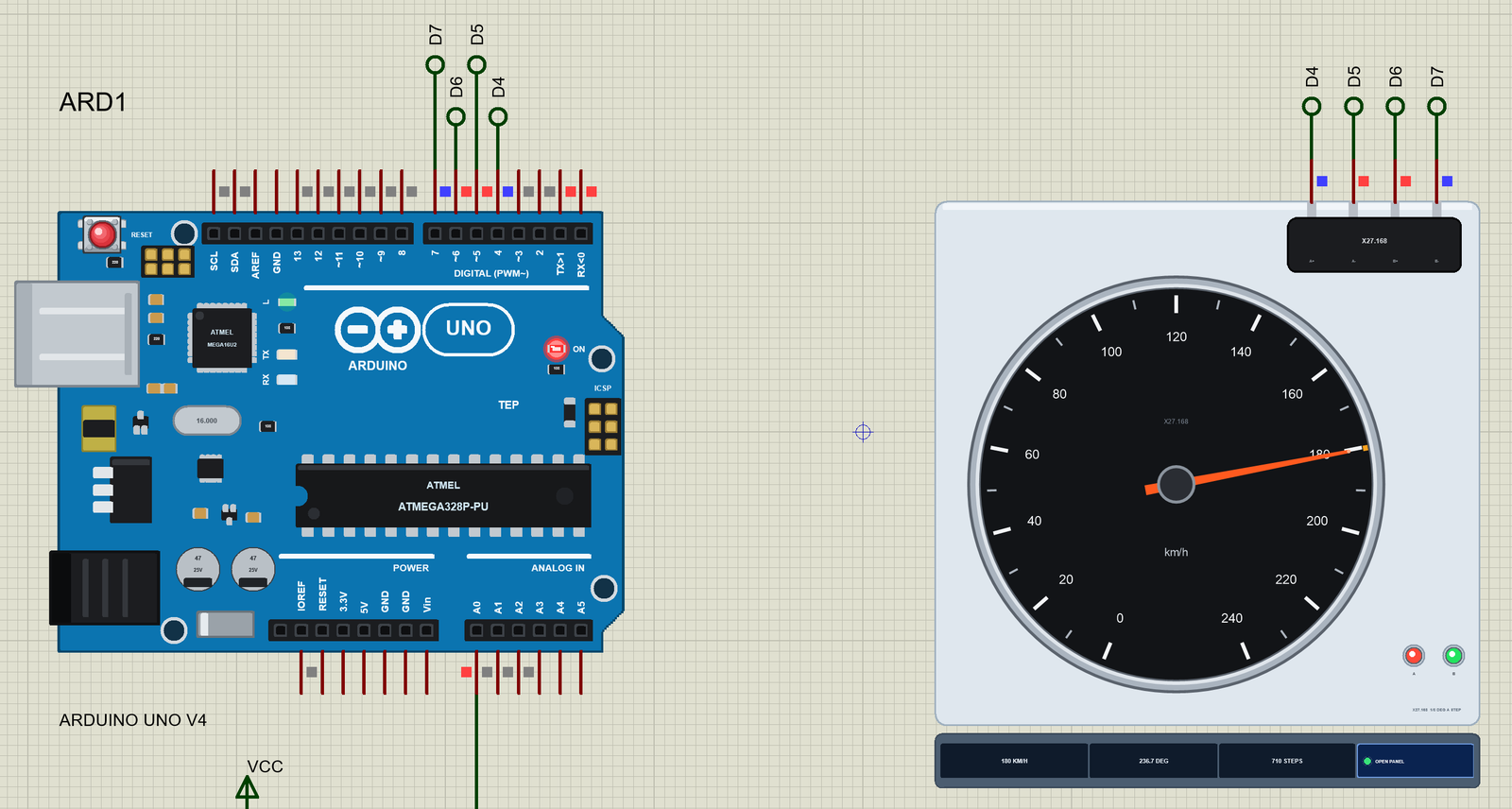
Search X27 in Pick Devices; the device X27168TEP is in TEPX27.LIB (category Electromechanical, Stepper Motors) and its model is TEPX27.DLL. It is drawn as a small instrument: a white plate with a black speedometer dial from 0 to 240 km/h over the 315 degree sweep, and in the corner the black X27.168 motor body with its four pins A+, A-, B+ and B- on top.
The red-orange needle turns to the simulated angle. A small orange mark on the rim shows where the coils ask the needle to be; normally it hides under the tip, but when steps are lost the two part company. The coil LEDs A and B light green while the coil's current flows from + to - and red when it flows the other way, so when the needle moves you see them change in the six-state rhythm. Under the plate the strip shows the speed, the angle and the steps, and the OPEN PANEL button. The plate, the dial, the LEDs and the strip are TEP additions; the real X27.168 is the bare motor, and you print or buy the dial for it.
The Pins and the Properties
| Pin | What the model does with it |
|---|---|
| A+ / A- | coil A: 260 ohm, 30 mH and its back-EMF in the circuit |
| B+ / B- | coil B: the same, its axis 60 degrees from coil A |
| Property | Default | What it does |
|---|---|---|
| SCALE | 240 | the speed at the end of the dial in km/h; the numbers on the dial follow it |
| START | 0 | the needle's angle at the start, 0 - 315 degrees - start it at 120 to watch the zeroing bring it back |
A Click on the Dial: a Finger on the Needle
Click the dial while the simulation runs and you put a finger on the needle: a holding torque of 3 mN.m, more than the little motor can give. Click again to let go. The same switch is the Hold it chip on the pop-up. It is the easiest way to see the most important fault of every open-loop stepper, and we will use it in the demo below.
Download X27.168 Speedometer Gauge Library for Proteus
Click the button below to download X27.168-Speedometer-Gauge-Library-for-Proteus-v1.0.zip (about 1.2 MB, without the source code of the models):
X27.168 Speedometer Gauge Library for Proteus V1.0- README.txt: installation, the demo, the wiring, the properties, real hardware, troubleshooting and the limits.
- Proteus Library Files:
TEPX27.LIBandArduinoV4TEP.LIBfrom our Arduino Library for Proteus V4.0. - Proteus Model Files:
TEPX27.DLLandTEPARDUINO.DLL. - Proteus Simulation:
X27-Speedometer-Gauge-ArduinoUnoV4.pdsprj,X27_Speedometer_Demo.hexand copies of the two DLLs. - Arduino Code:
X27_Speedometer_Demo.ino(no library needed).
No Proteus yet? Read How to Download and Install Proteus 7 and 8. New to libraries? Follow How to Install a New Library in Proteus.
How to Install X27.168 Speedometer Gauge Library for Proteus
- Close Proteus and extract the whole zip file, for example to your Desktop.
- Copy
TEPX27.LIBandArduinoV4TEP.LIBfrom Proteus Library Files into the LIBRARY folder of Proteus (usuallyC:\Program Files (x86)\Labcenter Electronics\Proteus 8 Professional\LIBRARY). - Copy
TEPX27.DLLandTEPARDUINO.DLLfrom Proteus Model Files into the MODELS folder. The two Arduino files are the ones of our Arduino Library V4.0; if you have it, they are the same. - Delete
TEPX27.IDXfrom the LIBRARY folder if it is there. - Start Proteus, press P and search for X27.
Tip: keep the Proteus Simulation folder together, because the project needs its .hex file and the DLLs beside it. The library is tested in Proteus 8.5; Proteus 7 is not supported.
The Demo Circuit
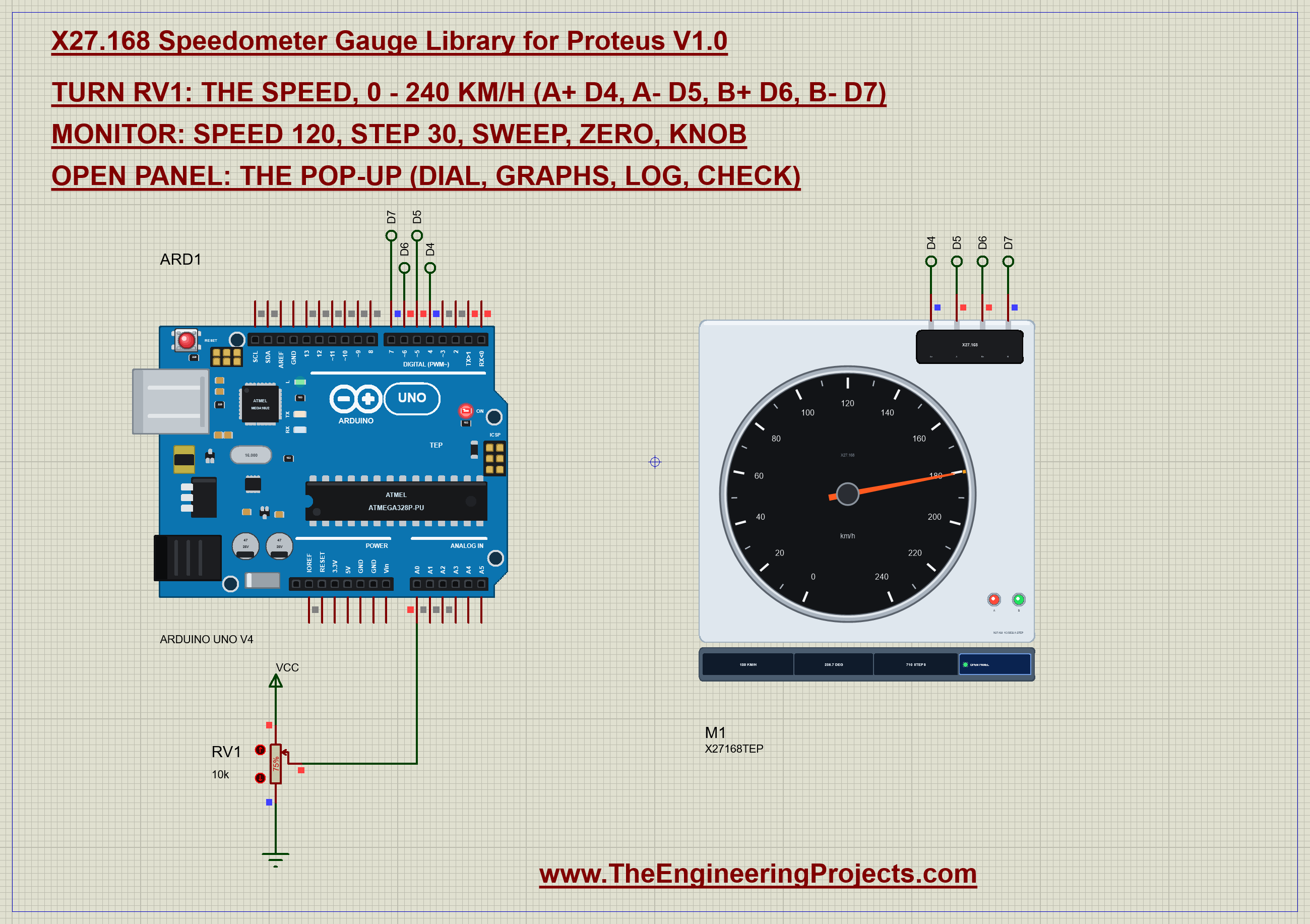
Open X27-Speedometer-Gauge-ArduinoUnoV4.pdsprj. It is a small circuit on an A4 sheet. ARD1 is an Arduino UNO V4.0 from our Arduino UNO Library for Proteus V4.0, running X27_Speedometer_Demo.hex with its serial monitor built in. M1 is the X27.168 gauge, and RV1 is a 10k potentiometer on A0: it plays the speed of the car, from 0 to 240 km/h.
| X27.168 pin | Arduino UNO | Note |
|---|---|---|
| 1 (A+) | D4 | coil A between pins 1 and 2 |
| 2 (A-) | D5 | |
| 3 (B+) | D6 | coil B between pins 3 and 4 |
| 4 (B-) | D7 | |
| RV1 ends / wiper | 5V, GND / A0 | the speed |
In Proteus each gauge pin runs up to a net label - D4, D5, D6 and D7 - and the UNO's pins climb to the same labels, so the sheet stays clean. There is nothing else: no driver, no transistors, no diodes. The coils draw so little that the pins of the ATmega328P handle them directly. Any four digital pins work; the demo uses D4 - D7 because they sit side by side.
The Arduino Code
The demo needs no library at all: it writes the six states itself and makes its own ramp. New to Arduino? Start with Arduino Tutorial for Beginners and Introduction to Arduino UNO. The pins and the state table come first:
const int PIN_A_PLUS = 4, PIN_A_MINUS = 5, PIN_B_PLUS = 6, PIN_B_MINUS = 7;
const int POT_PIN = A0;
const int STEPS = 945;                                 // 315 deg
const long MAX_KMH = 240;                              // the dial's full scale
const byte STATE_MAP[6] = {0x9, 0x1, 0x7, 0x6, 0xE, 0x8};   // bit 0 = A+, bit 1 = A-, bit 2 = B+, bit 3 = B-
One function puts a state on the four pins, bit by bit. A step up is the next state, a step down the one before; the position counts along:
void writeState() {
  const byte m = STATE_MAP[state];
  digitalWrite(PIN_A_PLUS, m & 1);
  digitalWrite(PIN_A_MINUS, (m >> 1) & 1);
  digitalWrite(PIN_B_PLUS, (m >> 2) & 1);
  digitalWrite(PIN_B_MINUS, (m >> 3) & 1);
}
void stepUp() { state = (state + 1) % 6; position++; writeState(); }
void stepDown() { state = (state + 5) % 6; position--; writeState(); }
The zeroing sends 1000 steps down - 55 more than the whole scale - at 800 microseconds each. That is slow enough for the rotor to start from rest, and whatever the needle showed, it ends against its 0 stop. Then the position is set to 0:
void zero() {
  Serial.println(F("Zeroing: 1000 steps down against the 0 stop..."));
  for (int i = 0; i < STEPS + 55; i++) { stepDown(); delayMicroseconds(800); }
  position = 0; target = 0; run = 0;
}
The heart of the sketch is the ramp. The rotor is light, but it is a magnet with inertia: started at full speed it falls behind the field and slips. So update() makes one step when it is due, starting at 3000 microseconds a step, speeding up to 600 microseconds in the middle of a move and slowing down again near the target. A change of direction starts slowly again:
void update() {
  if (position == target) { run = 0; return; }
  if ((long)(micros() - nextStepAt) < 0) return;
  const int dir = target > position ? 1 : -1;
  if (dir != lastDir) { run = 0; lastDir = dir; }       // a turn: start slowly again
  if (dir > 0) stepUp(); else stepDown();
  const int edge = min(run, abs(target - position));
  const unsigned int us = max(600.0, 3000.0 / sqrt(1.0 + edge * 0.5));
  run++;
  nextStepAt = micros() + us;
}
Because update() never waits, the loop stays free to read the serial monitor and the pot while the needle moves. A speed becomes steps with one line - 945 steps for 240 km/h, rounded to the nearest step:
int stepsFor(long kmh) { return (int)((kmh * STEPS + MAX_KMH / 2) / MAX_KMH); } // rounded: 180 km/h = 709 stepsThe self-test sweep is the car-cluster greeting: up to the end of the dial, a short pause, and back to 0:
void sweep() {
  Serial.println(F("Self-test: the needle to the end of the dial and back"));
  moveTo(STEPS); wait(); delay(200);
  moveTo(0); wait();
}
In setup() the four pins become outputs and the first state is written, so the coils hold the rotor before anything moves. Then come the zeroing and the sweep:
void setup() {
  Serial.begin(9600);
  pinMode(PIN_A_PLUS, OUTPUT); pinMode(PIN_A_MINUS, OUTPUT); pinMode(PIN_B_PLUS, OUTPUT); pinMode(PIN_B_MINUS, OUTPUT);
  writeState();
Every 50 ms the loop reads the pot and turns it into a speed. Only a change of 2 km/h or more moves the needle, so the noise of the analog input does not make it tremble:
      const int raw = analogRead(POT_PIN);
      const long kmh = (long)raw * MAX_KMH / 1023;
      if (lastKmh < 0 || abs(kmh - lastKmh) >= 2) {
        lastKmh = kmh; moveTo(stepsFor(kmh));
The HEX file is in the package. To change the sketch, open it in the Arduino IDE and export the compiled binary, as in How to get the HEX file from Arduino. It needs 7,786 bytes of flash (24 % of the UNO) and 295 bytes of RAM. For an older look at stepper timing, our Stepper Motor Speed Control using Arduino tutorial is a good companion.
Running the Demo
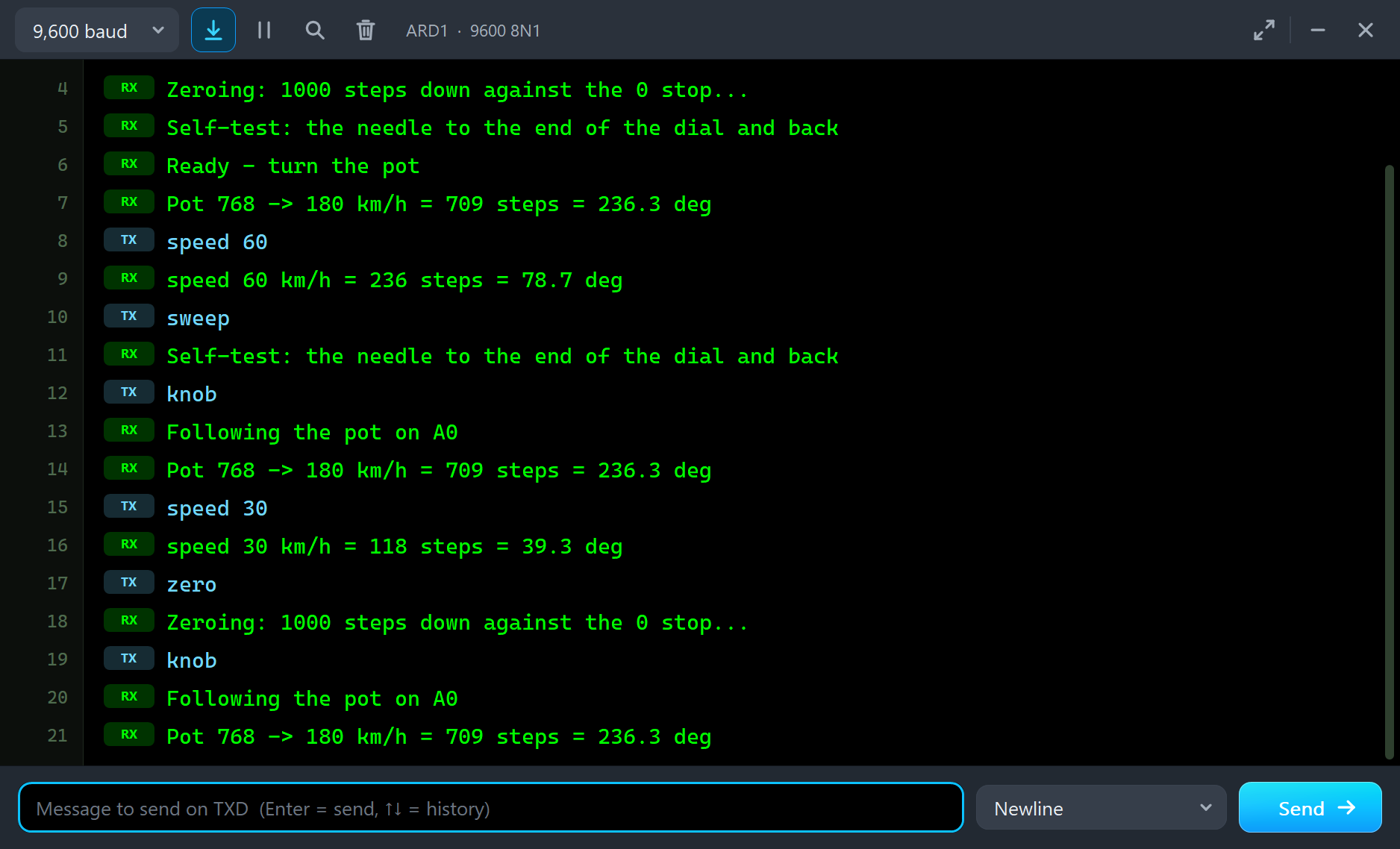
Press Run. The UNO's serial monitor and the gauge's pop-up open over the schematic; move them aside. The needle zeroes, sweeps to the end of the dial and back, and then goes to the speed of the pot. RV1 starts at 75 %:
X27.168 speedometer gauge demo - The Engineering Projects
A+ D4, A- D5, B+ D6, B- D7. The pot on A0 is the speed: 0 - 240 km/h.
Commands: speed 120 | step 30 | sweep | zero | knob | help
Zeroing: 1000 steps down against the 0 stop...
Self-test: the needle to the end of the dial and back
Ready - turn the pot
Pot 768 -> 180 km/h = 709 steps = 236.3 deg
The needle settles at 236.7 degrees, right on 180 km/h, and the coil LEDs show the state it holds: coil A at -16.7 mA (red) and coil B at 16.7 mA (green). Note that the needle stands one step above the count of 709 steps. After the zeroing the rotor rests on the first field position above the stop, so the whole scale sits 1/3 degree higher - a real gauge does exactly the same, and the printed dial hides it.
| Type | What it does | What the run showed |
|---|---|---|
| speed 120 | show that speed (0 - 240 km/h) and stay; the pot is ignored until knob | speed 60: 236 steps, the needle at 79.0 degrees |
| step 30 | 30 steps up from the target (step -30 goes down), kept in 0 - 945 | |
| sweep | the self-test: to the end of the dial and back | up to 315.3 degrees and back to 0.3 |
| zero | 1000 steps down against the 0 stop, then count from 0 | ZEROED again in the Event log |
| knob | follow the pot on A0 again | back to 236.7 degrees |
| help | the list of commands |
Type speed 60 and the needle ramps down to 60 km/h:
speed 60
speed 60 km/h = 236 steps = 78.7 deg
The Pop-Up Window
At Run the gauge opens TEP X27.168 Speedometer Gauge, a window in the look of our TEP Serial Monitor Advance for Proteus. It has four tabs - Gauge, Graphs, Event log and Check - plus Settings and Help behind the gear and question mark icons; the palette icon switches between the dark and the light theme. If you close it, the OPEN PANEL button on the strip brings it back.
Gauge
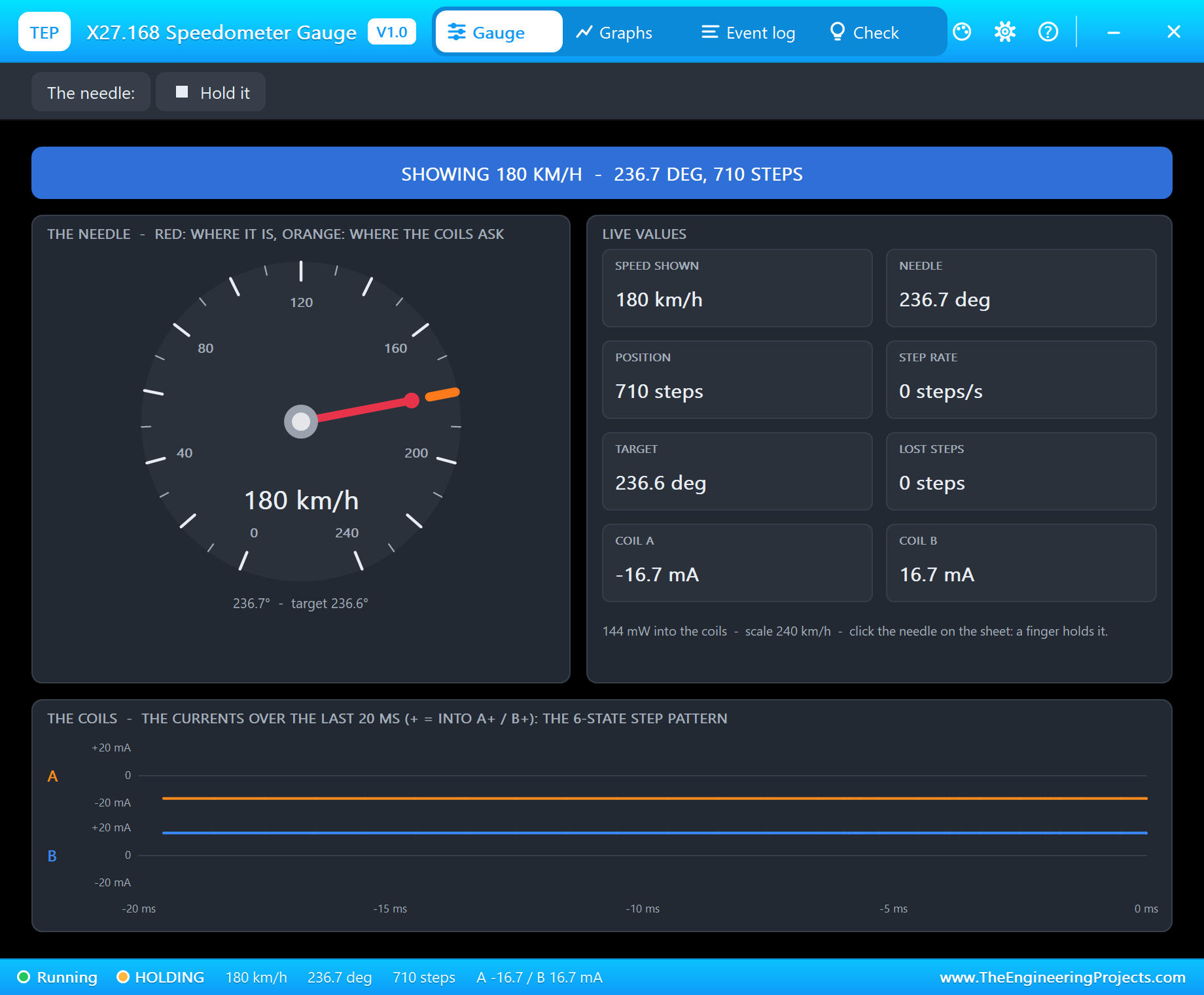
The banner gives the state in big letters: SHOWING the speed with the angle and the steps, MOVING UP or DOWN, AT THE 0 STOP during the zeroing, LOSING STEPS, or RELEASED when no coil carries current. On the left a large copy of the dial shows the needle in red and the place the coils ask for in orange. On the right are the live values: the speed shown, the needle angle, the position in steps, the step rate, the target, the lost steps and the two coil currents.
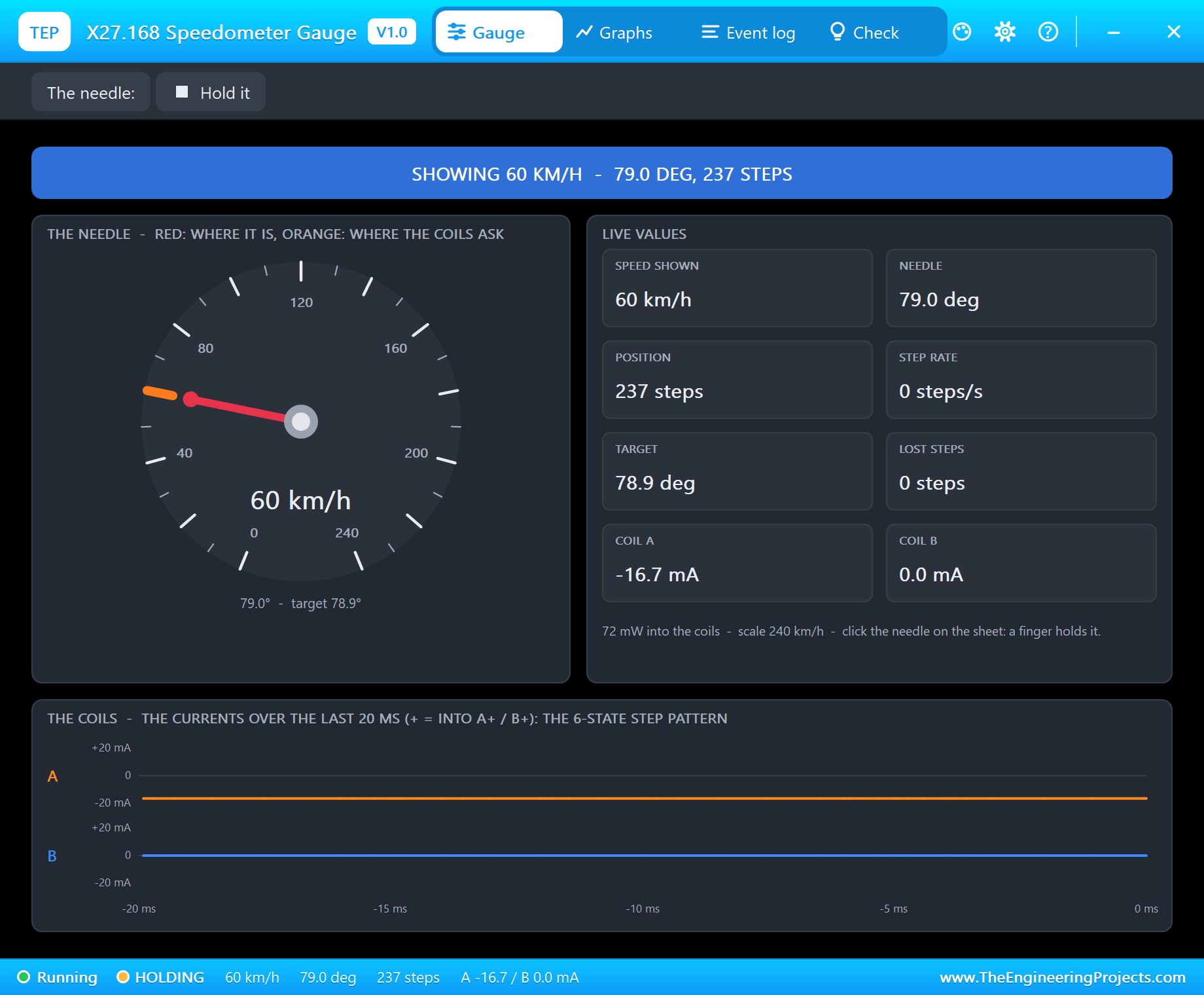
At the bottom the two coil currents are drawn over the last 20 milliseconds, each on its own row with its plus and minus scale. At 60 km/h the motor rests in a state where only coil A carries current - one of the six states, as the table above shows. While the needle moves, the rows turn into the stepped pattern of the sequence: forward, off, reversed, off, forward, in two rows a third of a cycle apart.
Graphs
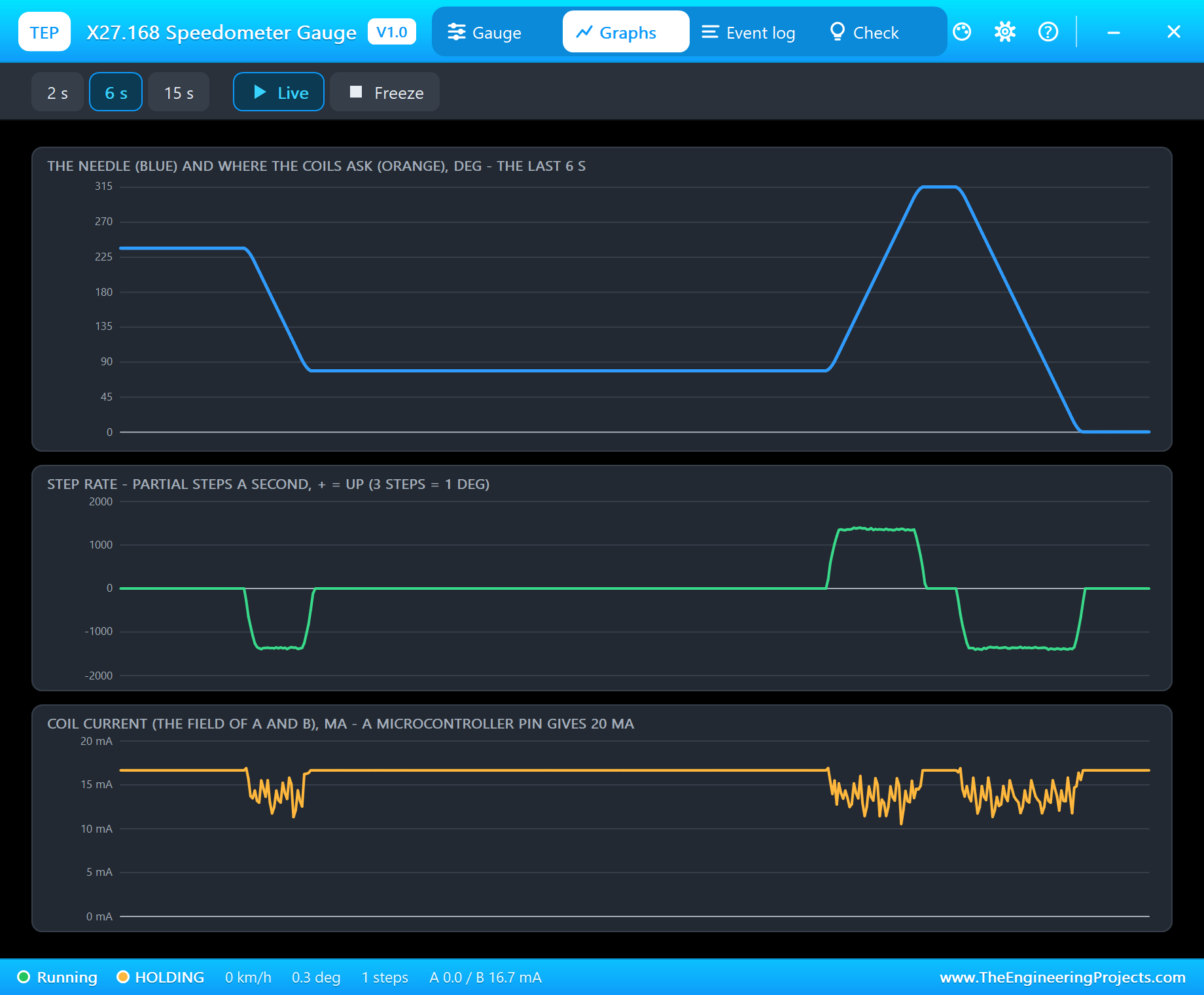
Graphs draws three traces over the last 2, 6 or 15 seconds: the needle angle (blue) on top of the angle the coils ask for (orange), the step rate in partial steps per second, and the coil current. Every ramped move shows as a clean slope with rounded ends, and the step rate as a flat-topped block at about 1400 steps per second - the 600 microsecond top speed of the sketch, 467 degrees per second at the needle. The current drops a little while the needle moves, because the coils' inductance and the back-EMF of the turning magnet slow its rise at each step.
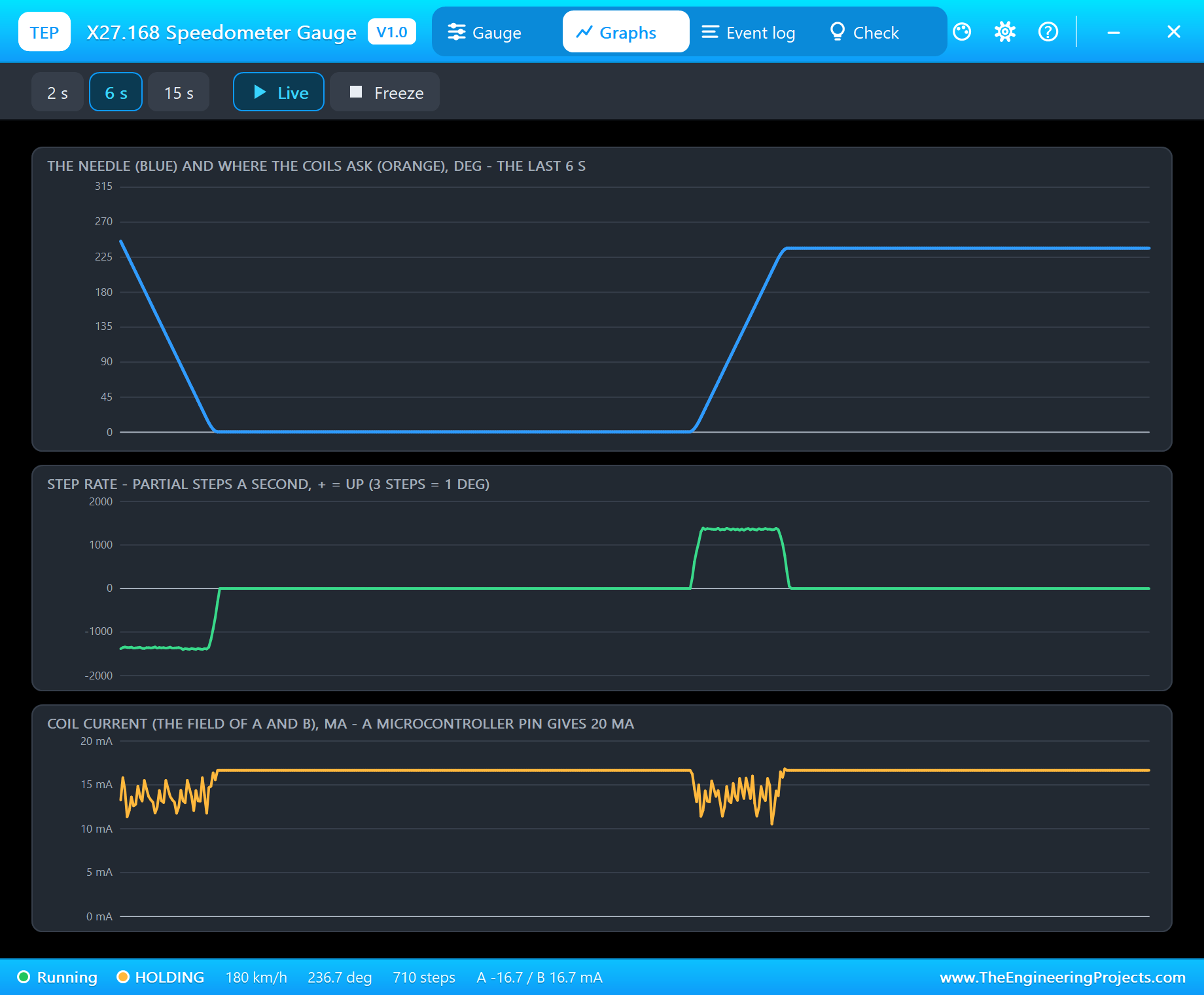
Freeze holds the page so you can study a move; Live lets it run again. While the needle follows the coils, the blue and orange traces lie on top of each other - you see only one line. Keep that in mind for the next section.
Event Log
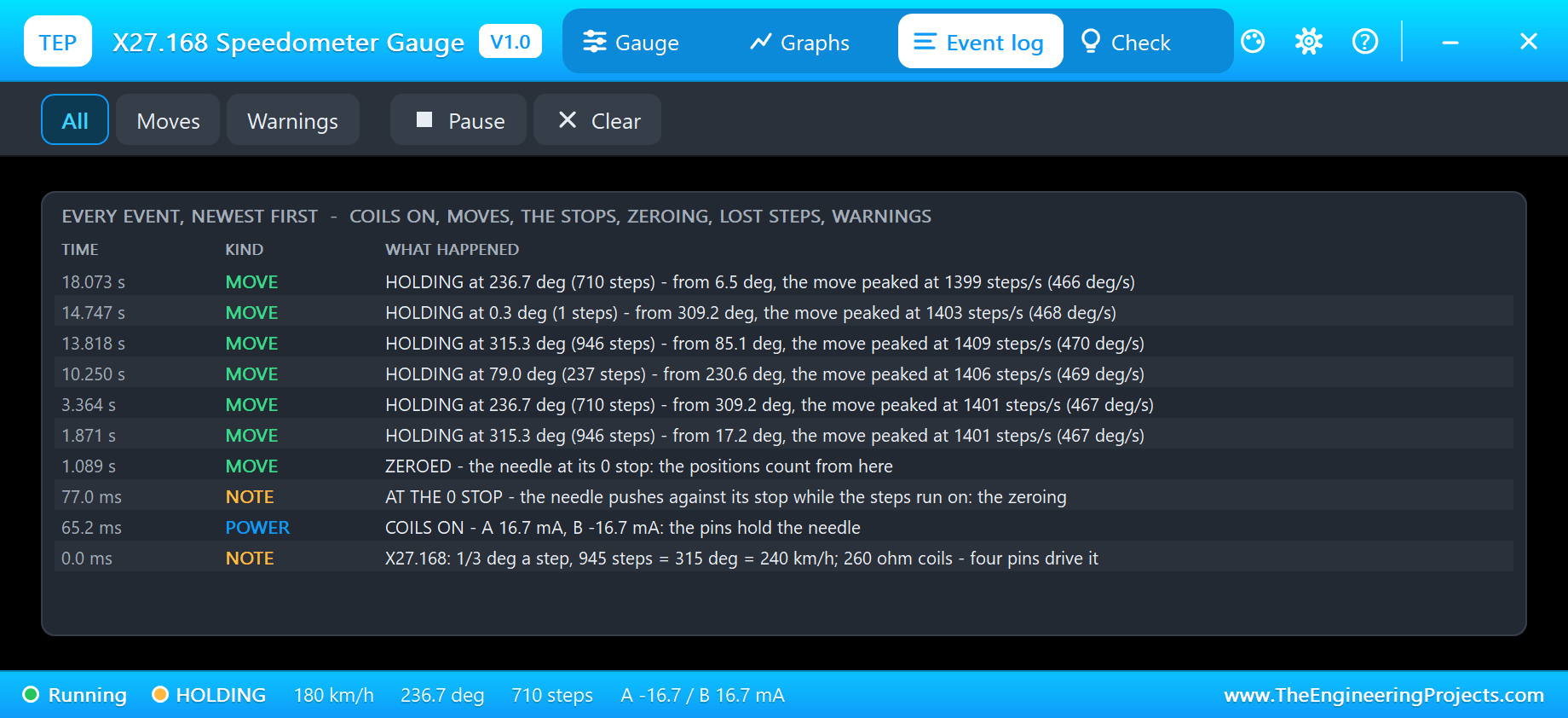
The Event log keeps the whole run with the simulation time: COILS ON with the two currents, AT THE 0 STOP when the needle pushes against its stop during the zeroing, ZEROED when the sketch starts counting from there (at 1.09 s in the demo), and every move as it ends - "HOLDING at 79.0 deg (237 steps) - from 230.6 deg, the move peaked at 1406 steps/s (469 deg/s)". Filter it by moves or warnings, pause it or clear it.
Lost Steps: the Finger Test
An X27.168 has no sensor, so the sketch can only count the steps it sends and trust that the needle followed. Now we break that trust on purpose. Click Hold it on the Gauge page (or click the dial on the schematic), then type speed 30:
speed 30
speed 30 km/h = 118 steps = 39.3 deg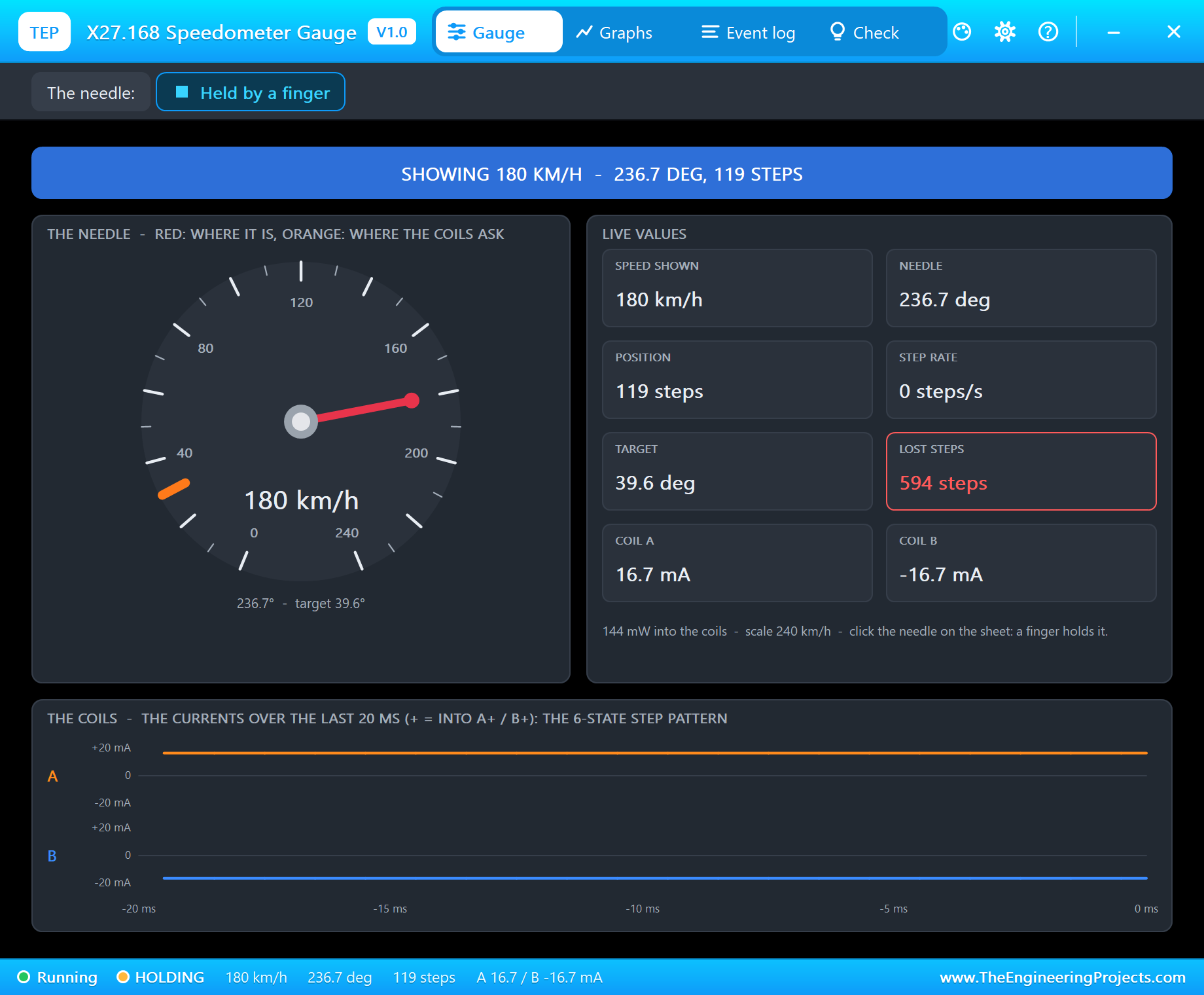
The sketch steps happily down to 118 steps and reports 30 km/h. The needle does not move. On the pop-up the orange mark has run away to 39.6 degrees while the red needle stays at 236.7, and the LOST STEPS box turns red. The model counts the slip in whole turns of the field, six steps at a time, because the magnet can only rest where the field points.
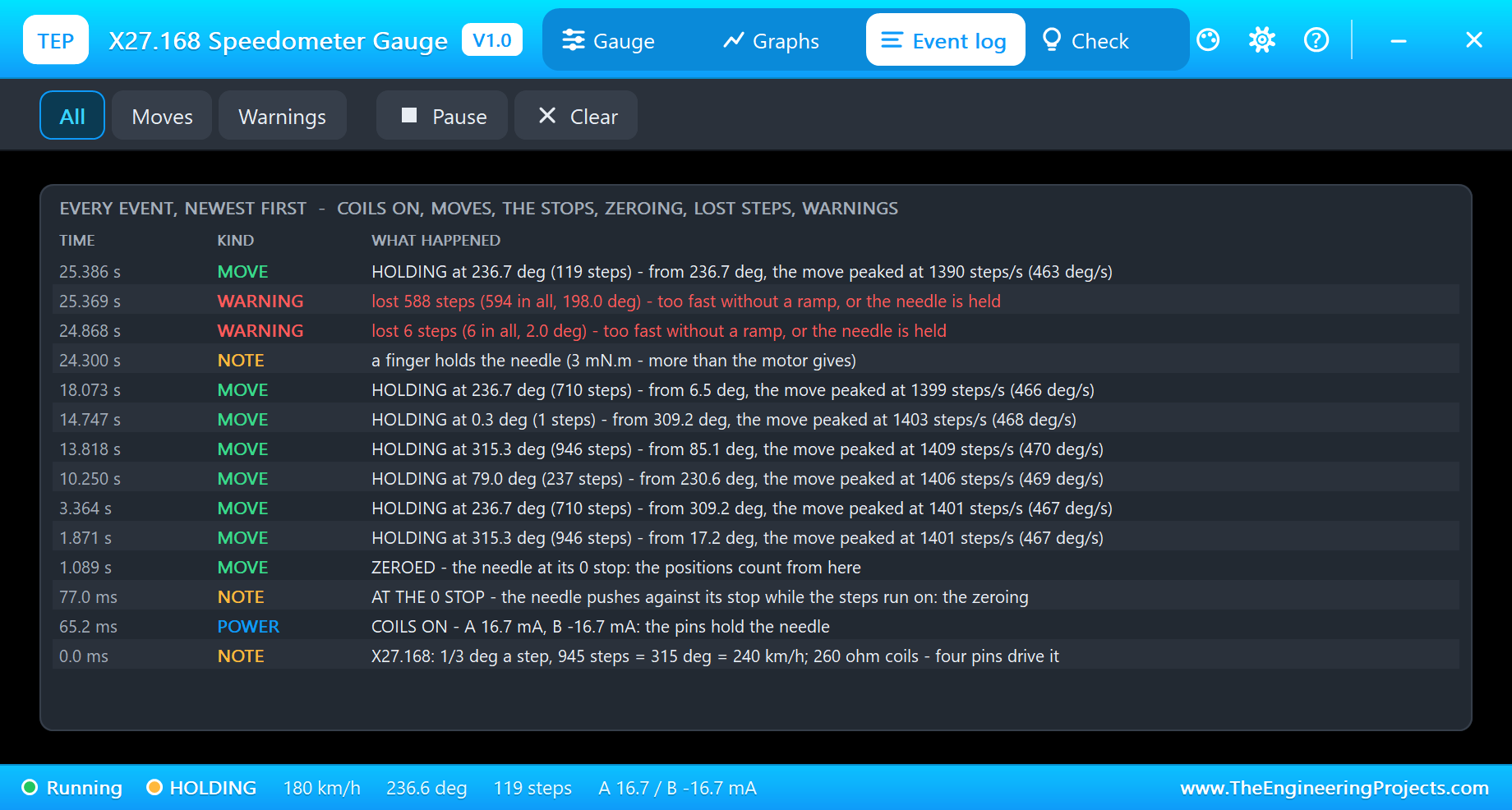
The Event log puts it in red: "lost 588 steps (594 in all, 198.0 deg) - too fast without a ramp, or the needle is held". Now let go: click Hold it again. The needle still does not move - it stays at 235.7 degrees, because nothing tells the motor that it is wrong. The sketch believes the gauge shows 30 km/h; the driver of the car reads 180. This is the classic bug of gauge projects, and the only cure is the one the sketch already knows:
zero
Zeroing: 1000 steps down against the 0 stop...
knob
Following the pot on A0
Pot 768 -> 180 km/h = 709 steps = 236.3 deg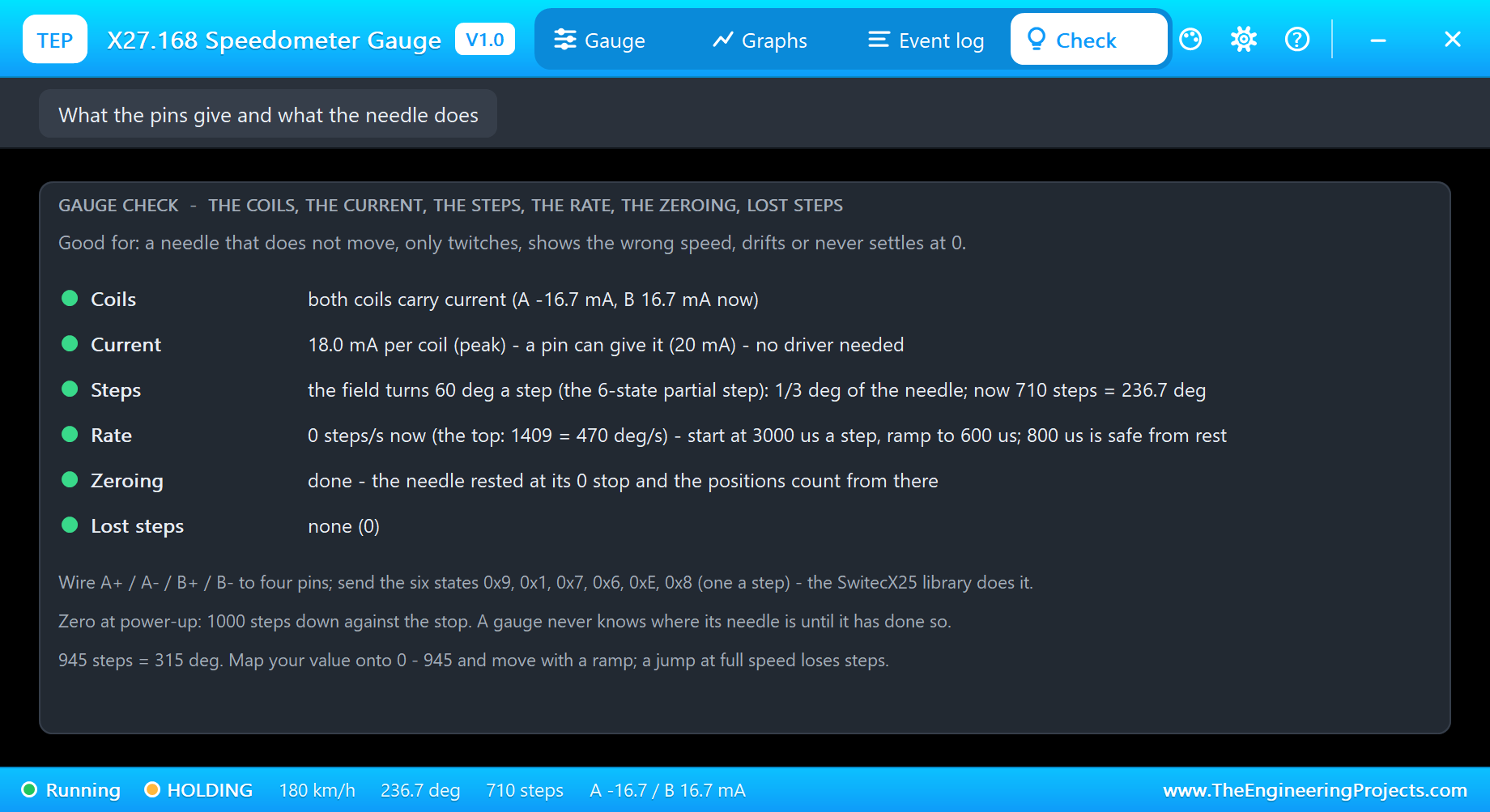
zero drives the needle down against its stop and the counting starts again; knob sends it back to the pot, and the needle is right once more at 236.7 degrees with 0 lost steps. The Check page sums it up, each row with a verdict - green for fine, amber to check, red for wrong: both coils carry current, the current is one a pin can give, the step size, the rate with the advice for the ramp, the zeroing and the lost steps. It is written for the questions people ask in the forum: a needle that does not move, only twitches, shows the wrong speed, drifts or never settles at 0.
Steps get lost the same way without a finger when the sketch is too fast. The model was checked on a PC: 300 steps at 350 microseconds from rest, with no ramp, move the needle only 6 degrees of the 100 asked - 282 steps are lost. The same 300 steps at 2000 microseconds, or with the ramp of the demo, arrive exactly.
How the Model Works
Each coil is in the circuit as its backward-Euler companion over the analog step - a conductance and a current source - with its back-EMF, so Proteus solves the coil together with the pin that drives it: the current rises with the time constant of 30 mH and 260 ohm plus the pin's own resistance. While the needle moves, the analog step is held to 100 us. Between two analog points the rotor runs in 5 us sub-steps: the torque of both coil currents on the magnet, the 180 : 1 gear, the inertia, the friction, the damping of the rotor's ringing and the two end stops.
The model then reads its own coils like a detective. The direction of the field from the two currents is where the coils ask the rotor to be; each 60 degrees of it is one step. From that come the position, the step rate, the target on the dial, the zeroing (the field turning back up after asking past the 0 stop), and the lost steps (the rotor a whole field turn away from where it is asked to be). Nothing in the model looks at the Arduino sketch; it knows only the pins, exactly like the real motor.
We checked it on a PC with 19 automatic tests on the gauge: the zeroing from 120 degrees ends at 0.3 degrees, 90 steps at 800 us from rest turn the needle 30.02 degrees, 3 steps make 0.997 degrees, each coil takes 16.1 mA from a pin, 900 ramped steps make 300 degrees with a top rate of 1701 steps per second and nothing lost, the upper stop holds at 315.4 degrees and a finger stops the needle. Three more tests render the pop-up pages, and the demo project is read back from disk with 63 checks.
Troubleshooting
- The needle never moves and the pop-up says RELEASED: no coil current - the pins are not outputs, the wires go to other pins than the sketch's, or the sketch never writes a state.
- The needle only twitches back and forth: the wires of the two coils are mixed up, so the field jumps instead of turning. Keep A+ and A- on one coil and B+ and B- on the other.
- "only coil A carries current": coil B's wires are off; the Check page names the pins.
- The needle shows the wrong speed: steps were lost - the Event log and the Check page show how many. Ramp the moves and zero at power-up.
- The needle sits at an end: more than 945 steps asked, or the sketch never zeroed and counts from the wrong place.
- No needle, no UNO or no monitor:
TEPX27.DLLorTEPARDUINO.DLLis missing from MODELS and the project folder; a closed monitor opens again with a click on the UNO's USB port.
Things to Know Before Using a Real X27.168
- Pins are enough: the 260 ohm coils take about 19 mA each at 5 V, inside what an Arduino pin can give.
- Zero at every power-up: the motor never knows where its needle is. Expect a short buzz while it pushes against the stop - that is normal.
- Ramp every move: start slowly, speed up, slow down. A jump at full speed loses steps.
- Driver chips: a quad driver such as the VID6606 adds microstepping for a smoother, quieter needle and takes step and direction pulses; this model expects the 6-state steps from four pins.
- Find the coils: about 260 ohm between pins 1 and 2 and between pins 3 and 4; open between the two coils.
- Want a bigger stepper? Our 28BYJ-48 Stepper Motor Library for Proteus and NEMA 17 Stepper Motor Library for Proteus run the same way in Proteus, with drivers.
Limitations of the Simulation
- Not modelled: microstepping drivers, gear play, the needle's bounce at a stop in detail, the spread from part to part and noise.
- The plate, the dial, the coil LEDs, the strip and the finger are TEP additions.
- The model is our own, written from the typical data of the X27.168 gauge stepper; this library is not made or endorsed by the gauge's makers, Arduino or Labcenter.
- Licences: the demo HEX contains the Arduino AVR core 1.8.6 (LGPL); the sketch is included and the README gives the source link. The potentiometer is Proteus's own.
- Tested in Proteus 8.5 in October 2026 with the demo as shipped: the zeroing, the sweep, the pot, speed 60, sweep, knob, the finger with speed 30, zero and knob, and all four pages of the pop-up. Proteus 7 is not supported.
So, that was all about the X27.168 Speedometer Gauge Library for Proteus V1.0. I hope it helps you build your dashboard, boost gauge or retro meter in Proteus first - with the zeroing, the ramp and the lost steps already understood - before you print the dial. If you have any questions, ask in the comments and I will help you out. Till the next tutorial, take care and have fun!