Hello friends, I hope you all are doing great. Today, I am going to share the new A2212 Brushless Motor Library for Proteus V1.0. The A2212 1000KV is the motor that put a whole generation of makers in the air: four of them lift the classic F450 quadcopter, one pulls a trainer plane, two push a hovercraft. Now it spins in Proteus too, with its prop turning on the schematic at the simulated speed and a pop-up that tells you the speed, the thrust and the current in each of its three wires.
A2212 Brushless Motor Library for Proteus
Latest version: V1.0 (October 2026, this tutorial)
Other motors: SG90 Servo · TT Gear Motor · 28BYJ-48 Stepper · NEMA 17 Stepper · MG996R Servo · N20 Encoder Motor · JGA25-370 Encoder Motor · FS90R 360 Servo · 130 DC Motor · X27.168 Gauge · Analog Panel Meter · DC Tachogenerator · LM393 Speed Sensor · MG90S Servo · DS3218 Servo · L12 Linear Servo · JGB37-520 Motor · RS-775 Motor · JGY-370 Worm Motor · 12V Linear Actuator · Coin Vibration Motor · Mini Submersible Water Pump · 12V Peristaltic Pump · 4-Pin PC Fan · 12V Push-Pull Solenoid · NEMA 23 Stepper Motor · Micro Linear Stepper · TYJ50 Synchronous Motor · Quartz Clock Movement · Air-Core Gauge · Electromechanical Counter · Split-Flap Display · Electric Bell · Wind Turbine · 8520 Coreless Motor · Car Wiper Motor · Car Door Lock Actuator · 12V Solenoid Water Valve · 12V Holding Electromagnet
Motor drivers: L298 · L9110S · TB6612FNG · BTS7960 · A4988 / DRV8825 · 28BYJ-48 + ULN2003 · PCA9685 Servo · Relay Module · 30A Brushless ESC · TB6600 Stepper Driver
Helping Tools
- Serial Monitor Advance: a serial terminal window for the UART of your board
- Serial Monitor Expert: the serial monitor with extra debugging tools
- LCD Library for Proteus V3.0: 16x2, 20x4 and I2C LCDs to show your readings
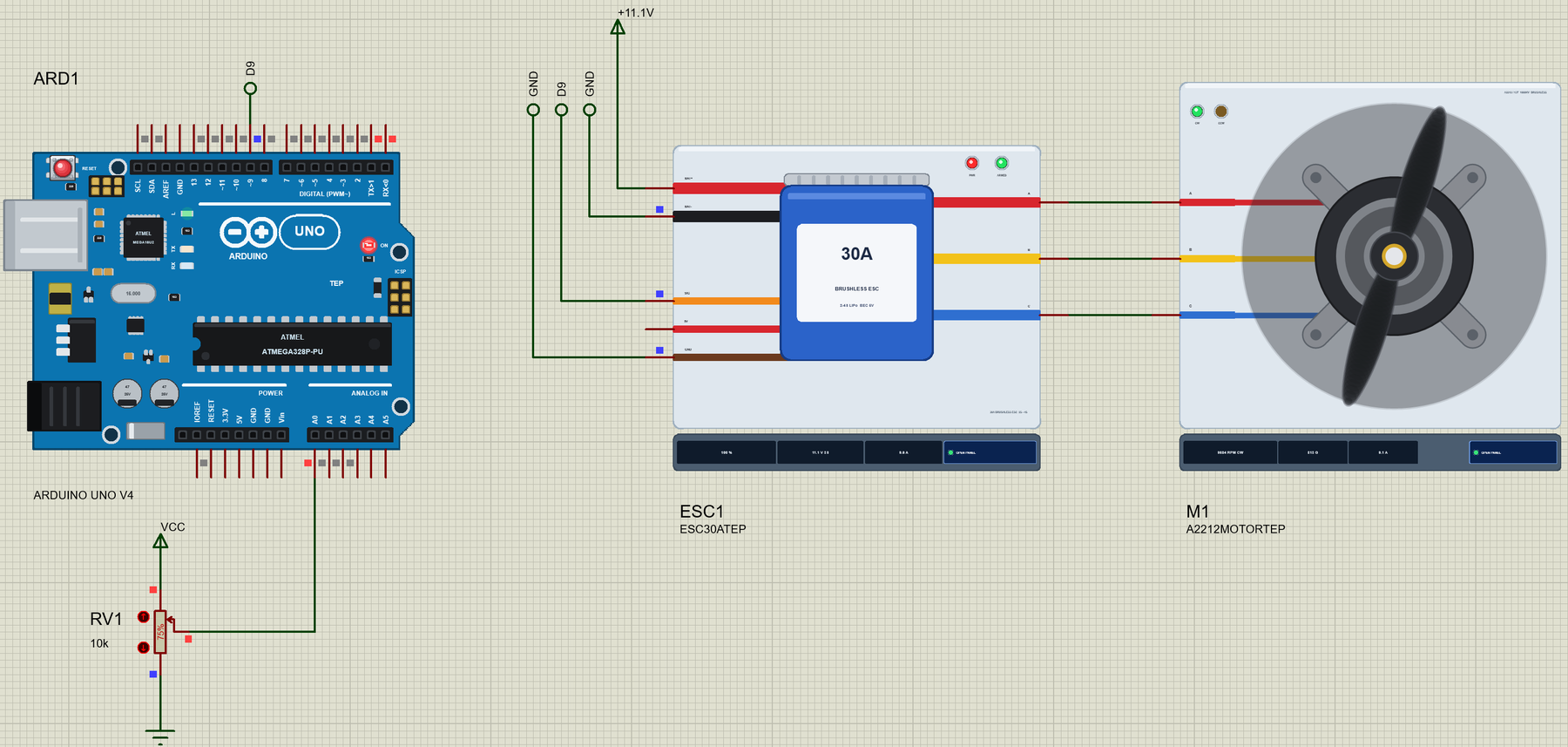
A brushless motor never runs on its own - it needs an ESC that switches its three wires in turn. So the demo drives it the way you would on the bench: an Arduino UNO V4.0 sends servo pulses to our 30A brushless ESC, a separate library, and a potentiometer is the throttle. The motor answers like the real one: about 9,700 RPM and 800 g of thrust with a 1045 prop on a 3S battery.
NOTICE: a motor model that just turns a picture would be easy. We wanted the real thing: three windings, the back-EMF of fourteen magnets, a bell and a prop with real inertia and real drag, so the thrust, the current and the speed come out of the physics. It took our team a lot of hard work. Your feedback is the fuel that keeps us going, so please tell us what you think in the comments below or in the Motor Driver board of our forum. And if our free libraries help you, you can buy us a coffee. So, let's get started with the A2212 Brushless Motor Library for Proteus V1.0:
What is the A2212 Brushless Motor?
The A2212 is an outrunner brushless motor. In an ordinary motor the magnets stand still and the middle turns; in an outrunner it is the other way round. The copper windings sit on a star-shaped stator fixed to the mount, and the magnets are glued inside a bell that spins around them. The prop bolts straight onto the bell, so there is no gearbox and nothing to wear out but two ball bearings. Our Brushless DC Motor tutorial explains the principle in more detail.
The name is a size code: 22 mm is the diameter of the stator and 12 mm its height. "13T" means 13 turns of wire on each stator tooth, and 1000KV means the motor turns at about 1000 RPM for every volt, with no load. Fewer turns would give a higher KV, more speed and more current; more turns the opposite.
| A2212 / 13T 1000KV | |
|---|---|
| Type | three-phase brushless outrunner, 14 magnets (7 pole pairs) |
| KV | 1000 RPM a volt with no load |
| Battery | 2S - 3S LiPo (7.4 - 11.1 V nominal) |
| Current | 12 A for 60 s |
| Resistance | about 90 mOhm between two wires (45 mOhm a phase) |
| Typical prop | 1045 (10 x 4.5 in): about 800 g of thrust at about 10 A on 3S |
| Size | 28 mm bell around a 22 x 12 mm stator, a 3.17 mm shaft, about 50 g |
KV, Props and Thrust
KV tells you the speed with no prop: on a 3S battery at 11.1 V the A2212 turns at about 11,000 RPM and takes only half an amp. Put a prop on it and everything changes. The torque a prop needs grows with the square of its speed, and so does the thrust it gives. The motor slows down until its torque matches the prop's, and the current climbs with the torque. That is why a bigger prop gives more thrust, at a lower speed and a much higher current.
The library has three common props plus none, and we ran each at full throttle on 3S in our host tests:
| Prop | Speed | Battery current | Thrust |
|---|---|---|---|
| None | about 11,000 RPM | about 0.5 A | - |
| 8045 (8 x 4.5 in) | about 10,500 RPM | about 4.1 A | about 395 g |
| 1045 (10 x 4.5 in) | 9,684 RPM | 9.65 A | 813 g |
| 1147 (11 x 4.7 in) | about 9,100 RPM | about 13.5 A | about 1,050 g |
The 1045 is the classic match. The 1147 pulls more, but takes more than the A2212's 12 A rating - the model warns about it if it lasts longer than a second.
What's New in A2212 Brushless Motor Library for Proteus V1.0
- A real three-phase motor: three windings in a star with the sine back-EMF of 14 magnets, solved by Proteus together with the ESC that drives it.
- A prop that spins: the bell and the prop turn on the schematic at the simulated speed, a translucent disc when fast.
- Four props: NONE, 8045, 1045 and 1147, each with its own torque and thrust; change them while it runs.
- Thrust in grams, the phase currents, the electrical frequency, the power and the efficiency, live.
- A jam: click the prop and the bell stops dead, as if a hand caught it - watch the ESC lose its timing and retry.
- Wiring checks: an open phase wire is found and named; the phase order decides the direction.
- A pop-up window with four pages - Motor, Graphs, Event log and Check.
- An Arduino demo with our 30A ESC library and a throttle pot, on our Arduino UNO V4.0.
The A2212 in Proteus
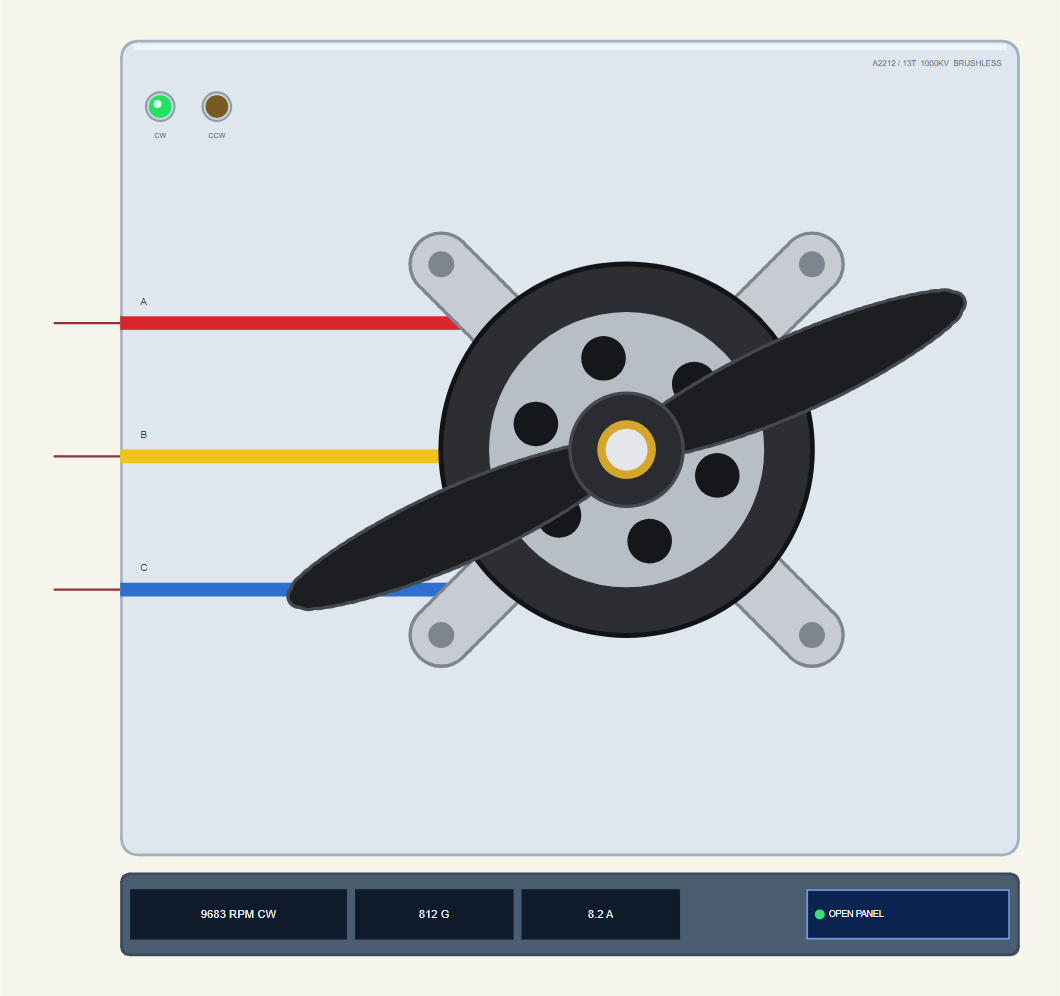
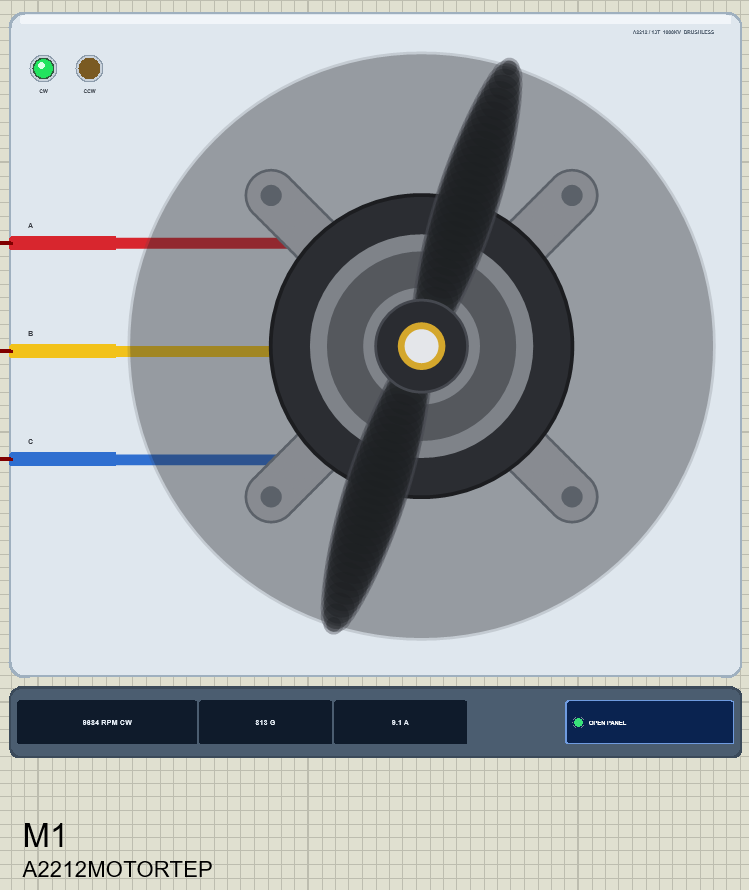
Search A2212 in Pick Devices; the device A2212MOTORTEP is in TEPA2212.LIB (category Electromechanical, DC Motors) and its model is TEPA2212.DLL. It shows the motor from above, at its real size: the grey cross mount with its four screw holes, the dark bell with its vents, the collet in the middle and a black prop, shortened to fit the plate. The red, yellow and blue wires come in from the left to the pins A, B and C. Real A2212s usually have three black wires; the colours here only make the phases easy to follow.
On the plate are two LEDs, CW (green) and CCW (amber), for the direction. The strip under the plate shows the speed with its direction, the thrust and the phase current, and the OPEN PANEL button. The plate, the LEDs and the strip are TEP additions.
| Pin | Wire | What it does |
|---|---|---|
| A | red | phase A - to the ESC's A |
| B | yellow | phase B - to the ESC's B |
| C | blue | phase C - to the ESC's C; swap any two wires and the motor turns the other way |
| Property | Default | What it does |
|---|---|---|
| PROP | 1045 | the prop: NONE, 8045, 1045 or 1147 (the pop-up's chips change it while it runs) |
Click the prop while the simulation runs and the bell jams, as if a hand caught it. The ESC loses the back-EMF it was following, stops and tries again; the motor's pop-up shows the stall current. Click again to let it go and the ESC starts it by itself.
Download A2212 Brushless Motor Library for Proteus
The download link of A2212-Brushless-Motor-Library-for-Proteus-v1.0.zip (without the source code) will be added here soon. The zip file will contain:
- README.txt: installation, the demo, the wiring, the props, real hardware, troubleshooting and the limits.
- Proteus Library Files:
TEPA2212.LIBandArduinoV4TEP.LIBfrom our Arduino Library for Proteus V4.0. - Proteus Model Files:
TEPA2212.DLLandTEPARDUINO.DLL. - Proteus Simulation:
A2212-Brushless-ESC30A-ArduinoUnoV4.pdsprj,ESC_A2212_Demo.hexand copies of the DLLs. - Arduino Code:
ESC_A2212_Demo.ino(the Servo library comes with the Arduino IDE).
Important: the demo's ESC is not in this zip. It is our 30A Brushless ESC Library for Proteus, a separate library: download it and install its TEPESC30A.LIB and TEPESC30A.DLL first, the same way as below.
No Proteus yet? Read How to Download and Install Proteus 7 and 8. New to libraries? Follow How to Install a New Library in Proteus.
How to Install A2212 Brushless Motor Library for Proteus
- Close Proteus and extract the whole zip file, for example to your Desktop.
- Copy
TEPA2212.LIBandArduinoV4TEP.LIBfrom Proteus Library Files into the LIBRARY folder of Proteus (usuallyC:\Program Files (x86)\Labcenter Electronics\Proteus 8 Professional\LIBRARY). - Copy
TEPA2212.DLLandTEPARDUINO.DLLfrom Proteus Model Files into the MODELS folder. - Install our 30A Brushless ESC library the same way, for the demo's ESC.
- Delete
TEPA2212.IDXfrom the LIBRARY folder if it is there. - Start Proteus, press P and search for A2212.
Tip: keep the Proteus Simulation folder together, because the project needs its .hex file and the DLLs beside it. The library is tested in Proteus 8.5; Proteus 7 is not supported.
The Demo Circuit
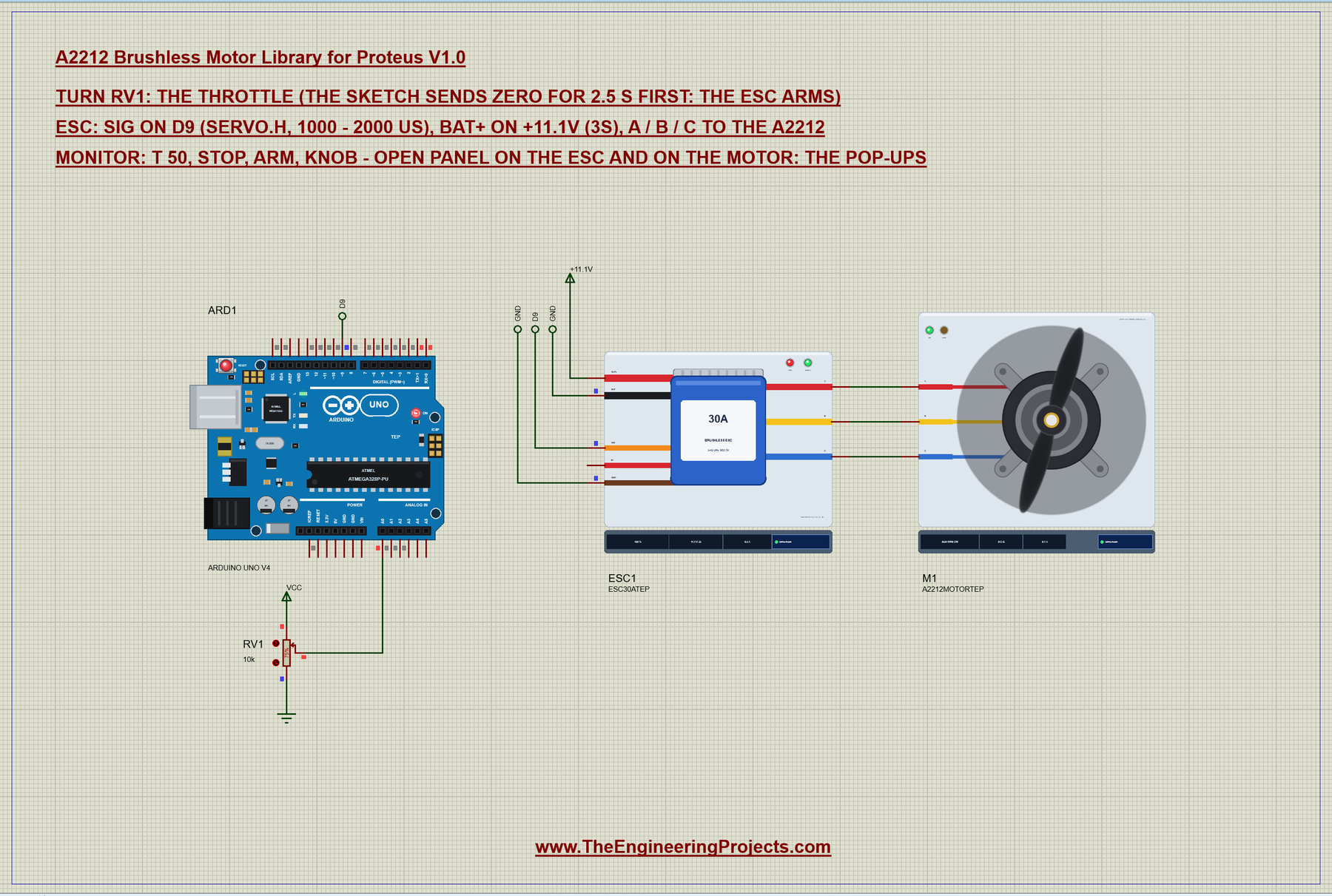
Open A2212-Brushless-ESC30A-ArduinoUnoV4.pdsprj. ARD1 is an Arduino UNO V4.0 from our Arduino UNO Library for Proteus V4.0, running ESC_A2212_Demo.hex with its serial monitor built in. ESC1 is the 30A ESC (the device ESC30ATEP of our ESC library), its battery leads on a +11.1V power terminal - the 3S battery - and its signal on D9. M1 is the A2212 with a 1045 prop, its three wires straight from the ESC's A, B and C. RV1 on A0 is the throttle.
| From | To | Note |
|---|---|---|
| ESC A / B / C | A2212 A / B / C | any order; swap two to reverse |
| ESC SIG | Arduino D9 | the Servo library's pulses: 1000 - 2000 us |
| ESC BAT+ / BAT- | +11.1V / GND | a 3S LiPo on the real thing |
| RV1 wiper | Arduino A0 | the throttle |
The Arduino Code
The Arduino never talks to the motor; it talks to the ESC, with the same Servo library as a hobby servo. The 30A Brushless ESC Library for Proteus article walks through the sketch line by line. The essential part is short: attach with the throttle range, send zero for a few seconds so the ESC arms, then send the throttle:
const int US_ZERO = 1000, US_FULL = 2000; esc.attach(ESC_PIN, US_ZERO, US_FULL); mode = ARMING; armUntil = millis() + 2500;
esc.writeMicroseconds(US_ZERO);After the 2.5 s the pot becomes the throttle, with a small dead zone at the bottom so that "fully down" always means stop:
    int raw = analogRead(POT_PIN);
    int us = raw < 20 ? US_ZERO : map(raw, 20, 1023, US_ZERO, US_FULL);   // a dead zone at the bottom: a sure stop
In the monitor, t 50 sets 50 % throttle, stop sends zero, arm arms again and knob returns to the pot. The HEX file is in the package; to change the sketch, export the compiled binary as in How to get the HEX file from Arduino. It needs 5,852 bytes of flash and 293 bytes of RAM.
Running the Demo
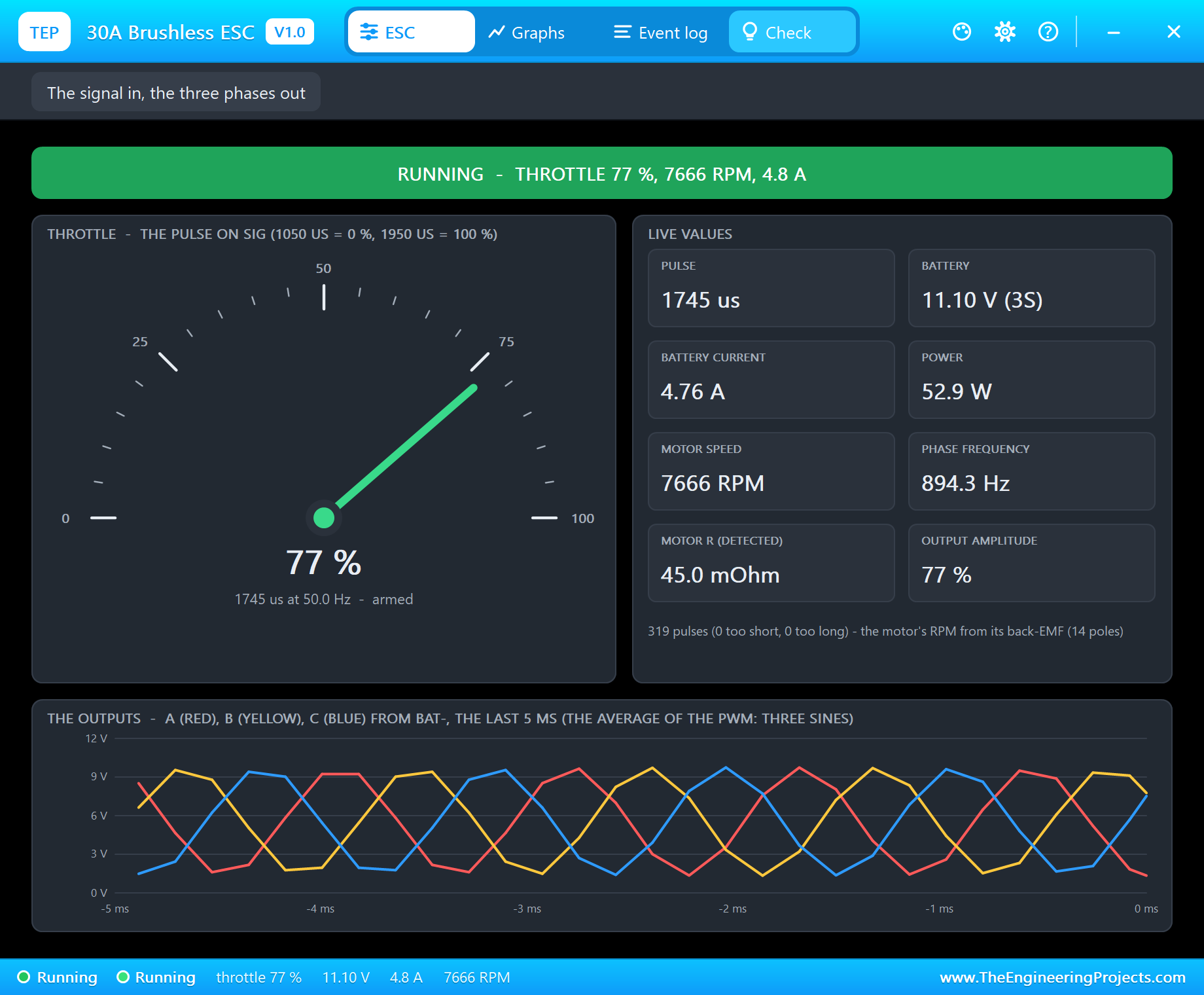
Press Run. The monitor and both pop-ups open; move them aside. The ESC counts its battery, measures the motor - 45.0 mOhm a phase, the A2212's own number - and arms during the sketch's 2.5 s of zero throttle. Then the pot takes over:
30A ESC + A2212 brushless motor demo - The Engineering Projects
ESC signal on D9, a 3S battery on the ESC. The pot on A0 is the throttle once the ESC is armed.
Commands: t 50 | stop | arm | knob | help
Arming: zero throttle (1000 us) for 2.5 s...
Armed (the ESC beeped) - the pot is the throttle now
Pot 768 -> 1745 us = throttle 74 %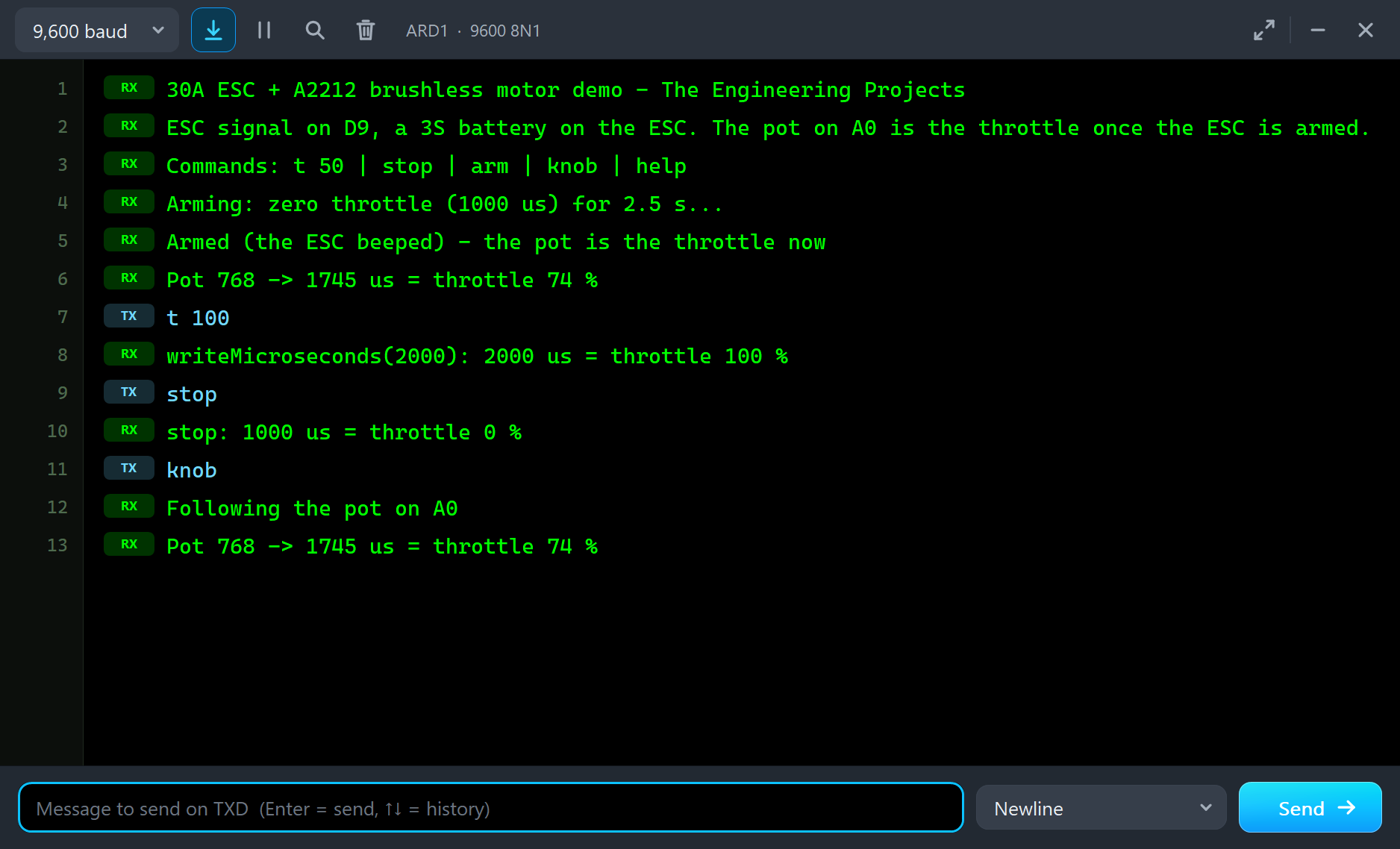
The ESC starts the motor, locks on its back-EMF a tenth of a second later and the prop runs up to speed:
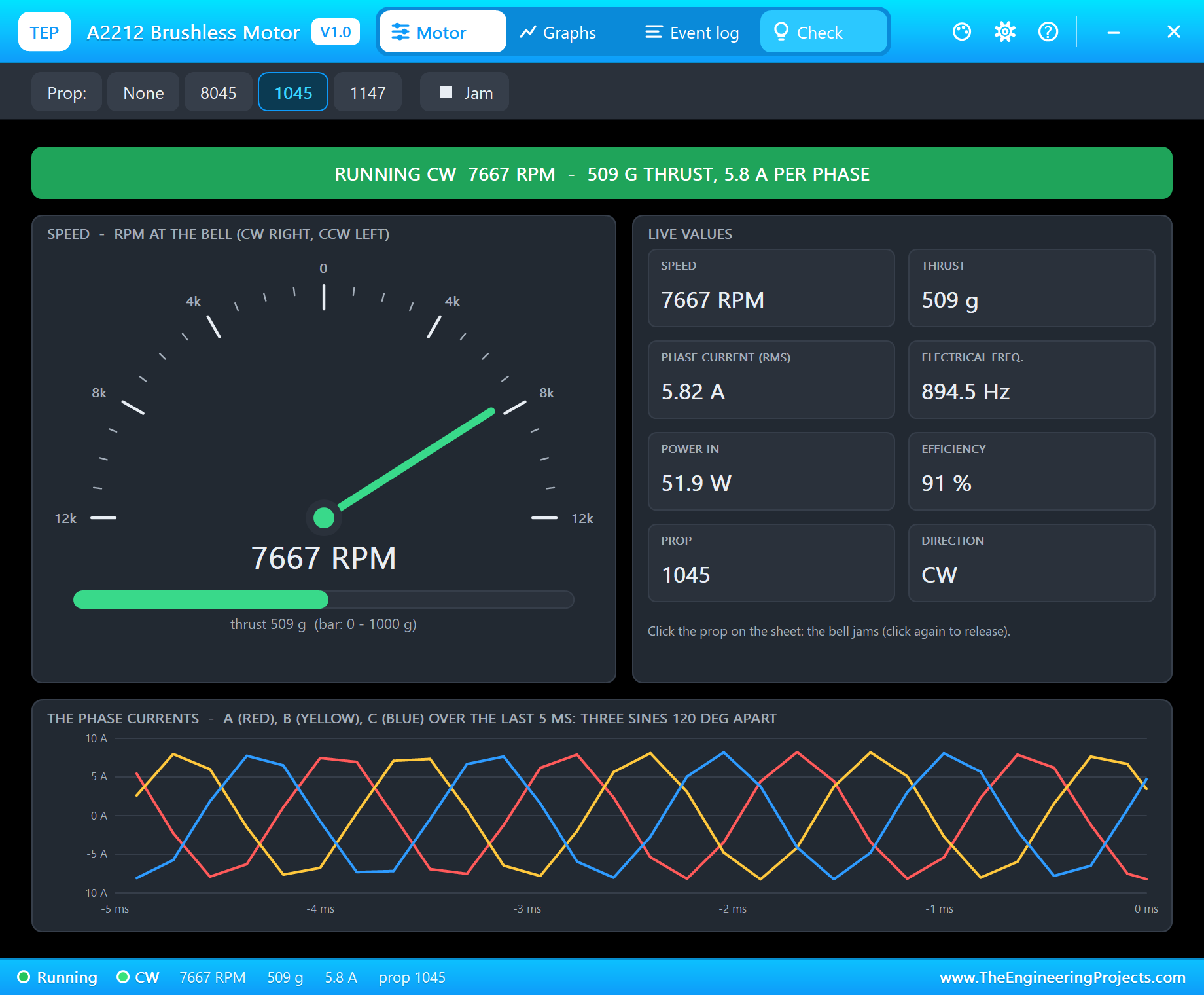
The motor's window, TEP A2212 Brushless Motor, has the look of our TEP Serial Monitor Advance for Proteus and four tabs: Motor, Graphs, Event log and Check. The Motor page names the state in its banner - RUNNING CW with the speed, the thrust and the current. The gauge goes to 12,000 RPM either way, with the thrust as a bar under it. The live values add the electrical frequency, the power going in, the efficiency, the prop and the direction. At the bottom the three phase currents of the last 5 ms are drawn as three sines, 120 degrees apart: that is what a brushless motor looks like from the inside.
Full Throttle
Type t 100. The ESC goes to full throttle and the motor settles at 9,684 RPM:
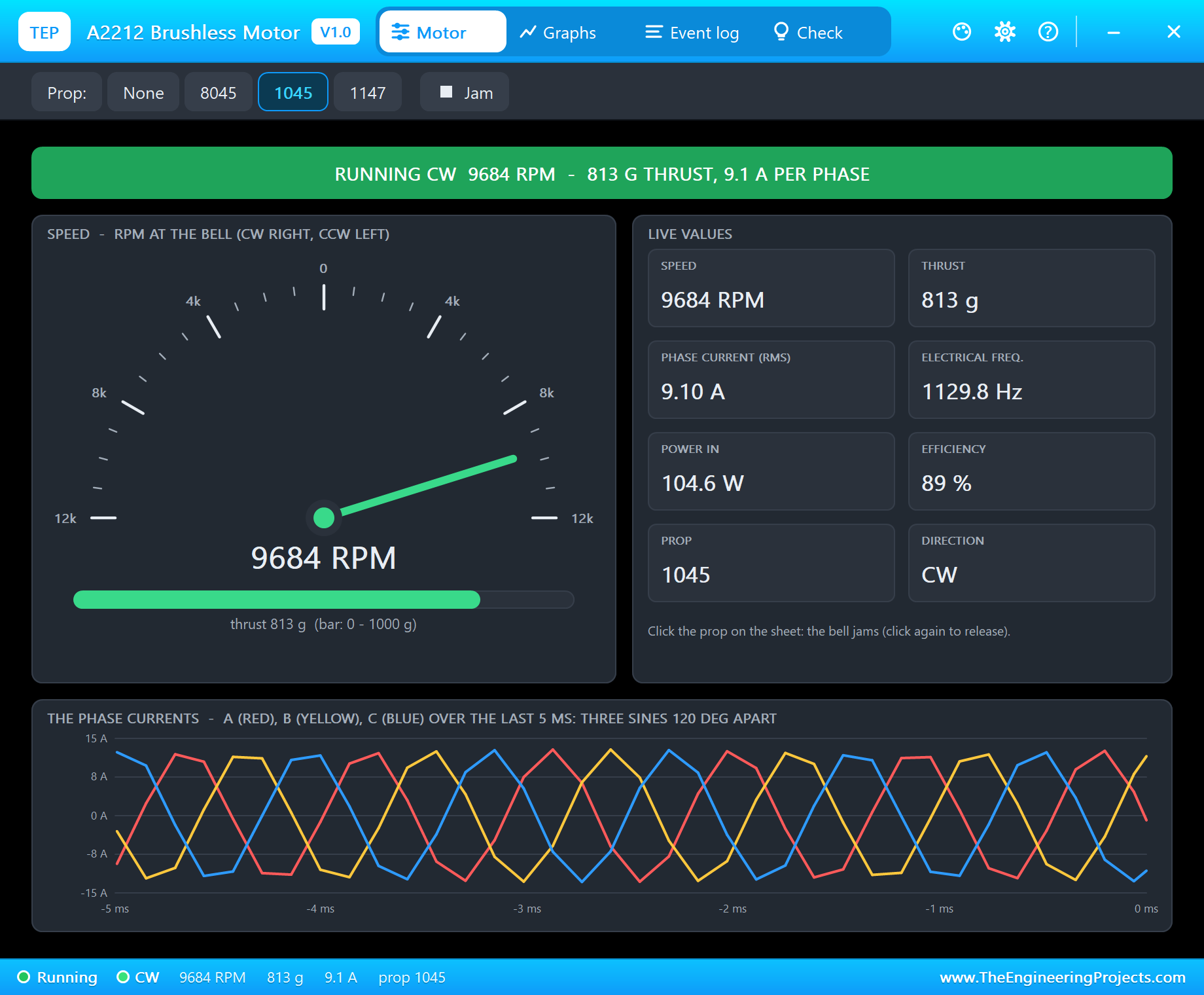
813 g of thrust, 9.1 A in each phase, 104.6 W going in and 89 % of it coming out as mechanical power. The electrical frequency, 1129.8 Hz, is seven times the turns a second - the A2212 has 7 pole pairs, so each turn of the bell is seven electrical cycles. On the ESC's side the battery gives 9.65 A. Those are the numbers of the makers' tables for an A2212 with a 1045 on 3S.
Stop, Coast and Start Again
Type stop. The ESC sends nothing more, the phase currents drop to zero and the bell coasts. With a 1045 on it the drag is strong, so it stops in under three seconds; without a prop it would spin for much longer. Type knob and the ESC starts it again and brings it back to 7,667 RPM. If the prop is still turning when the throttle comes back, the ESC catches it on the fly instead of starting from rest - the 30A Brushless ESC Library for Proteus article shows that in its event log.
Event Log
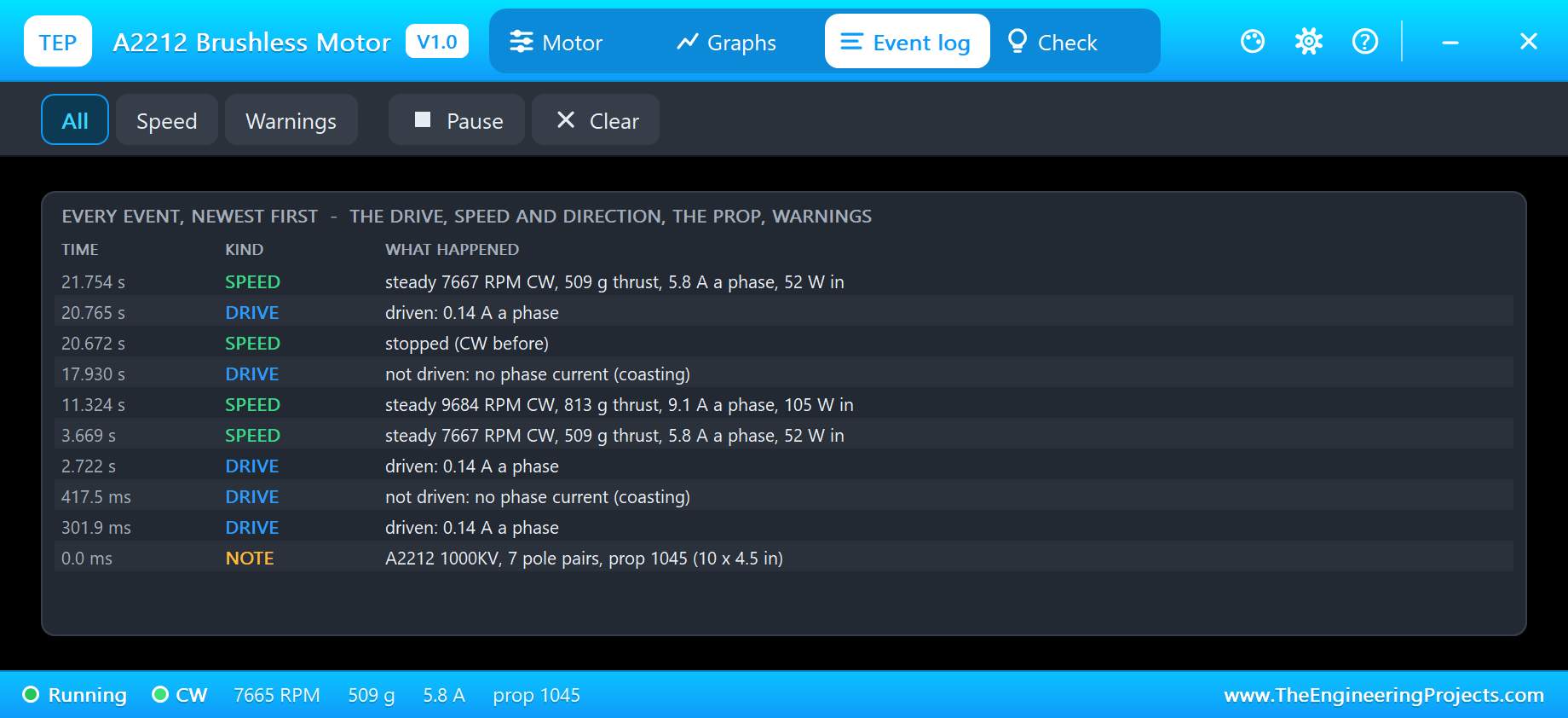
The Event log records when the motor is driven and when it coasts, every steady speed with its thrust, phase current and power, every stop, a change of prop and the warnings. Filter it by speed or warnings, pause it or clear it. The Graphs page draws the speed, the thrust and the phase current over the last 1, 3 or 6 seconds.
Check
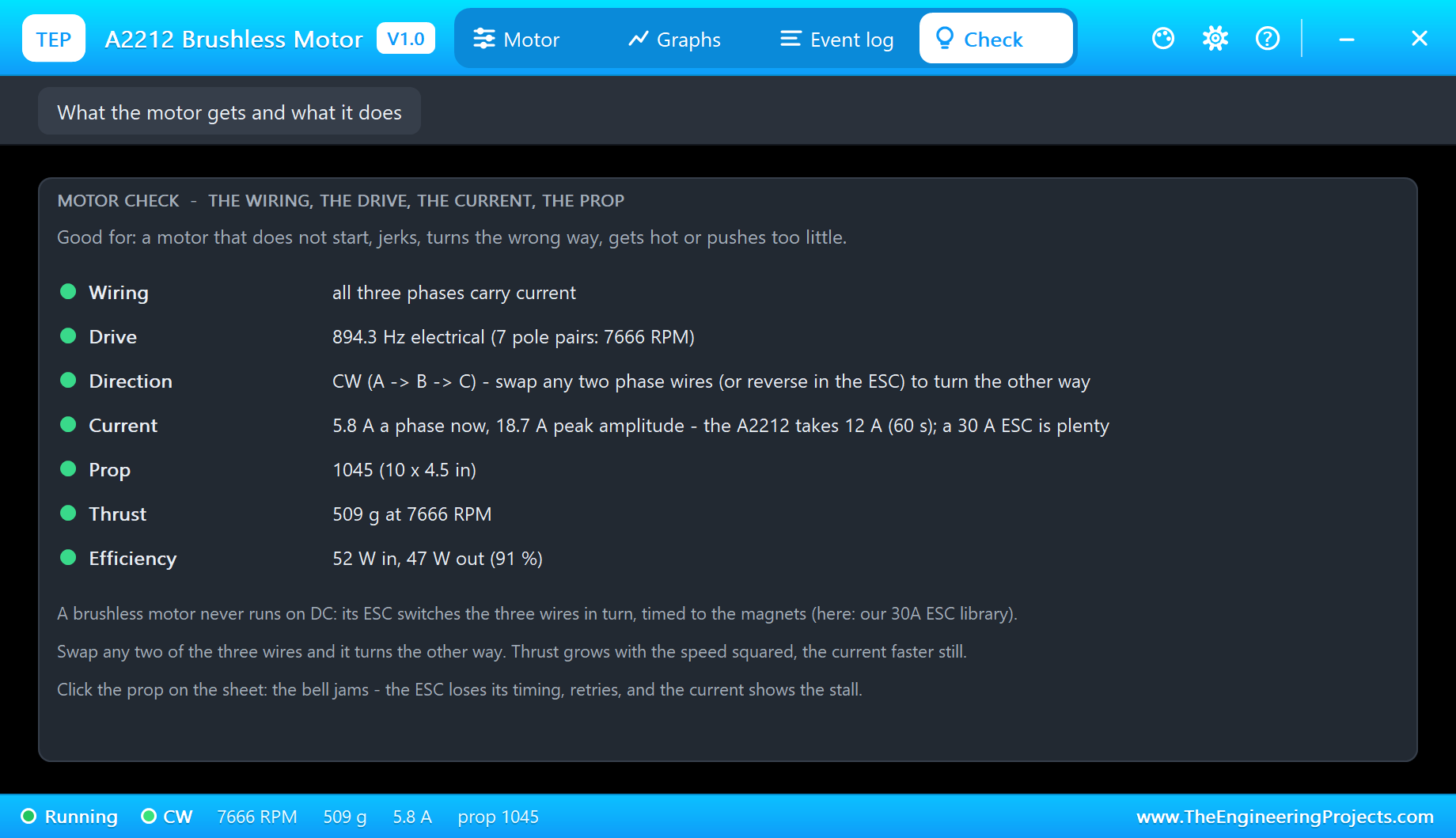
The Check page is for a motor that does not start, jerks, turns the wrong way, gets hot or pushes too little. It checks that all three phases carry current, shows the drive frequency and what it means in RPM, the direction and how to change it, the current against the A2212's 12 A, the prop, the thrust and the efficiency, each with a green, amber or red verdict.
How the Model Works
Each phase of the model is a winding of 45 mOhm from its pin to the star point inside the motor, with the back-EMF of the magnets in series. The back-EMF is a sine whose size grows with the speed and whose angle follows the bell, seven cycles a turn. Proteus solves these three windings together with the ESC's outputs at every analog step, so the current in each wire is the real result of the voltage the ESC applies and the voltage the magnets give back. The torque of the three currents turns the bell; the prop's drag, the bearings' friction and the inertia of the bell and the prop hold it back. Thrust is the prop's constant times the speed squared.
Because it is all physics, the classic effects appear by themselves: the motor slows down under a bigger prop, a start pulls a current peak while the prop accelerates, two swapped wires turn it the other way, an open wire leaves it jerking on two phases. We checked it with 17 automatic tests before it ran in Proteus. If you know our brushed 130 DC Motor Library for Proteus, compare the two: the 130 turns on plain DC, the A2212 only with an ESC.
Troubleshooting
- STOPPED - NO PHASE CURRENT: the ESC is not armed or at zero throttle - its own pop-up says why.
- It jerks and does not start: one phase wire is open; the Check page names it.
- It turns the wrong way: swap any two of A, B and C, or set the ESC's DIRECTION to REVERSED.
- STALLED: the prop is jammed - click it again - or the prop is too big for the throttle.
- OVER-CURRENT: more than 12 A a phase for over a second - use a smaller prop or less throttle.
- No motor part, or no ESC:
TEPA2212.DLLis missing from MODELS and the project folder, or our 30A ESC library is not installed.
Things to Know Before Using a Real A2212
- Take the prop off for every bench test. A 1045 at full throttle pulls about 800 g and cuts like a knife.
- The prop's direction: a motor turning CW needs a CW prop (the "R" one of a pair); if the air blows the wrong way, swap two motor wires or the prop.
- The battery: a 2S or 3S LiPo that can give 10 A and more. 4S or a prop bigger than the 1147 overloads the A2212.
- Balance the prop: an unbalanced prop shakes the bearings and every sensor on your frame.
- Mount it on the cross with short screws: a screw that touches the windings shorts them.
Limitations of the Simulation
- Not modelled: the windings' inductance (about 15 uH, which matters only above about 10,000 RPM), cogging, heating, the air's density and the spread between real motors and props.
- The prop is drawn shortened to fit the plate; the plate, the LEDs and the strip are TEP additions.
- The model is our own, written from the typical data of the A2212 / 13T 1000KV motor and its props; this library is not made or endorsed by any motor maker, Arduino or Labcenter.
- Licences: the demo HEX contains the Arduino Servo library 1.2.2 (LGPL 2.1) and the Arduino AVR core 1.8.6 (LGPL); the sketch is included and the README gives the source links.
- Tested in Proteus 8.5 in October 2026 with the demo as shipped and our 30A ESC library: the arming, the pot, full throttle, stop, the restart and all four pages of the pop-up. Proteus 7 is not supported.
So, that was all about the A2212 Brushless Motor Library for Proteus V1.0. I hope it helps you see what a drone motor really does with your throttle - the speed, the thrust and the amps it costs - before the first prop goes on. If you have any questions, ask in the comments and I will help you out. Till the next tutorial, take care and have fun!