Hello friends, I hope you all are doing great. Today, I am going to share the new 30A Brushless ESC Library for Proteus V1.0. If you have ever built a quadcopter, an RC plane or a hovercraft, you know the little blue box with two thick battery leads on one side, three motor wires on the other and a servo lead in between. That is the ESC, the electronic speed controller, and without it a brushless motor does not turn at all. Now you can wire one in Proteus, drive it from an Arduino with the Servo library and watch it arm, start the motor and hold its speed.
30A Brushless ESC Library for Proteus
Latest version: V1.0 (October 2026, this tutorial)
Other motor drivers: L298 · L9110S · TB6612FNG · BTS7960 · A4988 / DRV8825 · 28BYJ-48 + ULN2003 · PCA9685 Servo · Relay Module · TB6600 Stepper Driver
Motors: SG90 Servo · TT Gear Motor · 28BYJ-48 Stepper · NEMA 17 Stepper · MG996R Servo · N20 Encoder Motor · JGA25-370 Encoder Motor · FS90R 360 Servo · 130 DC Motor · A2212 Brushless · X27.168 Gauge · Analog Panel Meter · DC Tachogenerator · LM393 Speed Sensor · MG90S Servo · DS3218 Servo · L12 Linear Servo · JGB37-520 Motor · RS-775 Motor · JGY-370 Worm Motor · 12V Linear Actuator · Coin Vibration Motor · Mini Submersible Water Pump · 12V Peristaltic Pump · 4-Pin PC Fan · 12V Push-Pull Solenoid · NEMA 23 Stepper Motor · Micro Linear Stepper · TYJ50 Synchronous Motor · Quartz Clock Movement · Air-Core Gauge · Electromechanical Counter · Split-Flap Display · Electric Bell · Wind Turbine · 8520 Coreless Motor · Car Wiper Motor · Car Door Lock Actuator · 12V Solenoid Water Valve · 12V Holding Electromagnet
Helping Tools
- Serial Monitor Advance: a serial terminal window for the UART of your board
- Serial Monitor Expert: the serial monitor with extra debugging tools
- LCD Library for Proteus V3.0: 16x2, 20x4 and I2C LCDs to show your readings
This is not a speed knob drawn on a box. The model does what a real ESC does: it counts the battery cells, waits for zero throttle before it arms, measures the motor at power-up, starts it without sensors, locks on its back-EMF and drives the three phases with real current from the battery. The motor in the demo is our A2212 drone motor from its own library, and the demo runs on our Arduino UNO V4.0 with a potentiometer as the throttle stick.
NOTICE: a brushless motor is only as good as the ESC that drives it, so we built the ESC the hard way: an arming sequence, a motor test at power-up, a sensorless start and a back-EMF lock, all running inside Proteus against a real motor model. It took our team a lot of hard work. Your feedback is the fuel that keeps us going, so please tell us what you think in the comments below or in the Motor Driver board of our forum. And if our free libraries help you, you can buy us a coffee. So, let's get started with the 30A Brushless ESC Library for Proteus V1.0:
What is a Brushless ESC?
A brushed DC motor turns as soon as you connect a battery, because its brushes switch the current in the windings by themselves. A brushless motor has no brushes: its magnets turn and its three windings stand still, so something outside has to switch the current from one winding to the next, at the right moment, thousands of times a second. That something is the ESC. Our Brushless DC Motor tutorial explains the motor itself; this library is the controller.
Inside the shrink-wrap of a hobby ESC there are six MOSFETs arranged as three half-bridges, one for each motor wire, a small microcontroller that drives them, and often a small regulator, the BEC (battery eliminator circuit), that makes 5 V for a receiver or a few servos. The microcontroller reads a servo signal - the same 50 Hz pulse an SG90 servo reads - and turns the pulse width into a throttle between zero and full.
| A typical 30 A brushless ESC | |
|---|---|
| Battery | 2S - 4S LiPo (7.4 - 14.8 V nominal) on the red / black leads |
| Current | 30 A continuous |
| Signal | a servo pulse every 20 ms: about 1 ms = zero throttle, 2 ms = full throttle |
| Motor | three wires A / B / C to a three-phase brushless motor, in any order |
| BEC | 5 V on the servo lead's red wire, for a receiver or servos |
| Safety | arms only at zero throttle; stops when the signal is lost; cuts off at a low battery |
How an ESC Starts a Motor Without Sensors
Most hobby motors have no Hall sensors, so the ESC cannot see where the magnets are when the motor stands still. It solves this in two steps. First it applies a slowly rotating field, like a stepper motor drive, and drags the bell round - the open-loop start. As soon as the bell turns, the magnets induce a voltage in the windings, the back-EMF. The ESC measures it on its three wires, works out the angle of the magnets from it and from then on switches the phases in step with the motor - closed loop. Our model does exactly this, and its event log names the moment it locks.
Many modern ESCs also measure the motor when they power up, so they know its resistance before the first start. The model does the same: a small test voltage on the phases at power-up, and the motor's resistance appears on the pop-up - 45.0 mOhm a phase for the A2212, exactly the motor's own number.
Arming: Why the ESC Waits for Zero Throttle
Imagine plugging in the battery while the throttle stick is at the top: the prop would start at full speed in your hand. That is why every ESC arms only after it has seen zero throttle for a moment. Until then it beeps and ignores the throttle. In the simulation the beeps are written to the event log - three short beeps for a 3S battery, then the long beep when it is armed. Your Arduino sketch therefore always sends zero throttle for a few seconds after power-up, and our demo does exactly that.
What's New in 30A Brushless ESC Library for Proteus V1.0
- A real ESC behaviour: cell counting, arming at zero throttle, motor detection, the open-loop start, the back-EMF lock and a failsafe - the sequence of a real one, step by step.
- Three sine outputs: analog half-bridges on A / B / C that carry the battery's current through the motor; the pop-up draws the three phase voltages, 120 degrees apart.
- A running start: at zero throttle the ESC still follows the coasting motor, and when the throttle comes back it catches the motor still turning, without a jerk or a current surge.
- Safety: no pulse for 0.25 s stops the motor; low battery halves the power; the cutoff stops it.
- A 5 V BEC on the servo lead, as on the real board.
- A pop-up window with four pages - ESC, Graphs, Event log and Check - in the look of our serial monitor.
- Two properties: the motor's POLES (for its RPM) and DIRECTION, NORMAL or REVERSED.
- An Arduino demo on our Arduino UNO V4.0 with the Servo library, a throttle pot and serial commands.
The 30A ESC in Proteus
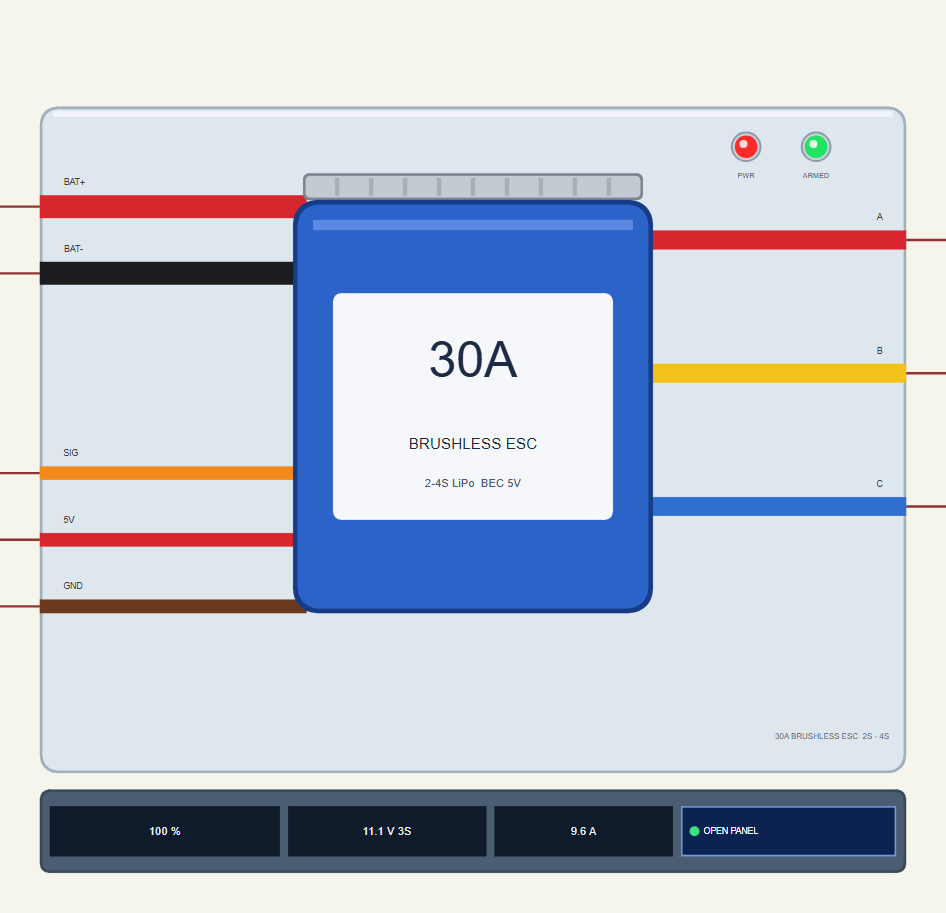
Search ESC in Pick Devices; the device ESC30ATEP is in TEPESC30A.LIB (category Electromechanical, Motor Drivers) and its model is TEPESC30A.DLL. It looks like the real ESC from the top: the blue shrink-wrapped board with its "30A" label and the heat sink along its top edge, the thick red and black battery leads and the orange, red and brown servo lead on the left, the red, yellow and blue motor wires on the right.
The light TEP plate carries two LEDs: PWR (red) lights when the battery is connected, ARMED (green) when the ESC has armed. Under the plate the strip shows the throttle, the battery voltage with its cell count and the current from the battery, plus the OPEN PANEL button. The plate, the LEDs and the strip are TEP additions; a real ESC only beeps.
| Pin | Wire | What it does |
|---|---|---|
| BAT+ | red (thick) | the battery's +: 2S - 4S; the ESC counts the cells at power-up |
| BAT- | black (thick) | the battery's -, the ground of everything |
| SIG | orange | the servo signal from the Arduino: 1050 us and less = zero, 1950 us and more = full throttle |
| 5V | red | the BEC's 5 V output (for a receiver or servos) |
| GND | brown | the signal's ground - the same as BAT- |
| A / B / C | red / yellow / blue | the three motor phases; swap any two and the motor turns the other way |
| Property | Default | What it does |
|---|---|---|
| POLES | 14 | the motor's magnet poles - only for the RPM the ESC shows (14 for the A2212) |
| DIRECTION | NORMAL | REVERSED swaps two phases inside, as a programmable ESC does |
Download 30A Brushless ESC Library for Proteus
The download link of 30A-Brushless-ESC-Library-for-Proteus-v1.0.zip (without the source code) will be added here soon. The zip file will contain:
- README.txt: installation, the demo, the wiring, the properties, real hardware, troubleshooting and the limits.
- Proteus Library Files:
TEPESC30A.LIBandArduinoV4TEP.LIBfrom our Arduino Library for Proteus V4.0. - Proteus Model Files:
TEPESC30A.DLLandTEPARDUINO.DLL. - Proteus Simulation:
ESC30A-A2212-Brushless-ArduinoUnoV4.pdsprj,ESC_A2212_Demo.hexand copies of the DLLs. - Arduino Code:
ESC_A2212_Demo.ino(the Servo library comes with the Arduino IDE).
Important: the demo's motor is not in this zip. It is our A2212 Brushless Motor Library for Proteus, a separate library: download it and install its TEPA2212.LIB and TEPA2212.DLL first, the same way as below.
No Proteus yet? Read How to Download and Install Proteus 7 and 8. New to libraries? Follow How to Install a New Library in Proteus.
How to Install 30A Brushless ESC Library for Proteus
- Close Proteus and extract the whole zip file, for example to your Desktop.
- Copy
TEPESC30A.LIBandArduinoV4TEP.LIBfrom Proteus Library Files into the LIBRARY folder of Proteus (usuallyC:\Program Files (x86)\Labcenter Electronics\Proteus 8 Professional\LIBRARY). - Copy
TEPESC30A.DLLandTEPARDUINO.DLLfrom Proteus Model Files into the MODELS folder. - Install our A2212 Brushless Motor library the same way, for the demo's motor.
- Delete
TEPESC30A.IDXfrom the LIBRARY folder if it is there. - Start Proteus, press P and search for ESC.
Tip: keep the Proteus Simulation folder together, because the project needs its .hex file and the DLLs beside it. The library is tested in Proteus 8.5; Proteus 7 is not supported.
The Demo Circuit
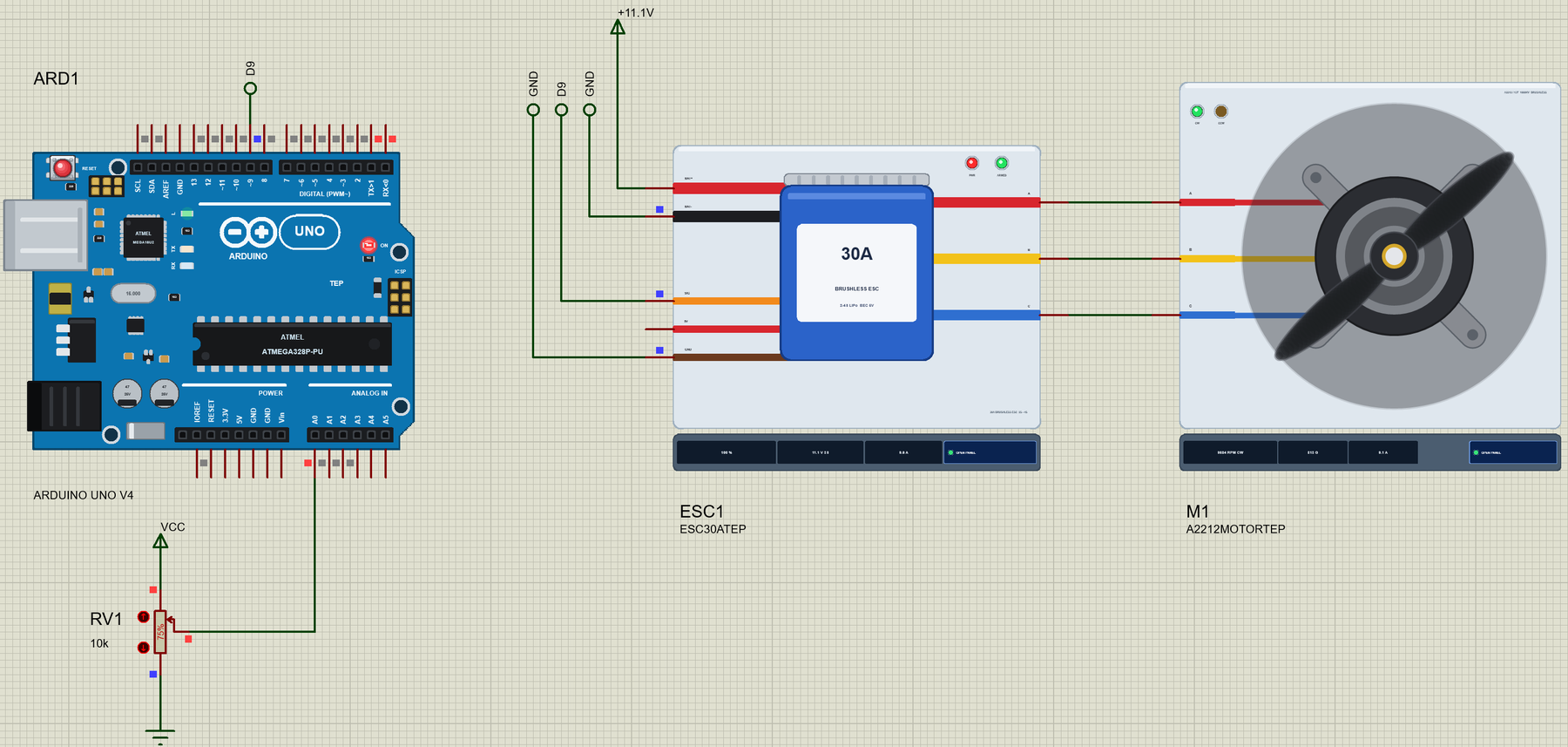
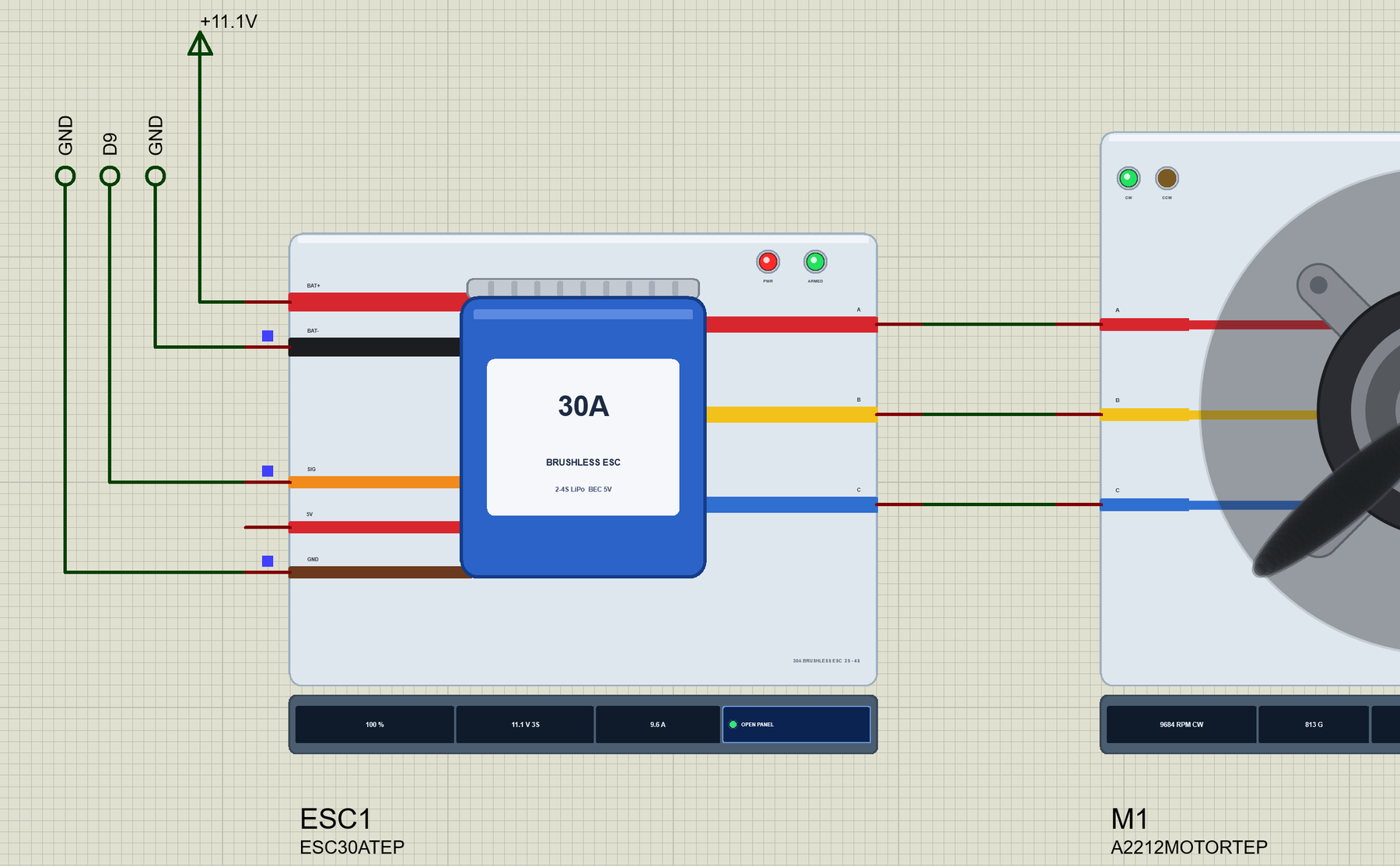
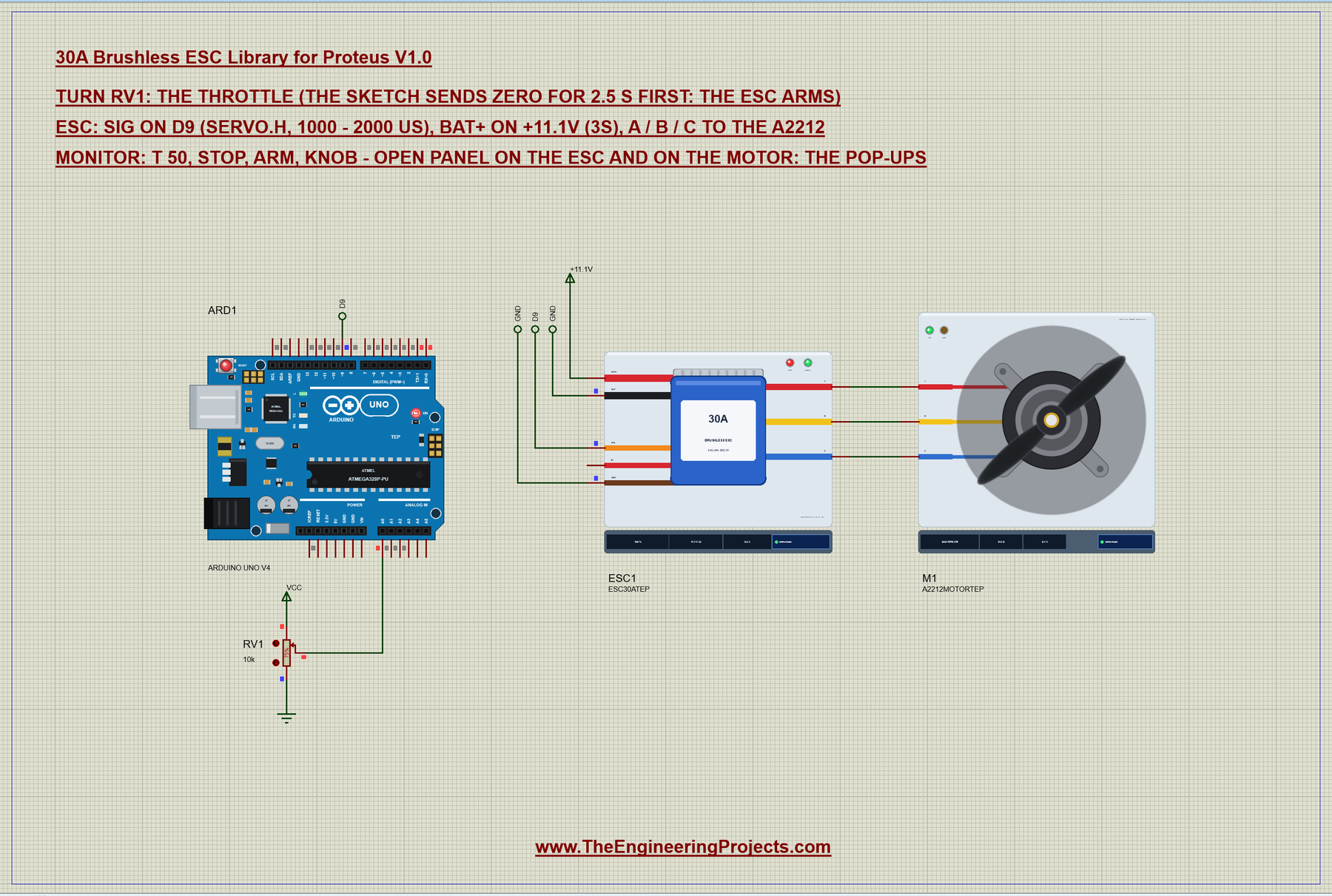
Open ESC30A-A2212-Brushless-ArduinoUnoV4.pdsprj. ARD1 is an Arduino UNO V4.0 from our Arduino UNO Library for Proteus V4.0, running ESC_A2212_Demo.hex with its serial monitor built in. ESC1 is the ESC: its BAT+ lead on a +11.1V power terminal, which plays the part of a 3S LiPo battery, BAT- and GND on ground, SIG on D9. M1 is the A2212 with a 1045 prop, wired straight to A, B and C. RV1, a 10k potentiometer on A0, is the throttle stick.
| ESC lead | Goes to | Note |
|---|---|---|
| BAT+ / BAT- | the battery (+11.1V terminal / GND) | a 3S LiPo on the real thing |
| SIG | Arduino D9 | any pin: the Servo library makes the pulses |
| GND | Arduino GND | the signal needs a common ground |
| 5V | not connected | an Arduino on USB has its own 5 V |
| A / B / C | the A2212's three wires | any order; swap two to reverse |
The Arduino Code
To the Arduino an ESC is just a servo: the same Servo library, the same writeMicroseconds(). New to Arduino? Start with Introduction to Arduino UNO. If you have used our SG90 Servo Motor Library for Proteus, you already know the signal. The sketch starts with the pins and the pulse widths for zero and full throttle:
#include <Servo.h>

const int ESC_PIN = 9;
const int POT_PIN = A0;
const int US_ZERO = 1000, US_FULL = 2000;
attach() gets the limits too, so writeMicroseconds() can never send less than 1000 or more than 2000 us. Then the sketch arms the ESC before anything else:
void setup() {
  Serial.begin(9600);
  esc.attach(ESC_PIN, US_ZERO, US_FULL);
void arm() {
mode = ARMING; armUntil = millis() + 2500;
esc.writeMicroseconds(US_ZERO);
Serial.println(F("Arming: zero throttle (1000 us) for 2.5 s..."));
}Arming is just zero throttle for long enough. The sketch does not block with delay(); loop() checks the clock and switches to the pot when the 2.5 s are over:
  if (mode == ARMING && (long)(millis() - armUntil) >= 0) {
    mode = KNOB; lastUs = -1;
    Serial.println(F("Armed (the ESC beeped) - the pot is the throttle now"));
  }
The pot becomes the throttle. Its bottom 20 counts are a dead zone that always sends exactly 1000 us, so turning the pot fully down is a sure stop even with a little noise on A0:
    int raw = analogRead(POT_PIN);
    int us = raw < 20 ? US_ZERO : map(raw, 20, 1023, US_ZERO, US_FULL);   // a dead zone at the bottom: a sure stop
    if (lastUs < 0 || abs(us - lastUs) >= 10) {
      esc.writeMicroseconds(us);
A command like t 50 in the monitor sets a fixed throttle in percent and ignores the pot until you type knob:
  if (s[0] == 't' && (s[1] == ' ' || (s[1] >= '0' && s[1] <= '9'))) {
    int pct = constrain(atoi(s + 1), 0, 100);
    int us = US_ZERO + (long)pct * (US_FULL - US_ZERO) / 100;
    mode = FIXED;
    esc.writeMicroseconds(us);
The HEX file is in the package. To change the sketch, open it in the Arduino IDE and export the compiled binary, as in How to get the HEX file from Arduino. It needs 5,852 bytes of flash (18 % of the UNO) and 293 bytes of RAM.
Running the Demo
Press Run. The UNO's monitor and the two pop-ups - the ESC's and the motor's - open; move them aside. The monitor shows the arming, and 2.5 s later the pot takes over:
30A ESC + A2212 brushless motor demo - The Engineering Projects
ESC signal on D9, a 3S battery on the ESC. The pot on A0 is the throttle once the ESC is armed.
Commands: t 50 | stop | arm | knob | help
Arming: zero throttle (1000 us) for 2.5 s...
Armed (the ESC beeped) - the pot is the throttle now
Pot 768 -> 1745 us = throttle 74 %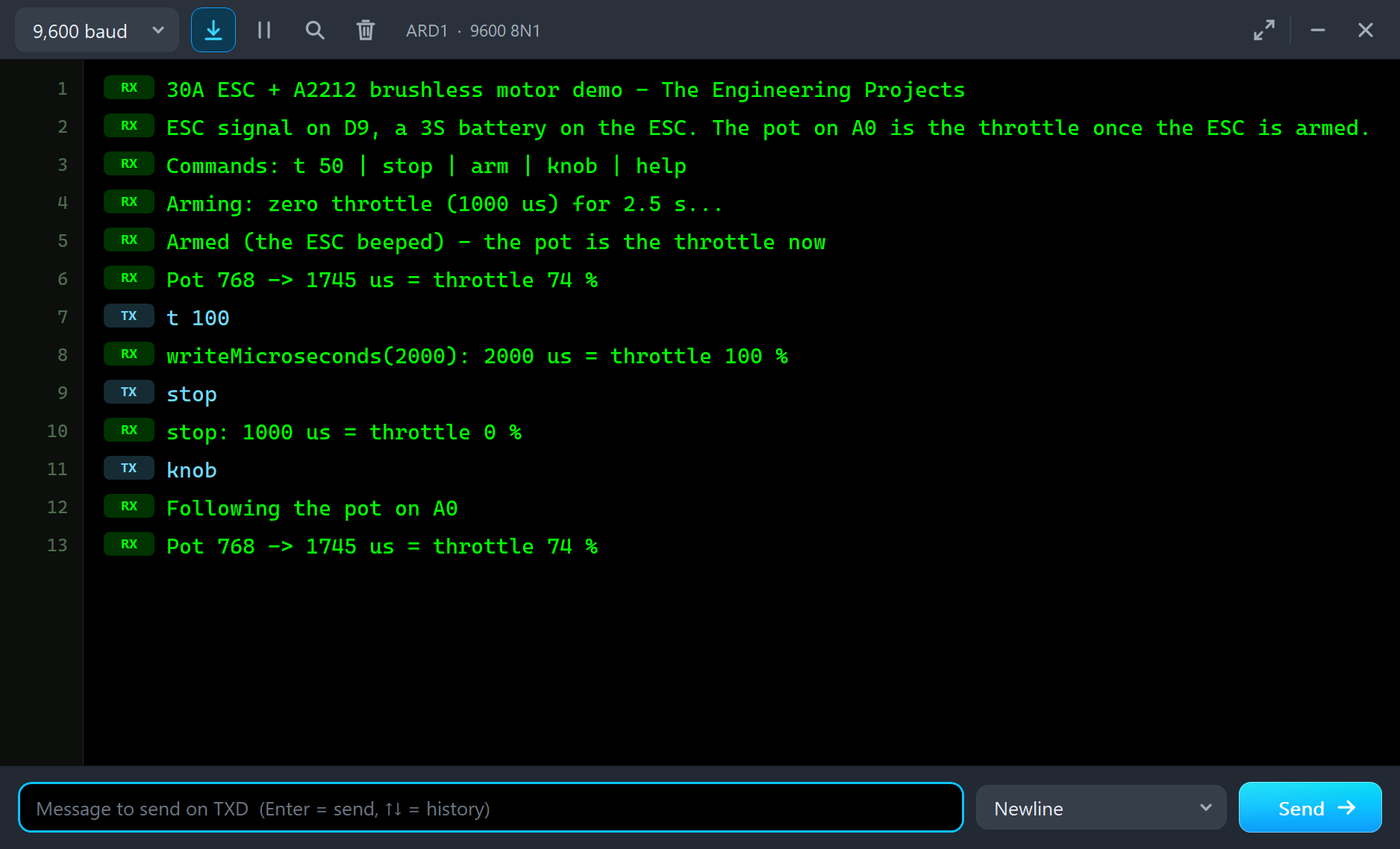
Meanwhile the ESC has done its own power-up: "battery 11.10 V = 3S: 3 short beeps", the motor detected at 0.3 s with 45.0 mOhm a phase, and "ARMED - the long beep" at 0.8 s. The green ARMED LED lights and the pop-up turns green.
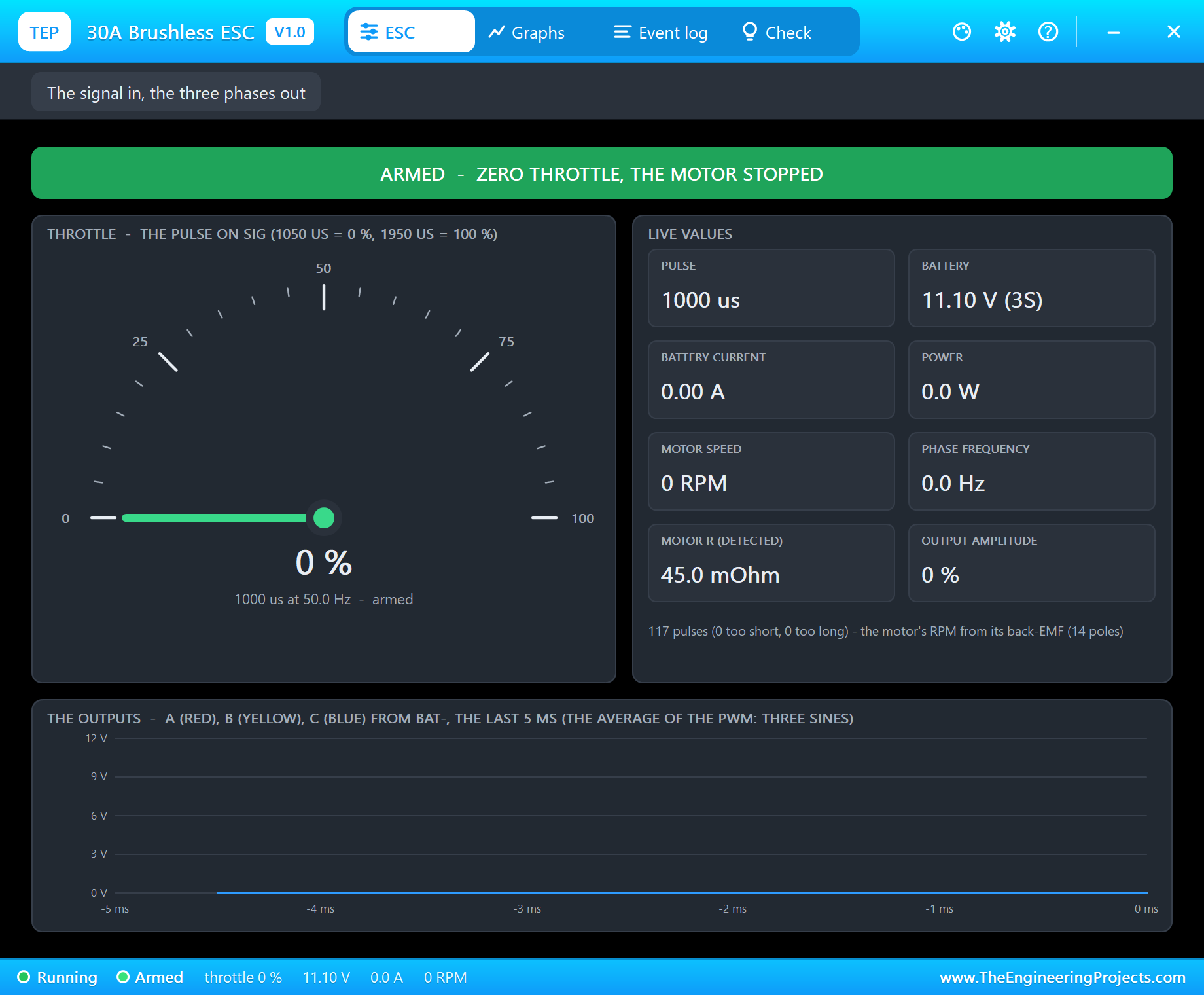
The Throttle Comes Up
At 2.72 s the sketch follows RV1 at 75 % and sends 1745 us. The ESC starts the motor in open loop and 0.12 s later the event log says "locked on the motor's back-EMF at 415 RPM: closed loop". The prop runs up to 7,666 RPM, takes 4.8 A from the battery and pulls 509 g. During the run-up the current peaks at 14.0 A, because a prop at rest needs its torque to accelerate.
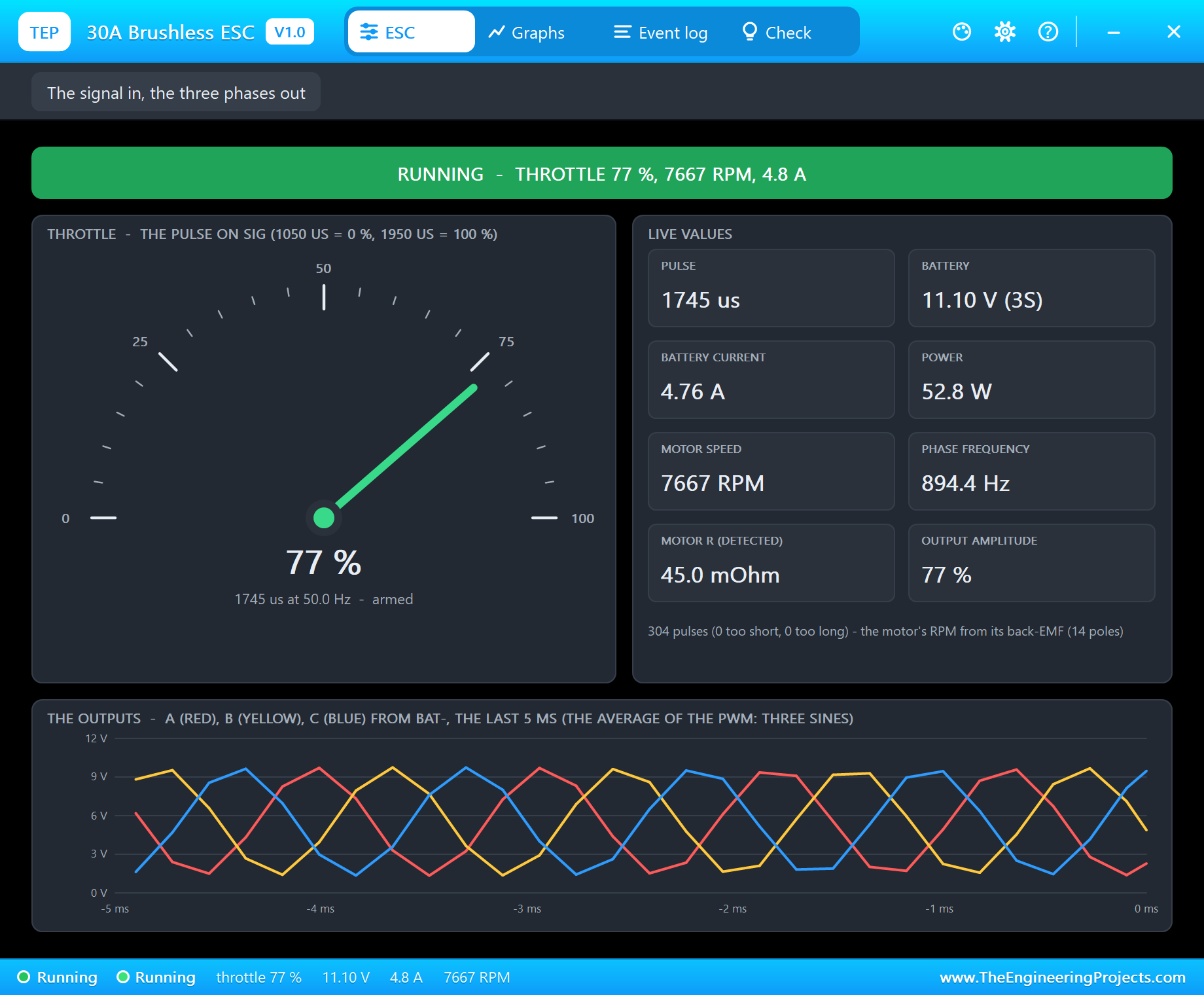
Notice the two percentages. The sketch prints 74 %, because it counts from 1000 to 2000 us. The ESC shows 77 %, because, like most ESCs, it treats everything below 1050 us as zero and everything above 1950 us as full. Real ESCs are calibrated to the transmitter's range for exactly this reason.
The sketchs own percentage comes from its report() function:
void report(int us) {
  Serial.print(us); Serial.print(F(" us = throttle "));
  Serial.print((long)(us - US_ZERO) * 100 / (US_FULL - US_ZERO)); Serial.println(F(" %"));
}
Full Throttle
Type t 100 and the sketch sends 2000 us:
t 100
writeMicroseconds(2000): 2000 us = throttle 100 %
stop
stop: 1000 us = throttle 0 %
knob
Following the pot on A0
Pot 768 -> 1745 us = throttle 74 %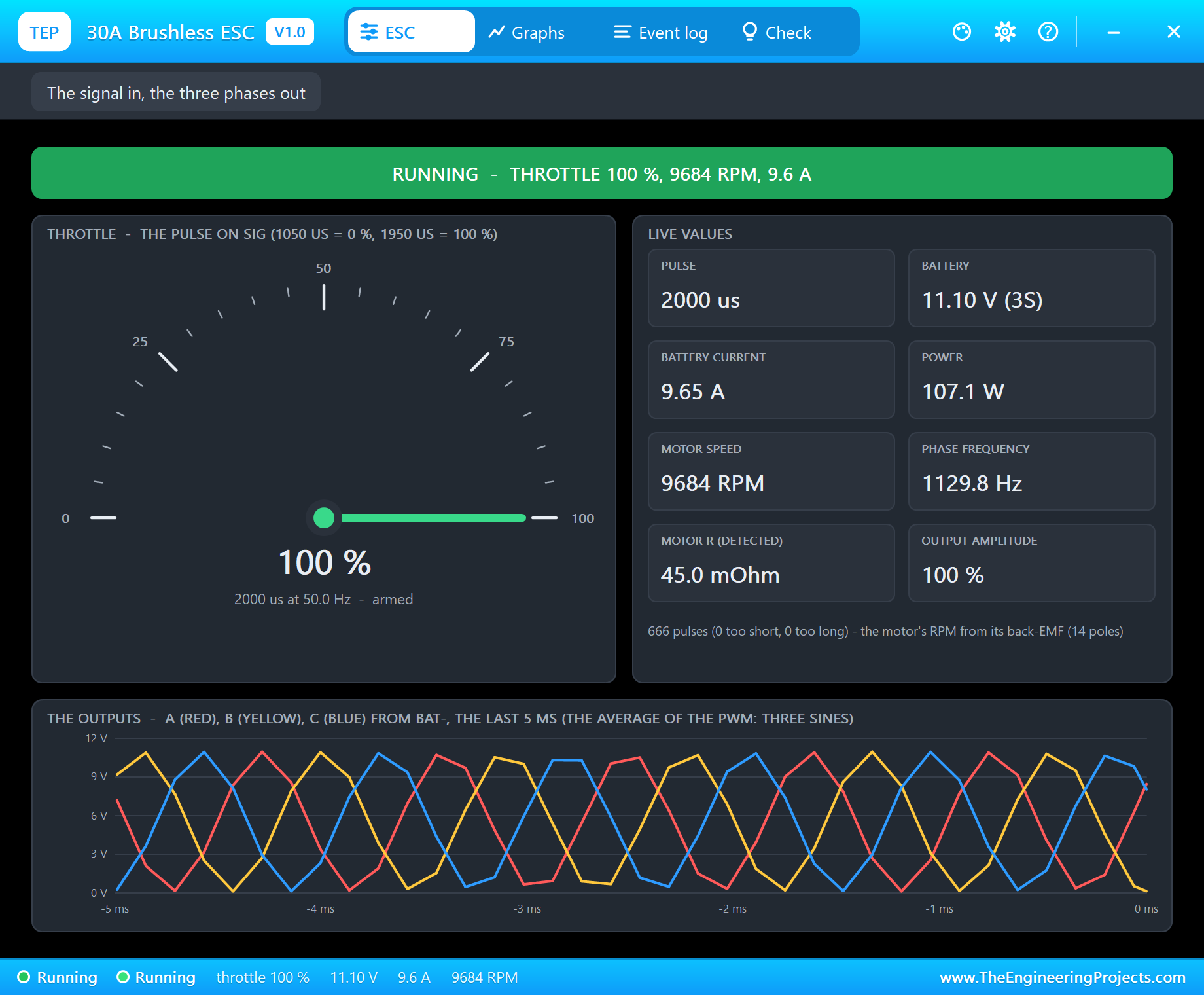
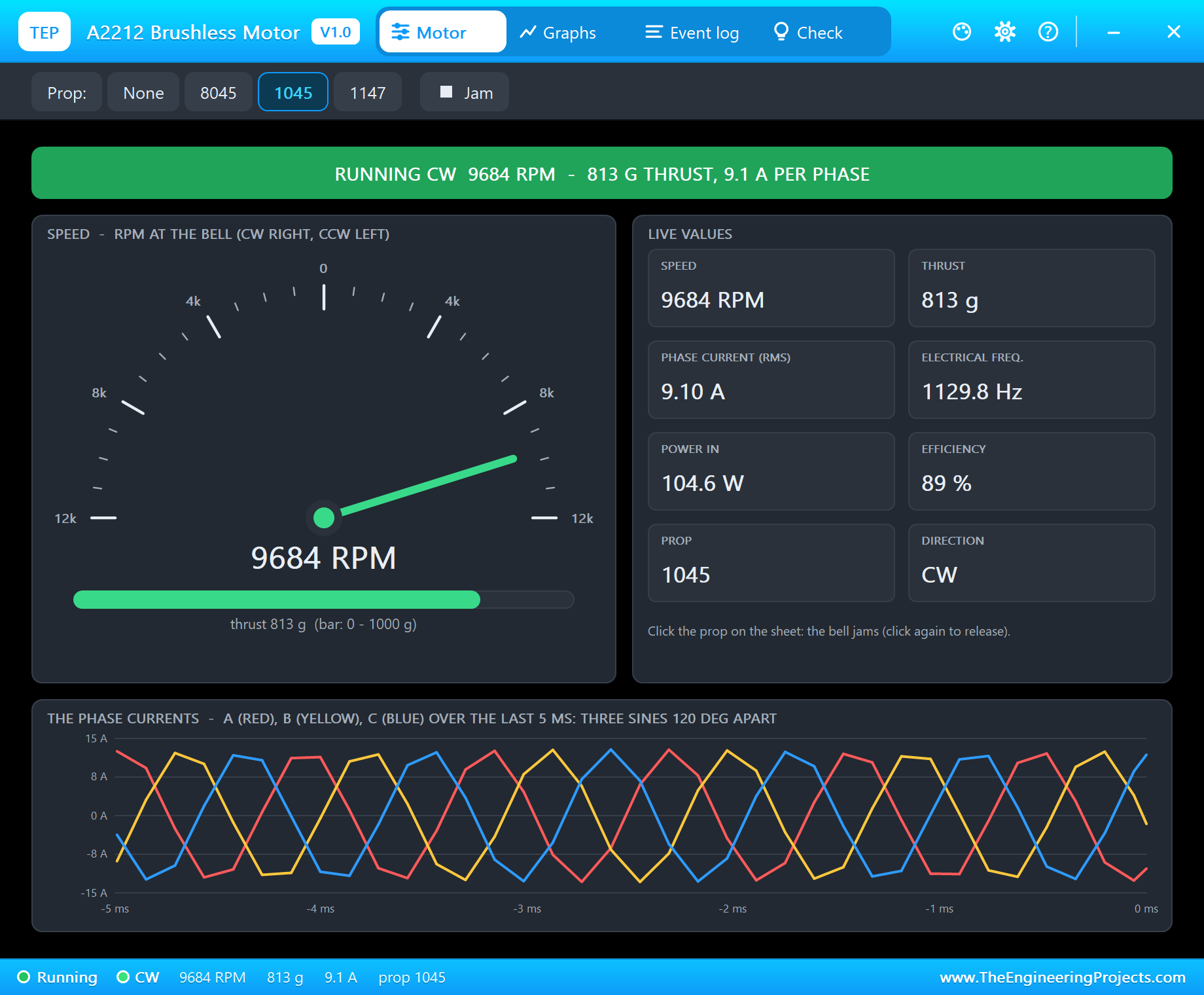
The motor settles at 9,684 RPM, the battery gives 9.65 A, 107.1 W, and the prop pulls 813 g - the numbers of an A2212 with a 1045 prop on 3S in the makers' tables. The bottom of the page draws the three outputs over the last 5 ms: three sines from 0 to 11 V, 120 degrees apart, at 1129.8 Hz. That is the average of the PWM a real ESC's MOSFETs switch, and it is what the motor's windings feel.
Stop and Start Again
Type stop: zero throttle, the outputs switch off and the log says "zero throttle: the motor coasts". The prop keeps turning for a while, and the ESC keeps watching it: its three wires now carry only the motor's back-EMF, so the pop-up still shows the speed as it falls.
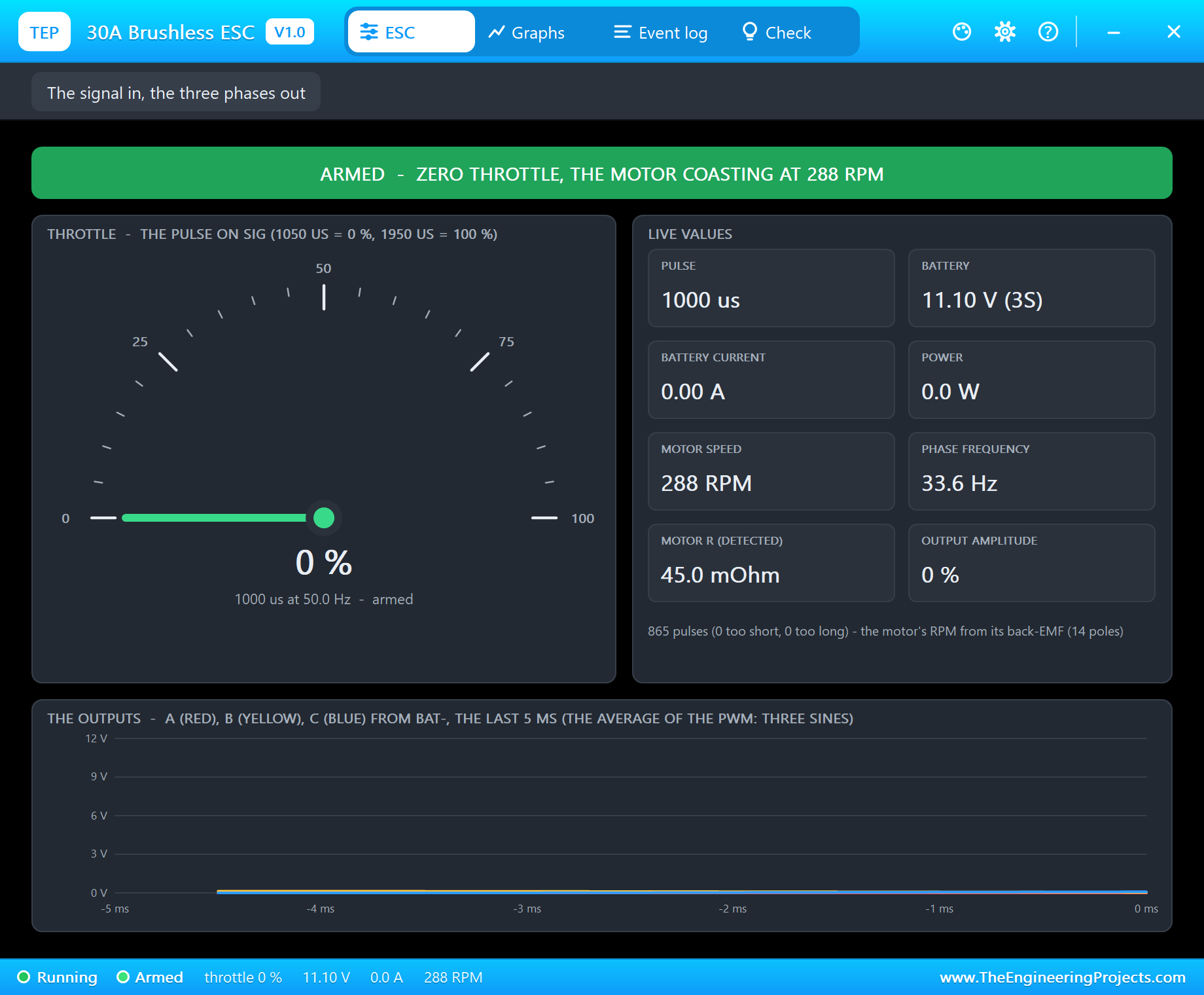
Type knob while the prop still turns fast enough and the ESC does not start from rest against it - in one of our runs it caught the motor still turning at 833 RPM, and the motor went straight back to 7,666 RPM without a jerk. If the prop has almost stopped, the ESC starts its rotating field in step with the slowly turning bell and locks a tenth of a second later.
The Pop-Up Window
The ESC's window, TEP 30A Brushless ESC, has the look of our TEP Serial Monitor Advance for Proteus. Besides the ESC page you have seen, three more tabs help you understand the run.
Graphs
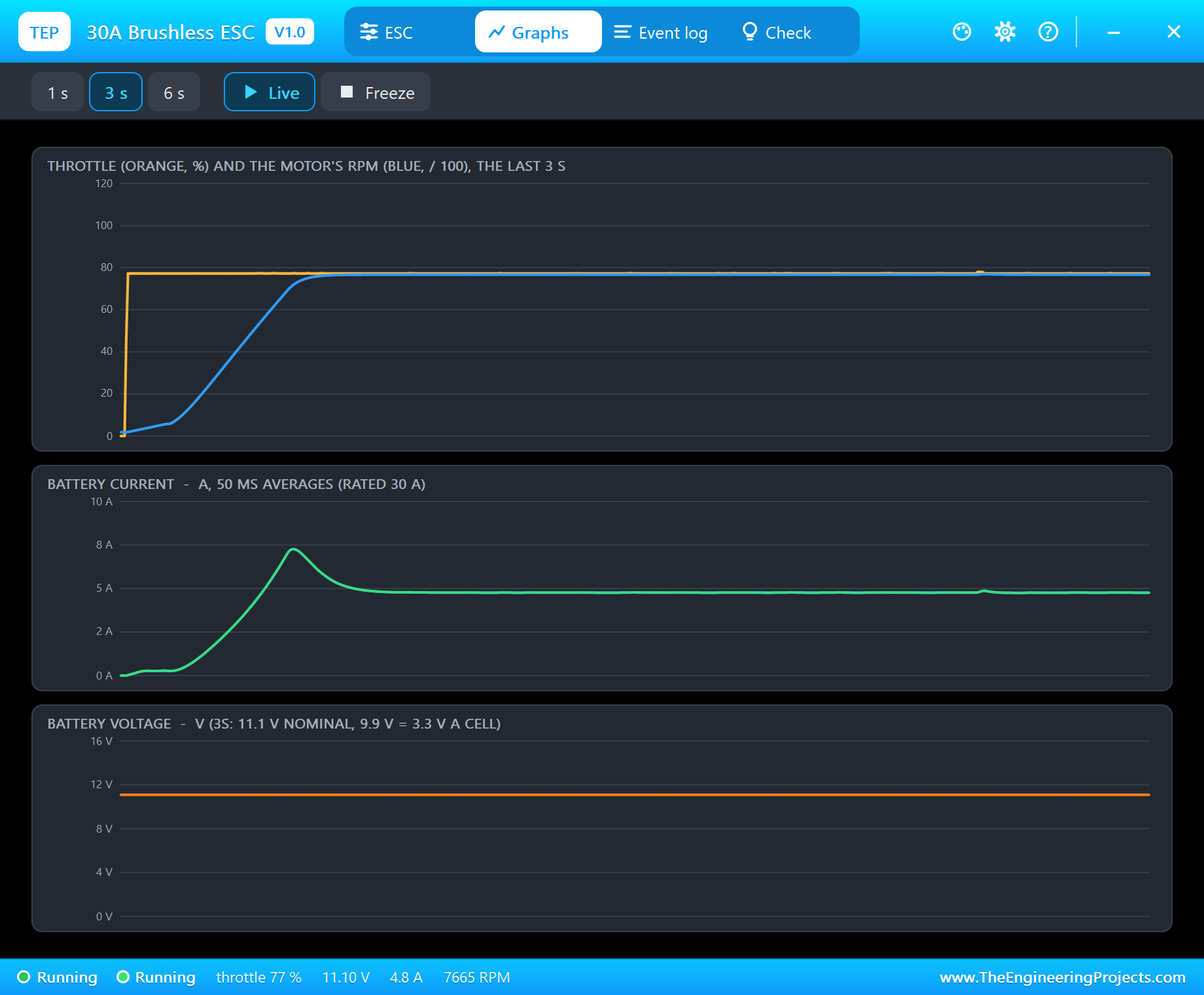
Graphs draws the throttle and the motor's RPM, the battery current and the battery voltage over the last 1, 3 or 6 s. The shape of the RPM curve is the shape of the prop: it accelerates fast at first, then more slowly as the prop's drag grows with the square of the speed. The current peak is the price of that acceleration.
Event Log
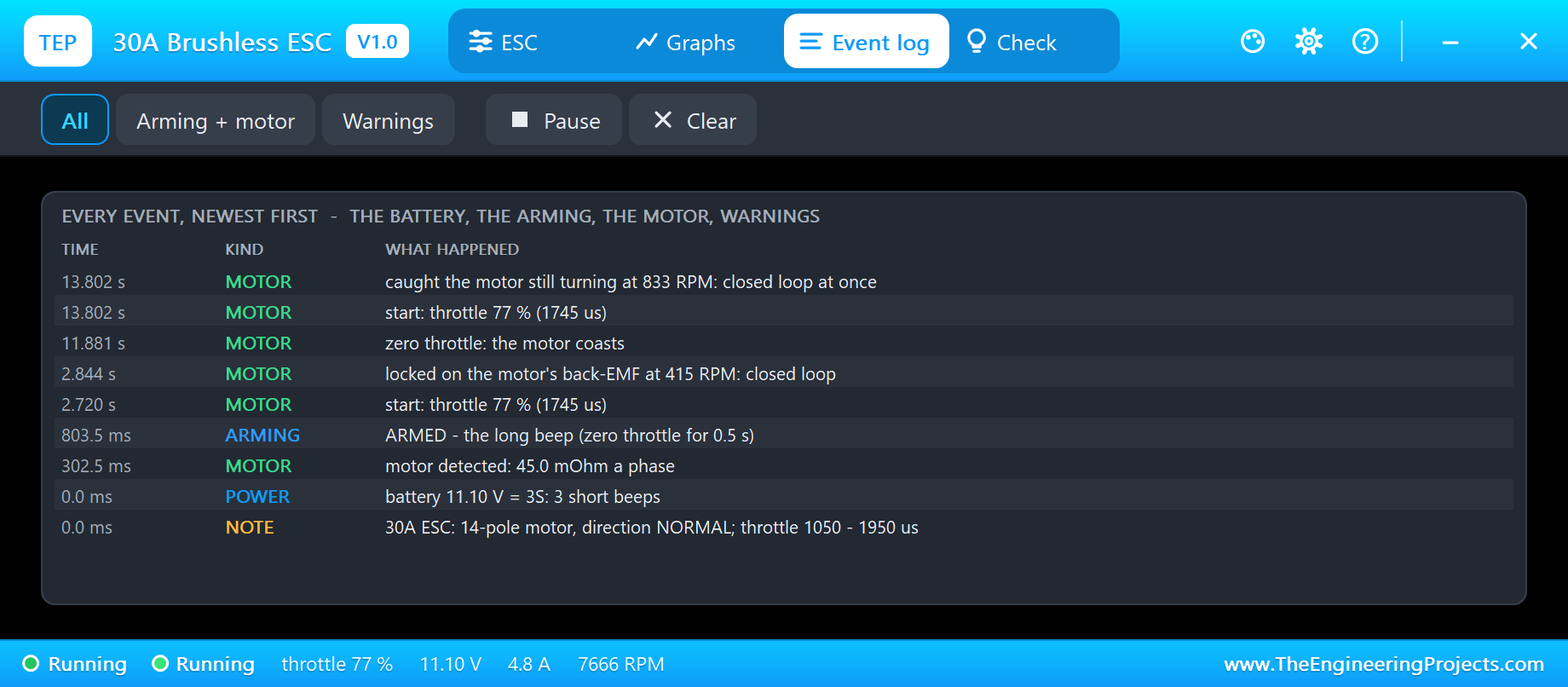
The Event log keeps the whole story, newest first: the battery and its cells, the motor detected, ARMED, every start with its throttle, the lock on the back-EMF, zero throttle, and the warnings. Filter it by arming and motor events or by warnings, pause it or clear it.
Check
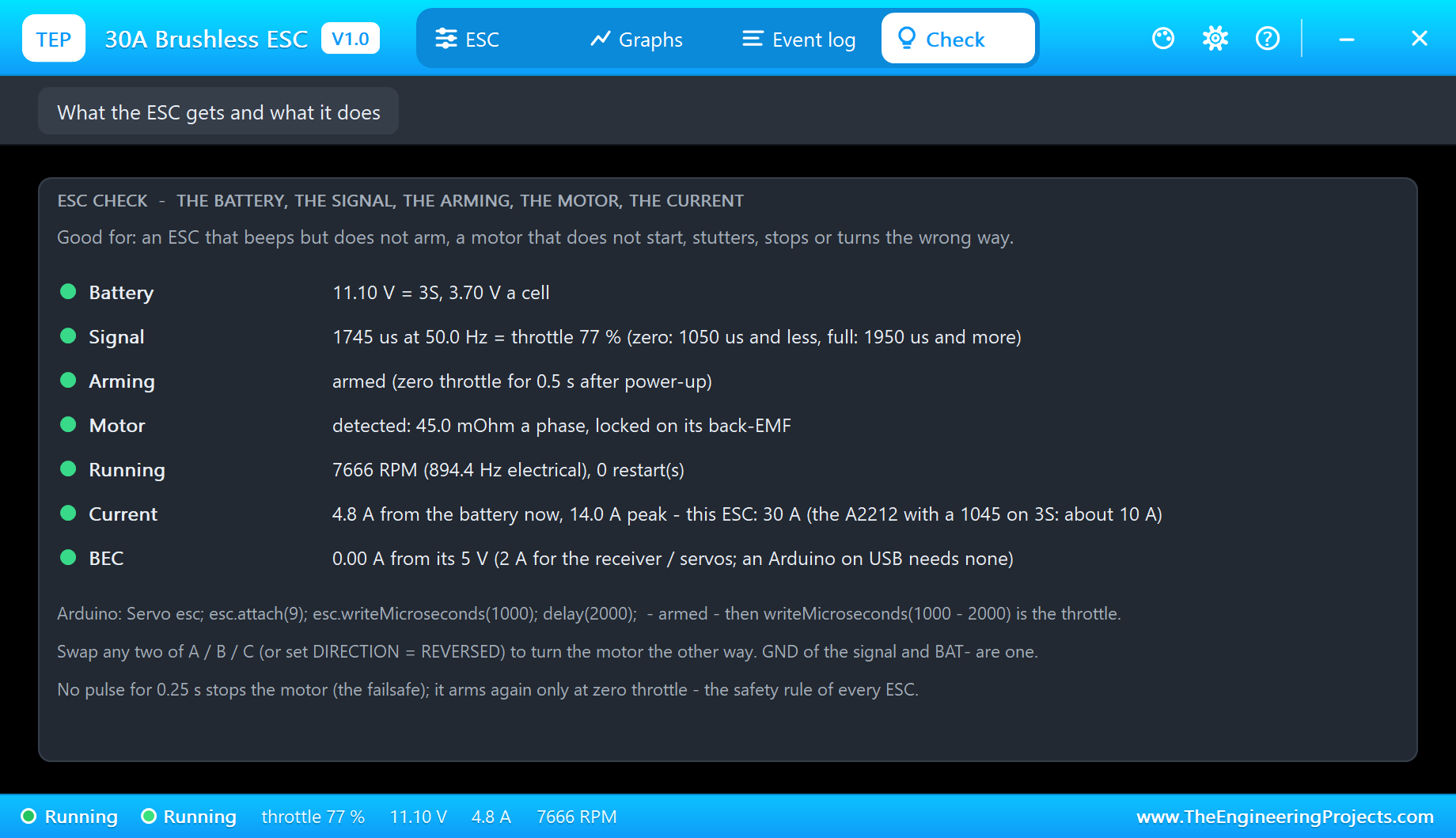
The Check page is for an ESC that beeps but does not arm, or a motor that does not start, stutters or turns the wrong way. It puts the battery, the signal, the arming, the motor, the running state, the current and the BEC in rows, each with a green, amber or red verdict, and ends with the three lines of Arduino code an ESC needs.
How the Model Works
Proteus solves the analog part of the circuit in time steps. In each step, each of the ESC's outputs is a half-bridge whose output is the average of its PWM over the step, behind the 10 mOhm resistance of its MOSFETs, so the battery current that flows through the motor is real. After each step, the ESC's controller reads the three output voltages and currents - what a real ESC's firmware measures - and works out the back-EMF and from it the angle and speed of the magnets. That observer is what lets it start without sensors, lock in closed loop, notice a jammed prop and catch a coasting one.
We tested the ESC with the A2212 model on a PC with 23 automatic checks before it ever ran in Proteus: the arming rules, full and half throttle, the failsafe, a missing motor, a jammed prop that is retried until it is released, a low battery, the cutoff, the reversed direction and the running start after 0.3, 1.2 and 2.5 s of coasting - never once turning the motor backwards.
Troubleshooting
- NO BATTERY and the PWR LED dark: BAT+ / BAT- are not connected, or below 5 V.
- THROTTLE NOT AT ZERO: the sketch sends a throttle at power-up - send 1000 us for a moment first.
- WAITING FOR THE SIGNAL: SIG is on another pin than
attach(), or the grounds are not common. - NO MOTOR: nothing on A / B / C - install our A2212 library and wire its three phases.
- The motor turns the wrong way: swap two of A / B / C, or set DIRECTION to REVERSED.
- SIGNAL LOST: the pulses stopped for 0.25 s - zero throttle arms it again (arm in the demo).
- No ESC, no UNO or no monitor:
TEPESC30A.DLLorTEPARDUINO.DLLis missing from MODELS and the project folder; a closed monitor opens again with a click on the UNO's USB port.
Things to Know Before Using a Real ESC
- Take the prop off while you test on the bench. A 1045 prop at full throttle pulls about 800 g and cuts like a knife.
- Calibrate it once: most ESCs learn the throttle range at power-up (full throttle first, then zero - see its manual); without it 1000 - 2000 us may not give the full range.
- The battery: a 3S LiPo that can give 10 A and more; a 2 A bench supply will sag and reset the ESC.
- The BEC: connect its 5 V to the Arduino only when the Arduino has no other supply; with USB, connect only SIG and GND.
- Arm in the sketch: always send zero throttle for a few seconds after power-up - the ESC will not start otherwise, and that is a feature.
Limitations of the Simulation
- The outputs are the average of the PWM over each analog step; the 16 - 48 kHz switching itself, the beeps (the log names them), the calibration and programming menus, timing advance, active braking and digital protocols (OneShot, DShot) are not modelled.
- The motor model is our A2212; other brushless motors are not in this release.
- The plate, the LEDs and the strip are TEP additions.
- The model is our own, written from the typical data and behaviour of 30 A hobby ESCs; this library is not made or endorsed by any ESC maker, Arduino or Labcenter.
- Licences: the demo HEX contains the Arduino Servo library 1.2.2 (LGPL 2.1) and the Arduino AVR core 1.8.6 (LGPL); the sketch is included and the README gives the source links.
- Tested in Proteus 8.5 in October 2026 with the demo as shipped: the arming, the pot, full throttle, stop, the restart and all four pages of both pop-ups. Proteus 7 is not supported.
So, that was all about the 30A Brushless ESC Library for Proteus V1.0. I hope it takes the mystery out of the little blue box: why it beeps, why it waits for zero, how it starts a motor it cannot see and what all those amps are doing. If you have any questions, ask in the comments and I will help you out. Till the next tutorial, take care and have fun!