Characteristics of Blockchain Technology
Hi friends, hope you are doing well. I have given you an introduction to
Blockchain Technology and ethereum in my previous tutorials. In today’s article, I am going to talk about the characteristics of blockchain. There are several key characteristics of blockchain technology that make it different and usable from other technologies.
The architecture of blockchain is so unique that it inherently provides a lot of features to this technology. These features have benefits for several areas and sectors so let’s discuss these characteristic features.
Characteristics of Blockchain
We have already discussed the components of Blockchain in our previous tutorial Introduction to BlockChain Technology. Now, let's understand the characteristics of Blockchain one by one:
1. Decentralization
- The most important one on the list is decentralization so I am going to explain it first.
- Blockchain is entirely different from traditional internet architecture where each computer or system is connected to a central server. The central server is responsible for managing data.
- In the blockchain, each system has access to the whole data with no central server controlling the operations. No organization is in charge of the data.
- The consensus mechanism in the blockchain is responsible for controlling the network.
- Each node has an updated copy of data and execution power instead of only one server having data and execution control.
- The benefits of decentralization are listed below:
Less Failure
- One benefit of decentralization is that the network and data are available always even if some server or node is not accessible.
User Control
- Users have full control of their assets and transactions.
No Intermediary
- There is no need for a central authority for verifying transactions.
Less possibility of hacking
- Attacking the system requires a lot of computing power.
Distributed Ledger
- The next feature is distributed ledger and to understand this, I will define ledger first. A ledger is a file for recording the transactions.
- An example is the ledgers in banks. All transactions of an account are listed in the ledger in an order. Each new transaction is added to it while retaining the previous record.
- Similarly, every approved transaction is added to the blockchain ledger while maintaining the previous history.
- The blockchain ledger is open to everyone as any node can view the transactions.
- Also, every node on the network is connected to other nodes of the network in many to many connections which makes it a distributed network.
- The network is maintained by all of the nodes. Each node provides computational power to this system.
- Some of the benefits of a distributed ledger are as follow:
- Fast Response: As the network is distributed with no central power, the transactions take less time.
- Participation: Every node participates in maintaining the record and database. Each node takes part in the validation process.
- No Tempering in Data: Each node has a copy of data, a single node cannot temper the past data. Any malicious activity is noticed easily.
- Equal Privileges: All nodes in the distributed network go through the same process of transaction verification.
- This was some idea of a distributed ledger in the blockchain. Next, I will talk about the Immutability feature.
Immutability
- Immutability is a core characteristic of blockchain. Immutable refers to something that cannot be changed with time.
- The data stored in the blockchain cannot be corrupted and this is a very useful and interesting feature.
- In the blockchain, immutability means that any records or transactions stored in it can never be changed or removed. Let’s explain how immutability works here.
- The data in the blockchain is added in the form of blocks. These blocks are verified by nodes and every entity of the network accepts them.
- Every node has a copy of data and changing a single copy residing on a single node cannot alter the data on the entire network.
- The data in each block is cryptographically secure and hashed. Each block is identified by its hash value and each block has the hash value of the previous block too.
- Changing the data of a block changes its hash value too and as each block contains information of the previous block the hash no longer matches with the next block of the chain.
- So, the distributed nature and cryptography make the data immutable in the blockchain.
- Once a transaction is recorded in a block, verified by nodes, and added to the blockchain, no one is able to modify or remove that from the database.
Security
- The next feature that I am going to discuss is security. The architecture of blockchain provides data security.
- Due to cryptography, all information is secure in the database and that makes it different from the existing internet structure.
- The account information is also secure and the identity of each node is hidden. Each account has a private and public key. The private key is secured and cannot be generated via public key.
- The network is controlled by a set of rules instead of any authority. So, no one is able to change the rules for themselves. The system enforces security and integrity itself.
- Now let’s talk about another important feature i.e., traceability.
Traceability
- Blockchain provides the traceability feature.
- Traceability means being able to trace and track the origin of something. Traceability allows verifying the source or origin, history, and all data of a product.
- As blockchain is an immutable database, any asset or transactional data can be traced back.
- The origin of any transaction can be traced back to the distributed ledger.
- This characteristic is very useful in a lot of applications such as in a supply chain network.
Cryptographic Hashing
- I have already given you an idea of what cryptographic hashing is in this article. The blockchain transactions are all cryptographically secured.
- The transactions in a block are hashed and thus converted to a fixed-length value. This value is stored in the block.
- Data can be converted to a hash value but a hash value cannot be converted back to input data which implies that cryptographic hashing is a one-way function.
- The pair of a public and a private key for each account also has cryptography associated with it. The public key is generated from the private key. The private key is secured and not shared on the network while the public key is open on the network. The public key can be generated via private key using cryptographic functions but the private key cannot be generated using public key due to the one-way nature of cryptographic functions.
Anonymity
- Having discussed the important features of blockchain technology, let’s not leave out another significant property that is anonymity.
- On a blockchain network, the true identity of a participant is hidden.
- Each participant of the distributed network has an address associated with it. This address is the identity of that entity instead of a true identity.
- The addresses keep the user anonymous on the network.
So, I have explained the basic characteristics of blockchain that make it unique from the traditional systems. I am hoping that you will get an idea of the benefits of blockchain after reading this article. I will come with another useful article next time. Till then, take care!
Buck Converter using MOSFET Gate Driver in Proteus
Hey Geeks! Welcome to The Engineering Projects. We hope you are doing great. MOSFET is a predominant component widely used in electronics due to its performance. We are working on the Projects of MOSFET and today's experiment is really interesting. We are working on the MOSFET Gate Driver and we will work on the following concepts:
- Introduction to MOSFET Gate Driver.
- Circuit of MOSFET Gate Driver.
- Working of MOSFET Gate Driver.
- Simulation of MOSFET Gate Driver in Proteus.
- Applications of MOSFET Gate Driver.
You will find important information about the topic in DID YOU KNOW sections.
Introduction to MOSFET Gate Driver
We all know MOSFET is a type of transistor and is used in a wide range of circuits. It has many interesting features and the characteristics of MOSFET are at the fingertips of electrical and electronic engineers. The circuit of the MOSFET Gate Driver may be new for many students so let's have a look at its definition:
"The MOSFET Gate Driver is a type of DC to DC power amplifier that in the form of on-chip as well as discrete module in which we use MOSFET as the gate driver IC, the low power is taken as input from MOSFET and high power is obtained its gate terminal and vice versa according to need."
DID YOU KNOW?
The name of the MOSFET Gate Driver is due to its characteristic to have the high current drive gate input of a Transistor. We use the MOSFET because it is a gate driver IC.
MOSFET is used in this circuit because it is commonly used in switching devices where the frequency ranges from hundred of KHz to thousands of KHz. It is mostly used in appliances where we need DC to DC amplification. It is used in computers to low their temperature during their performance. The MOSFET Gate driver is used to change the value of DC according to the circuit of the appliances.
There are three types of drivers:
- High side drivers.
- Low side Driver.
- Isolated Drivers.
Circuit of MOSFET Gate driver
When we look at the circuit of the MOSFET Gate drive, we found there are some basic as well as some special components in the circuit. In addition to MOSFET, the circuit consists of resistor, capacitor, inductor and IR2101. Let's look at their functions:
MOSFET
- Metal Oxide Semiconductor Field Effect Transistors have a thin layer of silicon oxide between Gate and channel. It four terminals: Gate, Drain, Source.
IR2101
It is IC that works very great with MOSFET. We use it in the MOSFET Gate driver to insert the voltage in the Gate terminal of the MOSFET in the form of pulses. We define the IR2101 as:
"It is seven pins, high power, high voltage, MOSFET and IGBT driver that has independent high and low channel references."
The detail of the pins is given as:
- Vcc: This Pin is for Low side and logic fixed supply voltage.
- Vs: It is for High side floating supply offset voltage.
- Hin: High side gate driver output is taken by this pin.
- HO: We get High side gate drive output through this pin.
- Lin: Low side gate driver output is taken by this pin.
- LO: Low side gate drive output is obtained through it.
- COM: we get Low side return from this pin.
Other components are very common to discuss.
Working of MOSFET Gate Driver
The working of the MOSFET Gate Driver start when the power is generated from power terminals.
- The IR2101 starts with the power terminal, the input pulse generators convert this power into the special length as set by the user.
- These pulses Enter at the gate terminals of MOSFETs.
- Both of these MOSFETs do not turn on at the same time. They work in a loop so that if the high side MOSFET is turned on then the other is off and vice versa.
- The MOSFET M1 on the upper side of the circuit is considered at the High side of the driver and the MOSFET M2, on the lower side of the circuit is at the Low side driver.
- After some time, when the voltage becomes greater than the threshold voltage of MOSFETs, they start working.
- The terminals of MOSFETs are connected with the capacitor.
- The aim of this circuit is to charge the capacitors. Hence when the MOSFET starts working, the charging of the capacitor takes place.
- The pulses reach both the MOSFET at a very specific time due to IR2101.
- Once the capacitor C2 is fully charged, it starts the discharging power and this discharging power from the inductor as well and at last, it goes to the ground terminal.
- In this case, the polarity of the inductor changes and in this way, the energy stored in the capacitor is discharged.
- Hence at the end, when we check on the oscilloscope, we get the changed output pulse from the input.
Simulation of MOSFET Gate Driver in Proteus ISIS
Material Required for MOSFET Gate Driver
- MOSFET
- IR2101
- Resistor
- Capacitor
- Inductor
- Ground Terminal
- Power Terminal
- Pulse Generator
Using all the concepts given above, we'll simulate the circuit in Proteus for a crystal clear concept. Just follow the steps given next:
- Start your Proteus Software.
- Make a new Project.
- Click at "P" button to choose the first five components for the experiment one after the other.
- Arrange all the components in the working area according to the arrangement given next:
- Go to Terminal Mode> Ground and add ground terminal with the required components of the circuit.
- Repeat the above step with the power Terminal.
DID YOU KNOW?
The efficiency of MOSFET Gate driver is more than 90% in many cases.
- Go to Instrument Mode and take the Oscilloscope from there. Now, arrange it just below the circuit.
- Connect all the components with the help of connecting wires by carefully following the image given next:
- Double-tap the components one by one and change the default values according to the table given next:
| Components |
Values |
| R1 |
10R |
| R2 |
10R |
| R3 |
60R |
| L1 |
500u |
| C1 |
4.7u |
| C2 |
60u |
| Pulse 1 |
Pulse (High) voltage =5v, frequency 1k, Pulse Width 50% |
| Pulse 2 |
Pulse (High) voltage =5v, frequency 1k, Pulse Width 50% |
- Tap the play button at the lower-left corner of the screen to simulate the graph.
- Set the values of voltage and current through the nob to see a clear output.
Applications of MOSFET Gate Driver
- MOSFET Gate driver is used in DC to DC converter.
- It is used in the conversion of high voltage to low voltage.
- It is mainly used to reduce heat in many circuits.
- Due to its functions, it is useful in extending battery life.
So, in the present article, we saw what is MOSFET Gate driver. What important components are used in it, how does its circuit works and how can we simulate its circuit in Proteus. Moreover, we also read some of its applications. We hope you learned well from this article.
Blockchain Technology: Definition, Structure, Architecture & Components
Hello friends, Hope you are doing good. Today I am going to talk about the technology that is most hyped right now and is said to bring revolution to the internet. Yes, I am talking about Blockchain technology and I am going to start explaining it from the very basics. Let’s start with a little history here without getting into too many details of it.
The concept of blockchain was introduced to the world by Satoshi Nakamoto although this concept was first described in 1991. The technology was introduced via bitcoin which is a cryptocurrency invented in 2008. You must have heard about this cryptocurrency already. Now I am going to move towards the introduction of blockchain in the next section.
What is Blockchain Technology?
- Blockchain is a distributed network that acts as a ledger and also as a system for transferring assets eliminating the need for centralized authorities.
- In simpler words, blockchain is a ledger for transactions but actually, it is more than that.
- I will explain this concept with a daily life example and then I will give you an idea about its structure.
Example Case:
In our traditional systems, all our money and assets are stored in banks. All transactions take place via banks and if I want to initiate a transaction on my own it is not possible and no money transfer can take place without involving these banks. So, in this case, the bank is the central authority. It contains a record of all our data, assets, and money transfers. Blockchain technology allows us to have control of our money without the involvement of a central party.
Structure of Blockchain
In this section, I am going to tell you about the structure of the blockchain.
- Blockchain is an ordered structure, a list of ordered blocks.
- These blocks contain transactions and records.
- The blockchain is stored in the form of a database or a flat-file.
- Each block is linked to the previous block of the list, in such a way that all blocks are layered on top of each other.
- The first block of this list is the foundation and is termed as Genesis block.
- Each block in the list is called the parent block of the upcoming block.
Block Identification
- As I already explained how blockchain contains a list of blocks in the previous section.
- This list keeps on increasing day by day and in order to identify a particular block in the list, some identification parameter is needed.
- Blockchain technology uses cryptography for data security and therefore all data in a block is converted to a hash value.
- SHA256 algorithm is used for generating this hash value.
I will explain cryptography and hashing in the upcoming tutorials. For now, it is enough to understand that by using cryptographic techniques, block data is converted to a hash value. A hash value is a fixed-sized numeric value and this value is used for identifying a block from other blocks of the chain. Each block points to the previous block that is the parent block by having its hash value.
- Another parameter used for block identification is Block Height.
- This parameter shows the position of the block in reference to the first block that is the genesis block.
Thus, we can say that there are two parameters that help in identifying a block:
- Hash Value.
- Block Height.
Now let’s move towards the next section of this tutorial which will help you in understanding the architecture of a blockchain.
Architecture of Blockchain
In this part, we will learn the basic architecture of this technology which in turn helps in understanding its working.
- The main feature of blockchain is decentralization, which means there is no central server or authority.
- All computers are linked to each other instead of being connected to one server.
- These systems are called nodes and they are connected in a peer-to-peer network.
- The database and all information are available and stored on each node. In other words, the information is distributed throughout the network instead of being copied.
- The peer-to-peer network and decentralization are the powerful features of blockchain and provide security and trust in this system.
I am going to explain decentralization through a simple example given below.
Decentralization Example:
The concept of decentralization can be grasped by looking at the example of google drive. The shared content on Google Drive such as a document or a spreadsheet is accessible to a group of people. Some of them also have the right to edit those files. Let’s talk about that group. Each person in the group has the right to edit and change the document and each person has access to the updated file. Everyone can work simultaneously on the document. The same happens in the blockchain. Anyone has access to the data and anyone can add new data. The difference is that each change is recorded in the blockchain and cannot be deleted from blockchain history. This feature comes from the immutability of blockchain which I will explain in subsequent tutorials.
Components of Blockchain
In this part of the tutorial, Let's talk about some basic components and key ideas of blockchain technology.
Peer–Peer Network:
- Blockchain is a peer-to-peer network as I mentioned earlier in the previous section. The nodes or participants of the network are connected.
Transactions:
- Transactions that are contained in the blocks. These transactions represent the changes in state.
List of Blocks:
- A chain of blocks that contains all transactional data.
Consensus Rules:
- Another important component is a set of rules called consensus rules that are defined for confirming transactions ad agreeing on state changes.
State Machine:
- A state machine whose function is to process transactions.
Incentive Scheme:
- A process of giving incentives to nodes that participate in confirming and verifying the transactions.
There are different types of blockchain today. Each of them has a few different properties and different qualifiers have been assigned to recognize them. A blockchain can be a public, private, open, consortium, etc.
These were some basics of blockchain technology. I am hoping that you have learned something from this tutorial. I will explain further about these concepts in upcoming articles. So stay tuned. Take Care.
Real Life Applications of Embedded Systems
Hello friends, I hope you all are happy, healthy, and content. Today we are going to discuss a very interesting and versatile topic, "Real Life Applications of embedded systems". Embedded systems are everywhere around us, they have countless applications from the medical field to electronic circuits and mechanical automotive parts. There is an endless list of their applications, we will only be discussing some of the mainstream applications today.
Applications of Embedded Systems in The Medical Field
- Embedded systems are used widely in the medical field, from manufacturing an artificial robotic limb to large-scale imaging techniques that are non-invasive in nature, embedded systems cover everything!
- Some of the imaging techniques involving embedded systems include MRI, PET scan, CT scan, SPECT scan, which are powered by industrial computers.
- Modern embedded electronic stethoscopes are also being used by high-budgeted hospitals in the developed countries.
- Embedded medical devices match the symptoms of patients with already existing files on the system to determine the disease, hence decreasing the workload of the physicians.
- Vital sign monitors and insulin pumps used in hospitals also imply embedded systems.
Application of embedded systems in the Automotive Industry
- The automotive industry has revolutionized itself by using embedded systems for introducing new concepts in the market.
- Modern-day cars use cruise control, airbags, emission control system, and navigation systems among many other functions, all having an embedded system which works synchronously with each other.
- Hybrid vehicles with higher efficiency and lesser pollution are a result of modern embedded systems otherwise the older versions were contributing to the world pollution on a large scale.
- Embedded systems have led to better engine control, the concepts such as brake-by-wire and drive-by-wire are the products of embedded systems.
- New safety systems such as Electronic Stability Control ESP, Traction control system TCS, Anti-lock Braking System ABS have been developed by using embedded systems.
Application of Embedded Systems in Telecommunications
- Whenever Apple launches a new iPhone, the world goes crazy over it and they are sold out completely in weeks and days, have you ever thought why? All thanks to the sophisticated embedded systems they keep on improving every year, providing higher speed, efficiency, and sleek design to their customers.
- Mobile embedded systems and network embedded systems are an ever-growing category of the embedded systems, all thanks to their sophisticated functionality and compact design manufacturing.
- There are endless examples of embedded systems in the telecommunication sector, web cameras, networked security systems, modern-day air conditioners using Wi-Fi to function, and many other similar appliances that use embedded systems.
Applications of Embedded Systems in Motes
- Let me ask you guys first, have you got any idea about motes? Here is a simple answer to this question, motes are also called sensor nodes, and can gather and process sensory information, communicating that sensory information to the other parts or nodes of a Wireless Sensor Network.
- A Wireless Sensor Network is a dedicated system of sensors that detect and record changes in the environment, the data collected by these motes are sent to a central location via GPS.
- These motes help in detecting the changes in air pollution, humidity, air pressure, noise pollution, and other environmental conditions using the embedded system.
- Motes like many other embedded systems are battery operated and run on power-saving mode, their batteries can last for years before they are needed to be replaced by new ones.
- A lot of real-time actions and decisions are based on the data collected by these motes!
Applications of Embedded Systems in Consumer Electronics
- In our previous article about the types of embedded systems, we briefly discussed the example of washing machines and air conditioners being manufactured using the embedded systems and how they work.
- There are countless examples like the one stated above such as printers, dishwashers, water dispensers, central cooling, and heating system, and whatnot! All of them are highly efficient and advanced, you only need to enter the instructions and the automated system takes care of the rest!
- Look around and observe, can you identify any other? You can!
- Home automation which is also known as Domotics, the process of building a smart home is carried out by embedded systems, all the automated devices and systems such as lighting, temperature control, and security systems are connected to a central hub which is controlled by the internet connectivity. This is indeed a costly pursuit, mainly used by elites in developed countries, you might have seen such a system in movies revolving around the drug cartel's owners and their lavish lifestyle.
Applications of Embedded Systems in Avionics
- Embedded systems didn't spare avionics at all, modern-day airplanes use modern navigation devices such as the inertial navigation system INS, which helps in calculating the orientation and velocity of a moving object without any external reference.
- Modern-day GPS systems have led to better air traffic and navigation control leading to greater security and satisfaction of the passengers. It has provided more safety and efficiency in flights, all thanks to embedded systems!
Applications of Embedded Systems in Safety-Critical Systems
Embedded systems have made their way to safety-critical systems as well, I have a question here, do you know, what a safety-critical system is? Let me tell you about safety-critical systems first, a safety-critical system can be defined as,
"A system whose failure can result in death or serious injury of the people involved, posing severe damage to the equipment and lastly it can result in an environmental hazard as well".
Following are some of the example of safety-critical systems,
- Pacemaker, failure of a pacemaker can lead to the death of a person.
- Space shuttle, a space shuttle launch failure can cost hefty amounts and can result in environmental hazards as well.
- The nuclear power plant, we all know the sensitivity of the matter, a missile launch involves a lot of financial risks, along with that human lives and environment is also tied to it.
These systems involve the use of embedded systems for higher efficiency, sophisticated functionality, and security purposes.
Application of Embedded Systems in Smart Cards
- Every other person who works today has a smart card, they are the new wallets and need of the hour as everyone cannot carry a hefty amount of cash in a wallet or a purse. A smart card is the ultimate source of convenience in many ways and has become the utmost necessity of everyone.
- Smart cards have several types based on their purpose of use, but the manufacturing and design are relatively similar in all of them.
- Smart cards are available in many forms nowadays and surprisingly they make use of embedded system technology as well.
Applications of Embedded Systems in Robotics
- Robots have replaced humans in many aspects with the entry of Artificial intelligence in the field, which has served as the cherry on top.
- Humans are slow and inefficient in some heavy tasks, but a robot has everything preset to perform a task such as time, manner, and pace, which has helped robots to take over many jobs which were previously done by humans.
- Robotics involves embedded systems that are sophisticated enough to carry out complex tasks efficiently and precisely which cannot be carried out by humans in such a manner.
Applications of Embedded Systems in Banking
- The banking sector has also reaped many benefits of the technology involving the embedded systems.
- ATM, automated teller machine, security systems used in banks, online transaction systems have embedded systems as their core elements.
- A detailed account of the working of an ATM has been explained in one of my previous articles on the real-life examples of the embedded systems.
Applications of Embedded systems in Security systems
- From the most primitive times human beings have been most concerned with their security, as time passed, Intruders found new ways of theft and robbery, this problem was solved by security systems including cameras and alarms which involve embedded systems.
- Security cameras and large-scale security systems are designed using embedded systems, they are commonly used these days for protecting offices, homes, and banks as well.
- Nowadays, Embedded System Security is another growing field, which is involved in the protection of embedded systems from cyber-attacks.
- Several technical parameters are followed to protect the system from any malicious behavior.
- Techniques as SSL Secure Socket layer and SSH Secure Shell are used for encryption, but with modernization came modern problems, these protocols can be hijacked as well!
So, it was all about the applications of embedded systems, there are countless other applications as well, I have tried to cover the ones you must know! I hope you enjoyed reading the article, if you know any of the applications that have not been mentioned in the article you can tell us in the comment section below. Have a good day ahead!
Valuable Tips for How to Ace Your Engineering Interview
Hello friends, I hope you all are fine. In today's tutorial, we will discuss a few Valuable Tips for How to Ace Your Engineering Interview. Students have excellent technical knowledge and skills but conveying it properly during the interview is quite difficult.
Whether you are applying for your first engineering job, moving to a higher position, or seeking employment in a different company, you must place your best foot forward, especially during your job interview. First impressions matter, and you must show your potential employer that you could be an asset to their company. Here are some key points to guide you during your engineering job interview.
Preparing for the interview
For many, job interviews can be stressful and can cause anxiety, especially for first-time applicants. Being prepared can help you control and manage unnecessary stress. Research your potential employer and try to learn the name of your interviewer. Review their website, and try to read recent articles and press releases about them. Check their social media platforms, especially their LinkedIn account for any company updates. Their chief operating officer may have changed, or they may have recently won an award, so try to learn as much as you can so that you can use these as talking points during your interview. Know their strengths and challenges in the engineering industry and envision how you can address some of these challenges.
Research frequently asked engineering interview questions and plan your answers accordingly. Practice answering them out loud to work on your communication skills. Remember that most questions may not necessarily have a correct answer, and your interviewer simply wants to know how you can effectively communicate your solution.
During the interview
Make sure to arrive on time and greet your interviewer politely. Shake their hands if possible and establish eye contact. Try to place yourself in their shoes and avoid being intimidated regardless of how strong they might look. Dress professionally; wear a suit if you can. Some companies might not be strict when it comes to what you wear, but many still expect you to dress appropriately. When answering questions, make sure to pause and collect your thoughts. If you did not understand the question, do not hesitate to ask your interviewer to repeat it but avoid doing this repeatedly as they might think that you are not listening attentively.
Moreover, if you do not know the answer, it is okay to say so. Never attempt to fake your answers, as seasoned hiring managers will immediately know your intention. As previously mentioned, these interviewers just want to see how you can craft your technical knowledge into a logical answer. Avoid talking too much, and be conscious of your non-verbal actions.
Refine your Resume
Your resume plays an integral role in your interview, so you need to make sure that it stands out. Thoroughly review your resume and make sure that it highlights your strengths and recent accomplishments. Focus on your engineering experience and quantify your achievements. Remember that the format might be different for every industry, so try to create the best resume for an electrical engineer. Your goal is to make your resume as compelling and straightforward as possible. Ensure that you know every detail included on your resume and be prepared to discuss every bullet point. Prepare a list of your updated references and remember to notify them in advance.
The demand for engineers has increased throughout the years. Engineering job applicants should know how they can efficiently handle their job interviews so that they can secure a position in this dynamic industry.
What Are Cyber Threats And How Can You Stay Protected?
Hello friends, I hope you all are fine. In today's tutorial, we are going to have a look at What Are Cyber Threats And How Can You Stay Protected? If you have any questions/queries, please ask in the comments.
Cybersecurity is a rising concern for many people and businesses in this techno-savvy 21st-century world. However, not many people realize cyber threats don't discriminate and believe that it's for fortune five companies and wealthy personalities. To demystify the ideas regarding cyber threats, it's important to define what they're, identify them, and explore some ways to protect themselves.
What Is A Cyber Threat?
The word cyber originally referred to cybernetics. This is the science of how machines and animals work. Later on, cyber came to mean computerized. In the 90s, the term cyberspace was introduced to mean physical space that exists behind the activities of digital devices. Currently, cyber is involved with information security.
A cyber-attack is an attack against digital devices executed through cyberspace. It involves an attacker whose intent is to cause harm. Cyber-attacks have the potential to cause costly inconveniences and threaten human lives.
Why Should You Protect Yourself From A Cyber Threat?
Cyber-attacks can result in a breach of national security threats, malfunctioning of military equipment, and electrical blackouts. These attacks can also end in the theft of private data such as patient medical records. Cyber-attacks also disable phone and computer networks and corrupt data.
Cybersecurity risks can affect any organization. In many cases, the IT department isn't able to handle cyber threats. According to the White House’s Office of Management and Budget, a high percentage of federal agencies are at a high risk of being targeted by cybercriminals.
The U.S. government has experienced its fair share of crippling data breaches. For example, the popular theft of naval codes and the Federal Office of Personnel Management breach, which have both been linked to Chinese intelligence institutions.
Types Of Cybersecurity Threats
The impact of a cybersecurity risk will depend on its type and mode of execution. There are many different types of cybersecurity threats. The most common are as follows:
1. Malware
These are the most common cyberattacks. The average cost of a malware attack is estimated to be $2.6 million. Malware is malicious software such as a virus, worm, ransomware, or spyware. The software is installed on your digital device when you click on an email or website link. When the software gets into your system, it prevents access to the network, steals private information, and can also damage your device.
2. Phishing
Phishing is similar to malware. It involves the use of malicious emails to gain access to the target’s credit card details and other private information. More than 80% of cyber incidents involve phishing attacks. Spear phishing is a type of phishing attack that focuses on specific users. For instance, the attack may target executives and system administrators.
3. Man In The Middle Attack
Man in the Middle is when a hacker intercepts communication between two people. The hacker steals sensitive data that is transmitted during the communication and returns a false response to the user. A study by Netcraft found that 95% of HTTPS servers are susceptible to “Man in the Middle Attacks.”
4. Distributed Denial Of Service (DDoS) Attack
The DDoS attack floods networks, systems, and servers with huge traffic preventing the system from executing legitimate requests. The attacks can use a few infected devices to overwhelm a targeted system. In 2019, there were reports of up to 8.4 million DDoS attacks.
5. SQL Injection
An SQL injection, also known as a Structured Query Language attack, arises when a hacker tries to penetrate into your database by loading malicious SQL scripts. After breaching the security controls, the malicious actor will corrupt the information in the database. 65% of all web application cyber-attacks are in the form of SQL injections.
6. Zero-Day Exploits
This attack arises when an organization’s hardware and software are vulnerable to security breaches. The hacker will exploit this vulnerability by launching an attack before the IT department finds a solution.
7. Advanced Persistent Threats (APT)
This threat arises when a hacker accesses a system and is undetected for a long time. These attacks are dangerous because data may be stolen or corrupted without your knowledge. 45% of businesses believe they're potential targets of an APT.
8. Ransomware
This is a malware attack where the attacker prevents access to a person’s data. The hacker will demand payment to allow access to the data. Otherwise, they may threaten to leak the data to the public. Studies estimate the global cost of ransomware attacks to be $ 20 billion by 2021.
9. DNS Attack
In a DNS attack, hackers exploit the vulnerabilities in your Domain Name System (DNS). The hackers direct site visitors to malicious sites. This is also known as DNS hijacking. The hacker will ex-filtrate information from the targeted systems, a process known as DNS tunneling.
How To Address Cyber Threats
The first step towards protecting yourself from cyber risk is identifying your vulnerabilities. This helps you highlight areas where you should take action. It's also important to prioritize. You should identify risks that need the most attention.
A risk management plan involves determining which task management, workflow, and mitigation strategies will work for you. Risk management is a continuous process. Therefore, it's important to brace yourself for more advanced attacks. This is why you should determine whether your risk posture is up to date.
Lastly, you should compare yourself with your competitors. Determine how they're dealing with similar risks and how well you're faring compared to them.
Best Practices For Businesses
The best practices for protecting yourself from cyberattacks include countermeasures such as patching systems. For example, when a tech vendor realizes a security flaw, they'll write code or patches to fix the problem. For instance, if Microsoft realizes a cyber-criminal can access Windows servers by using a code vulnerability, the company will provide a patch to all those who have a Windows Server license. If all IT departments were to apply these patches on time, many potential attacks would not succeed. Microsoft, like many other companies, sends out these patches at least once a month.
There are many new technologies that have made it easier for organizations to defend themselves from cyberattacks. These services include continual attack simulation tools, outsourced security services, point solutions for secure browsing and anti-phishing, and systems that allow collaboration between security team members.
Best Practices For Individuals
For individuals, there are security measures that can help keep information safe. These include password hygiene, anti-virus software, and measures against phishing attacks. It's easy for hackers to guess passwords like “1234.” Password hygiene can protect consumers against cyber threats. The other way to protect yourself is by using anti-virus software and ensuring it's up to date. You should schedule automated scheduled scans.
Lastly, you should be wary of phishing attacks. Avoid opening file attachments. Pay attention to phishing and spear-phishing emails. For instance, you may receive an email with an attachment. Verify the sender’s email and do not open the attachment unless you're certain it is from someone or an organization you know.
In Conclusion
Many organizations and individuals tend to take cyber threats lightly because they have never encountered them. However, these threats are real. Instead of waiting to experience their devastating effects, you should familiarize yourself with them and adopt measures to mitigate them if you are affected. Cybercriminals target both small and large organizations and also individuals. Therefore, one of the best defenses against these threats is prevention.
Characteristics of Embedded Systems
Hello friends, I hope you all are doing well. Today we are going to have an in-depth discussion on the
Characteristics of Embedded Systems. We have discussed
What is Embedded Systems? &
Types of Embedded Systems in detail, in our previous tutorial. So, I am hoping that you have a clear idea of Embedded Systems.
Today, we will discuss different characteristics which are found in almost every Embedded system. So, let's get started:
Definition of Embedded Systems
We already know that an embedded system can be defined as,
- "A dedicated system specially designed to perform a designated function, with a microcontroller or a microprocessor as its chief component, along with a software embedded in computer hardware, is called an embedded system."
Components of Embedded Systems
Let's have a brief overview of the components of an embedded system, which would later help us determine its characteristics.
- A microcontroller or a microprocessor is the heart of the embedded system.
- Embedded software keeps the embedded system on its feet.
- Embedded Hardware, mechanical parts which serve to perform the designated function.
- I/O ports acting as a connecting link between the peripheral parts and the microcontroller or the microprocessor whichever is serving as the core of the system.
- And lastly, a timer to carry out the tasks timely!
Characteristics of Embedded Systems
Without any further delay, we will now discuss some of the general characteristics of an embedded system;
1. Specificity
- Embedded systems can either be domain-specific or task-specific.
- An embedded system is designated to perform the dedicated task only, it cannot be made to perform several automated functions from different inputs.
- Let me give you a basic example, you can only wash clothes in a washing machine, it cannot cook food so this is a task-specific embedded system.
- Meanwhile, domain-specific embedded systems fall under certain domains or categories such as a mobile embedded system is a domain-specific embedded system.
2. Strict Design Parameters
- The design metrics are pre-defined for every system but they are configurable to a great extent, or we can say there is room for additions and extensions in systems other than embedded systems.
- But there is very little room for extensions and additions in an embedded because we have to fix everything on a single chip, that can perform its designated function independently, as we have already discussed the components of an embedded system you can understand this very well by now!
3. Efficiency
- An embedded system must be efficient enough to react and respond to the real-time environment.
- In certain real-time embedded systems, a system has to react according to the real-time situation and adjust accordingly such as the air conditioner works on the same principle.
- The cruise control of a car also works in a real-time response manner by reacting to the real-time situation hence managing the speed and brakes.
4. Microprocessor or Microcontroller based
- The Embedded system must have a microcontroller or microprocessor.
Features of A Microcontroller
A microcontroller is different from a microprocessor, and a microcontroller has the following features being listed below;
- Most of the time a microcontroller is used according to the system requirements, which comes in different sizes such as 6 bit, 8 bit, 16 bit and 32 bit.
- The microcontroller is composed of an external processor and internal memory along with I/O components.
- It consumes less power because everything is present internally on the chip. A lot of microcontrollers have a power-saving mode as well.
- It is easier to write a program on the microcontroller.
- Some of the most commonly used microcontrollers are Arduino, 8051 Microcontroller and PIC Microcontroller.
5. Exclusive Memory
- Embedded systems don't have a secondary memory, their memory is present in embedded software in the form of ROM.
- Embedded systems can't have their memories extended or configured, have you thought why? Let me tell you because they are not general-purpose computers we use normally! They are dedicated systems for special tasks!
6. Multi-Rate Operational System
- Some of the large-scale embedded systems are multi-rate operational systems i.e a large number of embedded systems are performing their dedicated functions independently to run a system.
- All the multi-rate operational, embedded systems are well articulated to work synchronously with each other.
- A car is such an example, many embedded systems work independently to keep a car on road. Yo.com.derstanding of this concept, there is an in-depth explanation of embedded systems working in a car along with many others examples!
7. Compact Design
- An embedded system is designed to compact and lightweight as everything is to be placed on a single chip to perform a task including the microcontroller, timer, I/O parts, and the embedded software as well.
8. Minimal Power Dissipation
- Embedded systems are designed in such a way to dissipate power at its minimal.
- The goal is to conserve power and prevent overheating of the system by adding in heat sinks and cooling fans, and sometimes a larger battery is used to run the system.
9. Sophisticated Functionality
- Embedded systems are highly advanced and developed these days, which are not aware of the sophisticated functionalities of mobile phones and tablets.
- They are designed to perfection keeping in view the needs and demands of the consumer market!
- Every other person wants to own an Apple iPhone, isn't it? Just because of their sophisticated functionality!
10. Minimal User Interface
- Have a brief look at your air conditioner, your oven, or your washing machine, you might have noticed one thing in common, a minimal user interface.
- Embedded systems are designed with minimal user interface because users have almost nothing to do by themselves, you only have to provide the input or we can say instructions, the system is already fully automated to perform the designated task accordingly!
11. Safety factor
- A safety analysis is always necessarily carried out for the embedded systems to ensure the safety of the operator and the environment in case of any material damage or hazardous emissions from the system.
12. Cost-Effective
- An embedded system is designed in such a way to make it cost-effective, overall the circuit is small since everything is present on a single chip.
- A compact design and designated functionality make an embedded system less costly and high speed.
So, that was all about the characteristics of embedded systems, I have tried to cover almost every aspect, or maybe I have missed one or two, if you know any of the additional characteristics that I have missed, you can let me know in the comment section below!
Have a good day!
What is 3D Printing? Definition, Technology and Applications
Hello students, I hope this tutorial finds you happy, healthy, and content. The topic we have at hand today is "3D printing", it is a very interesting and versatile topic, and extremely easy to comprehend as well, it would definitely keep you hooked to your screens. You might have heard a lot about 2D and 3D objects, in this digital era almost everyone has at least once heard of it, do you know what is a 3D object?
A 3D object can be defined as,
"An object or structure that has three dimensions which includes width, length, and height."
Definition of 3D Printing
As you are now familiar with the term 3D we shall proceed further with our actual topic, so
Here we have the most commonly asked question of all, what is 3D printing?
3D printing can be defined as;
- "Structuring a three-dimensional object in its physical configuration from its digital form"
3D printing and Additive Manufacturing
3D printing is also known as additive manufacturing due to the process of layering it involves. Both terms are used synonymously, digital printing is another term used for this purpose which you might have heard as well.
What is Additive manufacturing?
- Additive manufacturing is the opposite of subtractive manufacturing which was used widely in the past involving gradual removal of layers from a solid block of any material either be wood or metal to form a 3D object.
- Additive manufacturing as the name indicates is the layer by layer deposition of a specific material to form a 3D shape or structure.
- This technique can be employed in powders be it glass, ceramic, metal and resins in liquid form.
- Complex shapes and design elements can be easily cured on the materials using additive manufacturing techniques.
- There is almost zero wastage of the raw material in the additive manufacturing process.
- A narrow range of materials can be employed for the process which has relatively low melting points.
History and Origin:
In order to understand a complex process, it is extremely important to be well aware of its roots, as humans evolved so did their technology, 3D printing also evolved in its today's form with time. Here is a quick trip to the past of 3D printing;
- Murray Leinster unknowingly presented the idea of 3D printing in his shorty story Things Pass By, in 1945.
- In 1971, a continuous inkjet metal printer that could produce multiple prints on-demand by melting the metal, again and again, laid the foundation of 3D printing but still the term 3D printing was not coined at all.
- Ariadne a column by David E. H. Jones in 1974 introduced the concept of 3D printing by its name, finally!
- In the 1980s many scientists worked on 3D printing some of them failed miserably on the hands of low budget and lack of support, some of them materialized their 3D printing dreams.
- The popularly introduced and used technologies for 3D printing by then were Stereolithography, Ultraviolet lasers, and Photopolymerization.
- The first-ever 3D commercial printer was SLA-1 launched in the market by 3D Systems Corporation in 1988.
- By 1999, 3D printing was not a new concept in the commercial market, within the initial years it was very expensive to buy a 3D printer but later due to increased demands the prices dropped a bit.
- By 1993 inkjet 3D printing started known as the dot-on-dot technique, introduced by Solidscape industries.
- In the first two decades of the 2000s, 3D printing experienced its full bloom and evolution, the process became cost-effective and efficient all thanks to the innovations and materials that were introduced in the industry of 3D printing.
Technology Used In 3D Printing
After going through the origin and history of 3D printing, you might have a vague idea of the technology used in 3D printing. 3D printing makes use of several types of efficient technologies which includes;
- Stereolithography SLA
- Multi Jet Fusion MJF
- Direct Metal Laser Sintering
- Electron Beam Melting
- Laser sintering
- Selective Laser Sintering SLS
- Digital Light Processing DLP
- PolyJet Fusion.
Before a detailed preview of the technologies involved in the process of 3D printing, let’s study a few basic processes that are involved in 3D printing which are:
- Photopolymerization
- 3D slicing
- STL file configuration
Here's a brief account of the above-mentioned processes;
1. Photopolymerization
- Photopolymerization refers to the curing of photopolymers under exposure to Ultraviolet light.
- You must be wondering, what a photopolymer is? A photopolymer is a resin material that solidifies under UV light.
- It helps in the solidification of several layers at once making it a quicker process than others.
- Photopolymerization makes the exposed material tough and durable.
2. 3D Slicing
- 3D slicing is the process of breaking down a design into several layers.
- It simply involves cutting a design in layers, these layers are then deposited one by one on each other during the printing process.
- A slicer generates a G code which helps in providing instructions to the 3D printer that is how the print process should be carried out.
- A lot of software is available in the market which can be used for 3D slicing such as Cura Slicer, Slic3r, and Simply3D.
3. STL file format
- STL file format is mostly used in Stereolithography.
- It is also called Standard Tessellation Language or Standard Triangle Language
- STL file format is used for describing the surface geometry of an object to be printed by the 3D printer before the process starts.
All types of 3D printing technology serve the same purpose of printing the object in its 3D shape, the only difference they have is in the layering techniques and materials that are specific to each type. Some of the insanely famous technologies used in 3D printing have been enlisted below.
4. Stereolithography SLA
- The term Stereolithography was coined by Chuck Hill in 1984.
- SLA is also called VAT Polymerization.
- SLA process involves the production of a 3D model by casting a light beam on the photopolymer resins.
- When the UV light beam strikes the polymer layer, it castes a design on the polymer bed, the design then solidifies and moves one inch downward, afterwards another sheet is polymerized in the same way, the process continues until the 3D object is formed completely.
- After the competition, the modeled object is washed with the solvent to remove excess resin from the layers making the design neat and sleek.
- This process is highly expensive yet fast, you can generate your model in a day.
5. Selective Laser Sintering
It is very similar to the technique being used in SLA
but differs in the use of powders instead of resins and laser beam instead of UV light beam in case of selective laser sintering.
- A high-powered pulsed laser beam such as a Co2 laser beam is projected on the powder bed, according to the 3D modeled file fed into the system.
- Powder beds can be made of any material such as Polyamide, Polystyrenes, Polycarbonate, and materials with thermal stability and durability are used.
- The 3D model is formed layer by layer by melting and then solidifying the powder layer, these layers are then fused together in the end to form the finished product.
6. MultiJet Fusion
- Multi-jet Fusion is used commercially for the production of 3D prototypes.
- A fusing agent and a detailing agent are used in the process.
- A nylon powder bed serves as the material for making the prototypes as the core material.
- A layer of material is selectively fused with another layer with the help of a binding agent which is also called a fusing agent. The layers after fusing are exposed to the thermal energy sources for better binding.
- After fusing the layers with each other, a detailing agent is then applied to create design elements and smooth surfaces.
7. Electron Beam melting
- Electron beam melting is a 3D printing technology that is mainly used in the production of heavy metal parts.
- It is similar to Fused Deposition Modelling, both of them only differ in the material being 3D printed, FDM makes use of plastics meanwhile Electron Beam Melting implies metal as the core material.
- An electron beam in a vacuum chamber is used to melt the metal powders, several layers are formed one by one, and these layers are then solidified together, for producing a 3D print.
- The end product doesn't require thermal treatment for the solidification of successive layers, unlike other 3D printing technologies.
8. Fused Deposition Model FDM
- It is the most commonly used method of 3D printing these days.
- FDM is used for the production of 3D prototypes and small-scale end products as well.
- Thermoplastic material like Polyacetic acid is used in the process as the core material.
- A 3D object is printed in layers by heating the thermoplastic material and extruding it on the layers by extrusion nozzles.
- The liquefier head along with the extrusion nozzles moves in X and Y coordinates according to the instructions already fed into the printer depending on the design of the 3D object.
- Each layer when formed is consolidated with the layer beneath it which hardens by time.
- The Fused Deposition Model is quick and produces sturdy 3D products with sleek finishing.
9. Laminated Object Manufacturing LOM
- As the name suggests, laminated object Manufacturing makes use of laminated sheets coated with adhesive material.
- The sheets can be made of plastic or paper according to the requirement of the 3D model.
- All the laminated sheets are glued together under specific temperatures and pressure.
- The laminated sheets are then cut into the desired 3D shape with the help of a laser or anything other cutting-edge technology.
- This is one of the outdated methods of 3D printing which aren't used today.
10. Direct Light Processing DLP
- Direct light processing has a similar working principle as of SLA, the only difference is the nature and use of the Light beam in the case of digital light processing.
- DLP makes use of a DMD, A Digital Micromirror device made up of a semiconductor chip that has multiple micro-sized mirrors arranged on it in the form of a matrix.
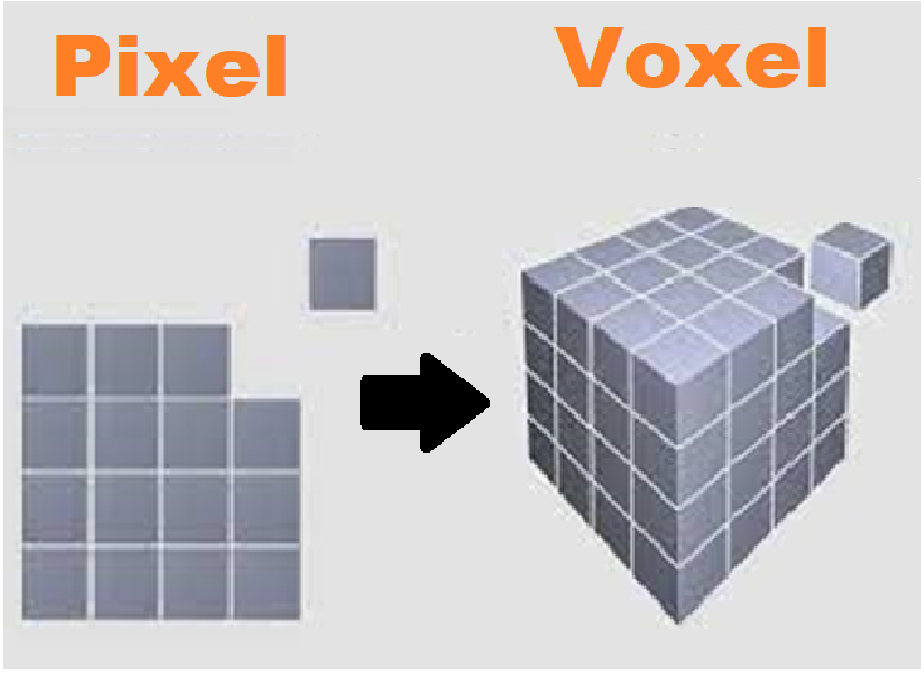
You must be thinking about what these micro-sized mirrors do? So here's your answer, they reflect the projected light beam on the Vat or resin bed forming the pattern according to the instructions of the printer. The design thus cured on the resin is in the form of voxels, if you are not well aware of a voxel, then let me tell you, Voxel is a three-dimensional cube inside the three-dimensional grid of a 3D model in the parallel 2D world it is similar to pixel but it is definitely not a pixel!
- DLA is faster than the other known methods of 3D printing to date.
11. Direct Metal Laser Sintering
- Before diving into metal sintering, here is a question for you, do you know the meaning of sintering?
- Sintering is the fusion of particles into a single solid mass without melting, under specific temperature and pressure conditions.
- Direct metal laser sintering has a similar working principle as Selective Laser Sintering, the only difference they have is the material being used.
- Selective laser sintering can implement the use of any material like ceramics, plastic or glass meanwhile, direct metal laser sintering can only be used for powdered metals.
- DMLS is widely used for the production of metallic parts and prototypes on an industrial level
12. Poly jet 3D printers
- Poly Jet printers are similar to inkjet printers.
- These printers jet photopolymers on the surface of the design bed which is later on cured with UV light. A layer-by-layer additive process creates the full-fledge 3D object.
- The most amazing feature of Poly Jet printing involves the use of two or more materials for a single prototype or product. You can manufacture any part of the 3D modeled object with your desired material without disturbing the other parts.
- Post-processing is not required while we use PolyJet printers, the 3D modeled object is ready to be used right after manufacturing
- PolyJet 3D printing is an expensive yet speedy process, with higher design accuracy than the other 3D printing technologies yet known to us.
- The following table shows the summary of all the technologies we use in 3D printing, you can go through it for a quick sneak peek of the overall process for each of the mentioned technologies for 3D printing.
Process of 3D printing
We have completed the section on 3D printing and the technology being used for 3D printing by now, you must be thinking of the process involved in 3D printing! Let's discuss this process step by step in detail for a better understanding;
Step 1: Modeling
3D printing begins with the process of designing the product in digital form using software like AutoCAD, solid works or whichever you like to work with as there are plenty of modeling software present in the market.
Step 2: 3D Printing
- After the approval of 3D design the file is fed into the 3D printer which translates the digital file into STL format.
- After translation of digital file into STL file format, a 3D Slicer starts configuring the whole process, layer by layer.
Each layer is deposited on the other according to the technology your 3D printer works on, it can be SLA, SLS or DLP. The process then continues until all the layers have been formed and our 3-dimensional object is complete.
This was all about the process of 3D printing, absolutely simple and easy to understand! Isn't it?
You can get anything 3D printed from the service providers nearby, cost depends on the dimensions of the object being printed. 3D printing has become less expensive now as compared to the past, all thanks to the increase in demand which led to the availability of better pocket-friendly options.
Applications of 3D Printing
3D printing has countless applications some of them are being listed here:
Rapid Prototyping
- 3D printing is used for Rapid Prototyping of 3D structures, I have a detailed tutorial on Rapid Prototyping, and you can definitely read it for an in-depth study of the topic.
Small Scale Production
- 3D printing is used for the end-products in industries as well, this feature of 3D printing has brought itself on a commercial scale.
Medical Equipment
- 3D printing has left its mark in biomedical engineering as well, from the prototyping of artificial limbs to the manufacturing of splints and braces on small scale, 3D printing knows no bounds.
Anatomical Models
- Anatomical models of body organs and systems are 3D printed for educational purposes.
Assembly Parts
- Small assembly parts made from powdered metals are also 3D printed for mass production, because of their cost-effectiveness.
Toys and Games
- Legos and small toys produced from manufacturing-grade plastics have made their way into the market all thanks to 3D printing.
Research and Development
- Almost every kind of 3D prototype can be printed with the help of 3D printing techniques, these prototypes are used for research purposes.
Art and Design
3D printing is used in the field of art of design for making sculptures, you might have seen a lot of them in the student's thesis display! If not, pay a visit after the pandemic ends.
Jewelry
- Limited edition jewelry is an extremely hyped-up thing these days, although the production cost is not as much as the tags say, but women buy it for the sake of self-satisfaction! These limited edition pieces are also 3D printed.
Agile Tooling
- Agile tooling that deals with the design and formation of tools that are related to tool manufacturing tools, including dies and molds also involves 3D printing.
Automotive Industry
- The automotive industry is also using 3D printing for the manufacturing of components, Urbee is the first car in the world that used 3D printing for its components.
Architectural Designs
- Architectural industry prints scalable 3D models of the buildings and bridges for evaluation and approval of everything that comes under building and construction.
Advantages of 3D Printing
3D printing has definitely made our lives easier and better, here are some of the advantages associated with the process:
1. Broader Design Window:
- Complex parts and products are easily achievable through 3D printing technology, traditional methods of production had a lot of limitations in case of complex and intricate designs
2. Durable Parts:
- The assembly parts that are manufactured with help of 3D printing are lightweight and durable because 3D printing can work with a variety of materials that better suits the manufacturer.
- Although the materials have to be checked according to the required parameters for safety and sustainability.
3. Minimal Waste:
- 3D manufacturing is an additive process and hence less waste is produced, you must be wondering how?
- The material only needed to build a 3D object is deposited layers by layer according to the design fed into the printer which means less waste.
3. Rapid Prototyping Made Easy:
- 3D printing makes rapid prototyping easier and faster, you can complete your prototype within days or weeks.
- This feature was missing when people used to make prototypes through the machining process in the past.
4. Cost-Effectiveness:
- The process of 3D printing is extremely cost-effective, you don't have to pay a lot of money in the form of labor costs and a large amount of material procurement.
- A design and a 3D printer service provider can make your day!
5. On-Demand Production:
- When you are using 3D printing for end-product manufacturing, you can easily print as many pieces as you want according to the supply and demand, so there is no need to stock up when you are using this method.
- A slight modification or a bigger change in the design can be made easily in the 3D file of the product, without disturbing the entire design.
Limitations of 3D Printing
- You are well aware of the advantages 3D printing serves, in this section we'll be discussing some of its limitations which is a necessary evil.
- Different End Product as Compared To 3D Model:
1. Material Limitations:
Nobody wants it to be true, but it can be! 3D modeling software has rendering tools and other highly specialized tools which create a sleek design with intricate details and patterns on the product, the product may not have all the design elements when 3D printed because of the gap between the 3D world and the real world.
3D printing can experiment with a lot of materials when you prototyping for design and development but in the end, the materials with very specific properties can be employed for end product and its mass production.
2. Size of the Object:
The objects when 3D printed have smaller sizes because the 3D printers are not humongous enough to print large 3D shapes and objects, have you ever thought, how much changed would our world be, if 3D printers could print an Eifel tower or leaning tower of Pisa?
3. Post Processing of the 3D Object:
After printing the object that has been modeled, it is soaked or bathed in different chemicals to remove the access amount of adhesive materials left on its surface, we have to wait for the model to cool down to start post-processing which takes time!
4. Fragility of the 3D Structures:
A few 3D printing methods produce 3D prints that are not sturdy enough and can break down if a higher amount of temperature and pressure is put on them, Fused Deposition Modeling is one of those techniques, don’t fret! , a little amount of care can save your day!
That was all about 3D printing, I tried to make it simpler for everyone. I presume you must have gained something out of it, if not, you can always revise it for another time, a second read never hurt anyone!
Types of Embedded Systems
Hello friends, I hope you all are happy, healthy and content! Today, we will be discussing the types of embedded systems. But, Before jumping to the types of embedded systems, let's first revise
what is an Embedded System? I hope you have a clear idea about the embedded systems, if not, there is always a solution!
Definition of an embedded system
"An embedded system is a unique combination of computer hardware and a software designed for performing a specific function or set of functions from a certain input"
For a detailed overview of the embedded system and its components, you can refer to the complete article on our website about embedded systems.
Types of Embedded Systems
Presuming that you are well aware of the embedded systems and its components, we will be discussing types of embedded systems in detail in this section. Embedded systems can be classified on two bases;
- Performance and functional requirements of the system.
- Performance of the Microcontroller used in the embedded system.
Types of embedded systems based on performance
As the name suggests these type of embedded systems comprise of a specific type of embedded system, aptly named after their functionalities and performance;
- Stand-Alone Embedded System.
- Real-Time Embedded System.
- Networked Embedded System.
- Mobile Embedded System.
1. Stand-Alone Embedded System
You might have made a rough sketch of a stand-alone embedded system by now after seeing the heading, let me explain it first so you may decide later if it was a right guess or not!
- A stand-alone embedded system is an isolated system that operates on its own.
- It converts digital or analog signals based on its input method, into the output in form of a task or a response.
Example of Stand-alone Embedded System
- I have a simple example for you to understand these stand-alone embedded systems, if you have a fully automatic washing machine or a dishwasher at your home, it makes use of such an embedded system.
- In the case of a washing machine, you start the process by feeding in the digital command for the task by setting water level, wash time, rinse time, spin time, and type of wash cycle.
- The digital input is then processed by the embedded system through its various components into the output, which you receive in the form of task performed that is the fully washed, rinsed and spun clothes which are ready to be ironed without any hassle!
- Many appliances such as sound systems, convection ovens, dishwashers have stand-alone embedded systems inside them.
2. Real-time embedded systems
- Real-time embedded systems are required to perform their assigned function or furnish the output under strict time constraints.
- Exact timing is crucial to the working of a real-time embedded system as the name suggests!
They can be further classified as;
- Hard real-time embedded systems.
- Soft real-time embedded systems.
Hard real-time embedded system
- Hard-real Time embedded systems imply strict time control, otherwise, there would be a critical system failure.
- There is lesser interaction of physical hardware with the embedded software in hard real-time embedded systems.
- Missing a deadline for output generation is considered as the complete system failure in the case of a hard real-time embedded system.
- In case of a delay at the system's end, it could only be up to a few microseconds, any value greater than this would pose serious problems.
Example:
- Heart pacemaker; pacemakers initiate normal heartbeat for people with heart pathologies, your heart can't skip a beat! It only happens in movies!
- Missile launch, what's the purpose of launching a missile if it isn't able to hit the target at the desired time? Wouldn't it be a waste of time any resources?
- Air traffic control, timing is crucial as there are many lives at stake in this case.
Soft real-time embedded systems
- Soft real-time embedded systems can tolerate delays in task or output execution by providing low service quality.
- Soft real-time embedded systems aim at prioritizing a task when a certain subset of commands is given to the system for generating output.
- The efficiency of the system degrades as deadlines are missed, this happens due to burnout and overload of the system with already existing commands.
Example:
- Online database.
- Live audio or video systems.
3. Networked Embedded Systems
In this modern era with the advancement of technology, networked embedded systems are being widely used. Before explaining network embedded systems, i want you to understand a networked system, Do you know what is a networked system? Let me explain; a networked system is a group of computers or devices connected through a network either through WAN, LAN or internet!
So, a Networked embedded system can be defined as;
- "The embedded system which requires a network to approach the resources for performing a given task is called a networked embedded system."
The network can be wireless or a wired connection in form of WAN, LAN or internet.
Example of Networked System
- In this highly advanced era of WIFI, we'll be discussing the example of a networked embedded system using a WIFI to operate!
- You might have seen advertisements of air conditioners and refrigerators using WiFi in their operation.
- It’s a simple process, you start by installing an app already present at the play store, connect that app with your appliance and operate your appliance with the help of this app! Refer to the diagram below for a better understanding;
- You can manage everything related to your appliance, from temperature regulation to self-cleaning, from your phone with internet connectivity! Isn't it revolutionary? Yes, it is, all thanks to a networked embedded system using an internet connection to operate an appliance for performing the desired tasks!
4. Mobile embedded system
- As technology advanced and revolutionized, mobile embedded systems never stopped amazing the consumers with their growth and advancement in every era.
- Mobile embedded systems are used in portable electronic devices such as mobile phones, tablets, modern-day PRISM cameras, DSLR and whatnot, they are everywhere, every small handheld electronic device makes use of them!
So it was all about embedded systems based on performance and function. We will be moving on to our next section, discussing the type of embedded systems based on the type of Microcontroller. Let's first discuss, what is a microcontroller?
What is a microcontroller?
A microcontroller is a small chip having CPU, RAM, ROM, I/O ports and timers on it; it is simply a pizza with its toppings!
Features of a Microcontroller
Here are some of the features of a microcontroller:
- You can have your cheese burst pizza but your microcontroller can only bear a limited amount of RAM, ROM and I/O ports, extra topping isn't even allowed in the form of additional memory!
- There are certain alternatives to the microcontrollers, but the latter suits well with the embedded systems, so why not use the one which suits the best?
- Microcontrollers are available in different bit sizes from 4 bit, 8bit, 16bit to 32 bit,64 bit you can use the one required for your task.
- They are cost-effective, minimize power consumption, control-oriented and highly reliable.
Now you are well aware of the microcontroller and its feature, we will be discussing the types of embedded systems based on the performance of microcontrollers!
Types of Embedded System Based on the Performance of Microcontroller
Following are the three types of embedded systems based on the performance of the microcontroller;
- Small Scale Embedded System.
- Medium Scale Embedded System.
- Sophisticated Embedded System.
1. Small Scale Embedded System
- As the name suggests a small scale embedded system makes use of a small sized microcontroller, ranging from 8 bit to 16 bit.
- They are less complex in terms of hardware and software and can be operated with batteries as well because of their smaller size.
- Mostly the C programing language is used in such embedded systems.
Examples of Small Scale Embedded System
- Bluetooth headphones.
- Digital pedometer.
2. Medium Scale Embedded System
- Medium-scale embedded systems are more complex in terms of their hardware and software than the small-scale embedded systems discussed above.
- They make use of microcontrollers that are larger in bit size i.e numerous 16-bit size microcontrollers or a 32-bit microcontroller is used in making the embedded system.
- Programming languages like Java, C, C++ are used to develop software for medium-scale embedded systems.
Example of Medium Scale Embedded System
ATM, which is widely used by us nowadays has a medium-scale embedded system in it. You can read a detailed account of its working in my previous tutorial about practical applications of embedded systems available on the website!
3. Sophisticated Embedded System
- Sophisticated embedded systems, as the name suggests are highly advanced and developed in terms of hardware and software.
- They make use of numerous 32 bit or 64-bit microcontrollers along with multiple programmable logic arrays PLA and configurable processors.
- They are highly complex and are designed for performing complex tasks and functions.
Examples of Sophisticated Embedded System
Here are some of the examples using sophisticated embedded systems;
- Modern-day air conditioners
- Medical imaging systems
- Industrial-scale ovens
- Hybrid vehicles
Sophisticated embedded systems mark an end to our discussion about the types of embedded systems, I presume, you are now fully aware of the topic we have discussed in depth today, I have tried my level best to cover all the aspects related to this topic in an easy way, without any doubt it is an easy one to grasp, for better understanding and developing a clearer perspective you can revise the concerned section, a second read never hurt anyone! Have a good day!
Solar Panel Library for Proteus V2.0
Hello friends, I hope you all are well. Today, we are going to share the second version of the Solar Panel Library for Proteus. You should also have a look at the first version of the Solar Panel Library, which we have posted around 2 years back and we were receiving suggestions to reduce its size as there's less space left for other components.
That's why we have designed this new Solar Panel Library and have reduced the size of the solar panel. We have also added a new black solar panel component to it. So, this library contains 2 solar Panel modules in it. First, let's have a look at a brief introduction to Solar Panel and then will download the Proteus Library zip file.
What is Solar Panel?
- Solar Panels are designed using solar cells composed of semiconductor materials(i.e. silicon, phosphorous etc.) and convert solar energy into electrical energy.
- Solar Panels are used to generate renewable energy and are considered as one of the major sources.
- Real Solar Panel modules are shown in the below figure:
Solar Panel Library for Proteus V2.0
- First, we need to download the zip file of Proteus Library by clicking the below button:
Download Proteus Library zip file
- In this zip file, you need to open the folder named Proteus Library Files.
- In this folder, you will find 2 Proteus Library files named:
- SolarPanel2TEP.IDX
- SolarPanel2TEP.LIB
- Copy-paste these files in the Library folder of Proteus software.
Note:
- After adding the files in Proteus software, open it and if you are already working on it, then you need to restart it.
- In the components section, make a search for solar panel and you will get results as shown in the below figure:
- In the above figure, the first result is from version 1.0, and the remaining two are added by this new solar library.
- Let's place these sensors in the Proteus workspace, as shown in the below figure:
- This Solar Library has thee two solar panels in it, one is blue and the second one is black.
- Both are of 12V but their voltage level can be changed from the Properties panel.
- In order to open the Properties panel, double click on the solar panel and you can change the value of Voltage here, as shown in the below figure:
- Click Ok to close the properties panel.
Now let's design a simple Proteus simulation of Solar Panel in Proteus:
Proteus Simulation of Solar Panel
- I have changed the voltage level of black solar from the properties panel & simply placed a voltmeter in front of these solar panels, as shown in the below figure:
- Now let's run the Proteus simulation of solar panel:
- As you can see in the above figure, the output of black solar is around 16V, while blue solar is giving 12V.
- That's how you can test it for variable voltage i.e. day time, night time etc.
So, that was all for today. I hope this library will help you guys in your engineering projects. If you have any issues/queries, use the below comment form. Thanks for reading. Have a good day. :)