Hello friends, I hope you all are doing great. Today, I am going to share the new MAX485 RS-485 Module Library for Proteus V1.0. RS-485 is how microcontrollers talk across a factory floor, a farm or a building: two wires, A and B, carry the data hundreds of meters, and many devices share them - energy meters, temperature controllers, VFDs, PLCs. Most of them speak Modbus RTU. The small MAX485 module puts an Arduino on that bus. Until now there was no MAX485 module in Proteus on which you could watch a Modbus master and a slave talk.
Behind the parts sits our own model, written from the MAX485 datasheet and the Modbus RTU specification. DE turns the driver on and RE the receiver, the board's bias resistors hold the idle line, and the A and B pins of two modules form a real half-duplex bus - two drivers at once is a collision. Every byte on the bus is decoded, grouped into Modbus RTU frames, checked with its CRC and explained: which slave, which function, which registers. You get a Simple device with a STATUS panel of the last frames, and an Advance device with a pop-up window where you can click any frame to see it field by field. The demo runs on two of our Arduino UNO V4.0 boards: a Modbus master with the ModbusMaster library and a Modbus slave.
NOTICE: an RS-485 module is easy to fake: a wire that copies TX to RX. We wanted more. Our module only drives the bus while DE is HIGH, so a sketch that drops DE too early loses its last byte, a node that leaves RE LOW hears itself, and two nodes that talk at once collide. Every frame on the bus is decoded and checked, and the DE timing of each frame is measured. It took our team a lot of hard work. Your feedback is the fuel that keeps us going, so please tell us what you think in the comments below or in the MAX485 RS-485 Module board of our forum. And if our free libraries help you, you can buy us a coffee. So, let's get started with the MAX485 RS-485 Module Library for Proteus V1.0:
What is the MAX485 RS-485 Module?
The MAX485 is an RS-485 transceiver: it turns the Arduino's TX and RX into the differential pair A and B and back. Its driver takes DI and drives A and B in opposite directions while DE is HIGH; its receiver compares A and B and gives the result on RO while RE is LOW. One pair of wires carries the data both ways, but only one way at a time - half duplex - so every node keeps its driver off until it is its turn to talk.
| MAX485 module | |
|---|---|
| Supply | 5 V on VCC |
| TTL side | RO (to the Arduino RX), DI (from TX), DE (driver enable, HIGH), RE (receiver enable, LOW) |
| Bus side | A and B - a twisted pair to the other nodes - and the screw terminal A B |
| On the board | 10 kohm resistors, the 120 ohm terminator (R7) |
| Speed | up to 2.5 Mbps; 9600 baud in the demo |
| Distance | up to 1200 m, up to 32 unit loads on one bus |
| Arduino libraries | ModbusMaster (the master), AltSoftSerial (a second serial port) |
Half Duplex: DE and RE
A node that wants to send sets DE HIGH, writes its bytes on DI, waits until the last stop bit has left - Serial.flush() - and sets DE LOW again. While DE is LOW the board's bias resistors hold A above B, so the idle line reads 1. Most sketches tie DE and RE to one Arduino pin: HIGH to send (the receiver off, so the node does not read its own bytes back), LOW to listen.
Modbus RTU in One Minute
Modbus RTU is a master and its slaves. The master sends a request: the slave address, a function code, the data and a 16-bit CRC. Only the addressed slave answers, with the same address and function and its data - or with an exception. A frame ends with 3.5 characters of silence (4 ms at 9600 baud).
| Function | What it does |
|---|---|
| 03 | read holding registers - the start and the count, the answer brings the values |
| 04 | read input registers |
| 06 | write single register - the answer repeats the request |
| 16 | write multiple registers |
| 01 / 05 | read coils / write single coil |
| + 80 | an exception answer: 01 illegal function, 02 illegal data address, 03 illegal data value |
What's New in MAX485 RS-485 Module Library for Proteus V1.0
- The MAX485 as on the bench: DE drives A and B from DI, RE gives the line on RO, the bias holds the idle line, RO is pulled HIGH while the receiver is off.
- A real bus: the A and B pins of all modules join; a strong driver beats the bias; two drivers at once leave the line undefined - a collision.
- Every byte decoded (8N1), at a fixed rate or measured on the line, and grouped into frames by 3.5 characters of silence.
- Modbus RTU explained: the slave, the function, the start and count, the register values, the exceptions, the CRC - requests and answers told apart.
- Click a frame in the Advance pop-up to see it field by field, byte by byte.
- DE timing: how long DE was HIGH before the first start bit and after the last stop bit of each frame; DE dropped inside a byte.
- Two TEP actions: CABLE cuts a node off the bus, NOISE flips one bit of the next frame it receives.
- Three test tools on the Advance device: Timing, Modbus and Wiring.
- A two-node demo on our Arduino UNO V4.0: a Modbus master with ModbusMaster and a slave with four registers - the slave's LED switched over the bus.
- A compact package: about 1.24 MB, without the C++ source code of the model.
Two Devices: Simple and Advance
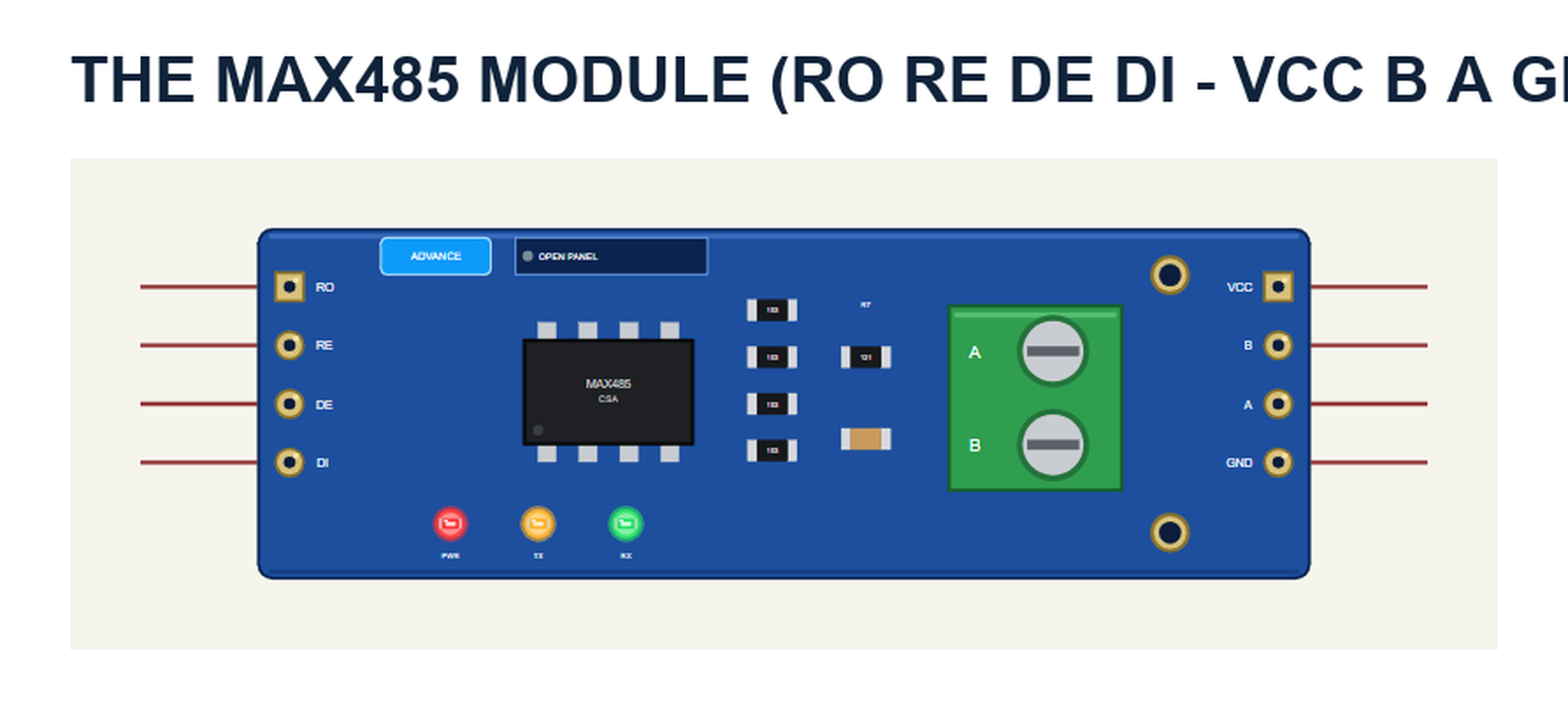
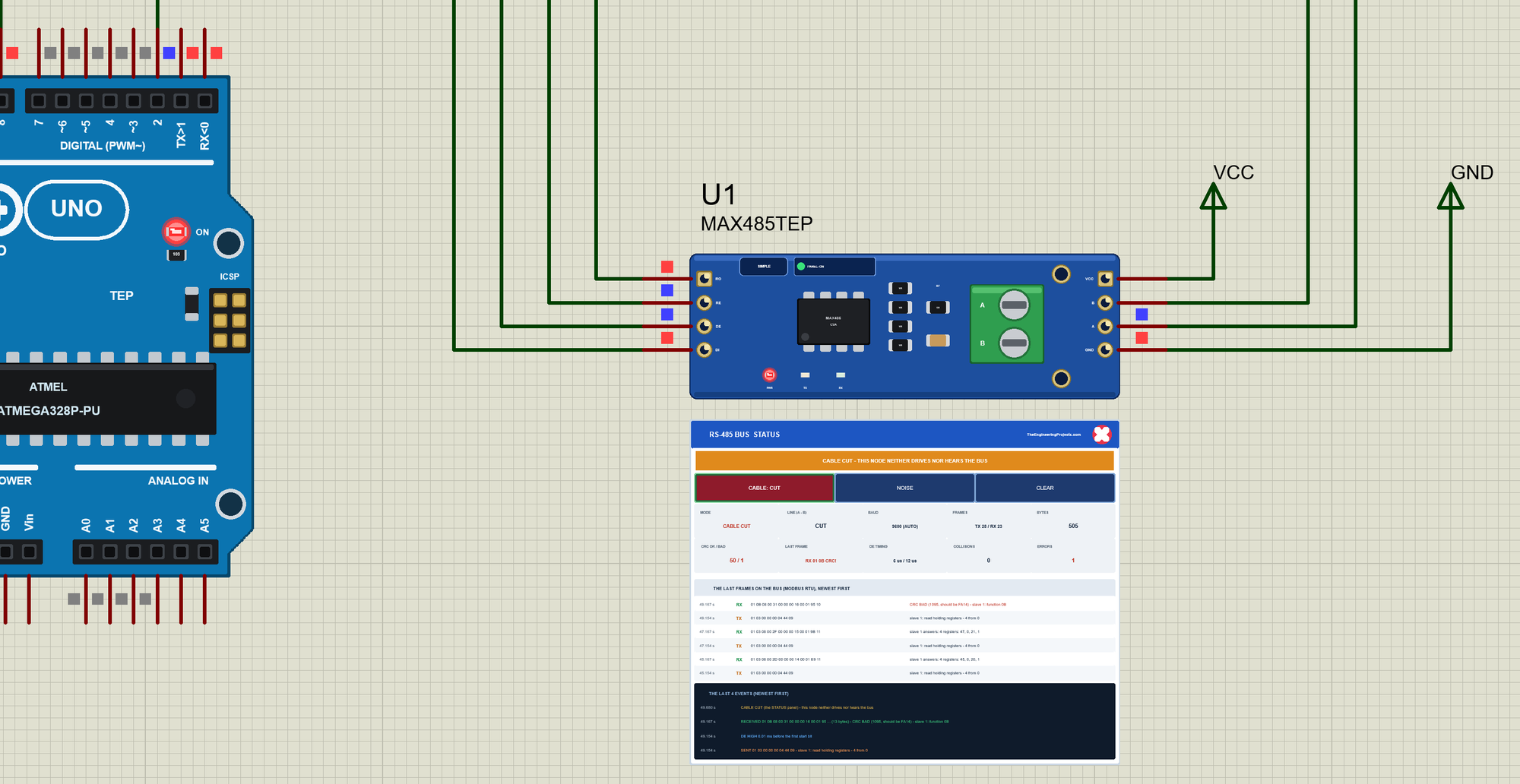
The part is the module seen from above, drawn at about its real size next to the Arduino UNO: the 4-pin TTL header RO RE DE DI on the left, the MAX485 in its SOIC-8, the four 103 resistors (10 kohm), the 121 terminator (120 ohm) and the capacitor, the green screw terminal A B and the header VCC B A GND on the right. The SIMPLE / ADVANCE badge, the LEDs and the panel button are TEP additions: PWR lights with VCC, TX while this node drives the bus, RX with activity on the bus.
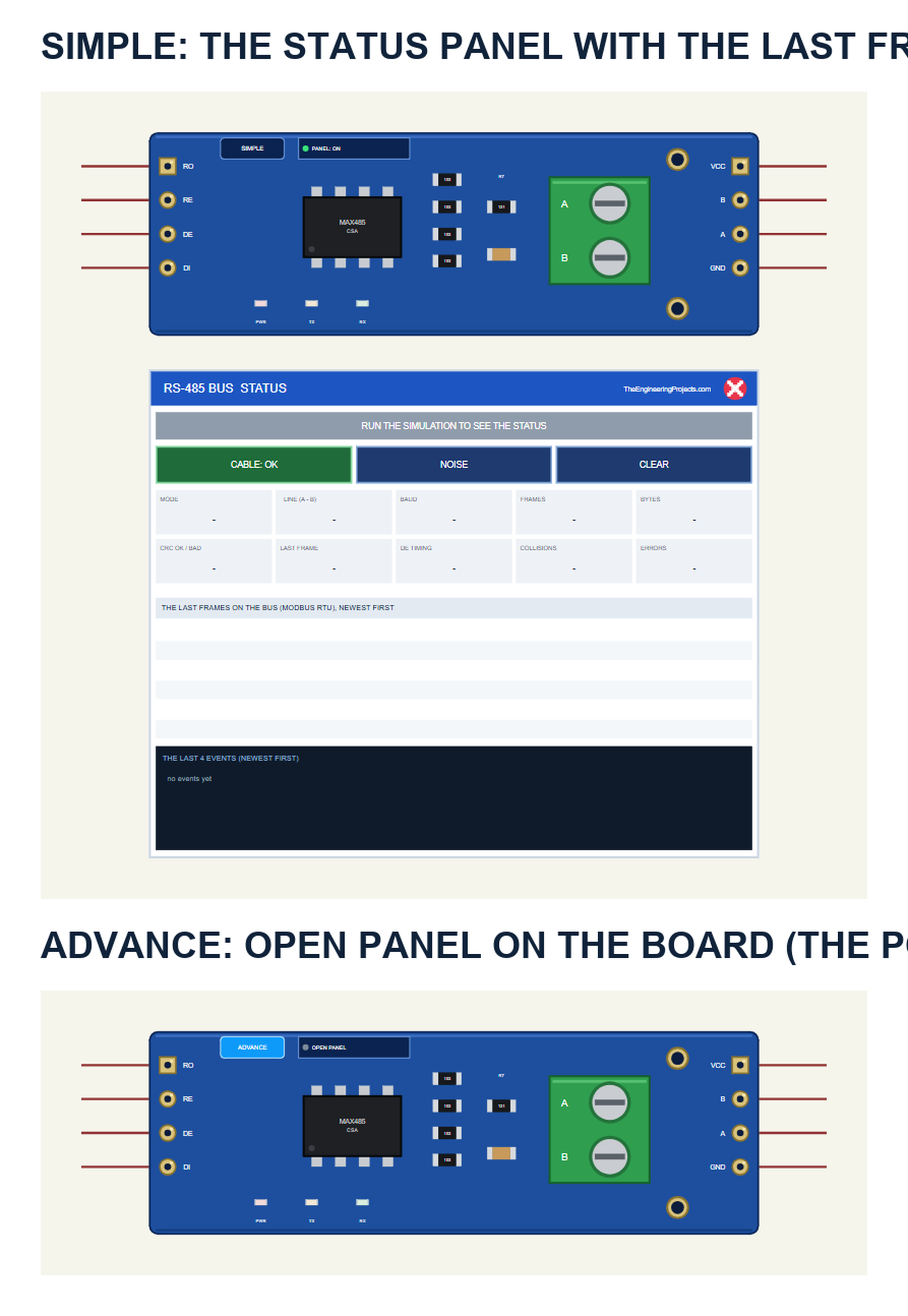
| Simple | Advance | |
|---|---|---|
| Device | MAX485TEP | MAX485ADVTEP |
| On the schematic | The module and the STATUS panel | The module |
| The frames | The last six, decoded | The last 32 - click one to see it field by field |
| Actions | CABLE, NOISE, CLEAR on the panel | The same on the pop-up's toolbar |
| Status | Banner, 10 readouts, the last 4 events | A pop-up: Bus, Event log, Tests |
Download MAX485 RS-485 Module Library for Proteus
Click the button below to download MAX485-RS485-Module-Library-for-Proteus-v1.0.zip (about 1.24 MB, without the C++ source code of the model):
MAX485 RS485 Module Library for Proteus V1.0- README.txt: the devices, installation, the demo, wiring, the test tools, the properties and real hardware.
- Proteus Library Files:
TEPMAX485.LIBandArduinoV4TEP.LIBfrom our Arduino Library for Proteus V4.0. - Proteus Model Files:
TEPMAX485.DLLandTEPARDUINO.DLL. - Proteus Simulation:
MAX485-RS485-Modbus-ArduinoUnoV4.pdsprj,RS485_Master.hex,RS485_Slave1.hexand copies of the two DLLs. - Arduino Code:
RS485_Master.inoandRS485_Slave1.ino- they need the ModbusMaster and AltSoftSerial libraries (not included; install them with the Library Manager).
No Proteus yet? Read How to Download and Install Proteus 7 and 8. New to libraries? Follow How to Install a New Library in Proteus.
How to Install MAX485 RS-485 Module Library for Proteus
- Close Proteus and extract the whole zip file, for example to your Desktop.
- Copy the two files from Proteus Library Files into the LIBRARY folder of Proteus (usually
C:\Program Files (x86)\Labcenter Electronics\Proteus 8 Professional\LIBRARY). - Copy
TEPMAX485.DLLandTEPARDUINO.DLLfrom Proteus Model Files into the MODELS folder. - Delete
TEPMAX485.IDXfrom the LIBRARY folder if it is there. - Start Proteus, press P and search for MAX485.
Tip: keep the Proteus Simulation folder together, because the project needs its two .hex files and the DLLs beside it. The library is tested in Proteus 8.5; Proteus 7 is not supported.
The MAX485 Part in Proteus
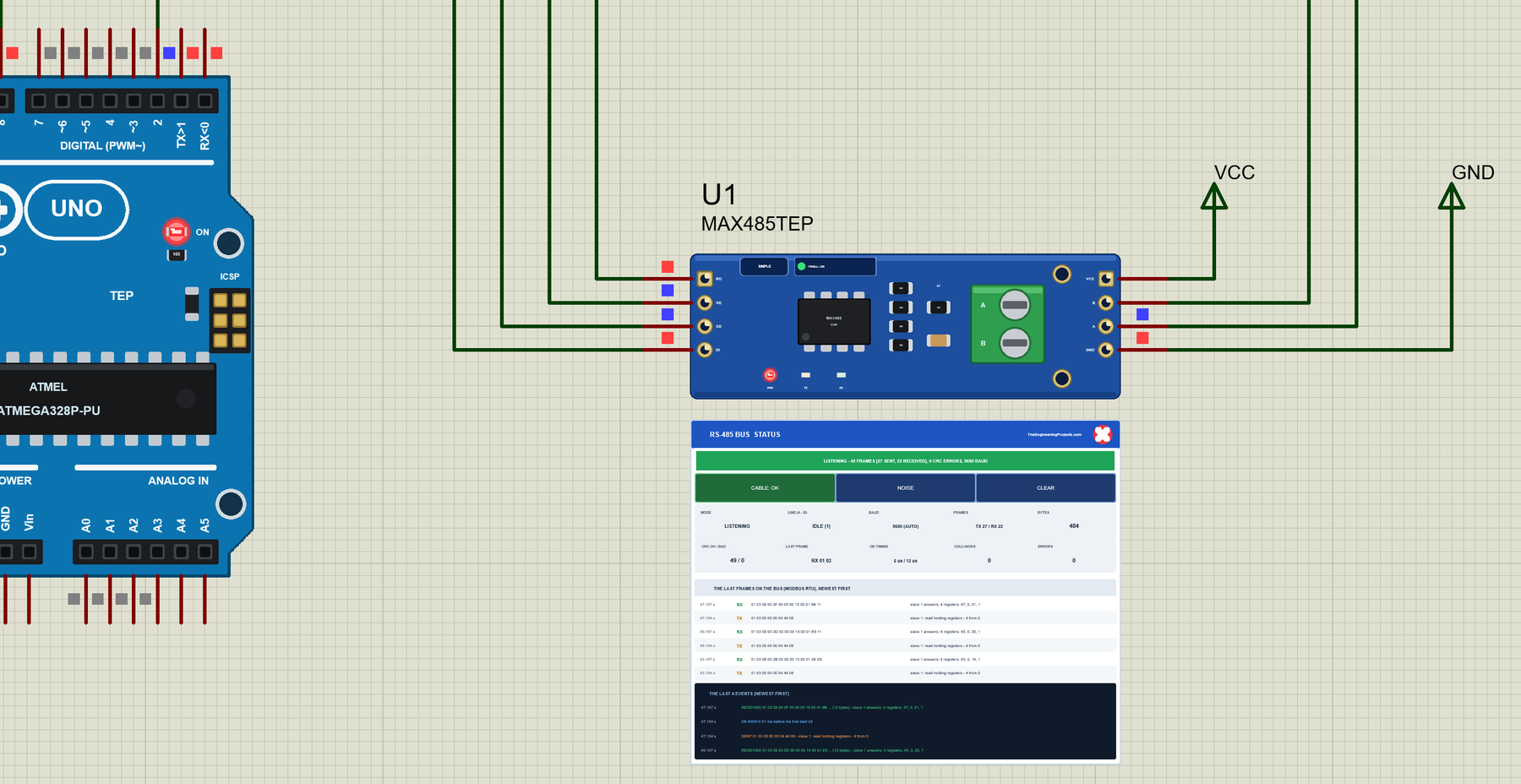
The Simple device adds the STATUS panel below the module. Its banner says what the node is doing: green while it listens, orange while it sends, amber with CRC errors or the cable cut, red for a collision or no power. Below it are the actions CABLE, NOISE and CLEAR, ten readouts, the last six frames on the bus and the last four events:
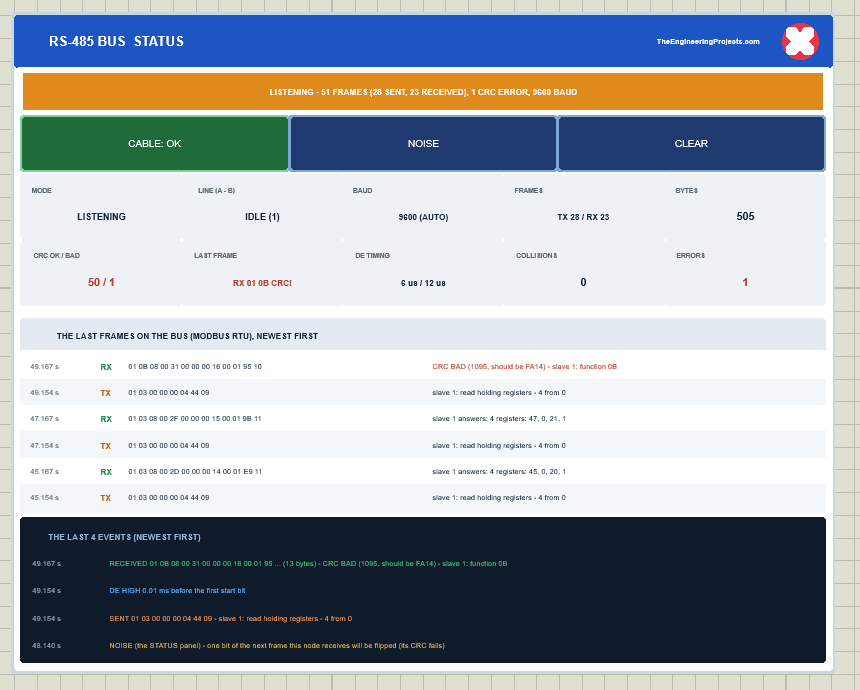
The readouts are the mode, the line, the baud rate, the frames sent and received, the bytes, the good and bad CRCs, the last frame, the DE timing, the collisions and the errors. The red X closes the panel, and the PANEL button on the board opens it again. The Advance device keeps the schematic clean - only the module; the live data opens in a pop-up window at Run, and the OPEN PANEL button on the board brings the window back.
The BAUD property sets the decoder's rate: AUTO (the default) starts at 9600 and follows a line whose bytes fail at that rate, or give a number. The Simple device also has PANEL. Every run starts again from the properties.
The Demo Circuit
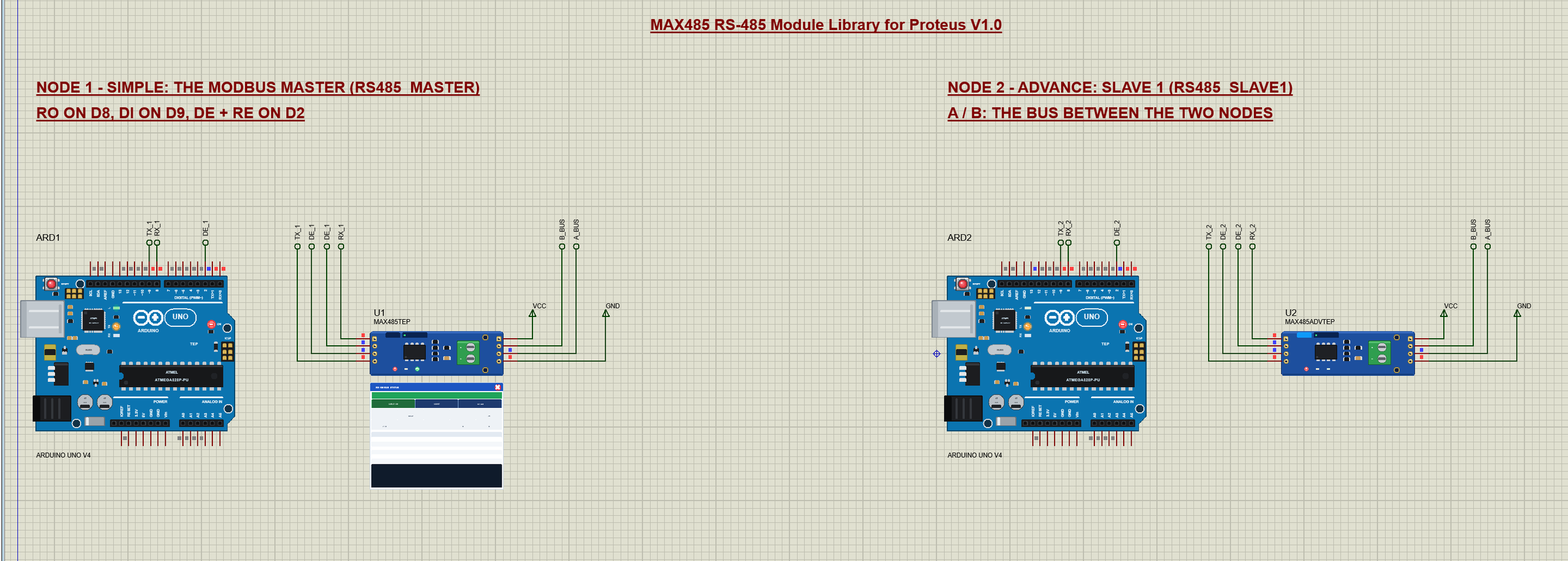
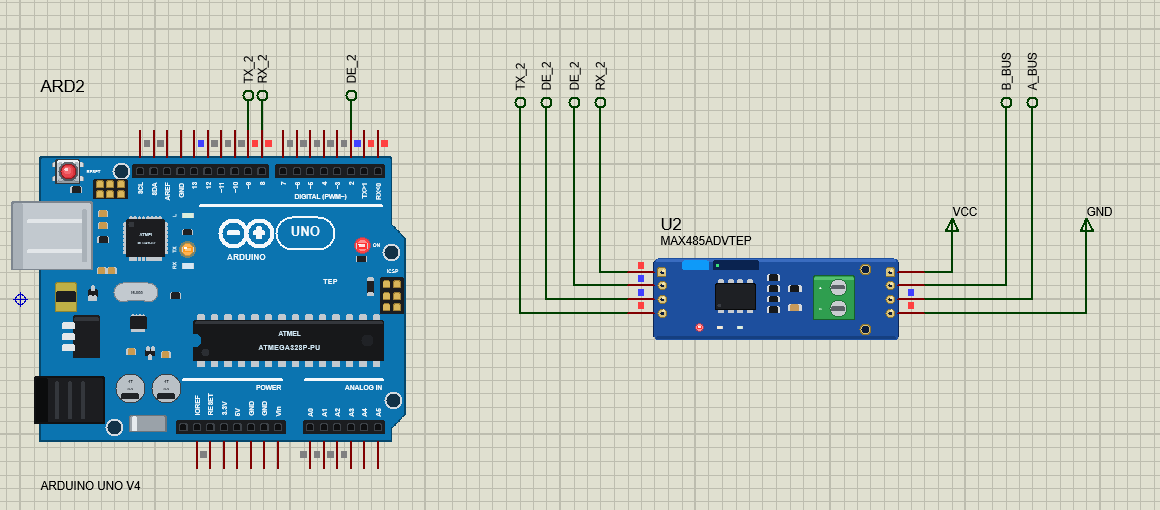
The demo project has two nodes, each an Arduino UNO V4.0 from our Arduino UNO Library for Proteus V4.0 with a MAX485 module. Node 1 is the Modbus master (RS485_Master.hex), node 2 is slave 1 (RS485_Slave1.hex). The A pins of the two modules meet at the label A_BUS and the B pins at B_BUS - that is the bus.
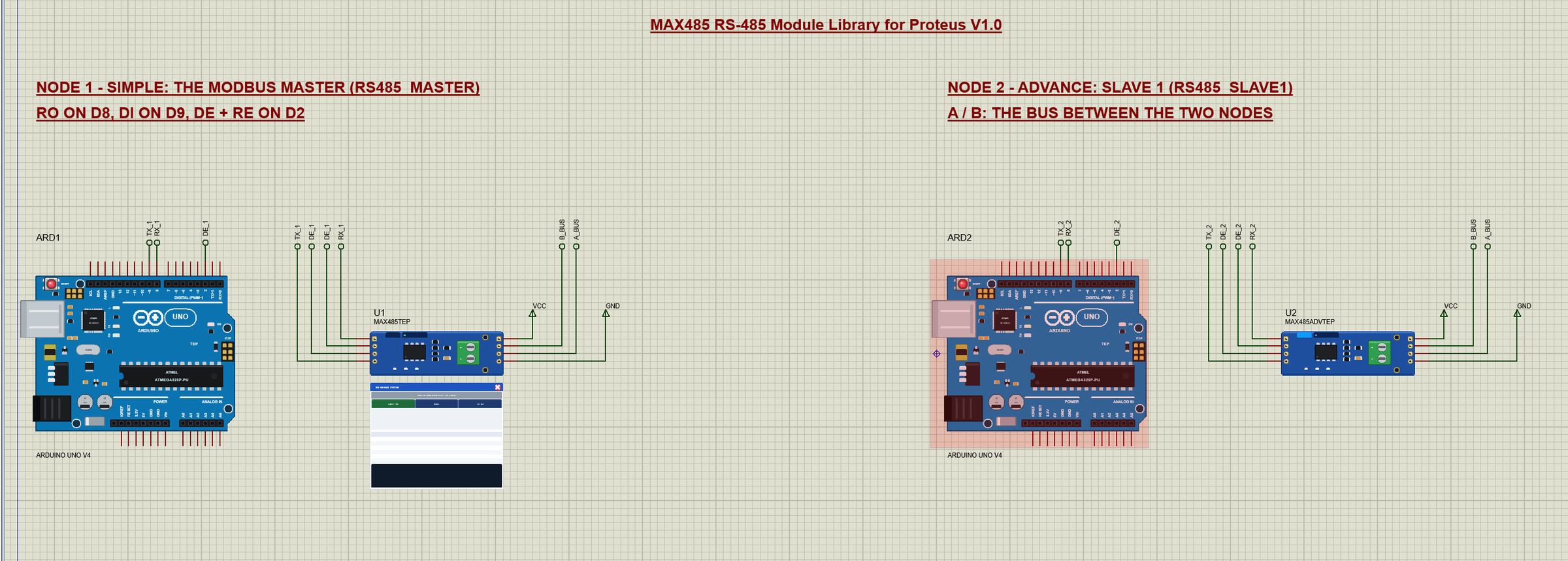
Wiring
| Module pin | Arduino UNO (the demo) | Notes |
|---|---|---|
| VCC | 5V | |
| GND | GND | also between the nodes on a real bus |
| RO | D8 | AltSoftSerial RX |
| DI | D9 | AltSoftSerial TX |
| DE | D2 | HIGH to send |
| RE | D2 (tied to DE) | LOW to listen |
| A / B | A / B of the other node | A to A, B to B |
Why AltSoftSerial on D8 and D9? The UNO's hardware serial port (D0 / D1) carries the serial monitor, and SoftwareSerial cannot receive in Proteus. AltSoftSerial uses the timer's input capture instead and works fine - the master and the slave both use it.
The Arduino Code
The master uses ModbusMaster 2.0.1 (Apache 2.0) over AltSoftSerial 1.4 (MIT) - install both with the Library Manager to rebuild it. New to Arduino? Start with Arduino Tutorial for Beginners and Introduction to Arduino UNO. ModbusMaster calls two functions around each request - this is where DE and RE switch:
void preTransmission() { digitalWrite(DE_RE, HIGH); }
void postTransmission() { digitalWrite(DE_RE, LOW); }   // ModbusMaster calls it after flush(): the last stop bit is out
postTransmission() comes after ModbusMaster has called flush(), and AltSoftSerial's flush waits until the last stop bit has left - so DE never drops inside a byte. In setup() the master listens first and hands ModbusMaster its serial port and the two functions:
  pinMode(DE_RE, OUTPUT);
  digitalWrite(DE_RE, LOW);                      // listen
  rs485.begin(9600);
  node.begin(slaveId, rs485);
  node.preTransmission(preTransmission);
  node.postTransmission(postTransmission);
  Serial.println(F("TEP MAX485 RS-485 - Modbus master demo V1.0"));
Every 2 seconds it reads the slave's four holding registers with function 03 and prints them:
  uint8_t r = node.readHoldingRegisters(0, 4);   // function 03: registers 0 - 3
  if (r != node.ku8MBSuccess) { error(r); return; }
LED ON and LED OFF write register 1 with function 06, WRITE r v any register, ID n talks to another slave and POLL n changes the period. ModbusMaster's result code tells what went wrong - an exception from the slave (01 - 04), no answer in 2 s (E2), a wrong CRC (E3):
  uint8_t r = node.writeSingleRegister(reg, value);   // function 06
  if (r != node.ku8MBSuccess) { error(r); return; }
The Slave
The slave is written in the sketch itself, without a library, so you can see how small a Modbus RTU slave is. It collects bytes until 4 ms of silence - 3.5 characters at 9600 baud - ends the frame:
  if (n && micros() - lastByte > SILENCE_US) {   // 3.5 characters of silence: the frame is complete
    handle();
    n = 0;
  }
It checks the CRC, the address and the function, and answers through its own DE:
void send(uint8_t* f, byte len) {
  uint16_t crc = crc16(f, len);
  f[len++] = crc & 0xFF;                         // the low byte first
  f[len++] = crc >> 8;
  digitalWrite(DE_RE, HIGH);                     // the driver on
  rs485.write(f, len);
  rs485.flush();                                 // wait for the last stop bit
  digitalWrite(DE_RE, LOW);                      // listen again
}
Its four registers are the uptime in seconds, the LED on D13, the requests answered and the frames with a bad CRC; only register 1, the LED, can be written - any other address gets exception 02. The HEX files are in the package, so you do not need the Arduino IDE to run the demo. To change a sketch, open it in the Arduino IDE and export the compiled binary, as in How to get the HEX file from Arduino.
The Master Polls Slave 1
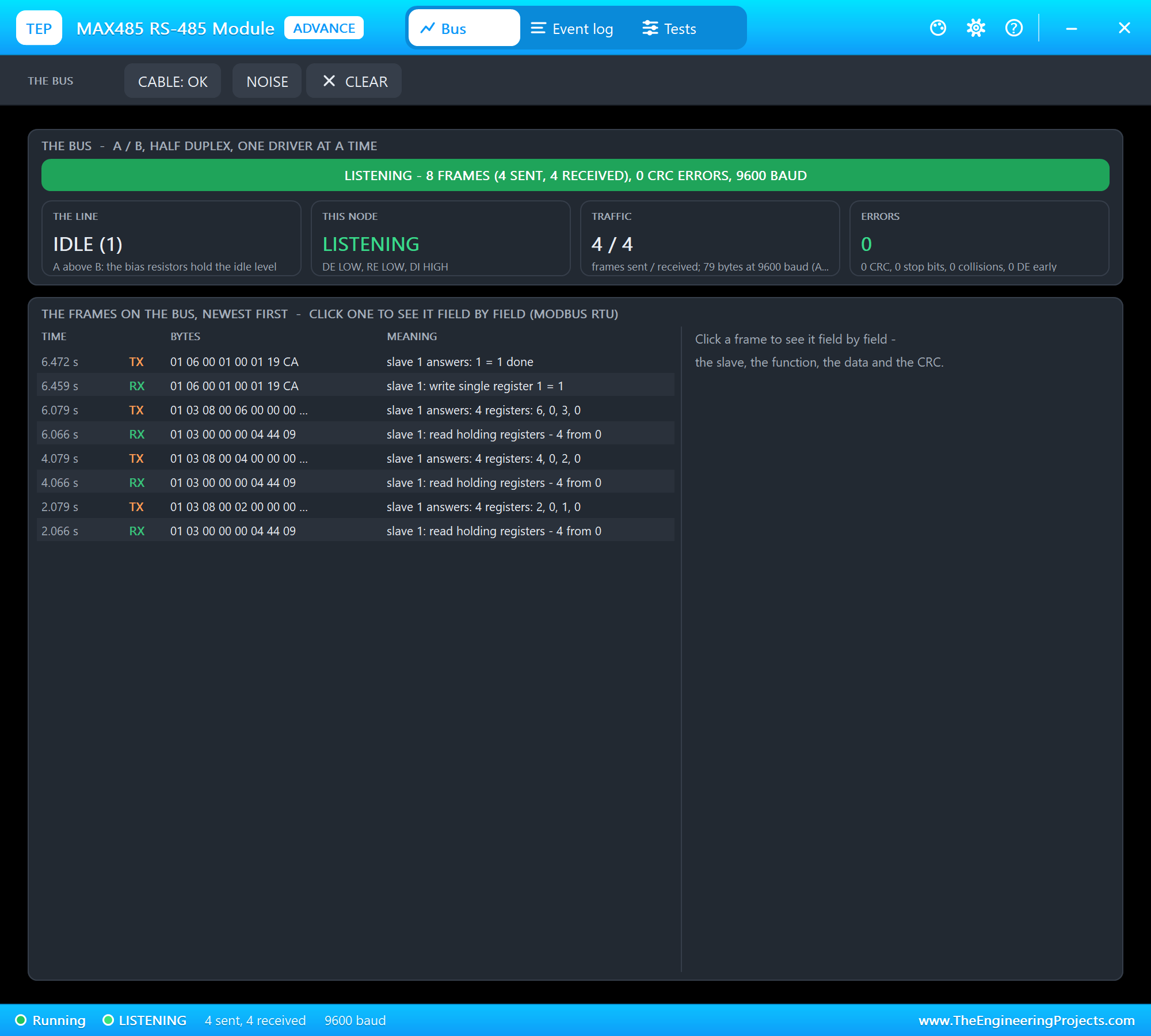
At Run both UNOs start their sketches and the master reads slave 1 every 2 seconds. U2 opens its own window, MAX485 RS-485 Module, with the look of our TEP Serial Monitor Advance for Proteus - three tabs, Bus, Event log and Tests, plus Settings and Help:
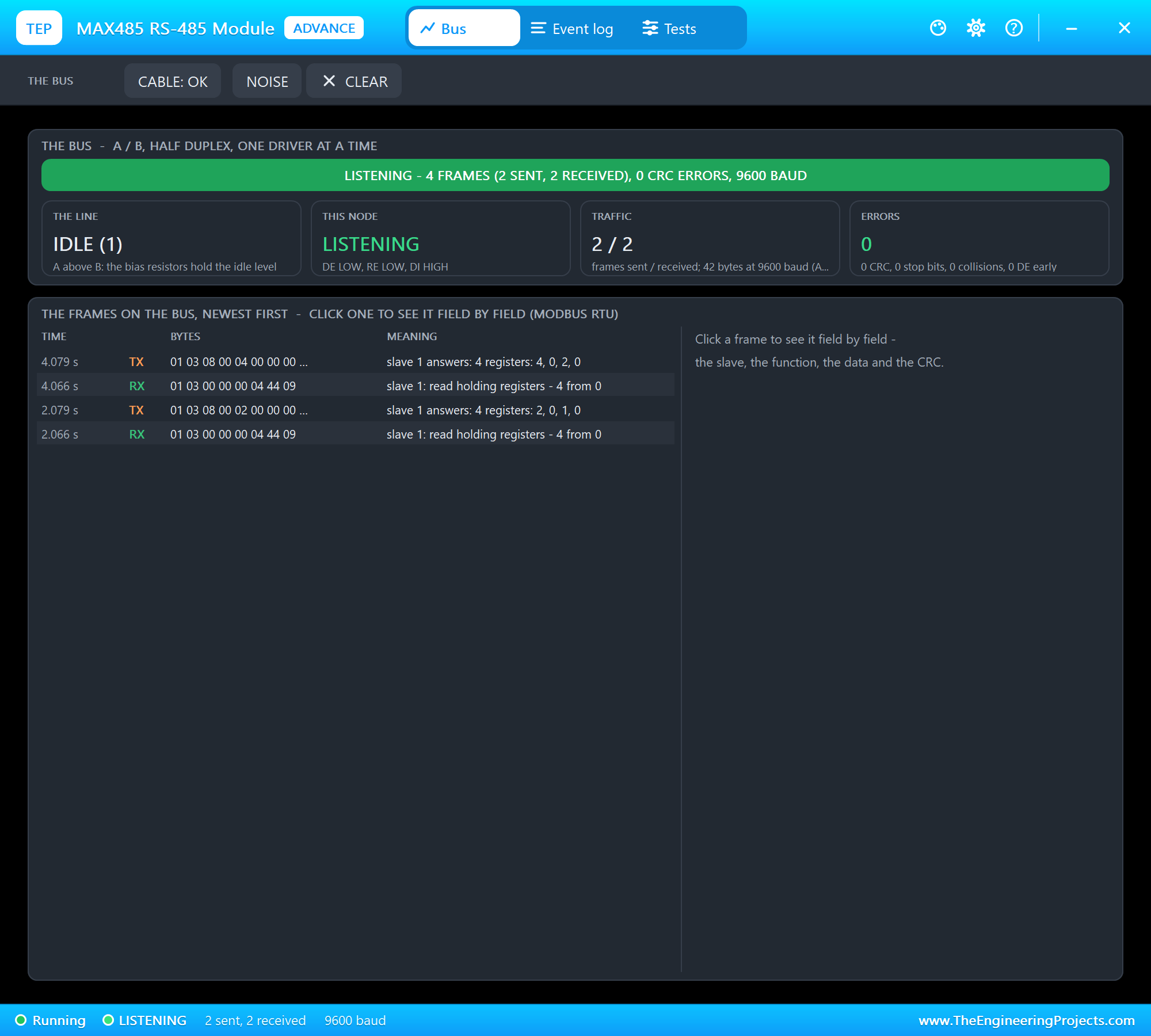
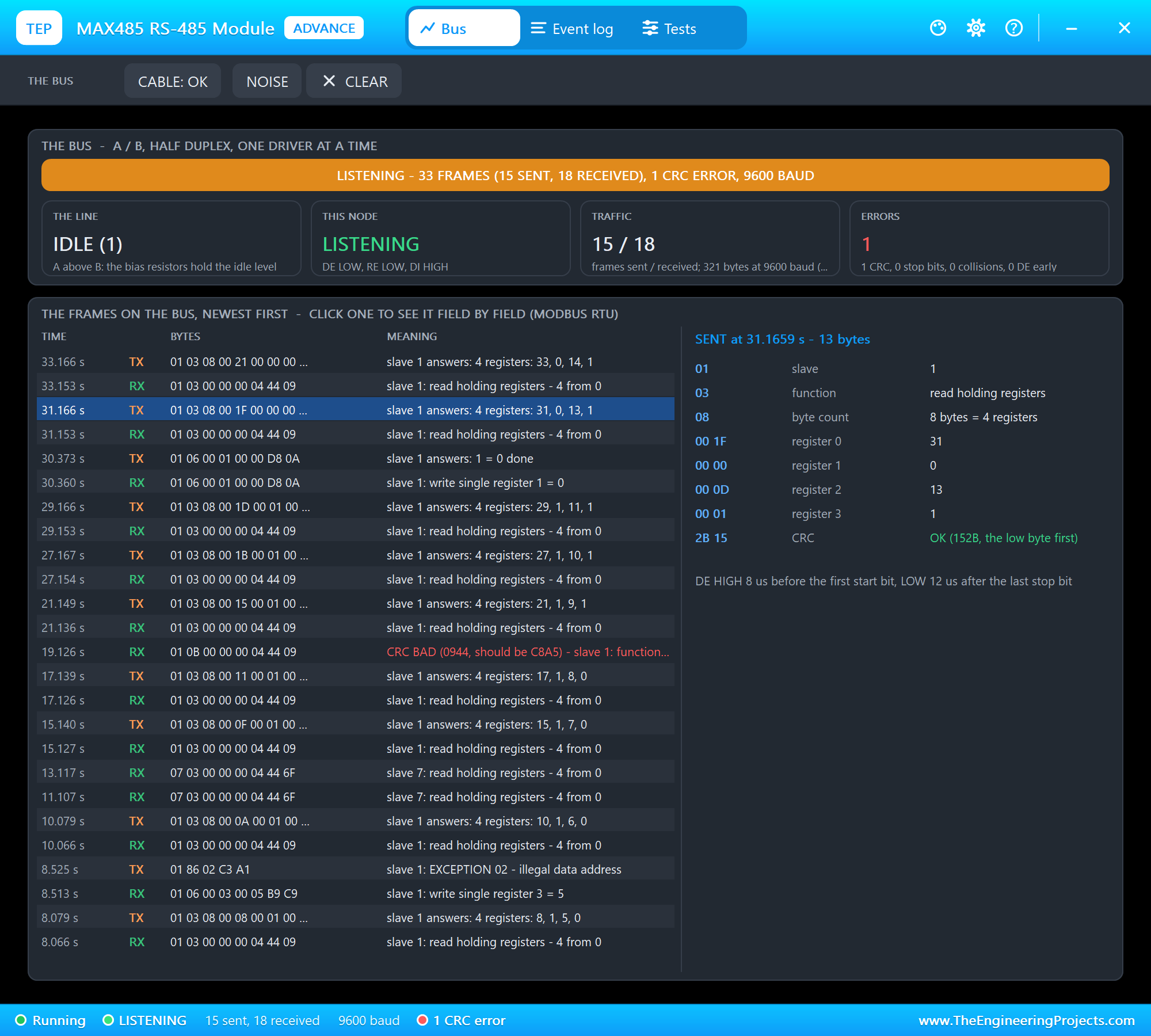
The Bus page shows the banner, four tiles - the line, this node, the traffic and the errors - and the frames on the bus, newest first. Seen from the slave, the master's requests are RX and its own answers TX. The answer starts 13 ms after the request: 8 bytes take 8.3 ms at 9600 baud, then the slave waits its 4 ms of silence.
LED ON, an Exception and a Missing Slave
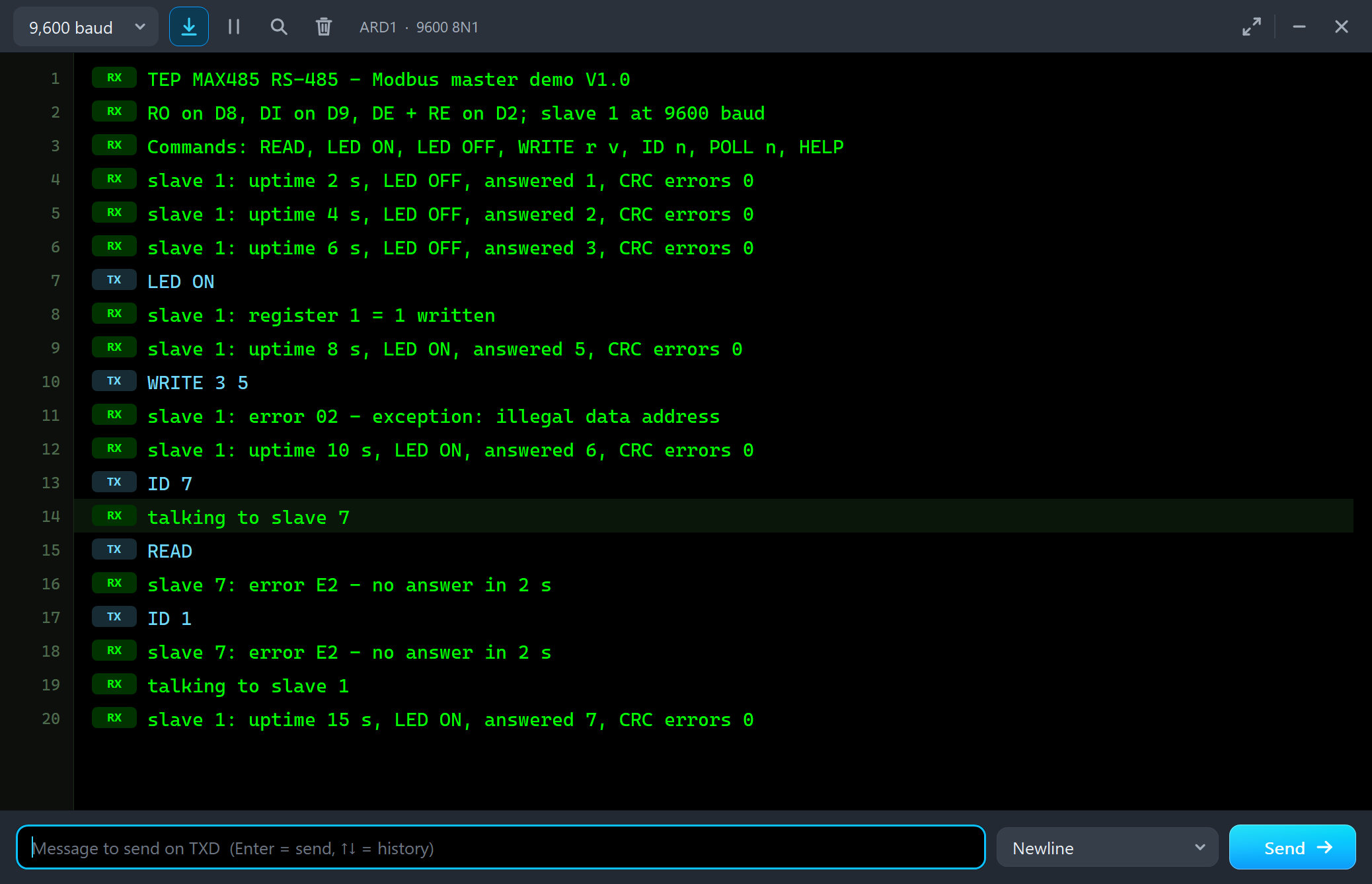
We typed LED ON, WRITE 3 5, ID 7, READ and ID 1 in ARD1's monitor:
TEP MAX485 RS-485 - Modbus master demo V1.0
RO on D8, DI on D9, DE + RE on D2; slave 1 at 9600 baud
Commands: READ, LED ON, LED OFF, WRITE r v, ID n, POLL n, HELP
slave 1: uptime 2 s, LED OFF, answered 1, CRC errors 0
slave 1: uptime 4 s, LED OFF, answered 2, CRC errors 0
slave 1: uptime 6 s, LED OFF, answered 3, CRC errors 0
LED ON
slave 1: register 1 = 1 written
slave 1: uptime 8 s, LED ON, answered 5, CRC errors 0
WRITE 3 5
slave 1: error 02 - exception: illegal data address
slave 1: uptime 10 s, LED ON, answered 6, CRC errors 0
ID 7
talking to slave 7
READ
slave 7: error E2 - no answer in 2 s
ID 1
slave 7: error E2 - no answer in 2 s
talking to slave 1
slave 1: uptime 15 s, LED ON, answered 7, CRC errors 0
LED ON is function 06 to register 1 - the slave switches its LED on D13 and answers with the request itself, as Modbus wants:
Register 3 is read only, so WRITE 3 5 got the exception 02 (illegal data address), and slave 7 does not exist, so ModbusMaster waited its 2 seconds and gave up with E2. The slave's monitor shows its side of the story:
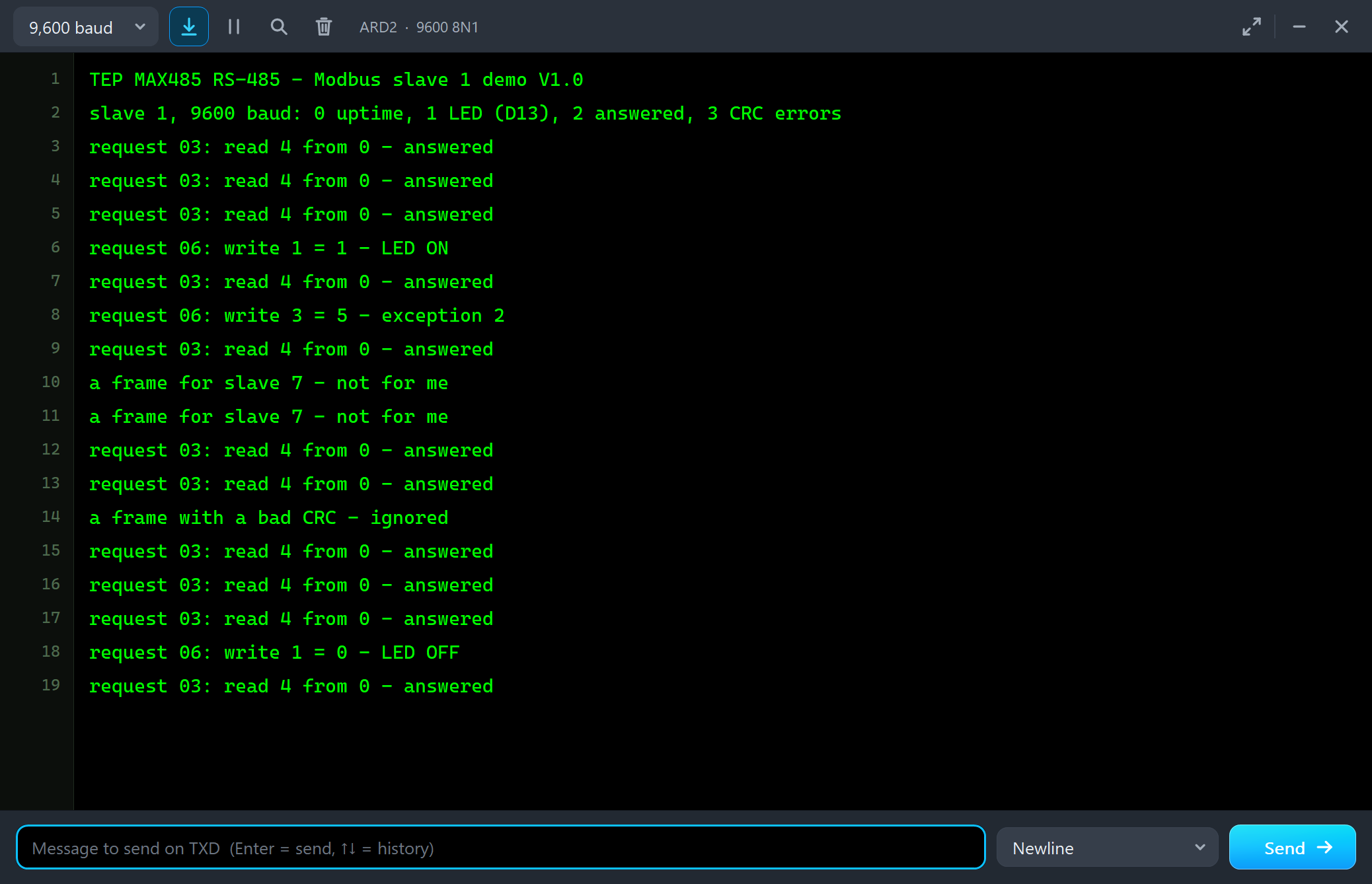
TEP MAX485 RS-485 - Modbus slave 1 demo V1.0
slave 1, 9600 baud: 0 uptime, 1 LED (D13), 2 answered, 3 CRC errors
request 03: read 4 from 0 - answered
request 03: read 4 from 0 - answered
request 03: read 4 from 0 - answered
request 06: write 1 = 1 - LED ON
request 03: read 4 from 0 - answered
request 06: write 3 = 5 - exception 2
request 03: read 4 from 0 - answered
a frame for slave 7 - not for me
a frame for slave 7 - not for me
request 03: read 4 from 0 - answered
request 03: read 4 from 0 - answered
a frame with a bad CRC - ignored
request 03: read 4 from 0 - answered
A Frame Field by Field
Click any frame in the pop-up and the right side explains it. A request from the master:
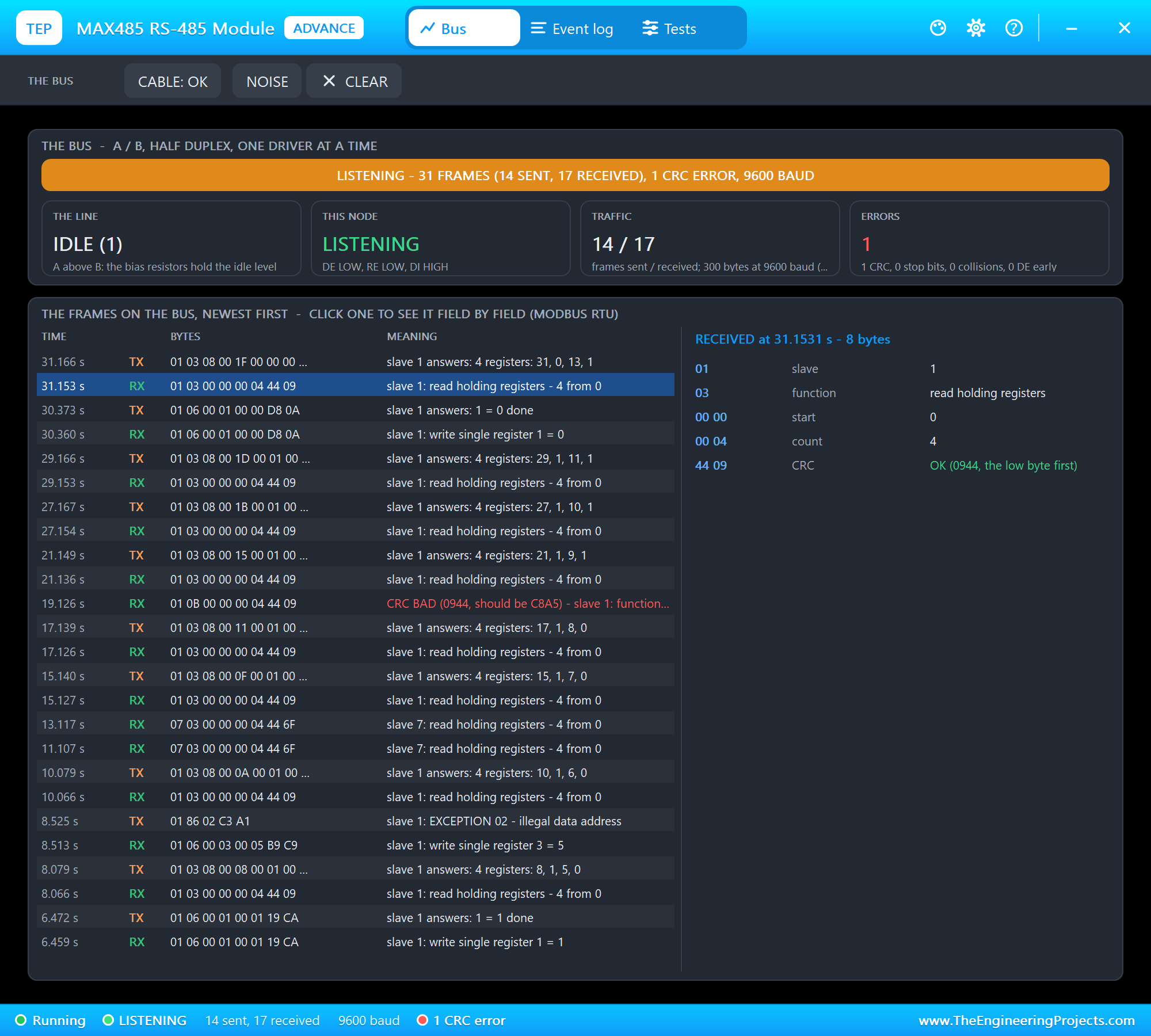
And the slave's answer, with each register and the DE timing of the slave's own transmission:
Noise and a Cut Cable
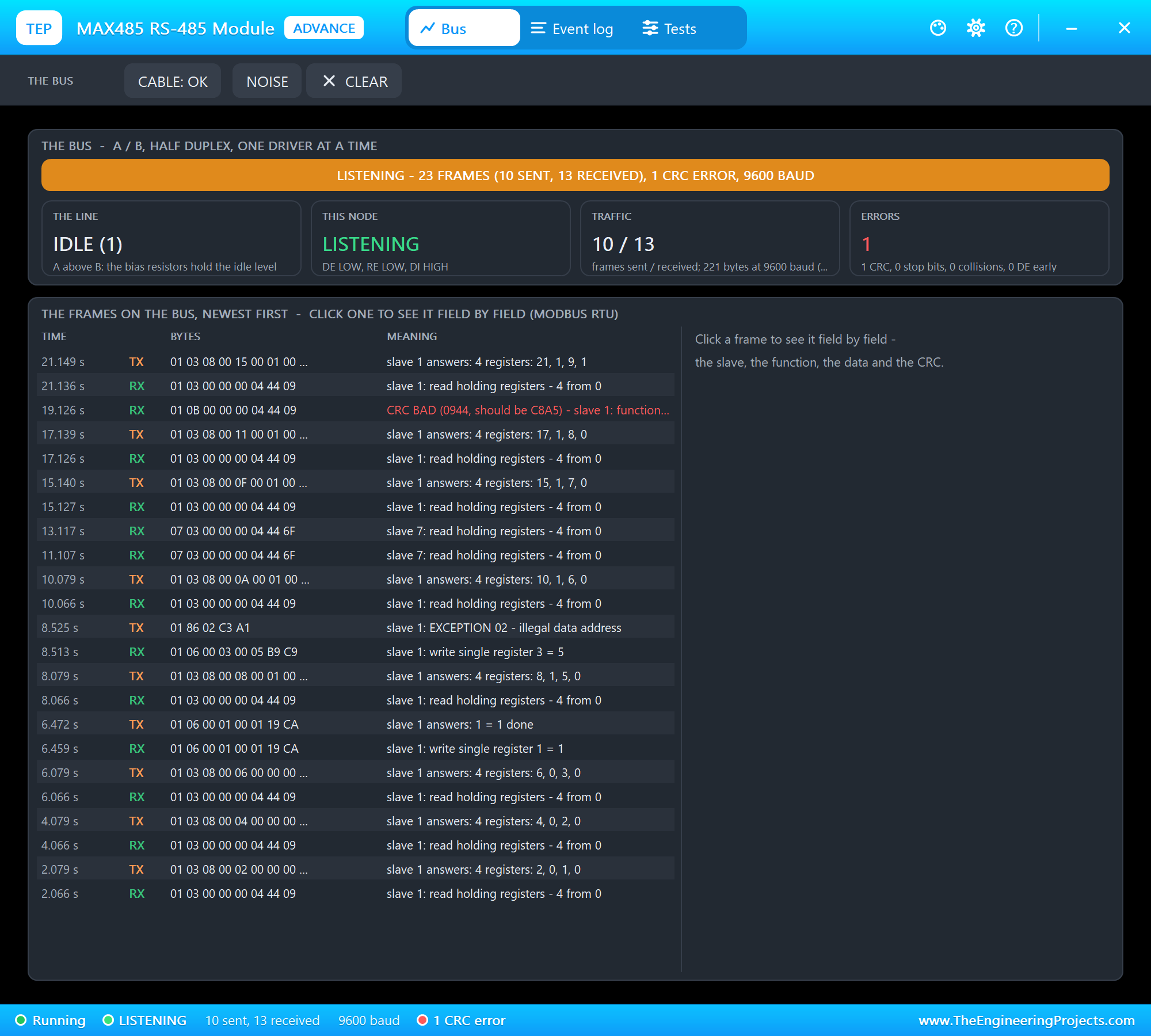
Real buses are not always clean. We clicked NOISE on U2's toolbar: one bit of the next frame U2 receives flips. The slave computed the CRC of the damaged request, found it wrong, and ignored it - so the master got no answer:
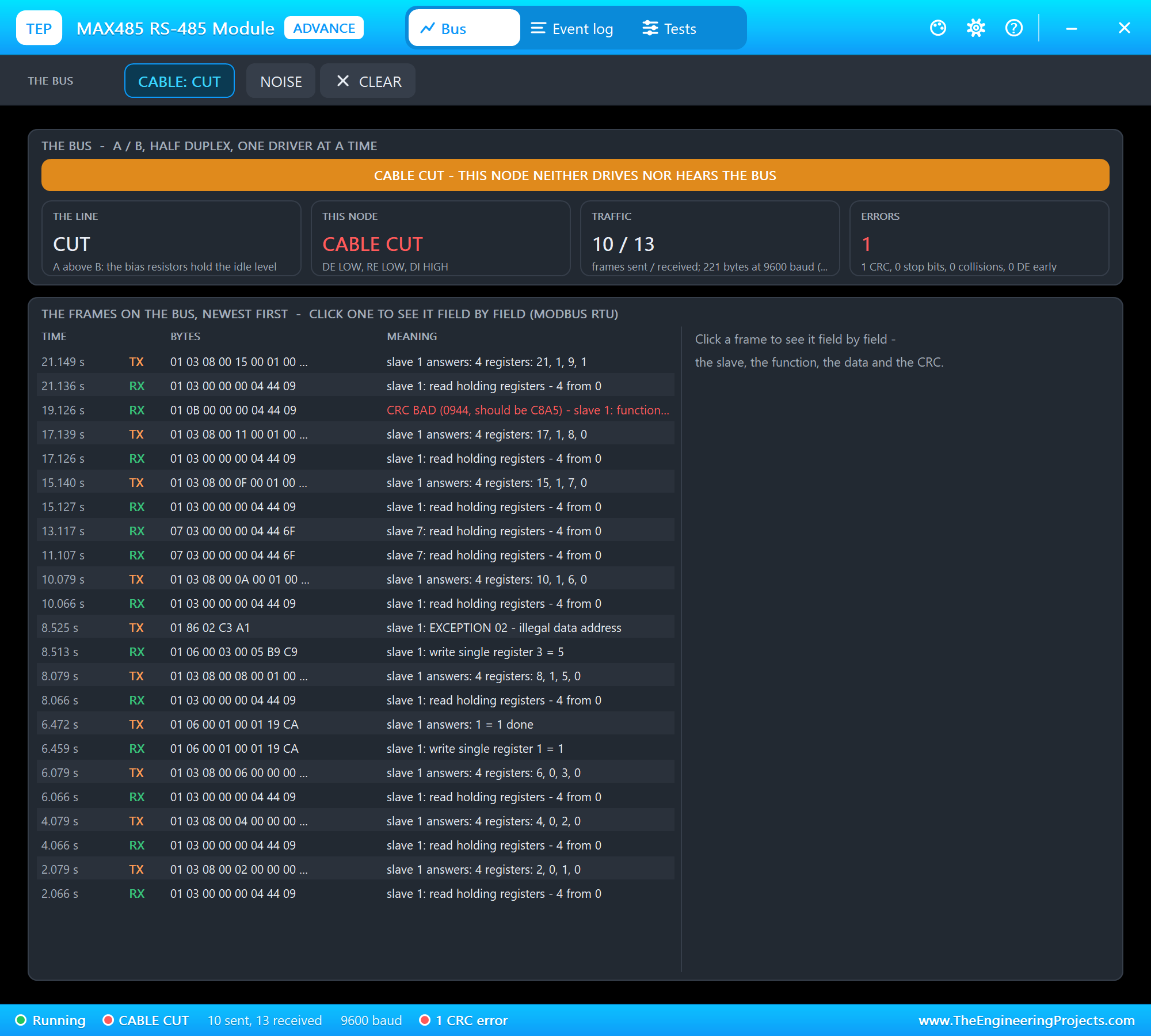
Then CABLE cut U2 off the bus. The slave heard nothing, the master timed out with E2 until we clicked CABLE again:
NOISE and CABLE with the Mouse on the Master
On node 1, the Simple part, we clicked NOISE on the master's STATUS panel. This time the answer was hit - and the flipped bit landed in the function byte:
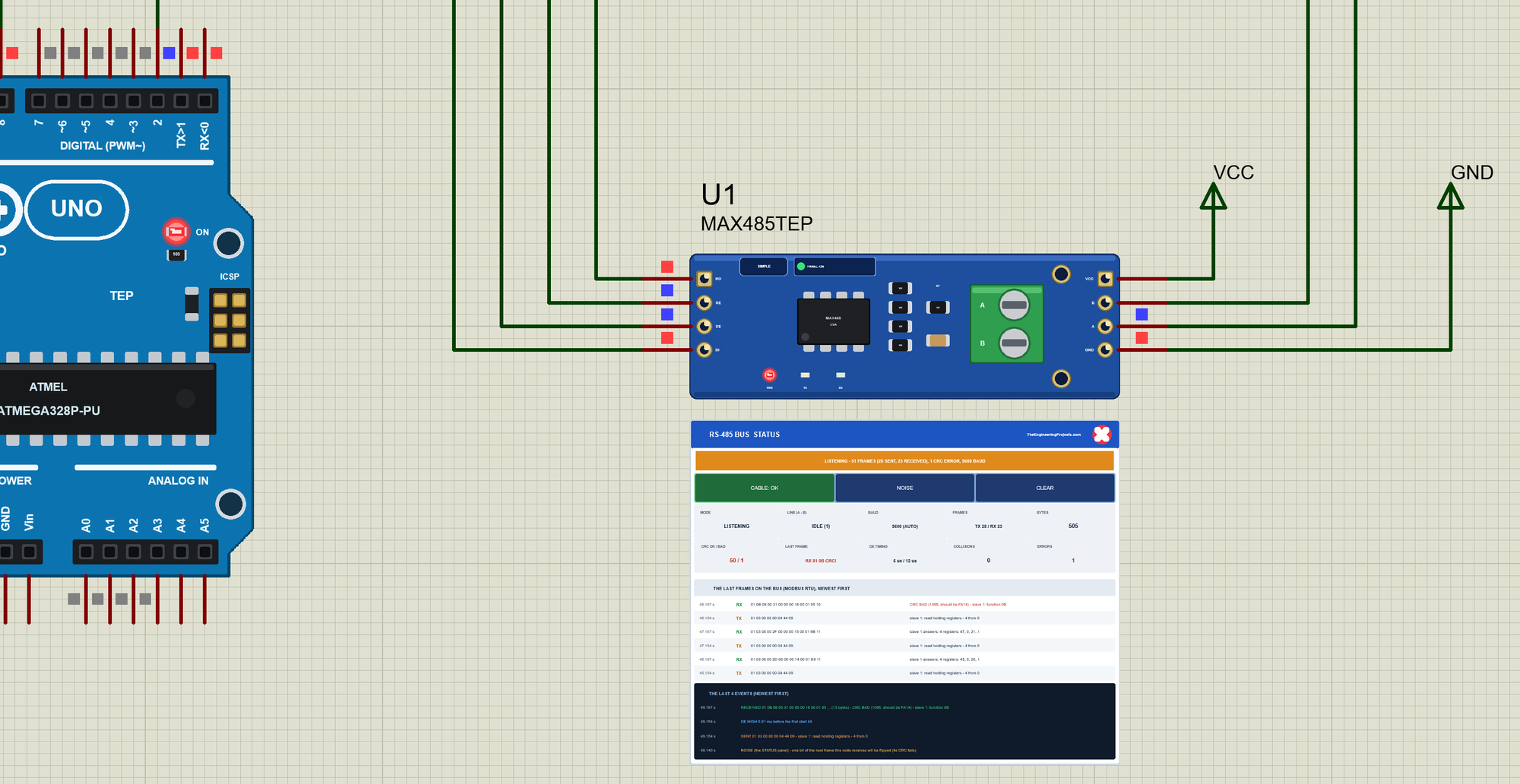
ModbusMaster checks the slave and the function after the first five bytes, so it reported E1 - the answer has another function - before it got to the CRC. Then CABLE on the panel cut the master off:
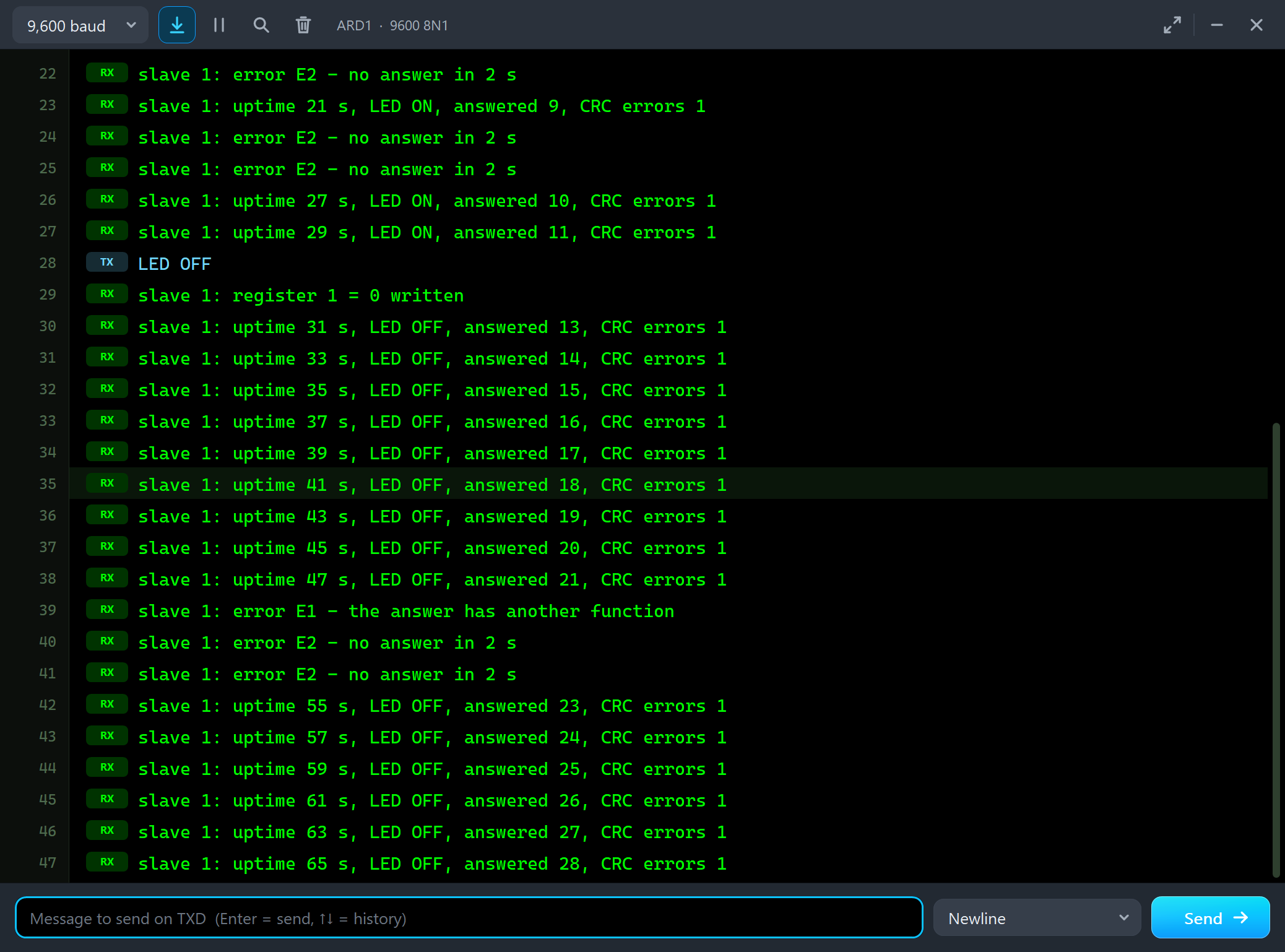
slave 1: uptime 45 s, LED OFF, answered 20, CRC errors 1
slave 1: uptime 47 s, LED OFF, answered 21, CRC errors 1
slave 1: error E1 - the answer has another function
slave 1: error E2 - no answer in 2 s
slave 1: error E2 - no answer in 2 s
slave 1: uptime 55 s, LED OFF, answered 23, CRC errors 1
The Test Tools
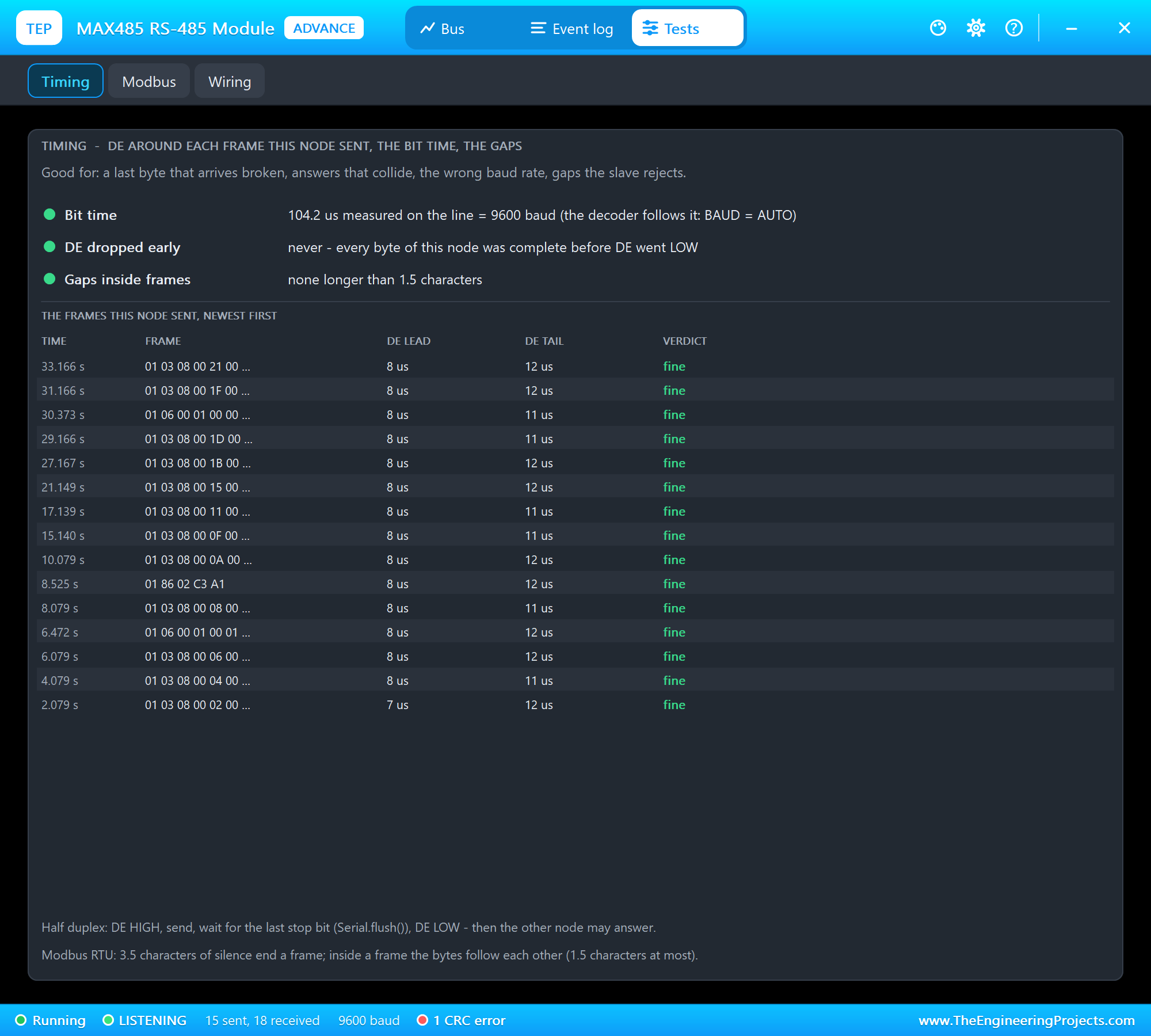
Timing is good for a last byte that arrives broken, answers that collide, the wrong baud rate and gaps a slave rejects. For every frame this node sent it shows how long DE was HIGH before the first start bit and after the last stop bit, with a verdict.
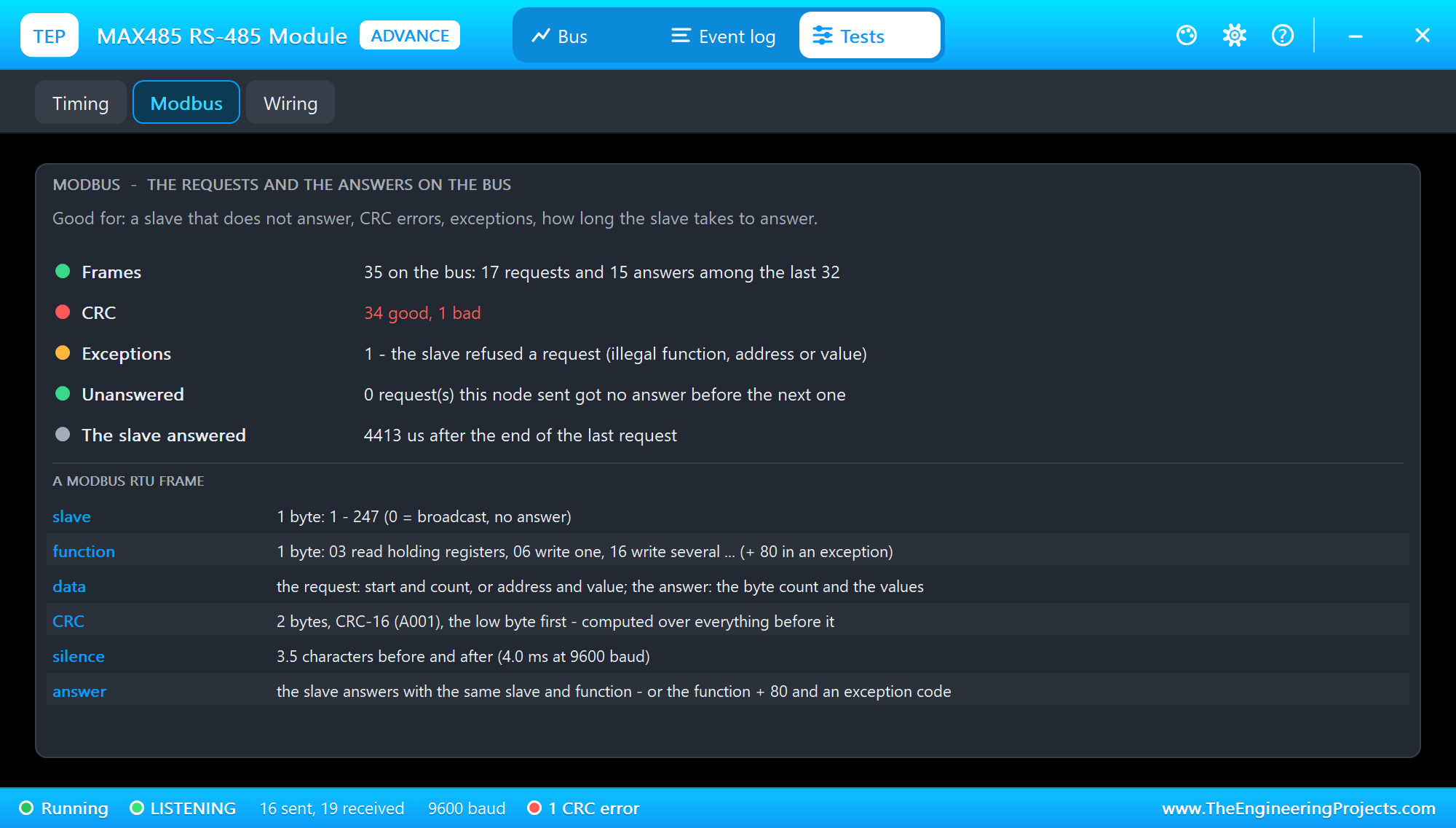
Modbus is good for a slave that does not answer, CRC errors and exceptions; it also shows how long the slave took to answer the last request.
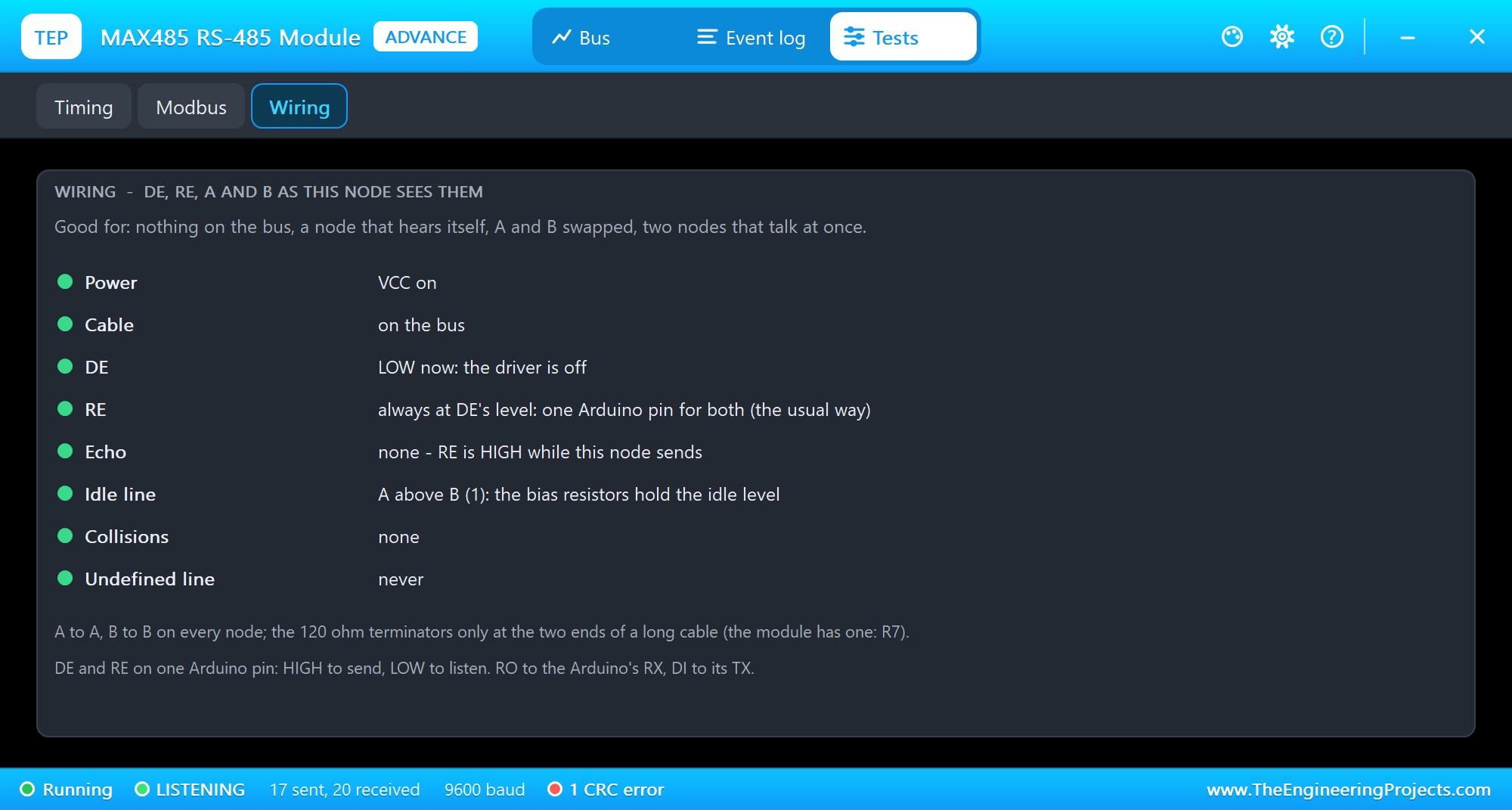
Wiring is good for nothing on the bus, a node that hears itself, A and B swapped, and two nodes that talk at once: power, the cable, DE, RE and whether it follows DE, the echo, the idle line and collisions.
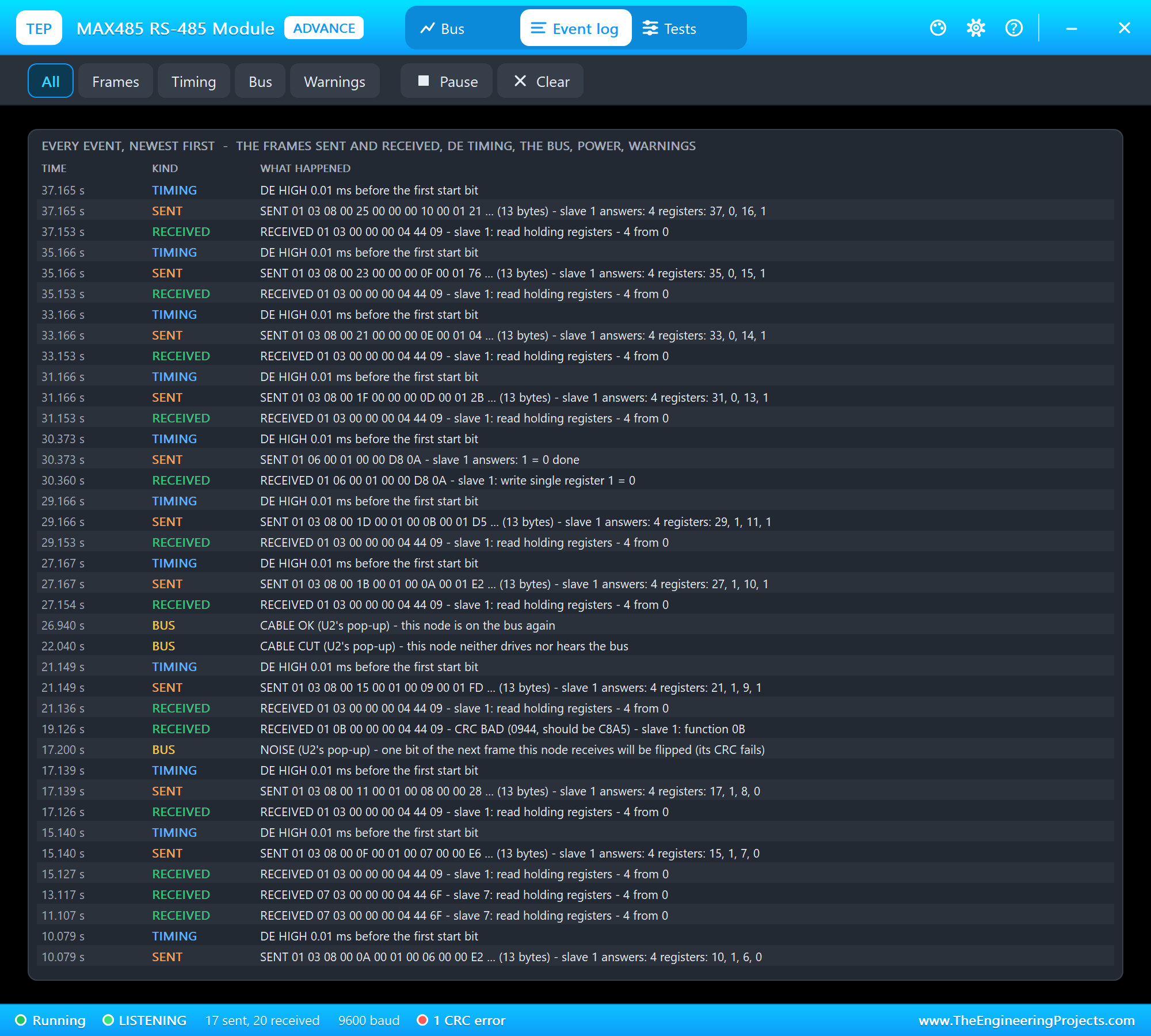
The Event log lists everything that happened, newest first: the frames sent and received, the DE timing, the bus actions, power and warnings. Filter it, pause it, or clear it.
The Simulation Log
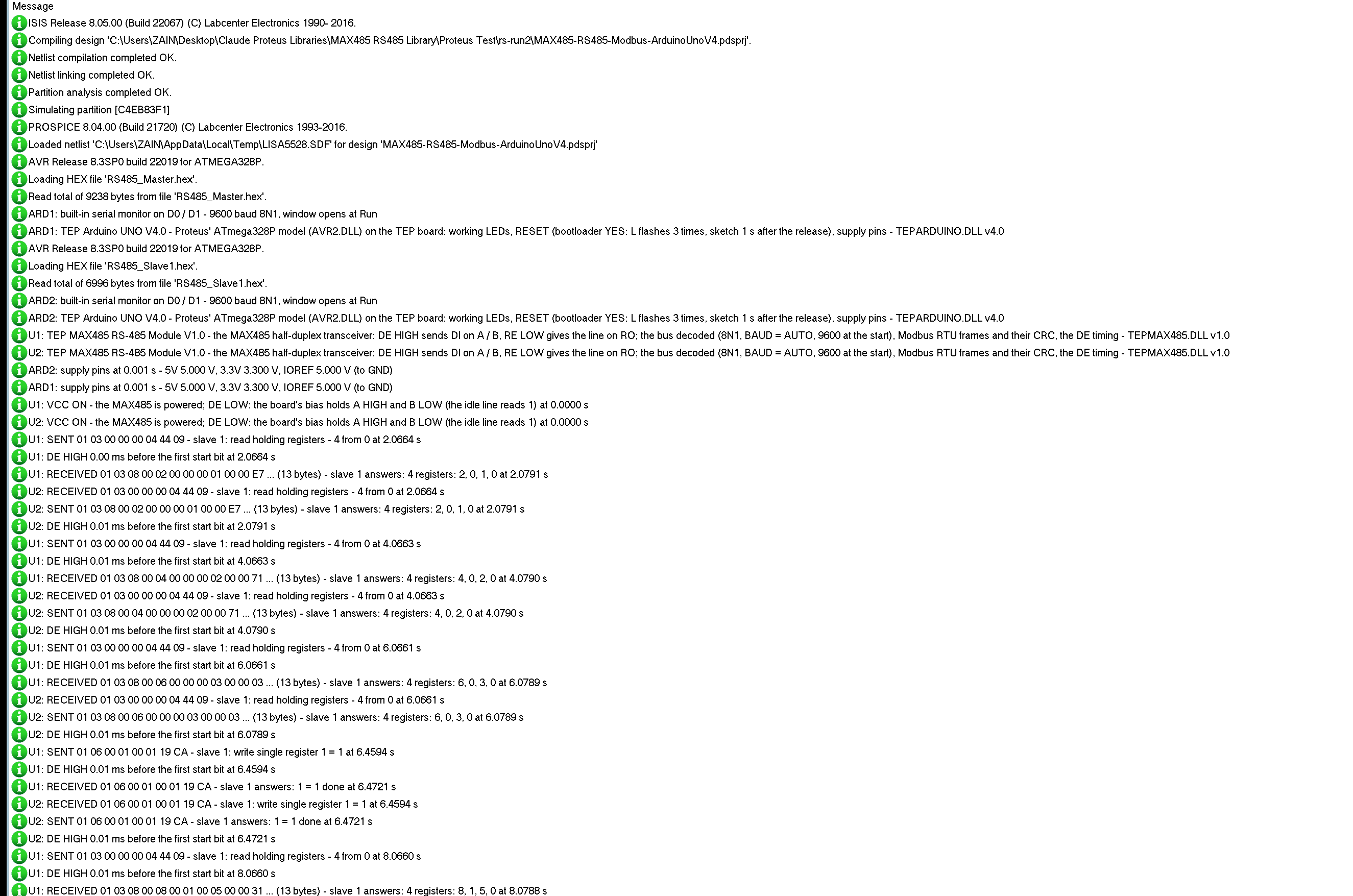
The parts also write to the simulation log of Proteus, with the exact simulation time. These lines show the first request and its answer on both modules, and LED ON:
U1: VCC ON - the MAX485 is powered; DE LOW: the board's bias holds A HIGH and B LOW (the idle line reads 1) at 0.0000 s
U1: SENT 01 03 00 00 00 04 44 09 - slave 1: read holding registers - 4 from 0 at 2.0664 s
U1: DE HIGH 0.00 ms before the first start bit at 2.0664 s
U1: RECEIVED 01 03 08 00 02 00 00 00 01 00 00 E7 ... (13 bytes) - slave 1 answers: 4 registers: 2, 0, 1, 0 at 2.0791 s
U2: RECEIVED 01 03 00 00 00 04 44 09 - slave 1: read holding registers - 4 from 0 at 2.0664 s
U2: SENT 01 03 08 00 02 00 00 00 01 00 00 E7 ... (13 bytes) - slave 1 answers: 4 registers: 2, 0, 1, 0 at 2.0791 s
U2: DE HIGH 0.01 ms before the first start bit at 2.0791 s
U1: SENT 01 06 00 01 00 01 19 CA - slave 1: write single register 1 = 1 at 6.4594 s
U1: RECEIVED 01 06 00 01 00 01 19 CA - slave 1 answers: 1 = 1 done at 6.4721 s
How the Model Works
Each module reads its pins at every edge. With DE HIGH it drives A = DI and B = NOT DI strongly; with DE LOW it pulls A HIGH and B LOW weakly - the bias. Proteus joins the A pins of all modules into one net and the B pins into another, so a strong driver wins over the bias, and two strong drivers in opposite directions leave the net undefined. The line is A above B; the decoder finds each start bit, reads the eight data bits in the middle of their bit times and checks the stop bit, a callback landing exactly on the end of each byte. 3.5 characters of silence close a frame: the model checks its CRC-16, decides from the frame itself whether it is a request or an answer, and explains it. For this node's own frames it measures DE against the first start bit and the last stop bit. The receiver gives the line on RO while RE is LOW; NOISE inverts one bit time of that line on this node only.
Troubleshooting
- "error E2 - no answer in 2 s": a wrong slave address, the slave's DE never HIGH, A and B swapped between the nodes, the cable cut (CABLE), the wrong baud rate - or the slave dropped a frame with a bad CRC.
- "error E3" or "E1": a damaged answer - noise (NOISE), or two nodes sent at once (Wiring shows collisions).
- The last byte of every frame is broken: DE goes LOW before the last stop bit -
Serial.flush()before DE LOW; Timing shows it. - The sketch reads its own requests back: RE is LOW while it sends - tie RE to DE.
- Nothing on the bus: DE not connected, or no VCC (the PWR LED).
- No part or no monitor: TEPMAX485.DLL or TEPARDUINO.DLL is missing; a closed monitor opens again with a click on the UNO's USB port.
Things to Know Before Using a Real MAX485 Module
- GND too: connect GND between the nodes, not only A and B.
- Termination: 120 ohm at the two ends of a long cable only - the module has one (R7); remove it on the nodes in the middle.
- DE and RE on one pin: the usual way; the receiver is off while a node sends.
- Serial.flush() before DE LOW: write() only queues the bytes.
- The limits: up to 1200 m, up to 2.5 Mbps on the MAX485, up to 32 unit loads on one bus.
Limitations of the Simulation
- Not modelled: the analog differential voltages, the cable (length, delay, reflections - the 120 ohm terminator is drawn, not simulated), the common-mode range, the slew rate, more than 32 unit loads, other framings than 8N1, ASCII Modbus.
- The model's own choices: AUTO starts at 9600 baud and follows a line whose bytes fail at that rate, NOISE flips data bit 3 of the second byte of the next frame this node receives, one collision is counted per transmission.
- The badge, the LEDs, CABLE, NOISE, the panel button and the panels are TEP additions.
- The model is our own implementation written from the MAX485 datasheet and the Modbus RTU specification. This library is not made or endorsed by Analog Devices / Maxim Integrated, the Modbus Organization, Microchip / Atmel, Arduino or Labcenter.
- Licences: RS485_Master.hex contains ModbusMaster 2.0.1 (Apache License 2.0 - the licence text is in the README), both HEX files AltSoftSerial 1.4 (MIT licence) and the Arduino AVR core 1.8.6 with LGPL-licensed code - the source links are in the README.
- Tested in Proteus 8.5 in October 2026 (the demo as shipped on two Arduino UNO V4.0 boards with their built-in monitors: the master polling slave 1, LED ON and OFF, an exception, a missing slave, NOISE and CABLE on the Advance part and, with the mouse, on the Simple one; 40.0 s of simulation took 111 s with the pop-up and both monitors open, about 0.36 x real time). Proteus 7 is not supported.
If you store your Modbus readings, our Micro SD Card Module Library for Proteus writes them to a CSV file on a card.
So, that was all about the MAX485 RS-485 Module Library for Proteus V1.0. I hope DE and RE, half duplex and Modbus RTU are clear now, and that your master and slaves talk on the first try. If you use the MAX485 RS-485 Module Library for Proteus in a project, please share it in the comments or in our forum, and if you have any questions, ask in the comments and I will help you out. Till the next tutorial, take care and have fun!