Hello friends, I hope you all are doing great. Today, I am going to share the AMG8833 Thermal Stove Guard on Raspberry Pi 5 - Proteus Simulation, the seventy-sixth project of our IoT Projects series. If you have searched for an AMG8833 thermal camera with a Raspberry Pi, a Python thermal imaging project, an unattended cooking alarm or an automatic stove shut-off, here is a complete one in a Proteus simulation. Unattended cooking is the leading cause of kitchen fires: a pan is left on the hob, someone answers the door or the phone, and the oil keeps heating. A smoke alarm only speaks once there is smoke. A stove guard acts earlier: it knows the pan is hot and that nobody is with it.
This Raspberry Pi 5 watches the stove with an AMG8833, an 8 x 8 thermal camera. From 64 temperatures four times a second it tells a hot pan from a person, starts a countdown when the pan is left alone, beeps, and then closes the stove's supply valve. It also notices a hand or a cloth over the lens. In this tutorial, we will go through the circuit, how a thermopile camera sees, why a person at a distance looks cooler than skin, the median and the room temperature, finding a person as a group of warm pixels, the state machine with its countdown and its latch, the fail-safe valve, and the thermal picture on a 1.8" TFT and on a web dashboard. Then we run the whole story in the simulation. At the end, you can download the project with the program and every library file.
NOTICE: Our team has put a lot of effort into this project: the circuit, the code and every part in the simulation are our own work, and you get them all free. Your feedback is the fuel that keeps us going, so please tell us what you think in the comments below. And if our free projects help you, you can buy us a coffee. So, let's get started with the AMG8833 thermal stove guard on Raspberry Pi 5 in Proteus simulation:
What Does This Thermal Stove Guard Do?
- Sees heat, not light: an AMG8833 thermal camera on the Pi's I2C bus, 64 temperatures, 4 frames a second.
- Tells a pan from a person: a pixel at 40 C or more is a hot spot; a group of warm pixels a little above the room is a person.
- Times the absence: a hot pan with nobody in view starts a countdown, with warning beeps near its end.
- Shuts the stove off: a relay lets a normally closed 12 V solenoid valve close, and the alarm sounds.
- Latches safely: the alarm stops when someone comes back, but the valve opens again only with a RESET, and only with a person in view.
- Notices tampering: a hand or a cloth over the lens is detected; covered for 5 s, the guard shuts the stove off too.
- Shows the heat: a thermal picture on a 1.8" TFT and on a dashboard, on a laptop or a phone.
It is a great project for learning thermal imaging, simple image processing and safe control logic in one go. In the simulation, the AMG8833's pop-up shows the 64 pixels with their temperatures, a scripted scene (someone cooking, then walking away) and buttons for a person, a hot mug and a hand on the lens, so every decision the Pi makes can be checked against what the camera really saw.
Components Used in the Proteus Simulation
All the parts come from our Proteus libraries, each with its own tutorial. The project zip at the end includes every LIB and DLL file and the TEP Pi runtime.
| Part | Proteus device | Library post | Connection |
|---|---|---|---|
| Raspberry Pi 5 | RASPBERRY PI 5 | Raspberry Pi 5 Library for Proteus | PI1, stove_guard.py, Ethernet 192.168.1.51 |
| AMG8833 thermal camera | THERMALAMG8833TEP | AMG8833 Thermal Camera Library for Proteus | U1, I2C1 at 0x69, VIN from the 5V pin |
| TFT 1.8" ST7735 | TFT18ST7735ADVTEP | TFT ST7735 Library for Proteus | TFT1 on SPI0, A0 GPIO25, RESET GPIO24 |
| Relay module | RELAY1ADVTEP | Relay Module Library for Proteus | RLY1, IN GPIO27 (active LOW) |
| 12 V solenoid valve | WATERVALVETEP | 12V Solenoid Valve Library for Proteus | SV1 on the relay, normally closed |
| 1N4007 diode | DIODE1N4007TEP | 1N4007 Diode Library for Proteus | D1 across the valve's coil |
| Active buzzer | BUZZERACTIVETEP | Active Buzzer Library for Proteus | BZ1 on the 5 V rail |
| BC547B transistor | BC547BTEP | Small Transistors Library for Proteus | Q1, base through R2 from GPIO23 |
| Resistors 1k | RESISTOR4BANDTEP | Resistor Library for Proteus | R1 across the buzzer, R2 to the base |
| Laptop WiFi Monitor | LAPTOP WIFI MONITOR | Laptop WiFi Monitor | PC1 |
| Mobile WiFi Monitor | MOBILE WIFI MONITOR | Mobile WiFi Monitor | MOB1 |
Proteus Simulation of the Stove Guard: the Circuit
| Part pin | Raspberry Pi 5 | Signal |
|---|---|---|
| AMG8833 SDA / SCL | GPIO2 (pin 3) / GPIO3 (pin 5) | I2C1, the camera at 0x69 |
| AMG8833 VIN / GND | 5V (pin 2) / GND | the module makes its own 3.3 V |
| TFT SDA / SCK / CS | GPIO10 (pin 19) / GPIO11 (pin 23) / GPIO8 (pin 24) | SPI0: MOSI, SCLK, CE0 |
| TFT A0 / RESET | GPIO25 (pin 22) / GPIO24 (pin 18) | command or data; reset |
| Relay IN | GPIO27 (pin 13) | LOW = the relay on = the valve open |
| BC547 base (through 1k) | GPIO23 (pin 16) | HIGH = the buzzer on |
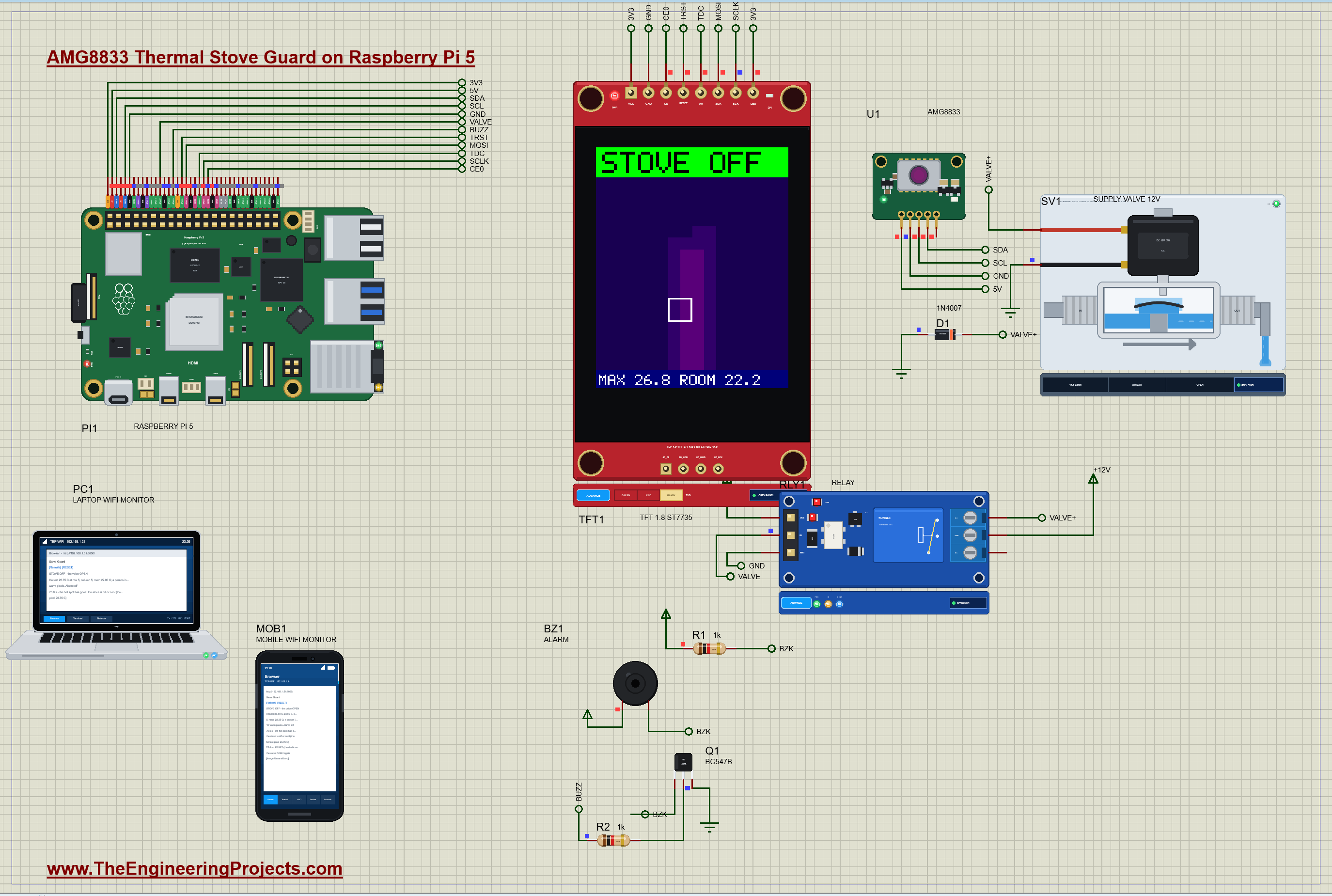
The camera module carries its own regulator and level shifter, so VIN comes from the Pi's 5 V pin while SDA and SCL work at the Pi's 3.3 V. The TFT sits on the SPI bus with two more GPIO pins: A0 says whether a byte is a command or data, and RESET restarts the controller. The relay module takes its coil supply from the 5 V rail and its input from GPIO27, active LOW. Its contact switches +12 V to the solenoid valve, with a 1N4007 across the coil to catch the voltage spike when the coil is switched off. The buzzer draws more current than a GPIO pin should give, so a BC547 switches its low side, with 1k into the base.
How the Thermal Stove Guard Works
How a Thermal Camera Sees
Everything warmer than absolute zero gives off infrared light, and the warmer it is, the more. The AMG8833 has 64 thermopiles behind a silicon lens, tiny junctions of two metals that make a voltage when their front warms up in that infrared light. Each one looks through the lens at its own patch of the scene, about 7.5 degrees wide, and the chip turns its voltage into a temperature: 12 bits, 0.25 C a step, from 0 to 80 C, ten frames a second. The Pi reads the 64 values from registers 0x80 to 0xFF, two bytes each. Because an I2C block read on Linux stops at 32 bytes, it reads the frame in four bursts; the chip moves to the next register by itself after each byte.
Why a Person Looks Cooler Than Skin
A pixel reports the average temperature of everything in its patch. Worked example: at 2 m, a 7.5 degree pixel covers a square about 26 cm wide (2 x tan 7.5 degrees x 1000 mm, about 263 mm). A face is about 16 cm wide, so even a pixel centred on it sees as much wall as face, and clothes are cooler than skin anyway. So in the simulation a person at 2 m reads about 28 C on the body and a little more at the face, against a 22 C room, never 37 C. That is why the program does not look for 37 C. It looks for pixels clearly warmer than the room. A pan on a hob, on the other hand, is far hotter than any person: even when it fills only part of a pixel, that pixel reads well over 40 C.
The Room, the Hot Spot and the Person
The room temperature comes from the frame itself: the median of the 64 pixels, the value with half of them above and half below. A person and a pan cover only a few pixels, so the median stays on the wall. A mean would be pulled up by a hot pan. A hot spot is any pixel at 40 C or more. A person is a group of at least 2 touching pixels, each 2.5 C or more above the room but below 40 C, with touching meaning up, down, left or right. The program finds the groups with a flood fill: it takes a warm pixel, then its warm neighbours, then theirs, until the group stops growing. The group's middle column tells where the person is, so the program can log the side they came in from and the side they left by.
The States and the Countdown
| State | When | The valve | The buzzer |
|---|---|---|---|
| STOVE OFF | no hot spot | open | quiet |
| COOKING | a hot spot and a person in view | open | quiet |
| AWAY | a hot spot, nobody in view | open, counting down 15 s | a beep a second in the last 5 s |
| SHUT OFF | the countdown ran out, or the lens covered for 5 s | closed | the alarm |
| VALVE OFF | shut off, and someone is back | closed until RESET | quiet |
| BLOCKED | the lens covered | open for 5 s | two short beeps |
The countdown is 15 s in this project only so that the simulation stays short; a real kitchen would use 5 to 10 minutes. A person who steps out of view for a moment should not restart everything, and a single frame can miss someone, so a person counts as gone only after 1 s without being seen. When the cook comes back before the end, the countdown simply stops.
Fail-Safe by Design
Three choices make the guard fail safe. The valve is normally closed: it is open only while the relay holds it, so a power cut, a crash of the program or a broken wire all close it. After a shut-off the valve stays closed even when the cook comes back: the alarm stops, but someone must press RESET, and the program accepts RESET only while a person is in view, so a stove cannot be switched on again from another room. And a covered lens is treated as danger, not as an empty kitchen: a guard that cannot see cannot guard, so after 5 s of a blocked lens it shuts the stove off. A blocked lens is easy to spot: all 64 pixels are within 2 C of each other, and well above the room the guard last saw.
The Python Code Explained
The program is stove_guard.py, written for Raspberry Pi OS with lgpio for the GPIO and I2C and spidev for the SPI bus. Three threads share the work: the camera loop, the buzzer patterns and the web server. The valve starts closed until the camera answers:
lgpio.gpio_claim_output(chip, VALVE, 1) # the relay off = the valve closed until the camera answersThe frame in four bursts, each pixel a 12-bit two's complement number of quarter degrees:
for reg in (0x80, 0xA0, 0xC0, 0xE0): # four bursts of 32 bytes (an I2C block read stops at 32) out.append((v - 0x1000 if v & 0x800 else v) * 0.25)The room as the median, then the three tests on each frame:
room = sorted(p)[32] # the median: half the pixels see the room even with a person and a pan blocked = (mx - mn) < FLAT_DC and avg > room + BLOCK_DC hot = mx >= HOT_C and not blocked warm = [not blocked and room + WARM_DC <= v < HOT_C for v in p] people = [g for g in blobs(warm) if len(g) >= PERSON_PX]The countdown while the stove is alone, and the shut-off:
left = AWAY_S - (now - away_since) shut('a hot stove alone for %.0f s' % AWAY_S)The relay's input is active LOW, so a 0 holds the valve open:
lgpio.gpio_write(chip, VALVE, 0 if open_ else 1) # (active LOW: 0 = the relay on = the valve held open)RESET is accepted only with someone at the stove and a clear lens:
ok = s['valve'] == 'CLOSED' and s['person'] and not s['blocked']For the pictures, the 8 x 8 frame is smoothed to 32 x 32 by bilinear interpolation, each new point a weighted mix of its four nearest pixels:
row.append((a * (1 - fx) + b * fx) * (1 - fy) + (c * (1 - fx) + d * fx) * fy)Each point then takes a colour from the iron palette, black through violet, red and orange to yellow and white, on a fixed scale from 18 to 50 C so that pictures can be compared. The TFT shows the state in a coloured bar, the picture with the hottest pixel framed, and the hottest pixel and the room in a line below. The dashboard's links are Refresh and RESET, and its pages are / (the dashboard), /thermal.bmp (the picture, 192 x 192 in 16 colours) and /data (JSON, with the 64 pixels).
How to Run the Proteus Simulation
- Download the project zip below and install the library files (the steps are under the download button).
- Open Pi-5-Stove-Guard.pdsprj from the Proteus Simulation folder. Keep stove_guard.py and the DLL files next to it.
- Press Play. When the Pi's terminal says serving on, click U1 for its pop-up and press Demo to start the scene.
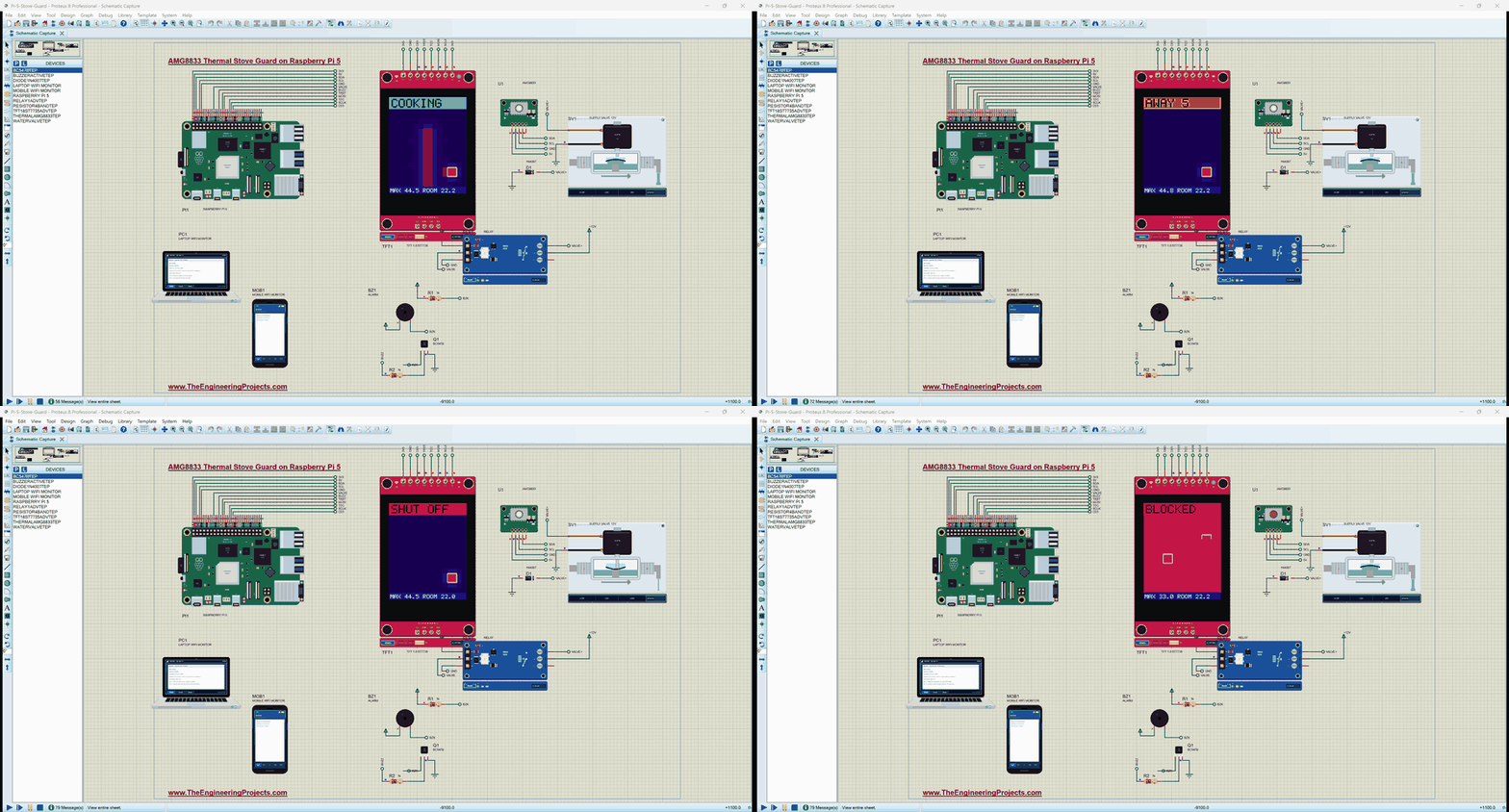
- Watch the TFT and the Laptop WiFi Monitor (press Go): COOKING, then AWAY with its countdown, then SHUT OFF.
- On U1's pop-up press Person, then click RESET on the dashboard. Try Hand on the lens and Hot mug too.
Simulation Results: the Stove Guard in Proteus
We ran the whole story in one simulation, reading the Pi's terminal, the TFT, the dashboard and the pop-ups of the camera and the valve along the way. The program started cleanly:
   0.1 s  AMG8833 at 0x69: room 22.0 C (the median pixel), the sensor itself 23.6 C
   0.1 s  the guard is armed: the valve OPEN
The camera module plays its scene from the moment the simulation starts, while the Pi is still booting, so the guard saw a first round of it: someone walked in, a pan appeared, they left and the countdown began. Then we pressed Demo on the camera's pop-up to start the scene again from the top. That made the pan vanish for a moment, and the guard's answer is itself worth seeing: the hot spot had gone, so the stove was off or cool, and the countdown simply stopped.
  28.1 s  the hot spot has gone: the stove is off or cool (the hottest pixel 22.75 C)
  28.1 s  state STOVE OFF
1. Someone Cooking
  32.3 s  a person came into view from the left (4 warm pixels)
  38.1 s  HOT: a hot spot at row 7, column 7, 44.50 C
  38.1 s  state COOKING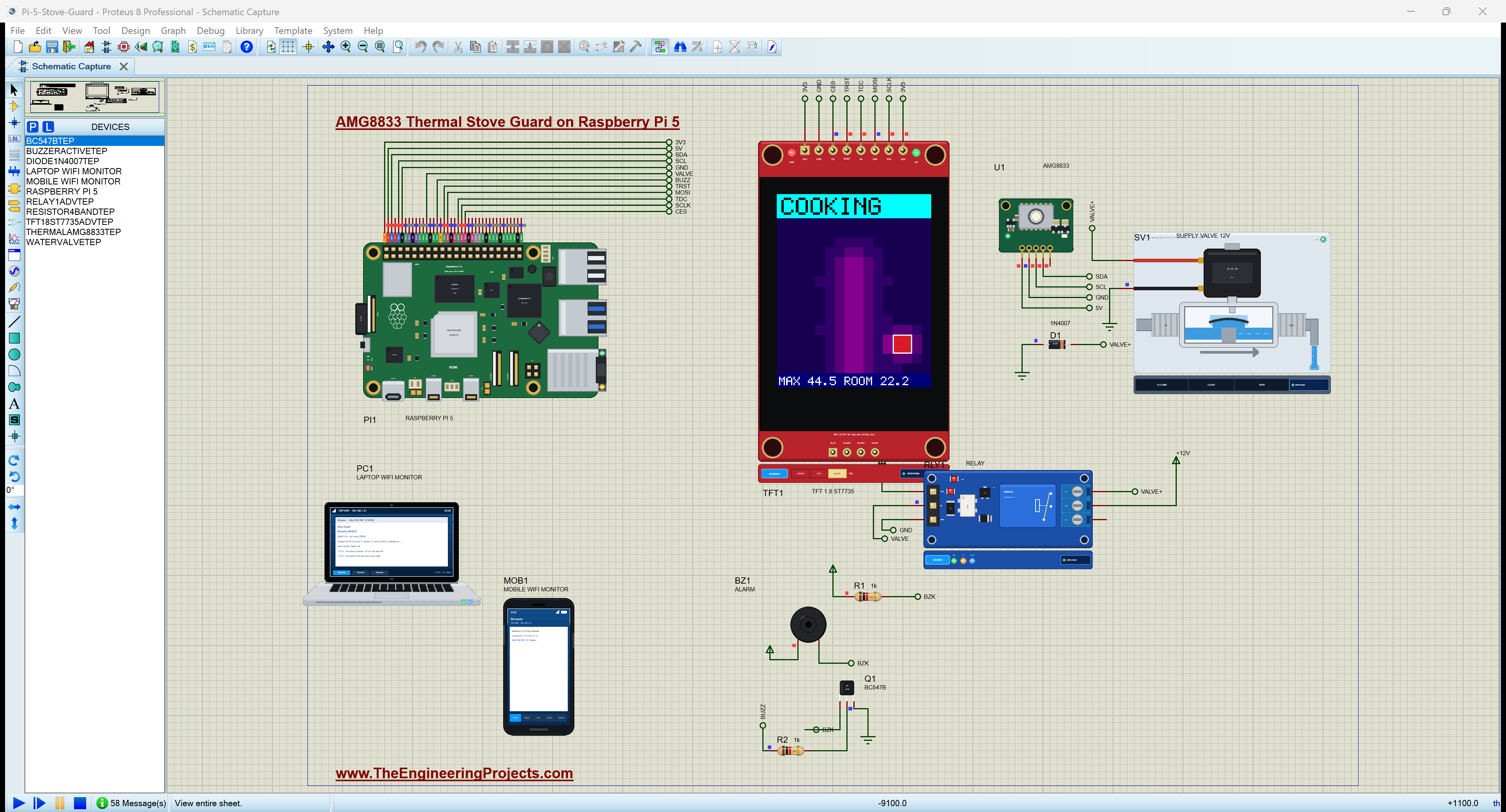
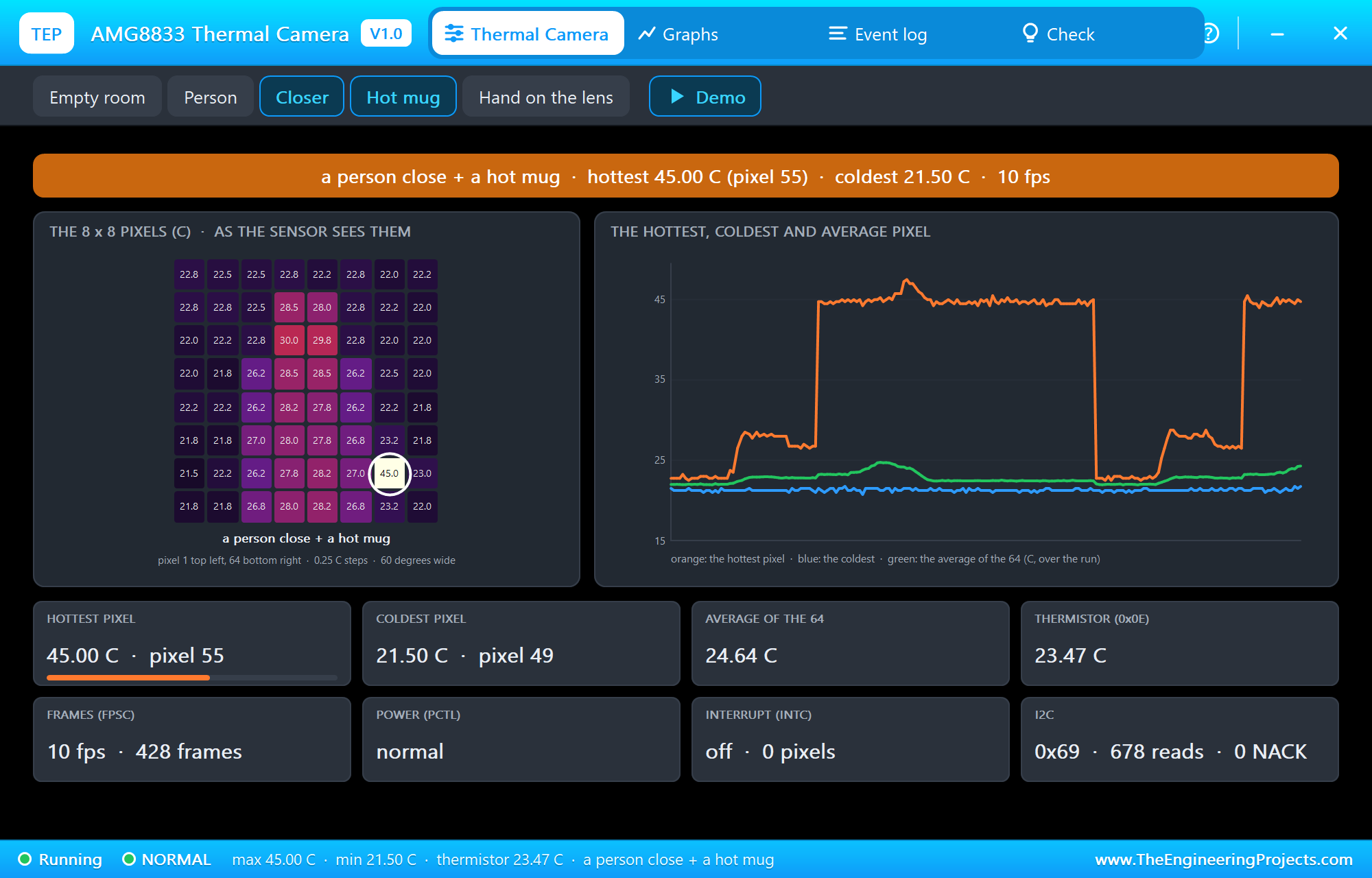
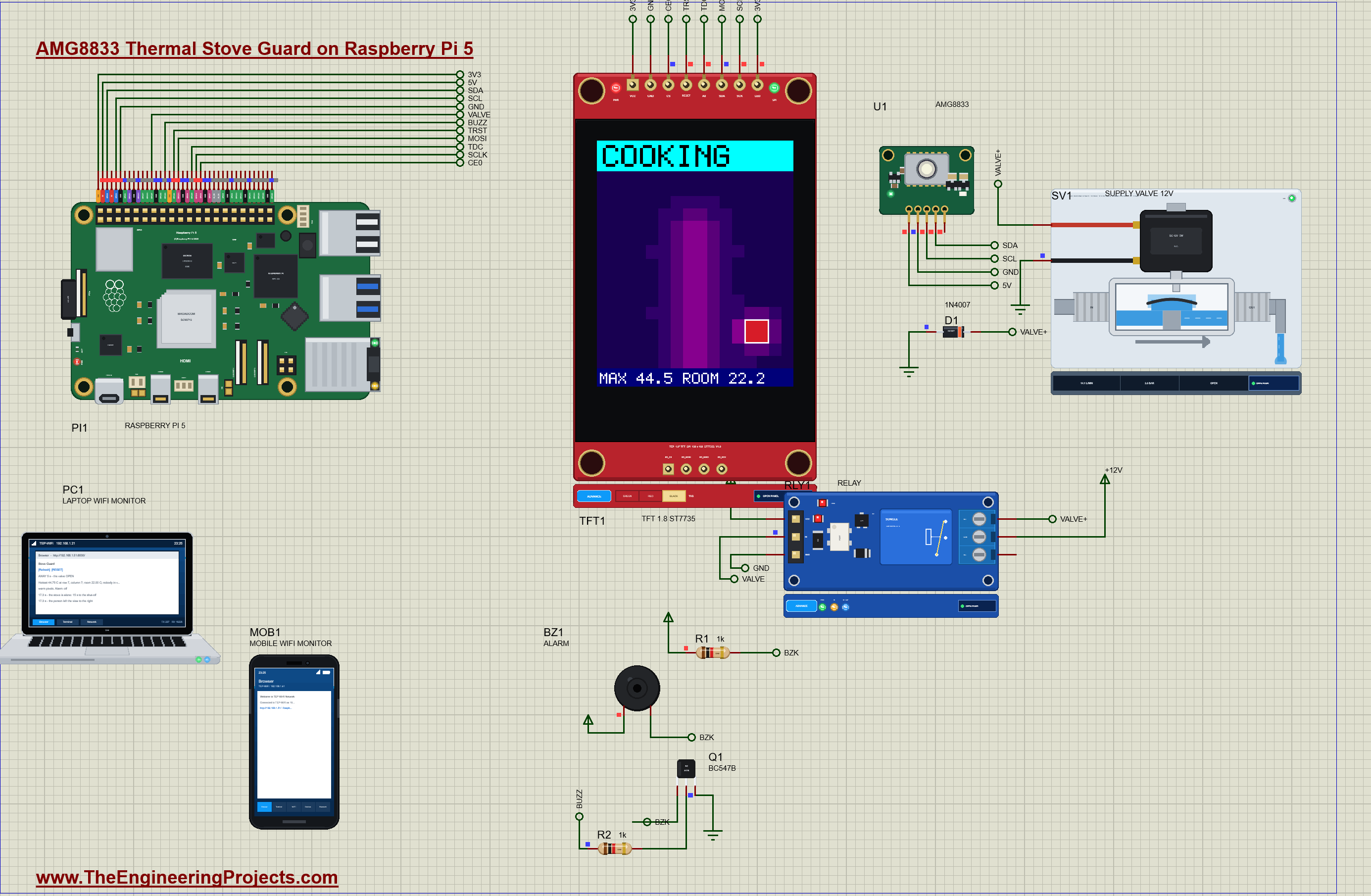
The camera's own pop-up confirms what the Pi worked out: a person close and a hot object, the hottest pixel 45.00 C at pixel 55, which is row 7, column 7, and the coldest 21.50 C. No pixel of the person comes near 40 C: the face reads about 32 C and the clothes about 28 C, exactly the averaging effect described above. The I2C bus shows hundreds of reads and 0 not acknowledged.
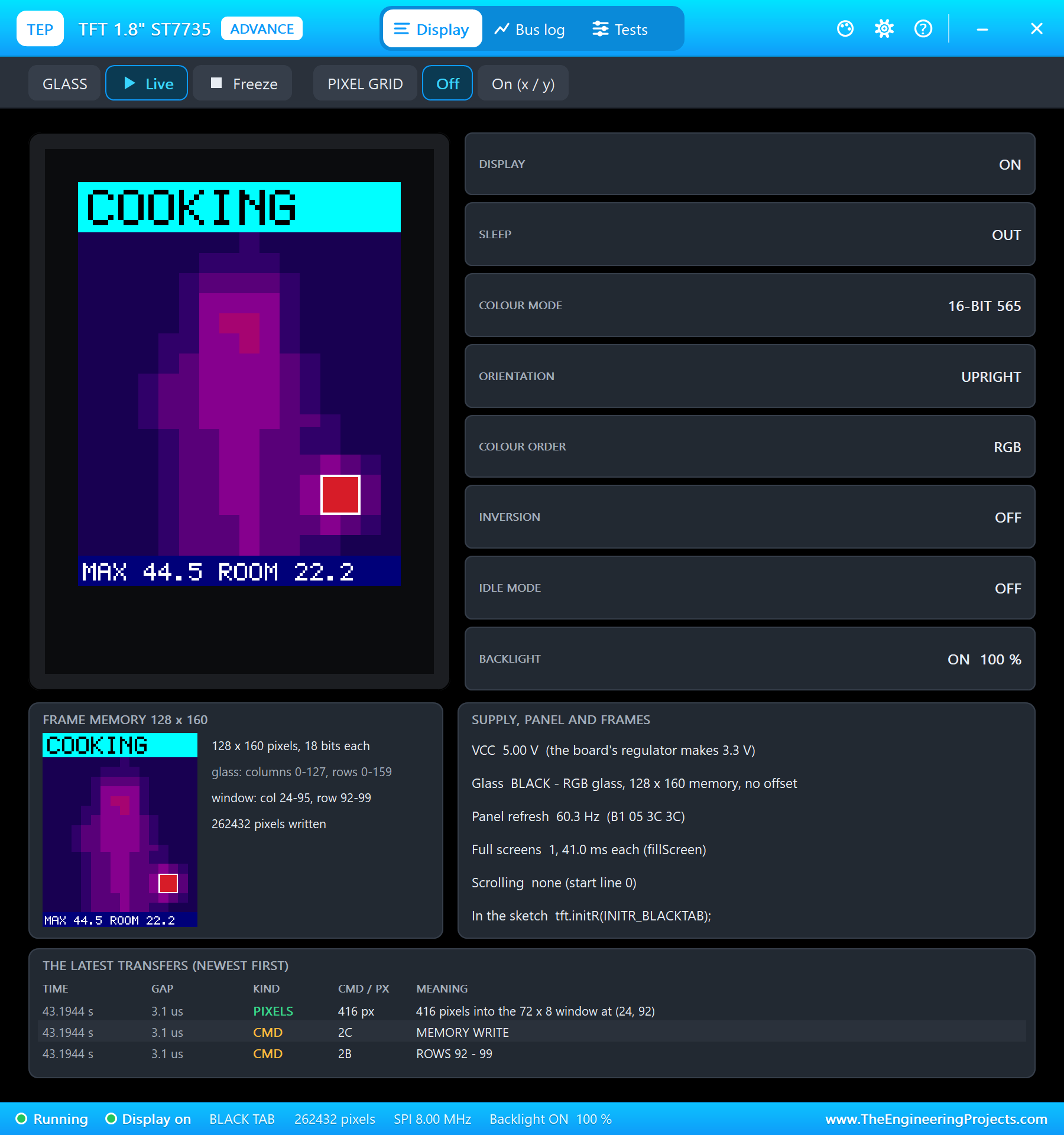
On the TFT the person stands as a violet figure in the middle of the picture, and the pan glows in the corner inside its white frame, the hottest pixel. The line below reads MAX 44.5 and ROOM 22.2.
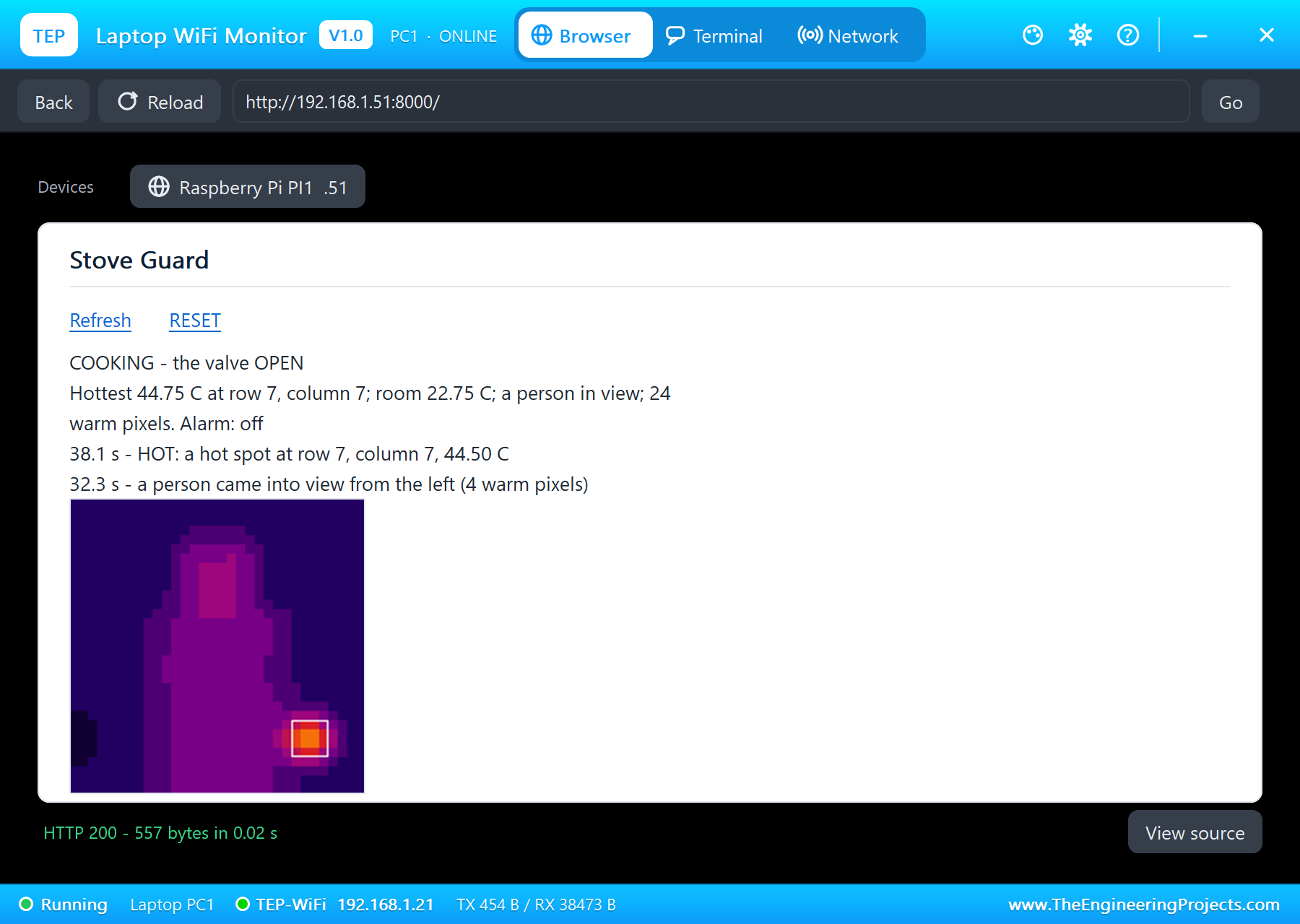
The dashboard adds the details: COOKING with the valve open, the hottest pixel 44.75 C at row 7, column 7, the room at 22.75 C, a person in view with 24 warm pixels (they had come to 1 m, so they fill three columns), and the alarm off.
2. The Pan Left Alone
  46.3 s  the person left the view to the right
  46.3 s  the stove is alone: 15 s to the shut-off
  46.3 s  state AWAY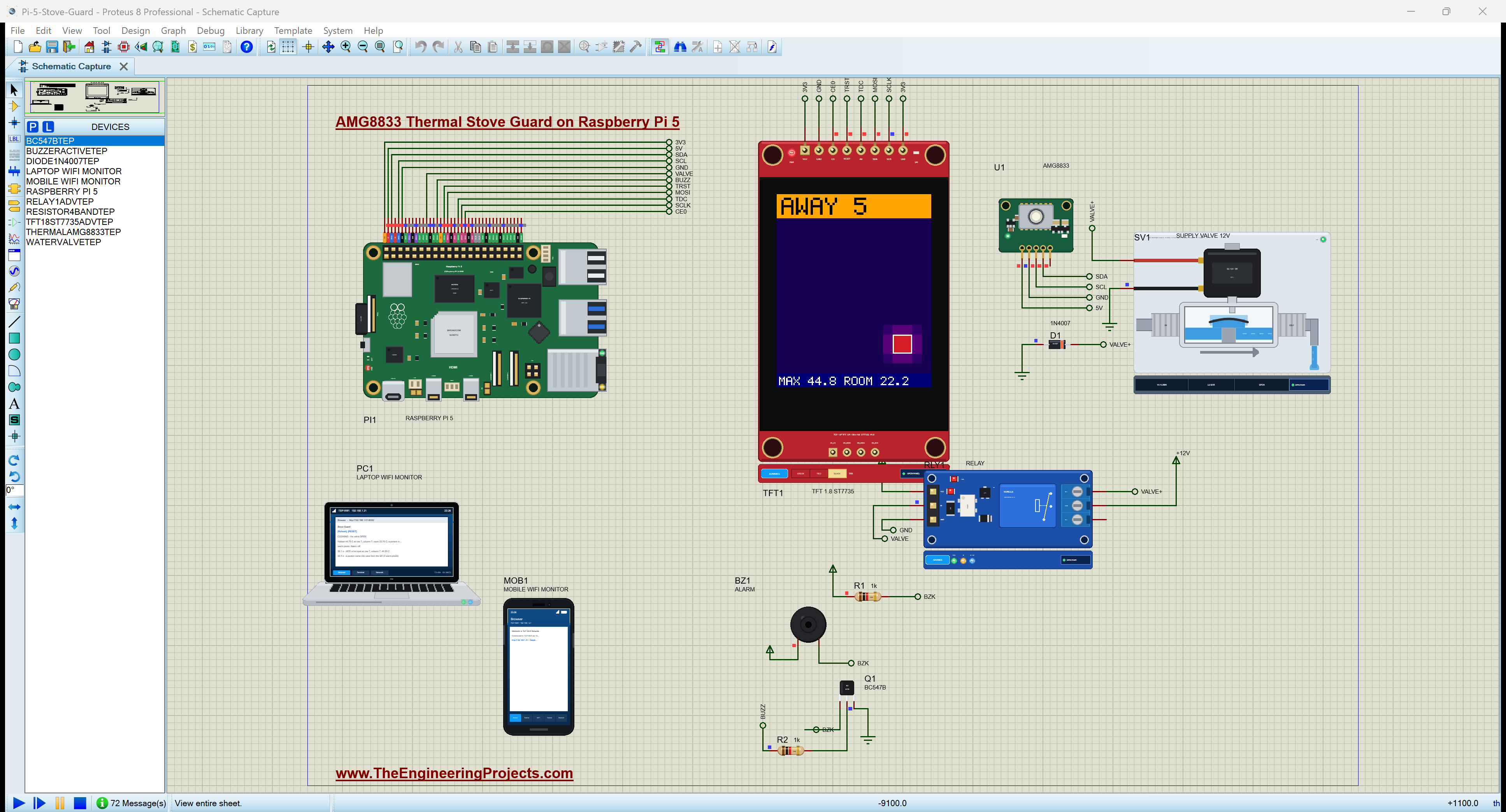
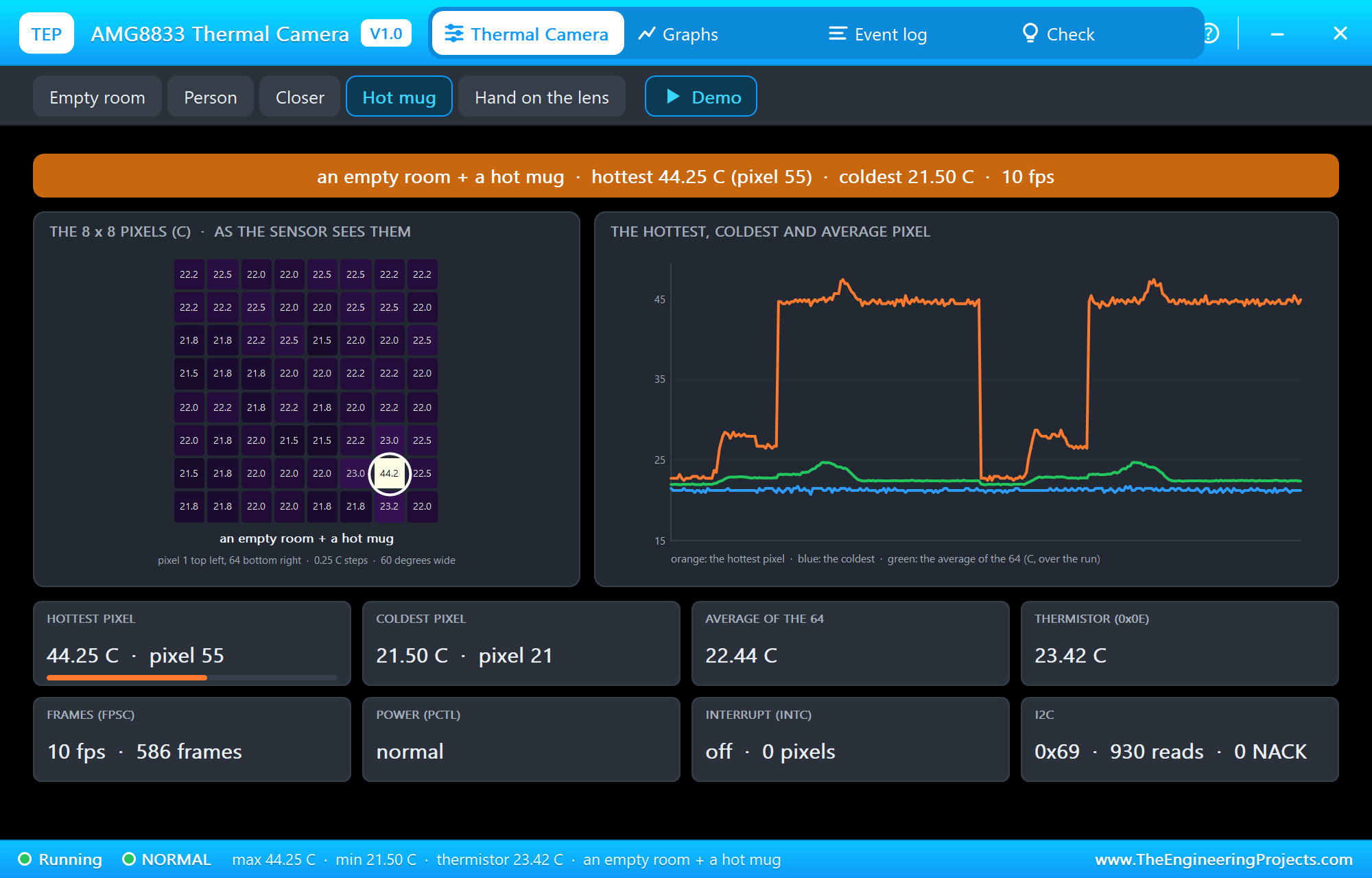
The camera now sees an empty room and the pan: the hot spot is still there at 44.25 C, and no warm group is left. The guard noted the side the person left by, the right, and started the countdown.
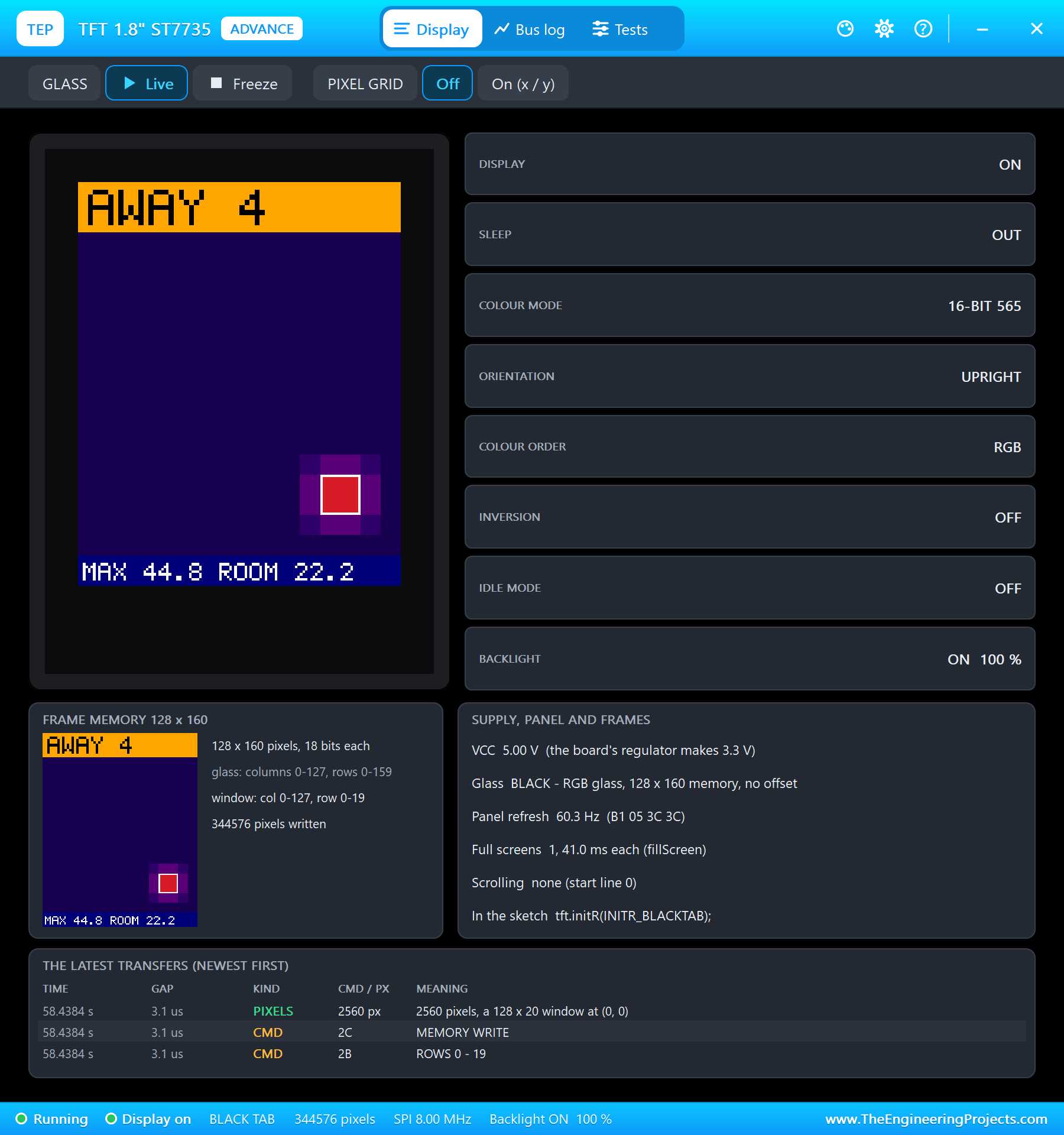
With 4 seconds left, the orange bar counts down and the buzzer beeps once a second: the last chance for the cook to come back.
3. The Shut-Off
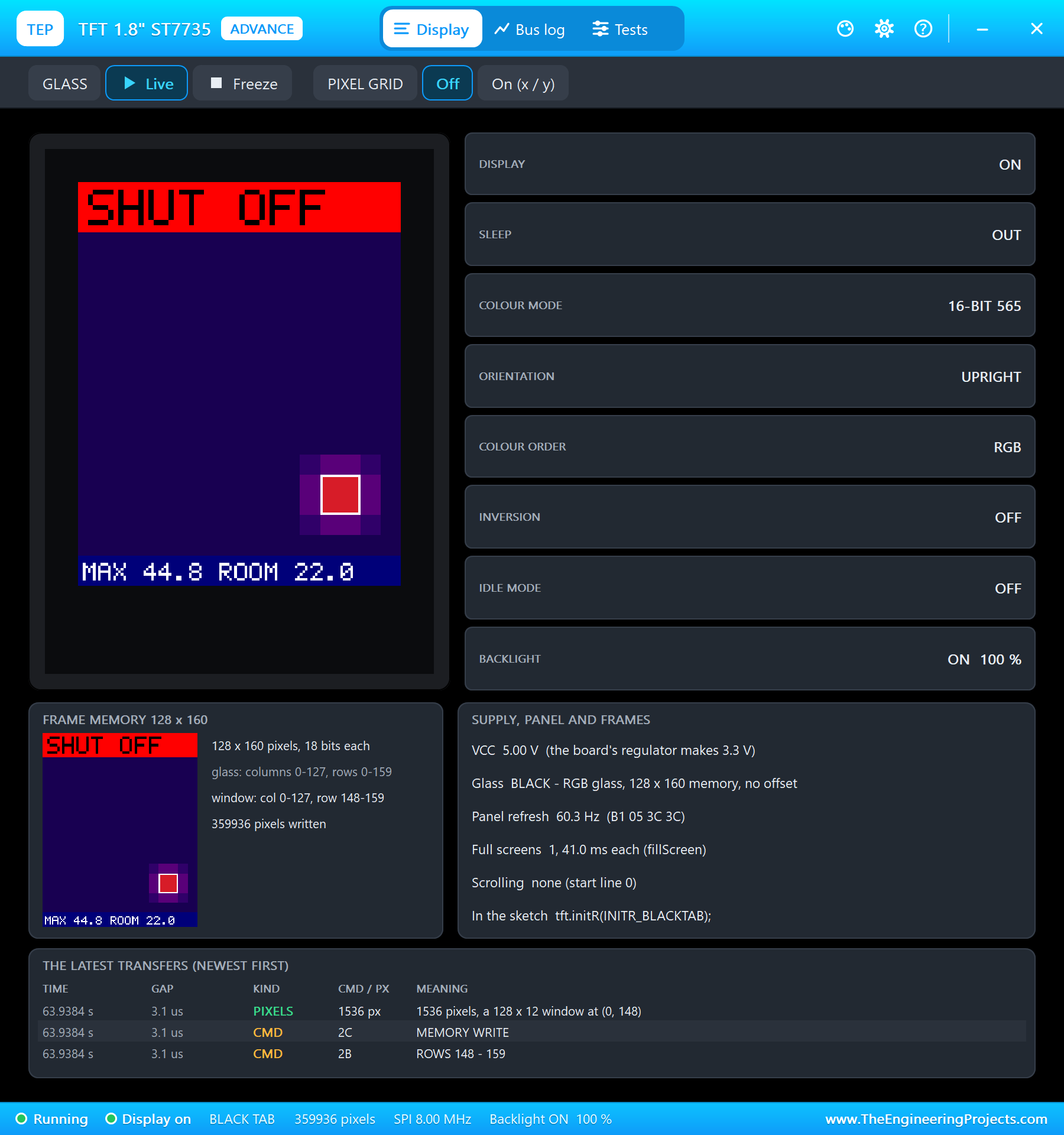
61.3 s SHUT-OFF: a hot stove alone for 15 s - the valve CLOSED, the alarm on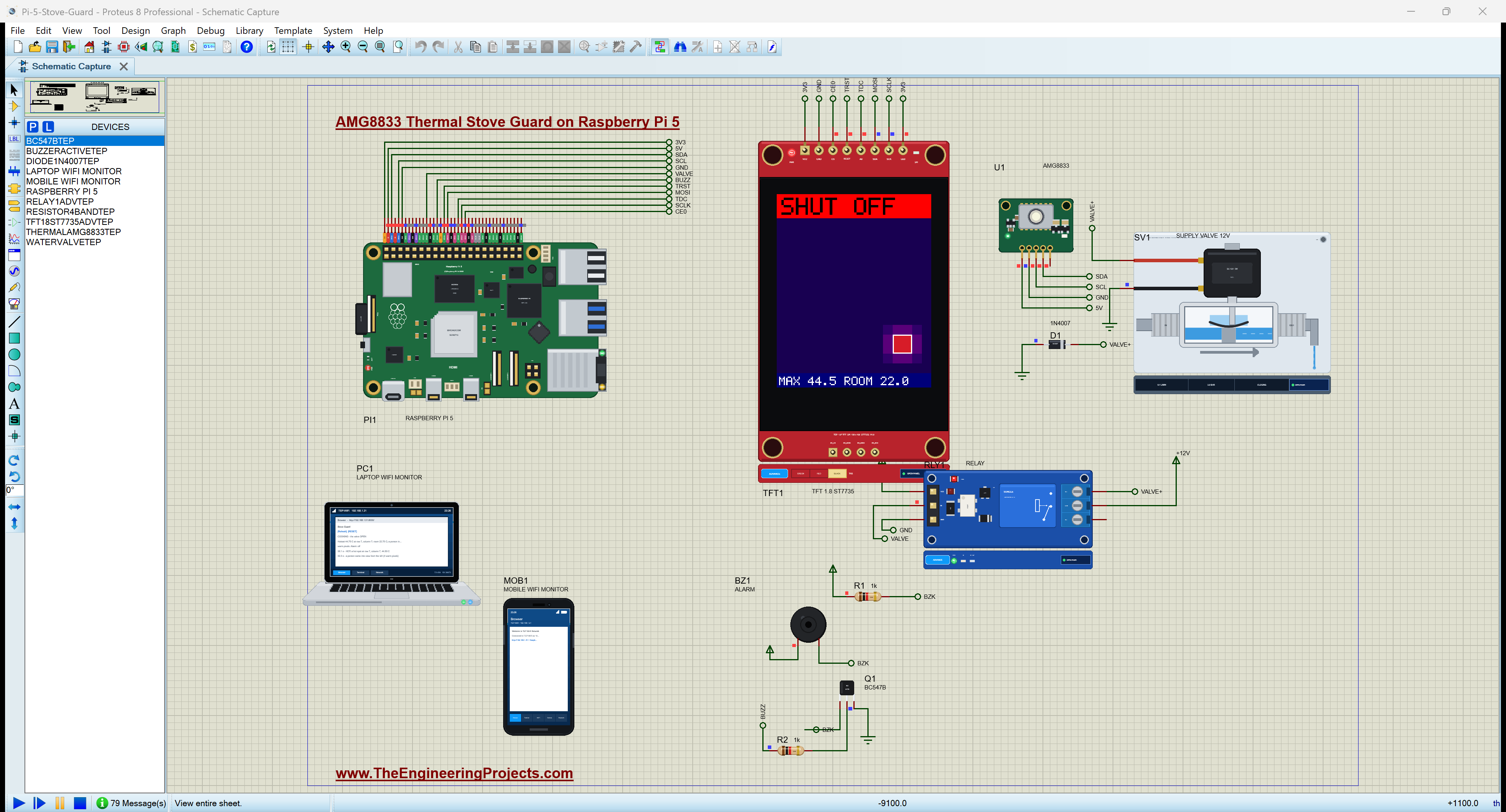
Exactly 15.0 s after the person left, the guard released the relay. The bar turned red, and the buzzer switched to the fast alarm.
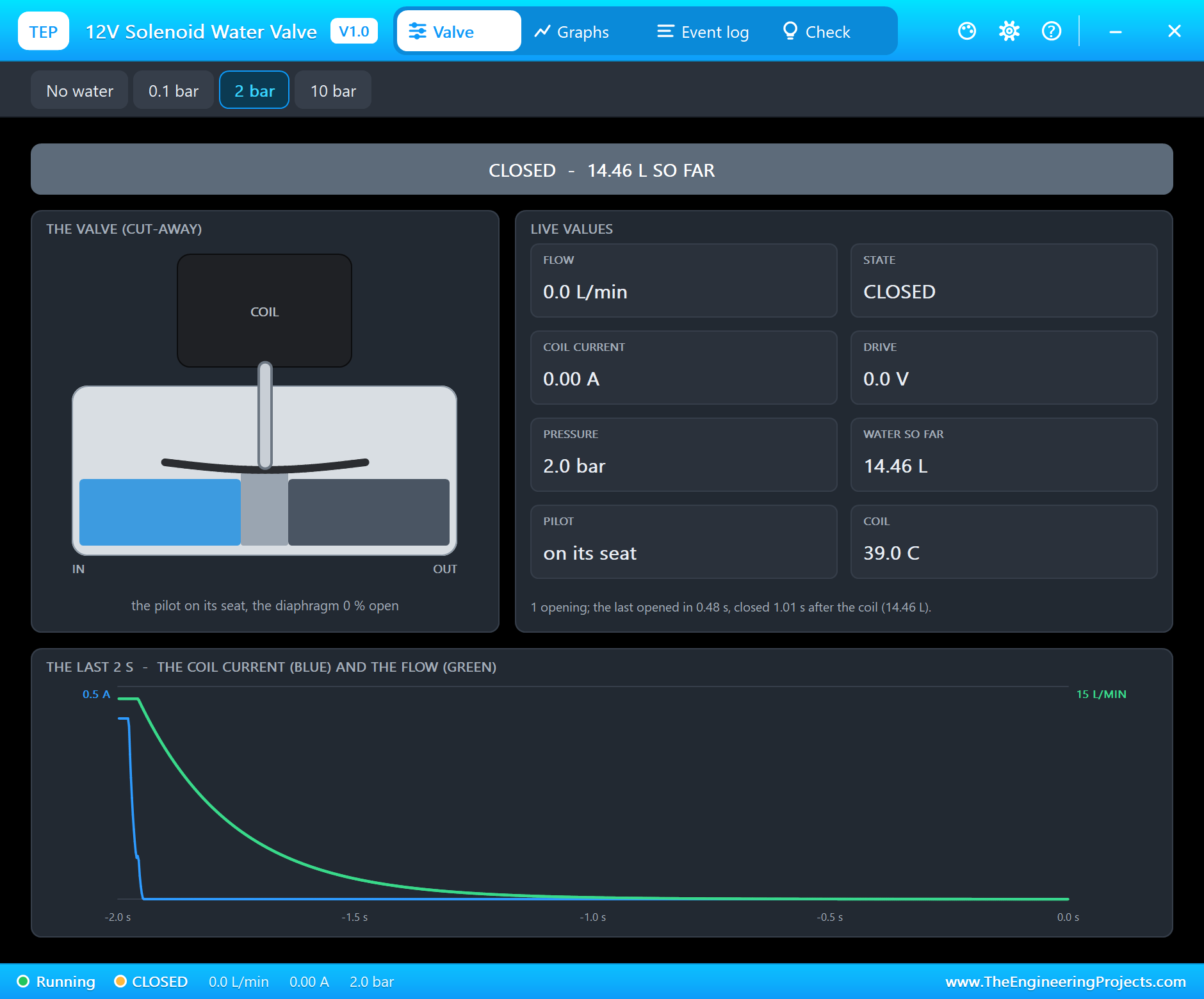
The valve's own pop-up shows the result of the relay letting go: no drive voltage, no coil current, the pilot back on its seat and the flow at 0.0 L/min. It closed about a second after its coil was switched off, the way a real pilot-operated valve does.
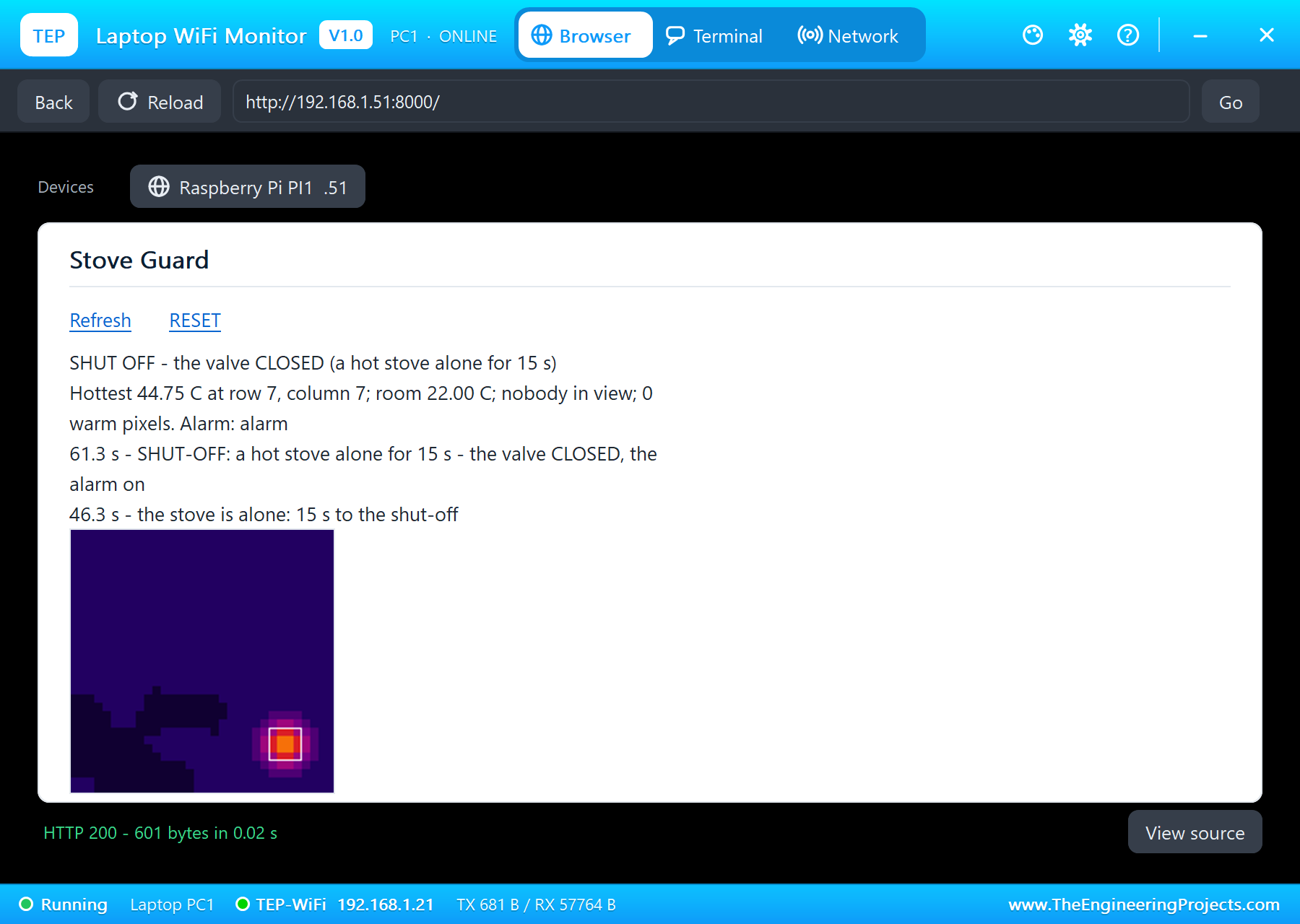
The dashboard writes the reason next to the state: the valve closed because a hot stove was alone for 15 s, nobody is in view, and the alarm is on.
4. Someone Comes Back, then RESET
  65.1 s  a person came into view from the left (3 warm pixels)
  65.1 s  someone is back: the alarm silenced - the valve stays CLOSED until RESET
  66.7 s  RESET (the dashboard): the valve OPEN again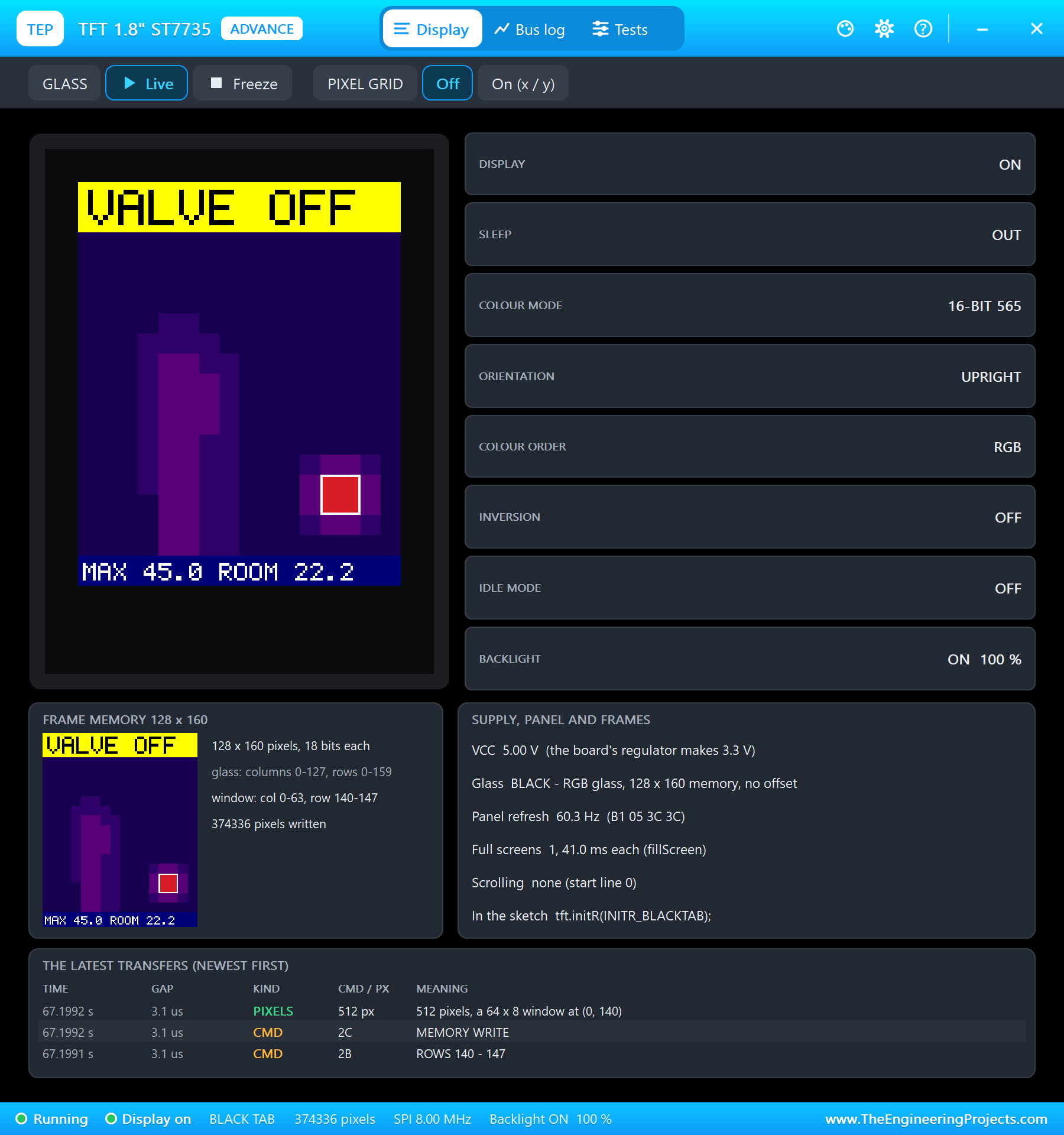
We pressed Person on the camera's pop-up. The moment the person was in view, the alarm stopped and the bar turned yellow: VALVE OFF. The valve did not open by itself, and that is the point of the latch: a pan that has just been shut off should not light again because someone walked past.
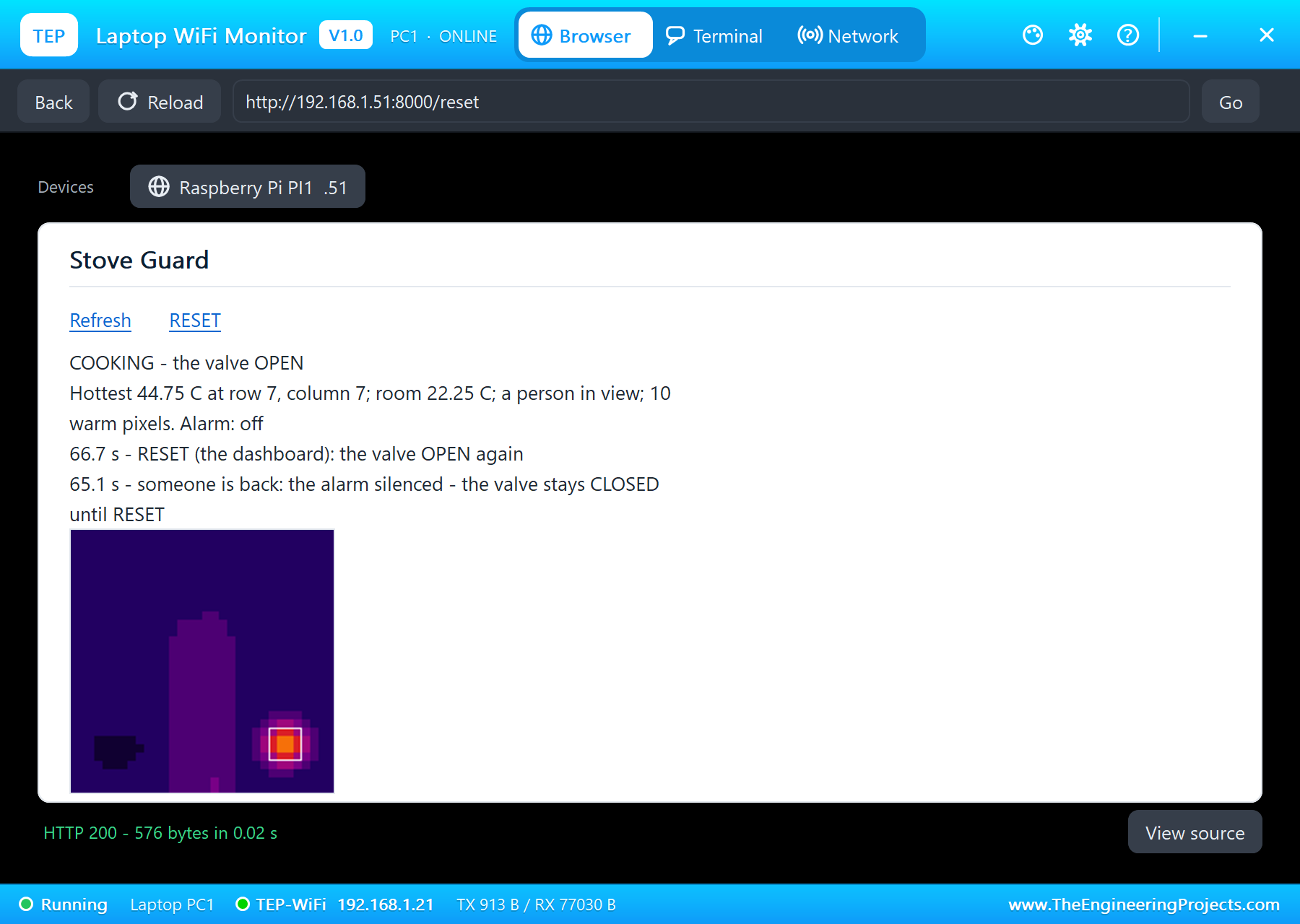
Only then did we click RESET on the dashboard. With a person in view and a clear lens, the guard accepted it and opened the valve: COOKING again.
5. A Hand Over the Lens
  67.6 s  BLOCKED: the lens is covered - the whole frame 32.00 - 33.25 C
  72.6 s  SHUT-OFF: the lens covered for 5 s - the guard cannot see the stove - the valve CLOSED, the alarm on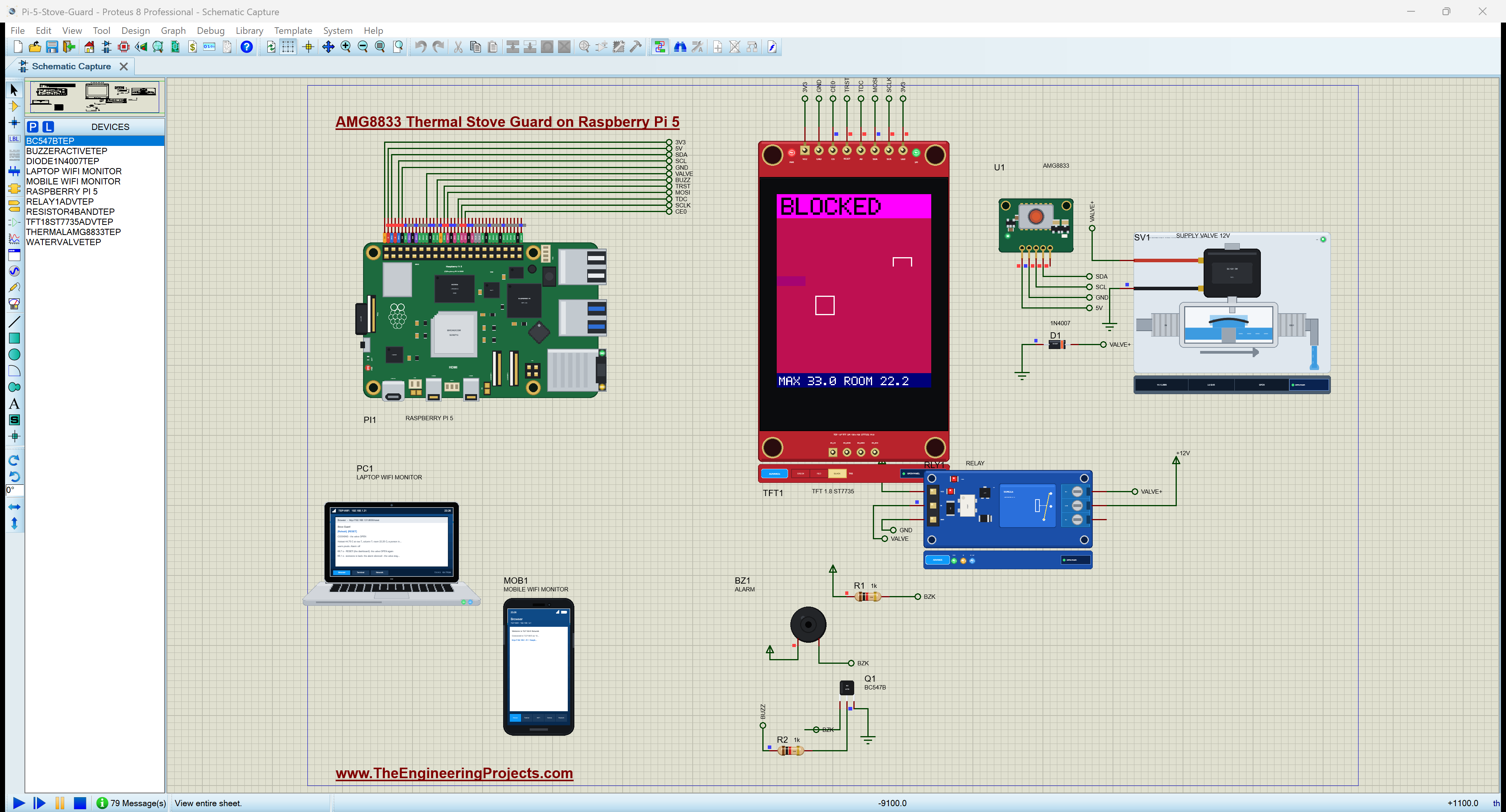
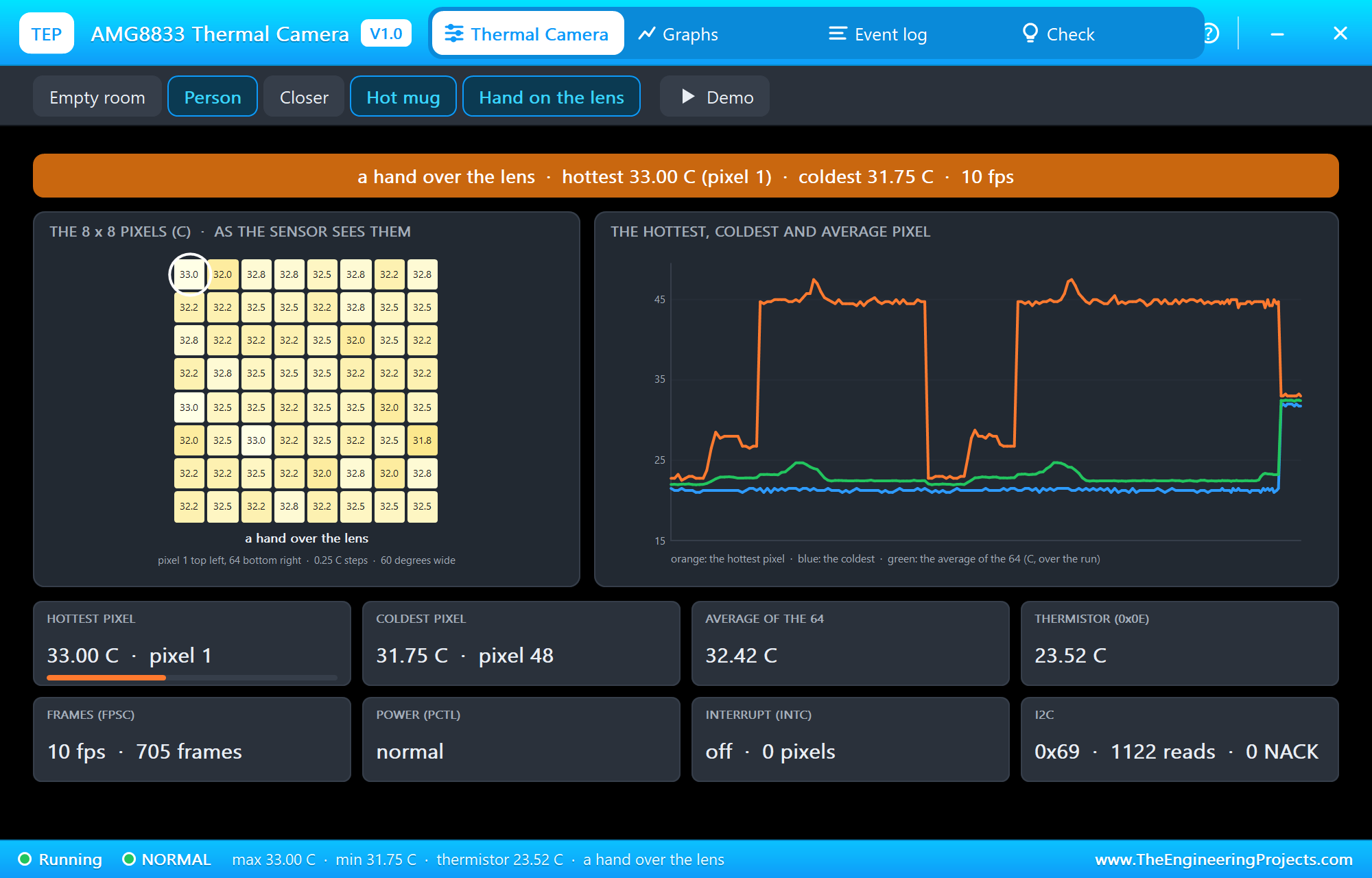
A hand over the lens turns the whole frame into one temperature: the camera shows all 64 pixels between 31.75 and 33.00 C. Within 2 C of each other and 10 C above the room, that is exactly the guard's test for a blocked lens.
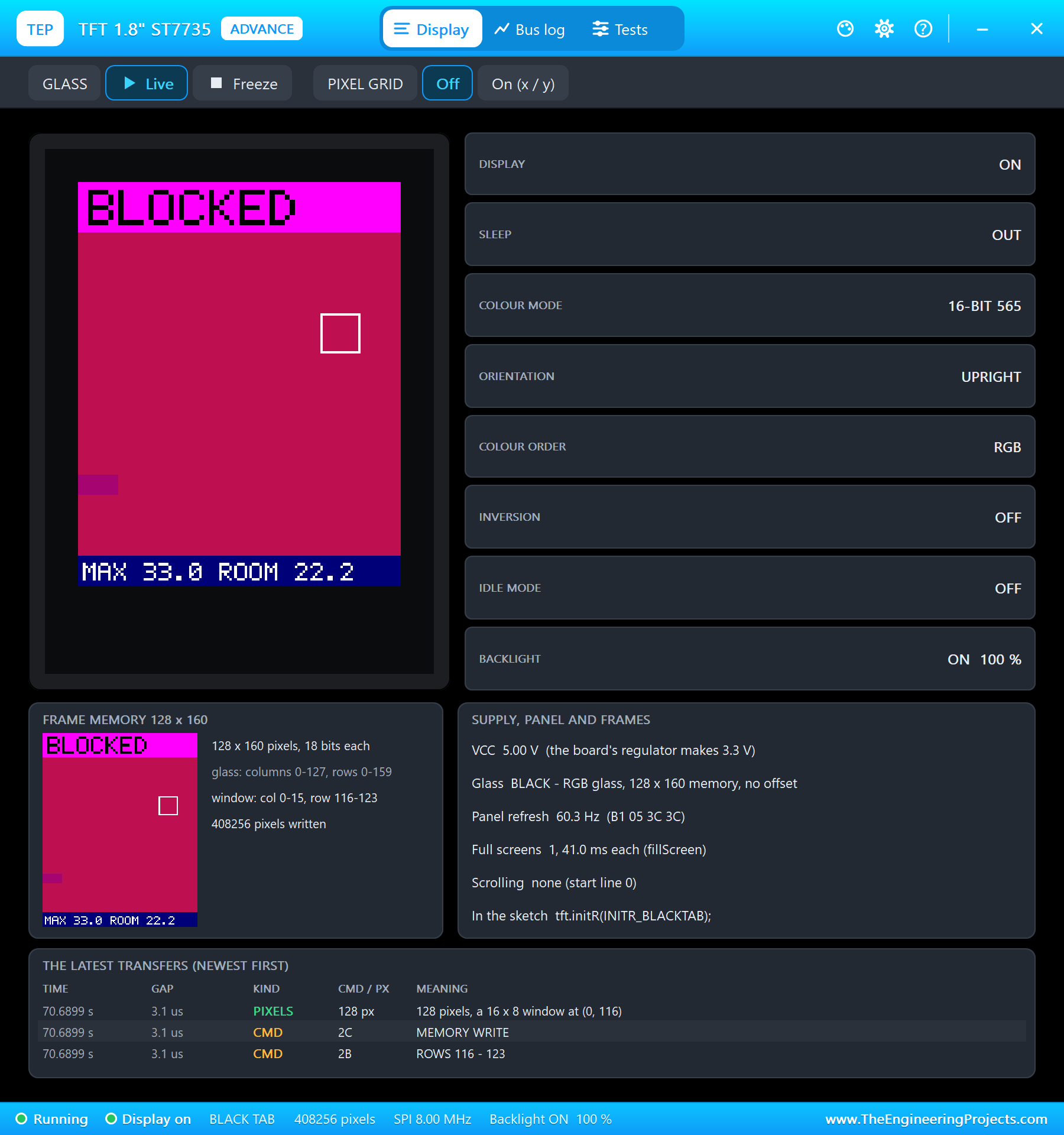
The picture went flat, the bar magenta, and the buzzer gave its double beep. After 5 s the guard shut the valve, because a guard that cannot see cannot guard. When the hand came away it saw the pan again and the person still there, silenced the alarm and waited for RESET, as before.
6. The Pan Taken Away
  75.0 s  RESET (the dashboard): the valve OPEN again
  75.6 s  the hot spot has gone: the stove is off or cool (the hottest pixel 26.75 C)
  75.6 s  state STOVE OFF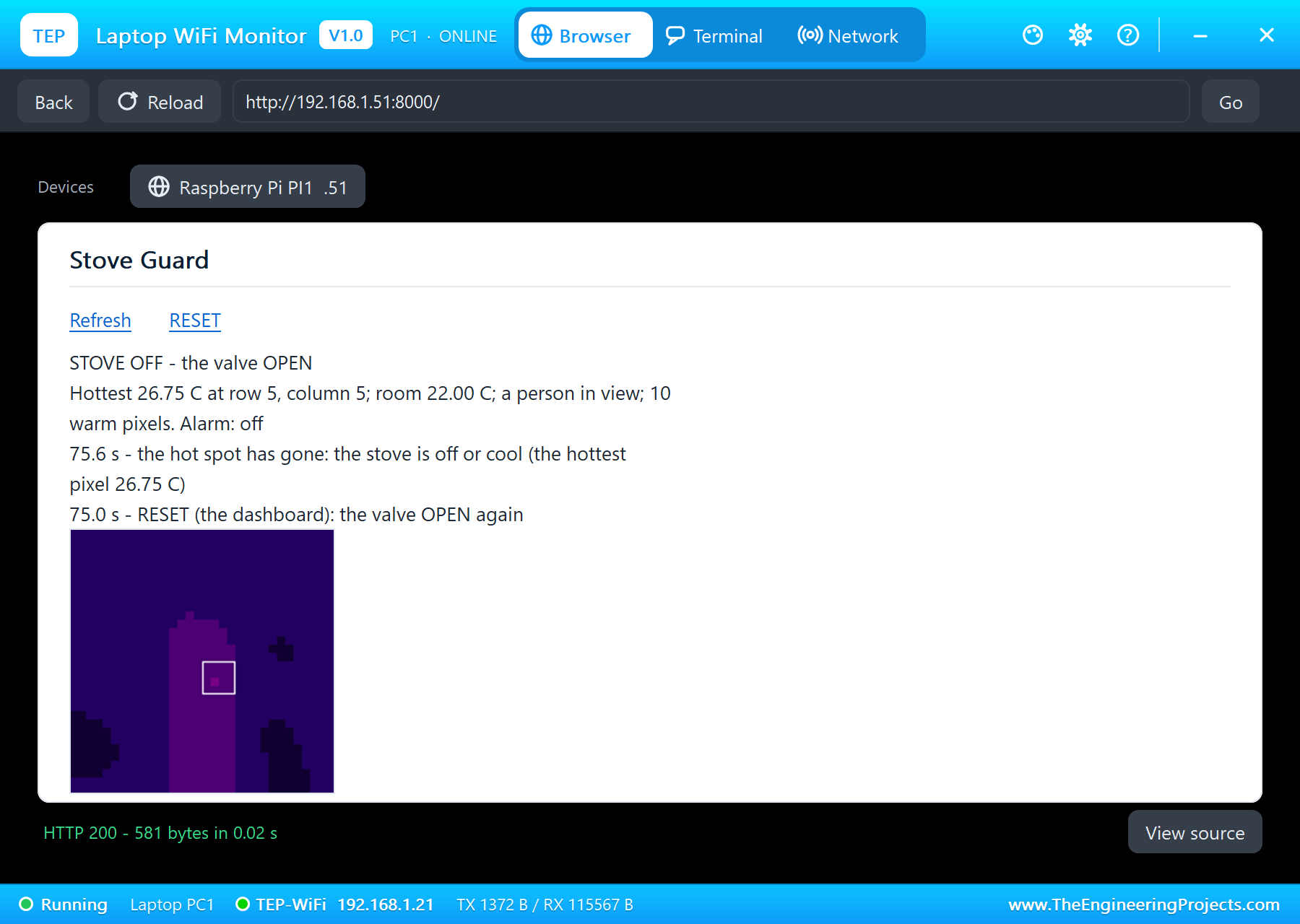
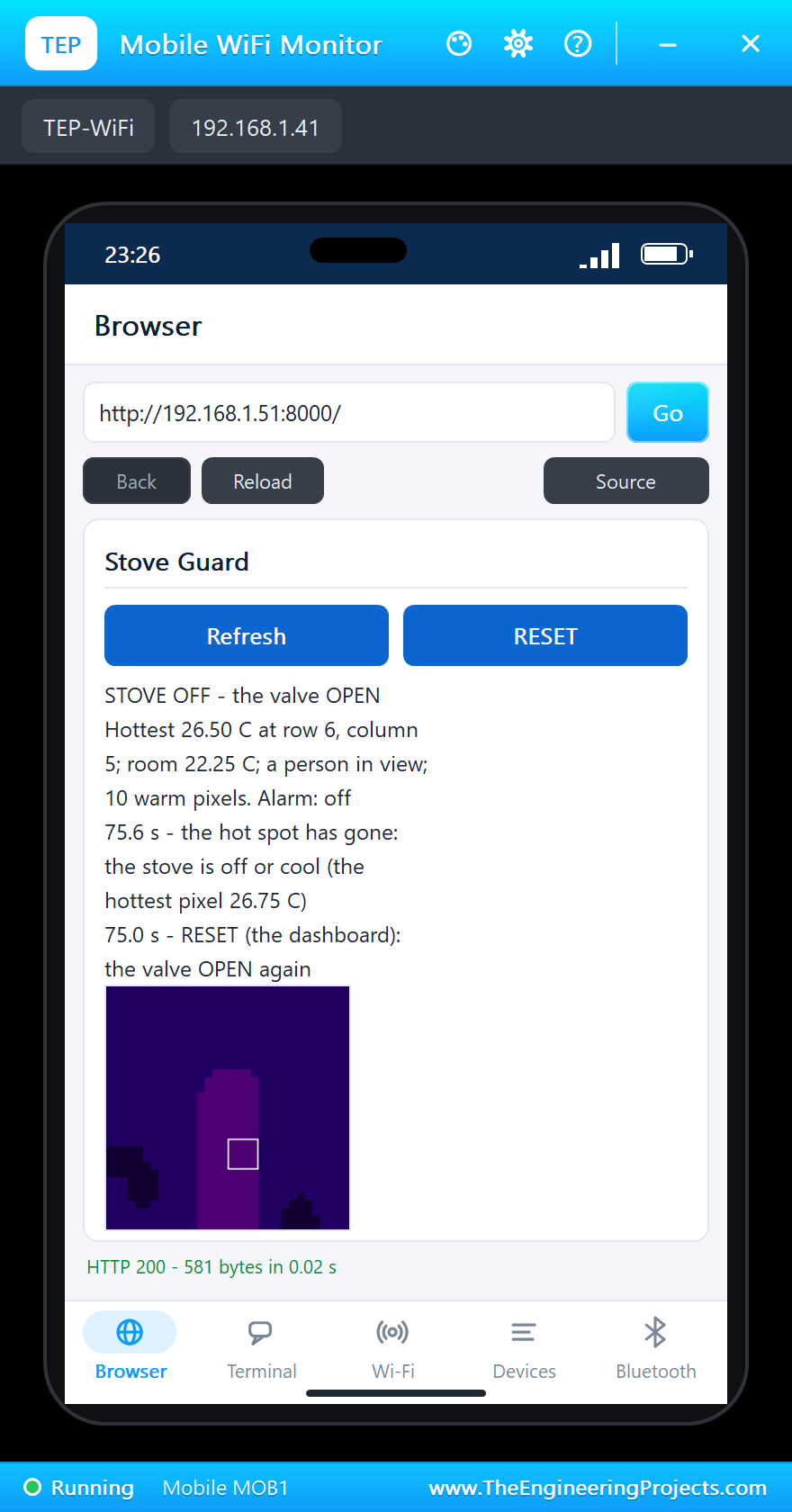
With the pan taken away, the hottest pixel was a warm patch of the person at 26.75 C, far from 40 C: STOVE OFF, the valve open, nothing to guard. The phone shows the same dashboard. And the terminal holds the whole story:
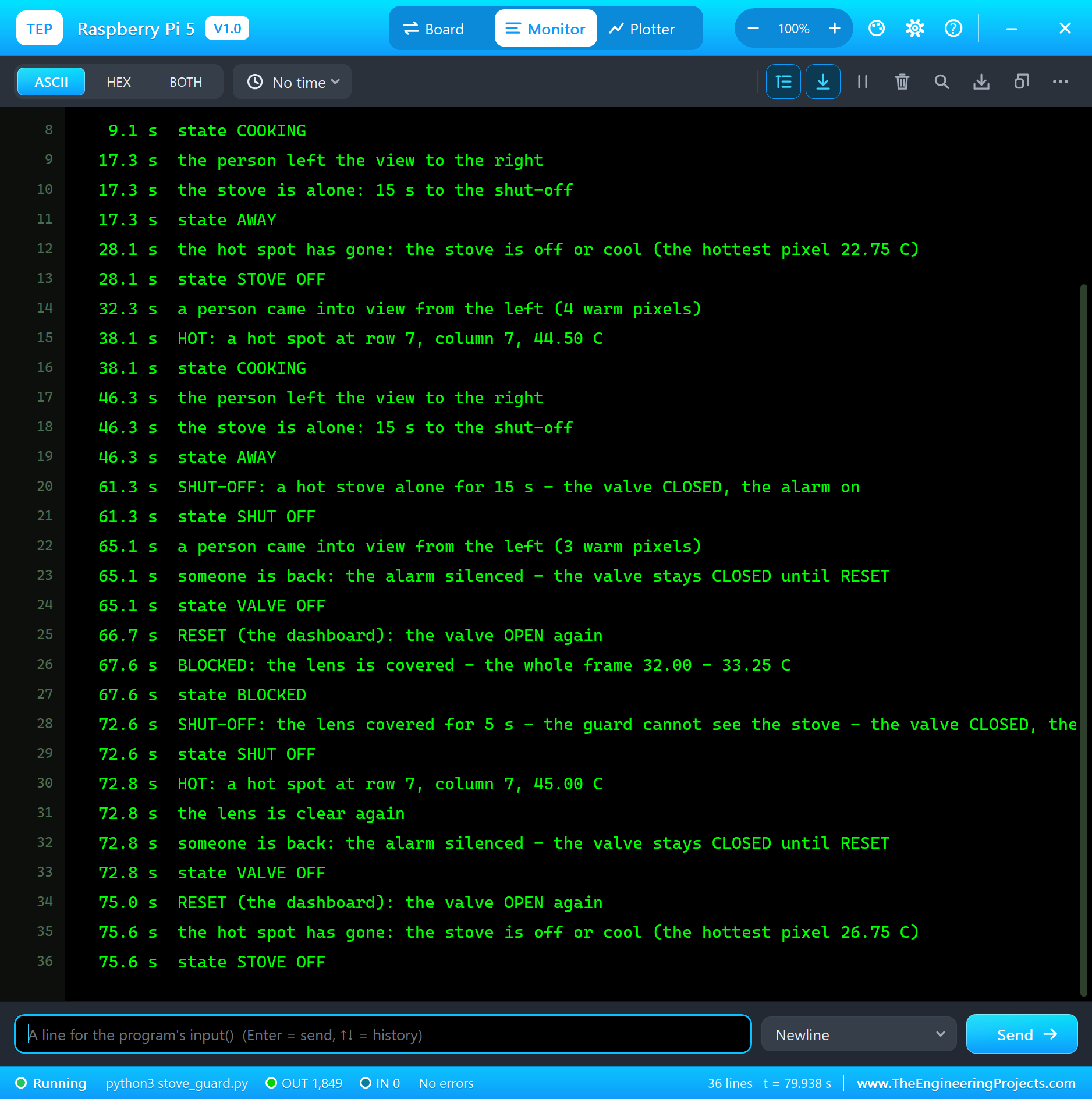
| Event | The program's time | What the guard did |
|---|---|---|
| the pan, a person in view | 38.1 s | COOKING |
| the person left | 46.3 s | AWAY, 15 s countdown |
| the countdown ran out | 61.3 s | SHUT OFF: the valve closed, the alarm |
| someone back | 65.1 s | VALVE OFF: quiet, the valve closed |
| RESET | 66.7 s | COOKING: the valve open |
| a hand on the lens | 67.6 s | BLOCKED, the shut-off 5.0 s later |
| the pan taken away | 75.6 s | STOVE OFF |
The run covered 80 seconds of simulation in about 22 minutes on our PC. Every decision of the guard can be checked against the camera's own pop-up, which shows what it really saw, and the valve's pop-up, which shows what really happened to the supply.
Download the Project Files
Click the button below to download AMG8833-Thermal-Stove-Guard-Raspberry-Pi-5-Proteus-Simulation-v1.0.zip (about 15.3 MB, without the source code of the models):
AMG8833 Thermal Stove Guard on Raspberry Pi 5 - Proteus Simulation V1.0- Proteus Simulation: Pi-5-Stove-Guard.pdsprj, stove_guard.py and copies of the models.
- Python Code: stove_guard.py, the program.
- Proteus Library Files: the LIB files of every part.
- Proteus Model Files: the DLL models and the TEPPi folder (the Python runtime of the simulated Pi).
- README.txt: the installation steps, the properties, the test results and the links to every library post.
No Proteus yet? Read How to Download and Install Proteus 7 and 8. New to libraries? Follow How to Install a New Library in Proteus.
How to Install the Project Files
- Close Proteus and extract the whole zip file, for example to your Desktop.
- Copy the files from Proteus Library Files into the LIBRARY folder of Proteus.
- Copy everything from Proteus Model Files, the DLL files and the TEPPi folder, into the MODELS folder.
- Start Proteus and open the project from the Proteus Simulation folder.
Changing the Code
stove_guard.py is plain Python: edit it next to the project and press Play again, nothing to compile. The thresholds are at the top: the hot spot (HOT_C), the margin for a person (WARM_DC), the countdown (AWAY_S), the warning time (WARN_S) and the blocked-lens time (BLOCK_S). On a real Raspberry Pi the same file runs as it is, with python3-lgpio and python3-spidev installed and I2C and SPI turned on in raspi-config.
Ideas to Extend the Project
- Send a message to a phone at the first warning beep, not only at the shut-off.
- Learn the kitchen: count how long each burner usually stays on and warn about an unusually long one.
- Watch the trend: a pan whose temperature keeps climbing with nobody near deserves a shorter countdown than one that has levelled off.
- Add a second camera for a large hob, or a smoke sensor as a second opinion.
- Log every cooking session with its peak temperature and its length.
- Use the AMG8833's own interrupt pin to wake the Pi when any pixel passes a level.
From Simulation to a Real Kitchen
- Use a certified valve: a gas hob needs an approved gas solenoid valve, an electric hob a contactor of the right rating; this project shows the sensing and the logic, it is not a certified safety device.
- Place the camera well: above and in front of the hob, so that the pans and the cook are both in its 60 degree view.
- Set the times from the kitchen: 5 to 10 minutes for the countdown is usual.
- Mind the heat on the camera: keep the module out of the steam and away from the hot air above the pans.
- Keep the 3.3 V logic: the AMG8833 breakout and the TFT work at 3.3 V on the Pi's pins; the relay module must accept a 3.3 V input.
Troubleshooting
- The TFT stays black: check CS, RESET, A0, SDA and SCK on pins 24, 18, 22, 19 and 23, and VCC and LED on 3.3 V.
- Nobody is ever seen: a person must be a few degrees warmer than the room; in the simulation PERSON_T is 32 C against a 22 C room.
- The valve never opens: the relay's input is active LOW, and its COM terminal needs +12 V.
- RESET is refused: someone must be in view and the lens must be clear; the dashboard says which.
- The terminal cannot start Python: the TEPPi folder must be in the MODELS folder.
Limitations of the Simulation
- The camera's scene is a model: a person, a hot object and a hand drawn into the 64 pixels with a little lens blur and noise; a real kitchen has steam, reflections from shiny pans and moving air.
- The countdown is shortened to 15 s and the blocked-lens time to 5 s so that the whole story fits in about a minute of simulation.
- The valve and the relay are our libraries' models; the gas side of the valve is not simulated.
- The network to the laptop and the phone is simulated inside Proteus.
- Raspberry Pi is a trademark of Raspberry Pi Ltd and Grid-EYE of Panasonic; this project is not made or endorsed by them or by Labcenter.
So, that was all about the AMG8833 Thermal Stove Guard on Raspberry Pi 5 - Proteus Simulation. I hope it helps you understand how a thermal camera sees, why a median and a flood fill are enough to tell a hot pan from a person, and how a countdown, a latch and a normally closed valve make a guard that fails safe, all tested in a simulation before you build anything for a real kitchen. More projects with the Raspberry Pi 5 and the ESP32 are coming. If you have any questions, ask in the comments and I will help you out. Till the next tutorial, take care and have fun!