Hello friends, I hope you all are doing great. Today, I am going to share the Cashless NFC Vending Machine on Raspberry Pi 5 in Proteus Simulation, the fifty-eighth project of our IoT Projects series. If you have searched for a Raspberry Pi vending machine, a PN532 NFC project with the Raspberry Pi, or a Proteus simulation of cashless payment with MIFARE cards, here is a complete one. The money is kept on the card itself, as on campus, canteen and transport cards: the Raspberry Pi 5 reads the credit from the card with a PN532 reader, takes the price off and writes it back, turns a spiral exactly one turn with an encoder gear motor, and checks with an infrared beam that the item really fell, giving the money back if it did not. A 20x4 LCD guides the customer, and a dashboard on a laptop or a phone tops up cards and restocks the machine.
Vending machines have quietly gone cashless, and stored-value cards are one of the oldest ways to do it. In this tutorial, we will go through the circuit, see how an NFC reader talks to a MIFARE Classic card, store a wallet in one 16-byte block with a check that catches a wrong value, take the payment before anything moves and refund it when the item sticks, count one spiral turn with a motor encoder, catch the falling item with an infrared beam, ignore a bouncing button, walk through the Python program, and then run the simulation: a new card, a top-up, purchases, an item that does not drop, a card with too little credit, and the credit still on the card after it was taken away. At the end, you can download the project with the program and every library file.
NOTICE: Our team has put a lot of effort into this project: the circuit, the code and every part in the simulation are our own work, and you get them all free. Your feedback is the fuel that keeps us going, so please tell us what you think in the comments below. And if our free projects help you, you can buy us a coffee. So, let's get started with the cashless NFC vending machine on the Raspberry Pi 5 in Proteus simulation:
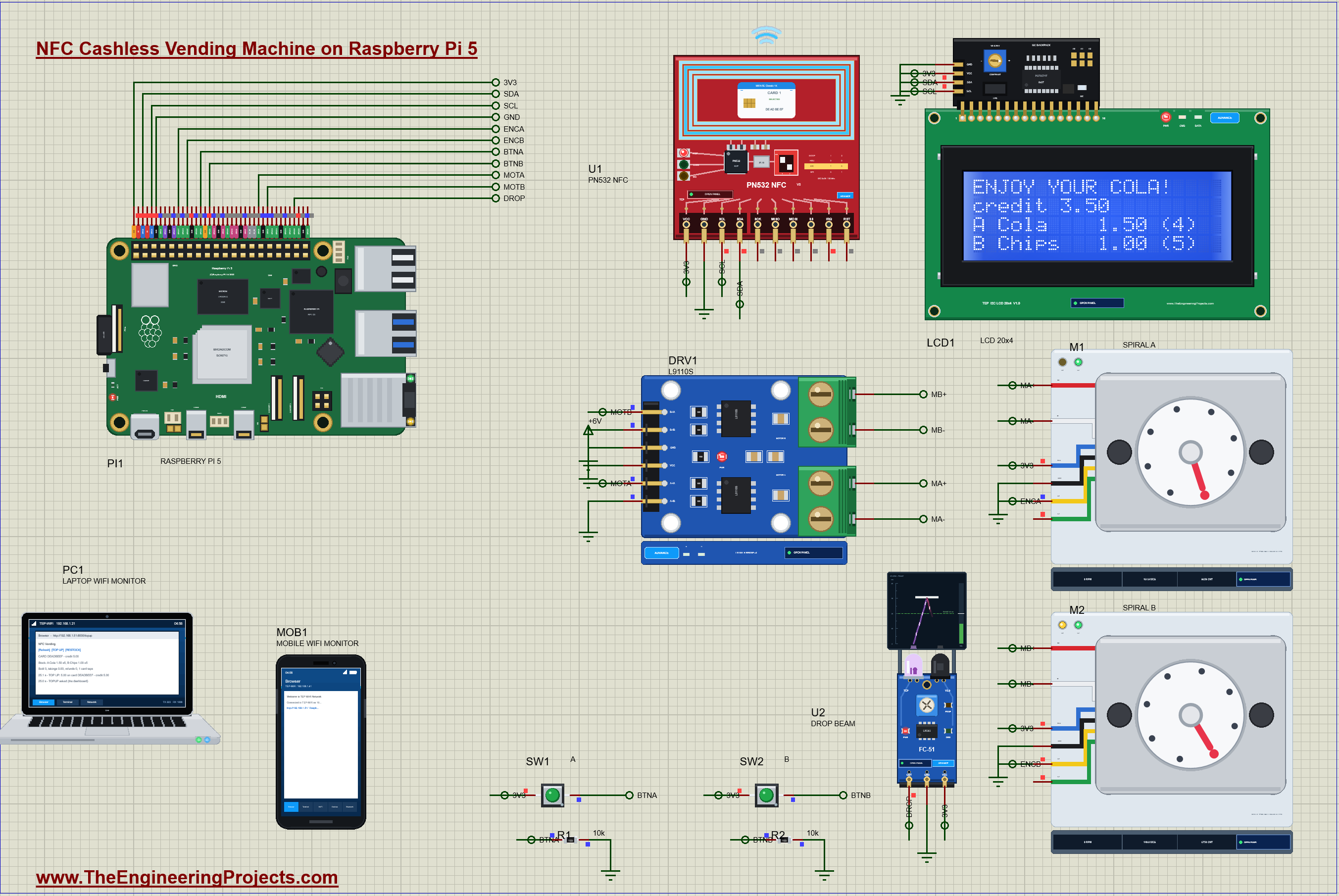
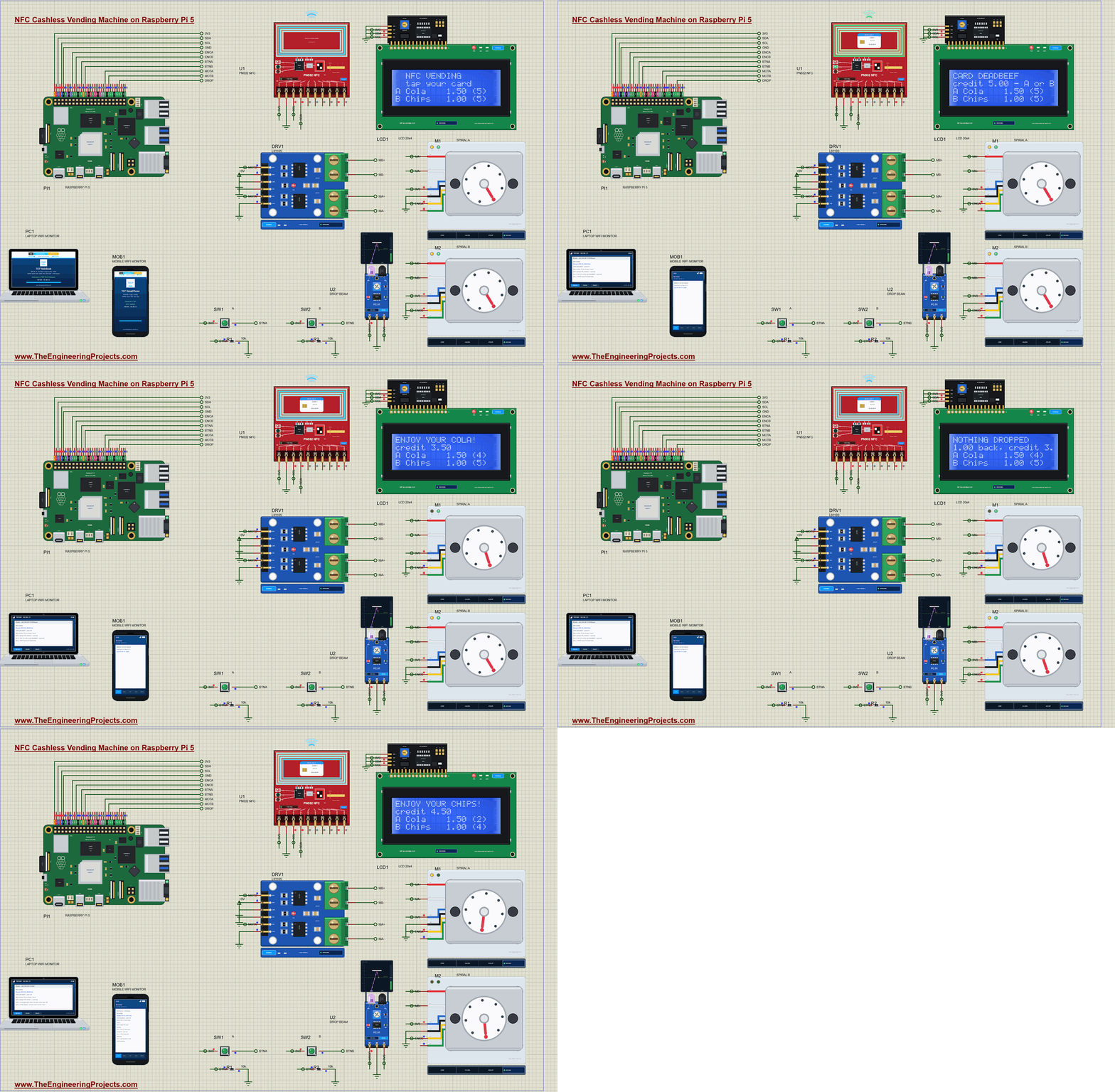
What Does This Vending Machine Do?
- Reads NFC cards: a PN532 reader finds the card on the reader and its UID, then authenticates and reads block 4, where the wallet lives.
- Keeps the money on the card: the credit, the number of purchases and a CRC32 check, written back after every sale; a card that is not a wallet yet is turned into one by a top-up.
- Sells two products: A Cola at 1.50 and B Chips at 1.00, five of each, each in its own spiral driven by an N20 encoder gear motor.
- Turns a spiral exactly once: the motor runs until its encoder has counted 700 pulses, one turn of the output shaft.
- Checks that the item fell: an FC-51 infrared beam across the delivery bin; no item in 1.5 s means the price goes back on the card.
- Refuses what it should: SOLD OUT, NOT ENOUGH CREDIT, a wallet whose check fails.
- Shows it all: a 20x4 LCD with the menu, the credit and every message, and a dashboard with the card, the stock, the sales, TOP UP and RESTOCK.
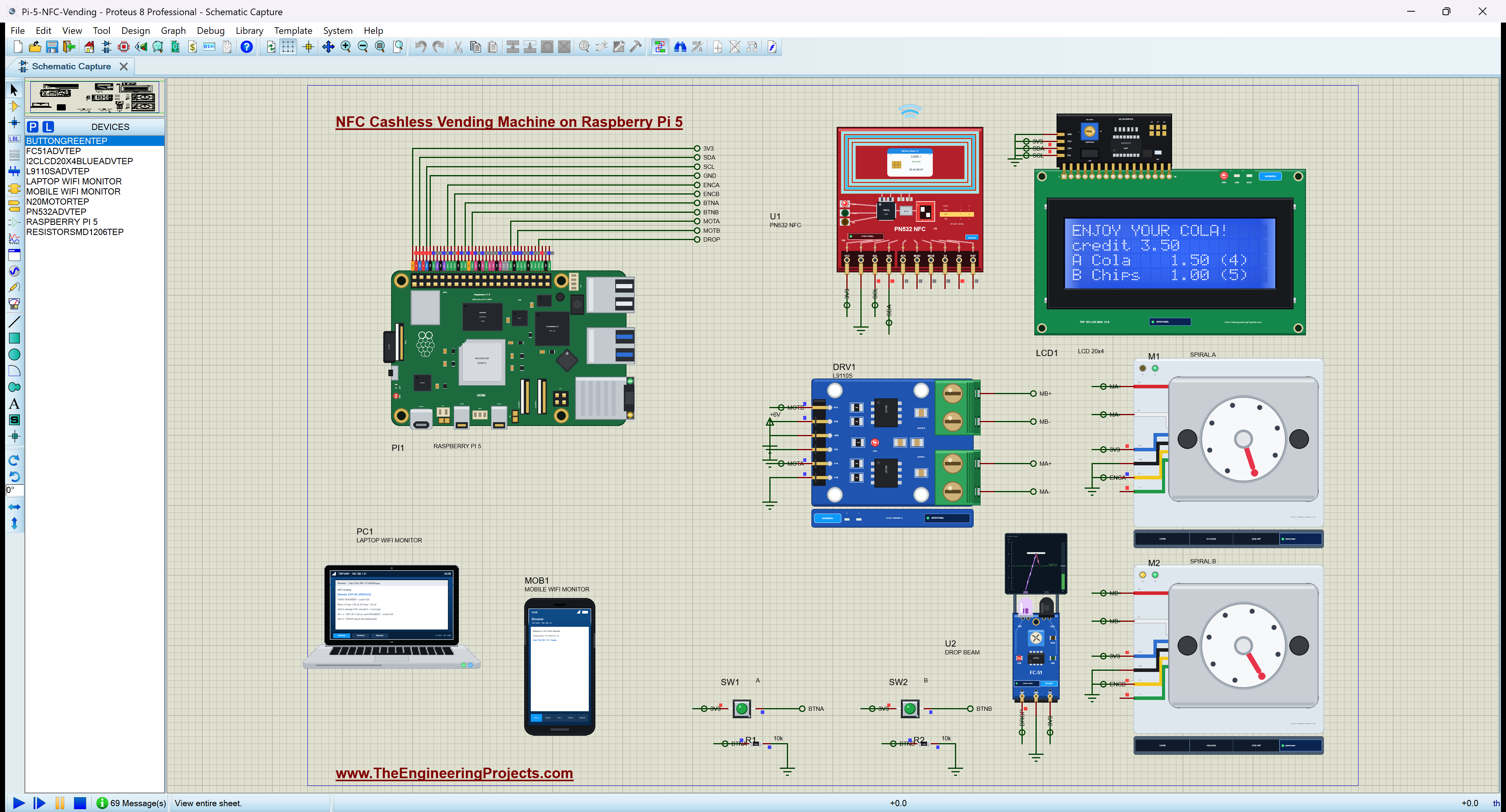
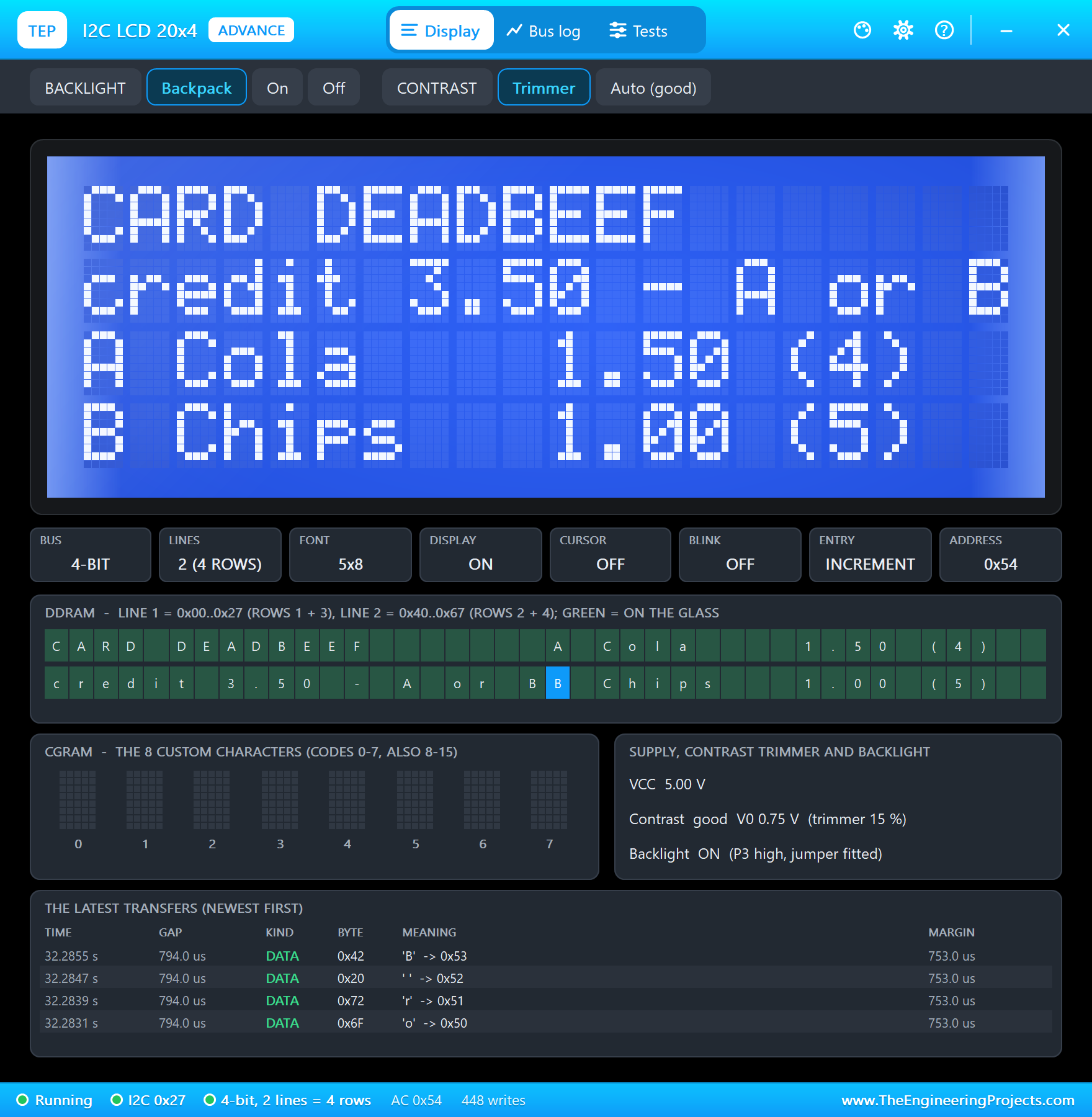
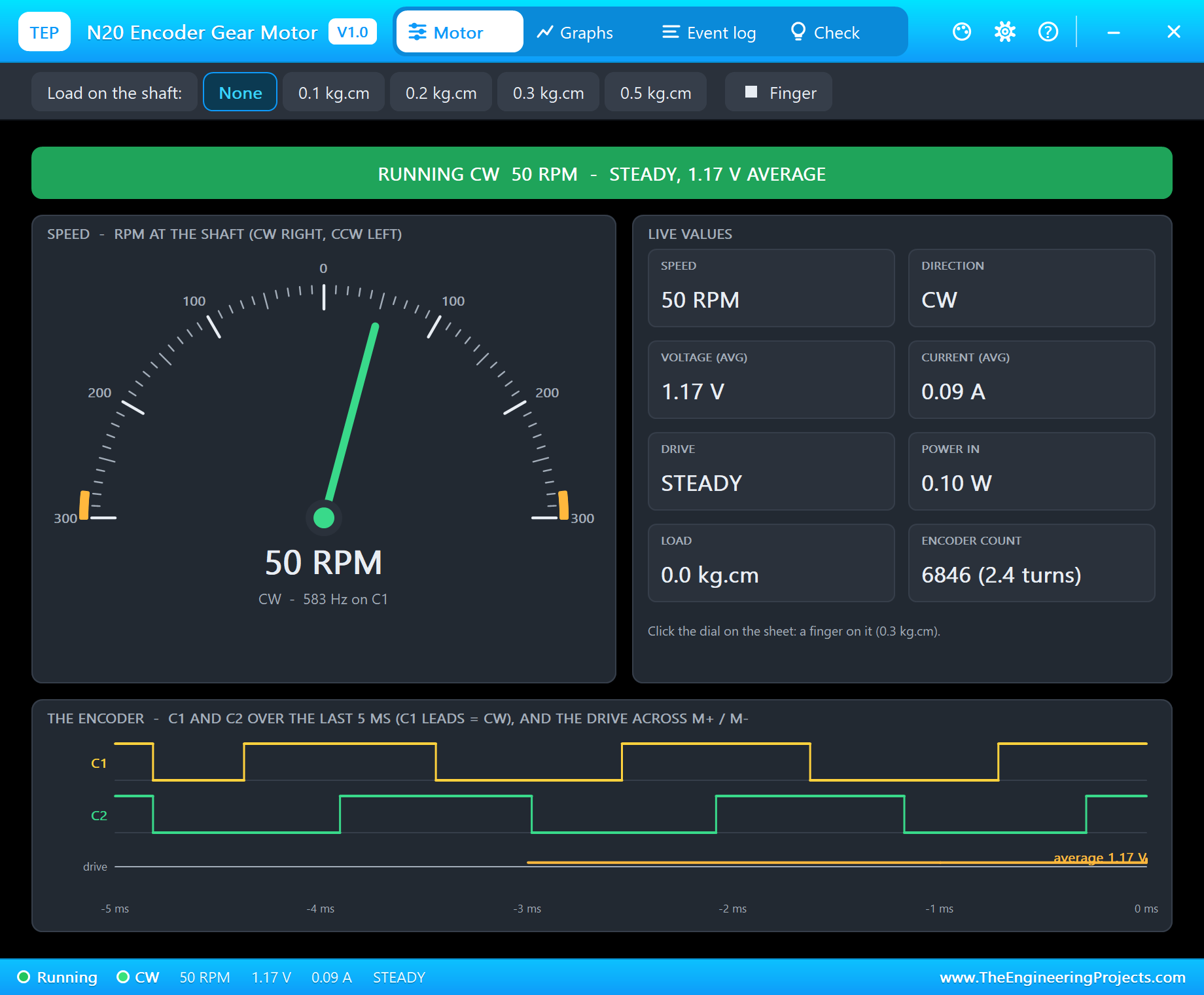
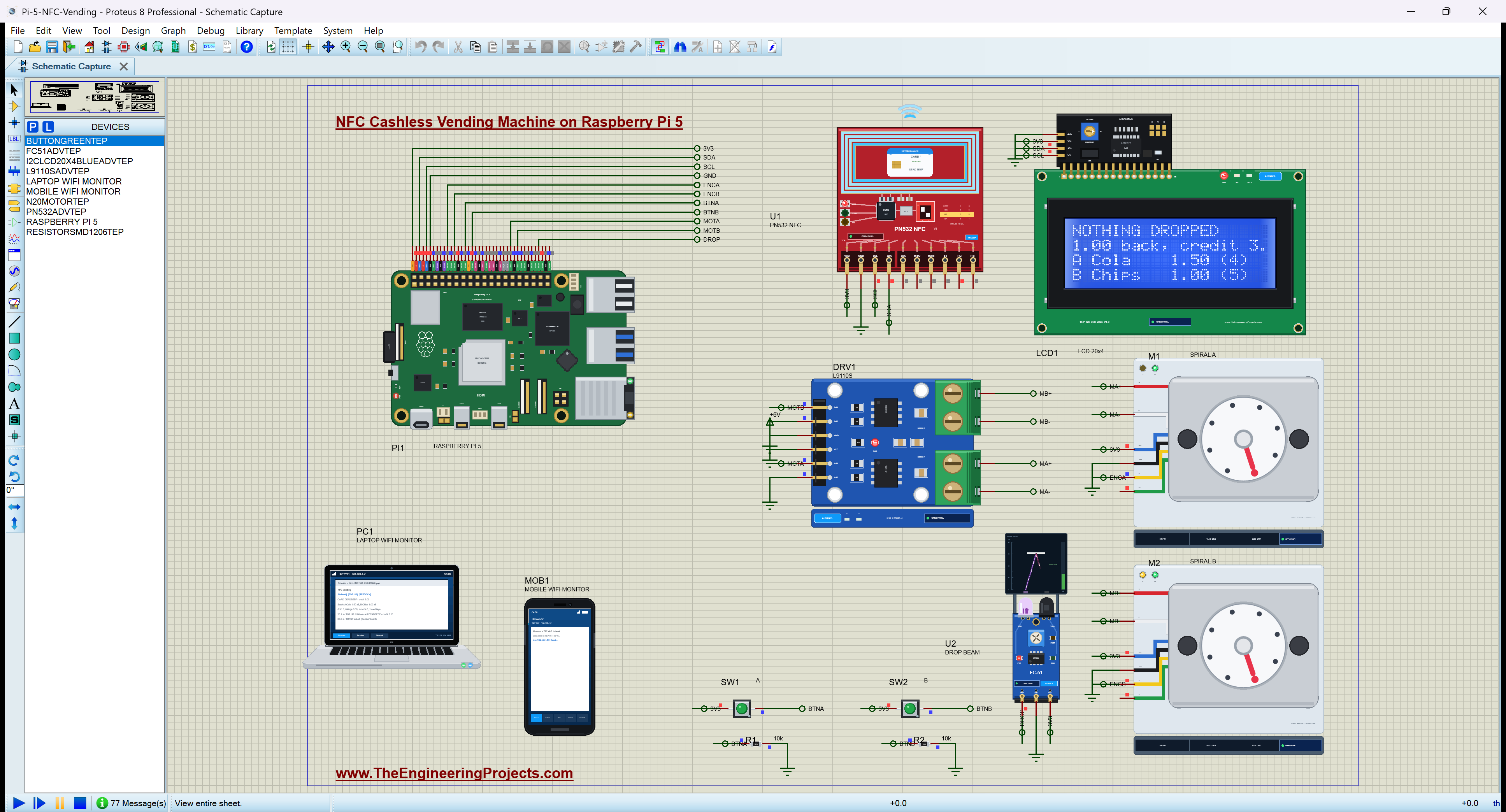
It is a great project for learning NFC and MIFARE Classic, binary data in Python with struct, checksums, I2C with two devices, motor encoders, PWM, debouncing, a small state machine and a web server, all on a Raspberry Pi. In the simulation, the PN532's pop-up holds four cards you can tap or hold on the reader and shows the memory of the selected card byte by byte, so you can watch the wallet change after every purchase; the N20's pop-up shows the speed, the voltage and the encoder; the LCD's pop-up shows the screen and every byte the Pi sent.
Components Used in the Proteus Simulation
All the parts come from our Proteus libraries, each with its own tutorial. The project zip at the end includes every LIB and DLL file and the TEPPi runtime that runs Python in Proteus.
| Part | Proteus device | Library post | Connection |
|---|---|---|---|
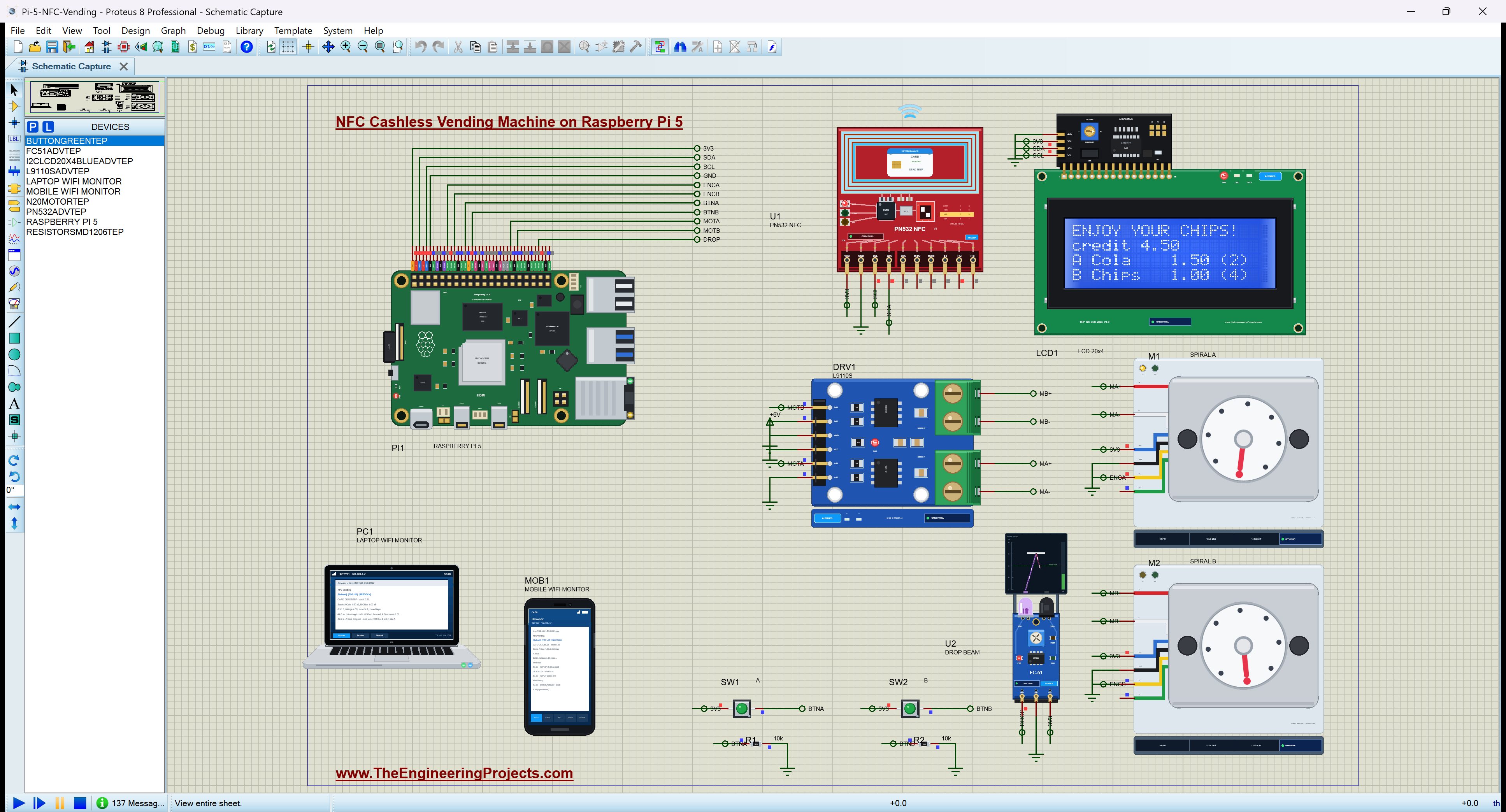
| Raspberry Pi 5 | RASPBERRY PI 5 | Raspberry Pi 5 Library for Proteus | PI1, vending.py, Ethernet 192.168.1.51 |
| PN532 NFC reader | PN532ADVTEP | PN532 NFC Library for Proteus | U1, I2C at 0x24 |
| I2C LCD 20x4 | I2CLCD20X4BLUEADVTEP | I2C LCD 20x4 Library | LCD1, I2C at 0x27 |
| L9110S motor driver | L9110SADVTEP | L9110S Motor Driver Library | DRV1, +6 V, A-IA / B-IA from GPIO5 / GPIO6 |
| N20 encoder gear motor (x2) | N20MOTORTEP | N20 Encoder Gear Motor Library | M1 / M2, the spirals; C1 to GPIO17 / GPIO27 |
| IR obstacle sensor FC-51 | FC51ADVTEP | IR Obstacle Sensor (FC-51) Library | U2, the drop beam, OUT to GPIO26 |
| Push buttons | BUTTONGREENTEP | Push Button Library | SW1 (A) GPIO23, SW2 (B) GPIO24 |
| SMD resistors | RESISTORSMD1206TEP | SMD Resistor Library | R1 / R2 10 kohm pull-downs |
| Laptop WiFi Monitor | LAPTOP WIFI MONITOR | Laptop WiFi Monitor | PC1 |
| Mobile WiFi Monitor | MOBILE WIFI MONITOR | Mobile WiFi Monitor | MOB1 |
Proteus Simulation of the Vending Machine: the Circuit
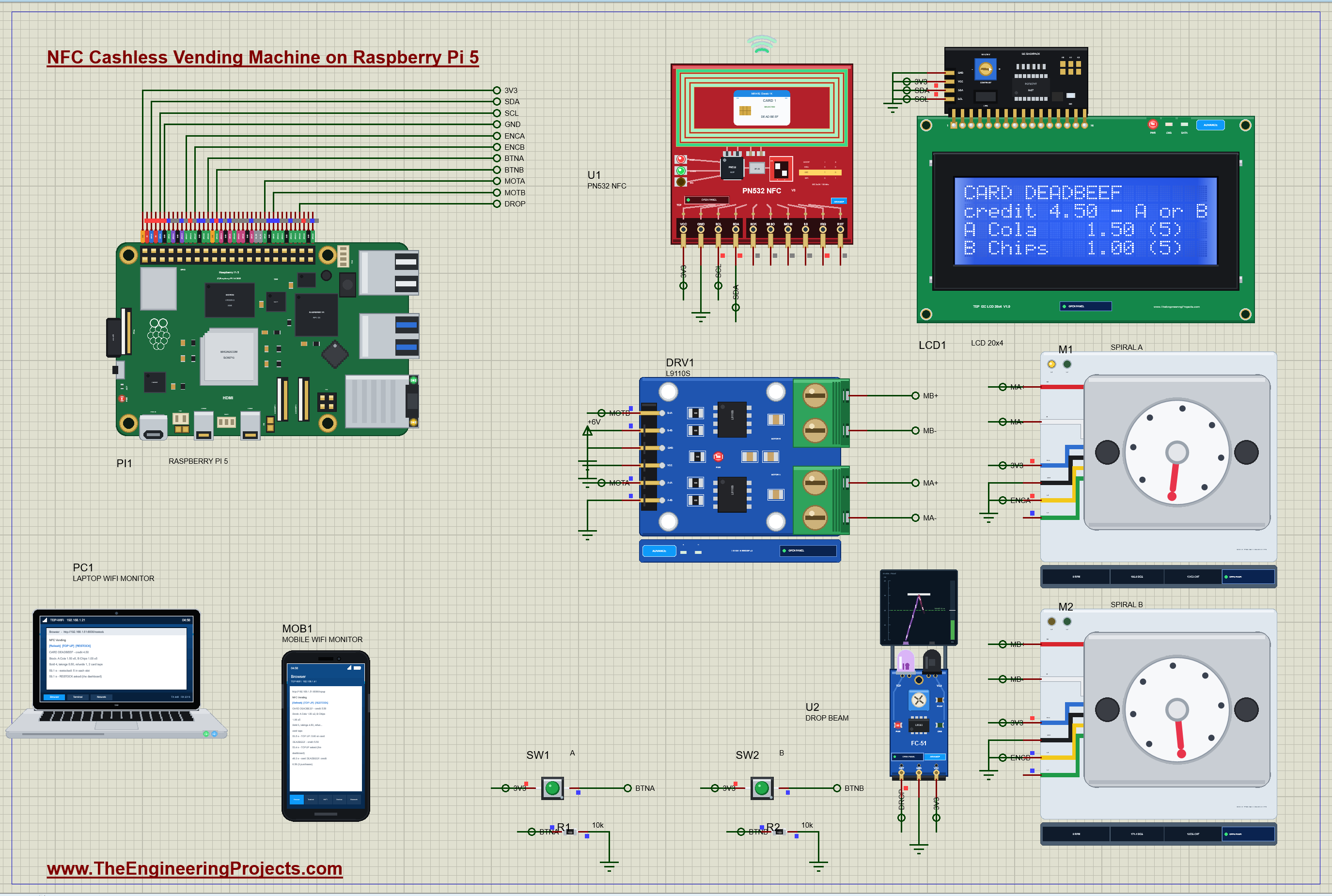
| Part | Pins | Raspberry Pi 5 / supply |
|---|---|---|
| U1 PN532, LCD1 | SDA / SCL / VCC | GPIO2 (pin 3) / GPIO3 (pin 5) / 3.3 V |
| DRV1 L9110S | A-IA / B-IA ; A-IB, B-IB ; VCC | GPIO5 (pin 29) / GPIO6 (pin 31) ; GND ; +6 V |
| M1 / M2 N20 | M+ M- ; C1 ; VCC | A-OA A-OB / B-OA B-OB ; GPIO17 (pin 11) / GPIO27 (pin 13) ; 3.3 V |
| U2 FC-51 | OUT / VCC | GPIO26 (pin 37) / 3.3 V |
| SW1 / SW2 | 1 / 2 | 3.3 V / GPIO23 (pin 16) / GPIO24 (pin 18), 10 kohm to GND |
The PN532 and the LCD share the I2C bus; the PN532 module chooses I2C, SPI or HSU with its mode switch (in Proteus the model follows the bus the Pi uses). The L9110S has two H-bridges, one per spiral. A spiral only ever turns one way, so each bridge's IB input is tied to ground and the Pi drives only IA, with PWM for the speed. The N20s' encoders run from 3.3 V, so their outputs go straight to the Pi. The buttons connect their GPIO to 3.3 V when pressed, and the 10 kohm resistors hold the inputs low the rest of the time.
How the Vending Machine Works
An NFC Card and Its Memory
A MIFARE Classic 1K card holds 1024 bytes in 16 sectors of 4 blocks, 16 bytes each. The last block of every sector, the sector trailer, holds two 6-byte keys, A and B, and the access bits that say which key may read or write the other blocks. Before reading or writing a block, the reader must authenticate to its sector with a key; a new card ships with both keys set to FF FF FF FF FF FF. Every card also has a UID, 4 bytes here, sent when it enters the field. This machine keeps its wallet in block 4, the first block of sector 1.
Talking to the PN532
The Pi speaks the PN532's own frame protocol over I2C. A command frame is 00 00 FF, the length, a length checksum, D4 (host to PN532), the command, its data, a data checksum and 00. The PN532 first answers with a short ACK frame, then with the answer frame: D5 and the command plus one. On I2C every read starts with a status byte whose bit 0 says the PN532 is ready. The program needs only four commands: GetFirmwareVersion (0x02), SAMConfiguration (0x14), InListPassiveTarget (0x4A) to find a card and its UID, and InDataExchange (0x40) to pass MIFARE commands to the card: authenticate with key A (0x60), read a block (0x30) and write a block (0xA0).
A Wallet in 16 Bytes
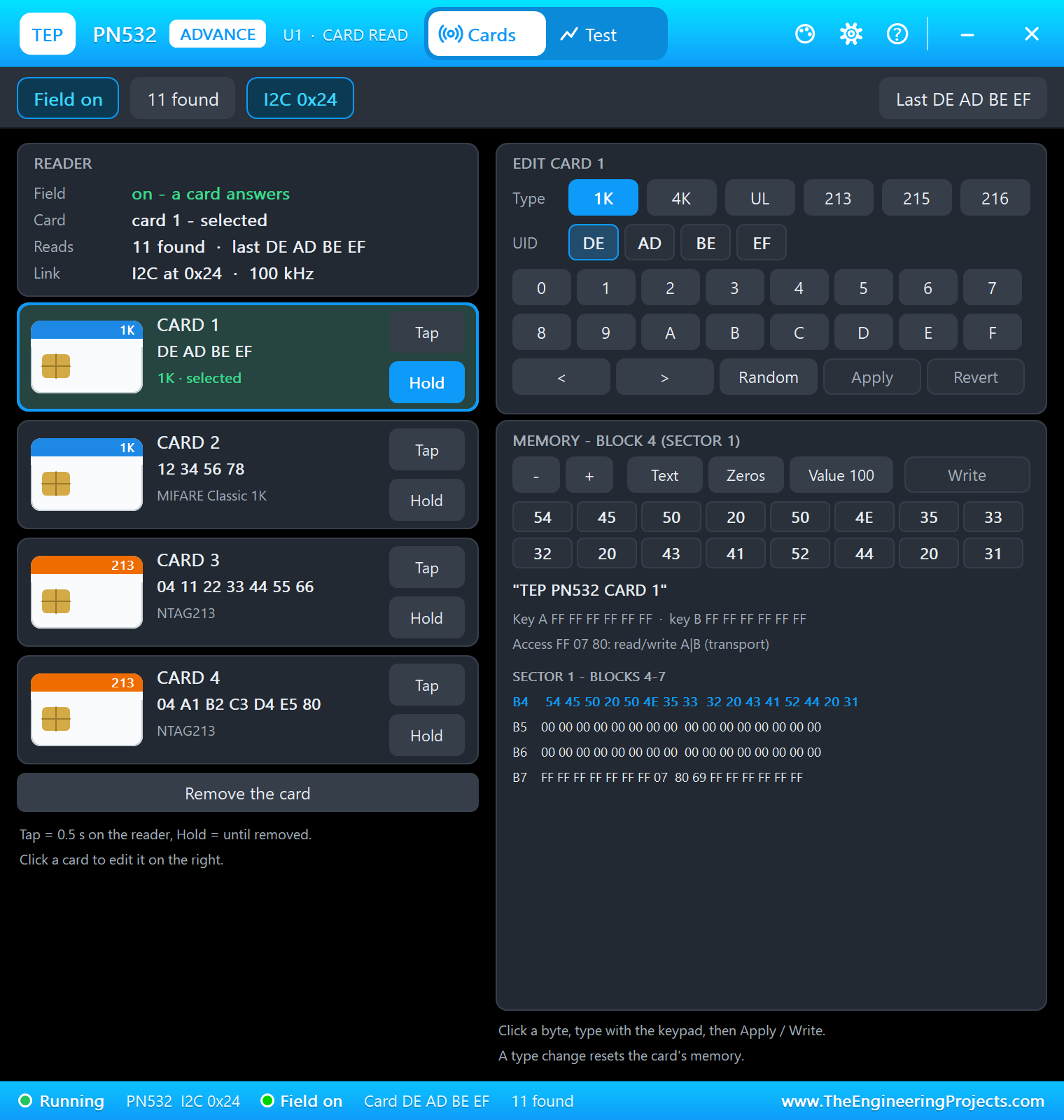
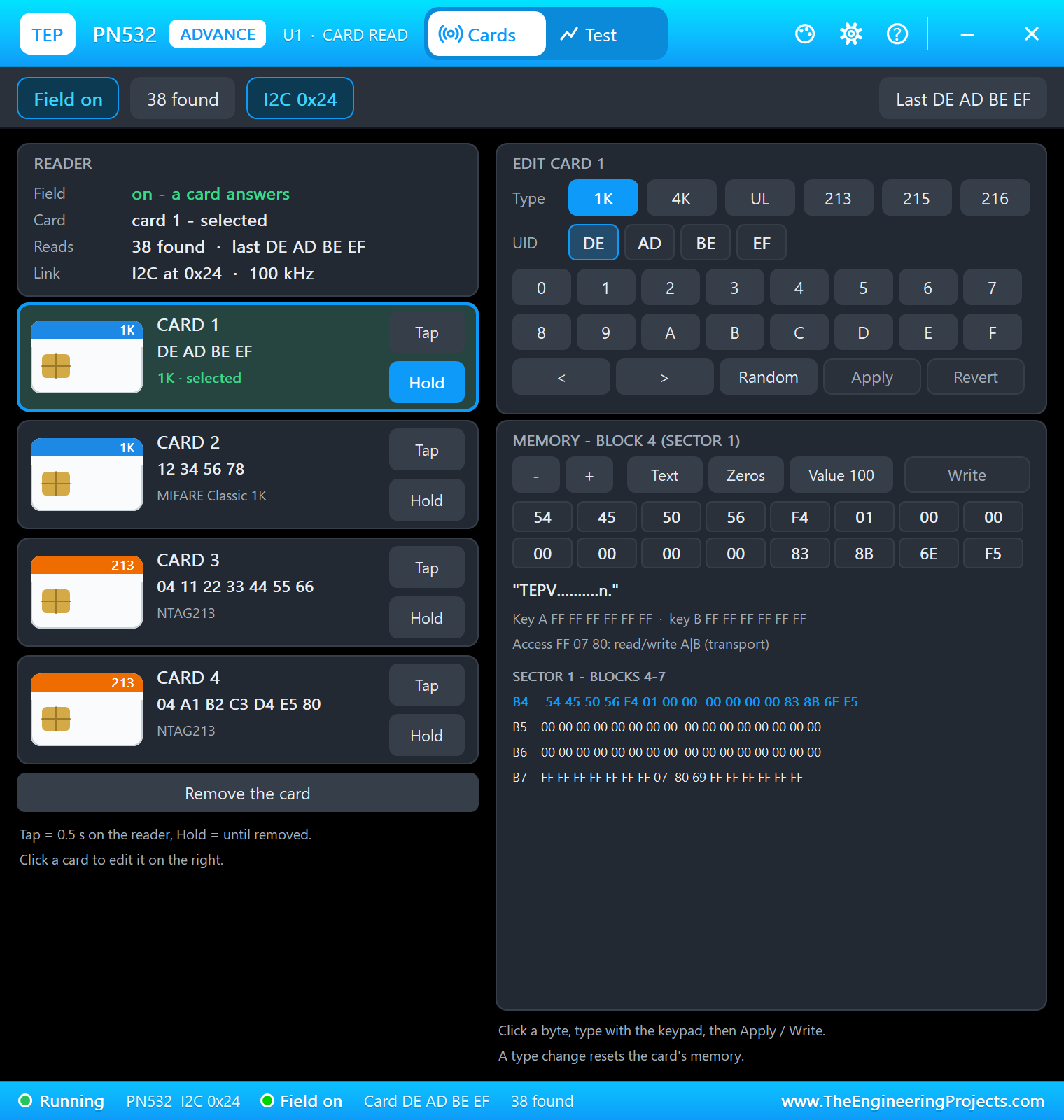
Block 4 holds the wallet: the four letters TEPV, the credit in cents as a 32-bit little-endian number, the number of purchases, and a CRC32 of the first 12 bytes together with the card's UID. Money is kept in whole cents, never in floating point, so 1.50 is the integer 150. Worked example: after a top-up of 5.00 on card DE AD BE EF, block 4 reads 54 45 50 56 (TEPV), F4 01 00 00 (0x01F4 = 500 cents), 00 00 00 00 (no purchases yet) and 83 88 6E F5 (the CRC). Any other content means the card is not a wallet yet; a wrong CRC, for example after one byte was changed, means the wallet is not accepted. Because the UID is part of the CRC, a wallet copied from one card to another fails the check too. A CRC catches mistakes and copying, but it is not security: a real payment system changes the sector keys and signs the wallet with a secret key.
Pay First, Then Vend, Refund If Needed
The order of the steps matters when money is on the card. The machine writes the new, lower credit to the card first; only when that write succeeded does the spiral turn. If anything then goes wrong, the spiral sticks or nothing falls, the old credit is written back. The other order, vend first and charge afterwards, would give away a free item every time someone pulled the card away at the right moment.
One Spiral Turn, Counted
A vending spiral pushes one item off its end every full turn. The N20 has a 1:100 gearbox and a magnetic encoder that gives 7 pulses per motor turn, so the output shaft makes one turn every 7 x 100 = 700 pulses. The Pi starts the motor with PWM at 30 % of 6 V, counts the encoder's rising edges in the background, and stops the motor at 700. At this duty one turn takes about 0.9 s. If 700 pulses do not arrive within 3 s, the spiral is stuck, and the purchase is refunded.
Did Anything Fall? The Drop Beam
Real machines have an infrared curtain across the delivery bin, because a spiral can turn and still leave the item hanging. Here an FC-51 looks across the bin: its output goes LOW while something is in front of it. The Pi counts its falling edges; if none arrives from the start of the turn until 1.5 s after it, nothing fell, and the price goes back on the card.
A Button Bounces
A mechanical push button does not switch cleanly: its contacts bounce for a few milliseconds, on the press and again on the release, and each bounce is an edge. The Pi counts the edges in the background and takes any change as a press. While a purchase runs, the release bounces too, so after each purchase the program takes the current counts as the new starting point: one press, one purchase.
The Python Code Explained
The program is vending.py. It uses lgpio, the GPIO library of Raspberry Pi OS, for the pins, the PWM, the edge counts and the I2C bus, struct and zlib for the wallet, and Python's own http.server for the dashboard. The products and the spiral are set at the top:
PULSES_TURN = 700 # 7 pulses a motor turn x 100:1 = one spiral turnNAME, PRICE = {'A': 'Cola', 'B': 'Chips'}, {'A': 150, 'B': 100} # the slots: the product, its price in centsA PN532 frame, with its two checksums:
lgpio.i2c_write_device(self.h, bytes([0x00, 0x00, 0xFF, len(body), -len(body) & 0xFF]) + body + bytes([-sum(body) & 0xFF, 0x00]))Finding a card, and authenticating to block 4's sector with key A and the card's UID:
r = self.command(0x4A, [0x01, 0x00]) return self.exchange([0x60, block] + KEY_A + list(uid[:4])) is not None # MIFARE authenticate with key AThe wallet: the magic letters, the credit and the purchases packed as little-endian integers, then the CRC32 with the UID:
    body = MAGIC + struct.pack('<II', cents, buys)
    return body + struct.pack('<I', zlib.crc32(bytes(uid) + body))
A purchase charges the card before anything moves:
if not wallet_write(nfc, uid, cents - price, buys + 1): # the money first: the card is charged before anything movesThe spiral runs until the encoder has counted one turn, or 3 s have passed:
while enc[slot].tally() - n0 < PULSES_TURN and time.monotonic() - t0 < TURN_MAX_S:Then the beam has 1.5 s to see the item; if it does not, the old credit goes back:
while full and drops.tally() == d0 and time.monotonic() - t0 < DROP_WAIT_S: ok = wallet_write(nfc, uid, cents, buys) # the refund: the old balance back on the cardAnd after a purchase, the buttons' counts start again, so a bounce is not a second press:
seen = {j: press[j].tally() for j in 'AB'} # (a button bounces: the edges of its release, during the purchase,All the I2C traffic, the PN532 and the LCD, runs in one thread, the machine; the dashboard only queues its requests (TOP UP, RESTOCK) for that thread, so two threads never talk on the bus at once. The pages are / (the dashboard), /topup (+5.00 on the card on the reader), /restock and /data (everything as JSON). Every card, sale, refund and top-up is printed on the Pi's terminal.
How to Run the Proteus Simulation
- Download the project zip below and install the library files and the TEPPi folder (the steps are under the download button).
- Open Pi-5-NFC-Vending.pdsprj from the Proteus Simulation folder. Keep vending.py and the DLL files next to it.
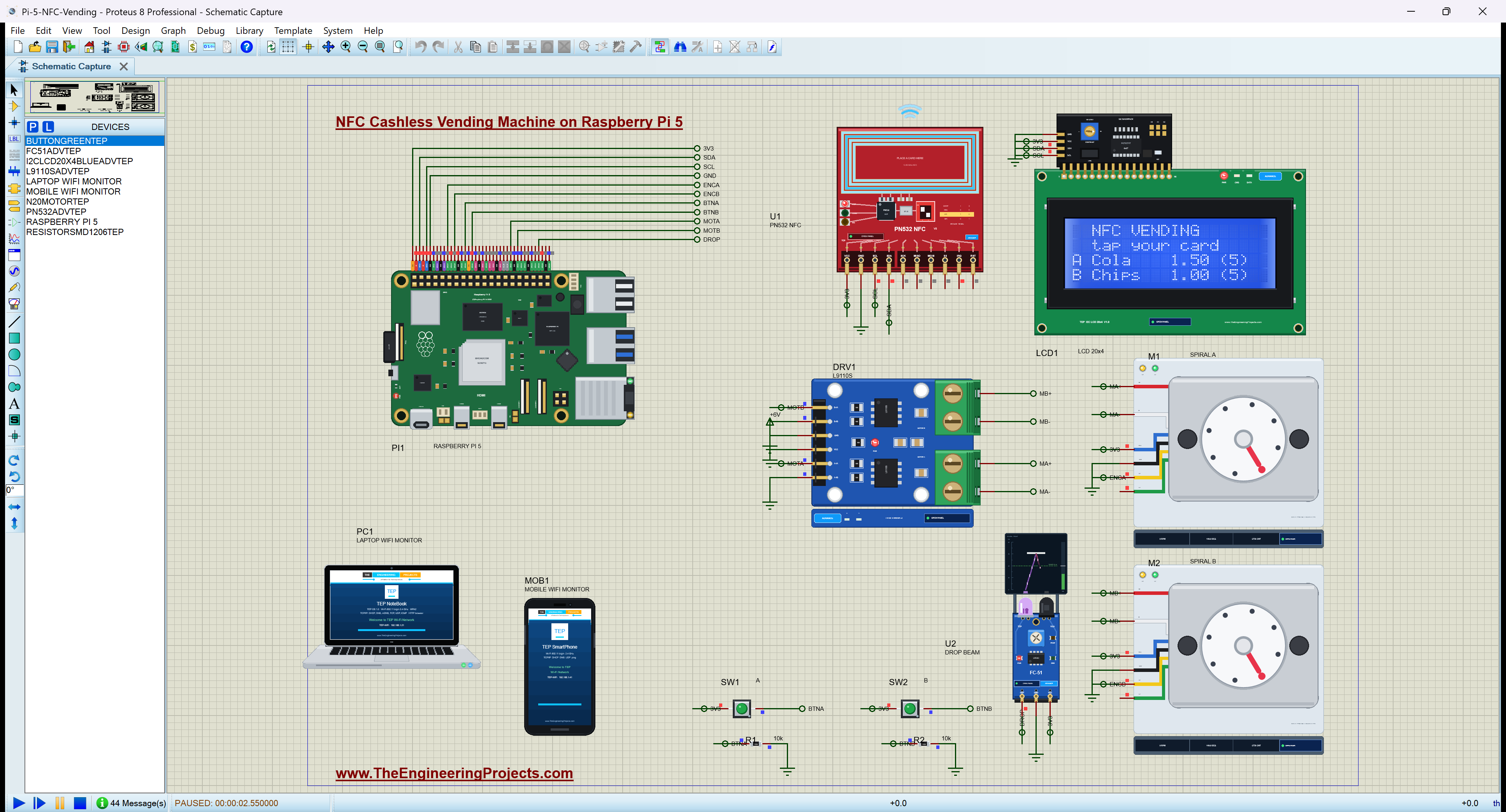
- Press Play. The LCD shows NFC VENDING and the two products.
- On the PN532's pop-up (U1) press Hold beside CARD 1: the LCD says it is not a wallet yet.
- Open the Laptop or the Mobile WiFi Monitor, press Go, then TOP UP: the card gets 5.00.
- Press SW1 (A) or SW2 (B). While the spiral turns, put something in the FC-51's beam on its pop-up (10 cm) and take it away again: the item dropped. Leave the beam empty: refunded.
Simulation Results: the Vending Machine in Proteus
Here is the run that made the screenshots of this tutorial, 61 seconds of simulation: a new card, a top-up, five purchases, one item that did not drop, a card with too little credit, the card taken away and back, a second top-up from the phone, and a restock. The times are the program's own clock, as it printed them on the Pi's terminal; the parts' numbers come from their pop-ups.
Ready, and a Card That Is Not a Wallet Yet
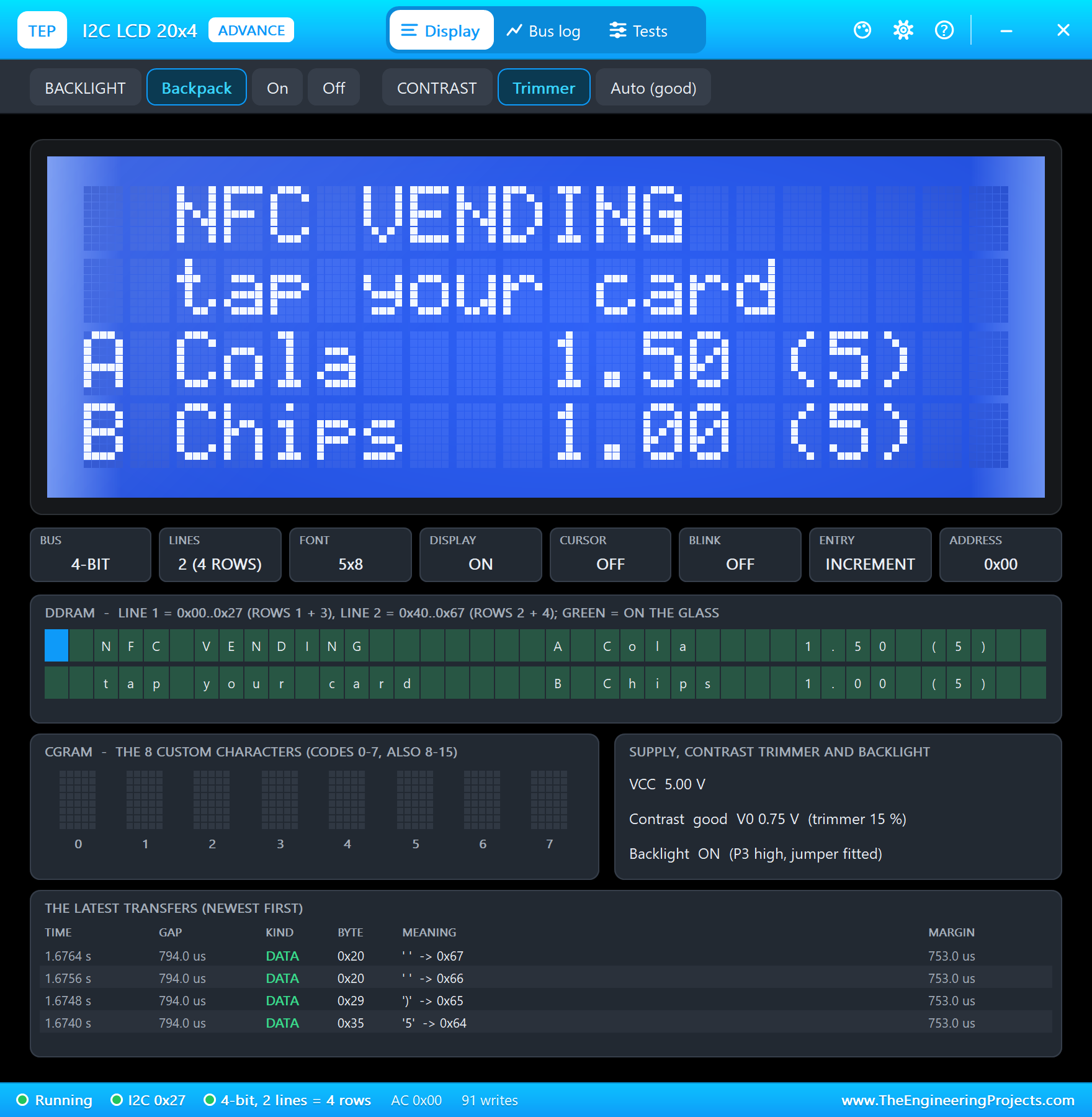
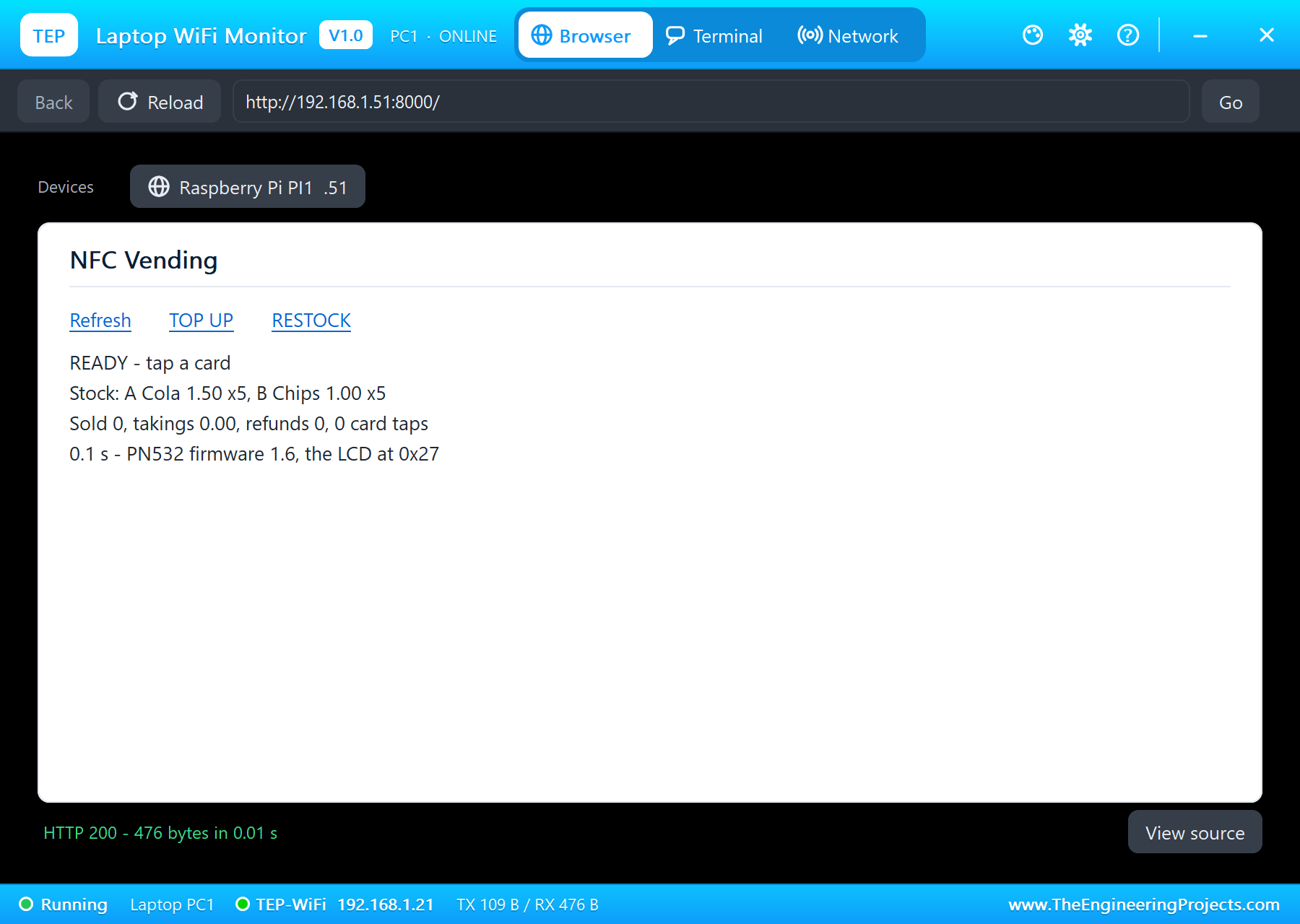
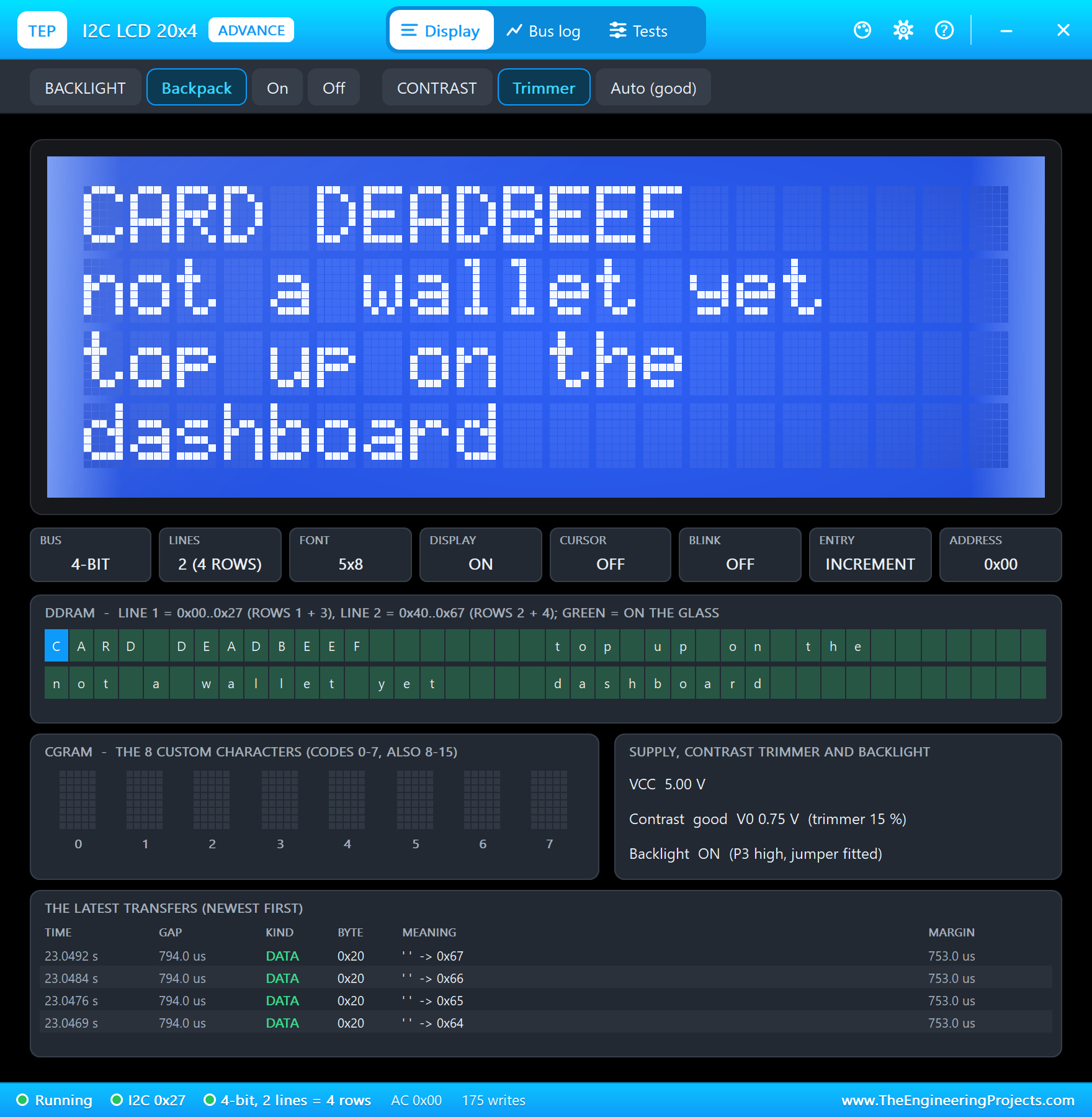
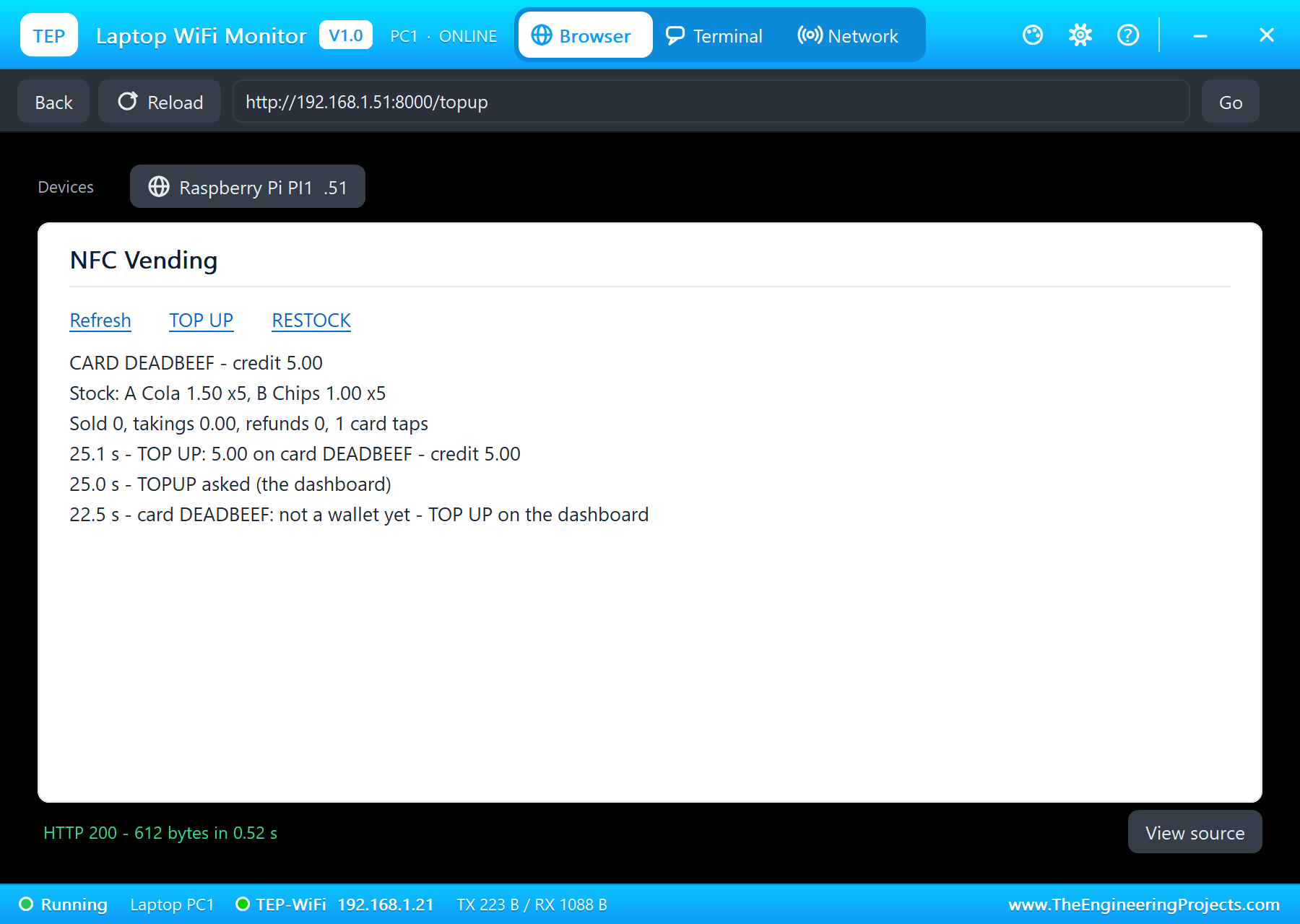
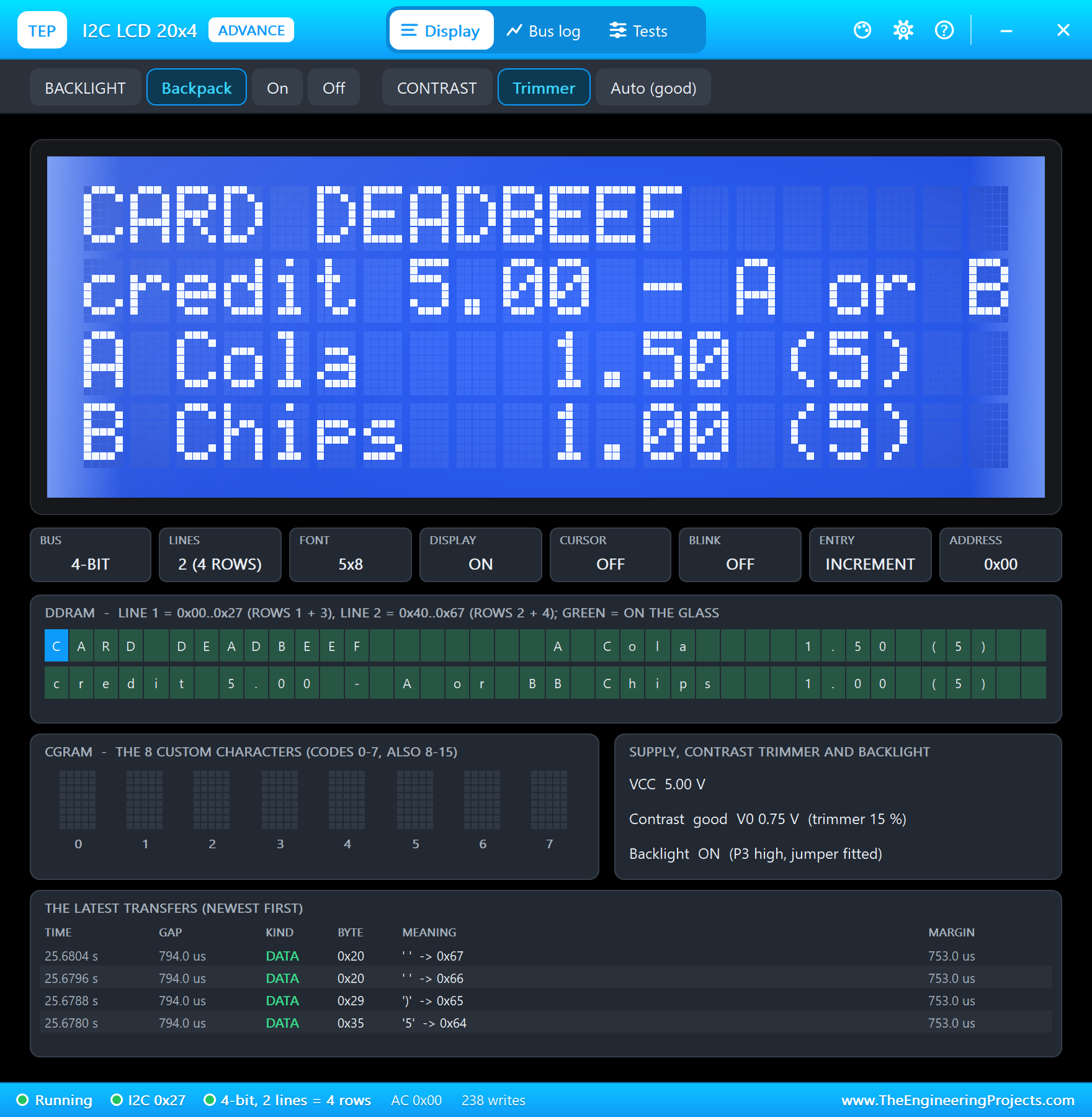
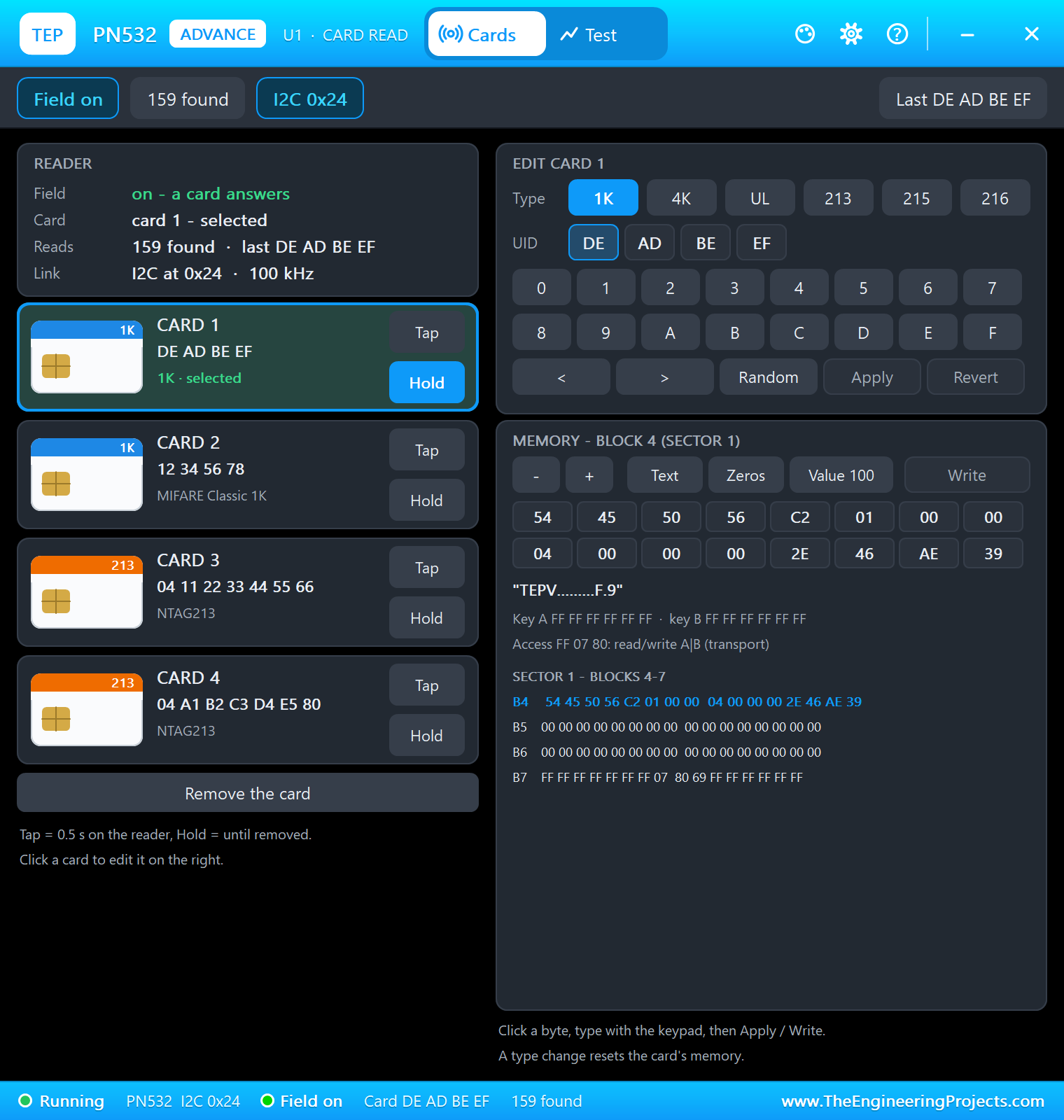
At 0.1 s: "PN532 firmware 1.6, the LCD at 0x27". The LCD shows NFC VENDING, tap your card, and the two products with their prices and stock. CARD 1, UID DE AD BE EF, goes on the reader with Hold. Its block 4 holds the text TEP PN532 CARD 1, not a wallet, so at 22.5 s: "card DEADBEEF: not a wallet yet - TOP UP on the dashboard". TOP UP on the laptop writes the first wallet, and at 25.1 s: "TOP UP: 5.00 on card DEADBEEF - credit 5.00". The PN532's pop-up shows block 4 with exactly the bytes worked out above: 54 45 50 56, F4 01 00 00, 00 00 00 00 and the CRC 83 88 6E F5.
A Purchase: Pay, Turn, Drop
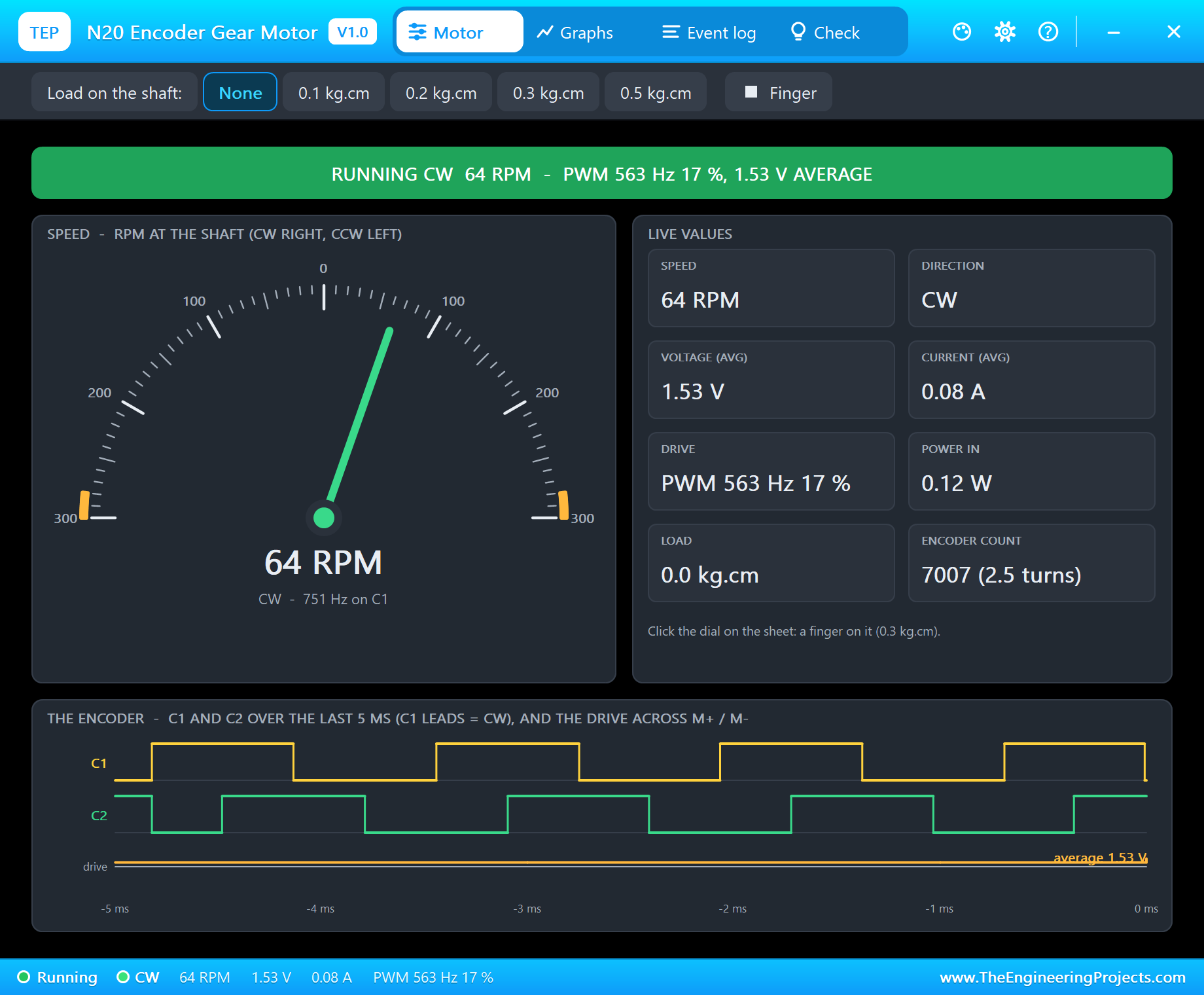
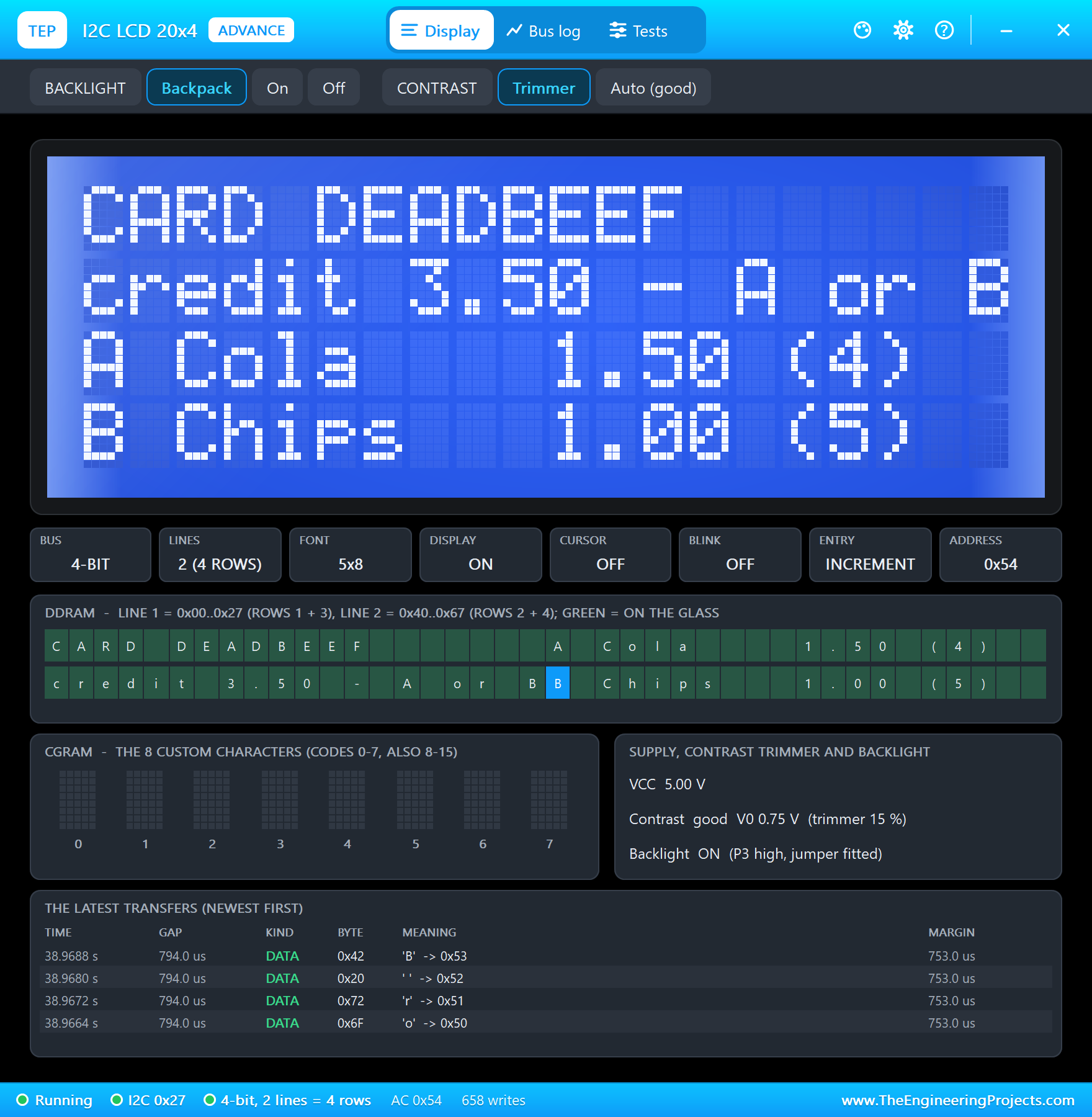
SW1, A: at 29.2 s "A Cola: 1.50 taken off the card (3.50 left)" - the card is charged first. Then spiral A turns: the N20's pop-up shows it running clockwise at 64 RPM on about 1.5 V average. The item crosses the beam, and at 30.3 s: "A Cola dropped - one turn in 0.91 s; 4 left in slot A". 700 pulses in 0.91 s is 66 RPM, the same speed. The LCD says ENJOY YOUR COLA!, then shows the credit, 3.50, and 4 Colas left.
Nothing Dropped: the Refund
SW2, B: at 34.4 s "B Chips: 1.00 taken off the card (2.50 left)", and spiral B turns (50 RPM on the pop-up as it slows), but this time nothing crosses the beam. 1.5 s after the turn, at 36.9 s: "B Chips: nothing crossed the beam - 1.00 refunded". The LCD shows NOTHING DROPPED, 1.00 back, and the card is at 3.50 again.
Not Enough Credit, and the Money Is on the Card
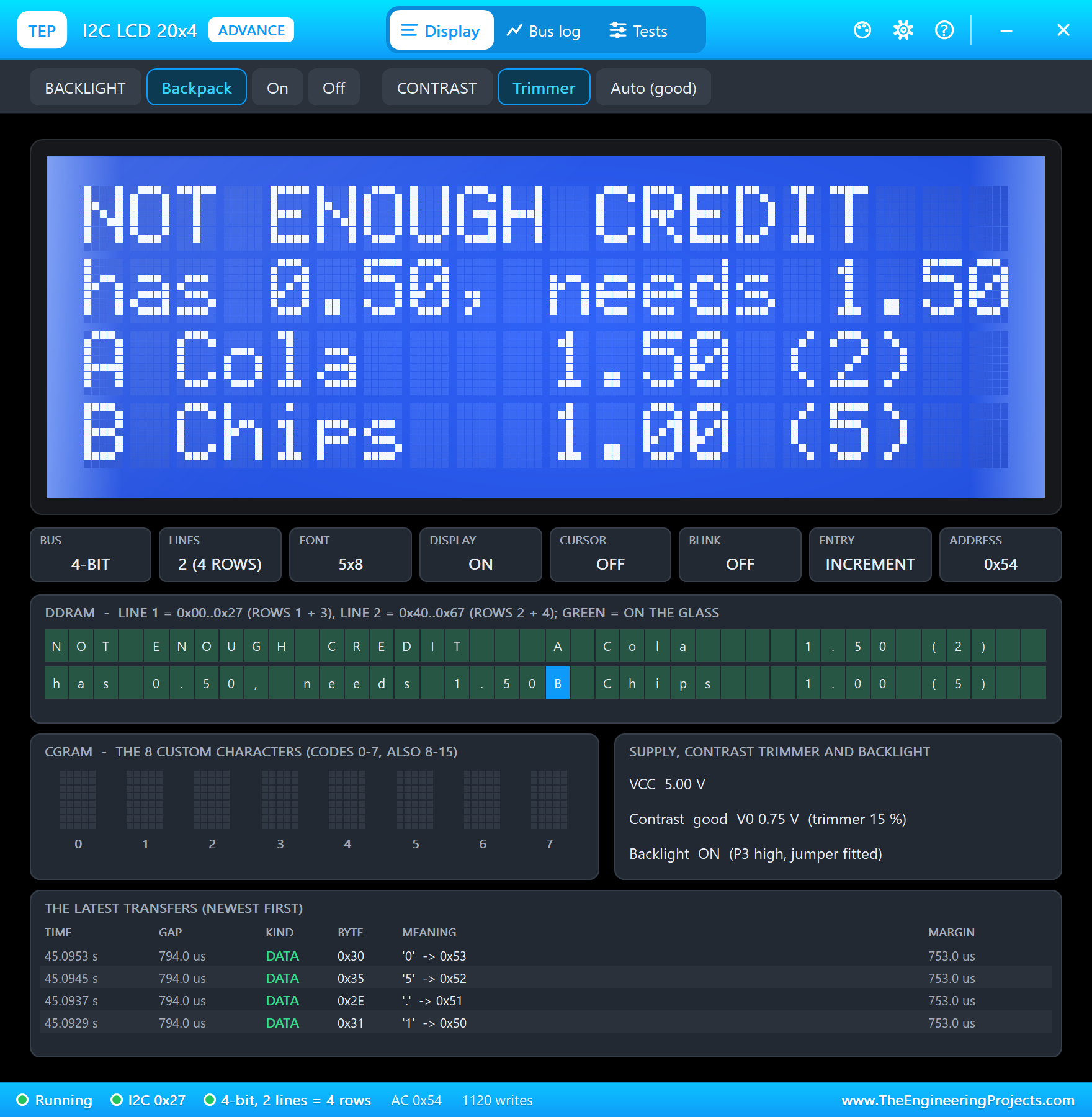
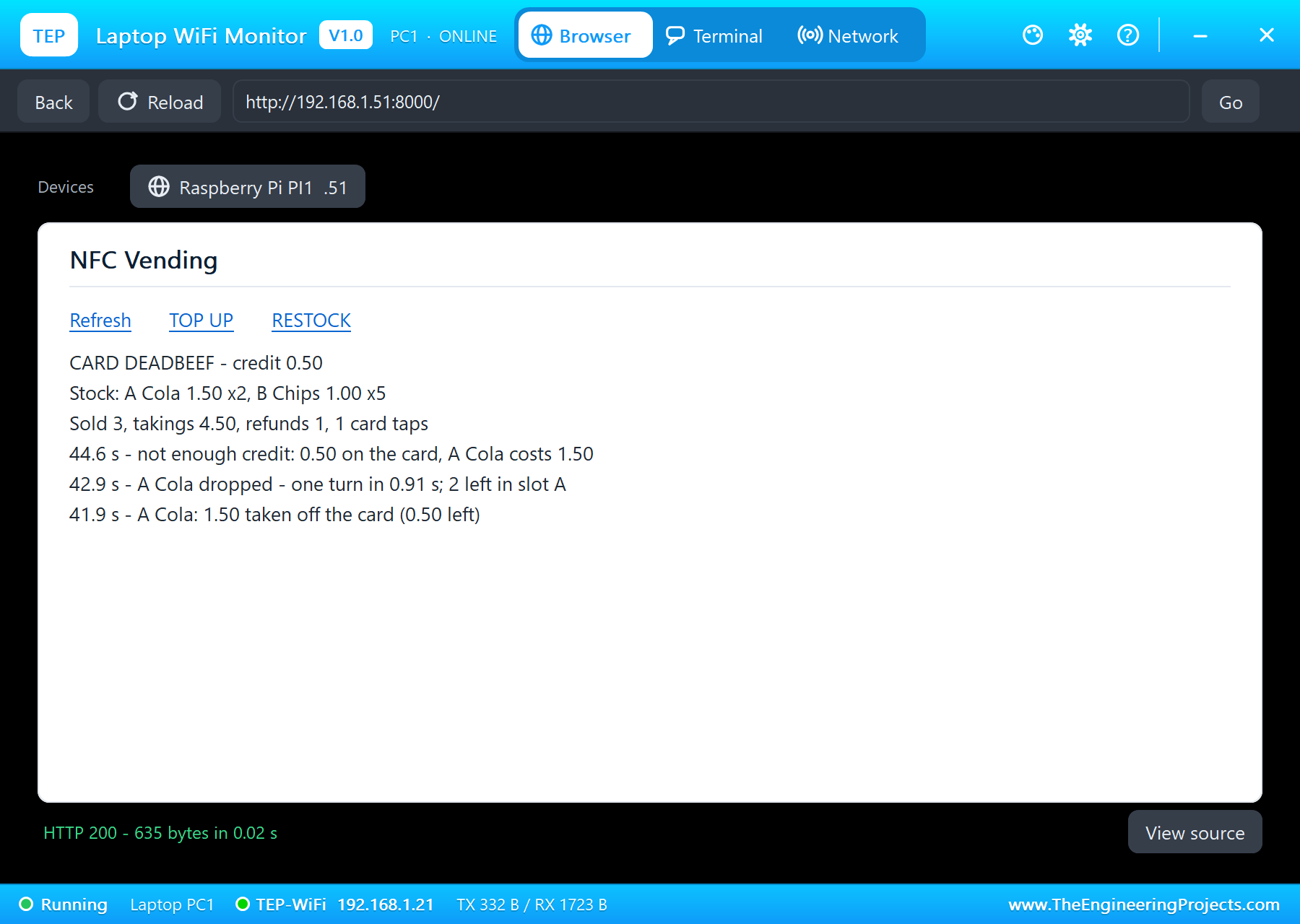
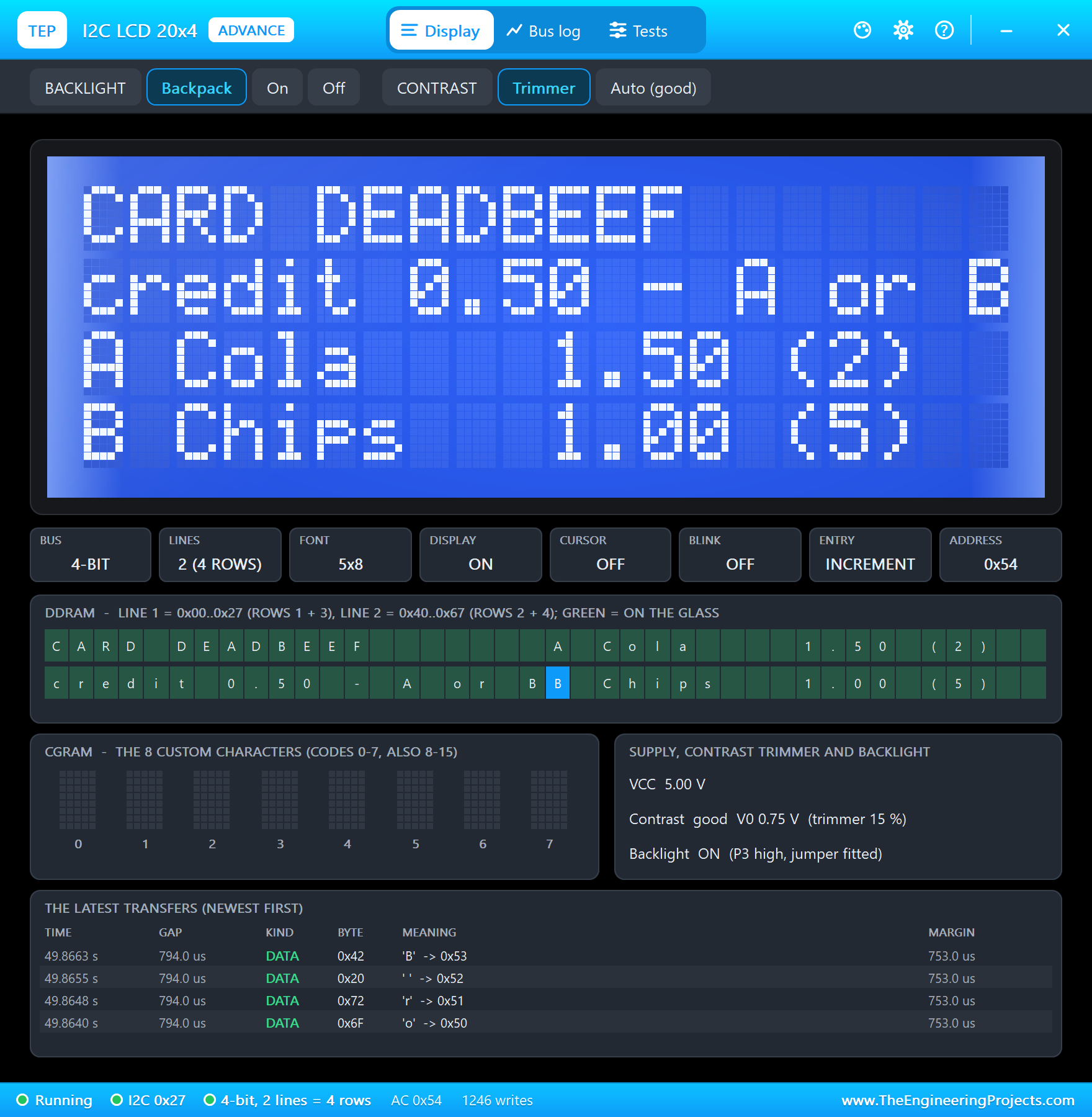
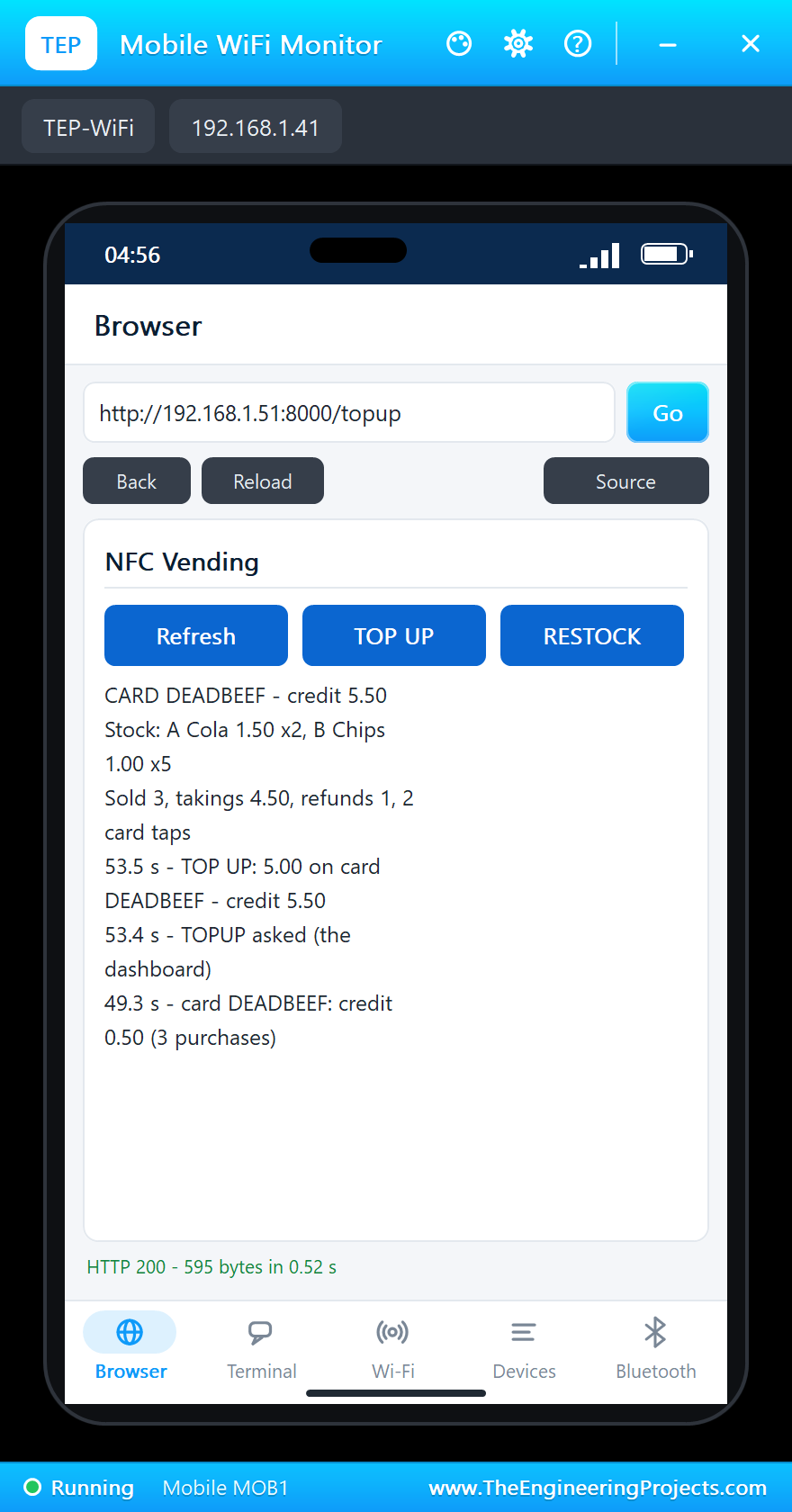
Two more Colas leave 2.00 and then 0.50 on the card. A third one: at 44.6 s "not enough credit: 0.50 on the card, A Cola costs 1.50", once, for one press. The dashboard now shows 3 sold, takings 4.50, one refund. Then the card is taken away (48.2 s) and put back: at 49.3 s "card DEADBEEF: credit 0.50 (3 purchases)". The machine kept nothing in memory: the credit and the count came back from the card itself.
A Top-Up from the Phone, and a Restock
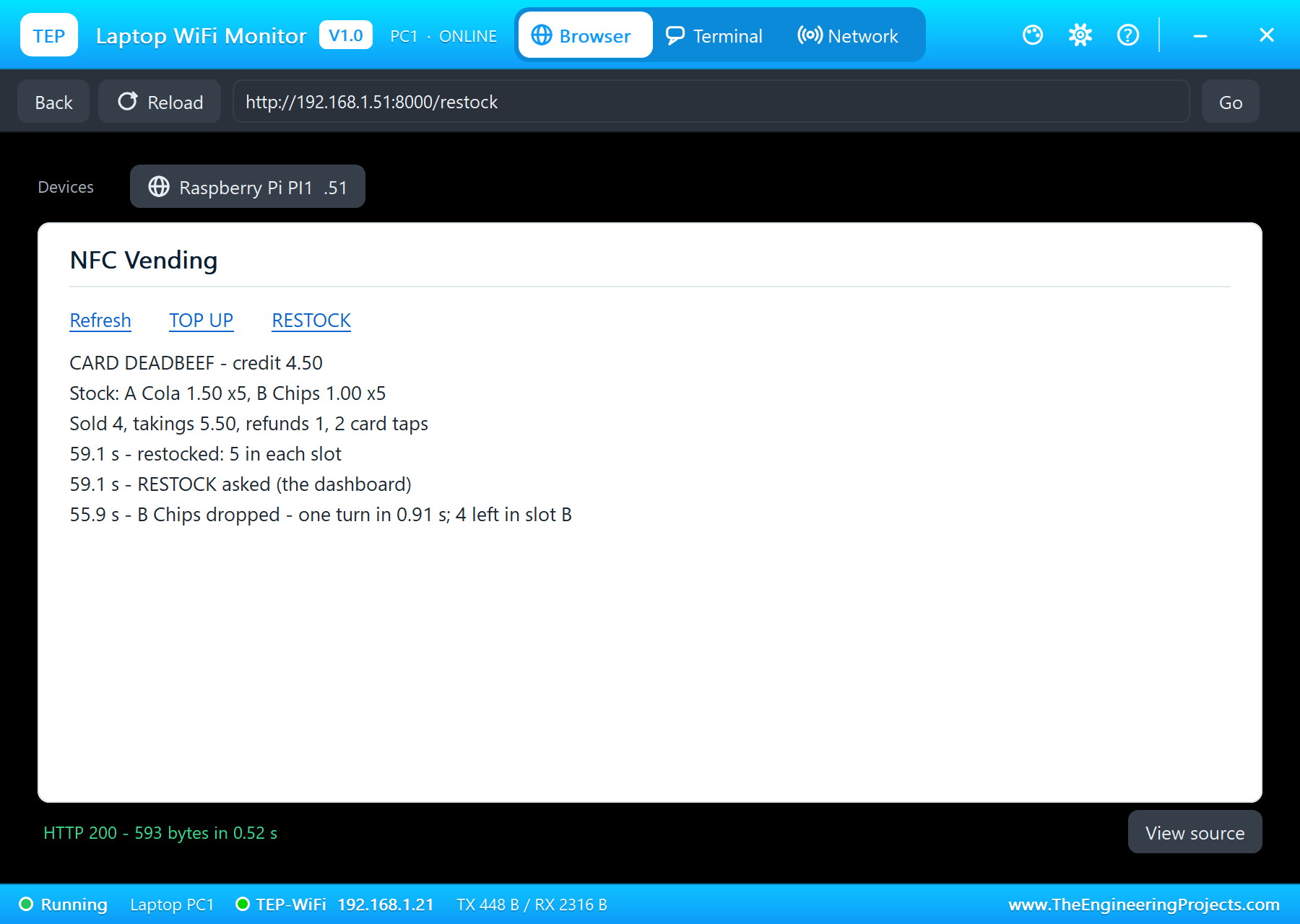
TOP UP on the phone: at 53.5 s the credit is 5.50. SW2, B: at 55.9 s "B Chips dropped", 4.50 left. The PN532's pop-up shows block 4 again: C2 01 00 00, 0x01C2 = 450 cents, and 04 00 00 00, four purchases. RESTOCK on the laptop fills both slots at 59.1 s. The dashboard ends at 4 sold, takings 5.50, 1 refund.
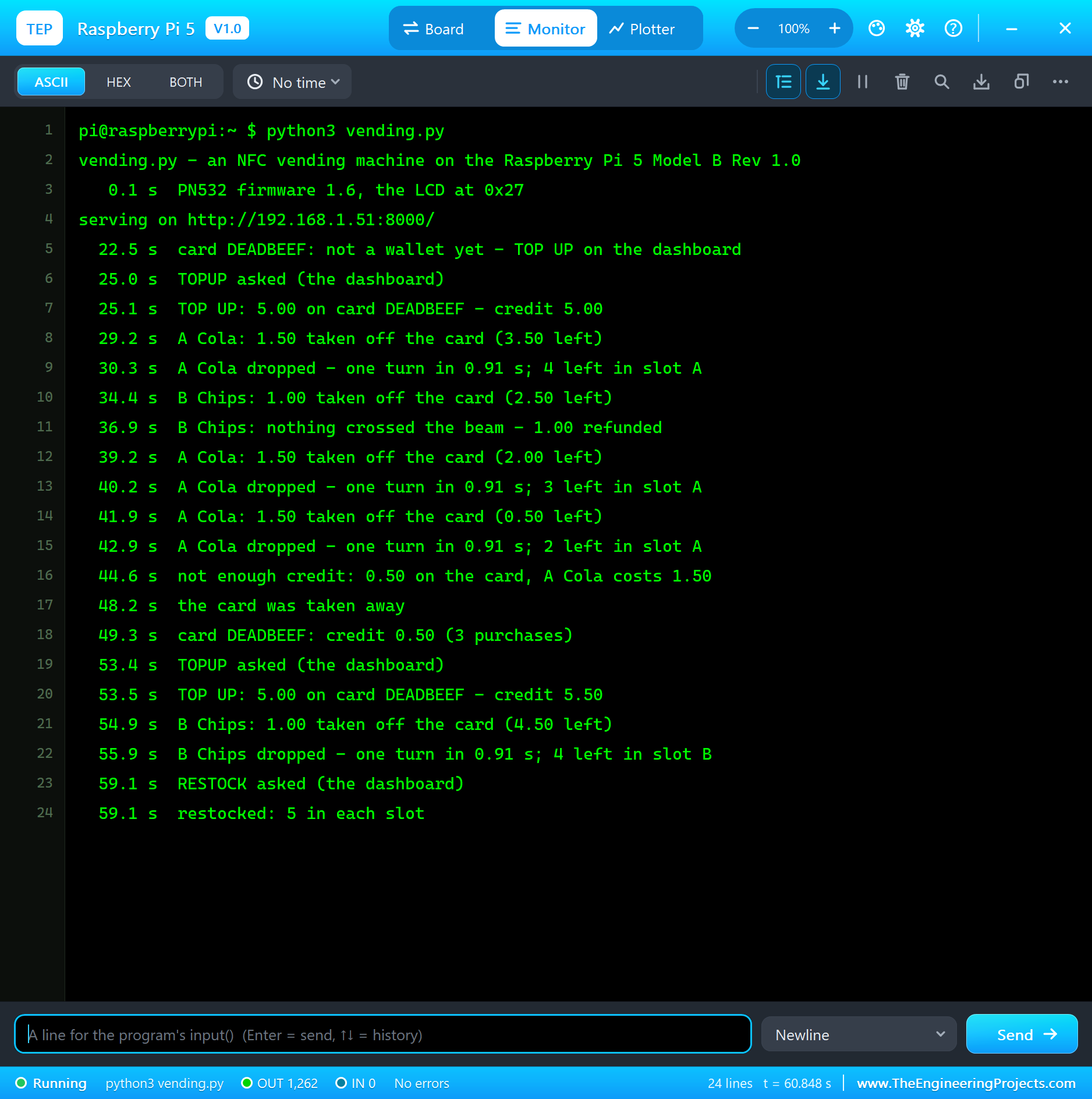
| What | Result |
|---|---|
| The card | DE AD BE EF: not a wallet yet, then 5.00 after TOP UP (block 4 = TEPV, F4 01 00 00 ...) |
| A Cola | charged 1.50, one turn in 0.91 s, dropped: 3.50 left |
| B Chips, no drop | charged 1.00, nothing in the beam within 1.5 s: refunded |
| Too little credit | 0.50 on the card, Cola 1.50: refused, one message for one press |
| The card away and back | credit 0.50 (3 purchases) read back from the card |
| The end | credit 4.50, 4 purchases; sold 4, takings 5.50, 1 refund |
| Simulation | 61 s of simulation |
Download the Project Files
Click the button below to download Cashless-NFC-Vending-Machine-Raspberry-Pi-5-Proteus-Simulation-v1.0.zip (about 15.2 MB, without the source code of the models):
Cashless NFC Vending Machine on Raspberry Pi 5 - Proteus Simulation V1.0- Proteus Simulation: Pi-5-NFC-Vending.pdsprj, vending.py and copies of the models.
- Python Code: vending.py, the program.
- Proteus Library Files: the LIB files of the Raspberry Pi 5, the PN532, the I2C LCD 20x4, the L9110S, the N20, the FC-51, the button, the SMD resistor and the two WiFi Monitors.
- Proteus Model Files: the DLL models and the TEPPi folder (Python 3.11 and the runtime).
- README.txt: the installation steps, the properties, the test results and the links to every library post.
No Proteus yet? Read How to Download and Install Proteus 7 and 8. New to libraries? Follow How to Install a New Library in Proteus.
How to Install the Project Files
- Close Proteus and extract the whole zip file, for example to your Desktop.
- Copy the files from Proteus Library Files into the LIBRARY folder of Proteus.
- Copy the files and the TEPPi folder from Proteus Model Files into the MODELS folder.
- Start Proteus and open the project from the Proteus Simulation folder.
Changing the Code
vending.py is plain Python: edit it next to the project and press Play again; PI1's PROGRAM property names the file it runs. The products, the prices, the spiral and the timings are at the top. The same program runs on a real Raspberry Pi 5 with Raspberry Pi OS, where lgpio is already installed; enable I2C with raspi-config, and set the PN532 module's switches to I2C.
Ideas to Extend the Project
- Change sector 1's keys on every new wallet, so other readers cannot even read the credit.
- Sign the wallet with a secret key (an HMAC) instead of a plain CRC.
- Add more slots: a second L9110S drives two more spirals, and a 4x4 keypad selects among them.
- Keep a sales log with each card's UID and send a daily report.
- Use MIFARE value blocks and the card's own increment / decrement commands.
- Show a QR code on a display for a phone top-up.
From Simulation to Real Hardware
- The PN532 switches: set the module to I2C (channel 1 on, channel 2 off on the red V3 board) and check it appears at 0x24 with i2cdetect.
- Spiral load: a full spiral needs more torque than an empty one; check that 30 % duty still turns it, or raise DUTY.
- The drop sensor: one FC-51 sees a small area; real machines use a row of emitters and receivers across the whole bin.
- Power: the motors from 6 V through the L9110S, the Pi from its own supply, the grounds joined.
- Not a payment system: a teaching wallet like this one must not hold real money.
Troubleshooting
- NO PN532 at 0x24: SDA / SCL on GPIO2 / GPIO3 and the module's supply; on a real board the I2C switch setting.
- cannot read block 4 (key A): the card's sector 1 keys were changed; use a new card.
- A spiral does not turn: VCC of the L9110S on +6 V; IA from GPIO5 / GPIO6.
- Every purchase is refunded: the FC-51's OUT must reach GPIO26, and it must go LOW when something passes.
- Two purchases on one press: keep the re-sync of the button counts after each purchase.
Limitations of the Simulation
- The cards are the PN532 model's four virtual cards; the item is simulated by placing something in the FC-51's beam on its pop-up; the spirals and the bin are imagined.
- The N20s turn with no spiral load; a real spiral is heavier, and a jam would show as a stall.
- The wallet uses the default keys and a CRC, a teaching design, not a secure payment system.
- The network to the laptop and the phone is simulated inside Proteus.
- Raspberry Pi is a trademark of Raspberry Pi Ltd; the PN532 and MIFARE are products and trademarks of NXP; this project is not made or endorsed by them or by Labcenter.
So, that was all about the Cashless NFC Vending Machine on Raspberry Pi 5 in Proteus Simulation. I hope it helps you understand how an NFC reader reads and writes a MIFARE Classic card, how a wallet fits in 16 bytes, why a machine charges first and refunds after, how an encoder counts one exact turn, and how a beam proves that an item fell, all tested in a simulation before you build a real machine. More IoT projects with the Raspberry Pi 5 and the ESP32 are coming in this series. If you have any questions, ask in the comments and I will help you out. Till the next tutorial, take care and have fun!