Hello friends, I hope you all are doing great. Today, I am going to share the new SW-420 Vibration Sensor Library for Proteus Simulation. The SW-420 module is the cheapest way to make a project feel a knock, a bump or a running machine: a tiny spring switch in a metal can, a comparator and a trimmer on a little blue board, and one digital output that pulses when the board is shaken. It guards doors and bicycles, tells you when the washing machine has stopped and makes earthquake toys. With this library you can run a full Proteus simulation of the module, pulse by pulse, so that your counting and your alarm logic are ready before the module is screwed to anything.
SW-420 Vibration Sensor Library for Proteus
Latest version: V1.0 (November 2026, this tutorial)
Other motion sensors: ADXL345 · MPU6050 · MPU9250 · BNO055
Helping Tools
- Serial Monitor Advance: a serial terminal window for the UART of your board
- Serial Monitor Expert: the serial monitor with extra debugging tools
- LCD Library for Proteus V3.0: 16x2, 20x4 and I2C LCDs to show your readings
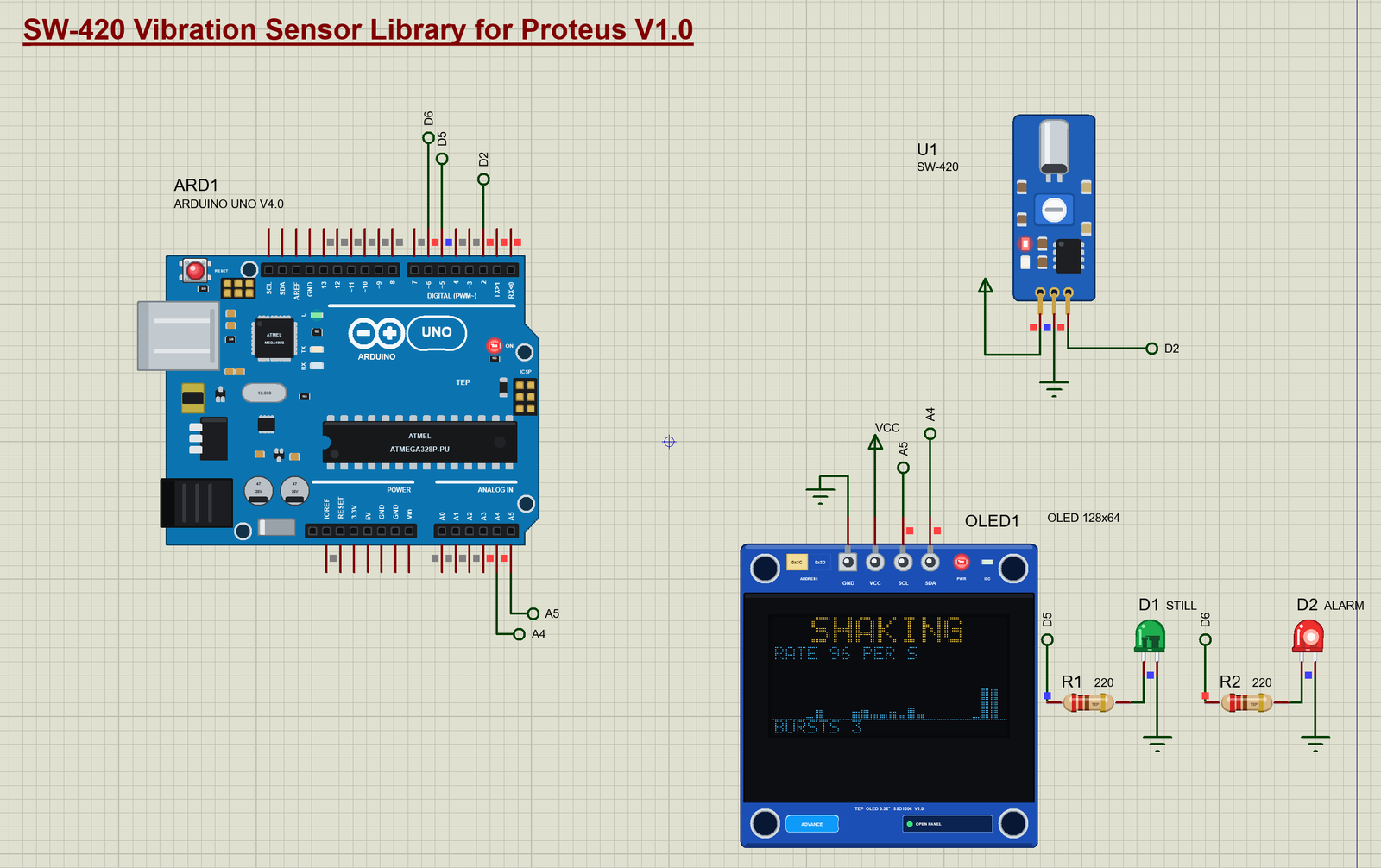
The module comes alive at run time: its PWR LED lights with the supply, and the DO LED - on while all is still - flickers off with every opening of the switch. The demo is a vibration monitor: an Arduino counts the pulses while the table is knocked, a machine runs and the whole thing is shaken hard, and shows the vibration class, the pulse rate, the bursts and a bar chart on an OLED, with a STILL and an ALARM LED.
NOTICE: Our team has put a lot of effort into these small parts: the bodies, the animation and the pop-ups are all our own design, and you get them free. Your feedback is the fuel that keeps us going, so please tell us what you think in the comments below or in the accelerometer board of our forum. And if our free libraries help you, you can buy us a coffee. So, let's get started with the SW-420 Vibration Sensor Library for Proteus Simulation:
How Does the SW-420 Vibration Switch Work?
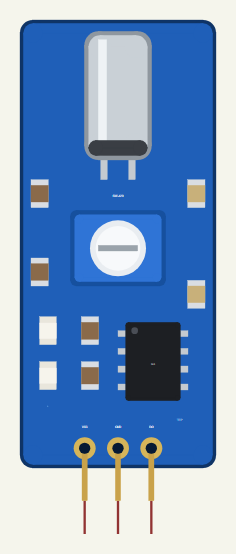
Inside the little silver can there is a centre pin and a coiled spring around it. At rest the spring leans on the pin, so the switch is closed - it is a normally-closed switch. Shake the can and the spring swings, lifting off the pin for a millisecond or two at a time: the switch opens in quick, irregular bursts. The stronger the shaking, the more often the spring flies off. The module turns those openings into a clean digital signal: the switch, a pull-up and a small capacitor feed an LM393 comparator, a blue trimmer sets its threshold, and the output DO is LOW at rest and goes HIGH with every opening.
| SW-420 vibration sensor module | |
|---|---|
| Sensor | the SW-420 spring switch - normally closed, opens when shaken |
| Board | 14 x 32 mm: the switch, an LM393 comparator, a sensitivity trimmer, PWR and DO LEDs |
| Supply | 3.3 - 5 V, a few milliamps |
| Output | DO: LOW at rest (the DO LED on), pulsing HIGH with the vibration |
| Tells you | shaken or not, and roughly how much - by the pulse rate |
| Header | VCC, GND, DO |
Reading Pulses, Not Levels
A newcomer reads DO with digitalRead every now and then and wonders why it seems to miss everything. The openings are only a millisecond or two long, so a loop busy with a display easily steps right over them. The answer is an interrupt: the UNO's D2 calls a tiny routine on every rising edge, no matter what the loop is doing, and the loop only looks at the count now and then. The count in a fixed time is the pulse rate - a rough but useful measure of how hard the board is shaking.
The Trimmer
The trimmer sets how strong a vibration must be before the switch opens often enough to matter. Turned towards sensitive, the module reacts to footsteps across the room; turned the other way, only to a real knock. In our model the trimmer is the property SENS, in g: below it the switch stays closed, above it the openings come faster the stronger the vibration.
Features of the SW-420 Vibration Sensor Library for Proteus Simulation
- A real-looking module: the blue board at its real size, 14 x 32 mm, with the silver SW-420 can, the blue trimmer, the LM393, the LEDs, the header and our small TEP mark.
- Animated: PWR lights with the supply; the DO LED is on at rest and flickers off with every opening.
- A real spring switch: closed at rest, opening in 1 - 4 ms bursts above the trimmer's threshold, more often the stronger the vibration.
- A real comparator output: DO low at rest, high during each opening, stretched a millisecond by the board's capacitor.
- A scene: a knock, a running machine and a strong shaking, plus chips for still, a machine, a strong vibration, a shaking and a single knock.
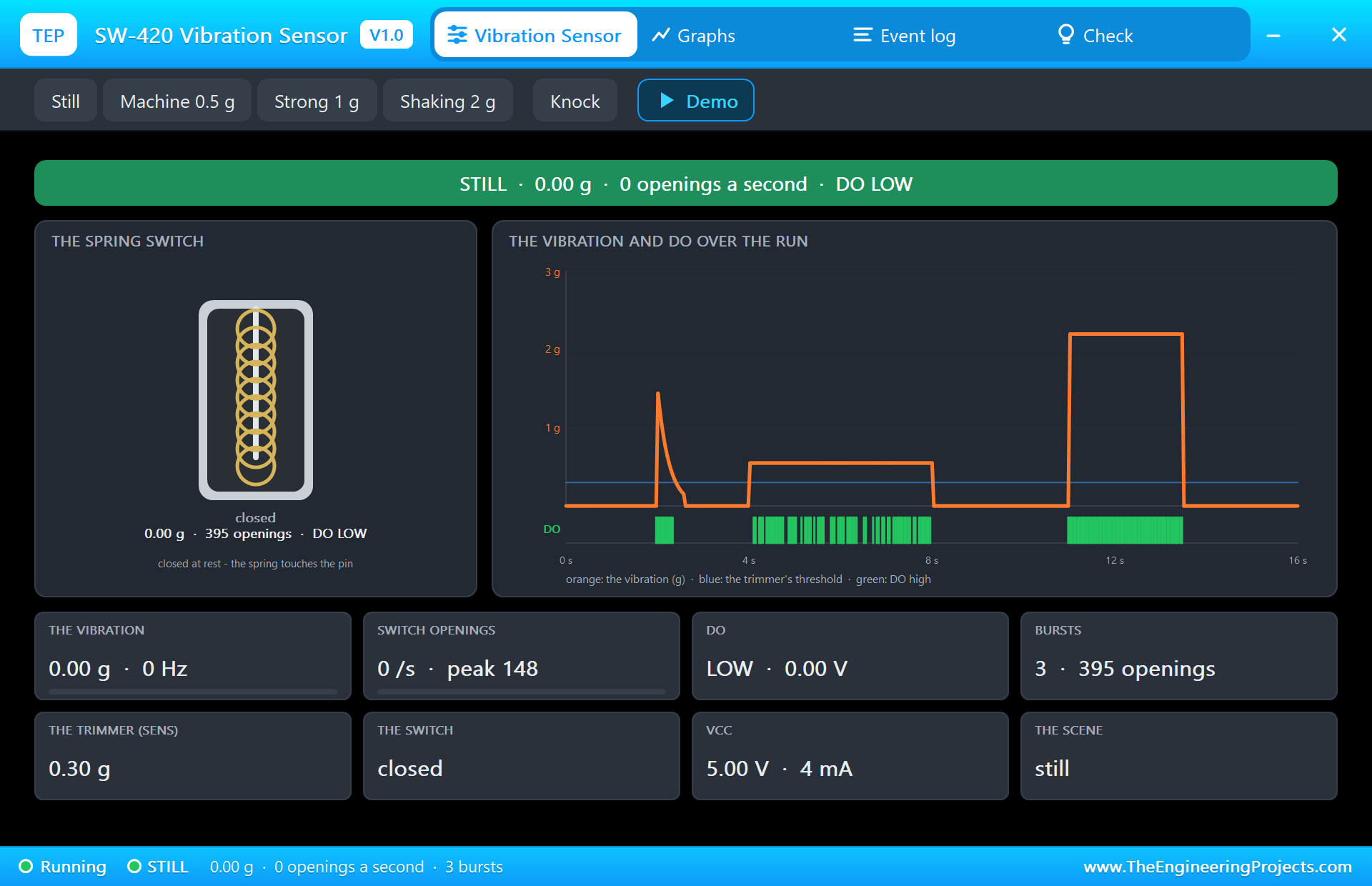
- A pop-up: the spring switch in section, the vibration with the threshold and DO over the run, eight live tiles, graphs, an event log and a check page.
- A complete package: about 2.3 MB with the library, our OLED, 5 mm LED and resistor libraries, our Arduino UNO V4.0 and the demo, without the source code of the model.
The SW-420 in Proteus
The device is VIBRATIONSW420TEP in TEPSW420.LIB, under Sensors > Motion, with the prefix U and the model TEPSW420.DLL. Search SW420 or vibration in Pick Devices. Three pins along the bottom: VCC, GND and DO. Its properties: PROFILE (DEMO or STEADY), LEVEL (the vibration in g, for STEADY) and SENS (the trimmer, 0.3 g).
Download SW-420 Vibration Sensor Library for Proteus Simulation
Click the button below to download SW-420-Vibration-Sensor-Library-for-Proteus-v1.0.zip (about 2.3 MB, without the source code of the models):
SW-420 Vibration Sensor Library for Proteus V1.0- README.txt: installation, the demo, the wiring, troubleshooting and the limits of the simulation.
- Proteus Library Files:
TEPSW420.LIB,TEPOLED12864.LIB,TEPLED5MM.LIB,TEPRESISTOR.LIBandArduinoV4TEP.LIB. - Proteus Model Files:
TEPSW420.DLL,TEPOLED.DLL,TEPLED5MM.DLL,TEPRESISTOR.DLLandTEPARDUINO.DLL. - Arduino Code: the demo sketch (no extra library).
- Proteus Simulation: the demo project, its HEX file and copies of the DLLs.
No Proteus yet? Read How to Download and Install Proteus 7 and 8. New to libraries? Follow How to Install a New Library in Proteus.
How to Install SW-420 Vibration Sensor Library for Proteus Simulation
- Close Proteus and extract the whole zip file, for example to your Desktop.
- Copy the files from Proteus Library Files into the LIBRARY folder of Proteus.
- Copy the files from Proteus Model Files into the MODELS folder.
- Delete
TEPSW420.IDXfrom the LIBRARY folder if it is there. - Start Proteus, press P and search for SW420.
Proteus Simulation of a Vibration Monitor
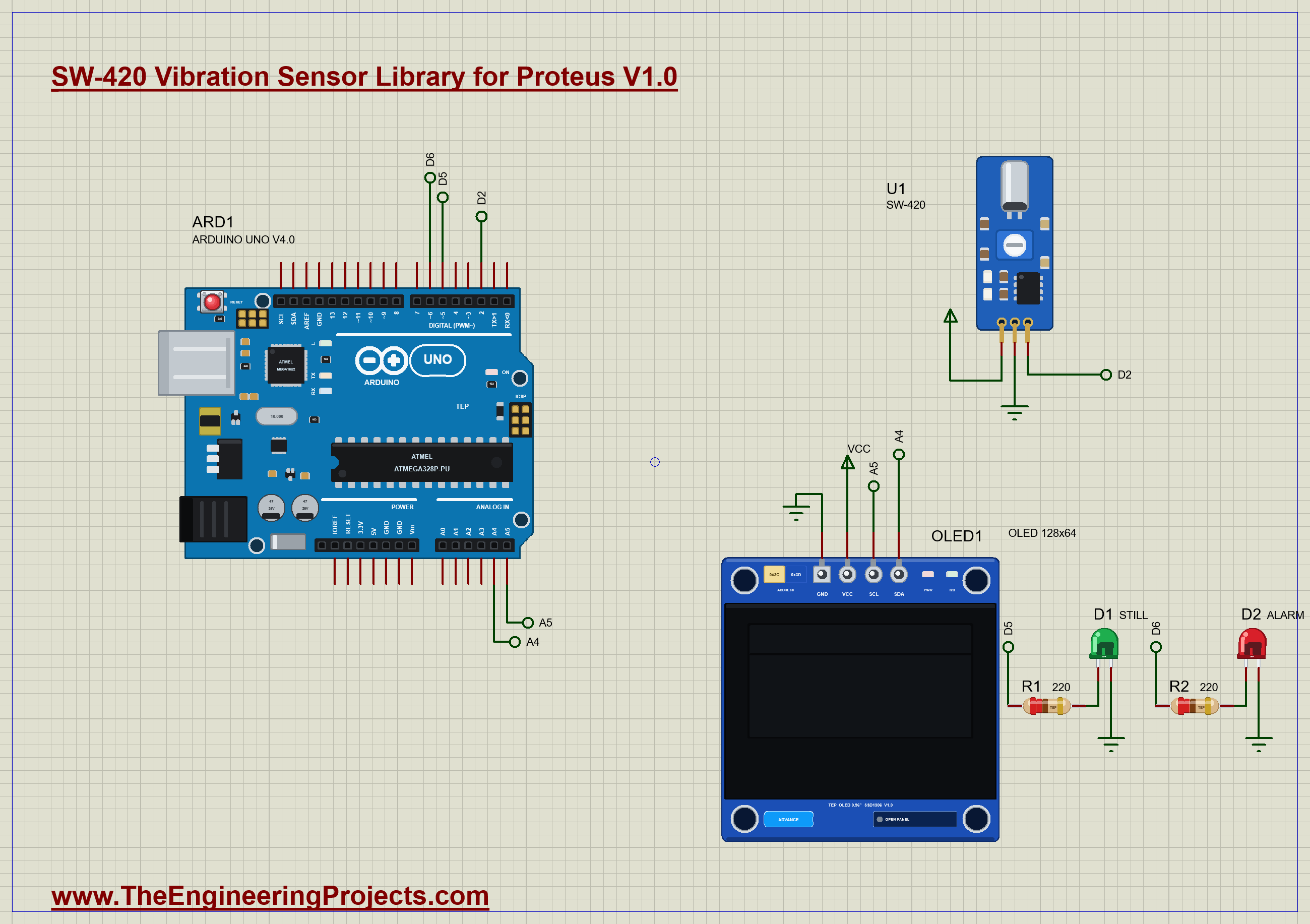
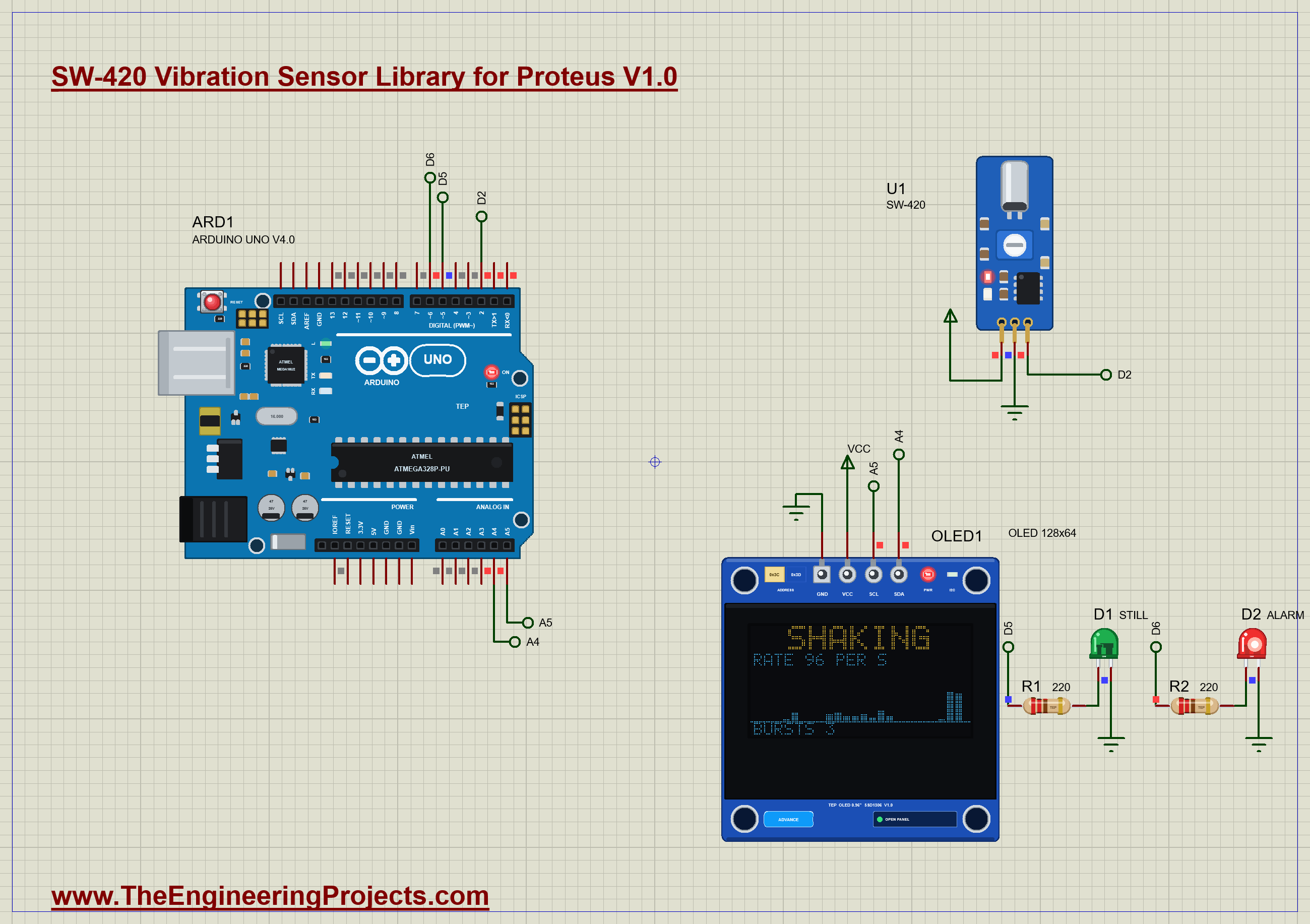
Our demo watches a workbench. U1 is the SW-420 module with PROFILE DEMO and the trimmer at 0.3 g: all is still, a knock on the table at 2 seconds, a machine running from 4 to 8 seconds, still again, then a strong shaking from 11 to 13.5 seconds, and still. VCC and GND go to the supply and DO to D2 of our Arduino UNO Library for Proteus V4.0 - an interrupt pin. Our OLED SSD1306 Library for Proteus shows the readings, and two LEDs from our 5mm LED Library for Proteus sit beside it: STILL (green, D5) and ALARM (red, D6), each through 220 ohm. The Arduino's built-in monitor is the same window as our TEP Serial Monitor Advance for Proteus. Open SW420-Vibration-ArduinoUnoV4.pdsprj.
The Sketch
The sketch needs no library. An interrupt on D2 catches every rising edge of DO - every opening of the spring switch:
attachInterrupt(digitalPinToInterrupt(PIN_DO), onPulse, RISING);The interrupt routine does as little as possible: it counts, and notes the time:
void onPulse() { pulses++; lastPulseMs = millis(); } // DO went high: the spring switch openedFour times a second the loop takes the count and clears it, with the interrupts off for those few instructions so that no pulse is lost or counted twice:
noInterrupts(); const unsigned int n = pulses; pulses = 0; const unsigned long lastP = lastPulseMs; interrupts();A quarter-second's count times four is the pulse rate, and the rate gives the class:
const char* k = rate == 0 ? "STILL" : rate < 50 ? "LIGHT" : rate < 90 ? "STRONG" : "SHAKING";A burst begins with the first pulse after a second of quiet and ends after a second of quiet; the sketch prints its length and its peak rate. The OLED shows the class in big letters, the rate, a bar chart of the last 12 seconds and the bursts; STILL lights after a second without pulses and ALARM from 50 pulses a second.
SW-420 Simulation Results
Open the project and press Run. The demo runs 16 simulated seconds and took about 8 minutes on our PC with the pop-up open and the pictures being taken. Click the module for its pop-up. Every number below comes from one simulation run, the demo exactly as it ships.
A Knock
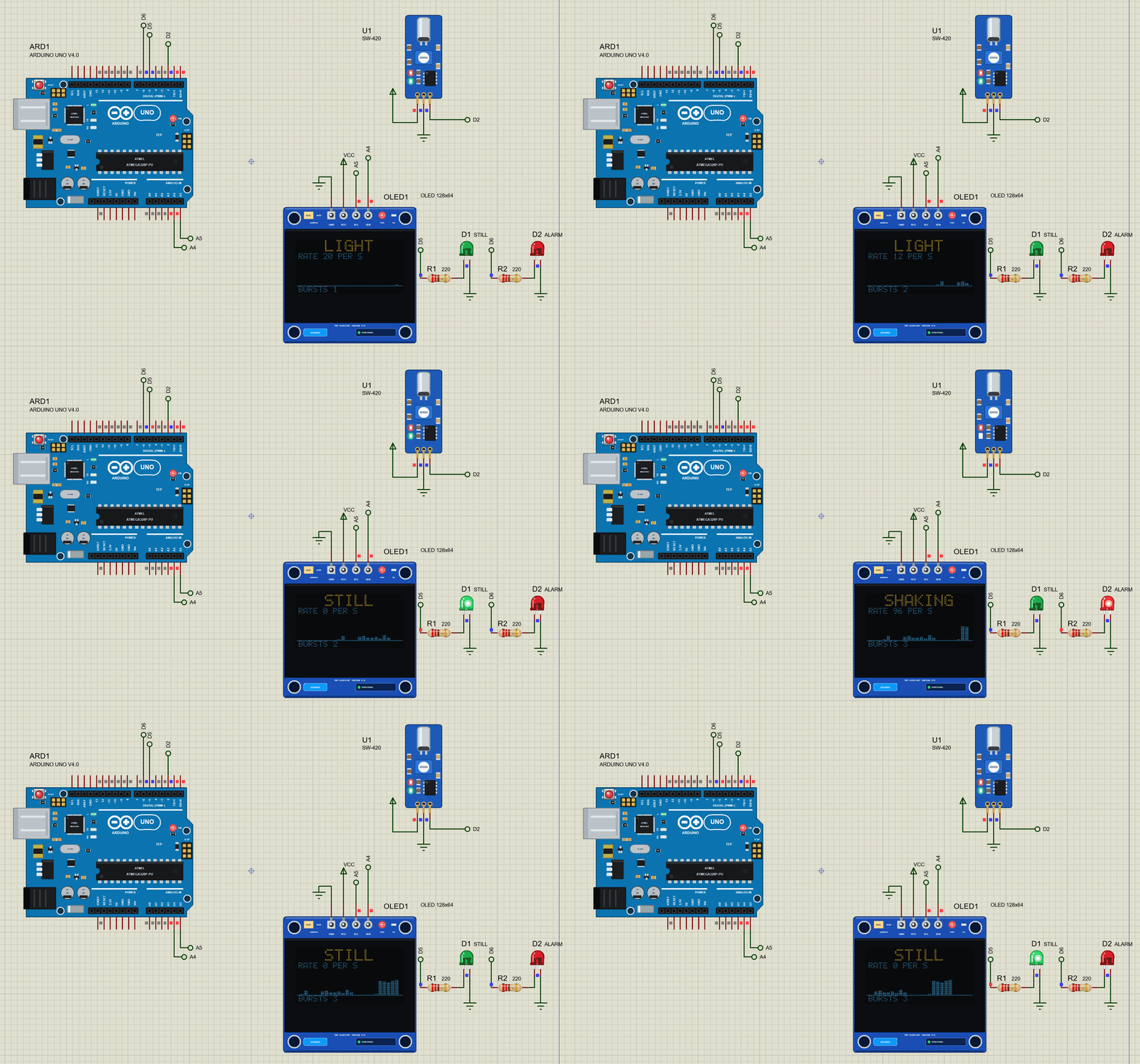
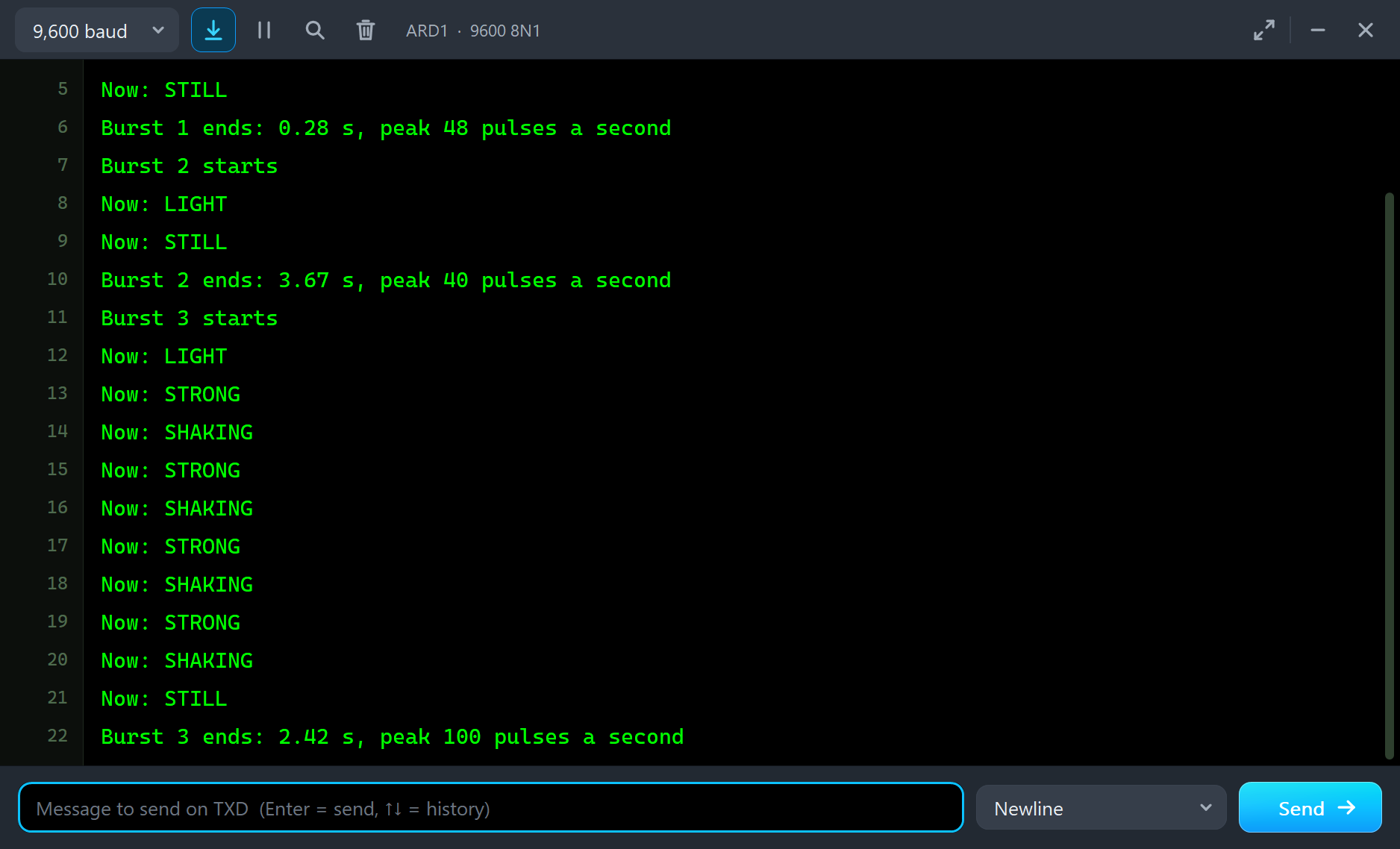
The demo starts still: the spring rests against the centre pin, DO sits LOW and the module's DO LED is on; the OLED says STILL and the green STILL LED is lit. At 2 seconds the table is knocked once. The vibration jumps to 1.49 g and dies away in about half a second, and the spring flicks away from the pin again and again - the first opening comes a millisecond after the knock - so DO pulses HIGH with every opening. When the run paused at 2.2 seconds, the pop-up had counted 10 openings. The sketch saw burst 1 start, called it LIGHT, and once the pulses stopped it printed "Burst 1 ends: 0.28 s, peak 48 pulses a second".
A Running Machine
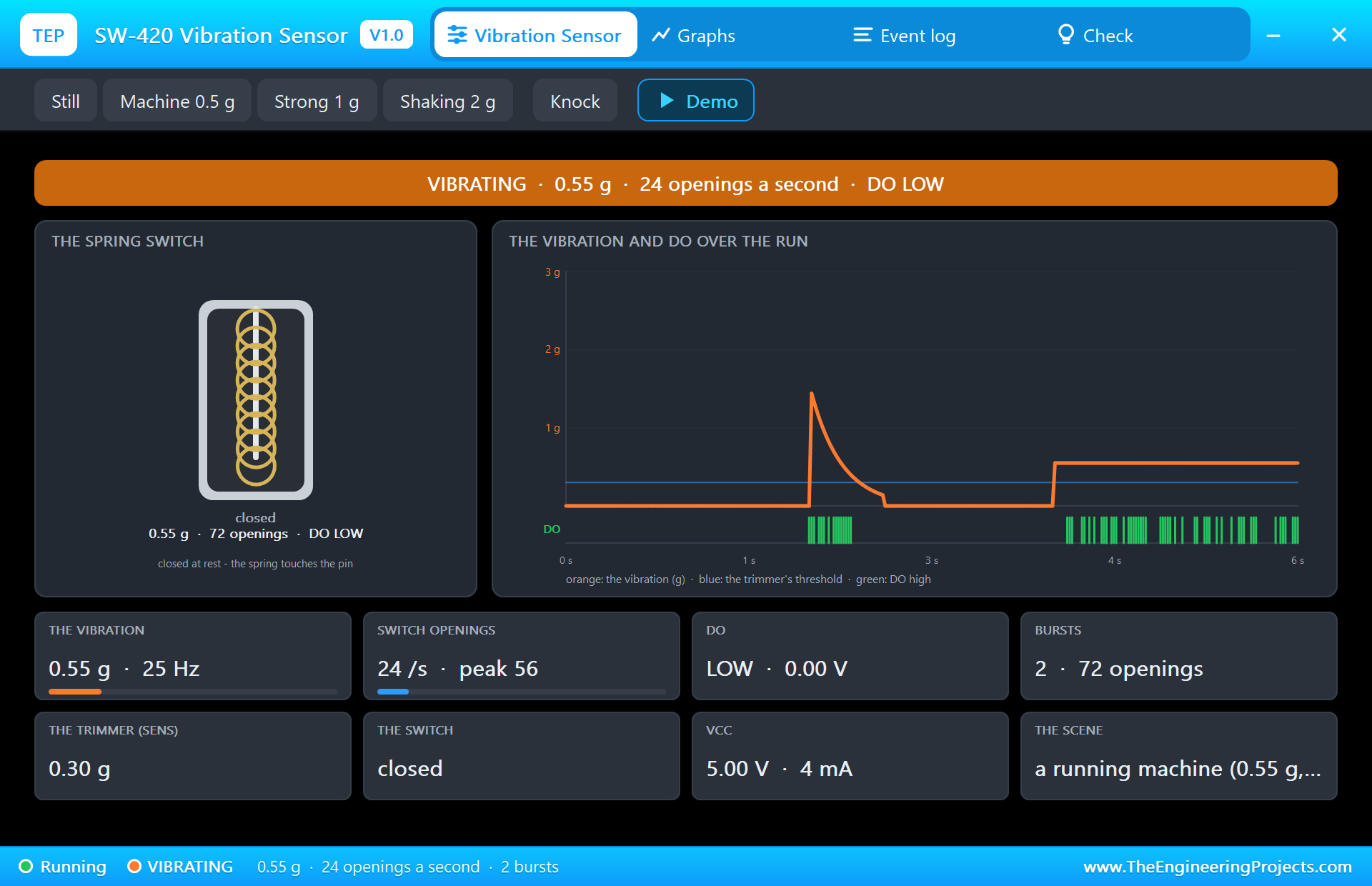
From 4 to 8 seconds a machine runs on the table: a steady 0.55 g at 25 Hz, not far above the trimmer's 0.30 g. Now the switch opens in a steady but irregular trickle - 24 openings a second when the run paused at 6 seconds, with DO HIGH at that moment - and the sketch stays at LIGHT, below its 50-pulse alarm level. That irregularity is the way a real spring switch rattles: a vibration only a little over the threshold opens it only now and then. When the machine stops, the monitor shows "Burst 2 ends: 3.67 s, peak 40 pulses a second"; by then the pop-up had counted 128 openings in all.
A Strong Shaking
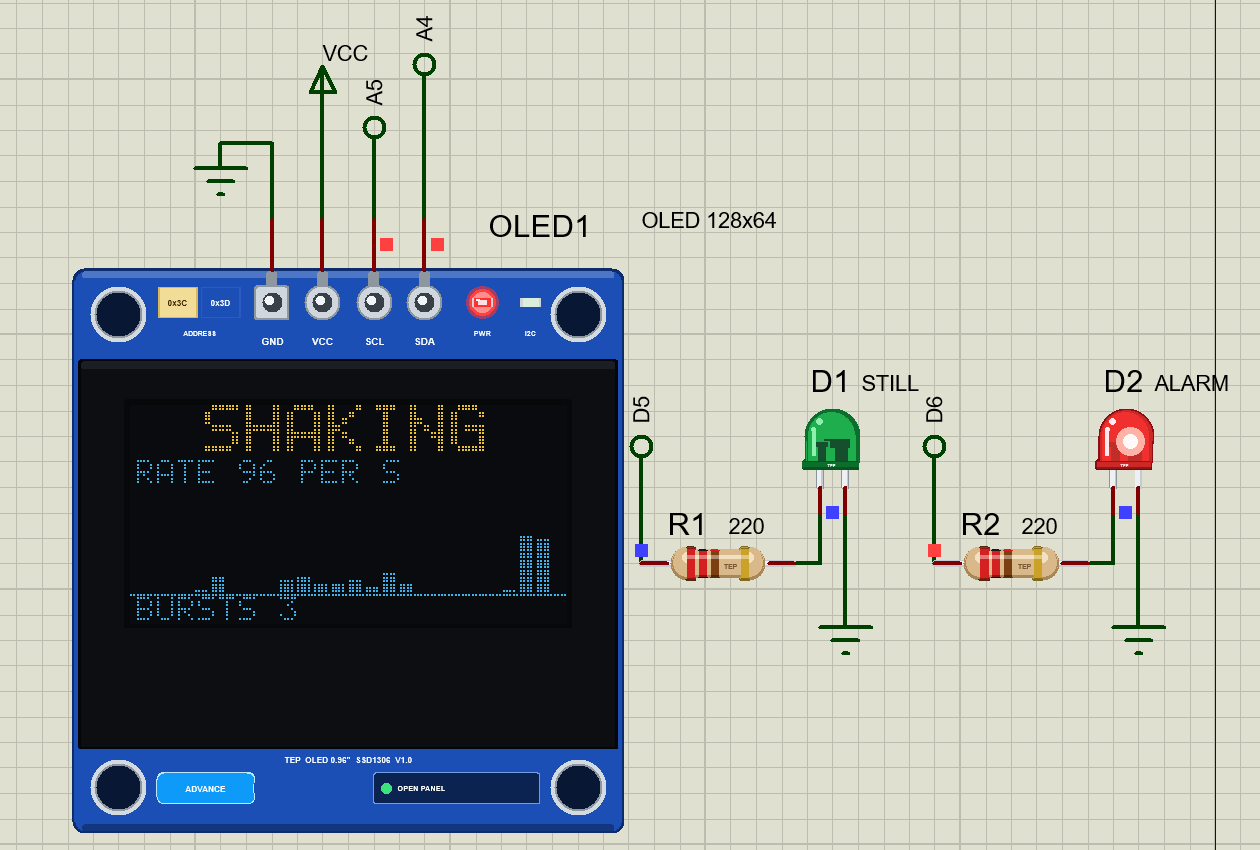
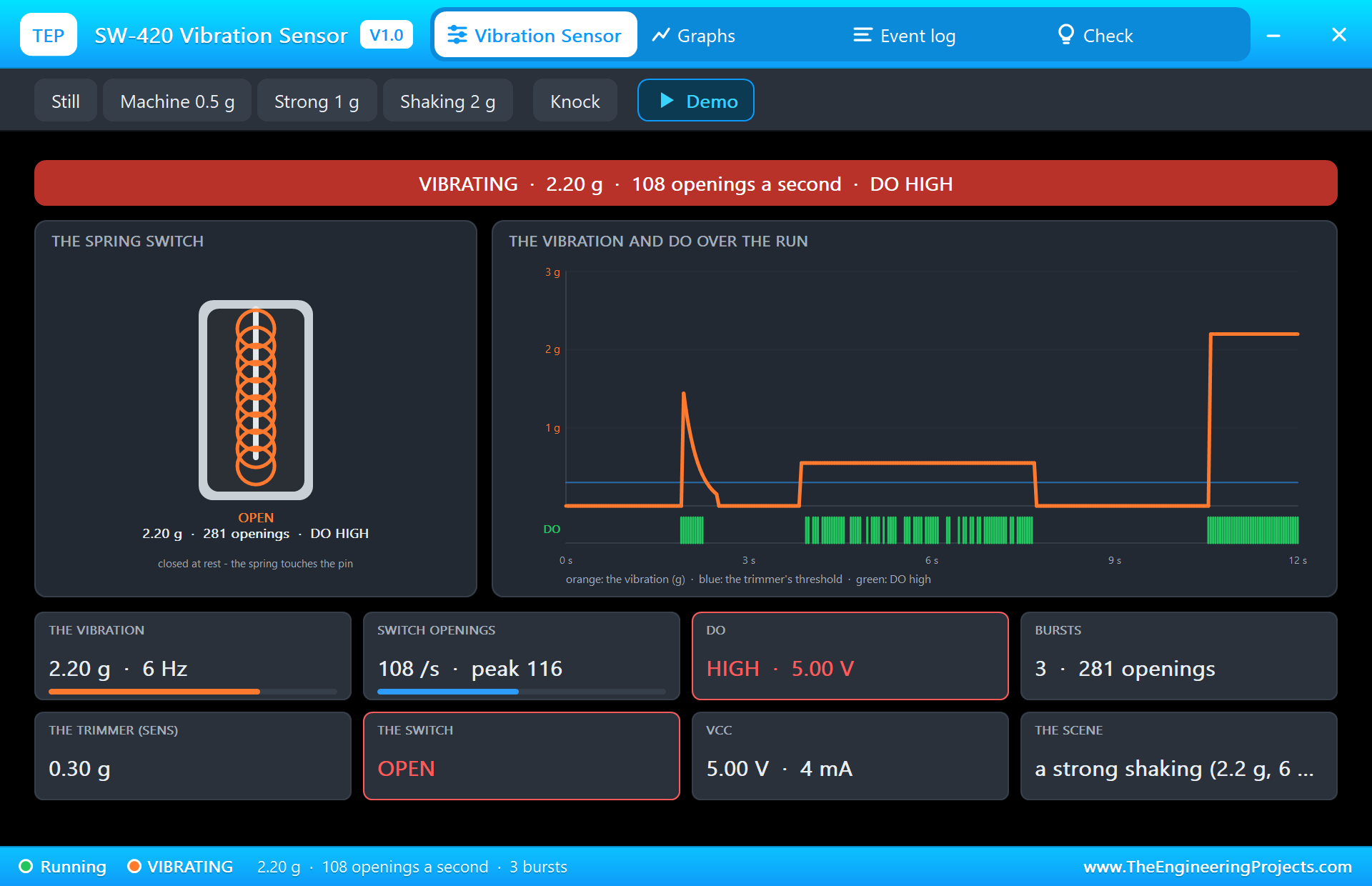
From 11 seconds the board is shaken hard: 2.2 g at 6 Hz, more than seven times the trimmer's level. The switch now opens over a hundred times a second - 108 a second, with a peak of 116, in the pop-up at 12.5 seconds. The sketch's class jumps between STRONG and SHAKING around its 90-pulse line, the OLED reads SHAKING at 96 pulses a second with a tall bar at the end of its chart, and the red ALARM LED is lit. The shaking stops at 13.5 seconds and the monitor closes the burst with "Burst 3 ends: 2.42 s, peak 100 pulses a second". After that all is still again: DO LOW, the DO LED on, the STILL LED lit and the count frozen at 395 openings in three bursts.
The Graphs, the Event Log and the Check Page
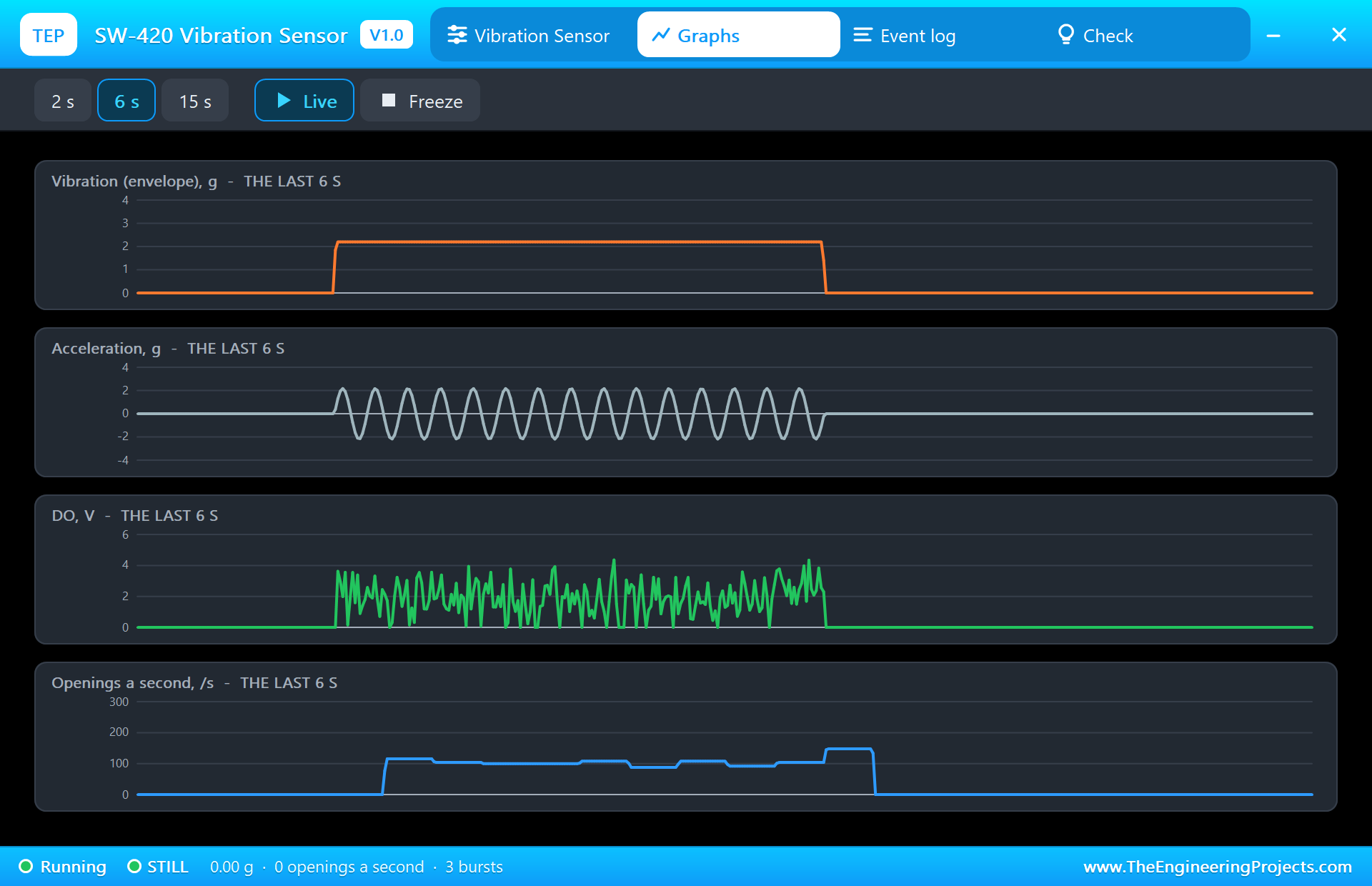
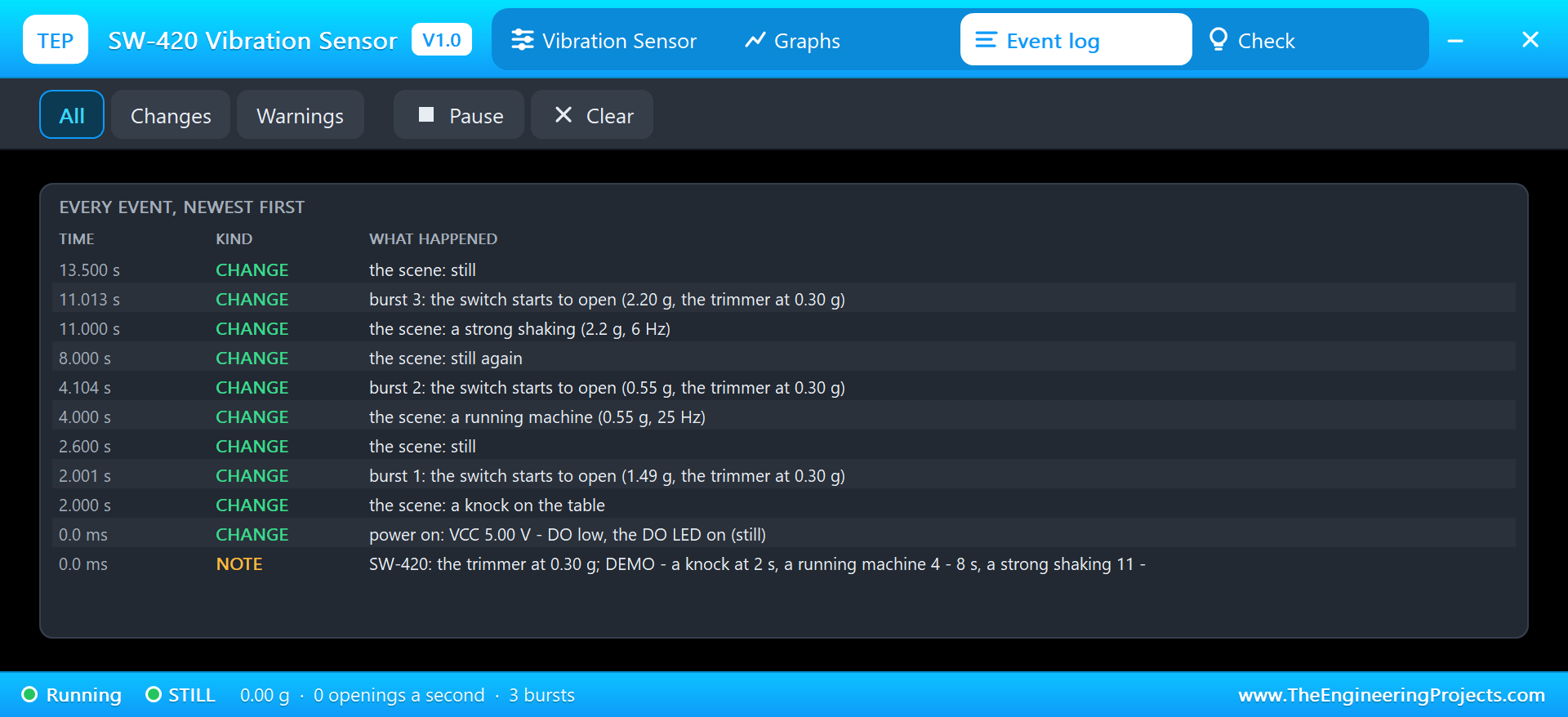
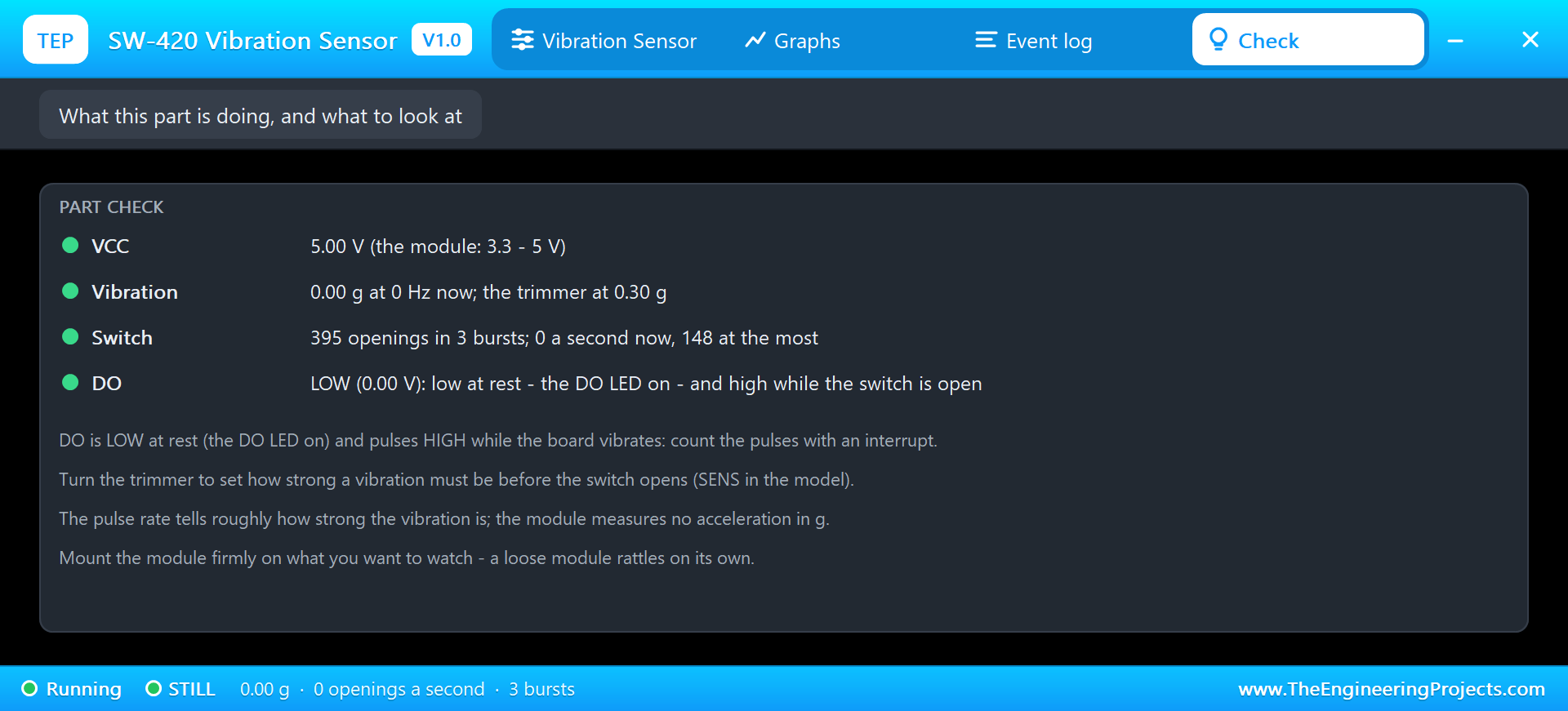
The Graphs page plots the vibration's envelope, the acceleration, DO and the openings a second. The Event log keeps the scene and every burst. The Check page sums up the run: the supply at 5.00 V, the vibration back to 0.00 g with the trimmer at 0.30 g, 395 openings in 3 bursts with 148 a second at the most, and DO LOW (0.00 V) at rest with the DO LED on - every row green.
The monitor shows the sketch's side: every change of class, and each burst's start, length and peak.
SW-420, an Accelerometer or an FSR?
The SW-420 answers one question cheaply: is it being shaken, and roughly how hard? An accelerometer like the one in our ADXL345 Accelerometer Library for Proteus answers it properly - the acceleration on three axes in g, hundreds of times a second - and a fusion sensor like our BNO055 Orientation Sensor Library for Proteus even tells which way the board points. For a push rather than a shake, there is the force-sensing resistor of our FSR402 Force Sensor Library for Proteus. For an alarm on a bicycle, a knock detector or a "the machine has stopped" signal, the SW-420 is all you need.
Try It Yourself
- Click Knock at any time: a short burst, and the monitor prints its length and peak.
- Click Machine 0.5 g, then raise SENS to 0.6 g: the machine no longer opens the switch - the trimmer turned down.
- Lower SENS to 0.1 g: the machine now reads STRONG - the module turned up.
- Read DO with digitalRead in the loop instead of the interrupt: most pulses go missing.
- Change the burst gap from a second to five seconds: a machine that runs in fits counts as one long burst.
Ideas to Extend the Demo
- A washing machine monitor: send a message when the vibration has been gone for two minutes.
- A bicycle alarm: arm it with a button, sound a buzzer on a strong burst.
- A machine log: the running hours from the bursts, kept in the EEPROM.
Your Own Sketches
The demo sketch is in the zip file, and you can change it in the Arduino IDE. New to Arduino? Start with our Arduino Tutorial for Beginners. Export the compiled binary, and set the UNO's PROGRAM property to the new file. Our guide on How to get the HEX file from Arduino shows you where the file ends up.
Things to Know Before Using a Real SW-420
- Set the trimmer: turn it until the DO LED stays on at rest, then until the vibration you want makes it flicker.
- Mount it firmly: a loose board rattles and makes pulses of its own.
- Count with an interrupt: the pulses can be a millisecond short.
- Direction: the spring reacts more to some directions than others - try the module upright and lying down.
- Not a measuring instrument: it gives no acceleration in g - use an accelerometer when you need numbers.
Troubleshooting
- DO is always high: no supply, or the trimmer turned so far that the switch reads open at rest.
- Nothing is counted: DO not on an interrupt pin, or the vibration under the trimmer's threshold.
- Pulses with nothing happening: the module is loose, or the trimmer too sensitive.
- The count misses pulses: reading DO in the loop instead of counting with an interrupt.
- The part is not simulated:
TEPSW420.DLLis missing from MODELS and from the project folder.
Limitations of the Simulation
- The normally-closed spring switch, the trimmer's threshold and the comparator's DO follow the way these modules behave; the board is our own drawing of an SW-420 module.
- Our own choices: the opening rate and lengths, the 1 ms stretch, the 1 k output and the scene.
- Not modelled: the switch's sensitivity to direction, mechanical resonance, contact wear and temperature.
- Arduino is a name of Arduino; this library is not made or endorsed by Arduino, Labcenter or any module maker.
- Tested in Proteus 8.5 in November 2026 (the demo as shipped). Proteus 7 is not supported.
So, that was all about the SW-420 Vibration Sensor Library for Proteus Simulation. I hope it helps you build your door alarm, your machine monitor or your knock lock before the module is screwed to anything - and shows that sensing a shake can be as simple as a spring, a pin and an interrupt. If you have any questions, ask in the comments and I will help you out. Till the next tutorial, take care and have fun!