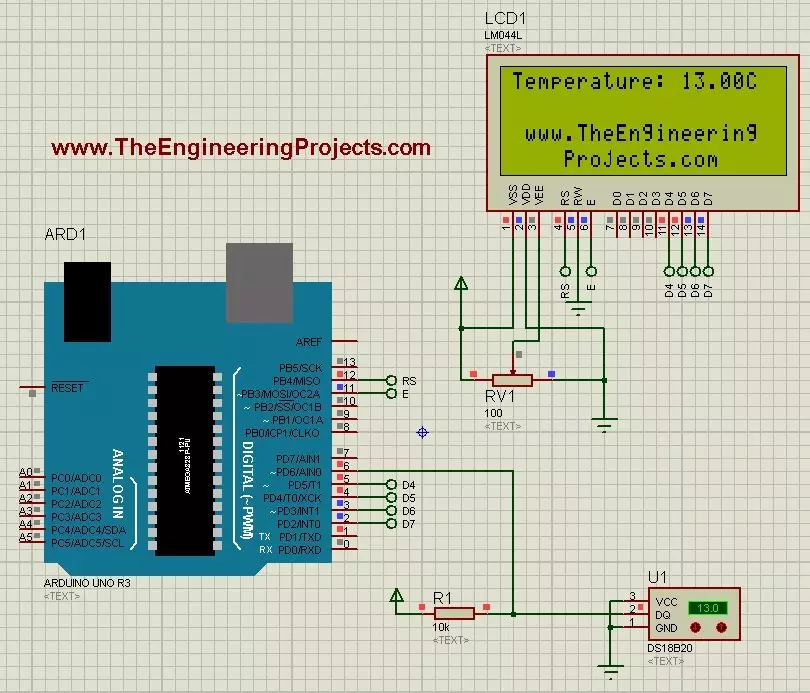
Hello friends! Today we will use the DS18B20 temperature sensor with Arduino Uno in Proteus and display its reading on a character LCD. The sensor is sometimes shortened to 18B20 in project descriptions, but DS18B20 is the part name we will use when selecting the device and checking its specifications. We will begin with the sensor connections, add a 20-column by 4-row LCD, and write a sketch that requests a temperature conversion before displaying the result. We will also handle a missing sensor explicitly instead of presenting an error value as though it were a real temperature. The Proteus model lets us change the simulated temperature using its controls. It does not measure the room around your computer. This makes it useful for checking the program and display workflow before building ...
Hello friends! We have prepared the original Pixy camera and installed PixyMon. In this tutorial, we will put the camera into its firmware programming mode, select the correct firmware file and check that it returns to normal operation afterward. This procedure applies to the original Pixy CMUcam5. The images show the earlier update performed for this series, including a 2.0.17 firmware file. They remain useful for understanding the sequence, but that filename should not be treated as a permanent recommendation. We will choose firmware from the original camera's official resources and keep its role separate from the desktop application and Arduino library. That distinction prevents a common mistake: downloading a newer-looking file for different hardware and assuming it is an upgrade for t ...