TEP , The Engineering Projects , Tutorials
Lm35 pinout, lm35 working, lm35 introduction, lm35, lm35 basics, introduction to lm35
TEP , The Engineering Projects , Boxes

Introduction to LM35

TEP , THe Engineering Projects , Shares 2.5K Views
TEP , The ENgineering Projects , Reaction 40
TEP , The ENgineering Projects , Reaction 700
TEP , The ENgineering Projects , Reaction 60
TEP , The ENgineering Projects , Reaction 25
TEP , The ENgineering Projects , Reaction 60
TEP , The Engineering Projects , Pintrest TEP , The Engineering Projects , Pintrest TEP , The Engineering Projects , Pintrest TEP , The Engineering Projects , Pintrest TEP , The Engineering Projects , Pintrest TEP , The Engineering Projects , Pintrest TEP , The Engineering Projects , Pintrest TEP , The Engineering Projects , Pintrest
Shares: 691
TEP , The Engineering Projects , PCBWAY
Hello friends, I hope you all are doing great. In today's tutorial, we are gonna have a look at a detailed Introduction to LM35. LM35  is a type of commonly used temperature sensor, that can be used to measure temperature with an electrical output compared to the temperature in (°C). In can measure temperature in a better way than a thermistor. LM35 is used in industries and commercial buildings where high accuracy of temperature measuring is needed. I will give you a detailed overview of this temperature sensor in today’s post where we will have a look its pinout, working, protocol, etc. I will also share some links of projects where I have interfaced it with Arduino or other microcontrollers. If you have any questions please ask in the comments, I will resolve your queries and will guide you in a comprehensive way. So, let’s get started with the basic Introduction to LM35:

Introduction to LM35

  • LM35 is a commonly used temperature sensor, It shows values in the form of output voltages instead of degrees Celsius.
  • LM35 shows higher voltage values than thermocouples and may not need the output voltage to be amplified.
  • The output voltage of LM35 is proportional to the Celsius temperature. The scale factor is .01 V/°C.
  • One most important characteristics is that it draws just 60 microamps from its supply and acquires a low self-heating capacity.
  • LM35 temperature sensor available in many different packages like T0-46 metal transistor-like package, TO-92 plastic transistor-like package, 8-lead surface mount SO-8 small outline package.
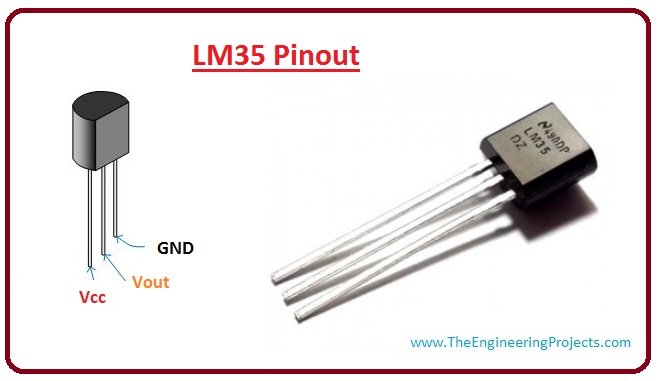
Let's have a look at LM35 PINOUT configuration:

LM35 Pinout

  • LM35 has three pinouts which are:
    • PIN 1: Vcc, it used as input at this pin we apply +5 V input voltage.
    • PIN 2: At this pin, we get output voltage.
    • PIN 3: This pin is used for ground.
  • Here's the table for LM35 Pinout for better understanding:
 
No. Parameter Pin Type
1. Vcc Power Pin ( Connected to +5V )
2 Vout Output Pin (It should be connected with an analog pin of Microcontroller)
3 Ground Ground Pin ( Connected to 0V or GND )
For better understanding lets, have a look at LM35 Pinout figure.
Lm35 pinout, lm35 working, lm35 introduction
Let's have a look at working of LM35  Working.

Working of LM35

  • LM35 is used to measure precise centigrade temperature. The output of this sensor changes describes the linearity. The output voltages of this sensor are linearly comparative to the Celsius temperature.
  • The output voltage range of this sensor is from -55° to +150°C. It also has low self-heating power.
  • Its operating voltages is 4 to 30 volts.
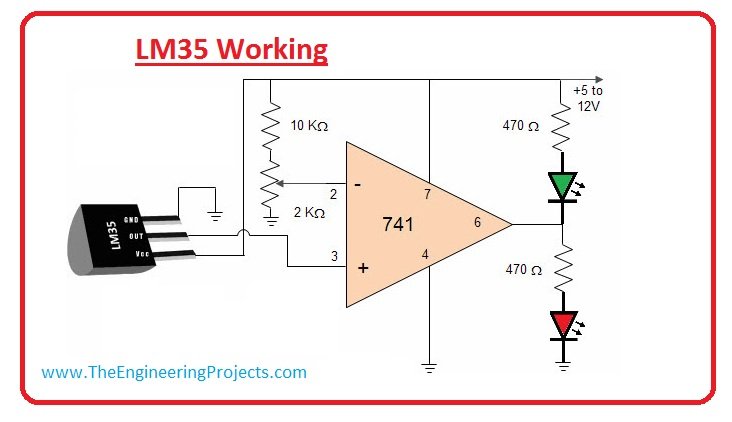
  • In the most circuit, this sensor is used with an operational amplifier. An amplifier is a device which amplifies applied a voltage at a certain level.
  • Operational Amplifier has three terminal, first two are inverting and noninverting inputs third one is used for output.
  • By using LM35 with operational amplifier we can get amplification of output voltages of LM35.
  • For better understanding lets have a look at circuit diagram.
lM35 working, lm35 pinout

LM35 Features

  • Its maximum and minimum input voltages are 35 V and -2 V respectively. It typically operates at 5 V.
  • It can measure temperature from -55°C to 150°C.
  • Its Output voltage is directly proportional (Linear) to temperature (i.e.) there will be a rise of 10mV (0.01V) for every 1°C rise in temperature.
  • Its Drain current is less than 60 uA.
  • Its low-cost temperature sensor.
  • It is small and hence suitable for remote applications.
  •  It is available in TO-92, TO-220, TO-CAN and SO IC package.
  • It is low self-heating, 0.08 C in still air n Non-linearity only ±1/4C typical.

Parameters of LM35

Let's discuss some working parameters of LM35
No. Parameter Conditions Value Unit
1. Accuracy LM35, LM 35C T A=+25°C ±0.4 °C
2 Accuracy, LM35D T A=+25°C ±0.6 °C
3 Non linearity T MIN=TA=T MAX ±0.3 °C
4 Sensor Gain T MIN=TA=T MAX +10.0 mV/°C
5 Load Regulation T A=+25°C ±0.4 mV/mA
6 Line Regulation T A=+25°C ±0.01 mV/V
7 Quiescent Current V S=+5V, +25°C 56 µA
8 Change of Quiescent Current 4V=VS=30V 0.2 µA
9 Temperature Coefficient of Quiescent Current             - +0.39 µA/°C
10 Long Term Stability T J=T MAX, for 1000 hours    ±0.08 ±0.08 °C
 

LM35 Interfaced with Aurdino

Now, let's discuss LM35 interfacing with Arduino and design a simple project:
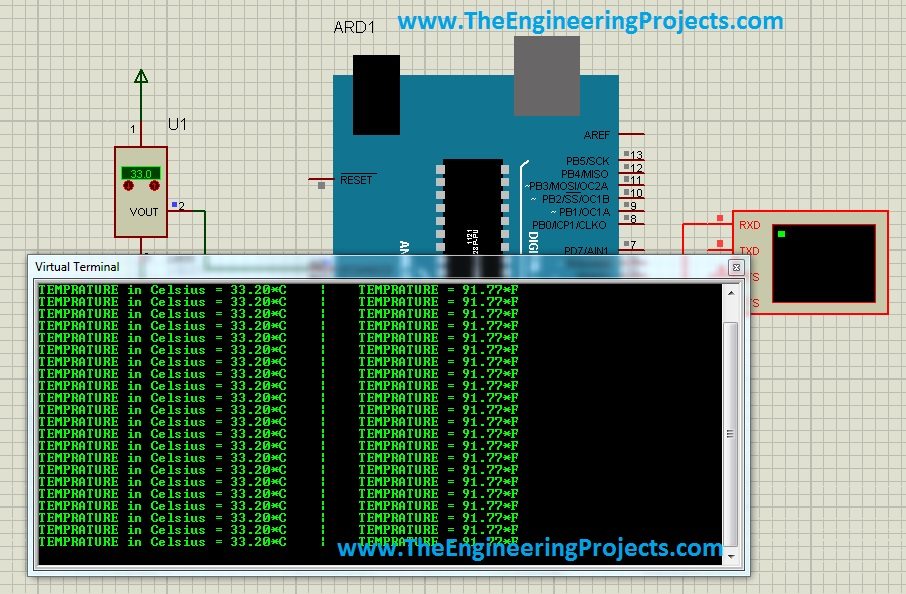
  • The project which we are gonna discuss is Temperature Monitoring on Virtual Terminal of Arduino.
  • Temperature Sensor we are gonna use is LM35.
  • In this circuit, Aurdino is the main component because it controls all functions.
  • In this circuit LM35 senses the temperature and converts into an electoral (analog) signal, then this signal applied to Microelectronic Unit through an analog-to-digital converter (ADC).
  • The analog signal is converted into digital format by the ADC.
  • The value of temperature sensed by the sensor will be displayed on Serial Terminal or virtual Terminal if you are working on Proteus.
  • You can download this complete Proteus simulation from Interfacing of LM35 with Arduino in Proteus.
  • I have also shared Interfacing of LM35 with PIC Microcontroller, so if you are working on PIC Microcontroller then you should read that out.
  • For better understanding lets see the circuit diagram of this project:
interface lm35 with arduino,lm35 arduino coding,how to connect lm35 and arduino,proteus lm35 example
Now, let's discuss the advantage and application of this project. Let's have a look at applications of LM35:

Applications of LM35

These are some applications of LM35, let discuss them.
  • It's used for measuring the temperature of a particular environment.
  • It provides thermal shutdown for a circuit or component used in a specific project.
  • It can be used for battery temperature measurement. It provides battery protection from overheating.
  • It can be used in HVAC applications as a temperature measurement device.
I hope you have enjoyed today's tutorial on this simple temperature sensor LM35. Let me know if you need any help with its projects. Will meet you guys in the next tutorial. Till then take care, have fun !!! :)
TEP , The Engineering Projects , TagsLm35 pinout
lm35 working
lm35 introduction
lm35
lm35 basics
introduction to lm35
TEP , The Engineering Projects , Calender Wednesday, January 30, 2019
Next Page TEP , The Engineering Projects , Arrow
TEP , The Engineering Projects , Comments

Write a Comment

TEP , The Engineering Projects , WordPress TEP , The Engineering Projects , Google TEP , The Engineering Projects , Twitter TEP , The Engineering Projects , Facebook TEP , The Engineering Projects , User
TEP , The Engineering Projects , Robot
TEP , The Engineering Projects , Comments Comments on ‘’ Introduction to LM35 ‘’ (1)
TEP , The Engineering Projects , Add

Top PCB Design Service

PCB
TEP, The Engineering Projects, PCB Online
TEP , The Engineering Projects , Add

Embedded Tools

ARDINO
TEP , The Engineering Projects , ARDUINO
TEP , The Engineering Projects , Subscribe

Subscribe Now !!!

Learn Free Pro Tricks

TEP , The Engineering Projects , Mail Receive Quality Tutorials Straight in your Inbox by Submitting your Email ID Below
TEP , The Engineering Projects , Mail
TEP , The Engineering Projects , Books

Engineering Books

TEP , The Engineering Projects , Arduino Programming Book
SALE $20
Text Book for arduino $20
TEP , The Engineering Proects , Star TEP , The Engineering Proects , Star TEP , The Engineering Proects , Star TEP , The Engineering Proects , Star TEP , The Engineering Proects , Star (5.0)
TEP , The Engineering Projects , Arduino Programming Book
SALE $20
Text Book for raspberry pi $20
TEP , The Engineering Proects , Star TEP , The Engineering Proects , Star TEP , The Engineering Proects , Star TEP , The Engineering Proects , Star TEP , The Engineering Proects , Star (3.0)
TEP , The Engineering Projects , Arduino Programming Book
SALE $20
Text Book for arduino $20
TEP , The Engineering Proects , Star TEP , The Engineering Proects , Star TEP , The Engineering Proects , Star TEP , The Engineering Proects , Star TEP , The Engineering Proects , Star (4.7)
TEP , The Engineering Projects , Arduino Programming Book
SALE $20
Text Book for raspberry pi $20
TEP , The Engineering Proects , Star TEP , The Engineering Proects , Star TEP , The Engineering Proects , Star TEP , The Engineering Proects , Star TEP , The Engineering Proects , Star (5.0)
TEP , The Engineering Projects , Category

Categories

TEP , The Engineering Projects , Arduino
TEP , The Engineering Projects , Notification 20K
TEP , The Engineering Projects , Tick 900
TEP , The Engineering Projects , Views 900
TEP , The Engineering Projects , Comments 20K
TEP , The Engineering Projects , Arduino
TEP , The Engineering Projects , Notification 20K
TEP , The Engineering Projects , Tick 900
TEP , The Engineering Projects , Views 900
TEP , The Engineering Projects , Comments 20K
TEP , The Engineering Projects , Arduino
TEP , The Engineering Projects , Notification 20K
TEP , The Engineering Projects , Tick 900
TEP , The Engineering Projects , Views 900
TEP , The Engineering Projects , Comments 20K
TEP , The Engineering Projects , Arduino
TEP , The Engineering Projects , Notification 20K
TEP , The Engineering Projects , Tick 900
TEP , The Engineering Projects , Views 900
TEP , The Engineering Projects , Comments 20K
TEP , The Engineering Projects , Arduino
TEP , The Engineering Projects , Notification 20K
TEP , The Engineering Projects , Tick 900
TEP , The Engineering Projects , Views 900
TEP , The Engineering Projects , Comments 20K
TEP , The Engineering Projects , Arduino
TEP , The Engineering Projects , Notification 20K
TEP , The Engineering Projects , Tick 900
TEP , The Engineering Projects , Views 900
TEP , The Engineering Projects , Comments 20K
TEP , The Engineering Projects , Arduino
TEP , The Engineering Projects , Notification 20K
TEP , The Engineering Projects , Tick 900
TEP , The Engineering Projects , Views 900
TEP , The Engineering Projects , Comments 20K
TEP , The Engineering Projects , Arduino
Matlab
200
TEP , The Engineering Projects , Notification 20K
TEP , The Engineering Projects , Tick 900
TEP , The Engineering Projects , Views 900
TEP , The Engineering Projects , Comments 20K
TEP , The Engineering Projects , Arduino
TEP , The Engineering Projects , Notification 20K
TEP , The Engineering Projects , Tick 900
TEP , The Engineering Projects , Views 900
TEP , The Engineering Projects , Comments 20K