Hello friends, I hope you all are doing great. Today, I am going to share the new MCP2515 CAN Bus Module Library for Proteus V1.0. CAN is the network inside every modern car: the engine, the brakes, the dashboard and dozens of other controllers share two wires, CANH and CANL, and talk without a master. Tractors, lifts, robots and factory machines use it too. The cheap blue MCP2515 module with its TJA1050 transceiver puts an Arduino on such a bus over SPI. Until now there was no MCP2515 in Proteus on which you could watch two Arduinos talk over CAN.
Behind the parts sits our own model, written from the MCP2515 datasheet and the CAN 2.0 specification. It answers the SPI instructions of the chip, keeps its registers, and puts every frame on CANH and CANL bit by bit: the identifier, the data, the CRC-15, the stuff bits and the ACK slot. Two nodes that start together go through a real arbitration, a broken frame ends in an error frame and is sent again, and the error counters climb exactly as on a real chip. You get a Simple device with a STATUS panel of the last frames, and an Advance device with a pop-up window where you can click any frame to see it field by field and bit by bit. The demo runs on two of our Arduino UNO V4.0 boards: an engine and a dashboard.
NOTICE: a CAN module is easy to fake: a wire that copies one Arduino's data to the other. We wanted more. Our module puts each bit on the bus at its own bit time, so a dominant bit of one node overwrites a recessive bit of another, the lower identifier wins the arbitration, a frame nobody acknowledges is an ACK error, and a node at the wrong speed hears only garbage. It took our team a lot of hard work. Your feedback is the fuel that keeps us going, so please tell us what you think in the comments below or in the MCP2515 CAN Bus Module board of our forum. And if our free libraries help you, you can buy us a coffee. So, let's get started with the MCP2515 CAN Bus Module Library for Proteus V1.0:
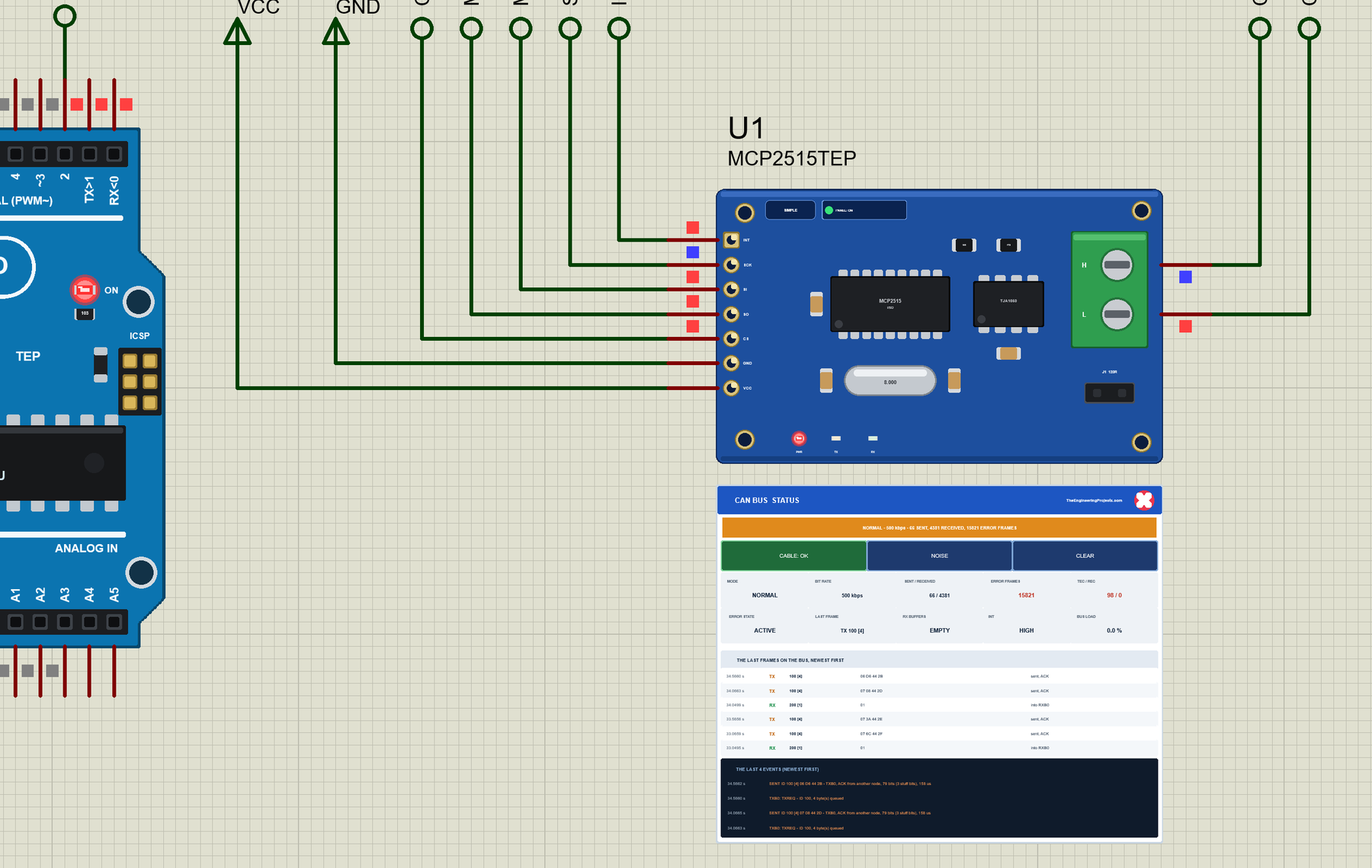
What is the MCP2515 CAN Bus Module?
The module carries two chips. The MCP2515 is a stand-alone CAN controller: the Arduino talks to it over SPI, writes a frame into one of its three TX buffers and asks it to send; the MCP2515 does the rest - the arbitration, the CRC, the stuffing, the ACK, the retries - and stores the frames it receives in two RX buffers. The TJA1050 is the transceiver: it turns the MCP2515's logic levels into the differential pair CANH and CANL.
| MCP2515 + TJA1050 module | |
|---|---|
| Supply | 5 V on VCC (the TJA1050 needs 5 V) |
| Arduino side | SPI (CS, SCK, SI = MOSI, SO = MISO) and INT, LOW while a frame waits |
| Bus side | CANH and CANL - the screw terminal H L - to the other nodes |
| On the board | the 8 MHz crystal, the J1 jumper (the 120 ohm terminator) |
| Speed | up to 1 Mbps; 500 kbps in the demo |
| Buffers | 3 TX buffers, 2 RX buffers with 2 masks and 6 filters |
| Arduino library | autowp-mcp2515 (MIT) in the demo |
How a CAN Bus Works
Every node is connected to the same two wires. A bit is either dominant (0: CANH pulled up, CANL pulled down) or recessive (1: both wires left alone). If one node sends dominant and another recessive, the bus is dominant - dominant always wins. Frames carry no address of a receiver; they carry an identifier that says what the data is (the engine speed, the doors), and every node decides itself whether it wants it.
The identifier is also the priority. Two nodes that start at the same moment send their identifiers bit by bit and read the bus back. The first node that sends a recessive 1 but reads a dominant 0 knows it has lost: it stops sending and simply receives the other frame - no data is destroyed, and it tries again afterwards. The lower identifier always wins.
| Field | Bits | What it is |
|---|---|---|
| SOF | 1 | start of frame, always dominant |
| Identifier | 11 or 29 | what the data is - and its priority (standard or extended frame) |
| RTR, IDE | 1 + 1 | a data or a remote frame; standard or extended |
| DLC | 4 | how many data bytes, 0 - 8 |
| Data | 0 - 64 | the bytes |
| CRC | 15 + 1 | the CRC-15 of everything before it, then a recessive delimiter |
| ACK | 1 + 1 | every receiver that got the frame right drives this slot dominant |
| EOF | 7 | seven recessive bits; then 3 bits of intermission |
What's New in MCP2515 CAN Bus Module Library for Proteus V1.0
- The MCP2515 as on the bench: the SPI instructions RESET, READ, WRITE, BIT MODIFY, READ STATUS, RX STATUS, LOAD TX BUFFER, READ RX BUFFER and RTS, the registers, the modes and the bit timing from CNF1 - CNF3 and the crystal.
- CAN frames bit by bit on CANH and CANL: standard and extended identifiers, data and remote frames, bit stuffing, the CRC-15, the ACK slot.
- A real bus: the CANH and CANL pins of all modules join; dominant beats recessive; two nodes that start together go through the arbitration.
- Errors as on a real chip: bit, stuff, CRC, form and ACK errors, error frames, the automatic retry, TEC and REC, error passive and bus-off.
- Three TX buffers and two RX buffers with the masks, the six filters, the rollover and the overflow flags; the INT pin.
- Click a frame in the Advance pop-up to see it field by field and every bit on the bus, the stuff bits marked.
- The wrong speed found at once: the bit rate measured on the bus is compared with this node's own.
- Two TEP actions: CABLE cuts a node off the bus, NOISE makes it read one bit of the next frame wrong.
- Three test tools on the Advance device: Bit timing, Registers and Wiring.
- A two-node demo on our Arduino UNO V4.0 with autowp-mcp2515: an engine sending its data every 500 ms and a dashboard that shows it, switches the engine's LED and can flood the bus.
- A compact package: about 1.28 MB, without the C++ source code of the model.
Two Devices: Simple and Advance
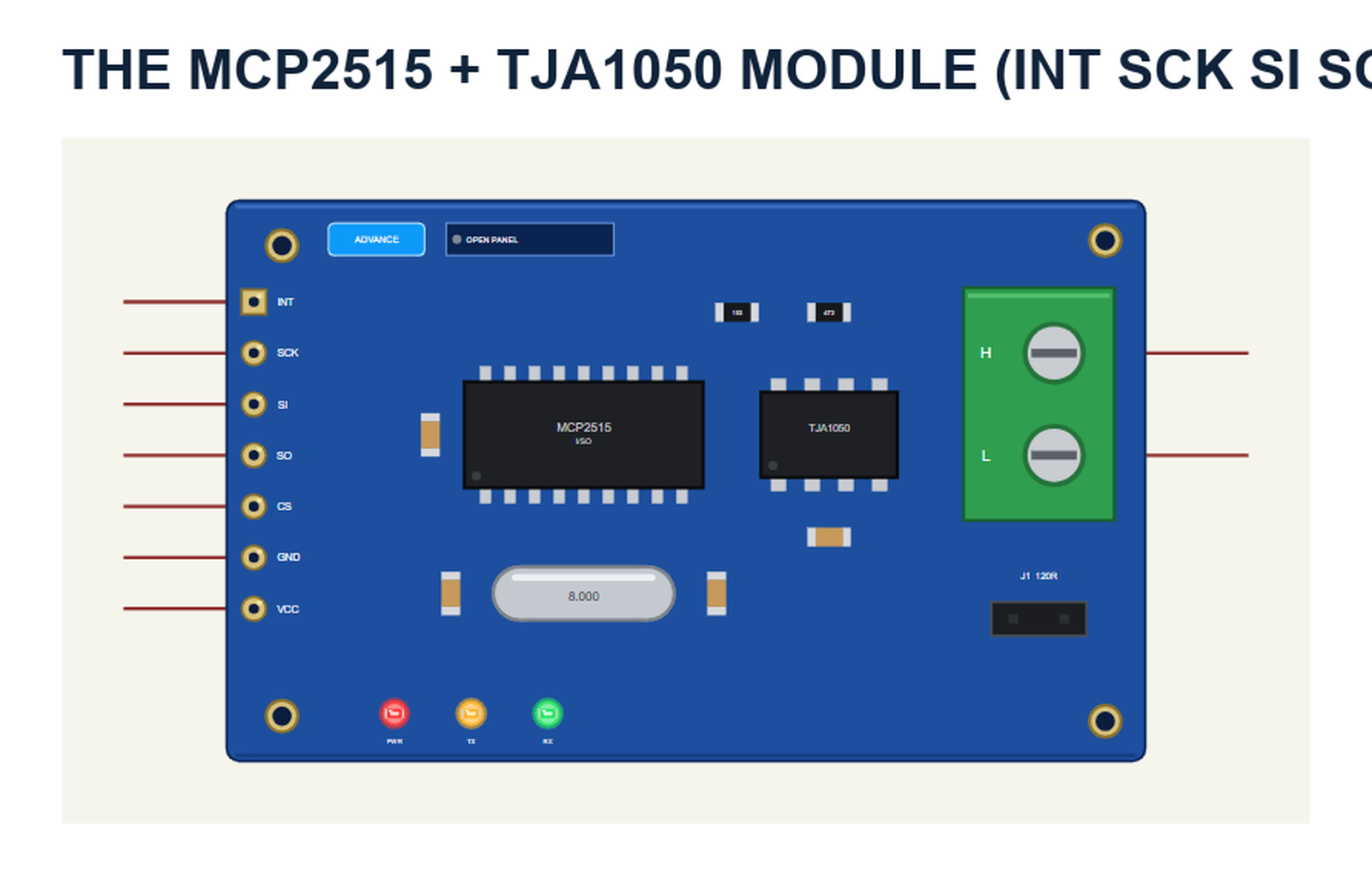
The part is the module seen from above, drawn at about its real size next to the Arduino UNO: the 7-pin header INT SCK SI SO CS GND VCC on the left, the MCP2515 in its SOIC-18 with the 8.000 MHz crystal, the TJA1050 in its SOIC-8, the green screw terminal H L (CANH and CANL) and the J1 jumper of the 120 ohm terminator. The SIMPLE / ADVANCE badge, the LEDs and the panel button are TEP additions: PWR lights with VCC, TX while this node sends a frame, RX when it received one.
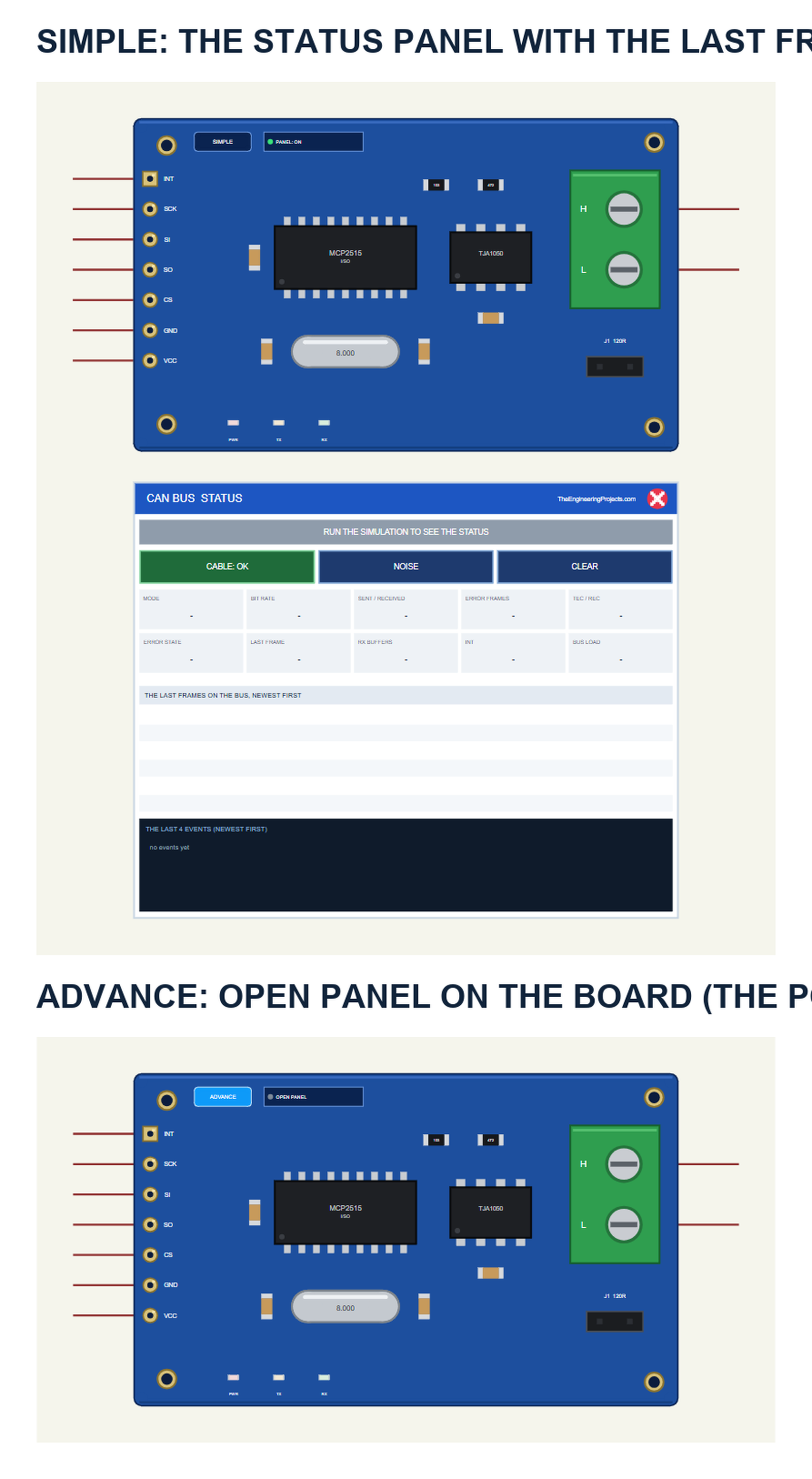
| Simple | Advance | |
|---|---|---|
| Device | MCP2515TEP | MCP2515ADVTEP |
| On the schematic | The module and the STATUS panel | The module |
| The frames | The last six | The last 32 - click one to see it field by field and bit by bit |
| Actions | CABLE, NOISE, CLEAR on the panel | The same on the pop-up's toolbar |
| Status | Banner, 10 readouts, the last 4 events | A pop-up: Bus, Event log, Tests |
Download MCP2515 CAN Bus Module Library for Proteus
Click the button below to download MCP2515-CAN-Bus-Module-Library-for-Proteus-v1.0.zip (about 1.28 MB, without the C++ source code of the model):
MCP2515 CAN Bus Module Library for Proteus V1.0- README.txt: the devices, installation, the demo, wiring, the test tools, the properties and real hardware.
- Proteus Library Files:
TEPMCP2515.LIBandArduinoV4TEP.LIBfrom our Arduino Library for Proteus V4.0. - Proteus Model Files:
TEPMCP2515.DLLandTEPARDUINO.DLL. - Proteus Simulation:
MCP2515-CAN-Bus-ArduinoUnoV4.pdsprj,CAN_Node1.hex,CAN_Node2.hexand copies of the two DLLs. - Arduino Code:
CAN_Node1.inoandCAN_Node2.ino- they need the autowp-mcp2515 library (not included; install it with the Library Manager).
No Proteus yet? Read How to Download and Install Proteus 7 and 8. New to libraries? Follow How to Install a New Library in Proteus.
How to Install MCP2515 CAN Bus Module Library for Proteus
- Close Proteus and extract the whole zip file, for example to your Desktop.
- Copy the two files from Proteus Library Files into the LIBRARY folder of Proteus (usually
C:\Program Files (x86)\Labcenter Electronics\Proteus 8 Professional\LIBRARY). - Copy
TEPMCP2515.DLLandTEPARDUINO.DLLfrom Proteus Model Files into the MODELS folder. - Delete
TEPMCP2515.IDXfrom the LIBRARY folder if it is there. - Start Proteus, press P and search for MCP2515.
Tip: keep the Proteus Simulation folder together, because the project needs its two .hex files and the DLLs beside it. The library is tested in Proteus 8.5; Proteus 7 is not supported.
The MCP2515 Part in Proteus
The Simple device adds the STATUS panel below the module. Its banner says how the node is doing: green while all is well, amber with error frames or the cable cut, red for bus-off, the wrong bit rate or no power. Below it are the actions CABLE, NOISE and CLEAR, ten readouts, the last six frames on the bus and the last four events:
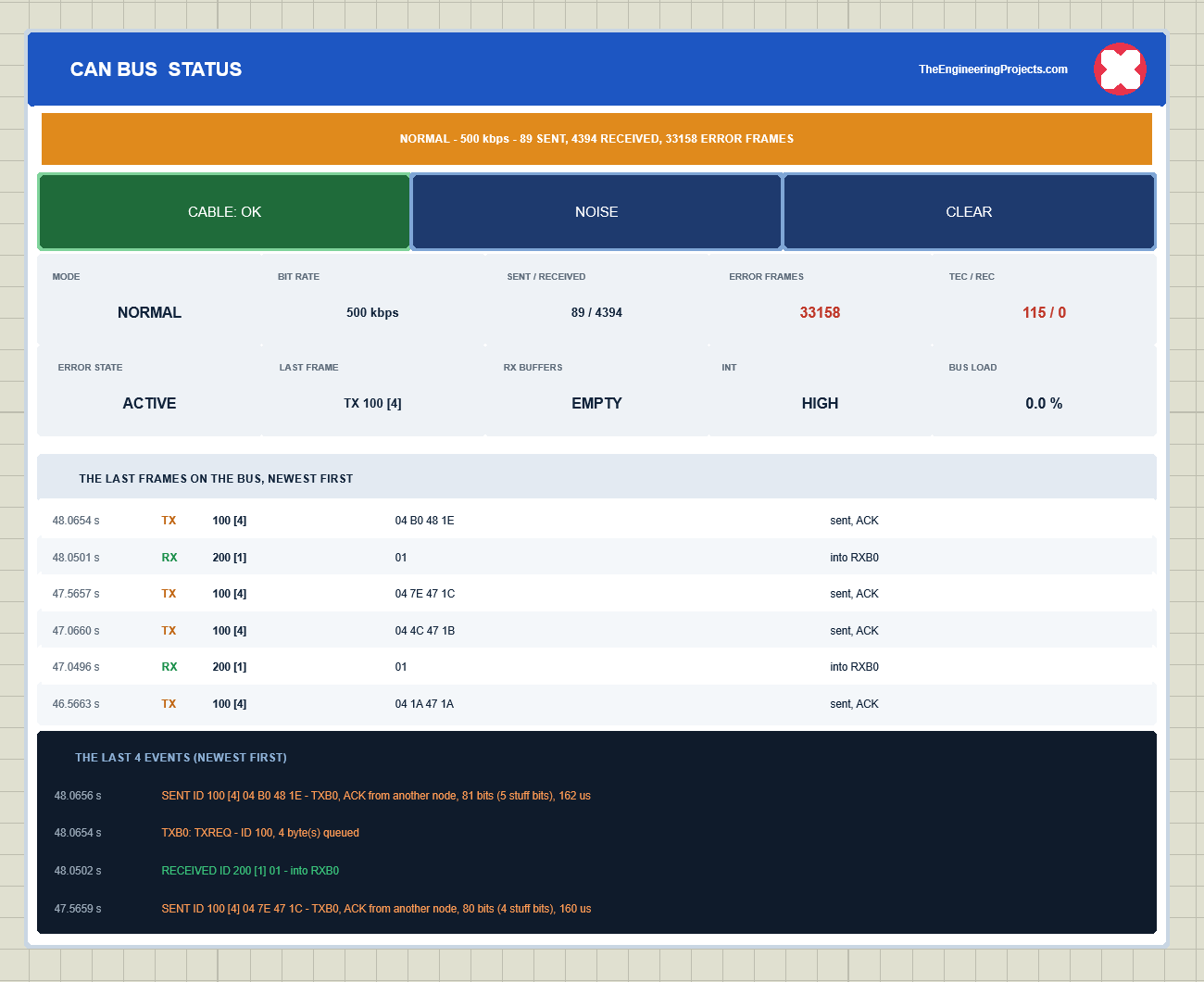
The readouts are the mode, the bit rate, the frames sent and received, the error frames, TEC / REC (the transmit and receive error counters), the error state, the last frame, the RX buffers, the INT pin and the bus load. The red X closes the panel, and the PANEL button on the board opens it again. The Advance device keeps the schematic clean - only the module; the live data opens in a pop-up window at Run, and the OPEN PANEL button on the board brings the window back.
The CRYSTAL property is the crystal on the module: 8MHz (the blue modules) or 16MHz. The Simple device also has PANEL. Every run starts again from the properties.
The Demo Circuit
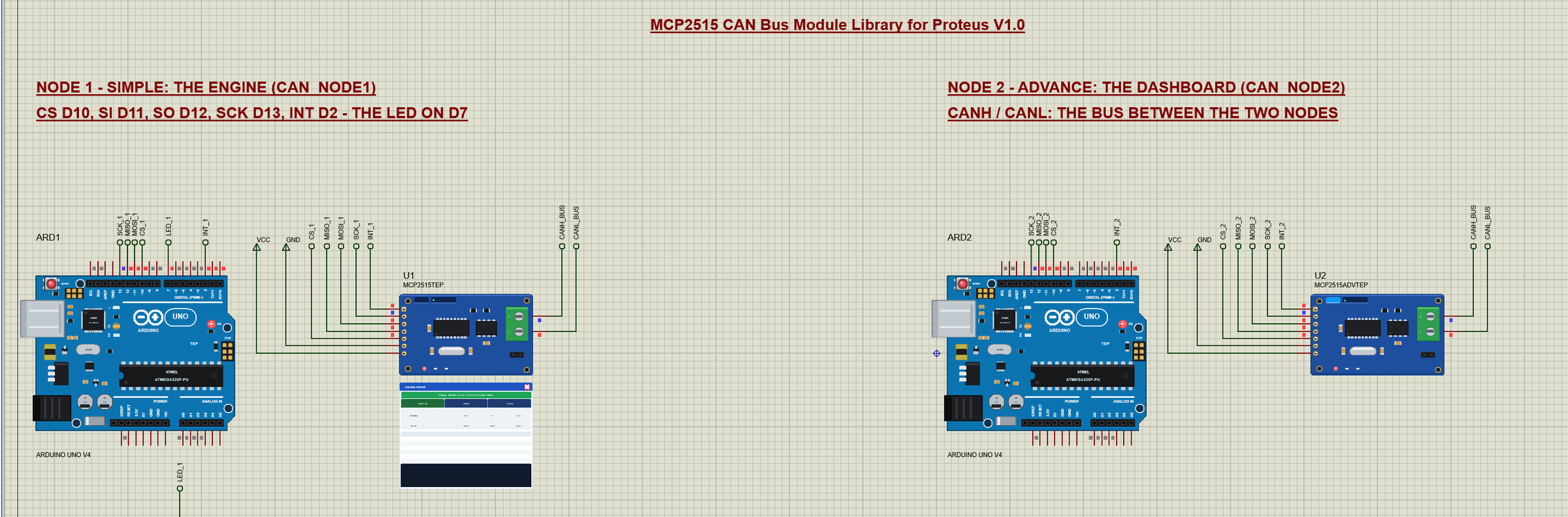
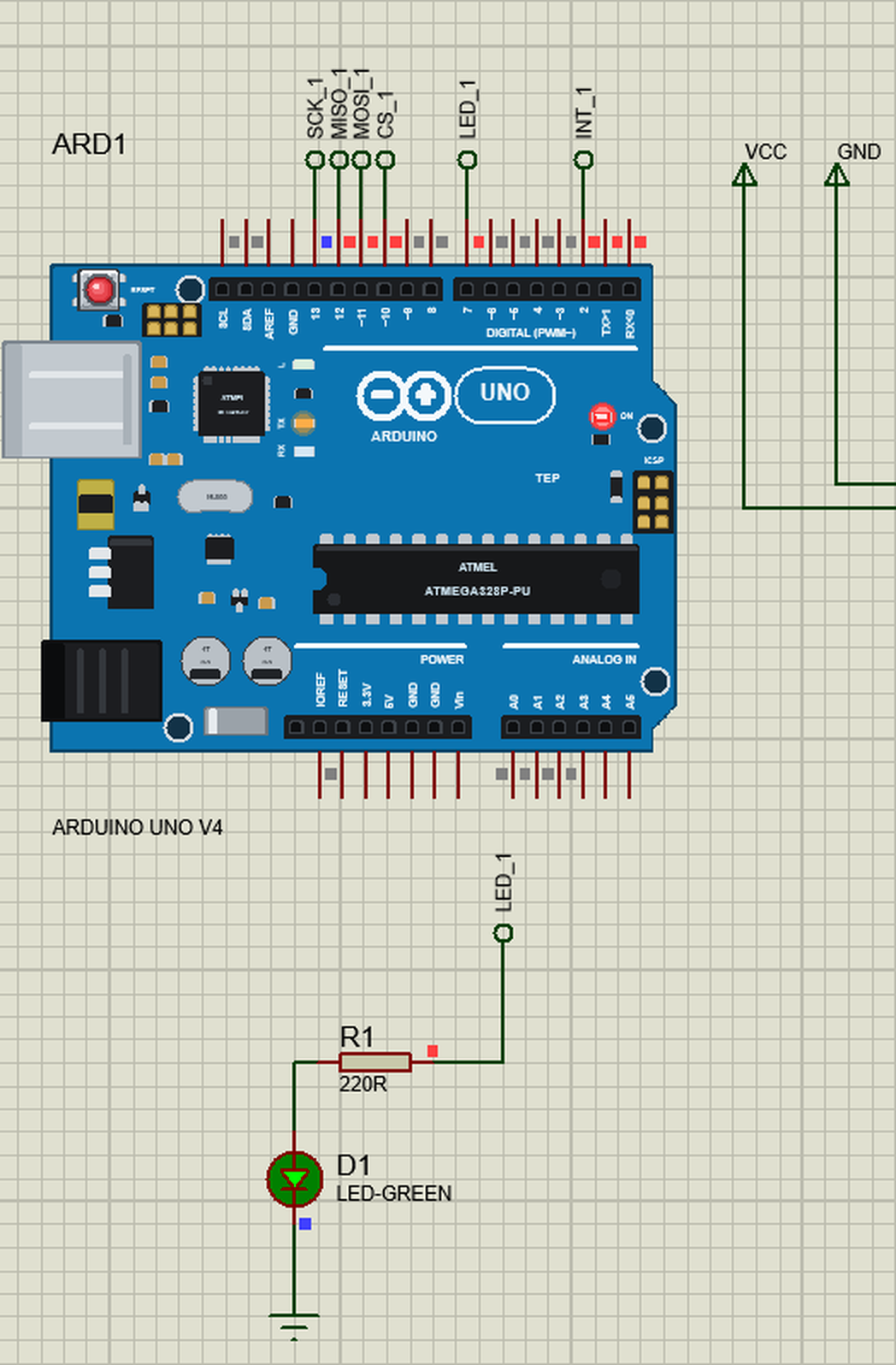
The demo project has two nodes, each an Arduino UNO V4.0 from our Arduino UNO Library for Proteus V4.0 with an MCP2515 module. Node 1 is the engine (CAN_Node1.hex) with a green LED on D7, node 2 the dashboard (CAN_Node2.hex). The CANH pins of the two modules meet at the label CANH_BUS and the CANL pins at CANL_BUS - that is the bus.
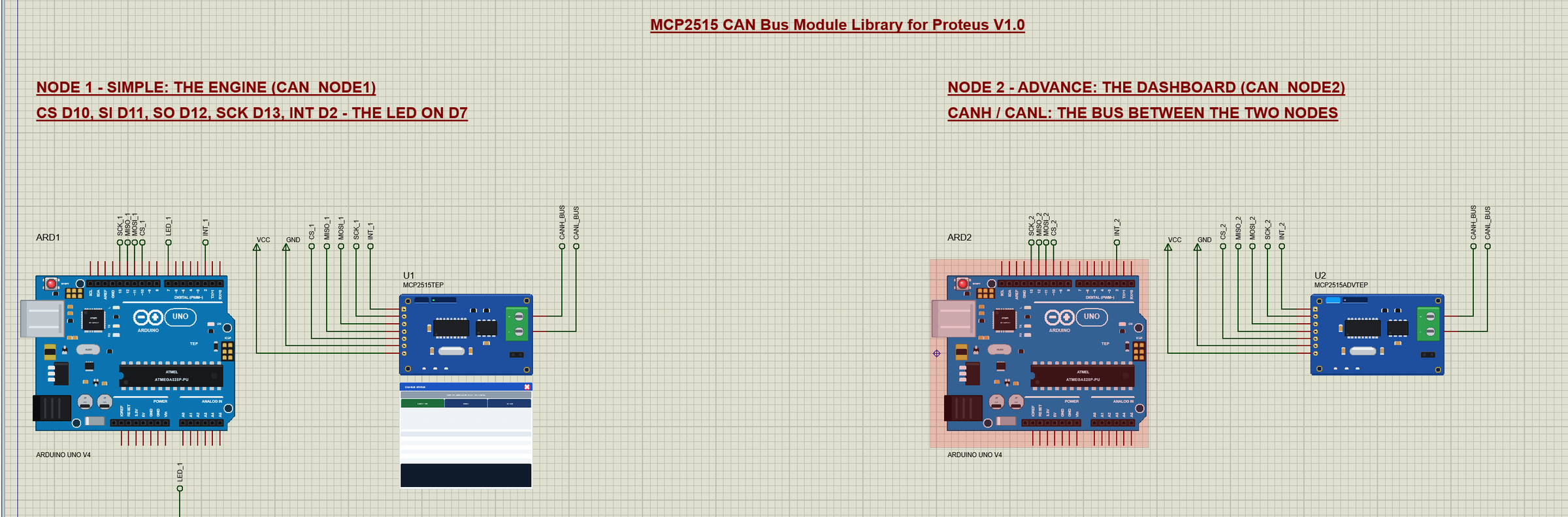
Wiring
| Module pin | Arduino UNO (the demo) | Notes |
|---|---|---|
| VCC | 5V | the TJA1050 needs 5 V |
| GND | GND | also between the nodes on a real bus |
| CS | D10 | chip select |
| SI | D11 | MOSI |
| SO | D12 | MISO |
| SCK | D13 | the SPI clock |
| INT | D2 | LOW while a frame waits |
| CANH / CANL | CANH / CANL of the other node | CANH to CANH, CANL to CANL |
| (node 1's LED) | D7 | 220 ohm to a green LED - not D13, the SPI clock |
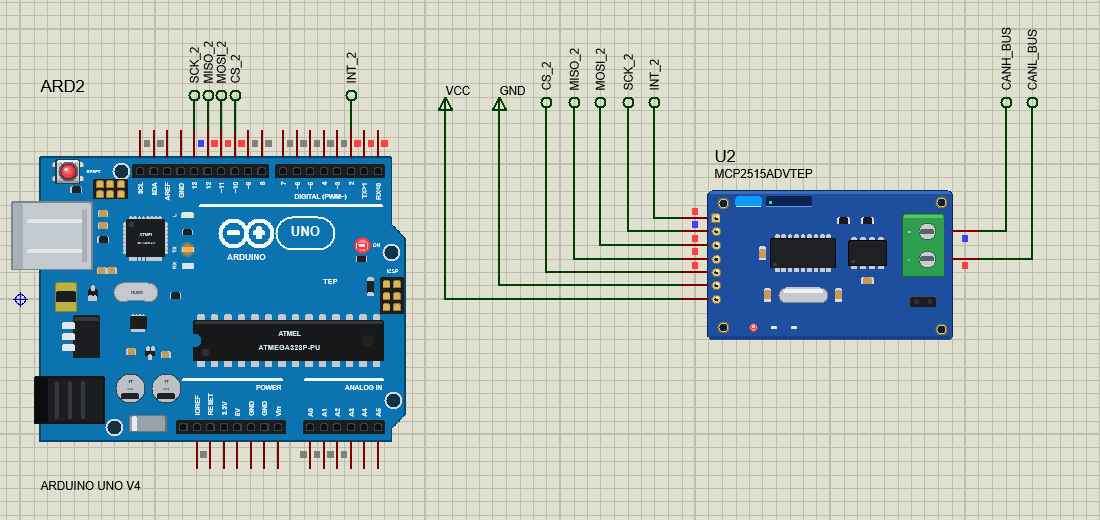
The pins D10 - D13 are the UNO's hardware SPI. D13 is also the pin of the UNO's L LED, and with SPI on it carries the clock - the L LED can only flicker with the transfers. That is why the engine's LED is a green LED on D7, with its 220 ohm resistor below the UNO.
The Arduino Code
Both sketches use autowp-mcp2515 1.3.1 (MIT) - install it with the Library Manager to rebuild them. New to Arduino? Start with Arduino Tutorial for Beginners and Introduction to Arduino UNO. The start is three lines: a reset over SPI, the bit rate, and the normal mode:
  mcp2515.reset();
  mcp2515.setBitrate(CAN_500KBPS, MCP_8MHZ);
  if (mcp2515.setNormalMode() == MCP2515::ERROR_OK) Serial.println(F("MCP2515 ready: 500 kbps, 8 MHz crystal, normal mode"));
  else Serial.println(F("MCP2515 not answering - check CS, SCK, SI, SO and 5 V"));
Note MCP_8MHZ: the blue modules carry an 8 MHz crystal. setBitrate(CAN_500KBPS) without it means MCP_16MHZ - on an 8 MHz module the node then runs at 250 kbps and hears nothing but errors. Every 500 ms the engine fills a can_frame with ID 0x100 and four bytes - the rpm in two bytes, the coolant temperature and the speed, made-up values that rise and fall - and hands it to the MCP2515:
  tx.can_id = 0x100;
  tx.can_dlc = 4;
  tx.data[0] = rpm >> 8;
  tx.data[1] = rpm & 0xFF;
  tx.data[2] = coolant;
  tx.data[3] = rpm / 40;                         // km/h
  MCP2515::ERROR e = mcp2515.sendMessage(&tx);
sendMessage() only loads a free TX buffer and sets TXREQ; the MCP2515 sends the frame on its own, waits for the bus, arbitrates and retries. The INT pin tells the sketch that something waits: a frame, or an error flag:
  if (!digitalRead(CAN_INT)) {
    if (mcp2515.readMessage(&rx) == MCP2515::ERROR_OK) {
      if (rx.can_id == 0x200 && rx.can_dlc >= 1) {
        digitalWrite(LED, rx.data[0] ? HIGH : LOW);
        if (rx.data[0] != led) {
          led = rx.data[0];
          Serial.println(led ? F("from node 2: LED ON") : F("from node 2: LED OFF"));
        }
      } else others++;                           // other IDs: counted, not printed
    } else {                                     // INT without a frame: an error flag (ERRIF / MERRF)
      if (millis() - lastError >= 1000) { lastError = millis(); printFlags(); }
      mcp2515.clearERRIF();
      mcp2515.clearMERR();
The Dashboard
Node 2 prints every frame of the engine, decoded:
  if (f.can_id == 0x100 && f.can_dlc == 4) {
    Serial.print(F("engine: "));
    Serial.print(word(f.data[0], f.data[1]));
    Serial.print(F(" rpm, coolant "));
    Serial.print(f.data[2]);
    Serial.print(F(" C, "));
    Serial.print(f.data[3]);
    Serial.println(F(" km/h"));
    return;
  }
Every second it sends the state of the engine's LED as ID 0x200 - a typical CAN pattern: the state is repeated, so a node that joins the bus late still gets it:
  if (millis() - lastLed >= 1000) {              // the LED state, every second (not printed)
    lastLed = millis();
    tx.can_id = 0x200; tx.can_dlc = 1; tx.data[0] = ledState;
    mcp2515.sendMessage(&tx);
  }
LED ON and LED OFF change that state and send it at once, SEND id b0 b1 ... sends any frame (an ID above 7FF goes out extended), ERRORS prints TEC, REC and EFLG, and LOAD fills the bus for one second with ID 0x300:
  while (millis() - start < 1000) {
    if (mcp2515.sendMessage(&tx) == MCP2515::ERROR_OK) queued++;
  }
The HEX files are in the package, so you do not need the Arduino IDE to run the demo. To change a sketch, open it in the Arduino IDE and export the compiled binary, as in How to get the HEX file from Arduino.
The Engine and the Dashboard
At Run both UNOs start their sketches. The engine sends ID 0x100 every 500 ms, the dashboard ID 0x200 every second. U2 opens its own window, MCP2515 CAN Bus Module, with the look of our TEP Serial Monitor Advance for Proteus - three tabs, Bus, Event log and Tests, plus Settings and Help:
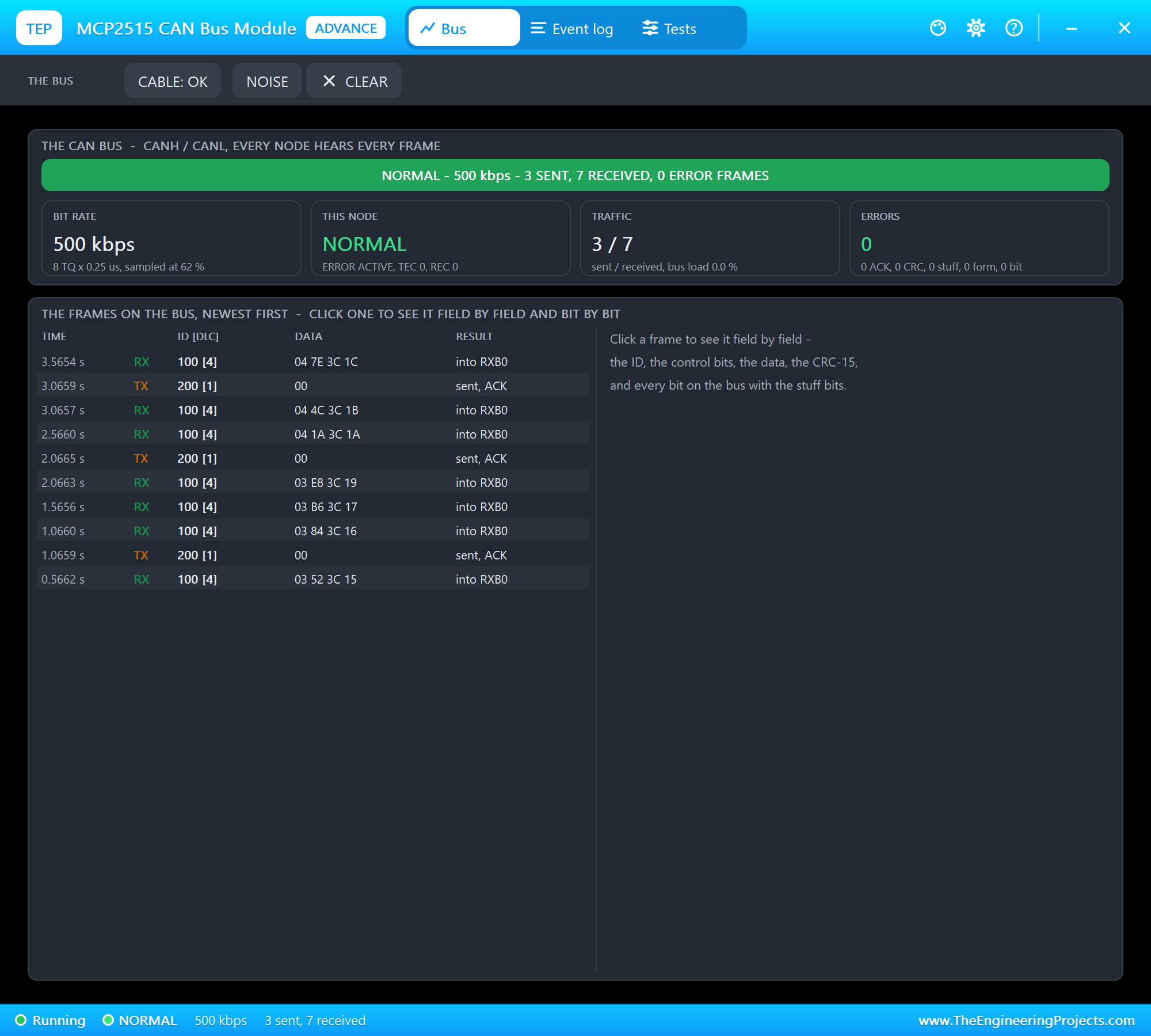
The Bus page shows the banner, four tiles - the bit rate, this node, the traffic and the errors - and the frames on the bus, newest first. The engine's monitor:
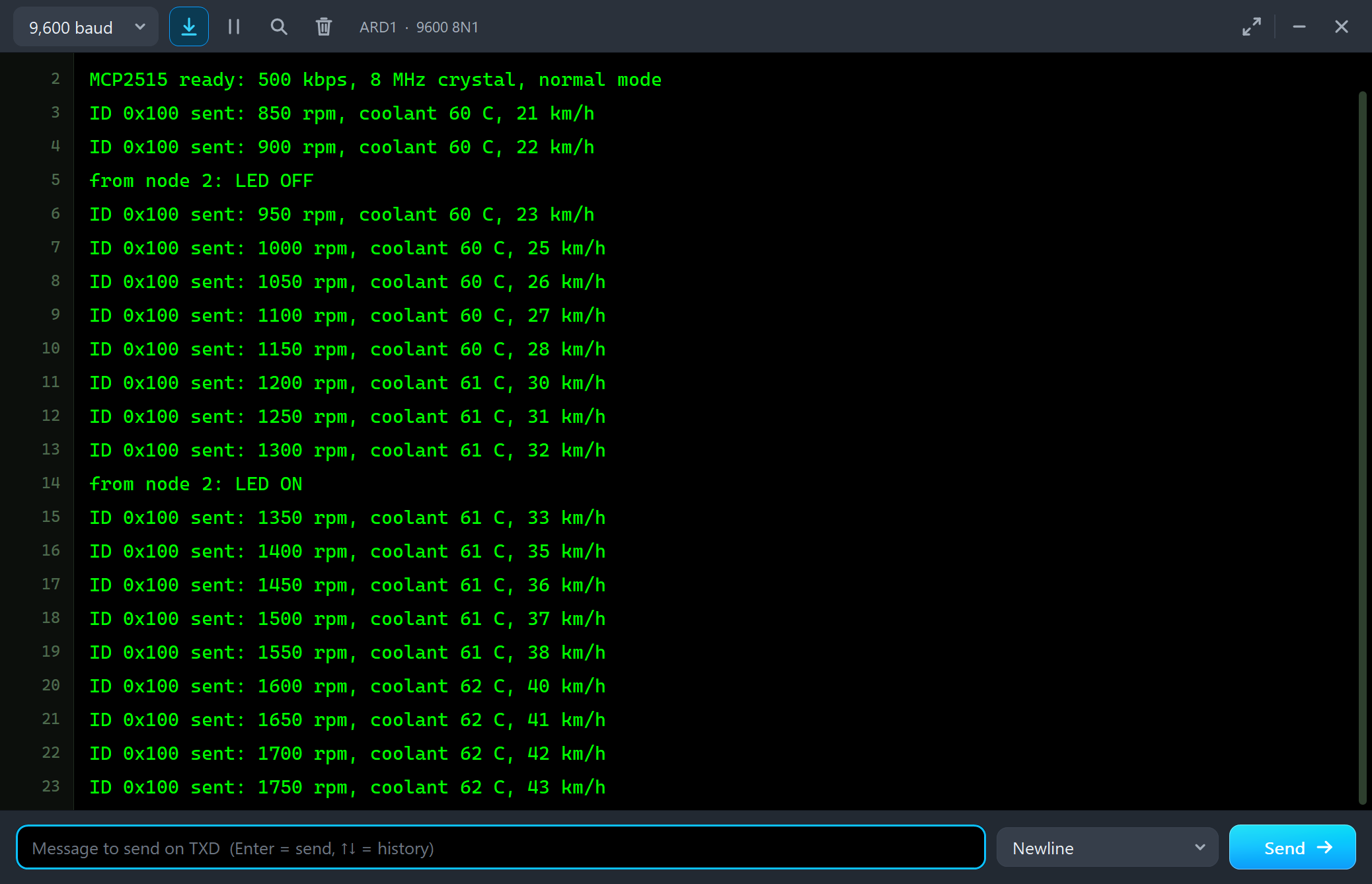
MCP2515 ready: 500 kbps, 8 MHz crystal, normal mode
ID 0x100 sent: 850 rpm, coolant 60 C, 21 km/h
ID 0x100 sent: 900 rpm, coolant 60 C, 22 km/h
from node 2: LED OFF
ID 0x100 sent: 950 rpm, coolant 60 C, 23 km/h
ID 0x100 sent: 1000 rpm, coolant 60 C, 25 km/h
ID 0x100 sent: 1050 rpm, coolant 60 C, 26 km/h
ID 0x100 sent: 1100 rpm, coolant 60 C, 27 km/h
ID 0x100 sent: 1150 rpm, coolant 60 C, 28 km/h
ID 0x100 sent: 1200 rpm, coolant 61 C, 30 km/h
ID 0x100 sent: 1250 rpm, coolant 61 C, 31 km/h
ID 0x100 sent: 1300 rpm, coolant 61 C, 32 km/h
from node 2: LED ON
ID 0x100 sent: 1350 rpm, coolant 61 C, 33 km/h
We typed LED ON, a frame by hand with an extended ID and ERRORS in the dashboard's monitor:
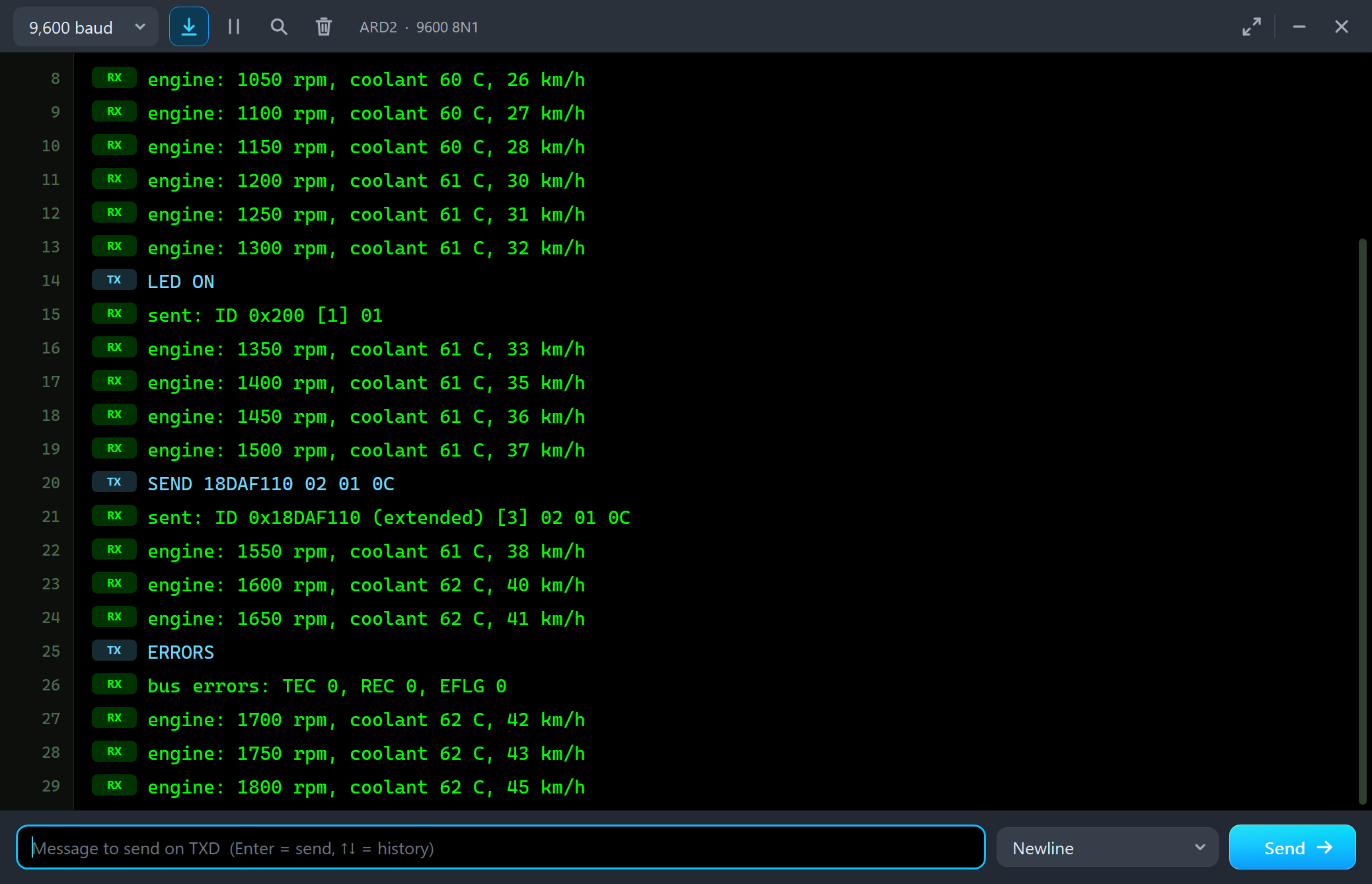
engine: 1250 rpm, coolant 61 C, 31 km/h
engine: 1300 rpm, coolant 61 C, 32 km/h
LED ON
sent: ID 0x200 [1] 01
engine: 1350 rpm, coolant 61 C, 33 km/h
engine: 1400 rpm, coolant 61 C, 35 km/h
engine: 1450 rpm, coolant 61 C, 36 km/h
engine: 1500 rpm, coolant 61 C, 37 km/h
SEND 18DAF110 02 01 0C
sent: ID 0x18DAF110 (extended) [3] 02 01 0C
engine: 1550 rpm, coolant 61 C, 38 km/h
engine: 1600 rpm, coolant 62 C, 40 km/h
engine: 1650 rpm, coolant 62 C, 41 km/h
ERRORS
bus errors: TEC 0, REC 0, EFLG 0
engine: 1700 rpm, coolant 62 C, 42 km/h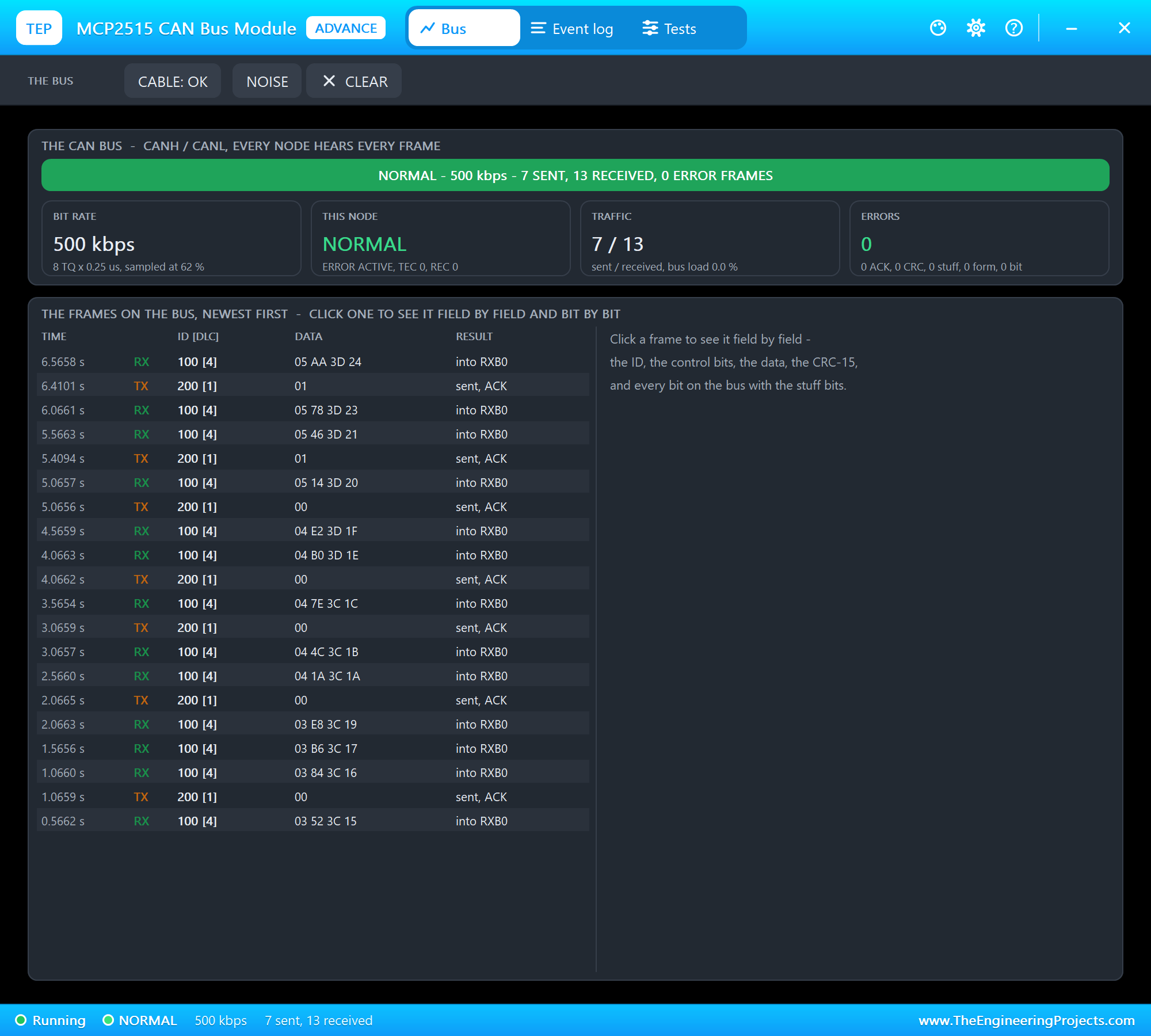
Arbitration: the Lower ID Wins
Then we typed LOAD. For one second the dashboard queued ID 0x300 frames back to back - the bus full, 100 percent. The engine kept sending its ID 0x100 every 500 ms, and nothing was lost:
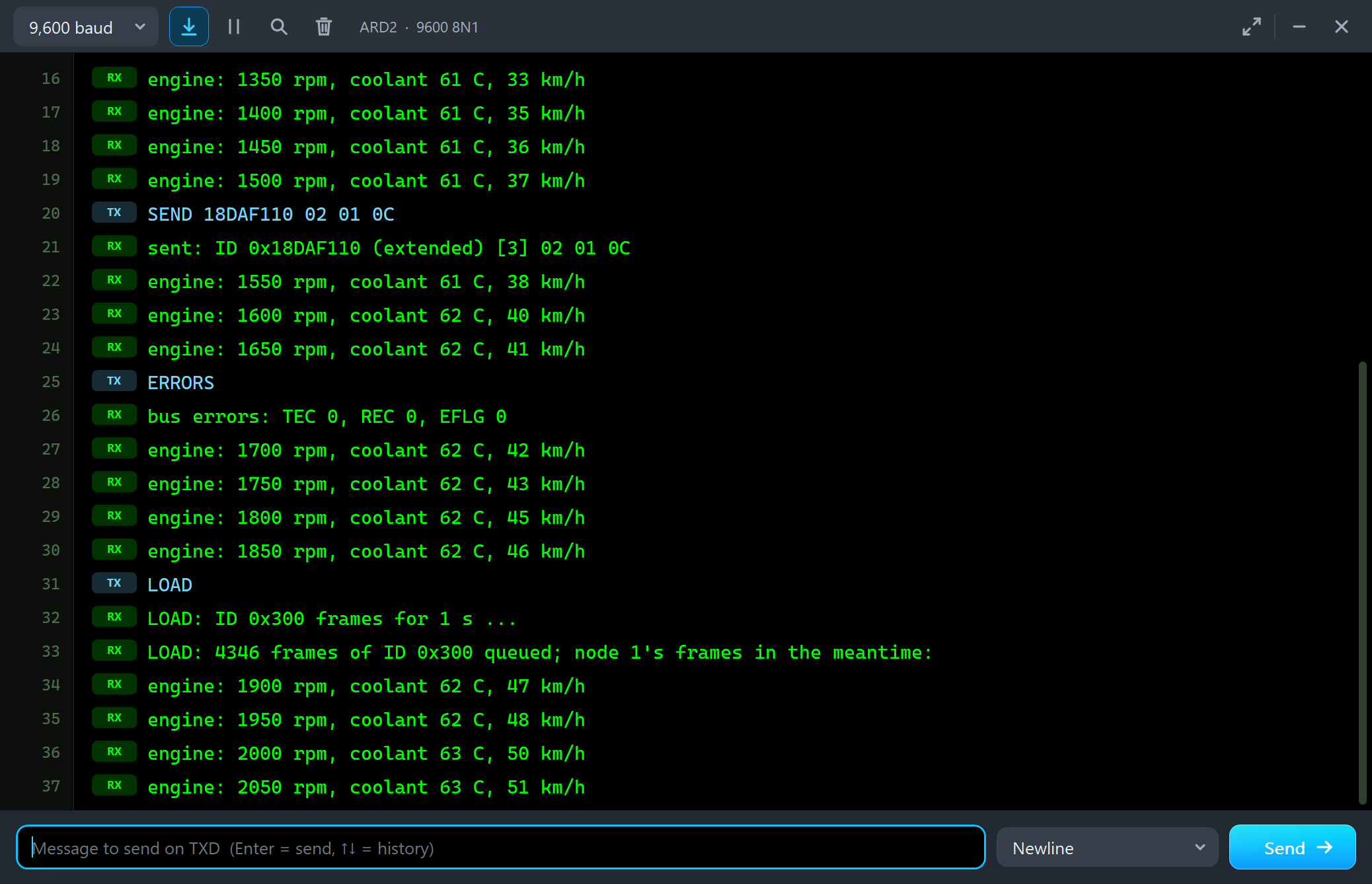
engine: 1850 rpm, coolant 62 C, 46 km/h
LOAD
LOAD: ID 0x300 frames for 1 s ...
LOAD: 4346 frames of ID 0x300 queued; node 1's frames in the meantime:
engine: 1900 rpm, coolant 62 C, 47 km/h
engine: 1950 rpm, coolant 62 C, 48 km/h
engine: 2000 rpm, coolant 63 C, 50 km/h
engine: 2050 rpm, coolant 63 C, 51 km/h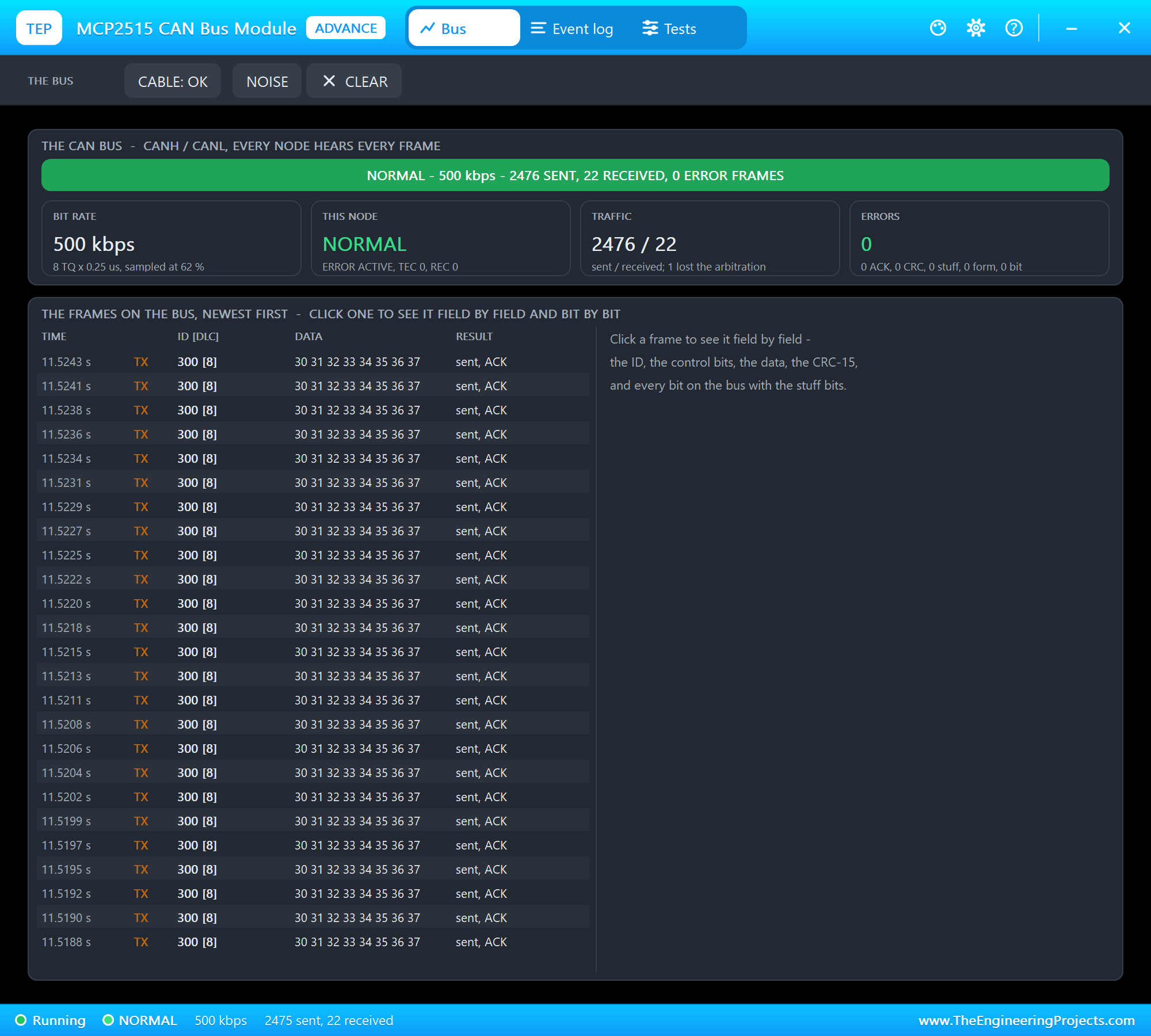
How? Whenever the engine had a frame waiting, both nodes started their next frame at the same moment, after the 3 bits of intermission. 0x100 is 001 0000 0000 in binary, 0x300 is 011 0000 0000: at the second identifier bit the engine sends a dominant 0, the dashboard a recessive 1. The dashboard reads 0, knows it has lost, and becomes a receiver for the rest of that frame. The Event log shows it:
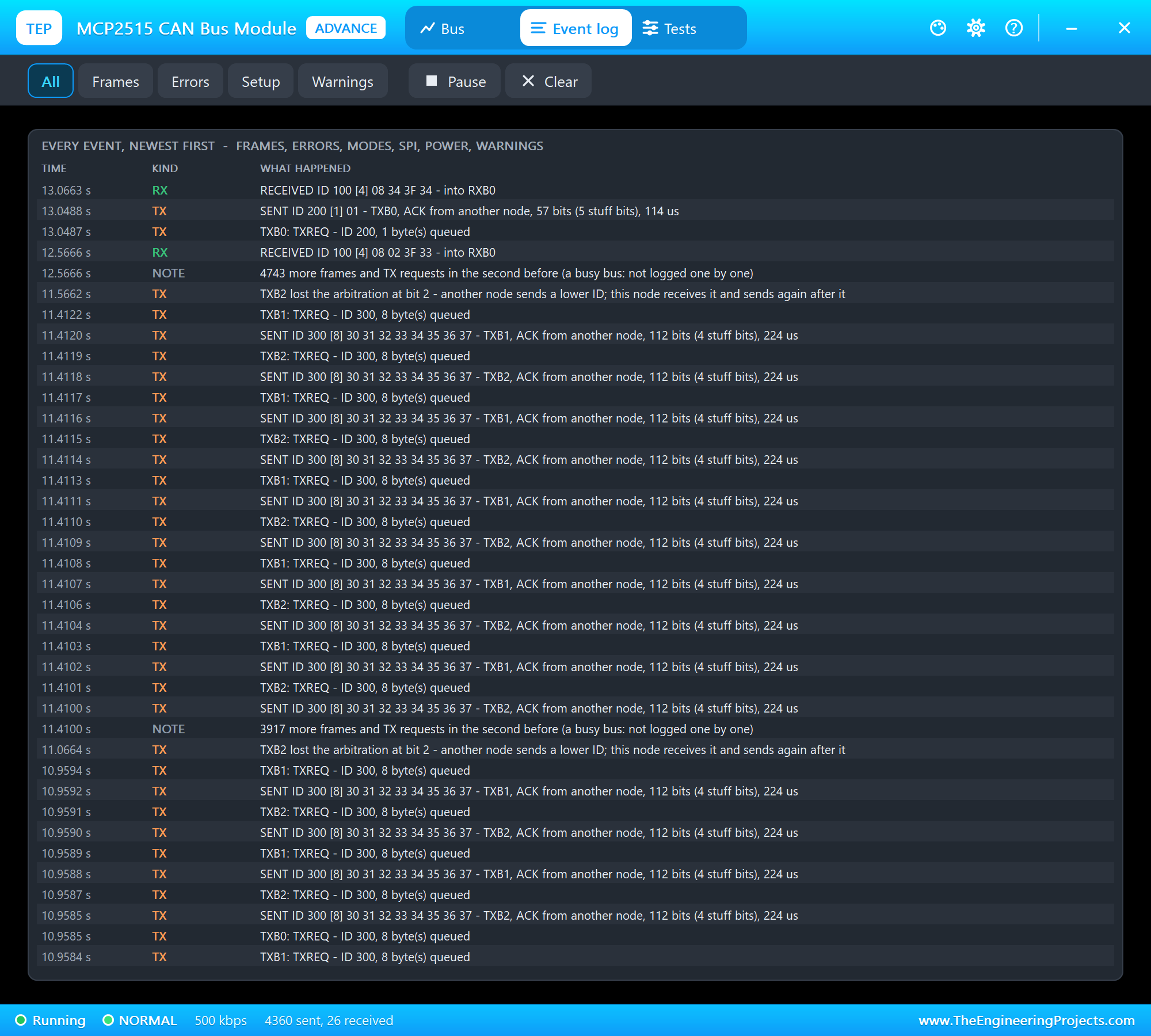
This is the heart of CAN: the priority is decided bit by bit on the wire, and the winner's frame is never damaged. Give the important data the low identifiers.
Noise: an Error Frame and the Retry
We clicked NOISE on U2's toolbar: U2 reads the first bit after the DLC of the next frame wrong. The next engine frame came, U2 computed the CRC-15 of what it read, and it did not match. U2 did not acknowledge and sent an error flag; the engine sent the same frame again 0.2 ms later. Click the frame and the right side shows every bit:
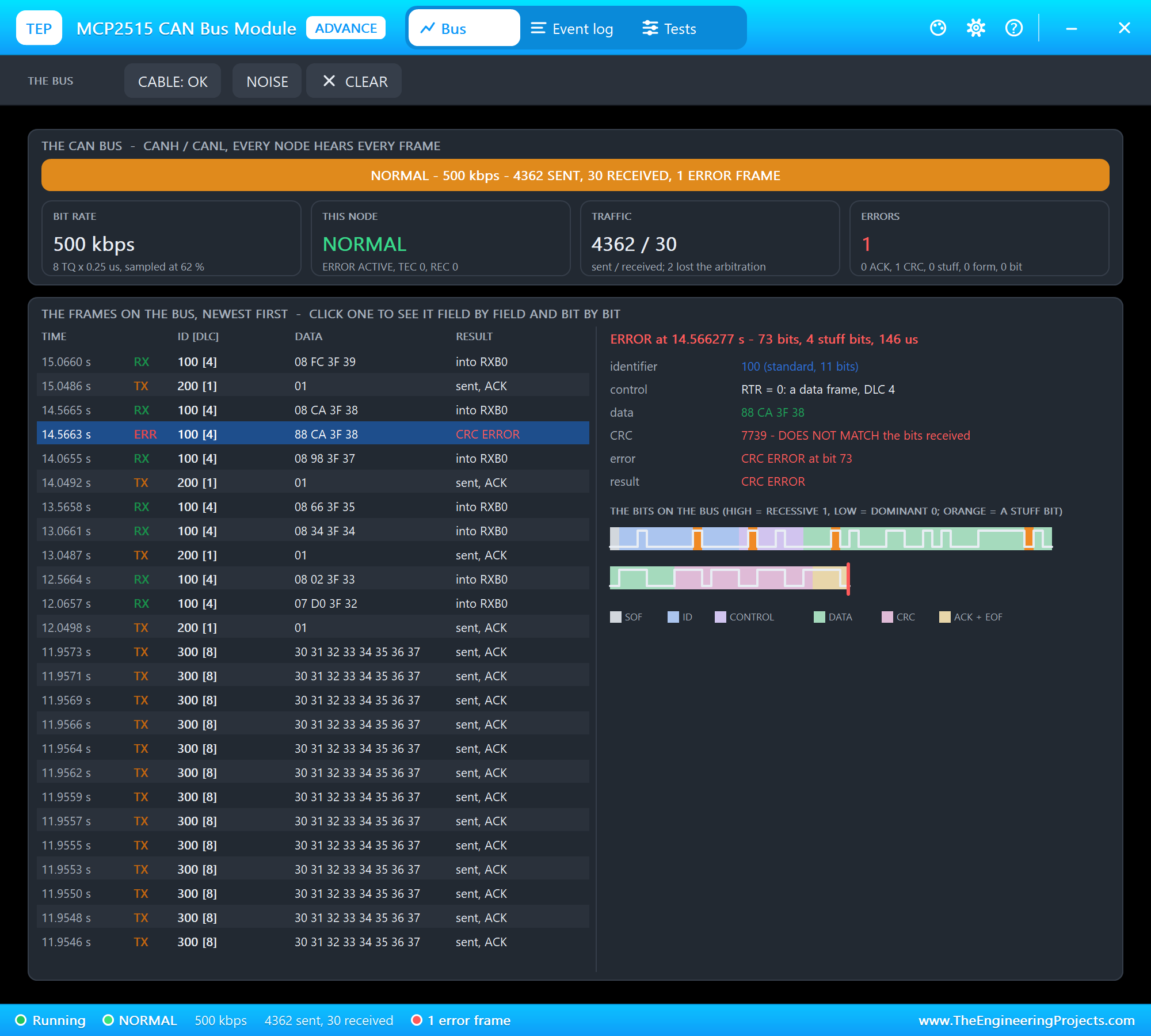
The sketches never saw the broken frame - CAN repairs it by itself. Only the error counters remember: with two nodes on the bus, the frame U2 refused had no acknowledgement at all, so the engine counted an ACK error (+8) and then a successful frame (-1). The engine's monitor printed bus errors: TEC 7, REC 0, EFLG 0 at that moment (the first lines of the next listing).
A Cut Cable: ACK Errors and Error Passive
Then CABLE cut U2 off the bus. The engine was alone. A CAN frame that nobody acknowledges is an error, so the engine sent each frame again and again, its TEC climbing by 8 per try. At 128 it became error passive (its error flags turn recessive), and its three TX buffers filled up:
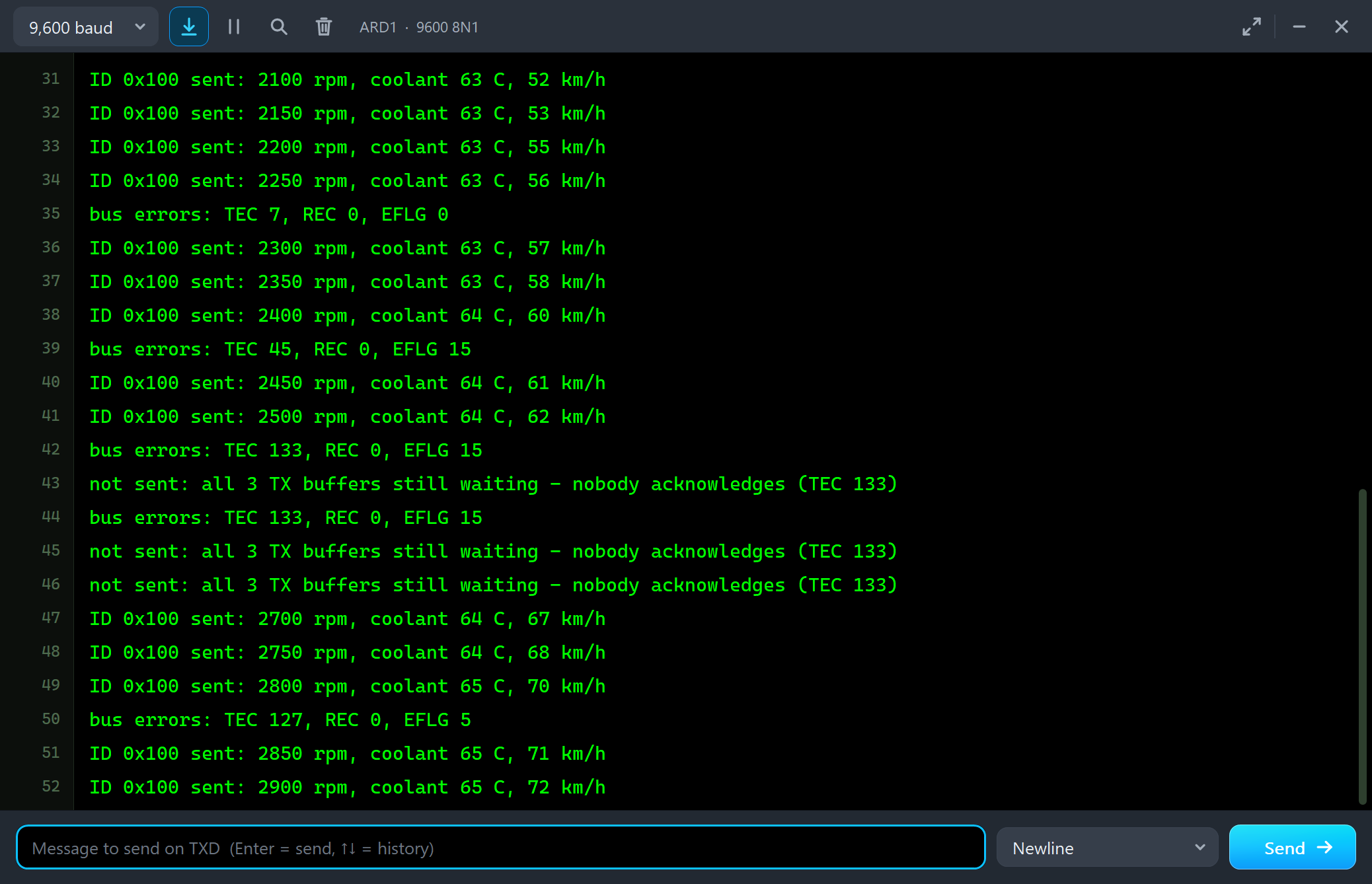
ID 0x100 sent: 2250 rpm, coolant 63 C, 56 km/h
bus errors: TEC 7, REC 0, EFLG 0
ID 0x100 sent: 2300 rpm, coolant 63 C, 57 km/h
ID 0x100 sent: 2350 rpm, coolant 63 C, 58 km/h
ID 0x100 sent: 2400 rpm, coolant 64 C, 60 km/h
bus errors: TEC 45, REC 0, EFLG 15
ID 0x100 sent: 2450 rpm, coolant 64 C, 61 km/h
ID 0x100 sent: 2500 rpm, coolant 64 C, 62 km/h
bus errors: TEC 133, REC 0, EFLG 15
not sent: all 3 TX buffers still waiting - nobody acknowledges (TEC 133)
bus errors: TEC 133, REC 0, EFLG 15
not sent: all 3 TX buffers still waiting - nobody acknowledges (TEC 133)
not sent: all 3 TX buffers still waiting - nobody acknowledges (TEC 133)
ID 0x100 sent: 2700 rpm, coolant 64 C, 67 km/h
ID 0x100 sent: 2750 rpm, coolant 64 C, 68 km/h
ID 0x100 sent: 2800 rpm, coolant 65 C, 70 km/h
bus errors: TEC 127, REC 0, EFLG 5
ID 0x100 sent: 2850 rpm, coolant 65 C, 71 km/h
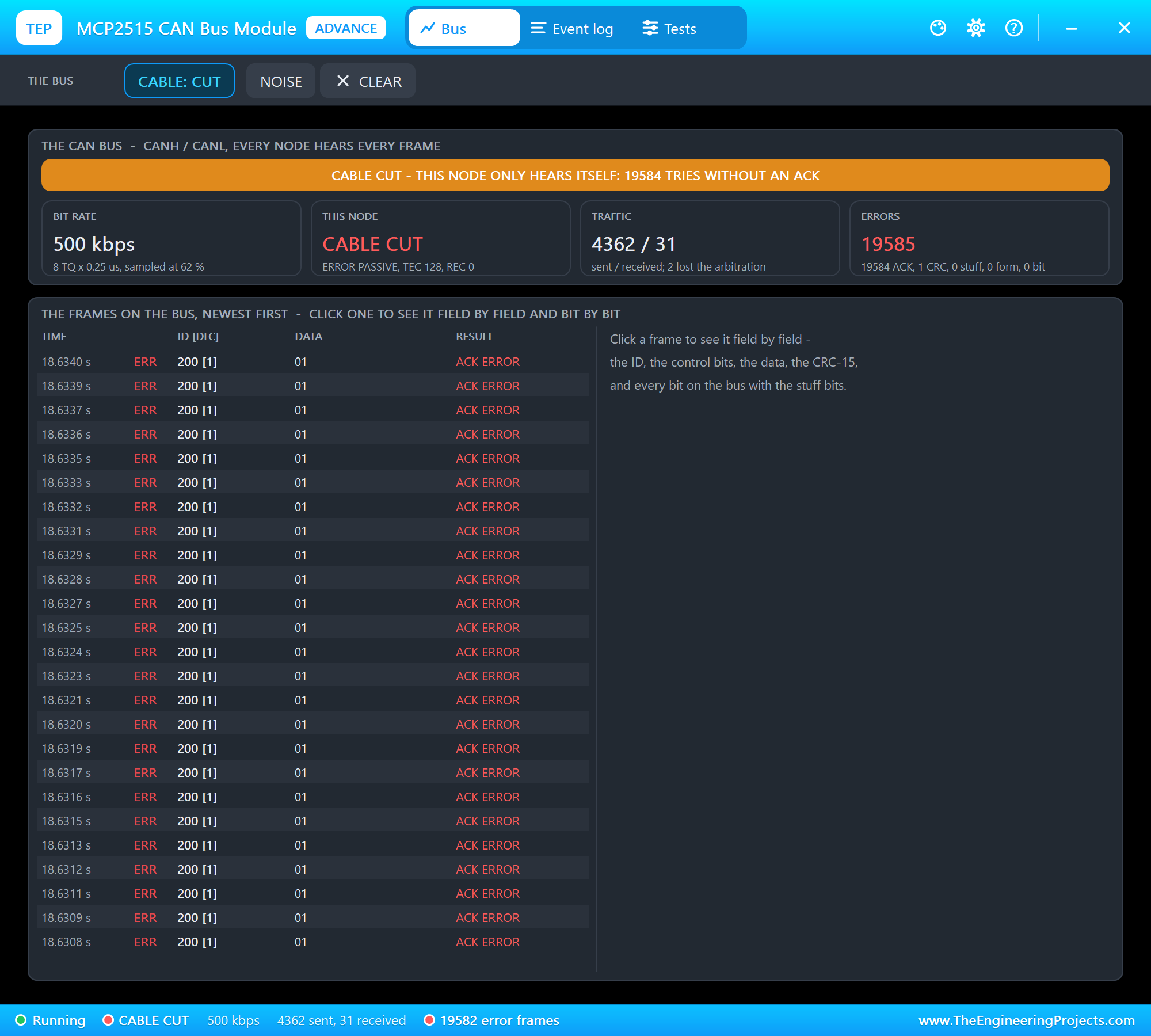
U2 itself only heard its own frames: its LED state frame got no ACK either, 19584 tries in 2.5 seconds, TEC 128:
We clicked CABLE again. The waiting frames went out at once - and the dashboard printed them newest first:
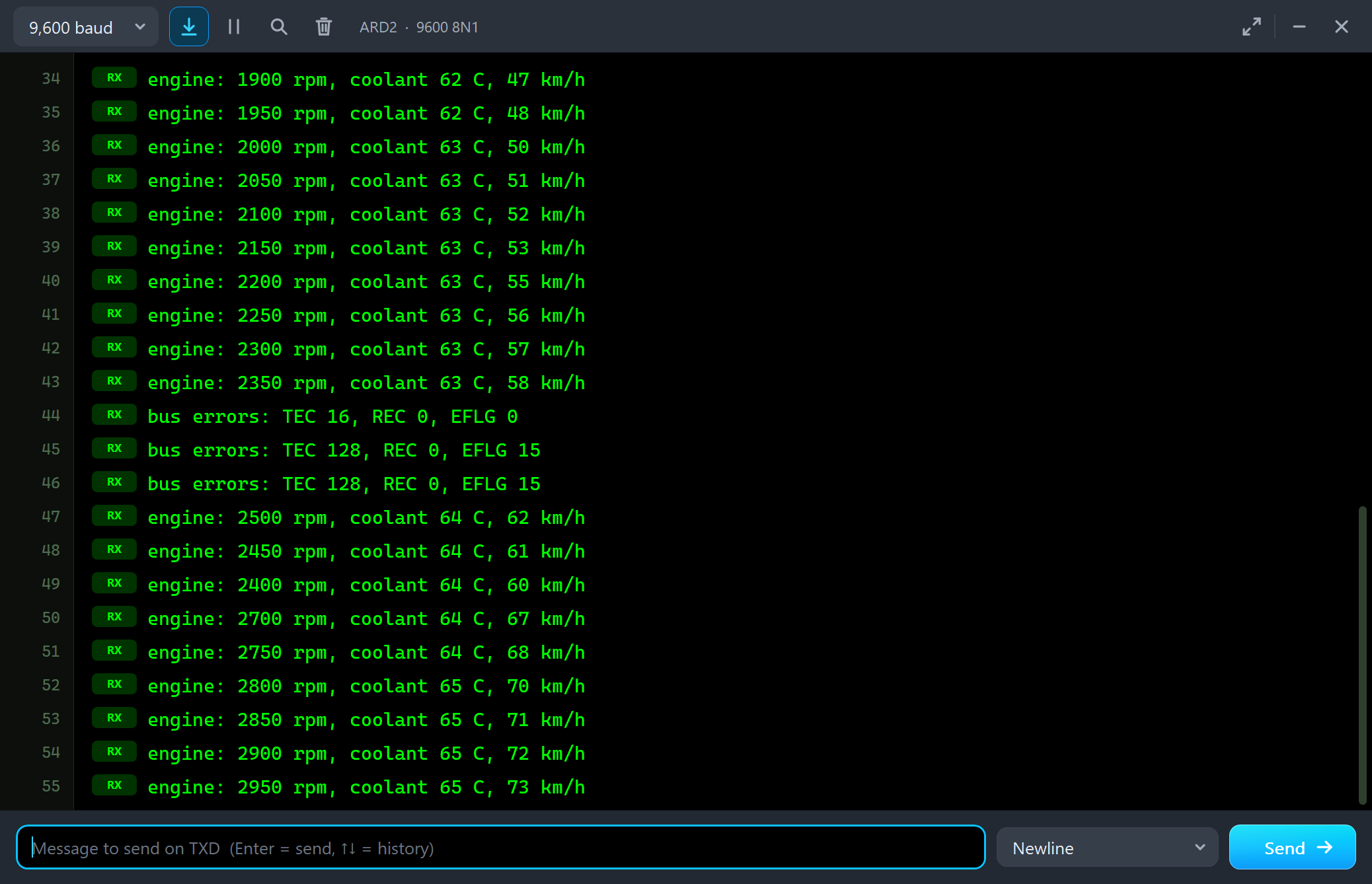
engine: 2300 rpm, coolant 63 C, 57 km/h
engine: 2350 rpm, coolant 63 C, 58 km/h
bus errors: TEC 16, REC 0, EFLG 0
bus errors: TEC 128, REC 0, EFLG 15
bus errors: TEC 128, REC 0, EFLG 15
engine: 2500 rpm, coolant 64 C, 62 km/h
engine: 2450 rpm, coolant 64 C, 61 km/h
engine: 2400 rpm, coolant 64 C, 60 km/h
engine: 2700 rpm, coolant 64 C, 67 km/h
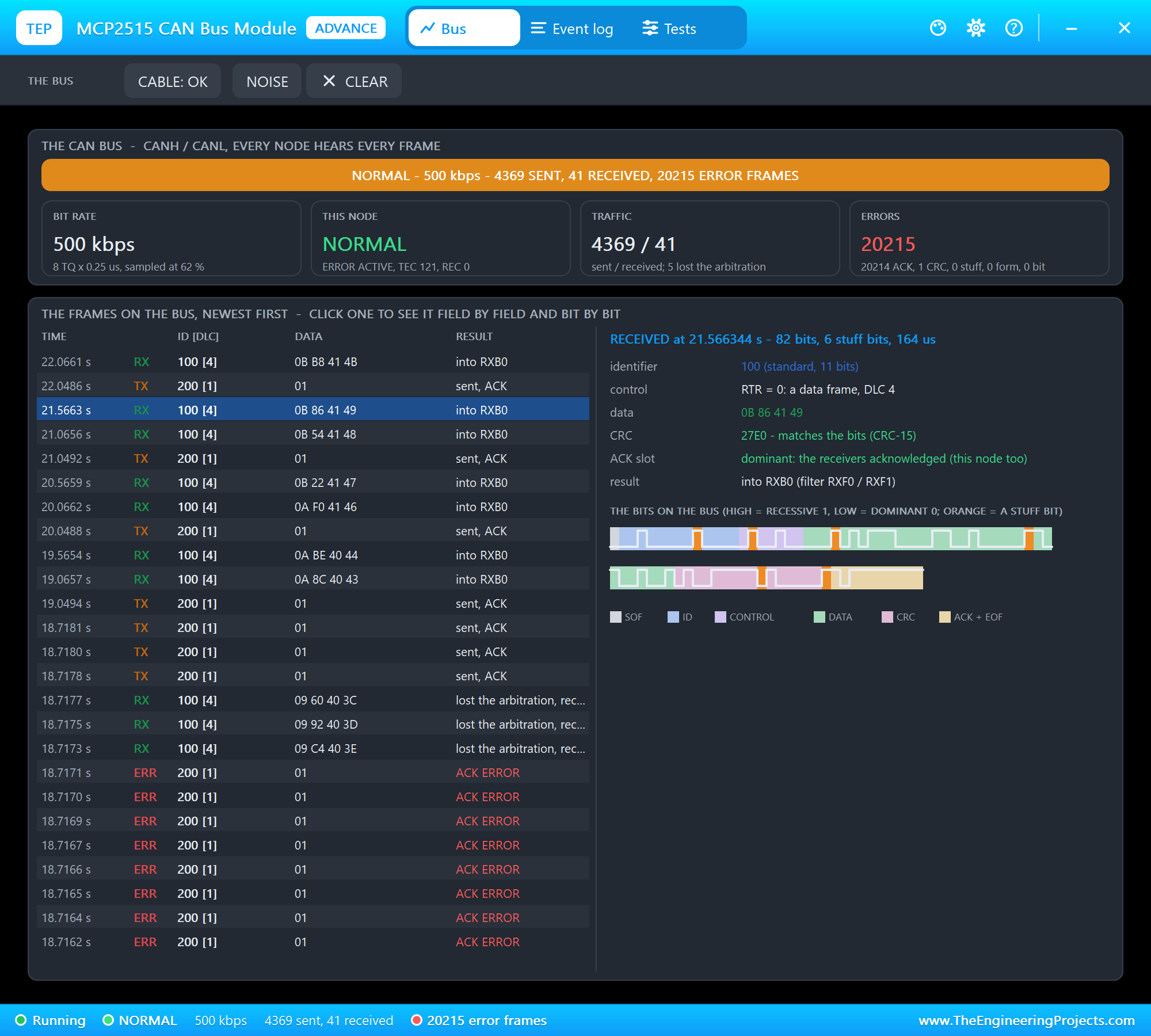
That is the MCP2515: when TX buffers with the same priority wait, it sends the highest buffer number first - TXB2 (2500 rpm), TXB1 (2450), then TXB0 (2400). If the order matters, give the buffers different priorities (TXP) or send the next frame only when the last one is gone. The recovery on U2's Bus page:
NOISE and CABLE with the Mouse on the Engine
On node 1, the Simple part, we clicked NOISE on the engine's STATUS panel. The next frame the engine received was the dashboard's LED state - and the engine read it wrong:
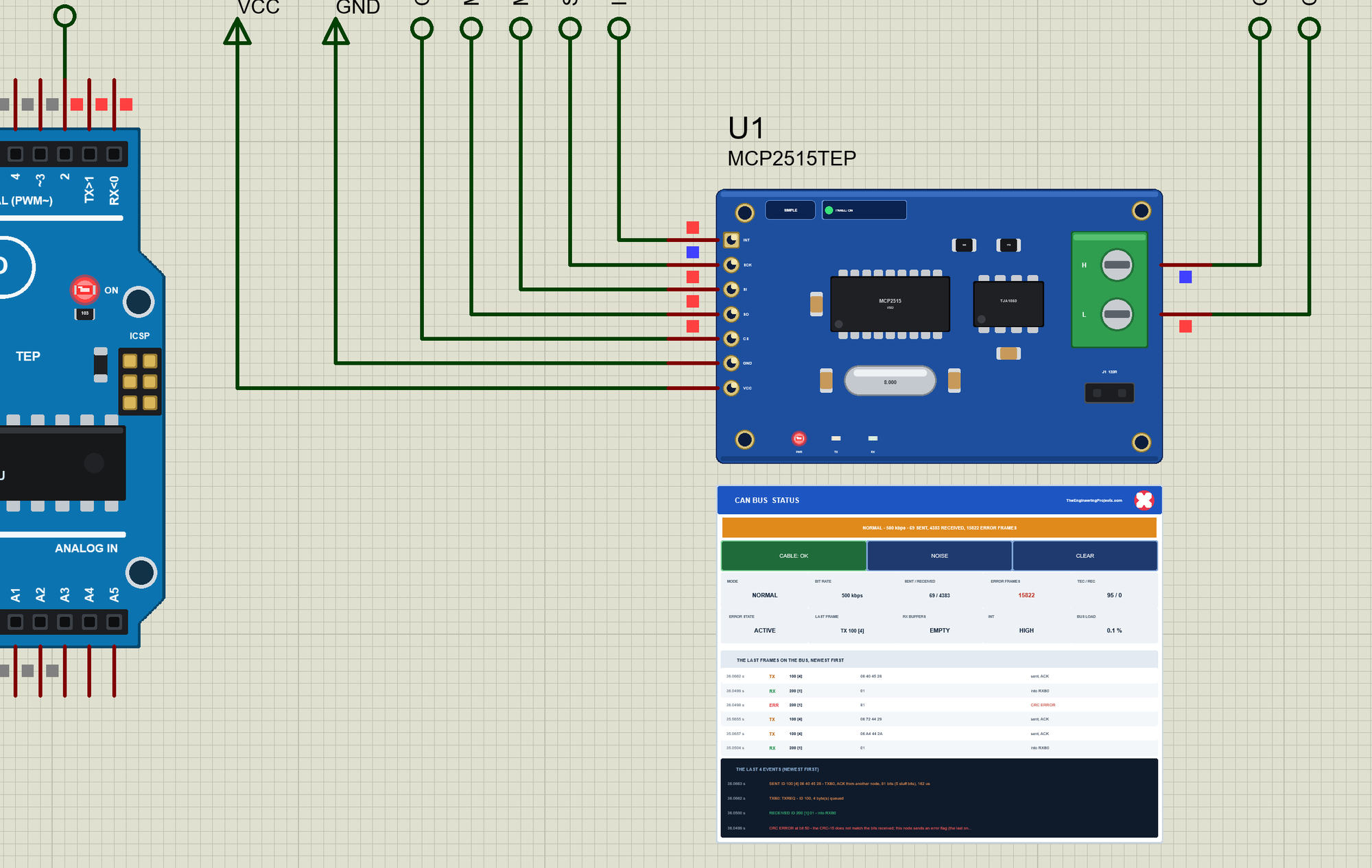
This time the dashboard was the sender: it saw the error flag and sent its frame again. Then CABLE on the panel cut the engine off the bus. Alone, its frames found no ACK, its TEC climbed past 128 and it went error passive - the model counts the retries of a cut node frame by frame:
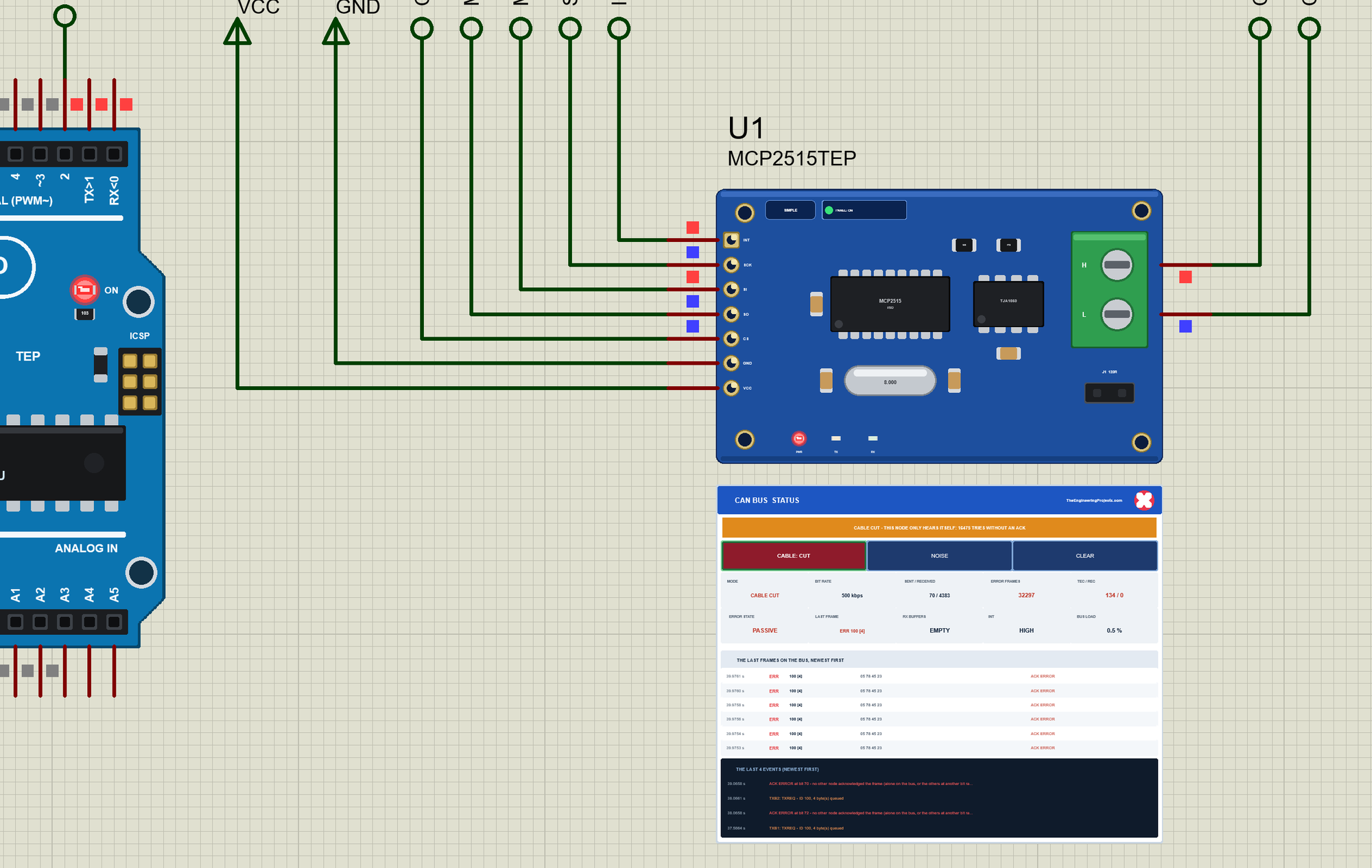
A second click on CABLE put the engine back on the bus: its waiting frames went out, its TEC fell with every good frame and it was error active again - the STATUS panel up close near the top of this article shows it a few seconds later.
The Test Tools
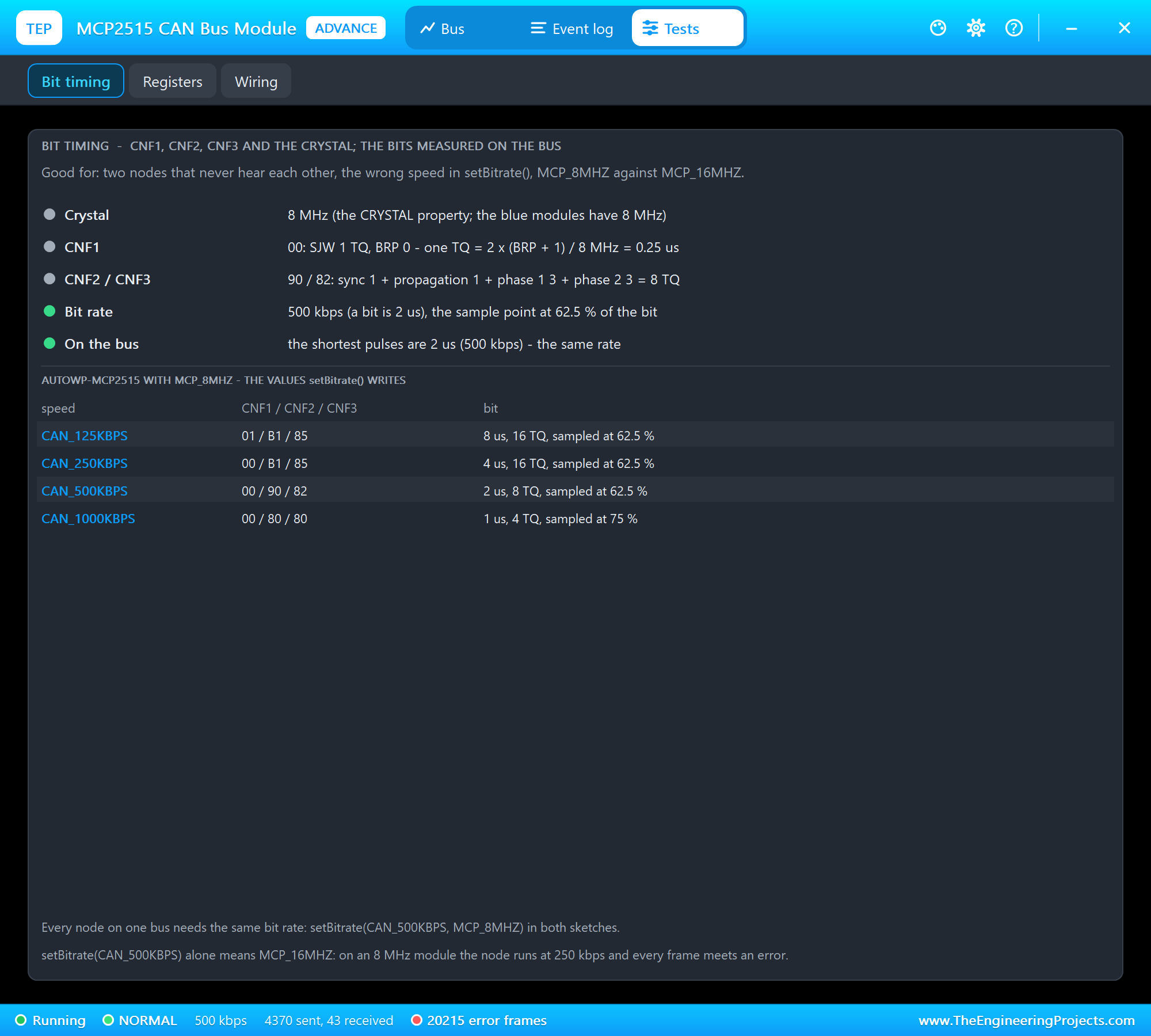
Bit timing is good for two nodes that never hear each other, the wrong speed in setBitrate() and MCP_8MHZ against MCP_16MHZ. It decodes CNF1 - CNF3 into the time quantum, the segments and the sample point, and compares the shortest pulses on the bus with this node's own bit time.
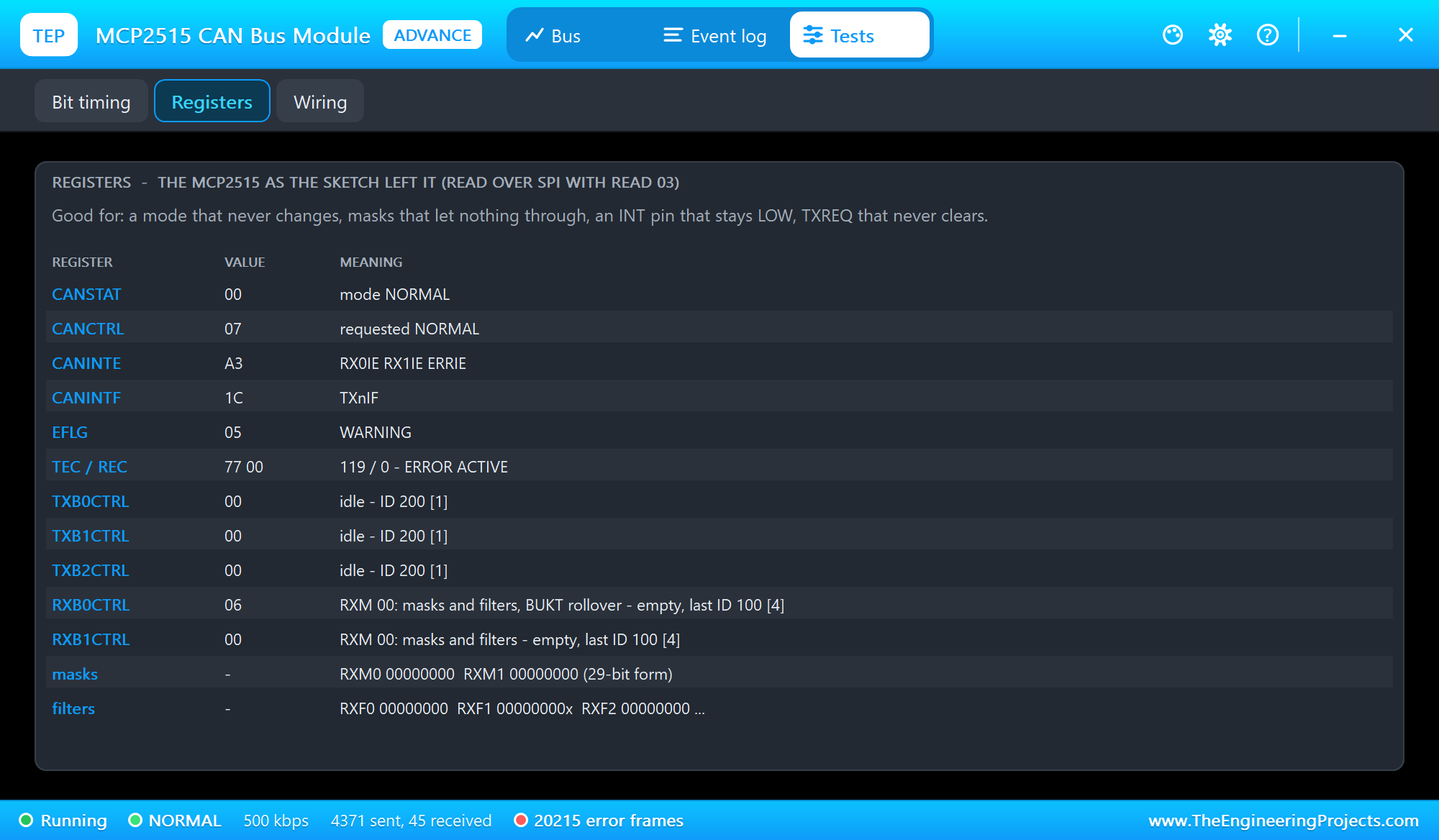
Registers is good for a mode that never changes, masks that let nothing through, an INT pin that stays LOW and TXREQ that never clears: the registers as the sketch left them, decoded.
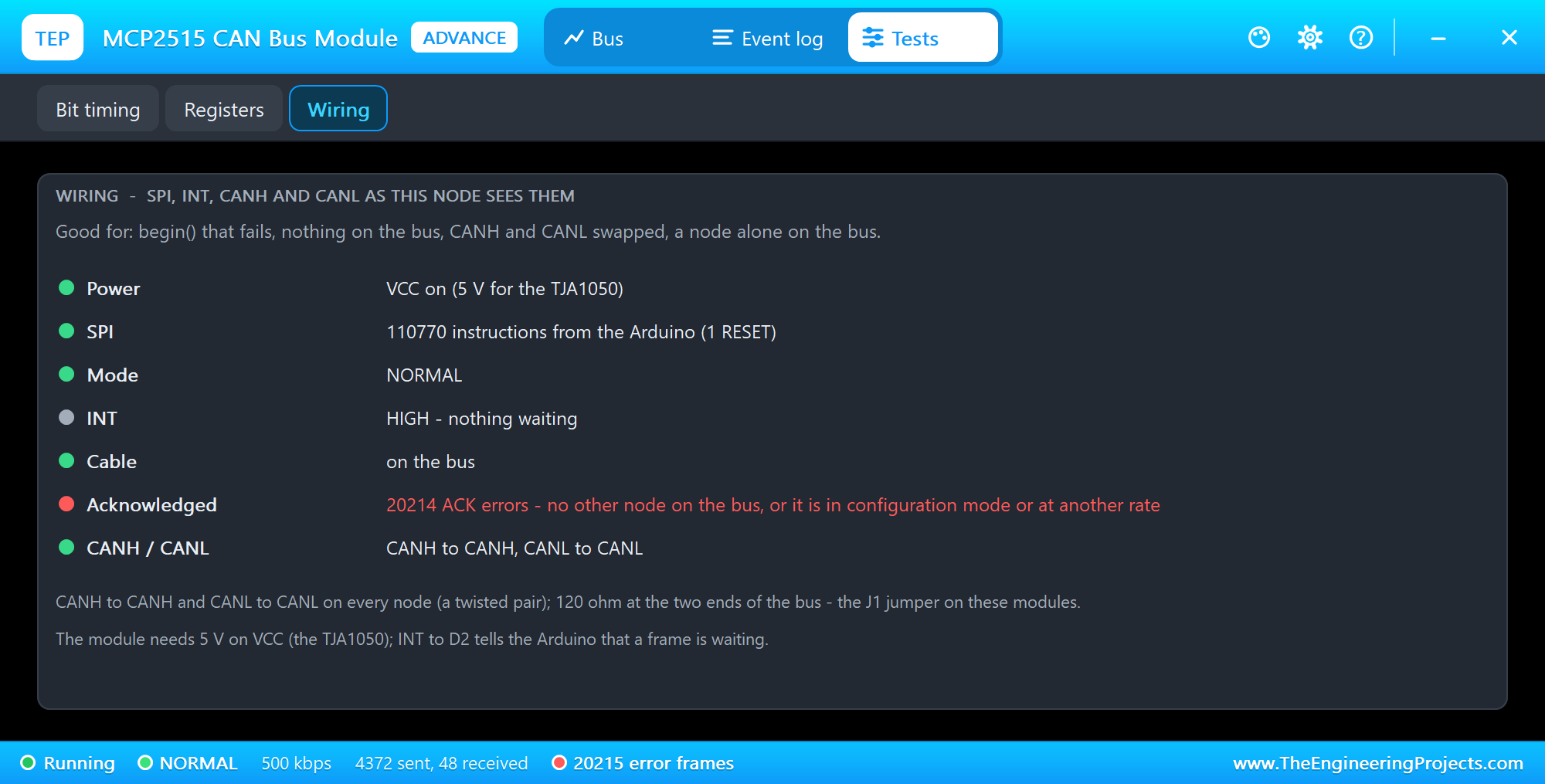
Wiring is good for a begin that fails, nothing on the bus, CANH and CANL swapped and a node alone on the bus: power, SPI, the mode, INT, the cable, the ACK errors and an undefined bus.
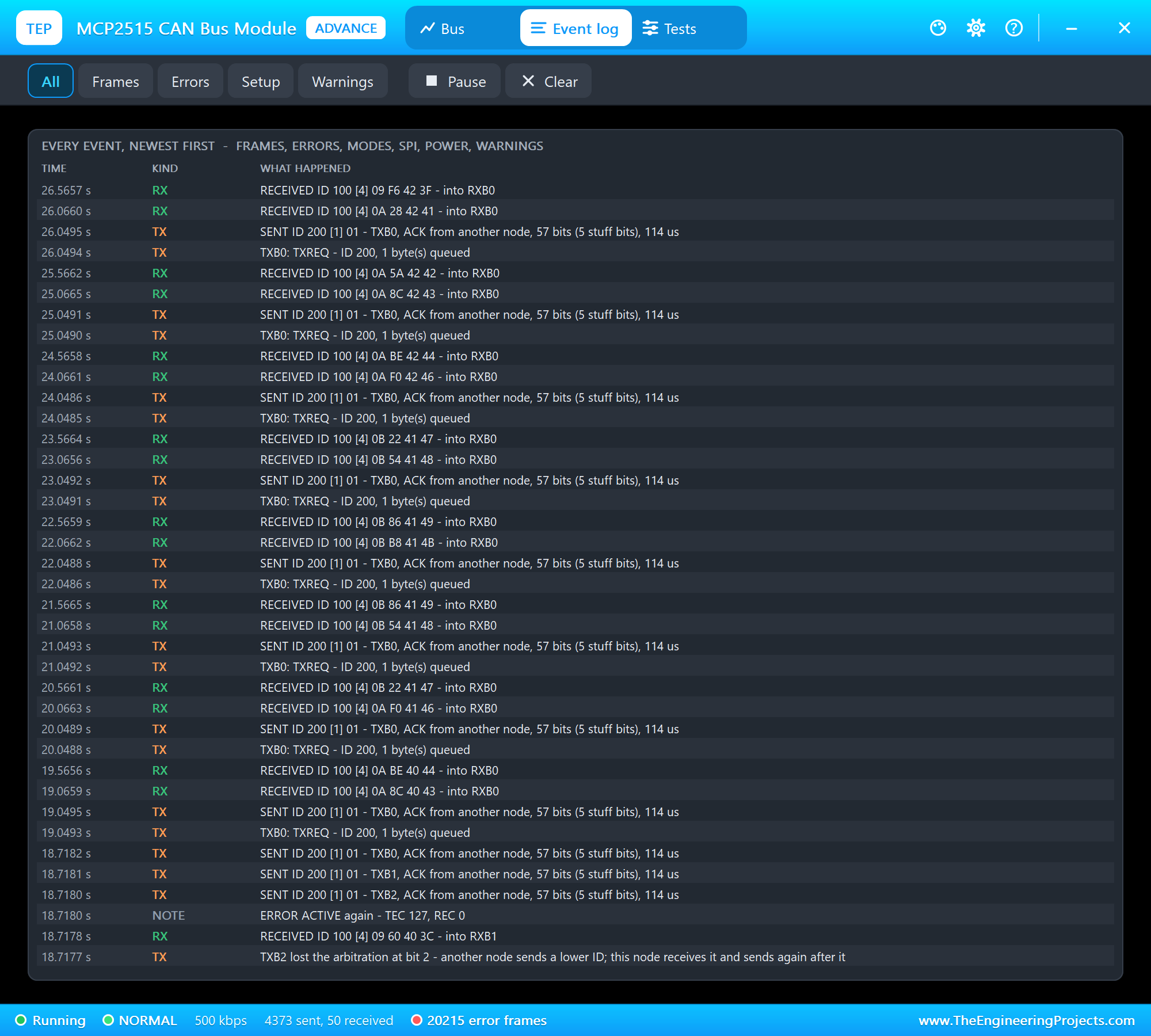
The Event log lists everything that happened, newest first: the frames, the errors, the modes, SPI, power and warnings. On a busy bus it lists 20 frames a second one by one and counts the rest. Filter it, pause it, or clear it.
The Simulation Log
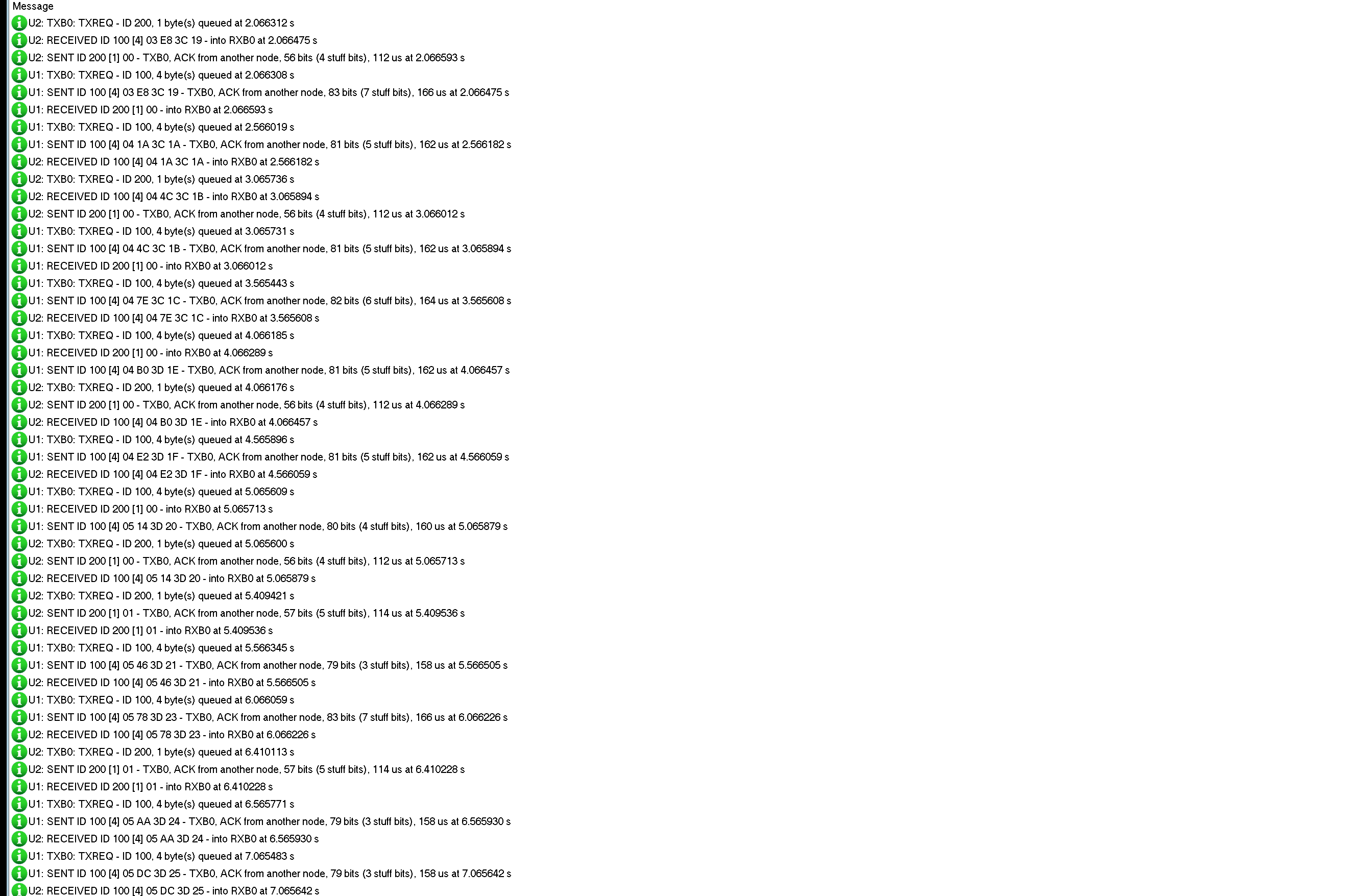
The parts also write to the simulation log of Proteus, with the exact simulation time. These lines show LED ON leaving U2 and arriving at U1 in the same microsecond, then the engine's next frame:
U2: TXB0: TXREQ - ID 200, 1 byte(s) queued at 5.409421 s
U2: SENT ID 200 [1] 01 - TXB0, ACK from another node, 57 bits (5 stuff bits), 114 us at 5.409536 s
U1: RECEIVED ID 200 [1] 01 - into RXB0 at 5.409536 s
U1: TXB0: TXREQ - ID 100, 4 byte(s) queued at 5.566345 s
U1: SENT ID 100 [4] 05 46 3D 21 - TXB0, ACK from another node, 79 bits (3 stuff bits), 158 us at 5.566505 s
U2: RECEIVED ID 100 [4] 05 46 3D 21 - into RXB0 at 5.566505 s
How the Model Works
Each module follows its SPI pins at every edge: it shifts in each byte on the rising edges of SCK, answers on SO, and runs the instruction - a register read or write, a TX buffer load, a request to send. For the bus it keeps a bit grid from the bit time of CNF1 - CNF3 and the crystal: at each bit boundary it drives CANH HIGH and CANL LOW for a dominant bit, or lets both go weak for a recessive one, and at each sample point it reads CANH back. Proteus joins the CANH pins of all modules into one net, so a strong dominant bit of any node wins. A falling edge on an idle bus is a start of frame: every receiver synchronises to it, removes the stuff bits, decodes the identifier, the DLC and the data, and checks the CRC-15. The transmitter compares each bit it reads with the bit it sent - a difference inside the identifier is a lost arbitration, anywhere else a bit error. The receivers drive the ACK slot; errors send 6 dominant bits, count TEC and REC, and the waiting frame goes out again. The bus is only simulated bit by bit while a frame is on it, so an idle bus costs nothing.
Troubleshooting
- "MCP2515 not answering": CS, SCK, SI or SO not connected, or no VCC (the PWR LED) - Wiring shows whether any SPI came in.
- The nodes never hear each other: different bit rates or crystals (Bit timing compares the bus with the node), CANH and CANL swapped, a node still in configuration mode (
setNormalMode()missing), the cable cut (CABLE). - "all 3 TX buffers still waiting" or TEC 128: no other node acknowledges - it is alone on the bus, in configuration or listen-only mode, or at another bit rate.
- Frames out of order: waiting TX buffers with the same priority go out highest number first; and
readMessage()reads RXB0 before RXB1. - Frames lost: the RX buffers hold two frames - read them as soon as INT goes LOW, or the overflow flags in EFLG are set.
- No part or no monitor: TEPMCP2515.DLL or TEPARDUINO.DLL is missing; a closed monitor opens again with a click on the UNO's USB port.
Things to Know Before Using a Real MCP2515 Module
- The crystal: most blue modules have 8 MHz -
setBitrate(CAN_500KBPS, MCP_8MHZ). - Termination: 120 ohm at the two ends of the bus only - the J1 jumper; remove it on the nodes in the middle.
- CANH to CANH, CANL to CANL on a twisted pair, and GND between the nodes.
- 5 V: the TJA1050 needs 5 V on VCC; the MCP2515 talks 5 V logic to the UNO.
- The same bit rate on every node of one bus.
- D13 is SCK: with an MCP2515 on the UNO's SPI, the L LED on D13 cannot show anything else; put your LEDs on other pins.
Limitations of the Simulation
- Not modelled: the analog levels on CANH and CANL, the cable (length, delay, reflections - the 120 ohm terminator J1 is drawn, not simulated), the resynchronisation inside a frame (all nodes share the crystal's exact rate), overload frames, the 8 bits of "suspend transmission" of an error-passive sender, the CLKOUT, RXnBF and TXnRTS pins, CAN FD.
- The model's own choices: NOISE makes this node read the first bit after the DLC of the next frame it receives wrong; after an error frame a node takes a falling edge as a start of frame once the bus has been recessive for 3 bits; a node with a frame waiting that sees another node's start of frame on an idle bus joins the arbitration; with the cable cut a node only hears itself and its retries are counted frame by frame.
- The badge, the LEDs, CABLE, NOISE, the panel button and the panels are TEP additions.
- The model is our own implementation written from the MCP2515 datasheet and the CAN 2.0 specification. This library is not made or endorsed by Microchip, NXP, Bosch, Arduino or Labcenter.
- Licences: both HEX files contain autowp-mcp2515 1.3.1 (MIT licence - the licence text is in the README) and the Arduino AVR core 1.8.6 with LGPL-licensed code - the source link is in the README.
- Tested in Proteus 8.5 in October 2026 (the demo as shipped on two Arduino UNO V4.0 boards with their built-in monitors: the frames both ways, LED ON, an extended frame, LOAD and the arbitration, NOISE and CABLE on the Advance part and, with the mouse, on the Simple one; 28.2 s of simulation took 96 s with the pop-up and both monitors open, about 0.29 x real time). Proteus 7 is not supported.
If your nodes need a longer cable and a simpler protocol, our MAX485 RS-485 Module Library for Proteus puts Modbus RTU on two wires.
So, that was all about the MCP2515 CAN Bus Module Library for Proteus V1.0. I hope dominant and recessive bits, the arbitration and the error counters are clear now, and that your nodes talk on the first try. If you use the MCP2515 CAN Bus Module Library for Proteus in a project, please share it in the comments or in our forum, and if you have any questions, ask in the comments and I will help you out. Till the next tutorial, take care and have fun!