Hello friends, I hope you all are doing great. Today, I am going to share the NodeMCU ESP8266 V3 Library for Proteus V2.0. The NodeMCU is the board most of us met the ESP8266 on: an ESP-12E module, a USB chip, a 3.3 V regulator and two rows of pins with names like D1 and D4 - plug it in, pick it in the Arduino IDE and your sketch is on Wi-Fi. Our first NodeMCU library from 2023 could only show the board and run an Arduino UNO sketch on its pins. This version runs your ESP8266 sketch - ESP8266WiFi, ESP8266WebServer, ESP8266mDNS, D0 to D8, A0 - and puts the board on a Wi-Fi network inside Proteus.
NodeMCU ESP8266 V3 Library for Proteus
Latest version: V2.0 (October 2026, this tutorial)
Earlier versions: V1.0 (2023)
Other ESP8266 modules: ESP-01 · ESP-01S · ESP-07 · ESP-07S · ESP-12E · ESP-12F · ESP-01 Adapter · WiFi Shield · NodeMCU V2 · D1 Mini
ESP32 boards and modules: ESP32 DevKit V1 · ESP32-DevKitC V4 · ESP32-S3 DevKitC-1 · ESP32-C3 SuperMini · TTGO T-Display · ESP32-WROOM-32 · AirLift WiFi Shield · AirLift ESP32 Breakout
Helping Tools
- Laptop WiFi Monitor: a laptop on the Wi-Fi of your design: a browser, a TCP / UDP terminal and ping
- Mobile WiFi Monitor: a smartphone that opens the pages of your Wi-Fi module and sends it commands
- Serial Monitor Advance: a serial terminal window for the UART of your board
This is the nineteenth library of our Wi-Fi series. Its demo is a little web dashboard: the NodeMCU reads a pot on A0, drives an LED on D1 and its own blue LED, counts presses of its FLASH button, sends reports to our Laptop WiFi Monitor and serves a page that our Mobile WiFi Monitor opens by its name, nodemcu.local.
NOTICE: Proteus has no ESP8266 processor, so this is not a real ESP8266 chip: your sketch is compiled for a hidden ATmega2560 inside the board (16 MHz, 8 KB of RAM). The ESP8266 Arduino API and the Wi-Fi are our model. The antenna colours, the red PWR LED, the PANEL pad and the panel are TEP additions. Your feedback is the fuel that keeps us going, so please tell us what you think in the comments below or in the NodeMCU ESP8266 V3 board of our forum. And if our free libraries help you, you can buy us a coffee. So, let's get started with the NodeMCU ESP8266 V3 Library for Proteus V2.0:
What is NodeMCU ESP8266 V3?
NodeMCU started as an open firmware for the ESP8266 and gave its name to a family of development boards. The board puts an ESP-12E module (the ESP8266EX chip with 4 MB of flash and a PCB antenna) next to a USB to serial chip, a 3.3 V regulator, the RST and FLASH buttons and 30 pins on a breadboard-friendly board. The V3 is the LoLin version with the CH340G USB chip; the V2 (Amica) uses a CP2102 and is narrower. In the Arduino IDE they are all "NodeMCU 1.0 (ESP-12E Module)". If the board is new to you, read our Introduction to NodeMCU V3 first.
| Real NodeMCU V3 | This library in Proteus | |
|---|---|---|
| Processor | ESP8266EX, 80 / 160 MHz, about 80 KB RAM | a hidden ATmega2560 at 16 MHz, 8 KB RAM |
| Sketch | ESP8266 Arduino core | the same API from our board package TEP Boards for Proteus 1.5.0 |
| Wi-Fi | 802.11 b/g/n, 2.4 GHz | our model: a router, DHCP, TCP, UDP, mDNS, NTP |
| A0 | 0 to 3.2 V through a 220k / 100k divider, 0 to 1023 | the same: 0 to 1023 for 0 to 3.2 V |
| LEDs | the blue LED of the ESP-12E on GPIO2 | the same, plus a red PWR LED |
| Buttons | RST and FLASH (GPIO0) | the same, clickable |
| USB | CH340G, the serial port and the upload | opens the built-in serial monitor |
How Your ESP8266 Sketch Runs in Proteus
Proteus 8 simulates many processors, but not the ESP8266. So we did what we did for our ESP32 DevKit V1 Library for Proteus V2.0: the board in Proteus has a hidden ATmega2560 inside, and our board package for the Arduino IDE compiles your ESP8266 sketch for it. The package gives the sketch the ESP8266 names - D1 is GPIO5, LED_BUILTIN is GPIO2, A0 answers 0 to 1023 - and the ESP8266 libraries, which talk to our model in TEPNET.DLL. The model is the radio: it joins the router, hands out the address, keeps the sockets and answers mDNS names.
This has a price you should know before you start: the sketch runs at 16 MHz with 8 KB of RAM, an int is 16 bits (use long above 32767), and there is no Bluetooth (the ESP8266 has none anyway), no SPIFFS or LittleFS, no OTA and no real TLS. For web pages, sockets, sensors and LEDs it is plenty, and the same sketch compiles for a real NodeMCU without a change.
What is New in V2.0
- Your ESP8266 sketch: V1.0 needed an Arduino UNO sketch; V2.0 runs ESP8266 sketches compiled with the board "NodeMCU ESP8266 V3 (TEP Proteus)".
- Wi-Fi: ESP8266WiFi, ESP8266WebServer, ESP8266mDNS, ESP8266HTTPClient, WiFiClient, WiFiServer and WiFiUDP on a virtual network.
- The real pin names: D0 to D8, RX, TX, S2, S3 and A0 with the ESP8266's GPIO numbers.
- A new drawing: the board at its real proportions with the ESP-12E, its antenna, the CH340G, the AMS1117, the RST and FLASH buttons and the blue LED.
- A panel and a serial monitor of their own, and our Laptop and Mobile WiFi Monitors for the demo.
Features of the NodeMCU ESP8266 V3 Library for Proteus
- The board as it looks: the black LoLin board turned on its side, the micro-USB on the left, RST and FLASH beside it, the CH340G and the AMS1117, the ESP-12E with its meander antenna on the right, 15 + 15 header pins with their labels.
- The ESP8266 Arduino API:
pinMode,digitalWrite,analogRead(A0),analogWritewithanalogWriteRangeandanalogWriteFreq,attachInterruptwithICACHE_RAM_ATTR,ESP.getChipId()and more. - Wi-Fi in Proteus: a virtual router (TEP-WiFi) with DHCP, a scan list, RSSI, mDNS names, NTP time, TCP and UDP to every TEP Wi-Fi part in the design, and an internet host for HTTP.
- The board's own parts: the blue LED on GPIO2 (lit when LOW, as on the real board), the FLASH button on GPIO0, the RST button, a red PWR LED and an antenna that changes colour with the traffic.
- A0 as on the NodeMCU: 0 to 1023 for 0 to 3.2 V, the board's divider in front of the ESP8266's 1 V input.
- A built-in serial monitor at 115200 baud with Monitor, Plotter and Board tabs.
- Our pop-up panel: a phone that opens the board's page, the board and Wi-Fi cards, the traffic, every pin live, a Test page, Settings and Help.
- Our Laptop and Mobile WiFi Monitors in the package: a browser, TCP and UDP terminals and ping on the same network.
- A compact package: about 2.17 MB with the board package for the Arduino IDE, without the C++ source code of the models.
The NodeMCU ESP8266 V3 in Proteus
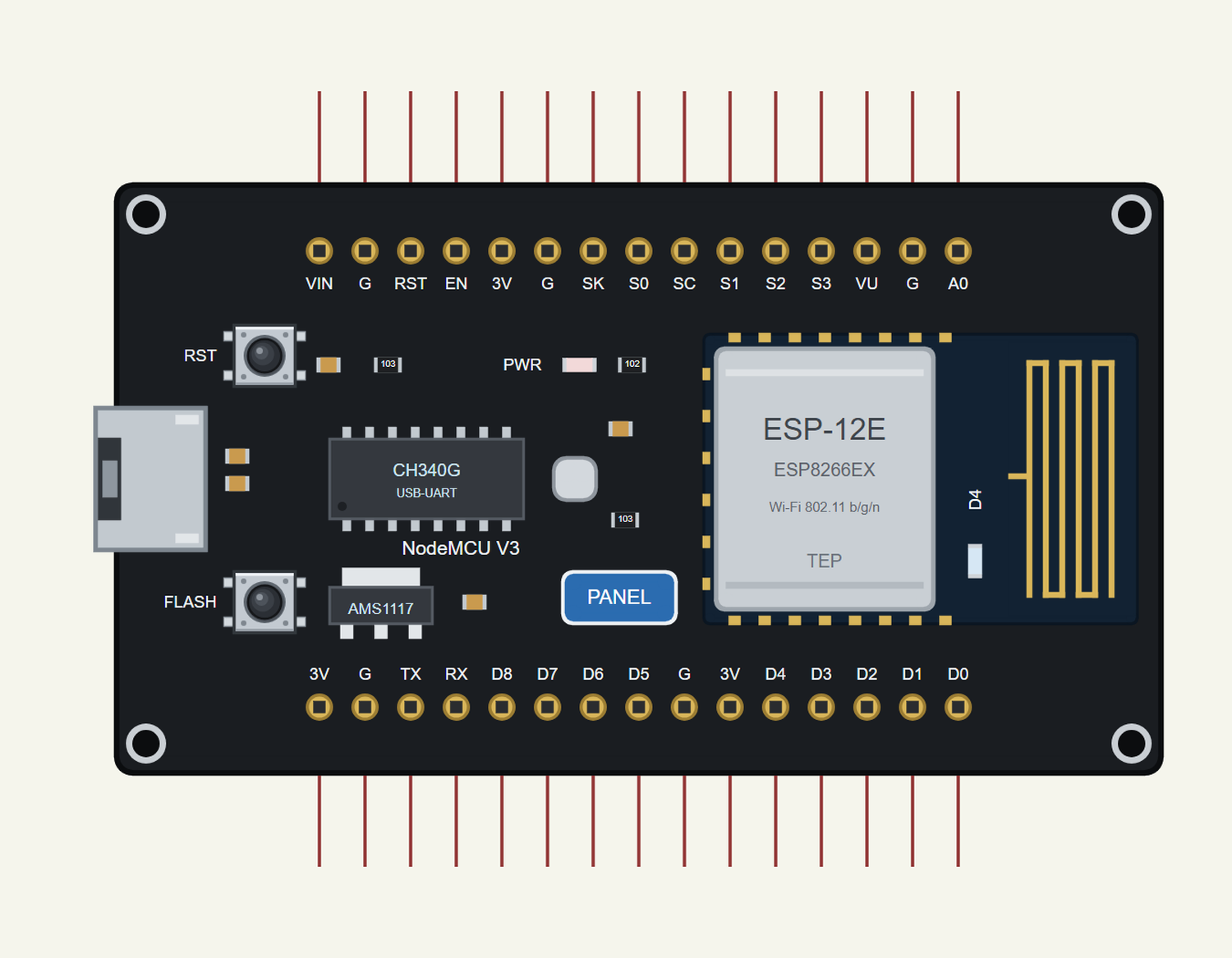
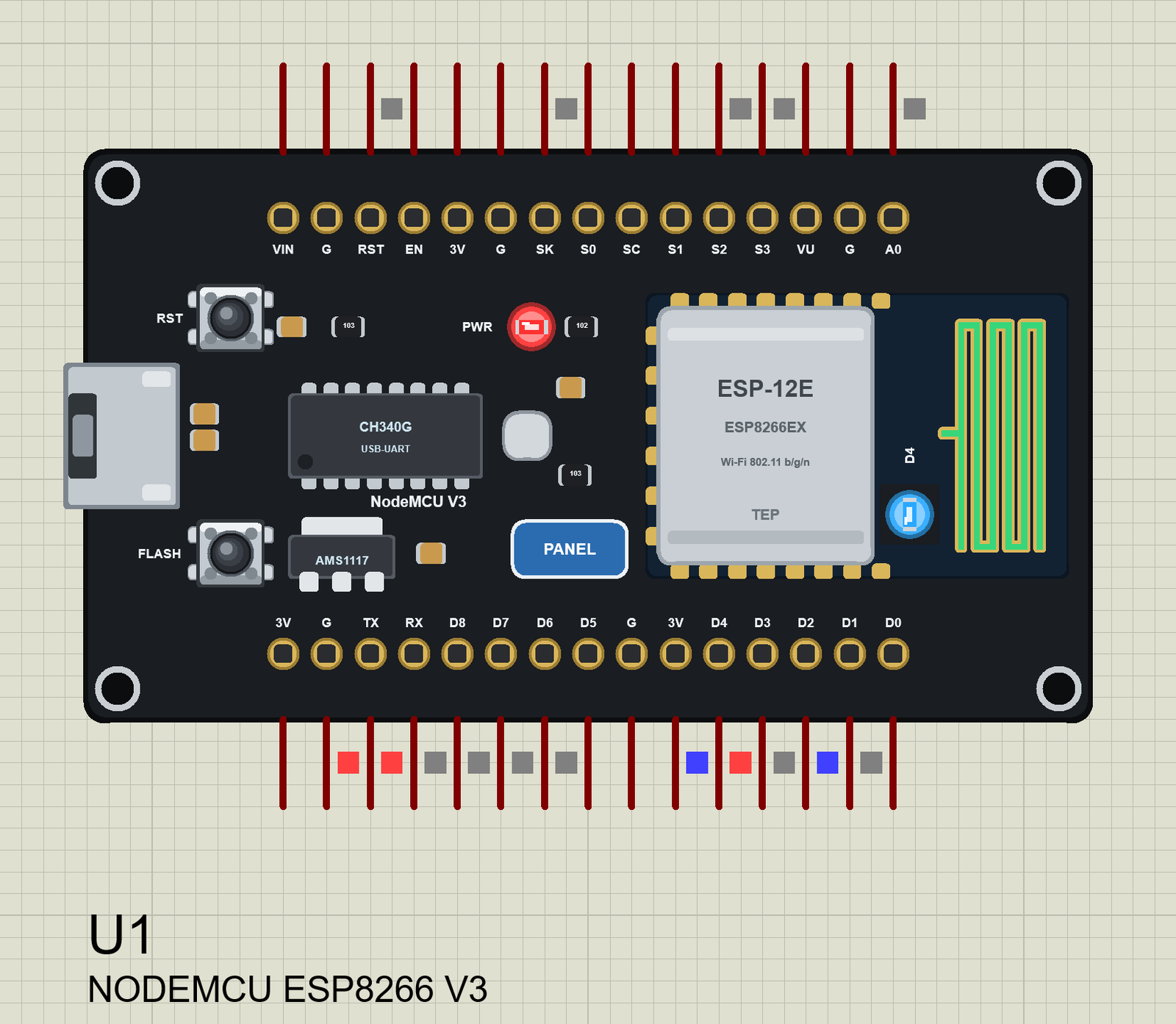
Search NODEMCU in Pick Devices; the device NODEMCU ESP8266 V3 is in TEPNODEMCU.LIB (Microprocessor ICs, ESP8266 Boards). The pins carry the labels of the real board. Click the micro-USB to open the serial monitor and the PANEL pad or the ESP-12E to open the panel.
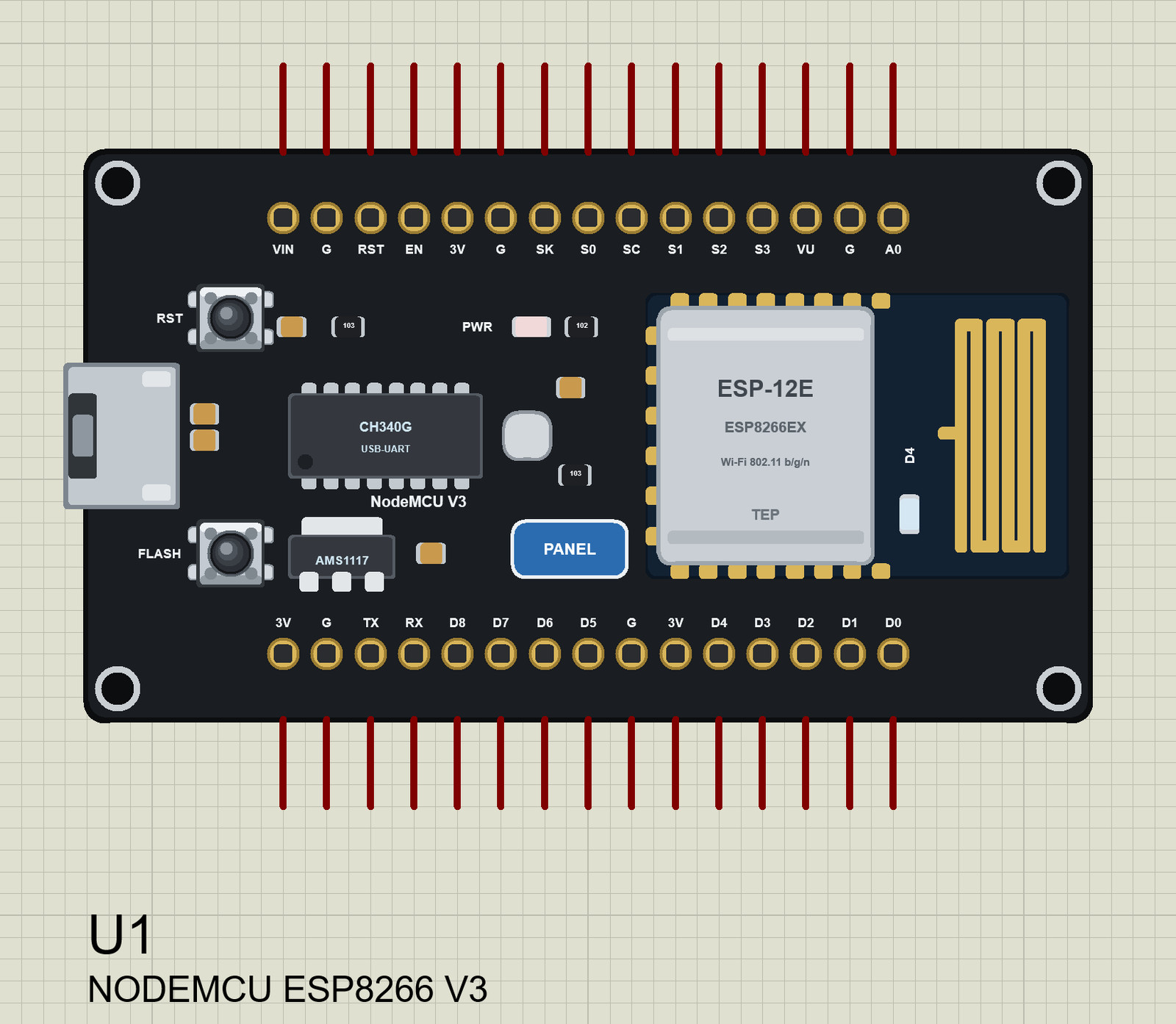
Every State of the NodeMCU
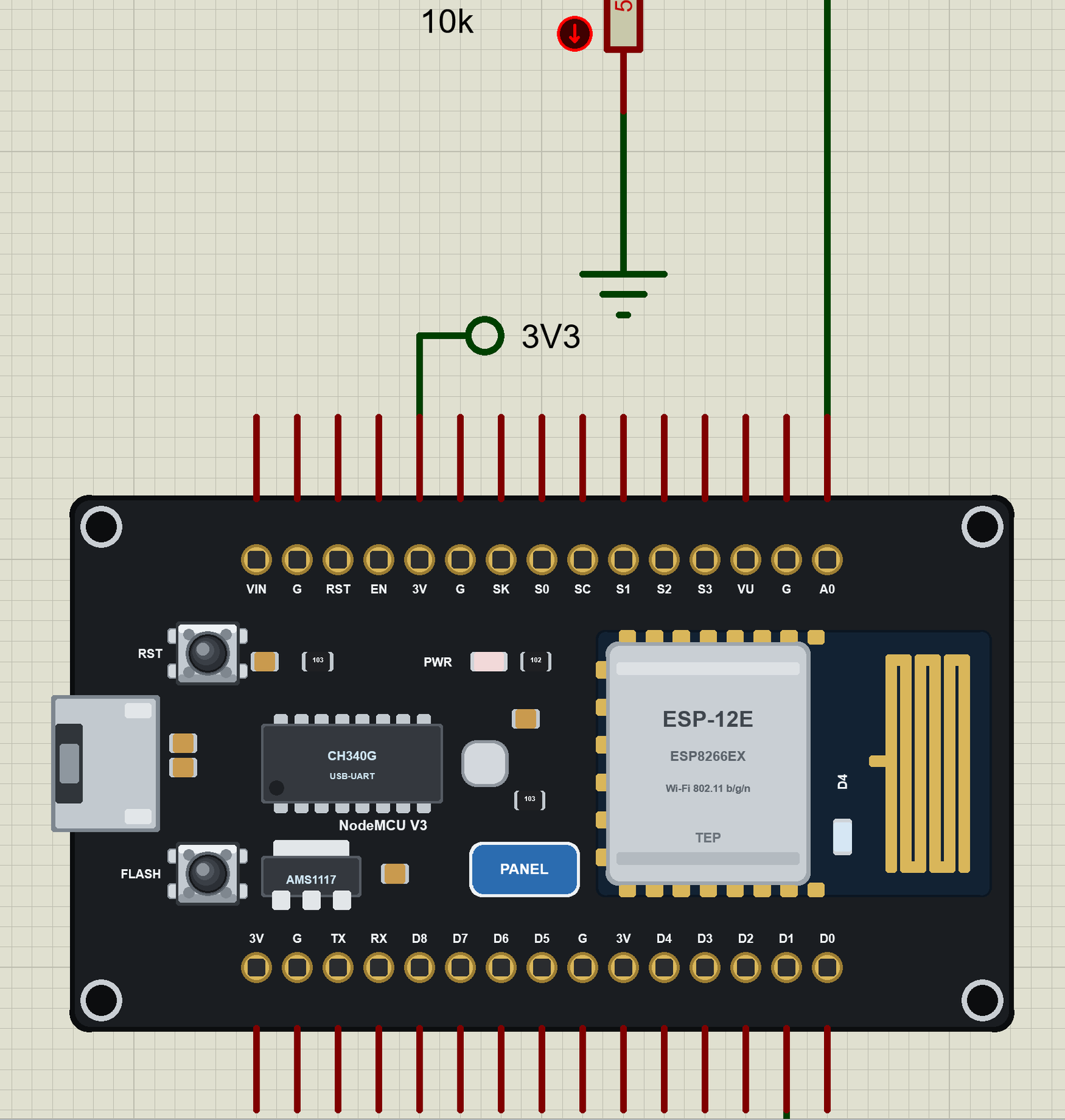
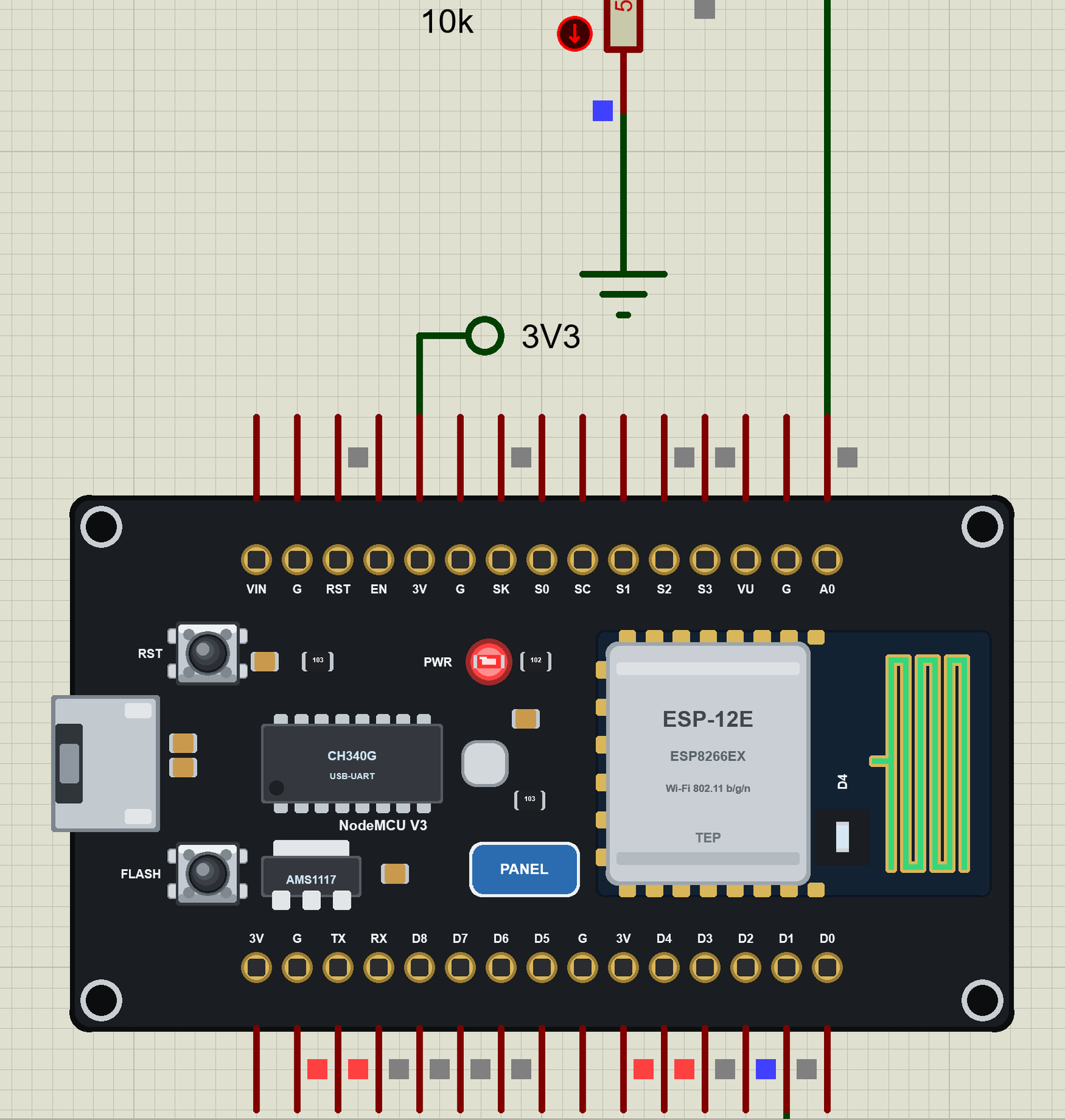
We ran the board and paused the simulation for each picture. At Run the red PWR LED lights, the sketch starts and calls WiFi.begin(); the antenna turns green when the board is on Wi-Fi:
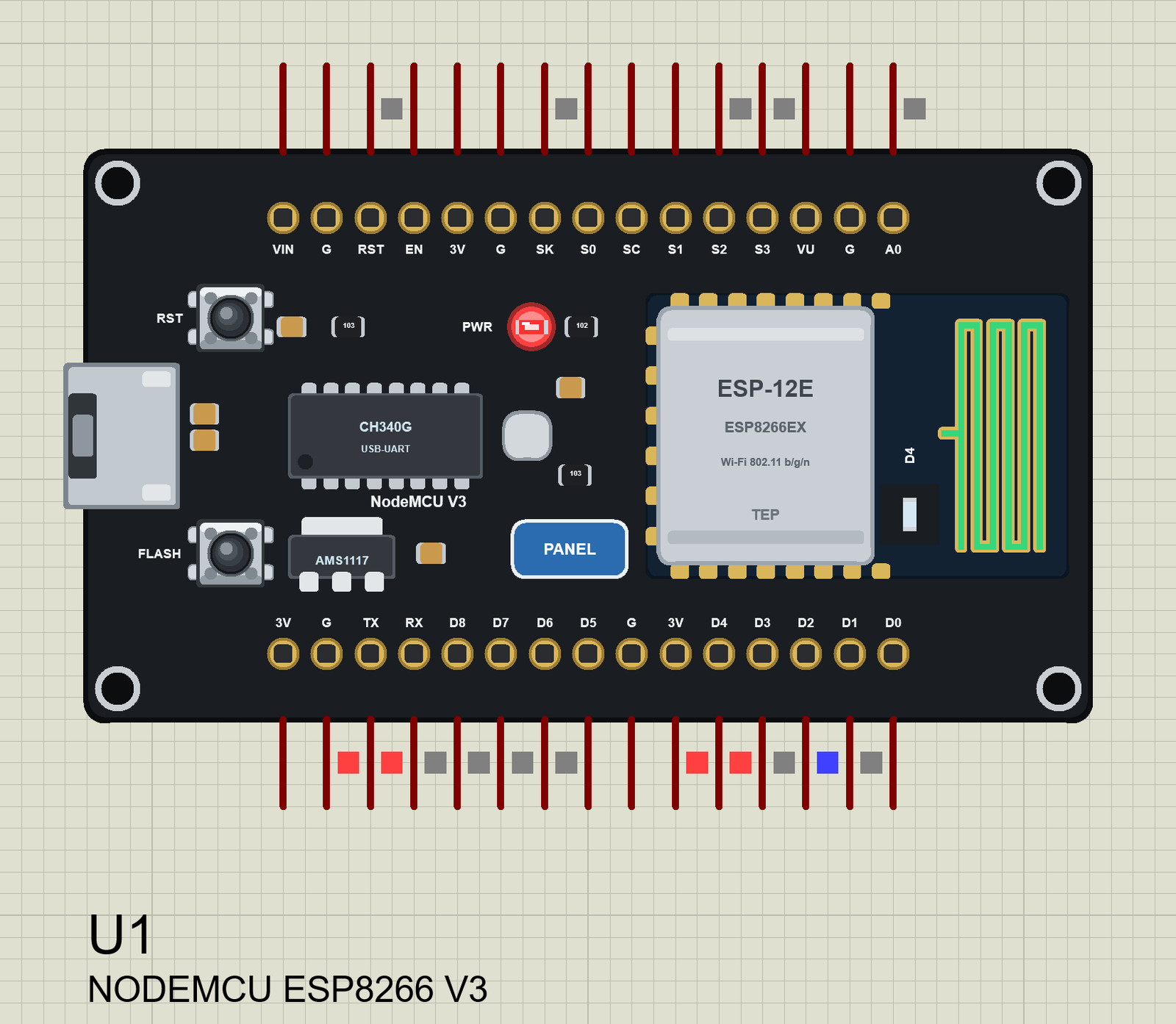
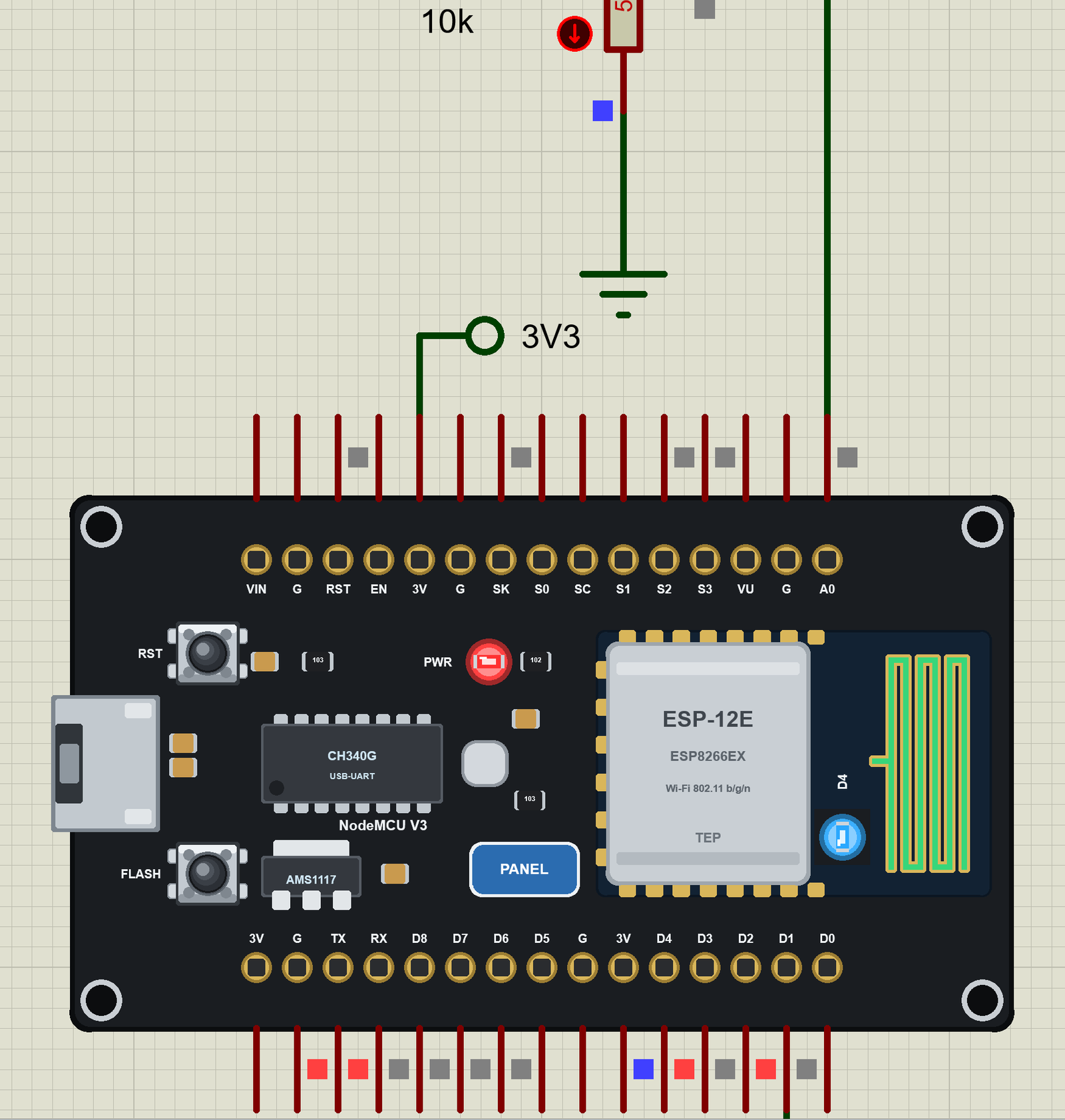
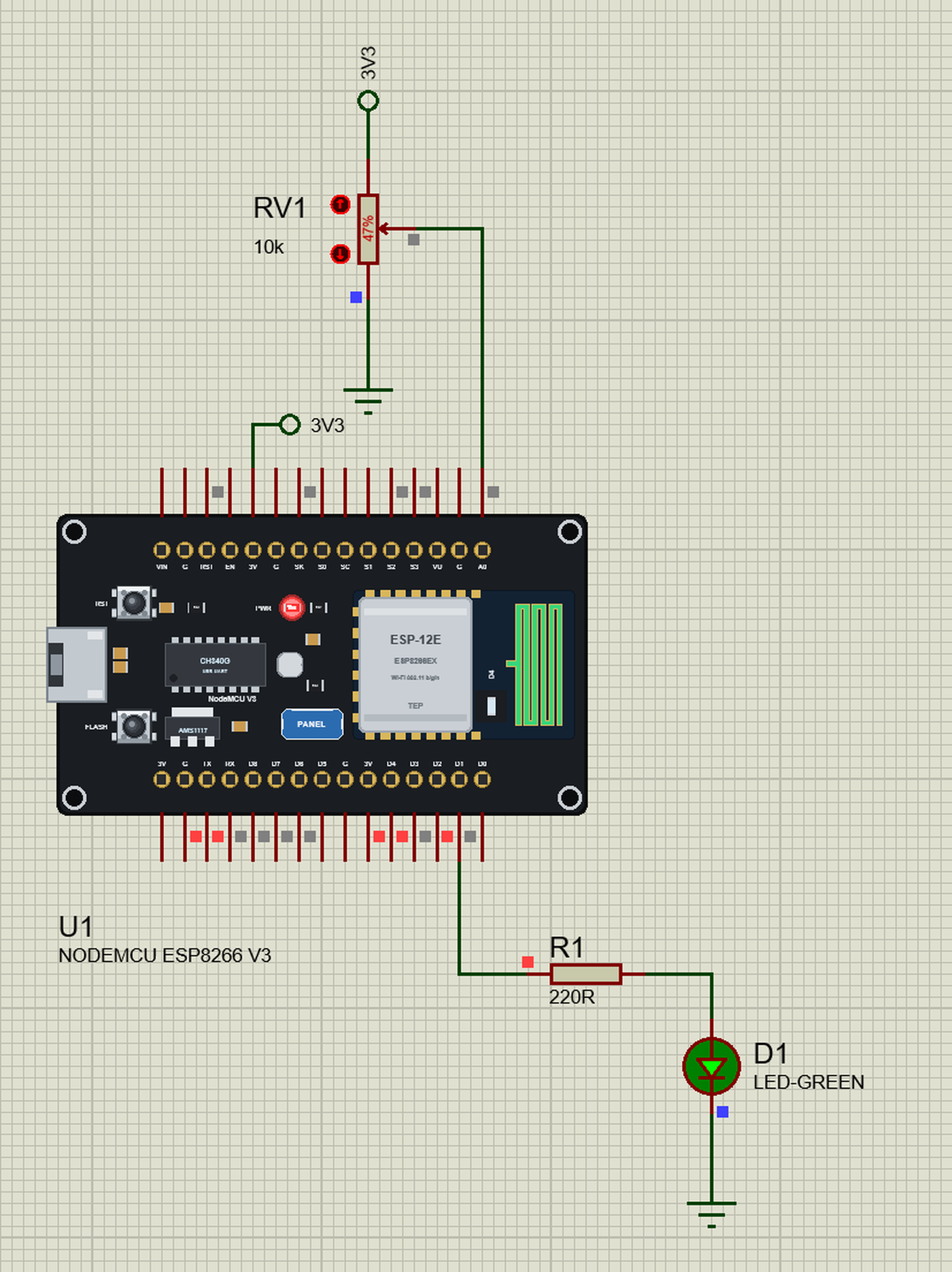
The same states in the demo, zoomed in on the board. The small squares on the pins are Proteus's logic levels - red HIGH, blue LOW, grey not driven:
Download NodeMCU ESP8266 V3 Library for Proteus V2.0
Click the button below to download NodeMCU-ESP8266-V3-Library-for-Proteus-v2.0.zip (about 2.17 MB, without the C++ source code of the models):
NodeMCU ESP8266 V3 Library for Proteus V2.0- README.txt: the device, installation, the demos, the pins, the properties, troubleshooting and the limits.
- Proteus Library Files:
TEPNODEMCU.LIB(the board),TEPLAPTOP.LIBandTEPMOBILE.LIB(our Laptop and Mobile WiFi Monitors). - Proteus Model Files:
TEPNET.DLL(the board, the two monitors and the Wi-Fi network). - Proteus Simulation: the two demo projects, the HEX file and a copy of the DLL.
- Arduino Code: the demo sketch and TEP Boards for Proteus 1.5.0, our board package for the Arduino IDE with the ESP8266 libraries.
No Proteus yet? Read How to Download and Install Proteus 7 and 8. New to libraries? Follow How to Install a New Library in Proteus.
How to Install NodeMCU ESP8266 V3 Library for Proteus
- Close Proteus and extract the whole zip file, for example to your Desktop.
- Copy the three files from Proteus Library Files into the LIBRARY folder of Proteus (usually
C:\Program Files (x86)\Labcenter Electronics\Proteus 8 Professional\LIBRARY). The files of the 2023 version can stay; they hold another device. - Copy
TEPNET.DLLfrom Proteus Model Files into the MODELS folder - replace an older copy (this one is the first that knows the NodeMCU, and it still runs our ESP32 boards, the ESP8266 modules, the shields and the two monitors). - Delete
TEPNODEMCU.IDX,TEPLAPTOP.IDXandTEPMOBILE.IDXfrom the LIBRARY folder if they are there. - Start Proteus, press P and search for NODEMCU.
The Board Package for the Arduino IDE
The demo has its HEX file, so you need the Arduino IDE only for your own sketches. Copy the folder Arduino Code\TEP Boards for Proteus\hardware into your sketchbook folder (normally Documents\Arduino), so that Documents\Arduino\hardware\tep\avr\boards.txt exists, and restart the IDE. The Arduino AVR Boards platform must be installed (IDE 1.8 has it; in IDE 2 install it once from the Boards Manager). Then choose Tools > Board > TEP Boards for Proteus > NodeMCU ESP8266 V3 (TEP Proteus), write your sketch and use Sketch > Export Compiled Binary; double-click the board in Proteus and set its Program File to the HEX (see How to get the HEX file from Arduino). The ESP8266 libraries the sketch includes are inside the package - nothing else to install.
Demo: A NodeMCU Web Dashboard with a Laptop and a Phone
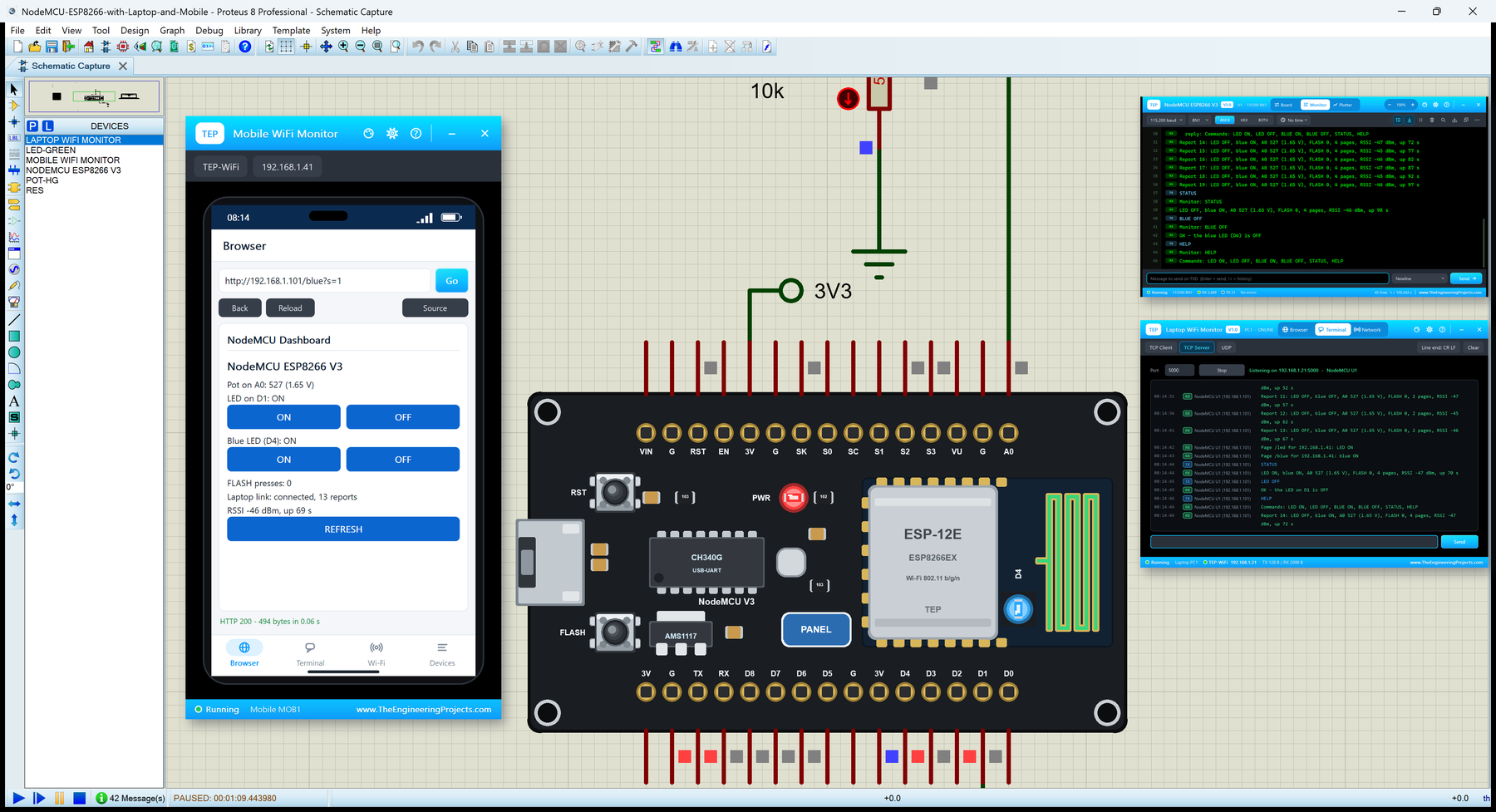
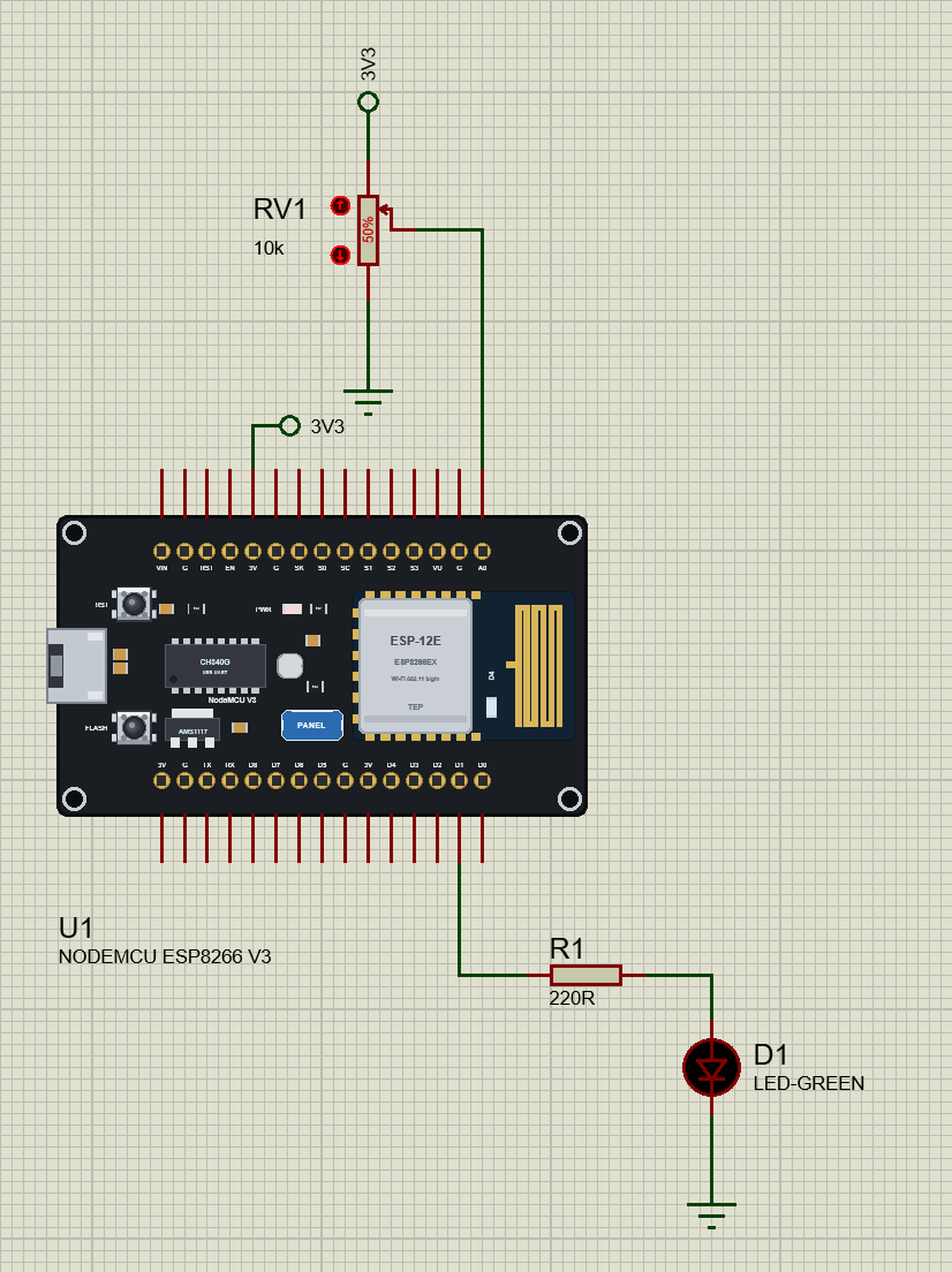
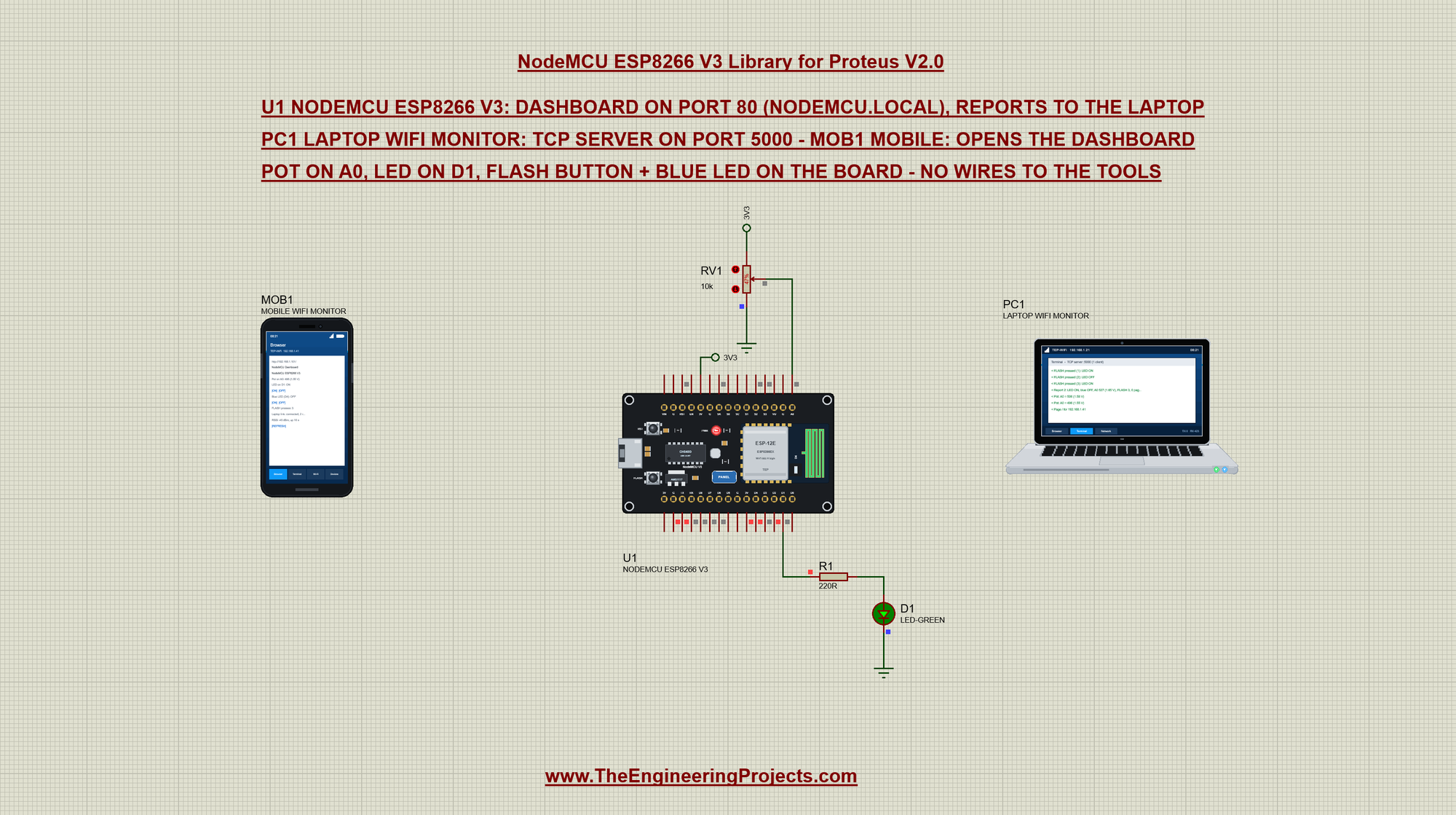
Open NodeMCU-ESP8266-with-Laptop-and-Mobile.pdsprj. In the middle is the NodeMCU (U1) with a pot on A0 and an LED on D1, on the left our phone (MOB1) and on the right our laptop (PC1) - no wires to them, they are on the TEP-WiFi network like the real ones. The package also has NodeMCU-ESP8266-V3-Board.pdsprj, the board alone with the same sketch.
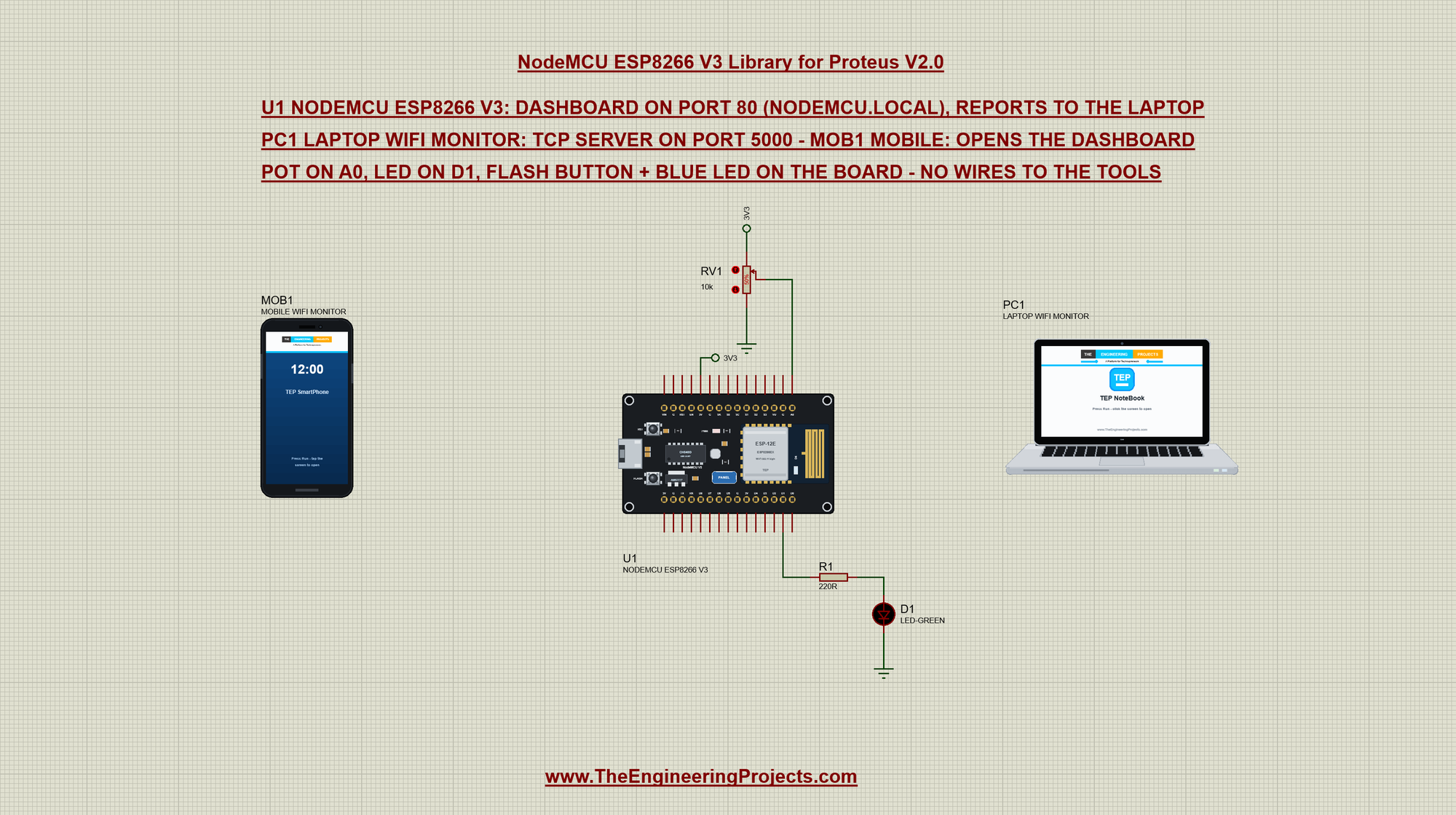
RV1 (10k) sits between the 3.3 V and ground with its wiper on A0; the board's first 3V pin carries a 3V3 label to the pot's top. R1 (220R) and the green LED D1 hang on the pin D1 (GPIO5). The FLASH button and the blue LED are on the board itself:
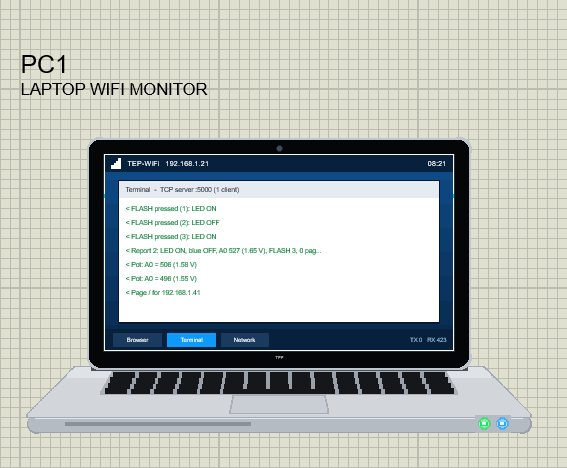
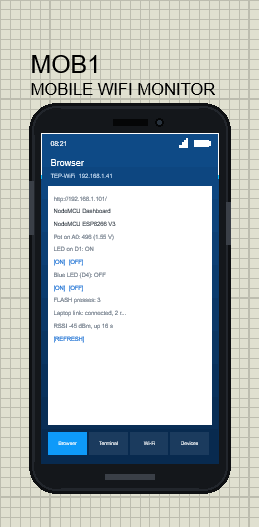
The two tools come from our Laptop WiFi Monitor Library for Proteus and Mobile WiFi Monitor Library for Proteus. The laptop is 192.168.1.21 and runs a TCP server on port 5000; its browser's home page is http://192.168.1.101/. The phone is 192.168.1.41 and its home page is http://nodemcu.local/, the board's mDNS name:
The Sketch: A Normal ESP8266 Sketch
The sketch is written as for a real NodeMCU. It includes the three ESP8266 libraries and uses the board's pin names:
#include <ESP8266WiFi.h>
#include <ESP8266WebServer.h>
#include <ESP8266mDNS.h>
const char *LAPTOP_IP = "192.168.1.21"; // the Laptop WiFi Monitor PC1
const uint16_t LAPTOP_PORT = 5000; // its terminal's TCP server
const int LED_PIN = D1; // GPIO5: the LED through 220R
const int FLASH_PIN = D3; // GPIO0: the FLASH button on the boardThe blue LED of the ESP-12E is wired from 3.3 V to GPIO2, so it lights when the pin is LOW - the sketch hides that in setBlue():
void setLed(bool on) { ledOn = on; digitalWrite(LED_PIN, on ? HIGH : LOW); }
void setBlue(bool on) { blueOn = on; digitalWrite(LED_BUILTIN, on ? LOW : HIGH); }   // the ESP-12E's LED lights when LOW
The FLASH button is GPIO0 with a pull-up. An interrupt counts the presses; on the ESP8266 an interrupt function must live in RAM, which ICACHE_RAM_ATTR says (our package accepts it, so the sketch stays the same):
ICACHE_RAM_ATTR void onFlash() { flashCount++; } pinMode(FLASH_PIN, INPUT_PULLUP);
attachInterrupt(digitalPinToInterrupt(FLASH_PIN), onFlash, FALLING);Then the Wi-Fi: station mode, the host name, the network. MDNS.begin() gives the board the name nodemcu.local, and the web server gets three pages:
  WiFi.mode(WIFI_STA);
  WiFi.hostname("nodemcu");
  WiFi.begin(ssid, password);
if (MDNS.begin("nodemcu")) Serial.println("mDNS: http://nodemcu.local/"); server.on("/", handlePage);
server.on("/led", handlePage);
server.on("/blue", handlePage);
server.onNotFound([]() { server.send(404, "text/plain", "Not found: " + server.uri()); });Press Run and watch the board's monitor (115200 baud): the chip, the join, the address, the mDNS name, the dashboard, the laptop link and the first reports:
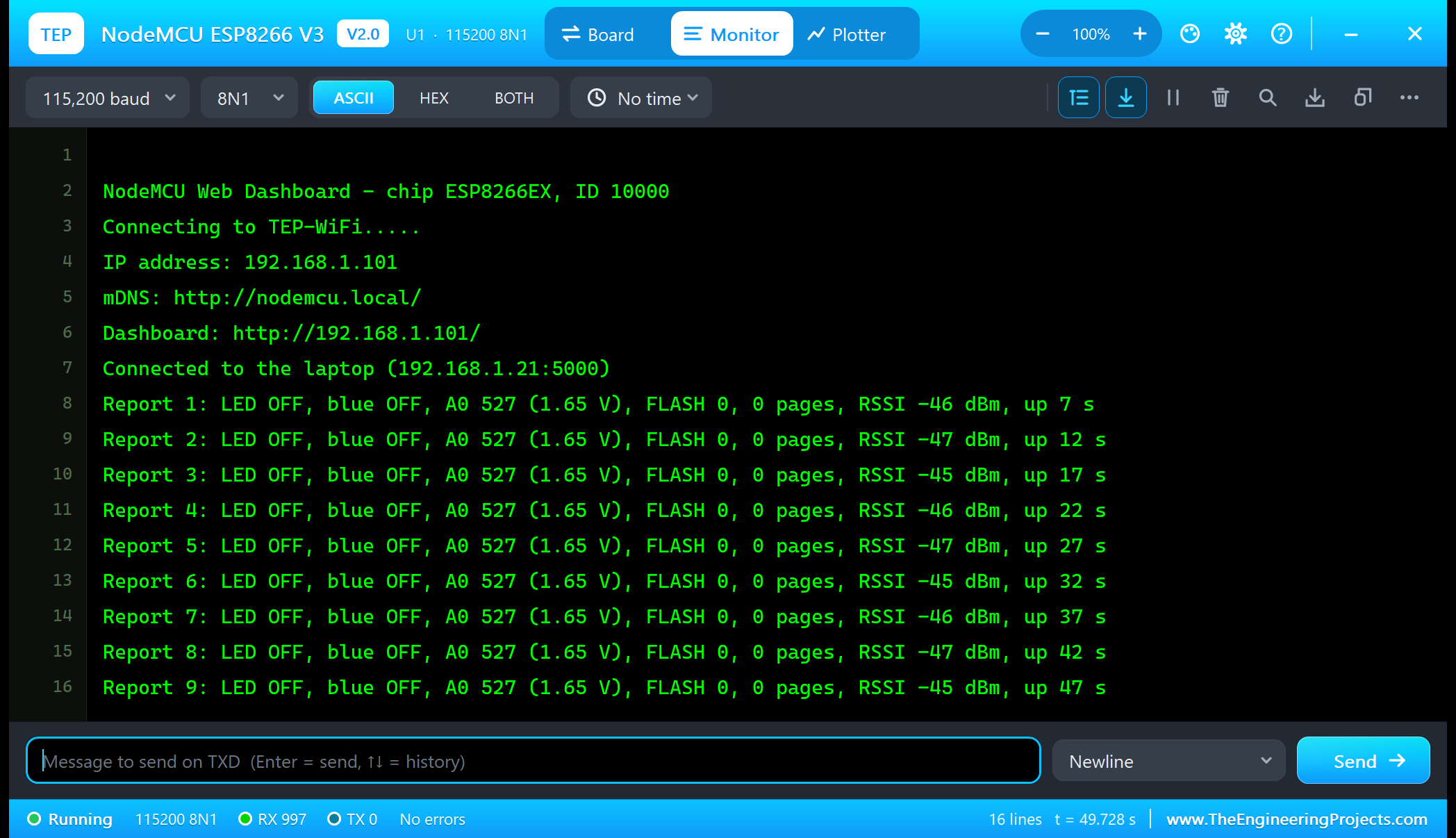
NodeMCU Web Dashboard - chip ESP8266EX, ID 10000
Connecting to TEP-WiFi.....
IP address: 192.168.1.101
mDNS: http://nodemcu.local/
Dashboard: http://192.168.1.101/
Connected to the laptop (192.168.1.21:5000)
Report 1: LED OFF, blue OFF, A0 527 (1.65 V), FLASH 0, 0 pages, RSSI -46 dBm, up 7 s
Report 2: LED OFF, blue OFF, A0 527 (1.65 V), FLASH 0, 0 pages, RSSI -47 dBm, up 12 s
The Laptop: Reports over TCP
At the end of setup() the board connects to the laptop's TCP server as a WiFiClient and says hello. If the server does not answer, the sketch tries again every 5 seconds:
  if (laptop.connect(LAPTOP_IP, LAPTOP_PORT)) {
    Serial.printf("Connected to the laptop (%s:%u)\n", LAPTOP_IP, LAPTOP_PORT);
    laptop.print("Hello laptop - NodeMCU ESP8266 here (" + myIp + ", nodemcu.local). Type HELP for the commands\r\n");
    linked = true;
    lastReport = millis();
While the link is up, a report goes out every 5 seconds with everything the board knows - the LED, the blue LED, A0 in raw and in volts, the FLASH presses, the pages, the RSSI and the uptime:
    if (millis() - lastReport >= REPORT_EVERY) {
      lastReport = millis();
      tell("Report " + String(++reports) + ": " + status());
    }
In the laptop, open the Terminal tab; its TCP Server listens on port 5000 and shows every line the board sends:
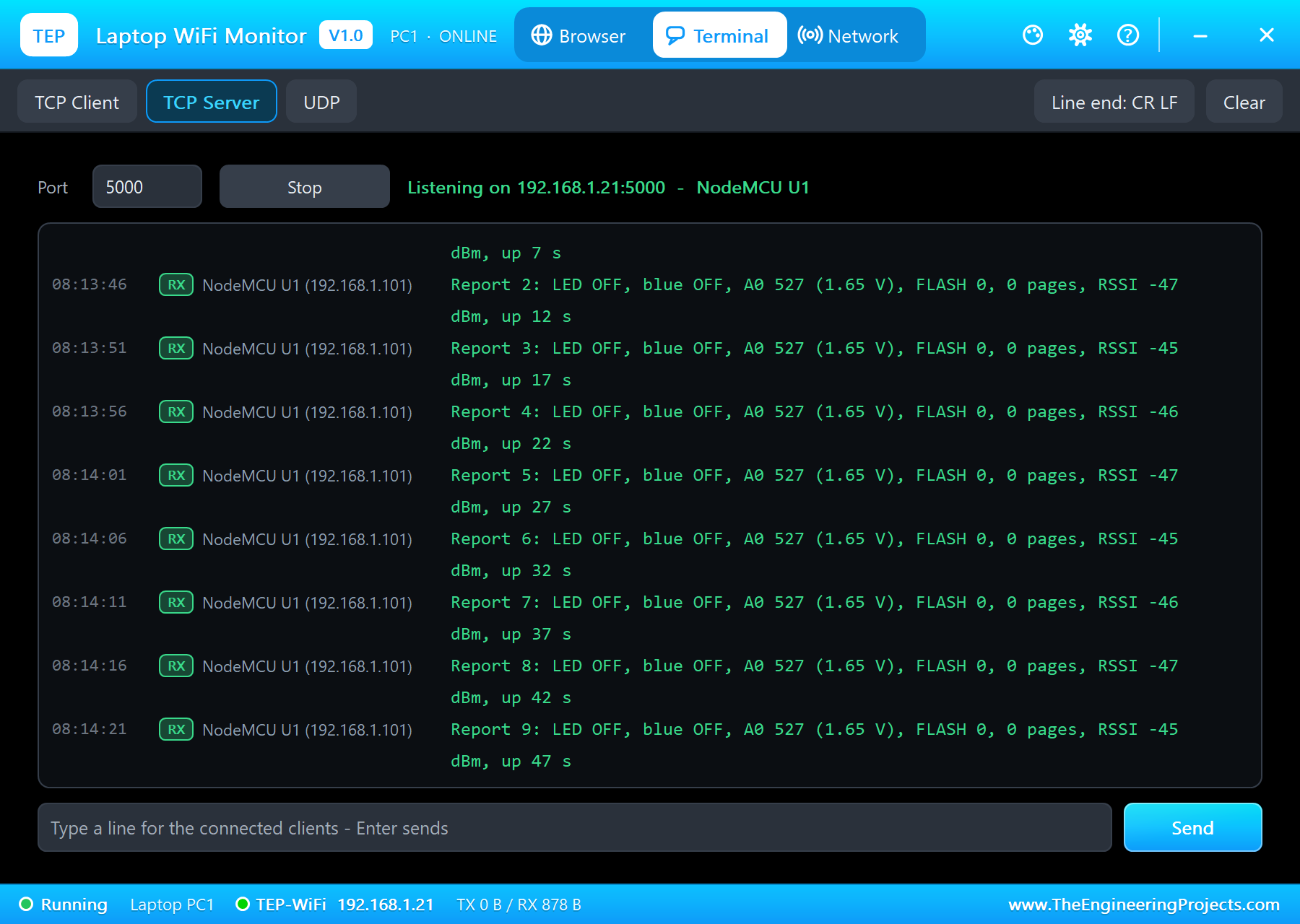
A0 reads 527 because the pot gives 1.65 V and the NodeMCU's A0 spans 3.2 V: 1.65 / 3.2 x 1023 = 527. The sketch turns the raw value back into volts the same way:
String volts(int raw) { return String(raw * 3.2 / 1023.0, 2) + " V"; }The Dashboard on the Phone
The pages all go to one handler. A link like /led?s=1 switches the LED, /blue?s=0 the blue LED; then the handler reads A0, sends the page and tells the laptop who asked:
void handlePage() {
  String uri = server.uri(), what;
  if (server.hasArg("s")) {
    const bool on = server.arg("s") == "1";
    if (uri == "/led") { setLed(on); what = on ? ": LED ON" : ": LED OFF"; }
    else if (uri == "/blue") { setBlue(on); what = on ? ": blue ON" : ": blue OFF"; }
  }
  pot = analogRead(A0);
  sendPage();
  tell("Page " + uri + " for " + server.client().remoteIP().toString() + what);
}
In the phone, open the Browser and press Go. Its home page is http://nodemcu.local/: the phone asks for the name, the board's mDNS answers with its address, and the dashboard opens - the same as a real phone on your network:
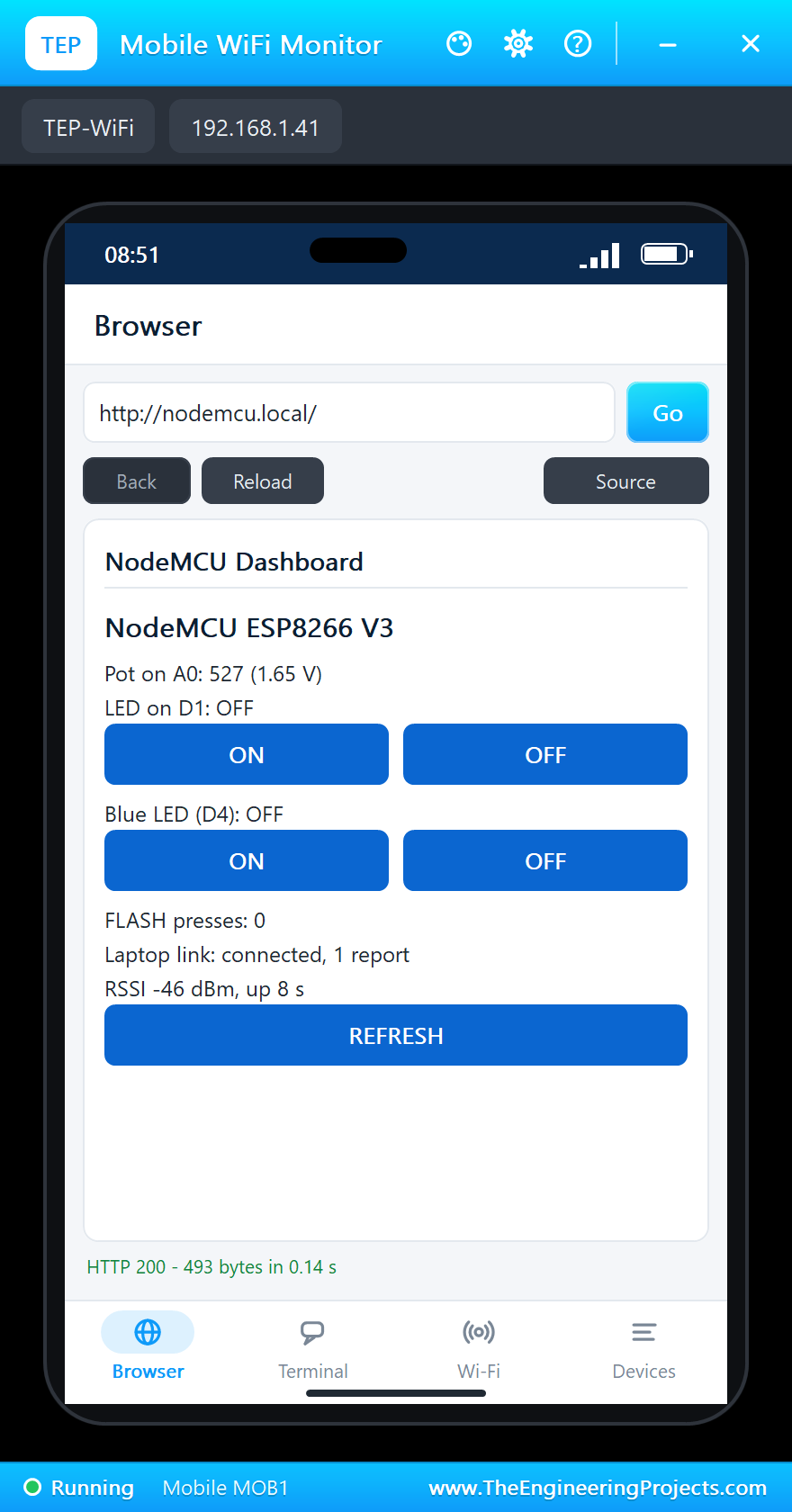
The phone's start screen also lists every device on the network; a tap on the NodeMCU's card opens the page at its address:
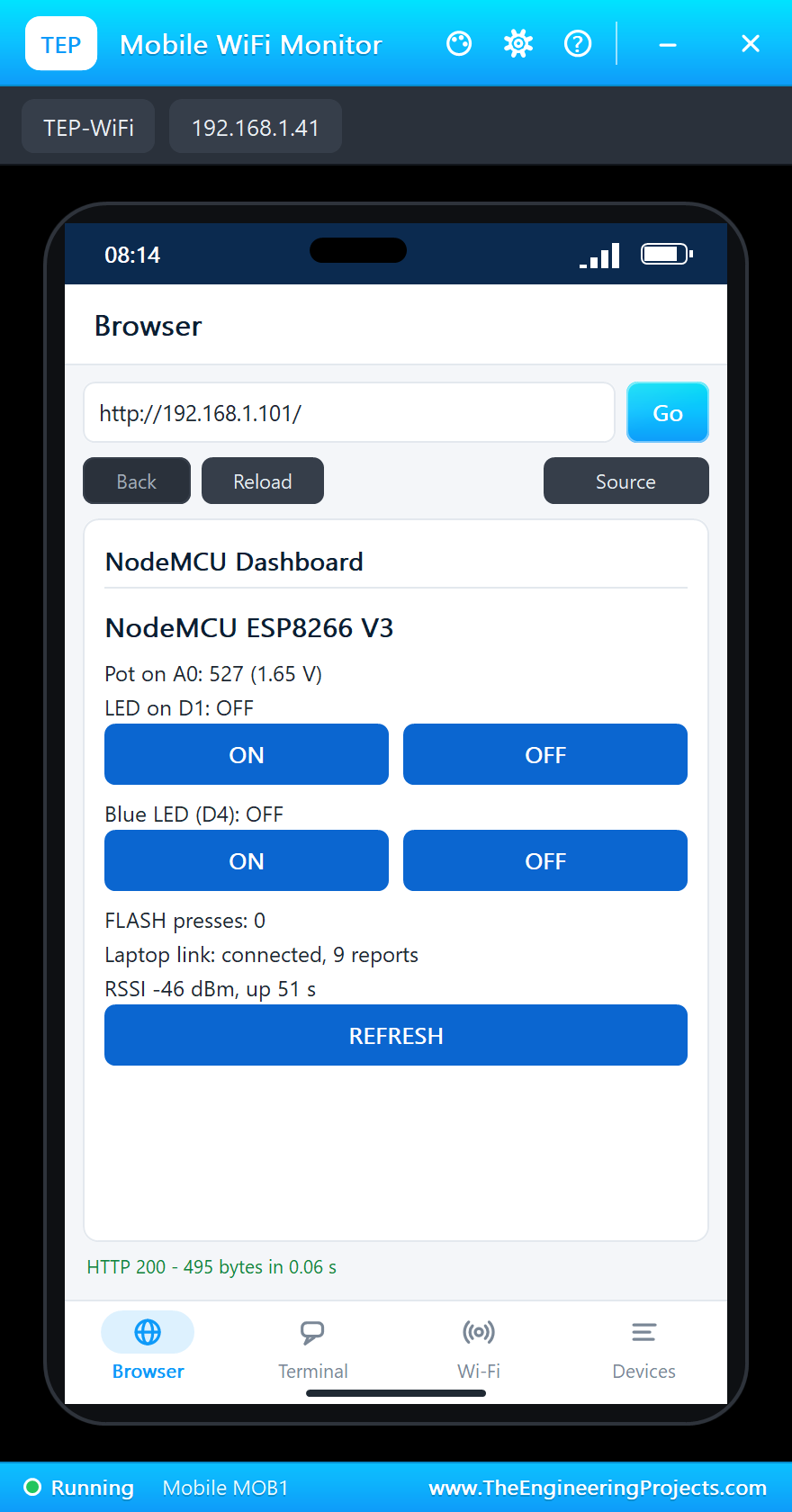
The laptop's browser opens the same page at the board's address; there the links look like links:
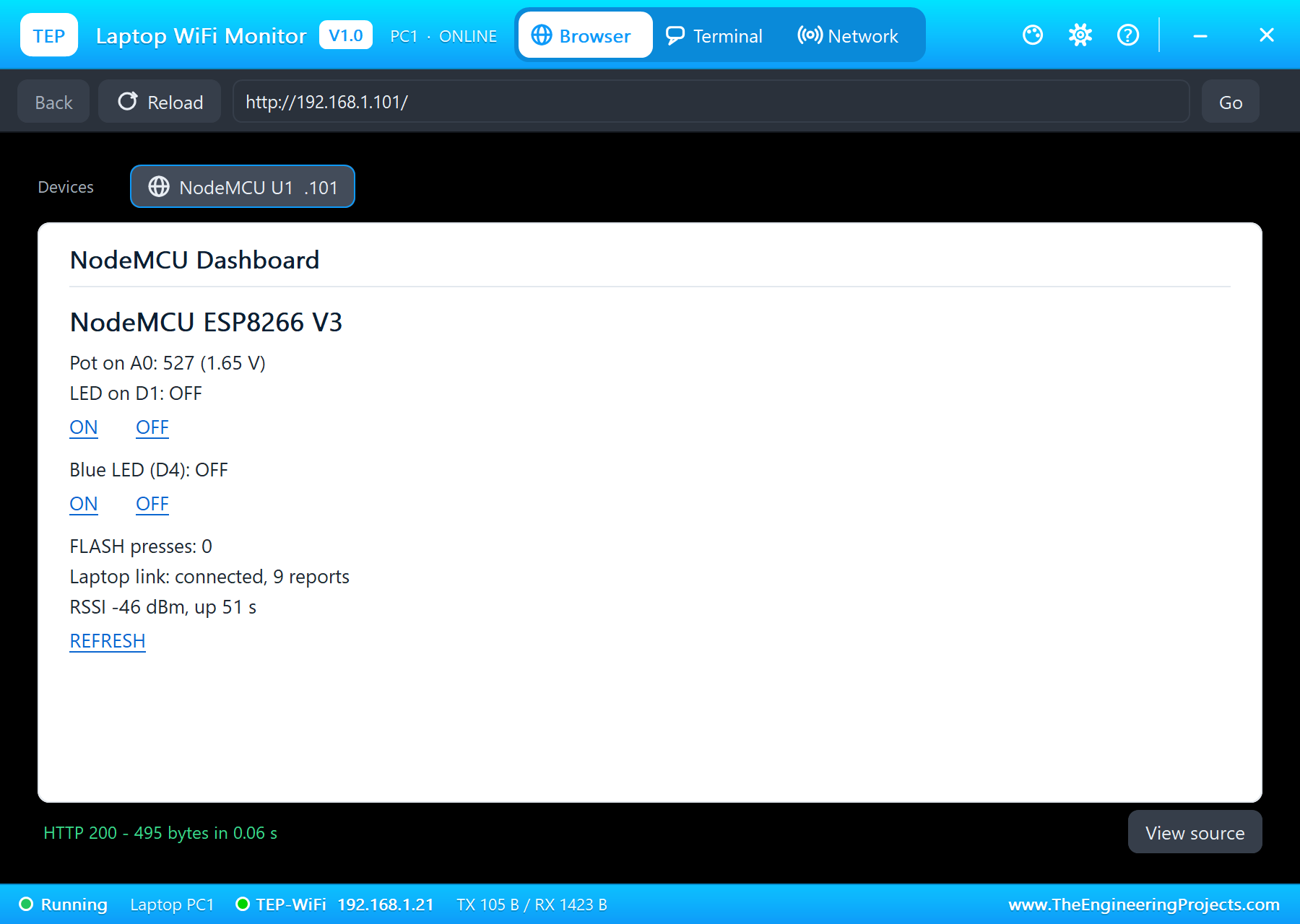
Tap ON under "LED on D1": the phone opens /led?s=1, D1 goes HIGH and the green LED lights:
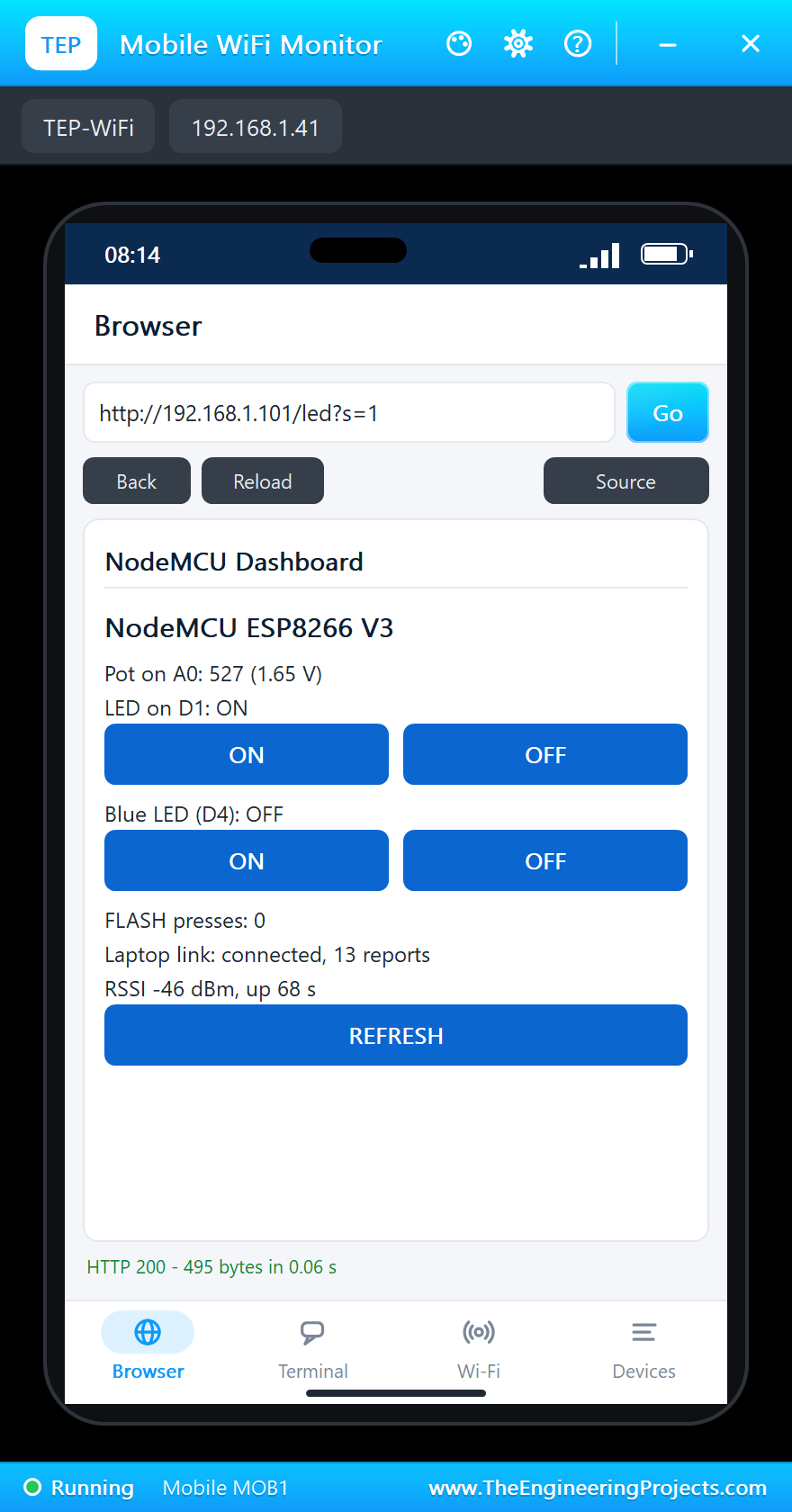
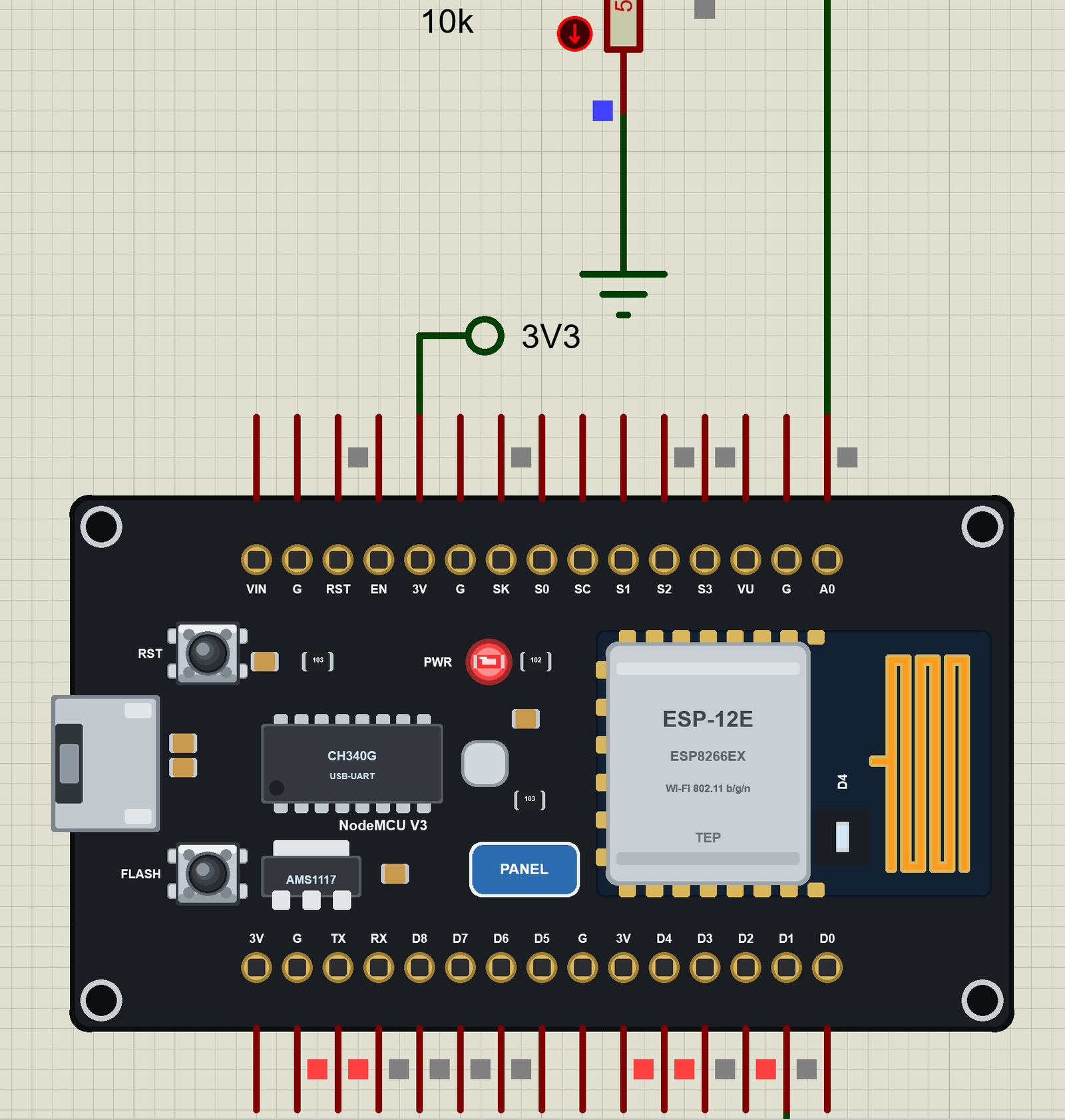
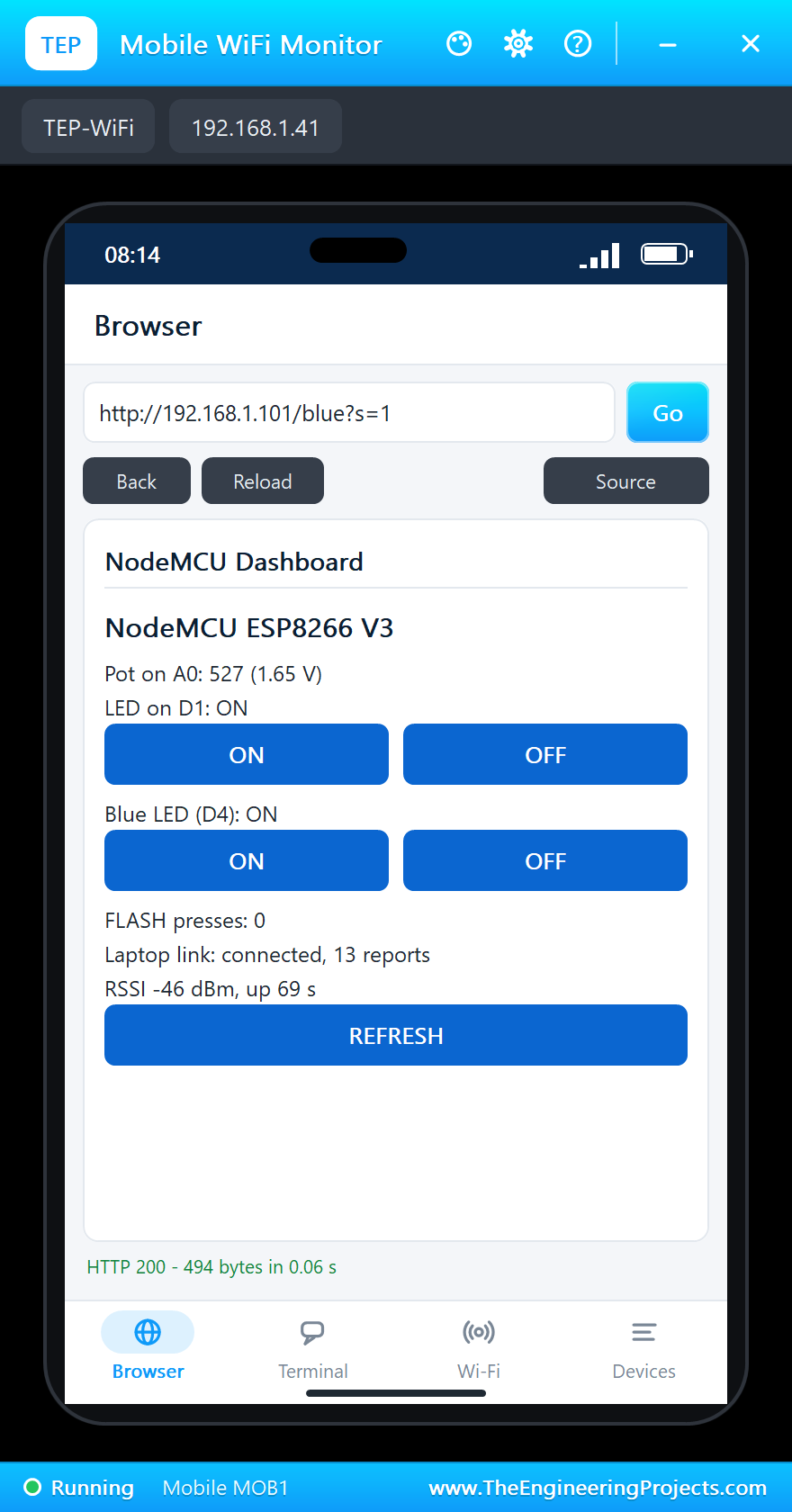
Now ON under "Blue LED (D4)": GPIO2 goes LOW and the blue LED of the ESP-12E lights:
Commands from the Laptop and the Monitor
The link to the laptop works both ways: every line the laptop sends is a command, and the answer goes back on the same link. The monitor takes the same commands. Both go through one function:
String answer(String cmd) {
  cmd.trim();
  cmd.toUpperCase();
  if (cmd == "LED ON") { setLed(true); return "OK - the LED on D1 is ON"; }
  if (cmd == "LED OFF") { setLed(false); return "OK - the LED on D1 is OFF"; }
  if (cmd == "BLUE ON") { setBlue(true); return "OK - the blue LED (D4) is ON"; }
  if (cmd == "BLUE OFF") { setBlue(false); return "OK - the blue LED (D4) is OFF"; }
  if (cmd == "STATUS") return status();
  if (cmd == "HELP") return "Commands: LED ON, LED OFF, BLUE ON, BLUE OFF, STATUS, HELP";
  return "Unknown command: " + cmd + " (type HELP)";
}
In the laptop's terminal type STATUS, LED OFF and HELP (TX lines are the laptop's, RX lines the board's); the two page lines above them are the phone's taps, which the board reported:
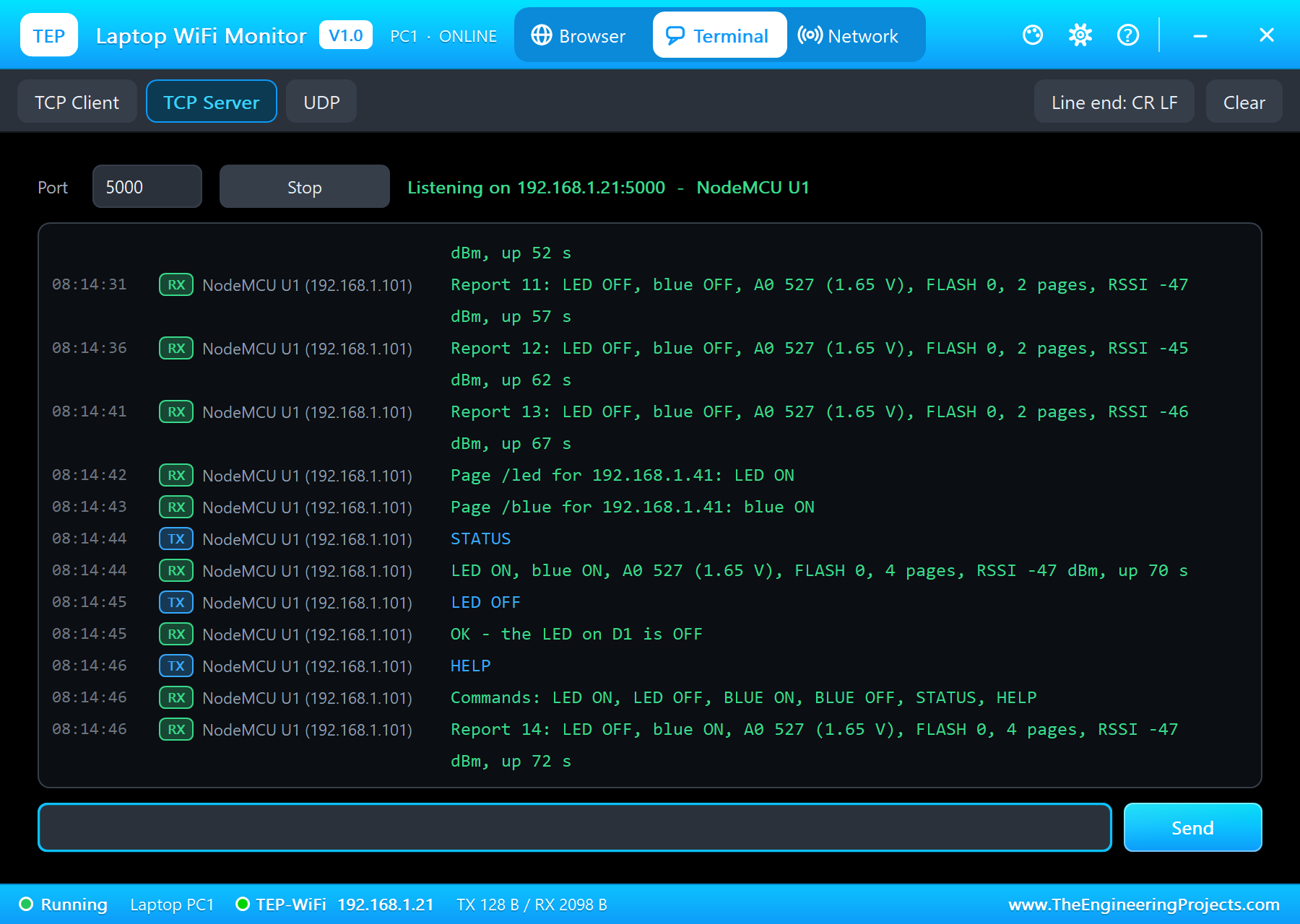
Page /led for 192.168.1.41: LED ON
Page /blue for 192.168.1.41: blue ON
STATUS
LED ON, blue ON, A0 527 (1.65 V), FLASH 0, 4 pages, RSSI -47 dBm, up 70 s
LED OFF
OK - the LED on D1 is OFF
HELP
Commands: LED ON, LED OFF, BLUE ON, BLUE OFF, STATUS, HELP
The same in the board's monitor - the typed line, the board's note of it and the answer:
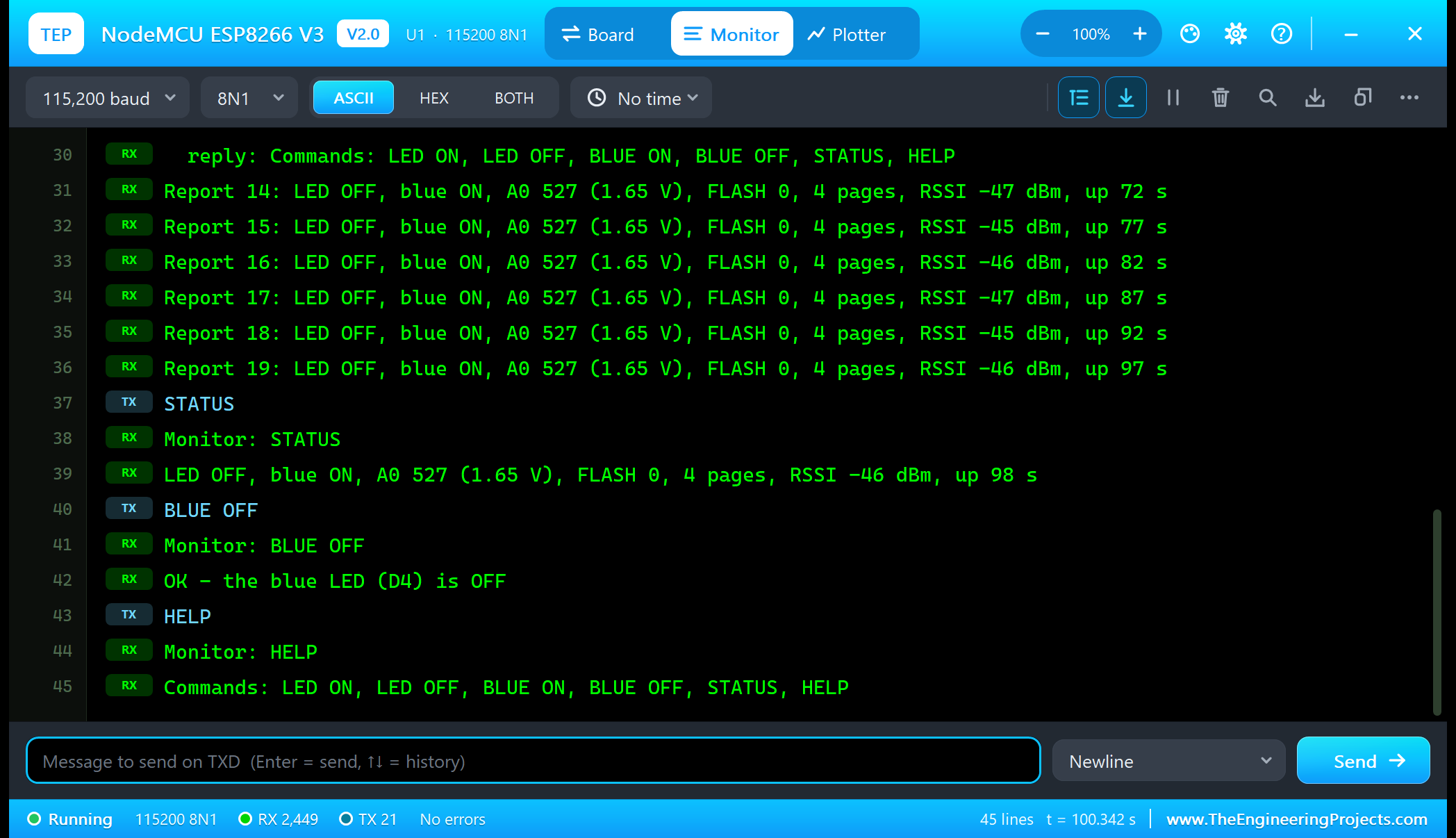
STATUS
Monitor: STATUS
LED OFF, blue ON, A0 527 (1.65 V), FLASH 0, 4 pages, RSSI -46 dBm, up 98 s
BLUE OFF
Monitor: BLUE OFF
OK - the blue LED (D4) is OFF
HELP
Monitor: HELP
Commands: LED ON, LED OFF, BLUE ON, BLUE OFF, STATUS, HELP
The FLASH Button and the Pot
The interrupt only counts; loop() picks the count up with interrupts off for a moment (the count is two bytes on the hidden AVR), toggles the LED and tells the laptop:
  noInterrupts();
  const unsigned int n = flashCount;
  interrupts();
  if (n != flashSeen) {
    flashSeen = n;
    setLed(!ledOn);
    tell("FLASH pressed (" + String(flashSeen) + "): LED " + (ledOn ? "ON" : "OFF"));
  }
Every half second the sketch reads A0 and reports a change of more than 8 steps, so the laptop hears about the pot without a flood of lines:
  if (millis() - lastPot >= POT_EVERY) {
    lastPot = millis();
    const int v = analogRead(A0);
    if (abs(v - pot) > 8) {
      pot = v;
      tell("Pot: A0 = " + String(v) + " (" + volts(v) + ")");
    }
  }
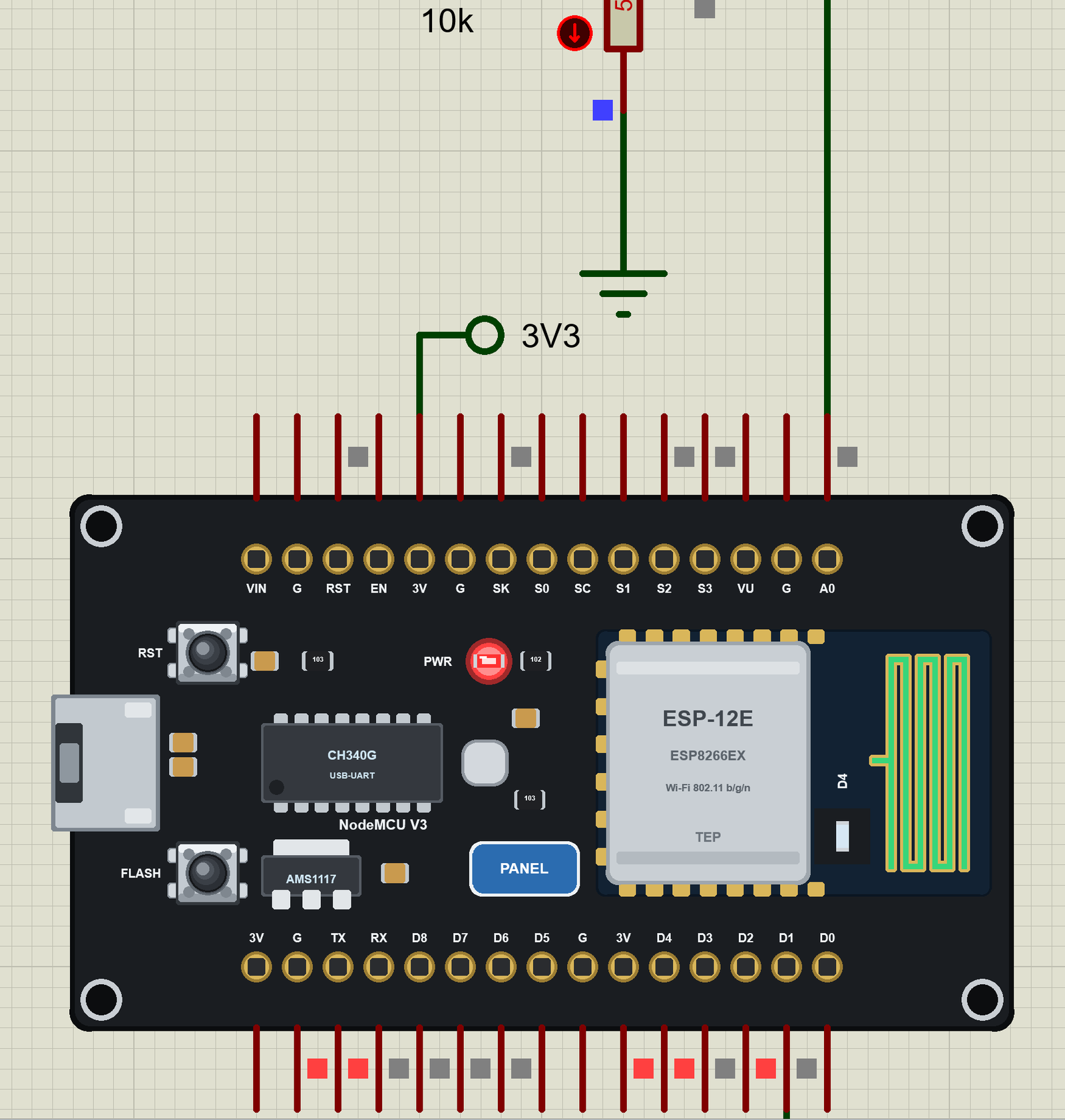
Click FLASH on the board: GPIO0 goes LOW while the button is down, the interrupt fires on the falling edge and the LED on D1 toggles:
We pressed FLASH three times and then clicked the pot's down arrow - the laptop got each event as it happened:
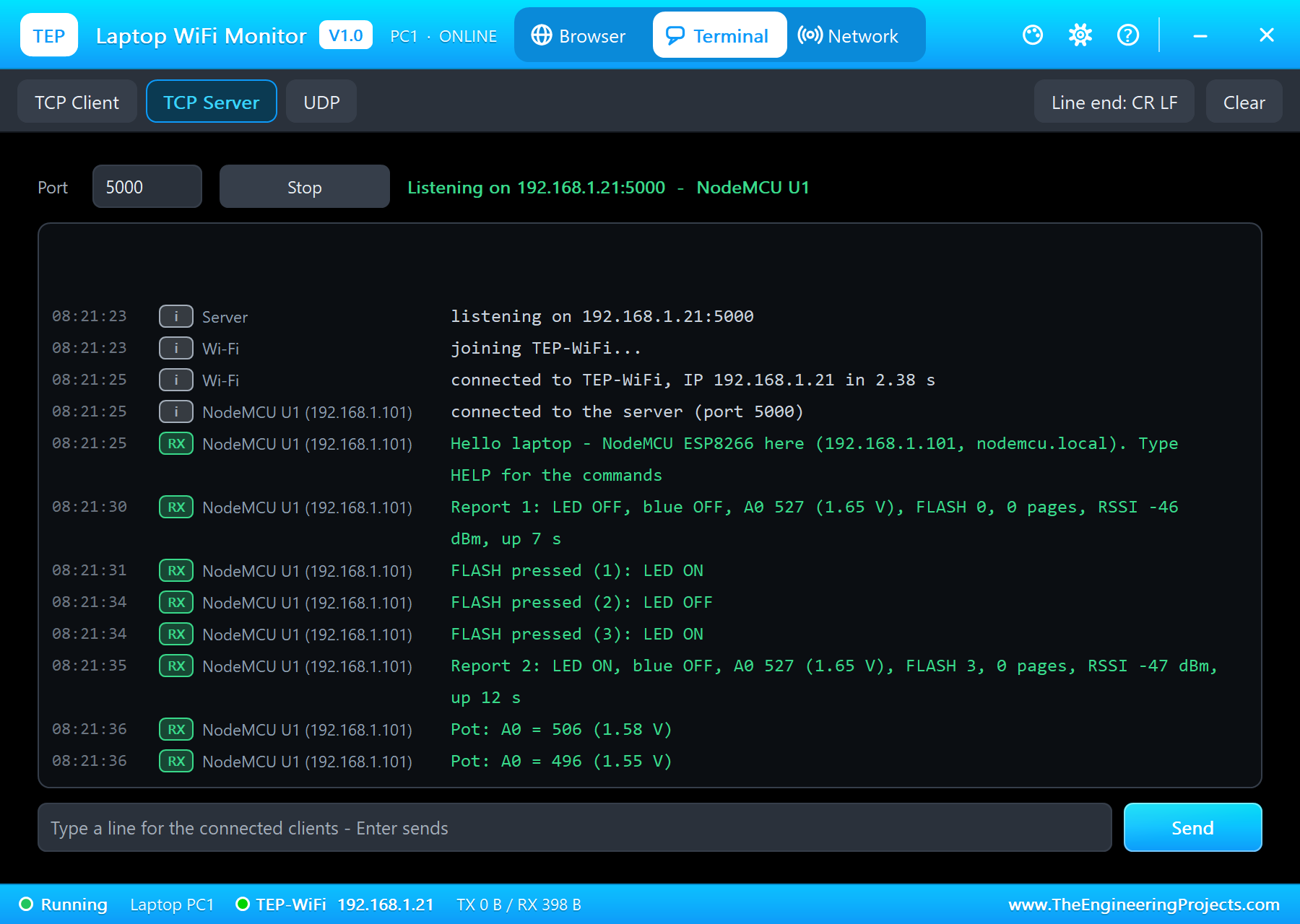
Hello laptop - NodeMCU ESP8266 here (192.168.1.101, nodemcu.local). Type HELP for the commands
Report 1: LED OFF, blue OFF, A0 527 (1.65 V), FLASH 0, 0 pages, RSSI -46 dBm, up 7 s
FLASH pressed (1): LED ON
FLASH pressed (2): LED OFF
FLASH pressed (3): LED ON
Report 2: LED ON, blue OFF, A0 527 (1.65 V), FLASH 3, 0 pages, RSSI -47 dBm, up 12 s
Pot: A0 = 506 (1.58 V)
Pot: A0 = 496 (1.55 V)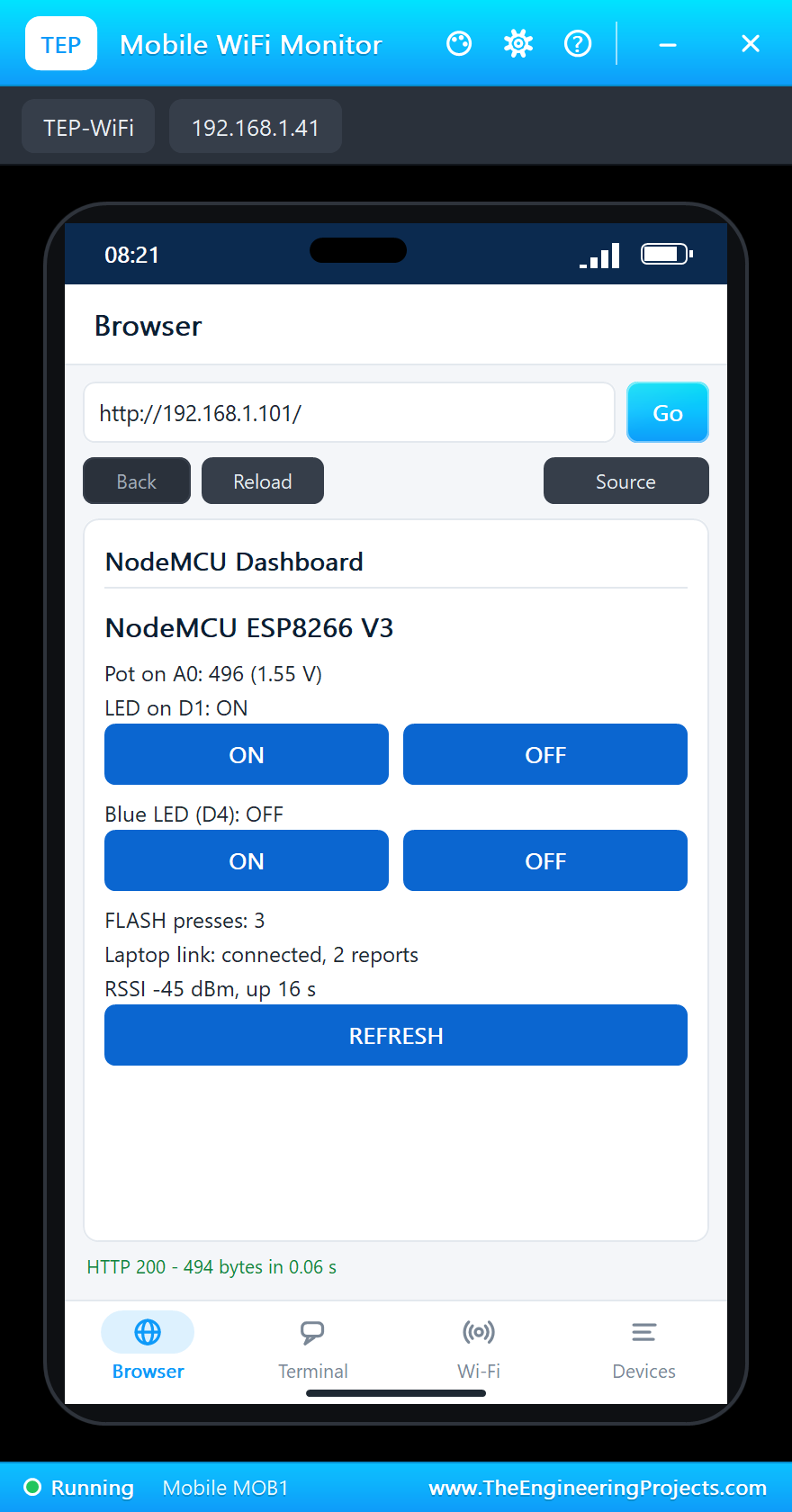
And the whole demo running, the green LED lit:
The NodeMCU ESP8266 V3 Panel
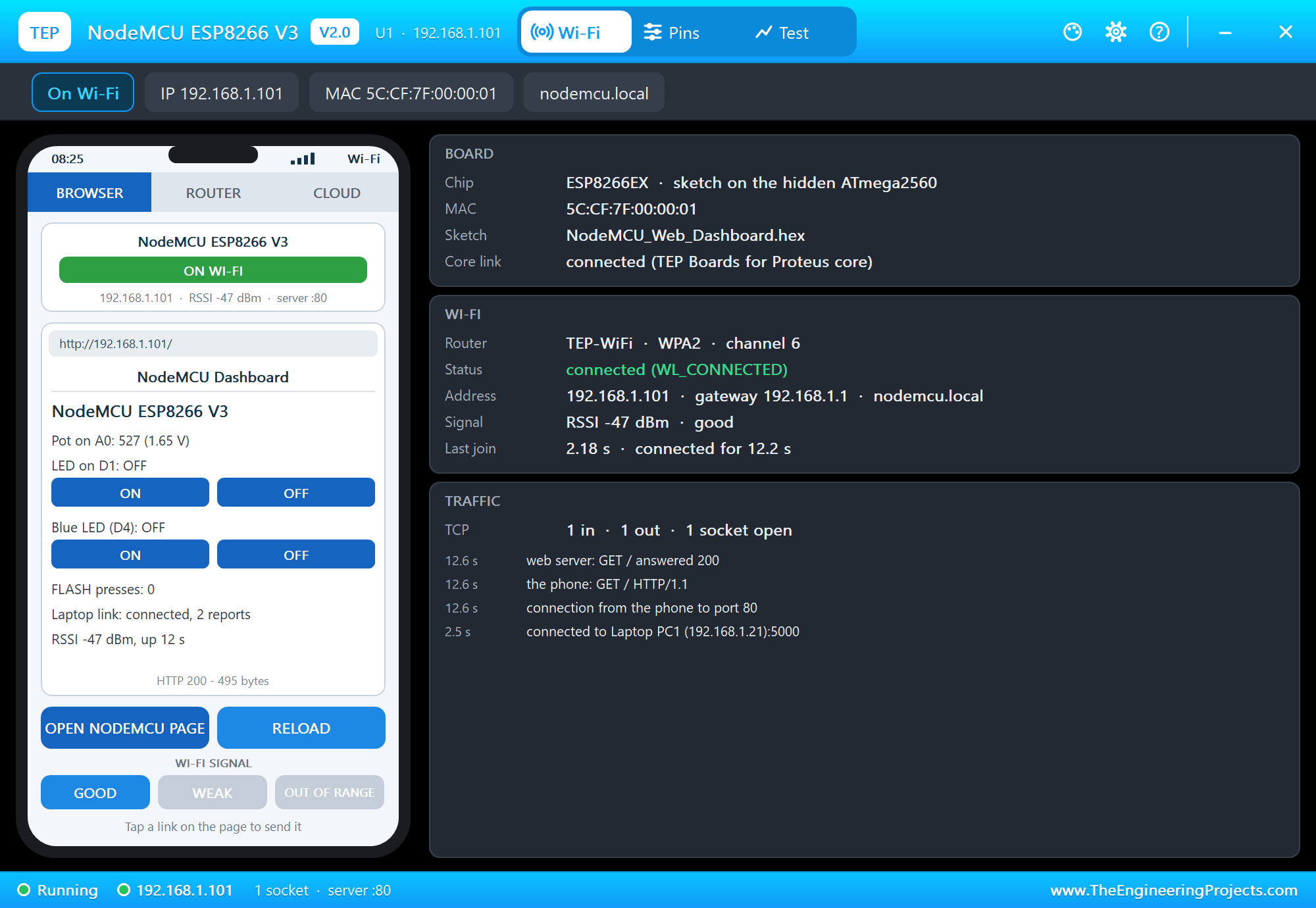
The panel opens at Run, in the look of our TEP Serial Monitor Advance for Proteus. Its Wi-Fi page has a small phone and three cards: BOARD (the chip, the MAC address, the sketch and the core link), WI-FI (the router, the status, the address with the mDNS name, the signal, the join time) and TRAFFIC. OPEN NODEMCU PAGE opens the sketch's page on the panel's phone:
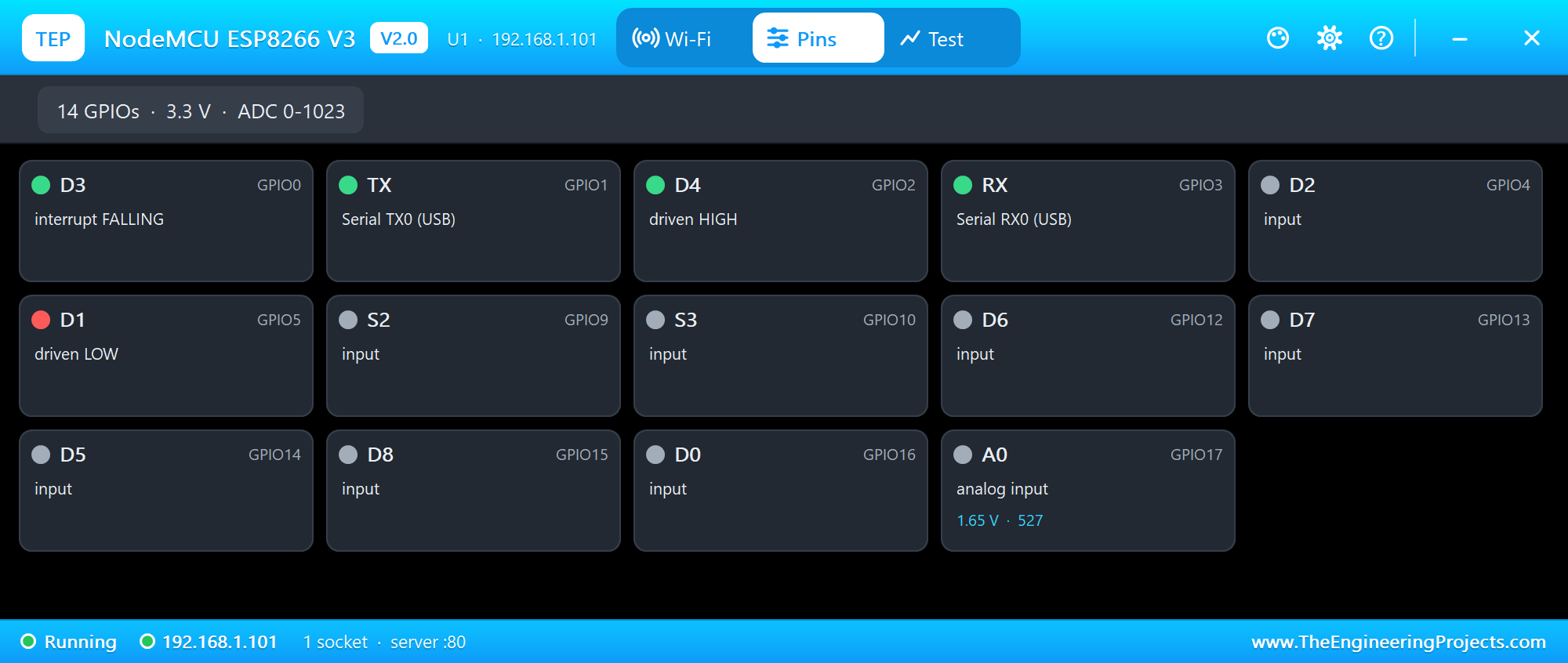
The Pins page shows the 14 GPIOs live with their roles - D3 as an interrupt on the falling edge, TX and RX as the serial port, D4 driven HIGH (the blue LED off), D1 driven LOW - and A0 with its voltage and its reading. WI-FI SIGNAL on the phone can take the router away (OUT OF RANGE) so you can test what your sketch does without Wi-Fi:
  if (WiFi.status() != WL_CONNECTED) {
    Serial.println("Wi-Fi lost - waiting for the router");
    while (WiFi.status() != WL_CONNECTED) delay(500);
    Serial.print("Back on Wi-Fi: ");
    Serial.println(WiFi.localIP());
Pins of the NodeMCU ESP8266 V3
| Pin | GPIO | What it does in the simulation |
|---|---|---|
| D0 | GPIO16 | digital I/O only (no PWM, no interrupt - as on the ESP8266) |
| D1, D2 | GPIO5, GPIO4 | Wire SCL, SDA; I/O, PWM, interrupt |
| D3 | GPIO0 | the FLASH button (LOW when pressed); I/O |
| D4 | GPIO2 | the ESP-12E's blue LED (lit when LOW), Serial1 TX; I/O |
| D5, D6, D7, D8 | GPIO14, 12, 13, 15 | SPI SCK, MISO, MOSI, SS; I/O, PWM, interrupt |
| RX, TX | GPIO3, GPIO1 | Serial (the micro-USB and the board's monitor) |
| S2, S3 | GPIO9, GPIO10 | I/O |
| A0 | ADC | 0 to 1023 for 0 to 3.2 V |
| 3V, VIN, VU, G | 3.3 V out (all three 3V pins), 5 V, ground | |
| RST | reset (LOW holds the board in reset, as the RST button) | |
| EN, SK, S0, SC, S1 | drawn, not modelled (the enable and the flash pins) |
analogWrite works on every output pin but D0, with the ESP8266 core 3 defaults: a range of 255 and 1 kHz (analogWriteRange and analogWriteFreq change them). All pins are 3.3 V logic. For more on what each pin can do on the real board, see ESP8266: Knowing the NodeMCU GPIOs.
Properties of the NodeMCU ESP8266 V3
| Property | What it does |
|---|---|
| PROGRAM | the sketch's HEX (Export Compiled Binary with the board NodeMCU ESP8266 V3 (TEP Proteus)) |
| WIFISSID / WIFIPASS | the router in range (TEP-WiFi / 12345678) |
| MONITOR | YES = the built-in serial monitor on TX / RX |
| BAUD | the monitor's speed (115200, or AUTO) |
| AUTOOPEN | YES = the monitor opens at Run (the demos: YES) |
| TIME | the clock NTP gives the sketch: PC, or a start time in UTC |
The IP address follows the part's number: U1 gets 192.168.1.101, U2 .102 and so on, so give every Wi-Fi part its own number. The laptop is always 192.168.1.21 and the phone 192.168.1.41.
Troubleshooting
- Nothing happens at Run: the HEX was not built with our board package - choose NodeMCU ESP8266 V3 (TEP Proteus) and export it again.
- "ESP8266WiFi.h: No such file": another board is selected, or an older copy of the package is installed (1.5.0 is the first with the ESP8266 libraries).
- The board stays on "Connecting to TEP-WiFi": the sketch's network name or password differs from WIFISSID / WIFIPASS, or the phone's WI-FI SIGNAL is OUT OF RANGE.
- "The laptop's server does not answer yet": the laptop's TCP server is not on port 5000, or LAPTOP_IP is not the laptop's address (it is in the laptop's status bar).
- A0 reads 0: wire something analog to A0, as the pot in the demo.
- A number goes wrong above 32767: an int is 16 bits on the hidden AVR - use long.
- No monitor or no panel: click the micro-USB for the monitor, the PANEL pad for the panel.
Things to Know Before Using a Real NodeMCU
- The boot pins: D3 (GPIO0) and D4 (GPIO2) must be HIGH and D8 (GPIO15) LOW when the board starts, or it will not run your sketch - do not pull them the wrong way with your circuit. The simulation does not check this.
- A0: the ESP8266's own ADC takes 0 to 1 V; the NodeMCU's divider stretches that to about 3.2 V. A bare ESP-12E module (our ESP-12E Library for Proteus) has no divider.
- 3.3 V logic: the pins are 3.3 V; use a level shifter for 5 V parts.
- Deep sleep: to wake from
ESP.deepSleep(), D0 (GPIO16) must be wired to RST. - The USB driver: the V3 uses the CH340G, which needs its driver on some PCs; the V2 uses the CP2102.
- The same sketch: choose "NodeMCU 1.0 (ESP-12E Module)" of the ESP8266 core and upload - nothing to change.
Limitations of the Simulation
- The board runs your sketch on a hidden ATmega2560 at 16 MHz with 8 KB of RAM - not on an ESP8266. Long strings and big buffers that fit in the ESP8266's 80 KB may not fit here.
- Not modelled: SPIFFS and LittleFS, OTA updates, the soft AP and Wi-Fi events, real TLS, deep sleep timing (the board restarts), the EN and flash pins, the radio itself - the join and network times are realistic values, not a radio simulation.
- The internet host is a stand-in for the internet: every internet name is 203.0.113.10, and it answers HTTP, pings and the time.
- The antenna colours, the red PWR LED, the PANEL pad, the panel, its phone, the router, the internet host and the two monitors are TEP additions; the MAC address is a TEP address.
- NodeMCU is a name of the NodeMCU project, ESP8266 and ESP-12E of Espressif Systems and Ai-Thinker; this library is not made or endorsed by them or by Labcenter.
- Tested in Proteus 8.5 in October 2026 (the demos as shipped, the NodeMCU, the laptop and the phone together at about 0.3 x real time on our PC). Proteus 7 is not supported.
So, that was all about the NodeMCU ESP8266 V3 Library for Proteus V2.0. I hope it lets you try your ESP8266 sketches in Proteus - web pages, TCP links, mDNS names, buttons and LEDs - before the real board is on your desk, and watch every pin and every packet on the panel while you do. The first version is still at NodeMCU Library for Proteus V1.0 for the old projects. If you use the NodeMCU ESP8266 V3 Library for Proteus in a project, please share it in the comments or in our forum, and if you have any questions, ask in the comments and I will help you out. Till the next tutorial, take care and have fun!