Hello friends, I hope you all are doing great. Today, I am going to share the new APDS-9960 Gesture Sensor Library for Proteus Simulation. The APDS-9960 is the small sensor that lets a phone switch its screen off at your ear and lets a lamp react to a wave of your hand: in one tiny package it senses gestures, proximity, ambient light and colour, and it reports all of them over I2C. With this library you can run a full Proteus simulation of it, register by register, so that the code you test here runs on the real sensor.
APDS-9960 Gesture Sensor Library for Proteus
Latest version: V1.0 (November 2026, this tutorial)
Other light sensors: BH1750 · TCS34725 · LDR
Helping Tools
- Serial Monitor Advance: a serial terminal window for the UART of your board
- Serial Monitor Expert: the serial monitor with extra debugging tools
- LCD Library for Proteus V3.0: 16x2, 20x4 and I2C LCDs to show your readings
The module is drawn at its real size and comes alive at run time: its LEDs work, its infrared LED glows while it pulses, and the window over its photodiodes takes the colour of the light. The demo is a gesture and colour lamp - four LEDs that show which way a hand swiped, and an RGB LED that copies the colour of the room's light.
NOTICE: Our team has put a lot of effort into these small parts: the bodies, the animation and the pop-ups are all our own design, and you get them free. Your feedback is the fuel that keeps us going, so please tell us what you think in the comments below or in the photodiode board of our forum. And if our free libraries help you, you can buy us a coffee. So, let's get started with the APDS-9960 Gesture Sensor Library for Proteus Simulation:
What is the APDS-9960?
The APDS-9960 is a digital sensor from Broadcom in a package of only 3.94 x 2.36 mm. Under its two openings sit an infrared LED and a group of photodiodes. Four of the photodiodes look in four directions - up, down, left and right - and see the infrared light that a hand reflects; four more sit behind clear, red, green and blue filters and measure the light around the sensor. A small engine inside turns all of that into numbers that your microcontroller reads over I2C.
That makes four sensors in one: proximity (how much infrared comes back - something is close), gesture (which way a hand moved across it), ambient light (how bright it is) and colour (the red, green and blue in that light). Phones use it to turn the screen off during a call and to dim the display; makers use it for touchless switches, gesture menus and colour detectors.
| APDS-9960 | |
|---|---|
| Senses | gestures (up, down, left, right), proximity, ambient light, colour (red, green, blue) |
| Inside | an infrared LED, four directional photodiodes, four filtered photodiodes, a state machine |
| Proximity | PDATA, 0 - 255, from the infrared pulses a hand reflects |
| Light and colour | clear, red, green and blue counts, 16 bits each |
| Gestures | a FIFO of 32 datasets, each the Up, Down, Left and Right photodiodes |
| Interface | I2C at the address 0x39, up to 400 kHz; INT pin, open drain, active LOW |
| Supply | 2.4 - 3.6 V (our module: 3.3 - 5 V through its regulator and level shifter) |
| Size | the sensor 3.94 x 2.36 mm; our module 20 x 15 mm |
How a Gesture Is Seen
The trick of the gesture sensor is that its four photodiodes do not look straight up: each one looks a little to its own side. When your hand swipes from left to right, the left photodiode sees it first and the right one last. The engine samples all four every few milliseconds while the hand is above it, so the first samples of a right swipe are heavy on the left photodiode and the last ones are heavy on the right. The sensor does not decide the direction itself - it hands the samples to your code, and your code compares the start with the end.
How the APDS-9960 Talks: Registers and the State Machine
The APDS-9960 is a register device. You write the address of a register, then a value, or you write the address and read bytes back - the address moves on by itself after each byte, so one read can fetch several registers. The ID register at 0x92 always reads 0xAB. These are the registers that matter most:
| Register | Address | What it does |
|---|---|---|
| ENABLE | 0x80 | PON (power on), AEN (light), PEN (proximity), WEN (wait), GEN (gesture), the interrupt enables |
| ATIME | 0x81 | the light integration time: (256 - ATIME) x 2.78 ms |
| CONTROL | 0x8F | the infrared LED current and the proximity and light gains |
| STATUS | 0x93 | AVALID (a light reading is ready), PVALID, the interrupt flags |
| CDATA ... BDATA | 0x94 - 0x9B | the clear, red, green and blue counts, low byte first |
| PDATA | 0x9C | proximity, 0 - 255 |
| GPENTH / GEXTH | 0xA0 / 0xA1 | the PDATA that starts the gesture engine, the level that stops it |
| GCONF1 - GCONF4 | 0xA2, 0xA3, 0xAA, 0xAB | the FIFO threshold, the gesture gain and timing, GMODE and the gesture interrupt |
| GFLVL | 0xAE | how many datasets wait in the FIFO |
| GFIFO | 0xFC - 0xFF | the datasets: Up, Down, Left, Right |
The State Machine
Once PON is set, the APDS-9960 runs in a loop on its own: a proximity measurement, then - if a hand is close enough - the gesture engine, then an optional wait, then a light measurement, and round again. The gesture engine starts when PDATA passes GPENTH and keeps collecting until the Up, Down, Left and Right photodiodes all fall below GEXTH; while it runs, the GMODE bit in GCONF4 is 1. The light measurement takes as long as ATIME says - 103 ms in our demo - so the proximity check, and with it the start of a gesture, comes about ten times a second.
The Gesture FIFO
Every gesture cycle - a few milliseconds - adds one dataset of four bytes to a FIFO that holds 32 of them. GFLVL says how many are waiting; reading 0xFC onwards hands them out one after another, Up, Down, Left, Right, Up, Down... When the FIFO holds GFIFOTH datasets and the gesture interrupt is enabled, the INT pin goes LOW, so your code knows when to read. If nobody reads, the FIFO fills in about 140 ms and the rest of the swipe is lost.
Features of the APDS-9960 Gesture Sensor Library for Proteus Simulation
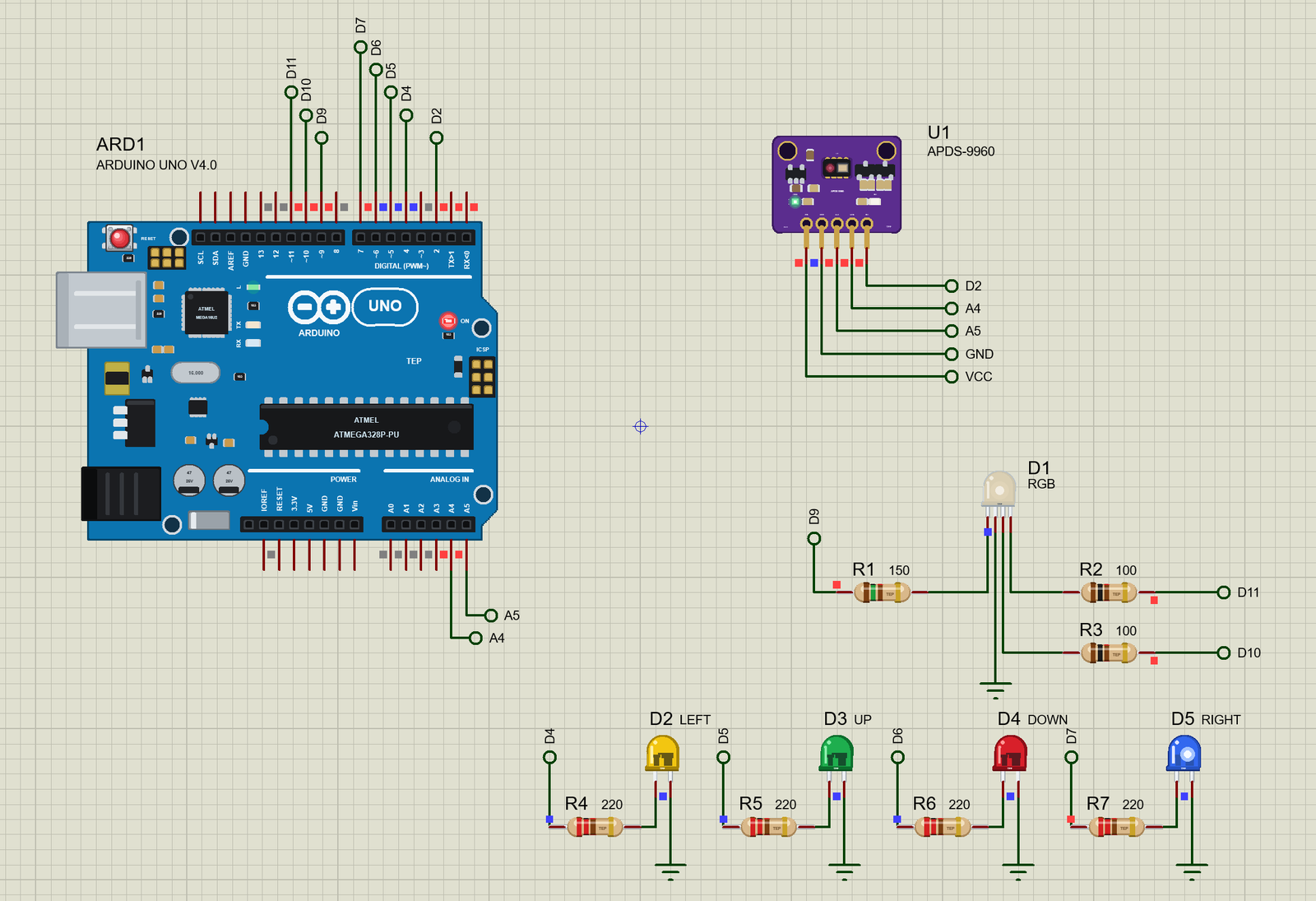
- A real-looking module: the purple board at its real size, 20 x 15 mm, with the sensor's package and its two openings, the regulator, the level shifter, the pull-ups and our small TEP mark.
- Animated: PWR and INT LEDs that work at run time, the infrared LED glowing while it pulses, and the photodiodes' window taking the colour of the light.
- The real register map: ENABLE, ATIME, WTIME, CONTROL, CONFIG2, the thresholds, STATUS, the colour data, PDATA, the gesture registers, GFLVL, GSTATUS, the special functions and the FIFO at 0xFC, with their reset values.
- The real state machine: proximity, gesture, wait and light in a loop, with the gesture engine's entry and exit thresholds, the 32-dataset FIFO, its overflow and the INT pin.
- A hand and a room: a demo scene with four swipes, a hand held still and coloured lights, and chips to swipe, hover and change the light at any time.
- A pop-up: the hand above the sensor, what the four photodiodes see over the last three seconds, eight live tiles, graphs, an event log and a check page.
- A complete package: about 2.3 MB with the library, our 5 mm LED, RGB LED and resistor libraries, our Arduino UNO V4.0 and the demo, without the source code of the model.
The APDS-9960 in Proteus
The device is GESTUREAPDS9960TEP in TEPAPDS9960.LIB, under Sensors > Optical, with the prefix U and the model TEPAPDS9960.DLL. Search APDS9960 or gesture in Pick Devices. It has five pins along the bottom: VIN (3.3 to 5 V), GND, SCL, SDA and INT. Its properties describe the scene: PROFILE (DEMO or STEADY), LUX (the room light), REFLECT (how much infrared the hand reflects) and HEIGHT (how high the hand swipes, in cm).
Download APDS-9960 Gesture Sensor Library for Proteus Simulation
Click the button below to download APDS9960-Gesture-Sensor-Library-for-Proteus-v1.0.zip (about 2.3 MB, without the source code of the models):
APDS-9960 Gesture Sensor Library for Proteus V1.0- README.txt: installation, the demo, the wiring, troubleshooting and the limits of the simulation.
- Proteus Library Files:
TEPAPDS9960.LIB,TEPLED5MM.LIB,TEPRGB.LIB,TEPRESISTOR.LIBandArduinoV4TEP.LIB. - Proteus Model Files:
TEPAPDS9960.DLL,TEPLED5MM.DLL,TEPRGB.DLL,TEPRESISTOR.DLLandTEPARDUINO.DLL. - Arduino Code: the demo sketch.
- Proteus Simulation: the demo project, its HEX file and copies of the DLLs.
No Proteus yet? Read How to Download and Install Proteus 7 and 8. New to libraries? Follow How to Install a New Library in Proteus.
How to Install APDS-9960 Gesture Sensor Library for Proteus Simulation
- Close Proteus and extract the whole zip file, for example to your Desktop.
- Copy the files from Proteus Library Files into the LIBRARY folder of Proteus.
- Copy the files from Proteus Model Files into the MODELS folder.
- Delete
TEPAPDS9960.IDXfrom the LIBRARY folder if it is there. - Start Proteus, press P and search for APDS9960.
Proteus Simulation of a Gesture and Colour Lamp
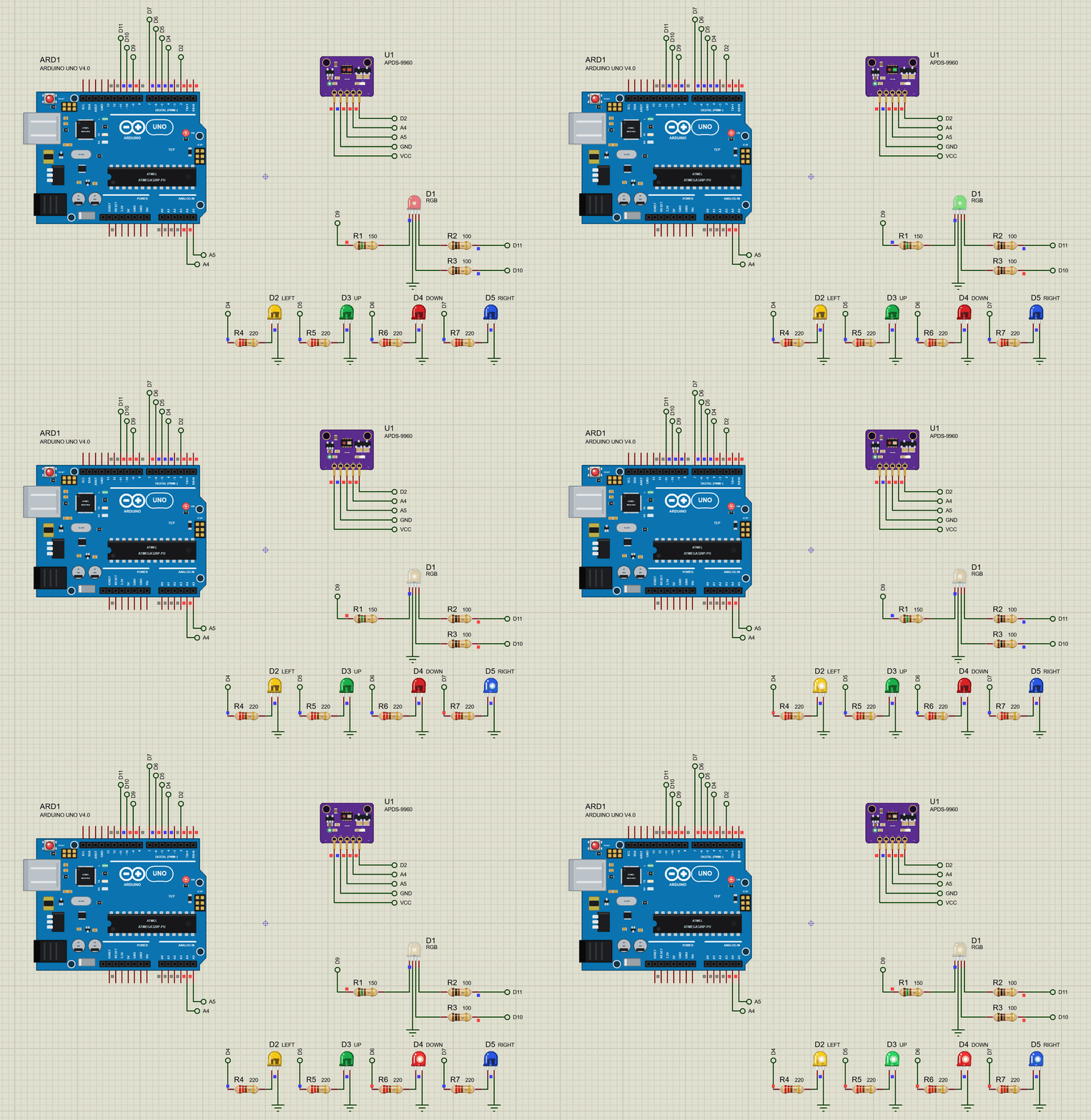
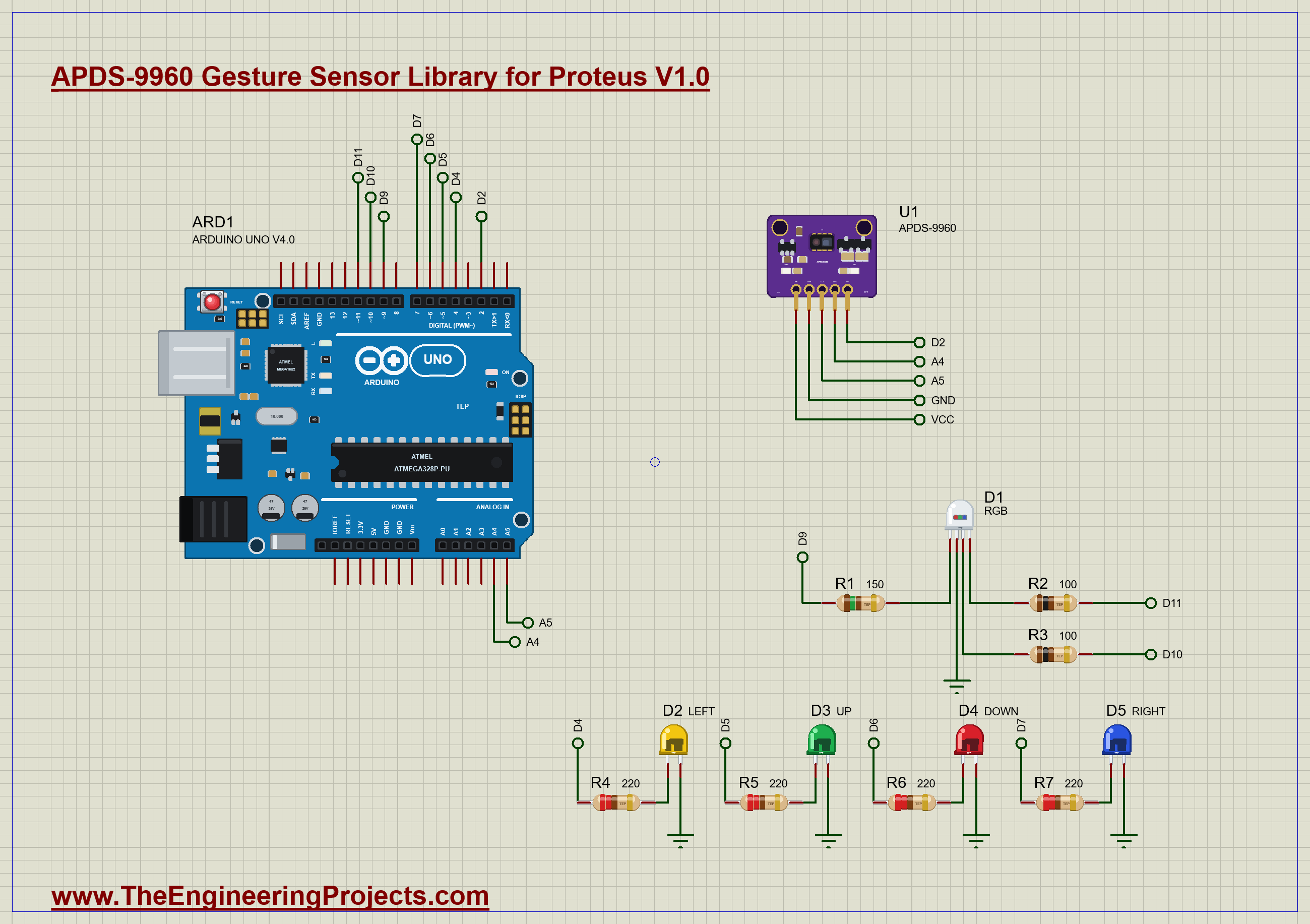
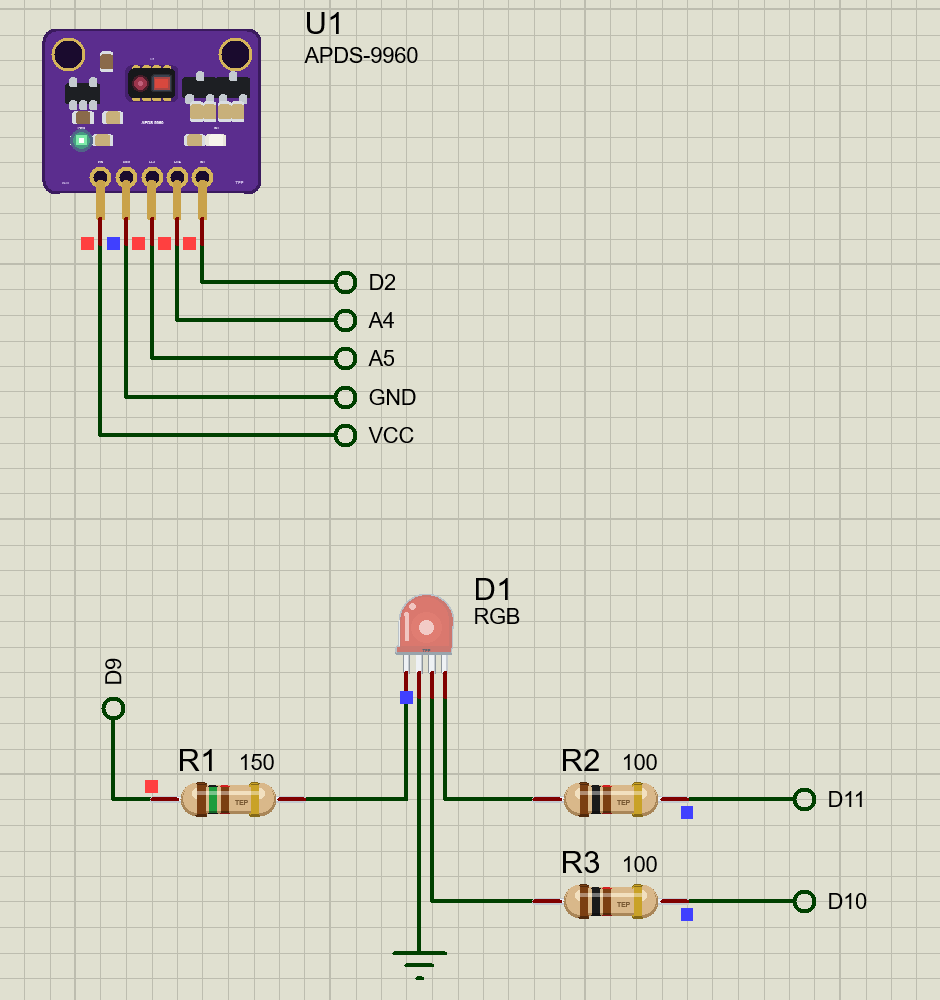
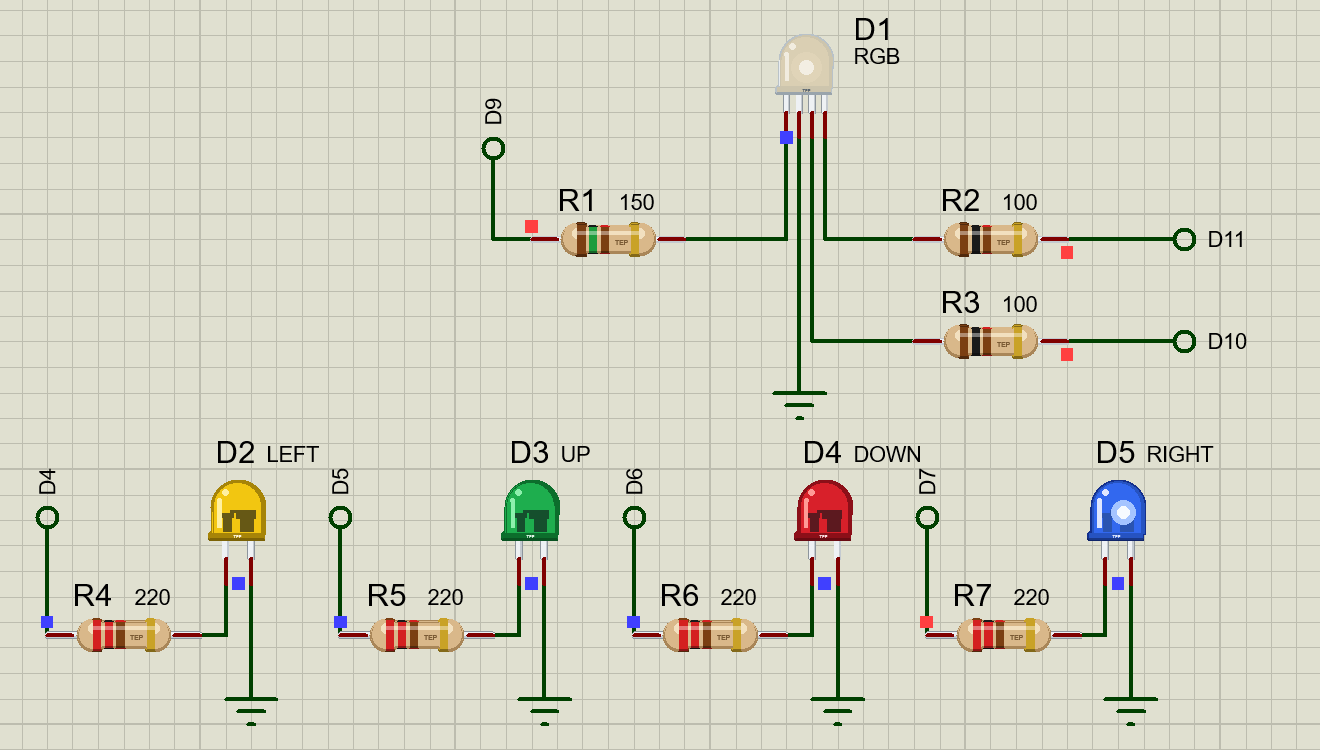
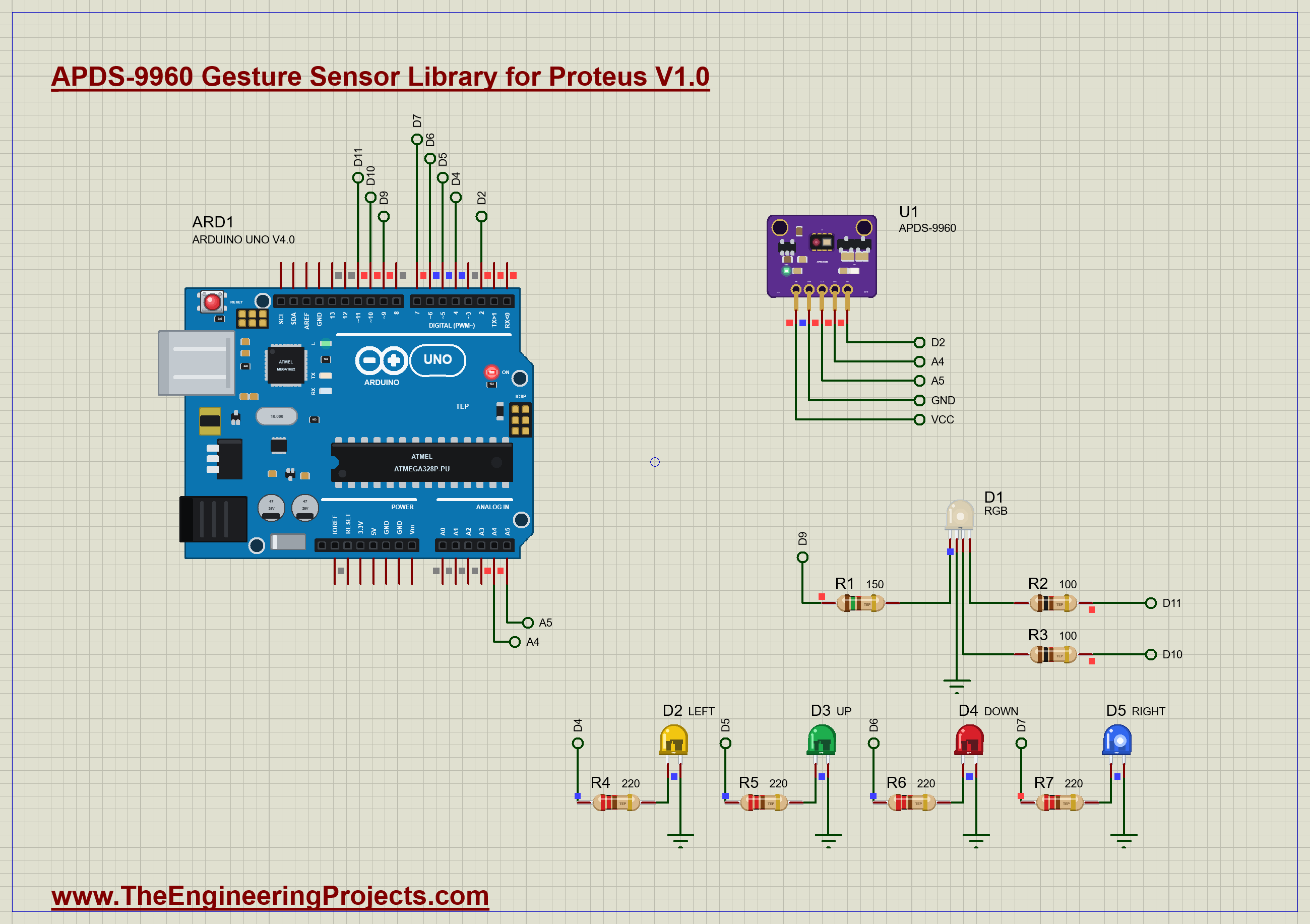
Our demo is a lamp you control without touching it. U1 is the APDS-9960 with PROFILE DEMO: from 3 seconds the room's light turns red, green, blue, to daylight, dark and back to the lamp, two seconds each; from 15 seconds a hand swipes right, left, up and down, two seconds apart, and at 23 seconds it hovers above the sensor. Its SCL and SDA go to A5 and A4 of our Arduino UNO Library for Proteus V4.0, and its INT pin to D2. D2 to D5 are LEDs from our 5mm LED Library for Proteus - LEFT yellow on D4, UP green on D5, DOWN red on D6 and RIGHT blue on D7, each through 220 ohm. D1 is a common-cathode LED from our RGB LED Library for Proteus on pins 9, 10 and 11. The Arduino's built-in monitor is the same window as our TEP Serial Monitor Advance for Proteus. Open APDS9960-Gesture-ArduinoUnoV4.pdsprj.
The Sketch
The sketch uses plain Wire calls, no library, so every register is in front of you. It sets the gains, the pulses and the gesture thresholds with the sensor switched off, and only then switches it on - PON, AEN, PEN and GEN in one write:
wr(0x80, 0x47); // ENABLE: PON, AEN (light), PEN (proximity), GEN (gesture)When INT goes LOW, the sketch reads GCONF4 (is the engine still collecting?) and GFLVL (how many datasets wait), then fetches the datasets, eight at a time - 32 bytes, the size of the Wire buffer:
const byte got = rdBlock(0xFC, buf, take * 4); // GFIFO_U: U, D, L, R, U, D, L, R ...It keeps the first and the last dataset in which all four photodiodes see the hand. For each pair - up and down, left and right - it works out a balance in percent:
int balance(byte a, byte b) { return ((int)a - (int)b) * 100 / ((int)a + (int)b); }When the engine stops, the change of balance from the first to the last dataset gives the direction. A swipe to the right starts on the left photodiode and ends on the right one, so the left-right balance falls:
if (lr < 0) { Serial.print(F("RIGHT")); leds(0, 0, 0, 1); } // it started on L and ended on RThat LED lights for 1.5 seconds; a hand held still, with no change of balance, lights all four. Between gestures the sketch reads STATUS, the four colour counts and PDATA in one go every 250 ms, and the RGB LED copies the colour.
APDS-9960 Simulation Results
Open the project and press Run. The demo runs 26 simulated seconds and took 393 seconds on our PC with the pop-up open and the pictures being taken. Click the module for its pop-up. Every number below comes from one simulation run, the demo exactly as it ships.
Starting Up
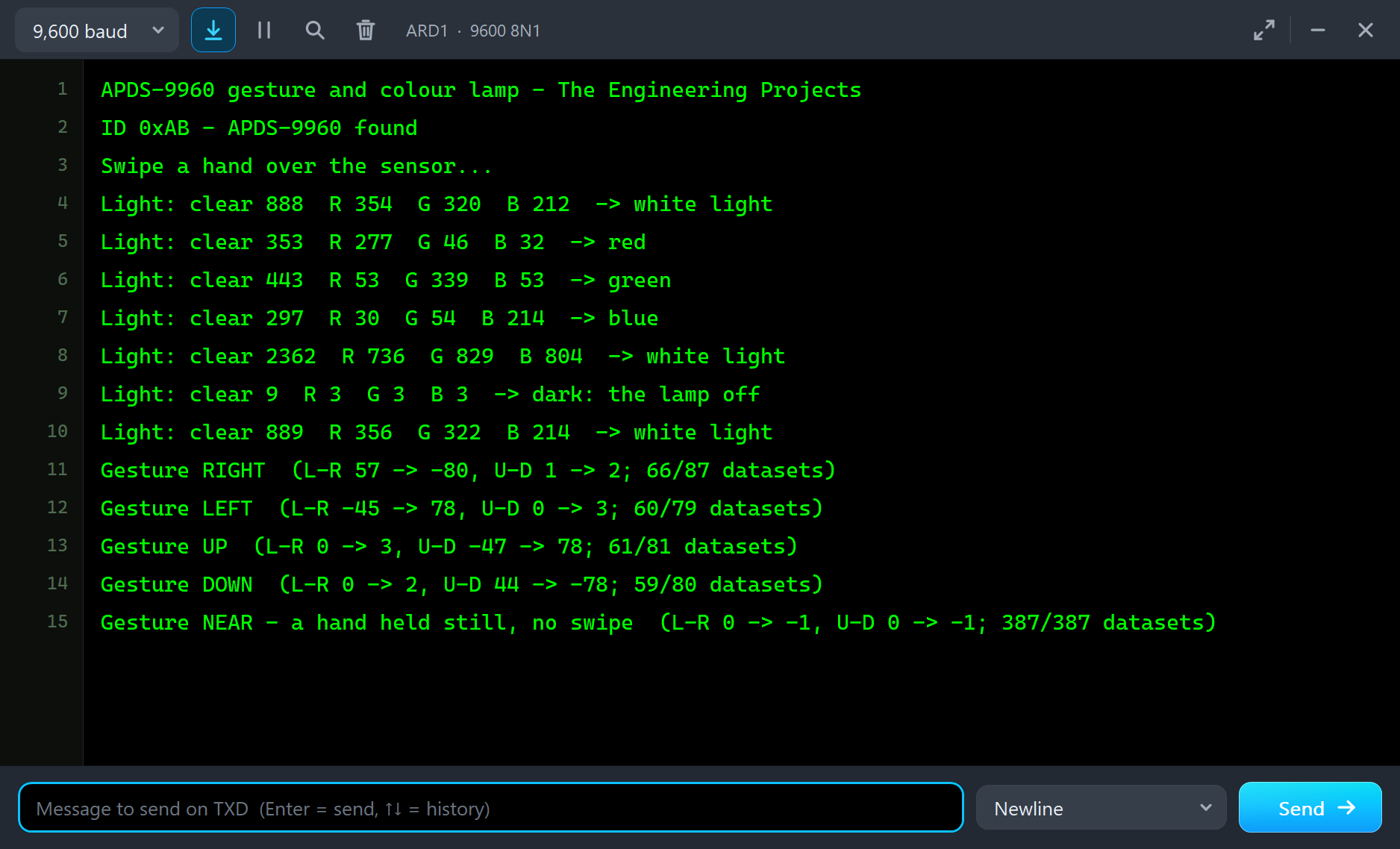
The sketch reads the ID - 0xAB, the APDS-9960 is there - writes its settings and switches the sensor on. The PWR LED is lit, the infrared LED starts to pulse and the light measurement begins: every 103 ms a new set of colour counts arrives, and under the lamp the clear count is 888 - red 354, green 320, blue 212 - which the sketch calls white light; the RGB LED glows warm white.
The Colour of the Light
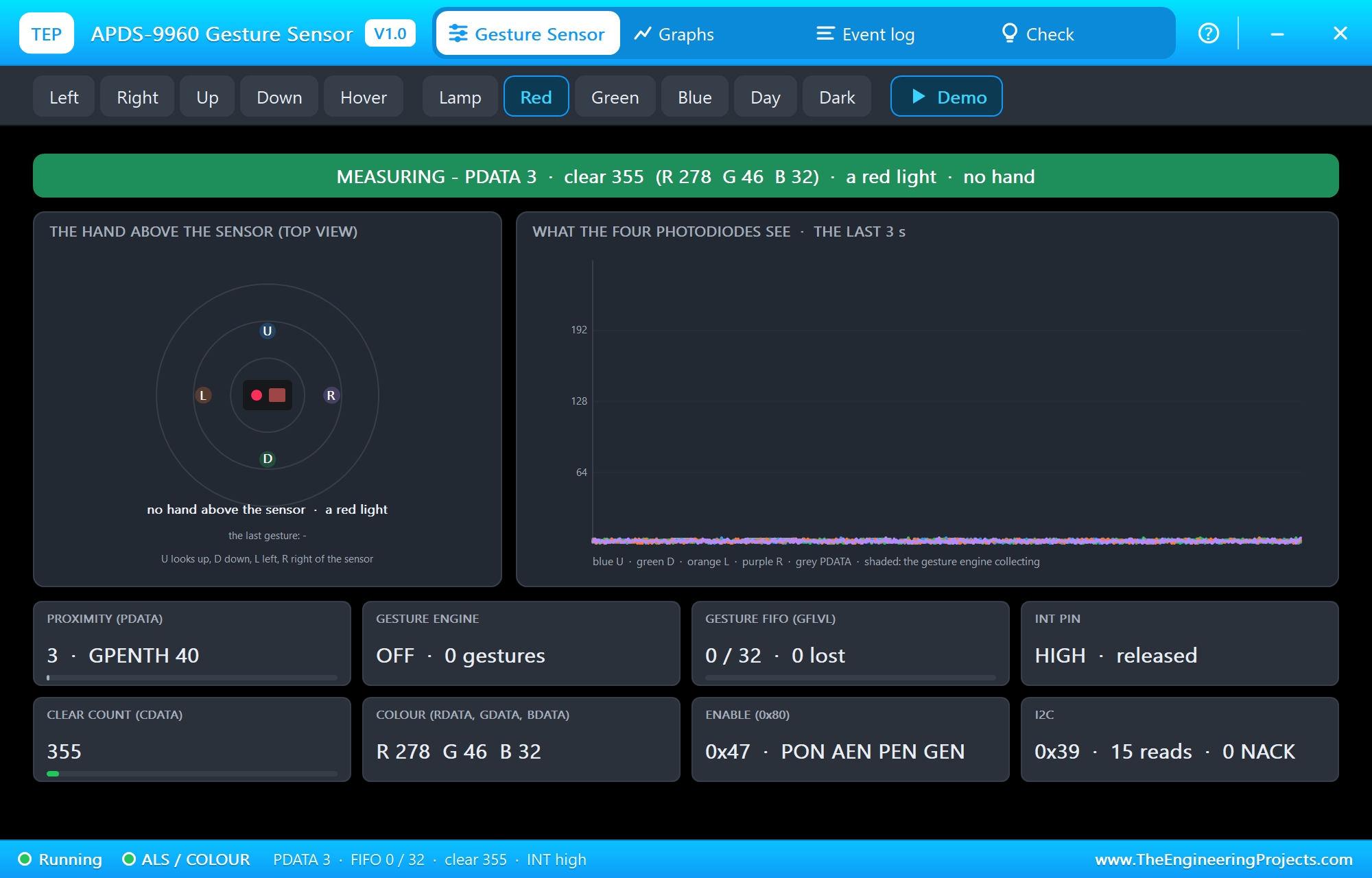
From 3 seconds the light changes every two seconds. Under the red light the clear count drops to 353, with red at 277 against green 46 and blue 32; under the green light green leads with 339; under the blue light blue leads with 214. Daylight is the brightest, a clear count of 2362 with red, green and blue nearly equal, and in the dark everything falls to 9 or less and the RGB LED goes out. Each time the sketch names the colour on the monitor and the RGB LED copies it.
Four Swipes
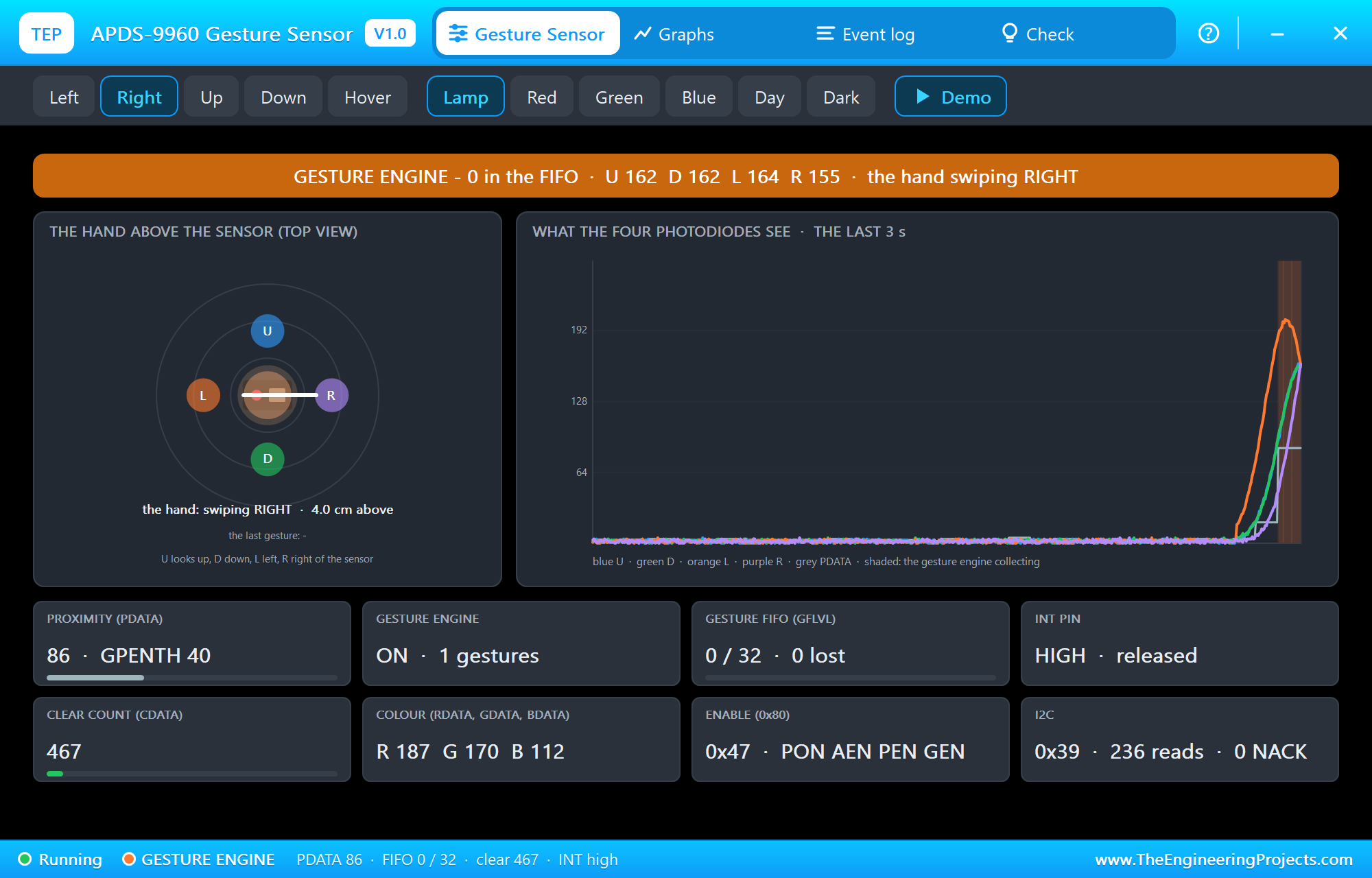
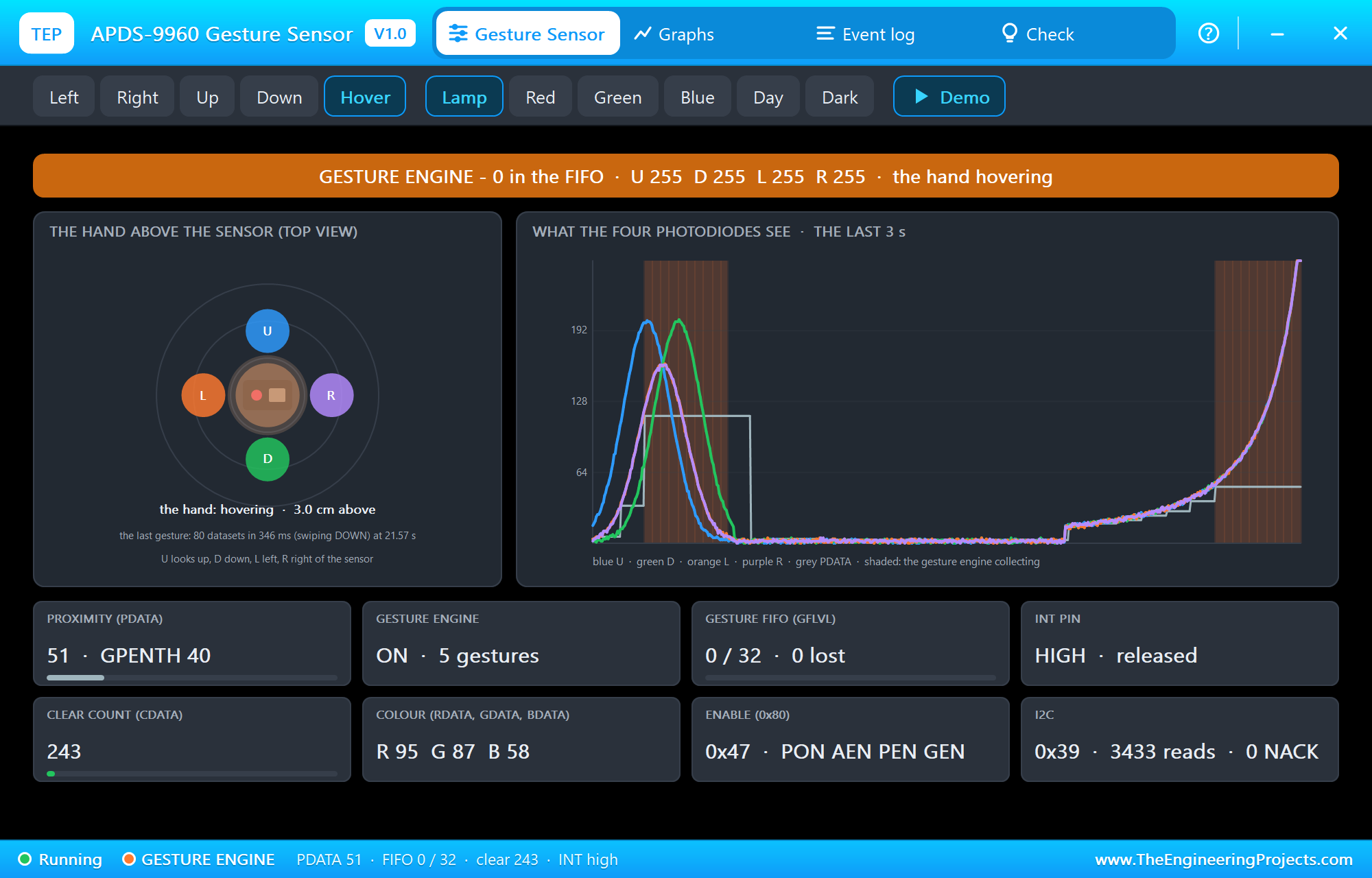
At 15 seconds a hand swipes from left to right, 4 cm above the sensor. The proximity check sees the hand and starts the gesture engine; INT goes LOW after four datasets and the sketch reads them as they come - 87 datasets in all. The first one leans to the left photodiode, a left-right balance of +57 %; the last one leans to the right, -80 %. The balance fell by 137 points: RIGHT, and the blue LED lights. The pop-up shows the hand crossing the sensor and the four photodiodes rising one after another - left first, right last.
Two seconds later the hand swipes back: LEFT, the left-right balance going from -45 to +78 % over 79 datasets. Then UP, from -47 to +78 on the up-down pair (81 datasets), and DOWN, from +44 to -78 (80 datasets). Each time the other pair stays near zero, and each time the LED of that direction lights for 1.5 seconds.
A Hand Held Still
At 23 seconds the hand comes down from 14 cm to 3 cm, stays still for a second and leaves. The engine starts as the hand passes the threshold and runs for 1676 ms, collecting 387 datasets - all four photodiodes rising and falling together. Both balances stay at 0 from the first dataset to the last, so the sketch reports NEAR - a hand held still, no swipe - and lights all four LEDs.
The Graphs, the Event Log and the Check Page
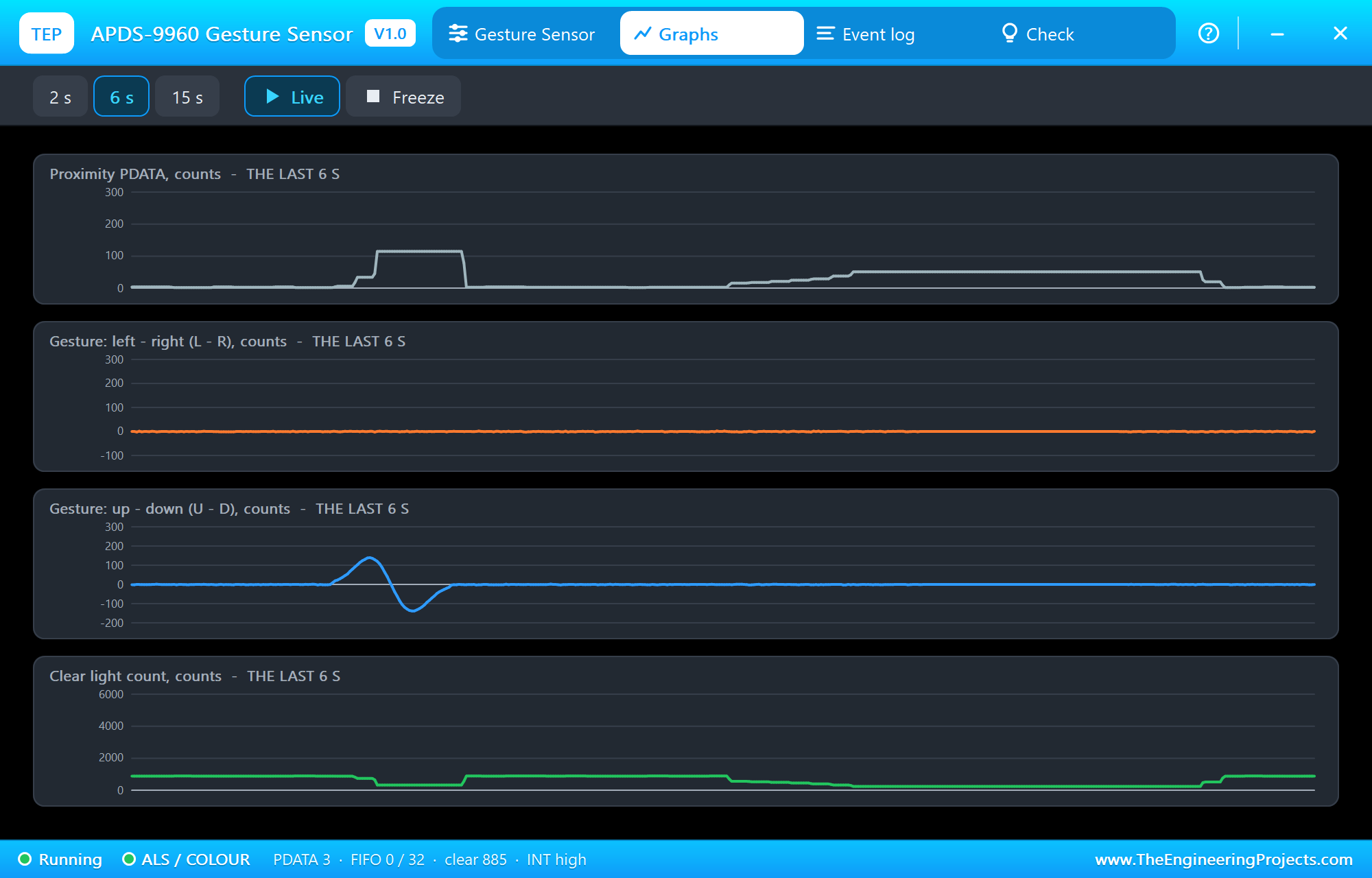
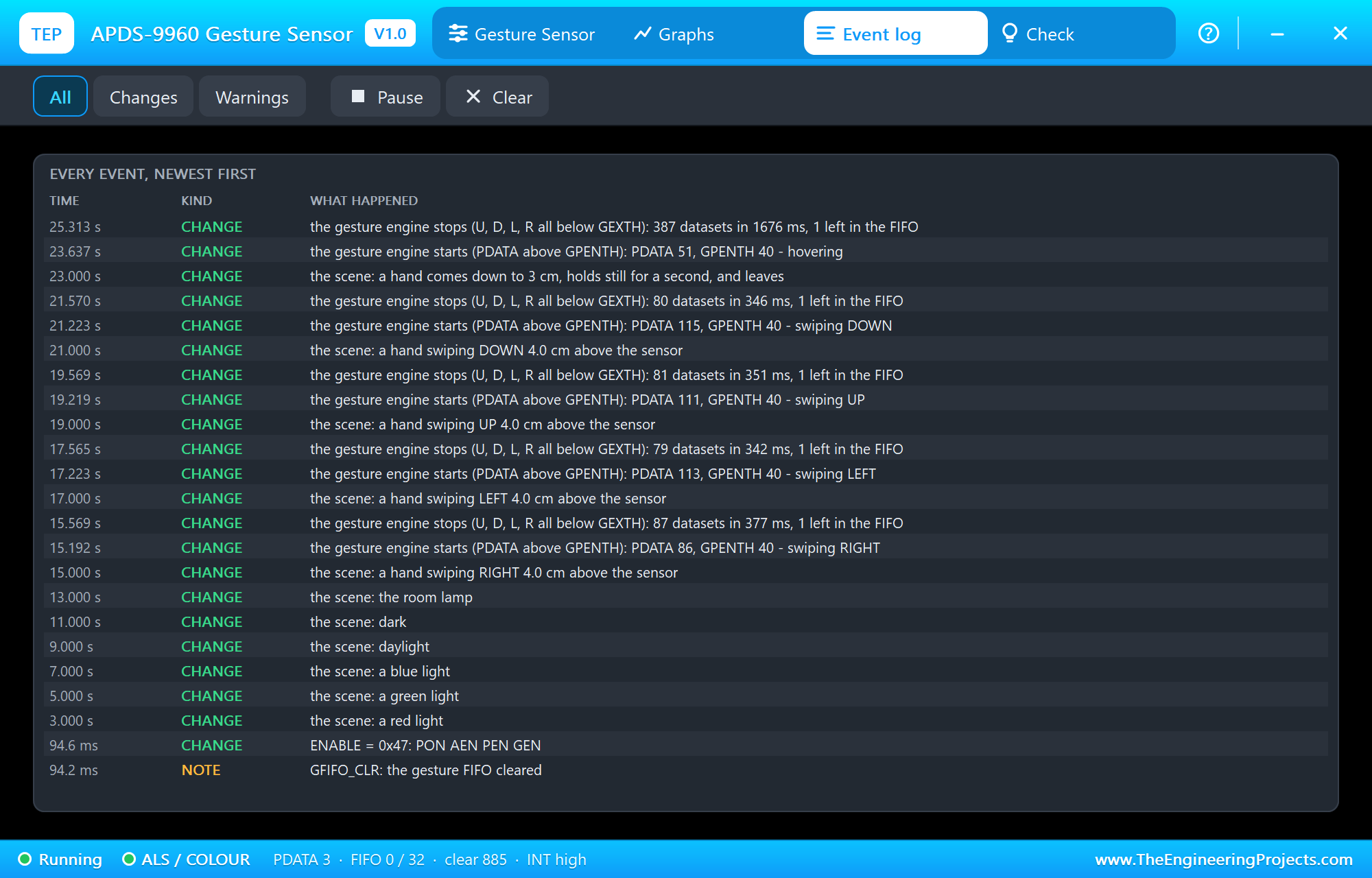
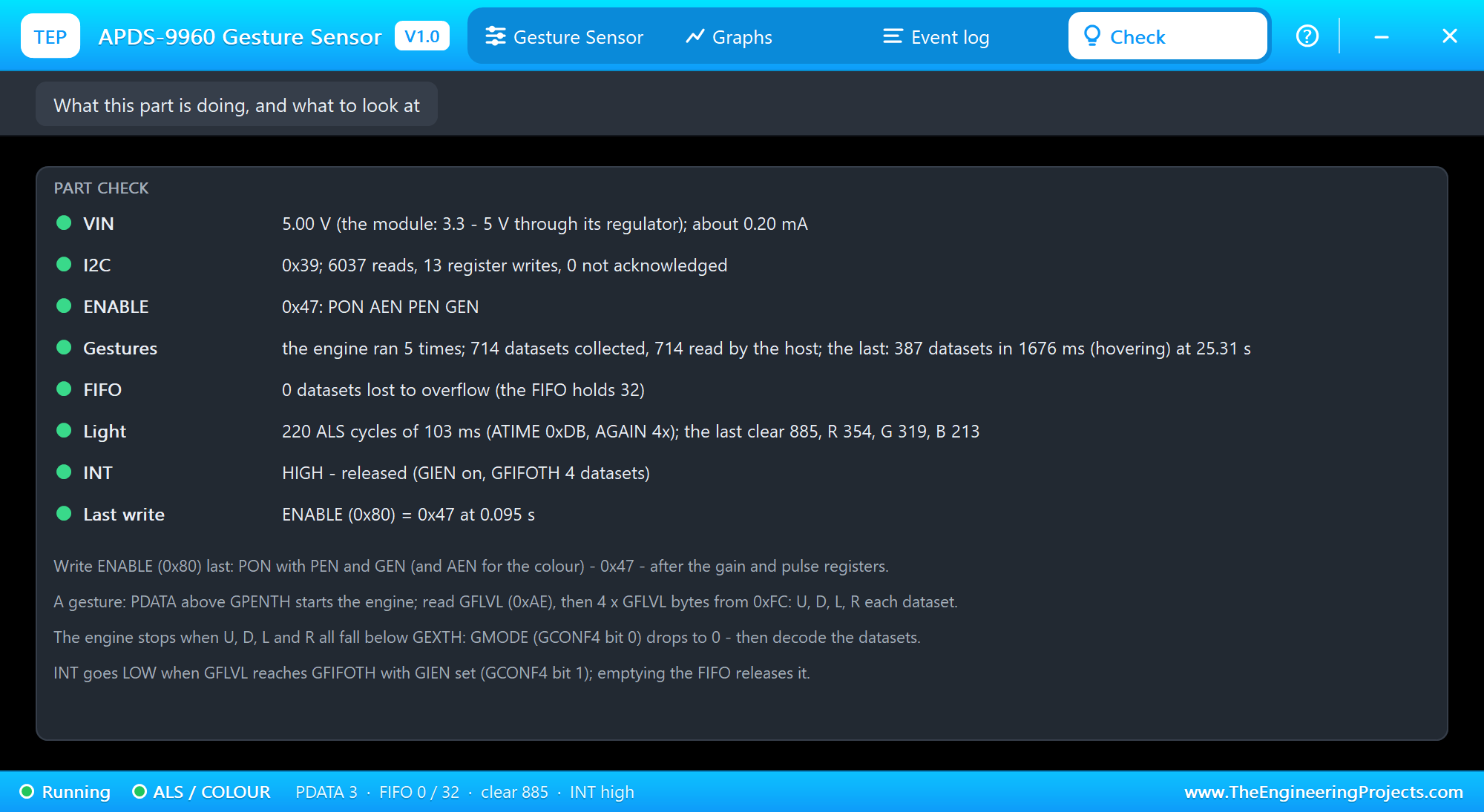
The Graphs page plots PDATA, the left-right and up-down differences of the photodiodes - each swipe a wave, positive then negative - and the clear count. The Event log keeps the register writes, every start and stop of the gesture engine and each change of the scene. The Check page sums up the run: the engine ran 5 times and collected 714 datasets, the host read all 714 and none was lost to overflow; 220 light cycles of 103 ms; 6037 reads, 13 register writes and no NACK.
The monitor shows the sketch's side: the ID, each gesture with its balances and the number of datasets, and a line whenever the colour of the light changes.
Why Four Photodiodes?
One photodiode can tell that something is close, but not where it went. Two of them, looking left and right, can tell left from right by which one sees the hand first; four of them add up and down. The APDS-9960 does not even need to know how fast the hand moved: the balance at the start against the balance at the end is enough, which is why such a small sensor can read gestures at all. For simple light levels, our LDR Sensor Library for Proteus and Photodiode Library for Proteus show the single-sensor side of the same idea.
Proximity Is Not Distance
PDATA is the amount of infrared that comes back, not a distance. A white hand at 10 cm can give the same PDATA as a dark sleeve at 5 cm. Try it in the simulation: lower the module's REFLECT from 60 to 20 and the same swipe gives a third of the counts - with GPENTH at 40 the gesture engine may not start at all. For a true distance, a time-of-flight sensor measures how long the light takes.
Try It Yourself
- Click Left, Right, Up or Down in the pop-up at any time: the LED of that direction lights a moment later.
- Set the module's HEIGHT to 9 cm: the counts fall with the height squared, and the swipes become harder to read.
- Change GPENTH in the sketch from 40 to 120: only a close hand starts the gesture engine.
- Change ATIME from 219 to 0xFF: the light measurement becomes 2.78 ms and the sensor checks for a hand far more often.
- Click Dark: the clear count drops near zero and the RGB LED goes out.
Ideas to Extend the Demo
- Swipe up and down to dim a lamp, left and right to switch it on and off.
- Use PDATA alone for a touchless tap: a hand within a few centimetres toggles a relay.
- Read the colour of an object held close, under the sensor's own light, and sort it.
Your Own Sketches
The demo sketch is in the zip file, and you can change it in the Arduino IDE. New to Arduino? Start with our Arduino Tutorial for Beginners. Export the compiled binary, and set the UNO's PROGRAM property to the new file. Our guide on How to get the HEX file from Arduino shows you where the file ends up.
Things to Know Before Using a Real APDS-9960
- 3.3 V: the bare chip runs at 2.4 - 3.6 V; on a 5 V board use a module with a regulator and a level shifter, as ours.
- Range: gestures work best 3 - 10 cm above it; sunlight and a cover glass cut the range, and the gains and offsets are there to trim it.
- Speed: read the FIFO as soon as INT goes LOW - it holds about 140 ms of a swipe.
- Raw counts: the colour counts are not lux; a lux value needs a calibration with your cover and your light.
- The INT pin is open drain: it needs a pull-up (our module has one).
Troubleshooting
- The ID is not 0xAB: check SDA, SCL and VIN; the sensor answers at 0x39.
- No gesture is seen: ENABLE needs PON, PEN and GEN, and GPENTH must be below the PDATA a hand gives.
- Gestures are lost: the FIFO overflows - read GFLVL and the datasets as soon as INT goes LOW.
- The colour reads 0: AEN is off, or the first light cycle is not done - wait for AVALID in STATUS.
- The part is not simulated:
TEPAPDS9960.DLLis missing from MODELS and from the project folder.
Limitations of the Simulation
- The registers, their addresses and reset values, the state machine, the FIFO and the INT pin follow the maker's datasheet; the module is our own drawing of an APDS-9960 breakout.
- Our own choices: the counts - a hand as a spot about 3 cm wide seen by four photodiodes looking 2 cm off the axis, the counts falling with the height squared, 0.02 clear counts per lux, gain step and cycle - the cycle times, and the scene with its swipes and lights.
- Not modelled: the interrupt persistence, the proximity offsets, the exact spectral response of each photodiode, sunlight and a cover glass.
- Arduino is a name of Arduino; this library is not made or endorsed by Arduino, Labcenter or the maker of the APDS-9960.
- Tested in Proteus 8.5 in November 2026 (the demo as shipped). Proteus 7 is not supported.
So, that was all about the APDS-9960 Gesture Sensor Library for Proteus Simulation. I hope it helps you build your touchless switch, your gesture menu or your colour detector before the real sensor arrives - and shows that reading a gesture is a simple thing at heart: four photodiodes, a start and an end. If you have any questions, ask in the comments and I will help you out. Till the next tutorial, take care and have fun!