Introduction to BC547, getting started with BC547, how to start with BC547, How to use BC547, BC547 Proteus simulation, Proteus BC547, BC547 Proteus
TEP , The Engineering Projects , Boxes

BC547: Datasheet, Pinout, Working, Applications and Simulation

Shares 2.5K Views
Reaction 40
Reaction 700
Reaction 60
Reaction 25
Reaction 60
Shares: 691
TEP , The Engineering Projects , PCBWAY

Introduction to BC547, getting started with BC547, how to start with BC547, How to use BC547, BC547 Proteus simulation, Proteus BC547, BC547 Proteus
Hello everyone! I hope you all will be absolutely fine and having fun. Today, I am going to give you a detailed Introduction to BC547. It is an NPN bipolar junction transistor (BJT), mainly used for switching and current amplification.

Its maximum current gain is around 800. So, let's have a detailed overview of BC 547.

Introduction to BC547

Introduction to BC547, getting started with BC547, how to start with BC547, How to use BC547, BC547 Proteus simulation, Proteus BC547, BC547 Proteus
  • BC547 is a 3-Terminal NPN Bipolar Junction Transistor(BJT), mostly used for switching purposes and current amplification.
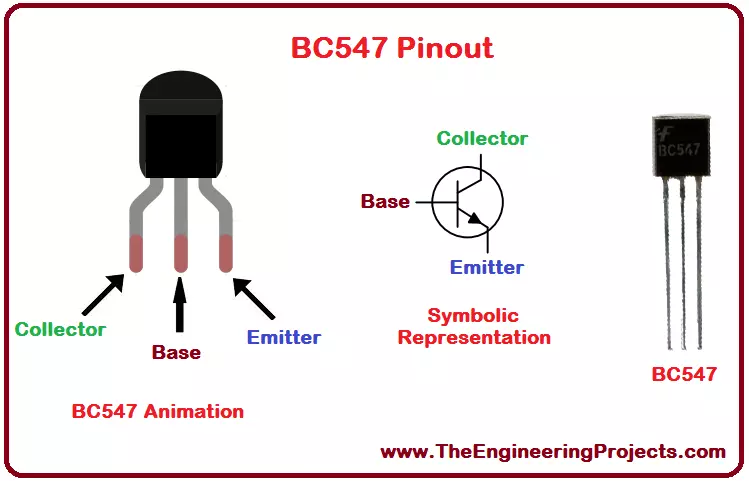
  • BC547 Pins(Terminals) from left to right are called:
    • Collector.
    • Base.
    • Emitter.
  • Depending on the voltage applied at Base Terminal, BC547 can operate in two states, named:
    • Forward Biased.
    • Reverse Biased.

BC547 as Reverse Biased

  • If Base Terminal is connected to the Ground(0V), Collector and Emitter will act as an open switch and the transistor is said to be acting as Reverse Biased.
  • In a Reverse Biased State, no current will flow through the transistor.

BC547 as Forward Biased

  • If a HIGH signal(normally 5V) is provided at the Base Terminal, Collector and Emitter will start acting as a closed switch and the transistor is said to be acting as Forward Biased.
  • In Forward Biased State, the current will start flowing from Collector to Emitter.
  • The maximum Collector current limit of BC547 is 110mA, so the load must be lower than that.
Introduction to BC547, getting started with BC547, how to start with BC547, How to use BC547, BC547 Proteus simulation, Proteus BC547, BC547 Proteus
  • Now let's have a look at the datasheet of BC547:

BC547 Datasheet

  • If you want to get in-depth knowledge about any electronic component, then you should read its datasheet.
  • You can download BC547 Datasheet by clicking the below button:
Download BC547 Datasheet
  • Now, let's have a look at the pinout of BC547:

BC547 Pinout

  • BC547 Pinout consists of 3 pins in total, named: Collector(C), Base(B) and Emitter(E).
  • All of these three pins along with their symbols are shown in the below table:
Introduction to BC547, getting started with BC547, how to start with BC547, How to use BC547, BC547 Proteus simulation, Proteus BC547, BC547 Proteus

BC547 Pins Configuration

  • The properly labeled pin configuration diagram of BC 547 along with its animation is shown in the figure given below.
Introduction to BC547, getting started with BC547, how to start with BC547, How to use BC547, BC547 Proteus simulation, Proteus BC547, BC547 Proteus
  • In the last section, we will design a Proteus Simulation of BC547, which will give you a better understanding of How to use these pins of BC547.

BC547 Transistor Working

  • As we know BC547 is an NPN transistor, so in its design, a P-region(Base) is sandwiched between two N-type regions.
  • At the border of the P and N, a depletion region is created, which blocks the flow of charge carriers from one region to another.
  • When the input voltage is applied at its Base terminal, some amount of current starts to flow from the base to the emitter and controls the current at the collector.
  • The voltage between the base and the emitter (VBE), is negative at the emitter and positive at the base terminal for its NPN construction.
  • The polarity of voltages applied for each junction is shown in the figure below:
Introduction to BC547, getting started with BC547, how to start with BC547, How to use BC547, BC547 Proteus simulation, Proteus BC547, BC547 Proteus

BC547 Ratings

  • The current, power and voltage ratings of BC547 along with their values and System International (SI) units are provided in the table shown below.
Introduction to BC547, getting started with BC547, how to start with BC547, How to use BC547, BC547 Proteus simulation, Proteus BC547, BC547 Proteus
  • Moreover, the storage temperature, as well as operating temperature for the transistor BC 547, is also given in the table shown above.

BC547 Thermal Characteristics

  • The thermal characteristics associated with BC 547 are provided along with typical values, in the table shown below.
Introduction to BC547, getting started with BC547, how to start with BC547, How to use BC547, BC547 Proteus simulation, Proteus BC547, BC547 Proteus

BC547 Applications

  • There are a lot of applications associated with BC547, a few of the major applications are given below.
    • BC547 can be used for switching purposes.
    • We can also use it for amplification purposes.

BC547 Proteus Simulation

  • I have made a simple Proteus ISIS simulation using BC 547 for the control of the DC motor.
  • The screenshot of the simulation is shown in the figure below.
Introduction to BC547, getting started with BC547, how to start with BC547, How to use BC547, BC547 Proteus simulation, Proteus BC547, BC547 Proteus
  • The running form of the simulation is shown in the figure below.

Introduction to BC547, getting started with BC547, how to start with BC547, How to use BC547, BC547 Proteus simulation, Proteus BC547, BC547 Proteus

  • By pressing the button encircled in the figure above, you will be able to observe the working of the DC motor.
  • I have made another simulation for DC motor control using Arduino UNO and BC 547.
  • The simulation's screenshot is shown in the figure below.
Introduction to BC547, getting started with BC547, how to start with BC547, How to use BC547, BC547 Proteus simulation, Proteus BC547, BC547 Proteus
  • The source code for the above simulation is given below.
int MotorInput = 2;
int MotorOutput = 7;

void setup() 
{
    pinMode(MotorInput, INPUT_PULLUP);
    pinMode(MotorOutput , OUTPUT);
}

void loop() 
{
    if(digitalRead(MotorInput) == HIGH)
    {
      digitalWrite(MotorOutput, HIGH);
    }
    if(digitalRead(MotorInput) == LOW)
    {
      digitalWrite(MotorOutput, LOW);
    }
  
}
  • The running form of the simulation is shown in the figure below.
Introduction to BC547, getting started with BC547, how to start with BC547, How to use BC547, BC547 Proteus simulation, Proteus BC547, BC547 Proteus
 
  • First of all, you need to change the logic state from 0 to 1, after uploading the hex file, the motor will automatically start to rotate.
That is all from the tutorial Introduction to BC547. I hope you enjoyed this exciting tutorial. If you are facing any sort of problem regarding anything, you can ask me in the comments anytime you want, without even feeling any kind of hesitation. I will try my level best to solve your issues in a better way, if possible. Our entire team is also 24/7 there to entertain you. I will explore further hardware equipment in my upcoming tutorials. So till then, Take Care :)
TEP , The Engineering Projects , Tags
Comments

Write a Comment

WordPress Google Twitter Facebook User
Robot
Comments Comments on ‘’ BC547: Datasheet, Pinout, Working, Applications and Simulation ‘’ (12)
Comment
Reaction 40
Reaction 700
Reaction 60
Reaction 25
Reaction 60
Hi. How’s everyone. I need to know that is the leg notation for base, emitter and collector for BC547 transistor are always same whether these are manufactured by different manufacturer? I have another question that can I use BC547 in replacement of BC548? Mention the main purpose of both transistors also which one can tolerate higher voltages.
Comment
Reaction 40
Reaction 700
Reaction 60
Reaction 25
Reaction 60
Good article. I’m having a problem in building a circuit as BC547 is getting very hot. And after one day the circuit completely burned. I measured the voltages and currents around it. These are following. Vce = 10.3V, Vbe = 0.7V, Vcb = 9.4V Ve to gnd = 12.2 V, Vc to gnd = 22.0V, Vb to gnd = 12.8V, Ie = 20mA, Ic = 20mA, Ib = 6.4uA. These values are below the max values. Then please help me to find the reason why is the transistor heating up. What should i need to check? Thanks
Comment
Reaction 40
Reaction 700
Reaction 60
Reaction 25
Reaction 60
I tried a similar setup with a BC547 transistor (45V, and 0.1A) but I'm not getting desired results. The emitter & collector are opposite but I tried both setup. Neither one is working. They are both seemed exact same. Is there any correct way in this setup. Where I am wrong? Or either it works if the transistor is not bipolar? I will wait for your valuable suggestions.
Comment
Reaction 40
Reaction 700
Reaction 60
Reaction 25
Reaction 60
Hello! Hope you are good. I want to drive a relay with 5v relay using bc547. And I’m using resistor 1K at base, but relay is not working. I tried replacing relay with led then it is working absolutely fine. The resistance of relay is 70ohms. So tell me the problem here.
Comment
Reaction 40
Reaction 700
Reaction 60
Reaction 25
Reaction 60
I am new in the feild of electronics. And i am working on a very basic water detection sensor by using a BC547 to switch on LED when there is current between two electrodes. The space between electrodes is 1cm. As I’m trying to understand more about working of transistors so I have some questions. When I replaced the 4.7k resistor with 1M ohm, the LED burns very dim. Explain why it is happening? According to the BC547 specifications, the max emitter-base voltage is 6 V. So is it meaning that i need to drop the voltage here? Or should I plug in couple of diodes?
Comment
Reaction 40
Reaction 700
Reaction 60
Reaction 25
Reaction 60
I’m using a reed switch having 2 pin. This acts as a switch when goes near to magnet. I want to keep it on even when theme get is not near. As the BC547 also use as a switch as well thus how can BC547 help me to perform this task. Thanks
Comment
Reaction 40
Reaction 700
Reaction 60
Reaction 25
Reaction 60
Hi. I had i-Snail-VC-50 sensor that has an output of 0-5V. I would like to link this output with the base of transistor BC547 that provide power an LED with an external power source of 5V. What actually I want to do is, the LED will light up when the voltage rise above 0V automatically. As the most of time voltage range is between 0-1V. So help me how could I achieve this task? And also mention that no components will get damaged if sensor output goes up to max 6.5V?
Comment
Reaction 40
Reaction 700
Reaction 60
Reaction 25
Reaction 60
I’m using a transistor as a switch, and the voltage providing is approximately 0.7 to the base of the transistor from the mid-point of the resistors. I know that silicon breakdown voltage is 0.7 that means it is going to forward-biasing above this voltage. The midpoint value is calculated that is 0.757V and observed is also around 0.7V. Though, the LED does not turn on in this setup. Please tell me where I am wrong here?
Comment
Reaction 40
Reaction 700
Reaction 60
Reaction 25
Reaction 60
I am working on a project of controlling RGB led Strip (5050) 5m by using arduino. In this process, the tutorial I am following is suggesting me to use TIP31 mosfets along with resistors. But I switched them with the transistor BC547. Now if I am using a10k resistor, it is decreasing the light of the LED strip too much. And by using low value resistor then I am getting the desired brightness, but in this situation the resistors become very hot and started blackening. I need to know the reasons. Is this because I replace TIP31 with BC547? Or any other reason is there?
Comment
Reaction 40
Reaction 700
Reaction 60
Reaction 25
Reaction 60
Hello! I am new in learning electronics. And currently working on a project. The task is I have to switch on and off the power going to SD card. So what should I do here? Should I use BC547 as a switch? Is that goi9ng to help me in this regard?