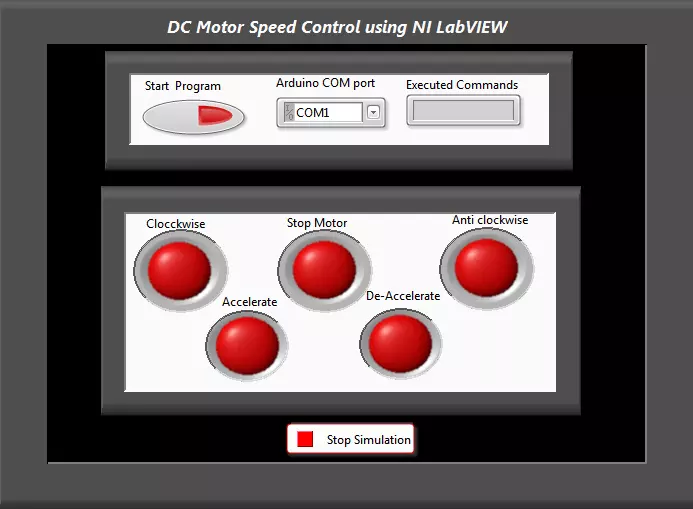
Hello everyone! I hope you all will be absolutely fine and having fun. Today, I am going to share my knowledge with all of you guys, about how to make a simple Virtual Instrument (VI) for DC Motor Speed Control in LabVIEW. In my previous tutorials, I have worked on DC Motor Speed Control using Arduino, in which I have controlled the DC Motor Speed using Arduino and after that I made some advancements in it and then created DC Motor Speed Control in Matlab in which commands were sent from Matlab. So, now we are gonna do the DC Motor Speed Control in LabVIEW.If you are working on DC Motor then you should also have a look at DC Motor Direction Control using Arduino.
In this tutorial, I am going to work on the program for DC Motor speed Control usin ...
Hello friends! I hope you all will be absolutely and having fun. Today, I am going to share my knowledge with all of you on Area and Volume Calculation of different shapes with the given radius in NI LABVIEW. First of all I want to tell you that the area basically shows the space inside an object having two dimensions. Where as, Volume is the parameter which shows the space occupied by a three dimensional object.
So, we can roughly say that the volume is the area of a three dimensional object. For example you want to go for a trip and you have to pack your bags. So, in this case you have to make some space in your bag to put the clothes inside it. The space that you make for the clothes is basically an application of volume. We can also called i ...
Hello everyone! I hope you all will be absolutely fine and having fun. Today, I am going to share my knowledge with all of you guys, about Communication Signals Generation in LabVIEW. In the previous tutorial, we have seen the Introduction to LabView and after that we have designed our First Project using LabView Programming so if you haven't read them yet then I would suggest you to read them so that you have the basic knowledge of LabView. In earlier days people used to convey their messages or some important notifications using a piece of paper and by delivering it to the other places with the help of the pigeons. It took a lot of time for the message conveying procedure because there are some notifications or messages in which such a huge delay ...
Hello friends! I hope you all will be absolutely fine and having fun. Today I am going to share my knowledge with all of you guys that how to make a simple program for Quadratic Roots Calculation in LabVIEW. Quadratic equation is a second order basic equation. It plays a vital role for a lot of mathematical problems. The answer obtained from this equation is knows as its roots (also called quadratic roots). It can not have more than two roots. Roots can be 0,1 or maximum 2 and not more than that. We can solve quadratic equation in three different ways, but in this tutorial we will focus on one of them only. Here, I am going to tell you about form and the different ways of Quadratic Roots Calculation.
Ways to Solve Quadratic Equation
The quadratic ...
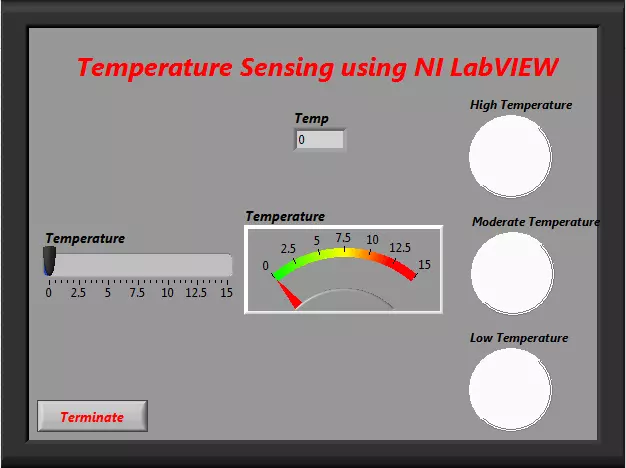
Hello friends! I hope you all will be absolutely fine and having fun. Today, I am going to share my knowledge about how to create program for "Temperature Sensing using NI LabVIEW". To sense the temperature is compulsory at a lot of the places e.g. refrigerators, air conditioners, storage rooms, kitchen etc. At these places to sense the temperature and its proper indication is compulsory because it can cause serious problems otherwise. For example, if the temperature in the food storage room is higher than an adjusted threshold, it will be harmful for all of the food items.
You can also consider "Fire Alarm" as an example of temperature sensor. First of all it measures the level of the temperature. If it founds that the temperature is higher tha ...
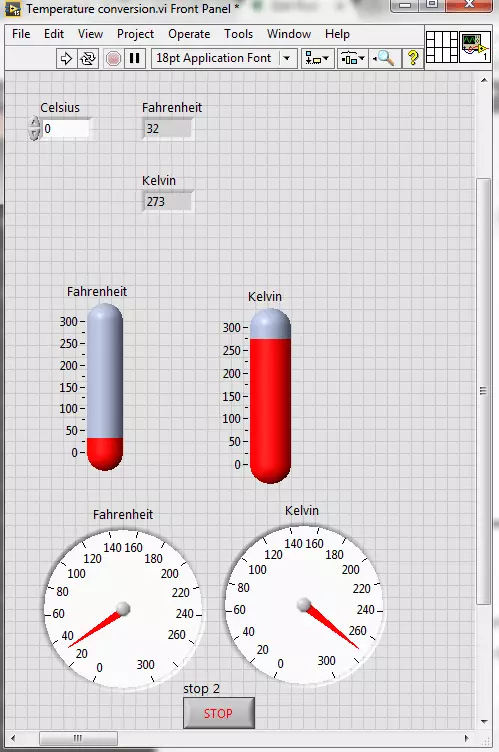
Hello friends! I hope you all will be absolutely fine. Today, I am going to share my knowledge with all of you guys, on how to make a Temperature Conversion in LabVIEW. Temperature is actually measured with different units at different places all across the world. However, there are three basic standard units for measuring the temperature i.e. Celsius, Fahrenheit and Kelvin. We can convert them in each other by performing some mathematical operations. In this tutorial I am going to elaborate only one of these conversions.
I would like to tell the standards of these scales with reference to the freezing and boiling point of water. "Celsius" scale is basically the scale based on 0 degrees for the freezing point of water and 100 degree for the boil ...
Hello friends! Hope you all will be absolutely fine. Today I am going to share my knowledge with you about how to create an algorithm for Water Level Detector in LabVIEW 2015. LabVIEW is an excellent software for simulation purpose as well as for the hardware interfacing (interfacing with the external devices). I support the "Graphical Language" which is usually known as "Field Programmable Gate Array (FPGA) " based language. In other software we have to create logic first and then we need to write a complete syntax for the created logic. This software is very easy to use and is quite helpful. Because, we don't have to write the complete complex syntax, instead we have to just create our logic and implement this logic using FPGA blocks. In this t ...
Hello everyone! I hope you all will be fine. Today, I am going to elaborate that how to create your First Project using NI LabVIEW Programming. This software is very easy to use in comparison to the other software. You do not have to write the complete source code for the desired output, like in other software e.g. Arduino, MATLAB, Dev C++, Eclipse etc. instead you have to just implement your logic using Field Programmable Gate Array (FPGA) blocks. The program is designed with the help of the FPGA blocks, is usually known as “Virtual Instruments”.
Normally we used to call it as VI’s. We create in “Block Diagram” window as described in our previous tutorial on Introduction to LabView. If you haven't read that tutorial then I owuld suggest you to ...
Hello everyone. I hope you all will be absolutely fine. Today, I am going to share an Introduction to LabView. LabView is a really exciting software and recently I have worked on many LabView Project so I thought to start this new set of series in which I am gonna explain all about LabView from beginners level to Pro Level. So, today I am gonna upload the first tutorial in this LabVIEW series so that's why I have named it Introduction to LabView and I hope you are gonna like this tutorial. :)
LabVIEW basically stands for “Laboratory Virtual Instrument Engineering Workbench”. This software is designed by the National Instruments (NI) for the control and design of the projects. You can use it for simulation purposes, can also interface hardware with ...
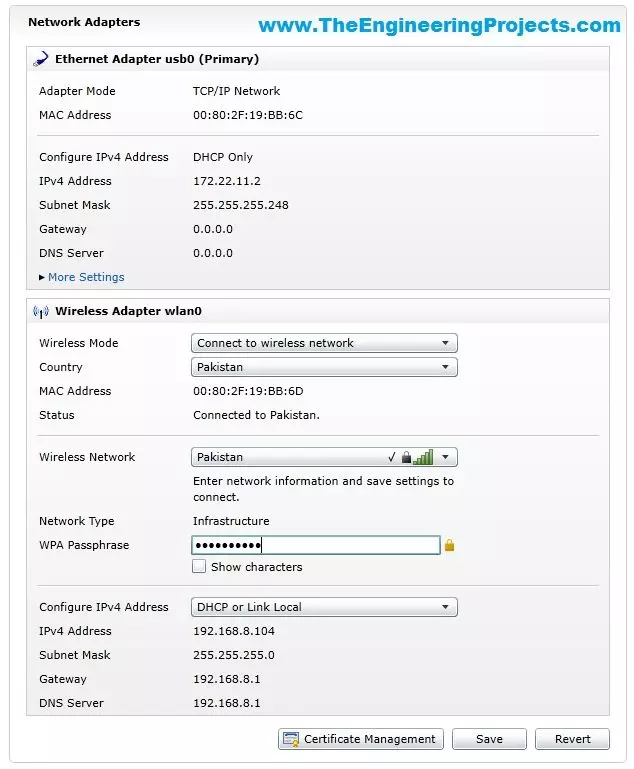
Hello friends, hope you all are fine and having fun with your lives. In today's tutorial, I am gonna show you How to Configure NI MyRio on Wifi. In our previous tutorial, Getting Started with NI MyRio I have show you how to get started with NI MyRio and control LEDs of NI MyRio but you have seen that we have done that over USB. In simple words, we have controlled the LEDs and gyroscope of MyRio over USB but in today's tutorial, first of all, we are gonna configure NI MyRio on Wifi and then we are gonna control all those things over Wifi instead of USB.
If you have a project on MyRio then its my recommendation to use Wifi instead of USB for upload and testing your codes because Wifi is quite flexible in use and you no more restricted to use the USB ...