Hello friends, I hope you all are doing great. Today, I am going to share a list of GSM Libraries for Proteus. A GSM module gives your Arduino its own phone number: it can send and receive SMS, ring when someone calls and tell your sketch who is calling. That's why GSM modules are used in so many engineering projects, like home security alarms, SMS-controlled relays, vehicle trackers and remote weather stations.
The problem is that a real GSM module needs a SIM card, a 2G network and a power supply that can deliver 2 A peaks, and when your project doesn't work, you can't see what the module and the Arduino are saying to each other. Our GSM libraries solve this: they answer real AT commands, register on a simulated network, send SMS to a virtual smartphone and show every line of the conversation, so you can debug your whole GSM project in Proteus before you buy anything.
In this list, I have placed our four newest GSM libraries at the top: SIM800C, SIM900A, SIM800L and SIM808, all of them in version 1.1. After them, you will find our first GSM library for Proteus, a few GSM simulation projects and a table of the AT commands that our models support. If you are new to Proteus libraries, read How to Add New Library in Proteus 8 first. So, let's get started with the GSM Libraries for Proteus:
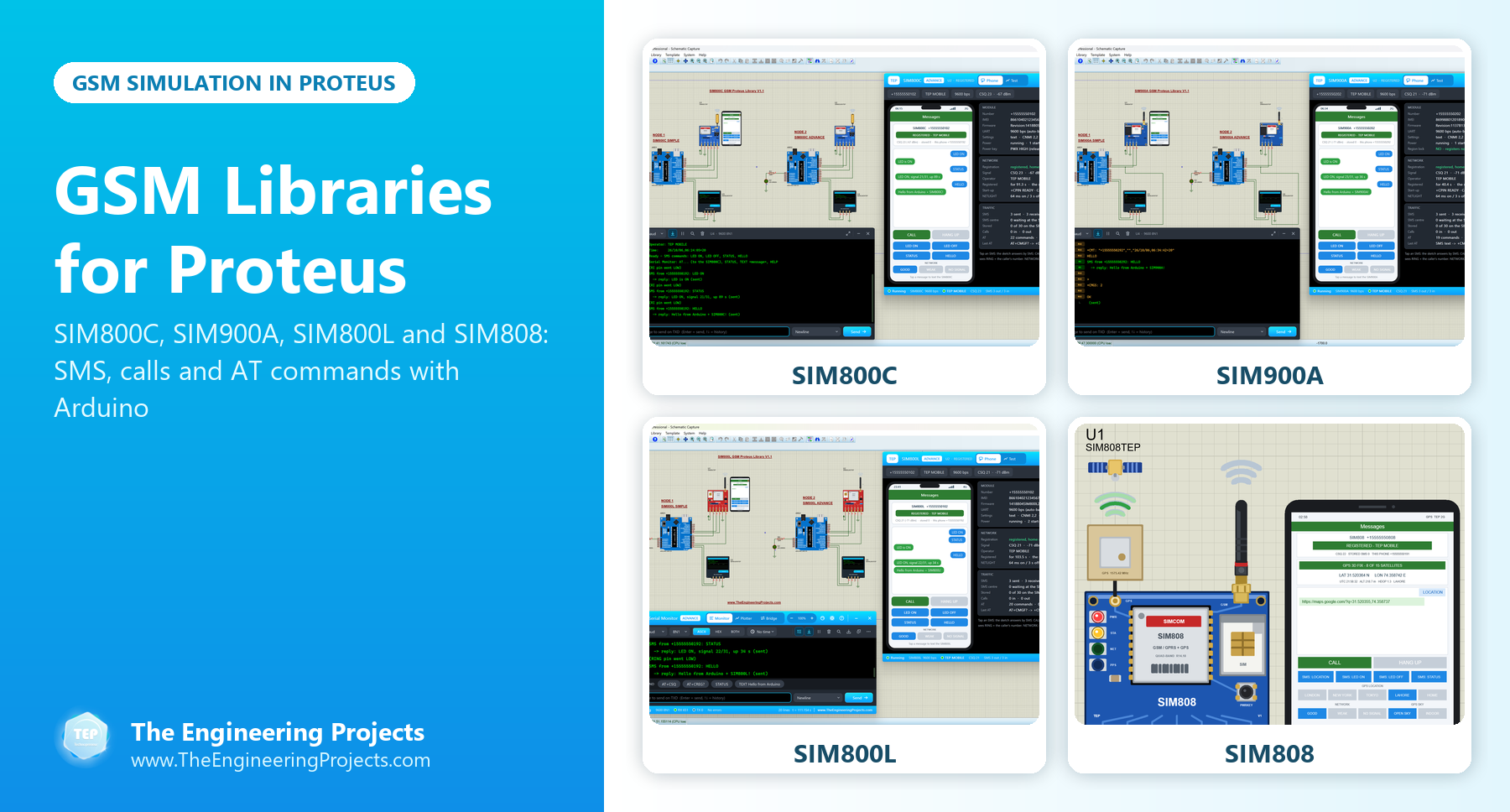
GSM Libraries for Proteus at a Glance
Here is a quick comparison of the GSM modules in this list. All four new models come with an Arduino example and work with our TEP Serial Monitor, so you can also type AT commands to them yourself.
| Library | Board | Bands | Power-on | Special feature |
|---|---|---|---|---|
| SIM800C V1.1 | Blue HW-537 board | Quad-band (850, 900, 1800, 1900 MHz) | Stays off until PWX is held LOW for more than 1 s | The full start-up sequence up to SMS Ready |
| SIM900A V1.1 | Blue SIM900A MINI board | Dual-band (900, 1800 MHz) | Switches itself on | The region lock of real SIM900A modules |
| SIM800L V1.1 | Tiny red breakout board | Quad-band | Starts with the simulation; the demo resets it once | SMS remote control and four GSM test tools |
| SIM808 V1.1 | GSM + GPS board | GSM and GPS | Starts OFF and needs a PWRKEY pulse | A GPS fix, an SMS GPS tracker and five GSM + GPS test tools |
| GSM Library (SIM900D) | SIM900D module | GSM | Starts when the simulation runs | Our first GSM model, with basic AT commands |
1. SIM800C GSM Library for Proteus V1.1
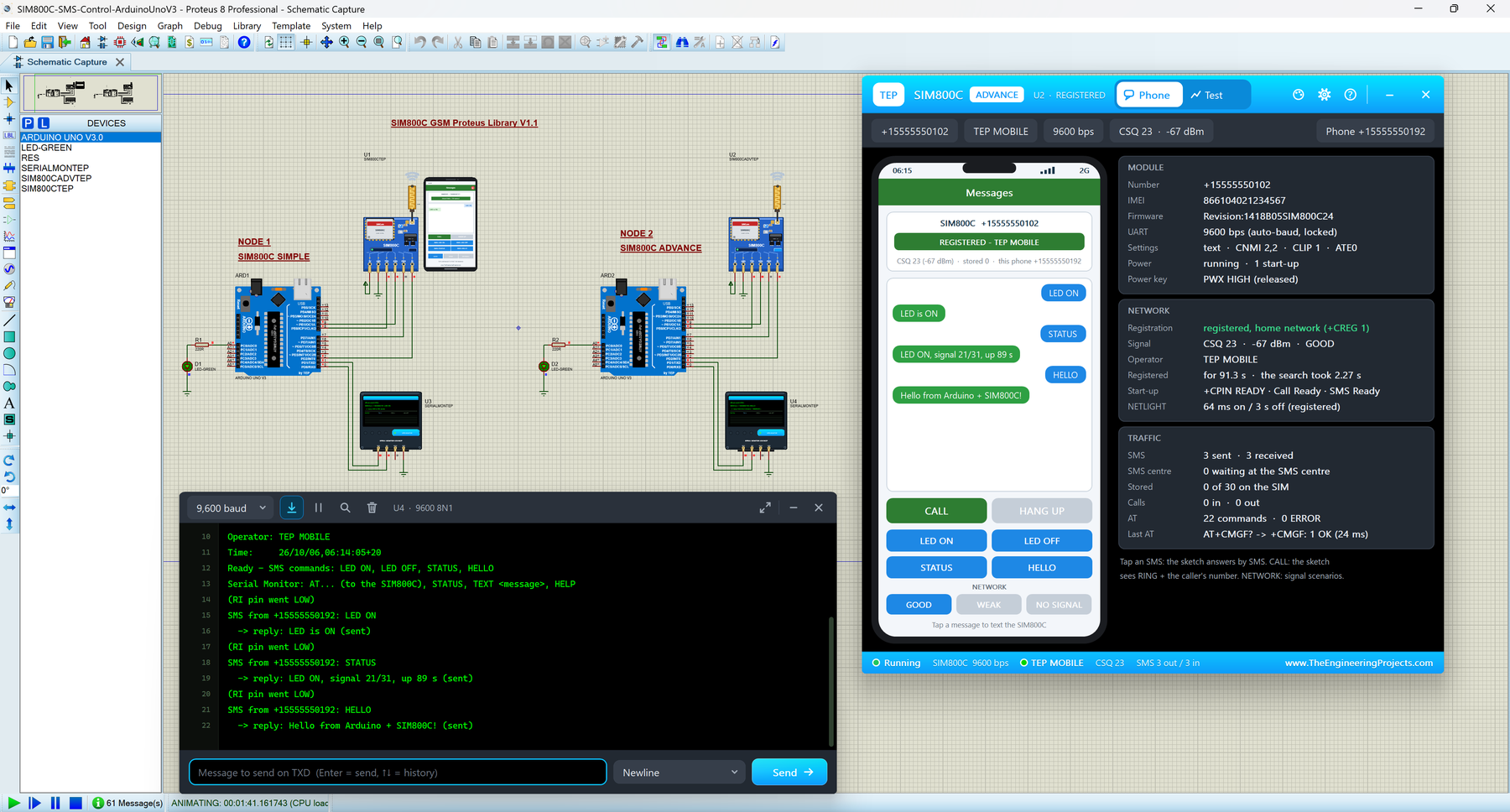
The SIM800C is SIMCom's quad-band GSM / GPRS module, and most makers buy it on the small blue HW-537 board with a flexible antenna. This board has one habit that confuses many beginners: it stays switched off until its PWX power key is held LOW for more than a second. Our SIM800C model does exactly the same, so your sketch has to switch the module on before it can talk to it, just like on the real board.
After the power key, the model learns your baud rate from the first "AT", reports +CPIN: READY, Call Ready and SMS Ready, registers on the simulated network and then sends SMS and handles calls. The library has two devices:
- SIM800C Simple: the HW-537 board with a virtual smartphone beside it on the schematic.
- SIM800C Advance: a pop-up window with the phone and four measured GSM test tools: network registration, SMS round trip, call test and AT check.
In the Arduino SIM800C Proteus demo, two Arduino UNOs switch their SIM800C on with PWX, control an LED by SMS, reject incoming calls and print everything in our TEP Serial Monitor.
Read the complete tutorial: SIM800C Library for Proteus V1.1
2. SIM900A GSM Library for Proteus V1.1
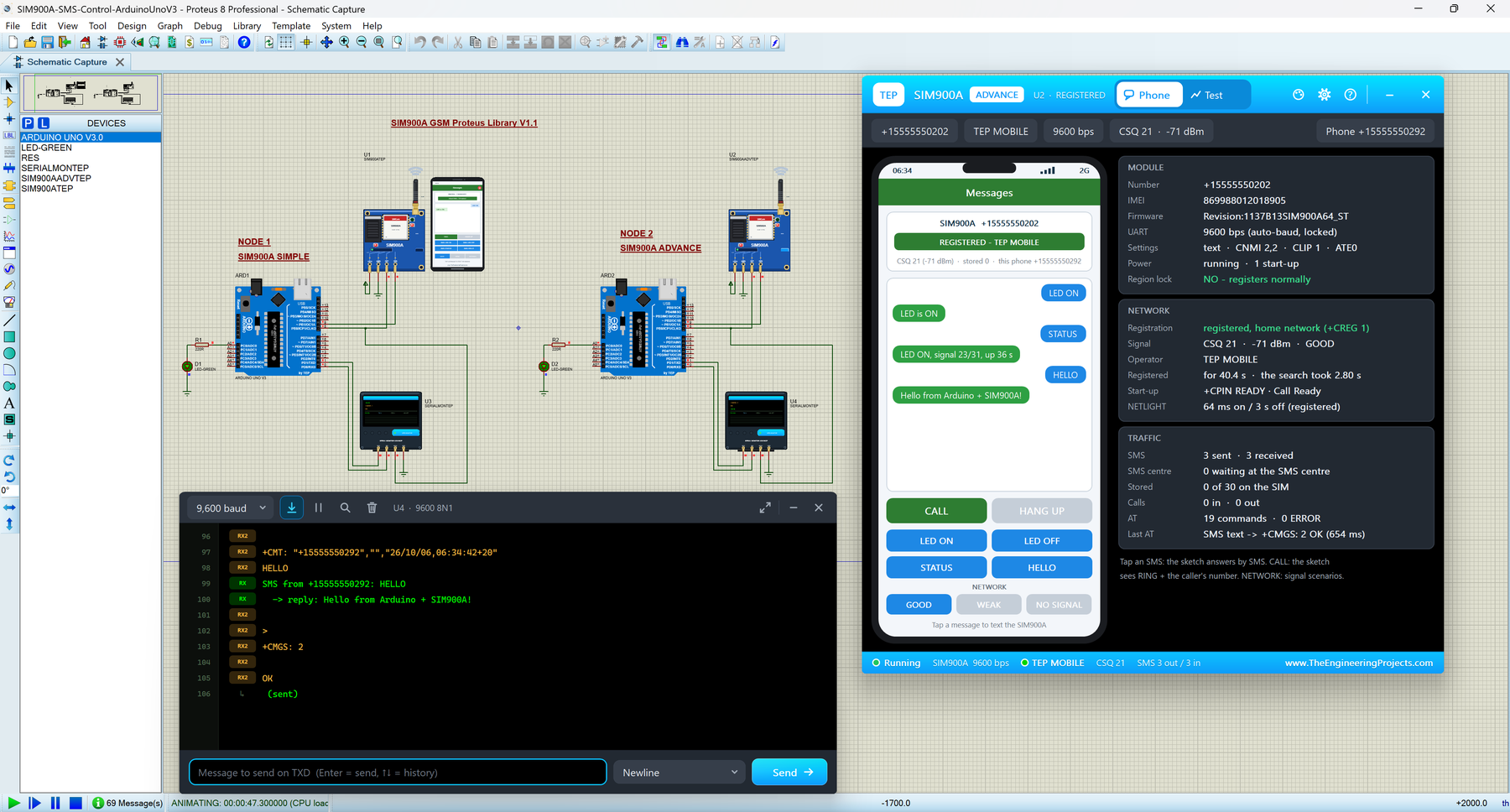
The SIM900A is a dual-band (900 / 1800 MHz) GSM module, and on its blue SIM900A MINI board it is one of the cheapest ways to give an Arduino a phone number. Unlike the SIM800C, this board switches itself on, and it even restarts by itself after AT+CPOWD=1, so your sketch must be ready to set the module up again.
The SIM900A is also famous for a nasty surprise: in many countries, a brand-new SIM900A never connects to the network, because its firmware only works in a list of Asian countries. Our model can simulate this region lock. Switch it on with a component property, and the module answers +CPIN: PH-NET PIN and never registers, exactly what your sketch would see from a locked module. The tutorial also explains how this is fixed on real hardware.
- SIM900A Simple and SIM900A Advance, with a virtual phone and four GSM test tools.
- The same model file as our SIM800C library, so a SIM900A and a SIM800C in one design can text and call each other.
- A demo with two Arduino UNOs that switch LEDs by SMS, reject calls and show the module's raw replies in the TEP Serial Monitor.
Read the complete tutorial: SIM900A Library for Proteus V1.1
3. SIM800L GSM Library for Proteus V1.1
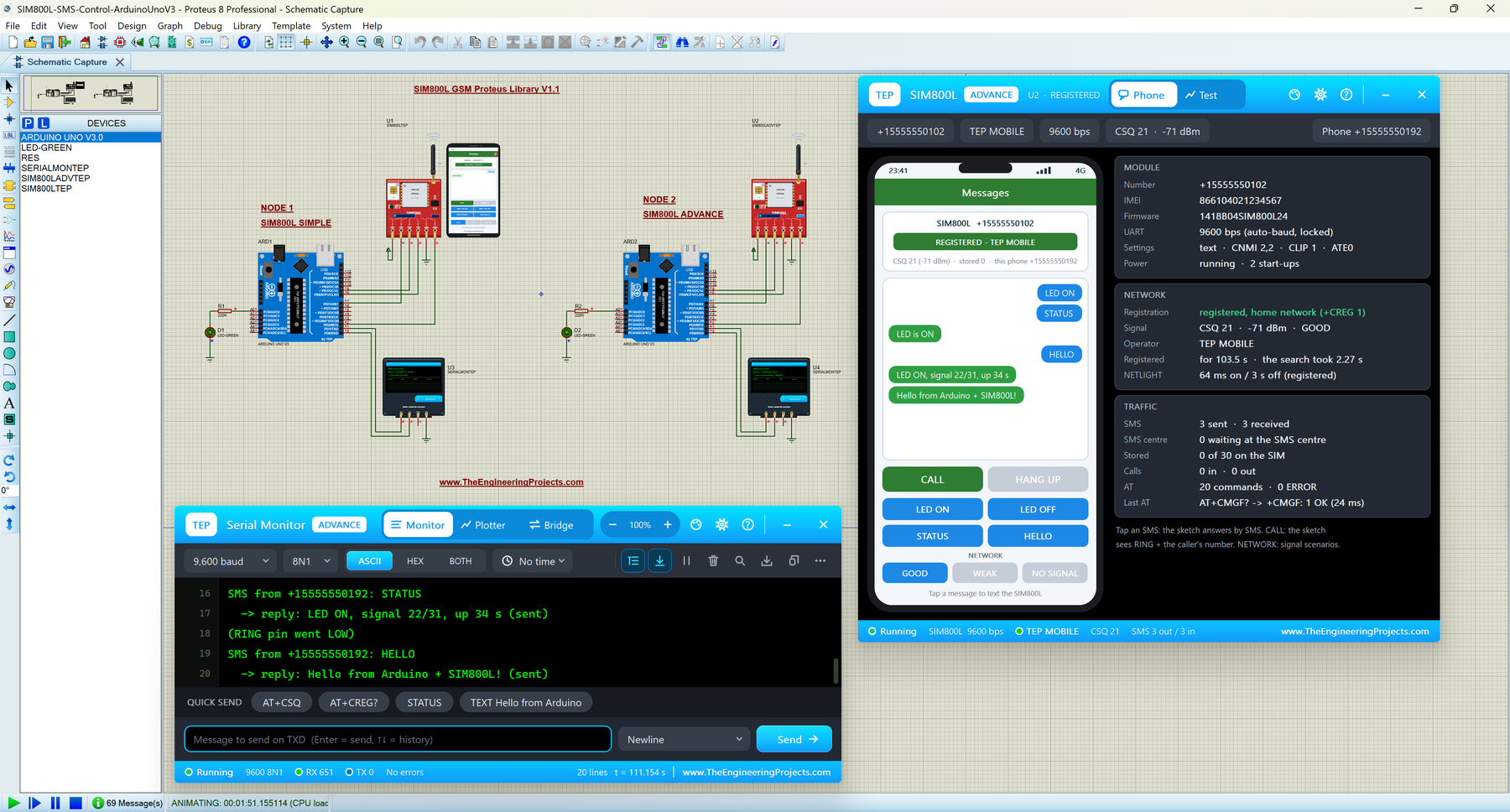
The SIM800L is a quad-band GSM module on a tiny red breakout board with a micro-SIM holder, and it is the GSM module that most students use first. It is behind almost every "control it from my phone" project: home automation, alarms, trackers and remote switches. On real hardware, it needs 3.4 - 4.4 V with 2 A peaks, which is a common source of trouble, but in Proteus you can start without any of that.
Our SIM800L library has two devices. SIM800L Simple draws a virtual smartphone on the schematic, and SIM800L Advance opens a pop-up window with the phone and four GSM test tools: network registration, SMS round trip, call test and AT check. The complete Arduino SIM800L Proteus simulation has two Arduino UNOs that switch an LED by SMS, reject calls and take AT commands from our TEP Serial Monitor.
Read the complete tutorial: SIM800L Library for Proteus V1.1
4. SIM808 GSM + GPS Library for Proteus V1.1
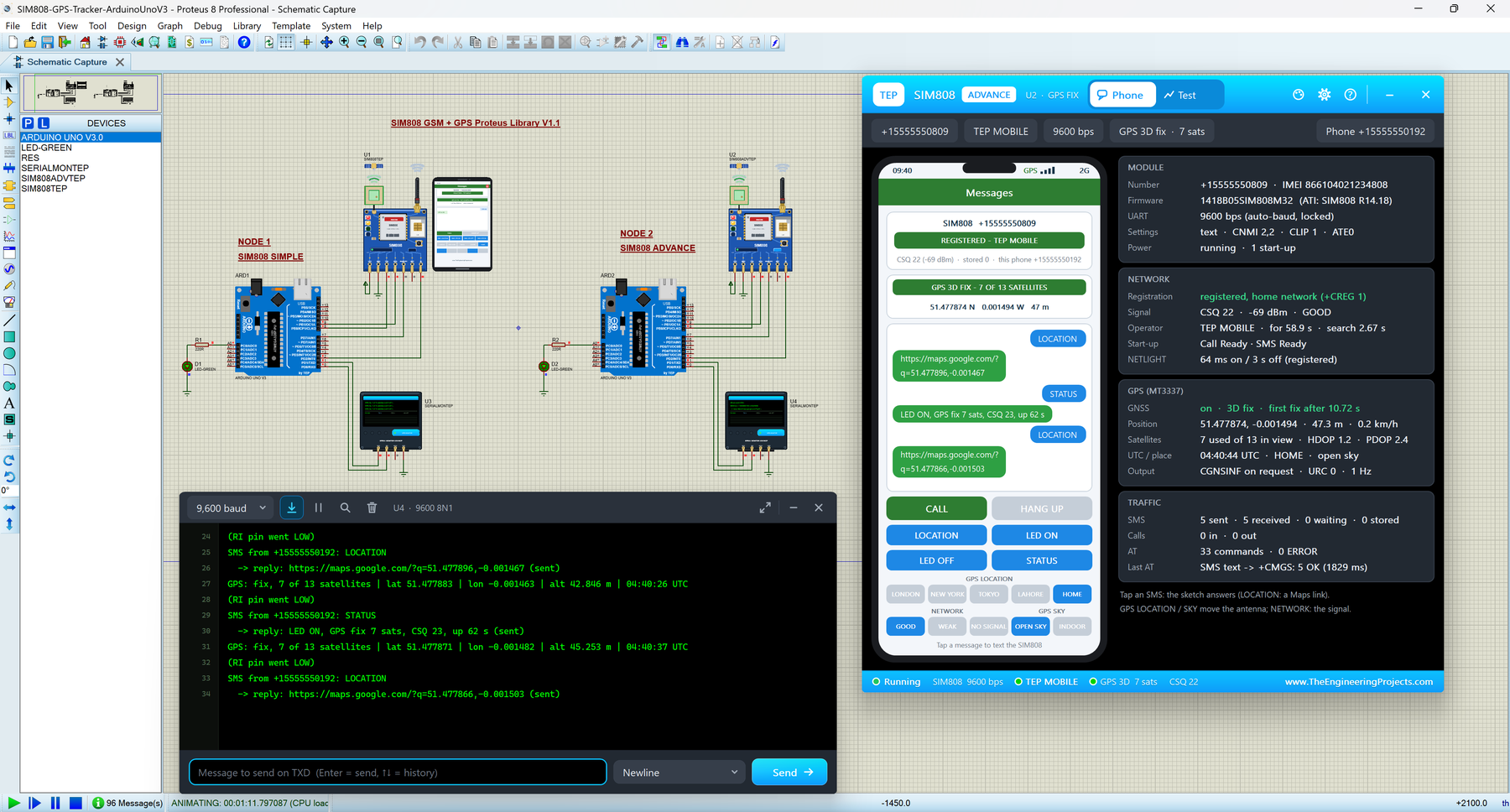
The SIM808 puts a GSM/GPRS modem and a GPS receiver on one board, so a single Arduino serial port gives you SMS, calls and your position. That makes it a common choice for GPS trackers, vehicle trackers and anti-theft projects. Our SIM808 model is not just a symbol: it answers real AT commands, sends and receives SMS, rings on incoming calls, tracks a simulated GPS sky and gets its first fix like a real receiver.
Like the real module, it starts switched OFF, and the Arduino switches it on with a PWRKEY pulse. Version 1.1 gives you two devices:
- SIM808 Simple: a virtual phone with a GPS strip beside the module, with buttons for the GPS location, the GPS sky, the network signal, SMS and calls.
- SIM808 Advance: the phone in a pop-up window, plus five GSM + GPS test tools: network, SMS round trip (with a Google Maps link check), call, GPS fix (cold, warm and hot starts) and AT check.
The Arduino GPS tracker demo is a complete project: two Arduino UNOs switch their SIM808 on with PWRKEY, and when you send "LOCATION" by SMS, the Arduino replies with a Google Maps link to the module's position.
Read the complete tutorial: SIM808 Library for Proteus V1.1
5. GSM Library for Proteus (SIM900D)
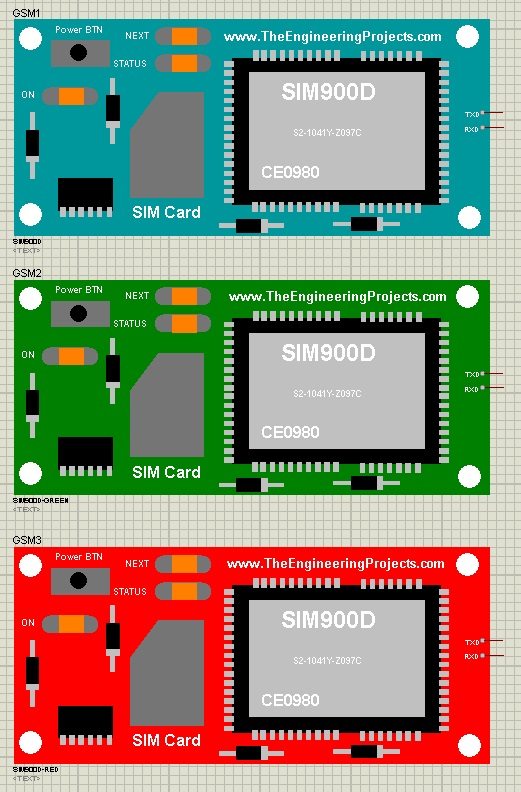
This is where our GSM journey started. In 2016, we shared the first GSM Library for Proteus, with a SIM900D module. It was a basic model that supports a set of AT commands, and you can test it by sending those commands from the Virtual Terminal of Proteus. If you are working on an older project that already uses this module, it still does the job.
For a new project, I recommend one of the four libraries above, because they behave much more like the real modules. You should also read Send SMS with SIM900D in Proteus ISIS, where I sent an SMS with this module using AT commands only.
Read the complete tutorial: GSM Library for Proteus
AT Commands Supported by Our GSM Models
All of our new GSM models are controlled with standard SIMCom AT commands, so the code you test in Proteus is the same code you will run on the real module. The table below shows the main groups. The SIM800C, SIM900A and SIM800L share almost the same command set, and the SIM808 adds its GPS commands. Each tutorial has the complete list for its module.
| Group | Commands | What they do |
|---|---|---|
| General | AT, ATE0, ATI, AT+CPIN?, AT+CFUN | Check the module, switch the echo off, read the version and the SIM state, and restart the module |
| Network | AT+CREG?, AT+CSQ, AT+COPS? | Registration, signal quality (0 - 31, 99 = no signal) and the operator name |
| SMS | AT+CMGF=1, AT+CNMI, AT+CMGS, AT+CMGR, AT+CMGD | Text mode, new-message alerts, sending, reading and deleting SMS |
| Calls | ATD+number;, ATA, ATH, AT+CLIP=1 | Make, answer and end calls, and show the caller's number |
| Balance | AT+CUSD=1,"*123#" | Returns a balance message from the simulated network |
| GPS (SIM808 only) | AT+CGNSPWR=1, AT+CGNSINF, AT+CGNSTST=1 | Switch the GPS on, read the position and stream the NMEA sentences |
One small detail that catches many students: the models are strict, like the real modules. For example, AT+CSQ? with a question mark answers ERROR, as in the SIMCom AT manual, and an SMS sent without network fails after about 2 s. An unknown command answers ERROR and is named in the Simulation Log of Proteus, which makes typing mistakes easy to find.
Which GSM Library Should You Use?
All of these libraries can send SMS and handle calls, so the right choice depends on the board you will use in your real project:
- You have the small red board: use the SIM800L library.
- You have the blue HW-537 board: use the SIM800C library, and learn its PWX power key first.
- You have the SIM900A MINI board: use the SIM900A library, and test the region lock before you buy a SIM card for it.
- You need GPS too: use the SIM808 library and start from its GPS tracker example.
- You want to compare modules: place a SIM800C and a SIM900A in one design and let them text each other.
GSM Projects in Proteus
Once you have a GSM module running, you can combine it with sensors and other modules. Here are a few GSM projects that we have designed in Proteus over the years:
- GSM Based Home Security System, which sends an SMS when a sensor detects an intruder.
- Real Time Security Control System using XBee and GSM, which combines a GSM module with XBee radios.
- Send SMS with SIM900D in Proteus ISIS, which sends an SMS with AT commands only.
You can rebuild these projects with one of the new libraries above, and you will see the difference: you will get a real start-up sequence, a virtual phone to answer your SMS, and the test tools of the Advance devices. We also have GPS libraries that pair well with these modules; you can find all of them in the GSM & GPS section of our Proteus Libraries tutorial series.
More Lists of Proteus Libraries
We have grouped our Proteus libraries into several lists, so you can quickly find the right ones for your project:
- 30 New Proteus Libraries for Engineering Students (2026)
- GPS Libraries for Proteus
- RF Module Libraries for Proteus
- LoRa and RF Libraries for Proteus
- Wi-Fi and Bluetooth Libraries for Proteus
- List of Wireless Modules for Proteus
- Top IoT Libraries for Proteus
- RFID and NFC Libraries for Proteus
- List of Embedded Sensors in Proteus
- I2C Sensor Libraries for Proteus
- Environmental Sensor Libraries for Proteus
- Motion and Distance Sensor Libraries for Proteus
- Smart Agriculture Sensor Libraries for Proteus
- Medical Sensor Libraries for Proteus
- Must-Have Proteus Libraries for Arduino Simulation
- Microcontroller Board Libraries for Proteus
Conclusion
So, that was all about the GSM Libraries for Proteus. I hope this list helps you choose the right GSM module for your project and test your SMS and call code before you touch any hardware. Our team is still improving these models, so if you find a bug or need a new AT command, please tell us in the comments or in the Proteus Libraries category of our forum. Till the next tutorial, take care and have fun!