Hello friends, I hope you all are doing great. Today, I am going to share the USR-TCP232-T2 Library for Proteus. The USR-TCP232-T2 from USR IOT is a tiny serial to Ethernet module: a TTL UART on one side, an RJ45 port on the other, and its own firmware in between. Your microcontroller prints to a serial port, and the bytes come out of a TCP connection on the LAN - no Ethernet library, no SPI, no TCP/IP stack on the microcontroller.
USR-TCP232-T2 Library for Proteus
Latest version: V1.0 (October 2026, this tutorial)
Other Ethernet libraries: Ethernet Shield · Ethernet Shield 2 · W5500 Module · W5100 Module · ENC28J60 Module · ENC28J60 Nano Shield · Ethernet Rev3 · LAN8720 Module · WT32-ETH01
Modules: Micro SD · MAX485 RS485 · MCP2515 CAN · DS3231 RTC · DFPlayer Mini
Arduino boards: UNO · Mega 2560 · Mega 1280 · Nano · Pro Mini · Mini (V4.0)
Helping Tools
- Laptop WiFi Monitor: a laptop on the Wi-Fi of your design: a browser, a TCP / UDP terminal and ping
- Mobile WiFi Monitor: a smartphone that opens the pages of your board and sends it commands
- Serial Monitor Advance: a serial terminal window for the UART of your board
This is the thirty-seventh library of our Wi-Fi / Ethernet series and the tenth of its Ethernet group. In Proteus the module works as the real one does: transparent mode as a TCP server, TCP client, UDP client or UDP server, the +++ sequence and its AT commands, its status page on port 80, and the LINK pin. The demo is an Arduino UNO that sets the module up with AT commands and then talks to our Laptop WiFi Monitor over TCP, while our Mobile WiFi Monitor opens the module's page.
NOTICE: the PANEL pad, the panel and the virtual router are TEP additions. The demo's UNO talks to the module with AltSoftSerial (included), because SoftwareSerial cannot receive in Proteus. Your feedback is the fuel that keeps us going, so please tell us what you think in the comments below or in the USR-TCP232-T2 board of our forum. And if our free libraries help you, you can buy us a coffee. So, let's get started with the USR-TCP232-T2 Library for Proteus:
What is the USR-TCP232-T2?
The USR-TCP232-T2 is a serial to Ethernet converter module made by Jinan USR IOT Technology. It is a small green board of 50.5 x 22.6 mm with its own processor, an Ethernet chip, a 25 MHz crystal, a 3.3 V regulator and a metal RJ45 jack that sticks out 4.5 mm past its end. A 7-pin header carries the power, the UART and two control pins, and three small pads give the LINK, 485_EN and ISP signals.
The idea is simple: everything the microcontroller sends on the UART goes to the network, and everything that arrives from the network comes out on the UART. The module packs the serial bytes into network packets - a short pause ends a packet - and keeps the TCP connections itself. That is why an 8-bit board with 2 KB of RAM, or an old device with only a serial port, can join a LAN with it.
| Real USR-TCP232-T2 | This library in Proteus | |
|---|---|---|
| Interface | TTL UART, 3.3 V, up to 460.8 kbps | the same UART, bit by bit, at the BAUD setting |
| Network | 10/100 Mbit/s RJ45, TCP and UDP | a virtual cable to our router, shared with our Wi-Fi parts |
| Work modes | TCP Server, TCP Client, UDP Client, UDP Server, HTTPD Client | the first four |
| Set-up | AT commands, a web page, USR's setup tool | AT commands and the properties; a status page on port 80 |
| Defaults | 192.168.0.7, 115200 bps, TCP Client to 192.168.0.201:8234 | 192.168.1.7 (our router's network), the rest the same |
| Pins | VDD, VCC, GND, RST, TXD, RXD, CFG; 485_EN, LINK, ISP | all of them, LINK and 485_EN driven |
Transparent Mode and the Work Modes
After power-up the module is in transparent mode. Its work mode decides where the serial data goes:
- TCP Server: it listens on its local port and accepts up to 4 clients; serial data goes to all of them.
- TCP Client: it connects to the remote IP and port, and tries again every 3 s when nobody answers - the default of a new module.
- UDP Client: it sends to the remote IP and port, and only that address may send back.
- UDP Server: it answers whoever sent the last packet.
Which mode to choose? A TCP server suits a device that waits for a PC or a phone to connect to it, like the UNO in our demo. A TCP client suits a device that reports on its own, for example a data logger that sends its readings to a program on a PC. UDP is for short messages where a lost packet does not matter much, and for one device that talks to several others.
AT Commands: +++ and a
To change the settings from the microcontroller, the module has an AT command mode. The way in is a little handshake: send +++ alone, with a pause before and after it; the module answers a. Send an a back within 3 seconds and it answers +ok. Now every line is a command - AT+SOCK for the work mode and the ports, AT+WANN for the address, AT+UART for the serial settings and so on - and AT+ENTM goes back to transparent mode. The new settings are stored and work after AT+Z, the restart.
Features of the USR-TCP232-T2 Library for Proteus
- The module as it looks: the green board, the metal RJ45 jack with "USR TCP232" stamped on it and its two LEDs, the two chips, the crystal, the regulator, the programming pads, the 7-pin header in the maker's yellow name boxes and the three reserved pads.
- A real UART: the bytes are read and sent bit by bit at the BAUD setting, so a wrong speed gives framing errors, as on the bench.
- Four work modes: TCP Server, TCP Client, UDP Client and UDP Server, with the packing of the serial data.
- AT commands: +++ / a, AT, AT+E, AT+ENTM, AT+Z, AT+VER, AT+MAC, AT+CLEAR, AT+UART, AT+SOCK, AT+WANN and AT+DHCPEN, with the real +OK / +ERR answers.
- Its status page: any browser on the LAN opens the module's address and sees its settings and connections.
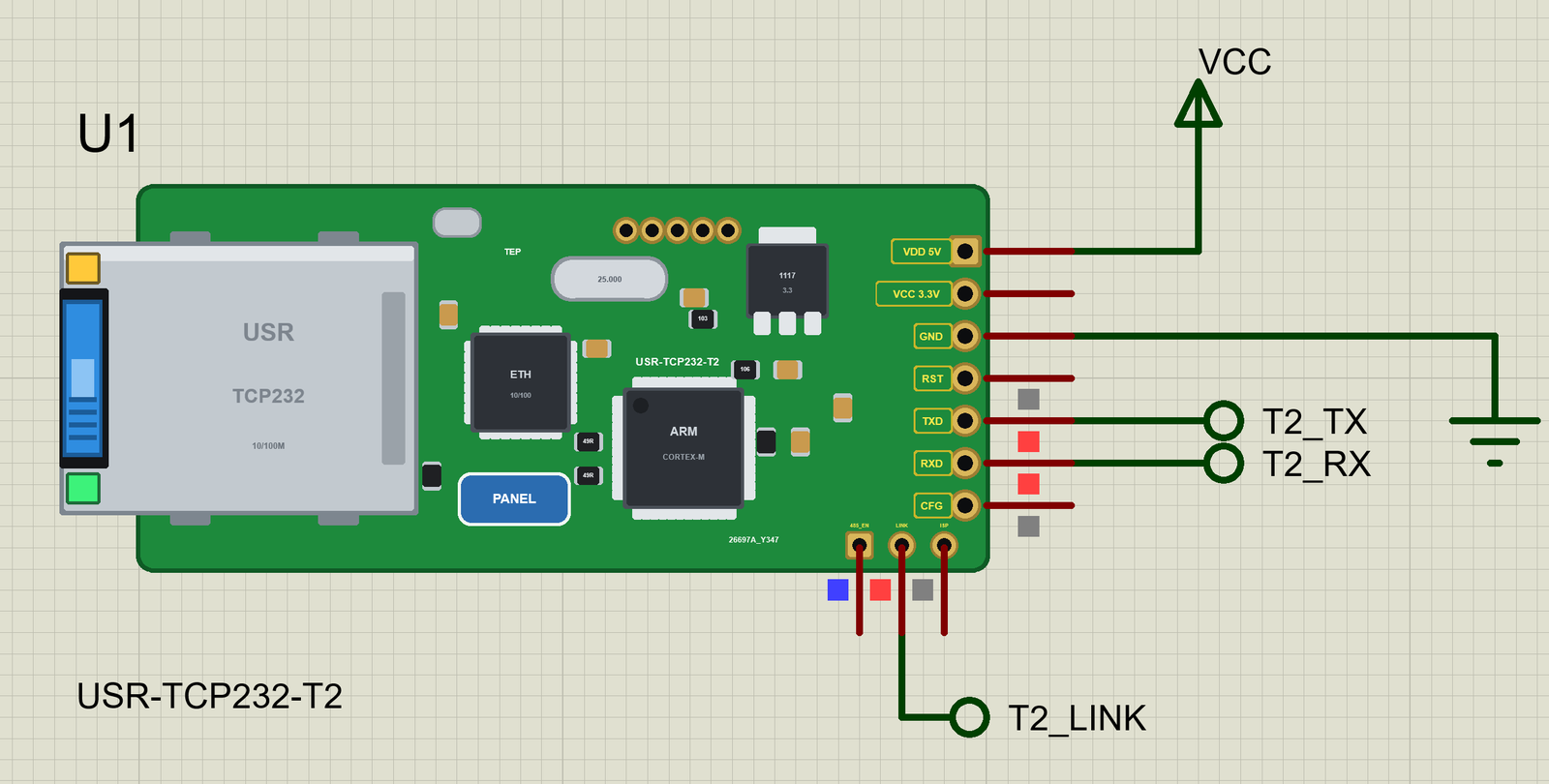
- Working pins and LEDs: LINK (LOW while a TCP connection is up), 485_EN, RST, CFG (the factory settings); the jack's green LINK and yellow DATA LEDs.
- The cable: pull it with a click on the jack, the CABLE property or the panel; the connections wait 20 s for it.
- Our Laptop and Mobile WiFi Monitors: a laptop with a browser and a TCP terminal and a phone with a browser - included in the package.
- Our pop-up panel: a phone, the MODULE / ETHERNET / TRAFFIC cards, a SERIAL page with every AT command and packet, a Test page, Settings and Help - with our TEP header, not a Windows title bar.
- A complete package: about 3.19 MB with our UNO V4.0, the demo and AltSoftSerial, without the C++ source code of the models.
The USR-TCP232-T2 in Proteus
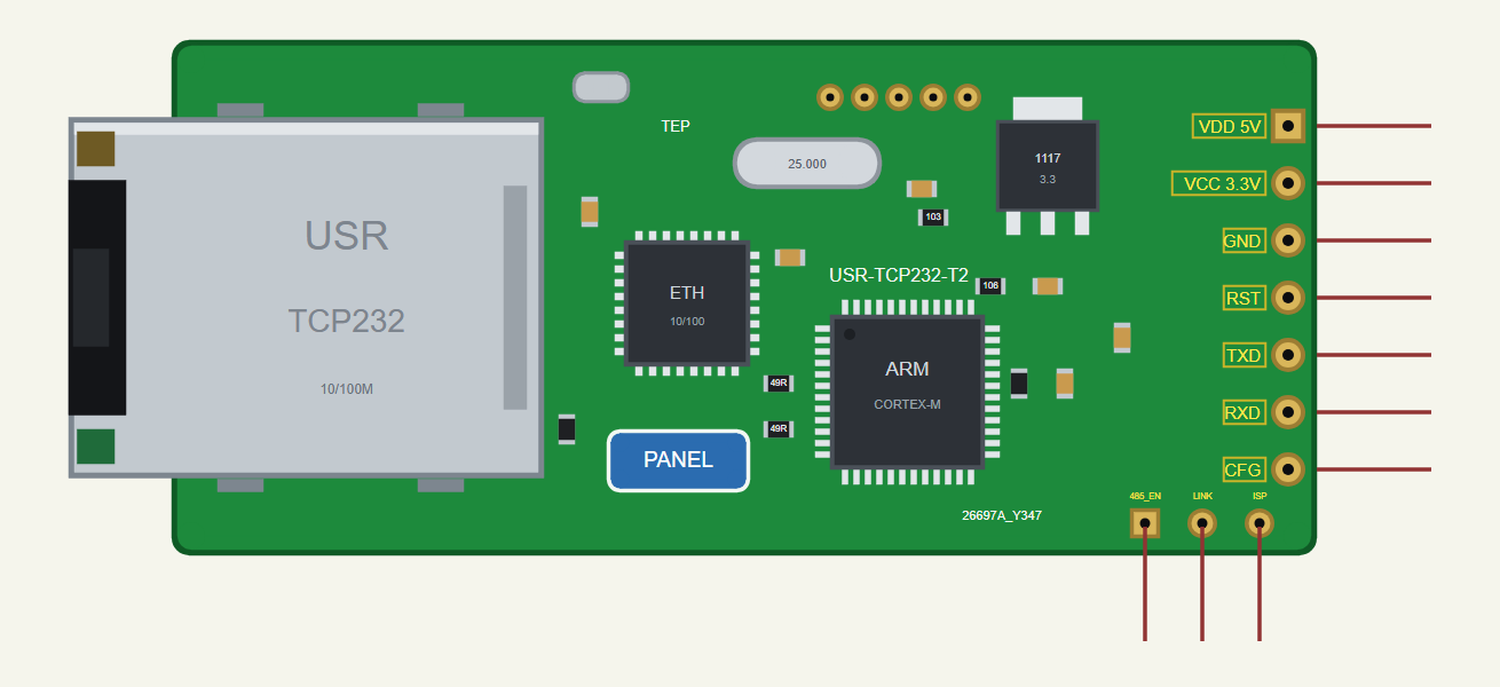
Search TCP232 in Pick Devices; the device USR-TCP232-T2 is in TEPUSRT2.LIB (Peripherals, Ethernet). USR's drawing has the header on the left; ours is turned so that the header is on the right, like our other Ethernet modules. Click the PANEL pad to open the panel and the RJ45 jack to pull or plug the cable.
Every State of the Module
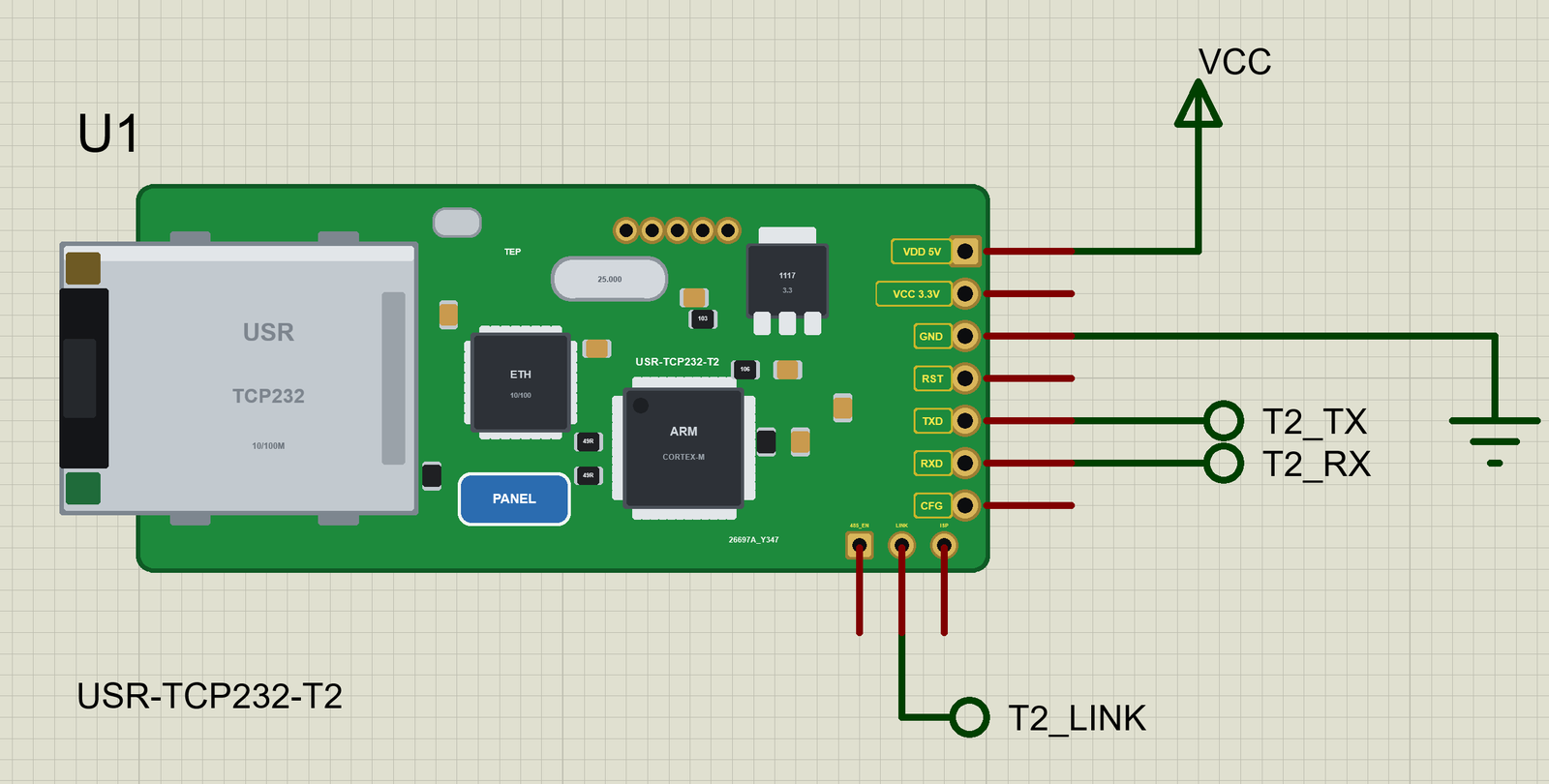
We ran the demo and paused the simulation for each picture. Half a second after power-up the module answers on its UART; with the cable in, the link comes 1.2 s later:
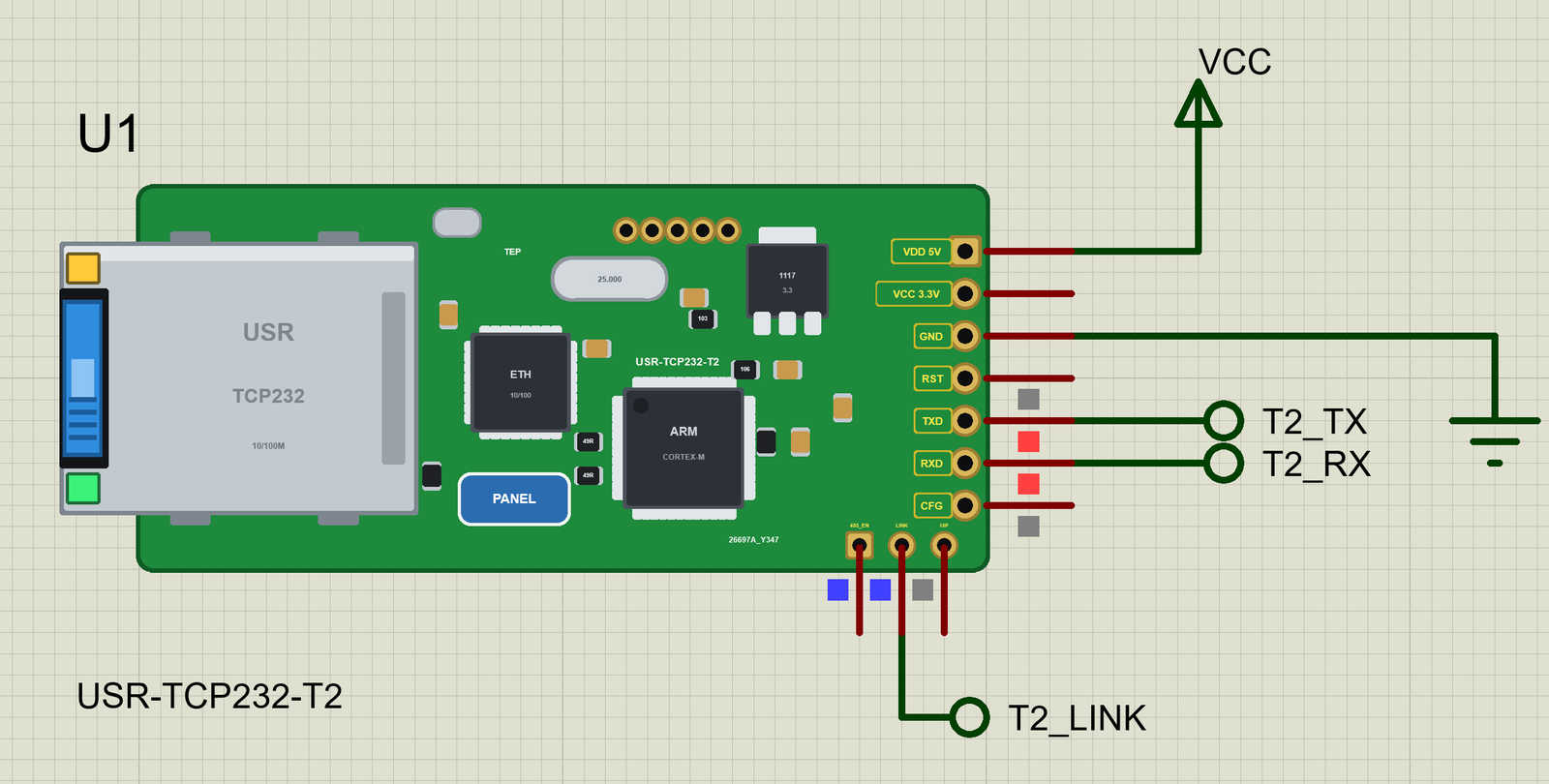
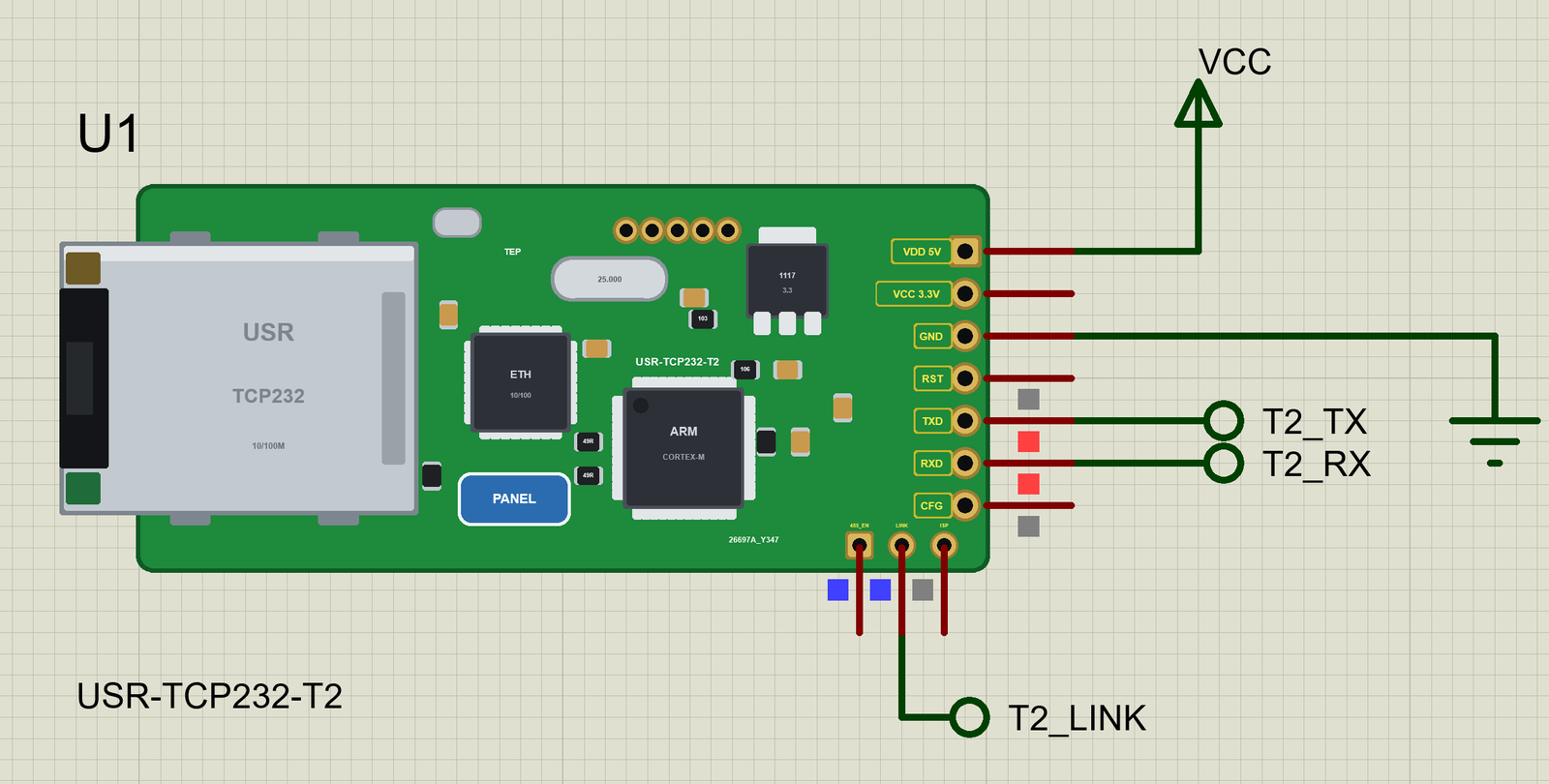
Download USR-TCP232-T2 Library for Proteus
Click the button below to download USR-TCP232-T2-Library-for-Proteus-v1.0.zip (about 3.19 MB, without the C++ source code of the models):
USR-TCP232-T2 Library for Proteus V1.0- README.txt: the device, installation, the demo, the pins, the properties, troubleshooting and the limits.
- Proteus Library Files:
TEPUSRT2.LIB(the module),ArduinoV4TEP.LIB(our Arduino UNO V4.0),TEPLAPTOP.LIBandTEPMOBILE.LIB(our Laptop and Mobile WiFi Monitors). - Proteus Model Files:
TEPNET.DLL(the module, the two monitors and the network) andTEPARDUINO.DLL(the UNO). - Proteus Simulation: the demo project, its HEX file and copies of the DLLs.
- Arduino Code: the demo sketch and the AltSoftSerial library.
No Proteus yet? Read How to Download and Install Proteus 7 and 8. New to libraries? Follow How to Install a New Library in Proteus.
How to Install USR-TCP232-T2 Library for Proteus
- Close Proteus and extract the whole zip file, for example to your Desktop.
- Copy the four files from Proteus Library Files into the LIBRARY folder of Proteus (usually
C:\Program Files (x86)\Labcenter Electronics\Proteus 8 Professional\LIBRARY). - Copy
TEPNET.DLLandTEPARDUINO.DLLfrom Proteus Model Files into the MODELS folder - replace older copies (this TEPNET.DLL is the first one with the USR-TCP232-T2, and it still runs every part of the series). - Delete
TEPUSRT2.IDX,ArduinoV4TEP.IDX,TEPLAPTOP.IDXandTEPMOBILE.IDXfrom the LIBRARY folder if they are there. - Start Proteus, press P and search for TCP232.
For your own sketches, copy Arduino Code\libraries\AltSoftSerial into Documents\Arduino\libraries (or install AltSoftSerial with the Library Manager), choose Tools > Board > Arduino Uno and use Sketch > Export Compiled Binary. Double-click the UNO in Proteus and set its Program File to the HEX (see How to get the HEX file from Arduino).
Demo: an Arduino UNO on the LAN through Its Serial Port
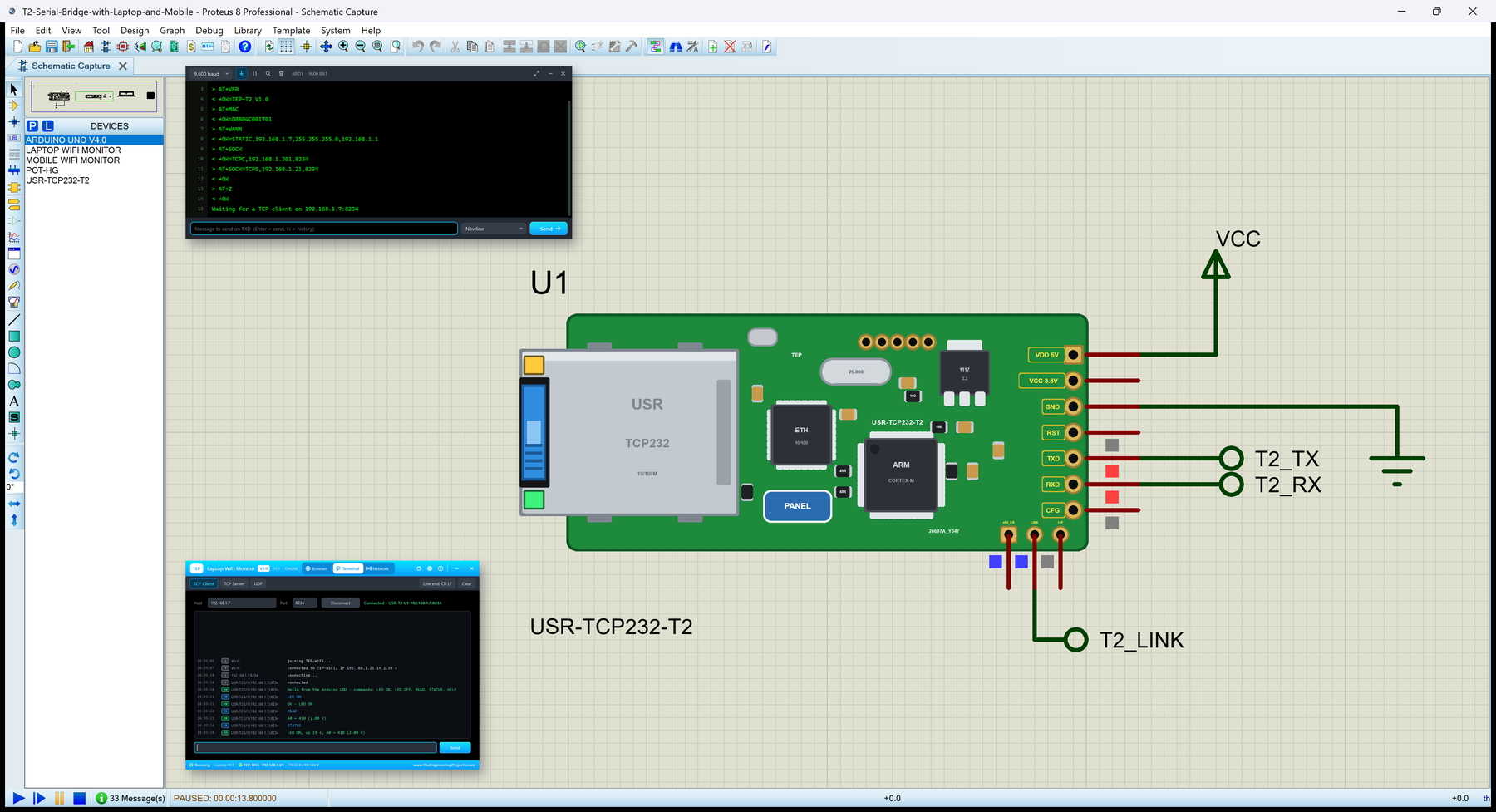
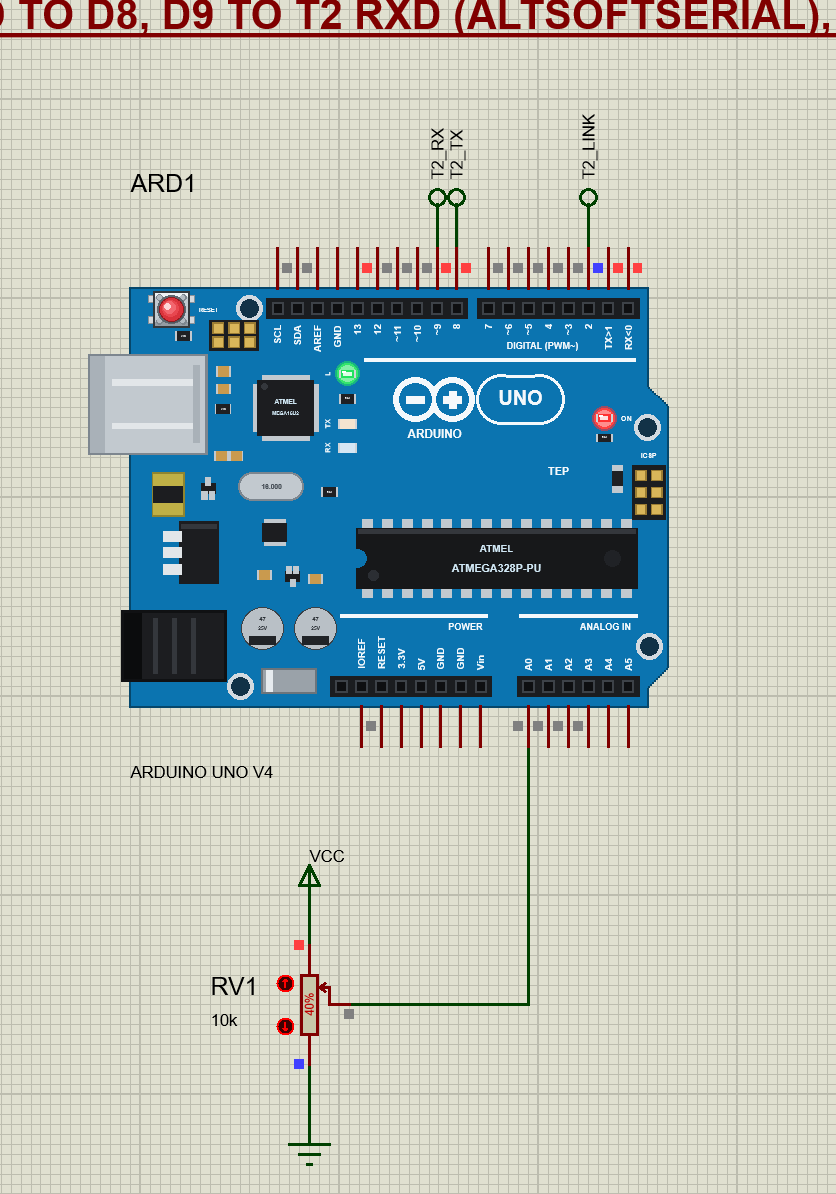
Open T2-Serial-Bridge-with-Laptop-and-Mobile.pdsprj. Our Arduino UNO Library for Proteus V4.0 (ARD1) is on the left with RV1 on A0, the module (U1) in the middle, the laptop (PC1) and the phone (MOB1) on the right. The laptop and the phone are on the router's network, like the real ones, so they have no wires; the module reaches the router through its own RJ45 jack.
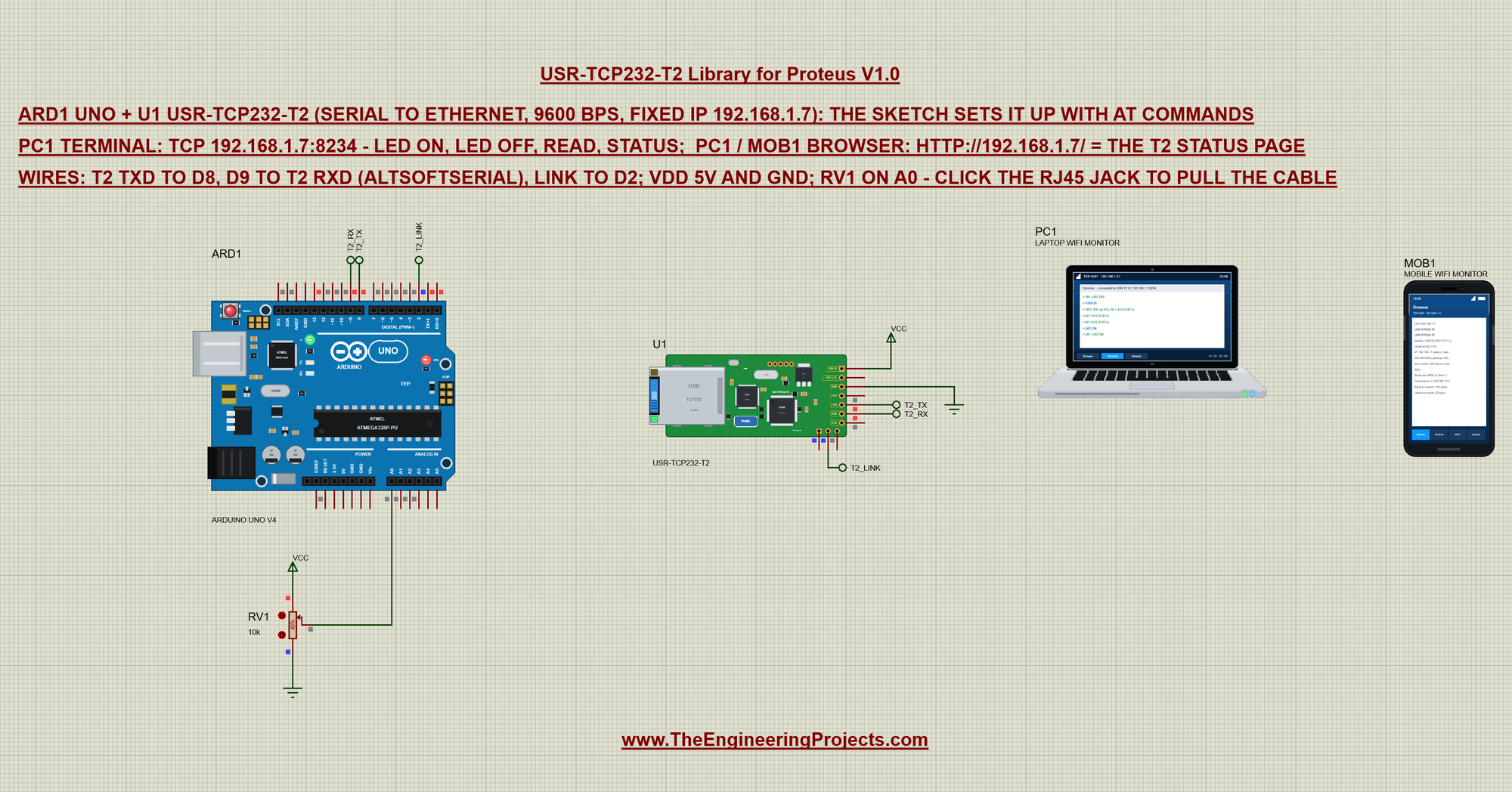
Three net labels connect the UNO and the module: the module's TXD goes to D8, D9 goes to the module's RXD, and LINK goes to D2. VDD takes 5 V and GND goes to ground:
| UNO | USR-TCP232-T2 | Net label | What it does |
|---|---|---|---|
| D8 (AltSoftSerial RX) | TXD | T2_TX | the module sends to the UNO |
| D9 (AltSoftSerial TX) | RXD | T2_RX | the UNO sends to the module |
| D2 | LINK | T2_LINK | LOW while a TCP client is connected |
| 5V, GND | VDD 5V, GND | VCC, ground | power |
The module's serial port is set to 9600 bps in this project (its BAUD property). A real module ships at 115200 bps; you would set it once with USR's setup tool, its web page or AT+UART=9600,8,1,NONE,NFC. 9600 suits AltSoftSerial on a 16 MHz UNO.
The laptop and the phone come from our Laptop WiFi Monitor Library for Proteus and Mobile WiFi Monitor Library for Proteus. The laptop's TCP terminal is set to 192.168.1.7, port 8234, and both home pages are http://192.168.1.7/. The laptop is 192.168.1.21 and the phone 192.168.1.41.
The Sketch: AltSoftSerial for the Module
The UNO keeps its hardware Serial for the monitor and talks to the module with AltSoftSerial on D8 / D9. In Proteus this matters: SoftwareSerial cannot receive there, because Proteus 8.5 does not simulate its pin-change interrupts, while AltSoftSerial uses Timer1:
#include <AltSoftSerial.h>AltSoftSerial t2; // RX D8, TX D9 (Timer1 - works in Proteus, where SoftwareSerial cannot receive)
const int LINK_PIN = 2, LED_PIN = 13, POT_PIN = A0;A small helper reads one answer line from the module, with a time-out:
bool readLine(char *buf, byte size, unsigned long ms) {
  byte n = 0;
  unsigned long t0 = millis();
  while (millis() - t0 < ms) {
    if (!t2.available()) continue;
    char c = t2.read();
    if (c == '\r' || c == '\n') {
      if (n) { buf[n] = 0; return true; }
    } else if (n < size - 1) {
      buf[n++] = c;
    }
  }
  buf[n] = 0;
  return n > 0;
}
The AT Set-up
enterAt() does the handshake: a pause, +++, wait for the a, send an a, wait for +ok:
bool enterAt() {
  while (t2.available()) t2.read();
  delay(50);
  t2.print("+++");
  unsigned long t0 = millis();
  while (millis() - t0 < 1000 && !t2.available()) {}
  if (!t2.available() || t2.read() != 'a') return false;
  t2.print("a");
  char ok[8];
  return readLine(ok, sizeof ok, 1000) && strcmp(ok, "+ok") == 0;
}
Each AT command is sent with CR LF. The module echoes the command and then answers with a line that starts with "+", so at() skips the echo and prints the answer:
void at(const char *cmd) {
  char line[56];
  Serial.print("> ");
  Serial.println(cmd);
  t2.print(cmd);
  t2.print("\r\n");
  while (readLine(line, sizeof line, 1000)) {
    if (line[0] != '+') continue;              // (the echo of the command)
    Serial.print("< ");
    Serial.println(line);
    return;
  }
  Serial.println("< (no answer)");
}
setup() asks for the version, the MAC, the address and the work mode, then makes the module a TCP server on port 8234 and restarts it. A new module is a TCP client, so this is the step that turns it into a server the laptop can reach:
  if (enterAt()) {
    Serial.println("AT command mode (+++ / a)");
    at("AT+VER");
    at("AT+MAC");
    at("AT+WANN");
    at("AT+SOCK");
    at("AT+SOCK=TCPS,192.168.1.21,8234");
    at("AT+Z");                                // restart: the T2 is a TCP server on port 8234 now
  } else {
    Serial.println("No answer to +++ - is the T2 at 9600 bps?");
  }
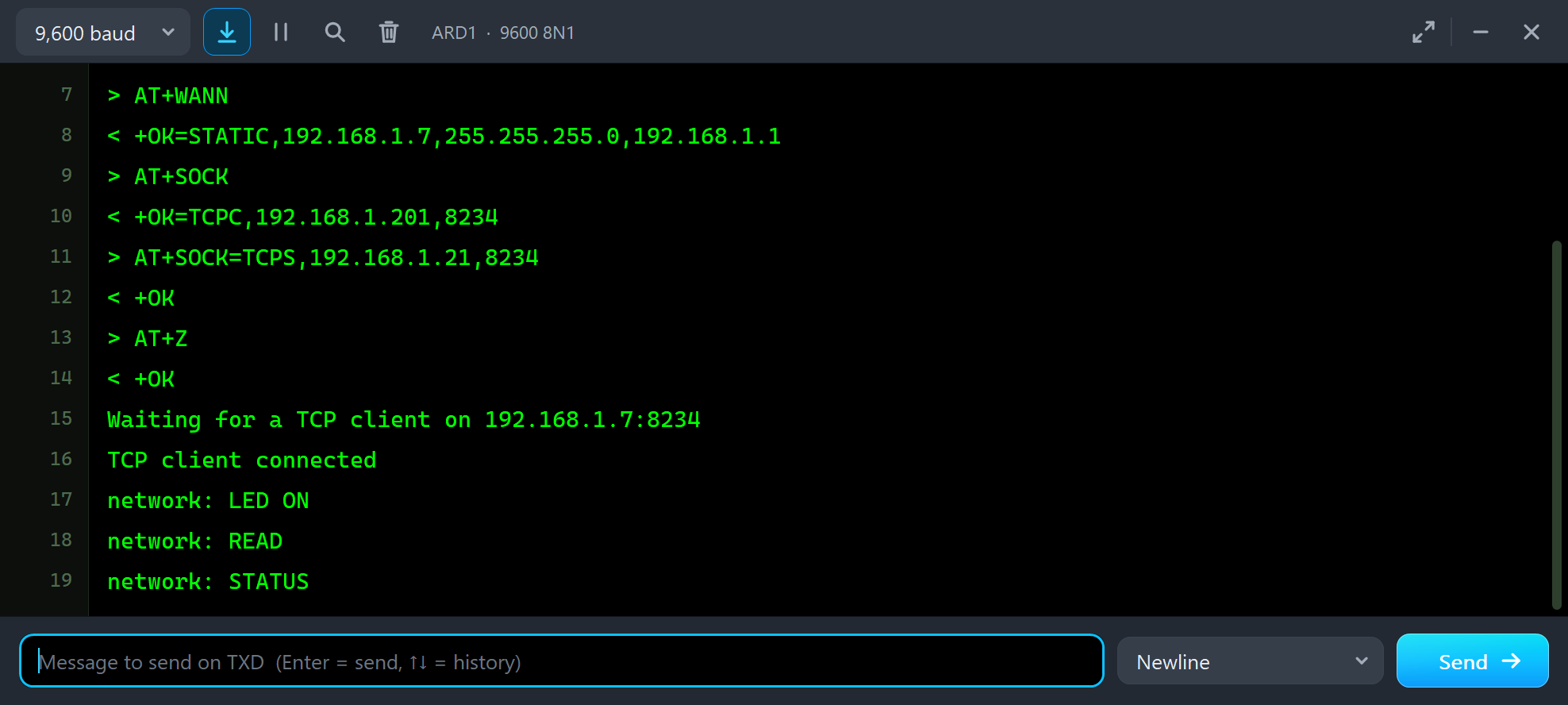
Press Run. The UNO's monitor shows the whole conversation - each command and the module's answer:
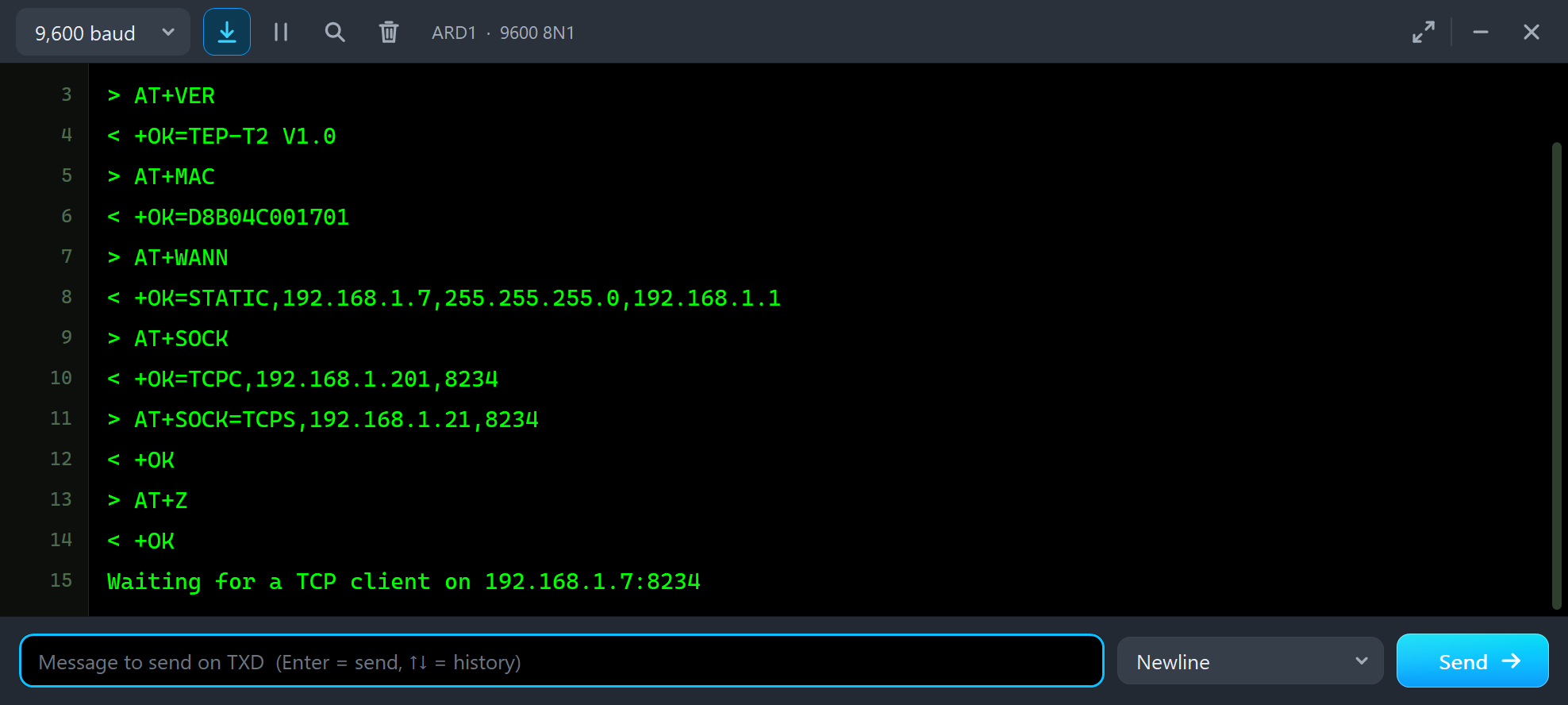
> AT+VER
< +OK=TEP-T2 V1.0
> AT+MAC
< +OK=D8B04C001701
> AT+WANN
< +OK=STATIC,192.168.1.7,255.255.255.0,192.168.1.1
> AT+SOCK
< +OK=TCPC,192.168.1.201,8234
> AT+SOCK=TCPS,192.168.1.21,8234
< +OK
> AT+Z
< +OK
Waiting for a TCP client on 192.168.1.7:8234
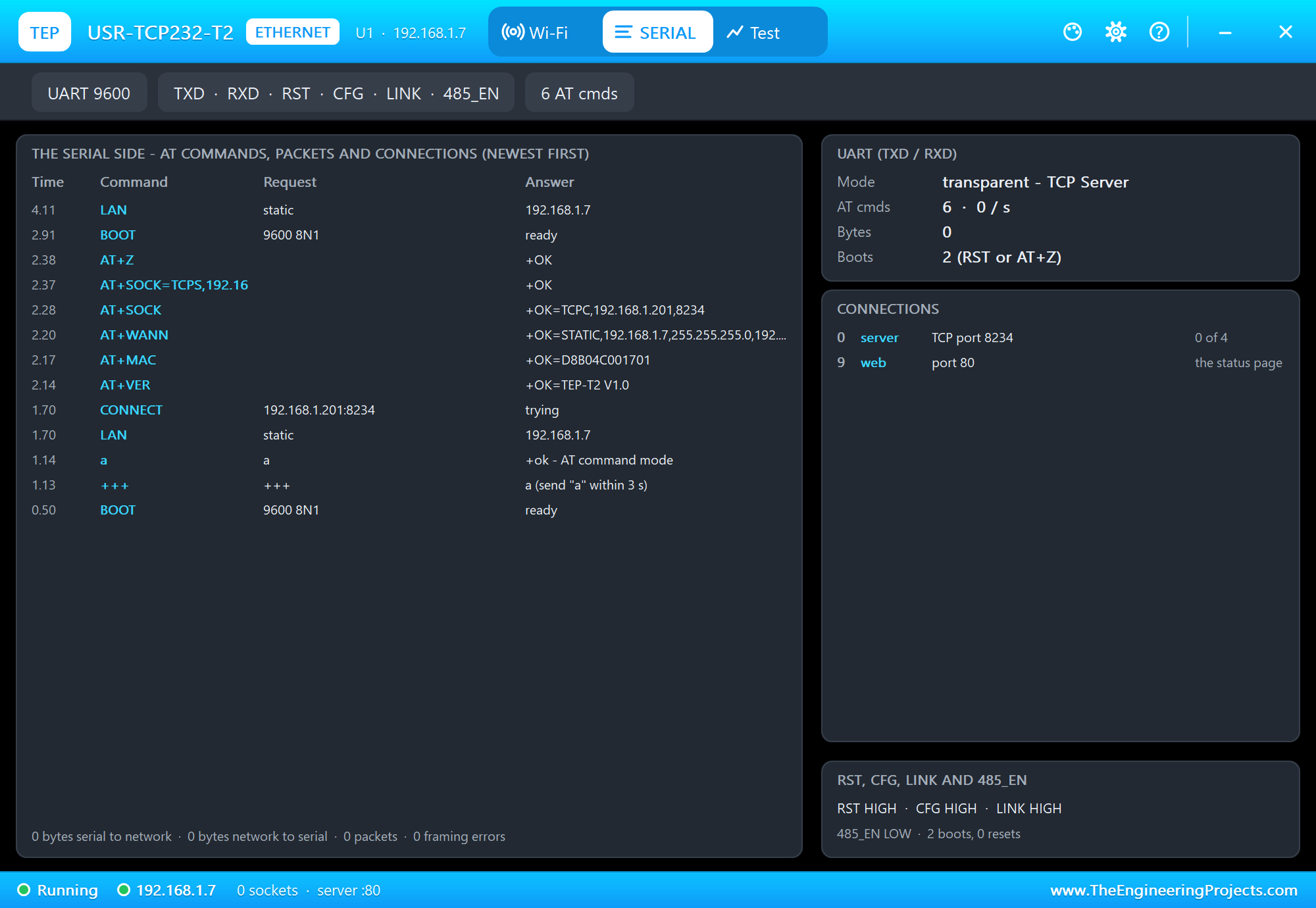
The panel's SERIAL page shows the same from the module's side, newest first: the first boot as a TCP client trying 192.168.1.201, +++ and a, every AT command, the restart and the static address:
Talking to the UNO over TCP
In transparent mode the sketch just reads and writes AltSoftSerial. The LINK pin tells it when a client connects - the UNO greets it, and while one is connected it sends A0 every 10 s:
  bool on = digitalRead(LINK_PIN) == LOW;      // LINK: LOW while a client is connected
  if (on != clientOn) {
    clientOn = on;
    Serial.println(on ? "TCP client connected" : "TCP client left");
    if (on) t2.println("Hello from the Arduino UNO - commands: LED ON, LED OFF, READ, STATUS, HELP");
    lastReport = millis();
  }
Each line from the network is a command:
  while (t2.available()) {                     // from the network: one command per line
    char c = t2.read();
    if (c == '\n' || c == '\r') {
      if (netLen) { netLine[netLen] = 0; command(netLine); netLen = 0; }
    } else if (netLen < sizeof netLine - 1) {
      netLine[netLen++] = c;
    }
  }
void command(char *c) {
Serial.print("network: ");
Serial.println(c);
if (!strcmp(c, "LED ON")) { digitalWrite(LED_PIN, HIGH); t2.println("OK - LED ON"); }
else if (!strcmp(c, "LED OFF")) { digitalWrite(LED_PIN, LOW); t2.println("OK - LED OFF"); }
else if (!strcmp(c, "READ")) sendReading(t2);
else if (!strcmp(c, "STATUS")) {
t2.print("LED ");
t2.print(digitalRead(LED_PIN) ? "ON" : "OFF");
t2.print(", up ");
t2.print(millis() / 1000);
t2.print(" s, ");
sendReading(t2);
} else t2.println("Commands: LED ON, LED OFF, READ, STATUS, HELP");
}void sendReading(Print &out) {
int v = potVolts100();
out.print("A0 = ");
out.print(analogRead(POT_PIN));
out.print(" (");
out.print(v / 100);
out.print('.');
if (v % 100 < 10) out.print('0');
out.print(v % 100);
out.println(" V)");
}While a client is connected, the reading also goes out by itself every 10 seconds:
  if (clientOn && millis() - lastReport >= 10000) {
    lastReport = millis();
    sendReading(t2);
  }
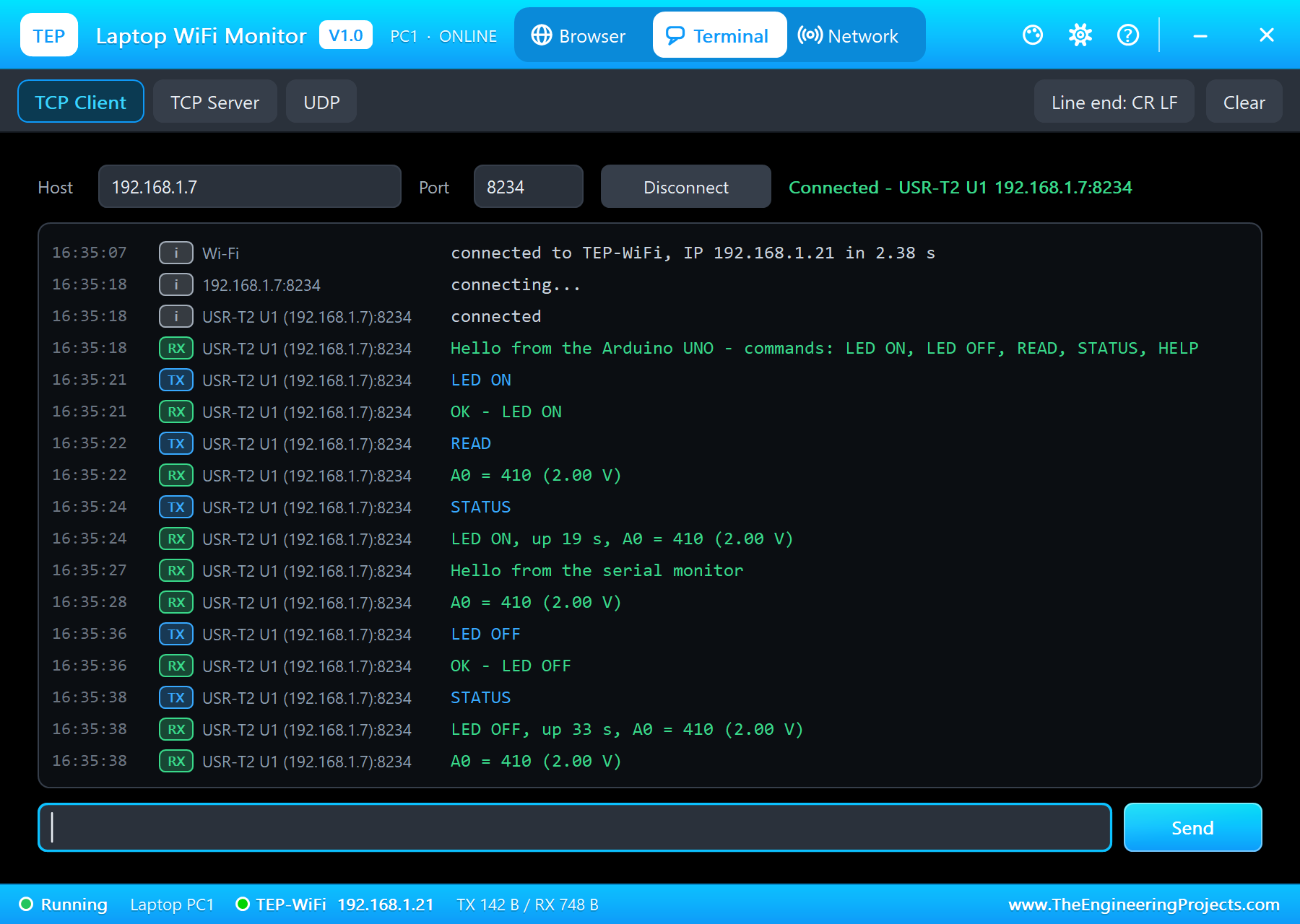
Open the laptop's Terminal tab and press Connect. The greeting arrives at once; type LED ON, READ and STATUS. The UNO's L LED lights up:
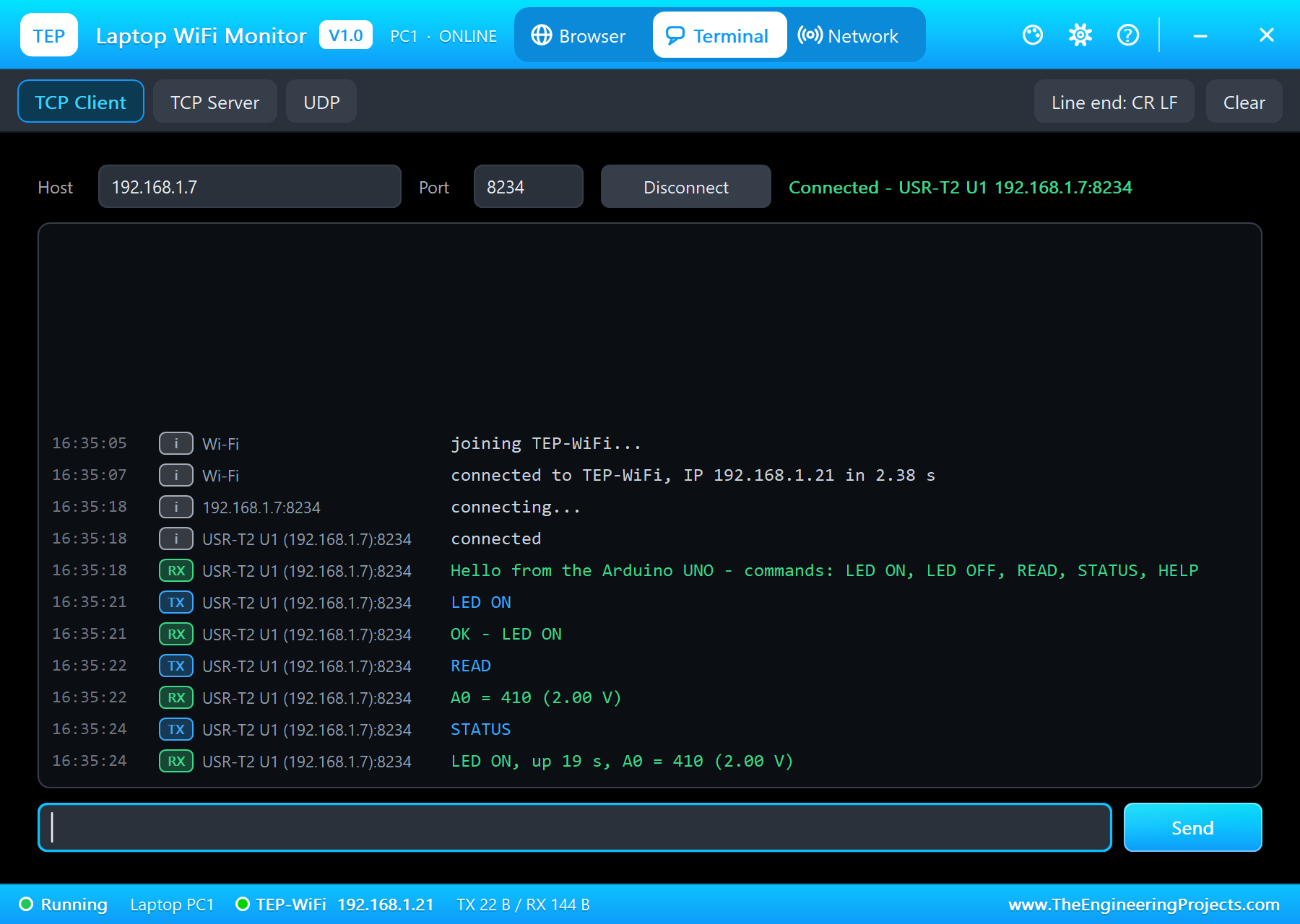
Hello from the Arduino UNO - commands: LED ON, LED OFF, READ, STATUS, HELP
LED ON
OK - LED ON
READ
A0 = 410 (2.00 V)
STATUS
LED ON, up 19 s, A0 = 410 (2.00 V)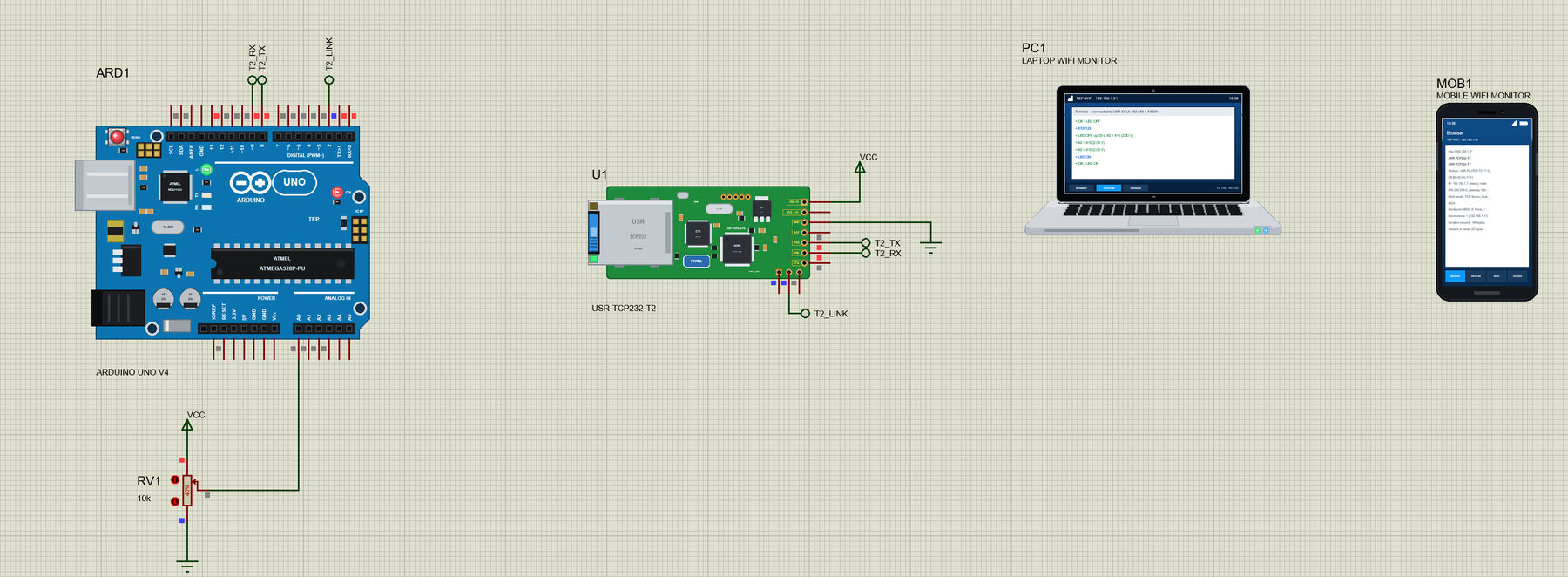
From the Monitor to the Laptop
Text typed in the UNO's monitor goes to the module as it is - the other direction of the bridge:
  while (Serial.available()) {                 // from the serial monitor: straight to the client
    char c = Serial.read();
    if (c == '\n' || c == '\r') {
      if (monLen) {
        monLine[monLen] = 0;
        t2.println(monLine);
        Serial.print("to the network: ");
        Serial.println(monLine);
        monLen = 0;
      }
    } else if (monLen < sizeof monLine - 1) {
      monLine[monLen++] = c;
    }
  }
TCP client connected
network: LED ON
network: READ
network: STATUS
Hello from the serial monitor
to the network: Hello from the serial monitor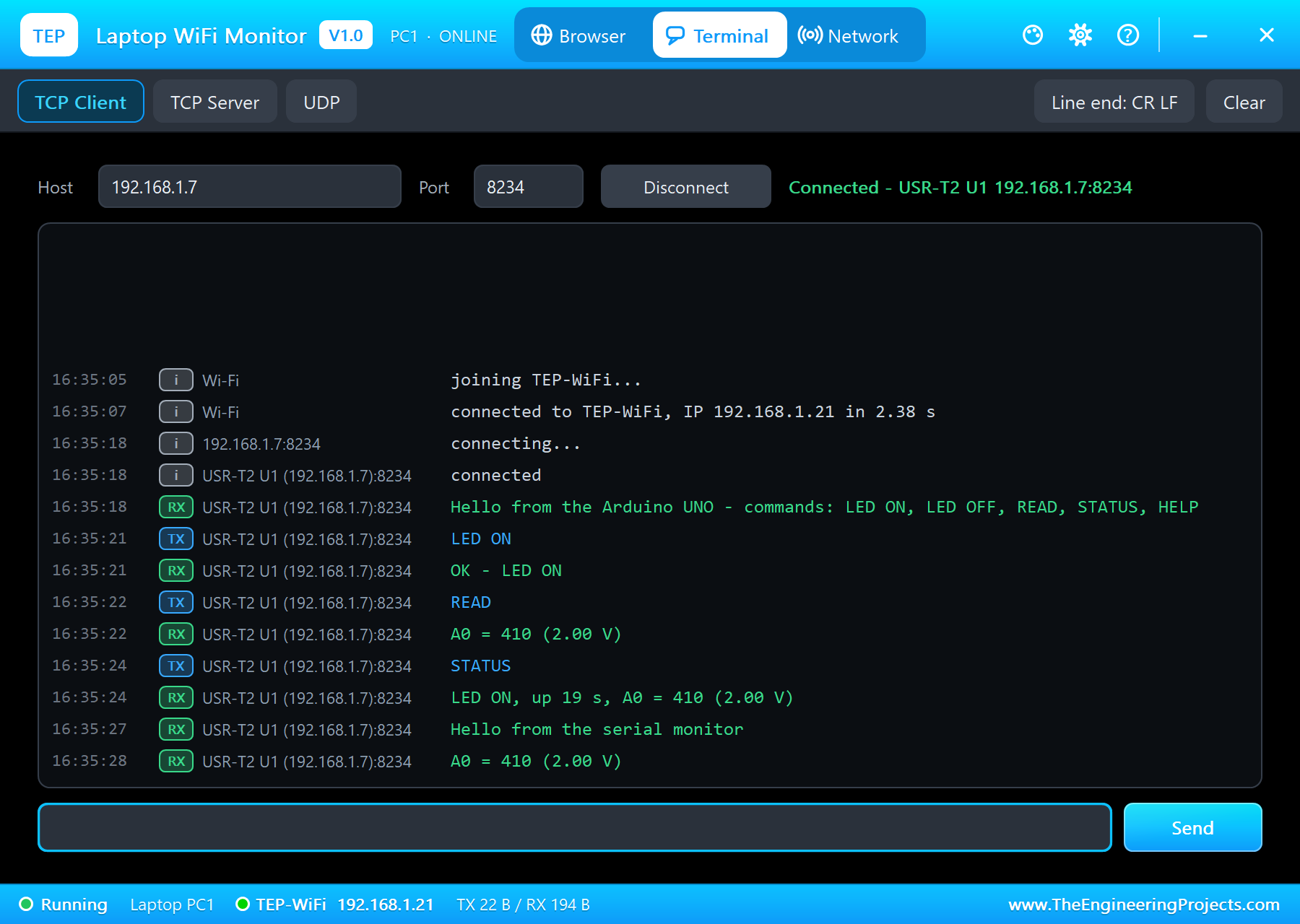
The Module's Status Page
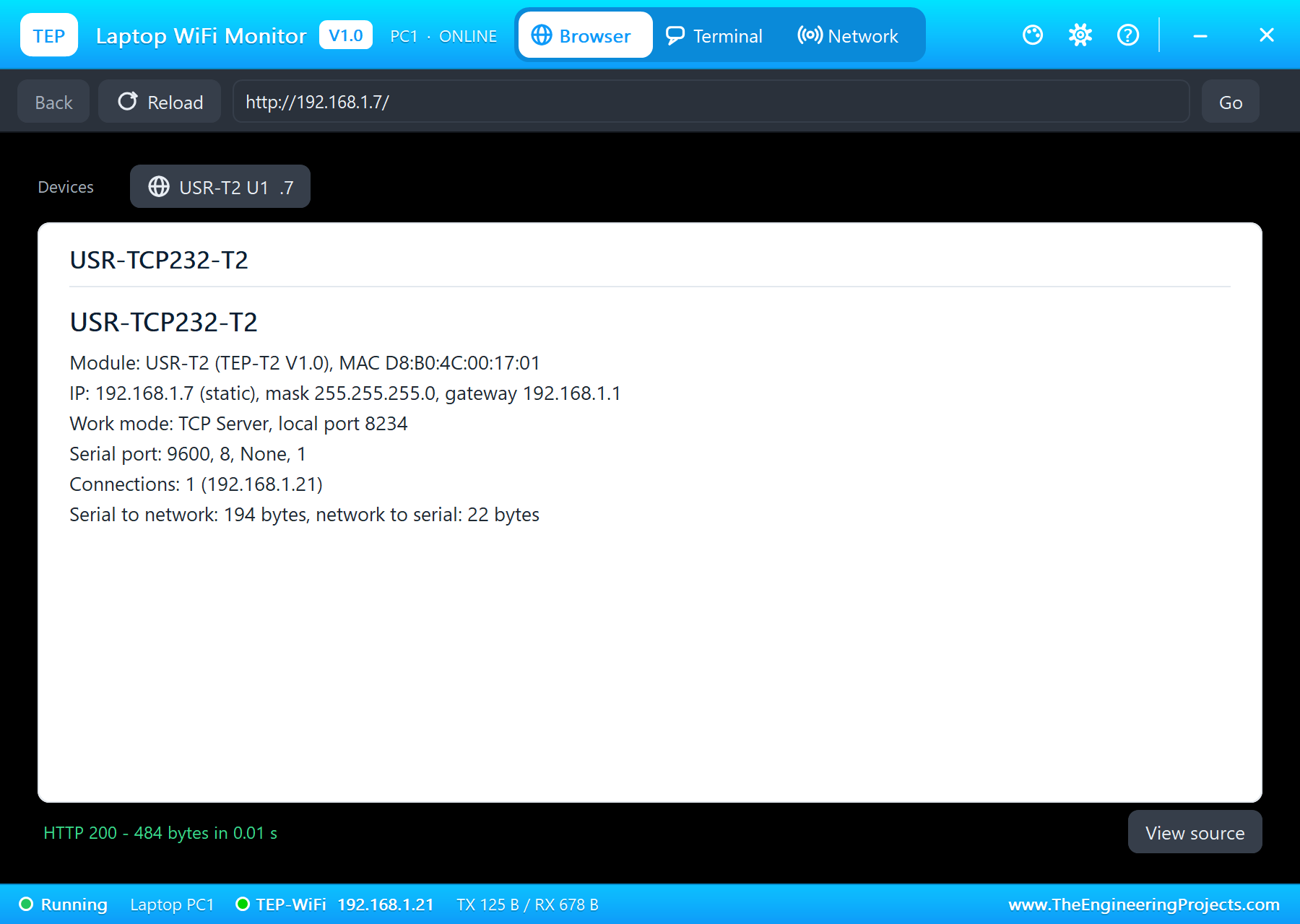
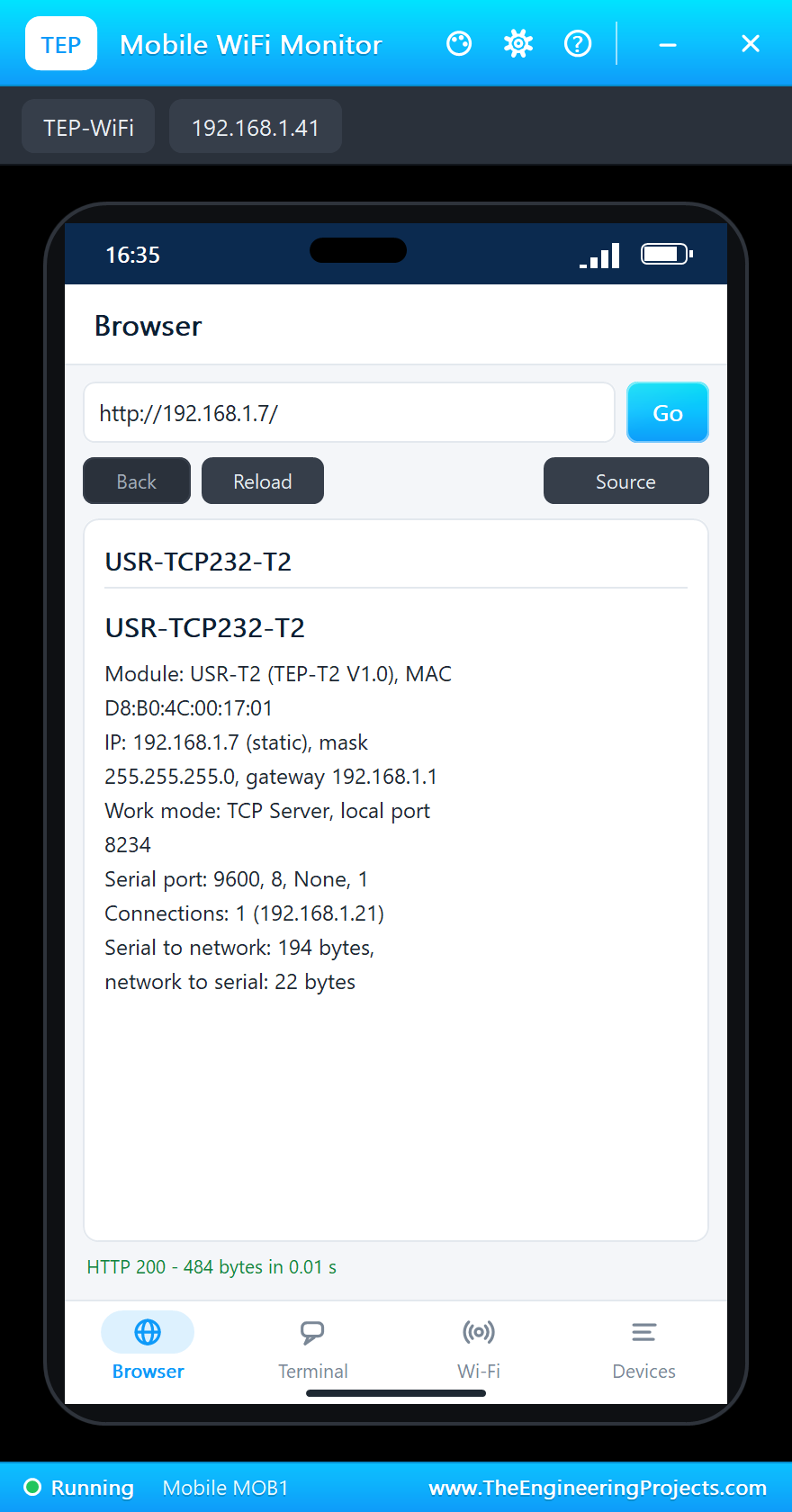
The real T2 has a configuration page on port 80 (it asks for admin / admin first). Our module shows its status page there - the MAC, the address, the work mode, the serial port, the connections and the bytes. Press Go in the laptop's Browser or the phone's:
Pull the Cable
Click CABLE OUT in the panel (or the RJ45 jack). The link goes down, the jack's LEDs go dark - but the TCP connection only waits. Put the cable back with CABLE IN: the link returns after 1.2 s of auto-negotiation and, with a static address, the module is on the LAN at once. If the cable stayed out for more than 20 s, the connections would be dropped. Here the laptop types on without pressing Connect again:
LED OFF
OK - LED OFF
STATUS
LED OFF, up 33 s, A0 = 410 (2.00 V)
The USR-TCP232-T2 Panel
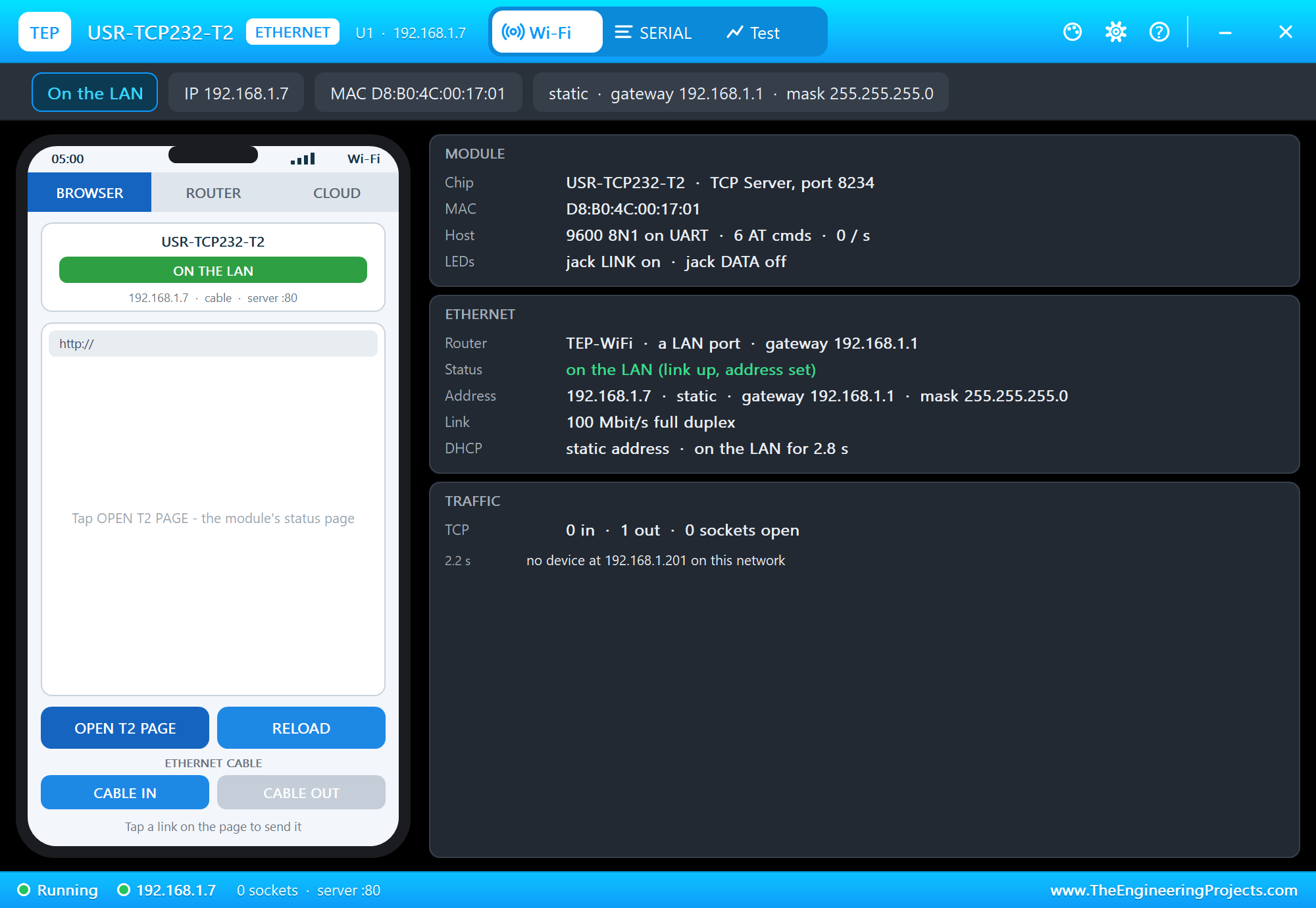
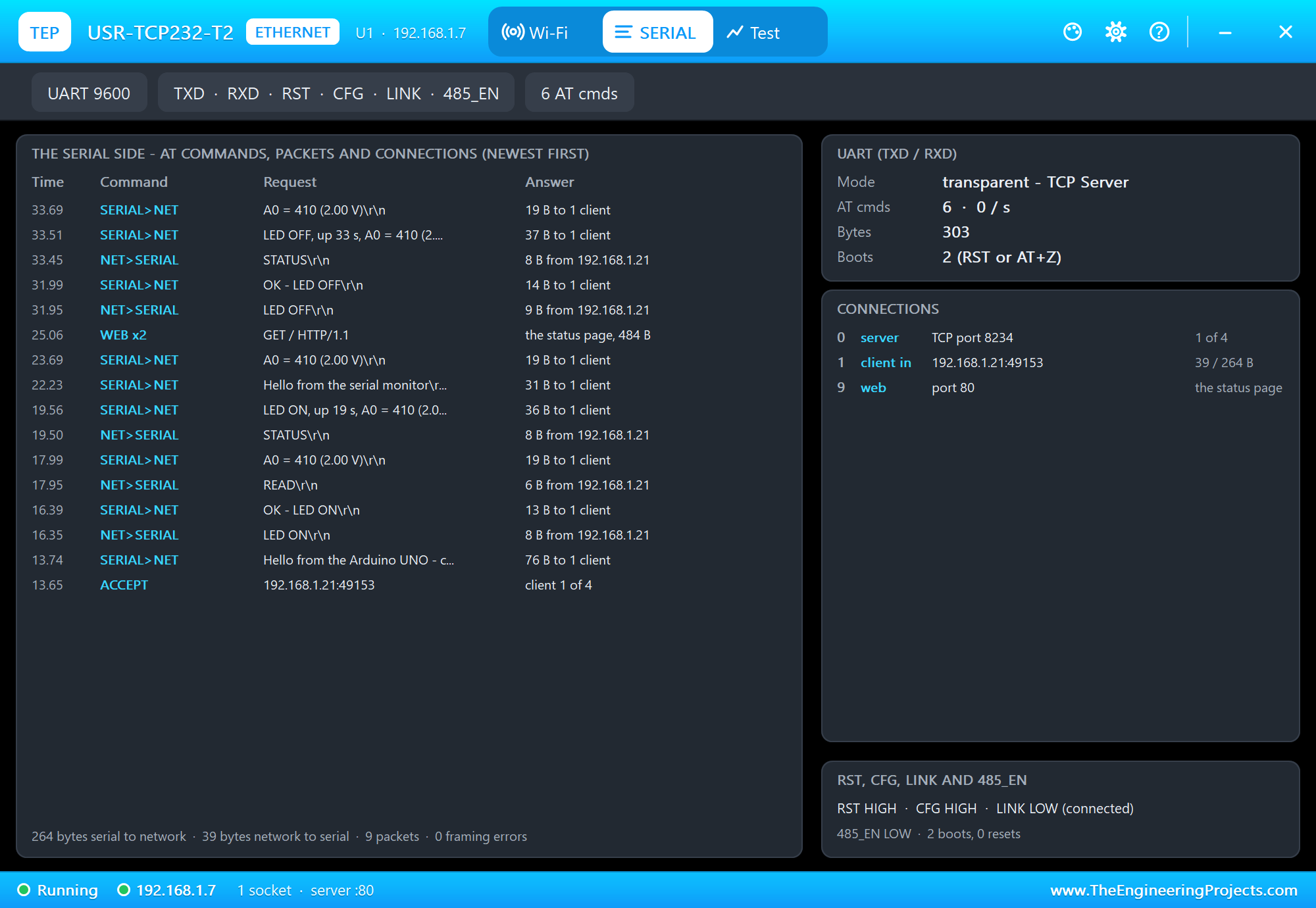
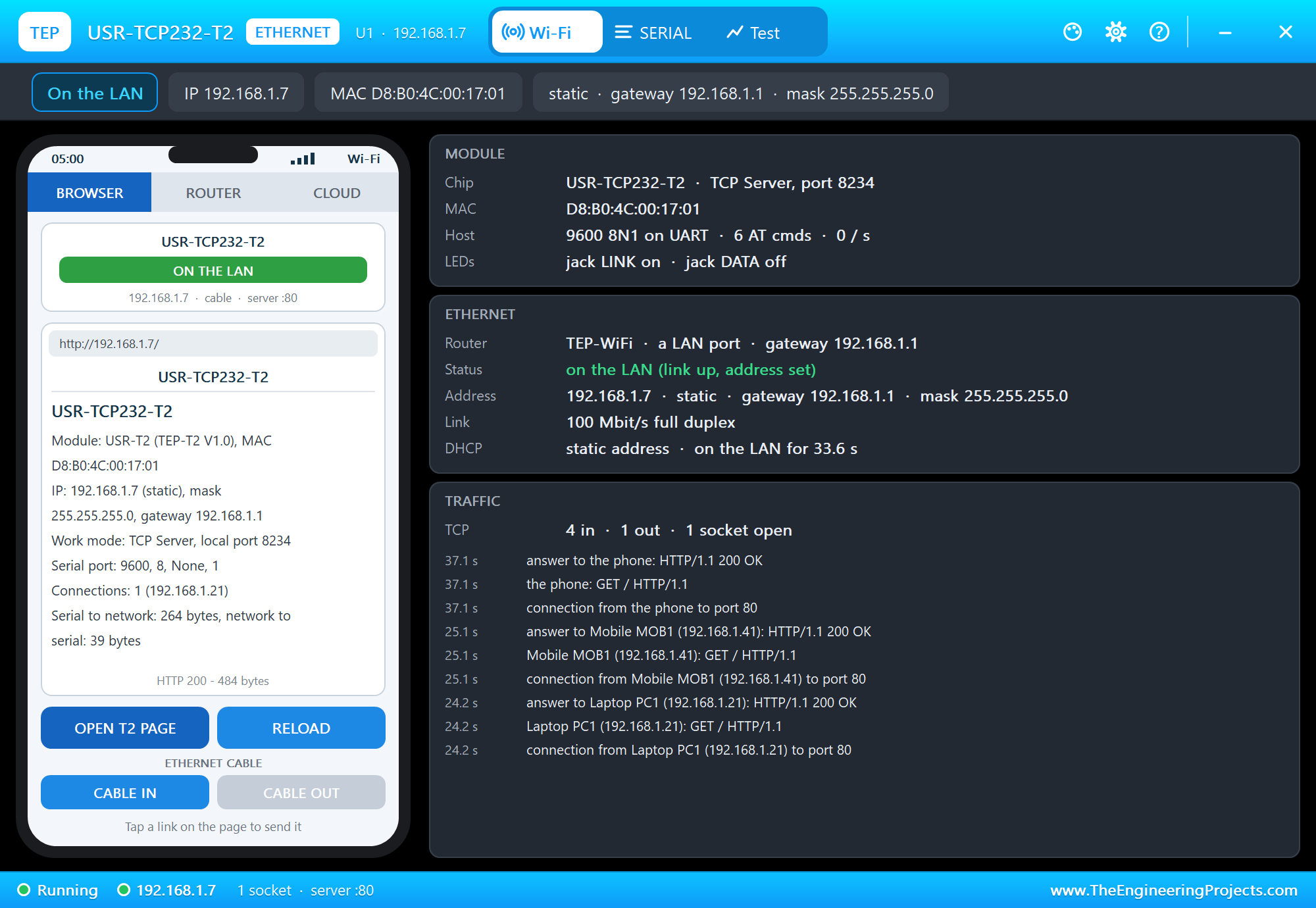
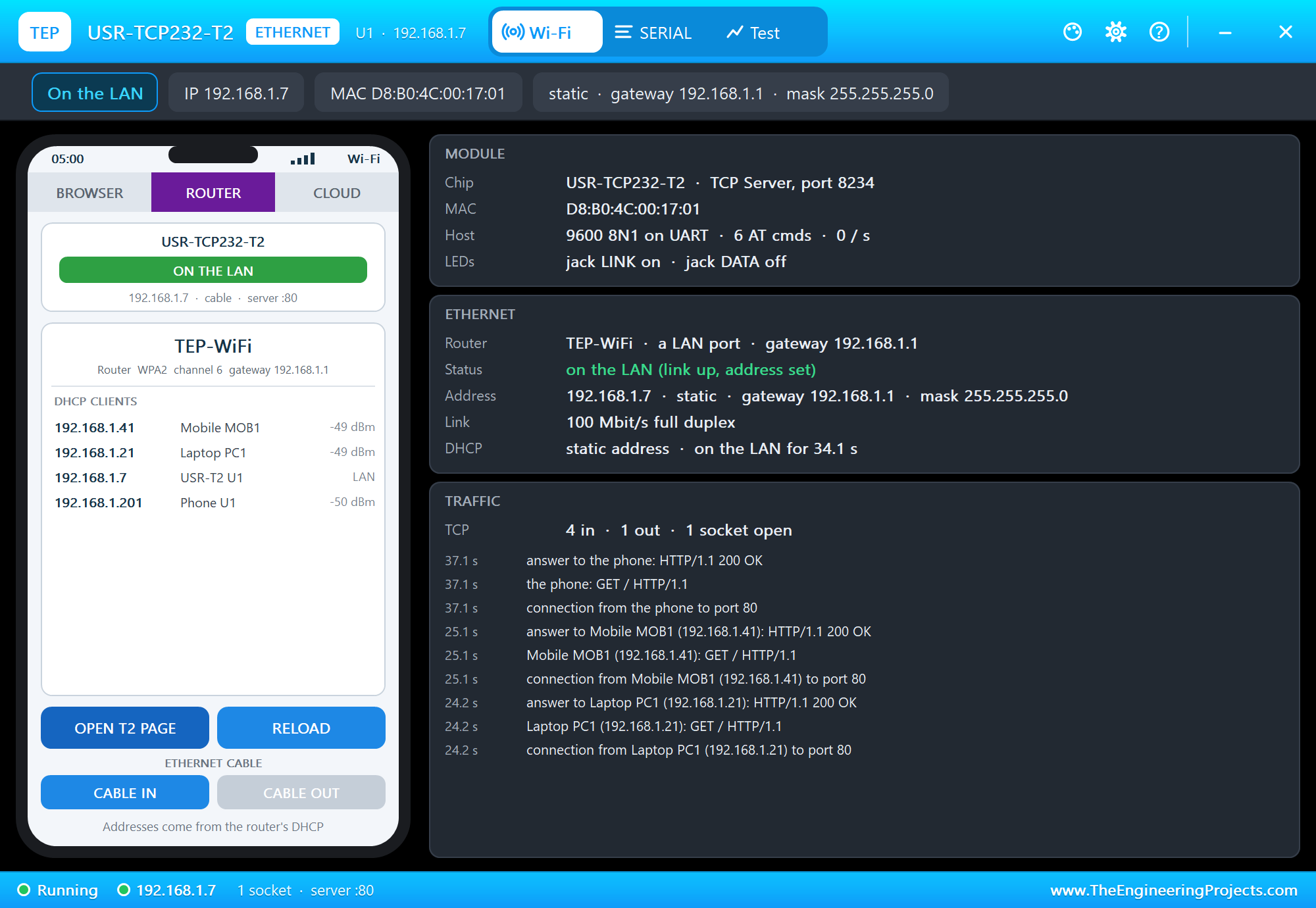
The panel opens at Run, in the look of our TEP Serial Monitor Advance for Proteus - our own TEP header, no Windows title bar. Its first page has a small phone with the CABLE IN and CABLE OUT buttons and three cards: MODULE with the work mode, the MAC, the UART and the jack's LEDs, ETHERNET with the router, the status, the address and the link, and TRAFFIC. The SERIAL page lists every packet both ways and the connections:
OPEN T2 PAGE lets the panel's phone open the status page, and the ROUTER tab lists the router's clients:
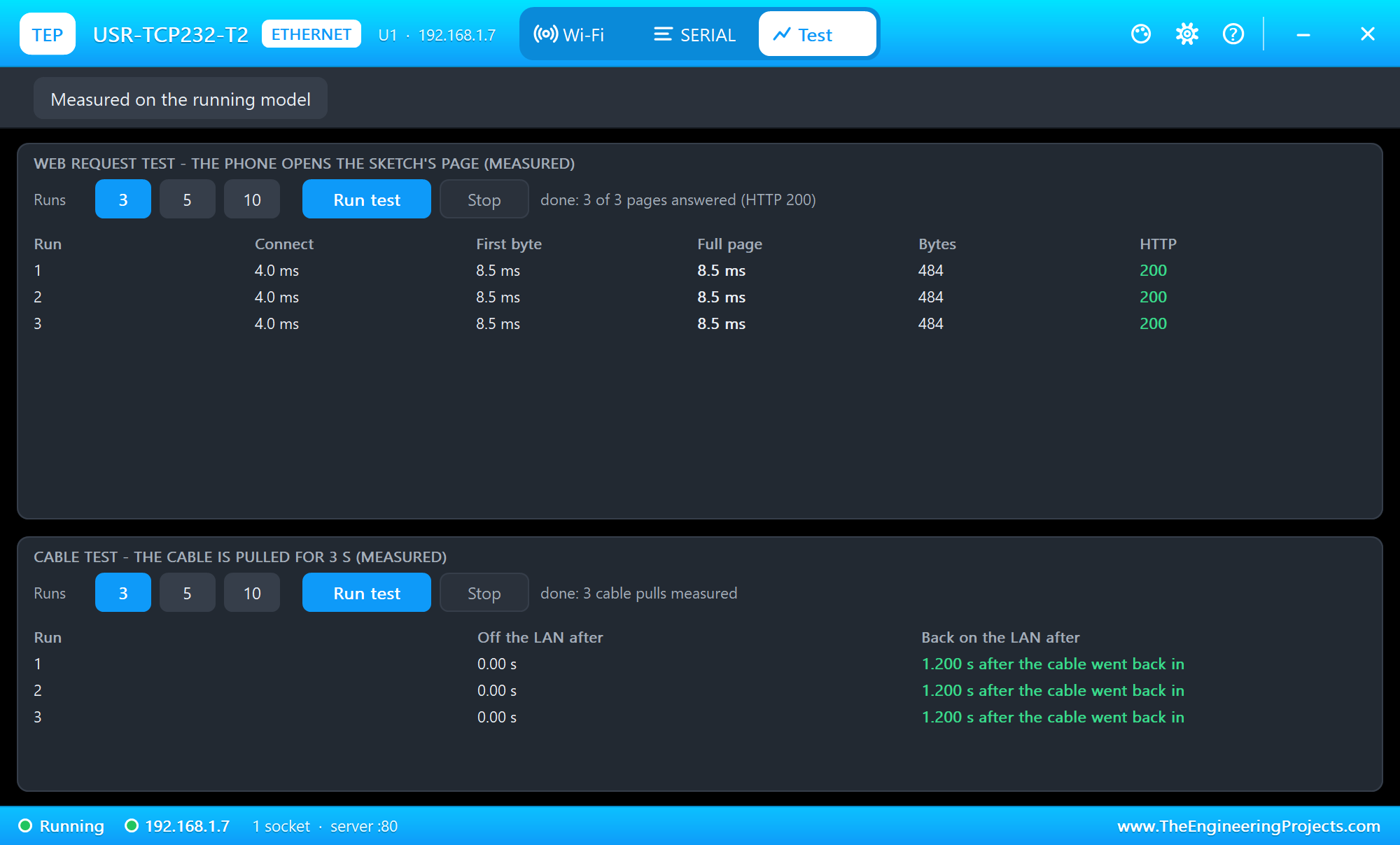
The Test page measures the running model: the web request test lets the panel's phone open the status page three times, and the cable test pulls the cable for 3 seconds, three times:
Pins of the USR-TCP232-T2
| Pin | What it does |
|---|---|
| VDD 5V | power: 5 V (4.75 to 5.5 V) into the regulator |
| VCC 3.3V | power: 3.3 V (3.0 to 3.6 V) straight in - use VDD or VCC, not both |
| GND | ground |
| RST | LOW resets the module (pulled up inside) |
| TXD, RXD | the module's serial output and input, 3.3 V TTL |
| CFG | Reload: held LOW for 3 s and released, the factory settings |
| 485_EN | HIGH while TXD sends (an RS-485 driver's enable) |
| LINK | LOW while a TCP connection is up; always LOW in UDP |
| ISP | not used |
Properties of the USR-TCP232-T2
| Property | What it does |
|---|---|
| BAUD | the serial speed (600 to 460800; 115200 as the real module, 9600 in the demo) |
| WORKMODE | TCPS, TCPC (default), UDPC or UDPS |
| LOCALPORT, REMOTEIP, REMOTEPORT | the server port (20108), the client's remote IP and port (192.168.1.201, 8234) |
| IPMODE, IP | STATIC (192.168.1.7) or DHCP |
| ROUTER, CABLE, PANEL | the router, the cable at Run, the phone's tab at start |
The AT Commands
| Command | Answer / what it does |
|---|---|
| AT | +OK |
| AT+E / AT+E=on|off | the echo of the command (on by default) |
| AT+ENTM | back to transparent mode |
| AT+Z | restart - the new settings work now |
| AT+VER, AT+MAC | the firmware version, the MAC |
| AT+CLEAR | the factory settings and a restart |
| AT+UART=9600,8,1,NONE,NFC | the serial settings |
| AT+SOCK=TCPS,192.168.1.21,8234 | the work mode, the IP and the port |
| AT+WANN=STATIC,ip,mask,gateway / DHCP | the address |
| AT+DHCPEN=on|off | DHCP on or off |
Troubleshooting
- No answer to +++: the sketch must use the module's speed, wait for it to start and send +++ alone - nothing 10 ms before or after. Proteus's simulation log names UART framing errors.
- Lines from the network arrive broken: read the module with hardware Serial or AltSoftSerial - SoftwareSerial cannot receive in Proteus 8.5.
- A setting has no effect: AT+SOCK, AT+WANN, AT+UART and AT+DHCPEN work after AT+Z.
- The laptop cannot connect: the module must be a TCP server and on the LAN; the port is its local port.
- Nothing happens as a TCP client: the remote IP must be a TCP server on the LAN; the SERIAL page lists the tries.
- No panel: click the PANEL pad, or turn "Open the panel at Run" back on in Settings.
Things to Know Before Using a Real USR-TCP232-T2
- 3.3 V levels: the T2's UART is 3.3 V. A 5 V UNO reads its TXD fine, but the T2's RXD needs a level shifter - USR's manual shows a two-transistor circuit - or a divider.
- Power: 5 V on VDD or 3.3 V on VCC, never both; the module draws up to about 200 mA.
- The defaults: a new module is 192.168.0.7 at 115200 bps, a TCP client to 192.168.0.201:8234. Put your PC on the 192.168.0.x network for the first set-up, or use USR's setup tool.
- The web page: open the module's address in a browser and log in with admin / admin to change every setting.
- The +++ timing: the pause around +++ is what tells it apart from data; a sketch that streams all the time must stop for a moment first.
- The factory settings: hold CFG (Reload) LOW for 3 s and release it, or send AT+CLEAR.
Limitations of the Simulation
- The module is modelled from its UART and network behaviour, not its firmware: the HTTPD Client mode, USR Cloud, the heartbeat and registration packets, the virtual COM port and RFC2217, flow control, 5, 6 or 7 data bits and parity are not modelled.
- Its page on port 80 shows the settings and needs no login; the real page has the settings forms.
- The router, the phone, the internet host, the PANEL pad, the panel and the two monitors are TEP additions.
- USR-TCP232-T2 and USR IOT are names of Jinan USR IOT Technology; this library is not made or endorsed by USR IOT or Labcenter.
- Tested in Proteus 8.5 in October 2026 (the demo as shipped, the UNO, the module, the laptop and the phone together at about 0.4 x real time on our PC). Proteus 7 is not supported.
So, that was all about the USR-TCP232-T2 Library for Proteus. I hope it helps you put a serial device on the LAN before you touch the hardware - the AT set-up, transparent mode, the LINK pin and the cable pulled and plugged back in. If you want the TCP/IP stack in the microcontroller instead, our W5500 Ethernet Module Library for Proteus does it over SPI, and the WT32-ETH01 Library for Proteus is an ESP32 with Ethernet on the board. If you use the USR-TCP232-T2 Library for Proteus in a project, please share it in the comments or in our forum, and if you have any questions, ask in the comments and I will help you out. Till the next tutorial, take care and have fun!