


Project Files of USR-TCP232-T2 Library for Proteus: Serial to Ethernet Module
 Libraries
 Code
Code Projects
 Simulation
usr-tcp232-t2-tep-v1-0-3f5e7adddb6e403b95302dbd89367ceb.zip
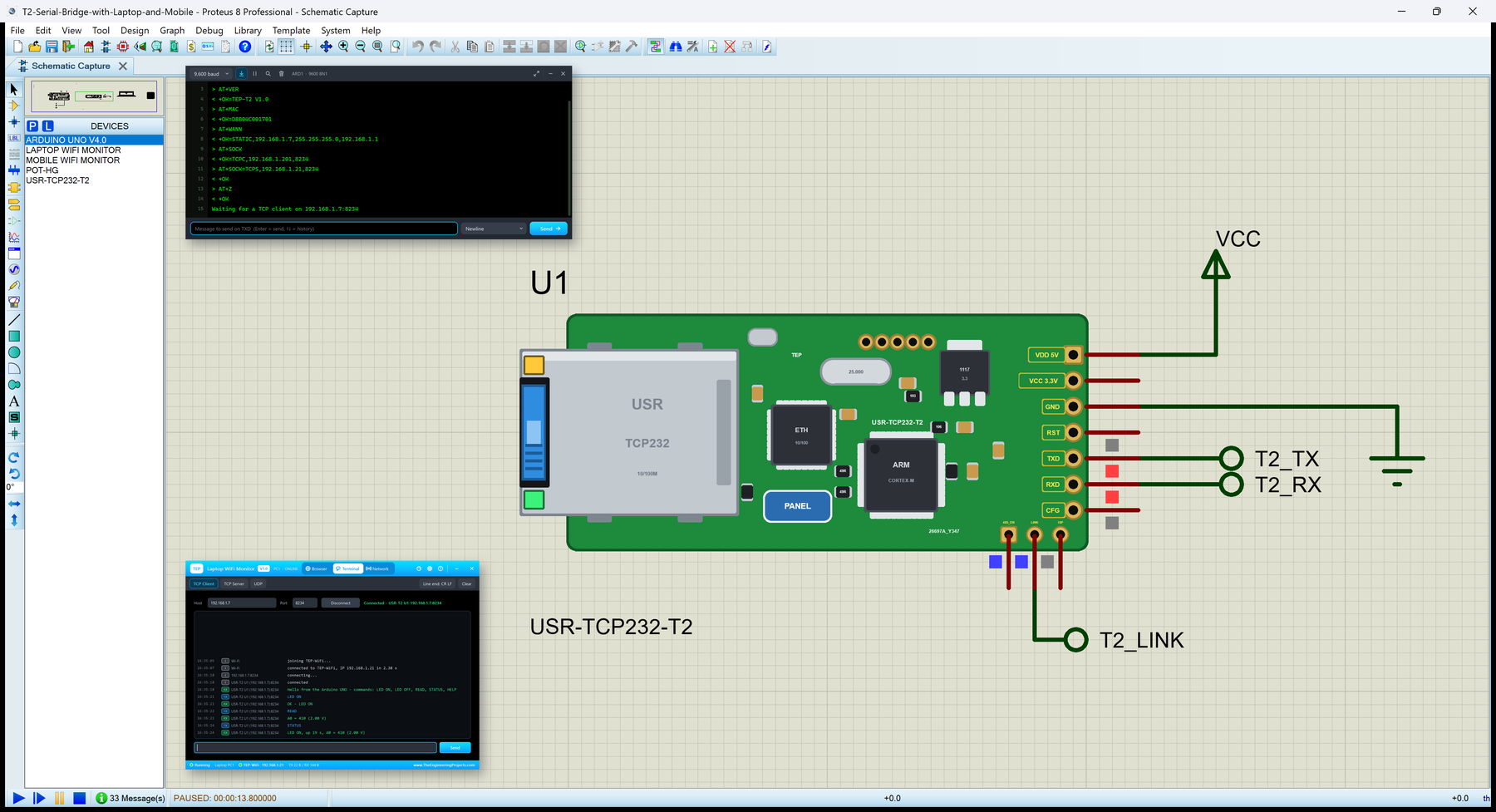
USR-TCP232-T2 Library for Proteus V1.0
USR-TCP232-T2 Library for Proteus V1.0 comes as a ZIP archive of 23 files (3.0 MB, 6.7 MB unpacked) holding Proteus library files, simulation model DLLs, a Proteus simulation, an Arduino sketch, an Arduino library, compiled HEX firmware and data files.
- LIBProteus library
- DLLProteus model
- DSNProteus simulation
- INOArduino sketch
- LIBArduino library
- HEXHEX firmware
- CSVData file
Description
USR-TCP232-T2-Library-for-Proteus-v1.0.zip with USR IOT's USR-TCP232-T2 serial to Ethernet module in Proteus (a TTL UART to an RJ45 port: transparent mode as a TCP server, TCP client, UDP client or UDP server, +++ / a and the AT commands, its status page on port 80, the LINK and 485_EN pins, the jack's LEDs and a phone panel; TEPUSRT2.LIB and TEPNET.DLL), our Arduino UNO V4.0 (ArduinoV4TEP.LIB, TEPARDUINO.DLL), our Laptop and Mobile WiFi Monitors (TEPLAPTOP.LIB, TEPMOBILE.LIB), the serial bridge demo project with its HEX file, the sketch, AltSoftSerial 1.4 and a README.

File Structure
 File Structure
4.6 KB9.8 KB968 B1.4 KB8.3 KB2.5 KB82 B441 B422 B1.3 KB384 B5.6 KB201.9 KB39.5 KB13.1 KB27 KB883.5 KB2.3 MB28.6 KB17.6 KB883.5 KB2.3 MB19.5 KBGallery12 images from the tutorialOpen the tutorial
 Gallery12 images from the tutorial
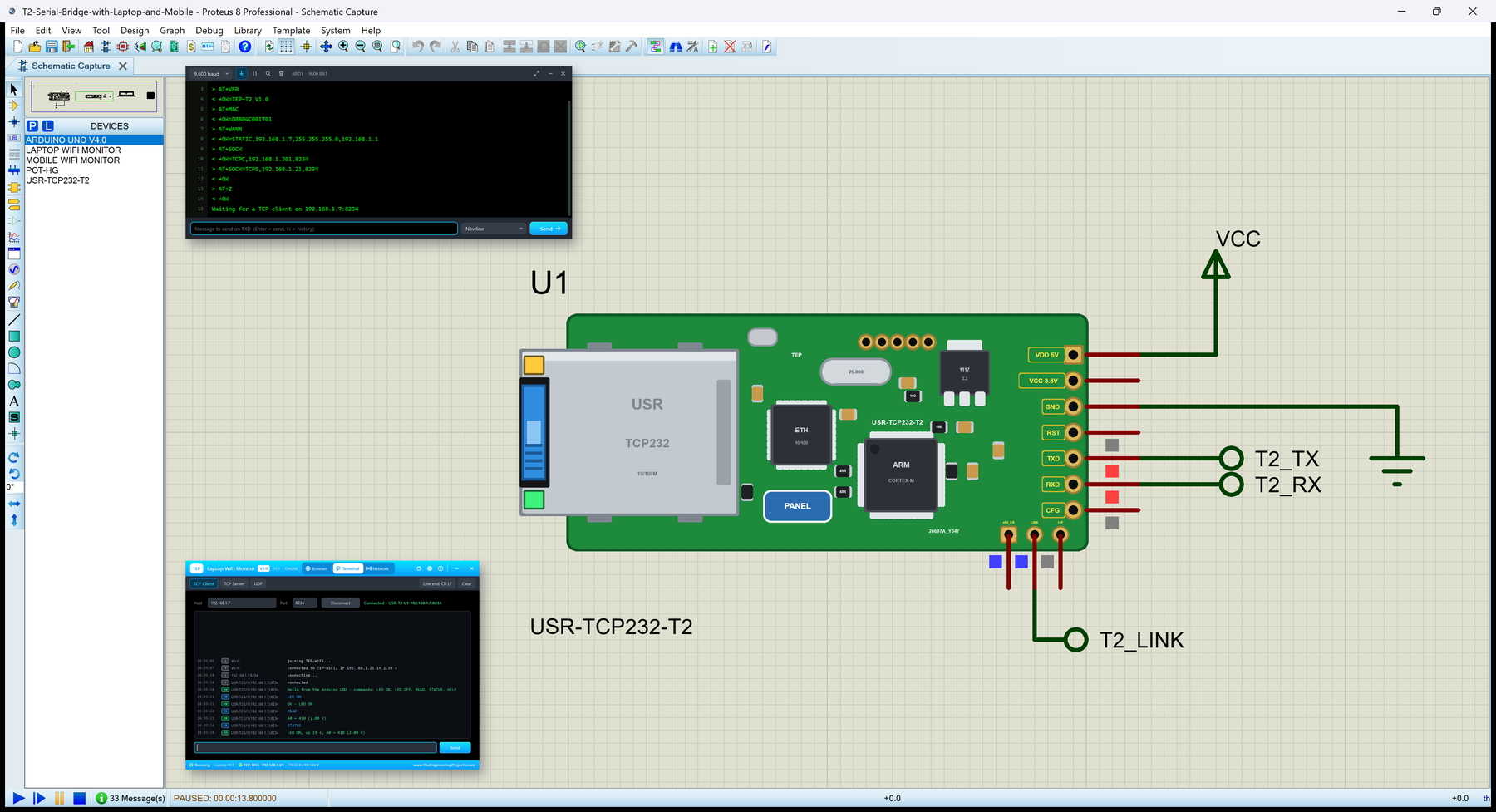
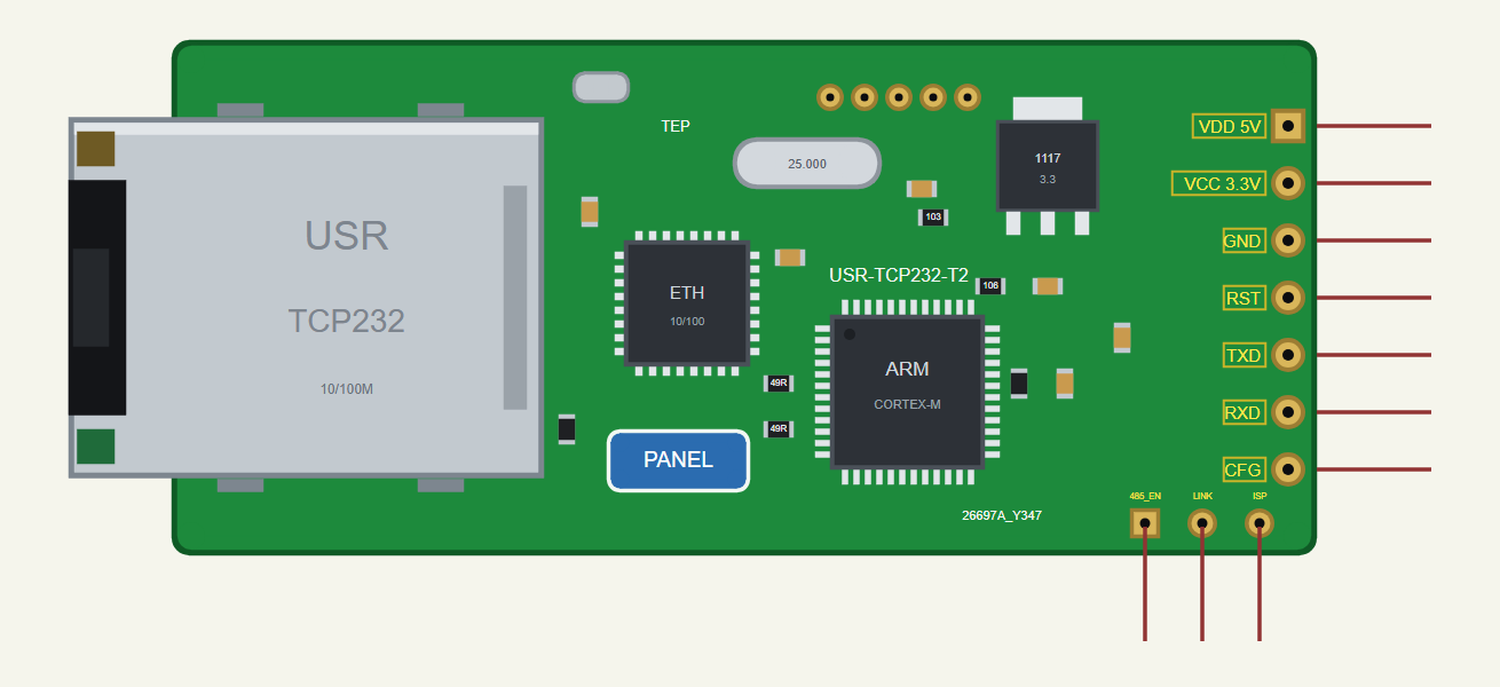
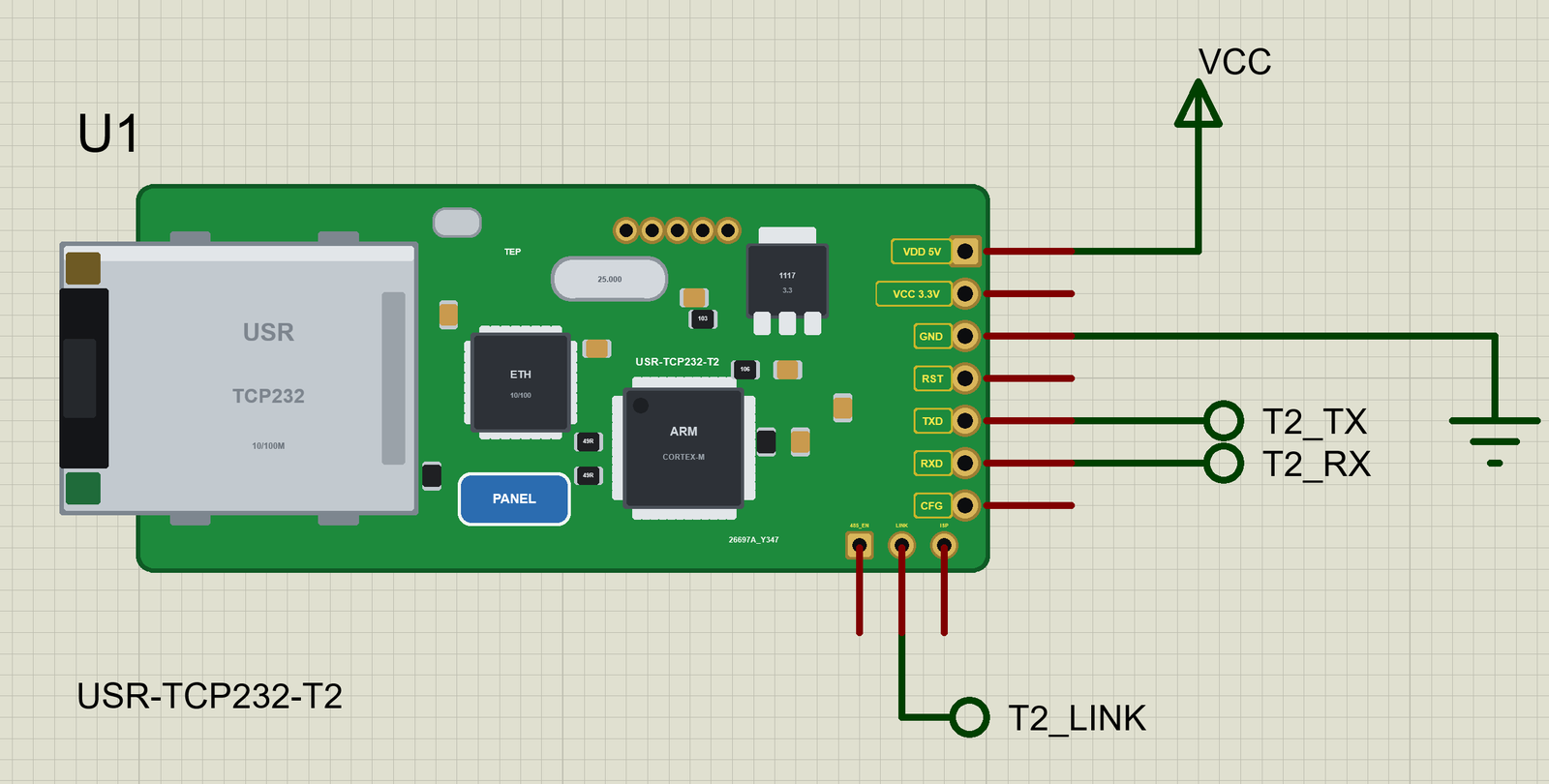
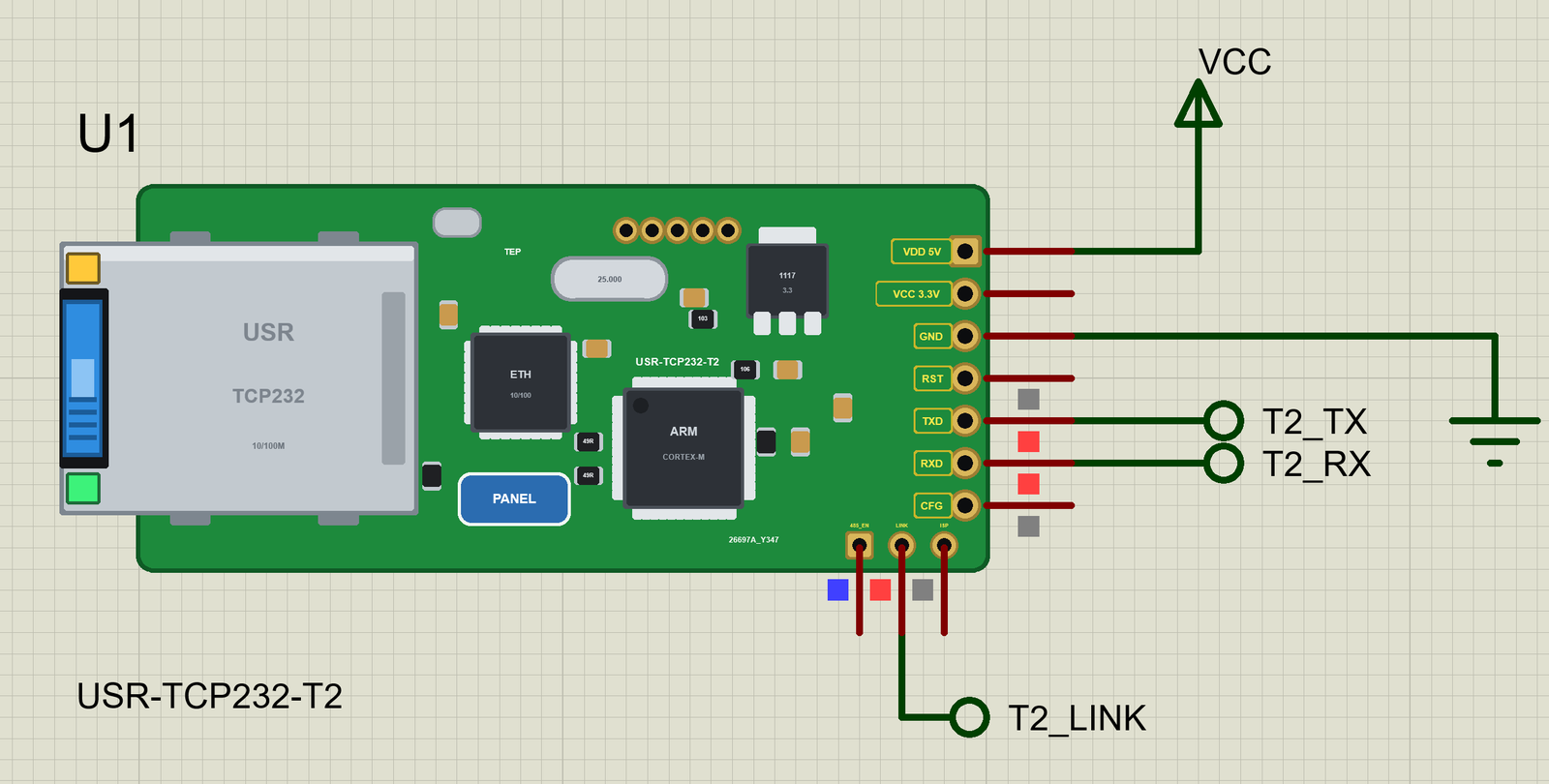
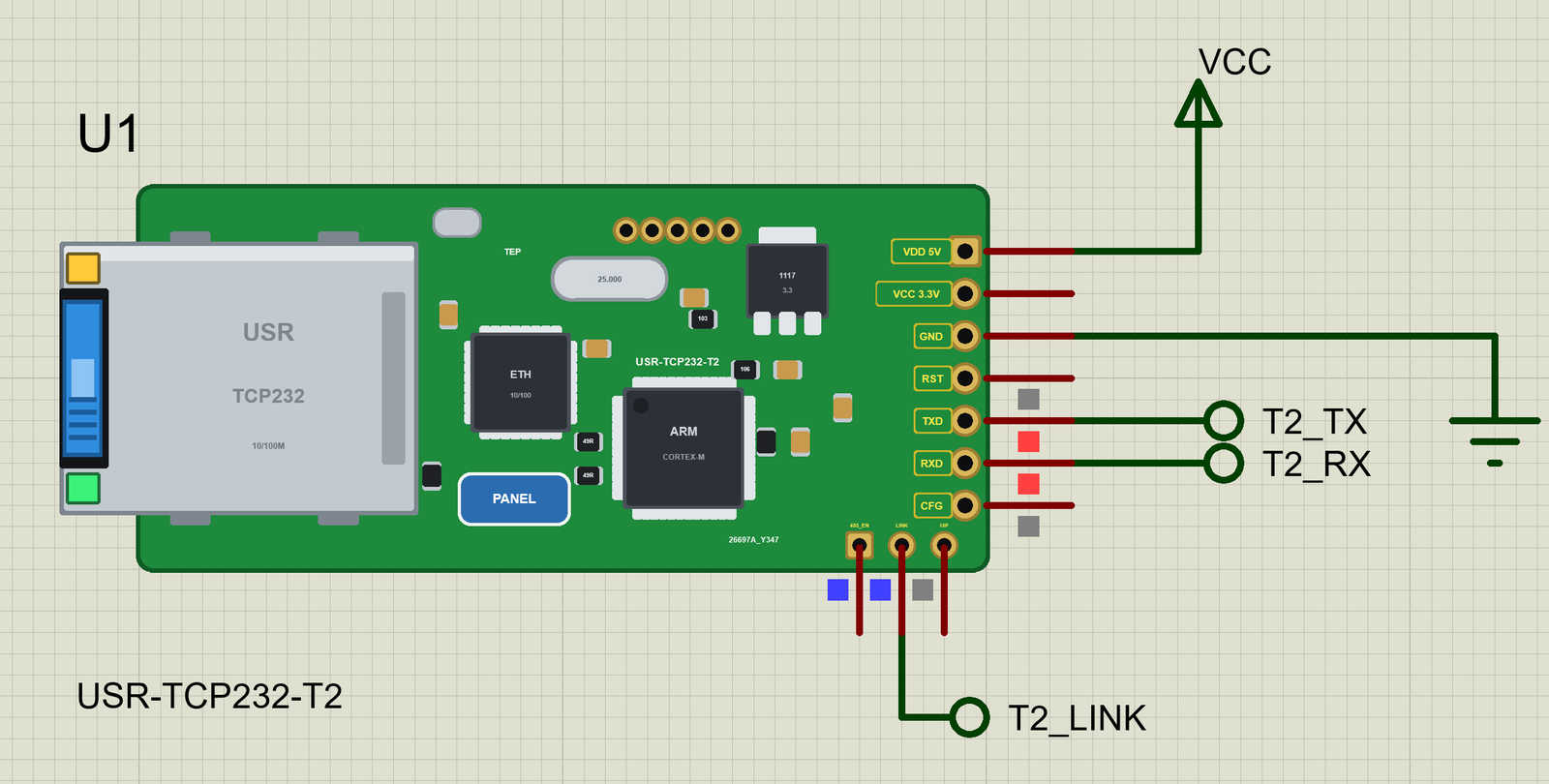
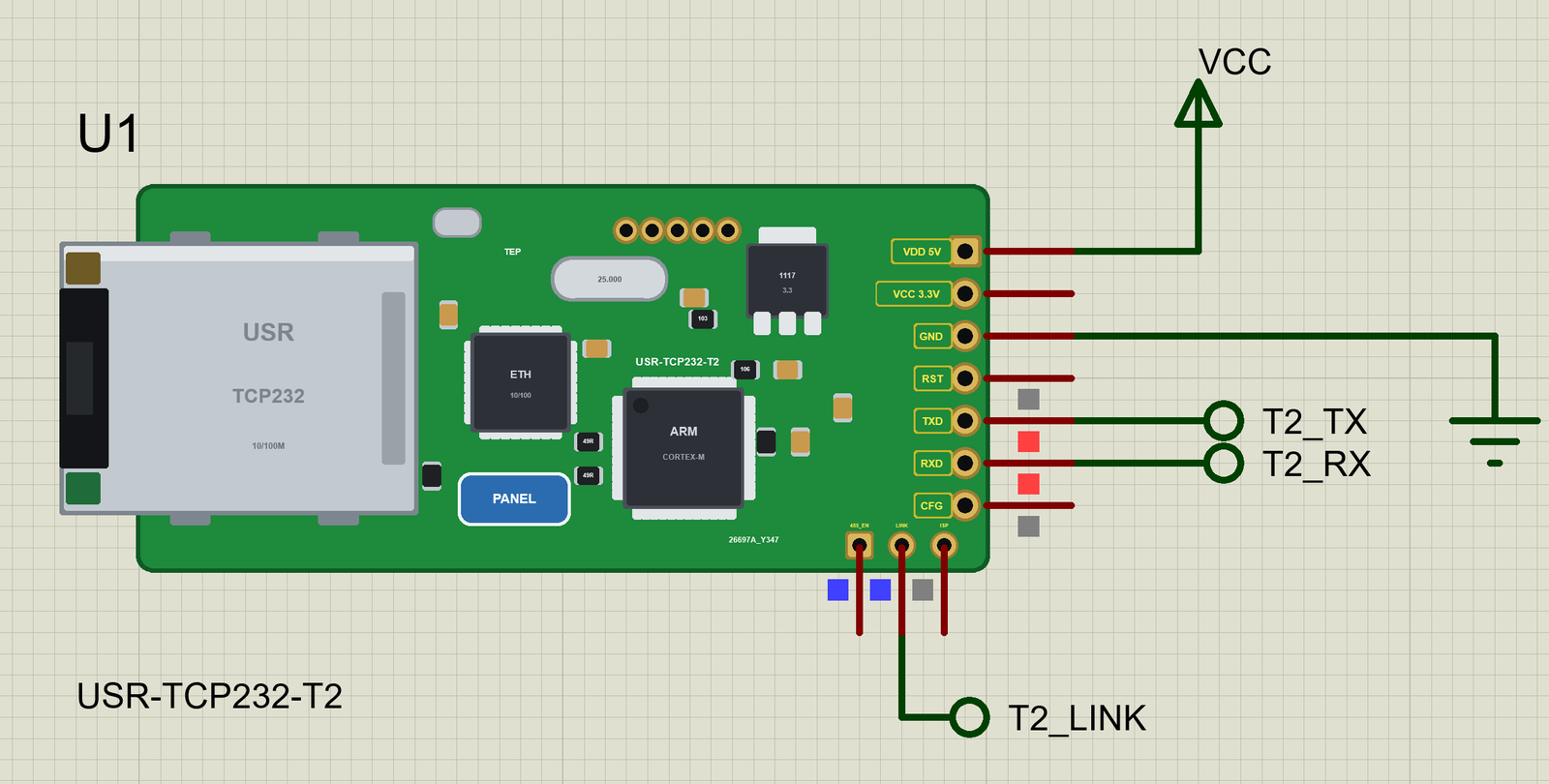
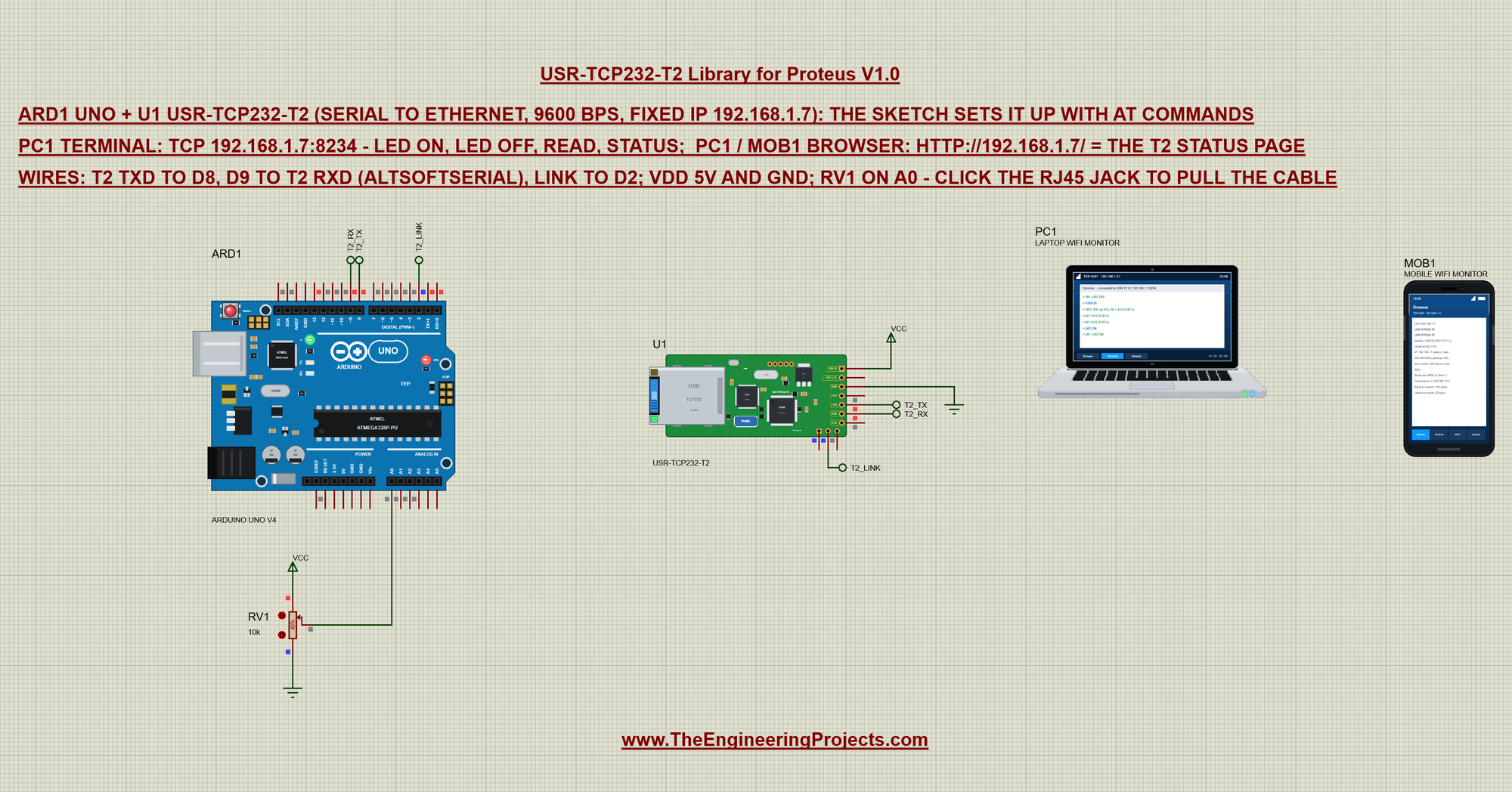
The circuit, the board and the results as they appear in USR-TCP232-T2 Library for Proteus: Serial to Ethernet Module. Open an image for its full size.
README
 README
USR-TCP232-T2 LIBRARY FOR PROTEUS - V1.0 (A SERIAL-TO-ETHERNET MODULE: TTL UART ON ONE SIDE, AN RJ45 PORT ON THE OTHER)
Designed by The Engineering Projects www.TheEngineeringProjects.com
IMPORTANT LINKS
Article (read it first - pictures, step by step, every feature explained):
https://www.theengineeringprojects.com/2026/10/usr-tcp232-t2-library-for-proteus.html
Report a bug or suggest a feature (our forum):
https://www.theengineeringprojects.com/forum/category/usr-tcp232-t2-proteus-library
The demo uses our Arduino UNO V4.0 (included) - its article:
https://www.theengineeringprojects.com/2026/10/arduino-uno-library-for-proteus-v40.html
The demo talks to our Laptop WiFi Monitor and Mobile WiFi Monitor (both included) - their articles:
https://www.theengineeringprojects.com/2026/10/laptop-wifi-monitor-library-for-proteus.html
https://www.theengineeringprojects.com/2026/10/mobile-wifi-monitor-library-for-proteus.html
Ethernet with the Arduino Ethernet library instead (SPI chips) - our W5500 module:
https://www.theengineeringprojects.com/2026/10/w5500-ethernet-module-library-for-proteus.html
Support us (the libraries are free):
https://www.theengineeringprojects.com/donate
FILE STRUCTURE
USR-TCP232-T2-TEP-v1.0/
|-- Proteus Library Files/
| |-- ArduinoV4TEP.LIB 201.9 KB our UNO V4.0, to LIBRARY
| |-- TEPLAPTOP.LIB 39.5 KB the laptop, to LIBRARY
| |-- TEPMOBILE.LIB 13.1 KB the phone, to LIBRARY
| |-- TEPUSRT2.LIB 27.0 KB the USR-TCP232-T2, to LIBRARY
|-- Proteus Model Files/
| |-- TEPARDUINO.DLL 883.5 KB the UNO V4.0, to MODELS
| |-- TEPNET.DLL 2.29 MB module + monitors, to MODELS
|-- Proteus Simulation/
| |-- T2_Serial_Bridge.hex 17.6 KB the UNO of the demo
| |-- T2-Serial-Bridge-with-Laptop-and-Mobile.pdsprj 28.6 KB the demo + PC + phone
| |-- TEPARDUINO.DLL 883.5 KB copy of the model
| |-- TEPNET.DLL 2.29 MB copy of the model
|-- Arduino Code/
| |-- T2_Serial_Bridge/T2_Serial_Bridge.ino 5.6 KB UNO sketch (AltSoftSerial)
| |-- libraries/AltSoftSerial/ 30.1 KB AltSoftSerial 1.4 (11 files)
|-- README.txt ~17.8 KB this file
Total: 6.67 MB (unzipped). The C++ source code of the models is not included.
WHAT IS IT?
The USR-TCP232-T2 of USR IOT (Jinan USR IOT Technology) as one Proteus part: a small green board (50.5 x 22.6 mm) with
its own processor, an Ethernet chip, a 25 MHz crystal, a 3.3 V regulator and a metal RJ45 jack 4.5 mm past its end. It
needs no Ethernet library at all: the module's own firmware moves the bytes between its UART (TTL, 3.3 V) and the
network, so any microcontroller with a serial port is on the LAN.
* Transparent mode (at power-up): what arrives on RXD is packed (a pause of 10 ms ends a packet) and sent to the
network; what comes from the network leaves on TXD. Four work modes: TCP Server (it listens on the local port, up
to 4 clients - a 5th replaces the oldest), TCP Client (it connects to the remote IP and port, again every 3 s when
there is no server), UDP Client (to the remote IP and port, only its packets come back) and UDP Server (it answers
the last sender).
* AT commands: "+++" alone (a pause before and after) is answered with "a"; send "a" within 3 s and the module
answers "+ok" - now AT commands: AT, AT+E (echo on / off), AT+ENTM (back to transparent mode), AT+Z (restart),
AT+VER, AT+MAC, AT+CLEAR (the factory settings), AT+UART (the serial settings), AT+SOCK (the work mode, the IP,
the port), AT+WANN (STATIC with the address, mask and gateway, or DHCP), AT+DHCPEN. The answers are
<CR><LF>+OK=<value><CR><LF>, <CR><LF>+OK<CR><LF> or <CR><LF>+ERR=<code><CR><LF> (-2: an unknown command, -4: a wrong
parameter). New settings work after AT+Z, as on the real module.
* Its status page on port 80 (the address, the MAC, the work mode, the serial port, the connections, the bytes) for a
browser on the LAN. (The real module's page asks for admin / admin first and has the settings forms; here it shows
the settings and needs no login.)
* The pins: LINK (LOW while a TCP connection is up; always LOW in UDP), RST (LOW resets the module), CFG / Reload
(held LOW for 3 s and released: the factory settings), 485_EN (HIGH while TXD sends).
* The jack's LEDs: green LINK (the cable's link) and yellow DATA (blinks with the traffic); the cable's blue plug in
the port. The cable: the CABLE property (IN / OUT), a click on the RJ45 jack, or CABLE IN / CABLE OUT in the panel.
The part is drawn our way at the real board's proportions, turned so that its header is on the right like our other
Ethernet modules (USR's drawing has the header on the left): the RJ45 jack ("USR TCP232" stamped on it) at the left end,
the chips, the crystal, the regulator and the programming pads in the middle, the 7-pin header in the maker's yellow
name boxes at the right end and the three reserved pads below it.
ONE DEVICE (search "USR" or "TCP232" in Pick Devices):
USR-TCP232-T2 "USR-TCP232-T2 Serial to Ethernet Module" V1.0 (category Peripherals > Ethernet), prefix U, model
TEPNET.DLL
The panel (a TEP pop-up window, the look of the TEP Serial Monitor - our own header, no Windows title bar; it opens
at Run, the PANEL pad or the module's processor opens it again). Tabs:
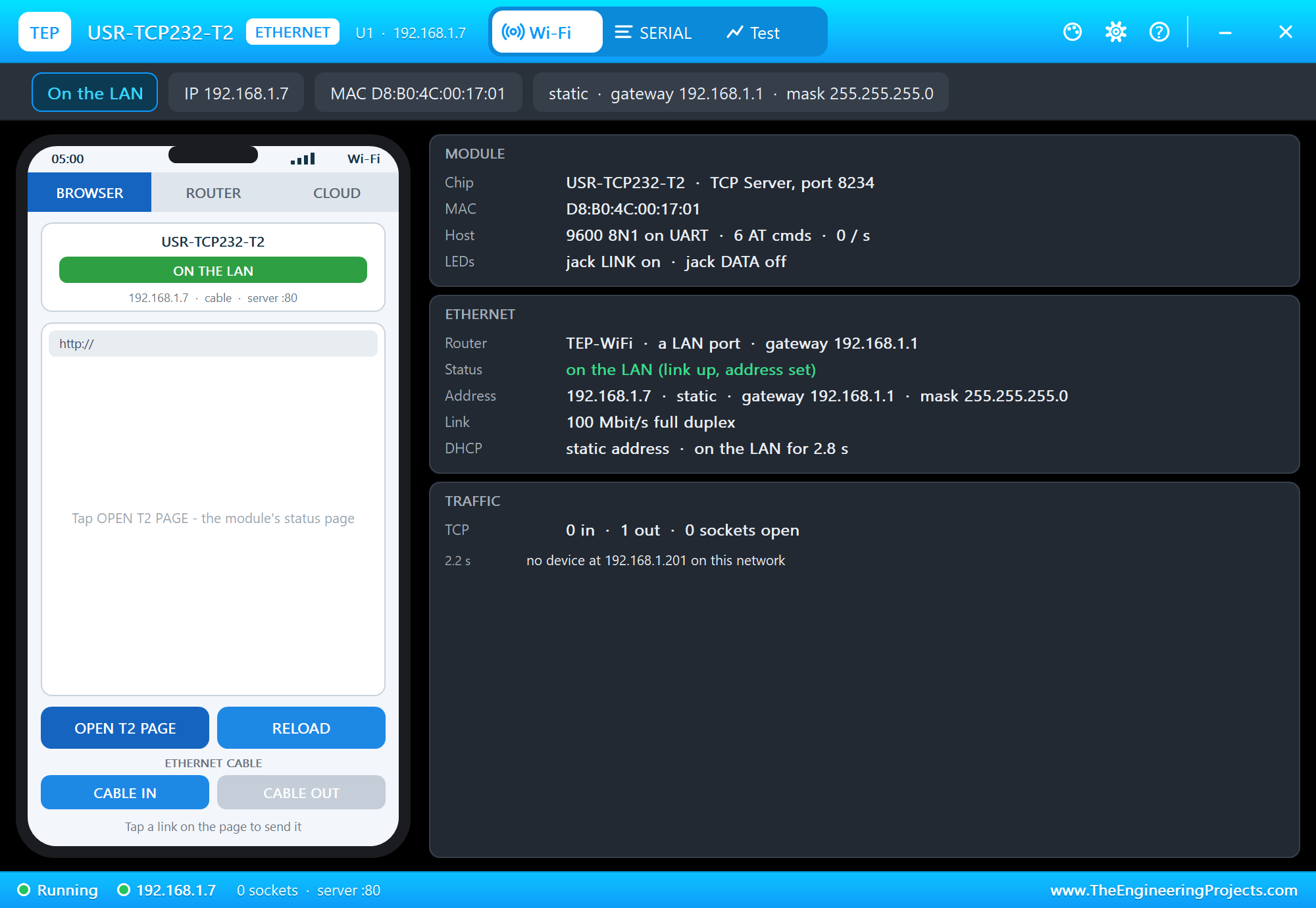
Wi-Fi a phone with three tabs - BROWSER (OPEN T2 PAGE: the phone opens the module's status page), ROUTER (the
router's clients) and CLOUD (the internet host's requests); ETHERNET CABLE IN / OUT; the cards MODULE
(the work mode, the MAC, the UART, the jack's LEDs), ETHERNET (router, status, address, the link) and
TRAFFIC
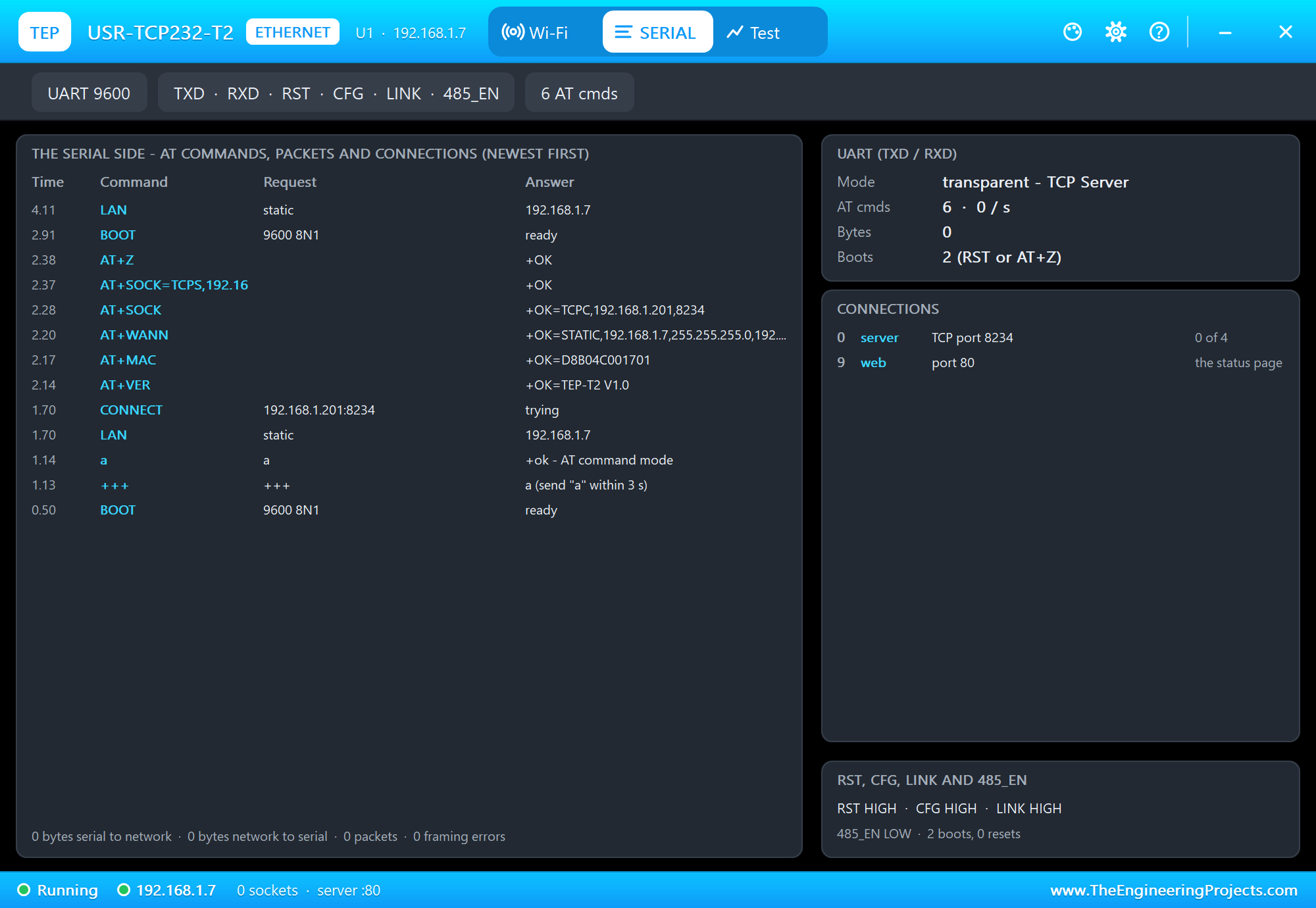
SERIAL the serial side, newest first: +++ / a, every AT command and its answer, each packet from the serial
port to the network and back, the connections; the UART card (the mode, the AT commands, the bytes, the
boots), the CONNECTIONS card and the pins RST, CFG, LINK and 485_EN
Test web request test (the phone opens the status page n times, measured) and cable test (the cable pulled
for 3 s, measured)
Settings theme, text size, open at Run, window size
Help report a bug, suggest a feature, article, updates, donate, forum; Copy diagnostics
The same TEPNET.DLL also runs our Ethernet and Wi-Fi shields, modules and boards and the Laptop / Mobile WiFi Monitors
(TEPLAPTOP.LIB, TEPMOBILE.LIB, included for the demo); it replaces any older TEPNET.DLL (keep only this newest one in
MODELS).
TEST STATUS
V1.0: verified in Proteus 8.5 on 23 Oct 2026 with the demo project as shipped (the windows off-screen, posted clicks
and keys). What the Proteus run showed:
* Run: the module starts as the real one ships (a TCP client to 192.168.1.201:8234 - nobody there, it tries again);
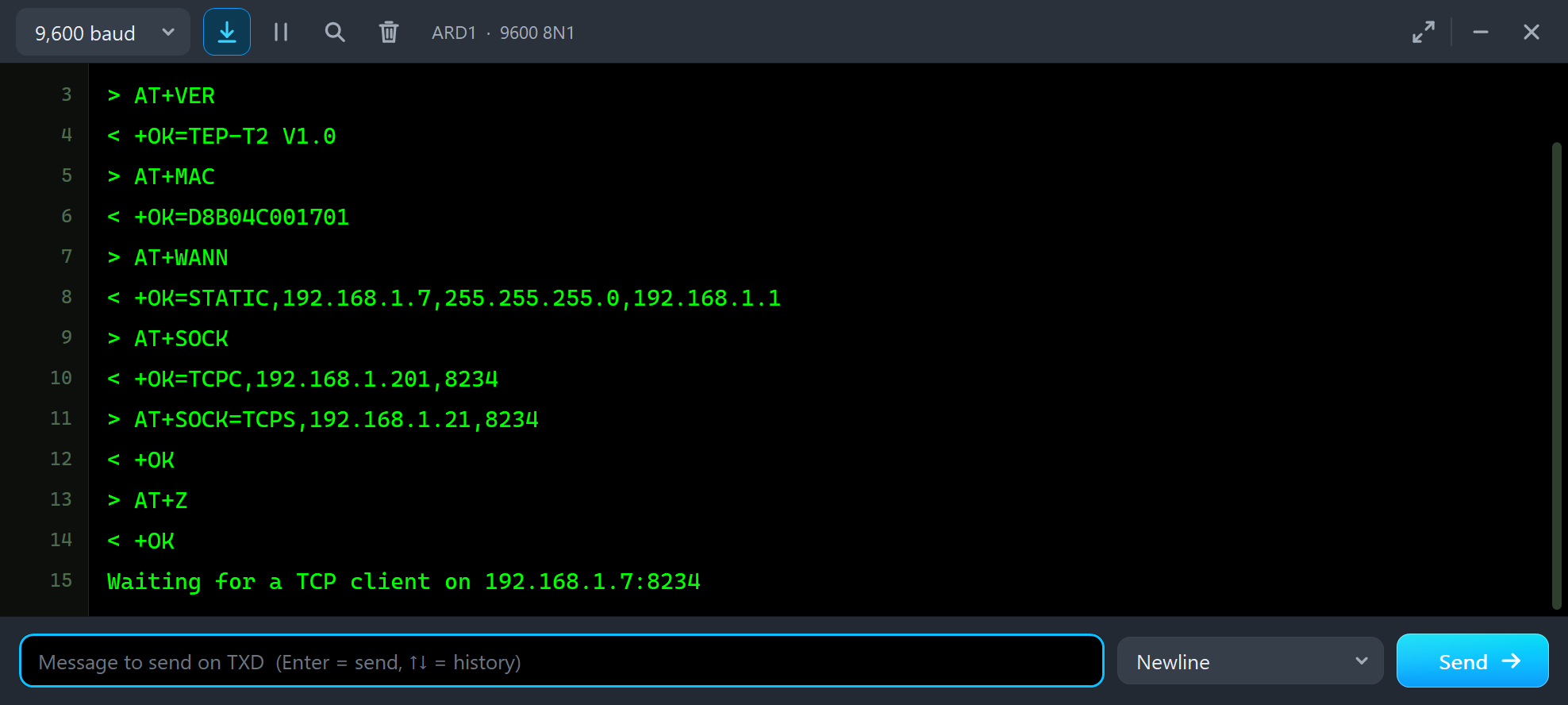
the UNO's "+++" is answered with "a", its "a" with "+ok"; AT+VER answers +OK=TEP-T2 V1.0, AT+MAC +OK=D8B04C001701,
AT+WANN +OK=STATIC,192.168.1.7,255.255.255.0,192.168.1.1, AT+SOCK +OK=TCPC,192.168.1.201,8234; AT+SOCK=TCPS,
192.168.1.21,8234 and AT+Z answer +OK - the module restarts and is on the LAN again as a TCP server on port 8234 at
4.2 s of simulation (the 1.2 s link, the static address at once); the jack's green LINK LED lights, the cable's plug
is in the port.
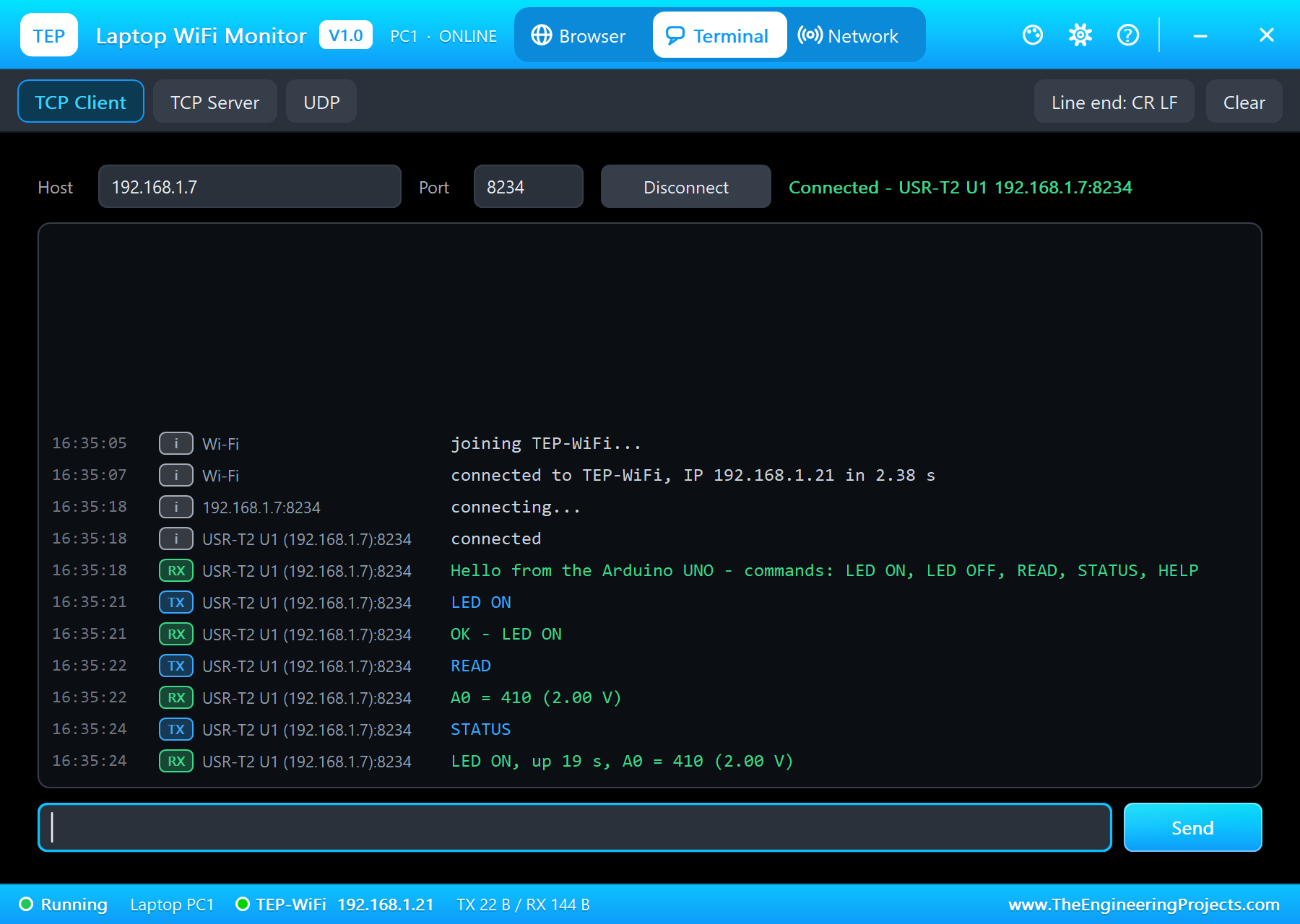
* The laptop's TCP terminal connects to 192.168.1.7:8234: LINK goes LOW, the UNO's greeting arrives ("Hello from the
Arduino UNO - commands: LED ON, LED OFF, READ, STATUS, HELP"); LED ON answers "OK - LED ON" (the UNO's L LED
lights), READ "A0 = 410 (2.00 V)", STATUS "LED ON, up 19 s, A0 = 410 (2.00 V)"; text typed in the UNO's monitor
("Hello from the serial monitor") arrives in the laptop's terminal.
* The laptop's browser and the phone open the module's status page at http://192.168.1.7/ (HTTP 200, 484 bytes in
0.01 s): the MAC, 192.168.1.7 (static), TCP Server on port 8234, 9600 8N1, one connection (192.168.1.21).
* The cable out (CABLE OUT in the panel) and back after 2 s: the jack's LEDs off, the plug out of the port, the link
back 1.2 s after the cable - the laptop's connection carried on: LED OFF answered "OK - LED OFF", STATUS "LED OFF,
up 33 s, A0 = 410 (2.00 V)".
* The panel's Test page: the web request test answered 3 of 3 (connect 4.0 ms, first byte 8.5 ms, full page 8.5 ms,
484 bytes); the cable test (3 pulls of 3 s) put the module back on the LAN 1.200 s after the cable went back in each
time. No UART framing error in the whole run.
* Speed: about 0.4 x real time with the UNO's sketch, the module, the laptop and the phone running.
INSTALLATION (about 3 minutes)
1. Close Proteus. Extract the WHOLE ZIP to a normal folder (e.g. Desktop).
2. Copy everything in "Proteus Library Files" to the LIBRARY folder of Proteus, for example:
C:\Program Files (x86)\Labcenter Electronics\Proteus 8 Professional\LIBRARY
(on some PCs: C:\ProgramData\Labcenter Electronics\Proteus 8 Professional\LIBRARY - use the folder that already holds
Proteus's own .LIB files). TEPUSRT2.LIB is the module; ArduinoV4TEP.LIB our Arduino boards V4.0 (the UNO of the
demo); TEPLAPTOP.LIB and TEPMOBILE.LIB our Laptop WiFi Monitor and Mobile WiFi Monitor.
3. Copy TEPNET.DLL and TEPARDUINO.DLL from "Proteus Model Files" to the MODELS folder (...\Proteus 8
Professional\MODELS) - replace older copies (this TEPNET.DLL is the first one that knows the USR-TCP232-T2; it still
runs every part of the series).
4. Delete TEPUSRT2.IDX, ArduinoV4TEP.IDX, TEPLAPTOP.IDX and TEPMOBILE.IDX from the LIBRARY folder if they are there.
5. The Arduino IDE (only to compile your own sketches - the demo has its HEX file): copy the folder "Arduino
Code\libraries\AltSoftSerial" into Documents\Arduino\libraries (or install AltSoftSerial with the Library Manager).
6. Start Proteus. In Pick Devices (P) search "TCP232".
RUN THE DEMO
Keep the .hex file, TEPNET.DLL and TEPARDUINO.DLL beside the project in "Proteus Simulation".
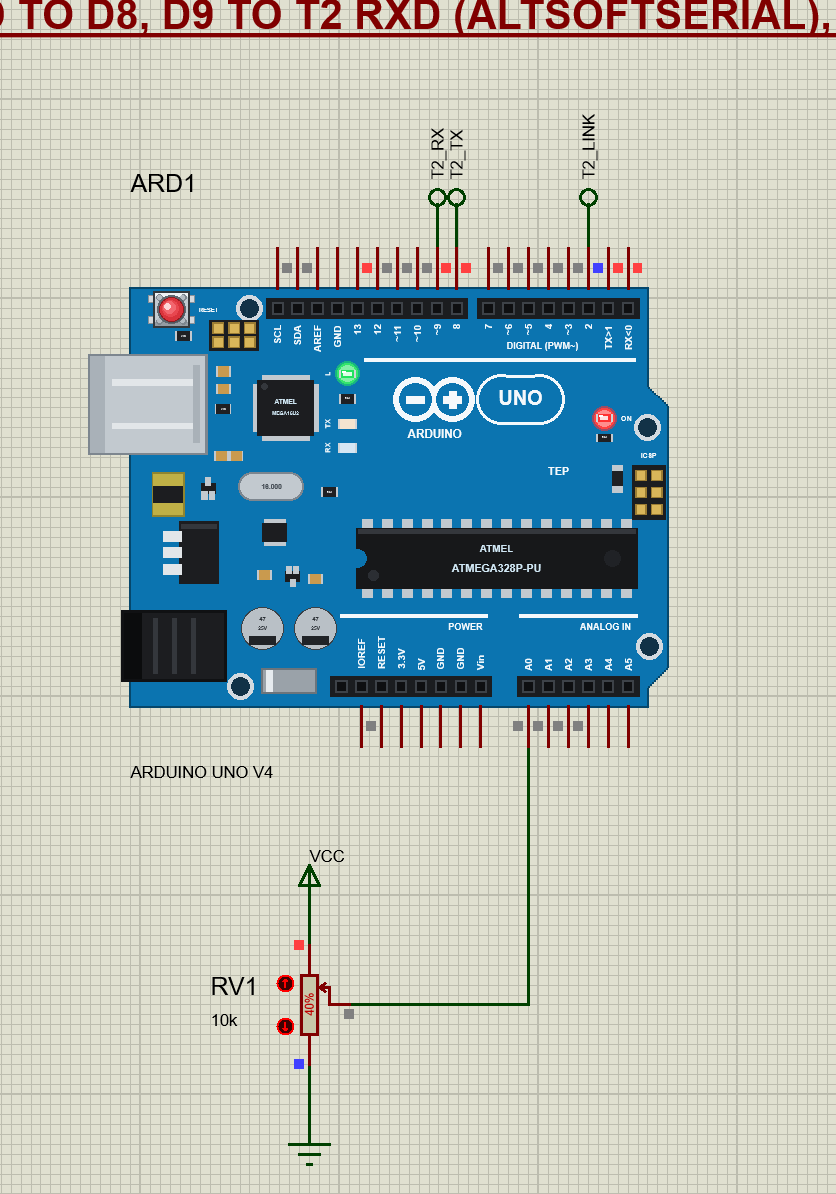
T2-Serial-Bridge-with-Laptop-and-Mobile.pdsprj - ARD1 our UNO V4.0 (T2_Serial_Bridge.hex, its monitor at 9600 bps)
with RV1 (POT-HG 10k) on A0, and U1 the USR-TCP232-T2 (its BAUD property 9600): T2_TX (the T2's TXD to D8), T2_RX (D9
to the T2's RXD) and T2_LINK (LINK to D2) by net labels, VDD to VCC (5 V), GND to ground; VCC (3.3 V), RST, CFG,
485_EN and ISP free. PC1 the Laptop WiFi Monitor (its TCP terminal set to 192.168.1.7, port 8234; home page
http://192.168.1.7/) and MOB1 the Mobile WiFi Monitor (home page http://192.168.1.7/) - no wires, they are on the
router's network; the module's own RJ45 is its cable to the router.
Press Run. The UNO's monitor shows the AT set-up: AT+VER, AT+MAC, AT+WANN, AT+SOCK with their answers, then
AT+SOCK=TCPS,192.168.1.21,8234 and AT+Z - the module restarts as a TCP server on port 8234. In the laptop's Terminal
tab press Connect: LINK goes LOW, the UNO sends its greeting; type LED ON, LED OFF, READ or STATUS (the UNO's L LED
on D13 is the "relay", READ sends A0). Text typed in the UNO's monitor goes to the laptop. The browsers show the
module's status page at http://192.168.1.7/. Pull the cable (CABLE OUT, or click the jack) and put it back: the
laptop's connection carries on.
PINS (the header on the right, top to bottom; the reserved pads below, left to right)
VDD 5V power: 5 V (4.75 to 5.5 V) into the module's regulator
VCC 3.3V power: 3.3 V (3.0 to 3.6 V) straight in - use VDD or VCC, not both
GND ground
RST reset: LOW resets the module (an internal pull-up: leave it free)
TXD the module's serial output (3.3 V TTL) - to the microcontroller's RX
RXD the module's serial input (3.3 V TTL) - from the microcontroller's TX
CFG Reload: held LOW for 3 s and released, the factory settings (an internal pull-up: leave it free)
485_EN HIGH while TXD sends (an RS-485 driver's enable)
LINK LOW while a TCP connection is up, HIGH without one; always LOW in UDP
ISP not used
In the simulation the module runs from VDD or VCC with GND; RST and CFG work free (the pull-ups).
THE DEMO SKETCH (Arduino Code)
T2_Serial_Bridge - AltSoftSerial t2 (RX D8, TX D9) at 9600.
setup(): "+++", wait for "a", send "a", wait for "+ok"; AT+VER, AT+MAC, AT+WANN and AT+SOCK print the module's
settings; AT+SOCK=TCPS,192.168.1.21,8234 and AT+Z make it a TCP server on port 8234.
loop(): LINK on D2 (a greeting when a client connects, A0 every 10 s while one is connected); the client's lines
LED ON, LED OFF, READ, STATUS, HELP (anything else answers the command list); what is typed in the monitor goes to
the client.
On a real UNO the same sketch works with a real T2 set to 9600 bps (USR's setup tool, its web page or
AT+UART=9600,8,1,NONE,NFC) - with a level shifter on the T2's RXD (a 3.3 V input).
PROPERTIES (double-click the module > Edit Properties)
BAUD the serial port's speed (600 to 460800; default 115200 as the real module - the demo: 9600)
WORKMODE TCPS, TCPC (default), UDPC or UDPS
LOCALPORT the port the server modes listen on (default 20108)
REMOTEIP the client modes' remote IP (default 192.168.1.201)
REMOTEPORT the client modes' remote port (default 8234)
IPMODE STATIC (default) or DHCP (DHCP gives 192.168.1.(100 + the part's number))
IP the static address (default 192.168.1.7; mask 255.255.255.0, gateway 192.168.1.1)
ROUTER the router the cable goes to - the network name of the Wi-Fi parts (default TEP-WiFi)
CABLE the Ethernet cable at Run: IN (default) or OUT
PANEL the phone's tab at start (BROWSER, ROUTER, CLOUD)
These are the module's flash at Run: AT commands change them until the simulation stops; every run starts again from
the properties. The real module ships with 192.168.0.7 / gateway 192.168.0.1 and the remote 192.168.0.201; our router's
network is 192.168.1.x, so the part starts at 192.168.1.7. The laptop is 192.168.1.21, the phone 192.168.1.41.
LINKS.INI (OPTIONAL)
The Help page cards open web pages. To point them somewhere else without a new DLL, put a text file named links.ini
next to TEPNET.DLL with lines KEY=URL, for example:
ARTICLE=https://www.theengineeringprojects.com/...
Keys: WEBSITE, FORUM, BUG_REPORT, FEATURE_REQUEST, ARTICLE, USER_GUIDE, UPDATE_CHECK, DONATE. Only http:// and
https:// links are used; lines starting with # are comments.
TROUBLESHOOTING
* No answer to +++: the sketch must talk at the module's BAUD, wait for the module to start (0.5 s) and send "+++"
alone - nothing 10 ms before or after it. Proteus's simulation log names UART framing errors (a wrong speed).
* The first characters of a line go missing on the microcontroller: read the module with hardware Serial or
AltSoftSerial - SoftwareSerial cannot receive in Proteus 8.5 (its pin-change interrupts are not simulated).
* A setting has no effect: AT+SOCK, AT+WANN, AT+UART and AT+DHCPEN work after AT+Z (the restart).
* The laptop's terminal does not connect: the module must be a TCP server (WORKMODE TCPS or AT+SOCK=TCPS,...) and on
the LAN (the panel shows it); the port is the local port.
* As a TCP client nothing happens: the remote IP must be a TCP server on the LAN (the laptop's TCP Server tab, another
module); the module tries again every 3 s (the panel's SERIAL page lists the tries).
* A paused simulation shows the SIMULATION LOG: click the Schematic Capture tab.
* No panel: click the PANEL pad (or the module's processor), or turn "Open the panel at Run" back on (Settings).
BUG REPORTS AND FEATURE REQUESTS
Please post them in our forum with a screenshot, the serial monitor text, the simulation log and the Copy diagnostics
text of the panel:
https://www.theengineeringprojects.com/forum/category/usr-tcp232-t2-proteus-library
SUPPORT US
This library is free. If it saves you time, please support our work:
https://www.theengineeringprojects.com/donate
WEBSITE
https://www.theengineeringprojects.com/
LICENCES AND THIRD-PARTY NOTES
* The USR-TCP232-T2 model, the Laptop / Mobile WiFi Monitors and the network (TEPNET.DLL), the Arduino board models
(TEPARDUINO.DLL), the symbols and artwork (TEPUSRT2.LIB, ArduinoV4TEP.LIB, TEPLAPTOP.LIB, TEPMOBILE.LIB) are made by
The Engineering Projects. The UNO's processor is Proteus's own AVR model (Labcenter); RV1 is Proteus's POT-HG. The
models use only standard Windows libraries; no Visual C++ redistributable is needed. The C++ source code of the
models is not included.
* Arduino Code\libraries\AltSoftSerial is AltSoftSerial 1.4 by Paul Stoffregen (PJRC), unchanged, with its licence
(LICENSE.txt). T2_Serial_Bridge.hex contains the Arduino AVR core 1.8.6 (LGPL 2.1,
https://github.com/arduino/ArduinoCore-avr/tree/1.8.6) and AltSoftSerial; the AVR core is not shipped.
* Proteus is a product of Labcenter Electronics and is not included. USR-TCP232-T2 and USR IOT are names of Jinan
USR IOT Technology. This library is not made or endorsed by USR IOT or Labcenter.
REBUILDING THE FIRMWARE (OPTIONAL)
The HEX file is supplied; the Arduino IDE is not needed to run the demo. Open the sketch in Arduino Code with Tools >
Board > Arduino Uno (AltSoftSerial installed), then Sketch > Export Compiled Binary. Flash / RAM: T2_Serial_Bridge
6,388 / 966 bytes (of the UNO's 32,256 / 2,048; the rest of the RAM is the stack). Put the exported HEX in place
of the simulation's .hex.
MODEL SCOPE AND LIMITS
Modelled: the UART bit by bit (8N1 at BAUD, one idle bit after each byte the module sends), the packing (a 10 ms pause
or 1460 bytes ends a packet), transparent mode in the four work modes, +++ / a and the AT commands above, the flash
settings and the restart, a static address or DHCP, the link (the cable, 1.2 s of auto-negotiation, 100 Mbit/s full
duplex), the status page on port 80, the pins RST, CFG, LINK and 485_EN, the jack's LEDs and the cable; TCP and UDP with
the router, the phone, the laptop and every TEP network part. Not modelled: the HTTPD Client mode, the cloud (USR
Cloud), the heartbeat and registration packets, the virtual COM port (USR VCOM) and the baud rate synchronisation
(RFC2217), USR's setup tool and the settings forms of the web page (its login), flow control, 5, 6 or 7 data bits and
parity, the CFG pin's serial setting mode at power-up, the ISP pin. The model's own choices: the cable goes to the same
router as the Wi-Fi parts; with the cable out the connections are kept for 20 s; the module starts 0.5 s after power;
network data waits while the module is in AT command mode (sent after AT+ENTM); the simulation runs below real time.
VERSION
TEP USR-TCP232-T2 library V1.0 (Oct 2026). Device USR-TCP232-T2 (TEPUSRT2.LIB / TEPNET.DLL, which also runs our
Ethernet and Wi-Fi shields, modules and boards, the ESP-01 family and the Laptop / Mobile WiFi Monitors), with our
Arduino UNO V4.0 (ArduinoV4TEP.LIB / TEPARDUINO.DLL) and the Laptop WiFi Monitor / Mobile WiFi Monitor (TEPLAPTOP.LIB /
TEPMOBILE.LIB). Demo sketch T2_Serial_Bridge V1.0.Development1 release
 Development1 release
-
V1.0USR-TCP232-T2 Library for Proteus V1.0this page
V1.0 is the only release in the Download Center so far. When a newer version is published, it appears above with its own download page.
Installation10 steps
 Installation10 steps
From the download to a working project, in order. The steps follow what the package contains.
You will need
- Proteus Design SuiteProteus 8 or newer (Labcenter), on Windows
- Arduino IDE1.8 or 2.x, with the board of the tutorial chosen under Tools → Board
- Any archive toolWindows, macOS and Linux extract ZIP files on their own
Steps
- 1
Extract the archive
Right-click usr-tcp232-t2-tep-v1-0-3f5e7adddb6e403b95302dbd89367ceb.zip and choose Extract All (or open it with 7-Zip or WinRAR) into a folder you can find again. Keep its folder structure (USR-TCP232-T2-TEP-v1.0) as it is.
- 2
Copy the library files into Proteus
Move ArduinoV4TEP.LIB, TEPLAPTOP.LIB and TEPMOBILE.LIB and 1 more and the files into the LIBRARY folder of your Proteus installation: C:\Program Files (x86)\Labcenter Electronics\Proteus 8 Professional\LIBRARY for Proteus 8, or the matching Proteus 7 folder. Older versions keep it under ProgramData\Labcenter Electronics. If Proteus is open, close it first.
- 3
Add the simulation model
Copy TEPARDUINO.DLL and TEPNET.DLL into the MODELS folder next to LIBRARY, so the component can run, not only be drawn.
- 4
Restart Proteus and place the component
Start Proteus, open a schematic, press P (Pick Devices) and search for the component by the name used in the tutorial. It appears with its pins ready to wire.
- 5
Install the Arduino library
In the Arduino IDE choose Sketch → Include Library → Add .ZIP Library and pick the library, or copy its folder into Documents\Arduino\libraries. Restart the IDE to see its examples.
- 6
Open the sketch in the Arduino IDE
Open T2_Serial_Bridge.ino, Echo.ino and ReceiveTest.ino, select your board and port under Tools, then Verify. Sketch → Export Compiled Binary writes the HEX file a simulation needs.
- 7
Load the HEX file
In Proteus double-click the microcontroller, set Program File to T2_Serial_Bridge.hex and run the simulation. For real hardware, flash the same file with your programmer.
- 8
Open the example simulation
Open T2-Serial-Bridge-with-Laptop-and-Mobile.pdsprj in Proteus to see the wiring exactly as in the tutorial. Check the controller's Program File path, then press Play.
- 9
Use the data files
library.json hold the readings or settings the project uses; open them with Excel, a text editor or the script of the tutorial.
- 10
Follow the tutorial
USR-TCP232-T2 Library for Proteus: Serial to Ethernet Module explains every connection and setting in order; keep it open beside the files while you build.
FAQs9 questionsContact TEP
 FAQs9 questions
How do I download USR-TCP232-T2 Library for Proteus V1.0?
Wait for the 30-second guest countdown on this page, then press the download button; the file comes straight from our storage. Members who are logged in skip the wait. If the browser opens the file instead of saving it, use its Save as option.
What is inside the archive?
USR-TCP232-T2 Library for Proteus V1.0 comes as a ZIP archive of 23 files (3.0 MB, 6.7 MB unpacked) holding Proteus library files, simulation model DLLs, a Proteus simulation, an Arduino sketch, an Arduino library, compiled HEX firmware and data files. Open the File Structure tab for the full list of 23 files.
What should I do if the download does not start?
Check the browser's download list first; an ad blocker or a company firewall can also hold it back, so try another browser or network. If the file arrives incomplete, download it again. For an installation problem, read the Install tab or tell us in the comments with your software version and the exact error message.
Is this file free?
Yes. Every file in the TEP Download Center is free for learning, personal and student projects. If you share it, link back to this page or the tutorial so others find the latest version.
How do I check that the file arrived complete?
Compare its SHA-256 with the one on this page, 3bd33dc464a0c98d06c64d84787dde5805d3f220fb341d96d4ef6b706d0ef7e7. In PowerShell run Get-FileHash "usr-tcp232-t2-tep-v1-0-3f5e7adddb6e403b95302dbd89367ceb.zip"; on macOS or Linux run shasum -a 256 "usr-tcp232-t2-tep-v1-0-3f5e7adddb6e403b95302dbd89367ceb.zip". The same value means the file is exactly the one in our storage; a different one means the download broke off, so download it again.
Do I need WinRAR to open the ZIP file?
No. Windows, macOS and Linux open ZIP archives on their own (Extract All, or double-click). WinRAR and 7-Zip work too. Extract the whole archive before using the files.
Where do I put the LIB and IDX files?
Both files go into the LIBRARY folder of your Proteus installation (Proteus 8: C:\Program Files (x86)\Labcenter Electronics\Proteus 8 Professional\LIBRARY; Proteus 7 has the same folder under its own name). Restart Proteus afterwards and search for the component with P.
Which Proteus version does the library need?
The tutorial names the Proteus version the library was made and tested with. Most TEP libraries work in Proteus 7 and Proteus 8; if the component does not appear after a restart, check that both the LIB and the IDX file were copied and that Proteus was fully closed while copying.
How do I get the HEX file into the simulation?
Compile the sketch in the Arduino IDE (Sketch → Export Compiled Binary gives you the HEX next to the sketch), then in Proteus double-click the board, set Program File to that HEX and run.
Members skip the wait. Log in or join TEP.

- 0Total downloads
- 4%Popularity
- ProteusCategory
- 0Comments
- ssyedzainnasirUploaded by
- 23 Oct 2026Uploaded at


 SHA-256
3bd33dc464a0c98d06c64d84787dde5805d3f220fb341d96d4ef6b706d0ef7e7


 Need help with this file?
 Tags
TagsRelated Proteus
All Proteus tutorials



Comments
0