Hello friends, I hope you all are doing great. Today, I am going to share the new FS90R Continuous Servo Library for Proteus V1.0. The FS90R looks exactly like a micro servo, but it never stops at an angle: it turns round and round like a small gear motor. That makes it the favourite wheel motor of tiny robot cars, line followers and turntables - two of them, a pair of wheels and an Arduino make a complete robot without a motor driver.
FS90R Continuous Servo Library for Proteus
Latest version: V1.0 (October 2026, this tutorial)
Other motors: SG90 Servo · TT Gear Motor · 28BYJ-48 Stepper · NEMA 17 Stepper · MG996R Servo · N20 Encoder Motor · JGA25-370 Encoder Motor · 130 DC Motor · A2212 Brushless · X27.168 Gauge · Analog Panel Meter · DC Tachogenerator · LM393 Speed Sensor · MG90S Servo · DS3218 Servo · L12 Linear Servo · JGB37-520 Motor · RS-775 Motor · JGY-370 Worm Motor · 12V Linear Actuator · Coin Vibration Motor · Mini Submersible Water Pump · 12V Peristaltic Pump · 4-Pin PC Fan · 12V Push-Pull Solenoid · NEMA 23 Stepper Motor · Micro Linear Stepper · TYJ50 Synchronous Motor · Quartz Clock Movement · Air-Core Gauge · Electromechanical Counter · Split-Flap Display · Electric Bell · Wind Turbine · 8520 Coreless Motor · Car Wiper Motor · Car Door Lock Actuator · 12V Solenoid Water Valve · 12V Holding Electromagnet
Motor drivers: L298 · L9110S · TB6612FNG · BTS7960 · A4988 / DRV8825 · 28BYJ-48 + ULN2003 · PCA9685 Servo · Relay Module · 30A Brushless ESC · TB6600 Stepper Driver
Helping Tools
- Serial Monitor Advance: a serial terminal window for the UART of your board
- Serial Monitor Expert: the serial monitor with extra debugging tools
- LCD Library for Proteus V3.0: 16x2, 20x4 and I2C LCDs to show your readings
The catch is that its pulse means something different. For a normal servo the pulse width is an angle; for the FS90R it is a speed and a direction, and 1500 us means stop. Our model reads the pulses exactly like that, turns the horn on your schematic at the simulated speed and draws the real current from your supply. It even reproduces the trap every FS90R owner falls into sooner or later: write(90) does not stop it. The demo runs on our Arduino UNO V4.0 with the standard Servo.h library and a potentiometer as the speed knob.
NOTICE: a continuous servo is a speed controller in a servo case, so a picture that spins at a fixed rate is not enough. We built the pulse decoder, the speed curve, the motor and the gearbox, and the model creeps, slows under load and stalls like the real one. It took our team a lot of hard work. Your feedback is the fuel that keeps us going, so please tell us what you think in the comments below or in the Motor Driver board of our forum. And if our free libraries help you, you can buy us a coffee. So, let's get started with the FS90R Continuous Servo Library for Proteus V1.0:
What is the FS90R Continuous Rotation Servo?
The FS90R from FEETECH is a 9 g micro servo with the SG90's size, mounting ears and three-wire cable. Inside, two things are different. The gear that limits a normal servo to 180 degrees is gone, so the output shaft turns freely. And the potentiometer that measures the angle is replaced by a fixed setting, so the control board no longer compares an angle with a target: it compares the pulse width with a fixed neutral and drives the motor faster the further the pulse is from it.
The result is a small gear motor with a built-in driver. It needs no H-bridge, no PWM pins and no direction pins - one signal wire sets both the speed and the direction. It runs from 4.8 to 6 V, turns at about 110 RPM with no load at 4.8 V and gives about 1.3 kg.cm before it stalls.
| FEETECH FS90R | |
|---|---|
| Supply | 4.8 - 6 V (the red wire) |
| Signal | one pulse every 20 ms (50 Hz); the width sets a speed: 1500 us = stop |
| Rotation | continuous, both directions |
| Speed | about 110 RPM at 4.8 V, 130 RPM at 6 V (no load) |
| Stall torque | about 1.3 kg.cm at 4.8 V |
| Current | a few mA stopped, 80 - 90 mA turning, about 0.6 A stalled |
| Neutral | set by a trim pot behind a hole in the case |
| Wires | brown GND, red V+, orange SIG |
Speed Instead of Angle
The pulse widths are the same as a normal servo's, they only mean something else. At the neutral of 1500 us the motor stands still. A longer pulse turns it counterclockwise, a shorter one clockwise, and the further the pulse is from 1500 us, the faster it turns. The speed does not grow forever: about 300 us from the neutral the servo is already at full speed, and longer pulses change nothing. Our model follows the same curve:
| Pulse | Away from 1500 us | What the FS90R does |
|---|---|---|
| 1500 us | 0 | stops (a dead band of 5 us each side) |
| 1600 us / 1400 us | 100 us | about half speed, CCW / CW |
| 1700 us / 1300 us | 200 us | about 85 % of full speed, CCW / CW |
| 1800 us and more / 1200 us and less | 300 us or more | full speed, CCW / CW |
| write(180) / write(0) | 900 / 956 us | full speed CCW / CW (2400 / 544 us) |
What's New in FS90R Continuous Servo Library for Proteus V1.0
- A continuous servo of its own: the black FS90R seen from the top, with a horn that turns round and round at the simulated speed.
- The speed curve: 1500 us stops it, longer pulses turn it CCW, shorter ones CW, full speed about 300 us away from the neutral.
- The FS90R's numbers: about 114 RPM with no load at 4.8 V, about 145 RPM at 6 V, 1.3 kg.cm before it stalls.
- Real current from V+: 6 mA stopped, 80 - 90 mA turning, about 0.6 A stalled.
- The creep, named:
write(90)sends 1472 us and the servo creeps; the pop-up says so and gives the fix. - STOP_US: a property for the neutral, like the trim pot of a real FS90R.
- Loads and a brake: 0.25 - 1.00 kg.cm from the pop-up, a LOAD property and a 2.0 kg.cm brake on the horn.
- A pop-up window with Servo, Graphs, Event log and Check pages, and an A4 demo on our Arduino UNO V4.0.
The FS90R in Proteus
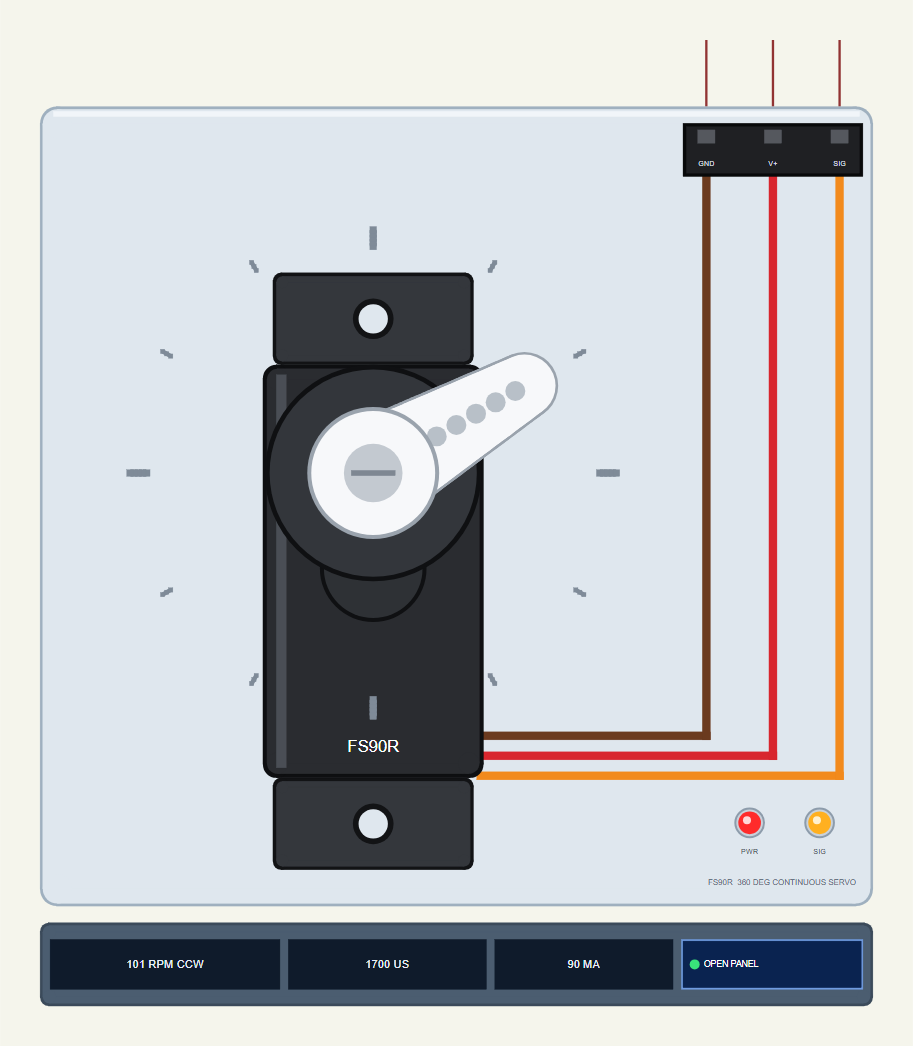
Search FS90R in Pick Devices; the device FS90RSERVOTEP is in TEPFS90R.LIB (category Electromechanical, Servo Motors) and its model is TEPFS90R.DLL. It is drawn from the top: the black body with its two ears, the round boss of the output shaft and the white single-arm horn, with the brown, red and orange cable running to the GND, V+ and SIG pins at the top right.
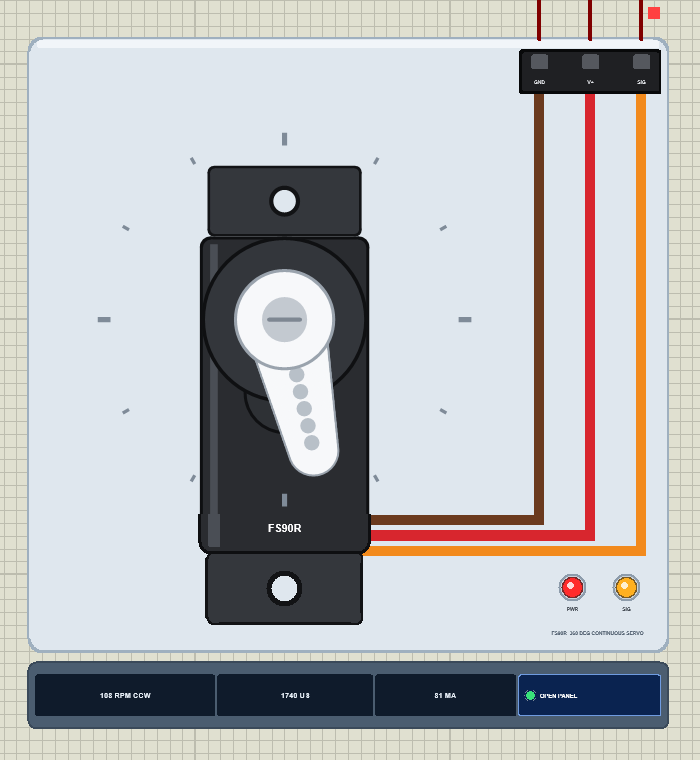
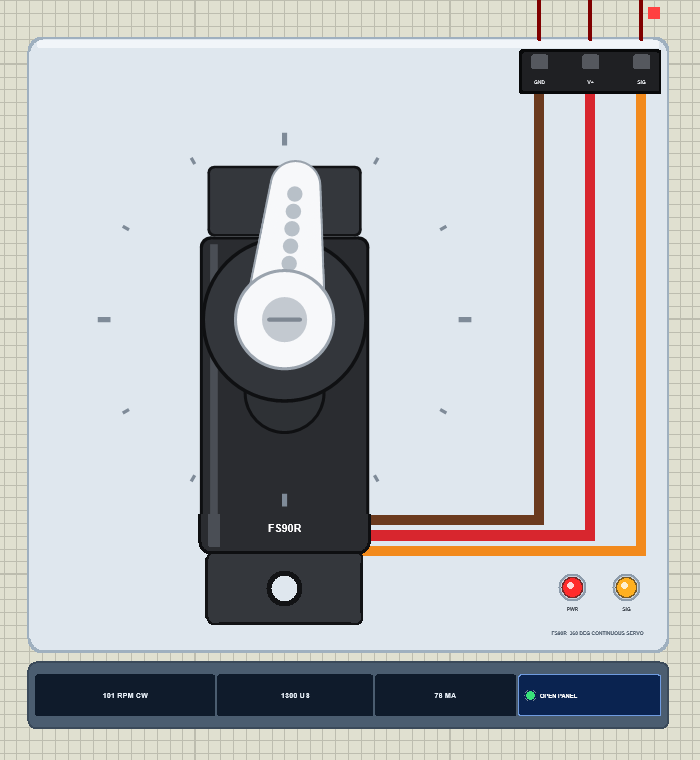
A normal servo has a 0 - 180 degree scale; the FS90R gets a full ring of ticks every 30 degrees instead, because its horn goes all the way round. While the simulation runs the horn turns at the simulated speed, with a motion blur when it is fast, so you can see the direction at a glance. The red PWR LED shows the supply, the amber SIG LED the pulses, and the strip under the plate shows the speed with its direction, the pulse width and the current, plus the OPEN PANEL button. The plate, the ring, the LEDs and the strip are TEP additions; the real servo has none of them.
The Pins and the Properties
| Pin | Wire | What the model does with it |
|---|---|---|
| GND | brown | the return of the servo's current |
| V+ | red | the supply, 4.8 - 6 V: the servo draws its current from it (3 V and less: nothing turns) |
| SIG | orange | a digital input: every edge is time-stamped; a 300 - 3000 us HIGH is a servo pulse |
| Property | Default | What it does |
|---|---|---|
| STOP_US | 1500 | the neutral pulse in us - no motion (1000 - 2000); a real FS90R sets it with its trim pot |
| LOAD | 0 | a constant load on the horn in kg.cm (the FS90R gives 1.3 kg.cm at 4.8 V) |
A Click on the Horn: the Brake
Click the horn while it turns and you hold it with a 2.0 kg.cm brake, more than an FS90R can give. An orange ring appears round the hub, the horn stops and the current on the strip jumps to about 0.6 A. Click again to let go - it is a wheel that has hit a wall.
Download FS90R Continuous Servo Library for Proteus
The download link of FS90R-Continuous-Servo-Library-for-Proteus-v1.0.zip (without the source code) will be added here soon. The zip file will contain:
- README.txt: installation, the demo, the wiring, the properties, real hardware, troubleshooting and the limits.
- Proteus Library Files:
TEPFS90R.LIBandArduinoV4TEP.LIBfrom our Arduino Library for Proteus V4.0. - Proteus Model Files:
TEPFS90R.DLLandTEPARDUINO.DLL. - Proteus Simulation:
FS90R-Continuous-Servo-ArduinoUnoV4.pdsprj,FS90R_Servo_Demo.hexand copies of the two DLLs. - Arduino Code:
FS90R_Servo_Demo.ino(the Servo library comes with the Arduino IDE).
No Proteus yet? Read How to Download and Install Proteus 7 and 8. New to libraries? Follow How to Install a New Library in Proteus.
How to Install FS90R Continuous Servo Library for Proteus
- Close Proteus and extract the whole zip file, for example to your Desktop.
- Copy
TEPFS90R.LIBandArduinoV4TEP.LIBfrom Proteus Library Files into the LIBRARY folder of Proteus (usuallyC:\Program Files (x86)\Labcenter Electronics\Proteus 8 Professional\LIBRARY). - Copy
TEPFS90R.DLLandTEPARDUINO.DLLfrom Proteus Model Files into the MODELS folder. The two Arduino files belong to our Arduino Library V4.0; if you already have it, they are the same files. - Delete
TEPFS90R.IDXfrom the LIBRARY folder if it is there. - Start Proteus, press P and search for FS90R.
Tip: keep the Proteus Simulation folder together, because the project needs its .hex file and the DLLs beside it. The library is tested in Proteus 8.5; Proteus 7 is not supported.
The Demo Circuit
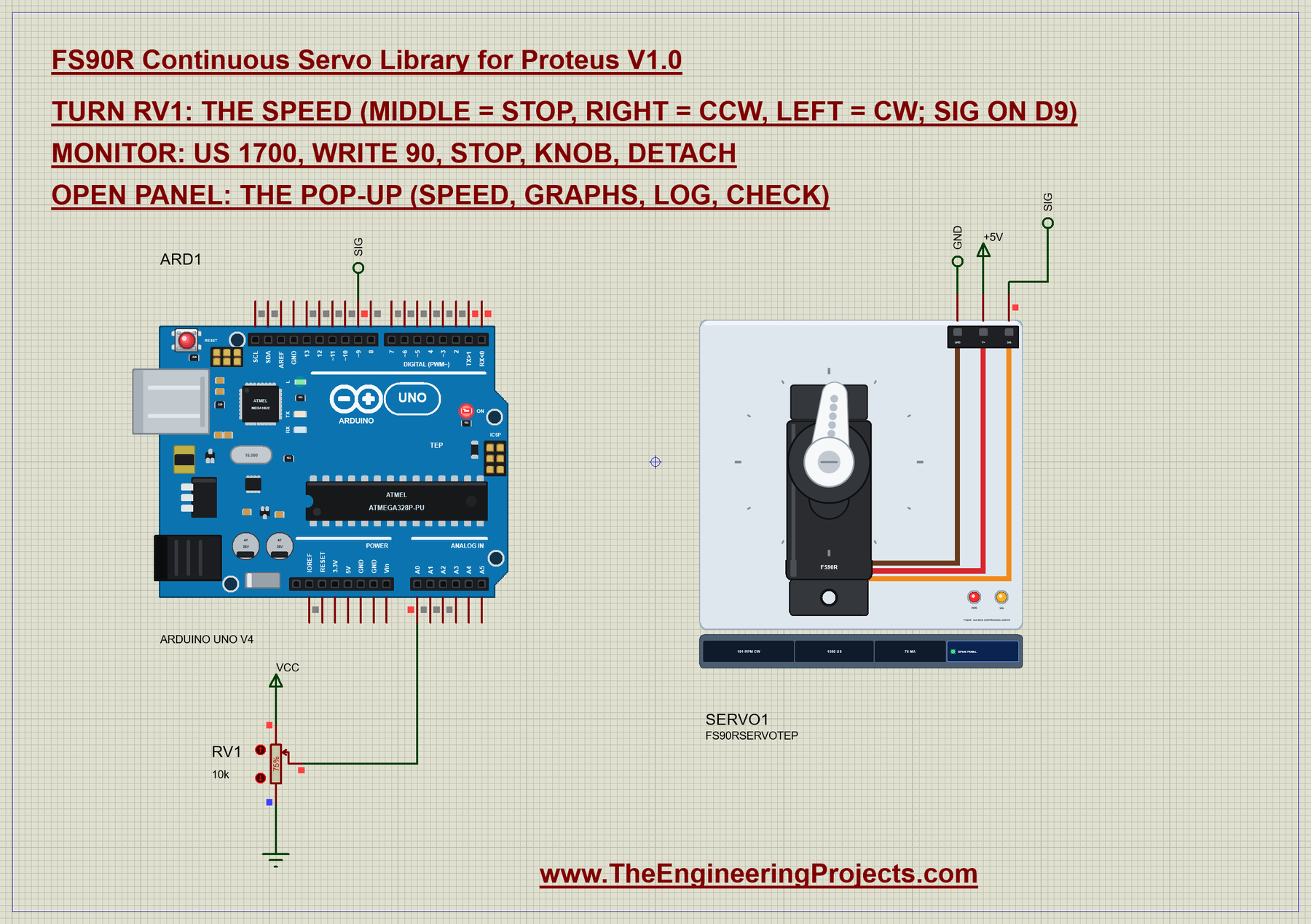
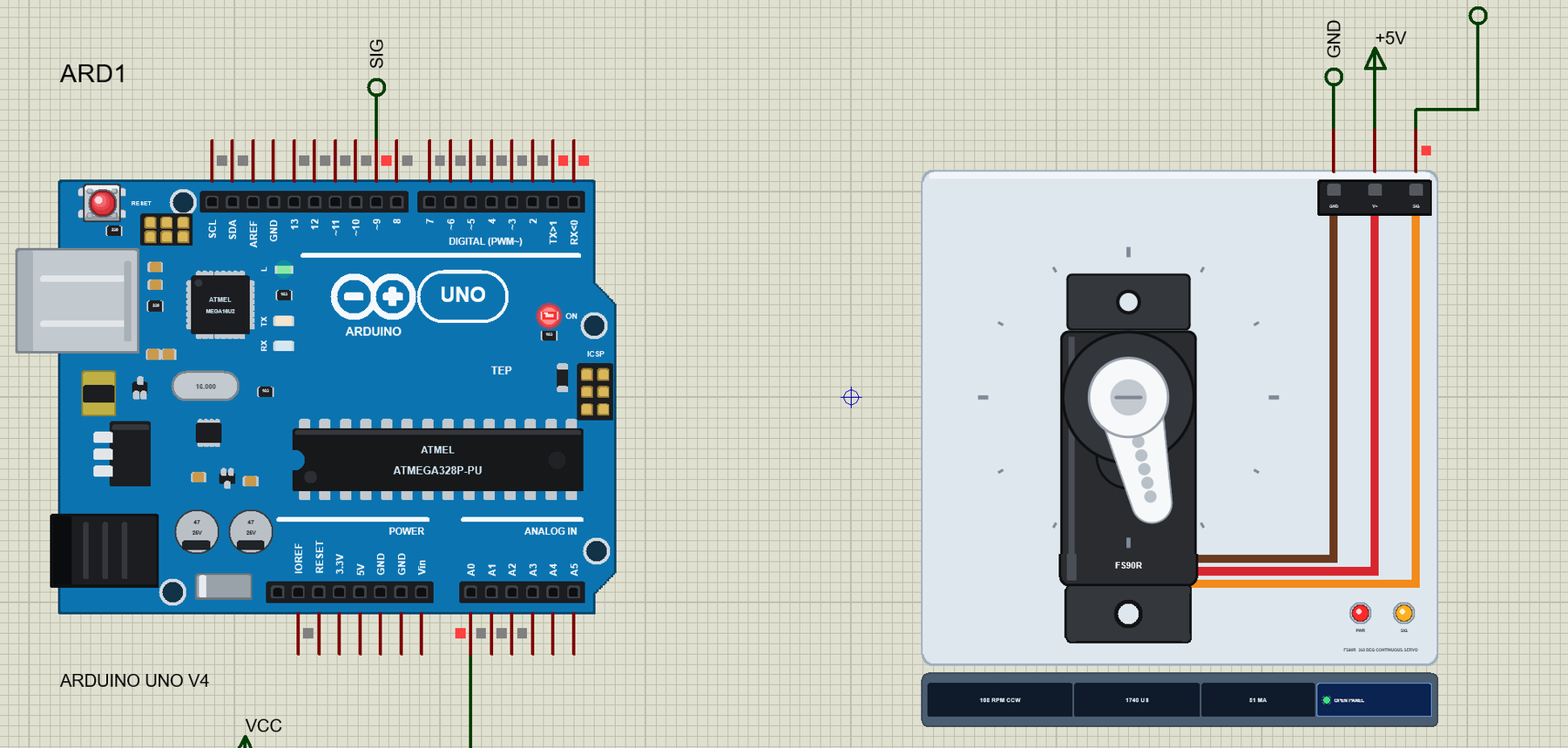
Open FS90R-Continuous-Servo-ArduinoUnoV4.pdsprj. The A4 sheet holds ARD1, an Arduino UNO V4.0 from our Arduino UNO Library for Proteus V4.0 running FS90R_Servo_Demo.hex with its serial monitor built in, SERVO1, the FS90R, and RV1, a 10k potentiometer on A0. This time the pot is a speed knob: the middle stops the servo, turning it right runs the servo CCW and turning it left runs it CW, faster the further you go.
| FS90R wire | Arduino UNO | Note |
|---|---|---|
| brown (GND) | GND | common with the supply |
| red (V+) | 5V | one FS90R with no load; a robot gives its servos their own 5 - 6 V supply |
| orange (SIG) | D9 | any digital pin: the Servo library makes the pulses with Timer1 |
| RV1 wiper | A0 | the ends of the pot on 5V and GND |
In Proteus, SIG reaches D9 through a net label called SIG, V+ sits on the +5V power terminal and GND on a ground terminal. The serial monitor needs no wires because it is built into the UNO V4.0.
The Arduino Code
The sketch uses the Servo library that comes with the Arduino IDE. New to Arduino? Start with Arduino Tutorial for Beginners and Introduction to Arduino UNO. The neutral gets a name of its own, because for a continuous servo it is the most important number in the sketch:
const int SERVO_PIN = 9;
const int POT_PIN = A0;
const int STOP_US = 1500;
setup() attaches the servo and sends the neutral straight away, so the servo stands still until the sketch asks for something else:
void setup() {
  Serial.begin(9600);
  servo.attach(SERVO_PIN);
  servo.writeMicroseconds(STOP_US);
The speed knob maps the pot onto 1000 - 2000 us. A band of 40 counts in the middle of the pot maps to exactly 1500 us, so the servo really stops when the knob is in the middle, even if the pot or the ADC is a few counts off:
    int raw = analogRead(POT_PIN), us = STOP_US;          // a dead zone in the middle: a sure stop
    if (raw > 532) us = STOP_US + (long)(raw - 532) * 500 / 491;
    else if (raw < 492) us = STOP_US - (long)(492 - raw) * 500 / 492;
For every pulse the sketch prints what it asks for - stop, CCW or CW, and how far from the neutral:
// what a pulse asks for: stop / CCW / CW
void report(int us) {
  Serial.print(us);
  if (us == STOP_US) Serial.println(F(" us = stop"));
stop is one line - the neutral, written as a pulse width:
if (!strcmp(s, "stop")) { mode = FIXED; servo.writeMicroseconds(STOP_US); Serial.print(F("writeMicroseconds(1500): ")); report(STOP_US); return; }us sends any pulse between 544 and 2400 us, the limits of the Servo library:
  if (!strncmp(s, "us", 2)) {
    int w = atoi(s + 2);
    if (w < 544 || w > 2400) { Serial.println(F("Pulse width: 544 - 2400 us")); return; }
    mode = FIXED;
    servo.writeMicroseconds(w);
And write uses the angle function of the library on purpose, then asks the library which pulse it really sends. That is the line that shows the trap:
  if (!strncmp(s, "write", 5)) {
    int a = atoi(s + 5);
    if (a < 0 || a > 180) { Serial.println(F("write: 0 - 180")); return; }
    mode = FIXED;
    servo.write(a);
    Serial.print(F("write(")); Serial.print(a); Serial.print(F(") sends ")); report(servo.readMicroseconds());
The HEX file is in the package. To change the sketch, open it in the Arduino IDE and export the compiled binary, as in How to get the HEX file from Arduino. It needs 6,232 bytes of flash (19 % of the UNO) and 301 bytes of RAM.
Running the Demo
Press Run. The UNO's serial monitor and the servo's pop-up open over the schematic; move them aside. RV1 starts at 75 %, so the first reading asks for a pulse of 1740 us:
FS90R Continuous Servo demo - The Engineering Projects
The pot on A0 is the speed: middle = stop, right = CCW, left = CW.
Commands: us 1700 | write 90 | stop | knob | detach | help
Pot 768 -> 1740 us = CCW, 240 us from the stop
That is 240 us from the neutral, well into the fast part of the curve. The horn starts turning counterclockwise and settles at 108 RPM; the Event log says "steady 108 RPM CCW at 1740 us, 81 mA". Click the arrows of RV1 and the speed follows the knob; in the middle the servo stops.
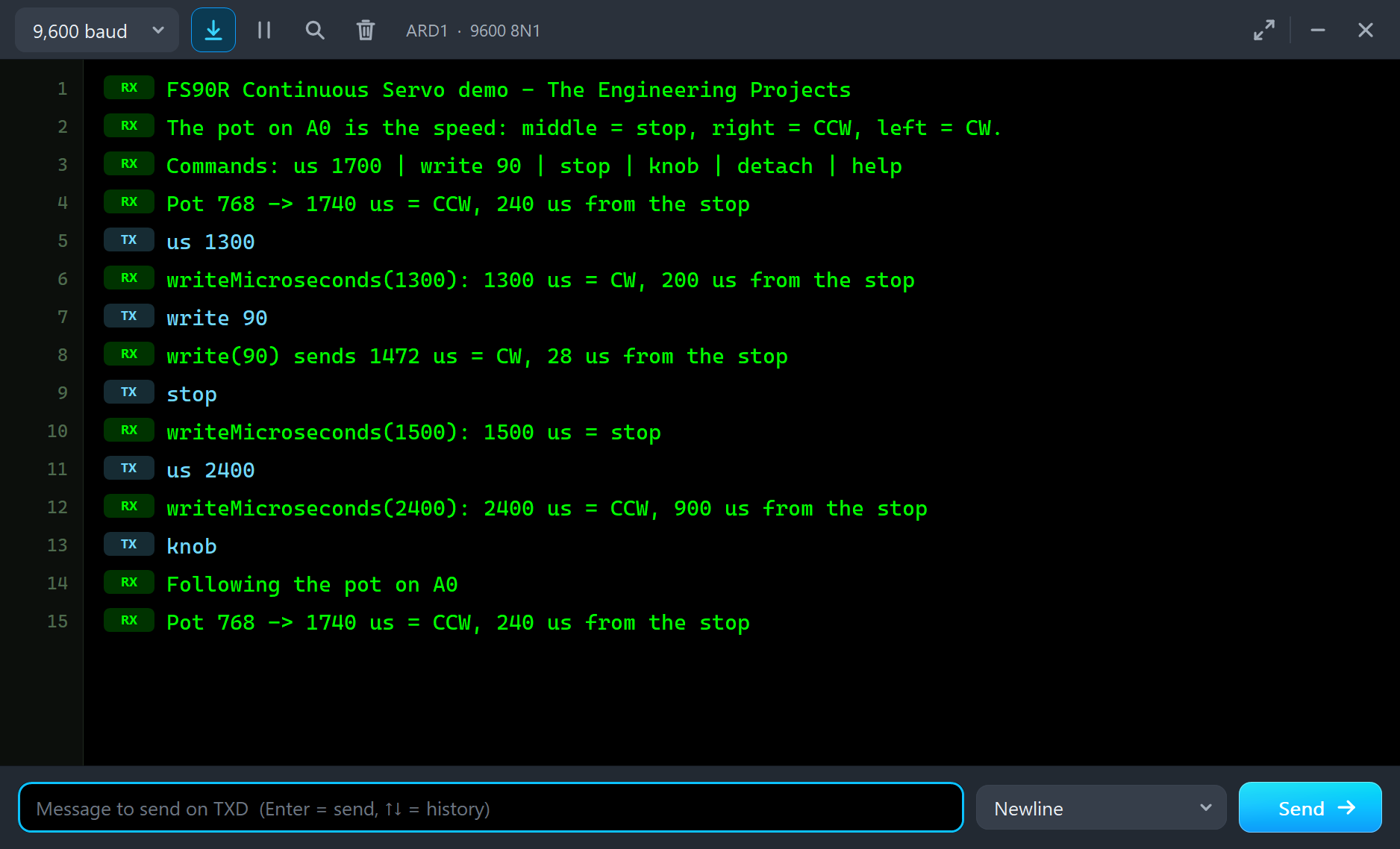
Type a command in the monitor and press Send. The knob is ignored until you type knob:
us 1300
writeMicroseconds(1300): 1300 us = CW, 200 us from the stop
write 90
write(90) sends 1472 us = CW, 28 us from the stop
stop
writeMicroseconds(1500): 1500 us = stop
us 1300 is 200 us on the other side of the neutral, so the servo reverses and settles at 100.7 RPM clockwise with 76 mA. write 90 is the interesting one - see the next section. stop sends exactly 1500 us and the horn stands still, drawing only 6 mA. Then the brake test and the way back:
us 2400
writeMicroseconds(2400): 2400 us = CCW, 900 us from the stop
knob
Following the pot on A0
Pot 768 -> 1740 us = CCW, 240 us from the stop| Type | What it does | What the run showed |
|---|---|---|
| us 1700 | writeMicroseconds(), 544 - 2400 us | us 1300: 100.7 RPM CW, 76 mA |
| write 90 | servo.write(90) - the angle function | 1472 us: it creeps about 3 RPM CW, 18 mA |
| stop | writeMicroseconds(1500) | 0 RPM, 6 mA |
| knob | follow the pot on A0 again | back to 108 RPM CCW |
| detach | stop the pulses | the motor is no longer driven and stops |
| help | the list of commands |
The Pop-Up Window
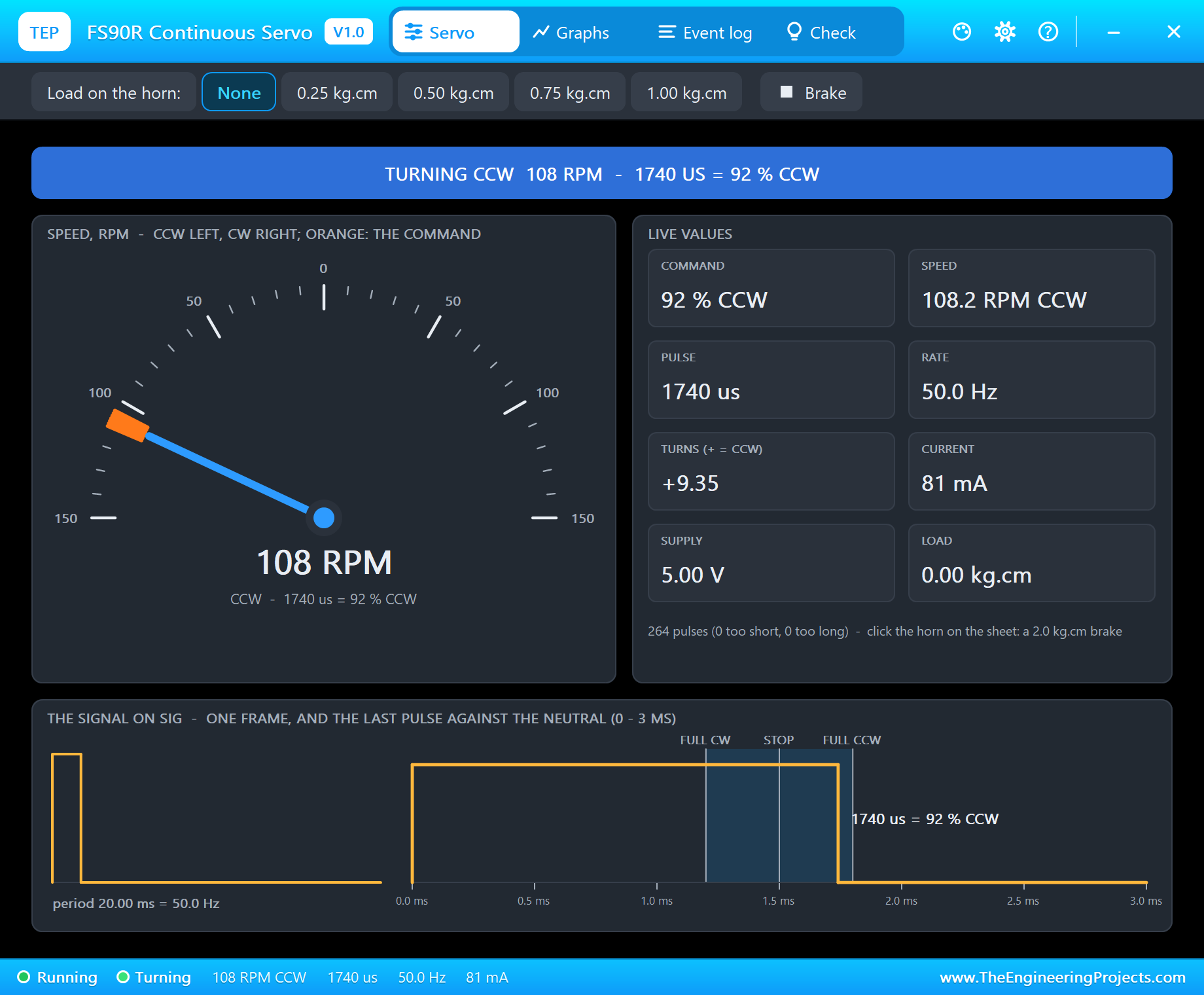
At Run the servo opens TEP FS90R Continuous Servo, a window in the look of our TEP Serial Monitor Advance for Proteus. The Servo page has a banner with the state - TURNING, STOPPED, CREEPING, NO PULSES, STALLED or NO POWER - and a speed gauge from 150 RPM CCW on the left to 150 RPM CW on the right. The needle is the horn's speed, the orange mark the speed the pulse asks for. The live values are the command in percent, the speed, the pulse, the rate, the turns since the start, the current, the supply and the load. At the bottom the last pulse is drawn against three marks: FULL CW, STOP and FULL CCW.
Graphs draws the speed with the command, the supply current and the pulse width over the last 1, 3 or 6 seconds. Event log lists every command and every steady speed. Check gives each condition a green, amber or red verdict, and the gear and question mark icons open Settings and Help. If you close the window, OPEN PANEL on the strip brings it back.
The Most Common Mistake: write(90) Is Not Stop
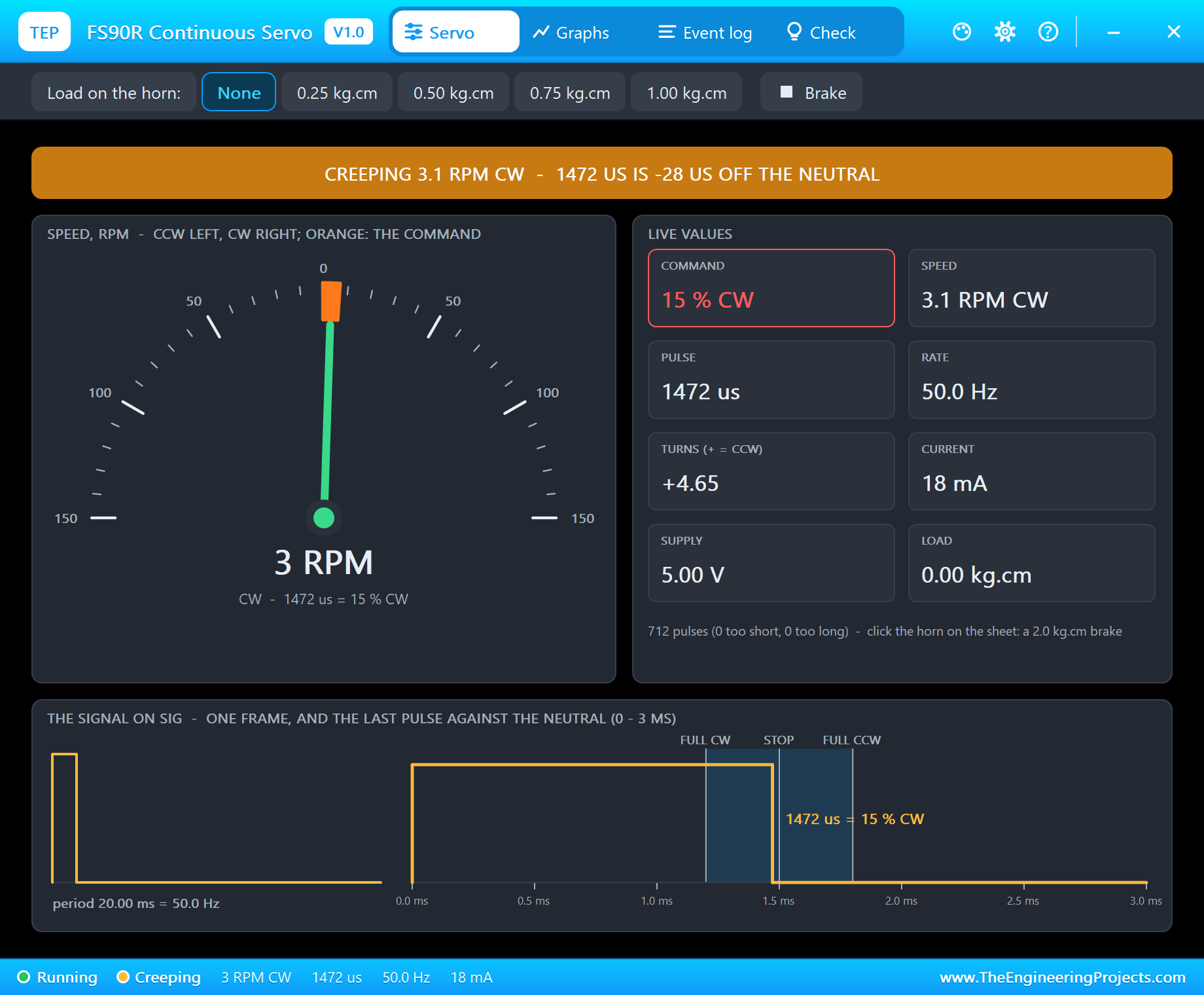
Every tutorial for a normal servo uses write(angle), so the first thing most people try with an FS90R is write(90) for "stop" - the middle of the range. The servo does not stop. It creeps slowly clockwise, a few turns a minute, and the robot drifts across the table.
The reason is in the Servo library, not in the servo. write() maps 0 - 180 onto the library's limits of 544 - 2400 us, and the middle of that range is 544 + 928 = 1472 us, not 1500. That is 28 us on the clockwise side of the neutral, well outside the dead band, so the FS90R does what it is told: it turns, slowly. The demo's monitor shows it plainly - "write(90) sends 1472 us = CW, 28 us from the stop" - and the model creeps at about 3 RPM clockwise, 2.9 to 3.1 RPM in our run, drawing 18 mA.
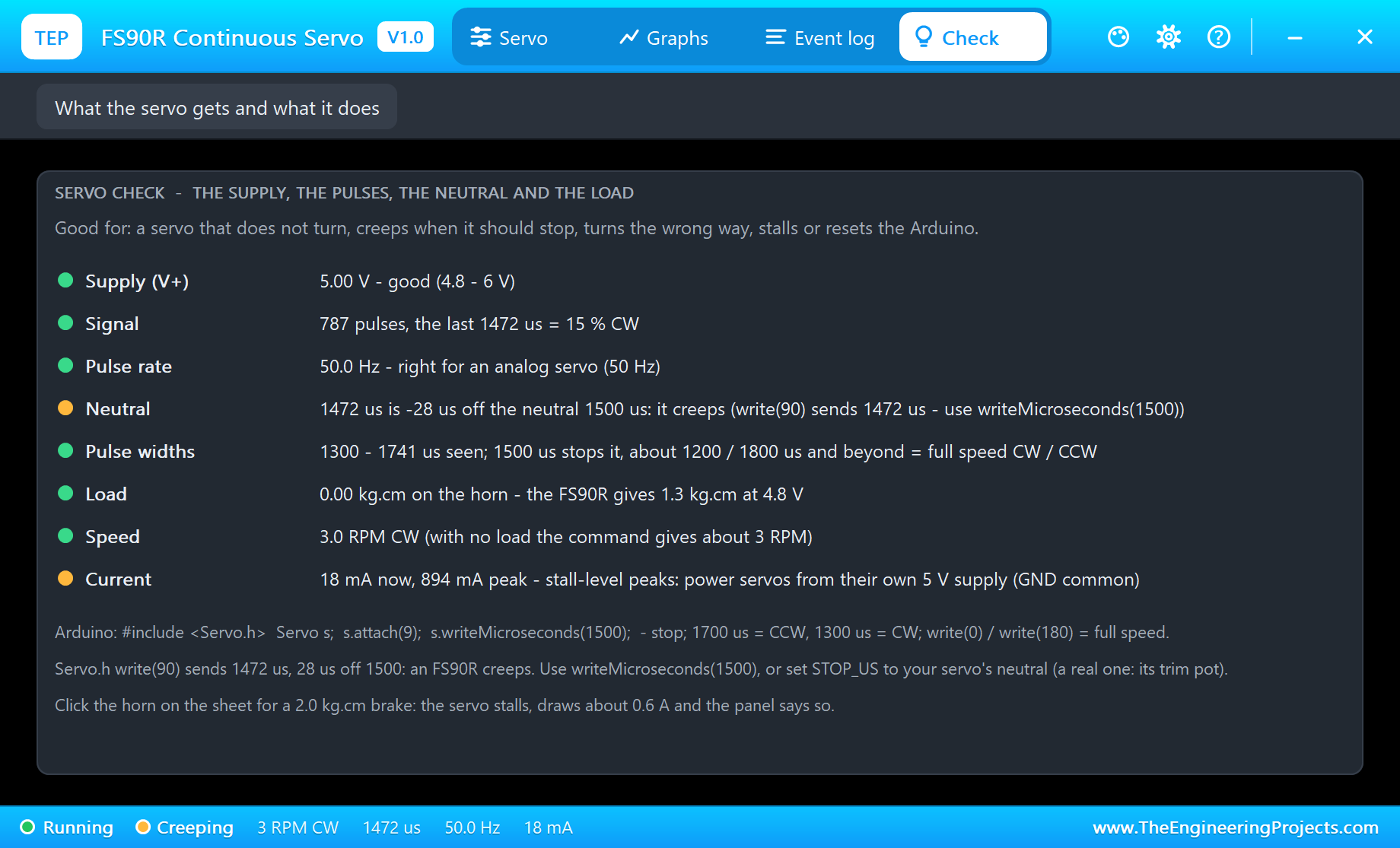
The pop-up names the problem in three places: the amber CREEPING banner, a warning in the Event log, and the Neutral row of the Check page - "1472 us is -28 us off the neutral 1500 us: it creeps (write(90) sends 1472 us - use writeMicroseconds(1500))". There are two fixes:
- In the sketch: stop the servo with
writeMicroseconds(1500), never withwrite(90). Type stop in the demo and the servo stands still at 0 RPM. - In the servo: a real FS90R has a trim pot behind a hole in its case. Turn it until the servo stands still at 1500 us. In the simulation the property STOP_US plays the trim pot: set it to your servo's neutral and the model stops there.
Even writeMicroseconds(1500) does not guarantee a stop on real hardware, because every FS90R's neutral is a little different. If yours creeps at 1500 us, trim it, or find the pulse at which it stands still and use that number in the sketch.
Stalling the FS90R
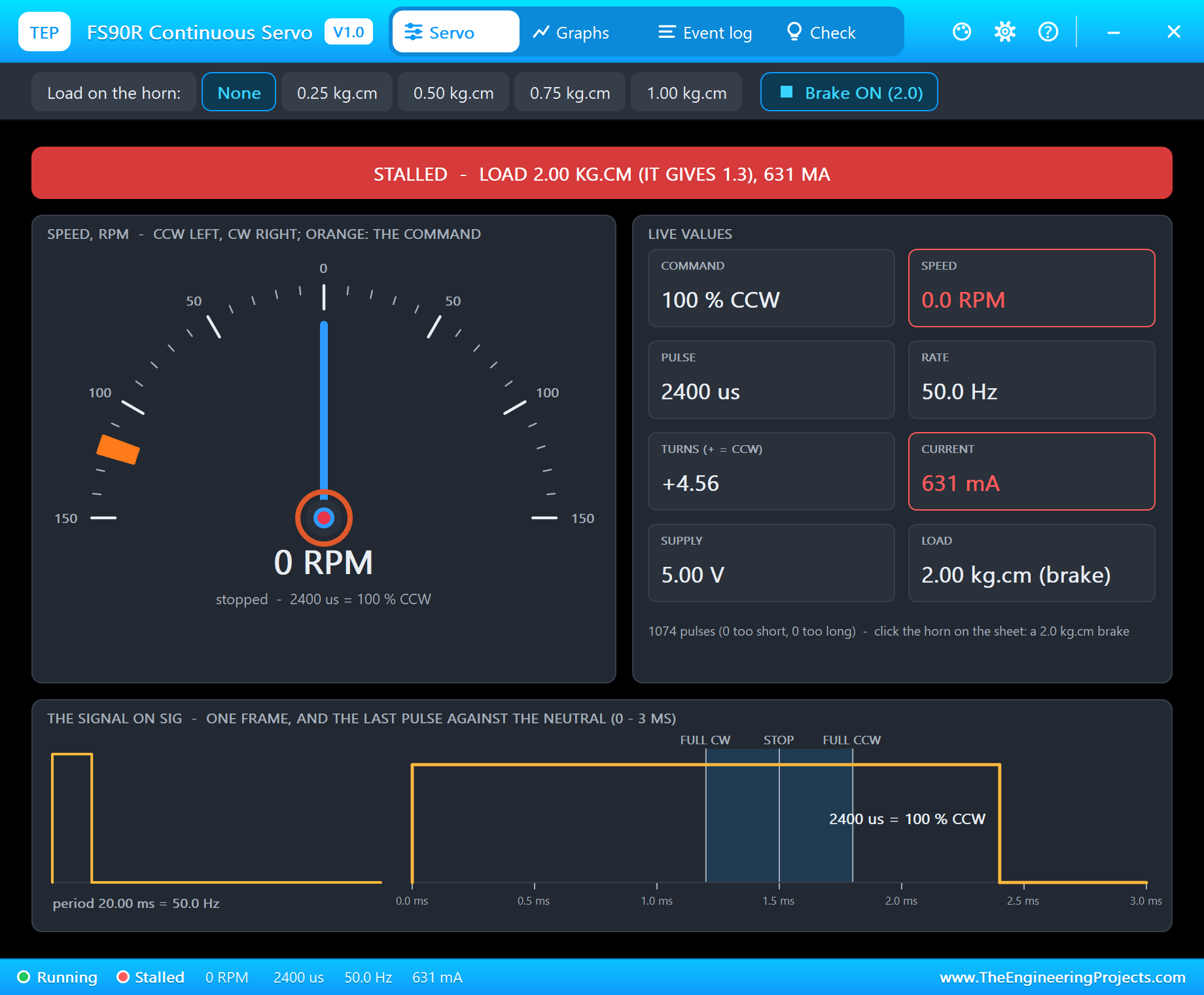
Click the Brake chip, or the horn on the schematic, and type us 2400 for full speed CCW. The command says 100 % CCW, but the needle stays at zero: the brake holds 2.0 kg.cm and the FS90R gives 1.3. The banner turns red and the current climbs to 631 mA - the stall current of a micro servo. On a robot car this is a wheel against a wall, and a few of them can brown out an Arduino on USB power.
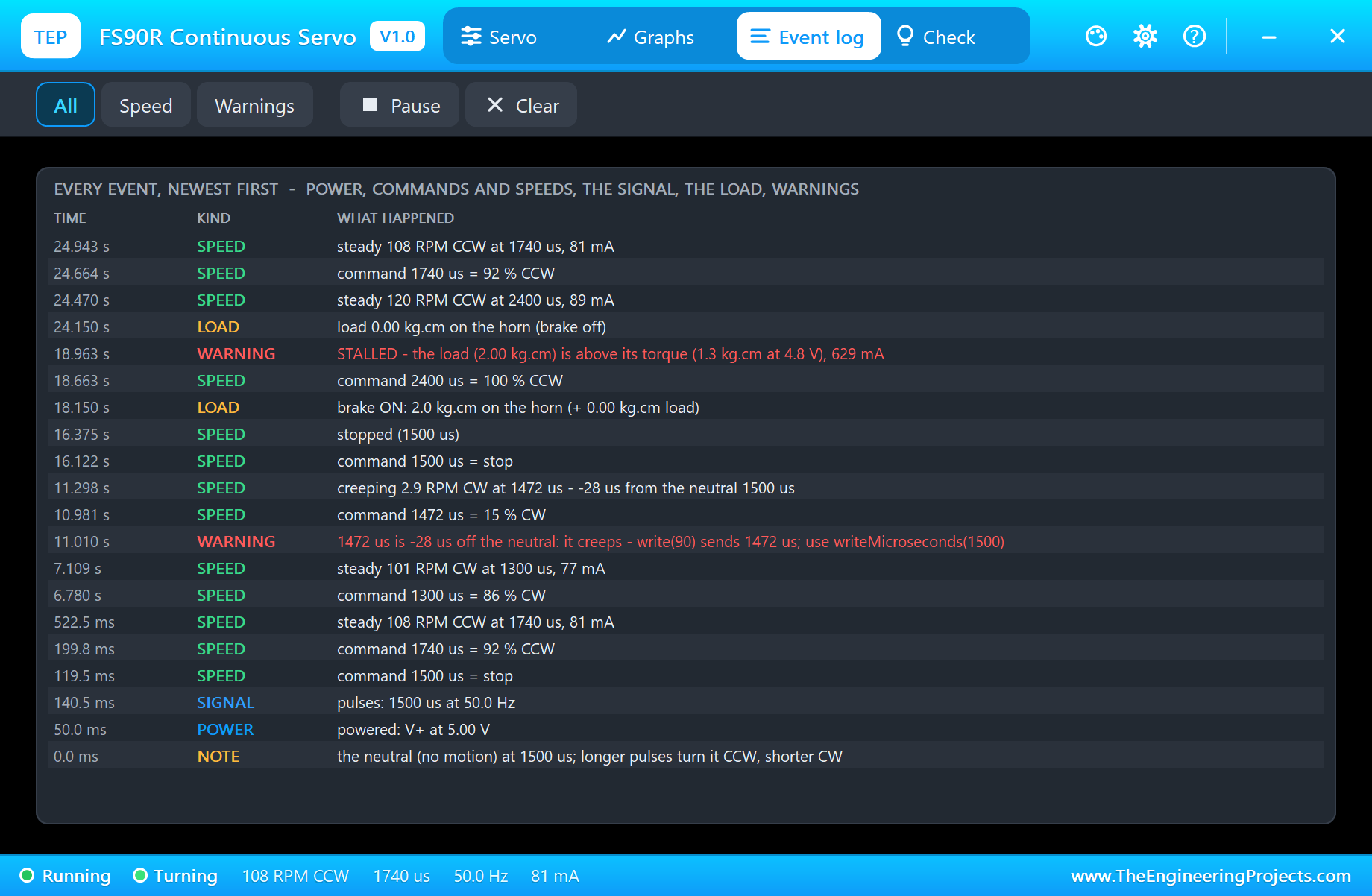
The Event log keeps the story of the run, newest first. Each command appears with its meaning, like "command 1300 us = 86 % CW", and each speed the servo settles at, like "steady 101 RPM CW at 1300 us, 77 mA". The creep has its own line and a warning, and the stall reads "STALLED - the load (2.00 kg.cm) is above its torque (1.3 kg.cm at 4.8 V)". After the brake is released the servo runs at full speed, about 120 RPM at 2400 us, and after knob it is back at 108 RPM CCW.
Two FS90Rs on a Robot Car
On a two-wheeled car the two servos are mounted facing each other, one on each side. So "forward" is counterclockwise for one wheel and clockwise for the other: one servo gets 1500 + x, the other 1500 - x. Turning on the spot means both get the same side of the neutral. Write that once in a small function and the rest of the sketch can think in "forward", "left" and "right".
Two more things help. The speed curve flattens about 300 us from the neutral, so for gentle control keep the pulses within that band. And two servos never have quite the same neutral or the same full speed, so a car that pulls to one side needs a small correction on one wheel. The FS90R has no position feedback at all: "turn 90 degrees" means "turn for a while", and for distances you need wheel encoders.
How the Model Works
Proteus solves the analog part of a circuit in time steps and runs the digital part, the Arduino with its pulses, before each step. The servo keeps every edge on SIG with its time, so it measures each pulse to the microsecond. From the width it computes a speed command with a 5 us dead band round STOP_US and a smooth curve that reaches full speed about 300 us away. Then it integrates the 8 ohm motor, the gearbox, the horn's inertia, the friction and the load in 50 us slices, and drives the motor only for about 22 ms after each pulse, like the real board.
The current is drawn from V+ in your circuit, so an ammeter or a probe on the red wire reads what the pop-up shows. We checked the model on a PC with 31 automatic tests: 1500 us stands still, write(180) gives 114 RPM and 87 mA at 4.8 V and reaches 90 % of that speed in 33 ms, 6 V gives 147 RPM, write(90) creeps at 3 RPM while 1503 us does not move, 1.0 kg.cm slows it to 26 RPM, 1.25 kg.cm still turns and 1.35 kg.cm stops it.
Need a normal servo that goes to an angle? Our SG90 Servo Motor Library for Proteus is the same size with the 180 degree position loop. Driving many servos? Our PCA9685 Servo Driver Library for Proteus makes sixteen sets of pulses over I2C.
Troubleshooting
- The horn never turns and the pop-up says NO POWER: V+ is not connected or below 3 V; an FS90R wants 4.8 - 6 V.
- WAITING FOR PULSES: SIG is on another pin than the one in
attach(), or the sketch never callsattach(). - It creeps when it should stop: the pulse is a little off the neutral -
write(90)sends 1472 us. UsewriteMicroseconds(1500), or set STOP_US. - It turns the wrong way: longer pulses turn it CCW; swap the sign in the sketch (1500 + x for CCW, 1500 - x for CW).
- "SIG stays HIGH" or "pulses under 300 us":
digitalWrite()oranalogWrite()on the SIG pin - use the Servo library. - Slow or STALLED: a load - the LOAD property, a load button or the brake (the orange ring) - or a low V+.
- No horn, no UNO or no monitor:
TEPFS90R.DLLorTEPARDUINO.DLLis missing from MODELS and the project folder; a closed monitor opens again with a click on the UNO's USB port.
Things to Know Before Using a Real FS90R
- Power: one FS90R draws up to about 0.6 A when it starts or stalls. Two of them on a robot car, or any load, want their own 5 - 6 V supply for the red wires, with GND common to the Arduino.
- The neutral: every FS90R stops at a slightly different pulse. Turn its trim pot until it stands still at 1500 us, or find its neutral and use that number.
- No position feedback: the servo knows its speed, not its angle; use wheel encoders for distances.
- analogWrite() is not a servo signal: it is 490 or 980 Hz PWM. Use the Servo library.
- The Servo library uses Timer1: on an UNO,
analogWrite()on D9 and D10 stops working while a servo is attached.
Limitations of the Simulation
- The model is the FS90R continuous rotation servo at 50 Hz; standard 180 degree servos are our SG90 and MG996R libraries.
- Not modelled: the differences in neutral and speed curve from part to part (set STOP_US for the neutral), gear play, heating, and damage from a wrong supply (the model only warns).
- The plate, the ring of ticks, the LEDs, the strip and the brake are TEP additions.
- The model is our own, written from the typical data of the FS90R; this library is not made or endorsed by FEETECH, Arduino or Labcenter.
- Licences: the demo HEX contains the Arduino Servo library 1.2.2 (LGPL 2.1) and the Arduino AVR core 1.8.6 (LGPL); the sketch is included and the README gives the source links. The potentiometer is Proteus's own POT-HG.
- Tested in Proteus 8.5 in October 2026 with the demo as shipped: the knob, us 1300, write 90, stop, the brake with us 2400, knob again and all four pages of the pop-up. Proteus 7 is not supported.
So, that was all about the FS90R Continuous Servo Library for Proteus V1.0. I hope it helps you drive your robot wheels with the right pulses - and stop them with 1500 us, not with write(90) - before you build the car. If you have any questions, ask in the comments and I will help you out. Till the next tutorial, take care and have fun!