Hello friends, I hope you all are doing great. Today, I am going to share the LOLIN S2 Mini Library for Proteus. The S2 Mini from WEMOS / LOLIN is a small, cheap Wi-Fi board built around Espressif's ESP32-S2: one fast core, Wi-Fi, a USB-C port wired straight to the chip and 27 GPIO pins on a board not much bigger than a postage stamp. With this library it runs your ESP32-S2 Arduino sketch in Proteus 8.5 and joins our virtual Wi-Fi network.
LOLIN S2 Mini Library for Proteus
Latest version: V1.0 (October 2026, this tutorial)
Other ESP32 boards and modules: ESP32 DevKit V1 · ESP32-DevKitC V4 · ESP32-S3 DevKitC-1 · ESP32-C3 SuperMini · ESP32-C6 DevKitC-1 · TTGO T-Display · T-Display S3 · XIAO ESP32-C3 · Heltec WiFi LoRa 32 V3 · LilyGO T-Beam · ESP32-CAM · ESP32-WROOM-32 · AirLift WiFi Shield · AirLift ESP32 Breakout · WT32-ETH01
Gas and fire sensors: Gas MQ-2 · MQ-3 / MQ-7 / MQ-135 · MH-Z19B CO2 · PMS5003 · CCS811 · Flame Sensor
Helping Tools
- Laptop WiFi Monitor: a laptop on the Wi-Fi of your design: a browser, a TCP / UDP terminal and ping
- Mobile WiFi Monitor: a smartphone that opens the pages of your board and sends it commands
- Serial Monitor Advance: a serial terminal window for the UART of your board
The demo is a kitchen fire and gas alarm. A flame sensor watches the stove for an open flame, an MQ-5 gas sensor measures LPG and natural gas in ppm, an ALARM LED lights when something is wrong, and a phone and a laptop follow the kitchen on the board's web page - with a RESET button for when the danger is over.
NOTICE: Proteus has no ESP32-S2 model, so our team has put a lot of effort into building this board ourselves: the S2 Mini's pins, Wi-Fi and LEDs are all our own model, and your sketch compiles with our free TEP Boards for Proteus add-on. Your feedback is the fuel that keeps us going, so please tell us what you think in the comments below or in the LOLIN S2 Mini board of our forum. And if our free libraries help you, you can buy us a coffee. So, let's get started with the LOLIN S2 Mini Library for Proteus:
What is the LOLIN S2 Mini?
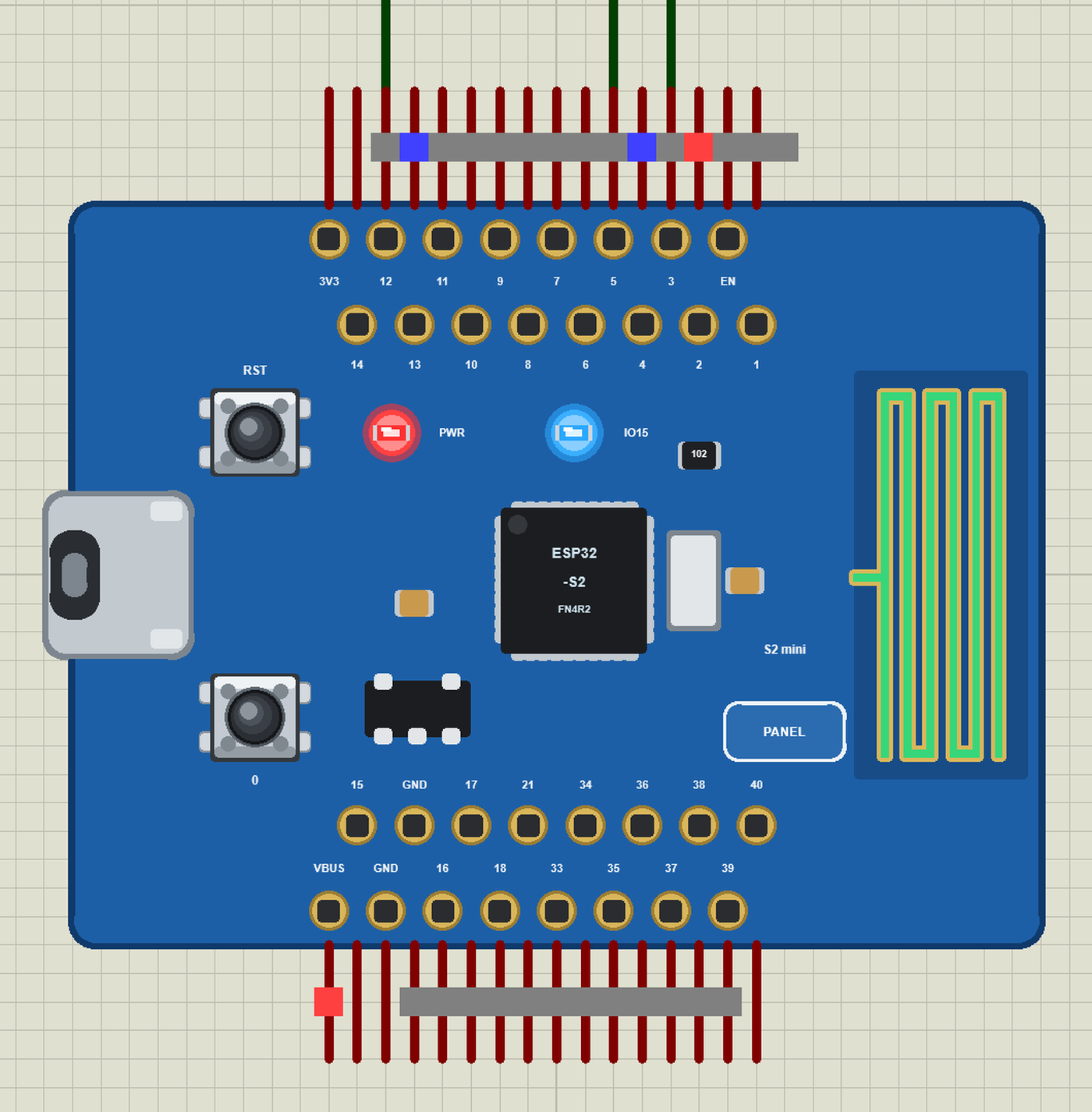
LOLIN is the brand WEMOS uses for its boards - the makers of the famous D1 Mini. The S2 Mini keeps the D1 Mini's size and its outer pin rows, so most D1 Mini shields still fit, but it carries an ESP32-S2FN4R2: a single Xtensa LX7 core at 240 MHz, 320 KB of RAM, 4 MB of flash and 2 MB of PSRAM inside the chip, and 2.4 GHz Wi-Fi. The S2 has no Bluetooth; instead it has a native USB port, so the USB-C socket goes straight to the chip without a USB-serial converter. The board has two buttons - 0 (BOOT) and RST - a blue LED on GPIO15 and a PCB antenna.
| LOLIN S2 Mini | WeMos D1 Mini | |
|---|---|---|
| Chip | ESP32-S2 (240 MHz, 320 KB RAM) | ESP8266 (80 MHz, 80 KB RAM) |
| Size | 34.3 x 25.4 mm | 34.2 x 25.6 mm |
| Pins | 2 x 2 rows of 8, 27 GPIOs | 2 x 8, 11 GPIOs |
| Analog inputs | 20 ADC channels (12 bits) | one (A0, 10 bits) |
| USB | native USB (CDC, HID) | CH340 serial converter |
| Bluetooth | none | none |
Our WeMos D1 Mini Library for Proteus is the S2 Mini's older brother; a D1 Mini project moves to the S2 Mini with more pins, a faster core and many more analog inputs. For an even smaller Wi-Fi board, see our XIAO ESP32-C3 Library for Proteus - a thumbnail-sized ESP32-C3.
Why the LOLIN S2 Mini?
Pick the S2 Mini when a project needs Wi-Fi and lots of inputs but no Bluetooth: a sensor hub with several analog sensors, a home automation node, a USB keyboard or MIDI device (thanks to the native USB), or a cheap upgrade for a D1 Mini design that has run out of pins. The ESP32-S2 is also one of the lowest-power Wi-Fi chips of the ESP32 family, which matters for a node that runs all day.
Features of the LOLIN S2 Mini Library for Proteus
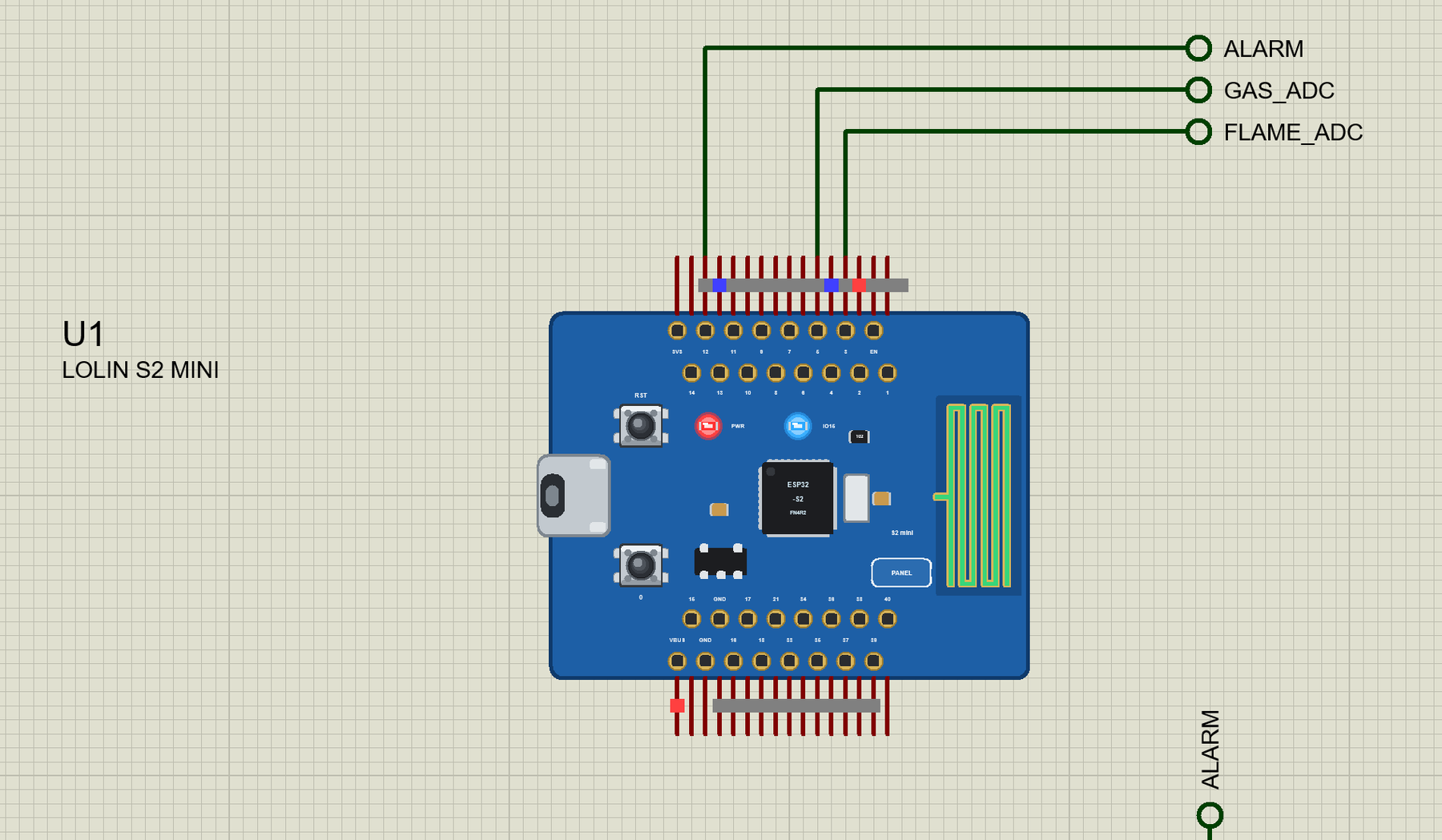
- The board as it looks: the S2 Mini with its four rows of pins, USB-C, 0 and RST, the ESP32-S2, the PWR and blue LEDs and the PCB antenna.
- Your sketch: a .hex for "LOLIN S2 Mini (TEP Proteus)" with the S2's GPIO numbers - analogRead and analogReadMilliVolts 0 to 4095, analogWrite and ledc PWM, attachInterrupt, Serial, Serial2, Wire on 33 / 35, SPI on 7 / 9 / 11 / 12.
- Wi-Fi: WiFi.begin, WebServer, HTTPClient, mDNS and NTP on our virtual router TEP-WiFi; the board is 192.168.1.101 in the demo.
- The panel and the serial monitor: the board's panel (Wi-Fi, Pins, Test) and the built-in serial monitor with Monitor, Plotter and Board tabs - our TEP header, no Windows title bar.
- A complete package: about 3.6 MB with the board, the add-on, the flame and MQ sensor libraries and the demo, without the source code of the models.
The LOLIN S2 Mini in Proteus
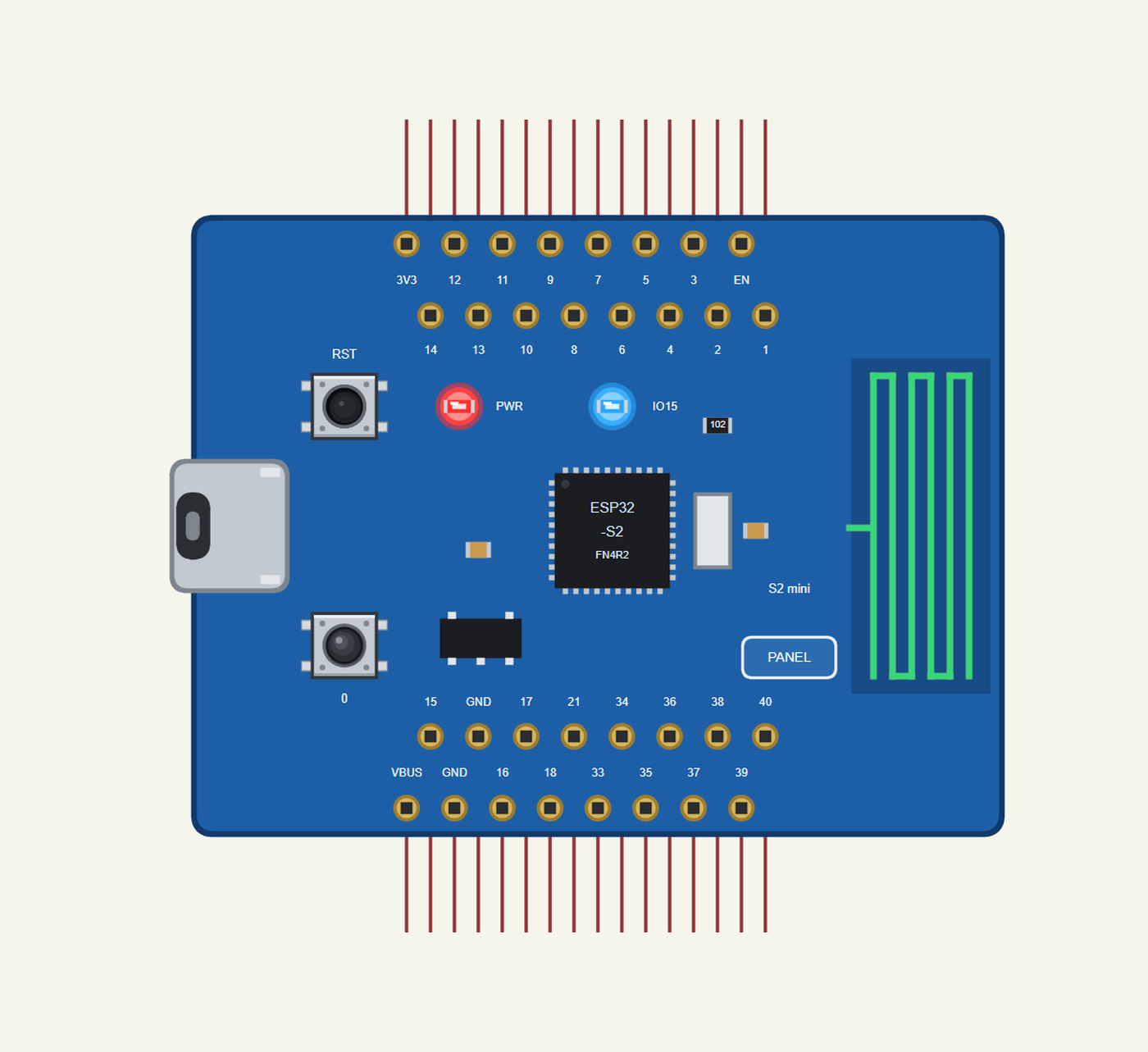
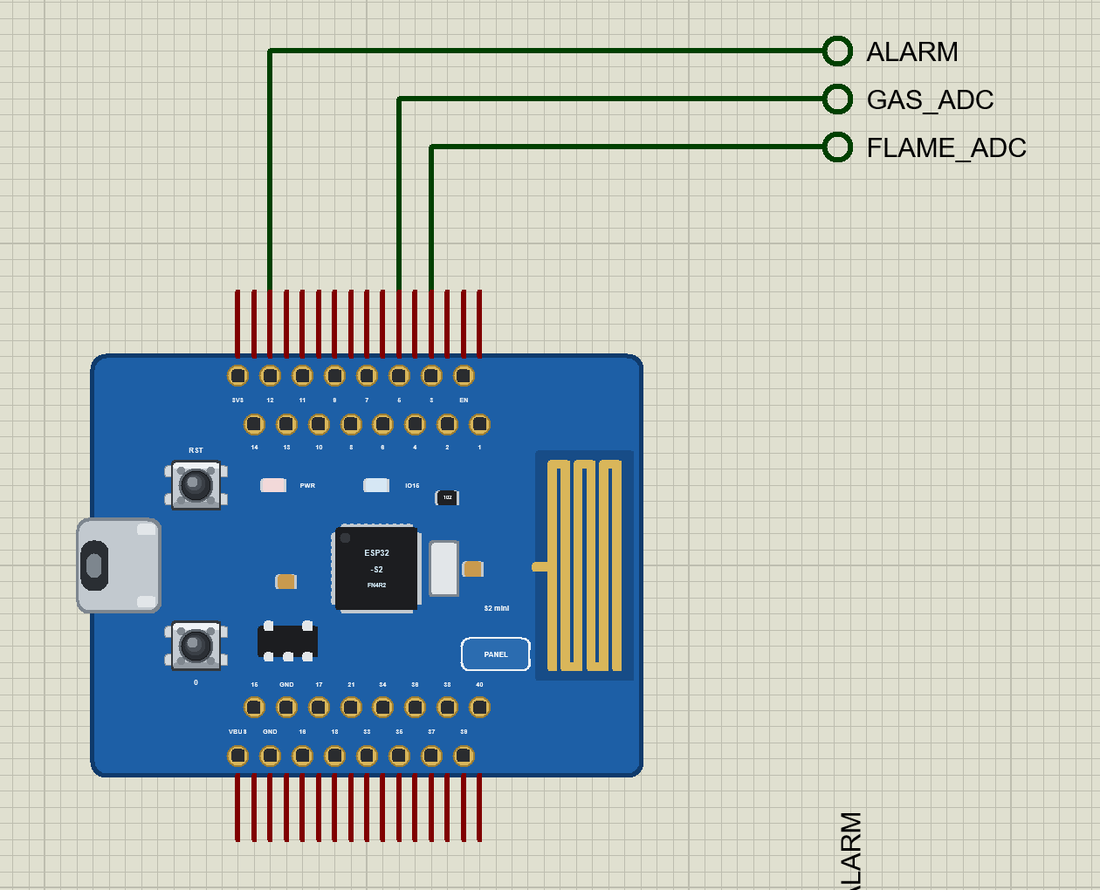
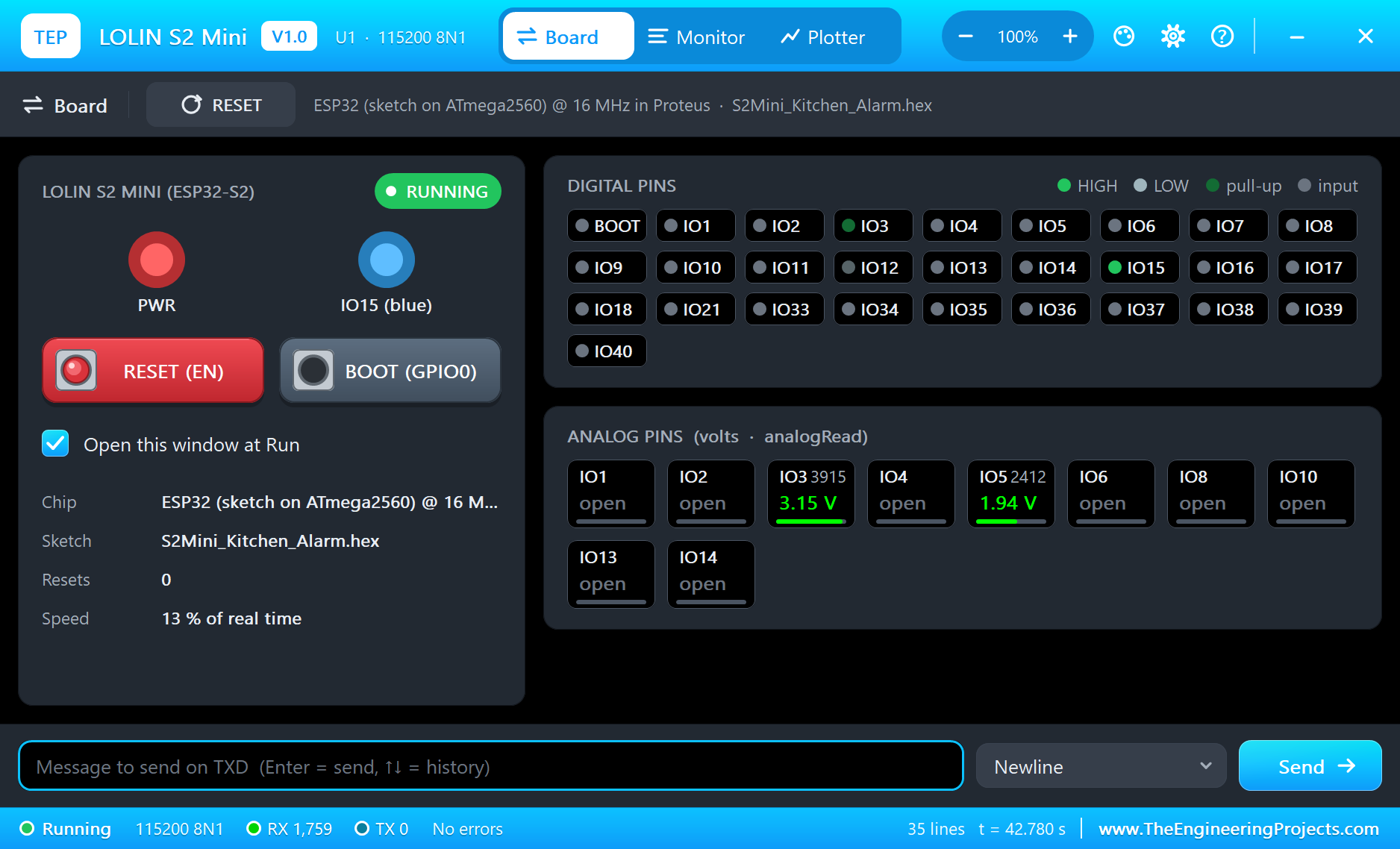
Search LOLIN in Pick Devices; the device LOLIN S2 MINI is in TEPS2MINI.LIB (Microprocessor ICs, ESP32 Boards), with the prefix U. The board lies with the USB-C port on the left. On the real board the inner rows sit in line with the outer ones; in Proteus they are drawn half a pin step along, so every pin gets its own wire. Click the USB-C port to open the serial monitor and the PANEL pad (or the chip) to open the board's panel.
The Pins
| Pins | What the library does with them |
|---|---|
| 1 to 6, 8, 10, 13, 14 | GPIO, analogRead (A0 to A9, A12, A13), PWM, interrupt |
| 7, 9, 11, 12 | SPI SCK / MISO / MOSI / SS |
| 33 / 35 | Wire SDA / SCL |
| 39 / 37 | Serial2 TX / RX |
| 15 | GPIO and the blue LED (LED_BUILTIN) |
| 16, 17, 18, 21, 34, 36, 38, 40 | GPIO, PWM, interrupt |
| 3V3, VBUS, GND, EN | 3.3 V, 5 V, ground, reset |
Download LOLIN S2 Mini Library for Proteus
Click the button below to download LOLIN-S2-Mini-Library-for-Proteus-v1.0.zip (about 3.6 MB, without the source code of the models):
LOLIN S2 Mini Library for Proteus V1.0- README.txt: installation, the demo, the pins, the properties, troubleshooting and the limits.
- Proteus Library Files:
TEPS2MINI.LIBand the demo's parts:TEPFLAME.LIB,TEPMQGAS.LIB,TEPLAPTOP.LIBandTEPMOBILE.LIB. - Proteus Model Files:
TEPNET.DLL(the board, the laptop, the phone and the network),TEPFLAME.DLLandTEPMQGAS.DLL. - Arduino Code: the demo sketch and the TEP Boards for Proteus add-on 1.25.0.
- Proteus Simulation: the demo project, its HEX file and copies of the DLLs.
No Proteus yet? Read How to Download and Install Proteus 7 and 8. New to libraries? Follow How to Install a New Library in Proteus.
How to Install LOLIN S2 Mini Library for Proteus
- Close Proteus and extract the whole zip file, for example to your Desktop.
- Copy the files from Proteus Library Files into the LIBRARY folder of Proteus.
- Copy the DLLs from Proteus Model Files into the MODELS folder, replacing an older TEPNET.DLL.
- Delete
TEPS2MINI.IDXfrom the LIBRARY folder if it is there. - For your own sketches, copy Arduino Code\TEP Boards for Proteus\hardware into your Arduino sketchbook (Documents\Arduino) and restart the Arduino IDE; the board is LOLIN S2 Mini (TEP Proteus). The demo needs no other library.
- Start Proteus, press P and search for LOLIN.
Demo: a Kitchen Fire and Gas Alarm
The kitchen is where most house fires start: a pan left on the stove, a towel too close to a flame, a gas burner that went out while the gas kept flowing. A small alarm that watches for an open flame and for leaking gas, and tells your phone, costs a few dollars - an S2 Mini, a flame sensor module and an MQ-5 module.
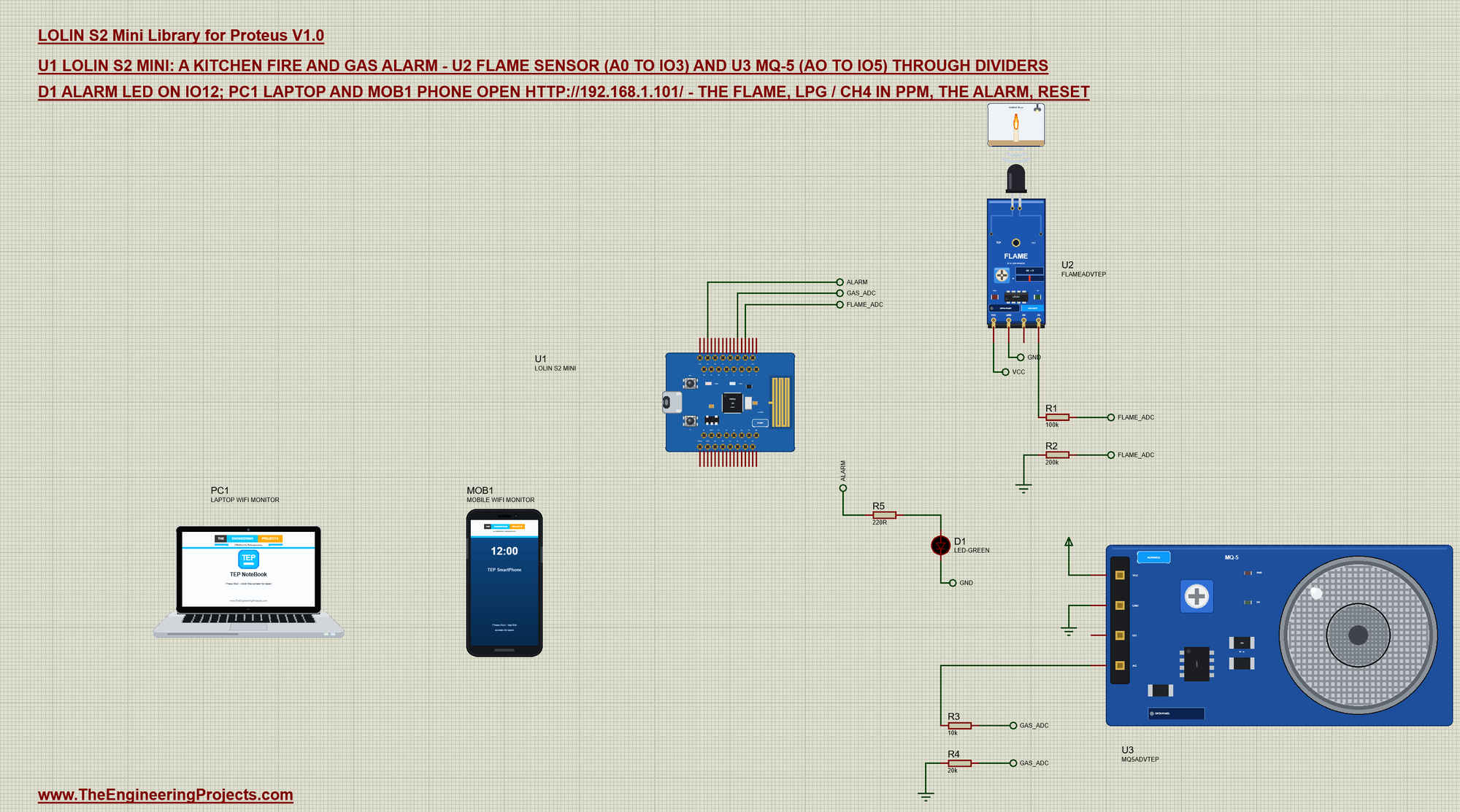
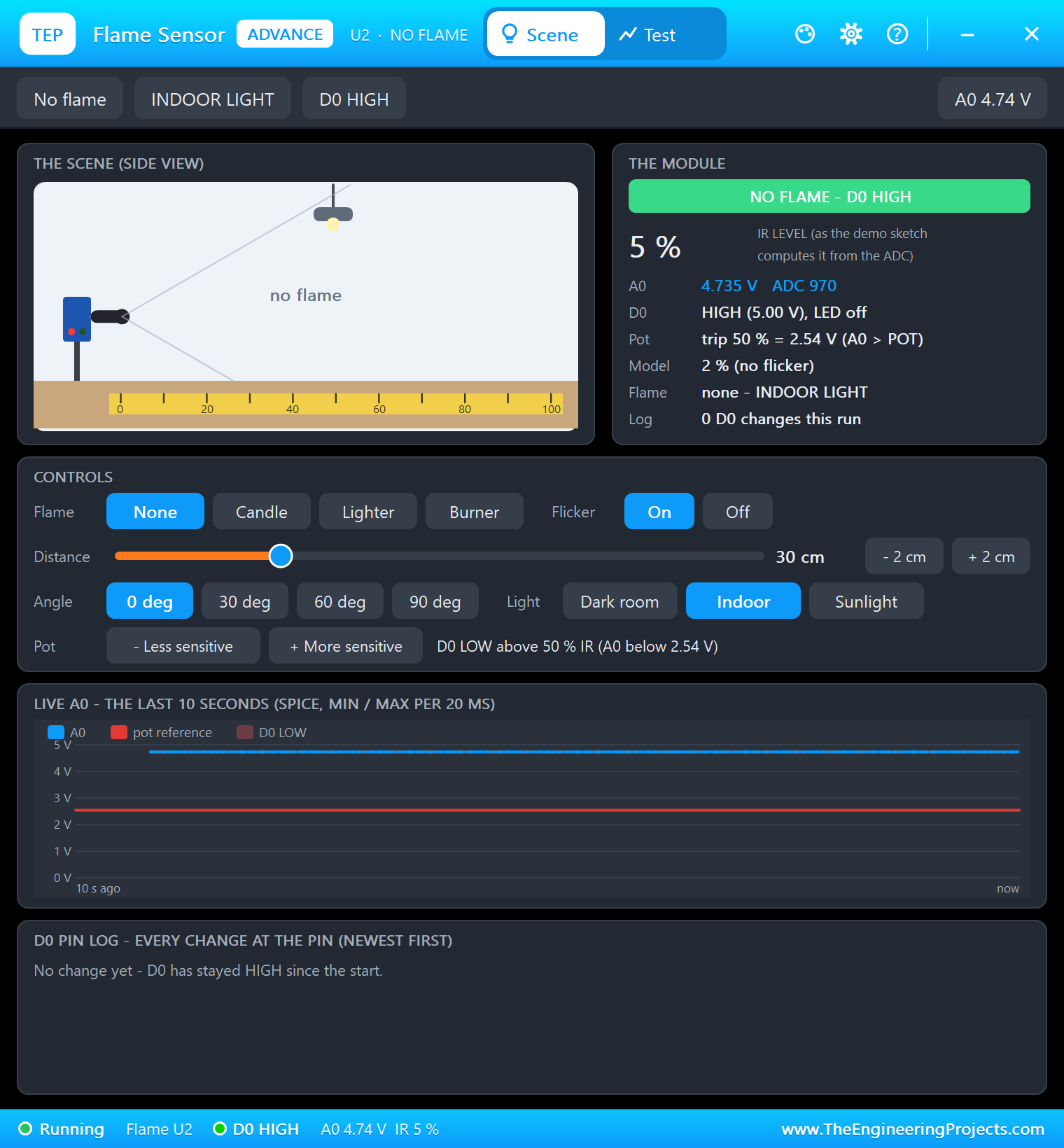
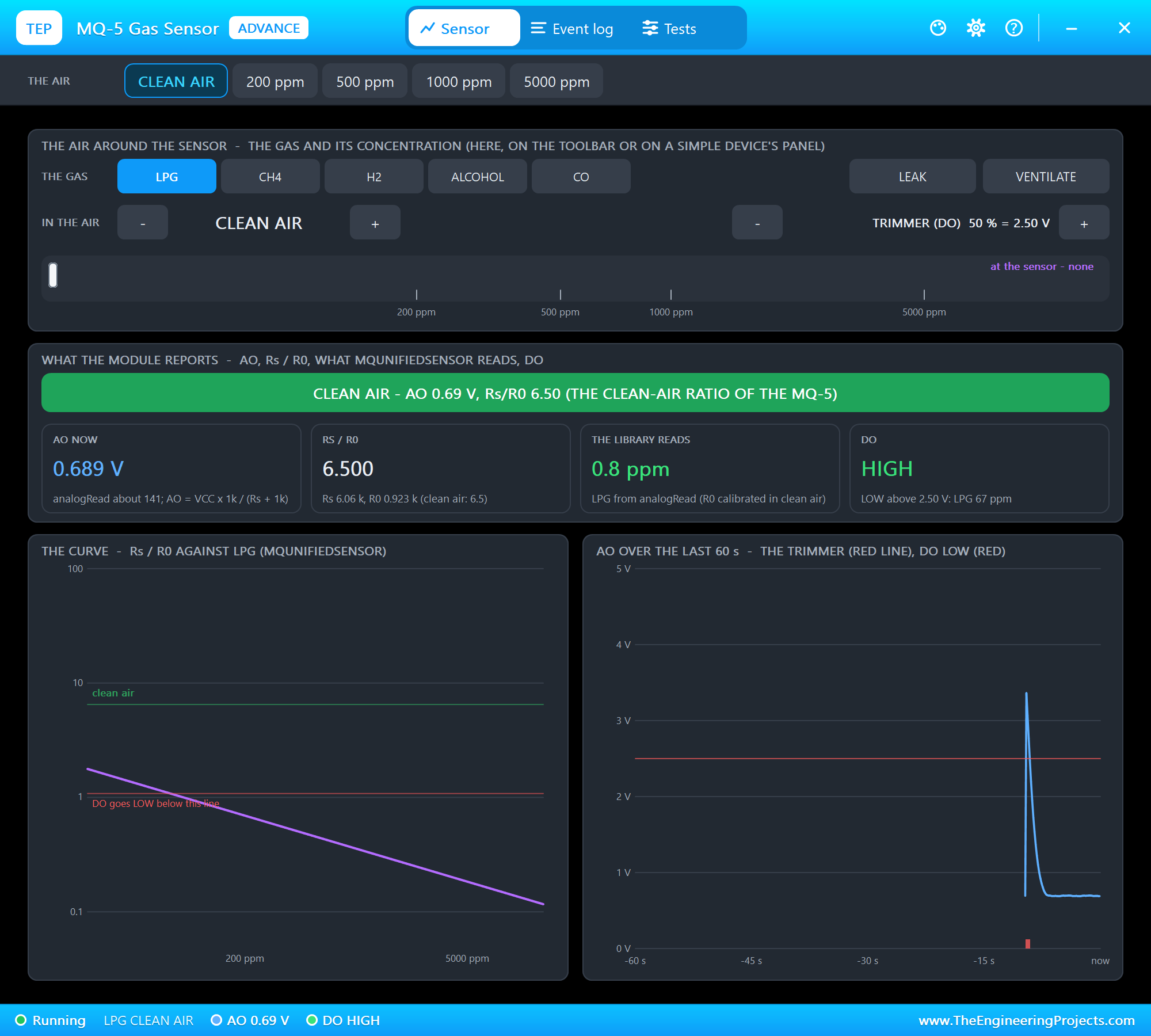
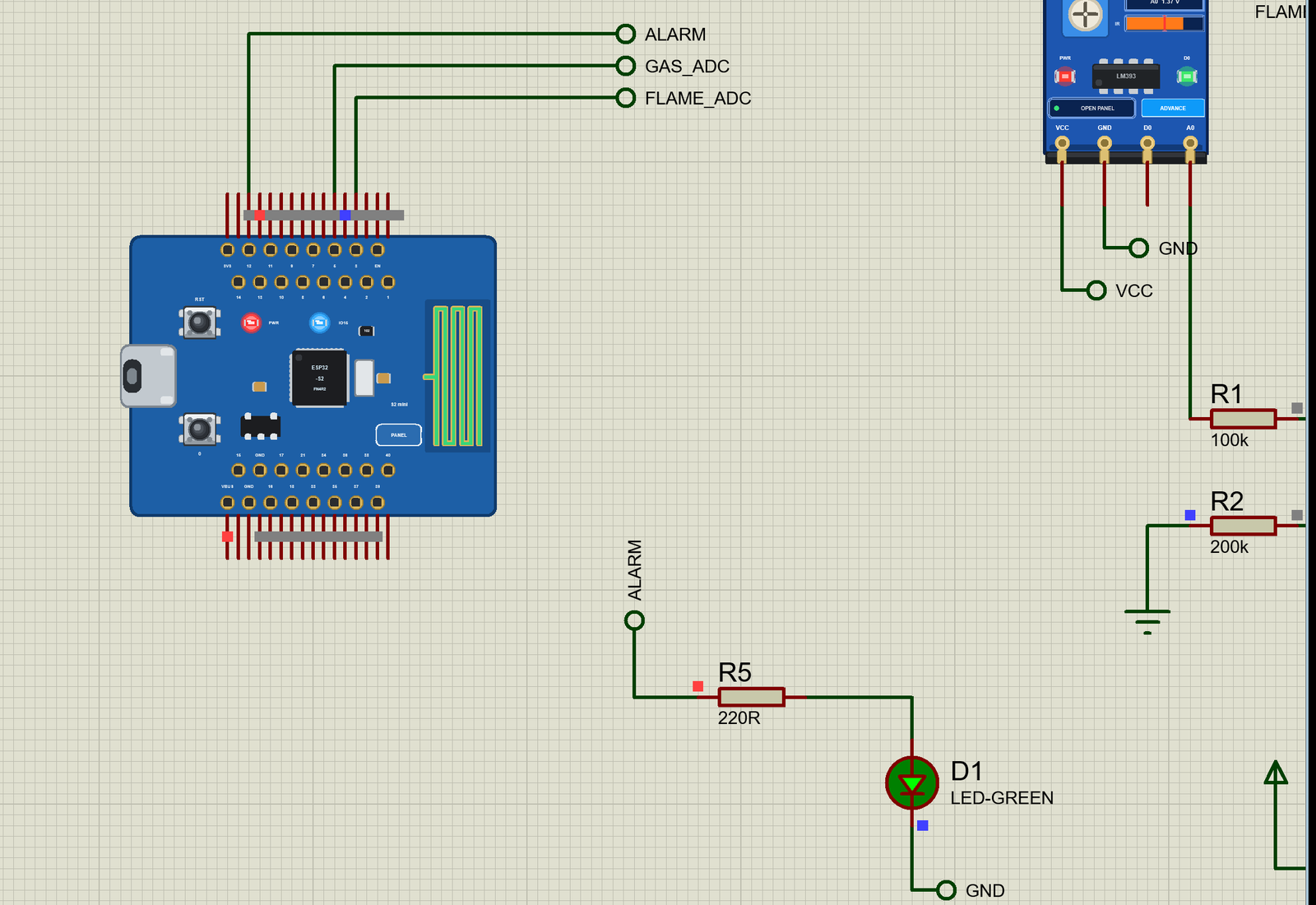
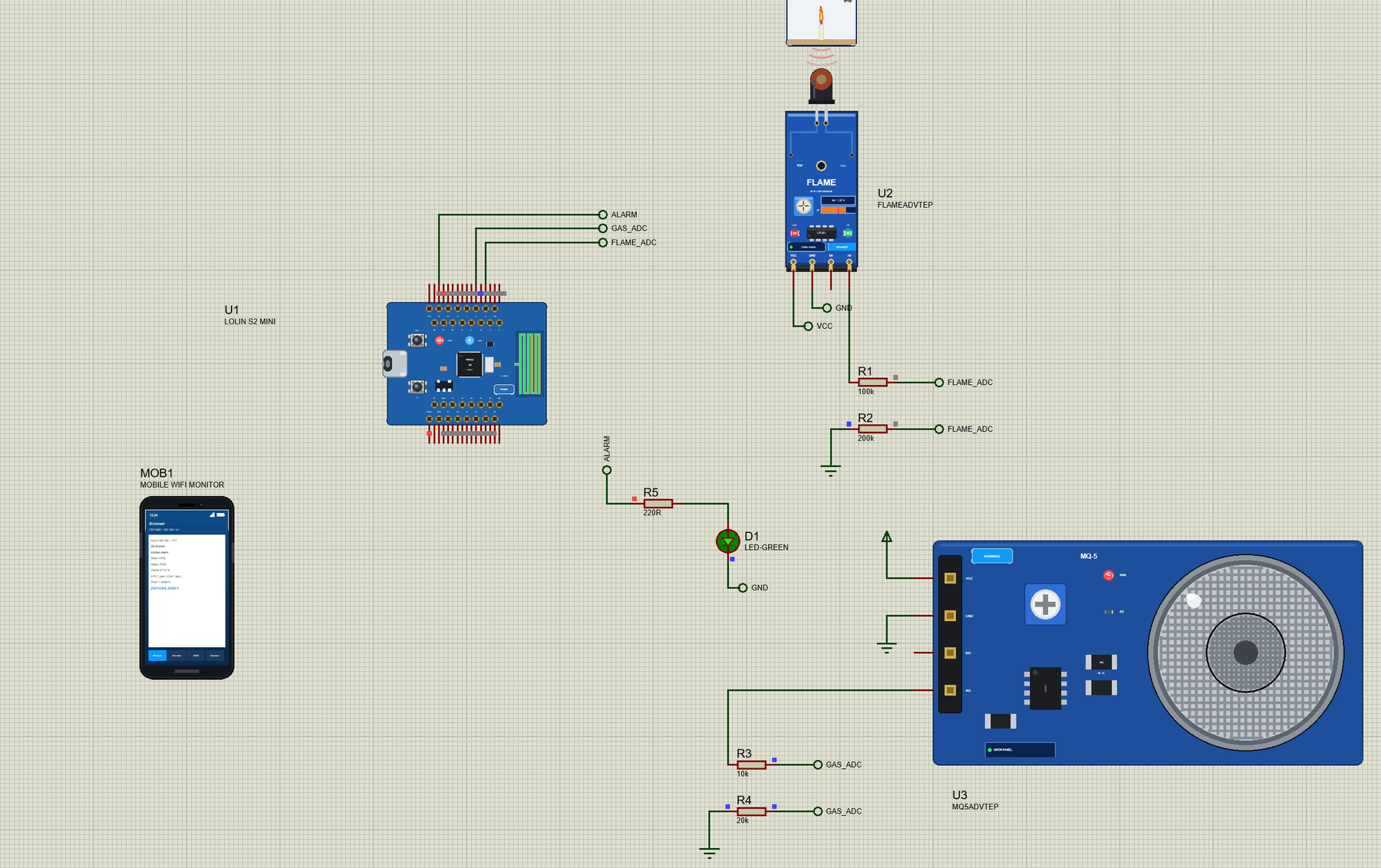
Open LOLIN-S2-Mini-Kitchen-Alarm.pdsprj. U1 runs S2Mini_Kitchen_Alarm.hex. U2 is the flame sensor from our Flame Sensor Library for Proteus and U3 the MQ-5 from our MQ Gas Sensor Library for Proteus - both are the Advance versions: each opens its pop-up window at Run, where you light a candle or let gas into the air. D1 is the ALARM LED. PC1 is the Laptop WiFi Monitor and MOB1 the Mobile WiFi Monitor.
| Part | Pin | Through | S2 Mini pin |
|---|---|---|---|
| Flame sensor U2 | A0 | R1 100k / R2 200k | GPIO3 (FLAME_ADC) |
| MQ-5 U3 | AO | R3 10k / R4 20k | GPIO5 (GAS_ADC) |
| ALARM LED D1 | anode | R5 220R | GPIO12 (ALARM) |
| Both modules | VCC, GND | - | the 5 V rail, GND |
Why the Dividers?
Both modules run on 5 V - the MQ-5 needs it for its heater - so their analog outputs swing up to 5 V. The ESP32-S2's ADC reads 0 to 3.3 V, and its pins are not 5 V tolerant. A divider of one to two scales 5 V down to 3.33 V, and the sketch multiplies the pin's voltage by 1.5 to get the module's voltage back.
The two dividers have different values for a reason. The flame module's A0 comes through a 10 k pull-up, so a 10k / 20k divider (30 k in total) would load it and pull it down by a quarter - in our first test the "no flame" reading showed 26 % infrared. With 100k / 200k the load is ten times lighter. The MQ-5's AO is the voltage across the board's 1 k load resistor, so 10k / 20k barely touches it; the sketch counts the 30 k in parallel with that 1 k as 0.968 k. The modules' digital outputs D0 and DO stay unconnected: their pull-ups go to 5 V, and the sketch sets its own alarm levels on the analog outputs anyway.
const float DIV = 1.5;                      // 100k over 200k and 10k over 20k: the module's voltage = the pin's x 1.5
const float VC = 5.0;                       // the modules' supply
const float RL = 0.968;                     // kOhm: the MQ-5 board's RL (1 k) with the divider's 30 k across it
The Flame: IR Level and a Whole Second
The flame sensor's receiver sees infrared from 760 to 1100 nm, where a flame is bright. The more infrared, the lower its A0: about 4.98 V in the dark and 0.1 V at the most. The sketch turns that into an IR level from 0 to 100 %. A fire is an IR level of 45 % or more for five readings in a row - one second. A real flame flickers but keeps glowing; a flash of sunlight or a camera flash does not last, so it does not set off the alarm.
  flameV = moduleVolts(FLAME_PIN);          // the flame module: A0 4.98 V with no infrared, 0.1 V at the most
  irLevel = constrain((4.98 - flameV) / 4.88 * 100.0, 0.0, 100.0);
  fireReads = irLevel >= FIRE_IR ? fireReads + 1 : 0;
  bool nowFire = fireReads >= FIRE_READS;
  if (nowFire && !fire) {
    fires++; alarmFire = true;
    Serial.print(">> FIRE - flame detected (IR "); Serial.print(irLevel, 0); Serial.println(" %)");
  }
  if (!nowFire && fire) Serial.println(">> FLAME GONE");
  fire = nowFire;
The Gas: From Volts to ppm
The MQ-5's tin dioxide layer becomes a better conductor when LPG or natural gas reaches it, so its resistance Rs falls. On the module Rs sits between VCC and AO, with the 1 k load resistor from AO to ground, so Rs = RL x (5 V - AO) / AO. What tells the gas is the ratio Rs / R0, where R0 is the sensor's resistance at a known point: the datasheet curve says Rs / R0 is 6.5 in clean air. So the sketch measures Rs in clean air after the warm-up and divides by 6.5 to get R0:
void calibrate() {                          // R0 in clean air: the mean Rs of 20 readings / 6.5
  float sum = 0;
  for (int i = 0; i < 20; i++) { sum += gasRs(); delay(20); }
  r0 = sum / 20 / CLEAN_AIR;
  Serial.print("MQ-5 calibrated in clean air: R0 = "); Serial.print(r0, 3); Serial.println(" kOhm");
}
Then each reading gives Rs / R0, and the datasheet curves - straight lines on a log-log chart - give the concentration: LPG = 80.897 x (Rs / R0) ^ -2.431 ppm and methane = 177.65 x (Rs / R0) ^ -2.56 ppm, the same numbers MQUnifiedsensor uses. The sensor cannot tell the two gases apart, so the sketch shows both: what the reading means if the gas is LPG (bottled gas) and if it is methane (natural gas). The methane figure is the higher one, because the MQ-5 is less sensitive to methane.
  ratio = gasRs() / r0;
  lpg = LPG_A * pow(ratio, LPG_B);
  ch4 = CH4_A * pow(ratio, CH4_B);
Alarm Levels
LPG burns in air between about 1.8 % and 9.5 % - 18,000 to 95,000 ppm. Gas alarms raise the alarm far below the lower limit: the sketch says GAS WARNING at 500 ppm and GAS LEAK at 2000 ppm, about a tenth of the lower explosive limit. A fire or a gas leak latches the alarm: the ALARM LED stays on until someone presses RESET, even if the flame went out by itself - somebody should look at the kitchen. A warning only makes the LED blink.
void showLeds() {
  if (!warm) { digitalWrite(ARMED_LED, (millis() / 250) % 2); return; }
  digitalWrite(ARMED_LED, HIGH);
  if (alarmFire || alarmGas) digitalWrite(ALARM_LED, HIGH);           // the alarm: on until RESET
  else digitalWrite(ALARM_LED, gas == WARNING && (millis() / 500) % 2); // a gas warning: blinking
}
The Warm-Up
An MQ sensor reads far too high when its heater has just been switched on: the tin dioxide layer needs time to reach its working temperature. A new sensor even needs a burn-in of a day or two before its readings settle. The MQ-5 model has a WARMUP property (3 s in the demo, 20 s by default) and the sketch waits 5 s before it measures R0; the blue LED blinks during that time and stays on once the alarm is armed. On a real board give it at least a minute, and type CAL in the monitor to measure R0 again in clean air.
Run the Demo
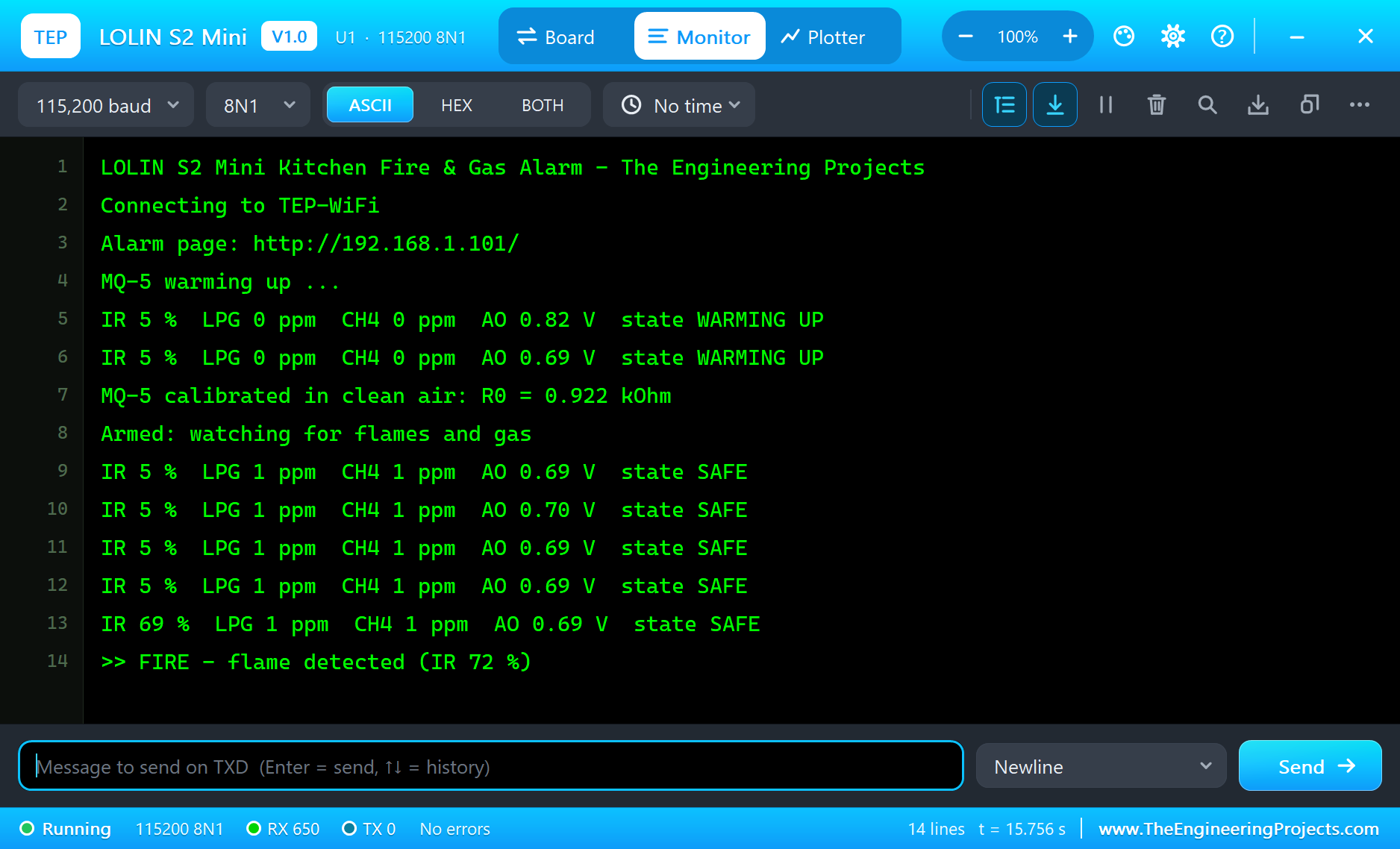
Press Run. The serial monitor opens, the board joins TEP-WiFi, the MQ-5 warms up and the sketch measures R0:
LOLIN S2 Mini Kitchen Fire & Gas Alarm - The Engineering Projects
Connecting to TEP-WiFi
Alarm page: http://192.168.1.101/
MQ-5 warming up ...
IR 5 %  LPG 0 ppm  CH4 0 ppm  AO 0.69 V  state WARMING UP
MQ-5 calibrated in clean air: R0 = 0.922 kOhm
Armed: watching for flames and gas
IR 5 %  LPG 1 ppm  CH4 1 ppm  AO 0.69 V  state SAFE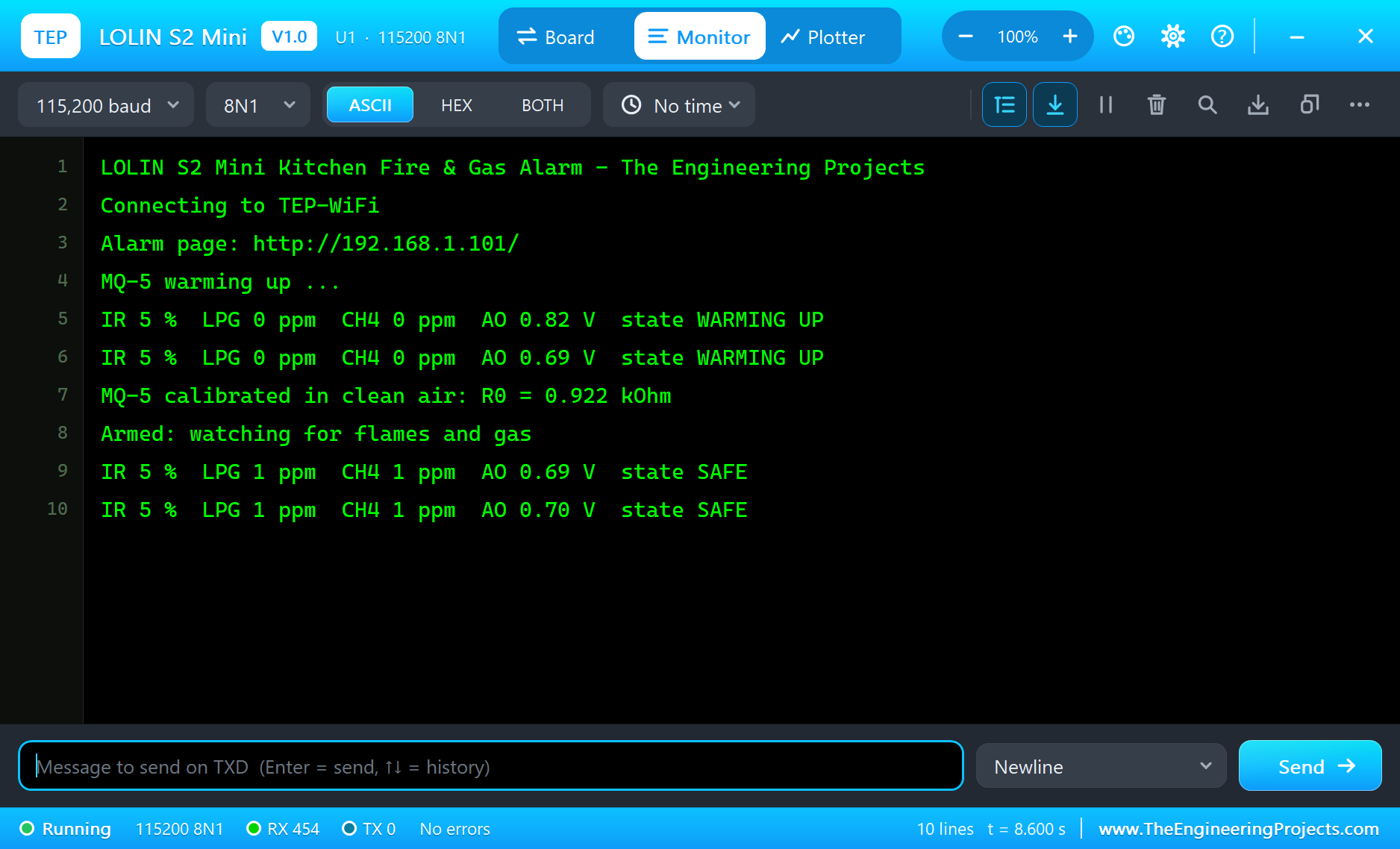
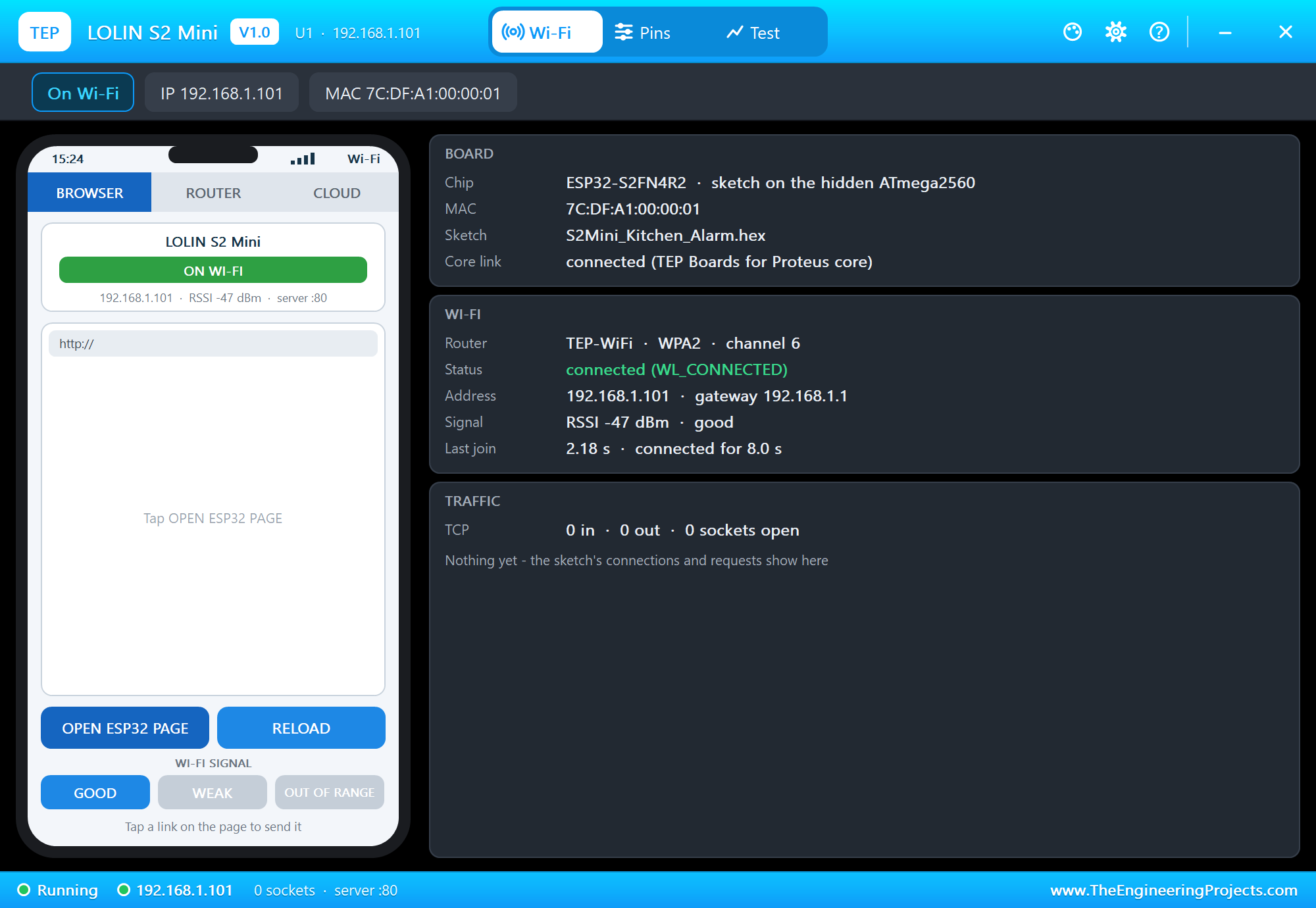
Open the Page
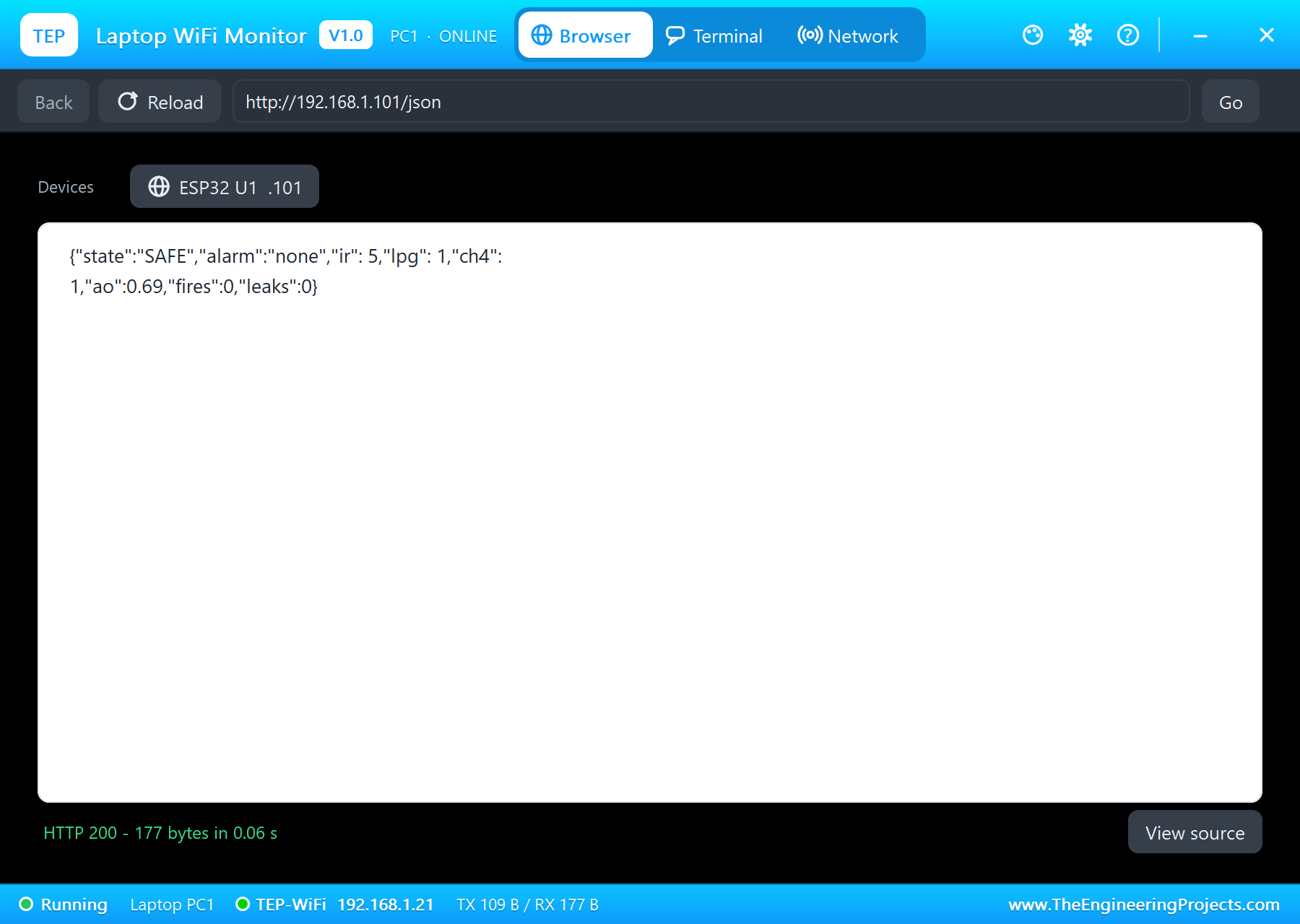
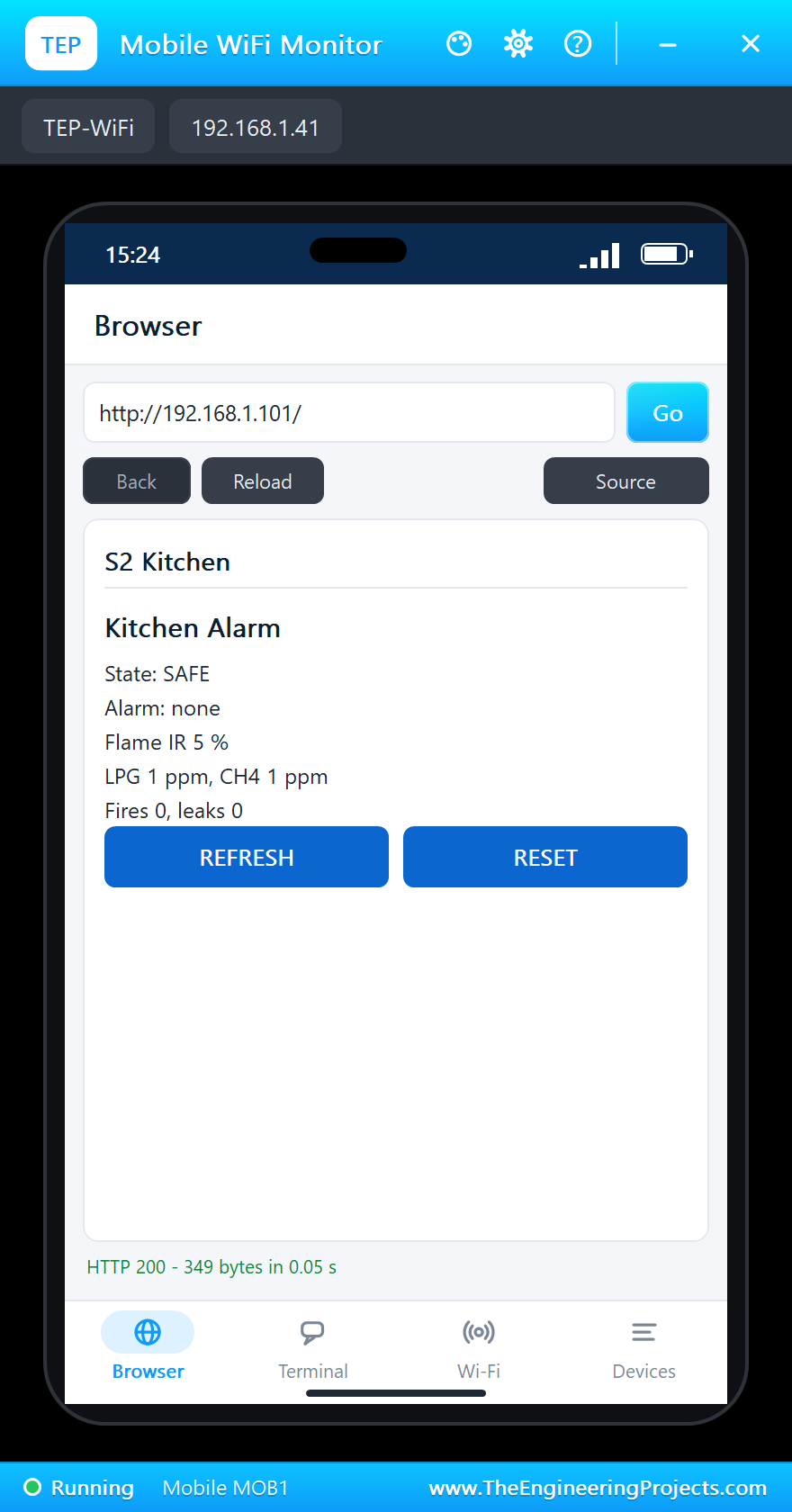
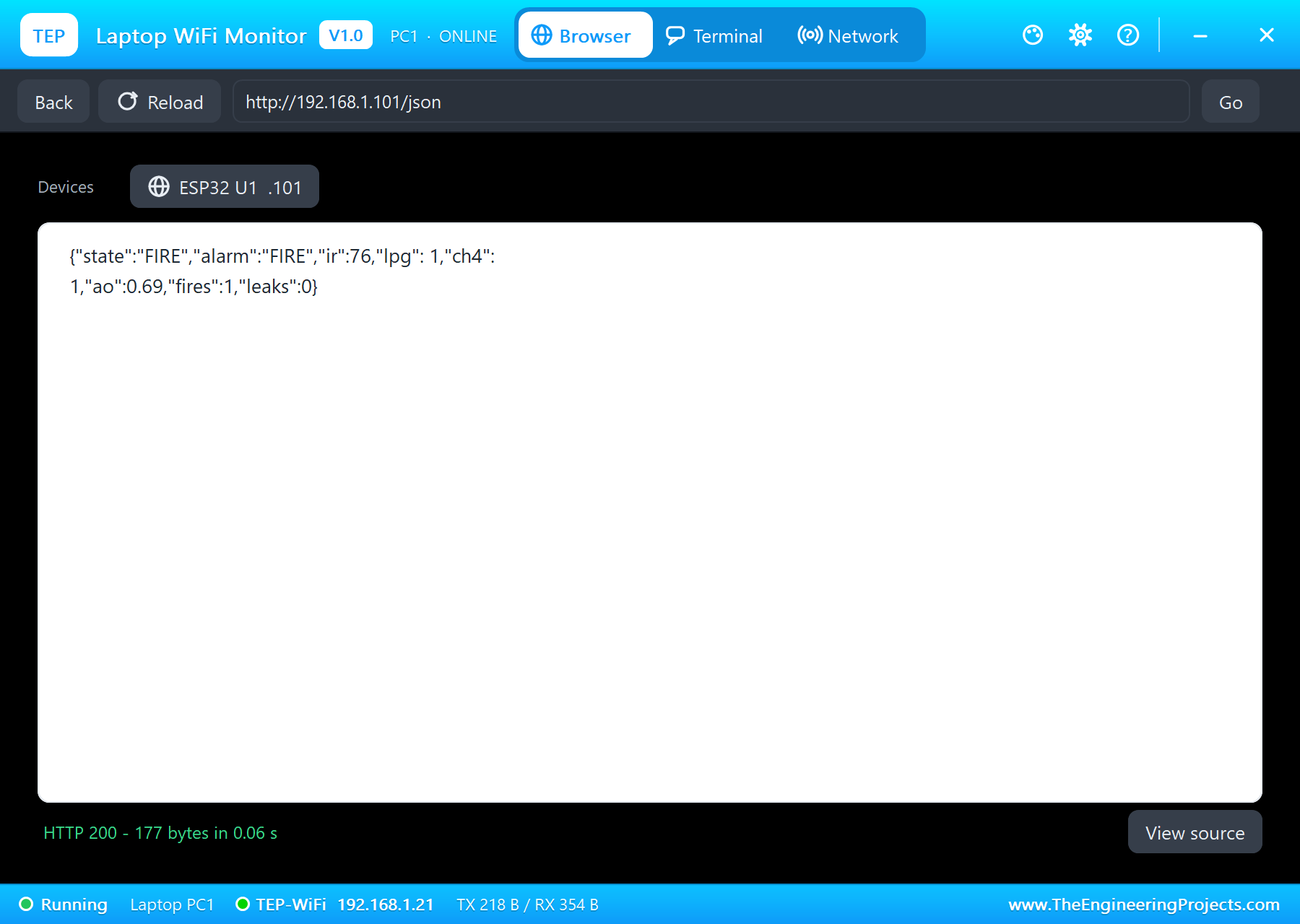
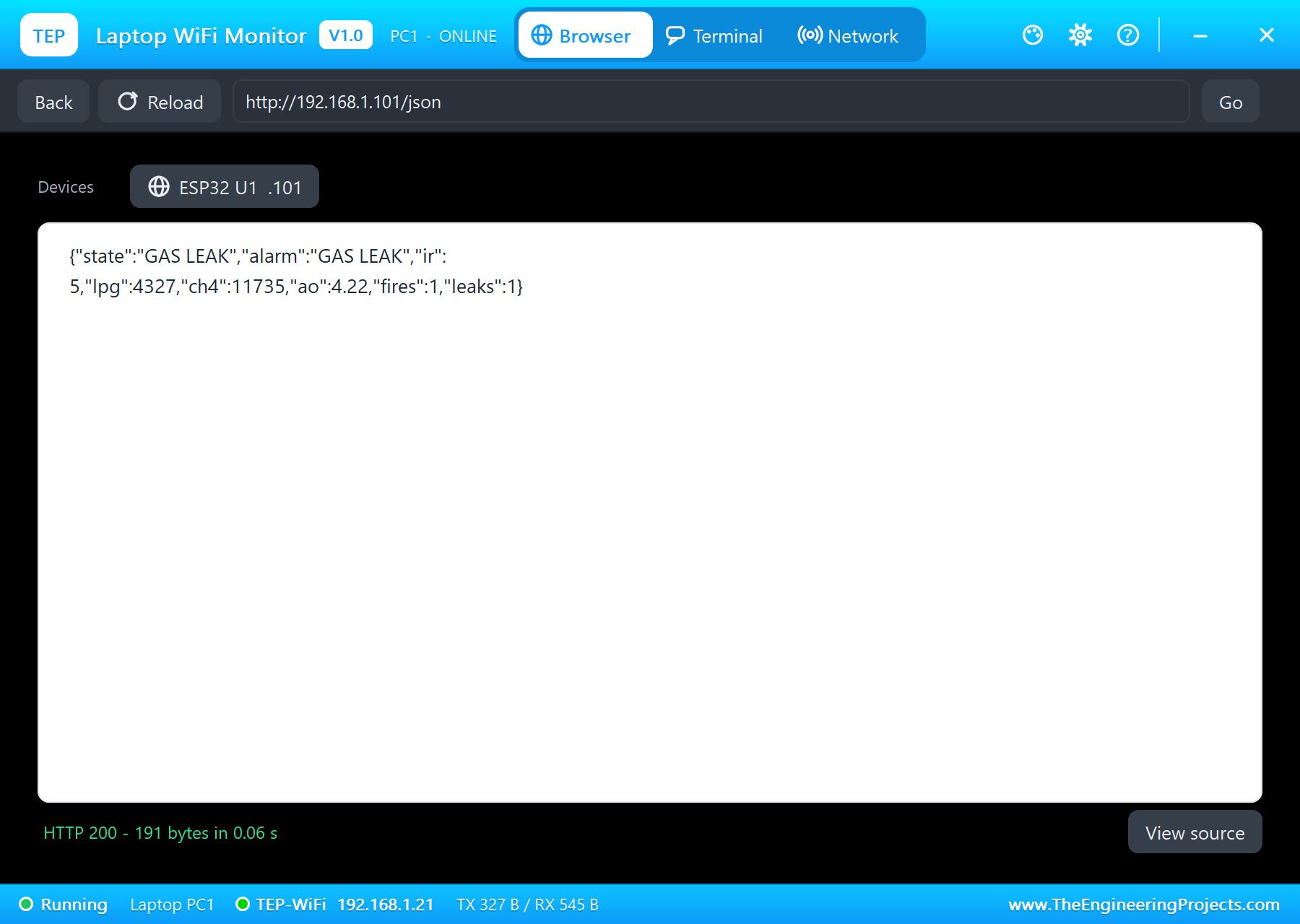
On the laptop click Browser and Go (the home page is http://192.168.1.101/json); on the phone the same with http://192.168.1.101/:
A Flame on the Stove
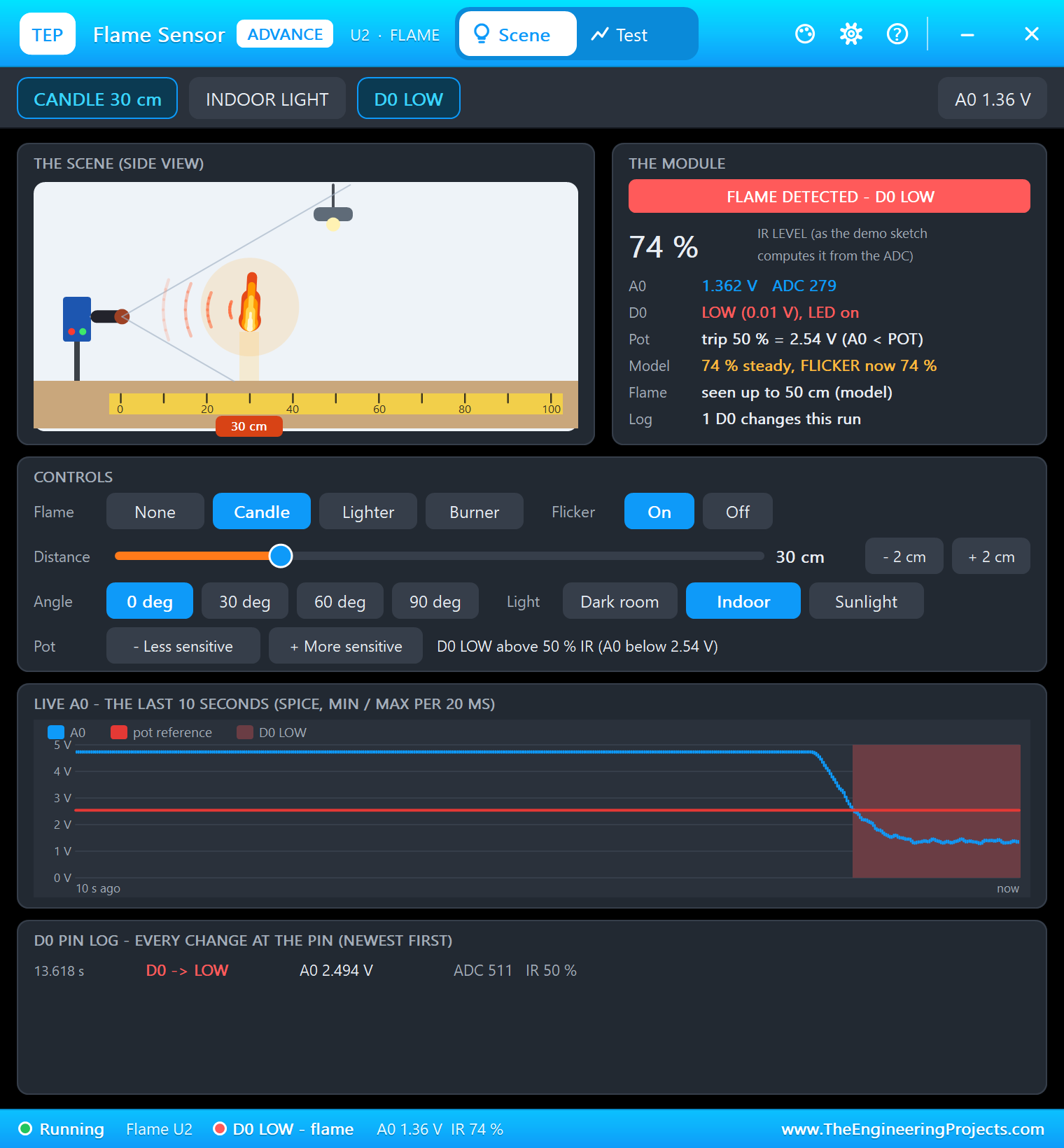
Click Candle on the flame sensor's pop-up: the candle at 30 cm lights and grows for about a second, the IR level climbs, and after five readings above 45 % the sketch calls it a fire. The ALARM LED lights:
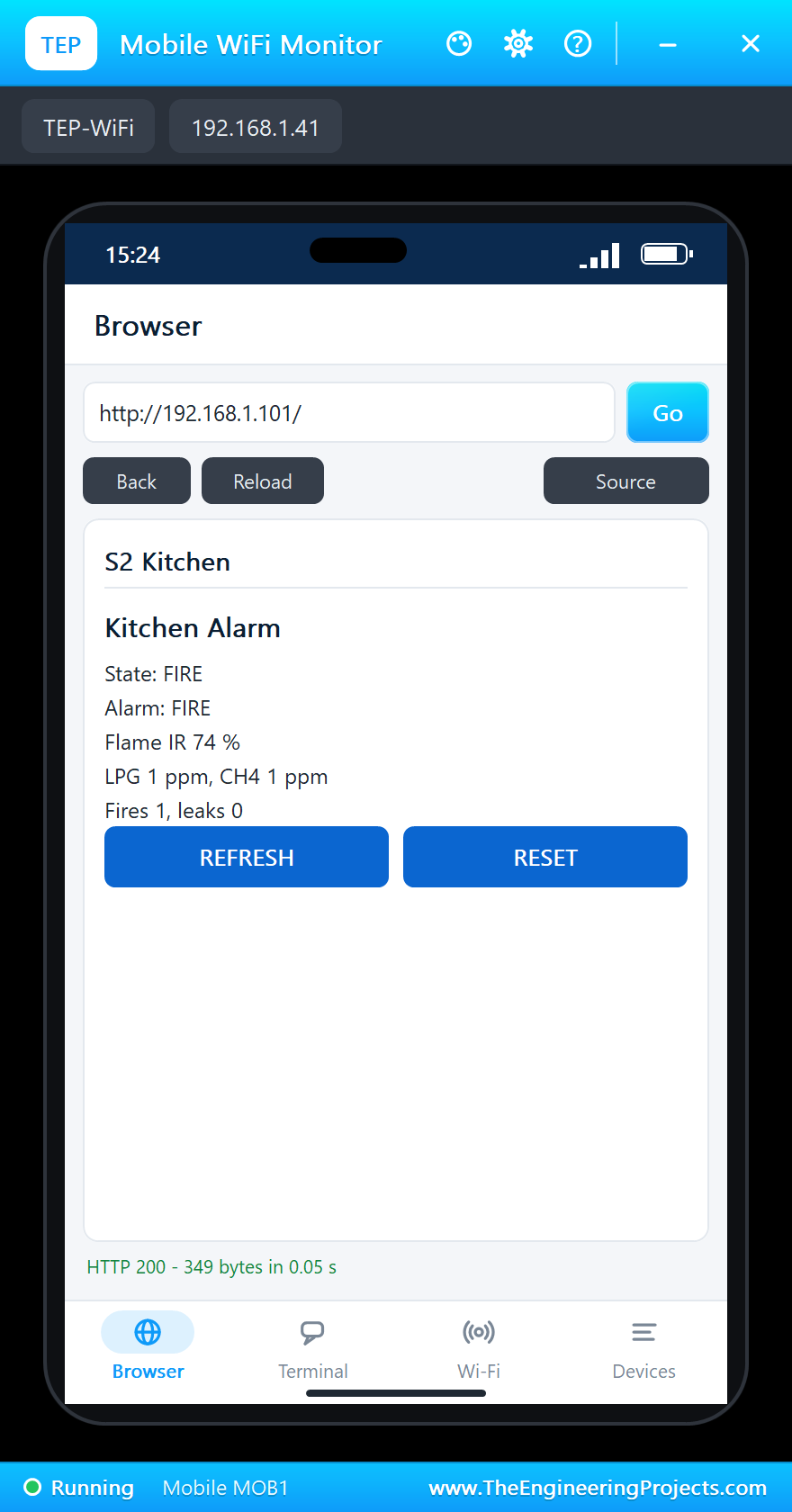
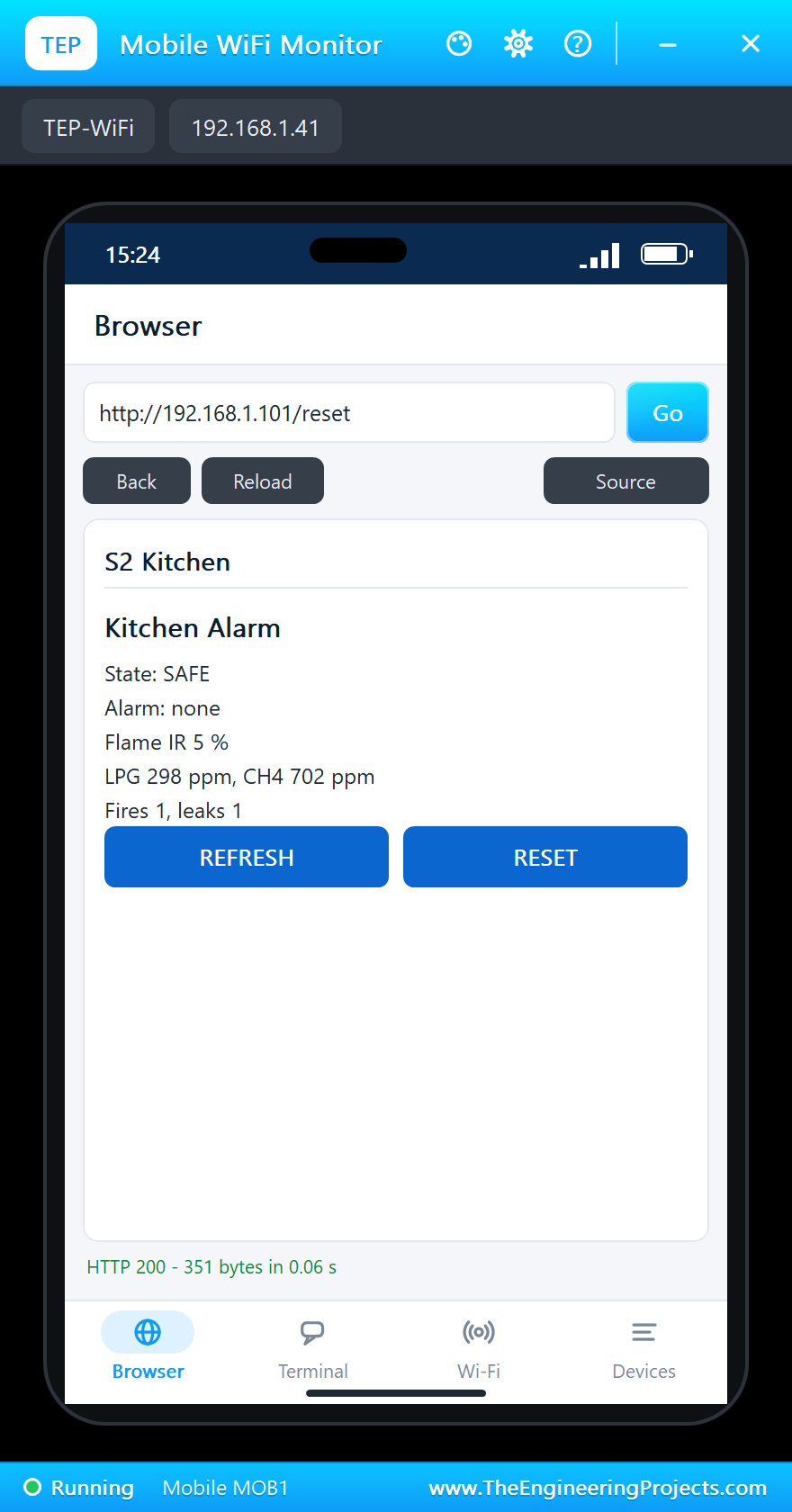
Click None: the flame goes out (FLAME GONE), but the alarm stays on - the LED waits for RESET. Tap RESET on the phone.
Gas in the Air
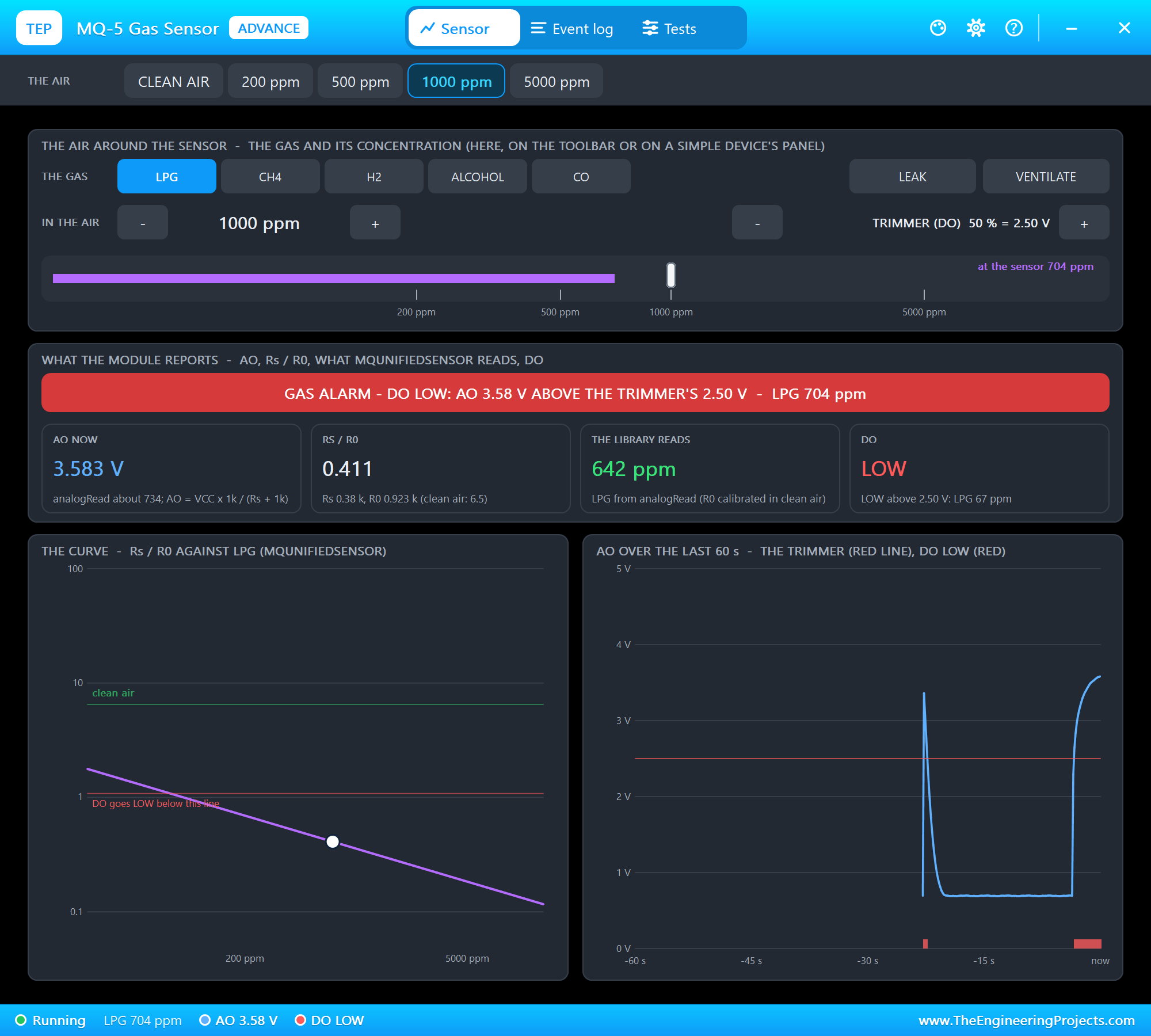
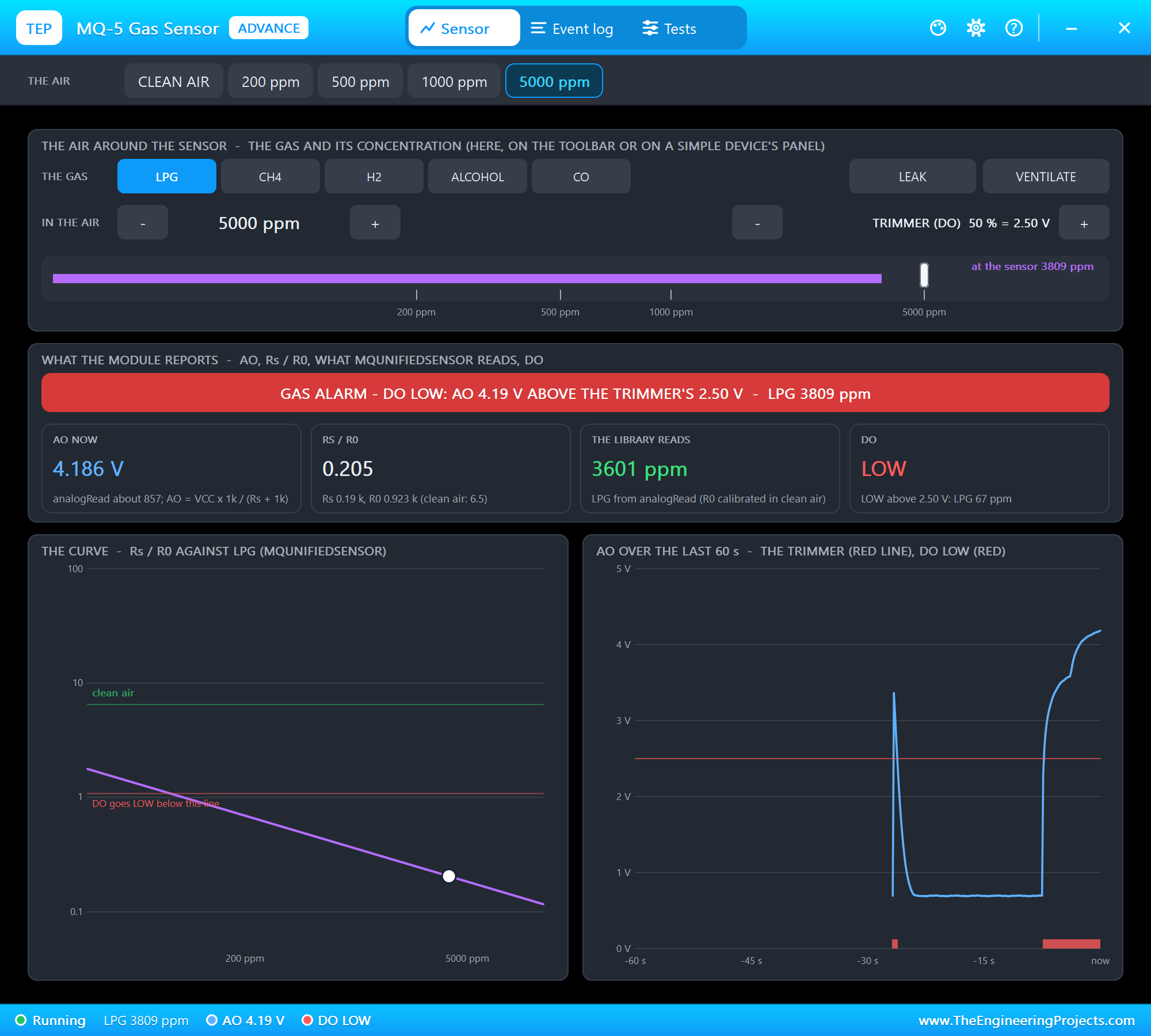
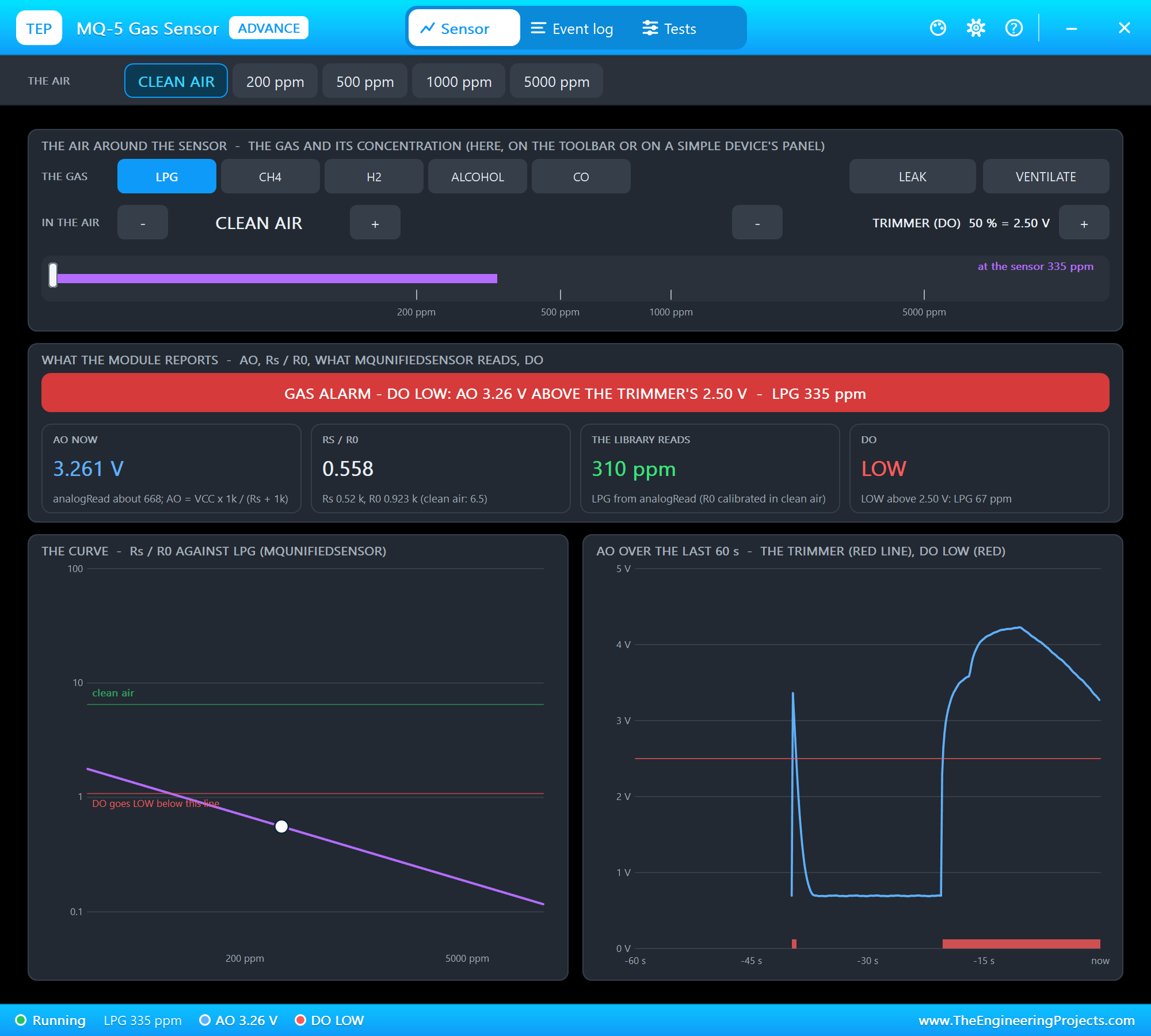
On the MQ-5's pop-up click 1000 ppm (LPG): AO rises, Rs / R0 falls, the reading climbs past 500 ppm - GAS WARNING, the ALARM LED blinks. Then 5000 ppm: past 2000 ppm the sketch reports a GAS LEAK and the LED stays on. The sensor does not jump to the new value; it follows the gas over a few seconds, as a real MQ-5 does.
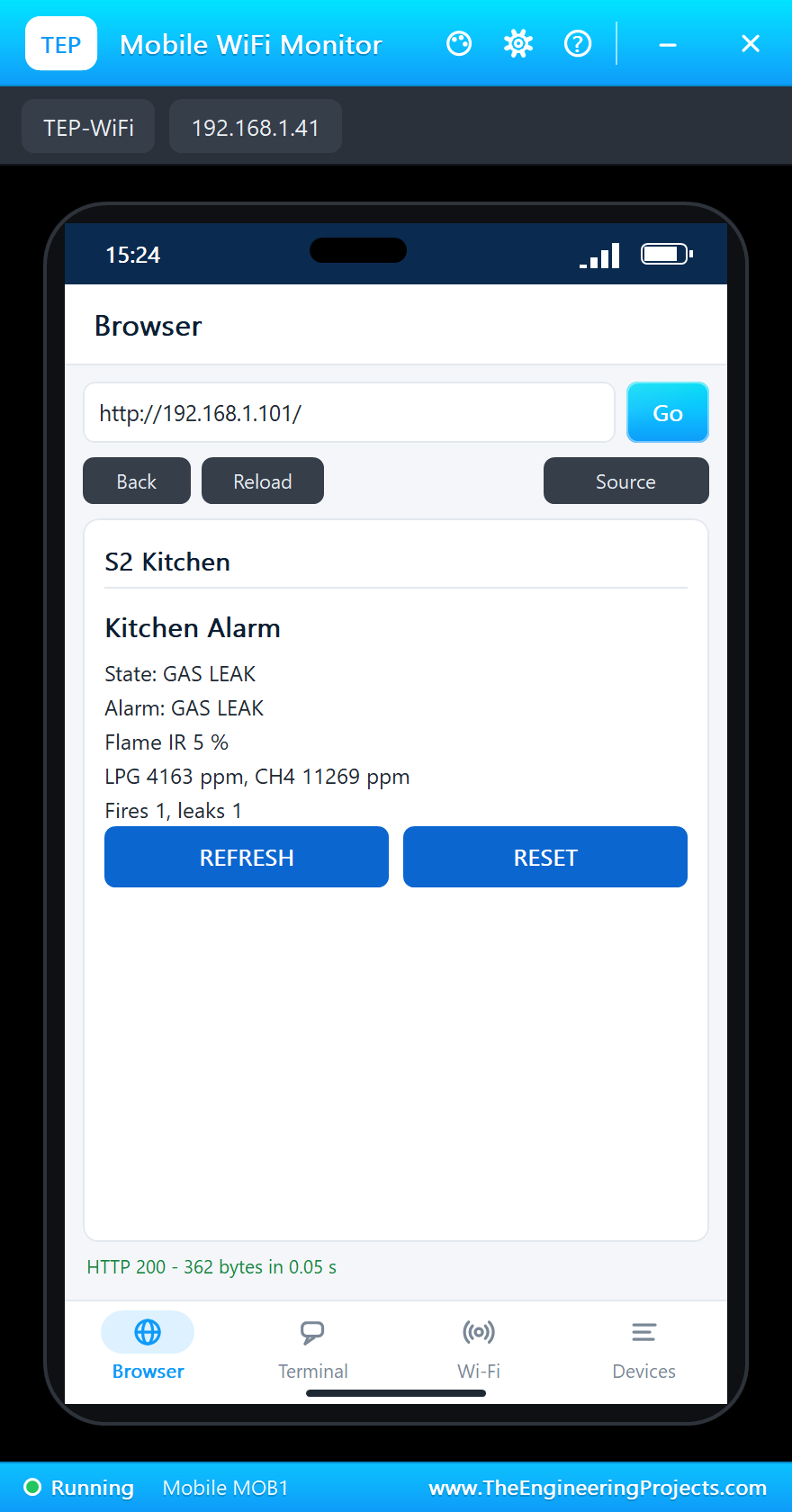
Click VENTILATE: fresh air comes in, the reading falls through the warning back to CLEAN AIR. Tap RESET on the phone to clear the alarm:
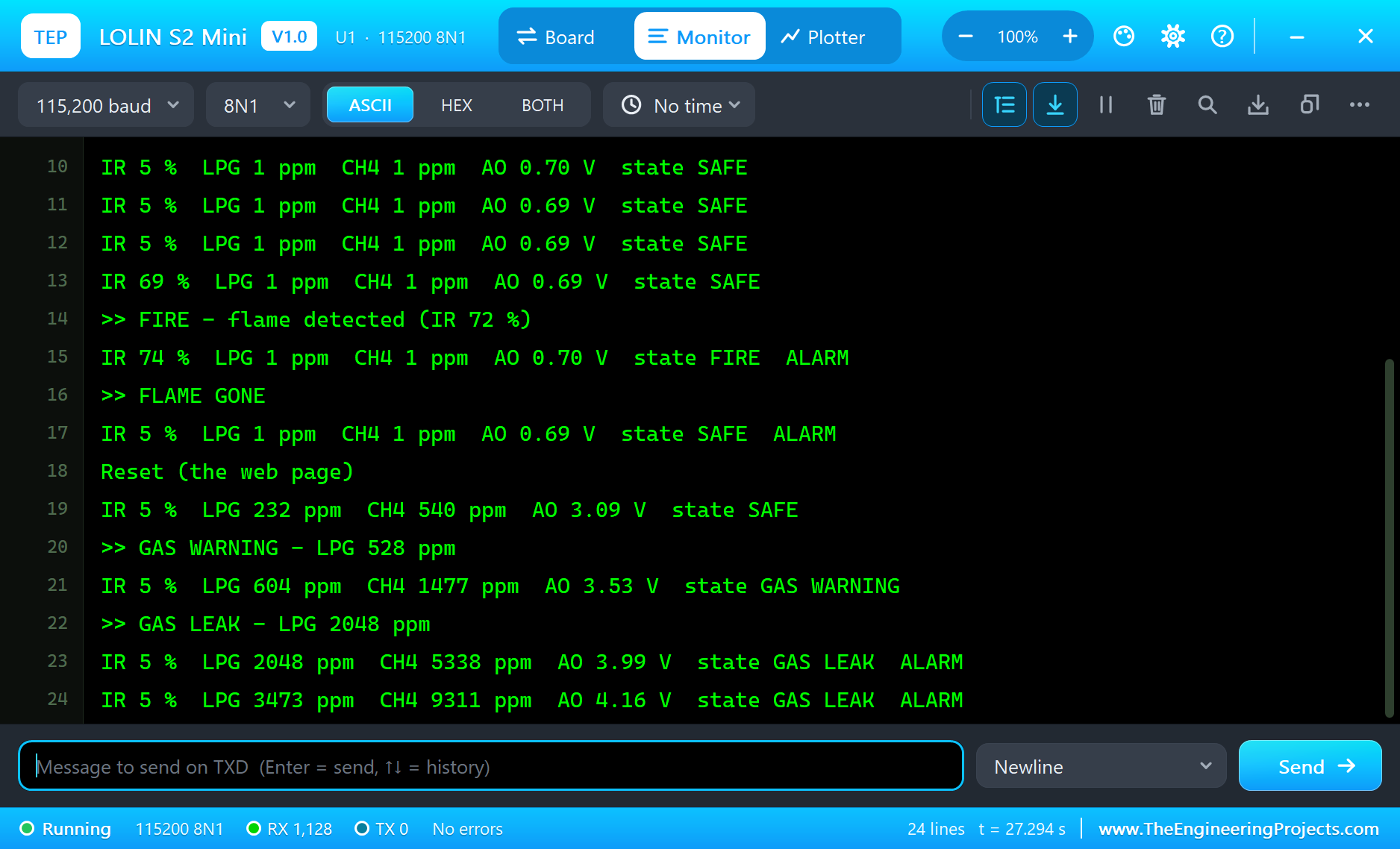
The built-in serial monitor, in the look of our TEP Serial Monitor Advance for Proteus, logs every event:
IR 69 %  LPG 1 ppm  CH4 1 ppm  AO 0.69 V  state SAFE
>> FIRE - flame detected (IR 72 %)
IR 74 %  LPG 1 ppm  CH4 1 ppm  AO 0.70 V  state FIRE  ALARM
>> FLAME GONE
IR 5 %  LPG 1 ppm  CH4 1 ppm  AO 0.69 V  state SAFE  ALARM
Reset (the web page)
>> GAS WARNING - LPG 528 ppm
IR 5 %  LPG 604 ppm  CH4 1477 ppm  AO 3.53 V  state GAS WARNING
>> GAS LEAK - LPG 2048 ppm
IR 5 %  LPG 4140 ppm  CH4 11204 ppm  AO 4.21 V  state GAS LEAK  ALARM
>> GAS WARNING - LPG 1966 ppm
>> CLEAN AIR - LPG 488 ppm
IR 5 %  LPG 314 ppm  CH4 741 ppm  AO 3.24 V  state SAFE  ALARM
Reset (the web page)
IR 5 %  LPG 185 ppm  CH4 425 ppm  AO 2.98 V  state SAFE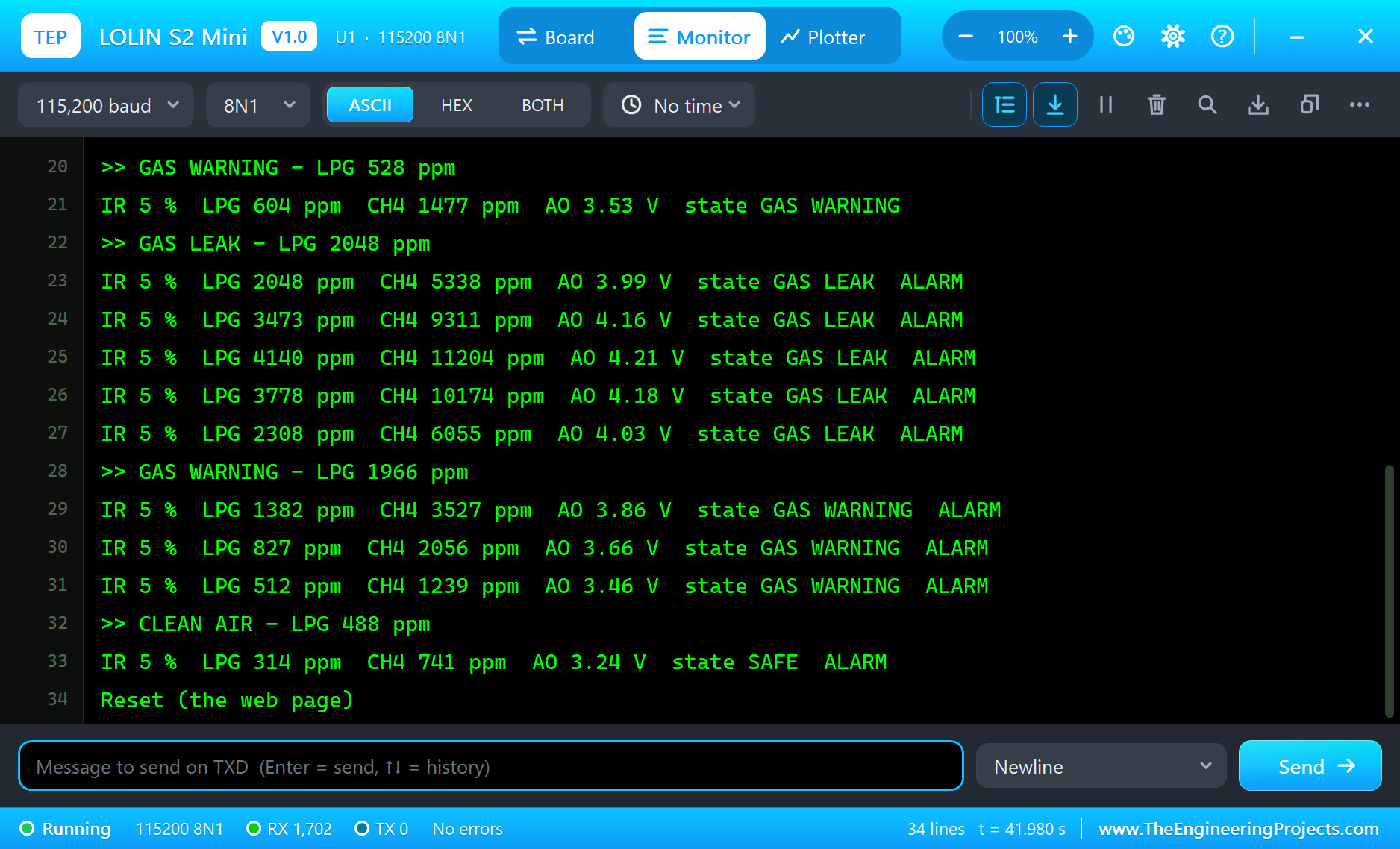
Try It Yourself
- Move the candle away with + 2 cm until the IR level drops below 45 %: how far does the alarm reach?
- Click Sunlight with no flame: the infrared of the sun is a classic false alarm for flame sensors.
- Pick CH4 on the MQ-5's pop-up: the same ppm of methane reads as less LPG - the sensor cannot tell the gases apart.
- Type
STATUS,RESETorCALin the monitor.
Ideas to Extend the Kitchen Alarm
- Add a buzzer on a free GPIO so people in the house hear the alarm.
- Switch an exhaust fan with a relay while the gas reading is above the warning level.
- Send a message to your phone with HTTPClient when the alarm latches.
- Close a gas solenoid valve on a GAS LEAK - with a relay rated for it.
Your Own Sketches
Write the sketch in the Arduino IDE with the board LOLIN S2 Mini (TEP Proteus), use Sketch > Export Compiled Binary and set the board's PROGRAM property to the .hex. For a real S2 Mini select "LOLIN S2 Mini" in Espressif's "esp32" package and upload - the same sketch, with the same GPIO numbers.
Things to Know Before Using a Real LOLIN S2 Mini
- The first upload: hold 0, tap RST and release 0 - the native USB shows up as a new port in download mode.
- USB CDC: Serial goes over the S2's own USB; enable "USB CDC On Boot" in the IDE to see it after a reset.
- No Bluetooth: the ESP32-S2 has Wi-Fi only.
- 3.3 V pins: never feed 5 V into a GPIO - use a divider as in the demo, or a level shifter.
- Give the MQ-5 time: a minute of warm-up after power-on, and a day of burn-in for a new sensor.
Properties of the LOLIN S2 Mini
| Property | What it does |
|---|---|
| PROGRAM | the sketch: a .hex from TEP Boards for Proteus (board "LOLIN S2 Mini") |
| WIFISSID, WIFIPASS | the router in range (TEP-WiFi, 12345678) |
| MONITOR, BAUD, AUTOOPEN | the built-in serial monitor: on, its baud rate (115200), open at Run |
| TIME | the clock for NTP: PC or a fixed UTC time |
Troubleshooting
- The gas readings are far too high: R0 was measured during the warm-up or with gas around - type CAL in clean air.
- IR level about 25 % with no flame: the flame divider loads the module - use 100k / 200k as in the demo.
- analogRead returns 0: GPIO33 to 40 have no ADC on the ESP32-S2 - use 1 to 10, 13 or 14.
- The board stays off the network: the sketch's SSID and password must match WIFISSID and WIFIPASS.
- The page shows old values: use REFRESH; the monitors do not reload by themselves.
Limitations of the Simulation
- Your sketch gets 8 KB of RAM in the simulation and runs slower than on the S2's 240 MHz core with 320 KB.
- The native USB, the touch pads, the DACs and the ULP coprocessor are not modelled.
- The router, the addresses and the windows are TEP additions.
- LOLIN and WEMOS are names of WEMOS Electronics and ESP32-S2 of Espressif Systems; this library is not made or endorsed by them or by Labcenter.
- Tested in Proteus 8.5 in October 2026 (the demo as shipped, about 43 s of simulation). Proteus 7 is not supported.
So, that was all about the LOLIN S2 Mini Library for Proteus. I hope it helps you build and test your S2 Mini projects before you touch the hardware - the sensors, the dividers, the alarm logic and the web page in one simulation. If you have any questions, ask in the comments and I will help you out. Till the next tutorial, take care and have fun!