



Basic
$5.99/ month
- 5 GB disk space
- 5 users
- 10 email accounts
- Limited download policy

English is currently available.
Engineering resources, ready for your next build.
Library files, an Arduino sketch and a Proteus simulation, together in one compact package.
Adds six Arduino board models to Proteus, providing a starting point for virtual circuits built around UNO, Mega, Mini, Pro Mini and Nano boards.
The .LIB and .IDX files make the models available in Proteus. Compile your Arduino sketch, then load its .HEX file into the simulated board’s Program File setting.
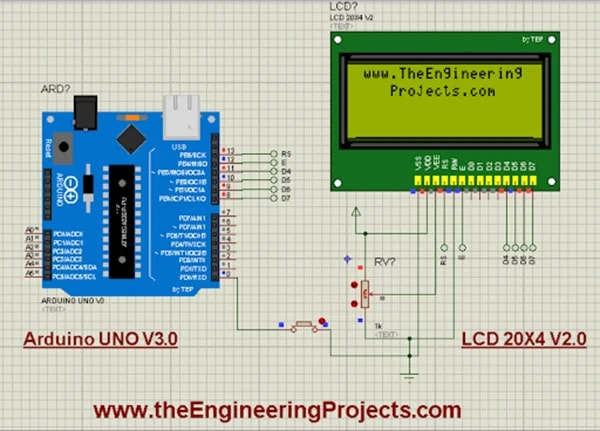
An UNO controls a 20×4 LCD. Pressing the pushbutton changes the displayed message. The .DSN contains the circuit; the .INO contains its editable sketch.
The demo also uses a separate LCD component library. Set the compiled sketch’s file path before running the simulation.
Read the package walkthroughUnzip the package and open the Arduino Library for Proteus folder.
Copy the .LIB and .IDX files from Library Files into your Proteus library folder.
Search for Arduino V3.0 TEP, or open the included .DSN example.
Explore the plans listed on TEP. Contact us for plan details and availability.
Wait for the 30-second guest countdown, then choose Download ZIP. The link opens the project archive from TEP. If your browser opens the file instead of saving it, use its Save option.
Extract the archive and open its Library Files folder. Copy ArduinoV3TEP.LIB and ArduinoV3TEP.IDX into the library folder used by your Proteus installation. Restart Proteus, then search for Arduino V3.0 TEP.
The V3.0 library includes UNO, Mega 1280, Mega 2560, Mini, Pro Mini and Nano models.
Check your browser’s downloads list first. If the ZIP is incomplete, download it again. For an installation issue, follow the linked tutorial or contact TEP with your Proteus version and the error message.
You can use your operating system’s ZIP extraction tool, WinRAR, or another ZIP-compatible archive utility. Extract the whole folder before opening the project.

Comments
0