Hello friends, I hope you all are doing great. Today, I am going to share the new Mini Submersible Water Pump Library for Proteus V1.0. The small white 3 - 6 V water pump is one of the most popular parts in Arduino projects: automatic plant watering, desk fountains, aquarium top-ups, drink dispensers and science-fair models all start with one. It costs very little, it runs from 5 V, and it is surprisingly easy to get wrong - a weak driver, a lift that is too high or a pump that runs dry, and nothing comes out.
Mini Submersible Water Pump Library for Proteus
Latest version: V1.0 (October 2026, this tutorial)
Other motors: SG90 Servo · TT Gear Motor · 28BYJ-48 Stepper · NEMA 17 Stepper · MG996R Servo · N20 Encoder Motor · JGA25-370 Encoder Motor · FS90R 360 Servo · 130 DC Motor · A2212 Brushless · X27.168 Gauge · Analog Panel Meter · DC Tachogenerator · LM393 Speed Sensor · MG90S Servo · DS3218 Servo · L12 Linear Servo · JGB37-520 Motor · RS-775 Motor · JGY-370 Worm Motor · 12V Linear Actuator · Coin Vibration Motor · 12V Peristaltic Pump · 4-Pin PC Fan · 12V Push-Pull Solenoid · NEMA 23 Stepper Motor · Micro Linear Stepper · TYJ50 Synchronous Motor · Quartz Clock Movement · Air-Core Gauge · Electromechanical Counter · Split-Flap Display · Electric Bell · Wind Turbine · 8520 Coreless Motor · Car Wiper Motor · Car Door Lock Actuator · 12V Solenoid Water Valve · 12V Holding Electromagnet
Motor drivers: L298 · L9110S · TB6612FNG · BTS7960 · A4988 / DRV8825 · 28BYJ-48 + ULN2003 · PCA9685 Servo · Relay Module · 30A Brushless ESC · TB6600 Stepper Driver
Helping Tools
- Serial Monitor Advance: a serial terminal window for the UART of your board
- Serial Monitor Expert: the serial monitor with extra debugging tools
- LCD Library for Proteus V3.0: 16x2, 20x4 and I2C LCDs to show your readings
This library puts the whole job on the Proteus sheet: the pump lies in a tank, the water climbs the tube as the simulation runs, pours from the spout and fills a cup with exactly the volume pumped. Its pop-up shows the flow in litres per hour against the lift, the time the tube takes to fill, and a dry run. The demo runs on our Arduino UNO V4.0 and drives the pump through our separate L9110S library, with a potentiometer for the speed and a command that pumps a measured dose.
NOTICE: a pump is not just a motor - it has to lift water, fill a tube and keep its feet wet. Our team put a lot of effort into making all of that visible in the simulation, so you can see why a pump does or does not deliver before any water touches your desk. Your feedback is the fuel that keeps us going, so please tell us what you think in the comments below or in the Motor Driver board of our forum. And if our free libraries help you, you can buy us a coffee. So, let's get started with the Mini Submersible Water Pump Library for Proteus V1.0:
What is a Mini Submersible Water Pump?
A mini submersible pump is a small brushed DC motor sealed in a plastic body together with a radial impeller. The whole pump sits under water: the water enters through the slots in its body, the spinning impeller throws it outwards, and it leaves through the outlet nozzle into a soft tube with a 4.7 mm bore. Being under water is not a detail - the water primes it, cools the motor and lubricates the shaft seal. Two wires come out of the black end cap: red for + and black for -.
| 3 - 6 V mini submersible water pump (the model) | |
|---|---|
| Voltage | 3 - 6 V DC (5 V is the usual) |
| Flow at 5 V | 84.6 L/h at a 30 cm lift, 104 L/h with no lift |
| Current at 5 V | about 170 mA running, about 0.5 A for a moment at a start |
| Lift | up to 98 cm at 5 V, 38 cm at 3 V |
| Dry | 7,240 RPM and 30 mA at 5 V - and no water |
| Tube | 4.7 mm bore: 7.8 mL for a 30 cm lift |
Flow and Lift
A centrifugal impeller does not push a fixed volume - it makes a pressure, measured as the height of water it can hold up. That height grows with the speed squared. The water flows as long as the pump's height is above the lift, the height from the tank's water surface to the top of the tube, and the closer the two are, the slower it flows. At 5 V our pump gives 104 L/h with no lift, 84.6 L/h at 30 cm, and nothing at all above 98 cm: there the water simply stands in the tube.
Priming and Running Back
Before any water comes out, the tube has to fill. A 30 cm lift with a 4.7 mm tube holds about 7.8 mL, and at 5 V the first water reaches the spout after about 0.4 s. When the pump stops, nothing holds the water up any more, and it runs back into the tank through the pump - so the next start has to fill the tube again. A small check valve in the tube prevents this, and it matters as soon as you want to pump accurate doses.
What's New in Mini Submersible Water Pump Library for Proteus V1.0
- A real mini pump: the motor's winding, back-EMF, friction and inertia with the impeller's load, which depends on the lift and on the flow, from any driver - PWM or DC.
- The flow against the lift: litres per hour out of the spout, falling to zero when the lift is too high.
- The tube: it fills before the water pours, and runs back when the pump stops.
- A dry run: out of the water the pump races, draws almost nothing and pumps nothing - and the pop-up warns you.
- A living scene: the water climbs the tube, the stream pours as wide as the flow, the cup fills with the volume pumped, and the head arrow shows the lift.
- Properties and buttons: HEAD and DRY, and lift buttons from 10 to 120 cm on the pop-up.
- A pop-up window with four pages - Pump, Graphs, Event log and Check.
- A demo on our Arduino UNO V4.0 and our L9110S driver: the pot for the speed, and a command that pumps a measured dose.
The Water Pump in Proteus
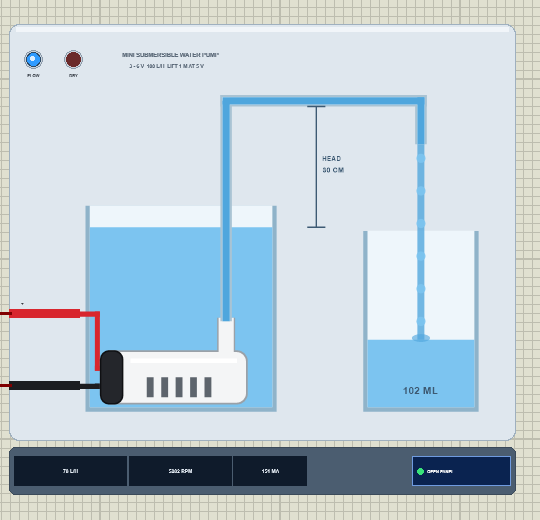
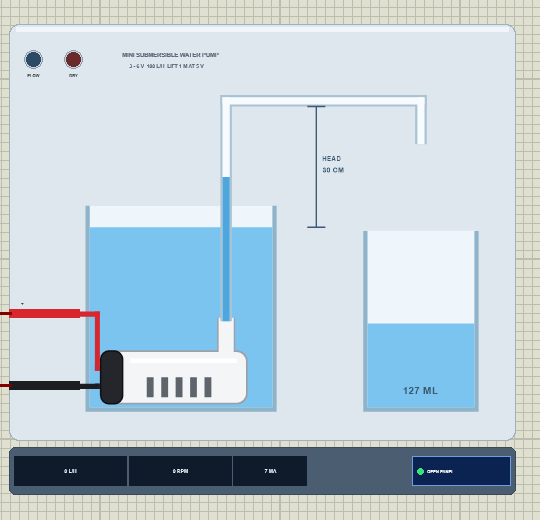
Search pump in Pick Devices; the device SUBPUMPTEP is in TEPSUBPUMP.LIB (category Electromechanical, Pumps) and its model is TEPSUBPUMP.DLL. The symbol is a small scene seen from the side: a glass tank of water with the pump lying on its bottom - the white body with its inlet slots, the black motor cap with the red and black leads, and the outlet nozzle - then a clear tube up and over to a spout above a glass cup. An arrow between them marks the head.
While the simulation runs, the water rises in the tube as fast as the pump can push it, pours from the spout as a stream as wide as the flow, and the cup fills with the water delivered, its volume written on it (a 250 mL cup that is emptied when full). The strip under the plate gives the flow in L/h, the speed and the current next to the OPEN PANEL button. The plate, the tank, the tube, the cup, the head arrow and the LEDs are TEP additions; the LEDs show FLOW (blue) and DRY (red).
| Pin | Wire | What the model does with it |
|---|---|---|
| + | red | the motor, analog: positive on + runs the pump |
| - | black | the motor's other terminal |
Two properties set the scene: HEAD is the lift in cm, from the water surface to the top of the tube (default 30), and DRY = 1 takes the pump out of the water. Both can also be changed on the pop-up while the simulation runs.
Download Mini Submersible Water Pump Library for Proteus
Click the button below to download Mini-Submersible-Water-Pump-Library-for-Proteus-v1.0.zip (about 1.2 MB, without the source code of the models):
Mini Submersible Water Pump Library for Proteus V1.0- README.txt: installation, the demo, the wiring, real hardware, troubleshooting and the limits.
- Proteus Library Files:
TEPSUBPUMP.LIBandArduinoV4TEP.LIBfrom our Arduino Library for Proteus V4.0. - Proteus Model Files:
TEPSUBPUMP.DLLandTEPARDUINO.DLL. - Proteus Simulation:
Mini-Submersible-Water-Pump-L9110S-ArduinoUnoV4.pdsprj,WaterPump_Demo.hexand copies of the two DLLs. - Arduino Code:
WaterPump_Demo.ino(no library needed).
The driver is a separate library: this package holds only the pump and the UNO. The demo drives it through our L9110S motor driver, which has its own download - get it from our L9110S Motor Driver Library for Proteus and install it first, or the demo opens without its driver.
No Proteus yet? Read How to Download and Install Proteus 7 and 8. New to libraries? Follow How to Install a New Library in Proteus.
How to Install Mini Submersible Water Pump Library for Proteus
- Close Proteus and extract the whole zip file, for example to your Desktop.
- Copy
TEPSUBPUMP.LIBandArduinoV4TEP.LIBfrom Proteus Library Files into the LIBRARY folder of Proteus (usuallyC:\Program Files (x86)\Labcenter Electronics\Proteus 8 Professional\LIBRARY). - Copy
TEPSUBPUMP.DLLandTEPARDUINO.DLLfrom Proteus Model Files into the MODELS folder. The two Arduino files are the ones of our Arduino Library V4.0; if you have it, they are the same. - Install our L9110S Motor Driver library the same way from its own zip:
TEPL9110S.LIBinto LIBRARY andTEPL9110S.DLLinto MODELS. - Delete
TEPSUBPUMP.IDXfrom the LIBRARY folder if it is there. - Start Proteus, press P and search for pump.
Tip: keep the Proteus Simulation folder together, because the project needs its .hex file and the DLLs beside it. The library is tested in Proteus 8.5; Proteus 7 is not supported.
The Demo Circuit
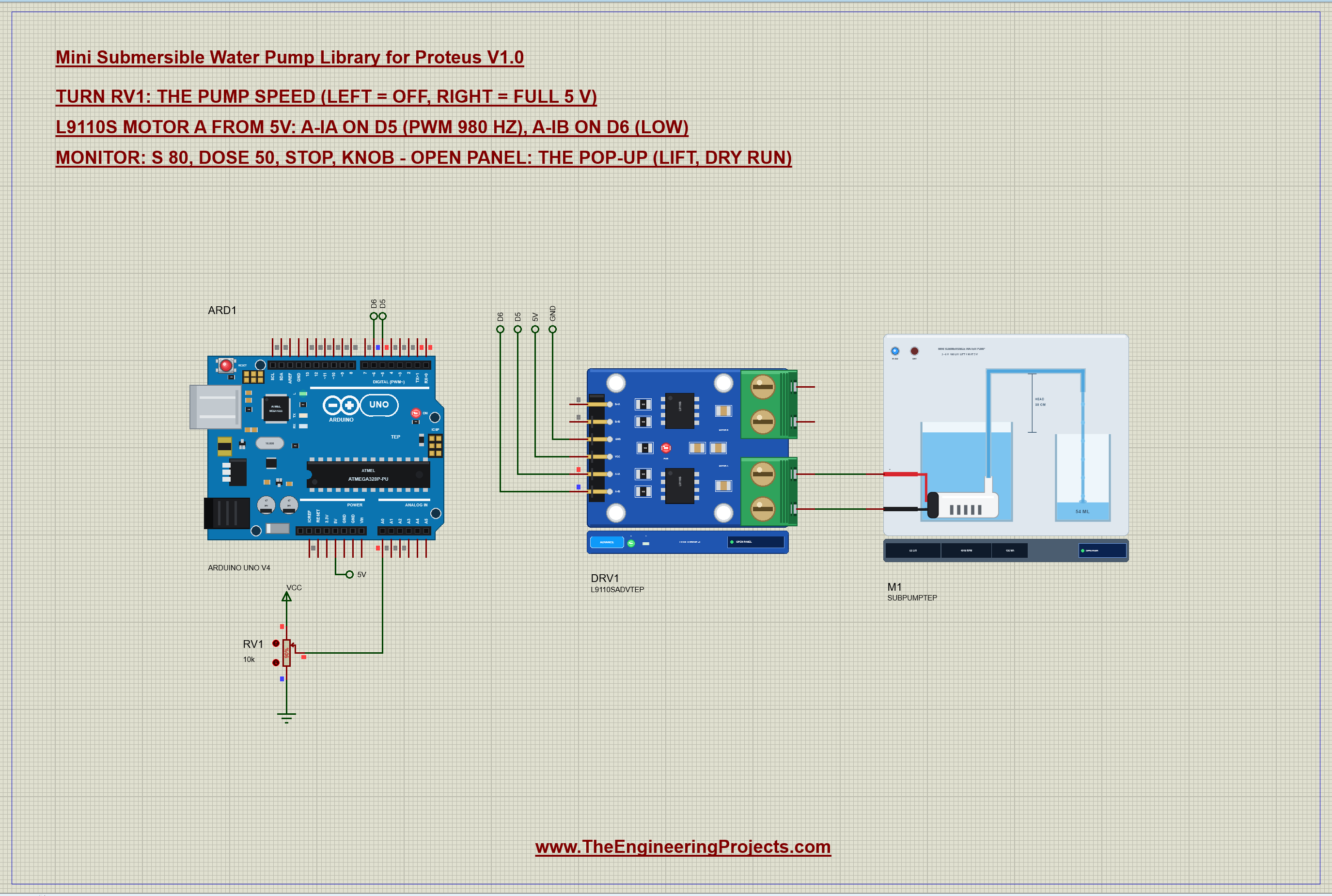
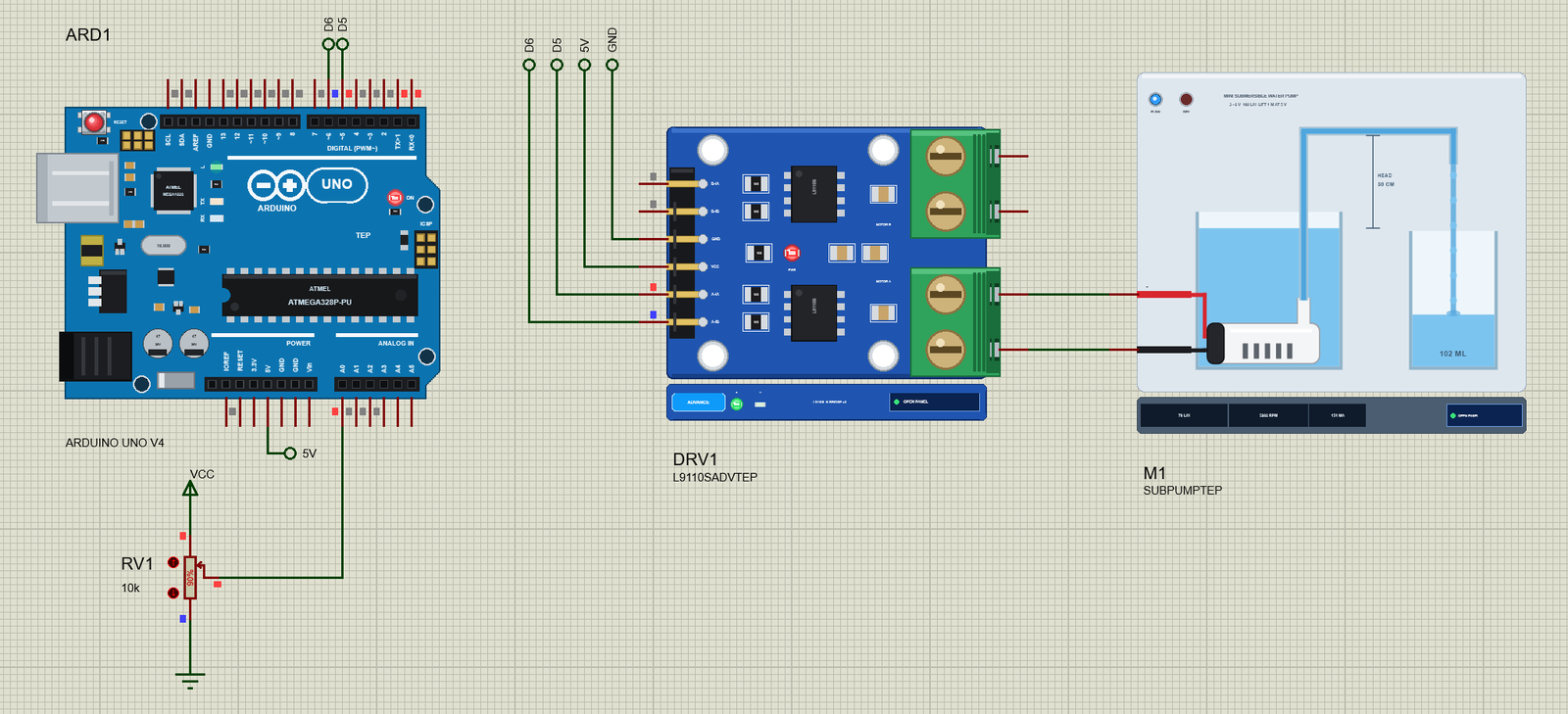
Open Mini-Submersible-Water-Pump-L9110S-ArduinoUnoV4.pdsprj. ARD1 is an Arduino UNO V4.0 from our Arduino UNO Library for Proteus V4.0, running WaterPump_Demo.hex with its serial monitor built in. DRV1 is the L9110S driver in its pop-up version, powered from 5V. M1 is the pump on the driver's MOTOR A, with a 30 cm lift. RV1 is a 10k potentiometer on A0 that sets the pump speed: left is off, right is full speed.
Why a driver? About 170 mA running and about half an amp for a moment at every start is far beyond the 20 mA an Arduino pin is meant to give. The L9110S handles it, but notice one thing in the results below: its switches drop a little of the 5 V, so the pump gets 4.68 V at full speed. A logic-level MOSFET would lose less, and a relay nothing at all.
| From | To | Note |
|---|---|---|
| L9110S A-IA | D5 | PWM 980 Hz: the speed |
| L9110S A-IB | D6 | LOW: the pump runs one way |
| L9110S VCC / GND | 5V / GND | the driver and the pump supply |
| L9110S A-OA / A-OB | pump + / - | the pump |
| RV1 wiper | A0 | the speed |
The Arduino Code
The demo needs no library. New to Arduino? Start with Arduino Tutorial for Beginners and Introduction to Arduino UNO. The pins come first, then the two numbers that make a timed dose possible - the flow at full speed and the time the empty tube takes to fill:
const int IA = 5, IB = 6, POT = A0;
const float FLOW_ML_S = 21.6;         // mL a second at full speed (a 30 cm lift) - measure yours
const int PRIME_MS = 440;             // the time the water takes to fill the empty tube
In setup() both pins become outputs and the pump starts off:
  pinMode(IA, OUTPUT); pinMode(IB, OUTPUT);
  drive(0);
One function sets the speed as a percentage of the 5 V supply. A-IB stays LOW - a pump only runs one way - and A-IA gets the PWM:
void drive(int pct) {                 // the pump at pct % of the 5 V supply
  pct = constrain(pct, 0, 100);
  digitalWrite(IB, LOW);
  if (pct == 0) digitalWrite(IA, LOW);
  else analogWrite(IA, (int)(pct * 255L / 100));
  speedPct = pct;
}
The interesting part is the dose. Without a flow sensor, the Arduino can only pump for a time. So the sketch turns the volume into milliseconds with the measured flow, and adds the time the water needs to climb the empty tube first:
void dose(int ml) {                   // open loop: the fill time + the volume / the measured flow
  unsigned long flowMs = (unsigned long)(ml * 1000.0 / FLOW_ML_S);
drive(100);
delay(PRIME_MS + flowMs);
drive(0);The command dose takes the volume in mL, and stop simply switches the pump off:
if (!strncmp(s, "dose", 4)) { mode = FIXED; dose(constrain(atoi(s + 4), 1, 1000)); return; } if (!strcmp(s, "stop")) { mode = FIXED; drive(0); Serial.println(F("stop: IA LOW, IB LOW")); return; }Finally, the pot is read in the loop. Its left end is a clear "off", and the rest of the travel maps to 1 - 100 % speed:
      int pct = raw < 40 ? 0 : map(raw, 40, 1023, 1, 100);     // the left end: off
      drive(pct);
The basics of PWM speed control are in our older DC Motor Speed Control using Arduino tutorial. The HEX file is in the package; to change the sketch, open it in the Arduino IDE and export the compiled binary, as in How to get the HEX file from Arduino. It needs 7,068 bytes of flash (22 % of the UNO) and 264 bytes of RAM.
Running the Demo
Press Run. The UNO's serial monitor and the pop-ups of the pump and the L9110S open over the schematic; move them aside. RV1 starts at 90 %, so the water climbs the tube and pours into the cup at 65.6 L/h. This is the whole session of our test run, with the commands typed in the monitor:
Mini Submersible Water Pump demo - The Engineering Projects
L9110S from 5 V: A-IA on D5 (PWM), A-IB on D6. The pot on A0 sets the pump speed.
Commands: s 80 | dose 50 | stop | knob | help
Pot 922: speed 89 % (PWM 226/255 = 4.43 V average)
s 100
speed 100 % (PWM 255/255 = 5.00 V average)
stop
stop: IA LOW, IB LOW
dose 50
dose 50 mL: 2754 ms at full speed (440 ms to fill the tube + 2314 ms of flow)
dose done
s 100
speed 100 % (PWM 255/255 = 5.00 V average)
stop
stop: IA LOW, IB LOW
dose 50
dose 50 mL: 2754 ms at full speed (440 ms to fill the tube + 2314 ms of flow)
dose done
knob
Following the pot on A0
Pot 922: speed 89 % (PWM 226/255 = 4.43 V average)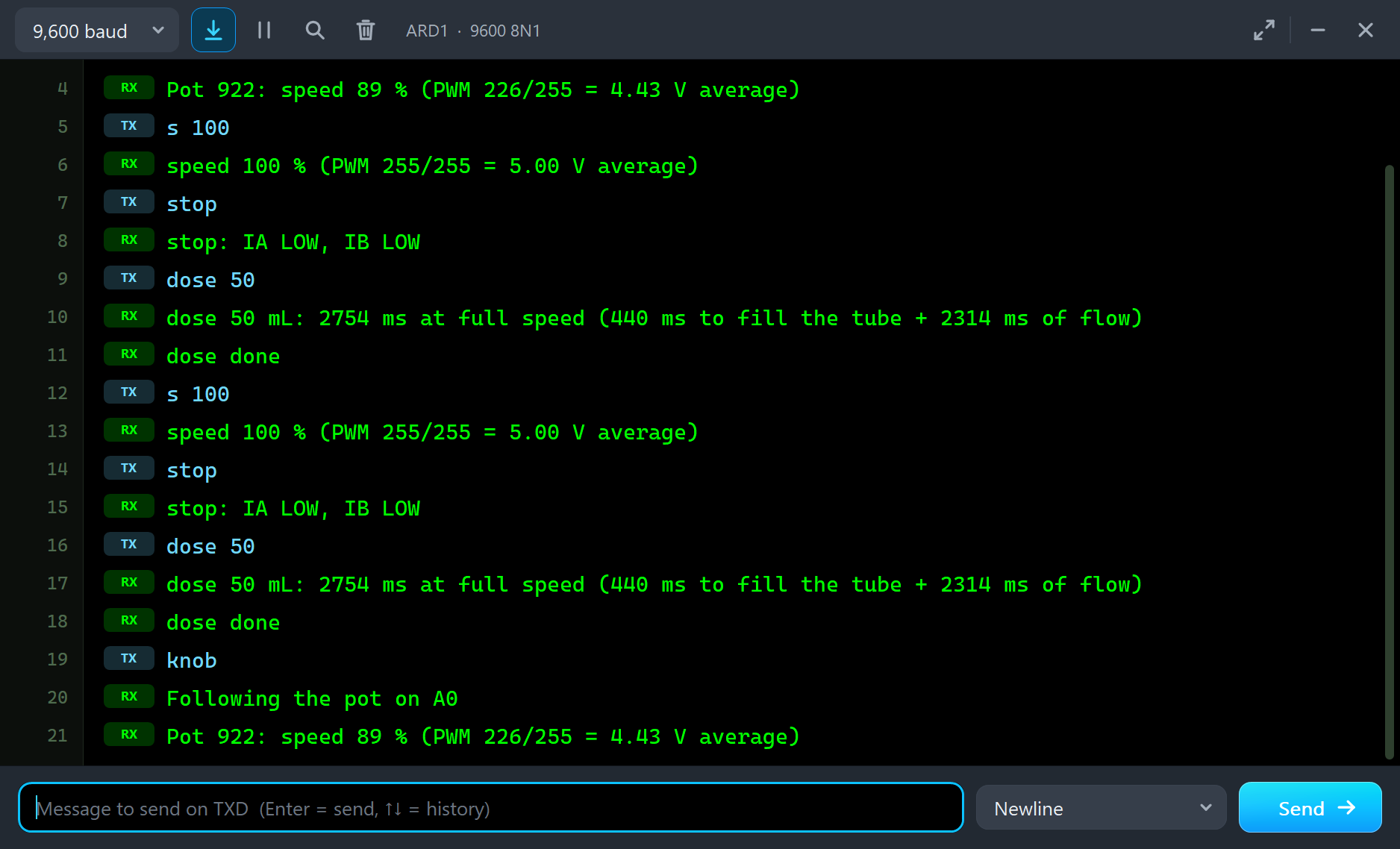
| Type | What it does | What the run showed |
|---|---|---|
| s 80 | speed 80 % (the pot is ignored until knob) | s 100: 77.7 L/h at 30 cm, 151 mA |
| dose 50 | pump 50 mL by time at full speed | 50.6 mL delivered in 2,754 ms |
| stop | both inputs LOW | the tube runs back into the tank |
| knob | follow the pot again | the pot's speed |
The Pop-Up Window
At Run the pump opens TEP Mini Submersible Water Pump, a window in the look of our TEP Serial Monitor Advance for Proteus. Its four tabs are Pump, Graphs, Event log and Check, with Settings and Help behind the gear and question mark icons. If you close it, OPEN PANEL on the strip brings it back.
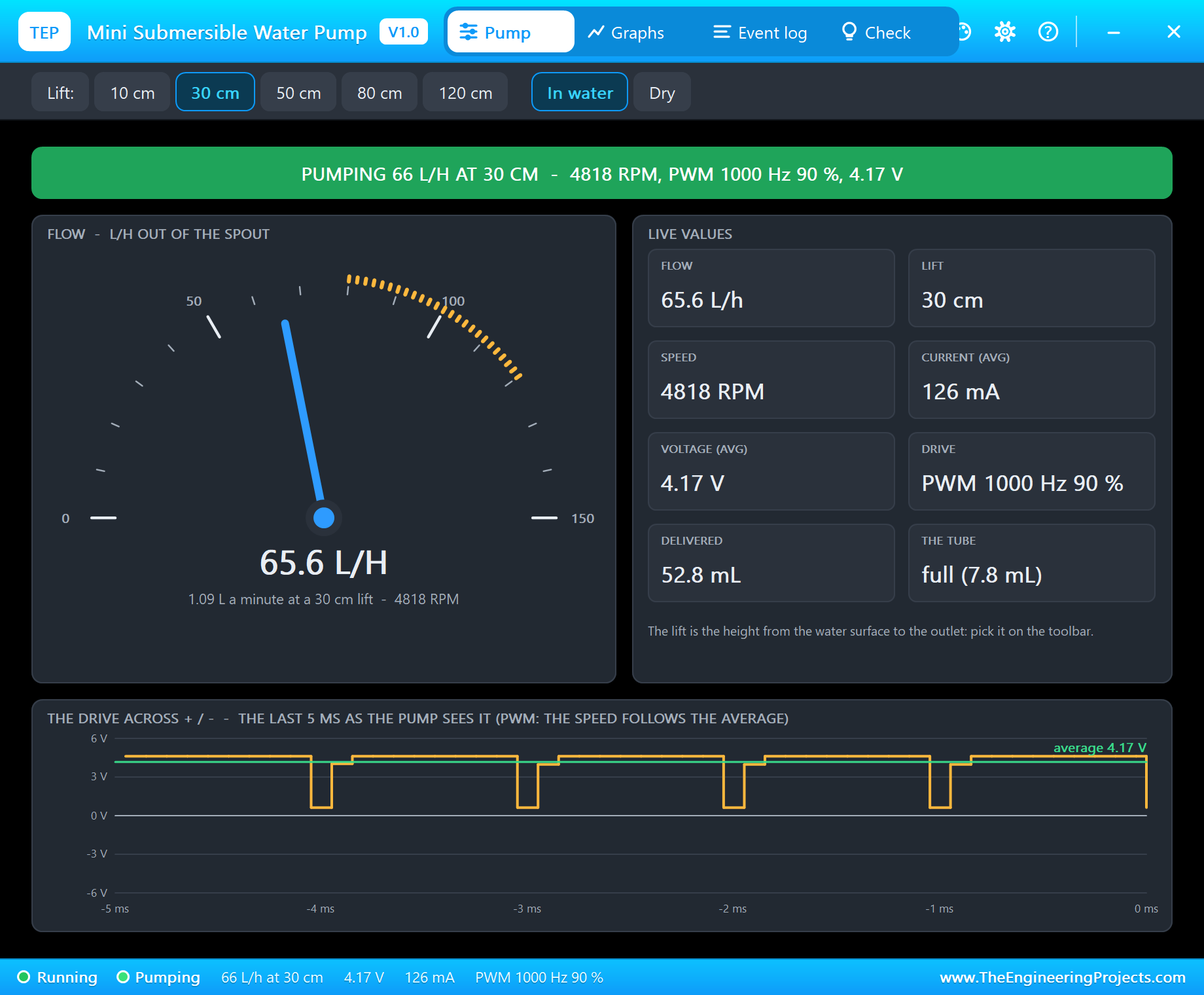
The banner gives the state in one line - here "PUMPING 66 L/H AT 30 CM" with the speed and the drive. The gauge shows the flow out of the spout from 0 to 150 L/h, with the 80 - 120 L/h of the pump's data marked in amber. The live values are the flow, the lift, the speed, the current, the voltage, the drive, the water delivered and the state of the tube. At the bottom, the drive across the pump over the last 5 ms: the UNO's 980 Hz PWM passed on by the L9110S. The toolbar sets the lift (10, 30, 50, 80 or 120 cm) and takes the pump in or out of the water.
Full Speed and the Driver's Drop
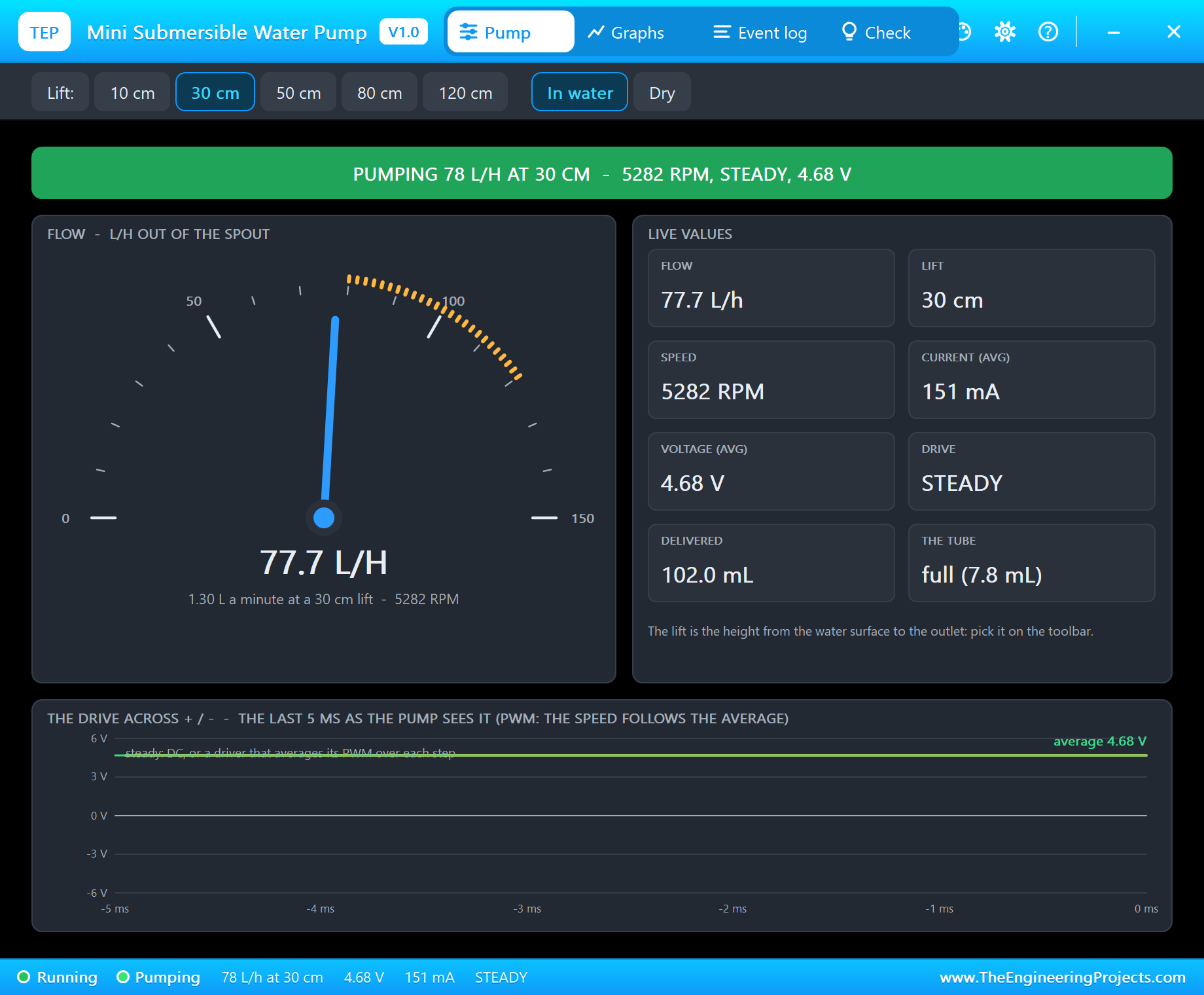
Type s 100. The Event log reads "steady 77.7 L/h at 30 cm, 5281 RPM, 4.68 V average, 151 mA". Compare that with the pump's own data, 84.6 L/h at a full 5 V: the L9110S's switches take about 0.3 V, and the pump loses 8 % of its flow. This is exactly the kind of detail that makes a timed dose come out wrong if the flow was measured with a different driver.
Stop: the Tube Runs Back
Type stop and watch the tube. The stream stops at once, and the water in the tube falls back into the tank through the pump - it is empty again after about 0.3 s, and the Event log says "the tube ran back into the tank through the pump (no check valve): the next start fills it again".
A Measured Dose
Now type dose 50. The sketch answers "dose 50 mL: 2754 ms at full speed (440 ms to fill the tube + 2314 ms of flow)". The tube fills, the first water arrives after 441 ms, and the cup gains 50.6 mL - within about 1 % of the target. We got there by measuring: our first version used the 23.3 mL/s of the pump at a full 5 V and delivered only 46 mL, because of the driver's drop. With the 21.6 mL/s measured through the L9110S, the dose is right. Do the same with your own pump: run it for 10 seconds into a measuring cup at your lift.
A Lift Too High
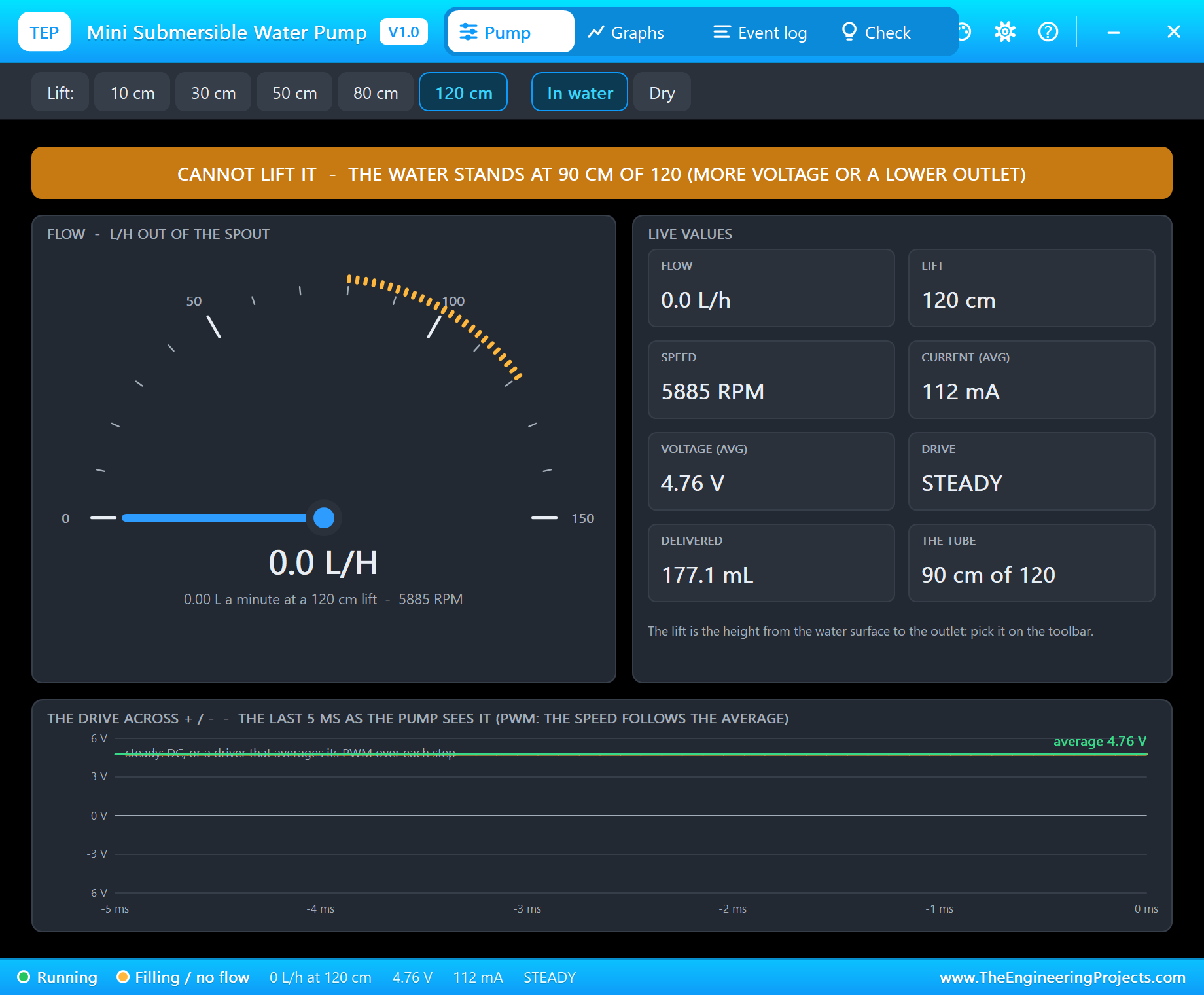
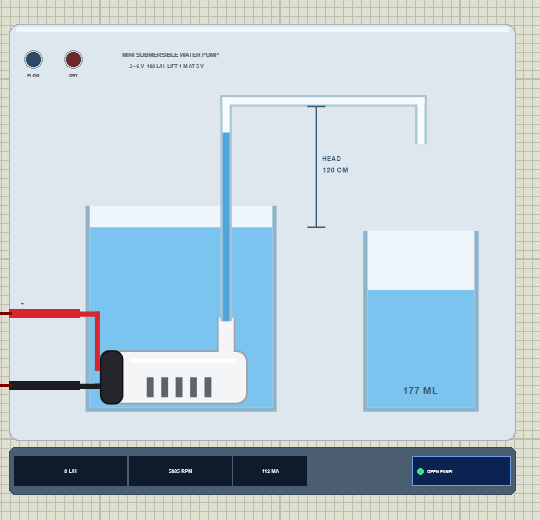
Click 120 cm on the toolbar and run the pump at full speed. The water climbs the tube, slows down and stops at 90 cm - the most this pump can hold up at 4.76 V. The banner turns amber: "CANNOT LIFT IT - THE WATER STANDS AT 90 CM OF 120 (MORE VOLTAGE OR A LOWER OUTLET)". The pump still turns and still draws 112 mA, but not a drop comes out.
A Dry Run
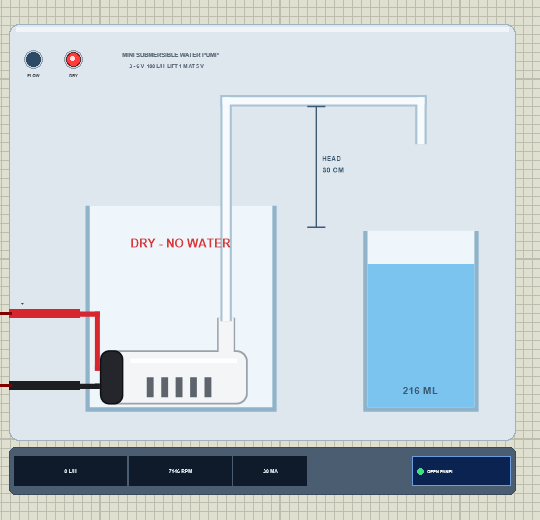
Click Dry to take the pump out of the water. With nothing to push, the impeller races to 7,146 RPM and the current falls to 30 mA - which is exactly how a real dry pump looks on a current meter. The pop-up turns red, and the Event log warns: a dry run, with no water to cool the seal.
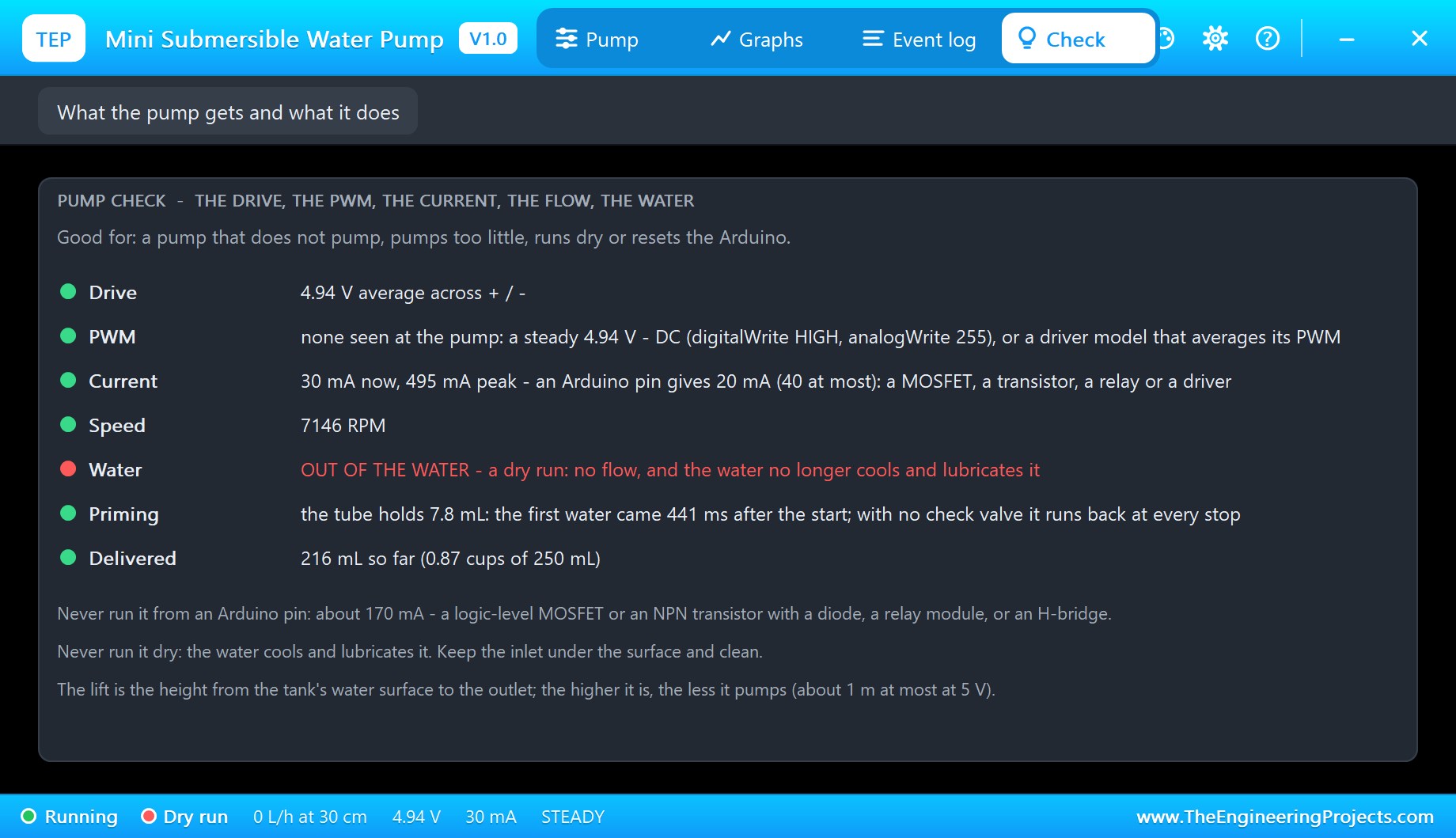
The Check page sums it up in rows with a verdict each: the drive, the PWM, the current against an Arduino pin, the speed, the water - here "OUT OF THE WATER" in red - the priming time of the last start and the water delivered so far. If a real project ever shows a low current and no flow, this is the first thing to check.
Graphs and Event Log
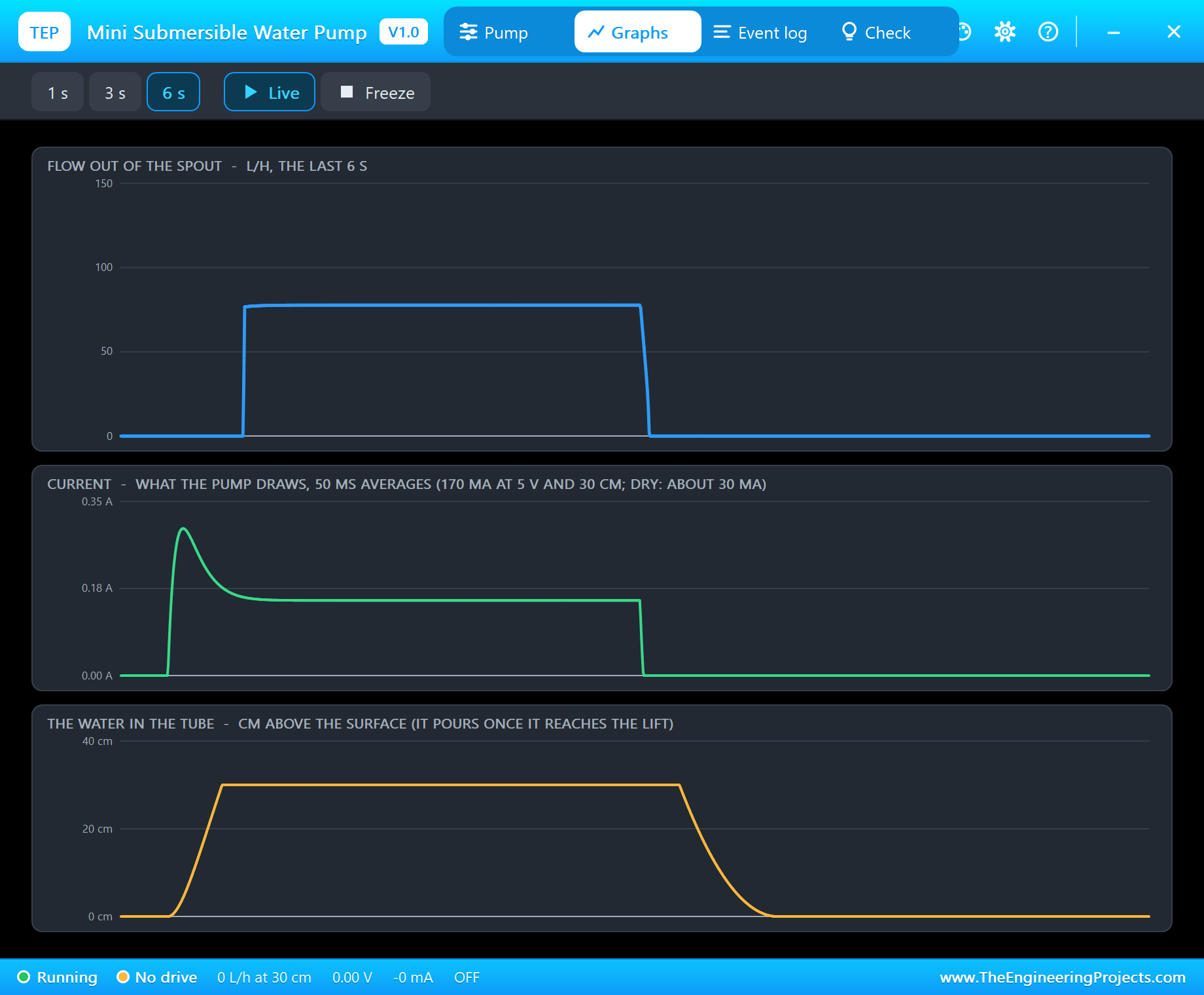
The Graphs page shows a dose in three lines. The current jumps at the start and settles at about 150 mA; the water in the tube climbs from 0 to 30 cm in less than half a second; only then does the flow out of the spout jump to 78 L/h. At the stop, the flow ends at once and the water line falls back to zero.
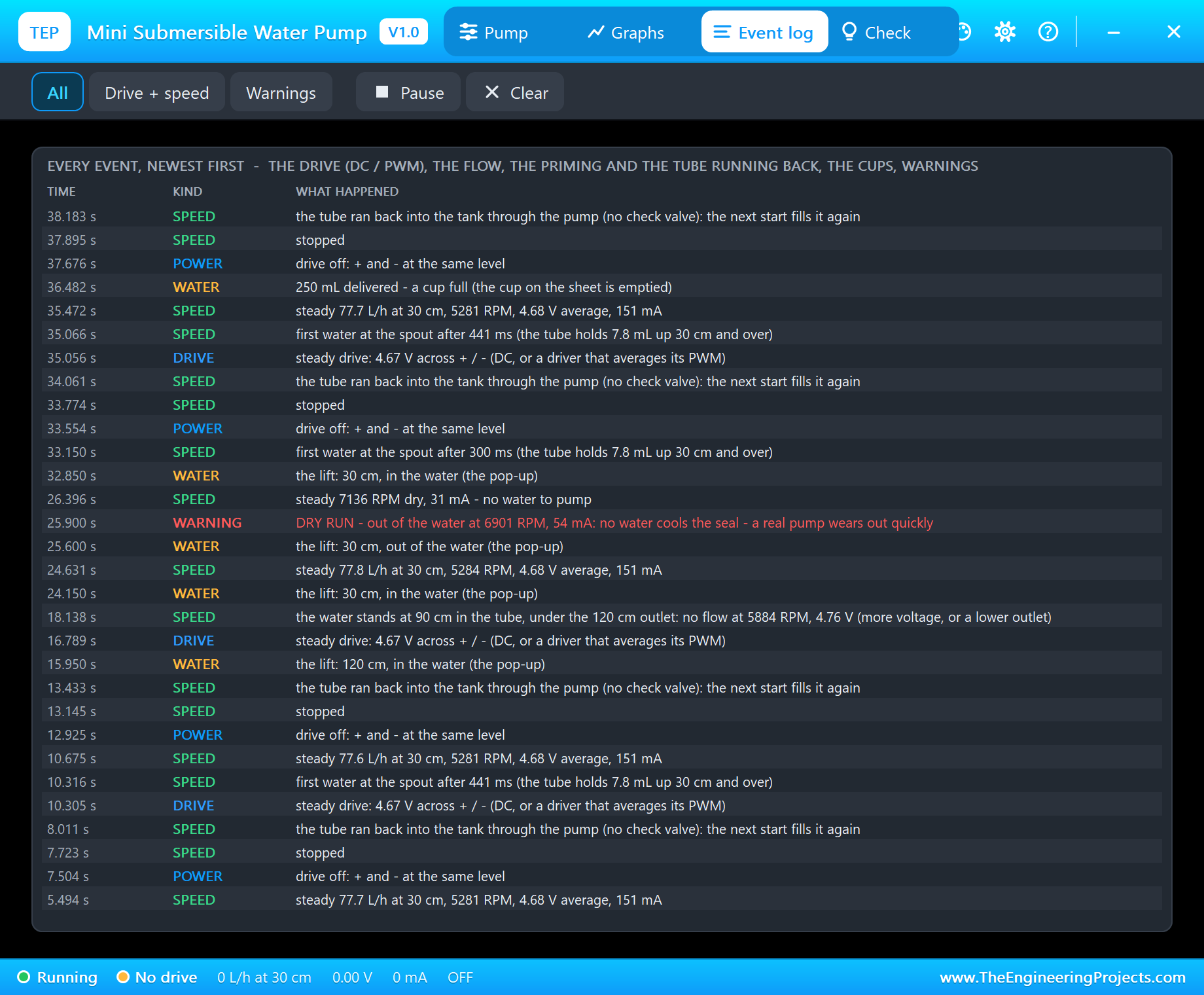
The Event log is the pump's diary, newest first: the drive, every steady flow with its lift and current, the first water at the spout with the time it took, the tube running back, a column that cannot reach the outlet, every 250 mL delivered and the warnings. Our Coin Vibration Motor Library for Proteus uses the same L9110S demo layout, if you want to compare a motor that only shakes.
How the Model Works
The pump is solved by Proteus's analog engine: the motor's speed is an internal node computed together with the driver from the winding resistance of 8 ohm, the back-EMF, the friction, the inertia and the impeller's load. The impeller makes a head that grows with the speed squared; the flow is what that head can push against the water already standing in the tube; and its load grows with the flow, so a blocked outlet still churns about half the torque. Out of the water only 3 % of that load is left.
The tube is stepped after every analog step: it fills up to the lift and over to the spout, pours once it is full, and runs back through the pump when the pump cannot hold the column. The analog steps are 0.1 ms or less, so the L9110S's PWM pulses are resolved. The demo runs at about a quarter of real time on a desktop PC: 43 seconds of simulation took about 3 minutes.
We checked the model on a PC with 24 automatic tests: 5,560 RPM, 168 mA and 84.6 L/h at 5 V and 30 cm, the first water after 397 ms with a 7.8 mL tube, the tube running back and priming again, 104 L/h with no lift, the water standing at 98 cm under a 130 cm outlet, 29 L/h at 3 V, 104.5 L/h at 6 V, a dry run at 7,240 RPM and 30 mA, PWM at 980 Hz found with its duty, a full cup of 250 mL and the over-voltage warning at 7 V.
Troubleshooting
- The water never comes out and the pop-up says NO DRIVE: the driver's inputs (both LOW means stop), its VCC, or the leads on the wrong outputs.
- CANNOT LIFT IT: the lift is above what the pump makes at this voltage - more speed, or a lower outlet.
- DRY RUN: the pump is out of the water (the DRY property or the Dry button).
- A timed dose gives too little: calibrate
FLOW_ML_SandPRIME_MSfor your pump, driver, tube and lift. - No driver in the project: install our L9110S library (
TEPL9110S.LIB/TEPL9110S.DLL) - it is not in this package. - Nothing moves on the sheet, no UNO or no monitor:
TEPSUBPUMP.DLLorTEPARDUINO.DLLis missing from MODELS and the project folder; a closed monitor opens again with a click on the UNO's USB port.
Things to Know Before Using a Real Mini Water Pump
- Never from a pin: use a logic-level MOSFET or an NPN transistor with a 1N4007 or 1N4148 diode across the pump, a relay module, or a driver such as the L9110S.
- Never dry: keep the inlet under the surface and clean - a small mesh keeps dirt out of the impeller.
- Its own supply: a USB charger or 4 x AA for the pump, with GND common with the Arduino; a starting pump can reset an Arduino on a weak USB port.
- Check valve and siphon: a check valve keeps the tube full between doses; end the tube above the target's water level, or the tank may siphon out after the pump stops.
- Calibrate: measure the flow at your lift with your driver before you trust a timed dose.
- Electricity and water: only low voltage near the water, and keep the Arduino and the wiring dry.
Limitations of the Simulation
- Not modelled: the winding inductance, air in the pump, the water's inertia in the tube, a tank running empty, the tube's length and bends beyond the lift, the heating and wear of a dry run, and the differences between real pumps.
- The pump is the common 3 - 6 V type; bigger 12 V pumps are not selectable.
- The plate, the tank, the tube, the cup, the head arrow, the LEDs and the strip are TEP additions.
- The model is our own, written from the typical data of 3 - 6 V mini submersible pumps; this library is not made or endorsed by Arduino or Labcenter.
- Licences: the demo needs no Arduino library; the HEX file contains the Arduino AVR core 1.8.6 with LGPL-licensed code, and the sketch is included. The potentiometer is Proteus's own POT-HG. The L9110S driver is our separate library.
- Tested in Proteus 8.5 in October 2026 with the demo as shipped: the pot, full speed, stop, a 50 mL dose, a 120 cm lift, a dry run and the pop-ups. Proteus 7 is not supported.
So, that was all about the Mini Submersible Water Pump Library for Proteus V1.0. I hope it helps you plan your watering system or fountain - the driver, the lift, the dose and the water level - before the first drop lands on your desk. If you have any questions, ask in the comments and I will help you out. Till the next tutorial, take care and have fun!