Hello friends, I hope you all are doing great. Today, I am going to share the Raspberry Pi 5 Library for Proteus. The Raspberry Pi 5 is the fastest Pi so far: the BCM2712 with four Cortex-A76 cores at 2.4 GHz, and for the first time a chip designed by Raspberry Pi itself, the RP1, which now drives the 40-pin header. With this library the board runs your Python program against the circuit in Proteus 8.5 - and it drives its pins the Pi 5 way, through lgpio.
Raspberry Pi 5 Library for Proteus
Latest version: V1.0 (October 2026, this tutorial)
Other Raspberry Pi boards: Pico · Pico W · Pico 2 W · Pi Model B · Pi 1 B+ · Pi 2 Model B · Pi 3 Model B · Pi 3 Model B+ · Pi 3 Model A+ · Pi 4 Model B · Pi Zero W · Pi Zero 2 W · Pi 400 · Pi 2 · Pi 3 · Pi 4 · Zero W
Temperature and weather sensors: DHT11 / DHT22 · DS18B20 · BME280 · BMP280 · SHT31 · AHT20 · BME680 · MLX90614 · MAX6675
Motor drivers: L298 · L9110S · TB6612FNG · BTS7960 · A4988 / DRV8825 · 28BYJ-48 + ULN2003 · PCA9685 Servo · Relay Module
Helping Tools
- Laptop WiFi Monitor: a laptop on the Wi-Fi of your design: a browser, a TCP / UDP terminal and ping
- Mobile WiFi Monitor: a smartphone that opens the pages of your board and sends it commands
- LCD Library for Proteus V3.0: 16x2, 20x4 and I2C LCDs to show your readings
This is the eighth library of our Raspberry Pi series, and every library of the series connects the Pi to a different module and serves a web page. This time the Pi 5 is an IR smart fan: an MLX90614 infra-red thermometer on I2C measures the object it looks at, a TB6612FNG driver runs a DC motor as the fan, an LED blinks when the object is too hot, and a page on a laptop and a phone shows the temperatures and sets the fan: AUTO, OFF, 50 %, 100 % and the airflow.
NOTICE: this library does not run Raspberry Pi OS. It runs your Python program, with the same Python libraries a Pi uses for its pins, its buses and its network, in step with the simulation. Your feedback is the fuel that keeps us going, so please tell us what you think in the comments below or in the Raspberry Pi 5 board of our forum. And if our free libraries help you, you can buy us a coffee. So, let's get started with the Raspberry Pi 5 Library for Proteus:
What is the Raspberry Pi 5?
The Raspberry Pi 5 came out in October 2023 at 60 dollars for 4 GB and 80 dollars for 8 GB; a 2 GB board and a 16 GB board followed. It keeps the size of the B+ boards - 85 x 56 mm, the same four mounting holes and the same 40-pin header - but its BCM2712 runs four 64-bit Cortex-A76 cores at 2.4 GHz, two to three times the speed of the Pi 4, with LPDDR4X memory beside it.
The biggest change is under the header. On every Pi before it, the GPIOs belonged to the Broadcom processor, and libraries like RPi.GPIO wrote straight into its registers. On the Pi 5 the processor talks over PCI Express to the RP1, Raspberry Pi's own I/O chip, and the RP1 owns the GPIOs, the USB ports, the Ethernet MAC and the camera and display lanes. Programs reach the pins through the Linux gpiochip with lgpio - gpiozero uses it on its own - and the old RPi.GPIO no longer works there (the rpi-lgpio package stands in for it).
The board gained a few things too: a power button, a real-time clock with a battery connector, a PCIe connector for an M.2 SSD, a fan connector for the Active Cooler, a 3-pin debug UART, and two 4-lane connectors that take either a camera or a display. The RJ45 went back to the bottom of the right edge, as on the Pi 3 B+, and the USB-C input now takes 5 V at 5 A.
| Raspberry Pi 4 Model B (2019) | Raspberry Pi 5 (2023) | |
|---|---|---|
| Processor | BCM2711, four Cortex-A72 cores at 1.5 GHz | BCM2712, four Cortex-A76 cores at 2.4 GHz |
| RAM | 1, 2, 4 or 8 GB LPDDR4 | 2, 4, 8 or 16 GB LPDDR4X |
| The 40-pin GPIOs | on the processor (RPi.GPIO, gpiozero) | on the RP1 (lgpio, gpiozero) |
| Ethernet | true Gigabit, PoE header | true Gigabit, PoE+ header |
| USB | 2 x USB 3.0 and 2 x USB 2.0 | the same, both USB 3.0 ports at full speed together |
| Power | USB-C, 5 V 3 A | USB-C, 5 V 5 A, and a power button |
| New on the board | - | RTC with a battery connector, PCIe, fan connector, debug UART |
| Board | 85 x 56 mm, 40-pin header | the same |
In Proteus, our Raspberry Pi Model B Library for Proteus covers how the board runs a Python program: the program and Proteus work in lockstep, every sleep, pin wait and bus transfer moves the simulation clock, and the Python libraries for the pins answer as on a Pi. Then came the Raspberry Pi 1 Model B+ Library for Proteus with a touch TFT, the Raspberry Pi 2 Model B Library for Proteus with four I2C parts, the Raspberry Pi 3 Model B Library for Proteus with Wi-Fi, the Raspberry Pi 3 Model B+ Library for Proteus with a keypad door lock, the Raspberry Pi 3 Model A+ Library for Proteus with an LED matrix and a stepper and the Raspberry Pi 4 Model B Library for Proteus with RFID and a real-time clock. The Pi 5 adds lgpio to the runtime and brings an IR thermometer and a motor driver.
Features of the Raspberry Pi 5 Library for Proteus
- The board as it looks: the Pi 5 at its real size with the 40-pin header, the Wi-Fi module's shield can, the silver BCM2712 and its LPDDR4X, the RP1, the fan connector, the USB 2.0 and blue USB 3.0 pairs, the RJ45, the PoE+ header, the two CAM/DISP connectors, the PCIe connector, the power button, the USB-C socket and the two micro-HDMI sockets.
- lgpio, as on a Pi 5: gpiochip 0, claims for inputs, outputs and alerts, callbacks on edges, PWM, servo pulses and pulse trains, I2C, SPI and the UART - and gpiozero on top of it.
- Ethernet and Wi-Fi: eth0 with the cable in (the default, a click on the RJ45 unplugs it), wlan0 on the network in WIFISSID and WIFIPASS when it is out; the Pi gets 192.168.1.51 and sockets and http.server work on either.
- Your Python program: any .py file in the PROGRAM property; Python 3.11 and its standard library are included.
- The other buses: smbus2, spidev, pyserial, the 1-Wire files and the DHT sensors, as on the earlier boards, and RPi.GPIO for older programs.
- Threads: a web server, a control loop and gpiozero's blink thread run side by side, every wait in simulation time.
- The Pi Terminal: the output, the errors, a line for input(), and a Board tab with the GPIOs, the LEDs and the supply pins - with our TEP header, no Windows title bar.
- A complete package: about 13.6 MB with the board, Python, the runtime, the thermometer, motor driver, motor and monitor libraries and the demo, without the source code of the models.
The Raspberry Pi 5 in Proteus
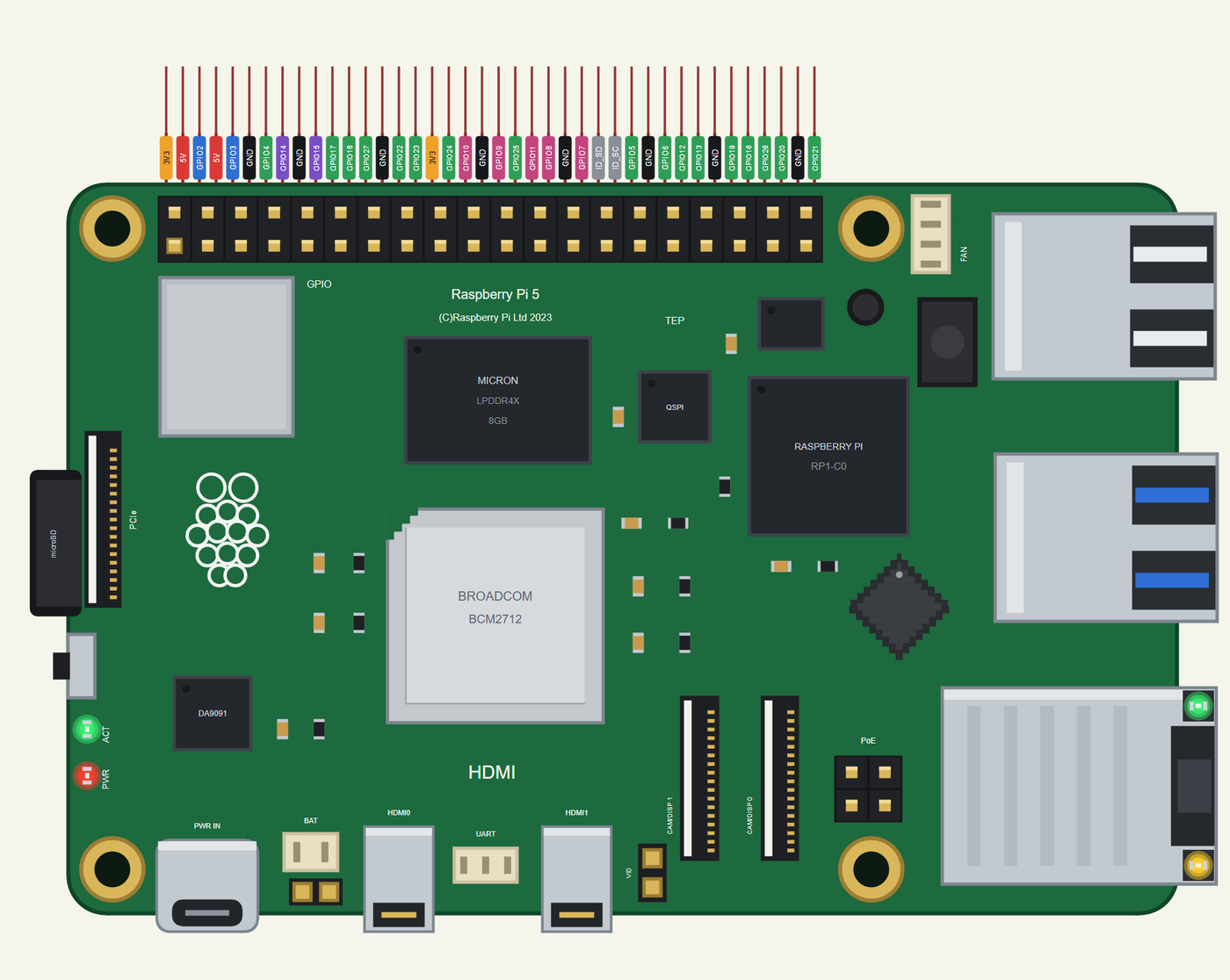
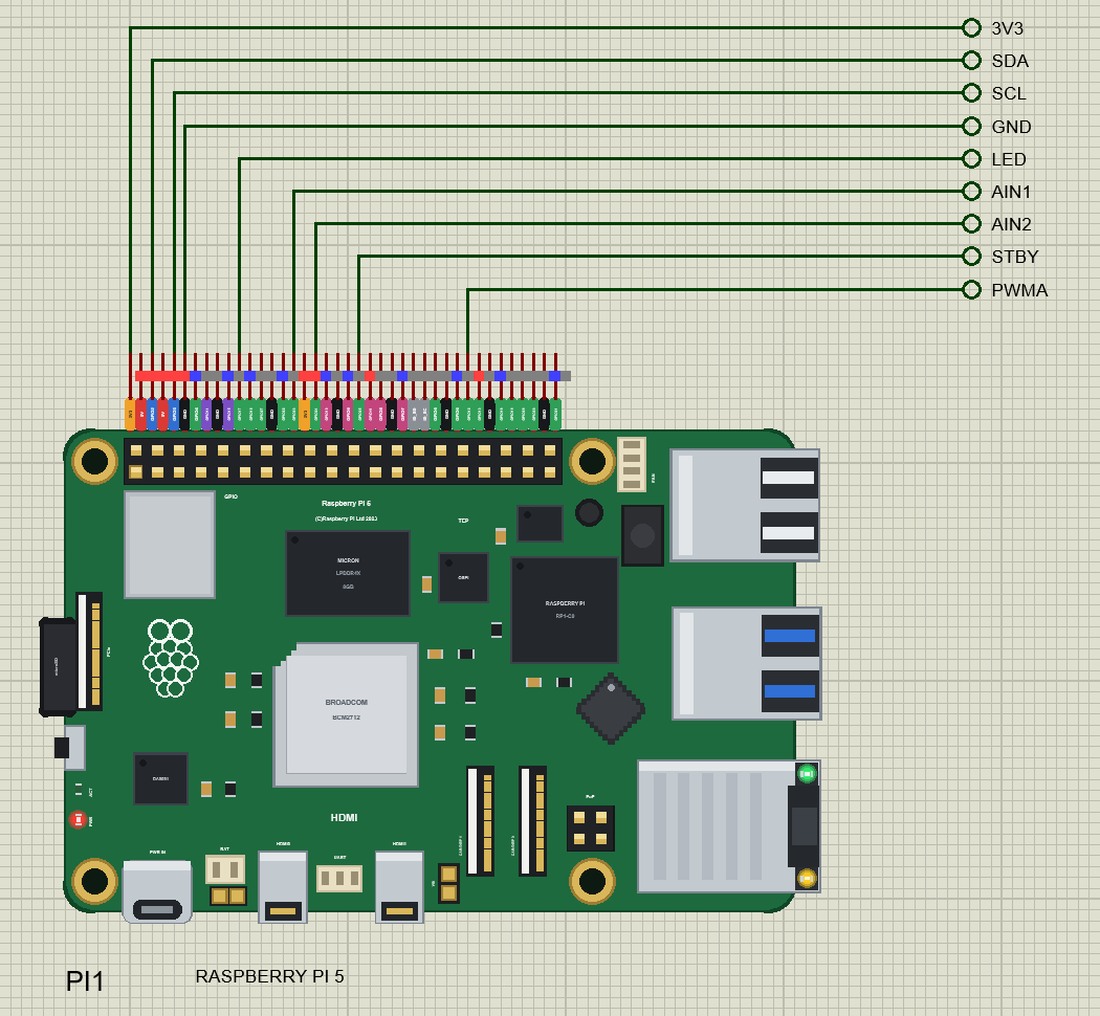
Search RASPBERRY in Pick Devices; the device RASPBERRY PI 5 is in TEPRPI5.LIB (Microprocessor ICs, Raspberry Pi), with the prefix PI. The 40 pins leave the top edge as one comb, each pin above its column of the header, with a tag in the colour of its kind: 5V red, 3V3 orange, GND black, GPIO green, I2C blue, SPI pink, UART purple and the ID pins grey. Click the HDMI0 socket or the processor to open the Pi Terminal, and the RJ45 to plug or unplug the Ethernet cable.
lgpio: the Pi 5's Way to the Pins
A program opens the chip with lgpio.gpiochip_open(0) and gets a handle; then it claims each GPIO it uses - gpio_claim_output, gpio_claim_input with a pull-up or pull-down, or gpio_claim_alert for edges that call a function. gpio_write and gpio_read set and read the levels, tx_pwm makes PWM from 0.1 Hz to 10 kHz, tx_servo servo pulses, and the i2c_, spi_ and serial_ functions talk to the buses. A GPIO that was not claimed answers with an lgpio.error, as on a Pi. gpiozero chooses lgpio by itself on a Pi 5 (its LGPIOFactory), so LED(17), Button(22) or Motor() work as they did on the earlier boards.
Ethernet and Wi-Fi
The ETHERNET property says whether the cable is in at Run - IN by default. At Run the board boots for half a second and eth0 comes up on our router at 192.168.1.51, with the name raspberrypi.local; the RJ45's LNK and 100 LEDs light. With the cable out, wlan0 joins the network named in WIFISSID with the password in WIFIPASS - by default our router TEP-WiFi with 12345678 - 2.3 to 3.5 s after Run. Either way the Pi is on the same network as our other network parts and the Laptop WiFi Monitor and the Mobile WiFi Monitor.
The 40-Pin Header
| Pins | Name | Pins | Name |
|---|---|---|---|
| 1 | 3V3 | 2 | 5V |
| 3 | GPIO2 (SDA) | 4 | 5V |
| 5 | GPIO3 (SCL) | 6 | GND |
| 7 | GPIO4 | 8 | GPIO14 (TXD) |
| 9 | GND | 10 | GPIO15 (RXD) |
| 11 | GPIO17 | 12 | GPIO18 |
| 13 | GPIO27 | 14 | GND |
| 15 | GPIO22 | 16 | GPIO23 |
| 17 | 3V3 | 18 | GPIO24 |
| 19 | GPIO10 (MOSI) | 20 | GND |
| 21 | GPIO9 (MISO) | 22 | GPIO25 |
| 23 | GPIO11 (SCLK) | 24 | GPIO8 (CE0) |
| 25 | GND | 26 | GPIO7 (CE1) |
| 27 | ID_SD | 28 | ID_SC |
| 29 | GPIO5 | 30 | GND |
| 31 | GPIO6 | 32 | GPIO12 |
| 33 | GPIO13 | 34 | GND |
| 35 | GPIO19 | 36 | GPIO16 |
| 37 | GPIO26 | 38 | GPIO20 |
| 39 | GND | 40 | GPIO21 |
The GPIOs work at 3.3 V; GPIO2 and GPIO3 have the Pi's 1.8 k pull-ups. The 5V and 3V3 pins power the modules wired to them. ID_SD and ID_SC are kept for a HAT's ID EEPROM, so leave them free, as on a real Pi. The fan, PoE+, UART, battery and power-button connectors are drawn, not pins of the part.
Download Raspberry Pi 5 Library for Proteus
Click the button below to download Raspberry-Pi-5-Library-for-Proteus-v1.0.zip (about 13.6 MB with Python included, without the source code of the models):
Raspberry Pi 5 Library for Proteus V1.0- README.txt: the device, lgpio, the network, installation, the demo, the header, the properties, troubleshooting and the limits.
- Proteus Library Files:
TEPRPI5.LIB(the Raspberry Pi 5) and the demo's parts:TEPMLX90614.LIB(the IR thermometer),TEPTB6612.LIB(the motor driver),TEPMOTOR.LIB(the TT gear motor),TEPLAPTOP.LIBandTEPMOBILE.LIB. - Proteus Model Files:
TEPNET.DLL(the Pi, the laptop, the phone and the network), the parts'TEPMLX90614.DLL,TEPTB6612.DLLandTEPMOTOR.DLL, and the TEPPi folder - Python 3.11 and the TEP Pi runtime, now with lgpio. - Python Code:
blink.pyandsmart_fan.py. - Proteus Simulation: the demo project, its program and copies of the DLLs.
No Proteus yet? Read How to Download and Install Proteus 7 and 8. New to libraries? Follow How to Install a New Library in Proteus.
How to Install Raspberry Pi 5 Library for Proteus
- Close Proteus and extract the whole zip file, for example to your Desktop.
- Copy the files from Proteus Library Files into the LIBRARY folder of Proteus (usually
C:\Program Files (x86)\Labcenter Electronics\Proteus 8 Professional\LIBRARY). - Copy everything from Proteus Model Files - the DLLs and the TEPPi folder - into the MODELS folder, replacing an older TEPNET.DLL and TEPPi folder (these are the newest; they also run our Model B, Model B+, Pi 2, Pi 3, Pi 3 B+, Pi 3 A+ and Pi 4).
- Delete
TEPRPI5.IDXfrom the LIBRARY folder if it is there. - Start Proteus, press P and search for RASPBERRY.
There is nothing else to install: Python comes in the TEPPi folder, so you need no Python on your PC.
Demo: an IR Smart Fan with a Web Page
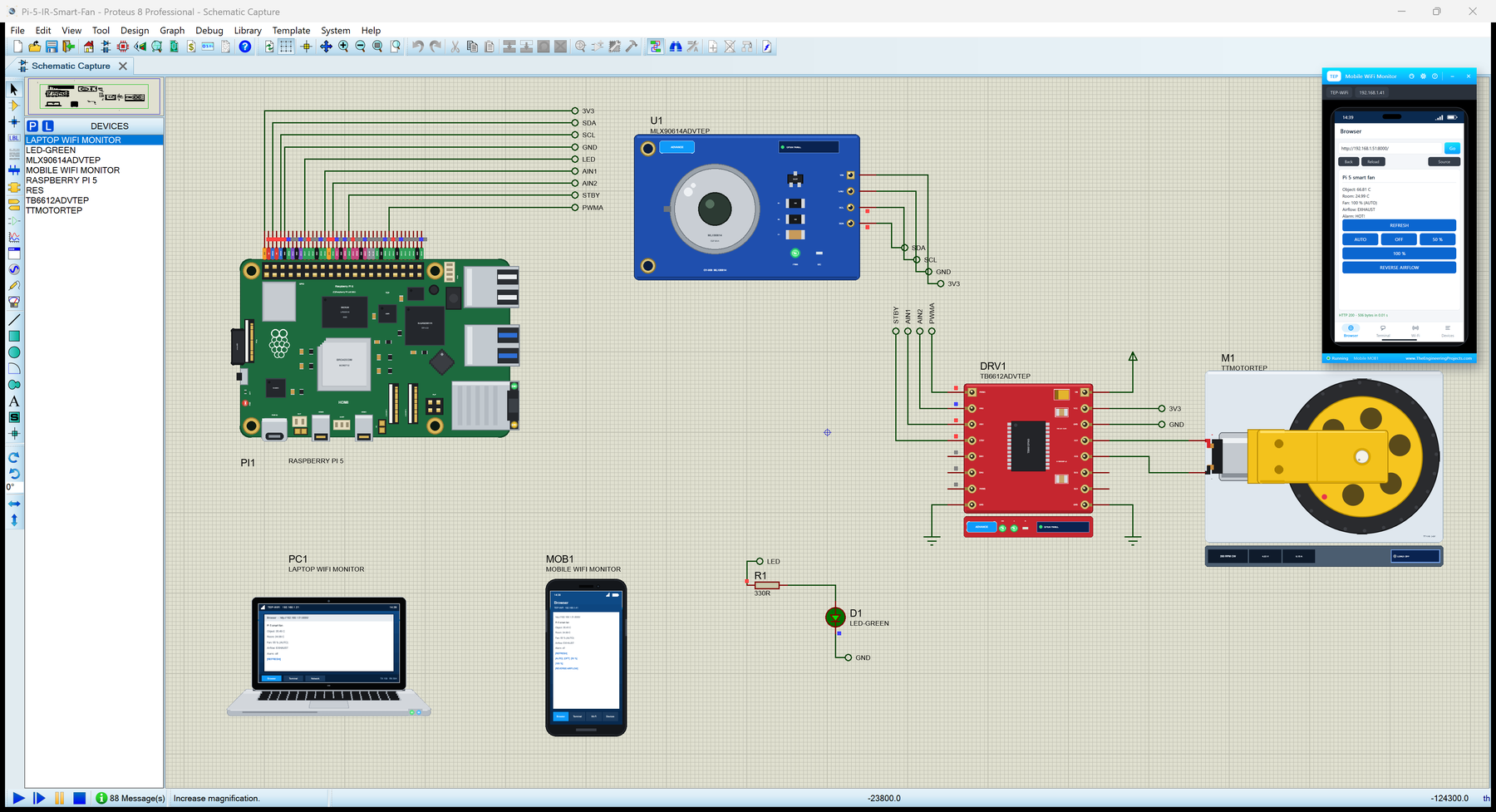
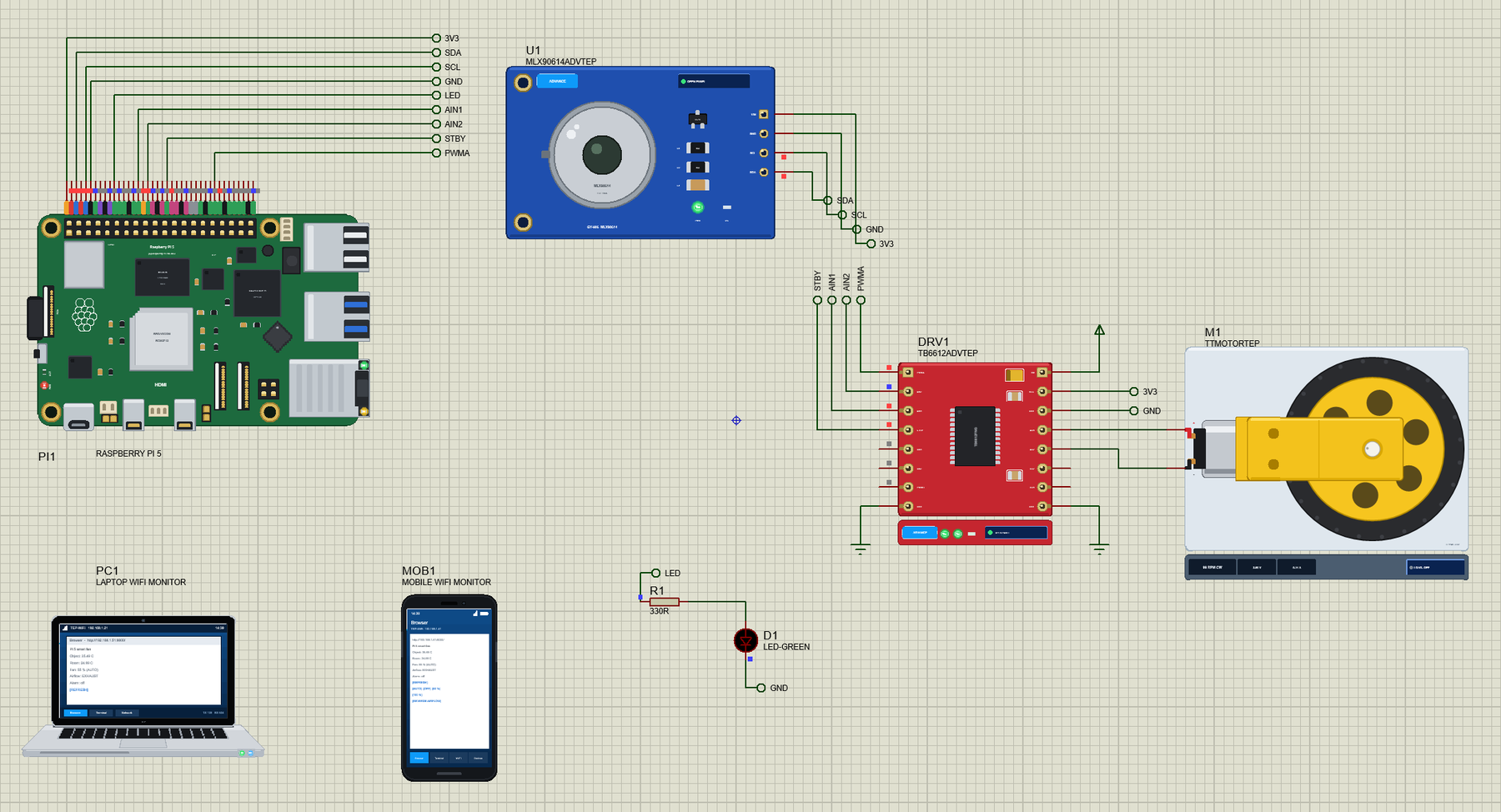
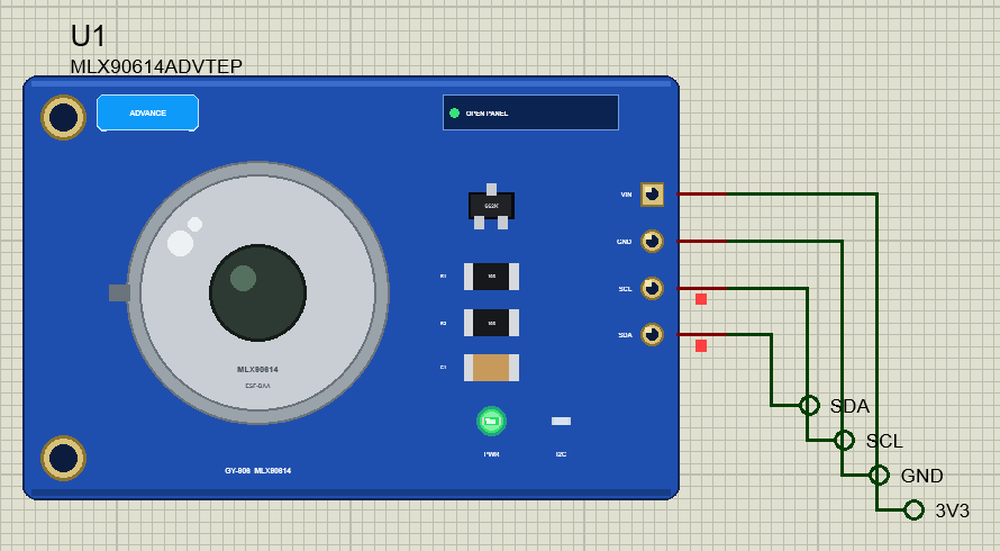
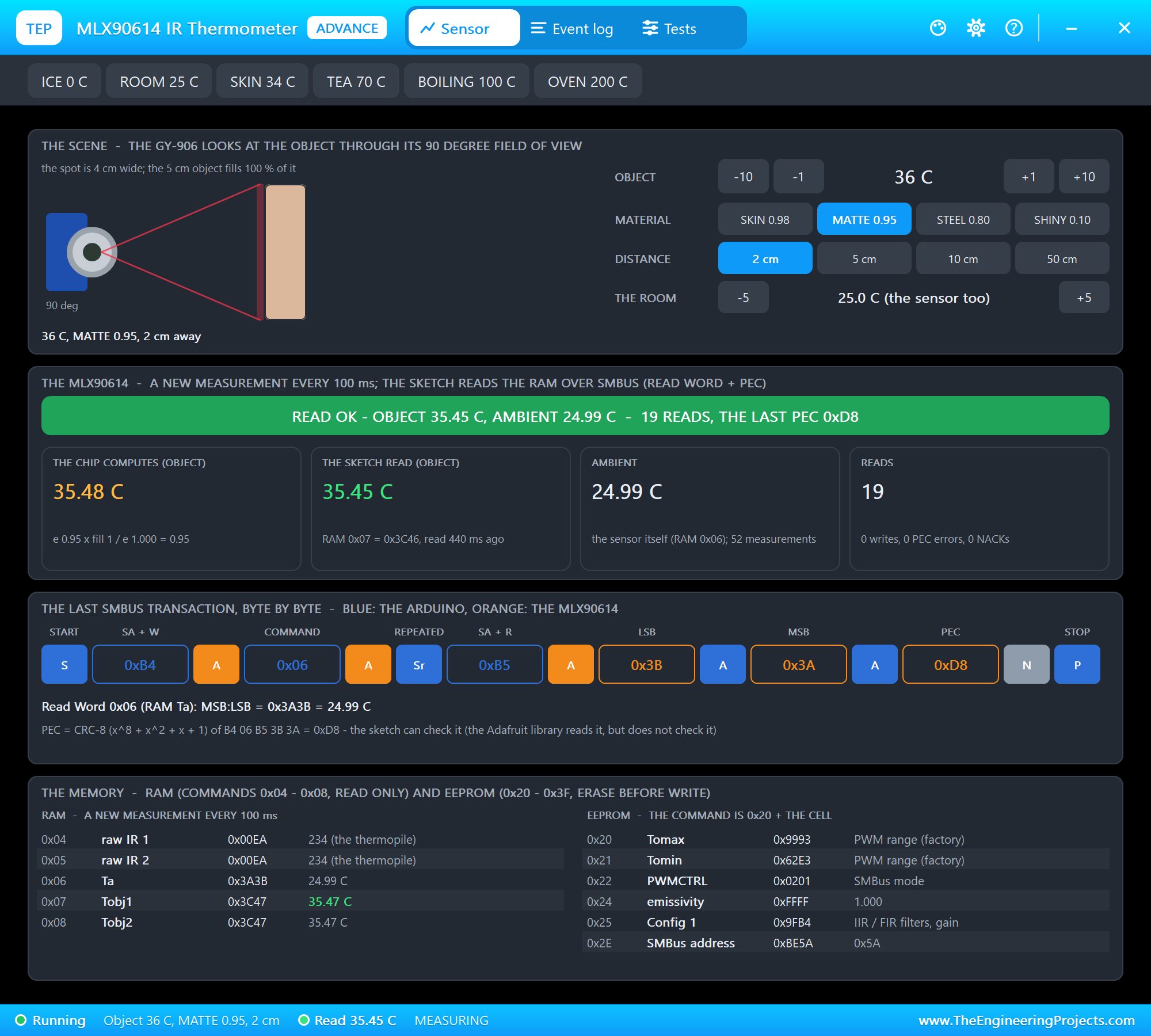
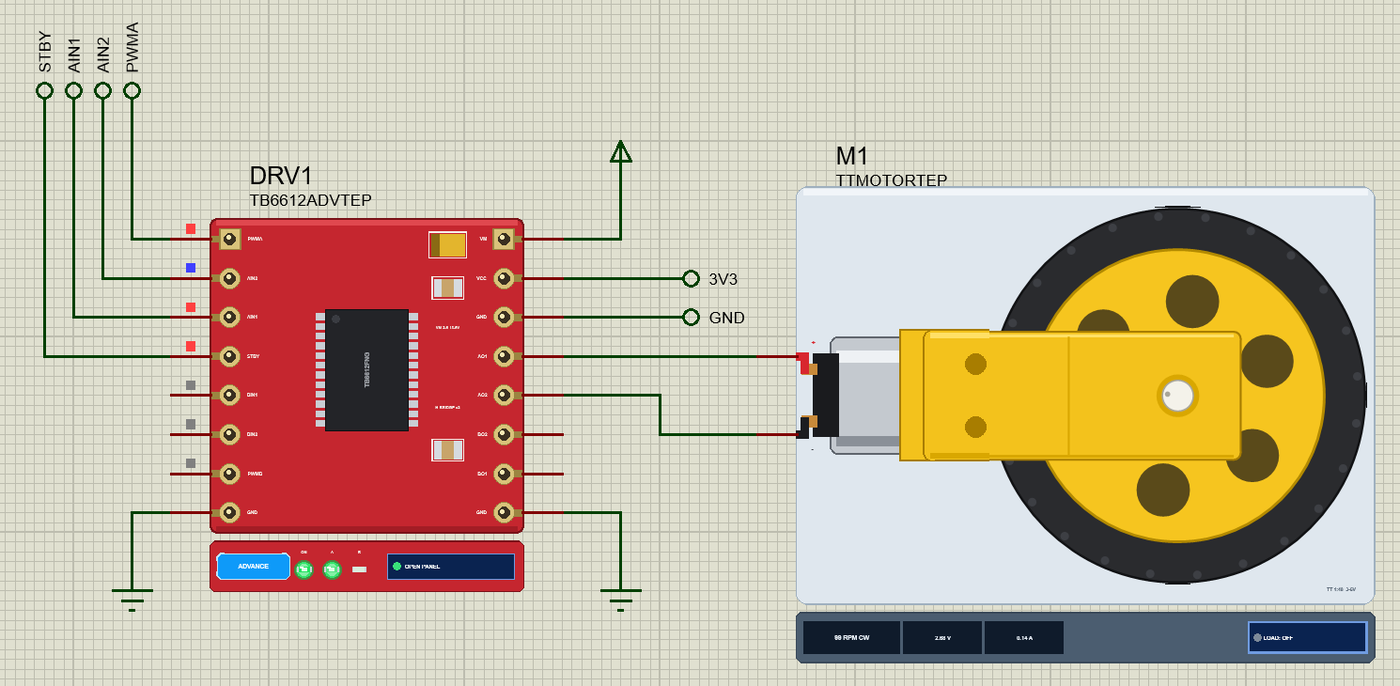
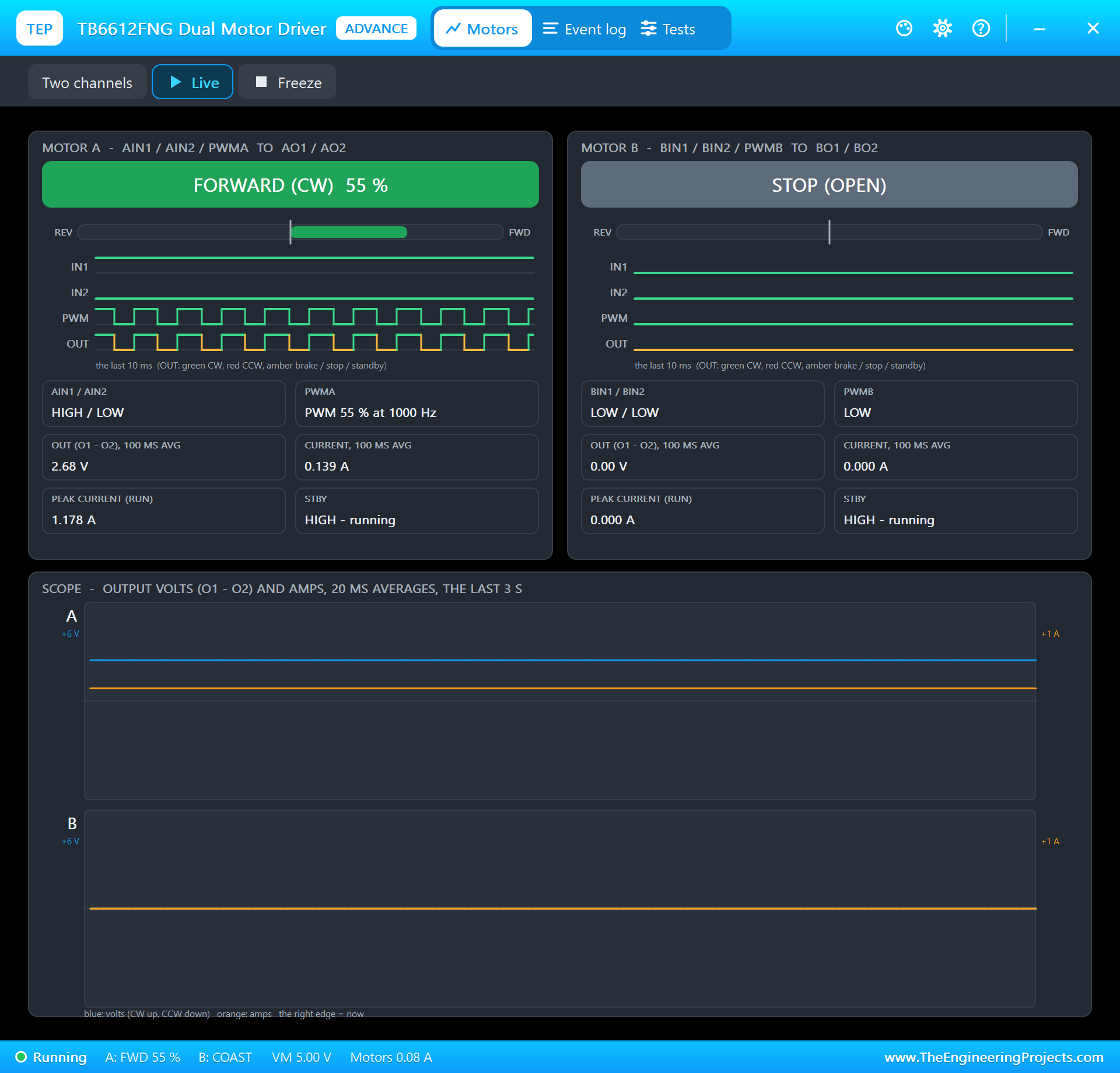
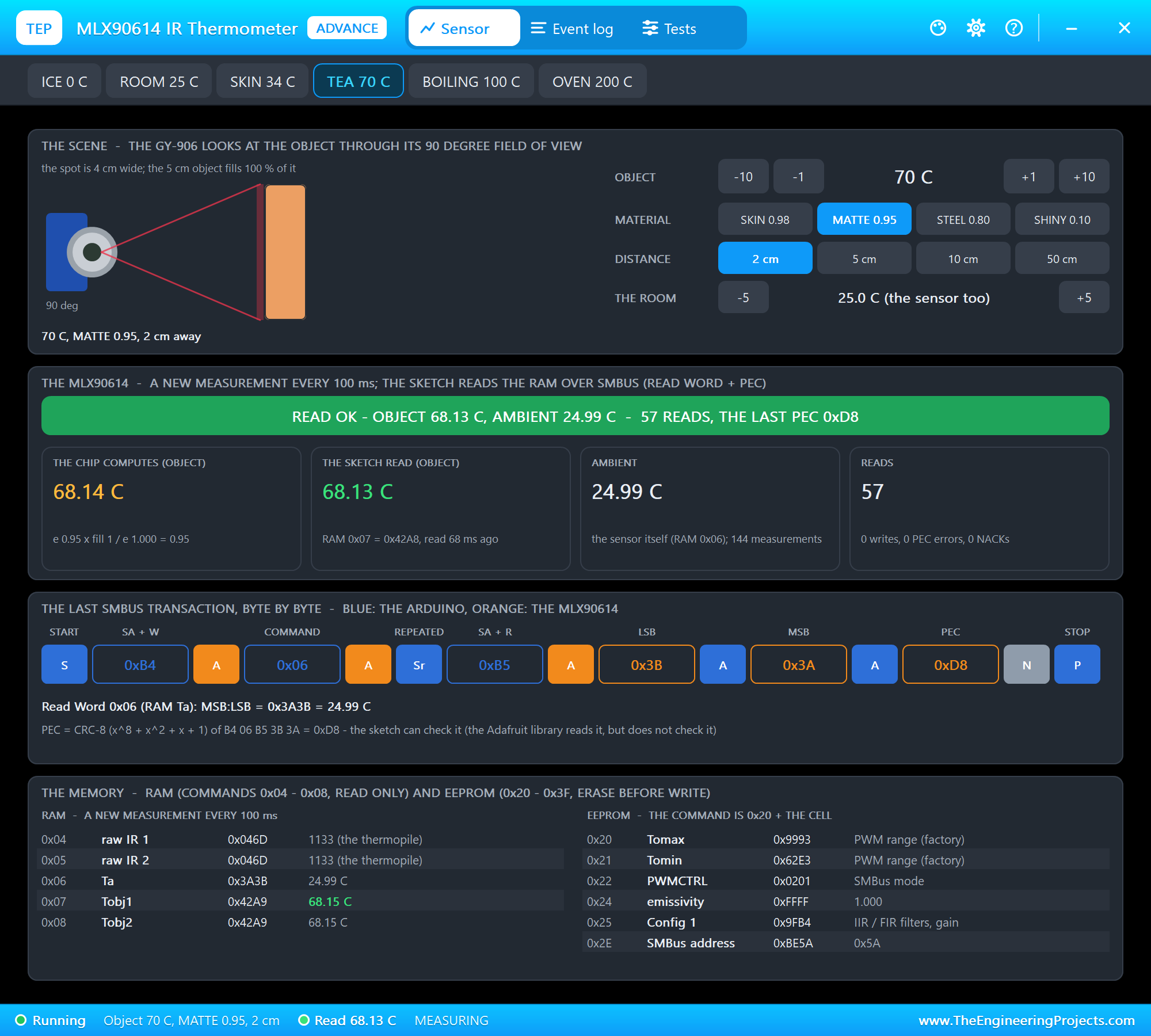
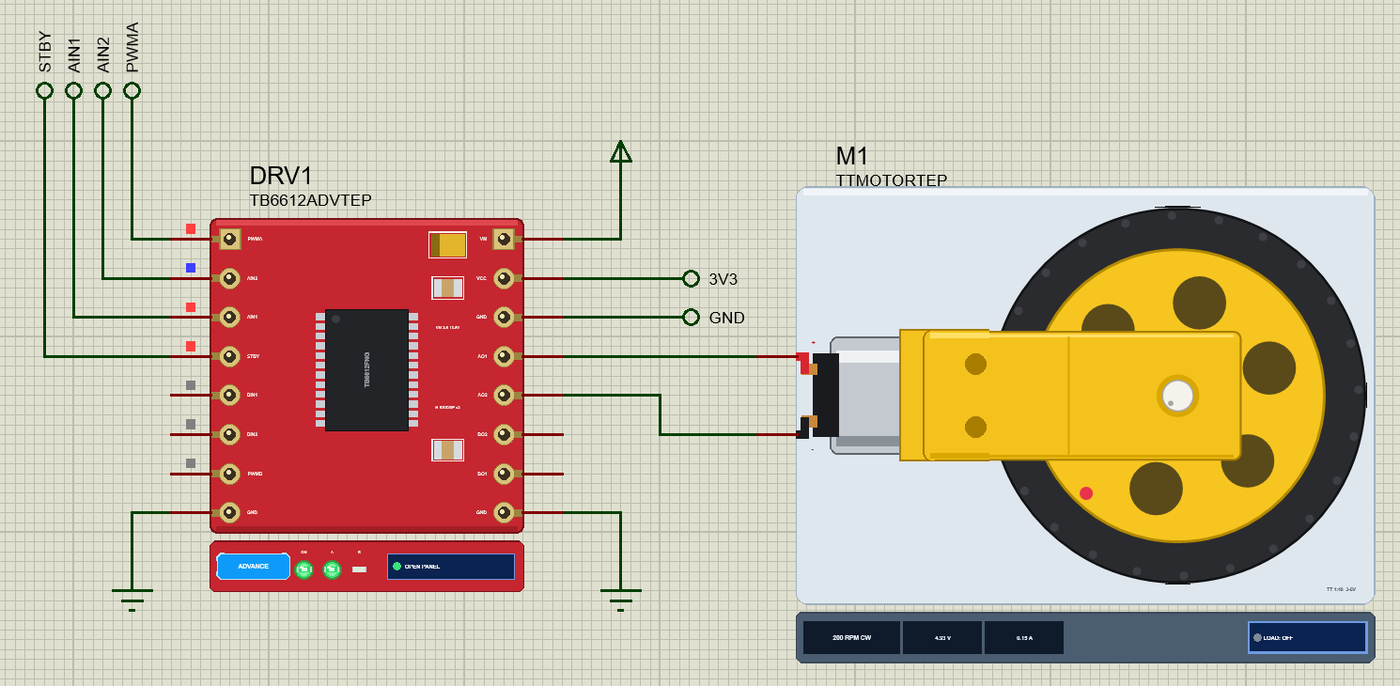
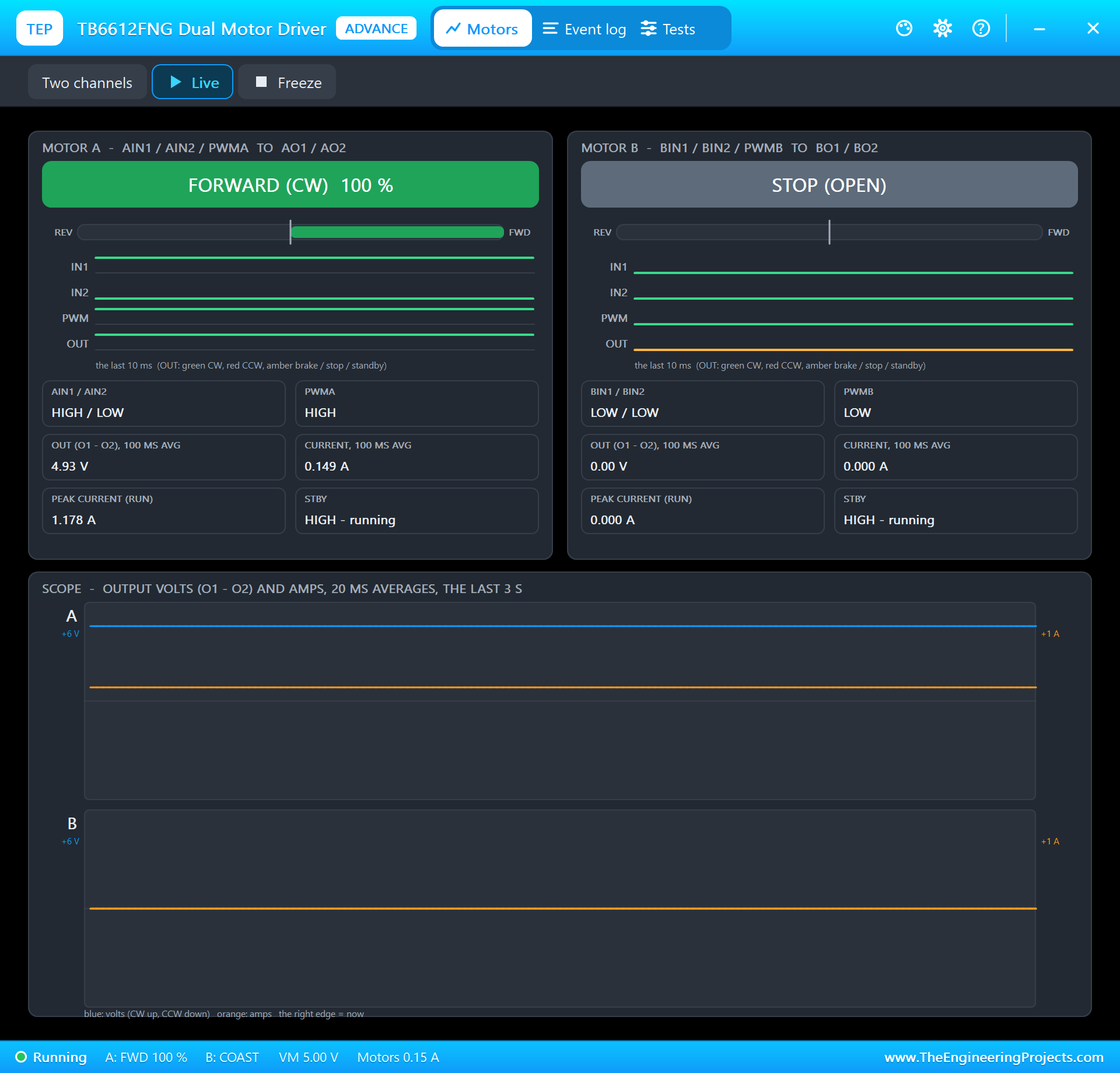
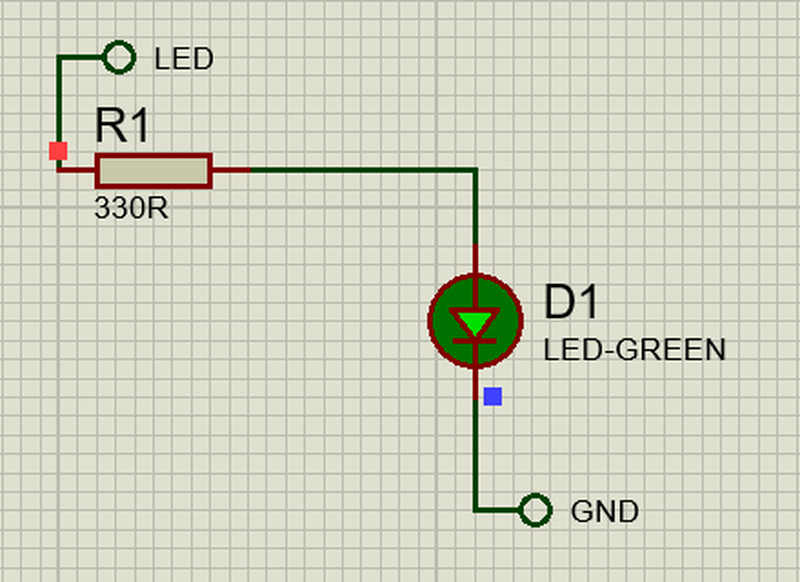
Open Pi-5-IR-Smart-Fan.pdsprj. PI1 runs smart_fan.py on Ethernet. The parts come from our own libraries, each with its article: U1 from the MLX90614 IR Thermometer Library for Proteus, DRV1 and the TT gear motor M1 from the TB6612FNG Motor Driver Library for Proteus. The thermometer and the driver are the Advance versions: each opens a pop-up window at Run that shows what the Pi does with it. D1 is a green alarm LED on GPIO17 through R1, 330 ohm. PC1 is the Laptop WiFi Monitor and MOB1 the Mobile WiFi Monitor, both on the router the Pi is wired to.
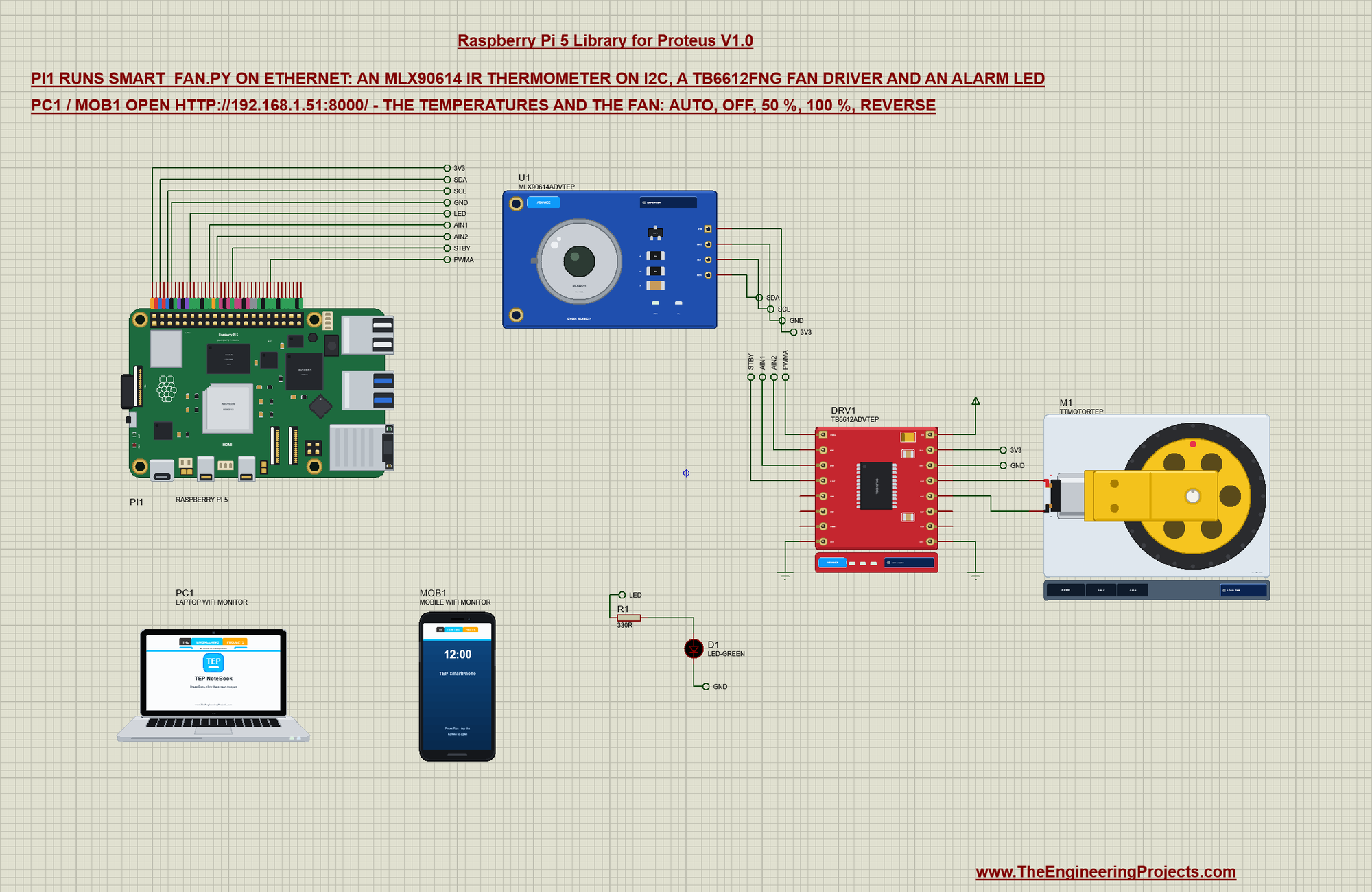
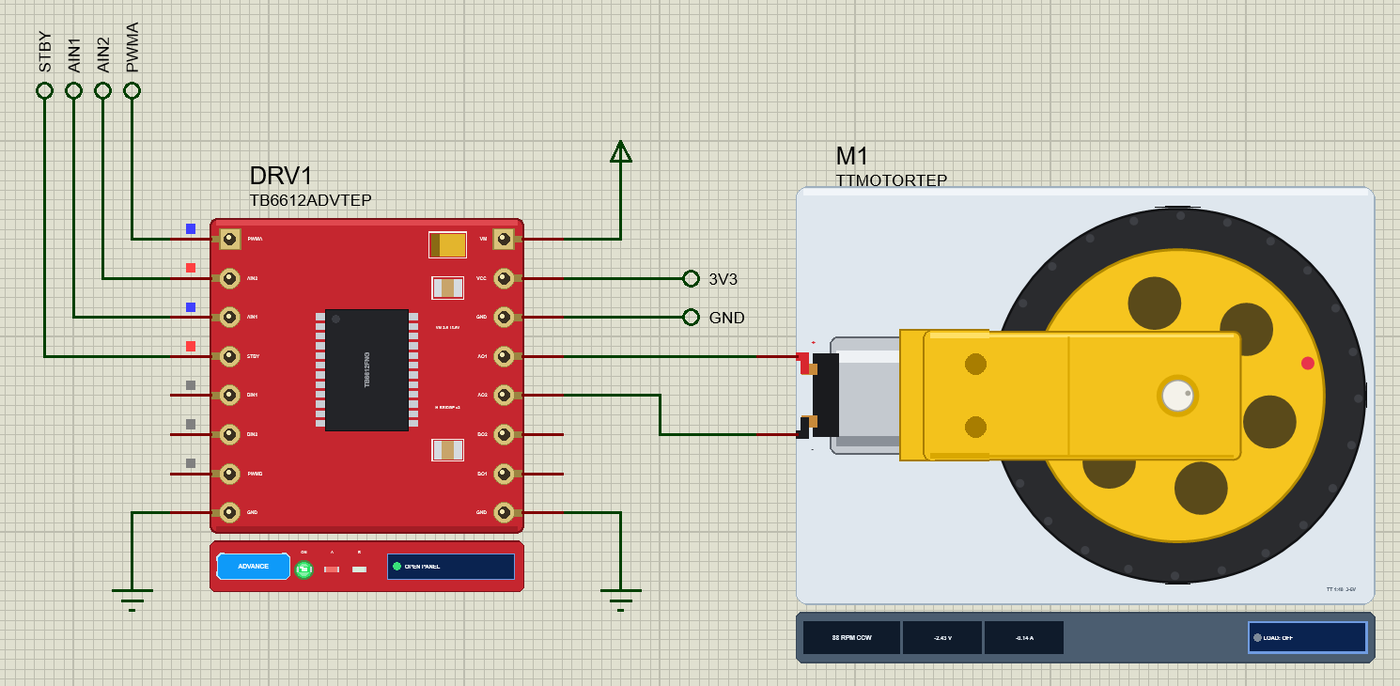
The MLX90614 on the GY-906 board measures the infra-red that an object sends out, so it reads its temperature without touching it - a heatsink, a cup, a hand - and it also reports its own temperature, the room's. It is an SMBus device (I2C with a CRC byte, the PEC) at 0x5A. The TB6612FNG holds two MOSFET H-bridges: two inputs choose the direction of a motor, PWM on a third sets its speed, and STBY wakes the chip. The motor has its own supply on VM, the 5 V rail here. Net labels connect everything:
| Part pin | Net label | Pi pin | What it does |
|---|---|---|---|
| MLX90614 VIN, GND | 3V3, GND | 1, 6 | the thermometer's supply |
| MLX90614 SDA, SCL | SDA, SCL | 3, 5 (GPIO2, GPIO3) | I2C bus 1, the address 0x5A |
| TB6612FNG PWMA | PWMA | 32 (GPIO12) | the fan's speed: PWM at 1000 Hz |
| TB6612FNG AIN1, AIN2 | AIN1, AIN2 | 16, 18 (GPIO23, GPIO24) | the direction: HIGH / LOW one way, LOW / HIGH the other |
| TB6612FNG STBY | STBY | 22 (GPIO25) | HIGH = the driver awake |
| TB6612FNG VCC, GND | 3V3, GND | 1, 6 | the driver's logic supply |
| TB6612FNG VM | the 5 V rail | - | the motor's own supply |
| TB6612FNG AO1, AO2 | wires | - | the TT gear motor, our fan |
| R1 and D1 | LED | 11 (GPIO17) | the alarm LED through 330 ohm |
The MLX90614 through lgpio's I2C
lgpio opens an I2C device by its bus and address and returns a handle. The MLX90614 keeps its readings in RAM words: 0x06 is the room, 0x07 the object. A read returns the word, low byte first, and a PEC byte:
    def __init__(self, bus=1, addr=MLX_ADDR):
        self.addr = addr
        self.h = lgpio.i2c_open(bus, addr)
def read(self, reg):
count, d = lgpio.i2c_read_i2c_block_data(self.h, reg, 3) # LSB, MSB, PEC
if crc8([self.addr << 1, reg, self.addr << 1 | 1, d[0], d[1]]) != d[2]:
raise IOError('MLX90614: bad PEC')
raw = d[0] | d[1] << 8
if raw & 0x8000:
raise IOError('MLX90614: error flag')
return raw * 0.02 - 273.15The PEC is a CRC-8 over every byte of the transaction - the address with the write bit, the command, the address with the read bit and the two data bytes - so the program can tell a damaged read from a good one. The value is in fiftieths of a kelvin:
def crc8(data):
    """The SMBus PEC: CRC-8 with the polynomial x^8 + x^2 + x + 1."""
    crc = 0
    for b in data:
        crc ^= b
        for _ in range(8):
            crc = ((crc << 1) ^ 0x07) & 0xFF if crc & 0x80 else (crc << 1) & 0xFF
    return crc
The Fan: the TB6612FNG through lgpio
The program claims the driver's four pins as outputs - STBY HIGH at once, the rest LOW - with the handle of gpiochip 0:
    def __init__(self, chip):
        self.chip = chip
        for g in (AIN1, AIN2, PWMA):
            lgpio.gpio_claim_output(chip, g, 0)
        lgpio.gpio_claim_output(chip, STBY, 1)
        self.speed, self.reverse = 0, False
A speed of 0 stops the PWM and sets both direction inputs LOW, so the motor coasts. Otherwise AIN1 and AIN2 choose the direction and tx_pwm runs PWMA at 1000 Hz with the speed as its duty cycle in percent:
    def set(self, speed, reverse):
        if speed == self.speed and reverse == self.reverse:
            return
        if speed == 0:
            lgpio.tx_pwm(self.chip, PWMA, 0, 0)                                  # PWM off
            lgpio.gpio_write(self.chip, AIN1, 0)
            lgpio.gpio_write(self.chip, AIN2, 0)
        else:
            lgpio.gpio_write(self.chip, AIN1, 0 if reverse else 1)
            lgpio.gpio_write(self.chip, AIN2, 1 if reverse else 0)
            lgpio.tx_pwm(self.chip, PWMA, PWM_HZ, speed)
        self.speed, self.reverse = speed, reverse
AUTO: the Speed Follows the Temperature
Below 30 C the fan is off, at 30 C it starts at 30 % and at 45 C it reaches 100 %. The speed moves in 5 % steps, and a small dead band keeps it where it is while the reading only wobbles:
def auto_speed(t, now):
    """The AUTO speed for the temperature t in 5 % steps; a 3 % dead band round the speed now keeps the fan steady."""
    target = 0 if t < AUTO_LOW else 100 if t >= AUTO_HIGH else 30 + 70 * (t - AUTO_LOW) / (AUTO_HIGH - AUTO_LOW)
    if 0 < target < 100 and now and abs(target - now) < 3:
        return now
    return 5 * round(target / 5)
A thread does the work every half second: it reads the thermometer (the object's reading smoothed), sets the fan for the mode, switches the alarm - gpiozero's LED blinks on its own thread from 50 C and stops below 48 C - and prints a line when anything changes:
def control():
    """Every half second: the temperatures (the object's smoothed), the fan's speed, the alarm."""
    last, obj = None, sensor.object()
    while True:
        obj += 0.3 * (sensor.object() - obj)
        room = sensor.room()
        with lock:
            state['obj'], state['room'] = obj, room
            speed = auto_speed(obj, state['speed']) if state['mode'] == 'AUTO' else state['manual']
            state['speed'] = speed
            reverse = state['reverse']
            hot = obj >= HOT or (state['hot'] and obj >= HOT - 2)
        fan.set(speed, reverse)
        if hot != state['hot']:
            if hot:
                alarm.blink(0.25, 0.25)                                         # (gpiozero's own thread blinks it)
            else:
                alarm.off()
            state['hot'] = hot
        now = (state['mode'], speed, reverse, hot)
        if now != last:
            print('%s  object %.2f C, room %.2f C - fan %s %d %%%s%s' % (time.strftime('%H:%M:%S'), obj, room, state['mode'], speed,
                                                                       ', INTAKE' if reverse else '', ' - HOT!' if hot else ''))
            last = now
        time.sleep(0.5)
The Web Page
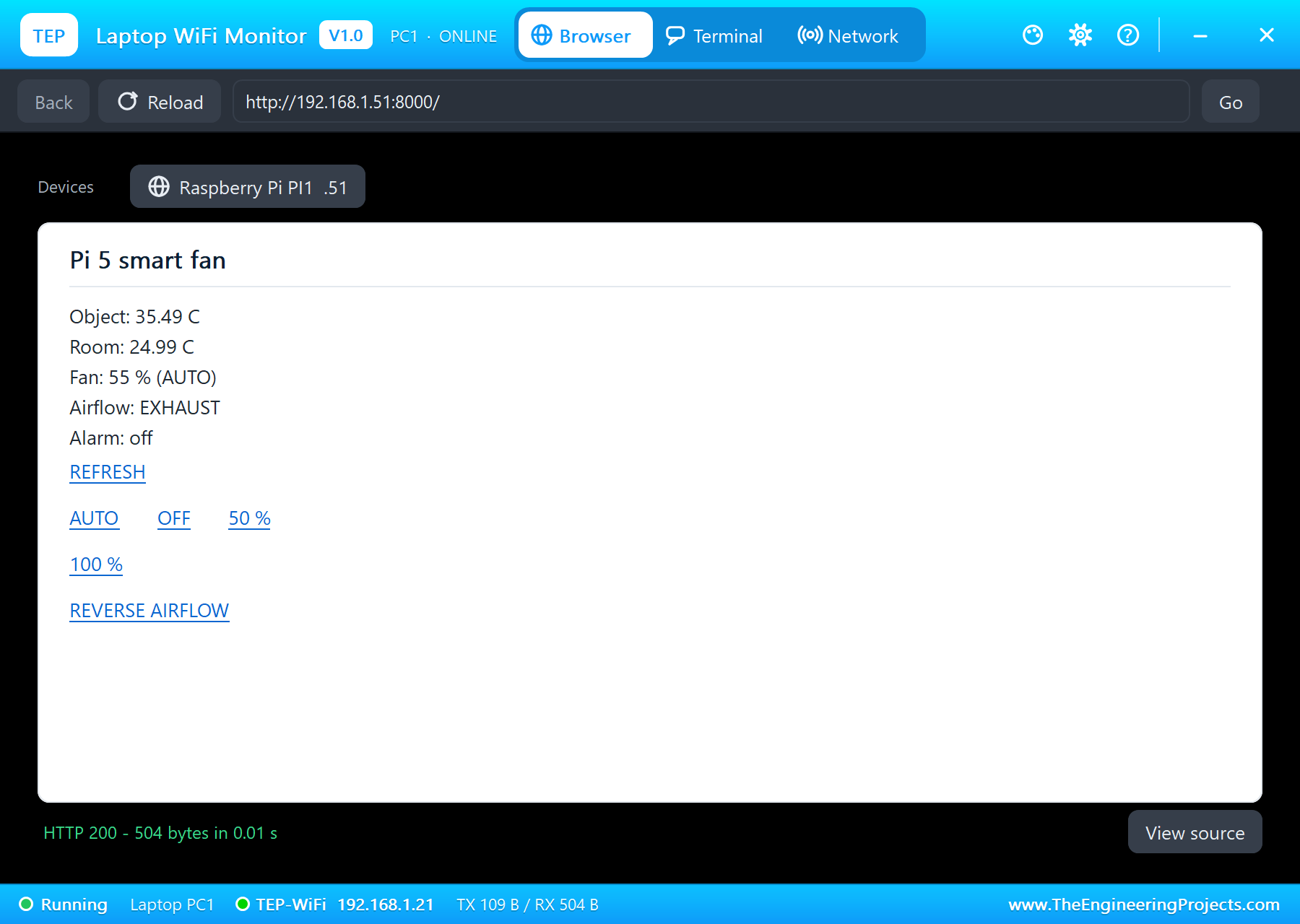
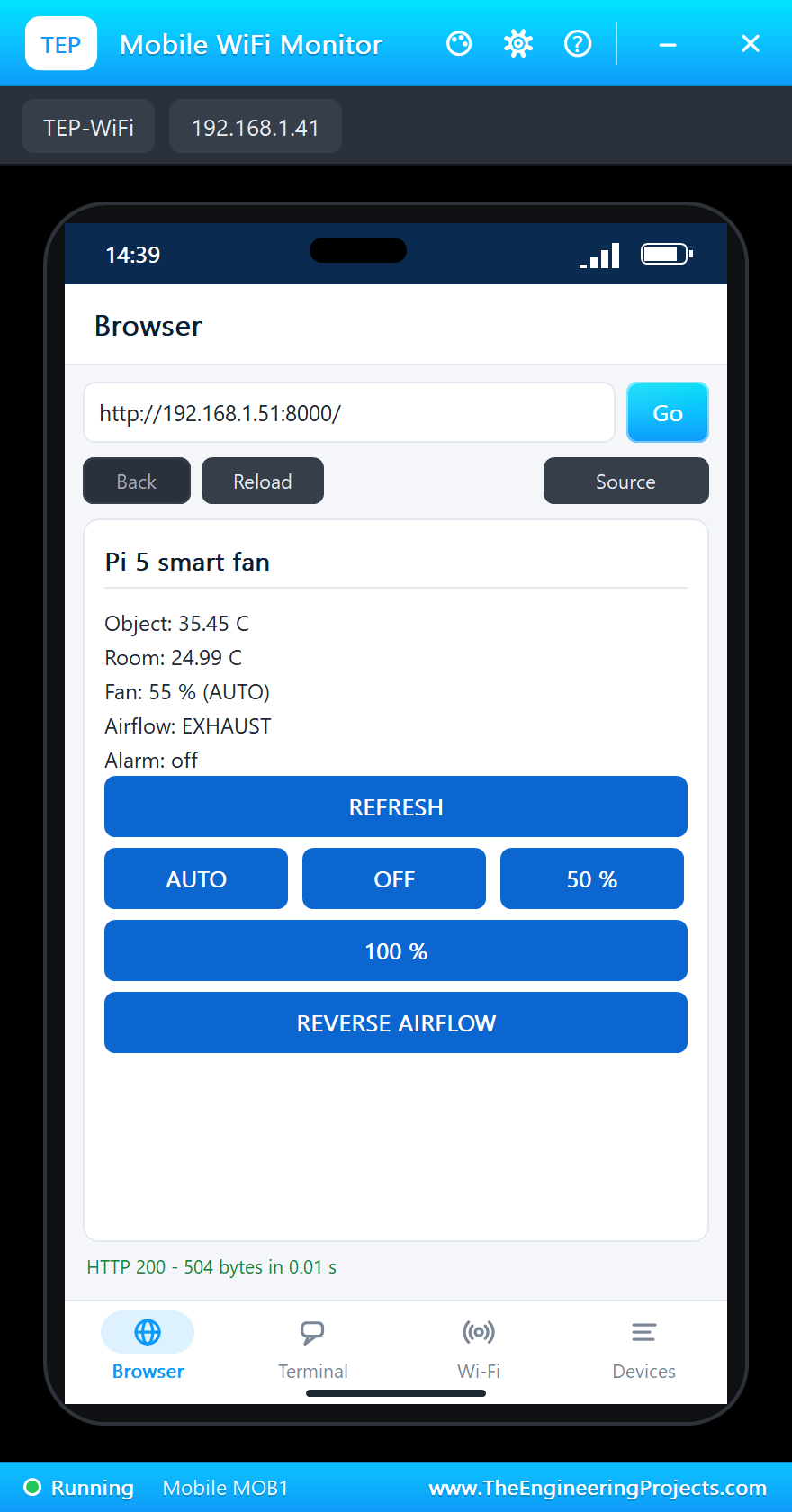
The page shows the object's and the room's temperatures, the fan's speed and mode, the airflow and the alarm. The six links come in three paragraphs, so the phone shows them as big buttons. Our monitors keep a page until you click, so it has a REFRESH link:
PAGE = """<html><head><title>Pi 5 smart fan</title></head><body>
<p>Object: <b>{obj:.2f} C</b></p>
<p>Room: {room:.2f} C</p>
<p>Fan: {speed} % ({mode})</p>
<p>Airflow: {flow}</p>
<p>Alarm: {alarm}</p>
<p><a href="/">REFRESH</a></p>
<p><a href="/auto">AUTO</a> <a href="/off">OFF</a> <a href="/50">50 %</a> <a href="/100">100 %</a></p>
<p><a href="/reverse">REVERSE AIRFLOW</a></p>
</body></html>"""
Python's http.server calls do_GET for every request: /auto hands the fan back to the temperature, /off, /50 and /100 set it by hand, /reverse turns the airflow round, and every path gets the page back with the state, read under the lock the control thread uses:
    def do_GET(self):
        with lock:
            if self.path == '/auto':
                state['mode'] = 'AUTO'
            elif self.path in ('/off', '/50', '/100'):
                state['mode'], state['manual'] = 'MANUAL', {'/off': 0, '/50': 50, '/100': 100}[self.path]
            elif self.path == '/reverse':
                state['reverse'] = not state['reverse']
            obj, room, mode, reverse, hot = state['obj'], state['room'], state['mode'], state['reverse'], state['hot']
            speed = auto_speed(obj, state['speed']) if mode == 'AUTO' else state['manual']
        if self.path != '/':
            print('%s  the page: %s' % (time.strftime('%H:%M:%S'), self.path))
        body = PAGE.format(obj=obj, room=room, speed=speed, mode=mode, flow='INTAKE' if reverse else 'EXHAUST',
                           alarm='HOT!' if hot else 'off').encode()
At the start the program prints the board's name from the device tree, opens gpiochip 0, sets up the fan, the alarm LED and the thermometer, waits for the network, starts the control thread and serves on port 8000:
with open('/proc/device-tree/model') as f:
    print('smart_fan.py - IR smart fan on the %s' % f.read().strip('\0'))
chip = lgpio.gpiochip_open(0)                                           # the RP1's GPIOs
fan = Fan(chip)
alarm = LED(17)
sensor = MLX90614()
print('gpiozero pin factory: %s; MLX90614 at 0x%02X: object %.2f C, room %.2f C'
      % (type(alarm.pin_factory).__name__, MLX_ADDR, sensor.object(), sensor.room()))
print('waiting for the network ...')
while my_ip() == '0.0.0.0':
    time.sleep(0.5)
threading.Thread(target=control, daemon=True).start()
print('serving on http://%s:%d/' % (my_ip(), PORT))
HTTPServer(('', PORT), Handler).serve_forever()
Run the Demo
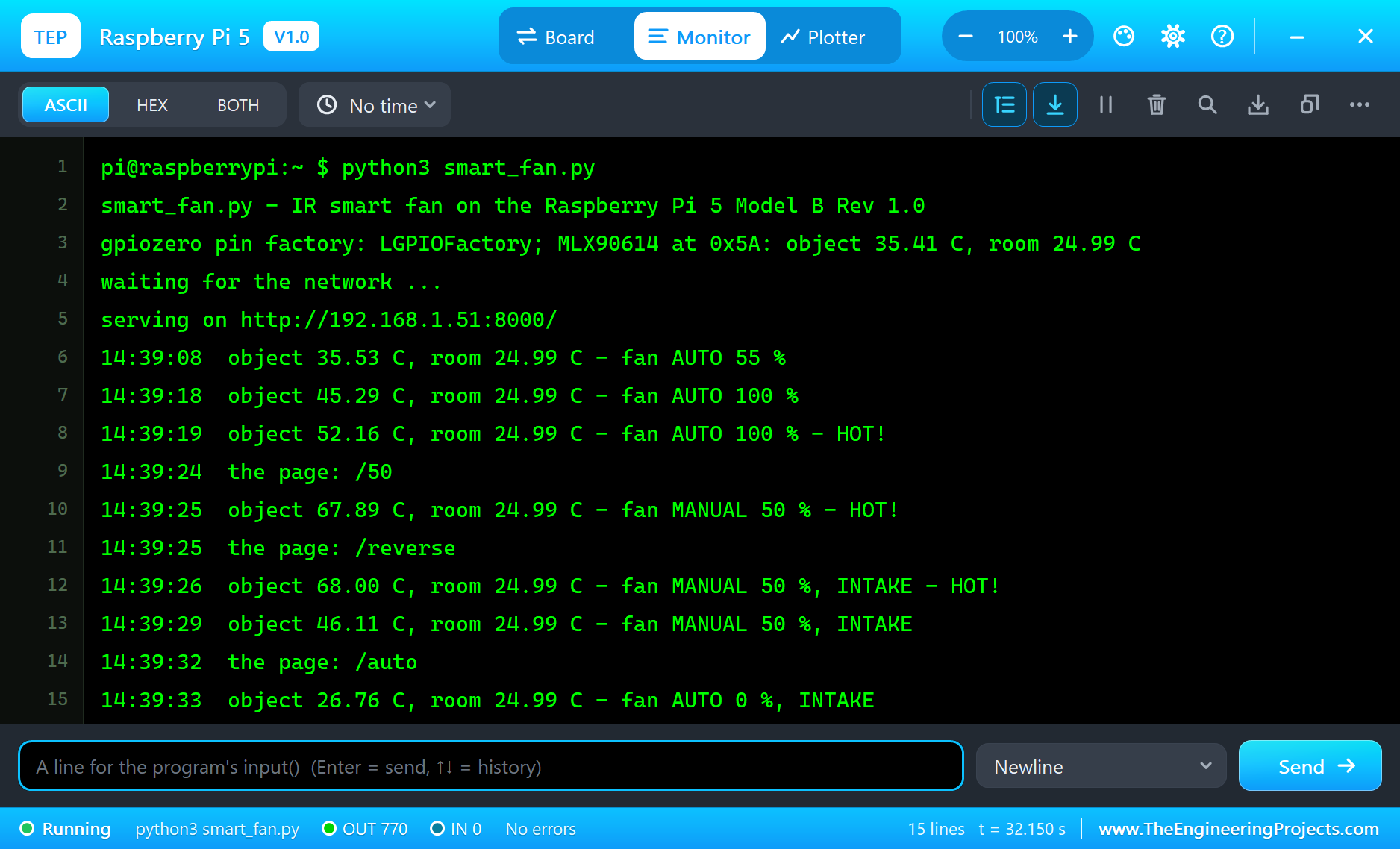
Press Run. The board boots, eth0 is up 1.5 s after Run, and the program reports the board, gpiozero's pin factory - LGPIOFactory, as on a real Pi 5 - and the first temperatures. The object is set to 36 C in the thermometer's properties, so AUTO starts the fan at 55 %:
pi@raspberrypi:~ $ python3 smart_fan.py
smart_fan.py - IR smart fan on the Raspberry Pi 5 Model B Rev 1.0
gpiozero pin factory: LGPIOFactory; MLX90614 at 0x5A: object 35.41 C, room 24.99 C
waiting for the network ...
serving on http://192.168.1.51:8000/
14:39:08  object 35.53 C, room 24.99 C - fan AUTO 55 %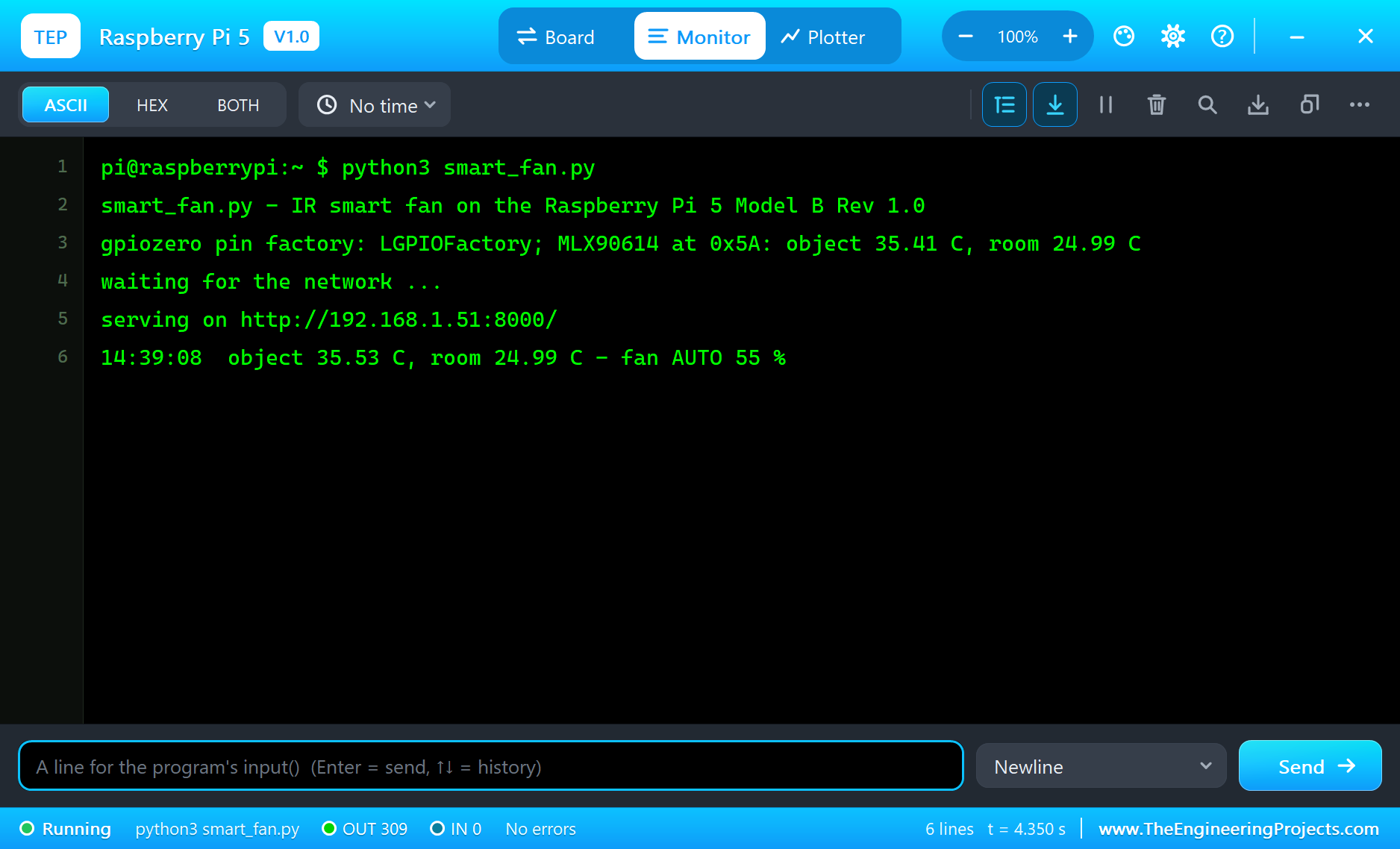
Open the Page
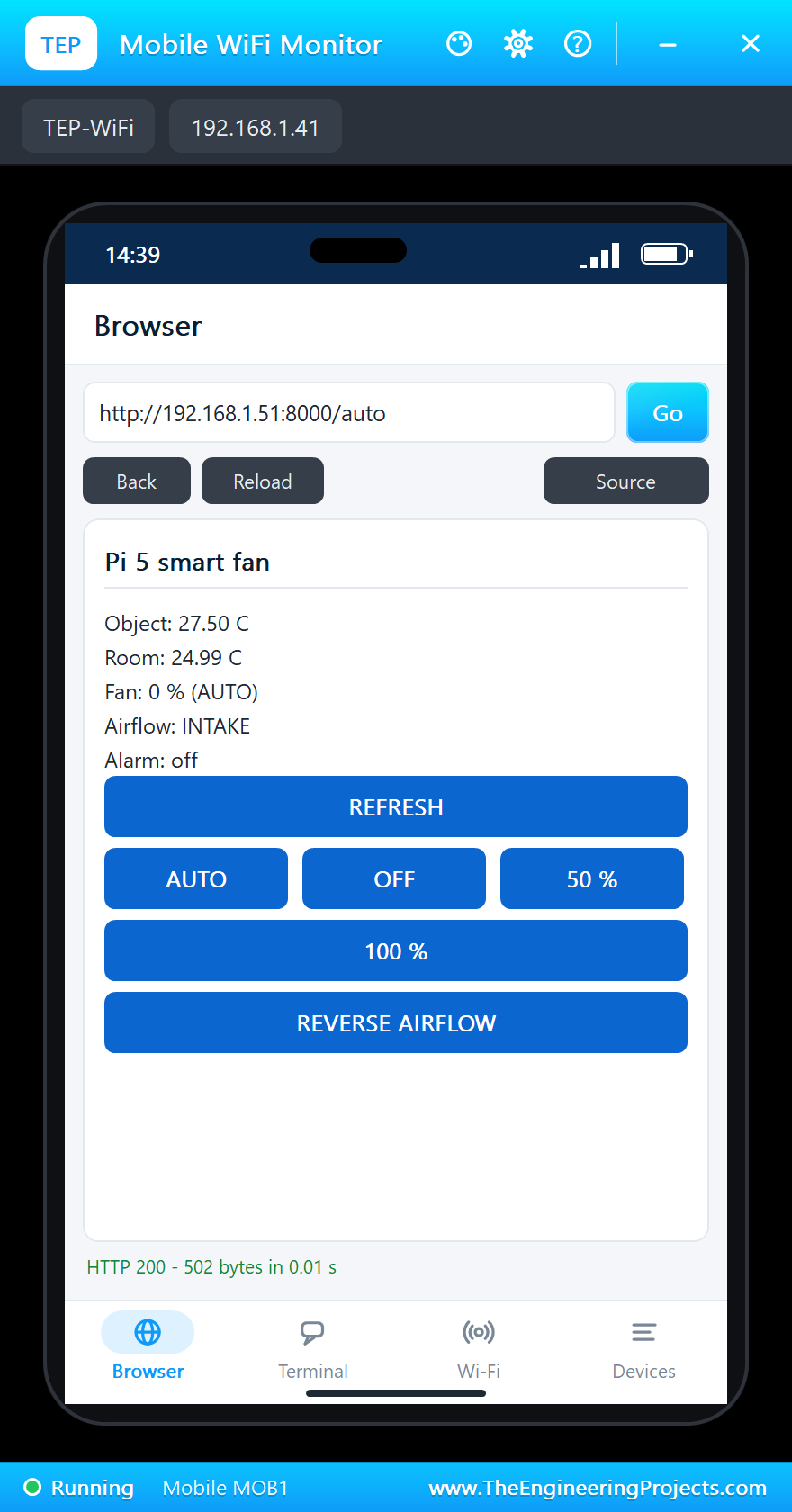
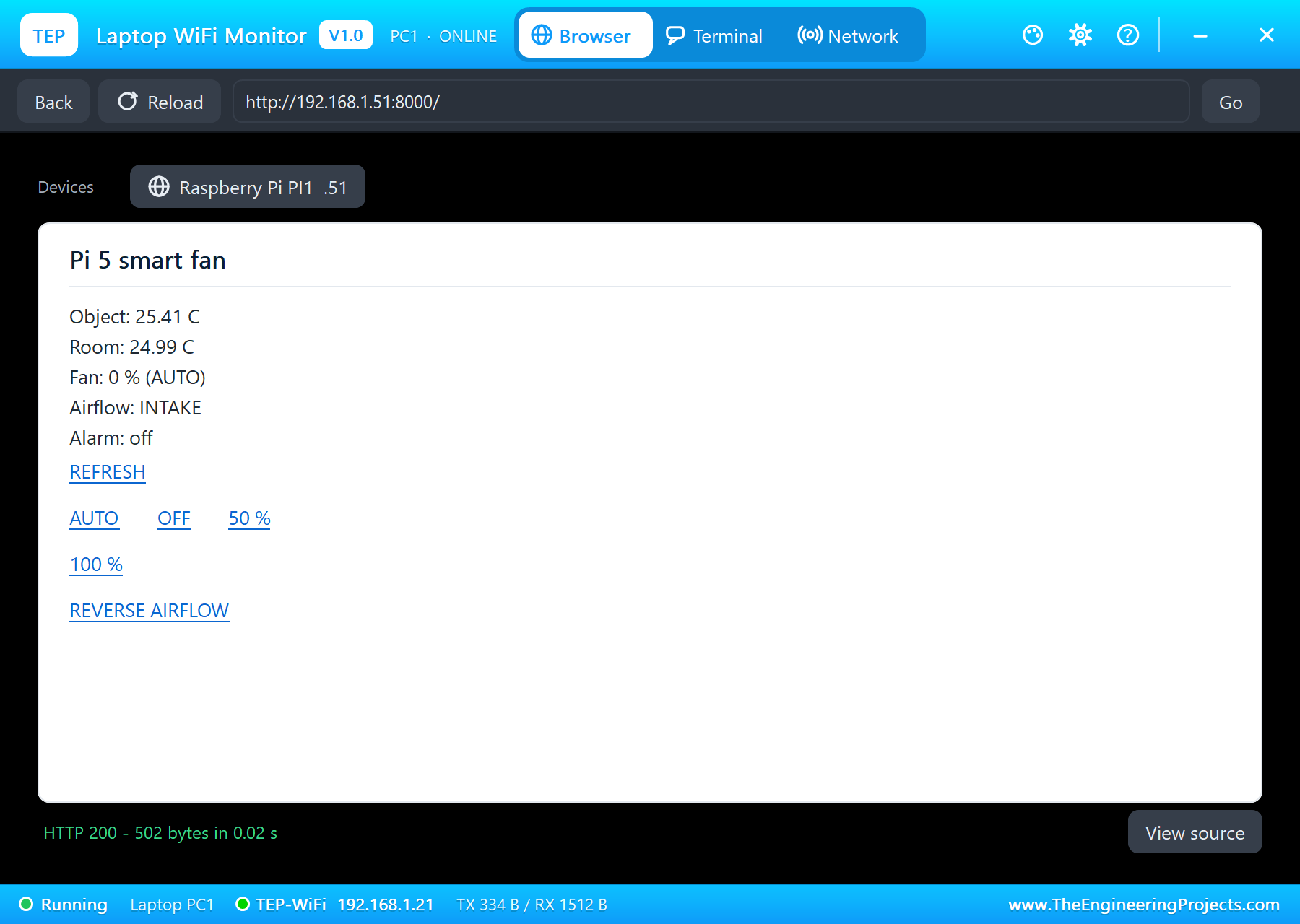
On the laptop click Browser, check the address http://192.168.1.51:8000/ and click Go; on the phone the same. The laptop shows the links as text, the phone as buttons:
Heat It Up
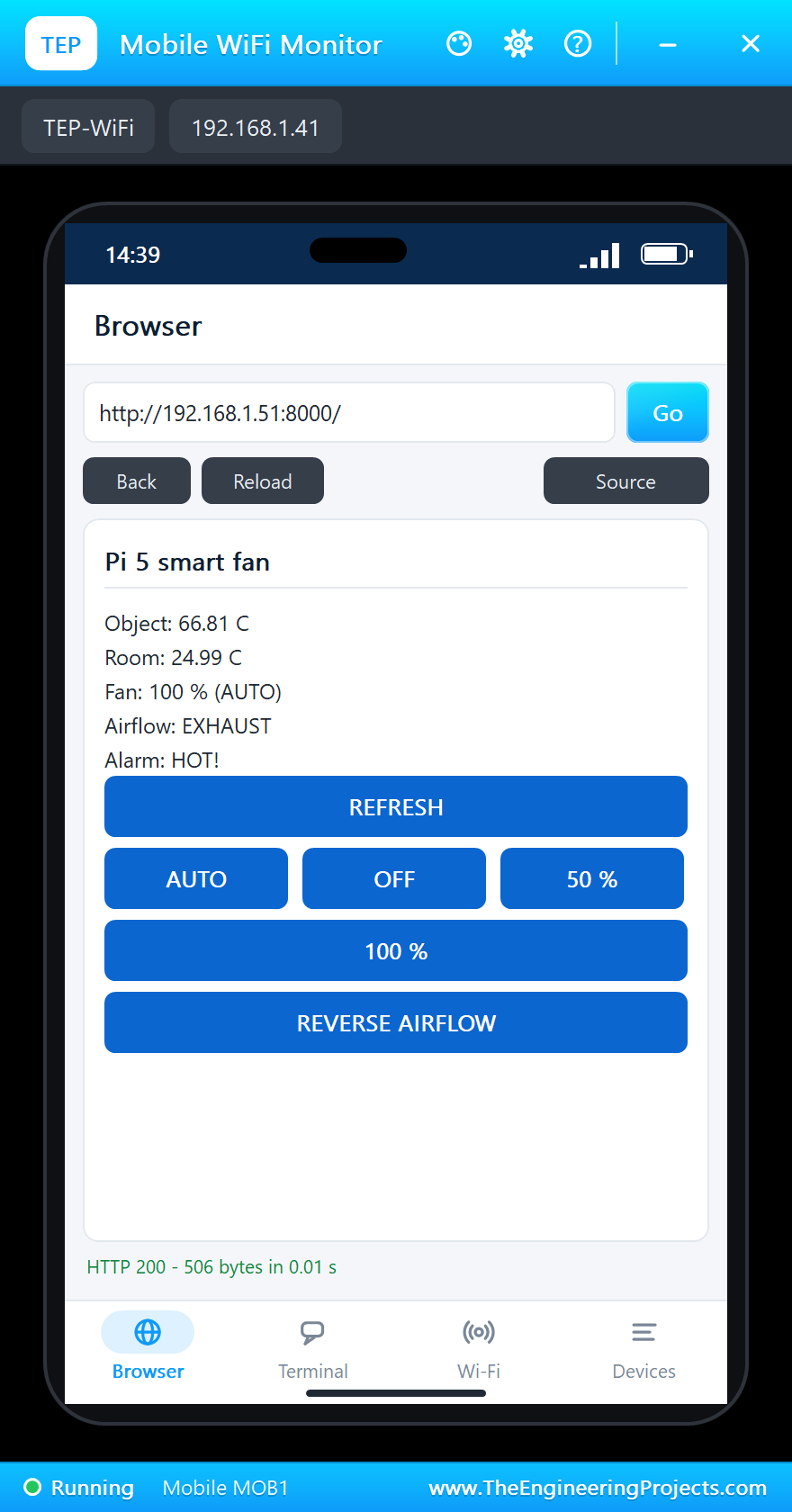
In the thermometer's pop-up click the TEA 70 C preset. The reading climbs over the next seconds, AUTO raises the fan to 100 % from 45 C, and from 50 C the alarm LED blinks and the page says HOT!:
Control the Fan by Hand
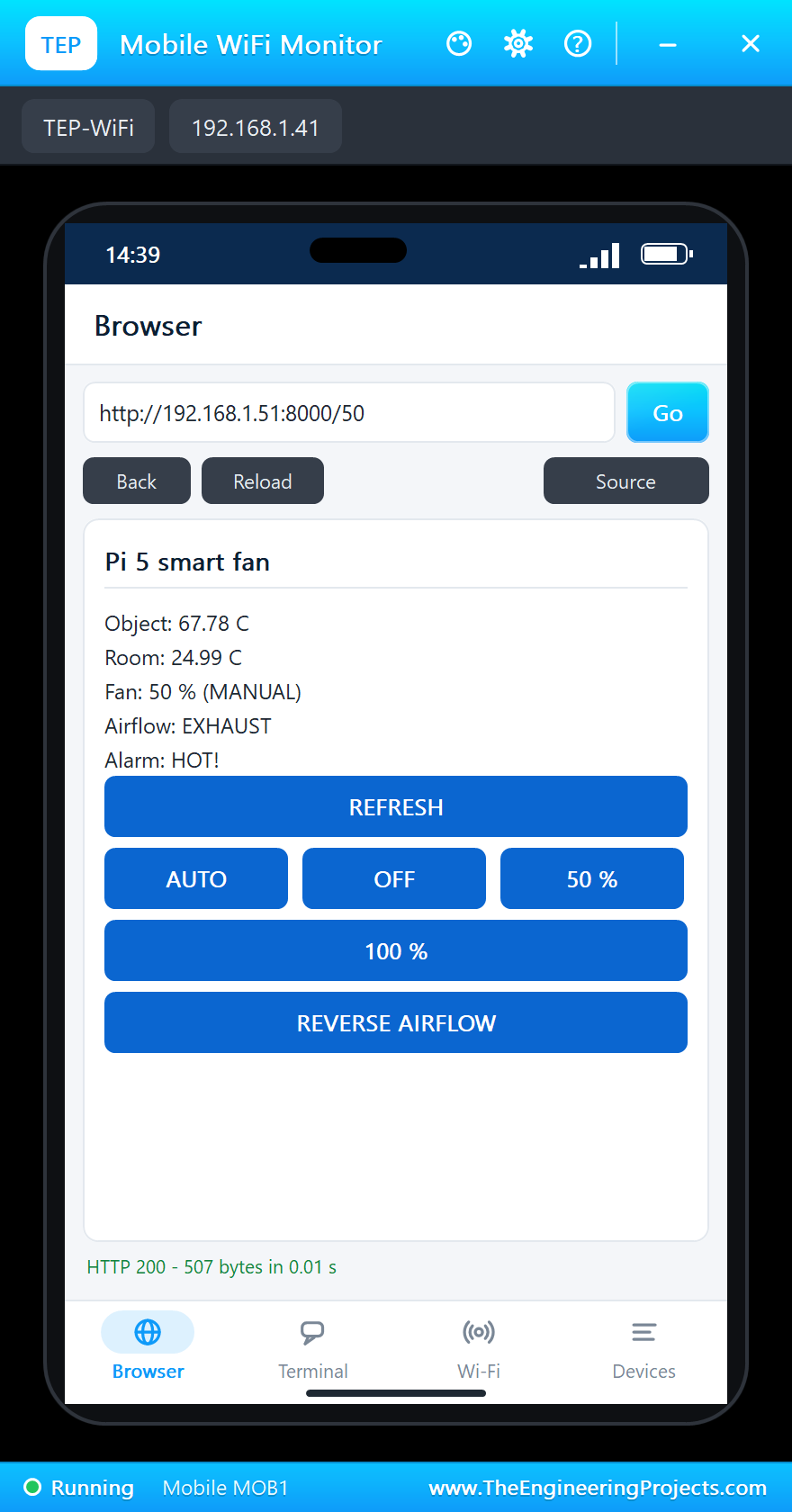
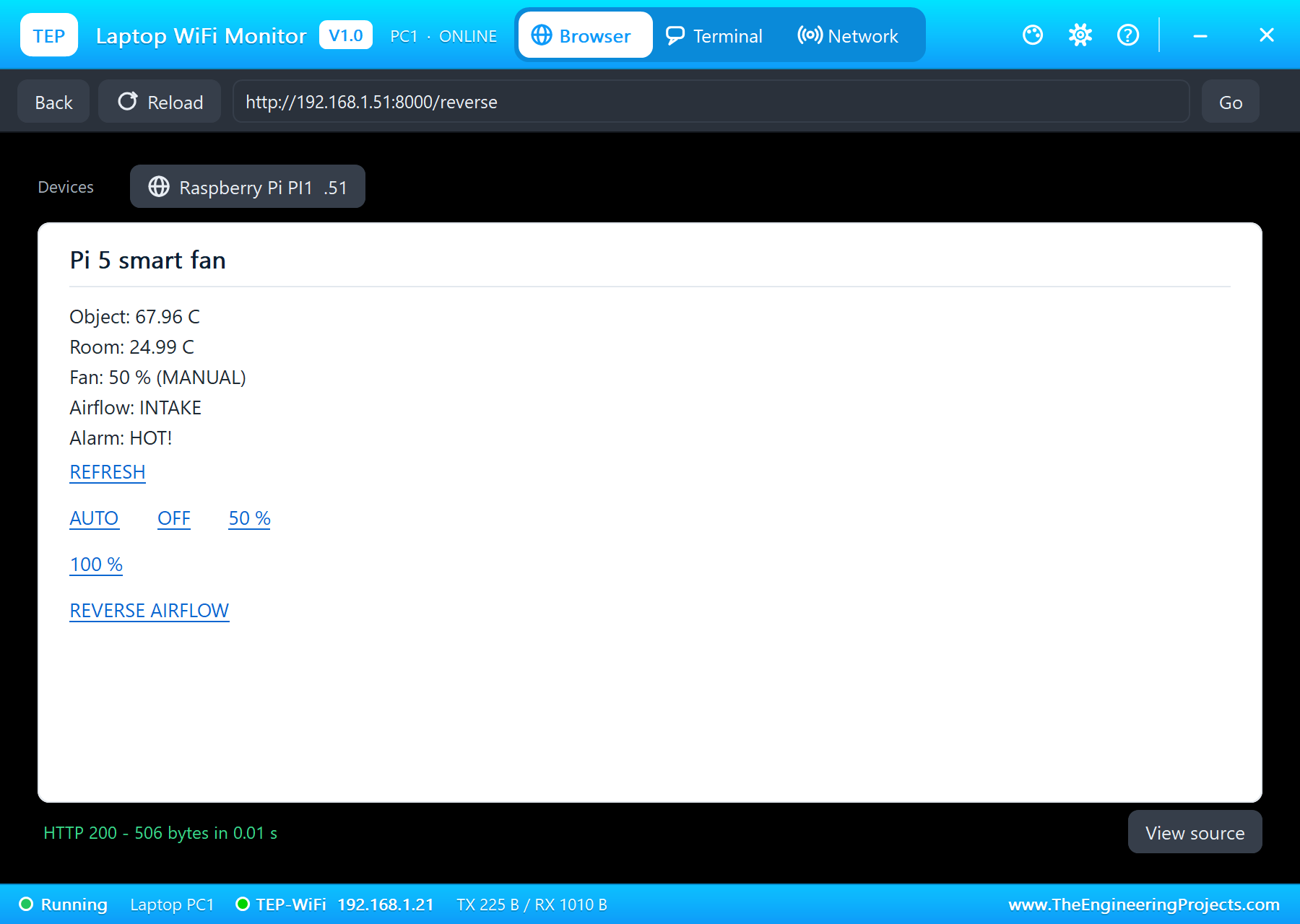
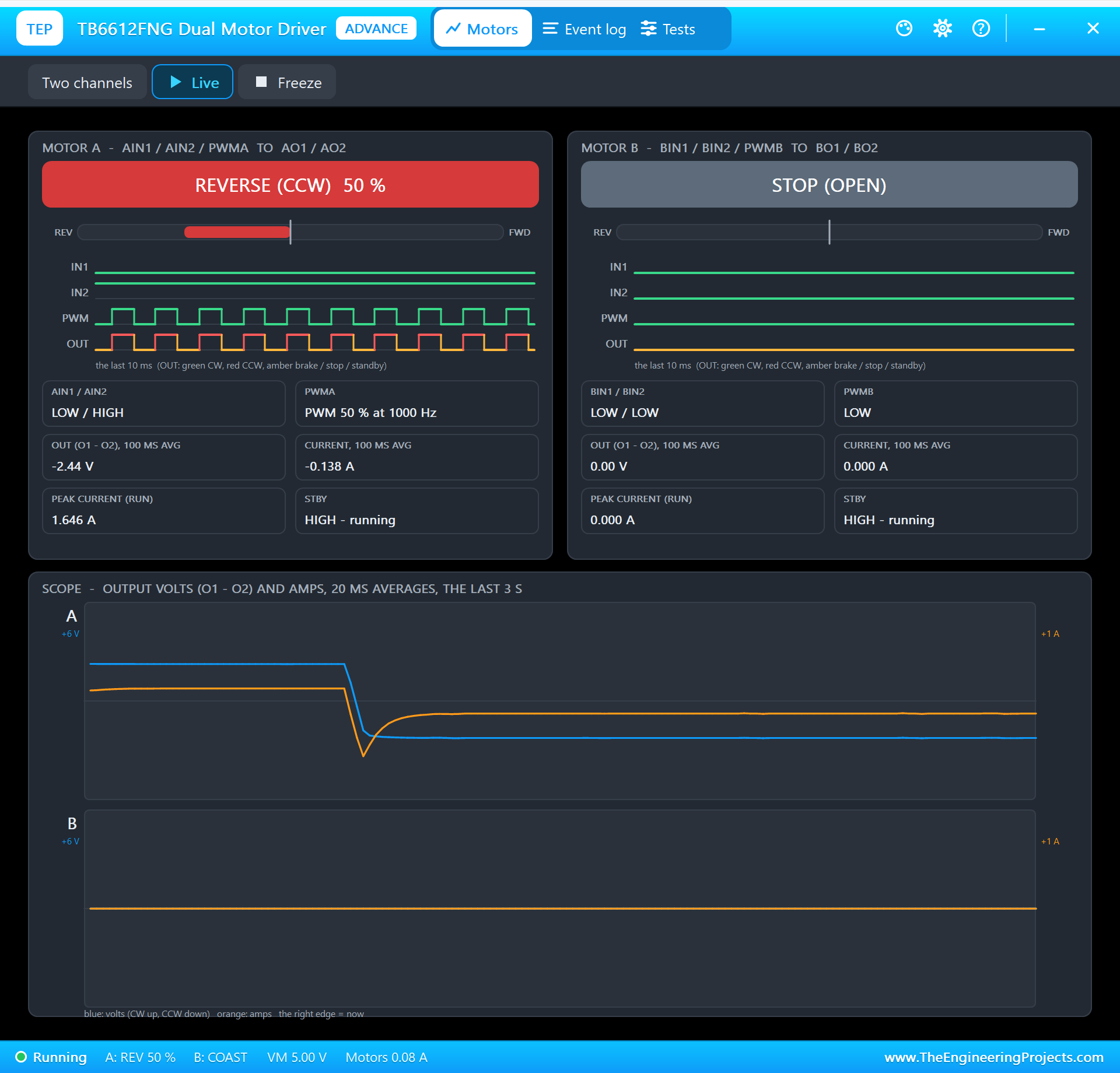
Tap 50 % on the phone: the mode becomes MANUAL and the fan slows down, although the object is still hot. Then click REVERSE AIRFLOW on the laptop: AIN1 and AIN2 swap, and the motor turns the other way - INTAKE:
Back to AUTO
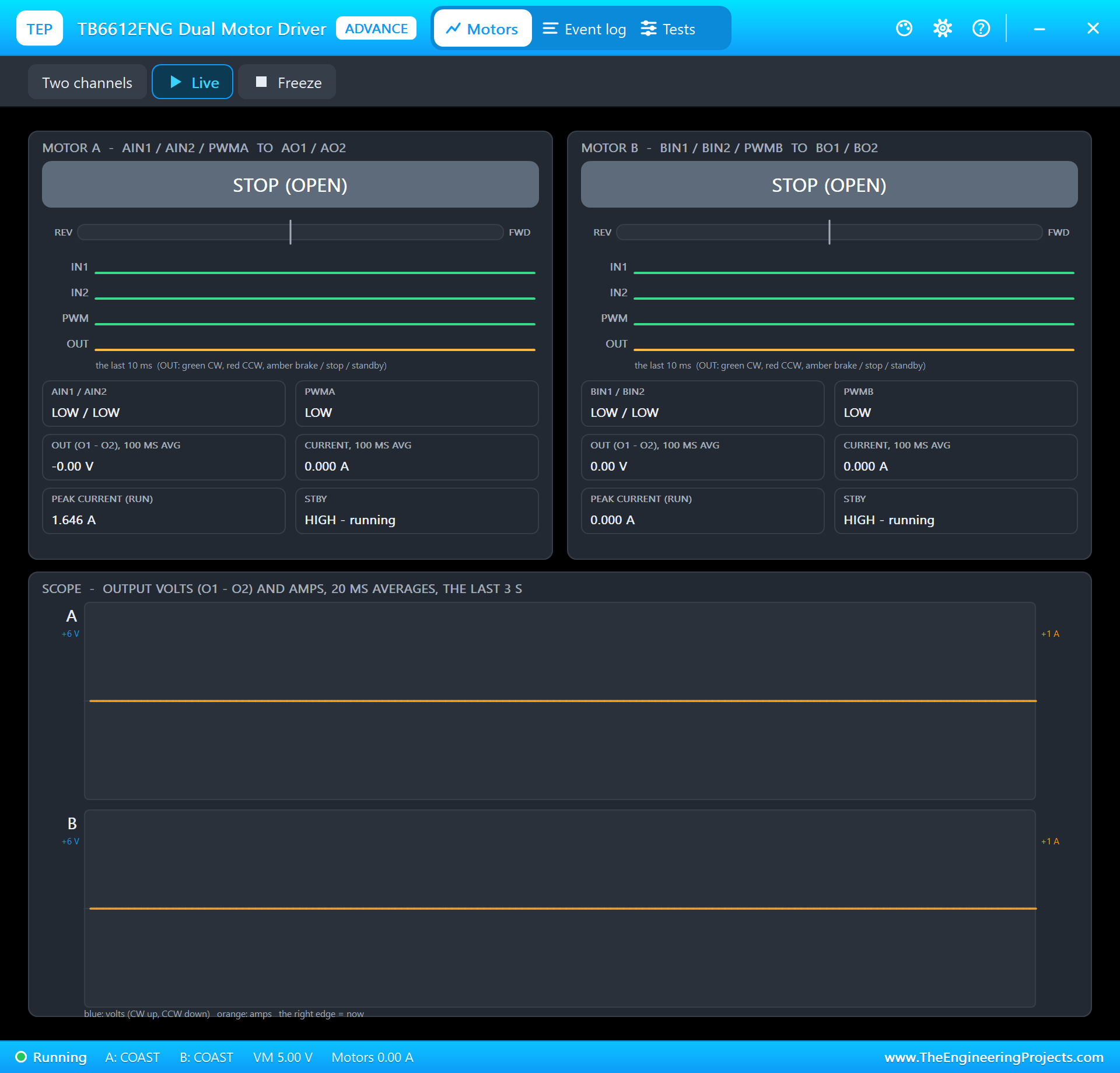
Click the ROOM 25 C preset in the thermometer's pop-up - the alarm stops once the reading falls below 48 C - and tap AUTO on the phone. Below 30 C AUTO means off: the driver stops, and REFRESH on the laptop shows it:
The Pi Terminal logs every change of the fan and every action from the page:
14:39:18  object 45.29 C, room 24.99 C - fan AUTO 100 %
14:39:19  object 52.16 C, room 24.99 C - fan AUTO 100 % - HOT!
14:39:24  the page: /50
14:39:25  object 67.89 C, room 24.99 C - fan MANUAL 50 % - HOT!
14:39:25  the page: /reverse
14:39:26  object 68.00 C, room 24.99 C - fan MANUAL 50 %, INTAKE - HOT!
14:39:29  object 46.11 C, room 24.99 C - fan MANUAL 50 %, INTAKE
14:39:32  the page: /auto
14:39:33  object 26.76 C, room 24.99 C - fan AUTO 0 %, INTAKE
The Pi Terminal
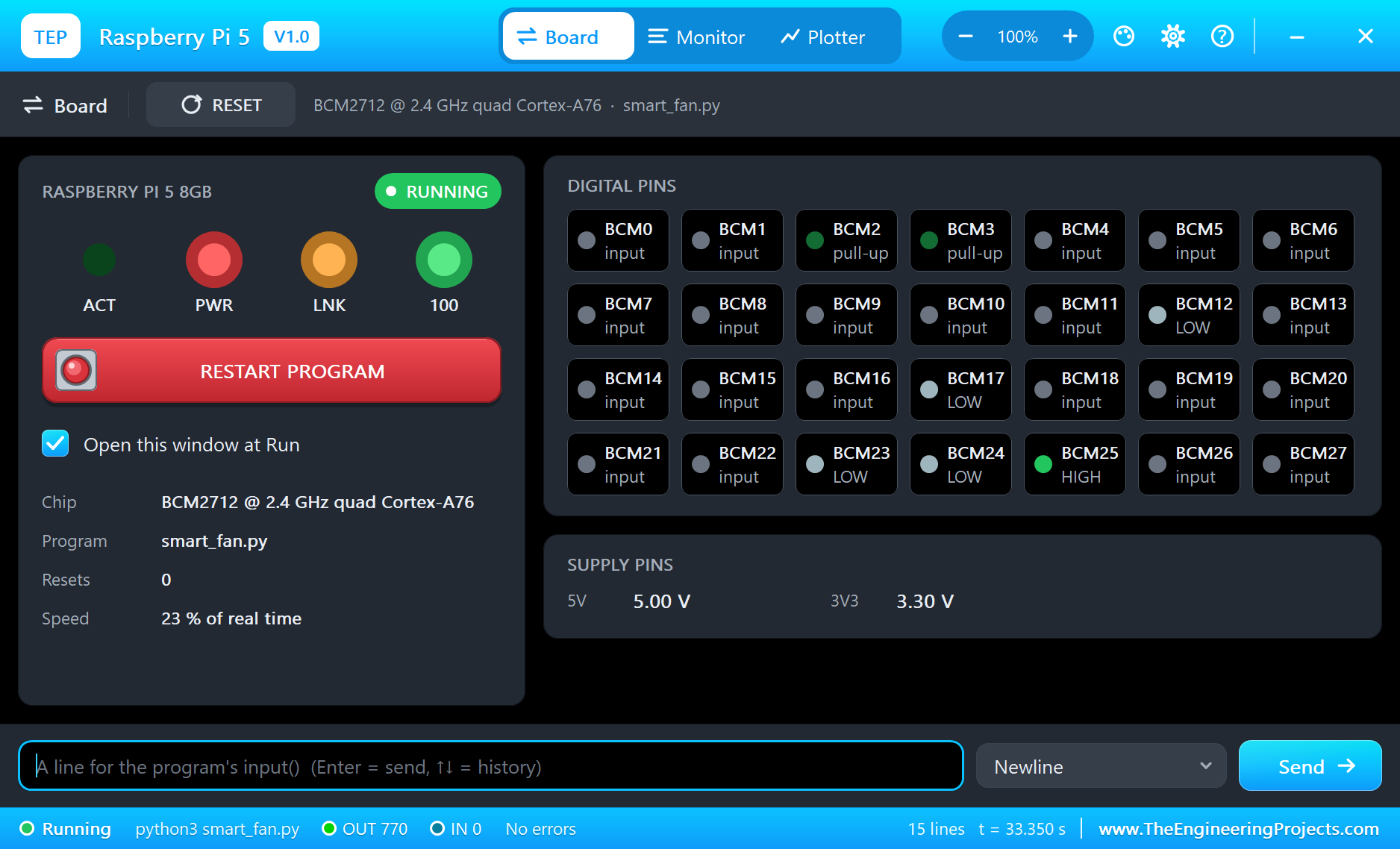
The Pi Terminal opens at Run, in the look of our TEP Serial Monitor Advance for Proteus - our own TEP header, no Windows title bar. Its Monitor tab shows the program's output (OUT), errors (ERR) and the lines you type for input() (IN). The Board tab shows the board live - GPIO2 and GPIO3 pulled up, STBY HIGH, the other driver pins LOW at the end - the LEDs and the supply pins, and RESTART PROGRAM starts the program again:
Properties of the Raspberry Pi 5
| Property | What it does |
|---|---|
| PROGRAM | the Python program (default blink.py; a name next to the project or a full path) |
| AUTOOPEN | the Pi Terminal at Run: YES (default) or NO |
| ETHERNET | the cable to the router at Run: IN (default, eth0) or OUT (the network on wlan0) |
| WIFISSID, WIFIPASS | the network wlan0 joins and its password (default TEP-WiFi, 12345678) |
| PYTHON, RUNTIME | a python.exe and a runtime folder of your own (empty: the TEPPi folder) |
Your own programs go next to your project; set PROGRAM to the file's name. The default blink.py blinks an LED on GPIO17 with gpiozero - on the Pi 5 it runs on lgpio without a change:
from time import sleep
from gpiozero import LED

led = LED(17)
while True:
    led.on()
    print('LED on')
    sleep(0.5)
    led.off()
    print('LED off')
    sleep(0.5)
Troubleshooting
- No module named lgpio: an older TEPPi folder is in MODELS - replace it with the one from this zip.
- lgpio.error: 'GPIO not allocated': claim the GPIO first, with the handle from gpiochip_open(0).
- lgpio.error: 'I2C read failed': no part answers at that address - the MLX90614 is 0x5A; check VIN, GND, SDA and SCL.
- The motor does not turn: STBY must be HIGH, AIN1 and AIN2 one HIGH and one LOW, PWM on PWMA, and VM needs the motor's own supply - the driver's pop-up shows every input and the output.
- The page does not open: the address is http://192.168.1.51:8000/ and the program must have printed "serving on". A monitor sometimes needs Go a second time. Use the page's REFRESH link - the monitors' Reload repeats the last link.
- The TEPPi folder was not found: copy it from Proteus Model Files into MODELS, or next to your project.
Things to Know Before Using a Real Raspberry Pi 5
- lgpio and gpiozero: Raspberry Pi OS comes with both; gpiozero picks lgpio on a Pi 5 by itself. For an old program that imports RPi.GPIO, install the rpi-lgpio package, which gives the same API on lgpio.
- I2C: turn it on with
sudo raspi-config(Interface Options); the MLX90614 then answers at 0x5A on /dev/i2c-1. Many cheap GY-906 boards have a 3.3 V regulator and pull-ups, so they sit on the 3V3 pin happily. - The UART: on a Pi 5, /dev/serial0 is the small debug connector; the header's TXD / RXD are /dev/ttyAMA0 after
dtparam=uart0=onin config.txt. - The motor: give VM its own supply and a common ground with the Pi, never the 3V3 pin; the TB6612FNG's inputs take the Pi's 3.3 V directly. lgpio's PWM is timed in software - fine for a fan, not for a precise servo.
- Power and cooling: the Pi 5 wants a 5 V 5 A USB-C supply for its full USB current, and under a long load the Active Cooler on the fan connector.
Limitations of the Simulation
- The board does not run Raspberry Pi OS: there is no desktop, no shell commands and no apt. It runs one Python program; its threads take turns, so the four cores are not modelled.
- Bluetooth, the 5 GHz band, the Gigabit speed, PoE, the RP1's PIO and the extra UART, I2C and SPI buses are not modelled; the network is the same TEP network, on eth0 or wlan0, one at a time.
- The power button, the real-time clock, the fan connector, PCIe, the debug UART, the micro-HDMI sockets, the camera and display connectors, USB, the microSD card's files and a HAT's ID EEPROM are drawn but not simulated.
- C programs and Python packages with C code do not run. Pure Python code takes no simulation time; only the pin, bus, sleep and network calls move the clock.
- The router, the board's address, the boot time and the Pi Terminal are TEP additions.
- Raspberry Pi is a trademark of Raspberry Pi Ltd; this library is not made or endorsed by Raspberry Pi Ltd or Labcenter.
- Tested in Proteus 8.5 in October 2026 (the demo as shipped, about 20 to 50 % of real time on our PC with the two pop-ups, the two monitors and the Pi Terminal open). Proteus 7 is not supported.
So, that was all about the Raspberry Pi 5 Library for Proteus. I hope it helps you try the Pi 5's new way to the pins before you touch the hardware - lgpio for the GPIOs, the PWM and I2C, gpiozero on top of it, an IR thermometer, a fan and a web page that a laptop and a phone use to watch and steer them. The next boards of our Raspberry Pi series bring other modules and more web pages. If you use the library in a project, please share it in the comments or in our forum, and if you have any questions, ask in the comments and I will help you out. Till the next tutorial, take care and have fun!