Hello friends, I hope you all are doing great. Today, I am going to share the Raspberry Pi Pico 2 W Library for Proteus. The Pico 2 W is the second generation of the Raspberry Pi Pico W: the same small board with Wi-Fi, now with the RP2350 microcontroller - two cores at 150 MHz and twice the RAM of the RP2040. With this library the Pico 2 W runs your Arduino sketch in Proteus 8.5, joins our virtual Wi-Fi network and serves web pages.
Raspberry Pi Pico 2 W Library for Proteus
Latest version: V1.0 (October 2026, this tutorial)
Other Raspberry Pi boards: Pico · Pico W · Pi Model B · Pi 1 B+ · Pi 2 Model B · Pi 3 Model B · Pi 3 Model B+ · Pi 3 Model A+ · Pi 4 Model B · Pi 5 · Pi Zero W · Pi Zero 2 W · Pi 400 · Pi 2 · Pi 3 · Pi 4 · Zero W
Gas and fire sensors: Gas MQ-2 · MQ-3 / MQ-7 / MQ-135 · MH-Z19B CO2 · PMS5003 · CCS811 · Flame Sensor
Temperature and weather sensors: DHT11 / DHT22 · DS18B20 · BME280 · BMP280 · SHT31 · AHT20 · BME680 · MLX90614 · MAX6675
Other displays: OLED · Nokia 5110 · LCD 128x64 · ST7735 · ST7789 · ILI9341 · TFT Shield 2.4 inch · TFT Shield 3.5 inch · E-Paper
Helping Tools
- Laptop WiFi Monitor: a laptop on the Wi-Fi of your design: a browser, a TCP / UDP terminal and ping
- Mobile WiFi Monitor: a smartphone that opens the pages of your board and sends it commands
- Serial Monitor Advance: a serial terminal window for the UART of your board
Our Raspberry Pi Pico W Library for Proteus brought the first Pico W to Proteus. For the Pico 2 W we built a complete project around it: an air quality station. A BME680 measures the temperature, humidity, pressure and gas resistance, a CCS811 the eCO2 and TVOC, a 1.54" ST7789 TFT shows GOOD, MODERATE or POOR in colour, the board's LED lights when the air is poor, and a laptop and a phone open the station's web page.
NOTICE: Proteus has no RP2350 model, so the board runs your sketch on a hidden ATmega2560 inside the part, compiled with our TEP Boards for Proteus add-on - the Pico 2 W's pins, Wi-Fi and LED are our model. Your feedback is the fuel that keeps us going, so please tell us what you think in the comments below or in the Raspberry Pi Pico 2 W board of our forum. And if our free libraries help you, you can buy us a coffee. So, let's get started with the Raspberry Pi Pico 2 W Library for Proteus:
What is the Raspberry Pi Pico 2 W?
Raspberry Pi released the Pico 2 W in November 2024. It keeps the Pico W's 51 x 21 mm board, its 40 castellated pins and its Infineon CYW43439 radio (Wi-Fi 4 on 2.4 GHz and Bluetooth 5.2), and replaces the RP2040 with the RP2350: two Arm Cortex-M33 cores or two Hazard3 RISC-V cores at 150 MHz, 520 KB of SRAM, 4 MB of flash, more PIO and new security features. A sketch for the Pico W runs on the Pico 2 W without a change.
| Raspberry Pi Pico W (2022) | Raspberry Pi Pico 2 W (2024) | |
|---|---|---|
| Microcontroller | RP2040: two Cortex-M0+, 133 MHz | RP2350: two Cortex-M33 or two Hazard3 RISC-V, 150 MHz |
| SRAM, flash | 264 KB, 2 MB | 520 KB, 4 MB |
| Radio | CYW43439: Wi-Fi 4, Bluetooth 5.2 | CYW43439: Wi-Fi 4, Bluetooth 5.2 |
| PIO | 2 blocks, 8 state machines | 3 blocks, 12 state machines |
| Size, pins | 51 x 21 mm, 40 pins | 51 x 21 mm, 40 pins (the same pinout) |
Our earlier Raspberry Pi Pico Library for Proteus covers the plain Pico; the Pico W and the Pico 2 W add Wi-Fi.
What the Pico 2 W Brings
For a project like this station the RP2350 matters in three ways. It has more RAM, so a sketch can keep a longer history of readings or a bigger web page in memory. It is faster, so the screen and the sensors leave more time for the web server. And its Cortex-M33 cores add a hardware floating-point unit, which helps with the sensors' compensation math. On the board side nothing changes: the Pico W's pinout, BOOTSEL, the LED on the radio chip and the castellated pins are all the same, so a Pico W design takes the Pico 2 W without a new PCB.
In Proteus the sketch runs on our model of the board, so the RAM and the speed are the simulation's, not the RP2350's - see the limitations at the end. What carries over to the real board is the sketch itself: the same pins, libraries and pages.
Features of the Raspberry Pi Pico 2 W Library for Proteus
- The board as it looks: the green 51 x 21 mm Pico 2 W with its castellated pins, micro-USB, BOOTSEL, the RP2350, the flash chip, the CYW43439 can and the PCB antenna.
- Your sketch: a .hex for "Raspberry Pi Pico 2 W (TEP Proteus)" with the arduino-pico names - GP0 to GP28, LED_BUILTIN, BOOTSEL, Serial, Serial1, Wire on GP4 / GP5, SPI on GP16 to GP19, analogRead, analogWrite and attachInterrupt.
- Wi-Fi: WiFi, WebServer, HTTPClient and LEAmDNS on our virtual router TEP-WiFi; the board is 192.168.1.101 and pico2w.local in the demo.
- The serial monitor: built in, on the USB, with Monitor, Plotter and Board tabs - our TEP header, no Windows title bar.
- A complete package: about 3.8 MB with the board, the add-on, the BME680, CCS811, ST7789 and monitor libraries and the demo, without the source code of the models.
The Raspberry Pi Pico 2 W in Proteus
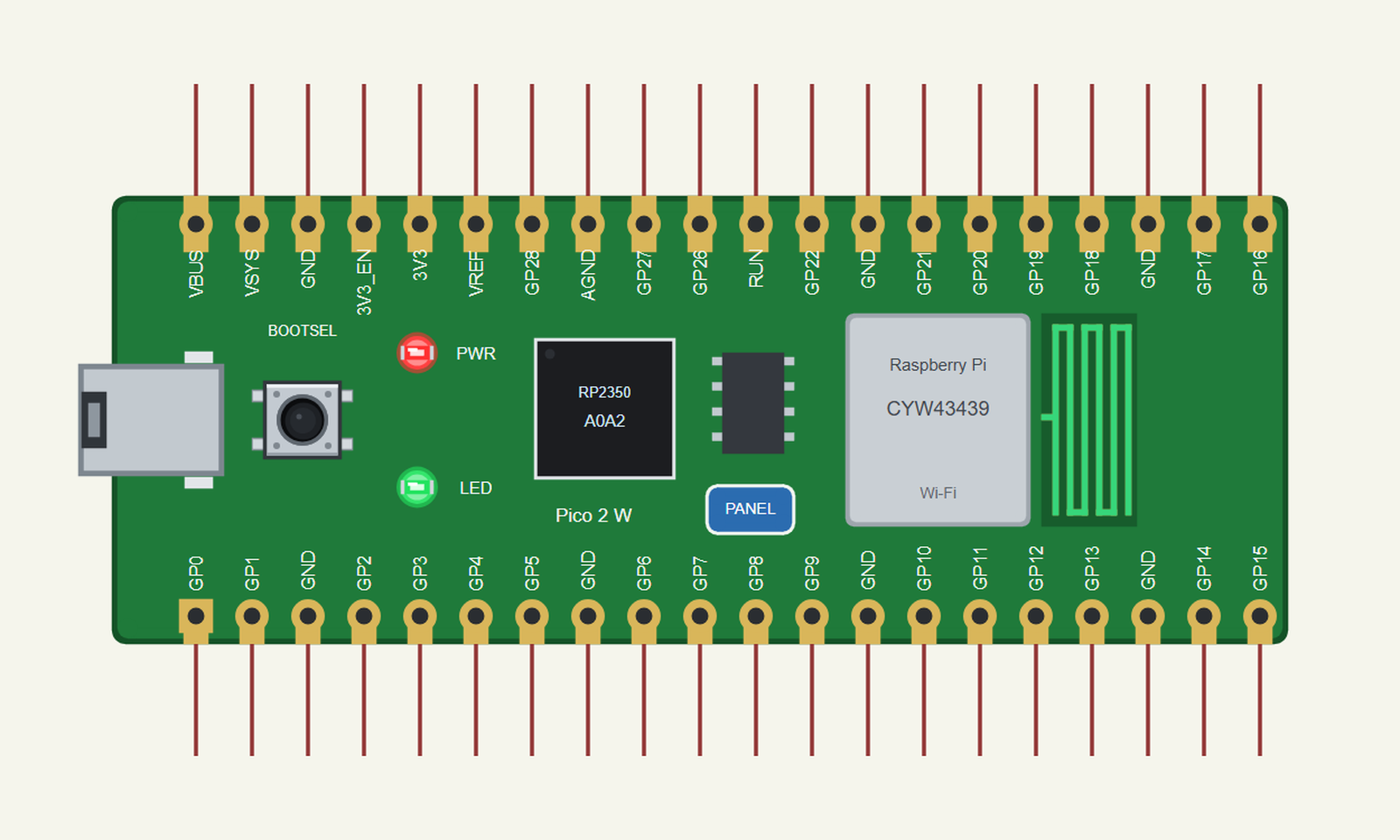
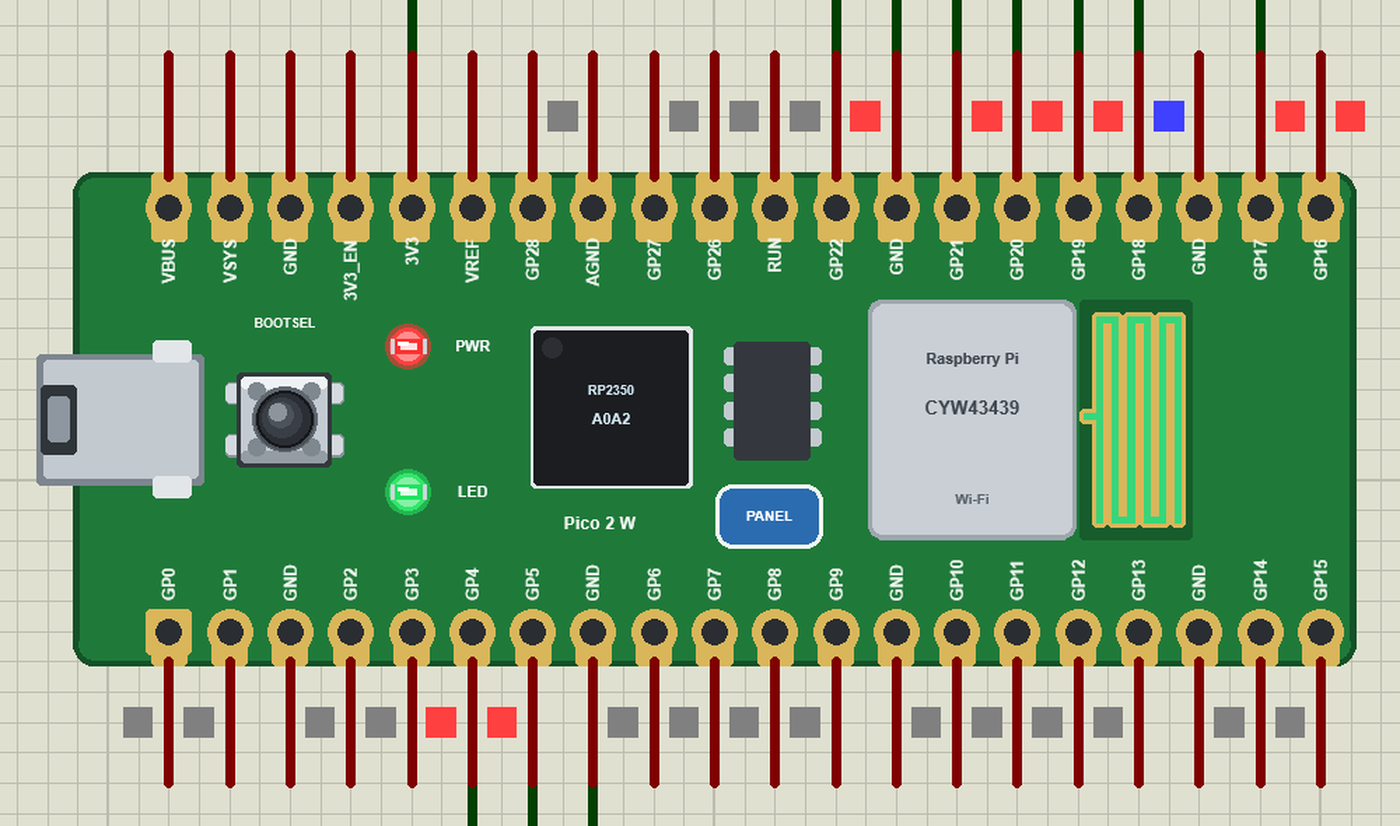
Search PICO 2 W in Pick Devices; the device RASPBERRY PI PICO 2 W is in TEPPICO2W.LIB (Microprocessor ICs, Raspberry Pi Boards), with the prefix U. The board lies with micro-USB on the left; the GP labels are printed inside the rows, as on the real board. Click the micro-USB to open the serial monitor and the PANEL pad to open the board's panel.
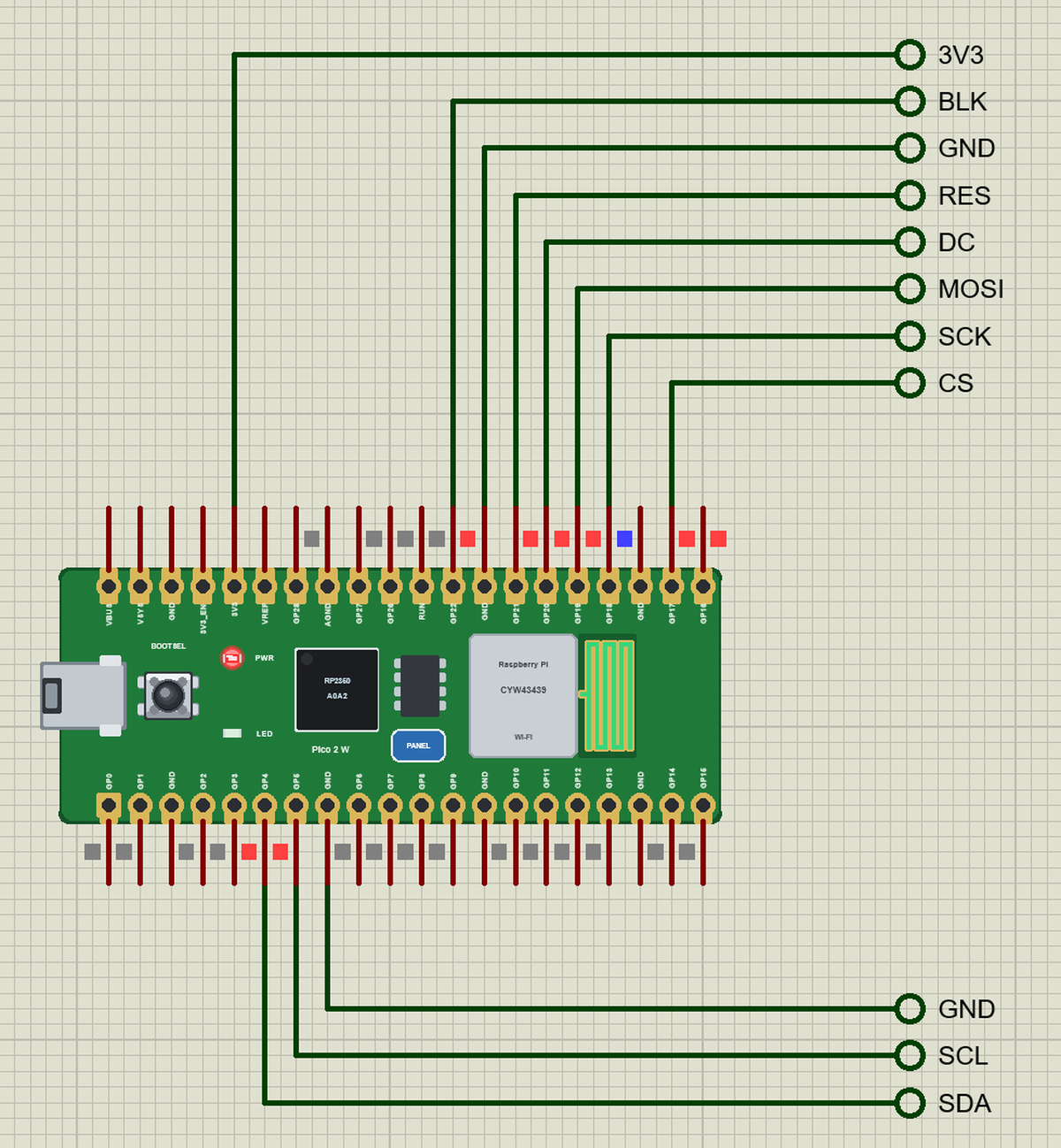
The Pins
| Pins | What the library does with them |
|---|---|
| GP0, GP1 | Serial1 TX / RX, GPIO |
| GP2 to GP22 | GPIO, interrupt, PWM on any pin |
| GP4, GP5 | Wire SDA / SCL (I2C) |
| GP16 to GP19 | SPI MISO / CS / SCK / MOSI |
| GP26 to GP28 | A0 to A2: analogRead 0 to 1023 for 0 to 3.3 V |
| LED_BUILTIN | the LED (32 here - write LED_BUILTIN) |
| 3V3, VBUS, GND, RUN | 3.3 V, 5 V, ground, reset |
| VSYS, 3V3_EN, VREF | drawn, not modelled |
Download Raspberry Pi Pico 2 W Library for Proteus
Click the button below to download Raspberry-Pi-Pico-2-W-Library-for-Proteus-v1.0.zip (about 3.8 MB, without the source code of the models):
Raspberry Pi Pico 2 W Library for Proteus V1.0- README.txt: installation, the demo, the pins, the properties, troubleshooting and the limits.
- Proteus Library Files:
TEPPICO2W.LIBand the demo's parts:TEPBME680.LIB,TEPCCS811.LIB,TEPST7789.LIB,TEPLAPTOP.LIBandTEPMOBILE.LIB. - Proteus Model Files:
TEPNET.DLL(the board, the laptop, the phone and the network) and the parts' DLLs. - Arduino Code: the demo sketch and the TEP Boards for Proteus add-on 1.17.0.
- Proteus Simulation: the demo project, its HEX file and copies of the DLLs.
No Proteus yet? Read How to Download and Install Proteus 7 and 8. New to libraries? Follow How to Install a New Library in Proteus.
How to Install Raspberry Pi Pico 2 W Library for Proteus
- Close Proteus and extract the whole zip file, for example to your Desktop.
- Copy the files from Proteus Library Files into the LIBRARY folder of Proteus.
- Copy the DLLs from Proteus Model Files into the MODELS folder, replacing an older TEPNET.DLL.
- Delete
TEPPICO2W.IDXfrom the LIBRARY folder if it is there. - For your own sketches, copy Arduino Code\TEP Boards for Proteus\hardware into your Arduino sketchbook (Documents\Arduino) and restart the Arduino IDE; the board is Raspberry Pi Pico 2 W (TEP Proteus).
- Start Proteus, press P and search for PICO 2 W.
Demo: an Air Quality Station
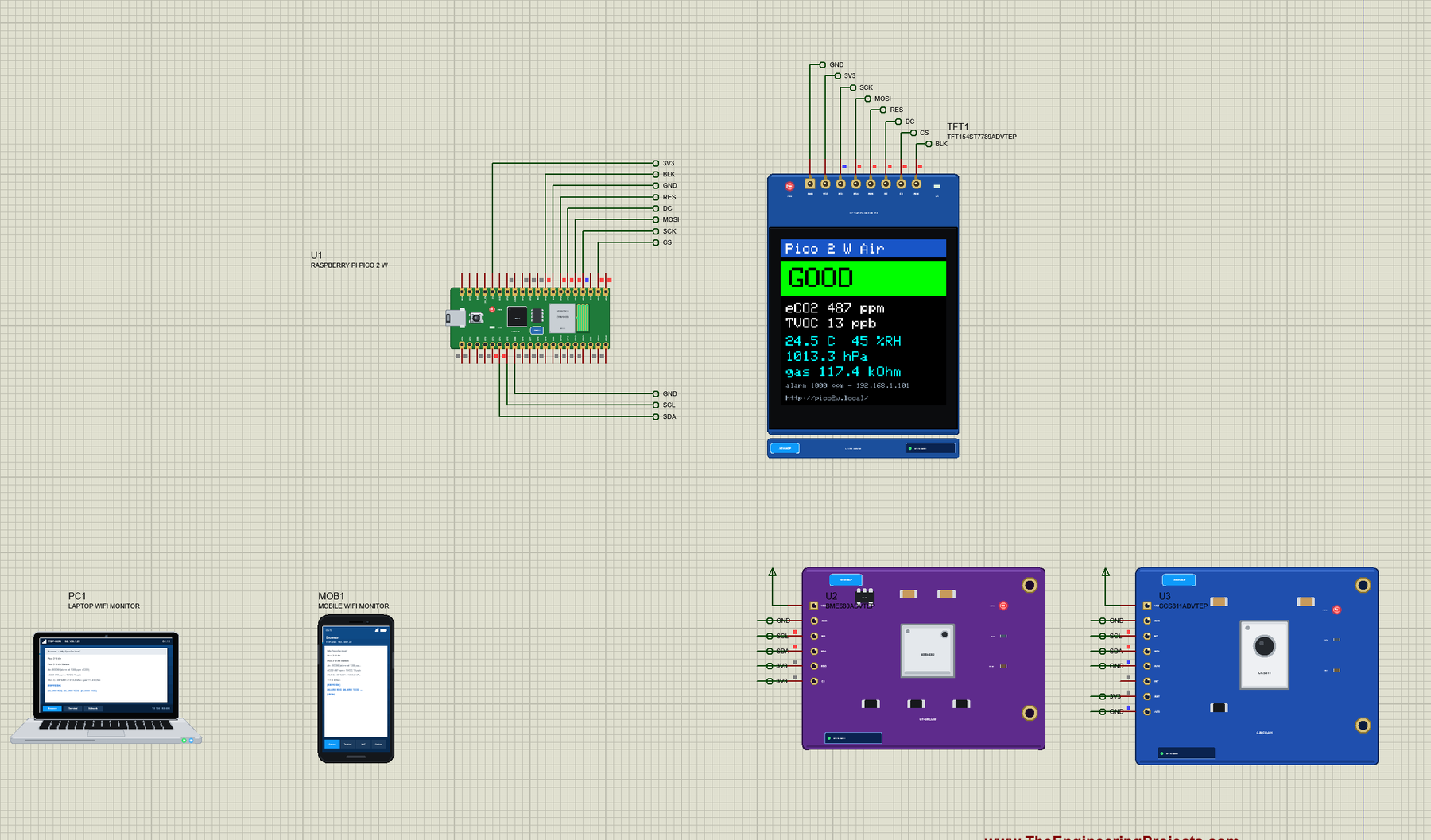
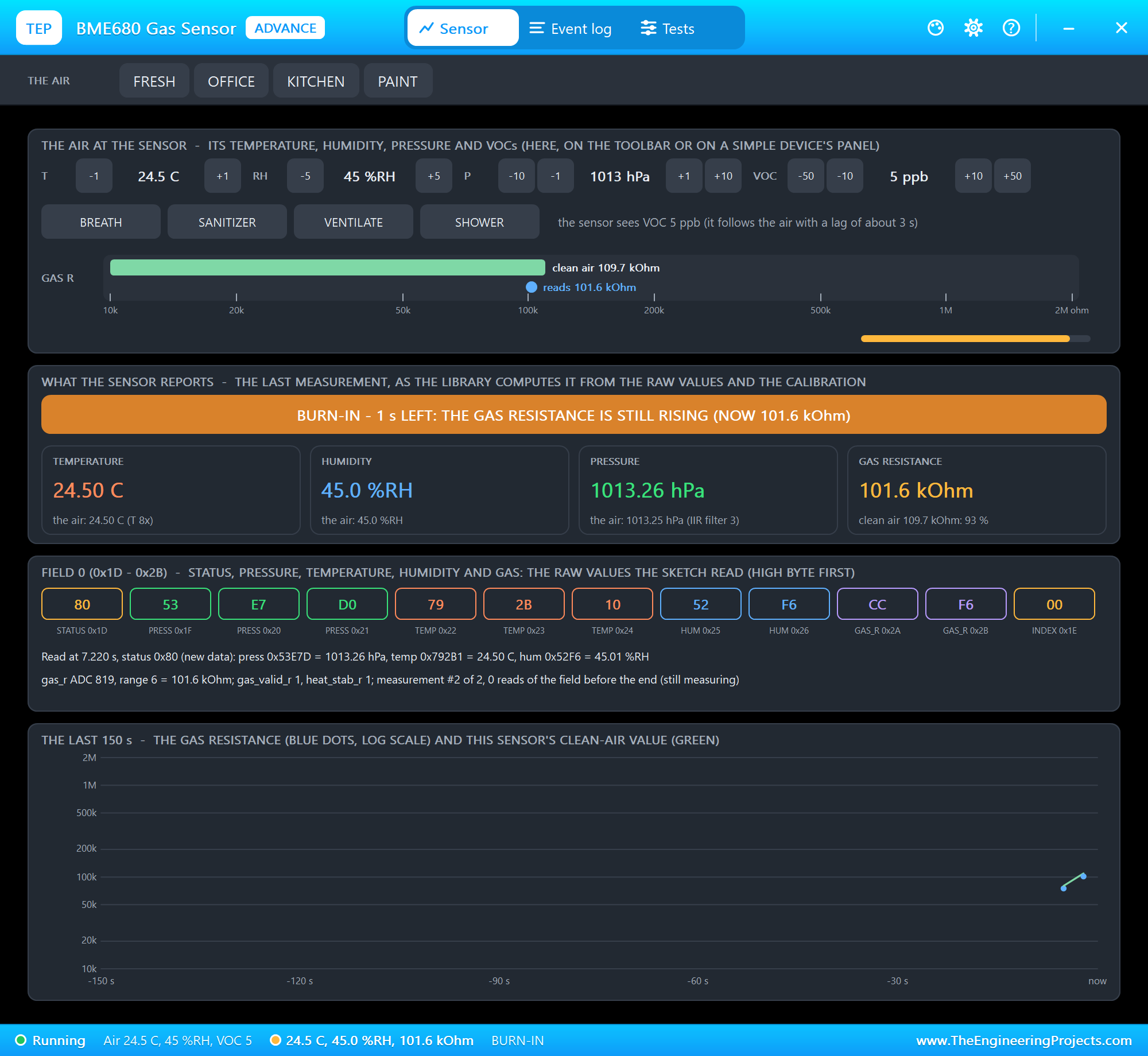
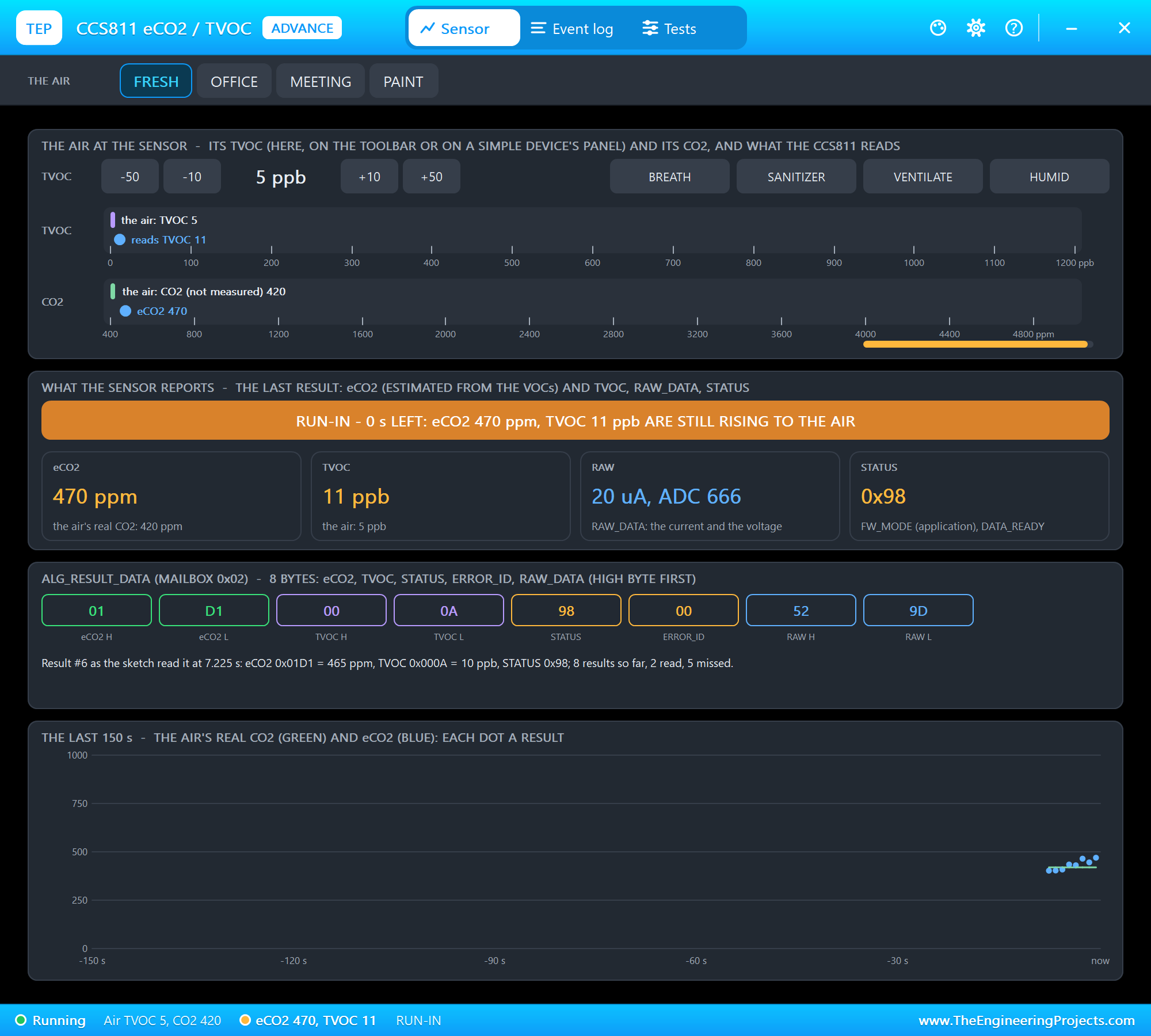
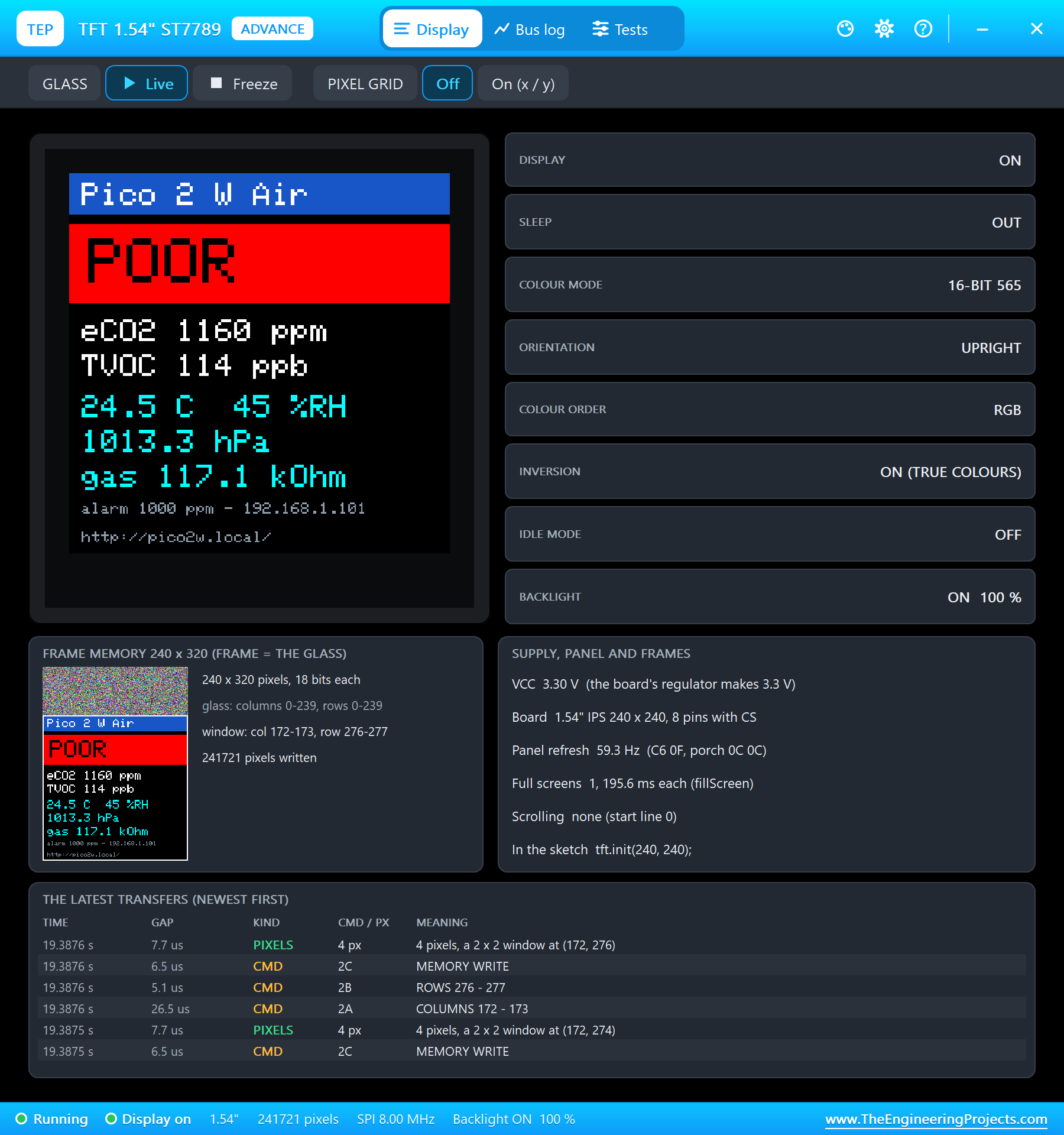
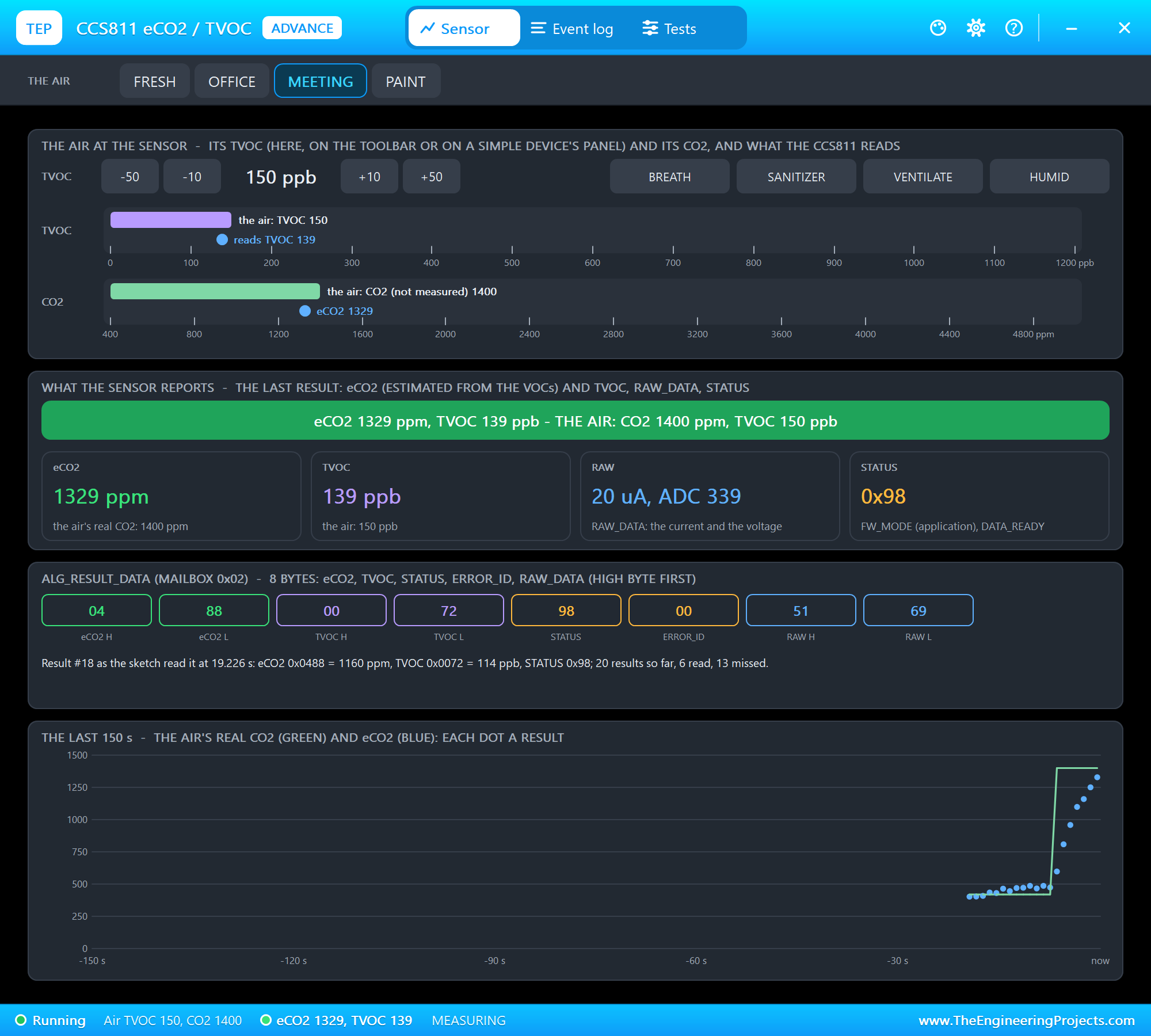
Open Pico-2-W-Air-Quality-Station.pdsprj. U1 runs Pico2W_Air_Station.hex. The parts come from our own libraries, each with its article: U2 from the BME680 Gas Sensor Library for Proteus, U3 from the CCS811 Air Quality Sensor Library for Proteus and TFT1 from the ST7789 TFT LCD Library for Proteus. All three are the Advance versions: each opens a pop-up window at Run. PC1 is the Laptop WiFi Monitor and MOB1 the Mobile WiFi Monitor.
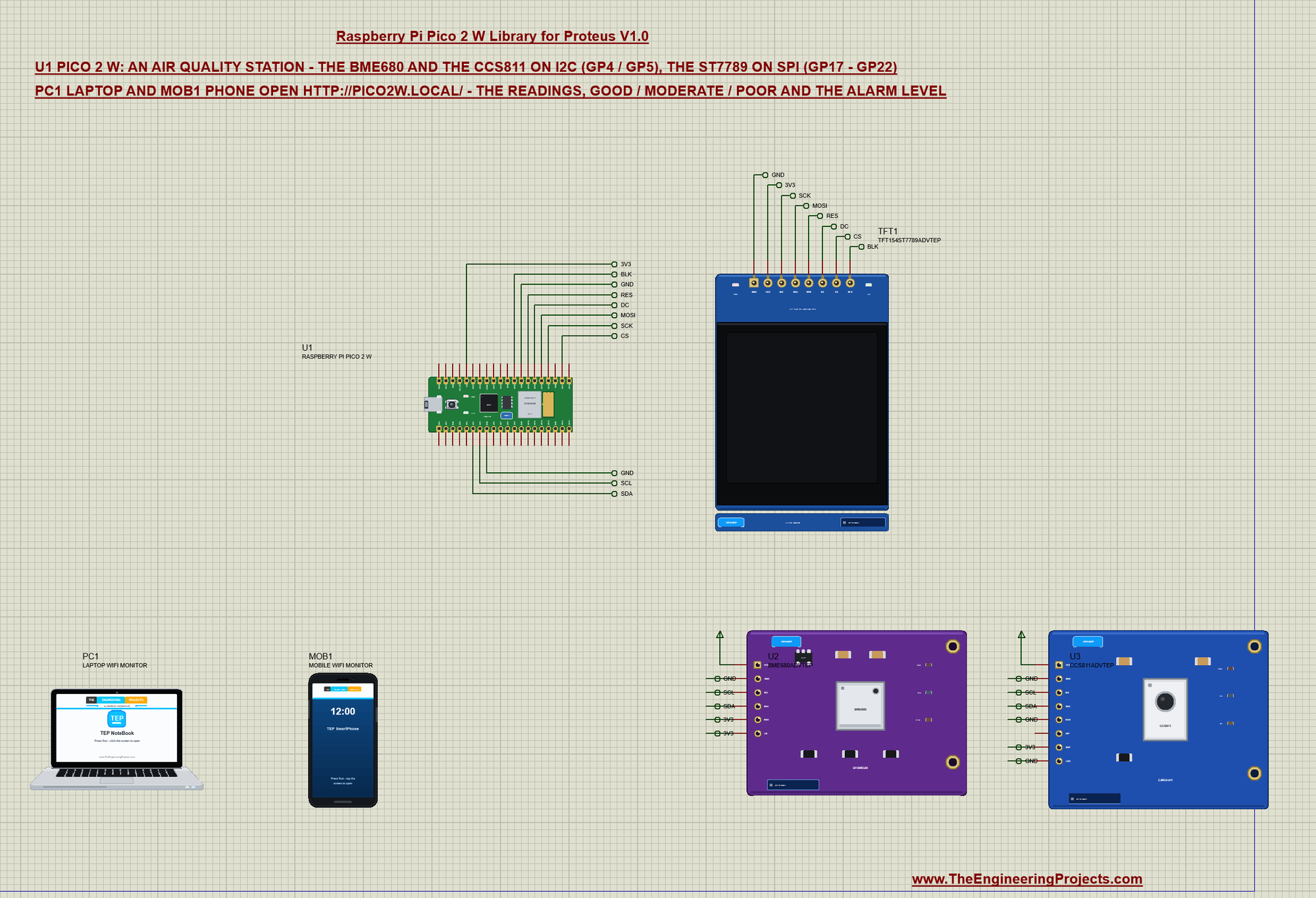
| Part pin | Net label | Pico 2 W pin | What it does |
|---|---|---|---|
| BME680 SDA, SCL | SDA, SCL | GP4, GP5 | I2C at 0x77 (SDO and CS on 3V3) |
| CCS811 SDA, SCL | SDA, SCL | GP4, GP5 | I2C at 0x5A (ADD and WAK on GND) |
| ST7789 SCL, SDA | SCK, MOSI | GP18, GP19 | SPI clock and data |
| ST7789 CS, DC, RES, BLK | CS, DC, RES, BLK | GP17, GP20, GP21, GP22 | chip select, data / command, reset, backlight |
| ST7789 VCC, GND | 3V3, GND | 3V3, GND | the display's supply |
The BME680 and the CCS811 take their supply from a power terminal in the demo: their models read VCC as a digital level, and the board's 3V3 is an analog source in Proteus. On a real board both sit on the Pico's 3V3 pin.
The Sketch
Every 3 s the sketch reads the BME680, gives its humidity and temperature to the CCS811 for compensation, reads the CCS811's eCO2 and TVOC, lights the LED when the air is poor, prints a line and updates the screen:
void readAir() {
  if (bmeOk && bme.performReading()) {
    temp = bme.temperature;
    hum = bme.humidity;
    hpa = bme.pressure / 100.0;
    gasK = bme.gas_resistance / 1000.0;
    if (ccsOk) ccs.setEnvironmentalData(hum, temp);        // the CCS811's humidity / temperature compensation
  }
  if (ccsOk && ccs.available() && !ccs.readData()) {
    eco2 = ccs.geteCO2();
    tvoc = ccs.getTVOC();
    haveAir = true;
  }
  digitalWrite(LED_BUILTIN, airText()[0] == 'P' ? HIGH : LOW);
  readings++;
  Serial.printf("#%lu  %.1f C  %.0f %%RH  %.1f hPa  gas %.1f kOhm  eCO2 %u ppm  TVOC %u ppb  %s\n", readings, temp, hum, hpa, gasK, eco2,
                tvoc, airText());
  drawValues();
}
The verdict compares eCO2 and TVOC with the limits; the alarm level comes from the page:
const char *airText() {
  if (!haveAir) return "WAIT";
  if (eco2 >= alarmPpm || tvoc >= 660) return "POOR";
  if (eco2 >= 800 || tvoc >= 220) return "MODERATE";
  return "GOOD";
}
The screen sends only the lines whose text changed - a full 240 x 240 screen is 115 KB over SPI:
void line(uint8_t k, int y, uint8_t size, uint16_t colour, const String &text) {
  if (shown[k] == text) return;
  shown[k] = text;
  tft.fillRect(0, y, 240, 8 * size + 2, ST77XX_BLACK);
  tft.setTextSize(size);
  tft.setTextColor(colour);
  tft.setCursor(8, y + 1);
  tft.print(text);
}
Two Sensors, Two Jobs
The BME680 is a climate sensor with a heated metal-oxide layer: it reports the temperature, the humidity, the pressure and the layer's gas resistance in kilo-ohms. Clean air leaves the resistance high; volatile compounds lower it. The resistance alone is not a ppm value - it only says "cleaner" or "dirtier" than before - so the station shows it as a trend and leaves the verdict to the second sensor.
The CCS811 turns its own metal-oxide reading into two numbers the station can judge: TVOC in parts per billion and an equivalent CO2 in parts per million. Its algorithm works better when it knows the room's humidity and temperature - exactly what the BME680 measures - so every reading starts with the BME680 and passes its values on with ccs.setEnvironmentalData(). Both sensors share the same two I2C wires on GP4 and GP5; their addresses (0x77 and 0x5A) keep them apart.
The page shows the readings with REFRESH and the alarm links:
void sendPage() {
  String html = F("<html><head><title>Pico 2 W Air</title></head><body><h1>Pico 2 W Air Station</h1><p>Air: <b>");
  html += airText();
  html += "</b> (alarm at " + String(alarmPpm) + " ppm eCO2)</p>";
  html += "<p>eCO2 " + String(eco2) + " ppm - TVOC " + String(tvoc) + " ppb</p>";
  html += "<p>" + String(temp, 1) + " C - " + String(hum, 0) + " %RH - " + String(hpa, 1) + " hPa - gas " + String(gasK, 1) + " kOhm</p>";
  html += F("<p><a href=\"/\">REFRESH</a></p><p><a href=\"/alarm?ppm=800\">ALARM 800</a> <a href=\"/alarm?ppm=1000\">ALARM 1000</a> "
            "<a href=\"/alarm?ppm=1500\">ALARM 1500</a> <a href=\"/json\">JSON</a></p></body></html>");
  server.send(200, "text/html", html);
}
The Web Server and mDNS
The setup joins TEP-WiFi, starts mDNS with the name pico2w and registers three pages: / for the readings, /json for the same values as JSON (handy for another program) and /alarm, which takes the new level from the address, for example /alarm?ppm=1500. The loop then calls server.handleClient() and MDNS.update() all the time and reads the sensors every 3 s:
  server.on("/", sendPage);
  server.on("/json", sendJson);
  server.on("/alarm", []() { setAlarm(server.arg("ppm").toInt(), "page"); sendPage(); });
  server.begin();
void loop() {
server.handleClient();
MDNS.update();
readMonitor();
if (millis() - lastRead >= 3000) {
lastRead = millis();
readAir();
}
}The setup starts the TFT in SPI mode 0, finds the two sensors, joins Wi-Fi and starts mDNS and the web server:
tft.init(240, 240, SPI_MODE0); // (mode 0: the one Proteus' SPI model clocks) bmeOk = bme.begin(0x77);
if (bmeOk) {
bme.setTemperatureOversampling(BME680_OS_8X);
bme.setHumidityOversampling(BME680_OS_2X);
bme.setPressureOversampling(BME680_OS_4X);
bme.setGasHeater(320, 150); // 320 C for 150 ms
}
ccsOk = ccs.begin(0x5A);Run the Demo
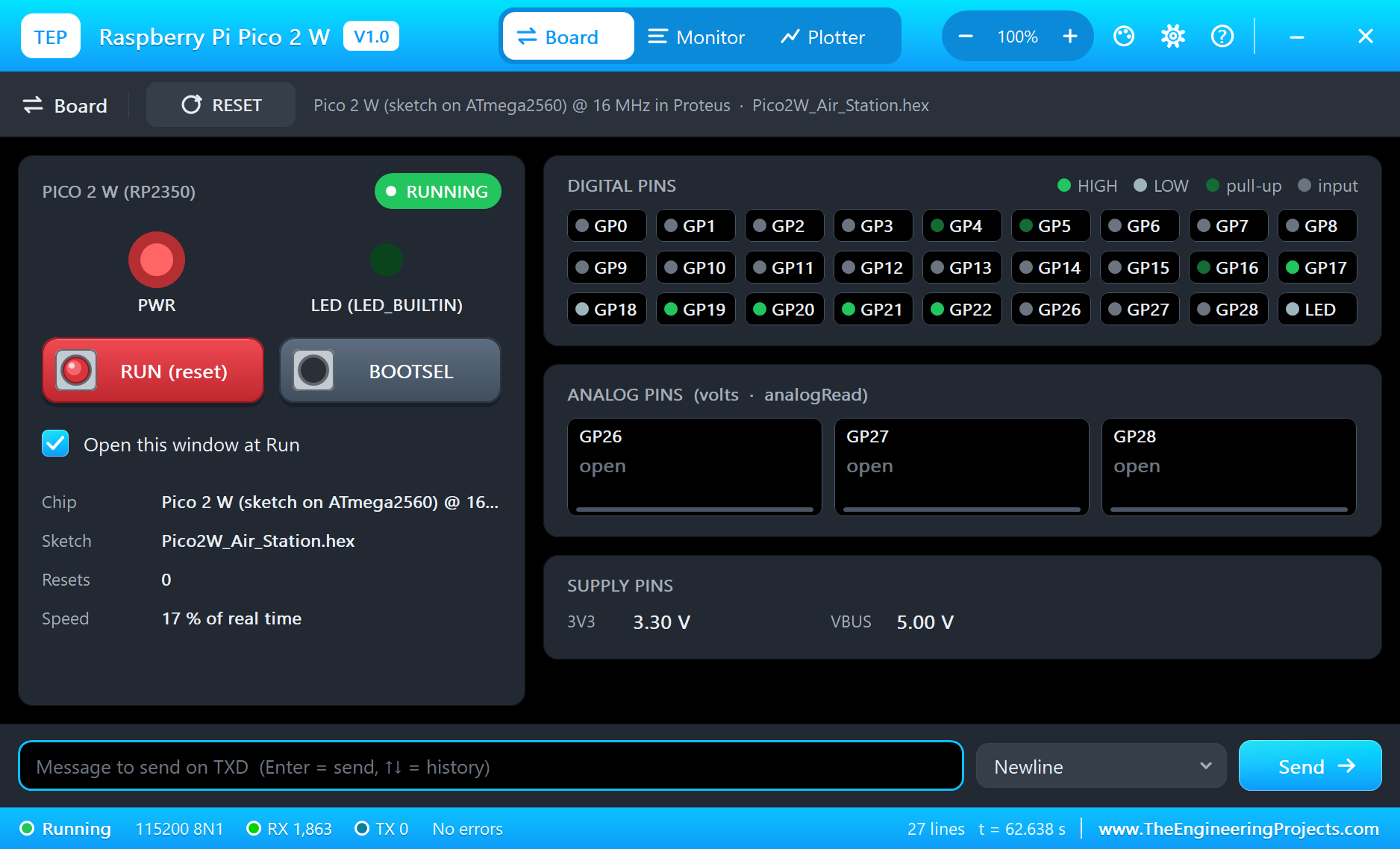
Press Run. The serial monitor opens; the sketch finds both sensors and joins TEP-WiFi:
Pico 2 W Air Quality Station - The Engineering Projects
BME680 found, CCS811 found
Connecting to TEP-WiFi.....
IP address: 192.168.1.101
mDNS: http://pico2w.local/
#1  24.5 C  45 %RH  1013.3 hPa  gas 75.1 kOhm  eCO2 409 ppm  TVOC 1 ppb  GOOD
#2  24.5 C  45 %RH  1013.3 hPa  gas 101.6 kOhm  eCO2 465 ppm  TVOC 10 ppb  GOOD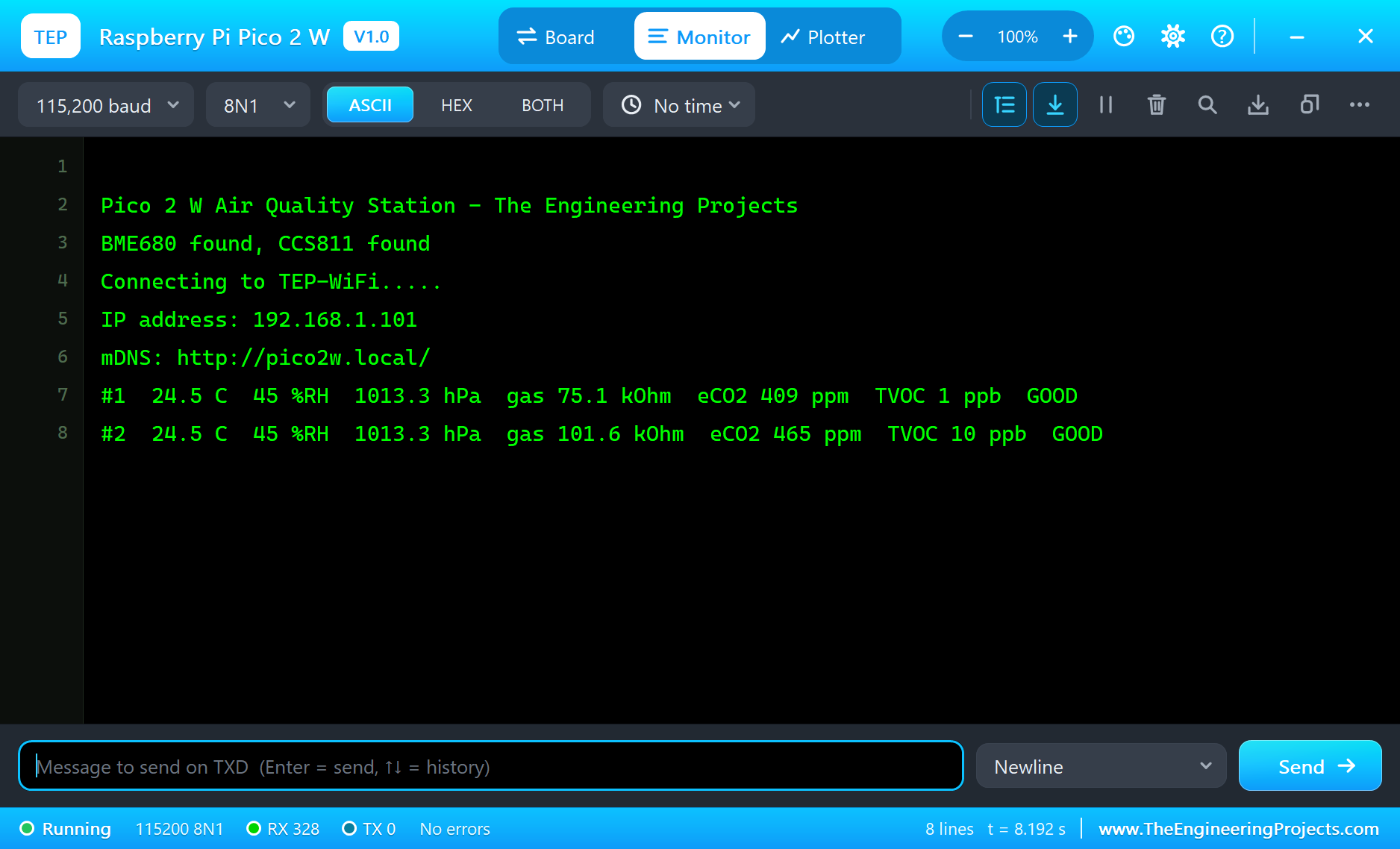
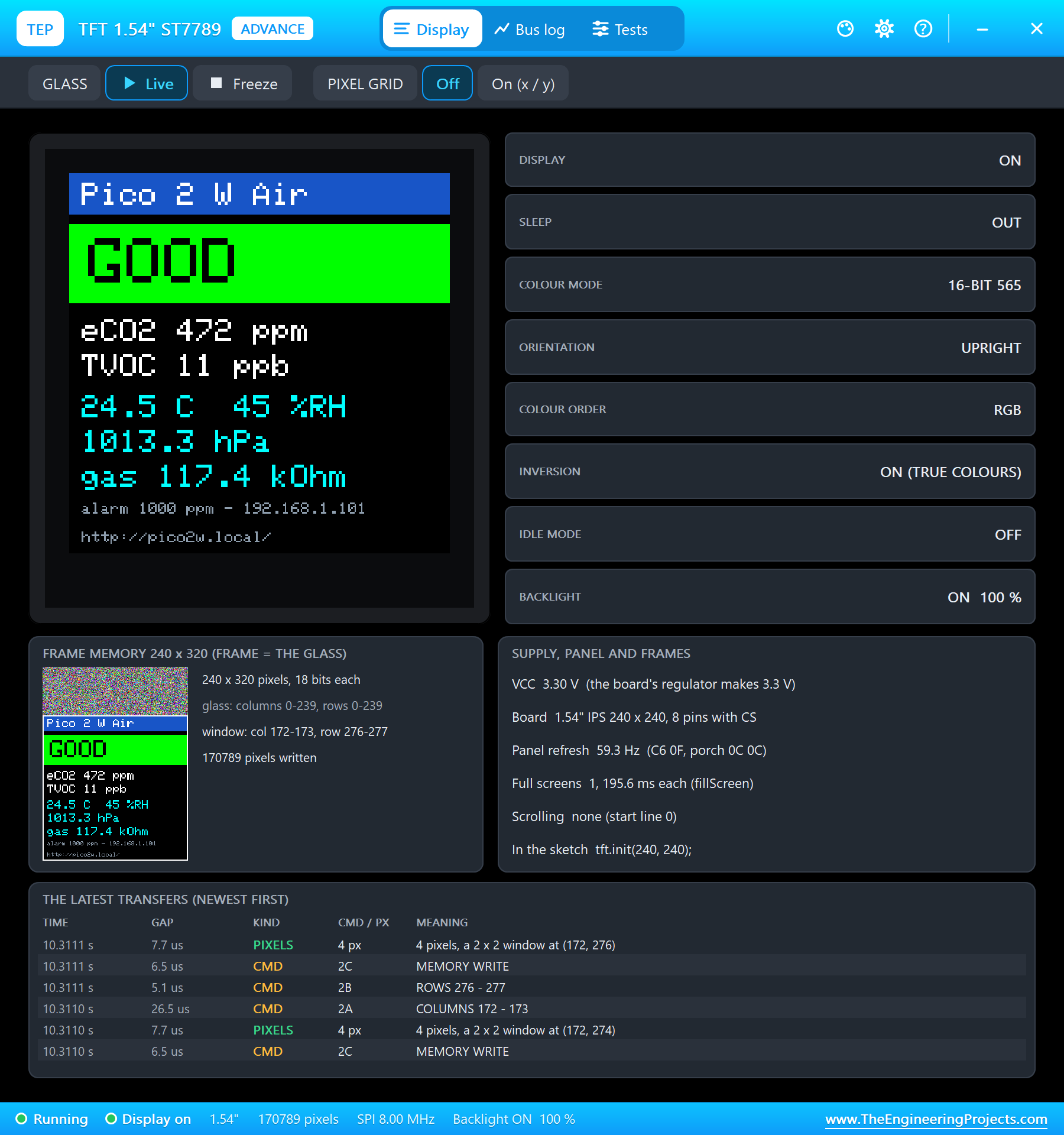
Open the Page
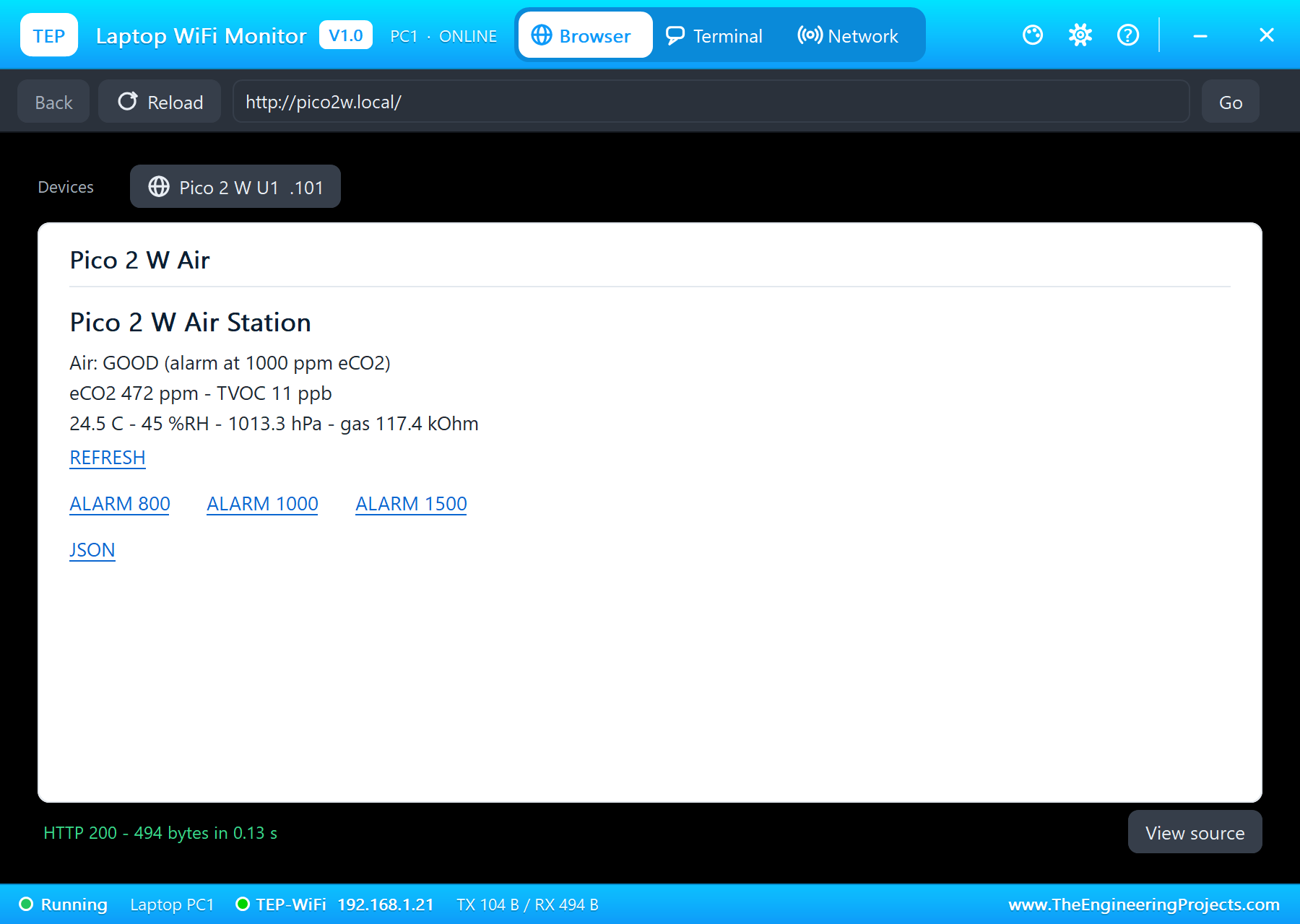
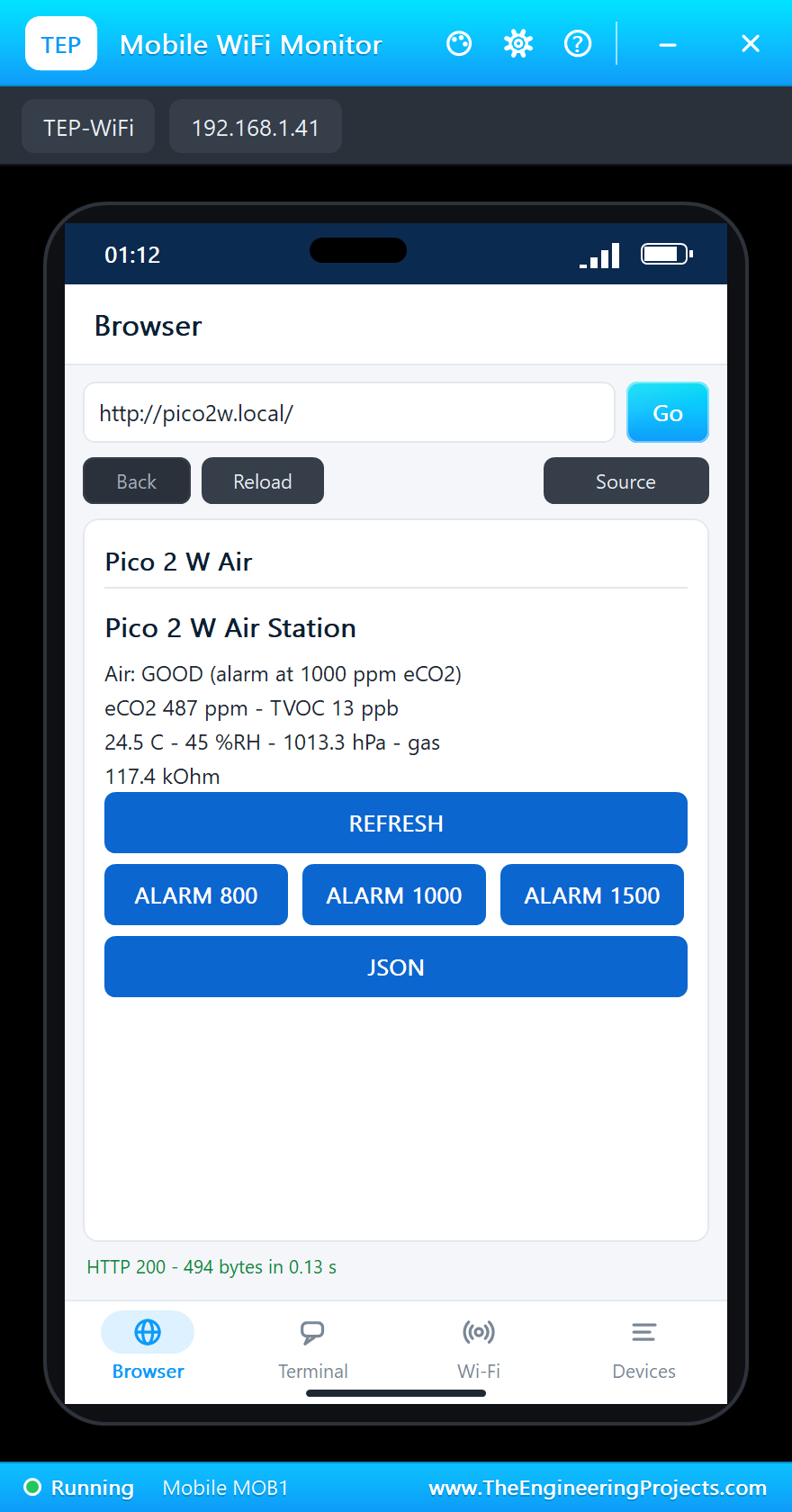
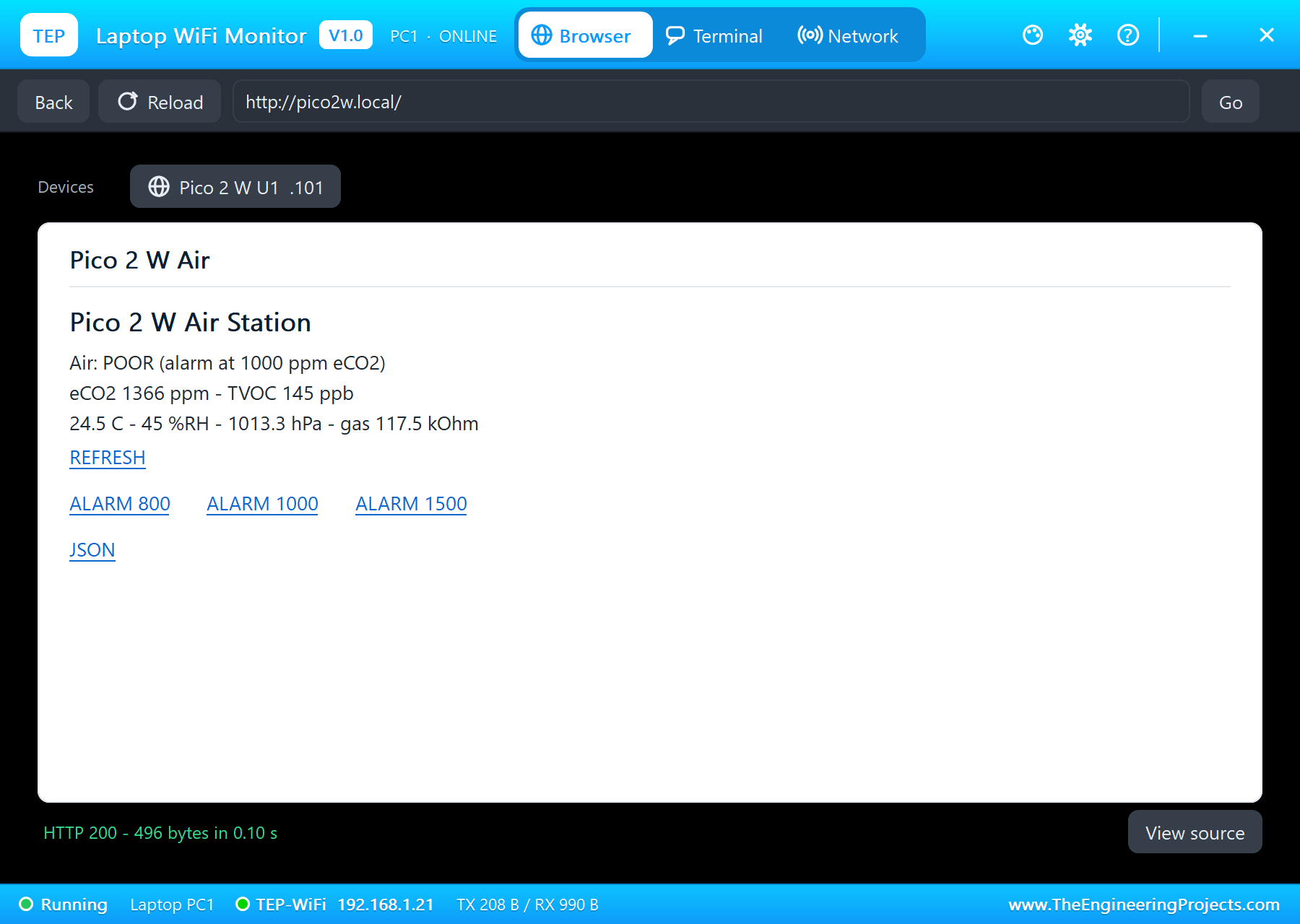
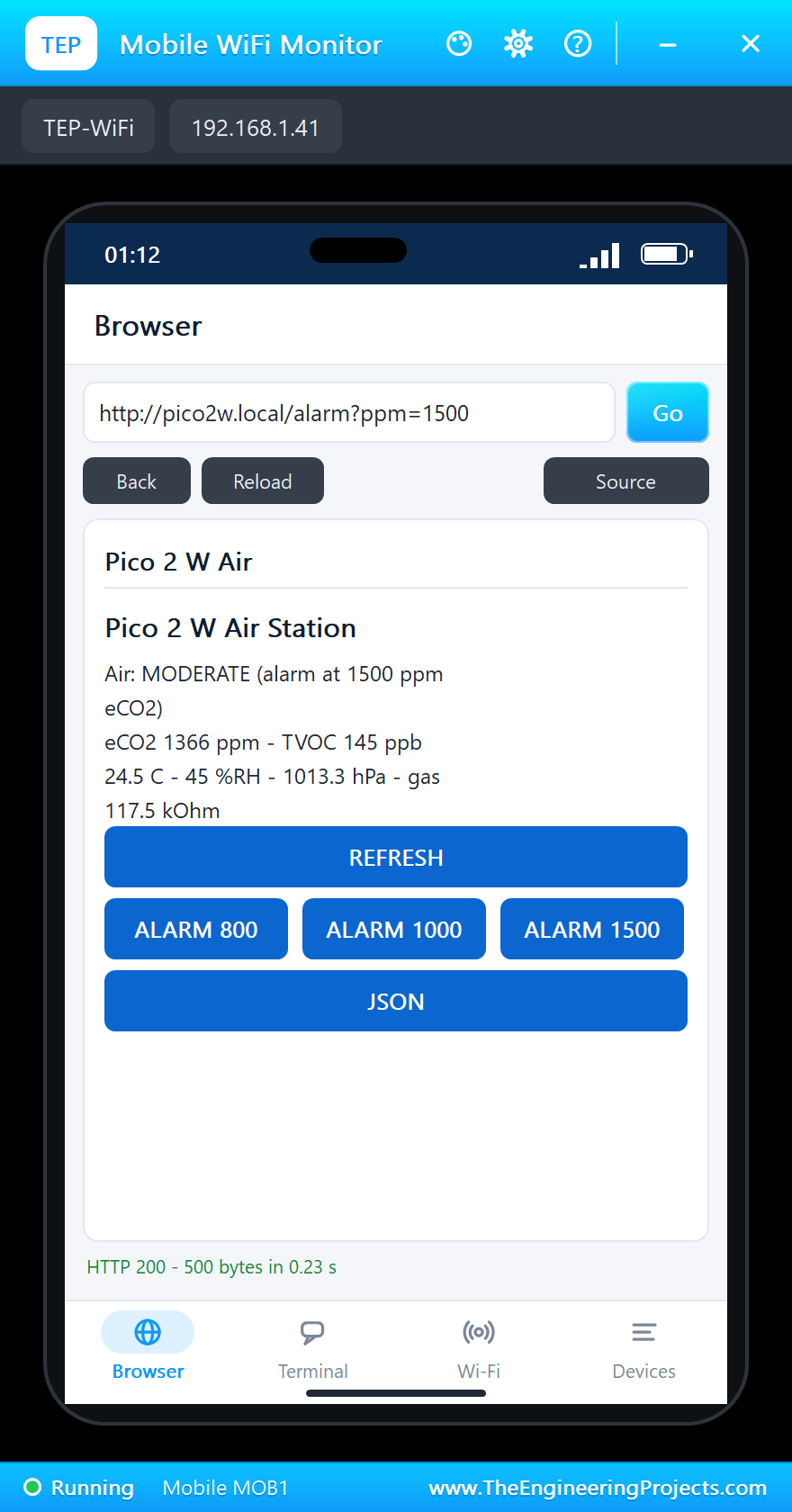
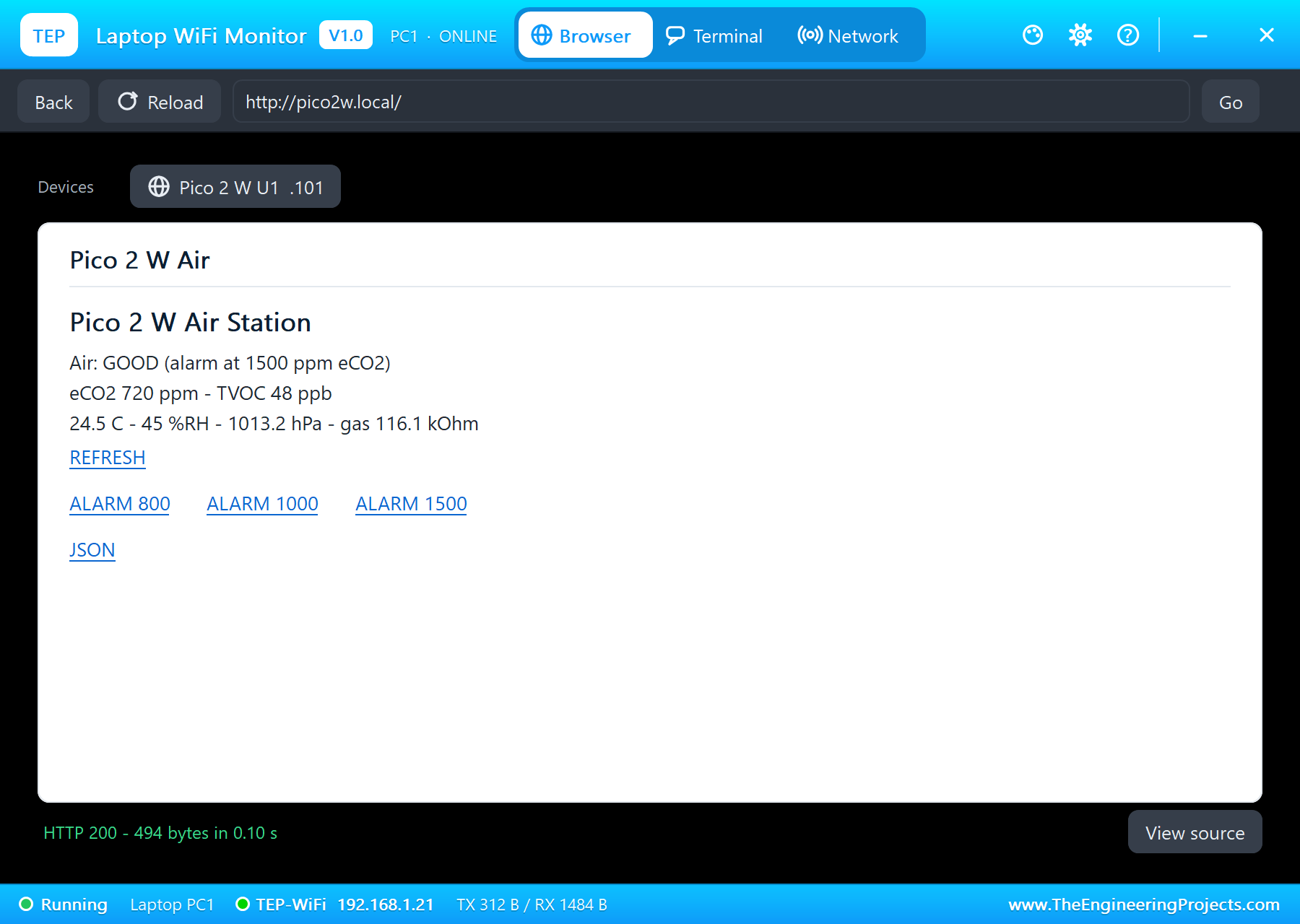
On the laptop click Browser and Go (the home page is http://pico2w.local/); on the phone the same. The laptop shows the links as text, the phone as buttons:
A Crowded Room: the LED On
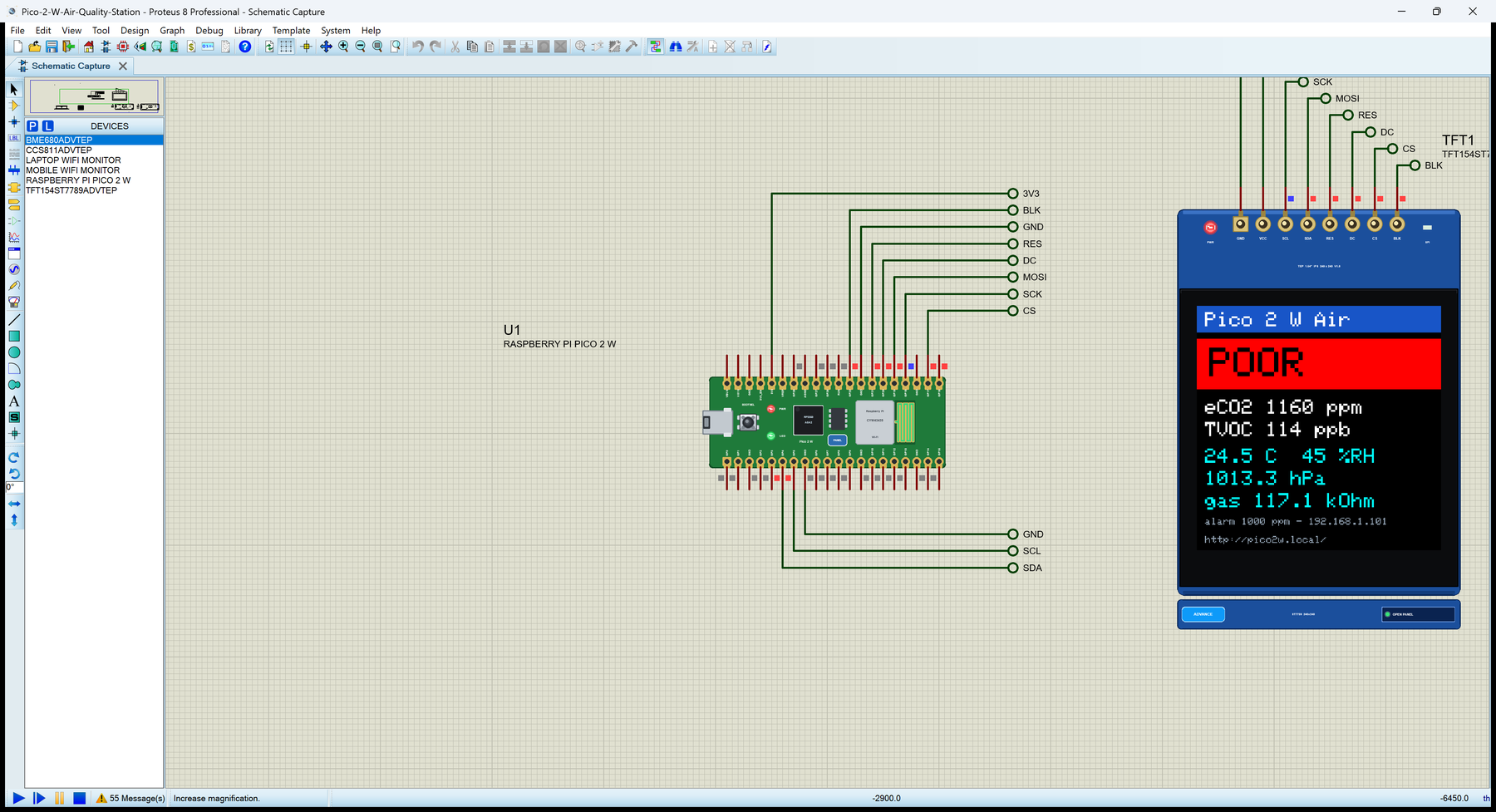
In the CCS811's pop-up click MEETING (1400 ppm). The eCO2 climbs over the 1000 ppm alarm: the screen turns red, POOR, and the Pico 2 W's LED lights next to the PWR LED:
A New Alarm Level
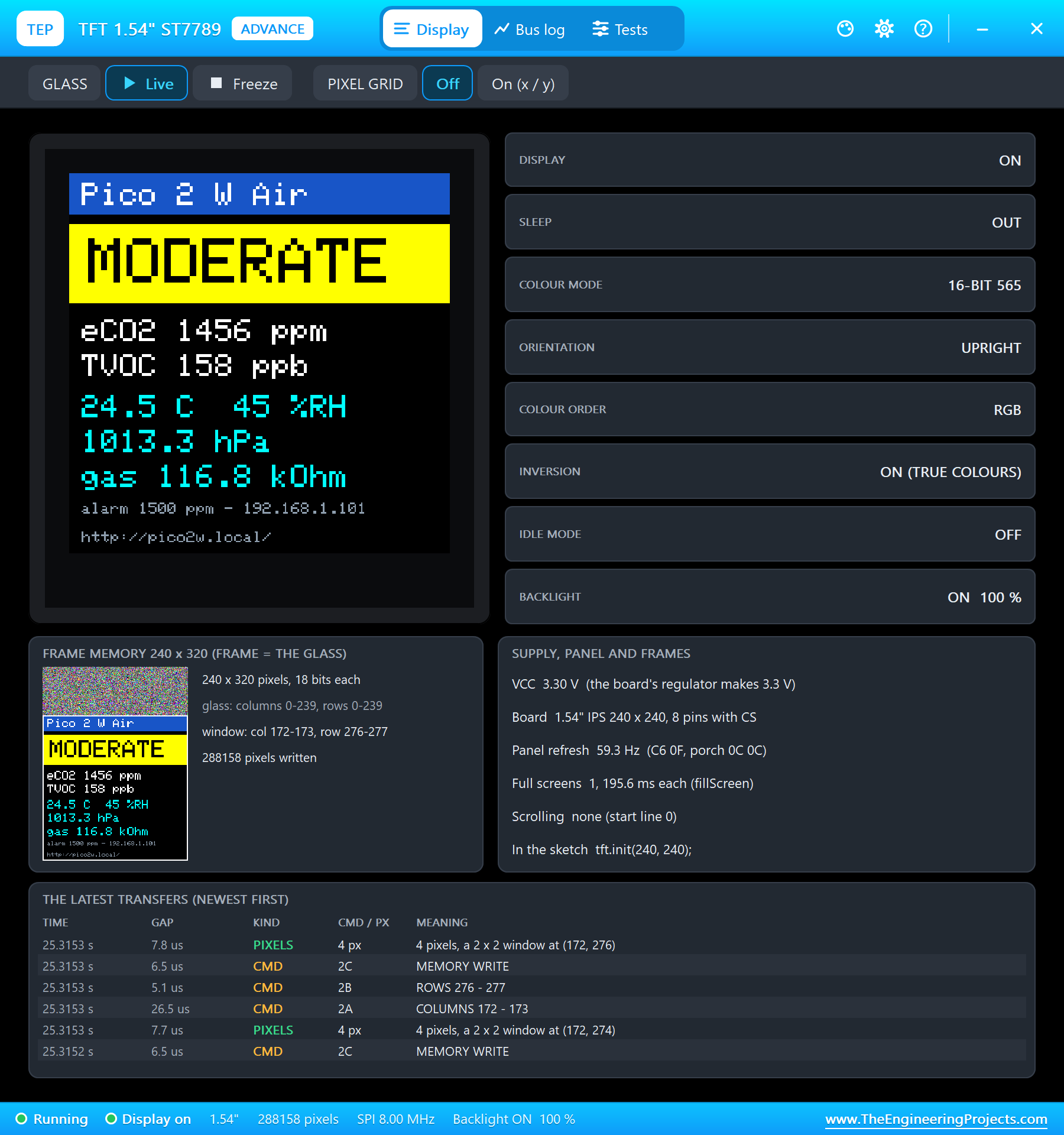
Tap ALARM 1500 on the phone. The sketch takes the new level and the meeting room is MODERATE now; the LED goes out:
Open the Windows
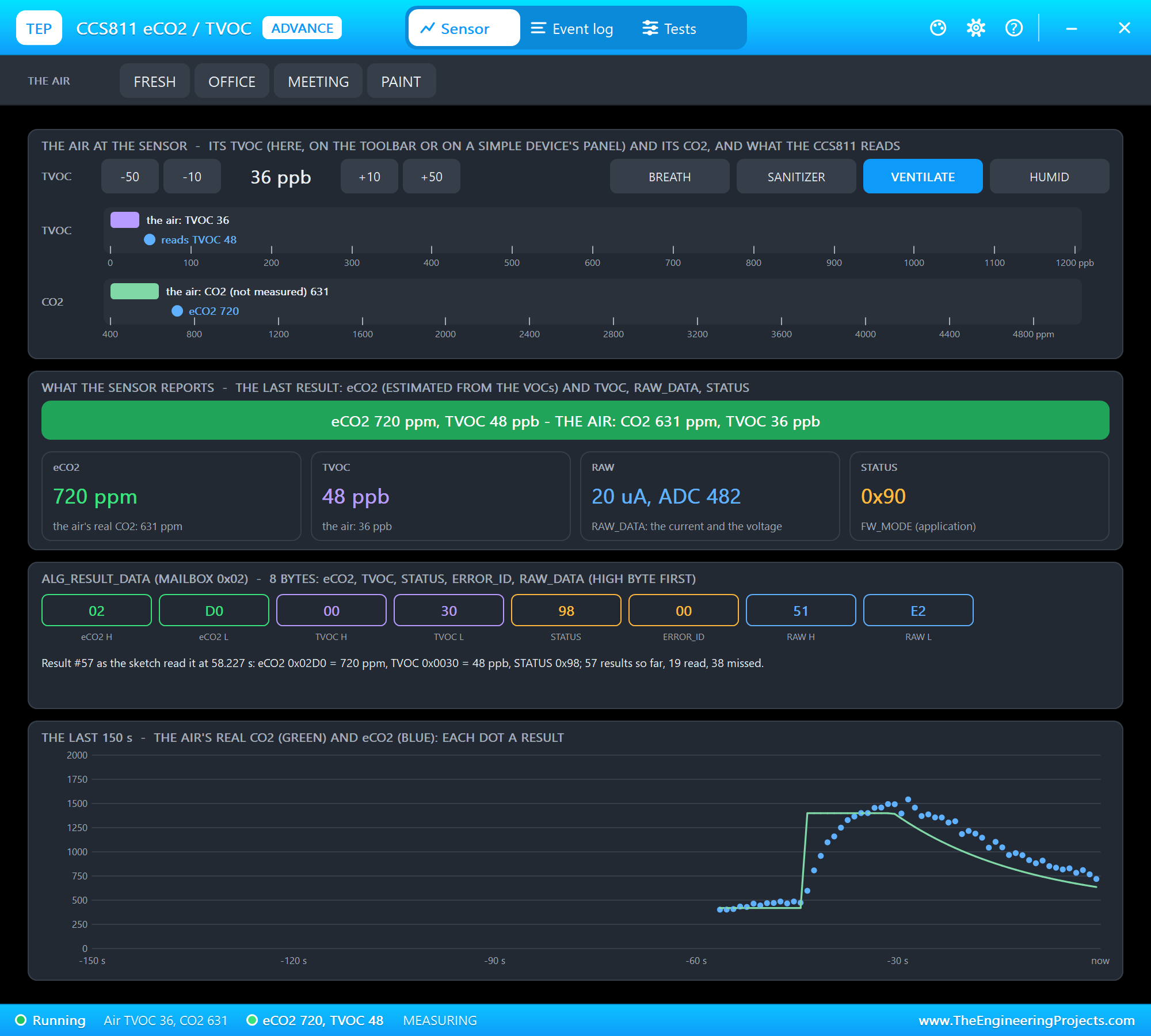
Click VENTILATE on the CCS811's pop-up: the air goes back to fresh, and the station says GOOD again:
| Step | eCO2 | TVOC | The station | The LED |
|---|---|---|---|---|
| Fresh air (FRESH) | about 480 ppm | about 13 ppb | GOOD (green) | off |
| MEETING, alarm 1000 ppm | 1160 - 1366 ppm | 114 - 145 ppb | POOR (red) | on |
| ALARM 1500 from the phone | about 1490 ppm | about 164 ppb | MODERATE (yellow) | off |
| VENTILATE | falling to 720 ppm | falling to 48 ppb | GOOD again | off |
The built-in serial monitor, in the look of our TEP Serial Monitor Advance for Proteus, logs every reading and every change from the page:
#4  24.5 C  45 %RH  1013.3 hPa  gas 117.4 kOhm  eCO2 487 ppm  TVOC 13 ppb  GOOD
#5  24.5 C  45 %RH  1013.2 hPa  gas 117.4 kOhm  eCO2 809 ppm  TVOC 61 ppb  MODERATE
#6  24.5 C  45 %RH  1013.3 hPa  gas 117.1 kOhm  eCO2 1160 ppm  TVOC 114 ppb  POOR
#7  24.5 C  45 %RH  1013.3 hPa  gas 117.5 kOhm  eCO2 1366 ppm  TVOC 145 ppb  POOR
alarm 1500 ppm (page)
#8  24.5 C  45 %RH  1013.3 hPa  gas 116.8 kOhm  eCO2 1456 ppm  TVOC 158 ppb  MODERATE
#9  24.5 C  45 %RH  1013.3 hPa  gas 114.2 kOhm  eCO2 1493 ppm  TVOC 164 ppb  MODERATE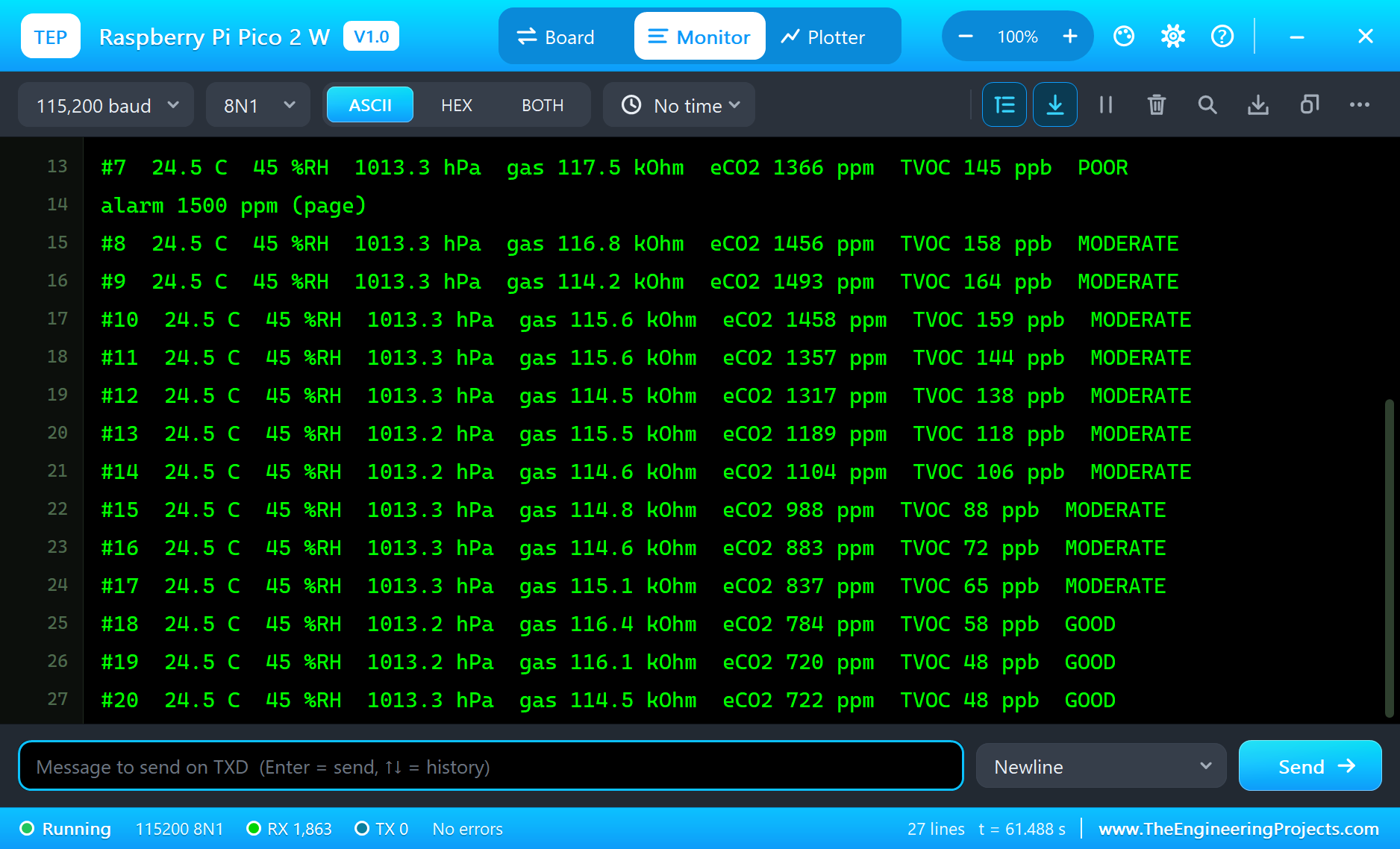
Why These Limits?
Outdoor air holds about 420 ppm of CO2; a room with people breathing in it climbs from there. Below about 800 ppm the air feels fresh; around 1000 ppm many building guidelines ask for more ventilation, and above 1500 ppm people start to feel tired and lose concentration. The CCS811 does not measure CO2 itself: it measures the volatile organic compounds (TVOC) from people, paint and cleaning products and estimates an equivalent CO2 (eCO2) from them. That is why the sketch looks at both numbers, and why the BME680's humidity and temperature go to the CCS811 for its compensation every 3 s.
The alarm level is a variable the page changes: a classroom might use 800 ppm, a workshop 1500 ppm. The sketch keeps it until the next reset; on a real board you could store it in flash with the EEPROM library.
Ideas to Extend the Station
- Add a relay on a spare GP pin and switch a fan when the air turns POOR - the LED already marks the moment.
- Keep the last 60 readings in an array and draw a small eCO2 graph on the ST7789 under the numbers.
- Send the JSON page's values to a laptop program every minute and log them to a file.
- Use BOOTSEL as a button to switch the screen between the readings and a large clock.
Your Own Sketches
Write the sketch in the Arduino IDE with the board Raspberry Pi Pico 2 W (TEP Proteus), use Sketch > Export Compiled Binary and set the board's PROGRAM property to the .hex. The same sketch compiles for a real Pico 2 W with Earle Philhower's arduino-pico core - select "Raspberry Pi Pico 2 W" there and upload. The Adafruit BME680, CCS811, GFX and ST7789 libraries come from the Library Manager.
Things to Know Before Using a Real Pico 2 W
- 3.3 V logic: the Pico 2 W's pins are not 5 V tolerant; the BME680, CCS811 and ST7789 modules all run on 3.3 V.
- The CCS811 needs time: its datasheet asks for 48 hours of burn-in on a new sensor and about 20 minutes of run-in at every start before its readings settle; the demo shortens both.
- The CCS811's WAK pin: hold it LOW, or the sensor does not answer on I2C at all.
- I2C pull-ups: the breakout boards carry them; with bare sensors add 4.7 k resistors on SDA and SCL.
- The ST7789: boards without a CS pin need SPI mode 3 on real hardware; the 1.54" board with CS works in mode 0.
- Power: the Pico 2 W takes 1.8 to 5.5 V on VSYS, or 5 V on the micro-USB.
Properties of the Raspberry Pi Pico 2 W
| Property | What it does |
|---|---|
| PROGRAM | the sketch: a .hex from TEP Boards for Proteus (board "Raspberry Pi Pico 2 W") |
| WIFISSID, WIFIPASS | the router in range (TEP-WiFi, 12345678) |
| MONITOR, BAUD, AUTOOPEN | the built-in serial monitor: on, its baud rate (115200), open at Run |
| TIME | the clock NTP gives the sketch: PC or a fixed UTC time |
Troubleshooting
- BME680 NOT FOUND, NO POWER on the pop-up: its VCC needs a digital supply - the power terminal, as in the demo; SDA and SCL on GP4 and GP5.
- The TFT stays black: use SPI_MODE0 in tft.init() - the only mode Proteus's AVR SPI clocks; CS GP17, DC GP20, RES GP21, BLK HIGH.
- The board stays on "Connecting to TEP-WiFi": the sketch's SSID and password must match WIFISSID and WIFIPASS.
- A number goes wrong above 32767: int is 16 bits on the hidden AVR - use long.
- The page shows old values: use REFRESH; the monitors do not reload by themselves.
Limitations of the Simulation
- The sketch runs on an ATmega2560 at 16 MHz with 8 KB of RAM inside the part, not on the RP2350 at 150 MHz with 520 KB.
- The second core, PIO, the RISC-V cores, Bluetooth and MicroPython are not modelled.
- The router, the addresses and the windows are TEP additions.
- Raspberry Pi, Pico and RP2350 are trademarks of Raspberry Pi Ltd; this library is not made or endorsed by Raspberry Pi, Infineon or Labcenter.
- Tested in Proteus 8.5 in October 2026 (the demo as shipped, about 63 s of simulation). Proteus 7 is not supported.
So, that was all about the Raspberry Pi Pico 2 W Library for Proteus. I hope it helps you build and test your Pico 2 W projects before you touch the hardware - the sensors, the screen and the web page in one simulation. If you have any questions, ask in the comments and I will help you out. Till the next tutorial, take care and have fun!