Hello friends, I hope you all are doing great. Today, I am going to share the new 12V Push-Pull Solenoid Library for Proteus V1.0. A solenoid is the simplest linear actuator there is: a coil of wire that pulls a steel plunger into itself when you switch the current on. You find it in electric door latches, vending machines, pinball flippers, card feeders, drum and bell strikers, valves and robot grippers - anywhere something has to move a few millimetres quickly.
12V Push-Pull Solenoid Library for Proteus
Latest version: V1.0 (November 2026, this tutorial)
Other motors: SG90 Servo · TT Gear Motor · 28BYJ-48 Stepper · NEMA 17 Stepper · MG996R Servo · N20 Encoder Motor · JGA25-370 Encoder Motor · FS90R 360 Servo · 130 DC Motor · A2212 Brushless · X27.168 Gauge · Analog Panel Meter · DC Tachogenerator · LM393 Speed Sensor · MG90S Servo · DS3218 Servo · L12 Linear Servo · JGB37-520 Motor · RS-775 Motor · JGY-370 Worm Motor · 12V Linear Actuator · Coin Vibration Motor · Mini Submersible Water Pump · 12V Peristaltic Pump · 4-Pin PC Fan · NEMA 23 Stepper Motor · Micro Linear Stepper · TYJ50 Synchronous Motor · Quartz Clock Movement · Air-Core Gauge · Electromechanical Counter · Split-Flap Display · Electric Bell · Wind Turbine · 8520 Coreless Motor · Car Wiper Motor · Car Door Lock Actuator · 12V Solenoid Water Valve · 12V Holding Electromagnet
Motor drivers: L298 · L9110S · TB6612FNG · BTS7960 · A4988 / DRV8825 · 28BYJ-48 + ULN2003 · PCA9685 Servo · Relay Module · 30A Brushless ESC · TB6600 Stepper Driver
Helping Tools
- Serial Monitor Advance: a serial terminal window for the UART of your board
- Serial Monitor Expert: the serial monitor with extra debugging tools
- LCD Library for Proteus V3.0: 16x2, 20x4 and I2C LCDs to show your readings
It looks trivial, but a solenoid hides more physics than most motors, and this library simulates all of it. The plunger slides on the schematic, the coil's inductance changes as it moves (so the current shows the famous dip at pull-in), the pull grows as the gap closes, a spring pushes it back, and the coil heats up when you hold it too long. The demo runs on our Arduino UNO V4.0 and drives the solenoid from 12 V through our separate L9110S library, with the classic kick and hold technique.
NOTICE: a solenoid that simply jumps between two positions would be easy to draw, but useless for learning - so our team put a lot of effort into the real behaviour: the inductance that changes with the gap, the force curve, the spring, the hysteresis that makes kick and hold work, and the heat. Your feedback is the fuel that keeps us going, so please tell us what you think in the comments below or in the Motor Driver board of our forum. And if our free libraries help you, you can buy us a coffee. So, let's get started with the 12V Push-Pull Solenoid Library for Proteus V1.0:
What is a Push-Pull Solenoid?
The push-pull solenoid of this library is the common open-frame type sold as the JF-0530B: a steel frame about 30 mm long holds a coil, and a 6 mm steel plunger runs through the middle. When current flows, the coil magnetises the frame and the plunger, and the plunger is pulled into the coil until it hits the pole piece. A return spring pushes it back out when the current stops. The plunger has two ends: the thick end on one side pulls, and a thin pin fixed to it comes out of the other side and pushes. That is where the name comes from - you can use either end.
| 12 V push-pull solenoid, JF-0530B type (the model) | |
|---|---|
| Coil | 40 ohm at 25 C: 0.30 A and 3.6 W at 12 V |
| Stroke | 10 mm (the rest stop; property STROKE: 2 - 10 mm) |
| Force | 0.27 N at 10 mm, 0.70 N at 5 mm, 5 N closed (at 0.30 A) |
| Return spring | 0.1 N at 10 mm, 0.2 N closed |
| Speed | pulls in from 10 mm in about 45 - 50 ms at 12 V |
| Inductance | 107 mH out, 363 mH pulled in |
The Force Grows as the Gap Closes
The most important thing to know about any solenoid is its force curve. The magnetic pull depends on the air gap between the plunger and the pole piece, and it grows very fast as that gap closes. In our model the pull at the rated 0.30 A is only 0.27 N with the plunger fully out at 10 mm, 0.70 N at 5 mm, 0.92 N at 4 mm and 5 N when it is closed. So a solenoid is weakest exactly where it has to start moving, and strongest when it is already in. The "5 N" printed on the listings is the holding force.
The Current Dip
The coil is an inductor, and its inductance grows as the plunger enters it - from 107 mH out to 363 mH in. While the plunger moves, the growing inductance produces a back-voltage that pushes the current down. The result is the classic pull-in signature you see on an oscilloscope: the current rises, sags while the plunger travels, and reaches the bottom of a dip exactly when the plunger hits the stop, then climbs to its final value. Engineers use that dip to check that a solenoid really moved, and our model shows it.
Kick and Hold
Put the two facts together and you get the most useful trick in solenoid driving. From rest our solenoid needs about 8.1 V to pull in, but once it is in, about 2.3 V holds it. So you kick it with full voltage for a moment, and then hold it with a PWM of about 30 %. The holding power is a tenth of the full power, so the coil stays cool - which matters, because most small solenoids are rated for intermittent duty and get hot within minutes at full voltage.
What's New in 12V Push-Pull Solenoid Library for Proteus V1.0
- A real coil: the resistance (rising as it heats) and the inductance that changes with the gap, solved with any driver - PWM or DC, either polarity.
- The force curve: the pull against the gap, the return spring, a load, friction, the plunger's mass and two stops.
- The pull-in signature: the current's dip as the plunger moves, with every pull-in timed and logged.
- Kick and hold: the hysteresis between pulling in and holding, shown on a force chart in the pop-up.
- Stroke and load: properties STROKE and LOAD, and chips on the pop-up to change them while it runs.
- The heat: the coil warms with its power, its resistance rises and its pull falls; a HOT warning above 100 C.
- A moving symbol: the plunger and the push pin slide on the sheet, the spring squeezes, the copper reddens as it heats, a red arrow shows the load.
- A pop-up window with four pages - Solenoid, Graphs, Event log and Check.
- A demo on our Arduino UNO V4.0 and our L9110S driver: kick and hold, release, pulses, taps, full power and a pot for the drive.
The Push-Pull Solenoid in Proteus
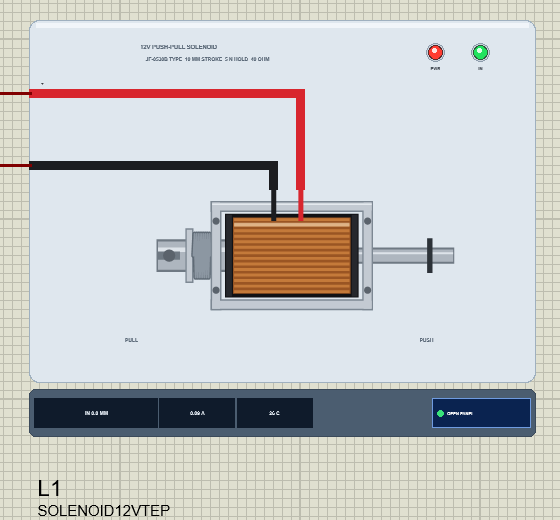
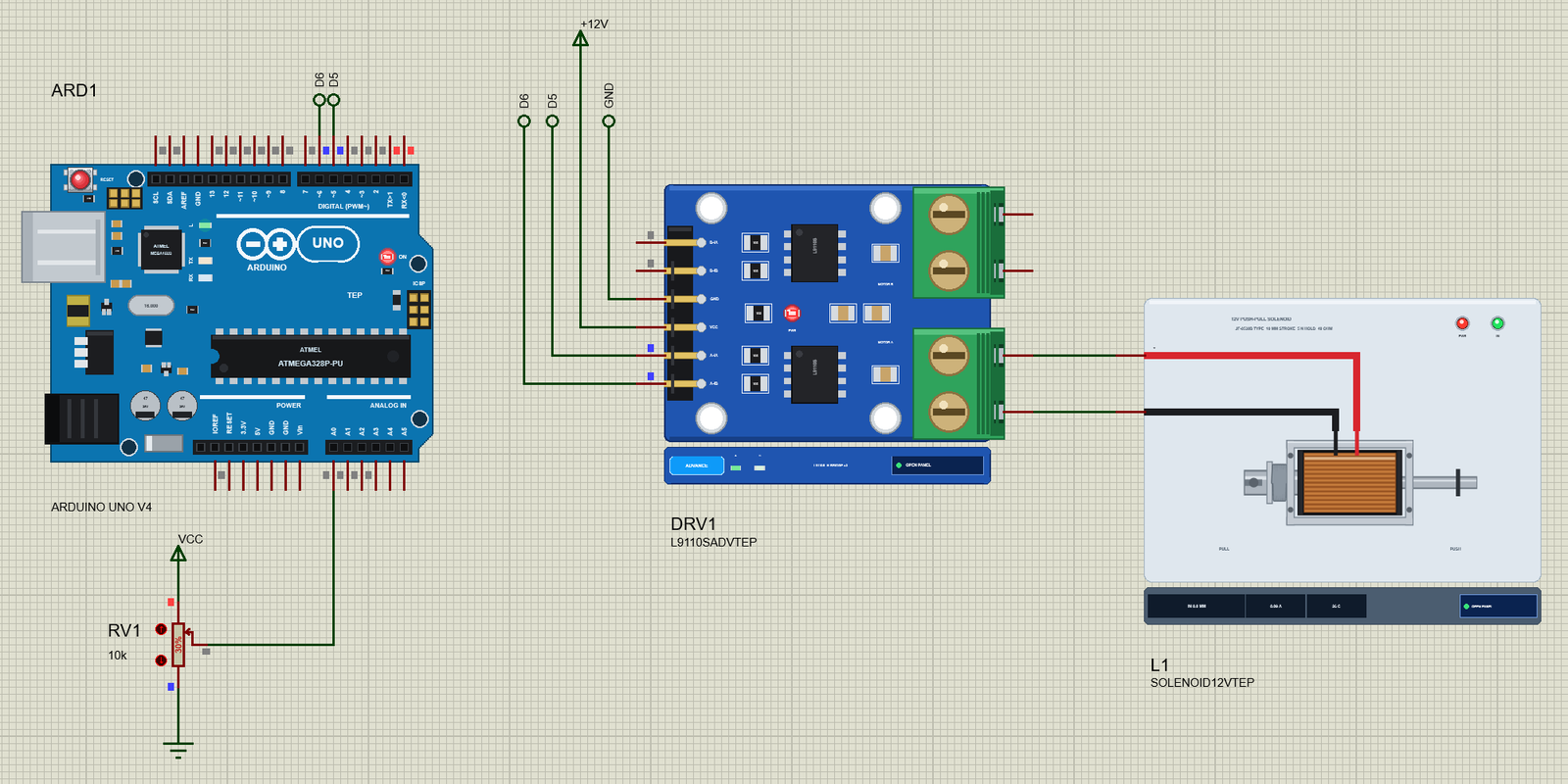
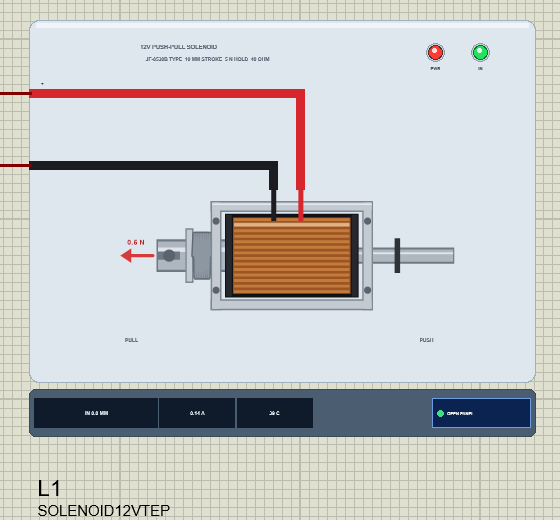
Search solenoid in Pick Devices; the device SOLENOID12VTEP is in TEPSOLENOID.LIB (category Electromechanical, Solenoids) and its model is TEPSOLENOID.DLL. The symbol shows the solenoid from above: the zinc-plated steel frame with its M3 mounting holes, the coil with its black bobbin and copper winding under clear tape, the plunger coming out of the left plate with its slot, washer and return spring, and the push pin coming out of the right plate with its E-clip. The red + and black - leads come out of the top of the coil.
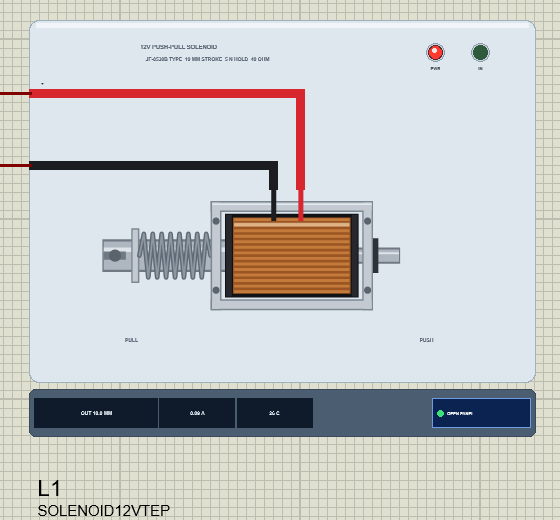
While the simulation runs, the plunger and the pin slide by the simulated gap and the spring squeezes. The E-clip on the push pin is the rest stop: it rests against the frame when the plunger is out, so a shorter stroke moves it along the pin. The strip under the plate shows the position, the current and the coil's temperature next to the OPEN PANEL button. The plate, the PULL and PUSH words, the strip and the LEDs are TEP additions: PWR (red) lights while the coil is driven, IN (green) while the plunger is pulled in.
| Pin | Wire | What the model does with it |
|---|---|---|
| + | red | one end of the coil (analog) |
| - | black | the other end; either polarity pulls the plunger in |
Two properties set the mechanics: STROKE is the rest stop in mm (default 10, from 2 to 10) and LOAD is a force against the pull in N (default 0, up to 2). The pop-up has chips for both, so you can see what a load or a shorter stroke does without stopping the simulation.
Download 12V Push-Pull Solenoid Library for Proteus
Click the button below to download 12V-Push-Pull-Solenoid-Library-for-Proteus-v1.0.zip (about 1.2 MB, without the source code of the models):
12V Push-Pull Solenoid Library for Proteus V1.0- README.txt: installation, the demo, the wiring, real hardware, troubleshooting and the limits.
- Proteus Library Files:
TEPSOLENOID.LIBandArduinoV4TEP.LIBfrom our Arduino Library for Proteus V4.0. - Proteus Model Files:
TEPSOLENOID.DLLandTEPARDUINO.DLL. - Proteus Simulation:
12V-Push-Pull-Solenoid-L9110S-ArduinoUnoV4.pdsprj,Solenoid_Demo.hexand copies of the two DLLs. - Arduino Code:
Solenoid_Demo.ino(no library needed).
The driver is a separate library: this package holds only the solenoid and the UNO. The demo drives it through our L9110S motor driver, which has its own download - get it from our L9110S Motor Driver Library for Proteus and install it first, or the demo opens without its driver.
No Proteus yet? Read How to Download and Install Proteus 7 and 8. New to libraries? Follow How to Install a New Library in Proteus.
How to Install 12V Push-Pull Solenoid Library for Proteus
- Close Proteus and extract the whole zip file, for example to your Desktop.
- Copy
TEPSOLENOID.LIBandArduinoV4TEP.LIBfrom Proteus Library Files into the LIBRARY folder of Proteus (usuallyC:\Program Files (x86)\Labcenter Electronics\Proteus 8 Professional\LIBRARY). - Copy
TEPSOLENOID.DLLandTEPARDUINO.DLLfrom Proteus Model Files into the MODELS folder. The two Arduino files are the ones of our Arduino Library V4.0; if you have it, they are the same. - Install our L9110S Motor Driver library the same way from its own zip:
TEPL9110S.LIBinto LIBRARY andTEPL9110S.DLLinto MODELS. - Delete
TEPSOLENOID.IDXfrom the LIBRARY folder if it is there. - Start Proteus, press P and search for solenoid.
Tip: keep the Proteus Simulation folder together, because the project needs its .hex file and the DLLs beside it. The library is tested in Proteus 8.5; Proteus 7 is not supported.
The Demo Circuit
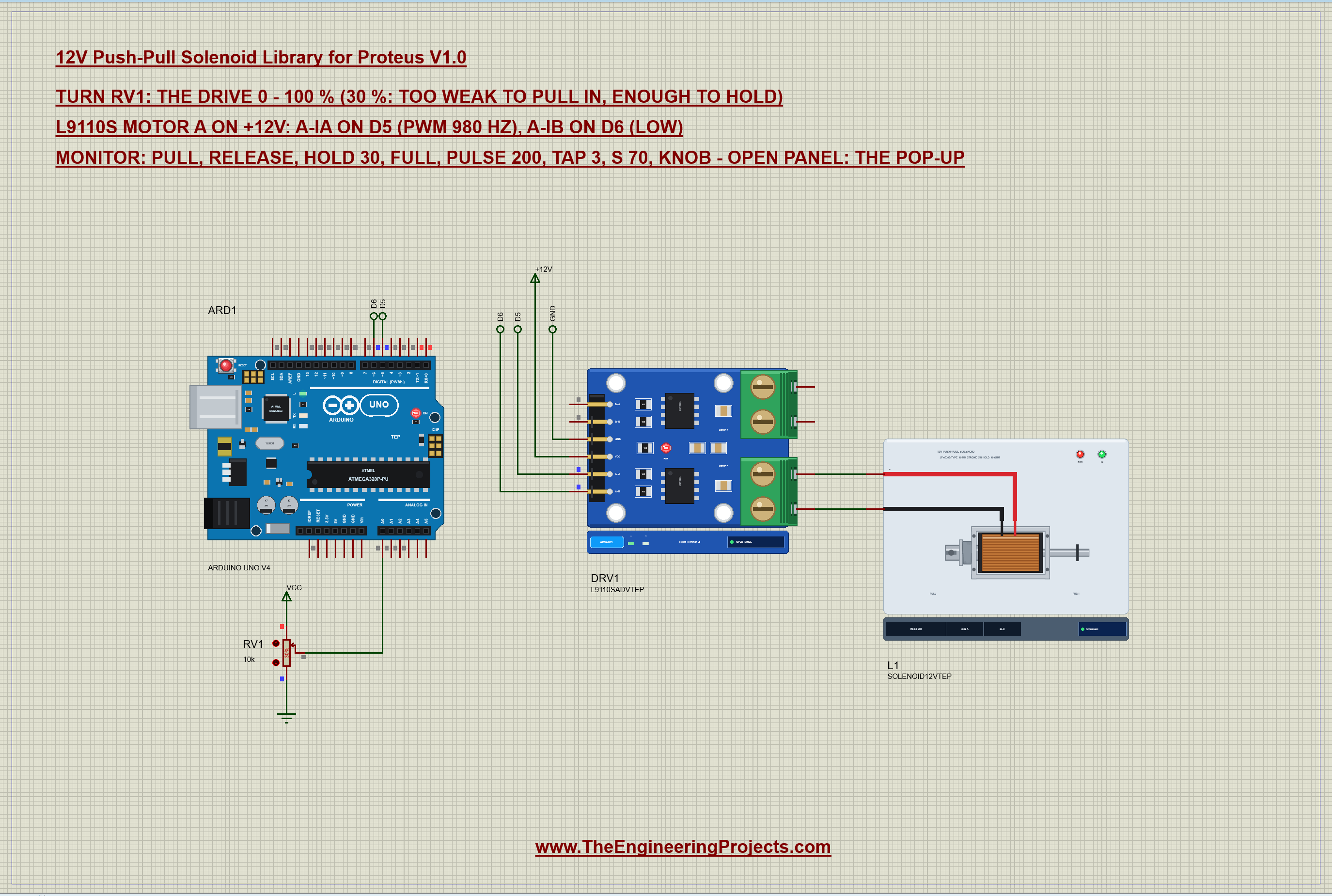
Open 12V-Push-Pull-Solenoid-L9110S-ArduinoUnoV4.pdsprj. ARD1 is an Arduino UNO V4.0 from our Arduino UNO Library for Proteus V4.0, running Solenoid_Demo.hex with its serial monitor built in. DRV1 is the L9110S driver in its pop-up version, its VCC on a +12V power terminal. L1 is the solenoid on MOTOR A, with a 10 mm stroke and no load. RV1 is a 10k potentiometer on A0 that sets the drive directly; it starts at 30 %.
Why an L9110S? It handles 12 V and 0.8 A, which covers the solenoid's 0.30 A, and its outputs already have the clamp diodes an inductive load needs. When both inputs are LOW, both outputs go LOW and the coil's current circulates through the driver and dies away smoothly - no voltage spike. A-IB stays LOW all the time, because a solenoid does not care about the direction of the current.
| From | To | Note |
|---|---|---|
| L9110S A-IA | D5 | PWM 980 Hz: the drive |
| L9110S A-IB | D6 | LOW |
| L9110S VCC / GND | +12V / GND | the solenoid's supply, GND common with the UNO |
| L9110S A-OA / A-OB | solenoid + / - | the coil |
| RV1 wiper | A0 | the drive, 0 - 100 % |
The Arduino Code
The demo needs no library. New to Arduino? Start with Arduino Tutorial for Beginners and Introduction to Arduino UNO. Two numbers define kick and hold: how long the full-voltage kick lasts, and how much PWM holds the plunger afterwards:
const int IA = 5, IB = 6, POT = A0;
const int KICK_MS = 100;              // full voltage to pull in (from 10 mm it takes about 45 ms)
int holdPct = 30;                     // then this holds it (about 20 % is the least with no load)
The kick has to be longer than the pull-in time. Our solenoid needs about 45 - 50 ms from 10 mm at 12 V, so 100 ms leaves a comfortable margin, even for a warm coil. In setup() both pins become outputs and the solenoid starts off:
  pinMode(IA, OUTPUT); pinMode(IB, OUTPUT);
  drive(0);
One function sets the drive in percent. A-IB is always LOW and A-IA gets the PWM; at 0 % both inputs are LOW, which turns the coil off through the driver:
void drive(int pct) {                 // A-IA PWM, A-IB LOW; 0 = both LOW (the coil's current decays through the driver)
  pct = constrain(pct, 0, 100);
  digitalWrite(IB, LOW);
  analogWrite(IA, (int)(pct * 255L / 100));
  drivePct = pct;
}
Kick and hold is only three lines: full voltage, wait for the kick, then drop to the hold PWM:
void pull() {                         // kick and hold
  drive(100); delay(KICK_MS);
  drive(holdPct);
Releasing is simply switching it off. The current decays through the driver, the magnetic pull falls below the spring's force, and the spring pushes the plunger out:
if (!strcmp(s, "release")) { mode = FIXED; drive(0); Serial.println(F("release: IA LOW, IB LOW - the spring pushes it out")); return; }Two more patterns cover most real projects. A pulse fires the solenoid for a set time - a latch that opens for a moment, or a striker that hits once:
drive(100); delay(ms); drive(0);And tap repeats short pulses, like the hammer of a chime or a drum robot:
for (int k = 0; k < n; k++) { drive(100); delay(60); drive(0); delay(240); }The hold PWM can be changed from the monitor with hold, and in knob mode the pot sets the drive directly, with its left end as a clear "off":
holdPct = constrain(atoi(s + 4), 0, 100); int pct = map(raw, 0, 1023, 0, 100);
if (pct < 3) pct = 0; // the left end: off
drive(pct);The basics of PWM drives are in our older DC Motor Speed Control using Arduino tutorial. The HEX file is in the package; to change the sketch, open it in the Arduino IDE and export the compiled binary, as in How to get the HEX file from Arduino. It needs 7,466 bytes of flash (23 % of the UNO) and 288 bytes of RAM.
Running the Demo
Press Run. The UNO's serial monitor and the pop-ups of the solenoid and the L9110S open over the schematic; move them aside. RV1 starts at 30 %, so the coil gets 3.40 V on average and draws 0.086 A - and the plunger does not move. This is our whole test session, with the commands typed in the monitor:
12V Push-Pull Solenoid demo - The Engineering Projects
L9110S on 12 V: A-IA on D5 (PWM), A-IB on D6 (LOW). The pot on A0 sets the drive.
Commands: pull | release | hold 30 | full | pulse 200 | tap 3 | s 70 | knob | help
Pot 307: drive 30 % (PWM 76/255 = 3.58 V average)
pull
pull: 100 % for 100 ms, then hold at drive 30 % (PWM 76/255 = 3.58 V average)
release
release: IA LOW, IB LOW - the spring pushes it out
s 80
drive 80 % (PWM 204/255 = 9.60 V average)
release
release: IA LOW, IB LOW - the spring pushes it out
tap 3
tap x 3: 60 ms on, 240 ms off
full
full: drive 100 % (PWM 255/255 = 12.00 V average)
release
release: IA LOW, IB LOW - the spring pushes it out
pull
pull: 100 % for 100 ms, then hold at drive 30 % (PWM 76/255 = 3.58 V average)
release
release: IA LOW, IB LOW - the spring pushes it out
hold 50
hold PWM: 50 %
pull
pull: 100 % for 100 ms, then hold at drive 50 % (PWM 127/255 = 5.98 V average)
release
release: IA LOW, IB LOW - the spring pushes it out
hold 15
hold PWM: 15 %
pull
pull: 100 % for 100 ms, then hold at drive 15 % (PWM 38/255 = 1.79 V average)
hold 30
hold PWM: 30 %
drive 30 % (PWM 76/255 = 3.58 V average)
pull
pull: 100 % for 100 ms, then hold at drive 30 % (PWM 76/255 = 3.58 V average)
knob
Following the pot on A0
Pot 307: drive 30 % (PWM 76/255 = 3.58 V average)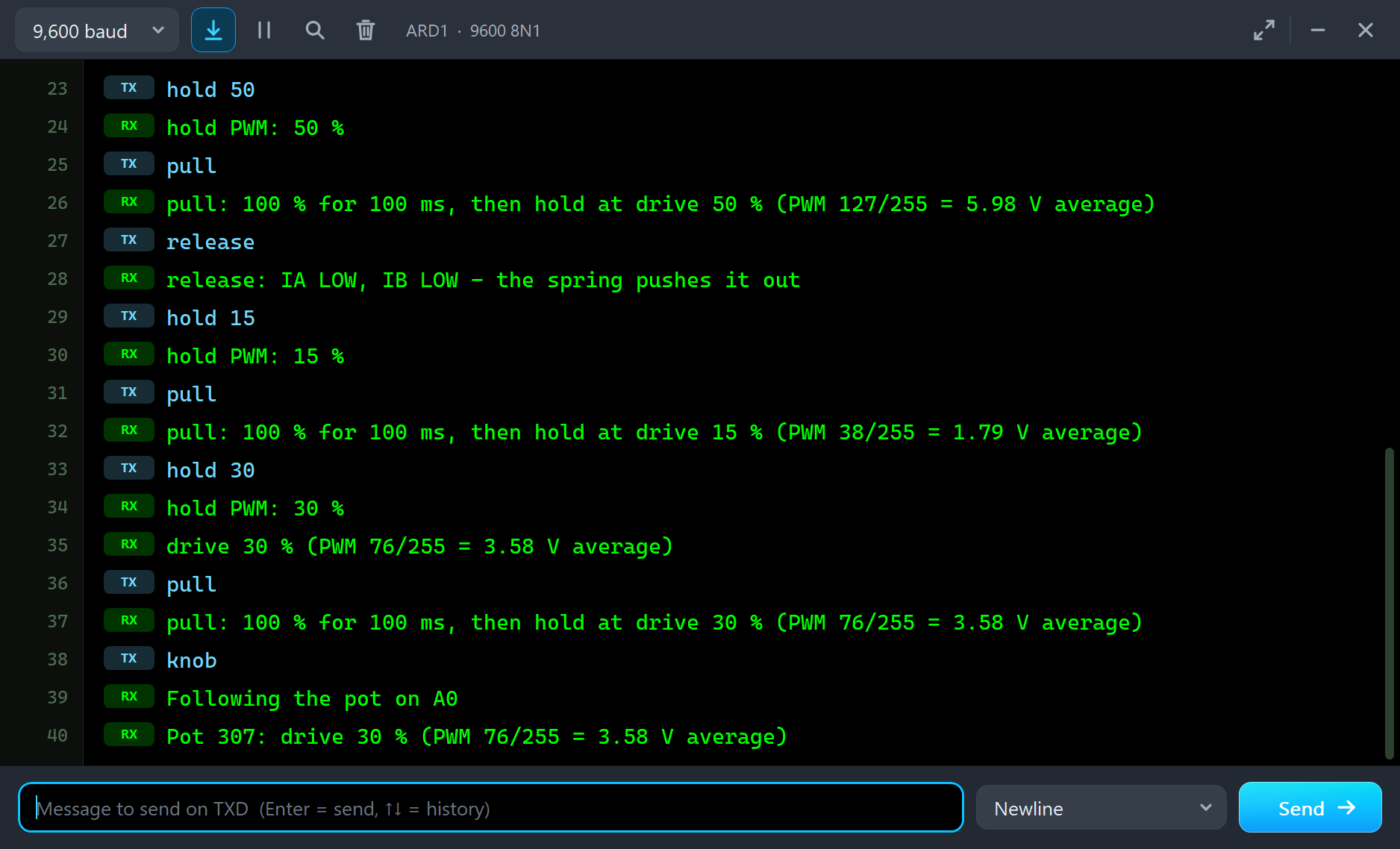
| Type | What it does | What the run showed |
|---|---|---|
| pull | kick and hold: 100 % for 100 ms, then the hold PWM | pulled in in 47.5 ms, held with 0.086 A |
| release | both inputs LOW | out in 59.8 ms |
| s 80 | a steady drive in % | pulled in in 89.3 ms |
| tap 3 | three 60 ms taps | three pull-ins and releases |
| full | 100 % and stay there | 0.280 A, 3.20 W, the coil warming |
| hold 15 | the hold PWM in % | pulled in, then dropped out |
| knob | follow the pot again | held in at 30 % |
The Pop-Up Window
At Run the solenoid opens TEP 12V Push-Pull Solenoid, a window in the look of our TEP Serial Monitor Advance for Proteus. Its four tabs are Solenoid, Graphs, Event log and Check, with Settings and Help behind the gear and question mark icons. If you close it, OPEN PANEL on the strip brings it back.
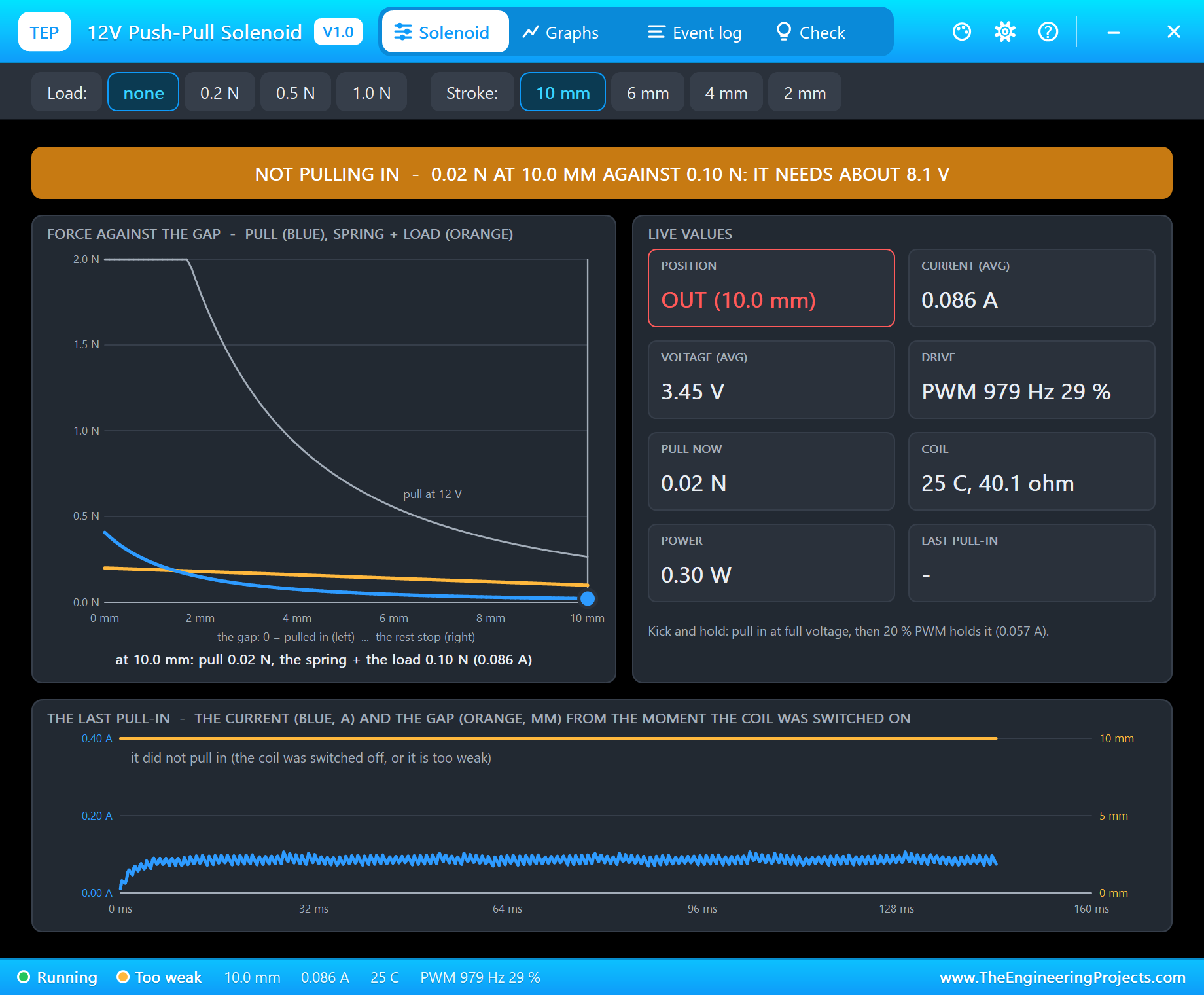
The banner says what is wrong in one line: "NOT PULLING IN - 0.02 N AT 10.0 MM AGAINST 0.10 N: IT NEEDS ABOUT 8.1 V". The chart on the left shows why. The grey curve is the pull at full 12 V, the blue one the pull at the present current, and the orange line is what holds the plunger back - the spring and the load. The plunger is the blue dot at 10 mm, where the blue curve is far below the orange line. The live values give the position, the current, the voltage, the drive, the pull now, the coil's temperature and resistance, the power and the last pull-in time.
Kick and Hold
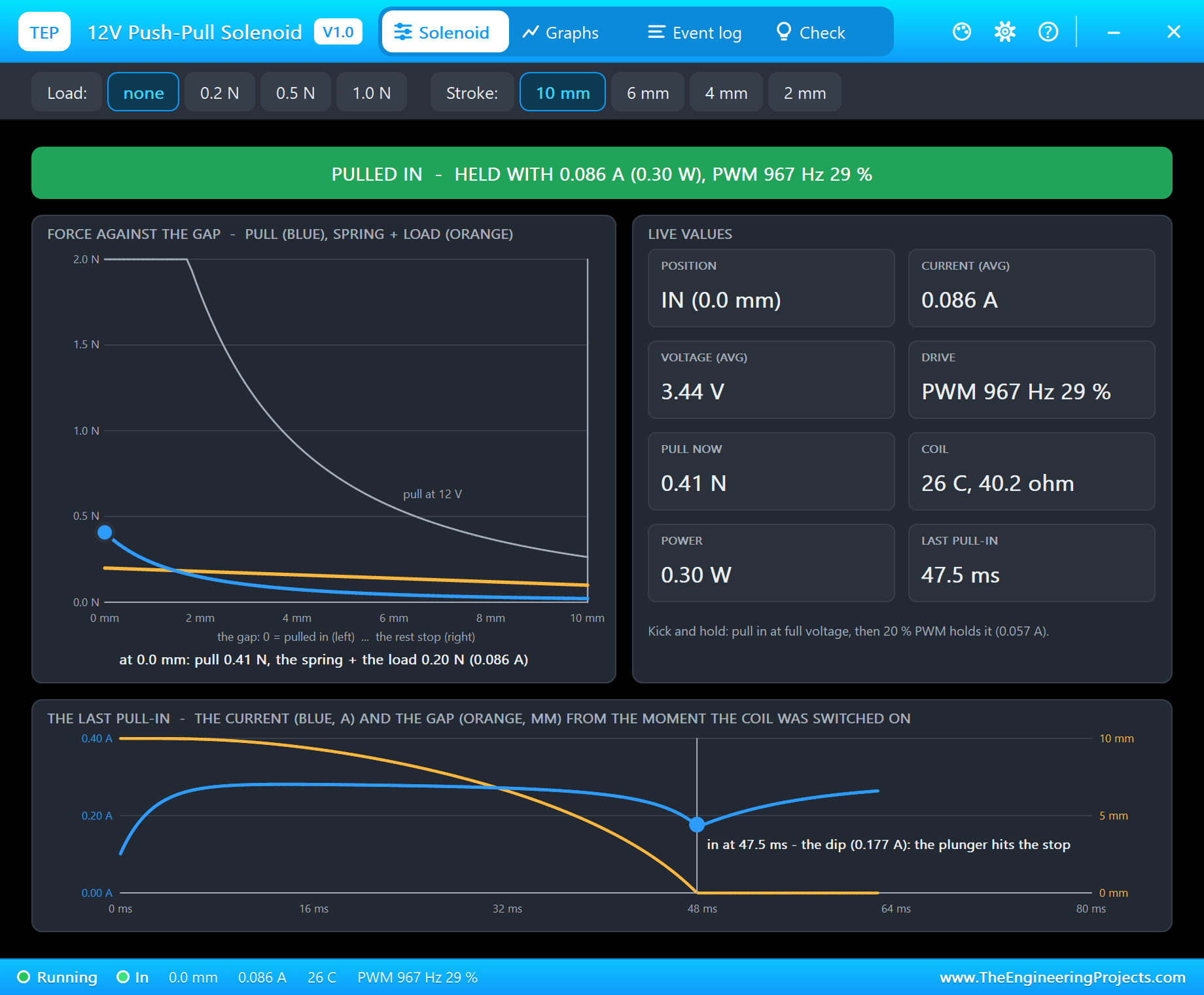
Type pull. The sketch gives the coil full voltage for 100 ms, and the Event log records "PULLED IN in 47.5 ms". Look at the bottom of the page: THE LAST PULL-IN shows the current (blue) and the gap (orange) from the moment of the kick. The gap closes slowly at first and then faster, and the current sags while it moves, reaching the bottom of its dip - 0.177 A - exactly at 47.5 ms, when the plunger hits the stop. Then the sketch drops back to 30 %, the current settles at 0.086 A, and the plunger stays in.
This is the hysteresis in action: the same 30 % that could not move the plunger a moment ago now holds it with 0.41 N against the spring's 0.20 N, because the gap is closed. The chart shows the dot at 0 mm, high above the orange line. The coil uses only 0.30 W - compare that with the 3.2 W at full voltage below. Type release and the plunger springs out in 59.8 ms.
Slower Without the Kick
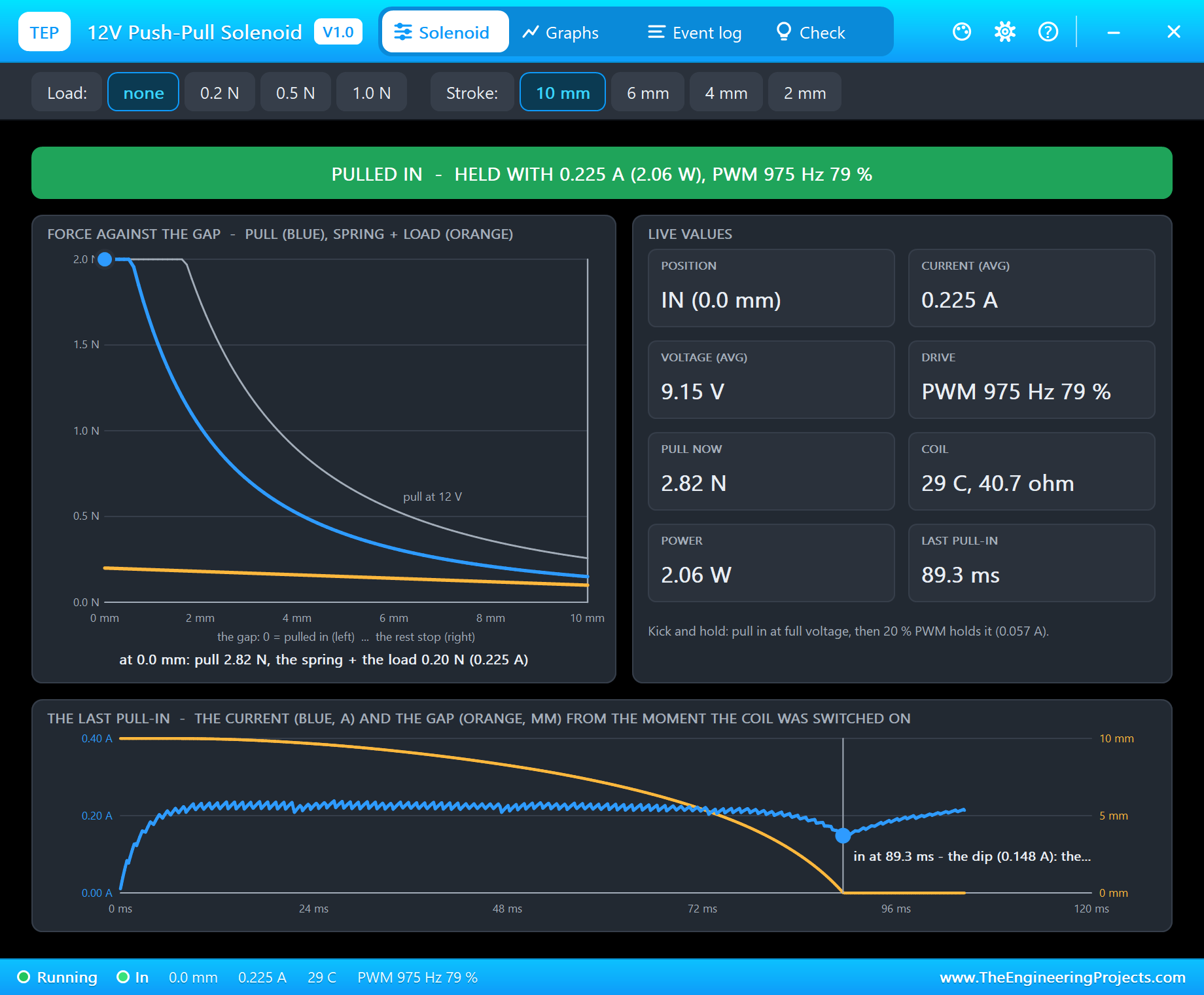
Type s 80 for a steady 80 % drive, 9.15 V on average. That is above the 8.1 V the solenoid needs from rest, so it pulls in - but it takes 89.3 ms instead of 47.5, because both the current and the pull are lower. Below about 70 % it would not pull in at all. A full-voltage kick is faster and more reliable, especially when the supply sags or the coil is warm.
Full Power and the Heat
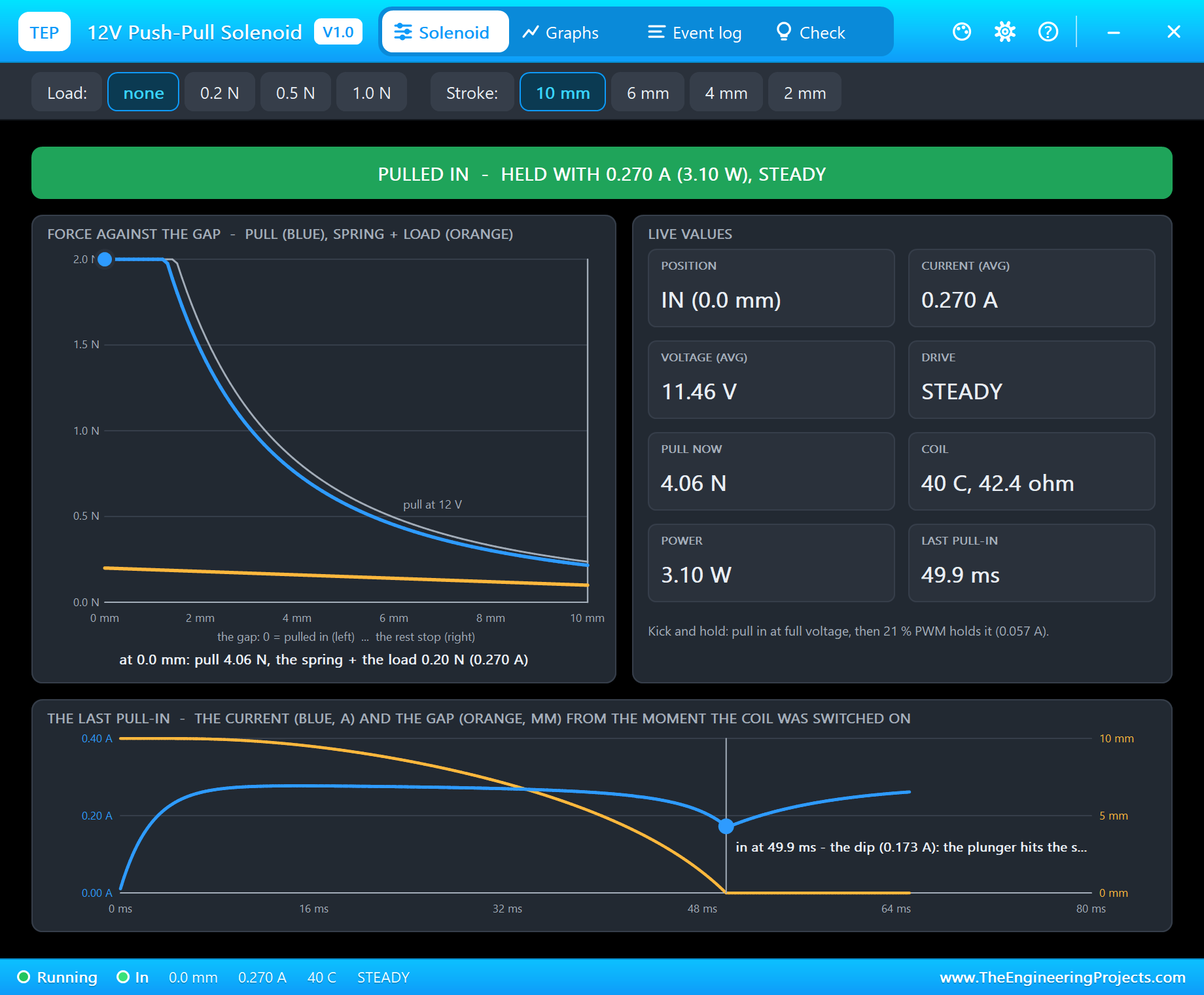
After a tap 3 - three quick pull-ins and releases - type full. The coil now gets 11.42 V: "steady drive: 11.42 V, 0.280 A (3.20 W) - held in". A few seconds later the coil is at 40 C, its resistance has risen to 42.4 ohm and the current has fallen to 0.270 A. Held like that for half a minute it passes 70 C, and after two minutes the pop-up turns red with HOT. A hot solenoid also pulls weaker, because the current falls with the rising resistance.
A Load and a Shorter Stroke
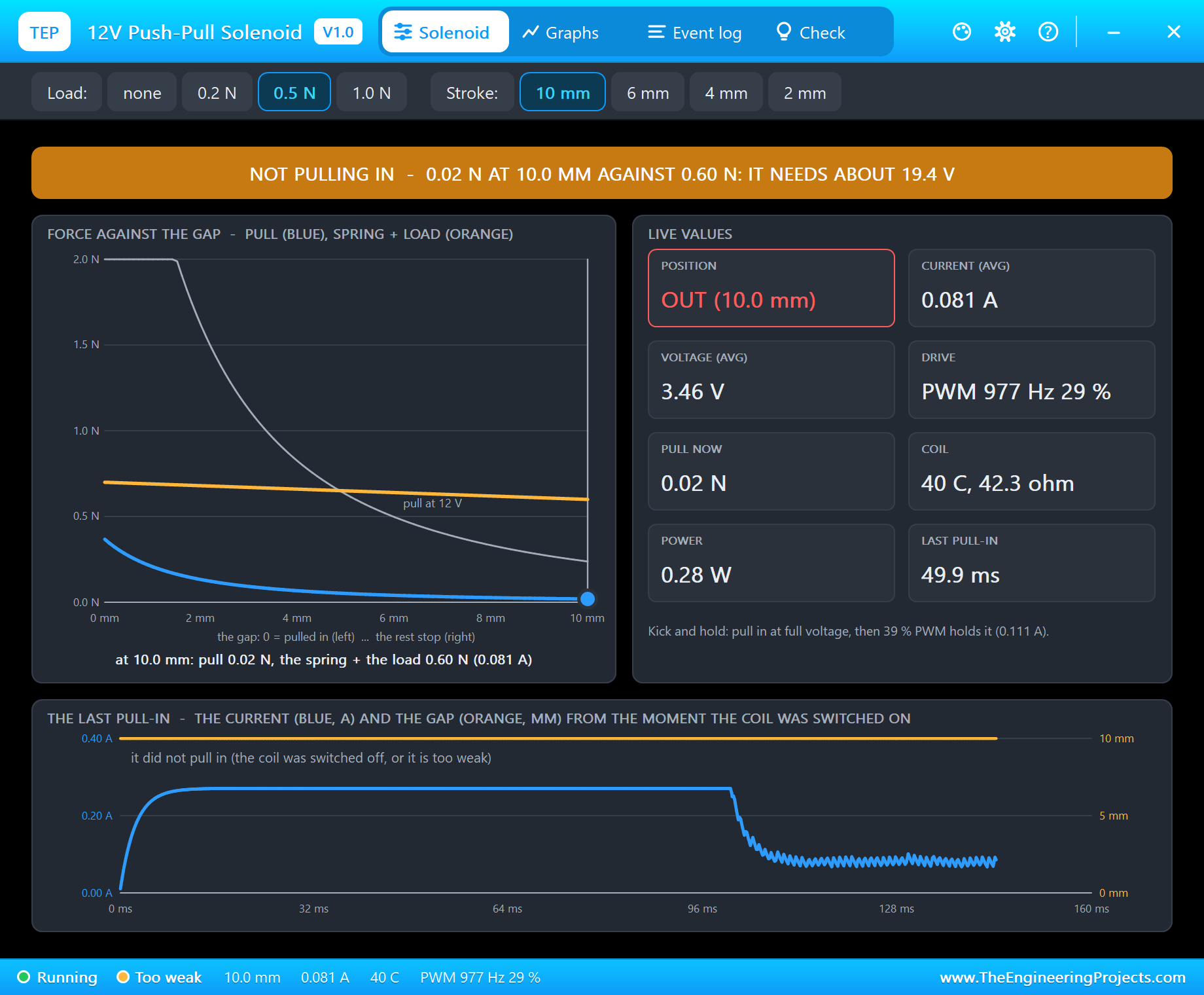
Now click 0.5 N on the toolbar and type pull. Even the full-voltage kick cannot do it: "NOT PULLING IN - 0.02 N of pull at 10.0 mm against 0.60 N (the spring + the load): it needs about 19.4 V here". The orange line has moved up above the whole grey 12 V curve on the right side of the chart.
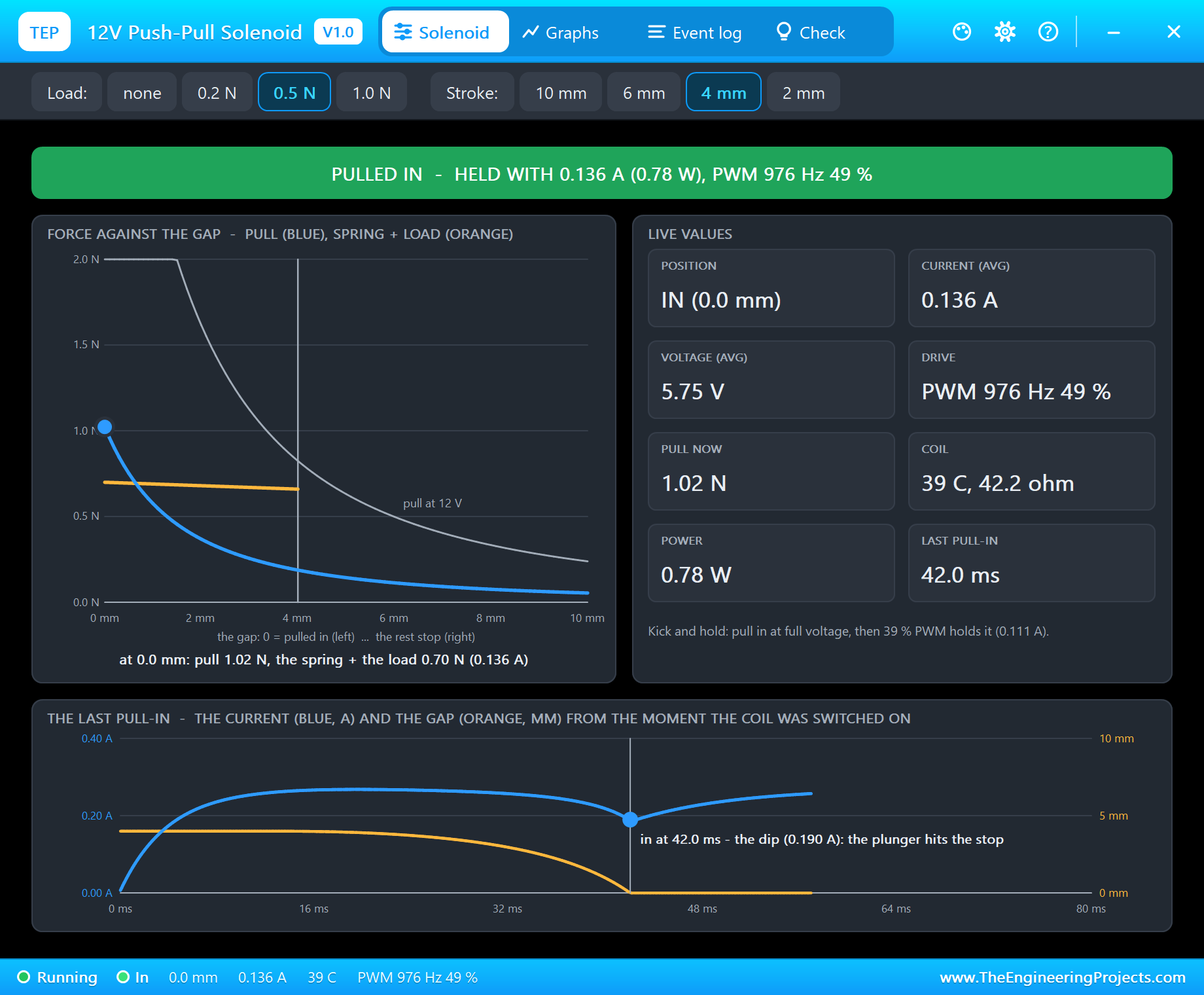
The fix is not more voltage but a shorter stroke. Click 4 mm: the plunger now rests 4 mm from the stop, where the pull is 0.92 N at the rated current. Type hold 50 and pull: "PULLED IN in 42.0 ms - the current dipped from 0.268 A to 0.188 A". With the load, the hold needs more than 30 % - the pop-up says 39 % - so 50 % holds it with 0.136 A and 1.02 N against 0.70 N. When you release it, the load helps the spring: it is out in only 17.0 ms.
A Drop-Out
Back at no load and 10 mm, type hold 15 and pull. The kick pulls the plunger in, but 15 % is too little to hold it: "DROPPED OUT 87 ms after it pulled in - the hold current is too low: the spring + the load push 0.20 N closed; holding needs 0.057 A (20 % PWM at 12 V)". The Graphs page shows it clearly.
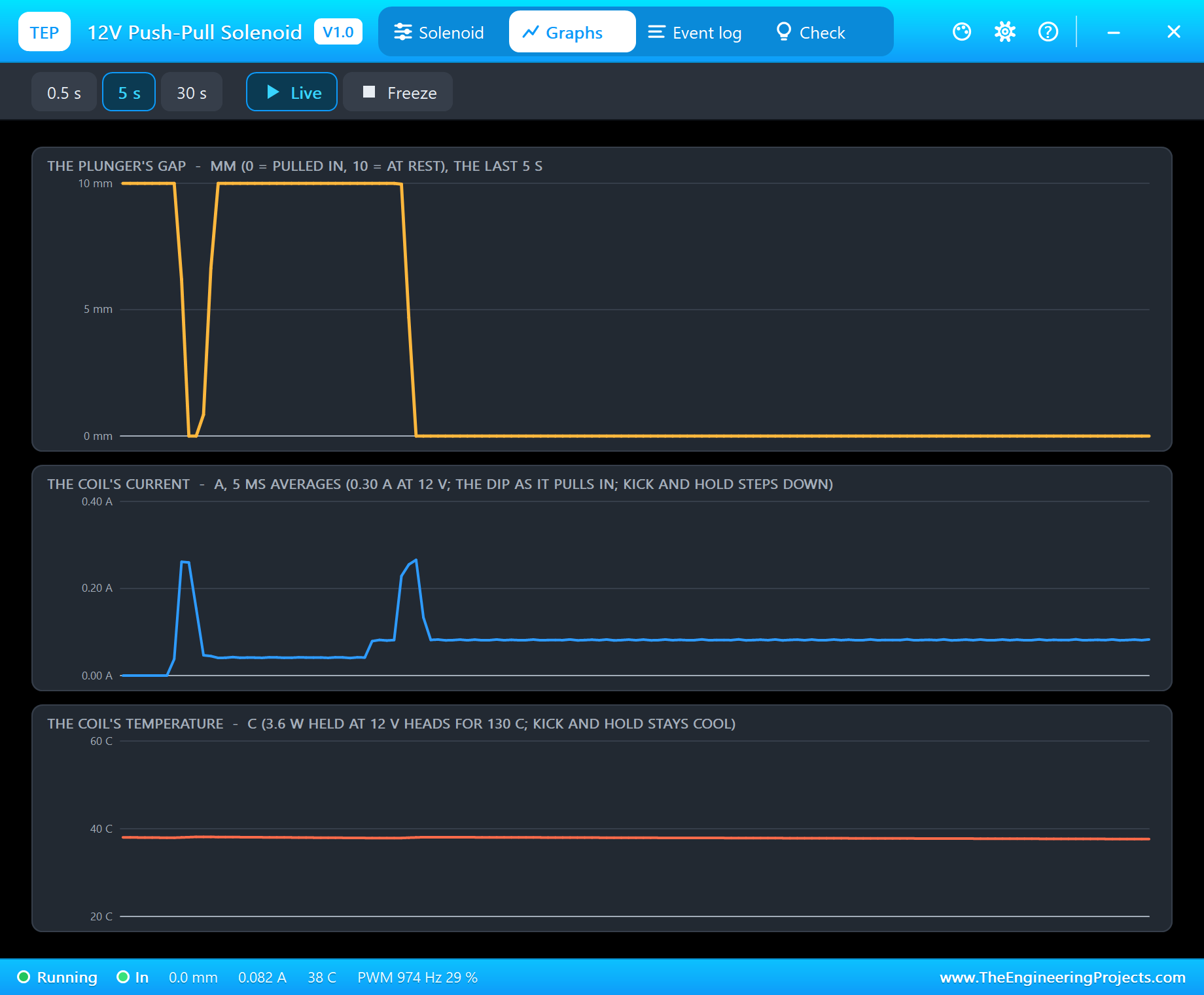
The Graphs page plots the gap, the current and the coil's temperature over the last 0.5, 5 or 30 seconds. In our capture the gap falls to 0 and jumps back to 10 mm - the drop-out - and then falls again and stays at 0 after hold 30 and another pull. The current shows the 0.27 A kicks and the much lower hold current after each one.
Event Log and Check
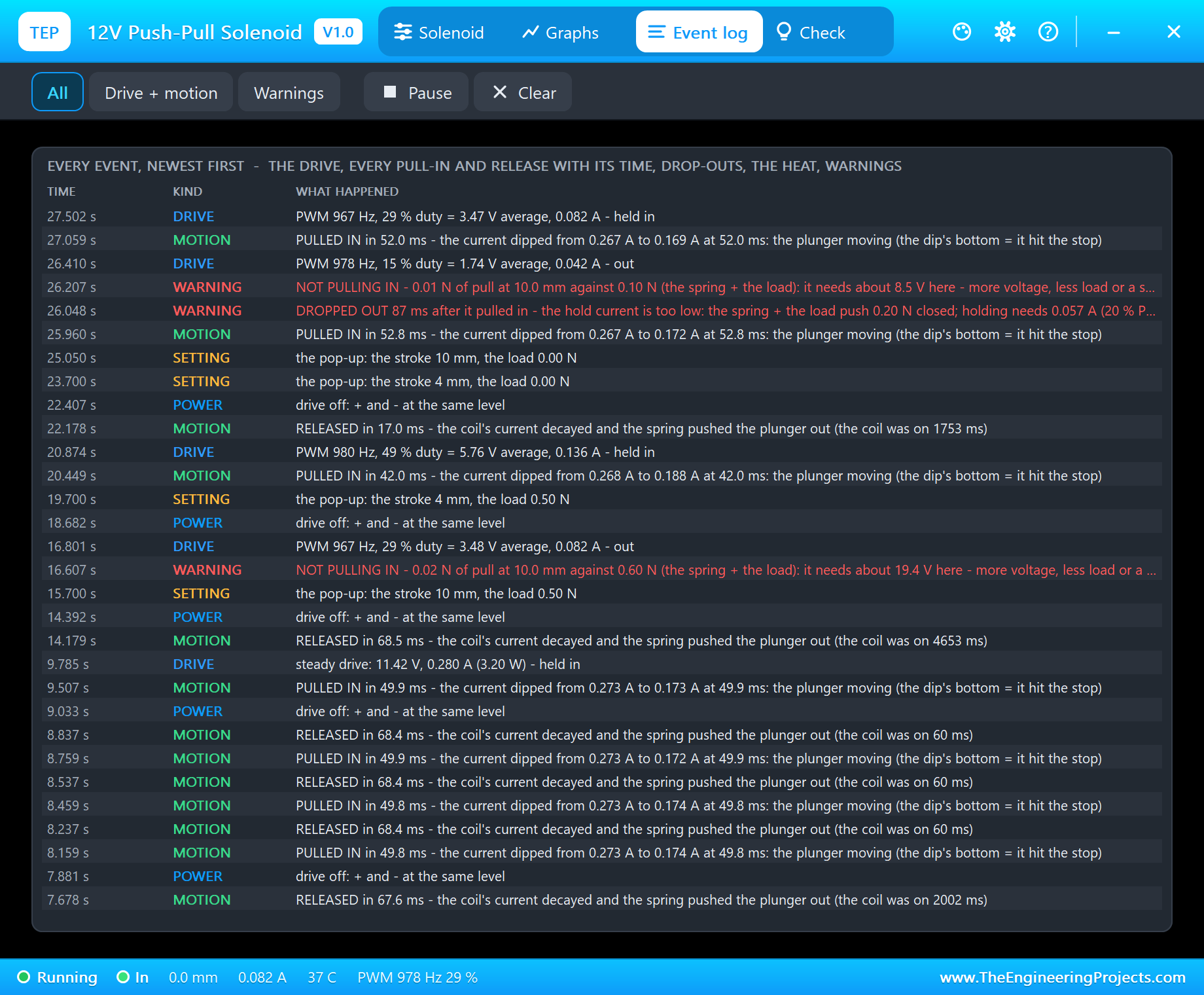
The Event log keeps every event with its simulation time: the drive (PWM or steady), every pull-in with its time and the current's dip, every release with its time and how long the coil was on, the drop-outs, the too-weak warnings, the heat and every change of the load or the stroke. The filters show all events, only the drive and the motion, or only the warnings.
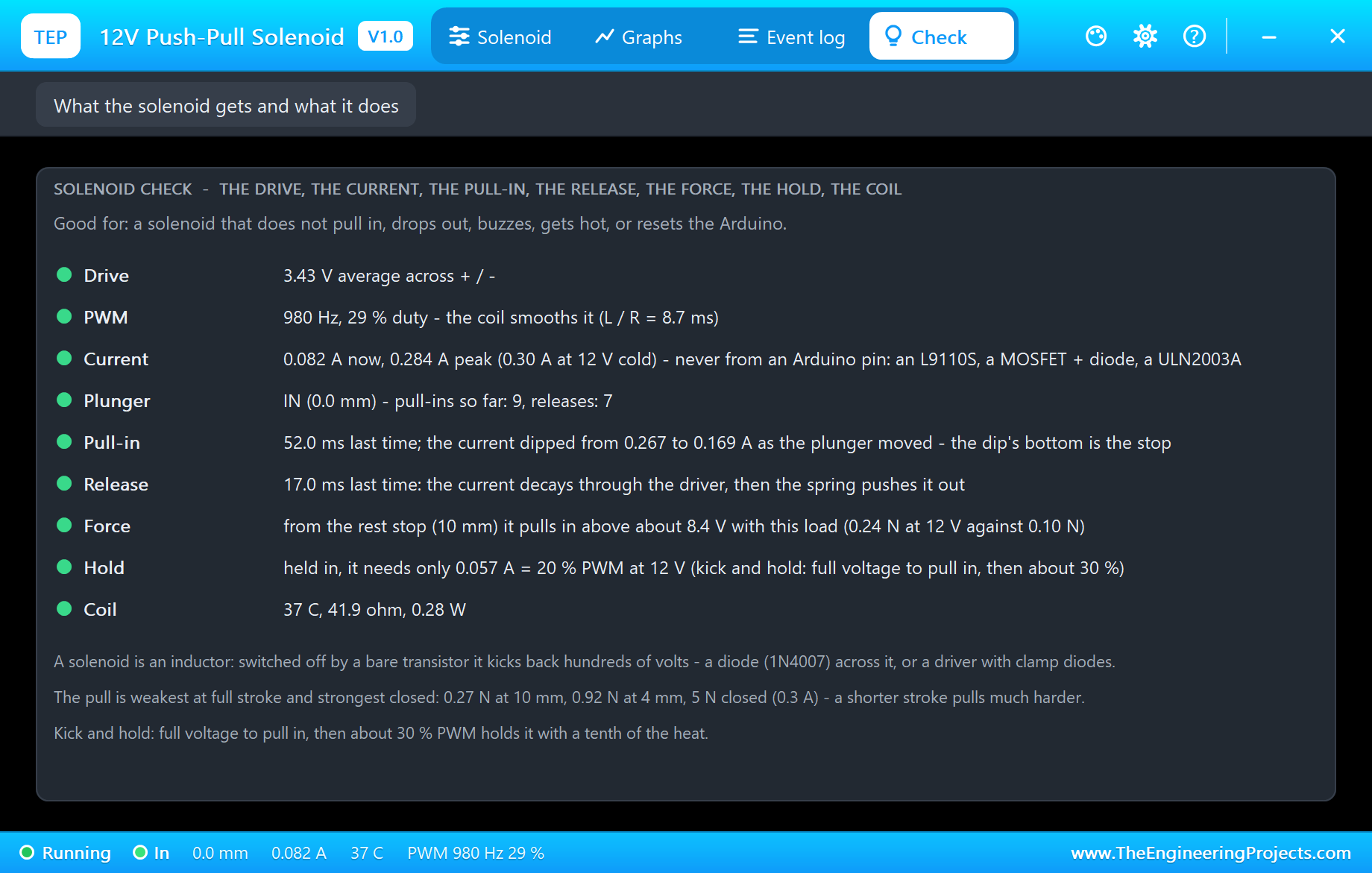
The Check page answers the questions people ask about solenoids: why it does not pull in, why it drops out, why it buzzes or gets hot, why the Arduino resets. Each row has a verdict - the drive, the PWM with the coil's time constant (the reason a 980 Hz PWM is smooth), the current, the plunger, the last pull-in and release, the voltage it needs to pull in from the rest stop with the present load, the least current that holds it, and the coil's temperature, resistance and power.
How the Model Works
The solenoid is solved by Proteus's analog engine. The coil's inductance follows the gap - a fixed part plus a part that grows as the gap closes - and the model steps the coil's magnetic flux by backward Euler with the inductance at the last accepted gap. That turns the coil into a conductance and a current source across + and - at every step, and it is what makes the current dip as the plunger moves. The analog steps are 0.1 ms or less, so the L9110S's PWM pulses are resolved.
The plunger is stepped after every analog step in 20 microsecond sub-steps: the magnetic pull from the current and the gap, the return spring, the load, friction, a 10 g mass, and the two stops. The coil's temperature follows its power with a heat capacity and a thermal resistance to the air, and its resistance rises 0.39 % a degree, like copper.
We checked the model on a PC with 22 automatic tests: at 12 V from rest it pulls in after 44.5 ms with the current dipping from 0.288 A to 0.179 A and holds with 4.97 N; it releases in 71.1 ms; it pulls in from 10 mm at 8.06 V and holds down to 2.28 V; kick and hold at 30 % uses 0.090 A and 0.32 W with the PWM found at 980 Hz; 10 % drops out; a 0.5 N load cannot be pulled from 10 mm at 12 V but can from 4 mm at 10.3 V; 40 s at 12 V warms it to 87 C; 15 V gives the over-voltage warning; and -12 V pulls in too. The demo project was read back from disk and passed 69 checks.
Troubleshooting
- It never moves and the pop-up says OUT - THE COIL OFF: the driver's inputs (both LOW means off), its 12 V supply, or the leads on the wrong outputs.
- NOT PULLING IN: too little voltage for the stroke and the load - kick it with full voltage, lighten the load or shorten the stroke.
- It pulls in, then DROPPED OUT: the hold PWM is too low for the spring and the load; the Check page gives the least that holds.
- HOT: it is held at full voltage - use kick and hold, or a duty cycle.
- No driver in the project: install our L9110S library (
TEPL9110S.LIB/TEPL9110S.DLL) - it is not in this package. - Nothing moves on the sheet, no UNO or no monitor:
TEPSOLENOID.DLLorTEPARDUINO.DLLis missing from MODELS and the project folder; a closed monitor opens again with a click on the UNO's USB port.
Things to Know Before Using a Real Solenoid
- A driver, never a pin: 0.3 A at 12 V. A driver with clamp diodes (L9110S, L298N, ULN2003A - 0.5 A a channel), or a logic-level MOSFET such as the IRLZ44N with a diode.
- The flyback diode: a solenoid is an inductor - switched off by a bare transistor it kicks back hundreds of volts and kills the transistor. A 1N4007 across the coil, cathode to +12V, catches it.
- Supply: a 12 V supply with its GND joined to the Arduino's GND.
- Kick and hold: pull in at full voltage, hold with about 30 % PWM; most small solenoids are rated for intermittent duty and get hot within minutes when held at full voltage.
- Stroke before voltage: the pull is weakest at full stroke - if it will not move a load, limit the stroke with a stop on the pin rather than raising the voltage.
- For a longer, slower stroke with a real motor inside, see our 12V Linear Actuator Library for Proteus.
Limitations of the Simulation
- Not modelled: the iron's saturation, eddy currents, the plunger bouncing on the stop, residual magnetism, the sound, and the differences between real solenoids.
- The solenoid is the 12 V JF-0530B type; other sizes and coils are not selectable.
- The plate, the PULL and PUSH words, the LEDs and the strip are TEP additions.
- The model is our own, written from the typical data of 12 V open-frame push-pull solenoids of the JF-0530B type; this library is not made or endorsed by any solenoid maker, Arduino or Labcenter.
- Licences: the demo needs no Arduino library; the HEX file contains the Arduino AVR core 1.8.6 with LGPL-licensed code, and the sketch is included. The potentiometer is Proteus's own POT-HG. The L9110S driver is our separate library.
- Tested in Proteus 8.5 in October 2026 with the demo as shipped: the pot, kick and hold, release, 80 %, taps, full power, a load, a shorter stroke, a drop-out and the pop-ups. Proteus 7 is not supported.
So, that was all about the 12V Push-Pull Solenoid Library for Proteus V1.0. I hope it helps you build your latch, striker or valve - the driver, the diode, the kick and the hold - before the first solenoid gets hot on your bench. If you have any questions, ask in the comments and I will help you out. Till the next tutorial, take care and have fun!