


Project Files of 12V Push-Pull Solenoid Library for Proteus V1.0 (Arduino)
 Libraries
 Code
Code Projects
 Simulation
12v-push-pull-solenoid-tep-v1-0-bfef9ea8551247b3b13378e1a03bbd0e.zip
12V Push-Pull Solenoid Library for Proteus V1.0
12V Push-Pull Solenoid Library for Proteus V1.0 comes as a ZIP archive of 10 files (1.2 MB, 2.6 MB unpacked) holding Proteus library files, simulation model DLLs, a Proteus simulation, an Arduino sketch and compiled HEX firmware.
- LIBProteus library
- DLLProteus model
- DSNProteus simulation
- INOArduino sketch
- HEXHEX firmware
Description
12V-Push-Pull-Solenoid-Library-for-Proteus-v1.0.zip with the 12 V push-pull solenoid in Proteus (the plunger moving on the sheet, the current's pull-in dip, kick and hold, the spring, a load, the stroke, the heat; TEPSOLENOID.LIB and TEPSOLENOID.DLL), our Arduino UNO V4.0, the A3 demo project with its sketch and a README.

File Structure
 File Structure
4.7 KB201.9 KB28 KB883.5 KB299.5 KB26.1 KB20.5 KB883.5 KB299.5 KB18.3 KBGallery12 images from the tutorialOpen the tutorial
 Gallery12 images from the tutorial
The circuit, the board and the results as they appear in 12V Push-Pull Solenoid Library for Proteus V1.0 (Arduino). Open an image for its full size.
README
 README
12V PUSH-PULL SOLENOID LIBRARY FOR PROTEUS - V1.0 (a JF-0530B type solenoid whose plunger moves; kick and hold)
Designed by The Engineering Projects
www.TheEngineeringProjects.com
IMPORTANT LINKS
Article (read it first - pictures, step by step, every feature explained):
https://www.theengineeringprojects.com/2026/11/12v-push-pull-solenoid-library-for-proteus-v1-0.html
Report a bug or suggest a feature (our forum):
https://www.theengineeringprojects.com/forum/category/motor-driver-proteus-library
The demo runs on our Arduino UNO V4.0 (included) - working LEDs, RESET and a
built-in serial monitor - its own article:
https://www.theengineeringprojects.com/2026/10/arduino-uno-library-for-proteus-v40.html
The demo's driver is our L9110S Motor Driver - a SEPARATE library, not in this
package: download and install it first - its own article:
https://www.theengineeringprojects.com/2026/10/l9110s-motor-driver-library-for-proteus-v1-0.html
Support us (the libraries are free):
https://www.theengineeringprojects.com/donate
FILE STRUCTURE
12V-Push-Pull-Solenoid-TEP-v1.0/
|-- Proteus Library Files/
| |-- ArduinoV4TEP.LIB 201.9 KB TEP Arduino boards V4.0 (UNO) -> LIBRARY
| |-- TEPSOLENOID.LIB 28.0 KB the library -> LIBRARY folder
|-- Proteus Model Files/
| |-- TEPARDUINO.DLL 883.5 KB the Arduino board model -> MODELS folder
| |-- TEPSOLENOID.DLL 299.5 KB the model -> MODELS folder
|-- Proteus Simulation/
| |-- 12V-Push-Pull-Solenoid-L9110S-ArduinoUnoV4.pdsprj 26.1 KB the demo project
| |-- Solenoid_Demo.hex 20.5 KB the demo firmware
| |-- TEPARDUINO.DLL 883.5 KB copy of the board model
| |-- TEPSOLENOID.DLL 299.5 KB copy of the model
|-- Arduino Code/
| |-- Solenoid_Demo/Solenoid_Demo.ino 4.7 KB the demo sketch (source of the .hex)
|-- README.txt ~19.3 KB this file
Total: 2.60 MB (unzipped). The C++ source code of the models is not included.
WHAT IS IT?
A simulation model of the 12 V open-frame push-pull solenoid (the JF-0530B
type) - the little electromagnet of door latches, vending machines, pinball
and drum strikers, valves, card feeders and robot grippers. A coil in a steel
frame pulls a 6 mm steel plunger in against a return spring; the plunger's
other end pushes a thin pin out of the frame, so one part pulls and the other
pushes. Our own model:
* An analog (SPICE) model between its + and - pins: the coil (40 ohm at
25 C: 0.30 A at 12 V) and its inductance, which grows as the plunger's
gap closes - 107 mH out, 363 mH pulled in. While the plunger moves the
current DIPS (the motion's back-EMF): the classic pull-in signature, and
the dip's bottom is the moment it hits the stop. Any driver works: an
L9110S, an L298N, a MOSFET with a diode, a ULN2003A, a relay, PWM or DC,
either polarity (a solenoid pulls either way round).
* The force: the pull is weakest at full stroke and grows fast as the gap
closes - 0.27 N at 10 mm, 0.70 N at 5 mm, 5 N closed (at 0.30 A). The
return spring pushes 0.1 N at 10 mm and 0.2 N closed. So from rest it
pulls in from about 8.1 V, but once in, about 2.3 V holds it:
KICK AND HOLD (full voltage to pull in, then a PWM of about 30 % to hold
it with a tenth of the heat).
* The plunger (10 g) moves with the pull, the spring, a load and friction
between two stops: closed and the rest stop (property STROKE: 10 mm by
default, 2 - 10 mm - a shorter stroke pulls much harder: 0.92 N at 4 mm).
A load works against the pull (property LOAD, 0 - 2 N).
* At 12 V it pulls in from 10 mm in about 45 - 50 ms; with the drive off
the current decays and the spring pushes it out in about 60 - 70 ms.
* The heat: the coil warms with i^2 R (3.6 W held at 12 V heads for about
130 C) and its resistance rises (+0.39 % a degree), so a hot solenoid
pulls weaker. Kick and hold stays cool.
* What it tells: the position, the current, the average voltage, PWM
(frequency and duty), the pull now, the coil's temperature and
resistance, every pull-in with its time and the current's dip, every
release, and the warnings - NOT PULLING IN (with the voltage it would
need), DROPPED OUT (the hold current too low, with the PWM that holds),
HOT (over 100 C), OVER-VOLTAGE (more than 13.5 V average).
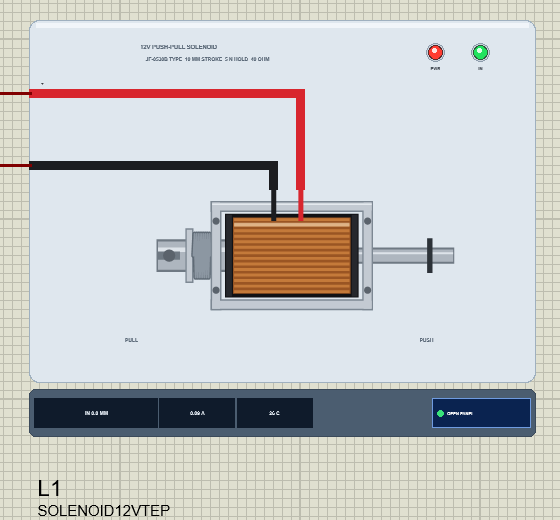
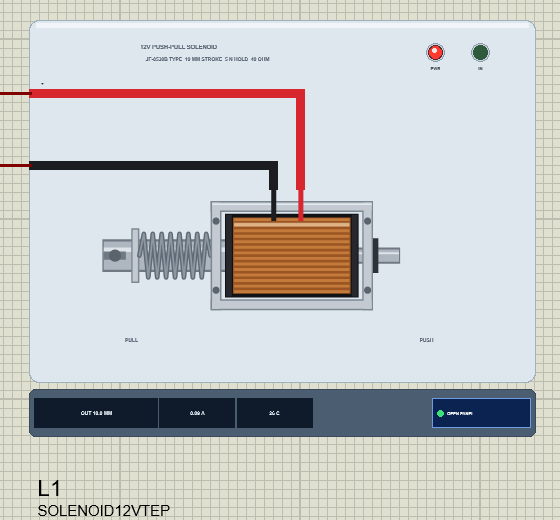
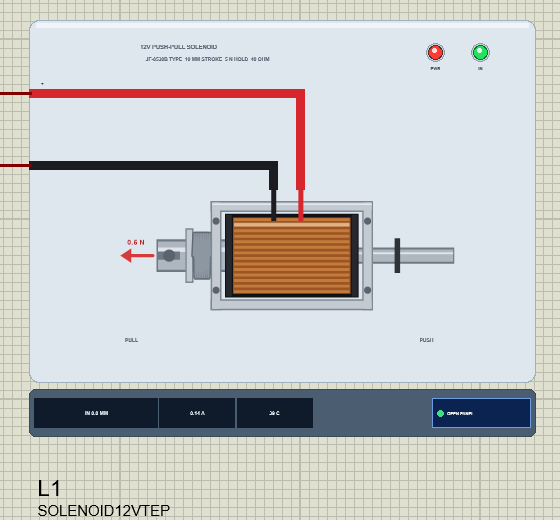
The symbol shows the solenoid from above: the zinc-plated steel frame with its
M3 holes, the coil (the black bobbin, the copper winding under clear tape),
the plunger out of the left plate with its slot, washer and return spring, the
push pin out of the right plate with its E-clip (the rest stop), the red + and
black - leads. At Run the plunger and the pin slide by the simulated gap, the
spring squeezes, the copper reddens as the coil heats and a red arrow shows a
load. The plate, the PULL / PUSH words, the PWR (red) and IN (green) LEDs and
the strip under the plate (POSITION, A, C, OPEN PANEL) are TEP additions; the
real solenoid has none of them.
ONE DEVICE (search "solenoid" in Pick Devices):
SOLENOID12VTEP "12V Push-Pull Solenoid V1.0" (category Electromechanical >
Solenoids), model TEPSOLENOID.DLL
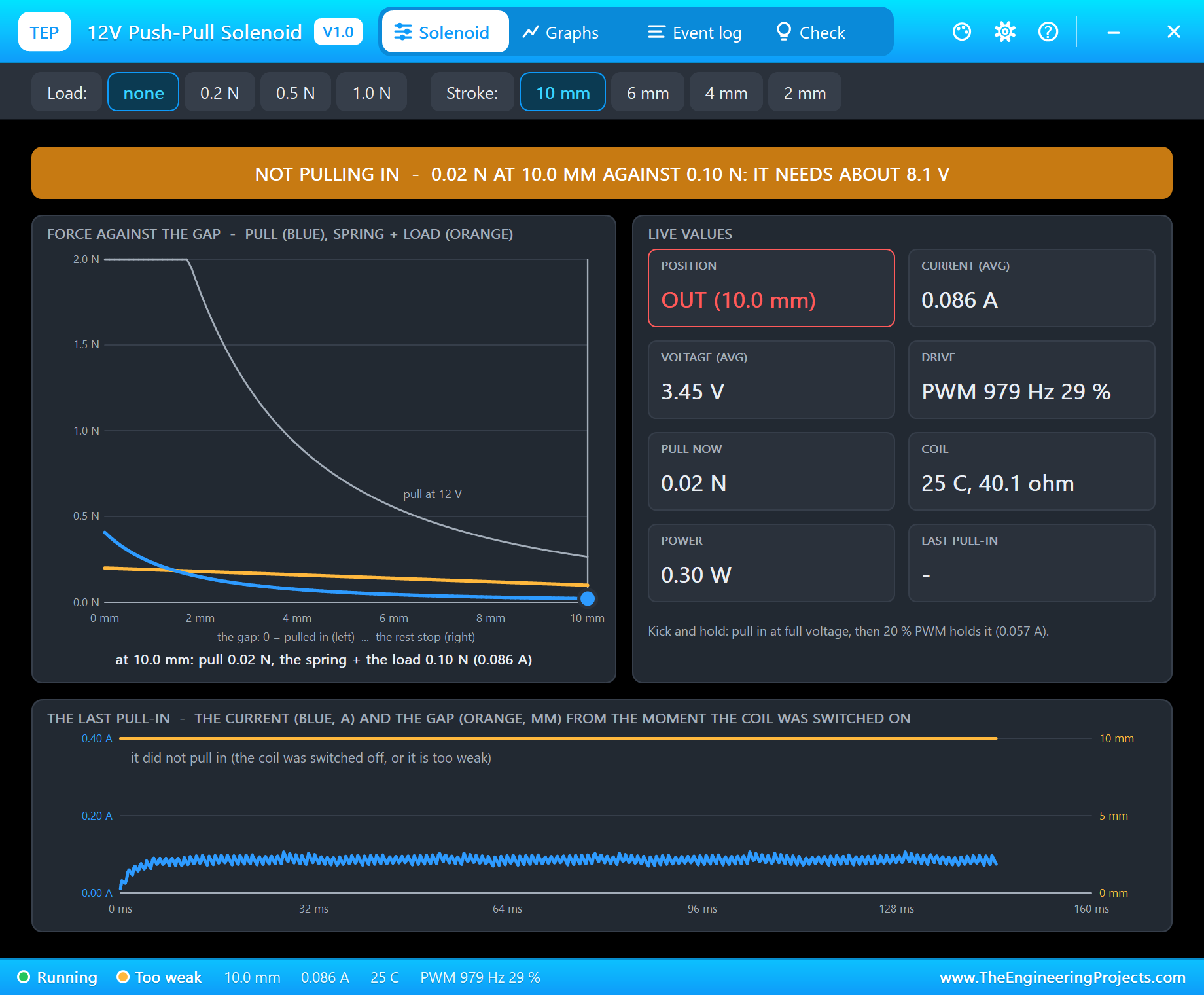
The pop-up panel "TEP 12V Push-Pull Solenoid" opens at Run (and with OPEN
PANEL on the strip) - the look of the TEP Serial Monitor. Tabs Solenoid,
Graphs, Event log and Check; gear and ? icons for Settings and Help; the
palette icon switches the theme:
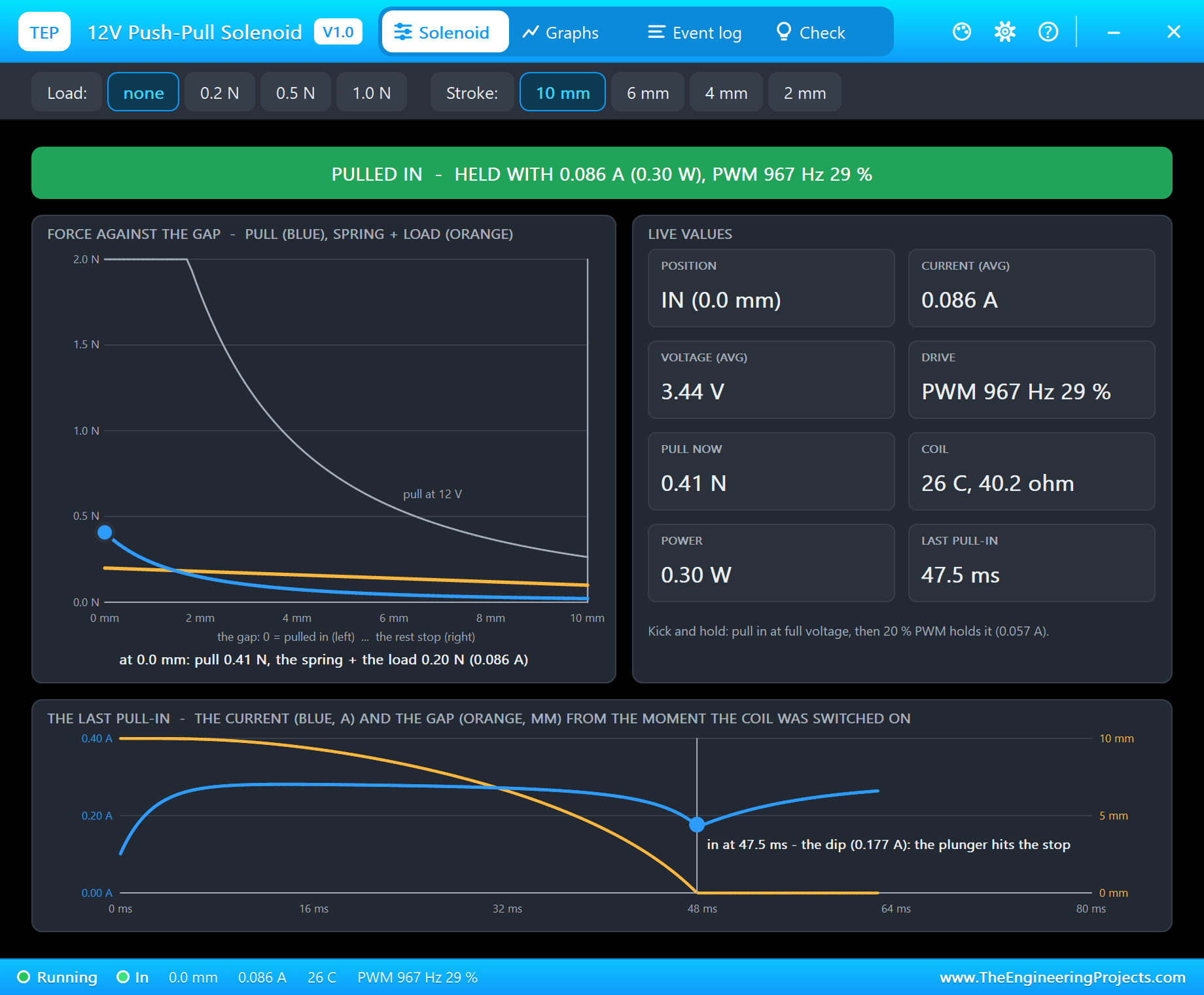
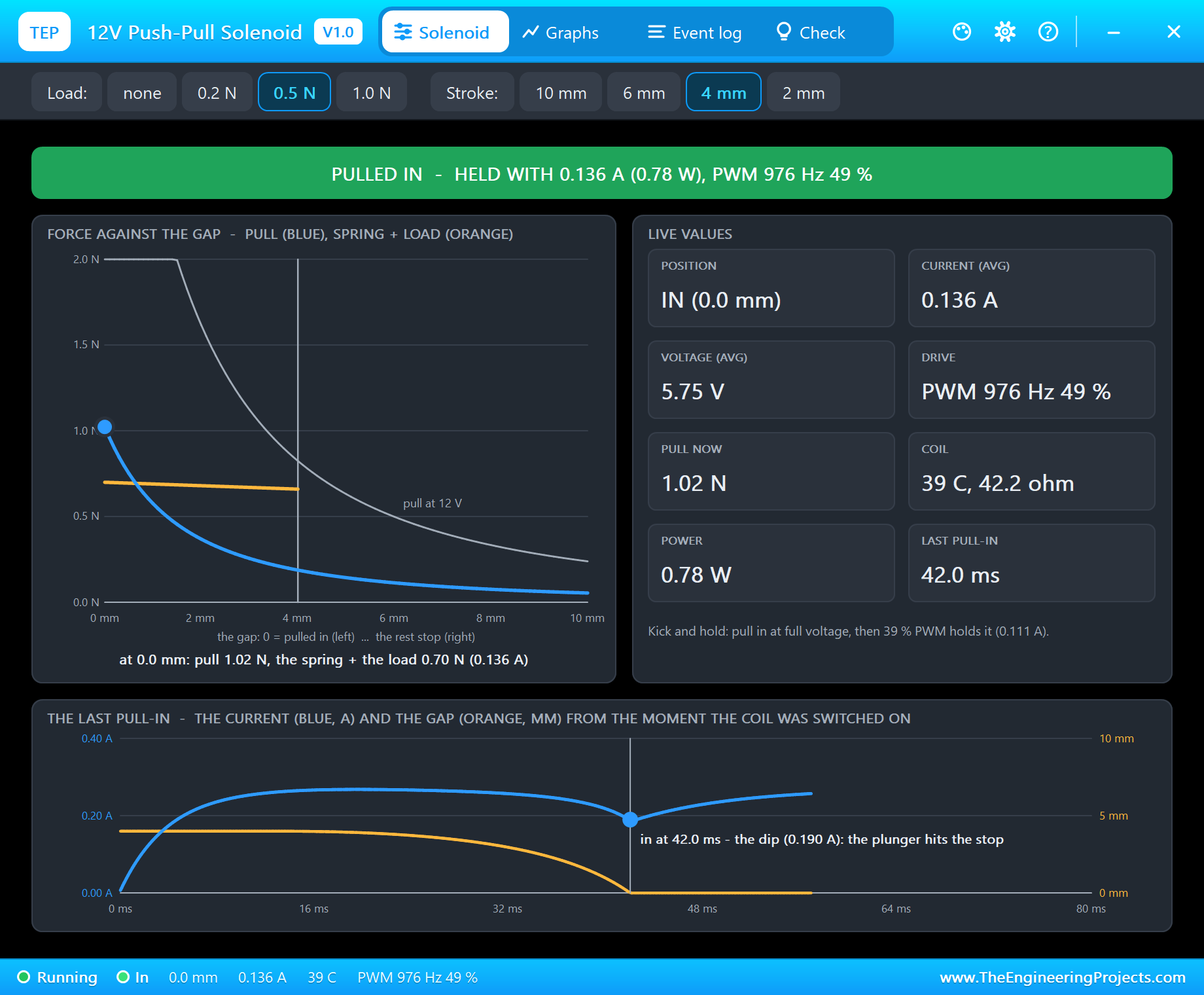
Solenoid the state in big letters (PULLED IN - HELD WITH 0.086 A, NOT
PULLING IN - IT NEEDS ABOUT 8.1 V, PULLING IN, RELEASING, OUT,
HOT, OVER-VOLTAGE); the force against the gap (the pull at the
present current and at 12 V, the spring + the load, the
plunger on its curve); the live values (position, current,
voltage, drive, pull now, coil, power, the last pull-in time);
THE LAST PULL-IN: the current and the gap from the moment the
coil was switched on, the dip marked. The toolbar: Load (none,
0.2, 0.5, 1.0 N) and Stroke (10, 6, 4, 2 mm).
Graphs the gap, the coil's current and its temperature over the last
0.5, 5 or 30 s. Live / Freeze.
Event log the drive (PWM / steady), every pull-in ("PULLED IN in 47.5 ms
- the current dipped from ... A to ... A"), every release,
drop-outs, too weak, the heat, the settings; filters All /
Drive + motion / Warnings, Pause, Clear
Check Good for: a solenoid that does not pull in, drops out, buzzes,
gets hot, or resets the Arduino - the drive, the PWM, the
current, the plunger, the pull-in, the release, the force at
the stroke, the hold current, the coil
Settings theme, text size, open at Run, window size
Help report a bug, suggest a feature, article, updates, donate,
forum; Copy diagnostics for a bug report
TEST STATUS
V1.0: verified in Proteus 8.5 on 29 Oct 2026 (the demo project as shipped: an
A3 sheet, an Arduino UNO V4.0 with its built-in monitor, our L9110S driver -
its pop-up version, from its own library - on a +12V supply, the solenoid on
MOTOR A, RV1 on A0 at 30 %; all pop-ups open). What the runs showed:
* The project loads and starts cleanly. RV1 at 30 %: "Pot 307: drive 30 %
(PWM 76/255 = 3.58 V average)"; the solenoid gets PWM 980 Hz, 29 %,
3.40 V, 0.086 A: "NOT PULLING IN - 0.02 N of pull at 10.0 mm against
0.10 N (the spring + the load): it needs about 8.1 V here".
* "pull" (100 % for 100 ms, then 30 %): "PULLED IN in 47.5 ms", the current
dipping to 0.177 A as the plunger hit the stop; then held with 0.086 A
(0.30 W, 0.41 N against the spring's 0.20 N) - the same 30 % that could
not pull it in now holds it. The PWR and IN LEDs lit, the plunger in.
* "release": "RELEASED in 59.8 ms".
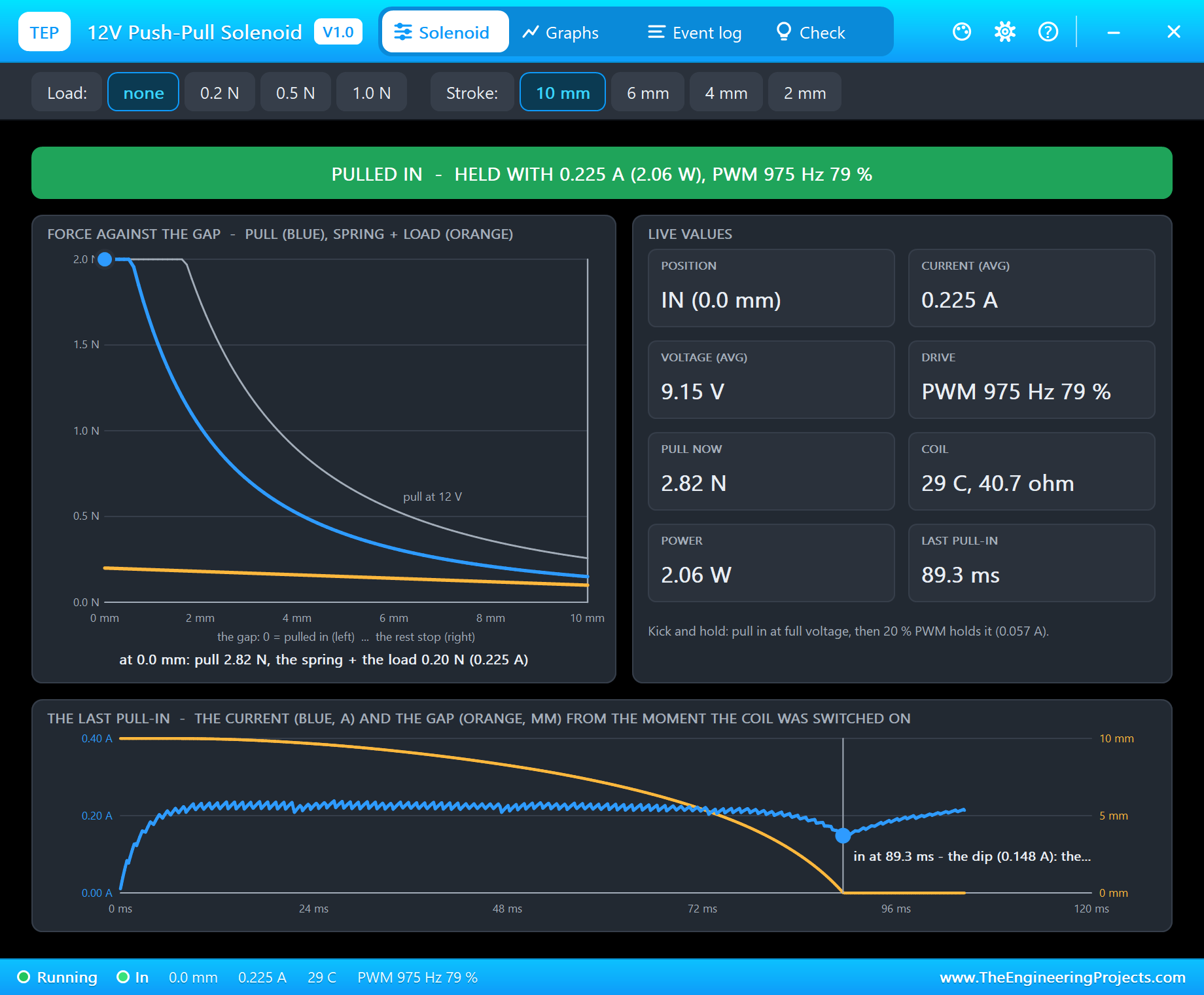
* "s 80" (9.15 V average, 0.227 A): pulled in in 89.3 ms - slower than at
full voltage.
* "tap 3": three pull-ins of 49.8 ms and releases of 68.4 ms (60 ms on).
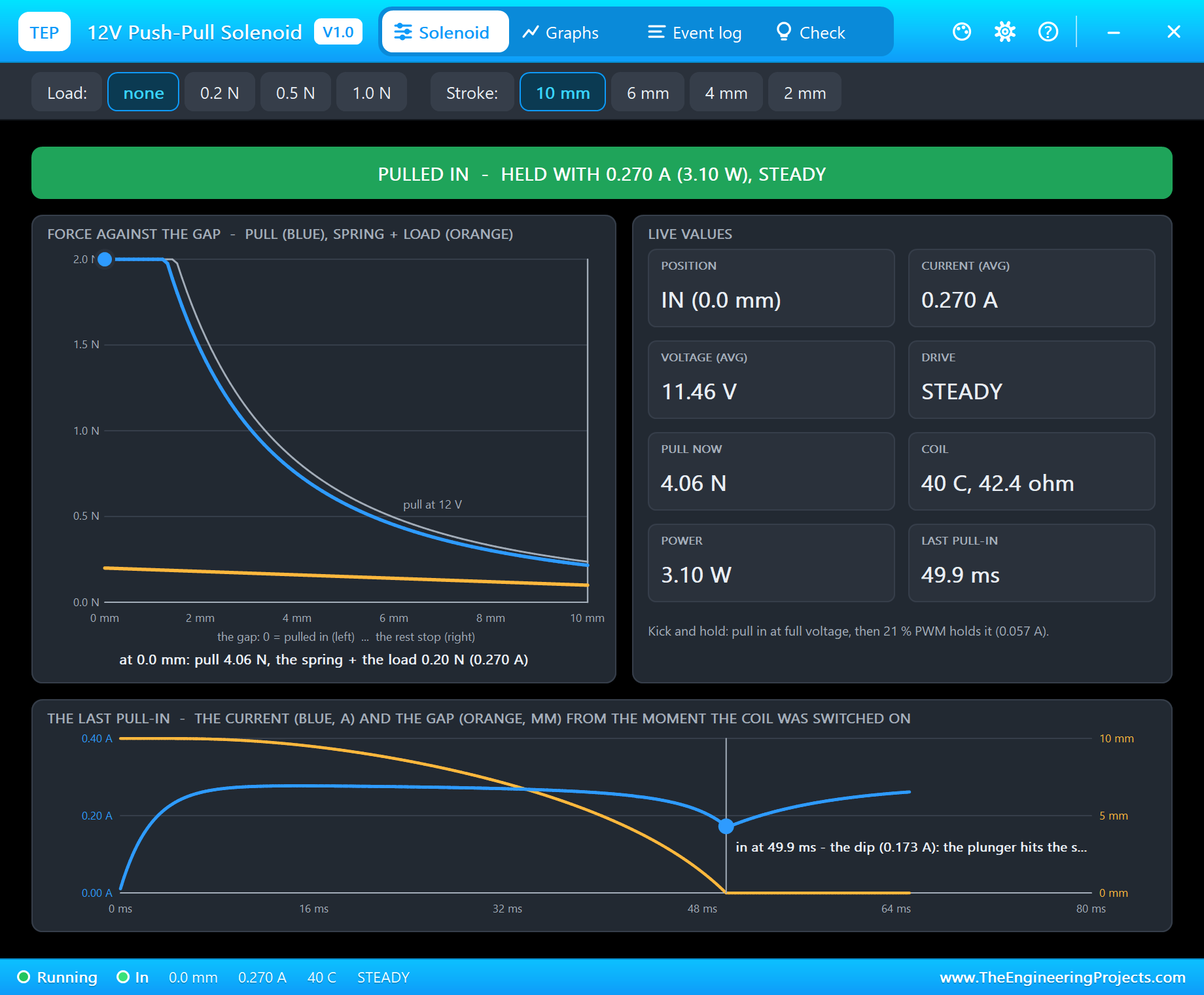
* "full": "steady drive: 11.42 V, 0.280 A (3.20 W) - held in"; a few
seconds later 0.270 A at 40 C (42.4 ohm, 3.10 W) - the coil warming.
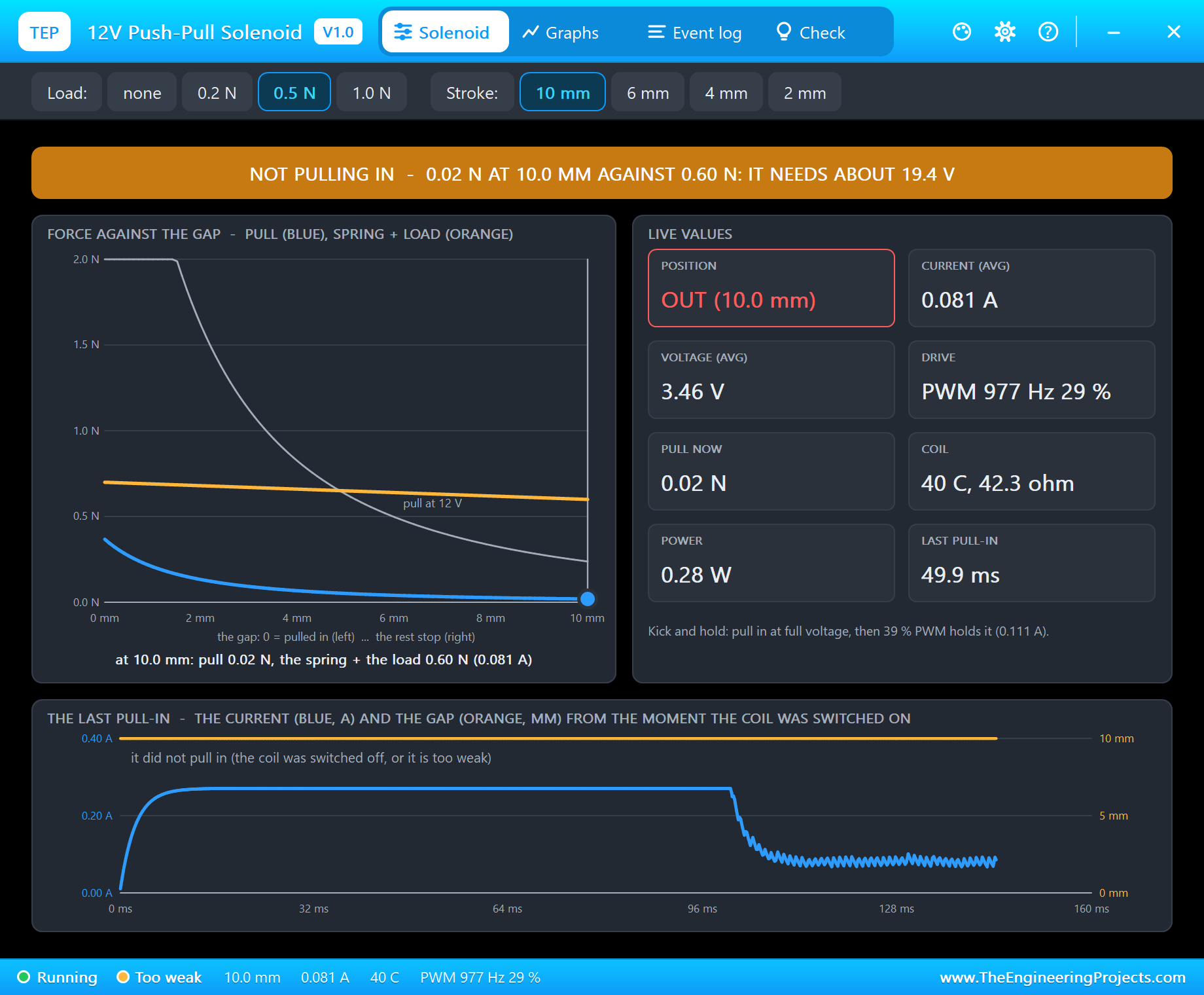
* The 0.5 N load, 10 mm, "pull": "NOT PULLING IN - 0.02 N of pull at 10.0
mm against 0.60 N (the spring + the load): it needs about 19.4 V here".
* The 4 mm stroke, "hold 50", "pull": "PULLED IN in 42.0 ms - the current
dipped from 0.268 A to 0.188 A"; held with 0.136 A (49 % PWM, 1.02 N
against 0.70 N); "release": "RELEASED in 17.0 ms" (the load helps).
* No load, 10 mm, "hold 15", "pull": pulled in, then "DROPPED OUT 87 ms
after it pulled in - the hold current is too low: the spring + the load
push 0.20 N closed; holding needs 0.057 A (20 % PWM at 12 V)".
* "hold 30", "pull", "knob": held in at the pot's 30 % (0.082 A).
Plus automatic checks on a PC, 0 failed: 22 on the solenoid (12 V from
rest: in after 44.5 ms, the current from 0.288 A dipping to 0.179 A, held
0.298 A and 4.97 N, 363 mH in; the release in 71.1 ms; it pulls in from
10 mm at 8.06 V and holds down to 2.28 V; kick and hold at 30 % PWM 980
Hz: 0.090 A, 0.32 W, the PWM found; 10 % PWM drops out; a 0.5 N load: not
from 10 mm at 12 V, from 4 mm at 10.3 V; 40 s held at 12 V: 87 C, 49.8
ohm, 0.241 A; 120 s: HOT; 15 V: over-voltage; -12 V pulls in too); 6 on the
pop-up pages rendered; the demo project read back from disk (69 checks:
devices, pins, wires, labels, no wire through a part, no crossing).
INSTALLATION (about 2 minutes)
1. Close Proteus. Extract the WHOLE ZIP to a normal folder (e.g. Desktop).
2. Copy everything in "Proteus Library Files" (TEPSOLENOID.LIB and our Arduino
library V4.0, ArduinoV4TEP.LIB) to the LIBRARY folder of Proteus, for
example:
C:\Program Files (x86)\Labcenter Electronics\Proteus 8 Professional\LIBRARY
(on some PCs: C:\ProgramData\Labcenter Electronics\Proteus 8 Professional\
LIBRARY - use the folder that already holds Proteus's own .LIB files).
3. Copy TEPSOLENOID.DLL and TEPARDUINO.DLL from "Proteus Model Files" to the
MODELS folder (...\Proteus 8 Professional\MODELS). The demo's driver is NOT
in this package: install our L9110S Motor Driver library the same way (its
own ZIP - see IMPORTANT LINKS): TEPL9110S.LIB and TEPL9110S.DLL.
4. Delete TEPSOLENOID.IDX from the LIBRARY folder if it is there.
5. Start Proteus. In Pick Devices (P) search "solenoid".
RUN THE DEMO
"Proteus Simulation\12V-Push-Pull-Solenoid-L9110S-ArduinoUnoV4.pdsprj" - keep
the .hex file and the DLLs beside the project (with the L9110S library
installed).
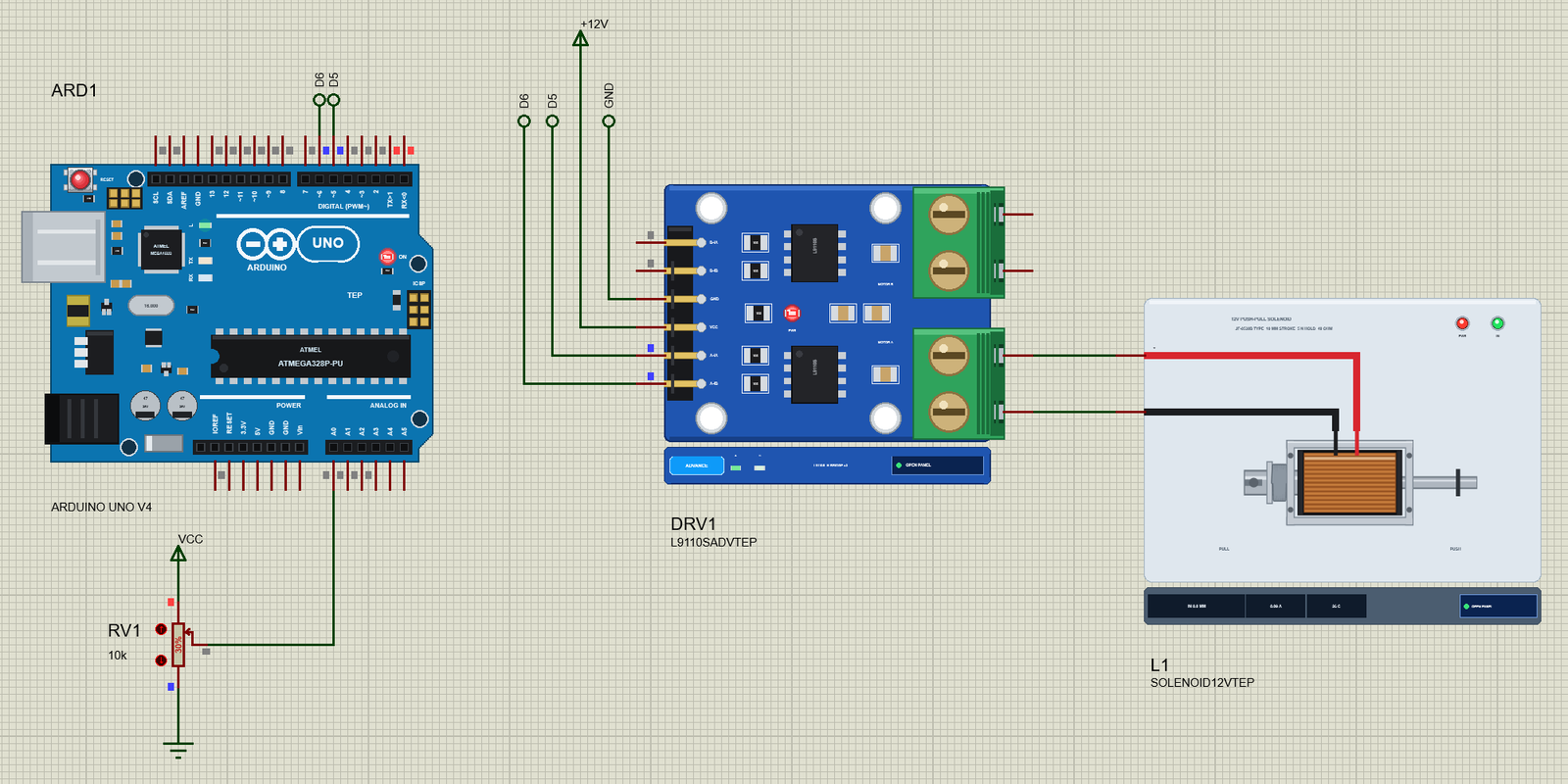
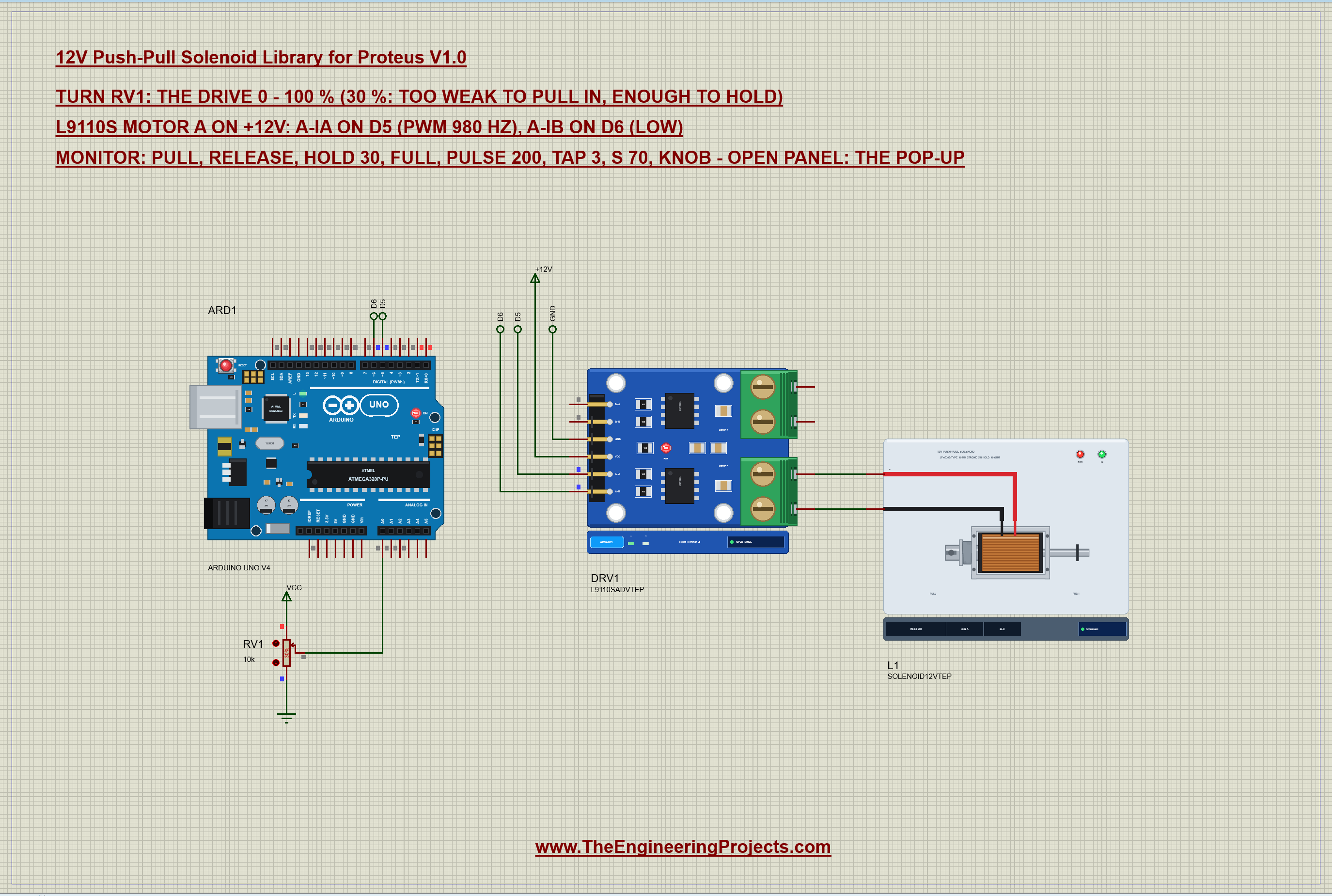
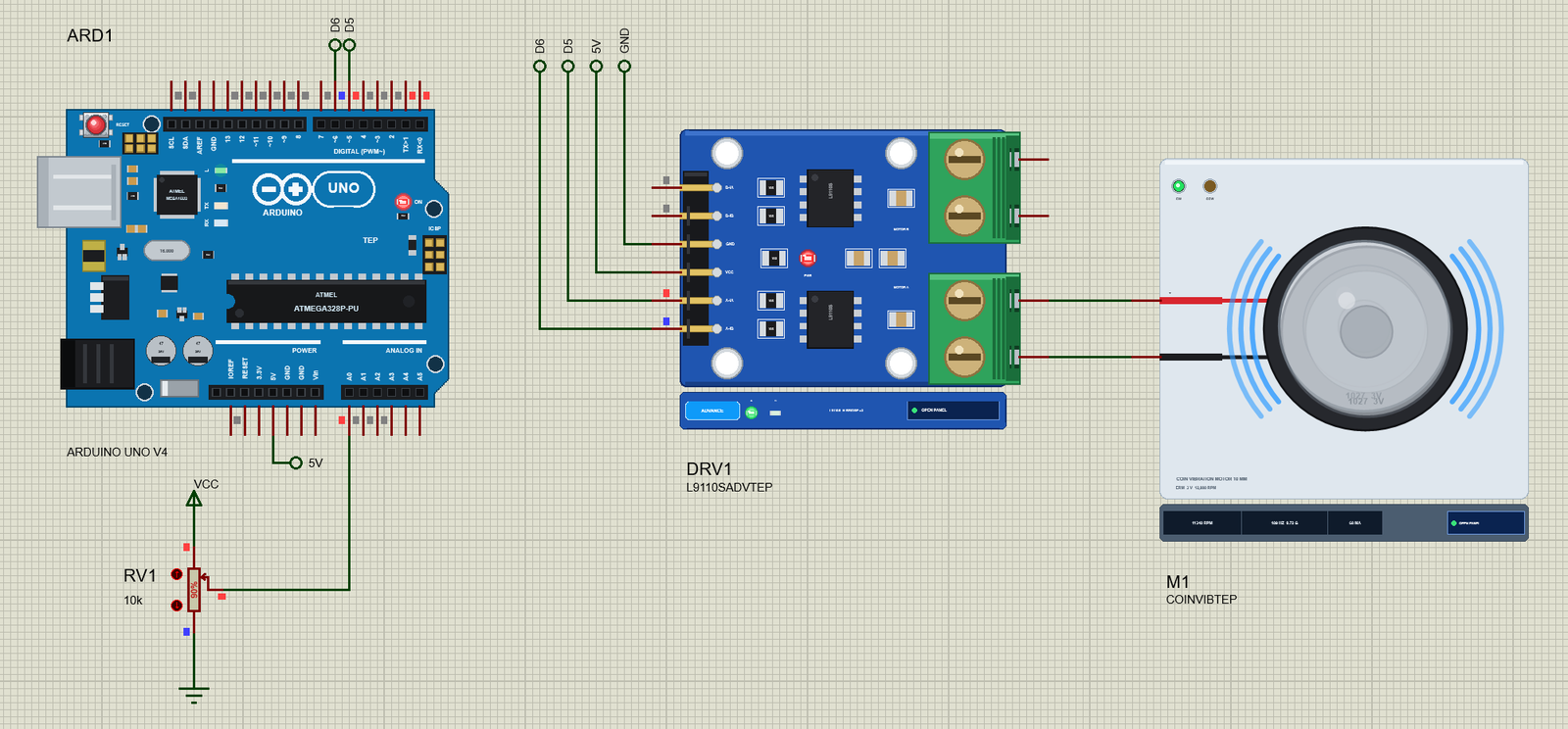
ARD1: Arduino UNO V4.0 running Solenoid_Demo.hex, its serial monitor built
in (window "TEP Arduino UNO - ARD1").
DRV1: the L9110S driver (pop-up version, our L9110S library): A-IA on D5,
A-IB on D6, VCC on a +12V supply, GND - by net labels; motor B unused.
L1: the solenoid on MOTOR A (A-OA to + red, A-OB to - black), a 10 mm
stroke, no load.
RV1: a 10k potentiometer on A0: the drive 0 - 100 % (it starts at 30 %).
1. Press Run. The monitor and the two pop-ups open (move them aside). At
30 % the solenoid stays out: NOT PULLING IN.
2. Type pull in the monitor and press Send: it pulls in at full voltage and
the same 30 % holds it (kick and hold). Type release: it springs out.
3. Click RV1's arrows: turn it up until it pulls in (about 70 %), then down
- it stays in until about 20 % (the hysteresis).
4. Try s 80, tap 3, pulse 200, full (watch the coil warm), hold 15 + pull
(it drops out), knob.
5. On the solenoid's pop-up: the Load and Stroke chips (0.5 N cannot be
pulled from 10 mm; from 4 mm it can - with hold 50).
6. The solenoid's pop-up: Solenoid, Graphs, Event log, Check.
WIRING (the same in Proteus and on a real board)
L9110S Arduino UNO
A-IA D5 (PWM: the drive)
A-IB D6 (LOW)
VCC a 12 V supply (not the Arduino's 5V)
GND GND (common with the Arduino)
Solenoid L9110S MOTOR A: + (red) to A-OA, - (black) to A-OB
In the sketch (no library needed):
pull: analogWrite(IA, 255); delay(100); analogWrite(IA, 76); // kick and hold (30 %)
release: digitalWrite(IA, LOW); // IB stays LOW
REAL HARDWARE:
* Never run it from an Arduino pin: 0.3 A at 12 V. A driver with clamp
diodes (L9110S, L298N, ULN2003A - 0.5 A a channel), or a logic-level
MOSFET (IRLZ44N) WITH a diode (1N4007) across the coil.
* A solenoid is an inductor: switched off by a bare transistor it kicks back
hundreds of volts and kills the transistor. The diode across the coil
(cathode to +12V) catches it.
* Feed it from a 12 V supply with GND common with the Arduino.
* Kick and hold keeps it cool; held at 12 V it gets hot within minutes (most
small solenoids are rated for intermittent duty).
* The pull is weakest at full stroke: if it will not pull a load, shorten
the stroke (a stop on the pin) rather than raising the voltage.
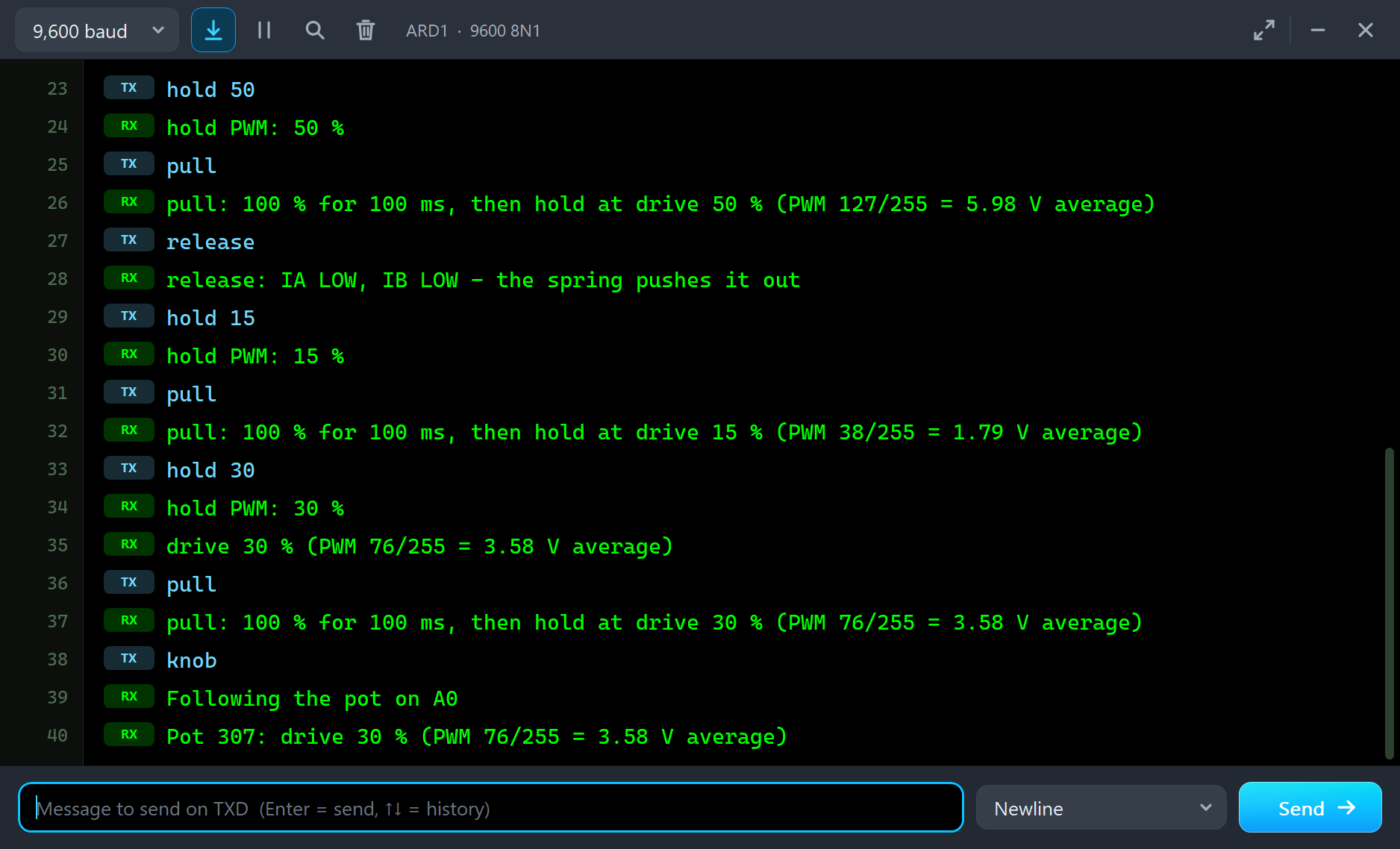
THE DEMO SKETCH ON THE SERIAL MONITOR (Solenoid_Demo V1.0, 9600 baud)
pull kick and hold: 100 % for 100 ms, then the hold PWM
release both inputs LOW: the spring pushes it out
hold 30 the hold PWM in % full 100 % and stay there (the coil heats)
pulse 200 100 % for 200 ms, then off tap 3 three short taps (60 ms on, 240 ms off)
s 70 a steady drive in % knob follow the pot again help the list
EXPECTED MONITOR OUTPUT
12V Push-Pull Solenoid demo - The Engineering Projects
L9110S on 12 V: A-IA on D5 (PWM), A-IB on D6 (LOW). The pot on A0 sets the drive.
Commands: pull | release | hold 30 | full | pulse 200 | tap 3 | s 70 | knob | help
Pot 307: drive 30 % (PWM 76/255 = 3.58 V average)
pull: 100 % for 100 ms, then hold at drive 30 % (PWM 76/255 = 3.58 V average)
release: IA LOW, IB LOW - the spring pushes it out
drive 80 % (PWM 204/255 = 9.60 V average)
tap x 3: 60 ms on, 240 ms off
full: drive 100 % (PWM 255/255 = 12.00 V average)
hold PWM: 15 %
PROPERTIES (double-click the part > Edit Properties)
STROKE the rest stop in mm (default 10; 2 - 10): a shorter stroke pulls
much harder
LOAD a force against the pull in N (default 0; 0 - 2)
Every run starts again from the properties; the pop-up's chips change them
while it runs.
TROUBLESHOOTING
* It never moves and the pop-up says OUT - THE COIL OFF: the driver's inputs
(both LOW = off), its VCC (12 V), or the leads on the wrong outputs.
* NOT PULLING IN: too little voltage for the stroke and the load - full
voltage to pull in (kick), less load or a shorter stroke.
* It pulls in, then DROPPED OUT: the hold PWM is too low for the spring and
the load - the Check page gives the least that holds.
* HOT: it is held at full voltage - use kick and hold, or a duty cycle.
* The part is not simulated: TEPSOLENOID.DLL is missing from MODELS and from
the project folder. No driver: install our L9110S library (TEPL9110S.LIB /
.DLL). No UNO / no monitor window: TEPARDUINO.DLL, or click the UNO's USB
port.
* The pop-up does not appear: click OPEN PANEL on the strip, or turn "Open the
panel at Run" on its Settings page back on.
BUG REPORTS AND FEATURE REQUESTS
Please post them in our forum with a screenshot, the Serial Monitor text, the
simulation log and the pop-up's Copy diagnostics text:
https://www.theengineeringprojects.com/forum/category/motor-driver-proteus-library
SUPPORT US
This library is free. If it saves you time, please support our work:
https://www.theengineeringprojects.com/donate
LICENCES AND THIRD-PARTY NOTES
* The solenoid model (TEPSOLENOID.DLL), the symbol and artwork and the Arduino
Library V4.0 (ArduinoV4TEP.LIB / TEPARDUINO.DLL) are made by The Engineering
Projects. The model is an independent implementation written from the
typical data of 12 V open-frame push-pull solenoids of the JF-0530B type.
The models use only standard Windows libraries; no Visual C++
redistributable is needed.
The C++ source code is not included.
The demo's driver, our L9110S Motor Driver library (TEPL9110S.LIB /
TEPL9110S.DLL), is a separate download.
* The potentiometer is Proteus's own POT-HG.
* The demo's .hex is built from the demo sketch and the Arduino AVR core 1.8.6,
which includes LGPL-licensed code; its source code is available at
https://github.com/arduino/ArduinoCore-avr/tree/1.8.6
* Proteus is a product of Labcenter Electronics and is not included. Arduino is
a trademark of Arduino SA. This library is not made or endorsed by any
solenoid maker, Arduino or Labcenter.
REBUILDING THE FIRMWARE (OPTIONAL)
The HEX file is supplied; Arduino IDE is not needed to run the demo. To edit
the sketch, open Arduino Code\Solenoid_Demo\Solenoid_Demo.ino, select Arduino
Uno and use Sketch > Export Compiled Binary. The sketch needs 7,466 bytes of
flash (23 % of the UNO) and 288 bytes of RAM.
MODEL SCOPE AND LIMITS
Modelled: the coil's resistance (with its temperature) and its inductance
against the gap, the current's dip as the plunger moves, the pull against the
gap, the return spring, a load, friction, the plunger's mass, the two stops,
the release through the driver, the coil's heat, either polarity.
How it runs: backward Euler on the coil's flux linkage with the inductance at
the last accepted gap (a conductance and a current source across + / -, analog
steps of 0.1 ms or less, so a PWM driver's pulses are resolved); the plunger
and the heat are stepped at every accepted point in 20 us sub-steps.
Not modelled: the iron's saturation, eddy currents, the plunger bouncing on
the stop, residual magnetism, the sound, the differences between real
solenoids (other models pull harder or softer).
VERSION
TEP 12V Push-Pull Solenoid library V1.0 (Oct 2026). Device SOLENOID12VTEP
(TEPSOLENOID.LIB / TEPSOLENOID.DLL). Demo sketch Solenoid_Demo V1.0.
Demo driver: L9110SADVTEP (TEP L9110S Motor Driver library V1.0, a separate
library). Demo board: ARDUINO UNO V4.0 (TEP Arduino Library V4.0) with its
built-in serial monitor.Development1 release
 Development1 release
-
V1.012V Push-Pull Solenoid Library for Proteus V1.0this page
V1.0 is the only release in the Download Center so far. When a newer version is published, it appears above with its own download page.
Installation8 steps
 Installation8 steps
From the download to a working project, in order. The steps follow what the package contains.
You will need
- Proteus Design SuiteProteus 8 or newer (Labcenter), on Windows
- Arduino IDE1.8 or 2.x, with the board of the tutorial chosen under Tools → Board
- Any archive toolWindows, macOS and Linux extract ZIP files on their own
Steps
- 1
Extract the archive
Right-click 12v-push-pull-solenoid-tep-v1-0-bfef9ea8551247b3b13378e1a03bbd0e.zip and choose Extract All (or open it with 7-Zip or WinRAR) into a folder you can find again. Keep its folder structure (12V-Push-Pull-Solenoid-TEP-v1.0) as it is.
- 2
Copy the library files into Proteus
Move ArduinoV4TEP.LIB and TEPSOLENOID.LIB and the files into the LIBRARY folder of your Proteus installation: C:\Program Files (x86)\Labcenter Electronics\Proteus 8 Professional\LIBRARY for Proteus 8, or the matching Proteus 7 folder. Older versions keep it under ProgramData\Labcenter Electronics. If Proteus is open, close it first.
- 3
Add the simulation model
Copy TEPARDUINO.DLL and TEPSOLENOID.DLL into the MODELS folder next to LIBRARY, so the component can run, not only be drawn.
- 4
Restart Proteus and place the component
Start Proteus, open a schematic, press P (Pick Devices) and search for the component by the name used in the tutorial. It appears with its pins ready to wire.
- 5
Open the sketch in the Arduino IDE
Open Solenoid_Demo.ino, select your board and port under Tools, then Verify. Sketch → Export Compiled Binary writes the HEX file a simulation needs.
- 6
Load the HEX file
In Proteus double-click the microcontroller, set Program File to Solenoid_Demo.hex and run the simulation. For real hardware, flash the same file with your programmer.
- 7
Open the example simulation
Open 12V-Push-Pull-Solenoid-L9110S-ArduinoUnoV4.pdsprj in Proteus to see the wiring exactly as in the tutorial. Check the controller's Program File path, then press Play.
- 8
Follow the tutorial
12V Push-Pull Solenoid Library for Proteus V1.0 (Arduino) explains every connection and setting in order; keep it open beside the files while you build.
FAQs9 questionsContact TEP
 FAQs9 questions
How do I download 12V Push-Pull Solenoid Library for Proteus V1.0?
Wait for the 30-second guest countdown on this page, then press the download button; the file comes straight from our storage. Members who are logged in skip the wait. If the browser opens the file instead of saving it, use its Save as option. The download link is made for you when the countdown ends and works for 15 minutes; a saved or shared link stops working, so share this page instead.
What is inside the archive?
12V Push-Pull Solenoid Library for Proteus V1.0 comes as a ZIP archive of 10 files (1.2 MB, 2.6 MB unpacked) holding Proteus library files, simulation model DLLs, a Proteus simulation, an Arduino sketch and compiled HEX firmware. Open the File Structure tab for the full list of 10 files.
What should I do if the download does not start?
Check the browser's download list first; an ad blocker or a company firewall can also hold it back, so try another browser or network. If the file arrives incomplete, download it again. For an installation problem, read the Install tab or tell us in the comments with your software version and the exact error message.
Is this file free?
Yes. Every file in the TEP Download Center is free for learning, personal and student projects. If you share it, link back to this page or the tutorial so others find the latest version.
How do I check that the file arrived complete?
Compare its SHA-256 with the one on this page, da2a5a9b9929a8c718a1277762eaa63659d24cfd1ece2ae9435015c43d6ef88a. In PowerShell run Get-FileHash "12v-push-pull-solenoid-tep-v1-0-bfef9ea8551247b3b13378e1a03bbd0e.zip"; on macOS or Linux run shasum -a 256 "12v-push-pull-solenoid-tep-v1-0-bfef9ea8551247b3b13378e1a03bbd0e.zip". The same value means the file is exactly the one in our storage; a different one means the download broke off, so download it again.
Do I need WinRAR to open the ZIP file?
No. Windows, macOS and Linux open ZIP archives on their own (Extract All, or double-click). WinRAR and 7-Zip work too. Extract the whole archive before using the files.
Where do I put the LIB and IDX files?
Both files go into the LIBRARY folder of your Proteus installation (Proteus 8: C:\Program Files (x86)\Labcenter Electronics\Proteus 8 Professional\LIBRARY; Proteus 7 has the same folder under its own name). Restart Proteus afterwards and search for the component with P.
Which Proteus version does the library need?
The tutorial names the Proteus version the library was made and tested with. Most TEP libraries work in Proteus 7 and Proteus 8; if the component does not appear after a restart, check that both the LIB and the IDX file were copied and that Proteus was fully closed while copying.
How do I get the HEX file into the simulation?
Compile the sketch in the Arduino IDE (Sketch → Export Compiled Binary gives you the HEX next to the sketch), then in Proteus double-click the board, set Program File to that HEX and run.
Members skip the wait. Log in or join TEP.

- 0Total downloads
- 4%Popularity
- ProteusCategory
- 0Comments
- ssyedzainnasirUploaded by
- 1 Nov 2026Uploaded at


 SHA-256
da2a5a9b9929a8c718a1277762eaa63659d24cfd1ece2ae9435015c43d6ef88a


 Need help with this file?
 Tags
TagsRelated Proteus
All Proteus tutorials



Comments
0