Hello friends, I hope you all are doing great. Today, I am going to share the new TYJ50 Synchronous Motor Library for Proteus V1.0. The TYJ50 is the little round AC gear motor that turns the glass plate in a microwave oven. You also find it in rotating display stands, fan oscillators, grills, curtain drives and old timers. It plugs straight into the mains, turns at a slow, steady 5 RPM, and has one famous habit: nobody can tell you which way it will start.
TYJ50 Synchronous Motor Library for Proteus
Latest version: V1.0 (November 2026, this tutorial)
Other motors: SG90 Servo · TT Gear Motor · 28BYJ-48 Stepper · NEMA 17 Stepper · MG996R Servo · N20 Encoder Motor · JGA25-370 Encoder Motor · FS90R 360 Servo · 130 DC Motor · A2212 Brushless · X27.168 Gauge · Analog Panel Meter · DC Tachogenerator · LM393 Speed Sensor · MG90S Servo · DS3218 Servo · L12 Linear Servo · JGB37-520 Motor · RS-775 Motor · JGY-370 Worm Motor · 12V Linear Actuator · Coin Vibration Motor · Mini Submersible Water Pump · 12V Peristaltic Pump · 4-Pin PC Fan · 12V Push-Pull Solenoid · NEMA 23 Stepper Motor · Micro Linear Stepper · Quartz Clock Movement · Air-Core Gauge · Electromechanical Counter · Split-Flap Display · Electric Bell · Wind Turbine · 8520 Coreless Motor · Car Wiper Motor · Car Door Lock Actuator · 12V Solenoid Water Valve · 12V Holding Electromagnet
Motor drivers: L298 · L9110S · TB6612FNG · BTS7960 · A4988 / DRV8825 · 28BYJ-48 + ULN2003 · PCA9685 Servo · Relay Module · 30A Brushless ESC · TB6600 Stepper Driver
Helping Tools
- Serial Monitor Advance: a serial terminal window for the UART of your board
- Serial Monitor Expert: the serial monitor with extra debugging tools
- LCD Library for Proteus V3.0: 16x2, 20x4 and I2C LCDs to show your readings
This library gives the TYJ50 a part of its own in Proteus. Its coil sits between two pins, L and N, with its resistance and inductance, so any AC source, relay or triac drives it. The model measures every cycle of the supply - frequency, voltage, current, power and power factor - locks to the mains like the real motor, picks its own direction at each start, reverses when the turntable hits something, and hums when the voltage is too low or the load too heavy. A turntable disc on the shaft turns on your schematic, and a pop-up window draws the coil's voltage and current. The demo switches it with an Arduino UNO V4.0 and our relay module, on a simulated 230 V 50 Hz mains.
NOTICE: a mains motor is not something to experiment with on the bench, so a simulation is the right place to learn how it behaves - and to see why it sometimes turns the "wrong" way. Our team put a lot of effort into making this small motor behave like the real one. Your feedback is the fuel that keeps us going, so please tell us what you think in the comments below or in the Motor Driver board of our forum. And if our free libraries help you, you can buy us a coffee. So, let's get started with the TYJ50 Synchronous Motor Library for Proteus V1.0:
What is the TYJ50 Synchronous Motor?
The TYJ50, also sold as 50TYZ, is a permanent-magnet synchronous gear motor about 49 mm across. Inside its steel can is one claw-pole coil and a small rotor made of a ring magnet with many poles. When AC flows in the coil, the poles of the stator flip back and forth with the mains, and the magnet rotor locks to them and turns in step - synchronous. A small gearbox brings the rotor's few hundred RPM down to a slow output: 5 RPM at 50 Hz.
| TYJ50 synchronous motor (the model) | |
|---|---|
| Supply | 230 V AC (also 120 V, 24 V and 12 V versions), 50 or 60 Hz |
| Coil | one coil, two leads: 7.5 kohm and 30 H at 230 V - about 19 mA, 2.7 W |
| Speed | 5 RPM at 50 Hz, 6 RPM at 60 Hz (a 16-pole rotor at 375 RPM, a 75:1 gearbox) |
| Torque | about 4 kg.cm on the D shaft |
| Direction | CW/CCW type: either way at each start, reverses when blocked; CW or CCW types one way |
| Mounting | a plate with two ears, holes 56 mm apart |
Synchronous: the Mains Sets the Speed
A DC motor slows down under load and speeds up with more voltage. A synchronous motor does neither. As long as it is in step, it turns at exactly 5 RPM on a 50 Hz supply, whatever the load and whatever the voltage - which is why these motors once drove clocks and timers. Only the frequency changes the speed: on a 60 Hz supply the same motor turns at 6 RPM. If the load is too heavy or the voltage too low, it does not slow down; it falls out of step and just hums.
Which Way Will It Turn?
The common TYJ50 is marked CW/CCW. It has no starting winding to give it a direction, so the rotor takes off whichever way the first pulse of the field kicks it - that depends on where in the AC cycle the power arrives and where the magnets came to rest last time. For a microwave turntable or a display stand that does not matter. It also has a nice side effect: when the turntable hits something, the rotor bounces back and runs the other way. Motors that must turn one way have a small one-way cam inside and are sold as CW or CCW types; blocked, they simply stall.
A Coil on the Mains
The motor's coil is mostly inductance. At 50 Hz its 30 H have a reactance of about 9.4 kohm next to its 7.5 kohm of resistance, so the current lags the voltage by about 50 degrees and the power factor is around 0.6. The pop-up draws the two waves so you can see the lag. The motor takes about 19 mA and 2.7 W - you can leave it running all day.
What's New in TYJ50 Synchronous Motor Library for Proteus V1.0
- A part of its own: the coil between L and N, driven by any AC source, relay or triac.
- Four versions in one: 230 V, 120 V, 24 V or 12 V AC (property VOLTAGE).
- Every cycle measured: the frequency, the RMS voltage and current, the power and the power factor.
- Synchronous speed: exactly 5 RPM at 50 Hz and 6 RPM at 60 Hz, a turntable disc turning on the schematic.
- The real habits: a random starting direction, a reversal at an obstacle (AUTO type), one-way CW and CCW types, humming below 80 % of the voltage or above 4 kg.cm of load, no rotation on DC.
- A pop-up window with four pages - Motor, Graphs, Event log and Check - and the coil's voltage and current drawn live.
- An A3 demo on our Arduino UNO V4.0 with our relay module and Proteus's own AC source as the mains.
The TYJ50 in Proteus
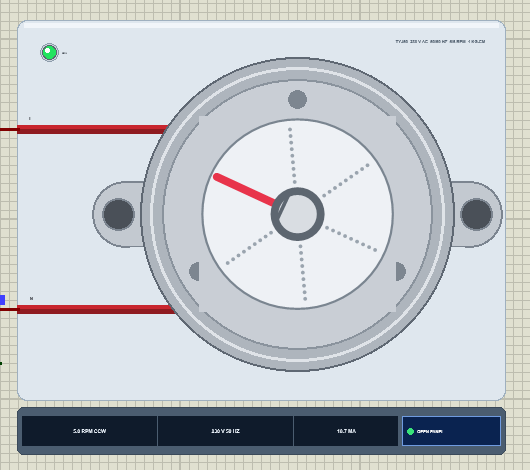
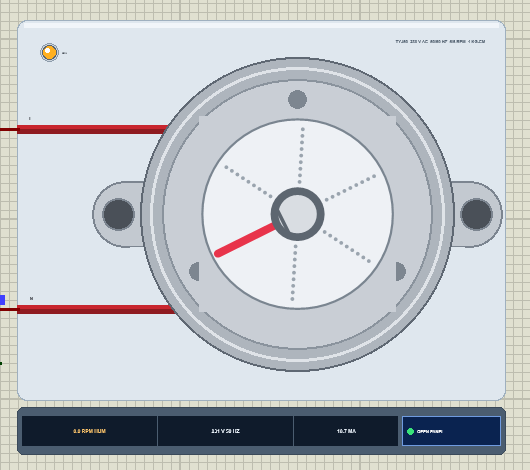
Search TYJ50 in Pick Devices; the device TYJ50MOTORTEP is in TEPTYJ50.LIB (category Electromechanical, Motors) and its model is TEPTYJ50.DLL. It is drawn from its shaft end: the mounting plate with its two ears and their holes, the 49 mm steel can, the gearbox cover with its rivets, and a turntable disc on the D shaft with a red pointer. The two red leads run to the pins L and N on the left.
At Run the disc turns to the output shaft's simulated angle. The AC LED lights green while the motor runs and amber while it hums or sits on DC. Under the plate the strip shows the speed with its direction, the supply and the current, and the OPEN PANEL button. The plate, the LED, the disc and the strip are TEP additions; the real motor has none of them.
The Pins and the Properties
| Pin | What the model does with it |
|---|---|
| L | one end of the coil: the live through a switch (the relay's NO in the demo) |
| N | the other end: the neutral (ground in the demo); the coil works either way round |
| Property | Default | What it does |
|---|---|---|
| VOLTAGE | 230 | the rated voltage: 230, 120, 24 or 12 V AC |
| DIRECTION | AUTO | AUTO (the CW/CCW type), CW or CCW (one-way types) |
| LOAD | 0 | a load on the shaft in kg.cm (it pulls 4 kg.cm at its rated voltage) |
A click on the turntable while the simulation runs puts an obstacle in its way; the pop-up's Block chip does the same. The toolbar also loads the shaft with 1, 2, 3 or 5 kg.cm.
Download TYJ50 Synchronous Motor Library for Proteus
Click the button below to download TYJ50-Synchronous-Motor-Library-for-Proteus-v1.0.zip (about 1.2 MB, without the source code of the models):
TYJ50 Synchronous Motor Library for Proteus V1.0- README.txt: installation, the demo, the wiring, the properties, mains safety, troubleshooting and the limits.
- Proteus Library Files:
TEPTYJ50.LIBandArduinoV4TEP.LIBfrom our Arduino Library for Proteus V4.0. - Proteus Model Files:
TEPTYJ50.DLLandTEPARDUINO.DLL. - Proteus Simulation:
TYJ50-Synchronous-Motor-Relay-ArduinoUnoV4.pdsprj,Turntable_Demo.hexand copies of the two DLLs. - Arduino Code:
Turntable_Demo.ino(no library needed).
Important: the relay module of the demo is not in this package. It is our separate Relay Module Library for Proteus: download it from its own article and install its TEPRELAY.LIB and TEPRELAY.DLL first, then this library. The AC source is Proteus's own ALTERNATOR, already in your Proteus.
No Proteus yet? Read How to Download and Install Proteus 7 and 8. New to libraries? Follow How to Install a New Library in Proteus.
How to Install TYJ50 Synchronous Motor Library for Proteus
- Close Proteus and extract the whole zip file, for example to your Desktop.
- Copy
TEPTYJ50.LIBandArduinoV4TEP.LIBfrom Proteus Library Files into the LIBRARY folder of Proteus (usuallyC:\Program Files (x86)\Labcenter Electronics\Proteus 8 Professional\LIBRARY). - Copy
TEPTYJ50.DLLandTEPARDUINO.DLLfrom Proteus Model Files into the MODELS folder. The two Arduino files are the ones of our Arduino Library V4.0; if you have it, they are the same. - For the demo, install our Relay Module library the same way:
TEPRELAY.LIBinto LIBRARY andTEPRELAY.DLLinto MODELS. - Delete
TEPTYJ50.IDXfrom the LIBRARY folder if it is there. - Start Proteus, press P and search for TYJ50.
Tip: keep the Proteus Simulation folder together, because the project needs its .hex file and the DLLs beside it. The library is tested in Proteus 8.5; Proteus 7 is not supported.
The Demo Circuit
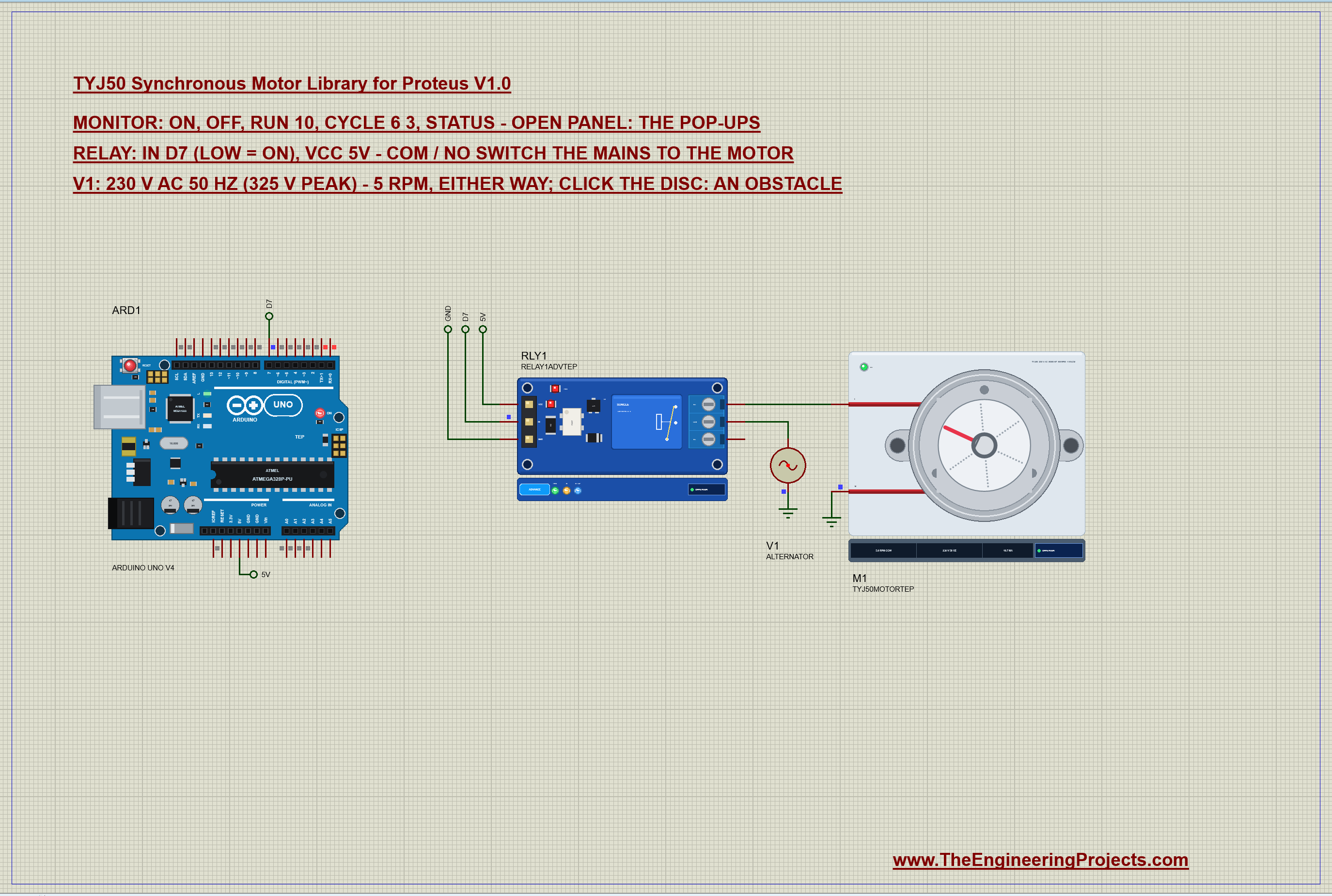
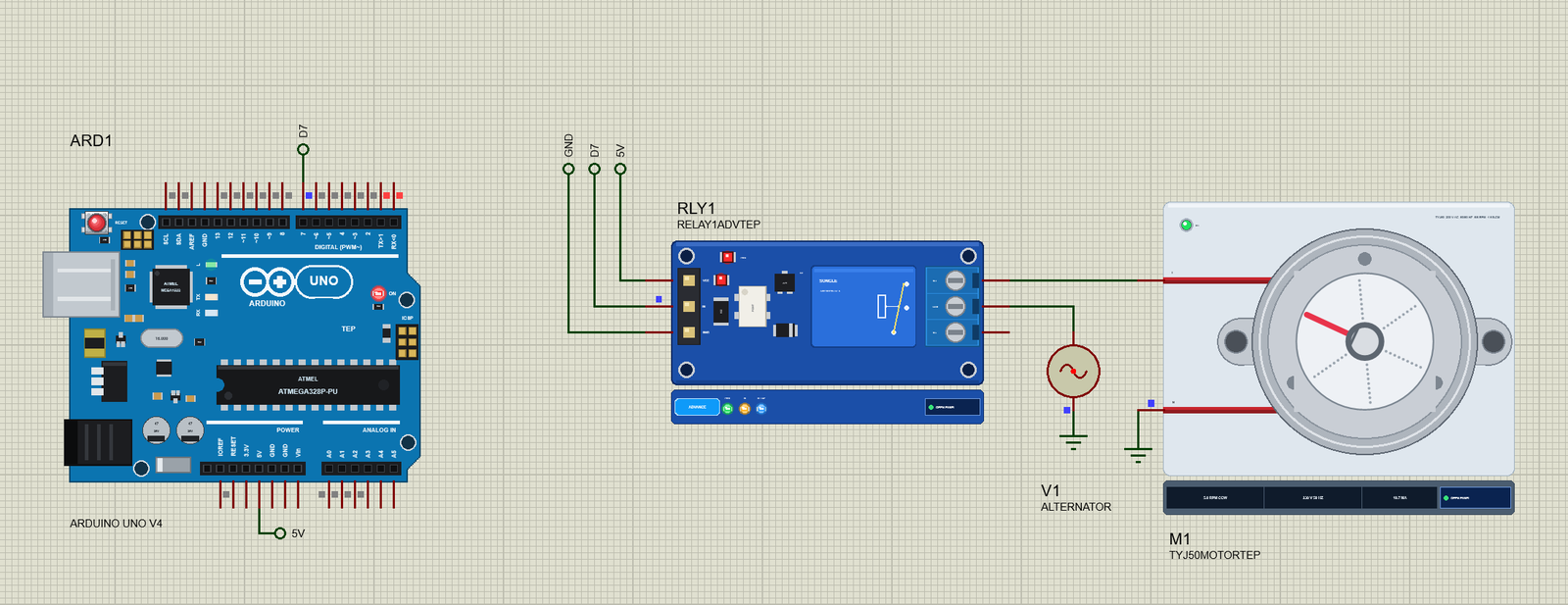
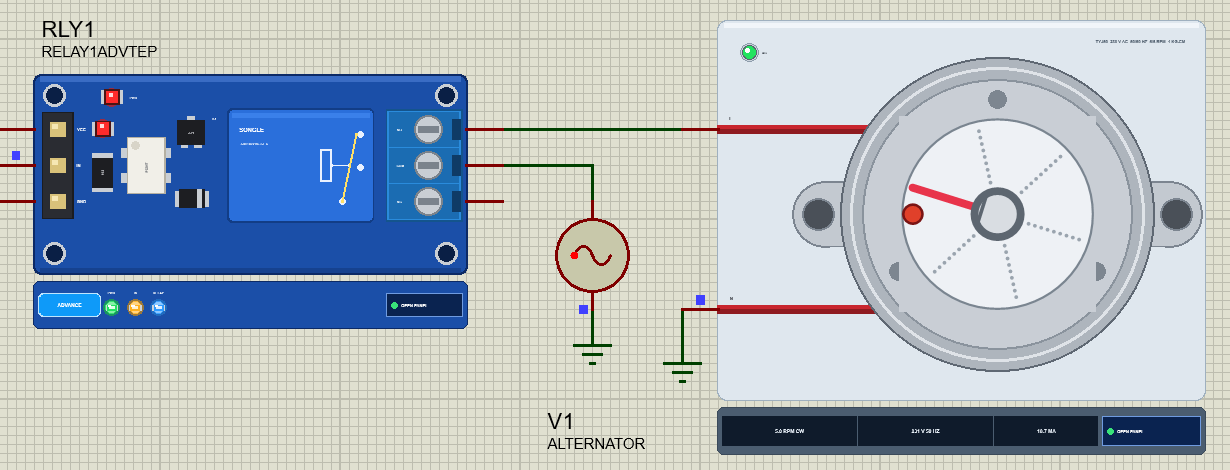
Open TYJ50-Synchronous-Motor-Relay-ArduinoUnoV4.pdsprj. ARD1 is an Arduino UNO V4.0 from our Arduino UNO Library for Proteus V4.0, running Turntable_Demo.hex with its serial monitor built in. RLY1 is the 1-channel relay module from our separate relay library, in its pop-up version. V1 is Proteus's ALTERNATOR, set to 325 V peak and 50 Hz - that is 230 V rms mains. M1 is the TYJ50.
| Part | Pin | Goes to |
|---|---|---|
| Relay module | IN | D7 (LOW = the relay ON) |
| Relay module | VCC, GND | 5V, GND |
| Relay module | COM | V1 + (the live) |
| Relay module | NO | the motor's L |
| TYJ50 | N | ground (the neutral) |
| V1 (ALTERNATOR) | - | ground |
The Mains in Proteus
The ALTERNATOR has two properties: AMP, the peak voltage, and FREQ. 230 V rms is 325 V peak, so the demo uses AMP=325V and FREQ=50Hz; for 120 V 60 Hz mains use 170V and 60Hz. One thing Proteus insists on: every node needs a path to ground, so the alternator's other side and the motor's N go to ground terminals. On a real board that is the neutral wire.
The Arduino Code
The sketch needs no library and no speed control: a synchronous motor turns at the speed the mains sets, so all the Arduino does is switch it on and off. New to Arduino? Start with Arduino Tutorial for Beginners and Introduction to Arduino UNO. The relay's input is active LOW:
const byte RELAY = 7; // the relay module's IN: LOW = ONIn setup() the pin goes HIGH before it becomes an output, so the relay never clicks at power-up:
  digitalWrite(RELAY, HIGH);                  // the relay OFF before the pin becomes an output
  pinMode(RELAY, OUTPUT);
One small function switches the motor and remembers when:
void setMotor(bool on, const __FlashStringHelper* why) {
  motorOn = on; since = millis();
  digitalWrite(RELAY, on ? LOW : HIGH);
on and off call it directly and cancel any timer:
if (!strcmp(s, "on")) { runFor = 0; cycleOn = 0; setMotor(true, F("the relay closes, 230 V on the motor")); return; } if (!strcmp(s, "off")) { runFor = 0; cycleOn = 0; setMotor(false, F("the relay opens")); return; }run 10 is a microwave's timer: on now, off after the given seconds. The loop checks it with millis(), never with delay(), so the serial monitor stays responsive:
runFor = sec * 1000UL; cycleOn = 0; if (runFor && motorOn && now - since >= runFor) { runFor = 0; setMotor(false, F("the timer is done")); }cycle 6 3 is a display stand that pauses: on for 6 s, off for 3 s, again and again:
  if (cycleOn) {
    if (motorOn && now - since >= cycleOn) setMotor(false, F("the cycle pauses"));
    else if (!motorOn && now - since >= cycleOff) setMotor(true, F("the cycle goes on"));
  }
The HEX file is in the package. To change the sketch, open it in the Arduino IDE and export the compiled binary, as in How to get the HEX file from Arduino. It needs 7,282 bytes of flash (22 % of the UNO) and 285 bytes of RAM.
Running the Demo
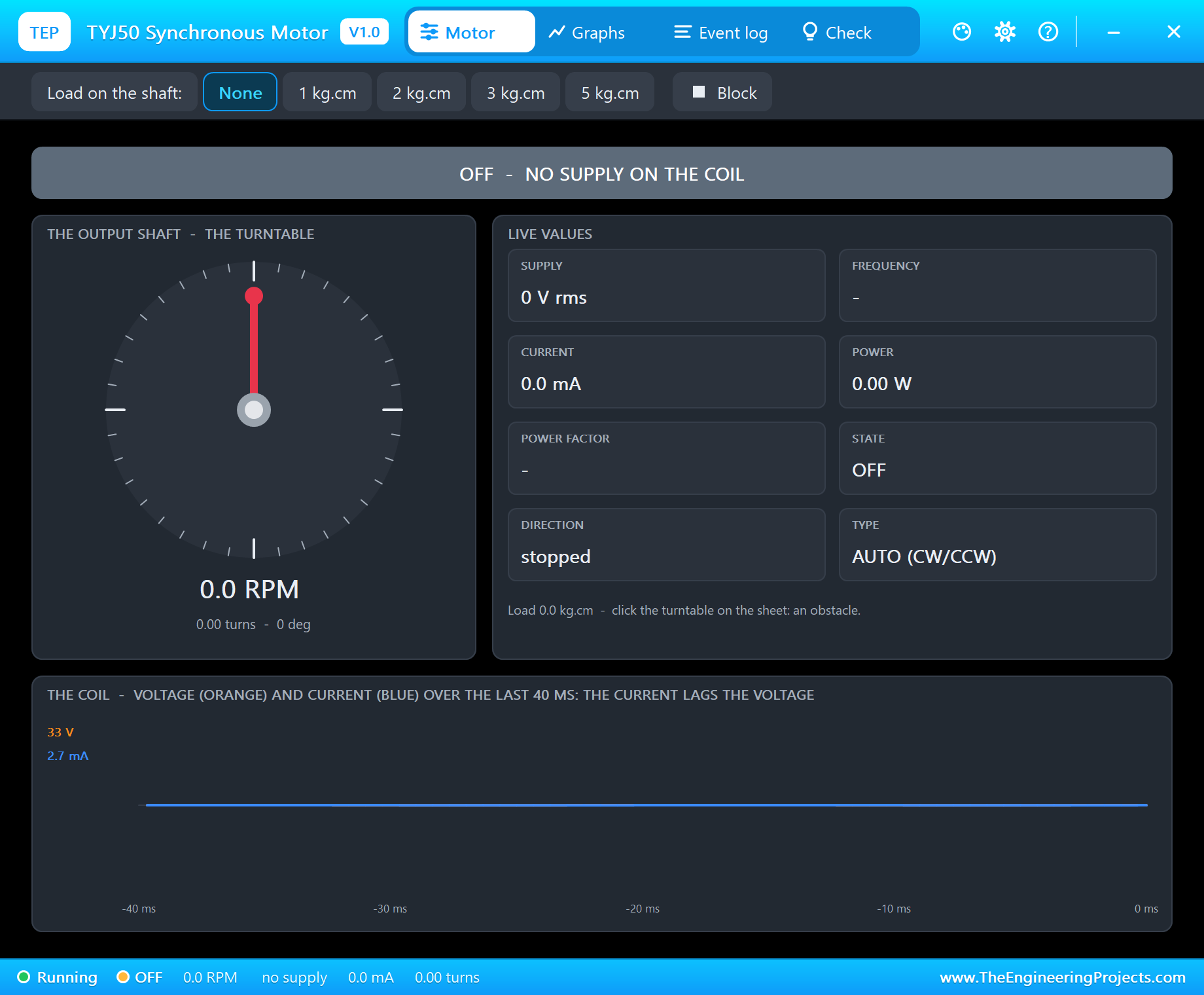
Press Run. The UNO's serial monitor and the two pop-ups - the motor's and the relay's - open over the schematic; move them aside. The relay is off, so the motor's pop-up says OFF - NO SUPPLY ON THE COIL.
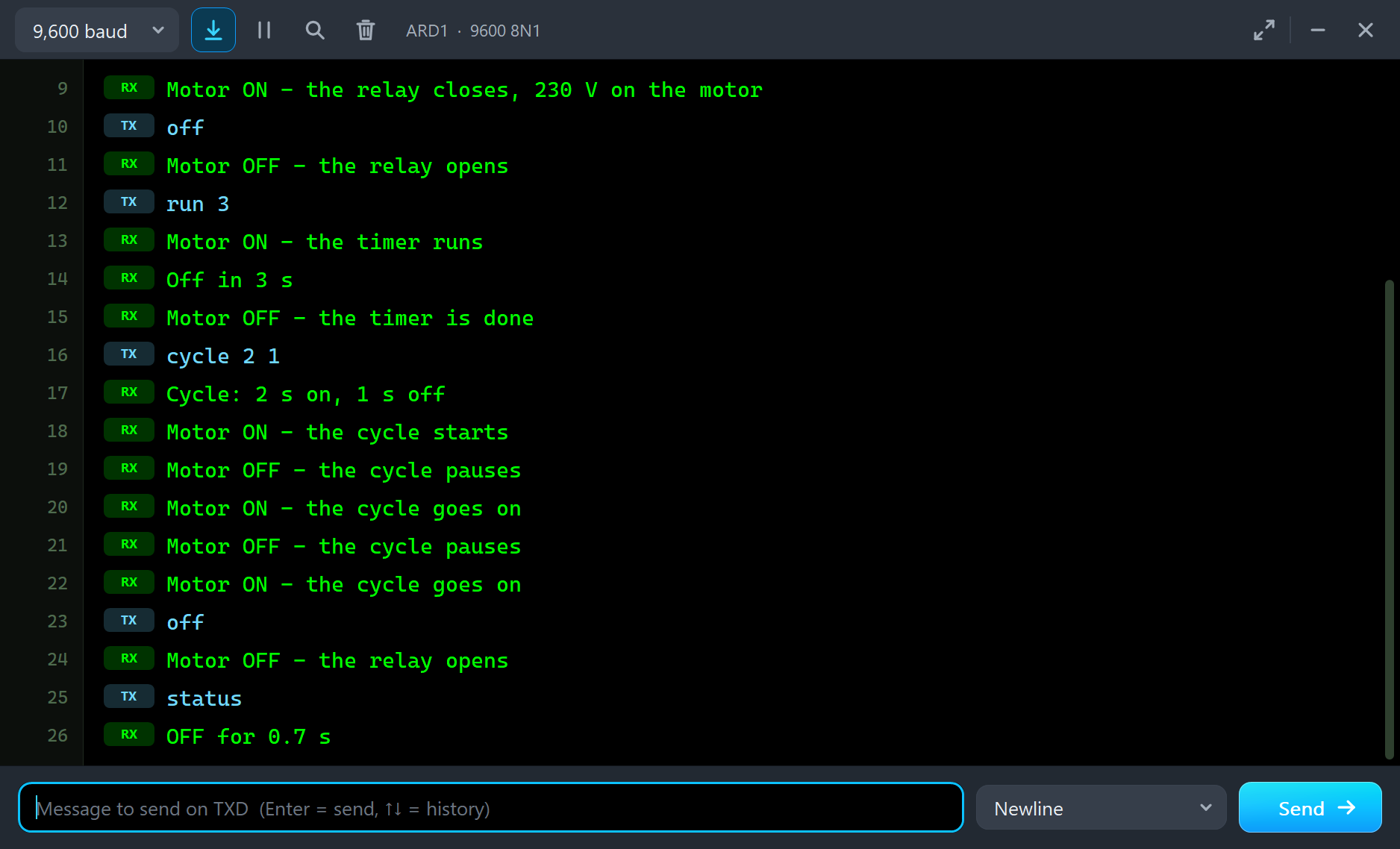
Type on in the monitor and press Send:
TYJ50 Turntable demo - The Engineering Projects
Relay module: IN on D7 (LOW = ON); COM / NO switch 230 V AC 50 Hz to the TYJ50 (5 RPM).
Commands: on | off | run 10 | cycle 6 3 | status | help
on
Motor ON - the relay closes, 230 V on the motor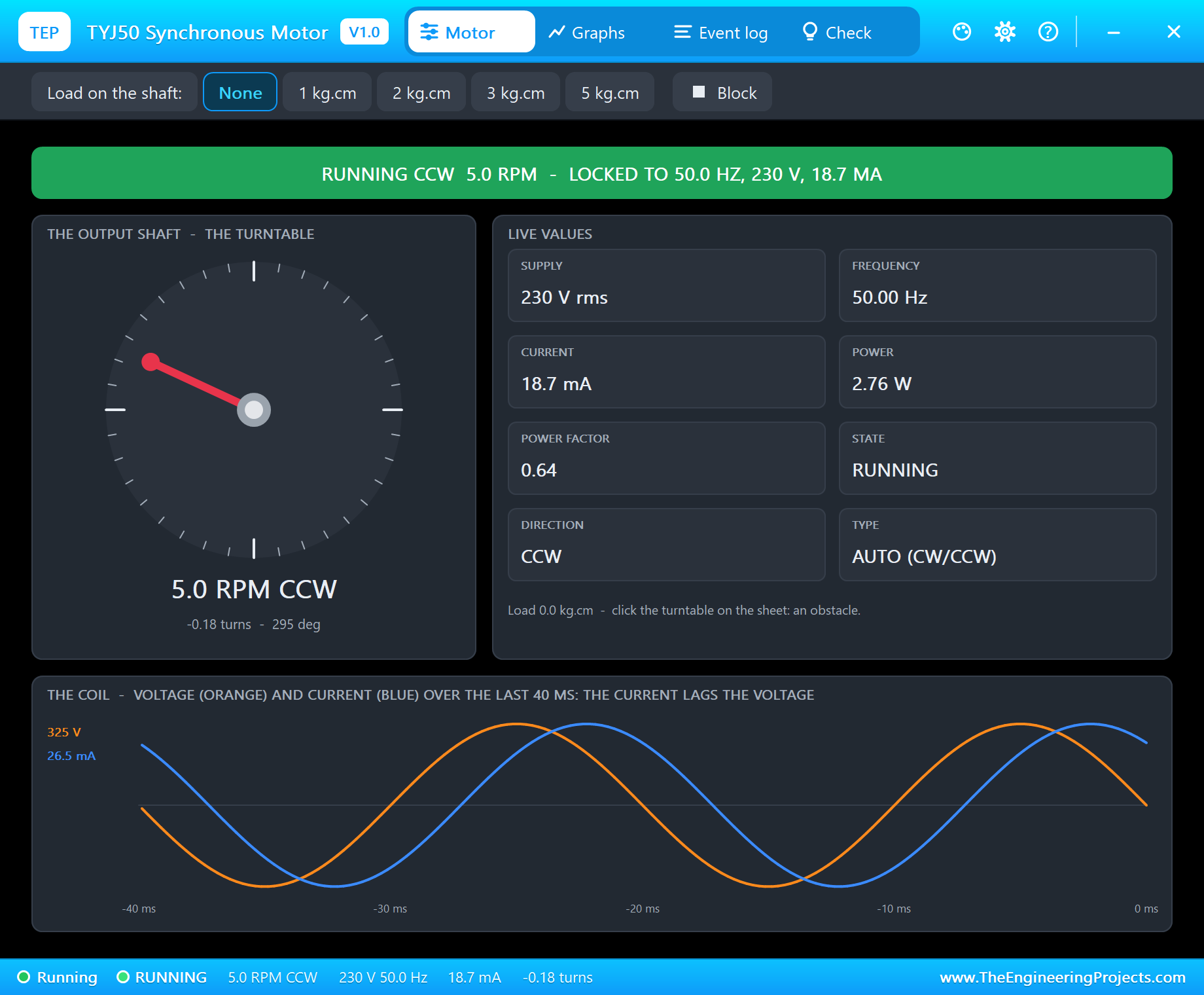
The relay closes, and the motor's Event log reads "AC ON - 229 V 50.0 Hz, 18.7 mA, 2.74 W (power factor 0.64)" and "RUNNING CCW at 5.0 RPM - locked to 50.0 Hz (start 1)". This time it chose counter-clockwise. The turntable turns, the AC LED is green, and at the bottom of the page the blue current wave runs about 50 degrees behind the orange voltage wave. The pop-up has the look of our TEP Serial Monitor Advance for Proteus and four tabs: Motor, Graphs, Event log and Check.
An Obstacle: It Turns Back
Now click the turntable on the schematic - or the Block chip on the pop-up - to put an obstacle in its way:
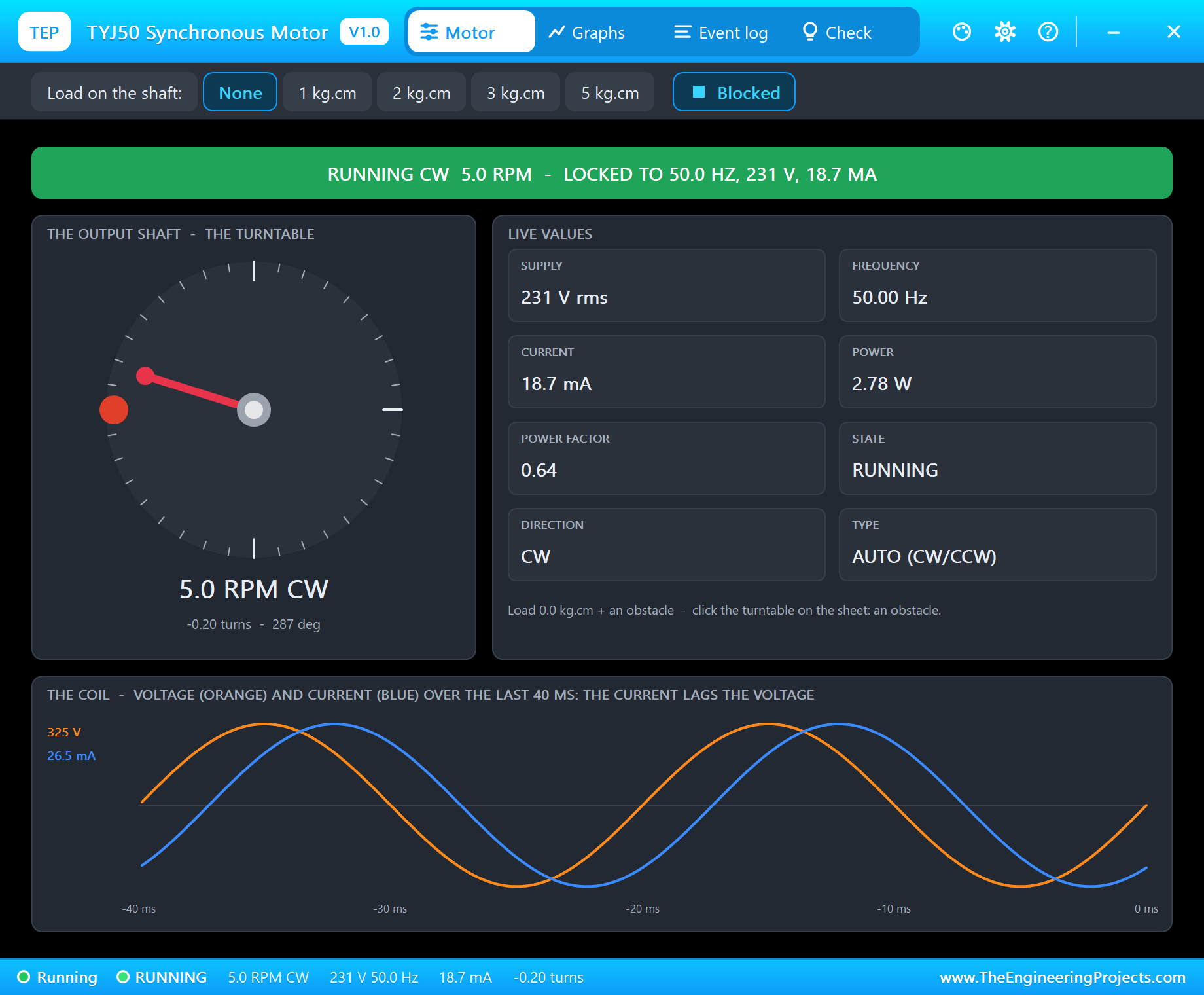
The log says "BLOCKED - the turntable hit an obstacle: the rotor bounced back, now CW". This is the CW/CCW motor's best trick, and it is why a microwave plate that catches on a bowl simply turns the other way. Remove the obstacle, type off and on again, and watch the direction of the new start:
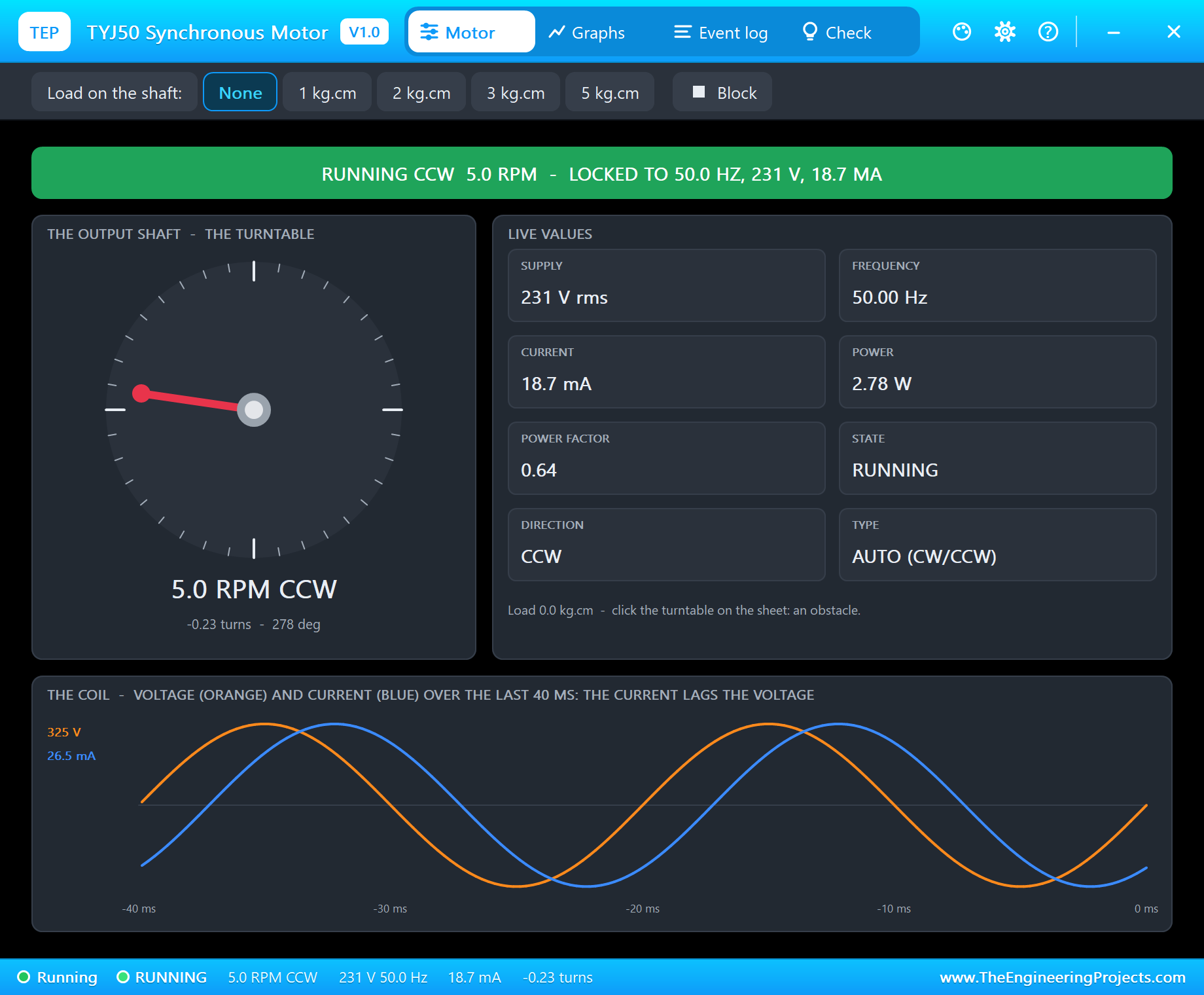
In our run the starts went CCW, CCW, CW, CW, CW, CCW and CW - either way, as the real motor does. If your design needs one direction, set the property DIRECTION to CW or CCW: a one-way motor always starts its own way, and against an obstacle it stalls and hums instead of turning back.
Too Much Load: It Hums
Click 5 kg.cm on the pop-up's toolbar:
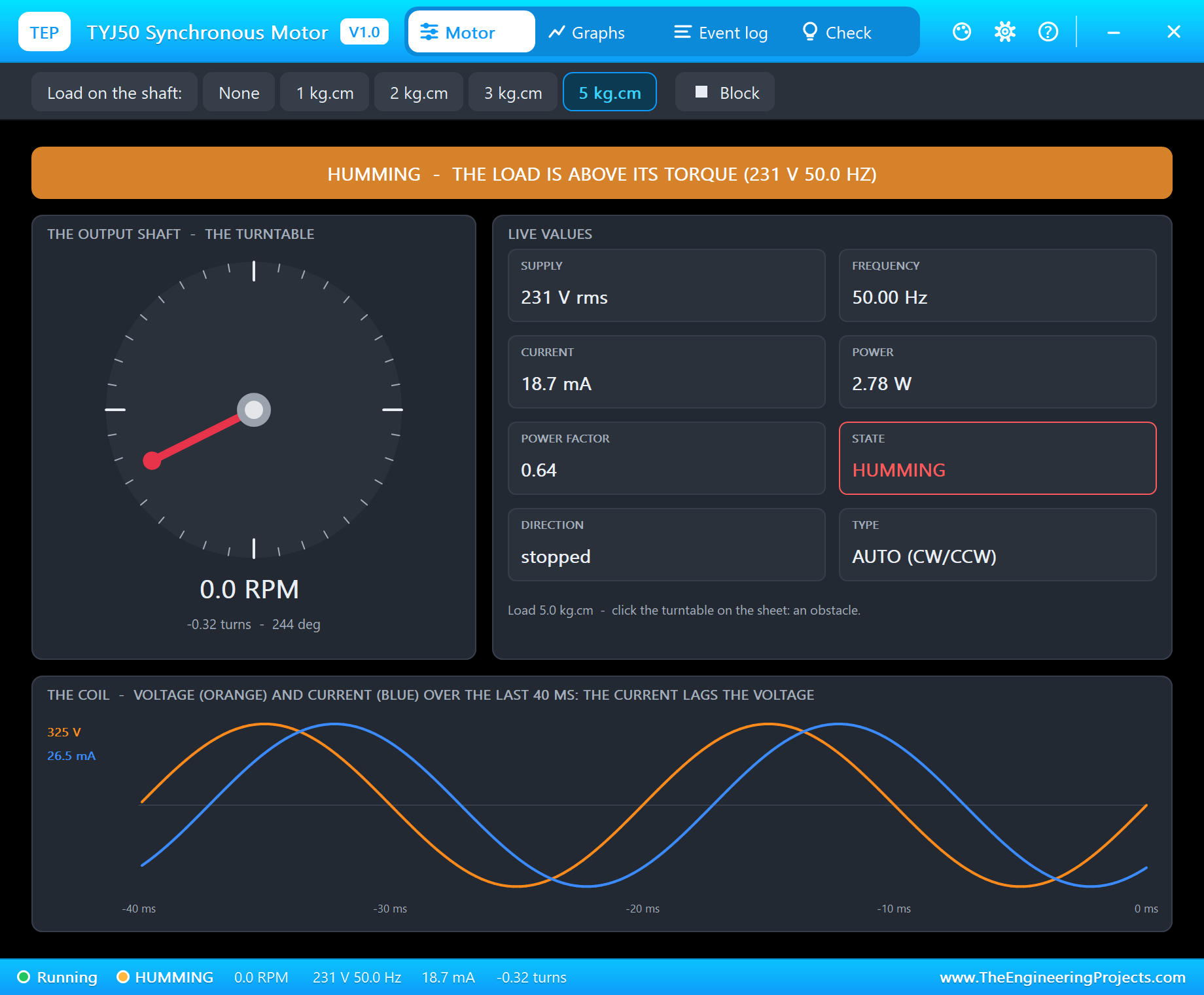
A synchronous motor cannot slow down to find more torque. The 5 kg.cm load is above the 4 kg.cm it can pull, so it falls out of step: "STALLED - the 5.0 kg.cm load is above the 4.0 kg.cm it pulls at 230 V: it hums". The coil still takes its current - a stalled synchronous motor does not burn like a stalled DC motor, it just hums. Take the load off and it starts again by itself.
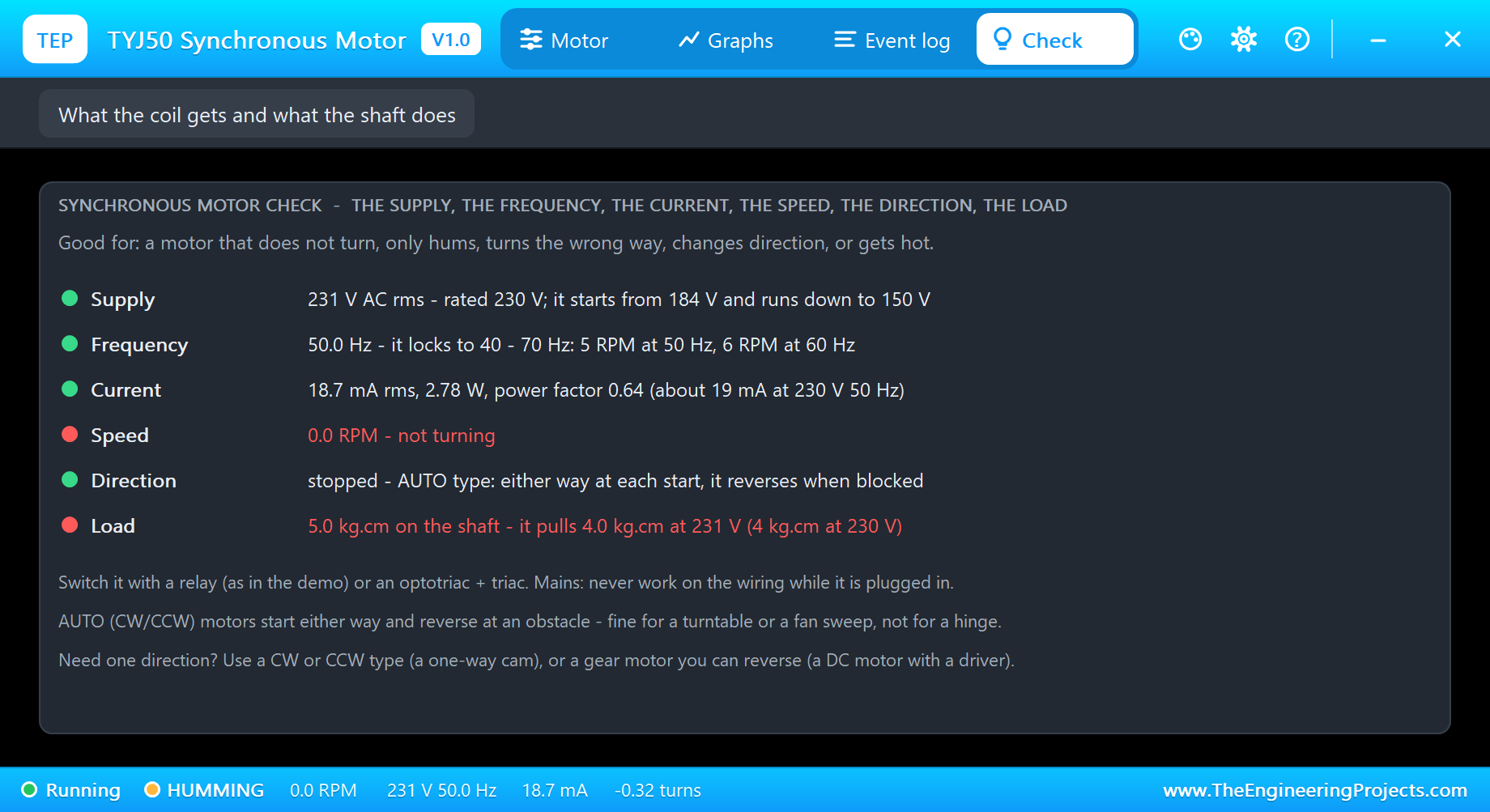
The Check page goes through the supply against the rating, the frequency, the current, the speed, the direction and the load, with tips on switching mains and on the CW/CCW type. The same page tells you when the voltage is too low to start (under 80 %), when the frequency is outside 40 - 70 Hz, or when someone fed it DC.
Timers
Back to no load. run 3 and cycle 2 1 show the sketch's two timers:
run 3
Motor ON - the timer runs
Off in 3 s
Motor OFF - the timer is done
cycle 2 1
Cycle: 2 s on, 1 s off
Motor ON - the cycle starts
Motor OFF - the cycle pauses
Motor ON - the cycle goes on
Motor OFF - the cycle pauses
Motor ON - the cycle goes on
off
Motor OFF - the relay opens
status
OFF for 0.7 s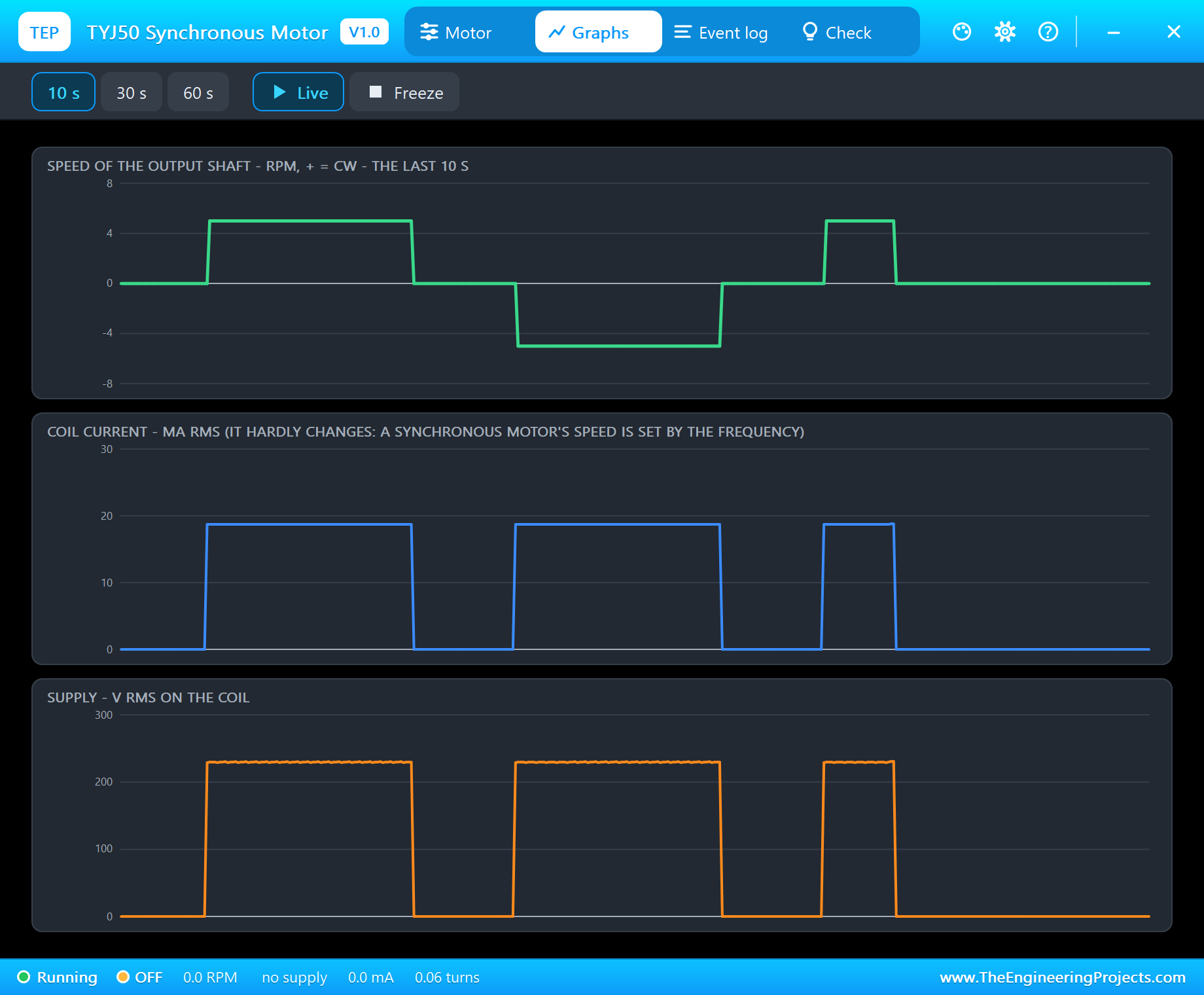
Graphs draws the speed (+ for CW), the coil current and the supply voltage over the last 10, 30 or 60 seconds. The speed is a clean step: 0 or exactly 5 RPM, with the sign of each start's direction. The current and the voltage step with the relay, because a synchronous motor takes nearly the same current running or humming.
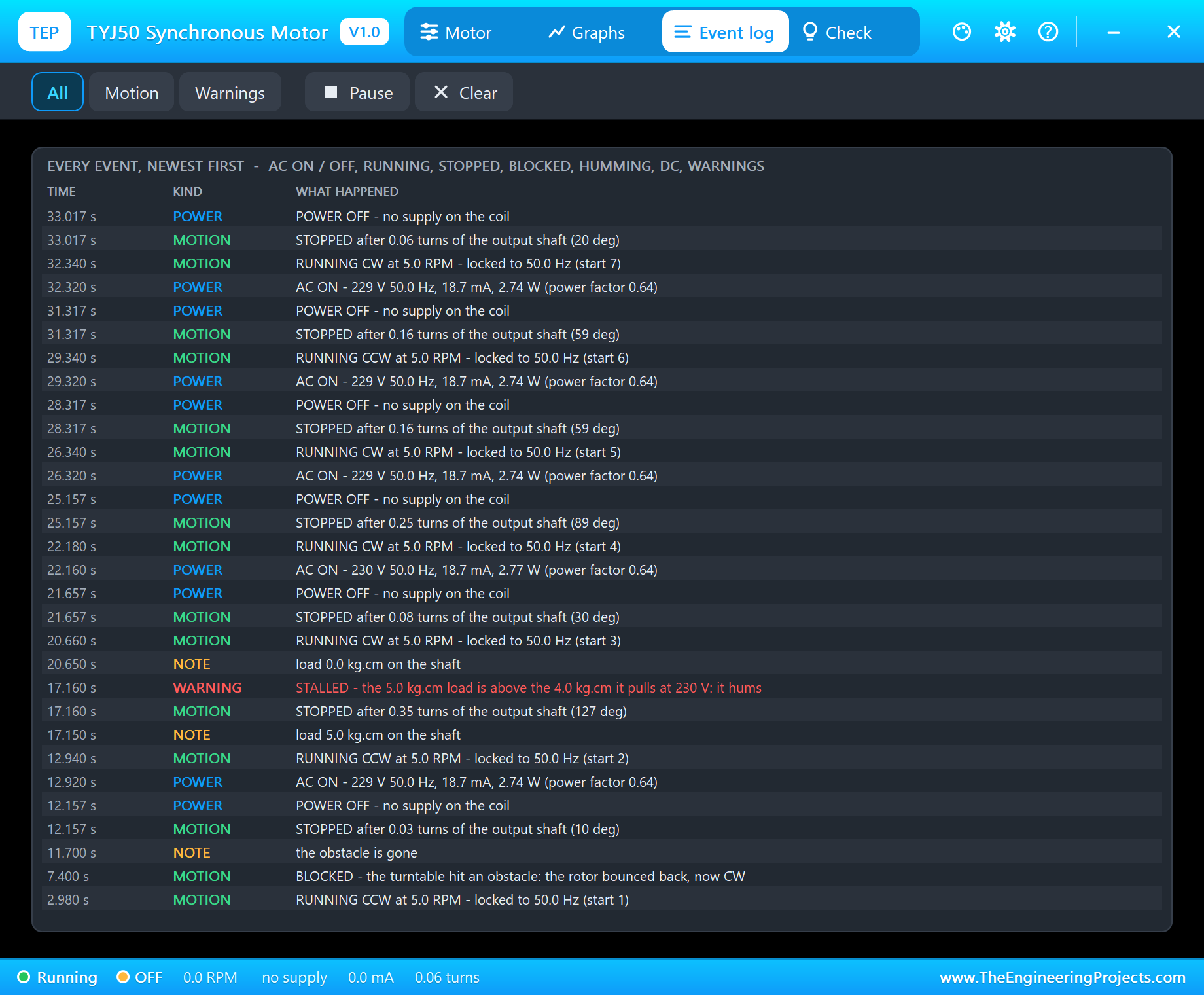
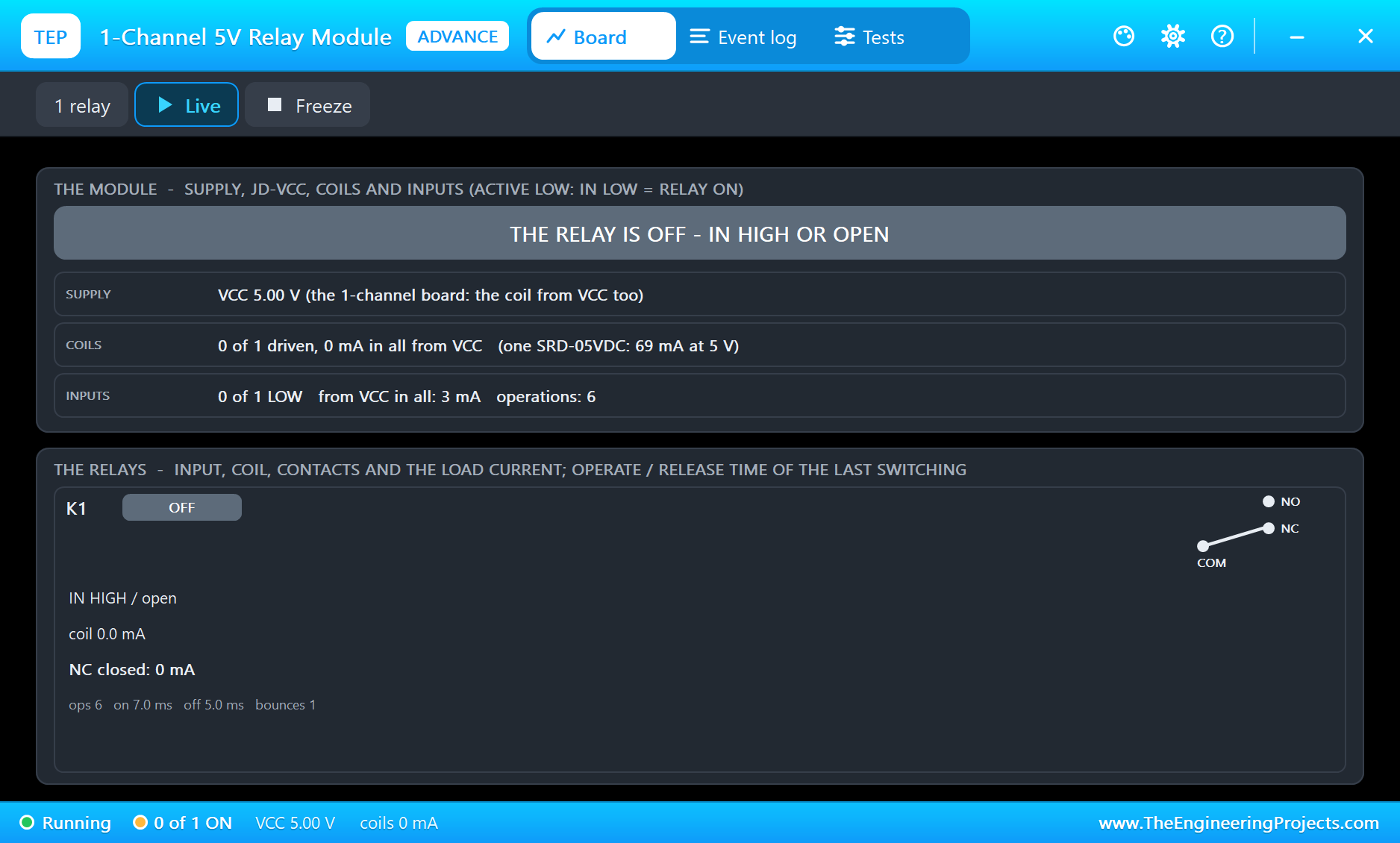
The Event log keeps every start and stop with its turns, the obstacle, the stall and the power going off. The relay module's own window shows the other side of the switching: the input, the coil and the contact.
How the Model Works
The coil is in the circuit as its backward-Euler companion over the analog step - a conductance and a source - so whatever drives it sees a real inductive load: the current lags, and opening the relay gives the coil's kick. While there is a supply the analog step is held to 0.25 ms, 80 points a 50 Hz cycle. At every positive zero crossing the model closes a cycle and computes the frequency, the RMS voltage and current, the power and the power factor; a cycle counts only when its period matches the previous one, so a contact closing, bouncing or opening is never mistaken for the mains.
A small state machine does the rest: two good cycles at 80 % of the rating and 40 - 70 Hz lock the rotor, and it turns at exactly 5 RPM times f / 50 until the voltage drops under 65 %, the frequency leaves the range or the load passes the pull-out torque, 4 kg.cm times the square of the voltage ratio. The direction of an AUTO motor comes from the sign of the first half-cycle and the pole the rotor rested on, which moves on at every stop.
We checked the model on a PC with 25 automatic tests: 230 V 50 Hz gives 5 RPM, about 19 mA, 2.7 W and a power factor of 0.62, 10 s turn the shaft exactly 300 degrees, 60 Hz gives 6 RPM, 150 V hums and 190 V starts, 5 kg.cm stalls, DC holds, an AUTO motor reverses at an obstacle while a CW type hums and runs again when it is gone, the 120 V version takes 32.5 mA at 120 V 60 Hz, and the leak of an open contact is not taken for a supply. The demo project is read back from disk with 63 checks.
Our other motors with a single coil are the 12V Push-Pull Solenoid Library for Proteus, which pulls a plunger, and the 4-Pin PC Fan Library for Proteus, which runs on 12 V DC with a PWM speed input - the opposite end of motor control from this mains-locked motor.
Troubleshooting
- OFF - NO SUPPLY: the relay is off (IN HIGH), L or N is not connected, or the AC source is off.
- HUMMING: too little voltage (under 80 % to start), a frequency outside 40 - 70 Hz, or a load above its torque - the Check page says which.
- DC: a synchronous motor needs AC; on DC it only holds the rotor and heats.
- It turns the wrong way: the AUTO type chooses at every start - set DIRECTION to CW or CCW.
- The simulation will not start: tie the AC source's other side and the motor's N to ground.
- No relay in Pick Devices: install our Relay Module library (
TEPRELAY.LIB/TEPRELAY.DLL). - No turntable, no UNO or no monitor:
TEPTYJ50.DLLorTEPARDUINO.DLLis missing from MODELS and the project folder; a closed monitor opens again with a click on the UNO's USB port.
Things to Know Before Using a Real TYJ50
- Mains voltage can kill: wire with the plug out, insulate every mains connection, put the relay board in a closed box and fuse the live wire. If you are not sure, use the 24 V or 12 V AC version with a transformer.
- A relay or a triac: a relay module (as in the demo) or an optotriac with a triac switches it; it needs no driver and no speed control.
- Pick the right type: CW/CCW for turntables and fan sweeps, a CW or CCW type for anything that must move one way.
- Frequency matters: the same motor turns 20 % faster on 60 Hz mains.
Limitations of the Simulation
- Not modelled: the rotor's swing as it locks, the gear backlash, heating, the back-EMF of the turning rotor and the noise.
- The plate, the AC LED, the turntable disc, the strip and the obstacle are TEP additions.
- The model is our own, written from the typical data of TYJ50 / 50TYZ permanent-magnet synchronous gear motors; this library is not made or endorsed by any motor maker, Arduino or Labcenter.
- Licences: the demo HEX contains the Arduino AVR core 1.8.6 (LGPL); the sketch is included and the README gives the source link. The AC source is Proteus's own ALTERNATOR; the relay module is our separate library.
- Tested in Proteus 8.5 in October 2026 with the demo as shipped: on, the obstacle, off and on, the 5 kg.cm load, run 3, cycle 2 1, all four pages of the pop-up and the relay's pop-up. Proteus 7 is not supported.
So, that was all about the TYJ50 Synchronous Motor Library for Proteus V1.0. I hope it helps you add a slow, steady turntable to your next project - and explains why your microwave plate sometimes turns the other way. If you have any questions, ask in the comments and I will help you out. Till the next tutorial, take care and have fun!