Hello friends, I hope you all are doing great. Today, I am going to share the STM32 Nucleo-F401RE Library for Proteus. The Nucleo-F401RE is ST's own development board: an STM32F401RET6 - an ARM Cortex-M4 with a floating-point unit at 84 MHz, 512 KB of flash and 96 KB of RAM - with a debugger on board and the Arduino UNO headers, so Arduino shields plug straight on. With this library it runs your STM32 Arduino sketch in Proteus 8.5, with the Arduino pin numbers and the STM32 names of the header pins.
STM32 Nucleo-F401RE Library for Proteus
Latest version: V1.0 (October 2026, this tutorial)
Other new Arduino boards: UNO R4 WiFi · Nano ESP32 · UNO WiFi Rev2 · Nano 33 IoT · UNO Q · UNO R4 Minima · Nano Every · MKR WiFi 1010 · Nano RP2040 Connect · STM32 Black Pill · STM32 Blue Pill · Teensy 4.1 · Arduino Due · Arduino Leonardo · Arduino Micro · BBC micro:bit V2 · GIGA R1 WiFi
Temperature and weather sensors: DHT11 / DHT22 · DS18B20 · BME280 · BMP280 · SHT31 · AHT20 · BME680 · MLX90614 · MAX6675
Ethernet libraries: Ethernet Shield · Ethernet Shield 2 · W5500 Module · W5100 Module · ENC28J60 Module · ENC28J60 Nano Shield · Ethernet Rev3 · LAN8720 Module · WT32-ETH01 · USR-TCP232-T2
Modules: Micro SD · MAX485 RS485 · MCP2515 CAN · DS3231 RTC · DFPlayer Mini
Helping Tools
- Laptop WiFi Monitor: a laptop on the Wi-Fi of your design: a browser, a TCP / UDP terminal and ping
- Mobile WiFi Monitor: a smartphone that opens the pages of your board and sends it commands
- Serial Monitor Advance: a serial terminal window for the UART of your board
The demo is a weather data logger: a barometer that keeps a diary. A BMP280 measures the temperature and the air pressure, a DS3231 clock stamps every reading, and an Arduino Ethernet Shield 2 on the Nucleo writes them to its micro SD card and serves a page to a phone and a laptop. When the pressure falls fast, the logger warns that a storm is on the way.
NOTICE: Proteus has no STM32F401 model, so our team has put a lot of effort into building this board ourselves: the Nucleo's pins, buttons and LEDs are all our own model, and your sketch compiles with our free TEP Boards for Proteus add-on. Your feedback is the fuel that keeps us going, so please tell us what you think in the comments below or in the STM32 Nucleo-F401RE board of our forum. And if our free libraries help you, you can buy us a coffee. So, let's get started with the STM32 Nucleo-F401RE Library for Proteus:
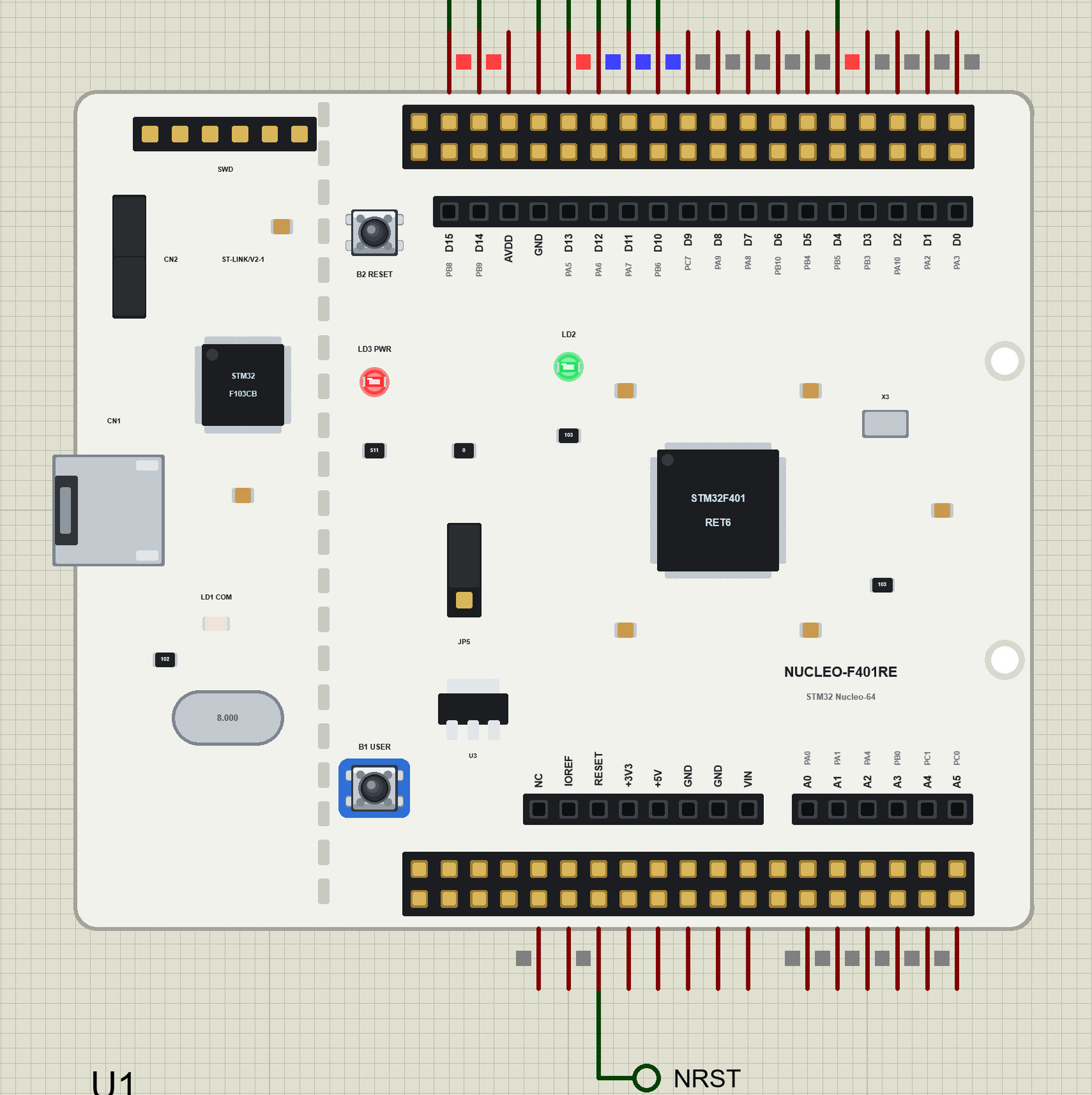
What is the STM32 Nucleo-F401RE?
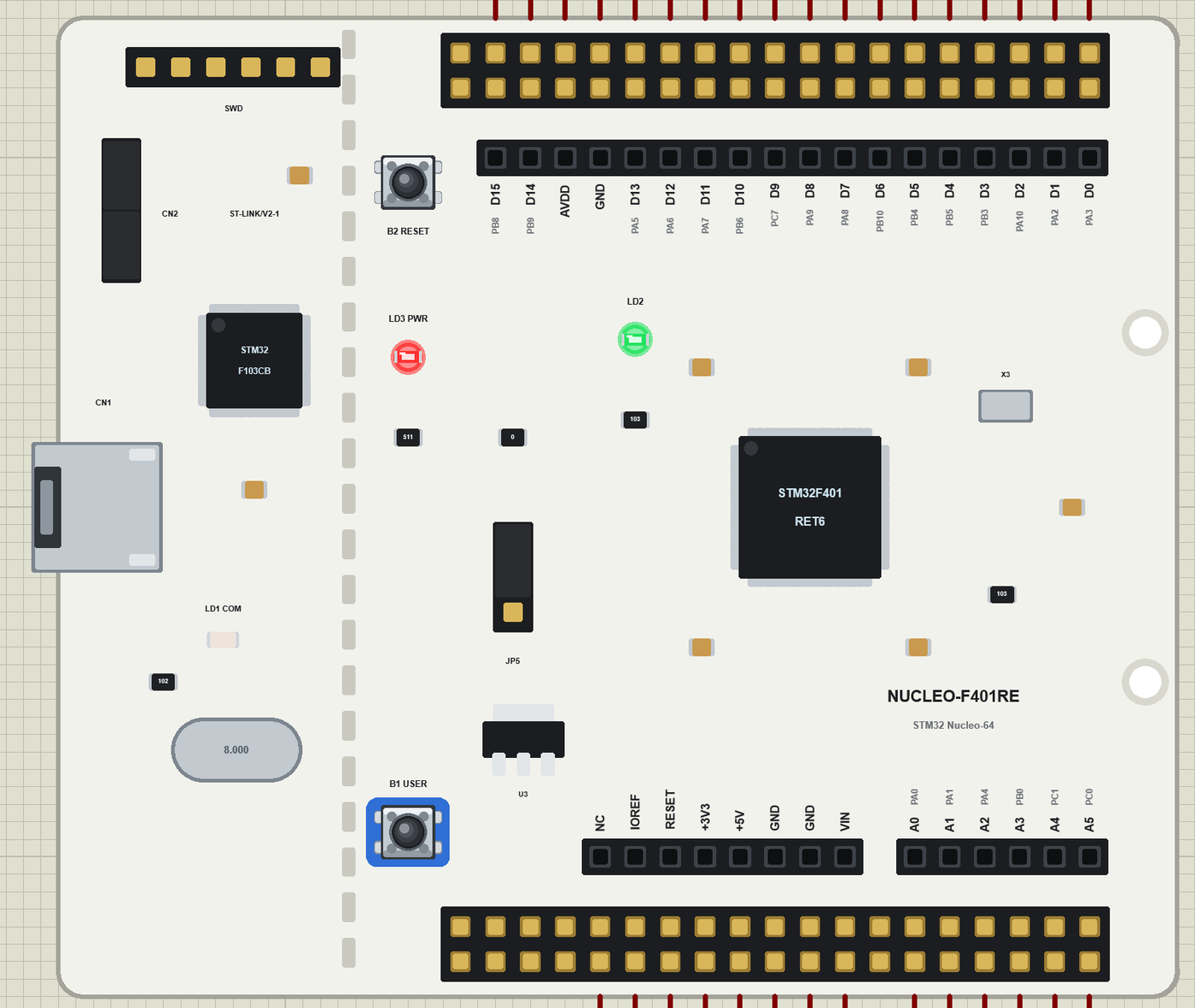
ST makes the Nucleo boards to get engineers started with its chips quickly. The NUCLEO-64 family shares one white board: the STM32 in the middle, the Arduino UNO R3 headers around it, and outside them the two long ST Morpho headers that bring out every pin of the chip. The end with the mini-USB is an ST-LINK/V2-1 debugger: it programs the board, debugs it and gives it a serial port over the same cable - you can even break it off and use it for your own boards. The blue B1 USER button sits on PC13, the black B2 resets the board, and the green LED LD2 is on PA5, the Arduino pin D13.
| Nucleo-F401RE | Arduino UNO R3 | |
|---|---|---|
| Chip | STM32F401RET6, Cortex-M4F at 84 MHz | ATmega328P, 8-bit AVR at 16 MHz |
| Memory | 512 KB flash, 96 KB RAM | 32 KB flash, 2 KB RAM |
| Programmer | ST-LINK/V2-1 on board (mini-USB) | ATmega16U2 USB bootloader |
| Headers | Arduino UNO R3 + 2 x 38 ST Morpho | Arduino UNO R3 |
| Buttons, LEDs | B1 USER (PC13), B2 RESET; LD1 COM, LD2 (PA5), LD3 power | RESET; L (D13), ON, TX, RX |
| Logic | 3.3 V | 5 V |
Why the STM32 Nucleo-F401RE?
The Nucleo is the board ST's own examples are written for, and the one many university labs use. It is the easy way into STM32: no programmer to buy, the Arduino IDE through STM32duino or ST's own STM32CubeIDE, and the whole range of Arduino shields. Where our STM32 Black Pill Library for Proteus is small enough for a breadboard, the Nucleo is the bench board: plug a shield on, wire a few modules, and debug.
Features of the STM32 Nucleo-F401RE Library for Proteus
- The board as it looks: the white Nucleo-64 with the ST-LINK end, the Morpho rows, the Arduino headers, B1 and B2, LD1, LD2 and LD3, the STM32F401 and its crystal.
- Your sketch: a .hex for "STM32 Nucleo-F401RE (TEP Proteus)" with the Arduino numbers D0 to D15, A0 to A5 and their STM32 names (PA5, PB8 ...), LED_BUILTIN = PA5, USER_BTN = PC13, analogRead, analogWrite, attachInterrupt, Serial, Serial1, Wire on D14 / D15, SPI on D10 to D13.
- Arduino shields: each pin sits where the shield expects it, so a shield's part wires pin for pin.
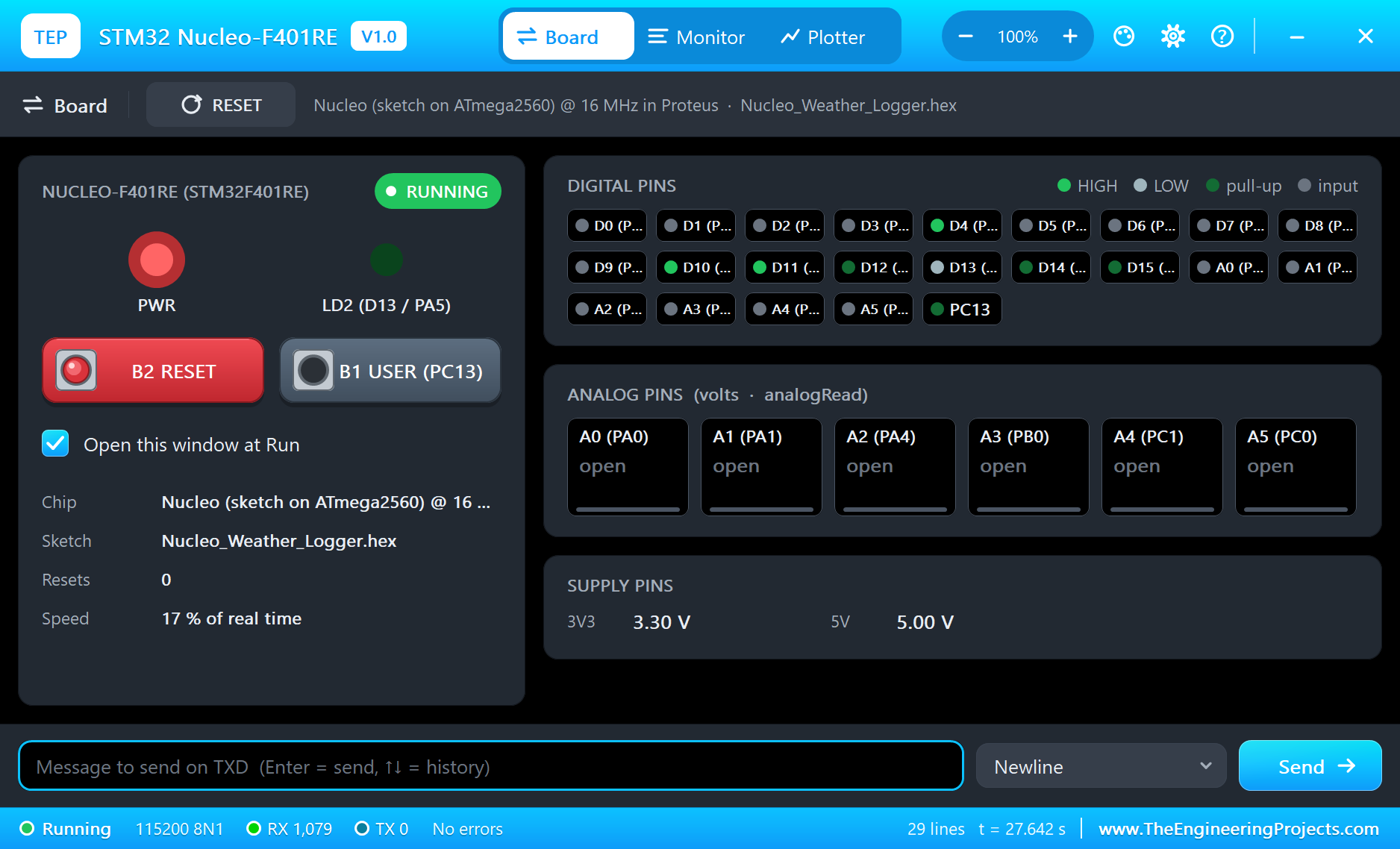
- The buttons and LEDs: B1 pulls PC13 LOW, B2 resets the board, LD2 lights when D13 is HIGH, LD3 shows the power.
- The serial monitor: the built-in monitor on the ST-LINK's USB with Monitor, Plotter and Board tabs - our TEP header, no Windows title bar.
- A complete package: about 3.7 MB with the board, the add-on, the BMP280, DS3231 and Ethernet Shield 2 libraries and the demo, without the source code of the models.
The STM32 Nucleo-F401RE in Proteus
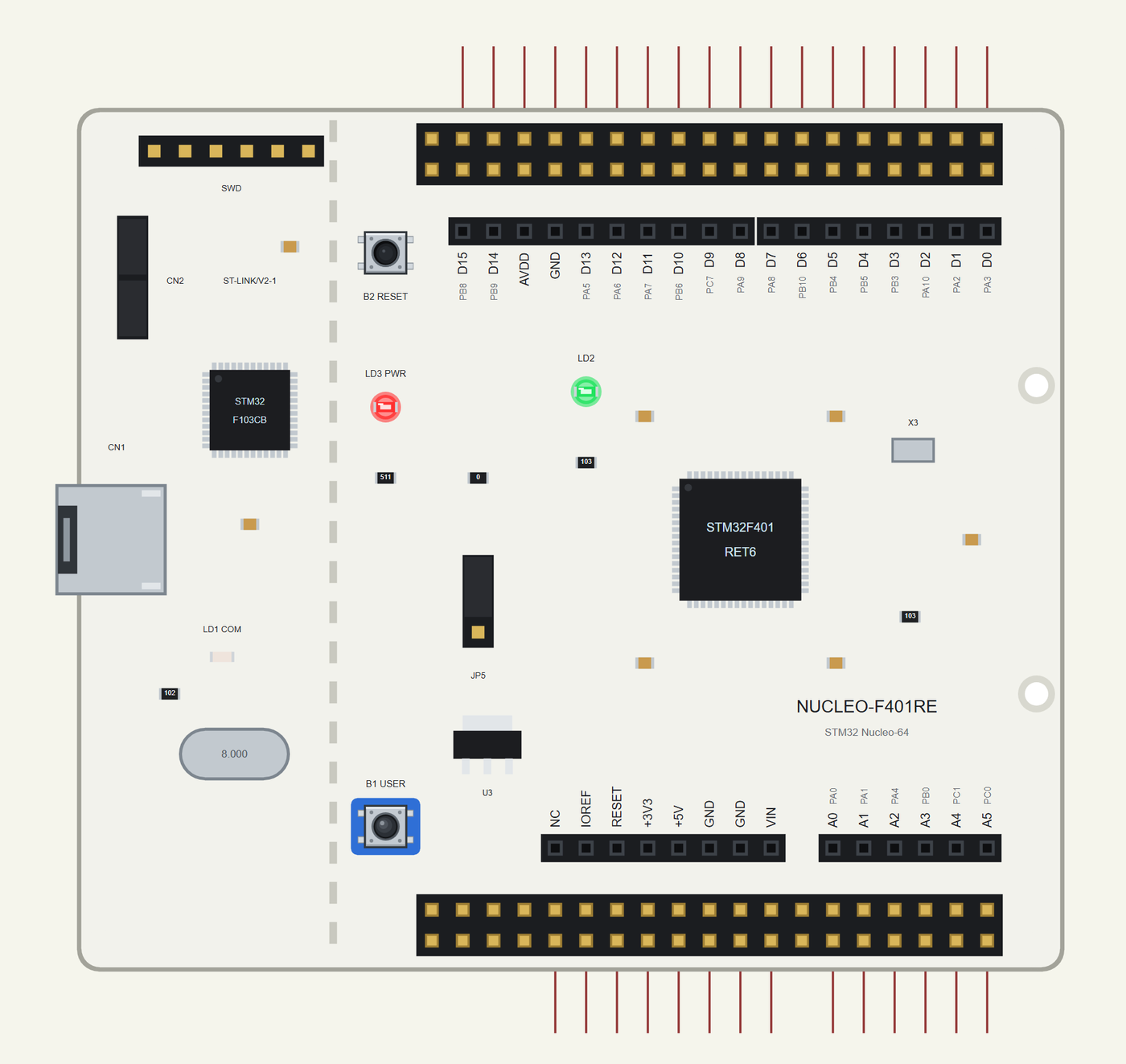
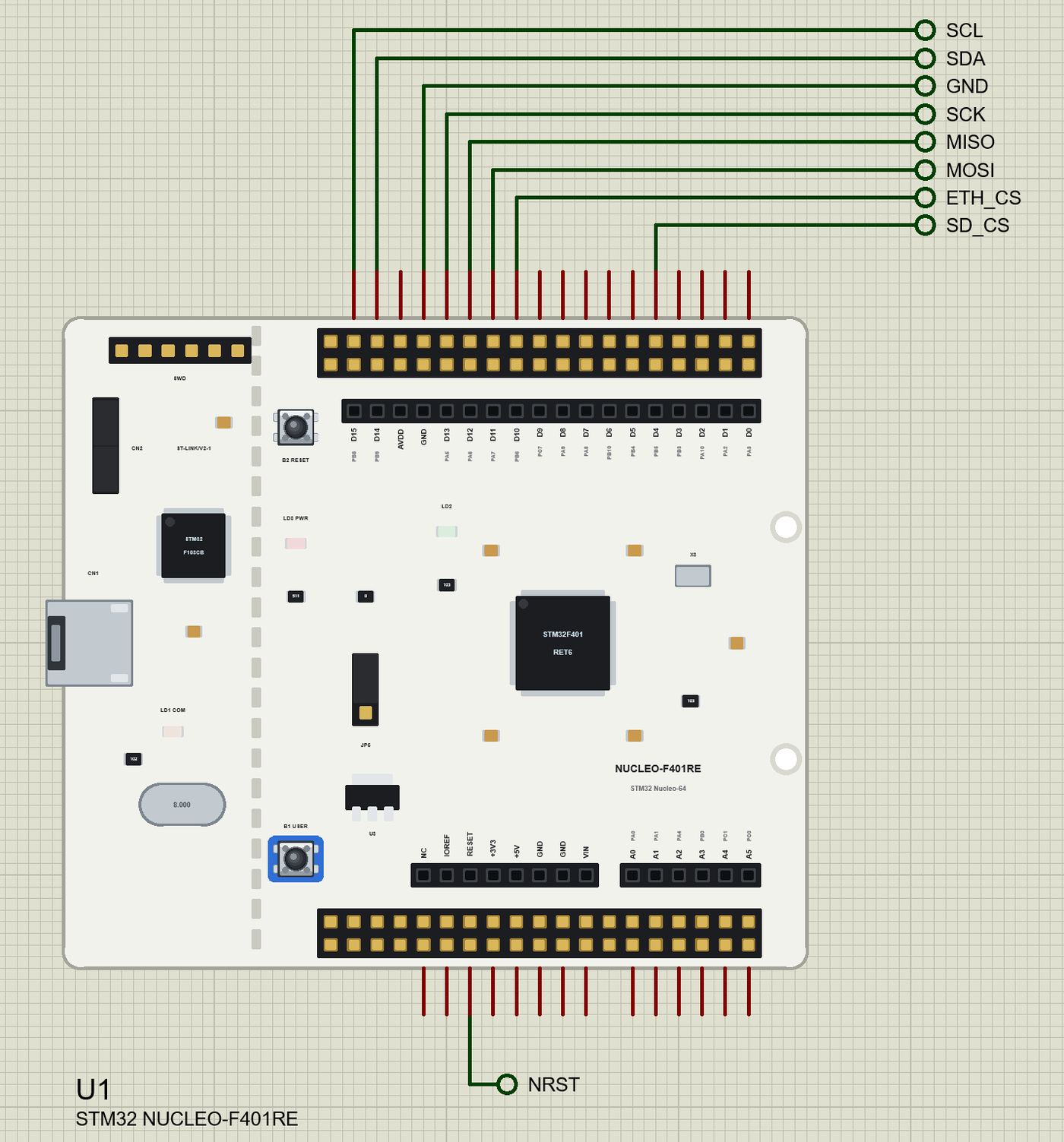
Search NUCLEO in Pick Devices; the device STM32 NUCLEO-F401RE is in TEPNUCLEOF401RE.LIB (Microprocessor ICs, STM32 Boards), with the prefix U. The board lies with the ST-LINK on the left, like an UNO: the digital header (D15 to D0) along the top, the power and analog headers along the bottom. Every pin leaves the board right above or below its Morpho twin. The other Morpho pins are drawn only. Click the mini-USB port to open the serial monitor.
The Pins
| Pins | STM32 | What the library does with them |
|---|---|---|
| D0 to D15 | PA3, PA2, PA10, PB3, PB5, PB4, PB10, PA8, PA9, PC7, PB6, PA7, PA6, PA5, PB9, PB8 | GPIO, PWM, interrupt |
| A0 to A5 | PA0, PA1, PA4, PB0, PC1, PC0 | analogRead 0 to 1023 for 0 to 3.3 V, GPIO |
| D8 / D2 | PA9 / PA10 | Serial1 TX / RX (USART1) |
| D14 / D15 | PB9 / PB8 | Wire SDA / SCL |
| D10 to D13 | PB6, PA7, PA6, PA5 | SPI SS / MOSI / MISO / SCK; D13 is also LD2 |
| B1 USER | PC13 | USER_BTN, LOW when pressed |
| RESET | NRST | B2: LOW holds the board in reset |
| +3V3, +5V, IOREF, GND | 3.3 V, 5 V, 3.3 V, ground |
Download STM32 Nucleo-F401RE Library for Proteus
Click the button below to download STM32-Nucleo-F401RE-Library-for-Proteus-v1.0.zip (about 3.7 MB, without the source code of the models):
STM32 Nucleo-F401RE Library for Proteus V1.0- README.txt: installation, the demo, the pins, the properties, troubleshooting and the limits.
- Proteus Library Files:
TEPNUCLEOF401RE.LIBand the demo's parts:TEPBMP280.LIB,TEPDS3231.LIB,TEPETHSHIELD2.LIB,TEPLAPTOP.LIBandTEPMOBILE.LIB. - Proteus Model Files:
TEPNET.DLL(the board, the Ethernet Shield 2, the laptop, the phone and the network),TEPBMP280.DLLandTEPDS3231.DLL. - Arduino Code: the demo sketch and the TEP Boards for Proteus add-on 1.27.0.
- Proteus Simulation: the demo project, its HEX file and copies of the DLLs.
No Proteus yet? Read How to Download and Install Proteus 7 and 8. New to libraries? Follow How to Install a New Library in Proteus.
How to Install STM32 Nucleo-F401RE Library for Proteus
- Close Proteus and extract the whole zip file, for example to your Desktop.
- Copy the files from Proteus Library Files into the LIBRARY folder of Proteus.
- Copy the DLLs from Proteus Model Files into the MODELS folder, replacing an older TEPNET.DLL.
- Delete
TEPNUCLEOF401RE.IDXfrom the LIBRARY folder if it is there. - For your own sketches, copy Arduino Code\TEP Boards for Proteus\hardware into your Arduino sketchbook (Documents\Arduino) and restart the Arduino IDE; the board is STM32 Nucleo-F401RE (TEP Proteus). For the demo install Ethernet, SD, Adafruit BMP280 and RTClib from the Library Manager.
- Start Proteus, press P and search for NUCLEO.
Demo: a Weather Data Logger
Long before weather apps, sailors read the barometer: a pressure that falls fast means a storm within hours, a pressure that rises means fair weather. A logger that writes the pressure down every few minutes shows the trend at a glance - and keeps the record for later. The Nucleo does the logging, the Ethernet Shield 2 gives it a card and a network port.
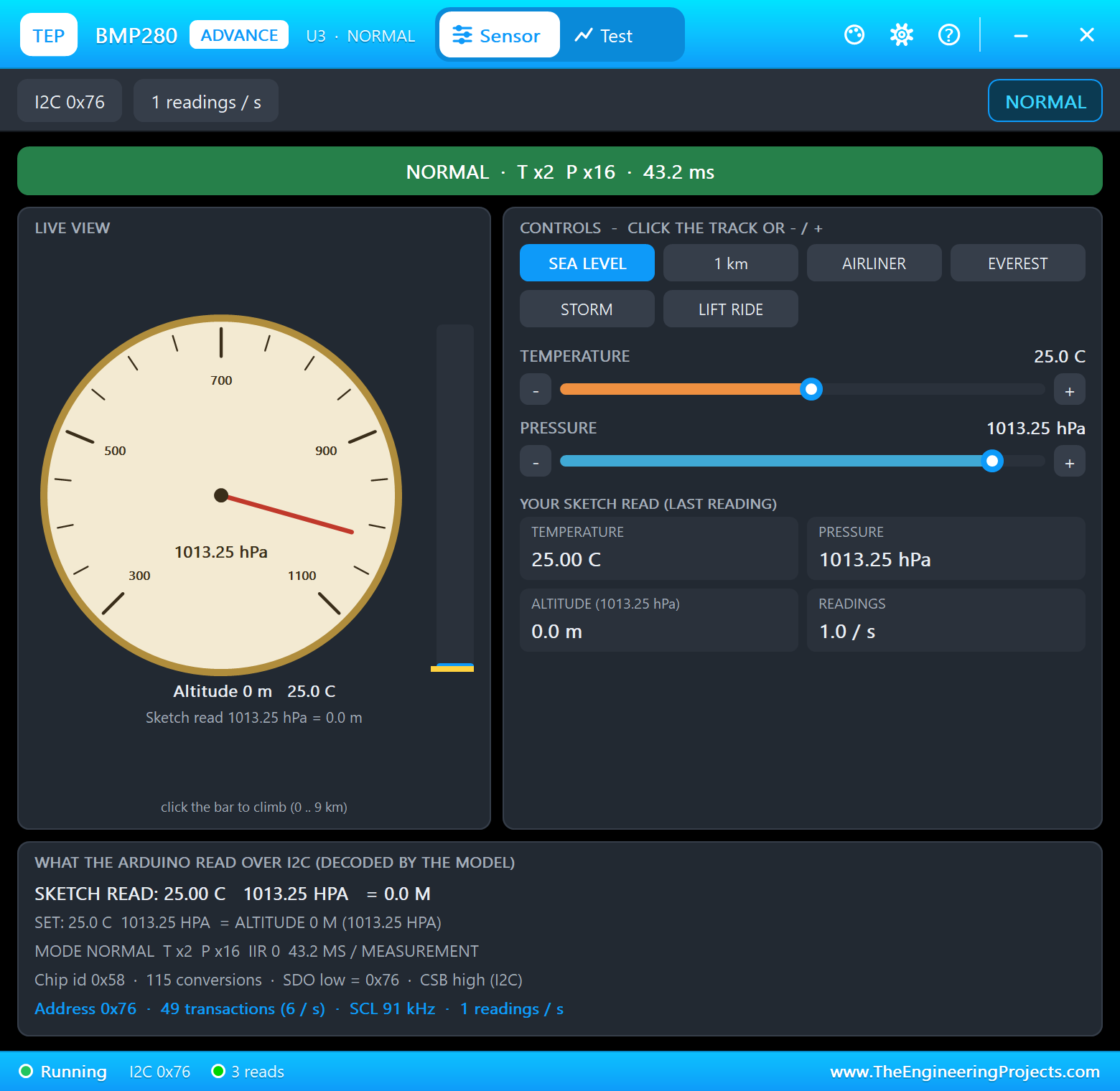
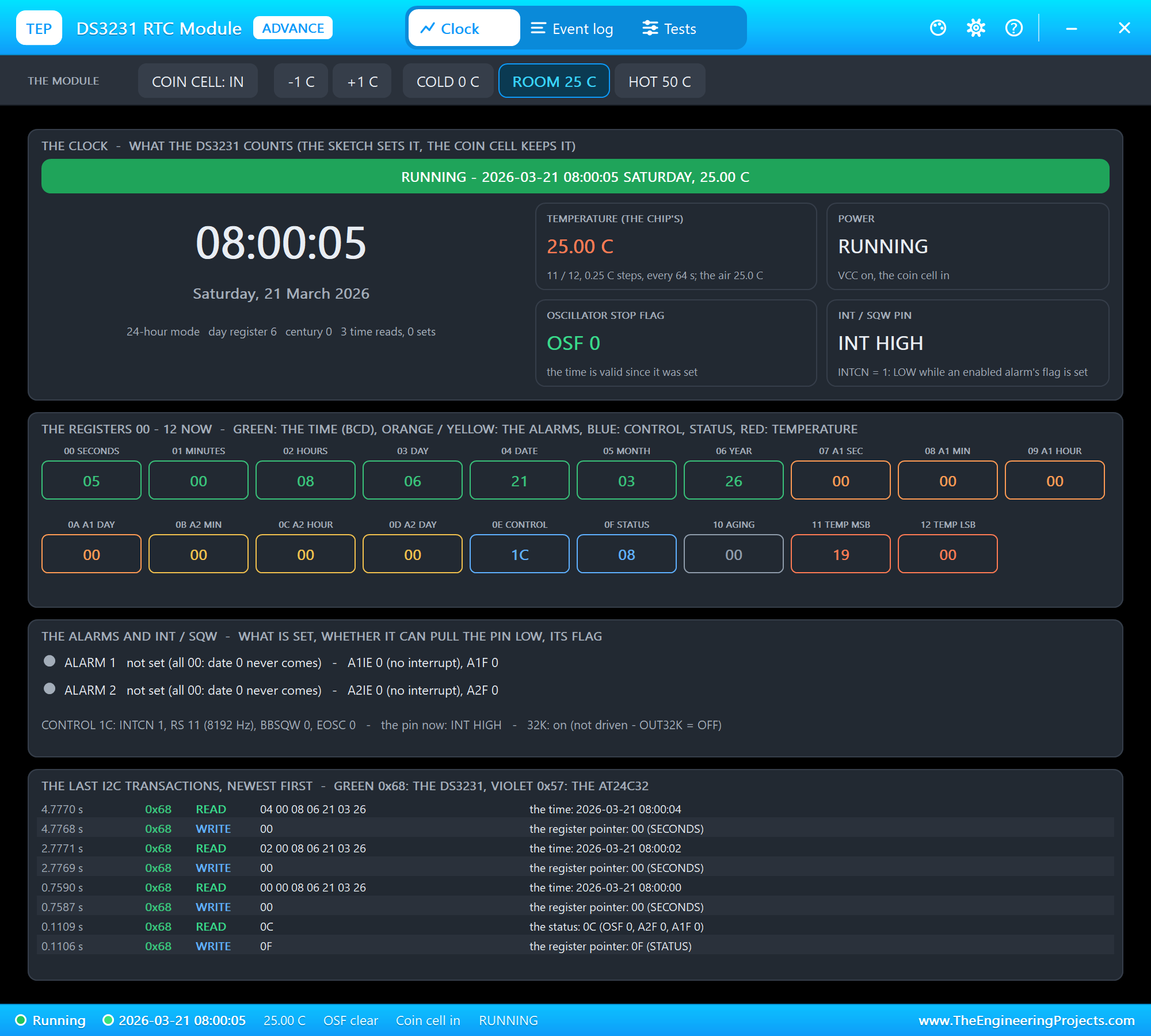
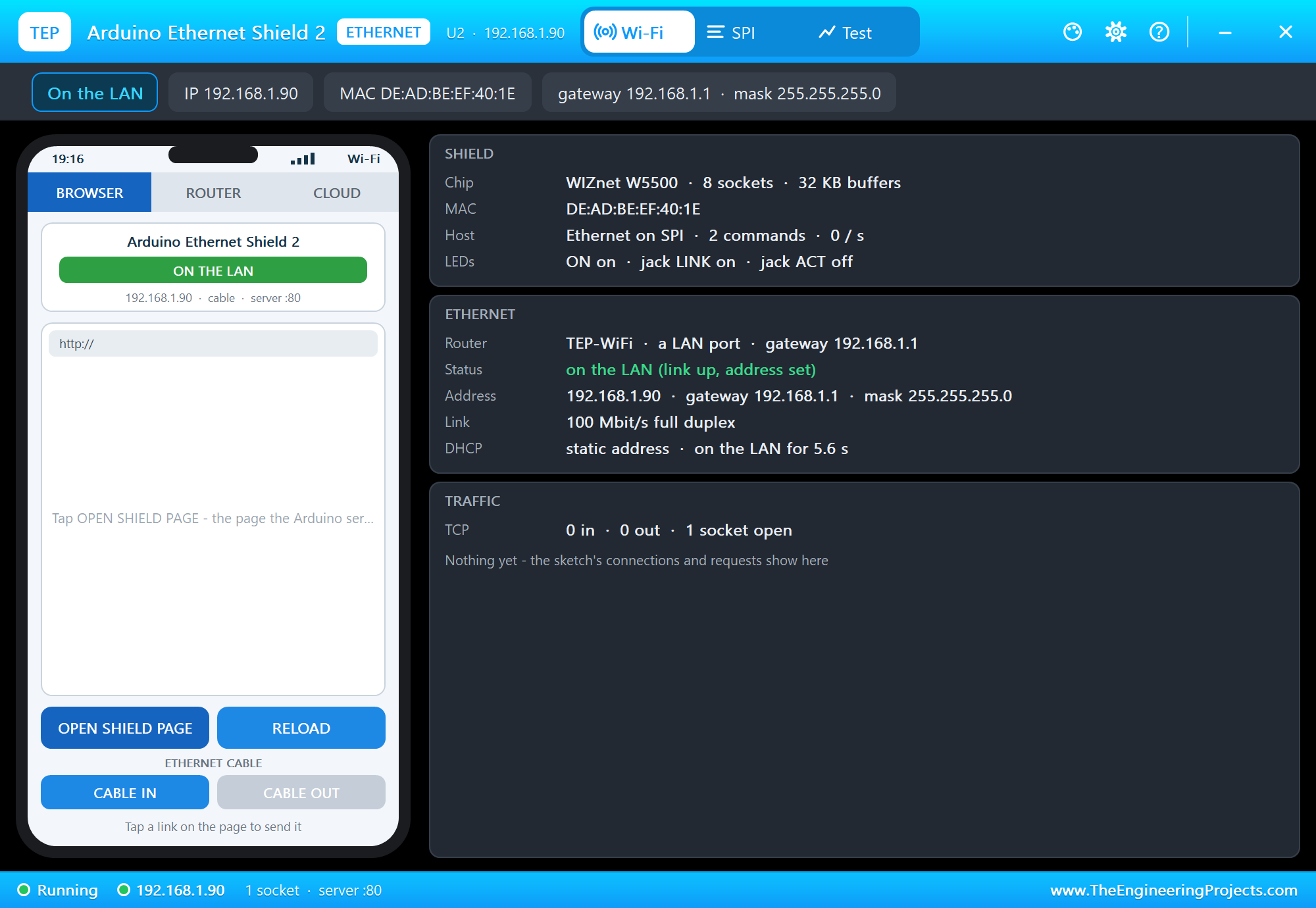
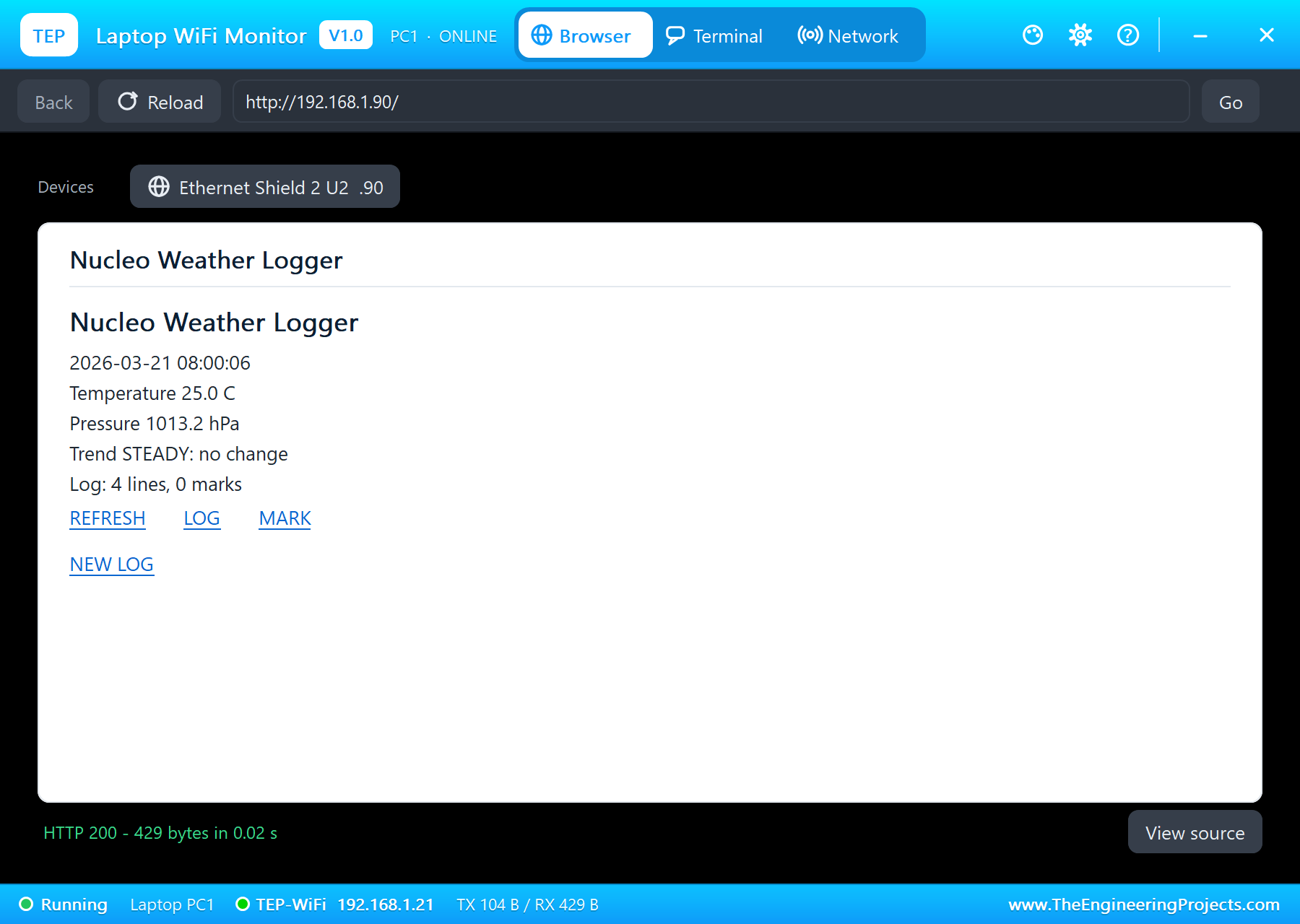
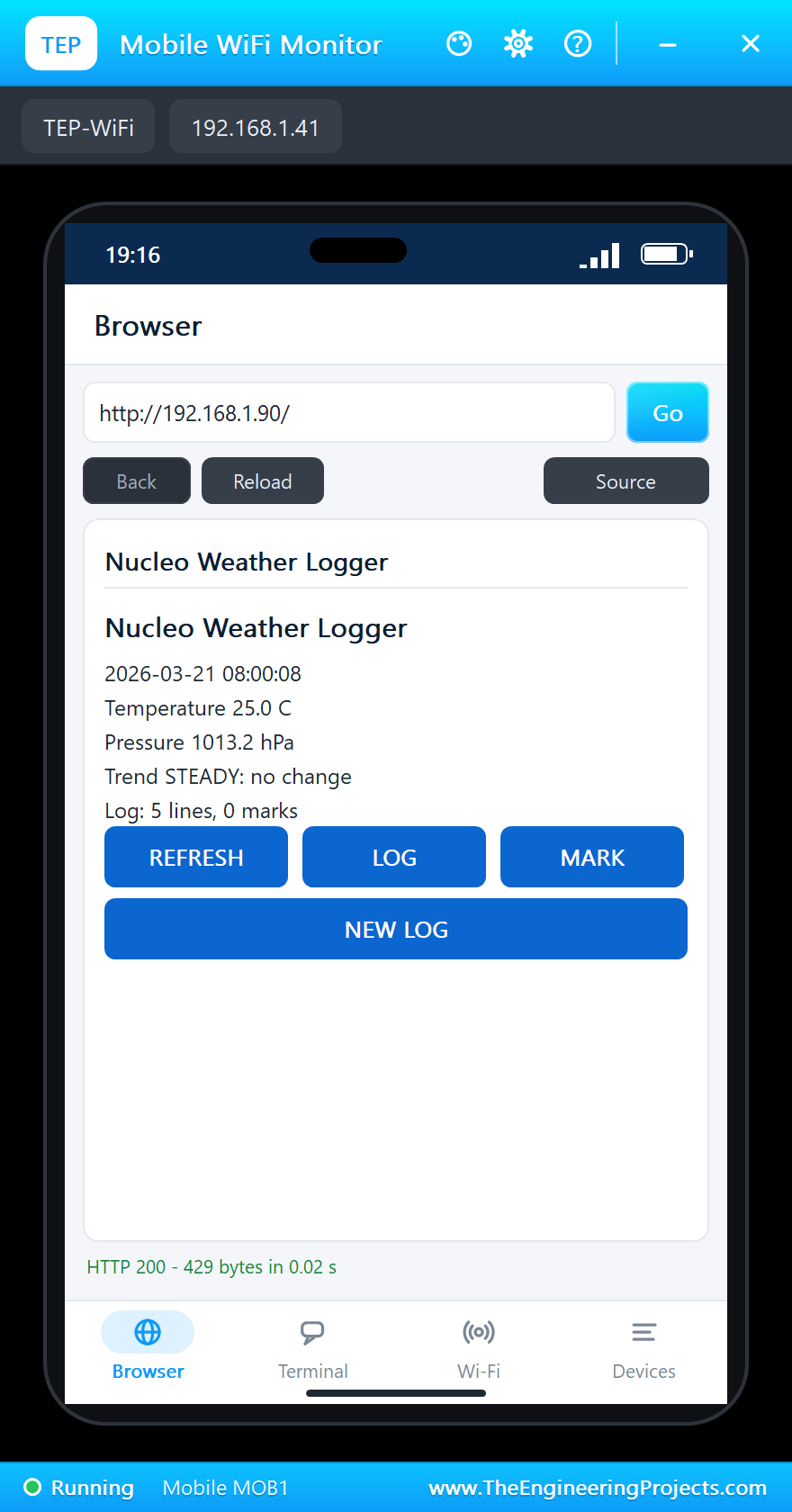
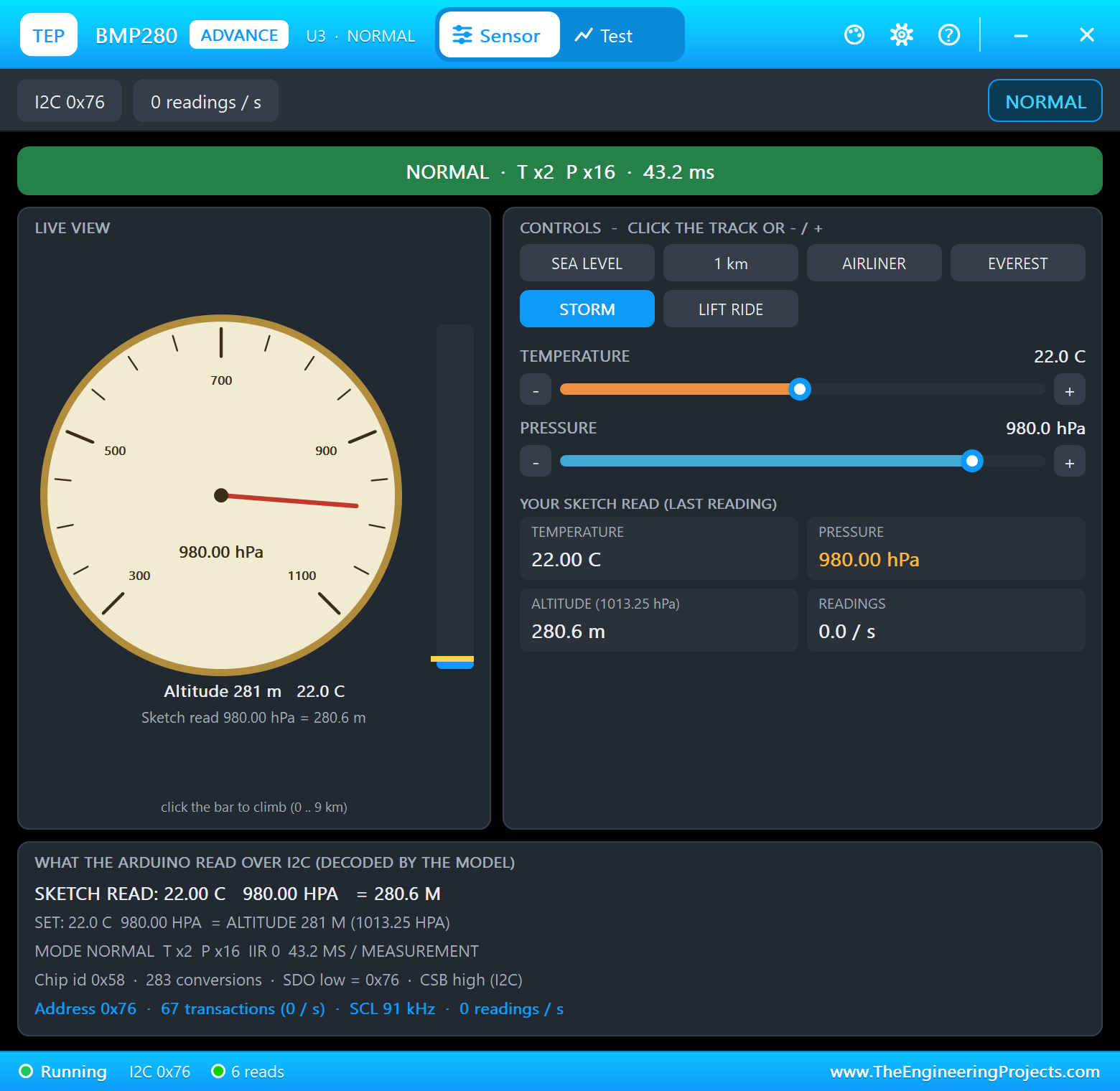
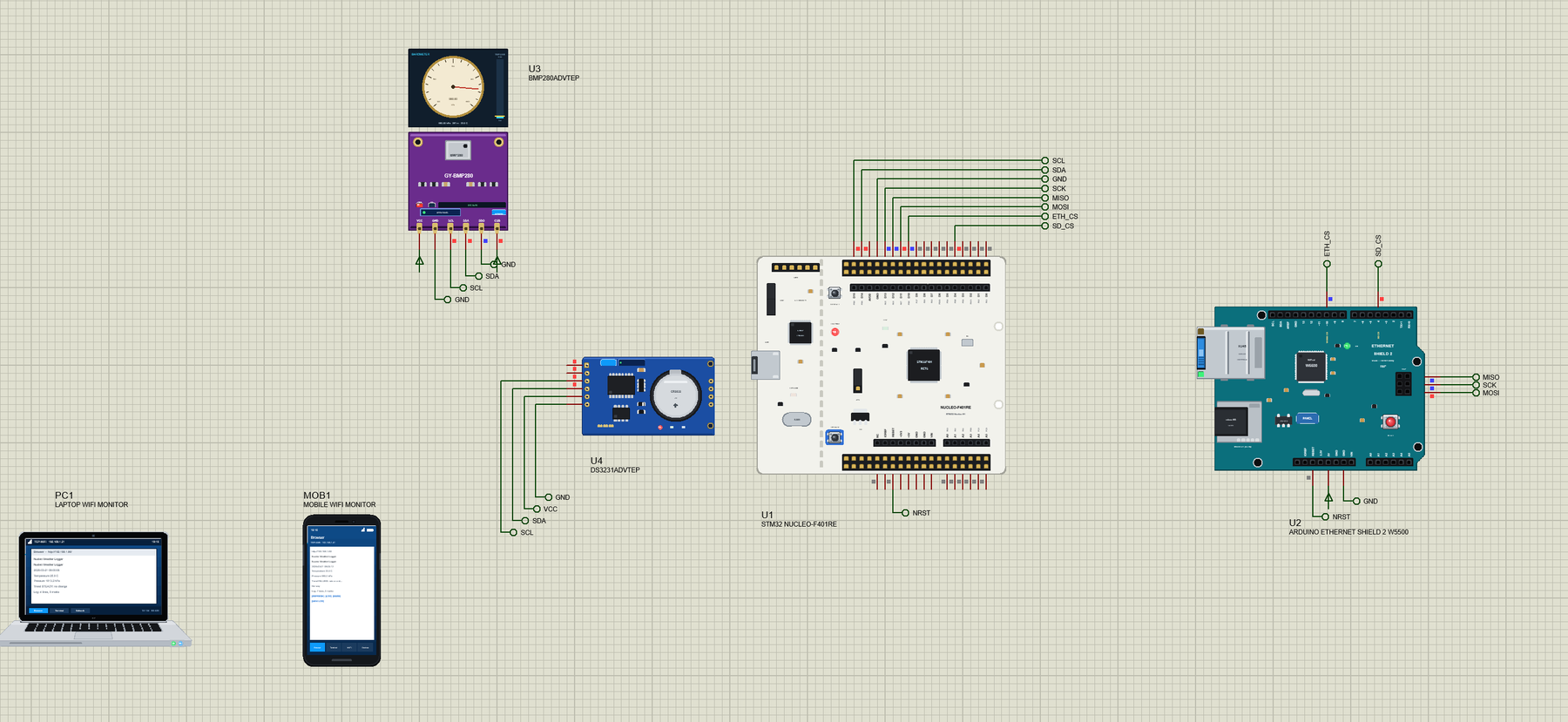
Open Nucleo-Weather-Logger.pdsprj. U1 runs Nucleo_Weather_Logger.hex. U3 is the GY-BMP280 board from our BMP280 Library for Proteus, U4 the ZS-042 module from our DS3231 RTC Module Library for Proteus and U2 the shield from our Arduino Ethernet Shield 2 Library for Proteus. The sensors are the Advance versions: each opens its pop-up window at Run, as the shield does. PC1 is the Laptop WiFi Monitor and MOB1 the Mobile WiFi Monitor.
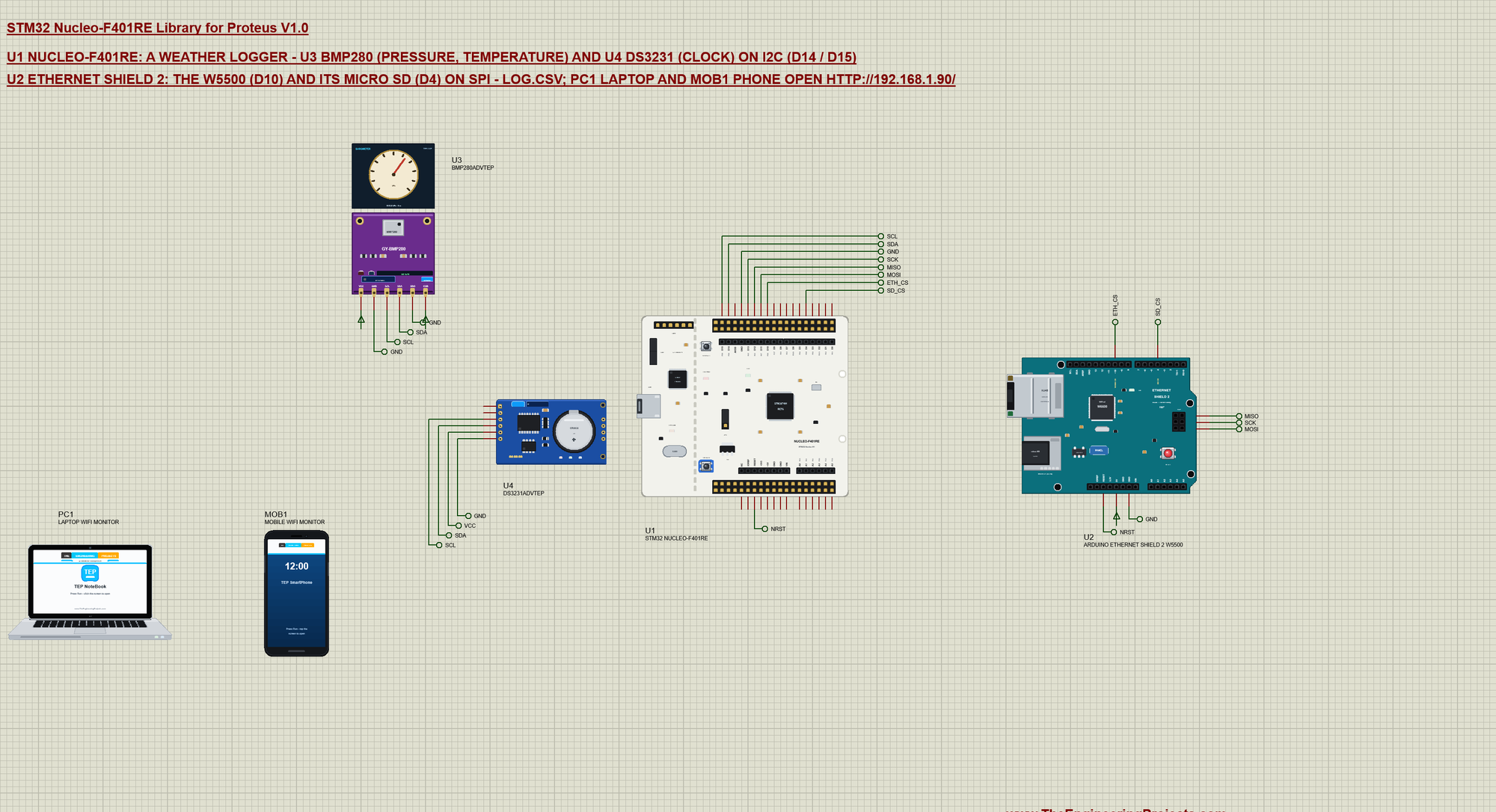
| Part | Pins | Nucleo pins | Notes |
|---|---|---|---|
| BMP280 (U3) | SDA, SCL | D14, D15 | address 0x76: SDO on GND, CSB on VCC (I2C mode) |
| DS3231 (U4) | SDA, SCL | D14, D15 | address 0x68, the clock starts at TIME |
| Ethernet Shield 2 (U2) | MOSI, MISO, SCK | D11, D12, D13 | SPI, shared by the W5500 and the card |
| CS, SDCS | D10, D4 | the W5500 (192.168.1.90) and the micro SD card | |
| RESET | RESET | the board's reset | |
| All three | VCC, GND | power rail, GND | the power terminals of the demo |
Two buses do all the work. The BMP280 and the DS3231 share I2C because each has its own address; the W5500 and the card share SPI because each has its own chip select - only the device whose CS is LOW listens. Both chip selects go HIGH before either library starts, so neither device answers for the other:
  pinMode(ETH_CS, OUTPUT); digitalWrite(ETH_CS, HIGH);     // both SPI devices deselected before either talks
  pinMode(SD_CS, OUTPUT); digitalWrite(SD_CS, HIGH);
Starting the Sensors
Adafruit's BMP280 library tries the module at 0x76 and then at 0x77 (SDO decides), RTClib starts the DS3231, and the SD library mounts the card. A DS3231 that lost its time gets the sketch's build time:
  bmpOk = bmp.begin(0x76) || bmp.begin(0x77);
  if (bmpOk) bmp.setSampling(Adafruit_BMP280::MODE_NORMAL, Adafruit_BMP280::SAMPLING_X2, Adafruit_BMP280::SAMPLING_X16,
                             Adafruit_BMP280::FILTER_OFF, Adafruit_BMP280::STANDBY_MS_250);
  rtcOk = rtc.begin();
  if (rtcOk && rtc.lostPower()) rtc.adjust(DateTime(F(__DATE__), F(__TIME__)));
  sdOk = SD.begin(SD_CS);
A Time Stamp for Every Line
The DS3231 keeps the time with its coin cell, so the log is right even after a power cut. One read gives the date and the time:
void makeStamp() {
  if (!rtcOk) { strcpy_P(stamp, PSTR("no clock")); return; }
  DateTime t = rtc.now();
  snprintf_P(stamp, sizeof stamp, PSTR("%04u-%02u-%02u %02u:%02u:%02u"), t.year(), t.month(), t.day(), t.hour(), t.minute(), t.second());
}
Writing LOG.CSV
Every 2 seconds the sketch opens LOG.CSV for appending, writes one line - date, time, temperature, pressure - and closes it again. Closing after every line costs a little time but keeps the file whole if the power fails. A spreadsheet opens the file directly:
void logLine(const char *what) {                            // what = NULL: a reading
  if (!sdOk) return;
  File f = SD.open("LOG.CSV", FILE_WRITE);
  if (!f) { Serial.println(F("SD: write failed")); return; }
  char d[11]; memcpy(d, stamp, 10); d[10] = 0;
  f.print(d); f.print(','); f.print(stamp + 11); f.print(',');
  if (what) f.println(what);
  else { f.print(tempC, 2); f.print(','); f.println(hPa, 2); }
  f.close();
  lines++;
}
The Pressure Trend
The sketch keeps the last six pressures. The newest against the one 10 seconds before gives the trend: more than 0.5 hPa up is RISING, as much down is FALLING, anything less is STEADY. A real station compares three hours, which would be a long wait in a simulation:
  if (stored == TREND_SAMPLES + 1) memmove(history, history + 1, TREND_SAMPLES * sizeof(float));
  else stored++;
  history[stored - 1] = hPa;
  int8_t was = trend;
  if (stored == TREND_SAMPLES + 1) {
    float d = hPa - history[0];
    trend = d > TREND_HPA ? 1 : d < -TREND_HPA ? -1 : 0;
  }
The Web Page and the Log
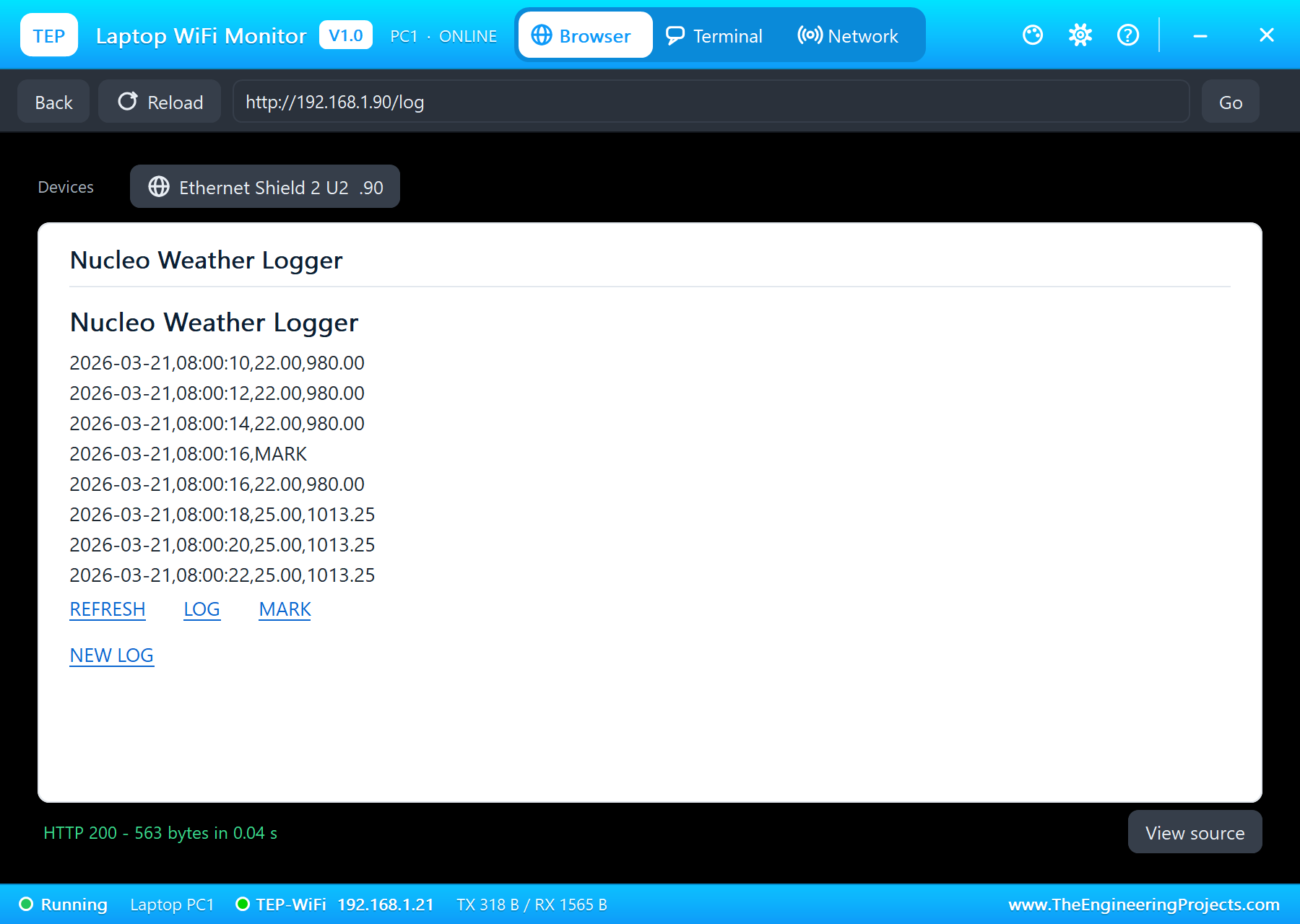
The W5500 serves the page at the fixed address 192.168.1.90: the time, the readings, the trend with its forecast and the size of the log, with REFRESH, LOG, MARK and NEW LOG links. LOG shows the end of the file - the sketch jumps to 300 bytes before the end, starts at the next whole line and ends every line with a line break:
void sendLog() {                                            // the last lines of LOG.CSV (its last 300 bytes), a line each
  sendHead();
  putF(F("<p>"));
  File f = sdOk ? SD.open("LOG.CSV") : File();
  if (f) {
    unsigned long n = f.size();
    if (n > 300) { f.seek(n - 300); while (f.available() && f.read() != '\n') {} }   // start on a whole line
    while (f.available()) { char c = f.read(); if (c == '\n') putF(F("<br>")); else if (c != '\r') putc1(c); }
    f.close();
  } else putF(F("no card"));
  putF(F("</p>"));
  sendLinks();
}
B1 Marks an Event
The blue USER button on PC13 writes a MARK line into the log - "I opened the window", "the rain started". One press is one mark, however long the finger stays on it; the page's MARK link and the monitor's MARK command do the same:
  const bool btn = digitalRead(USER_BTN) == LOW;            // B1: one MARK per press
  if (btn && !btnWas) mark(F("B1"));
  btnWas = btn;
The green LD2 is D13, the SPI clock: with the shield on the bus it flickers with every transfer, on the real board too. It stops being a user LED the moment a shield uses SPI.
Run the Demo
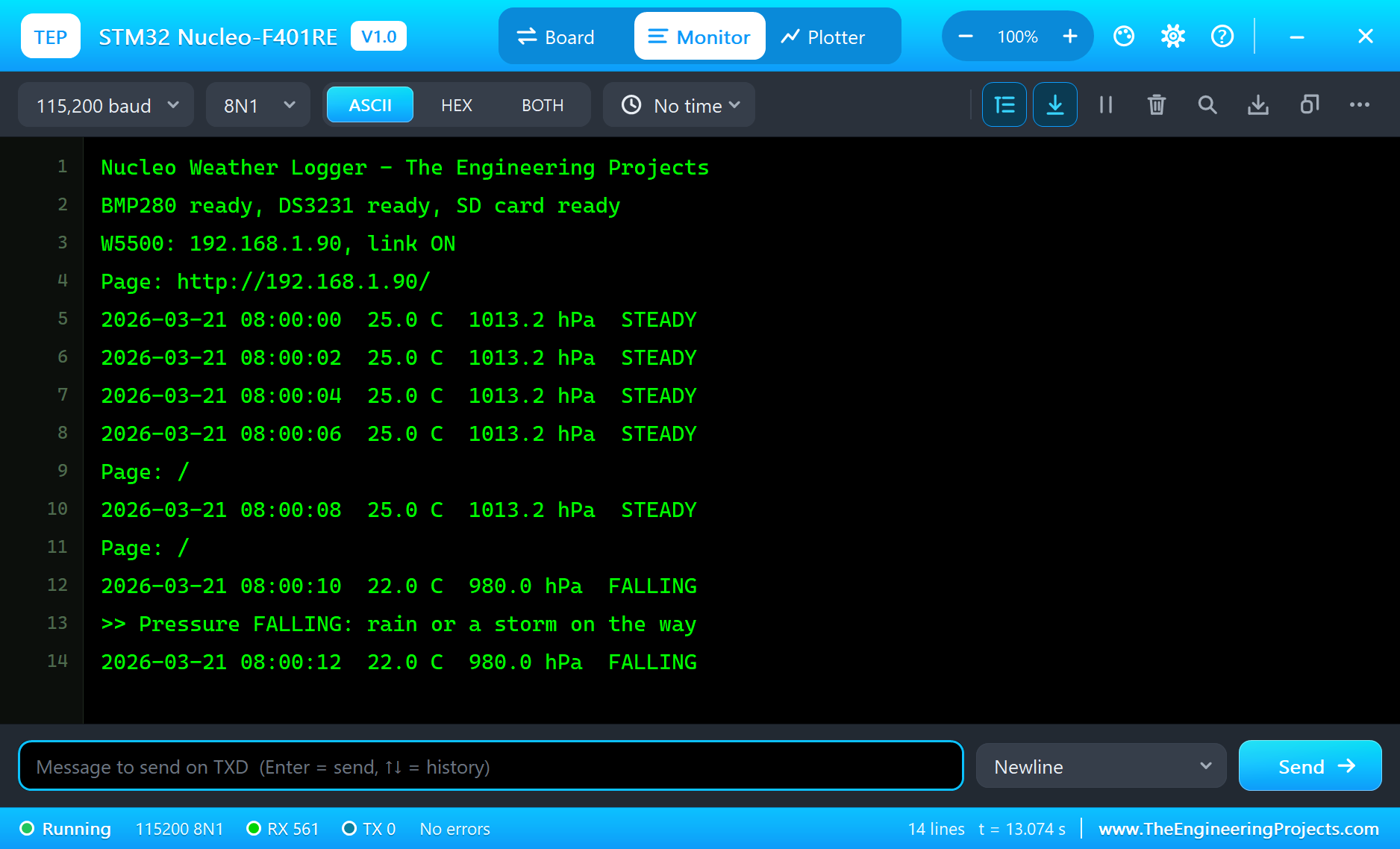
Press Run. The serial monitor opens, the three parts answer, the shield comes up on the LAN and a reading follows every 2 seconds:
Nucleo Weather Logger - The Engineering Projects
BMP280 ready, DS3231 ready, SD card ready
W5500: 192.168.1.90, link ON
Page: http://192.168.1.90/
2026-03-21 08:00:00  25.0 C  1013.2 hPa  STEADY
2026-03-21 08:00:02  25.0 C  1013.2 hPa  STEADY
2026-03-21 08:00:04  25.0 C  1013.2 hPa  STEADY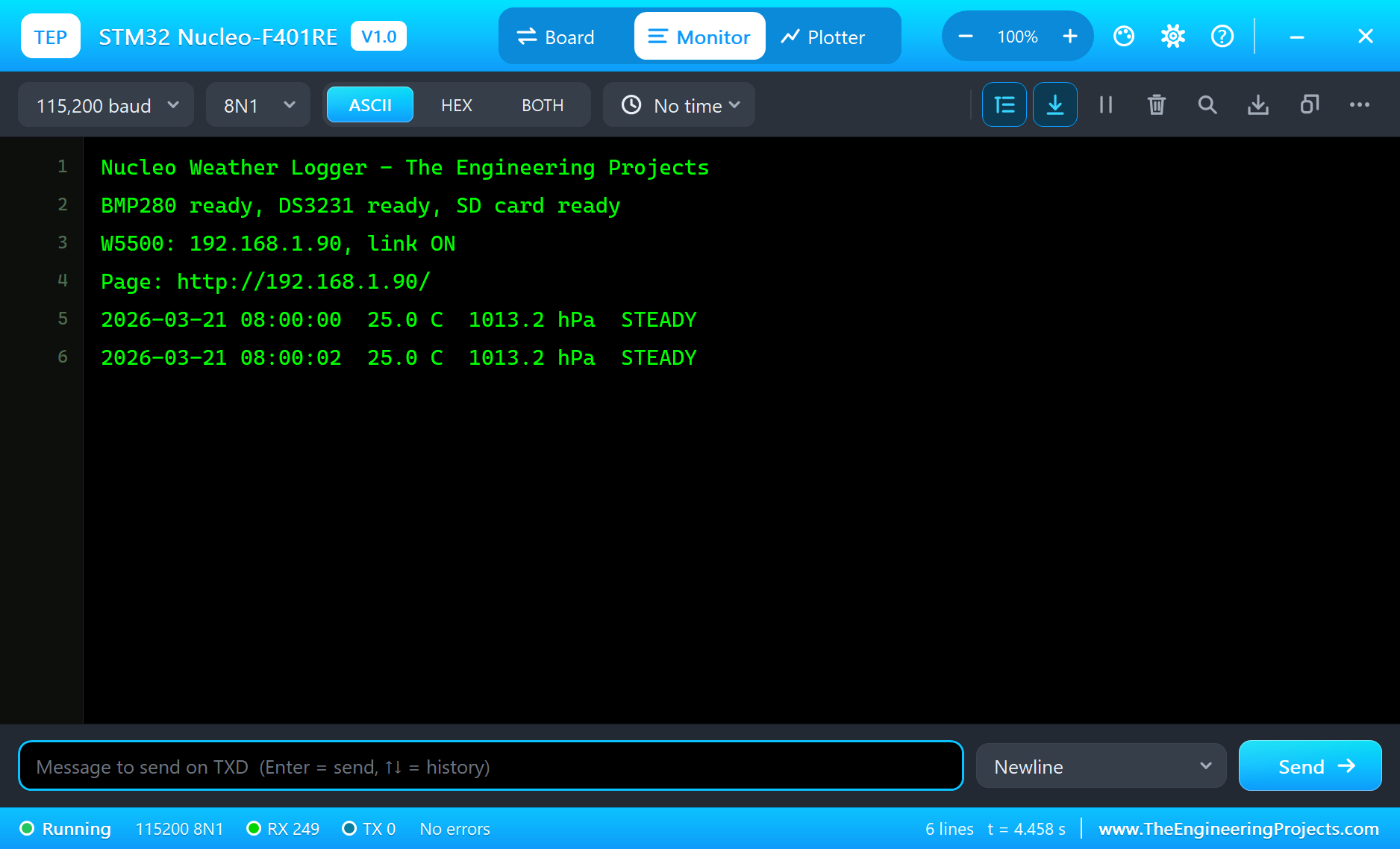
Open the Page
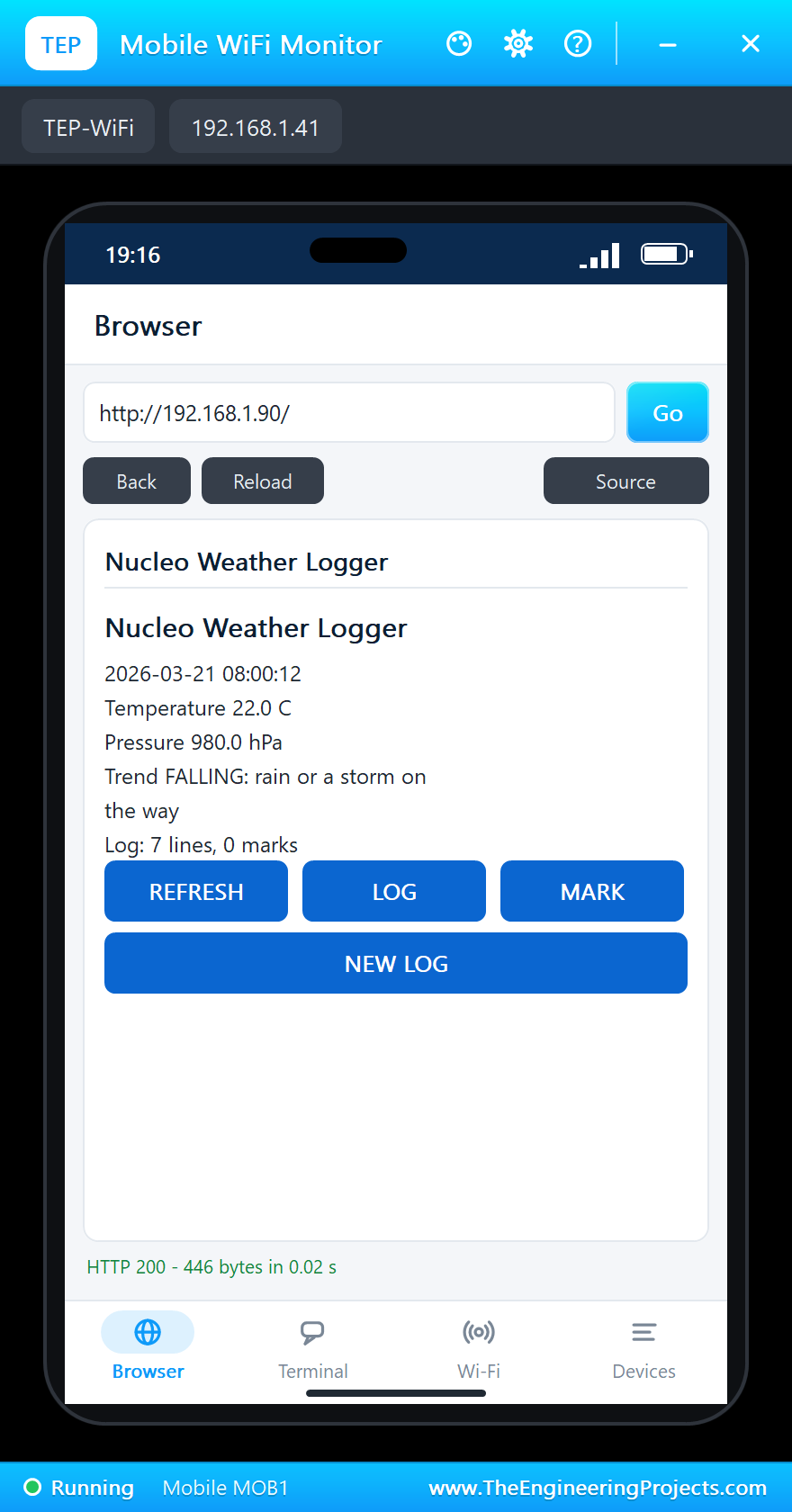
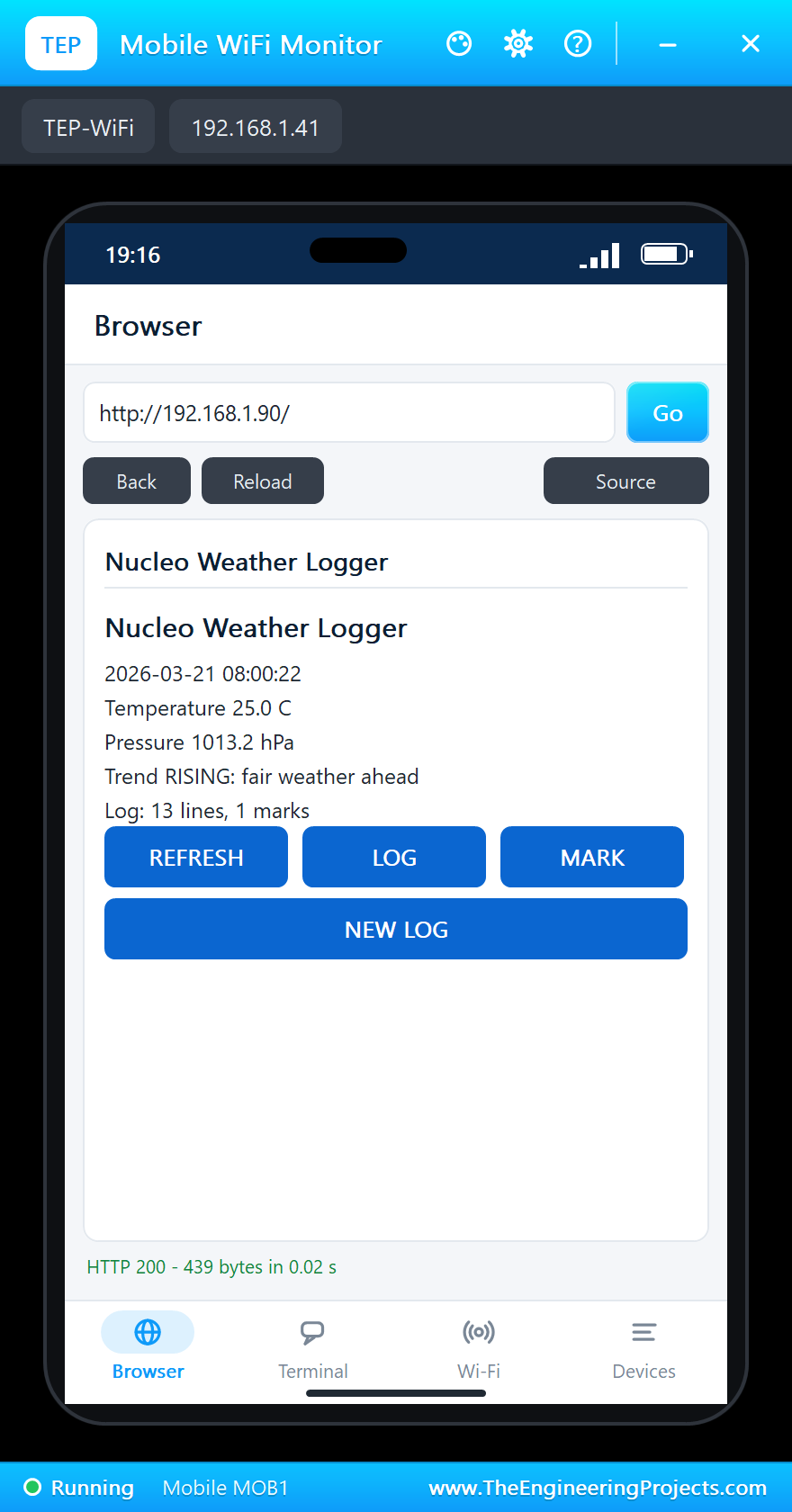
On the laptop click Browser and Go; on the phone the same - both open http://192.168.1.90/:
A Storm Comes
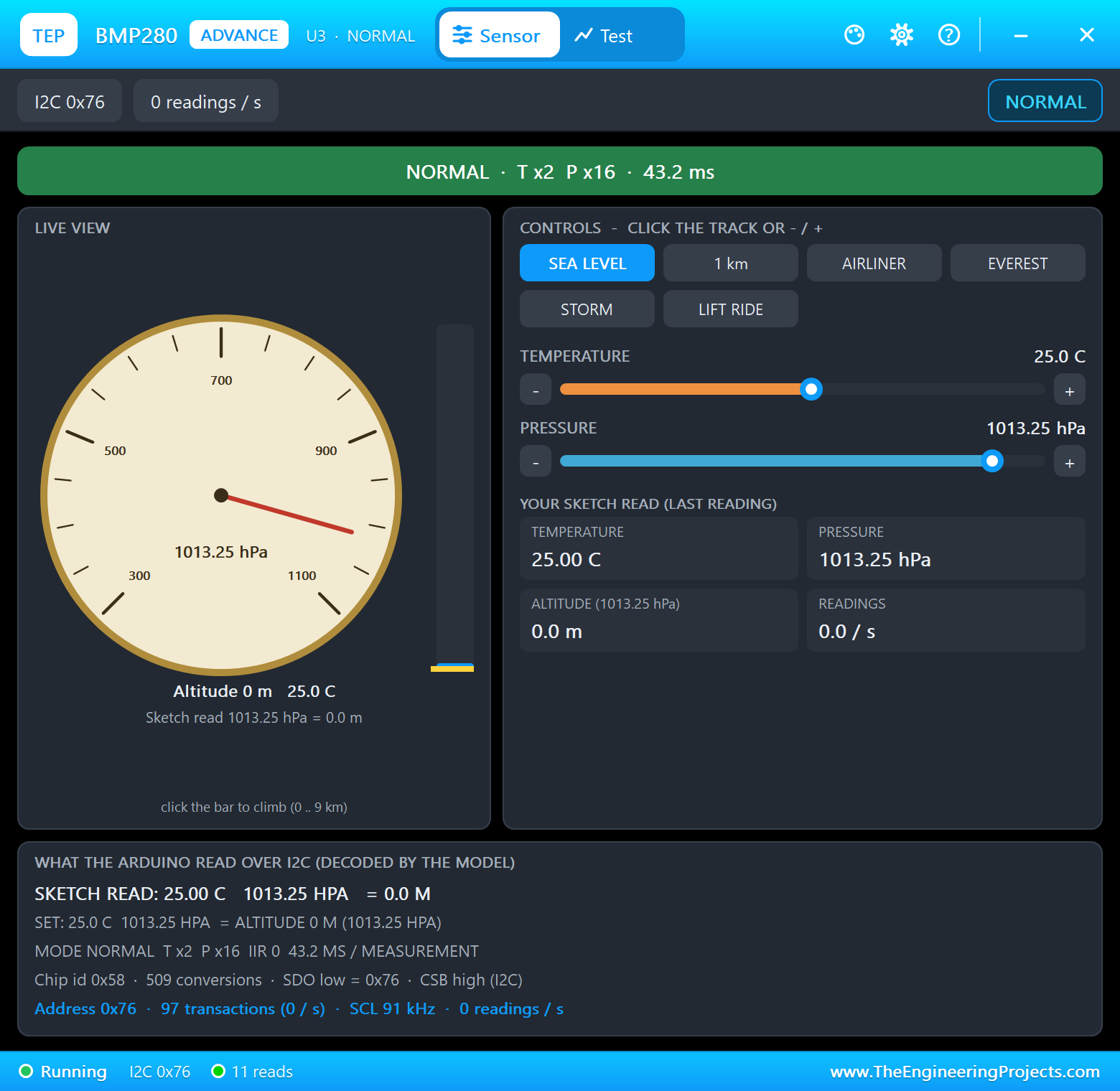
Click STORM on the BMP280's pop-up: the pressure drops. At the next reading the sketch sees the fall and warns:
Read the Log and Mark an Event
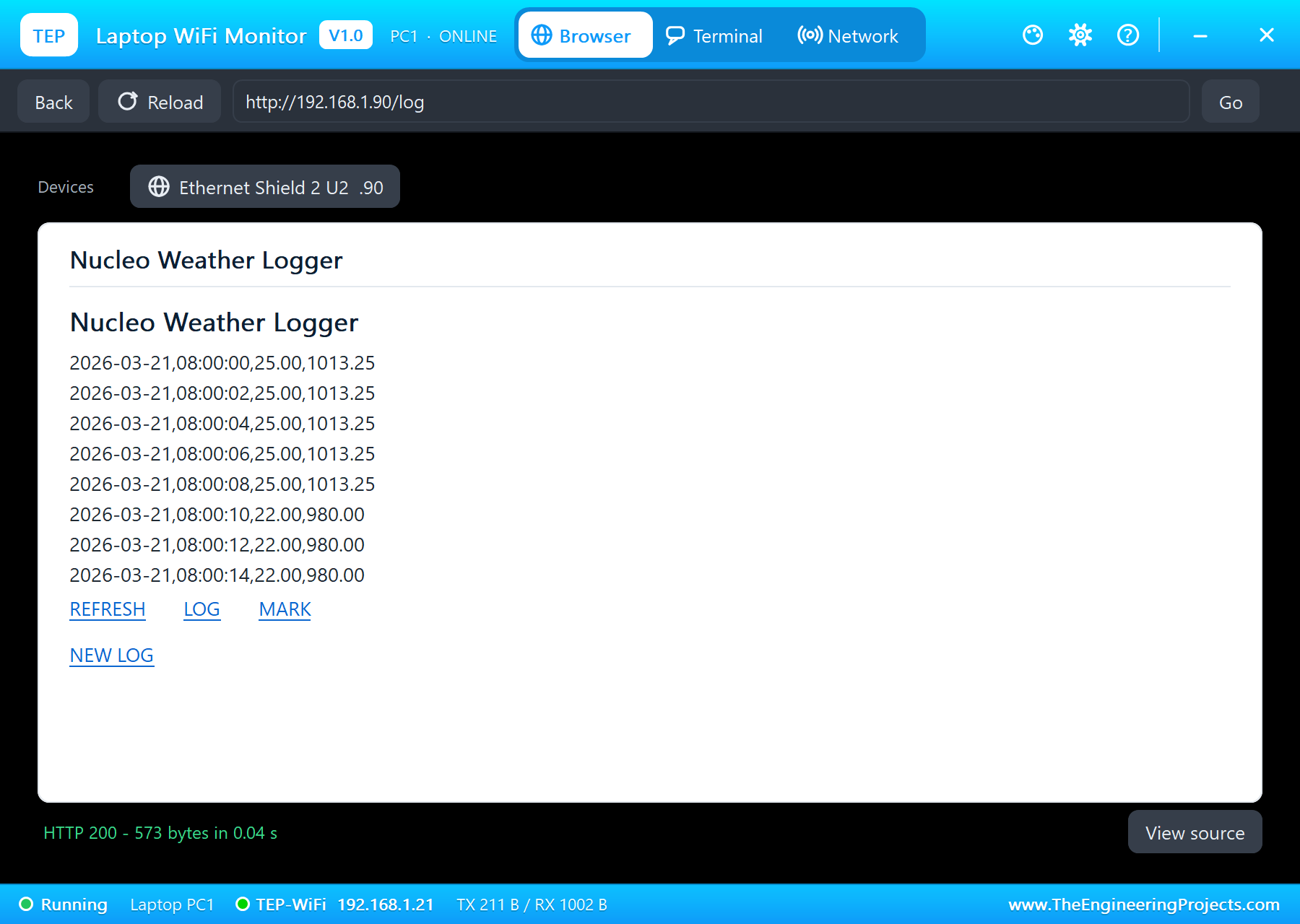
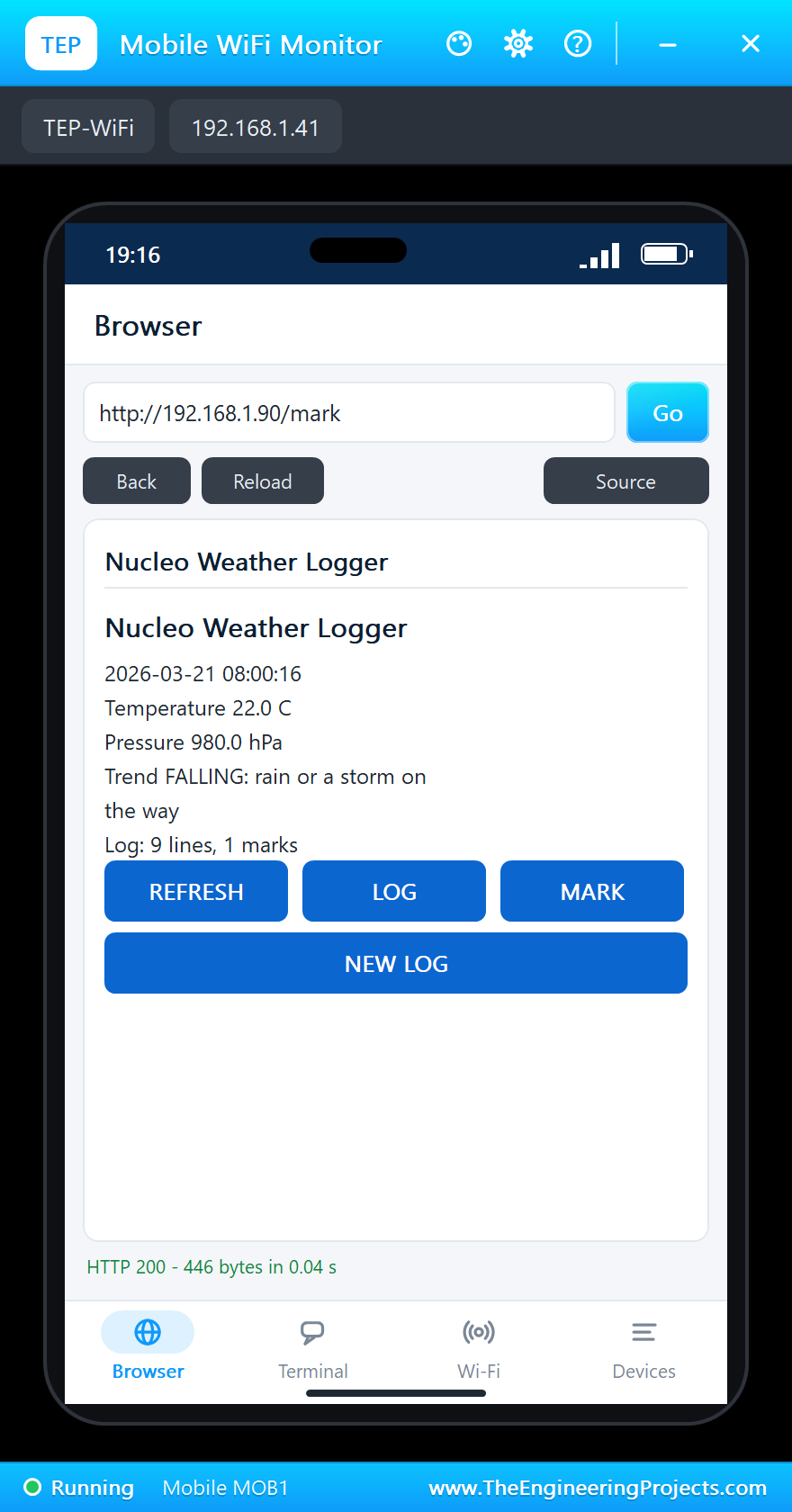
Click LOG on the laptop: the last lines of LOG.CSV, straight from the card. Tap MARK on the phone: a MARK line goes into the log, as B1 on the board does:
Fair Weather Again
Click SEA LEVEL on the BMP280: the pressure climbs back. For one reading the trend says STEADY - 10 seconds earlier, before the storm, the pressure was the same - then it turns to RISING:
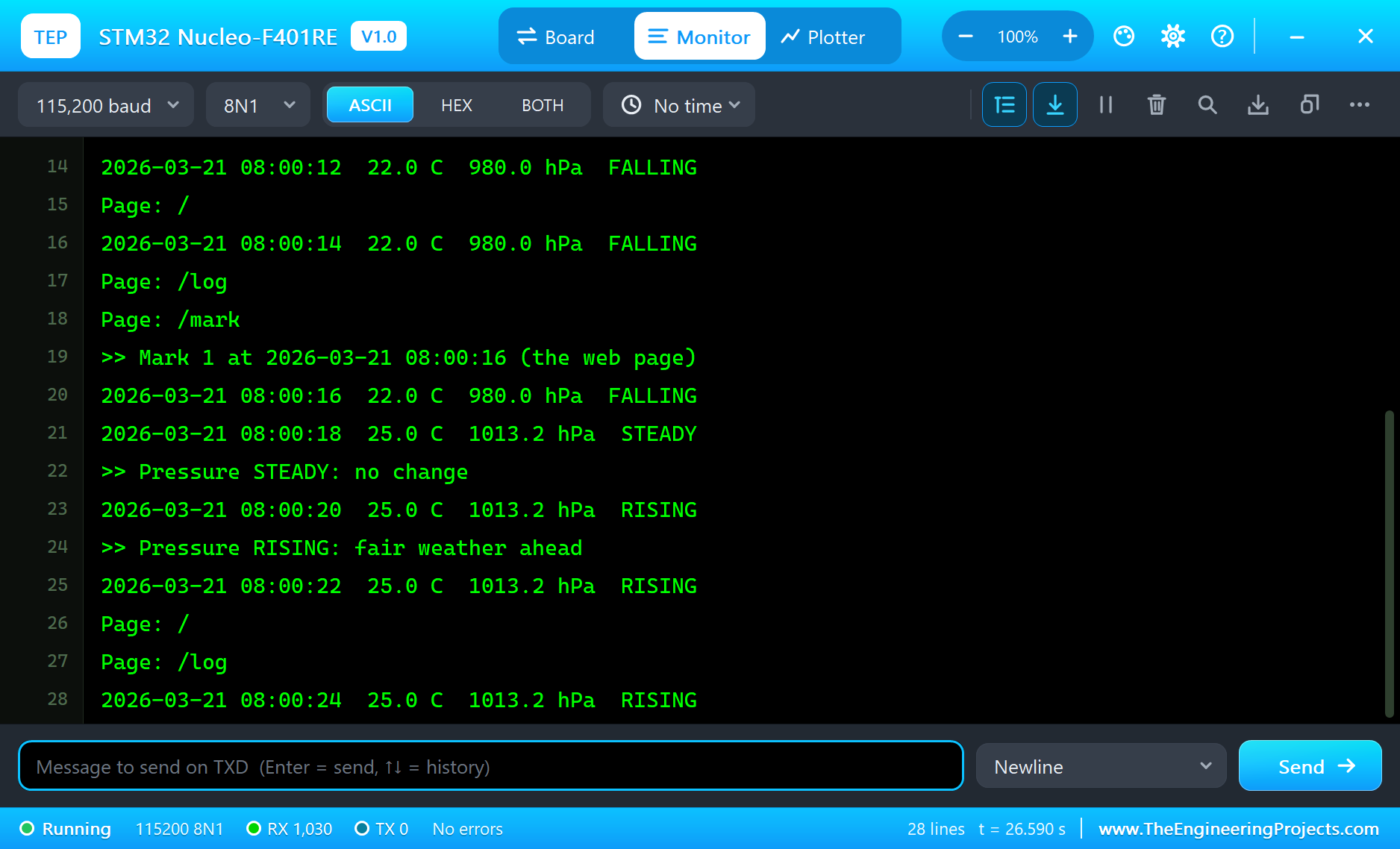
The built-in serial monitor, in the look of our TEP Serial Monitor Advance for Proteus, logs every event:
2026-03-21 08:00:08  25.0 C  1013.2 hPa  STEADY
Page: /
2026-03-21 08:00:10  22.0 C  980.0 hPa  FALLING
>> Pressure FALLING: rain or a storm on the way
2026-03-21 08:00:12  22.0 C  980.0 hPa  FALLING
Page: /
2026-03-21 08:00:14  22.0 C  980.0 hPa  FALLING
Page: /log
Page: /mark
>> Mark 1 at 2026-03-21 08:00:16 (the web page)
2026-03-21 08:00:16  22.0 C  980.0 hPa  FALLING
2026-03-21 08:00:18  25.0 C  1013.2 hPa  STEADY
>> Pressure STEADY: no change
2026-03-21 08:00:20  25.0 C  1013.2 hPa  RISING
>> Pressure RISING: fair weather ahead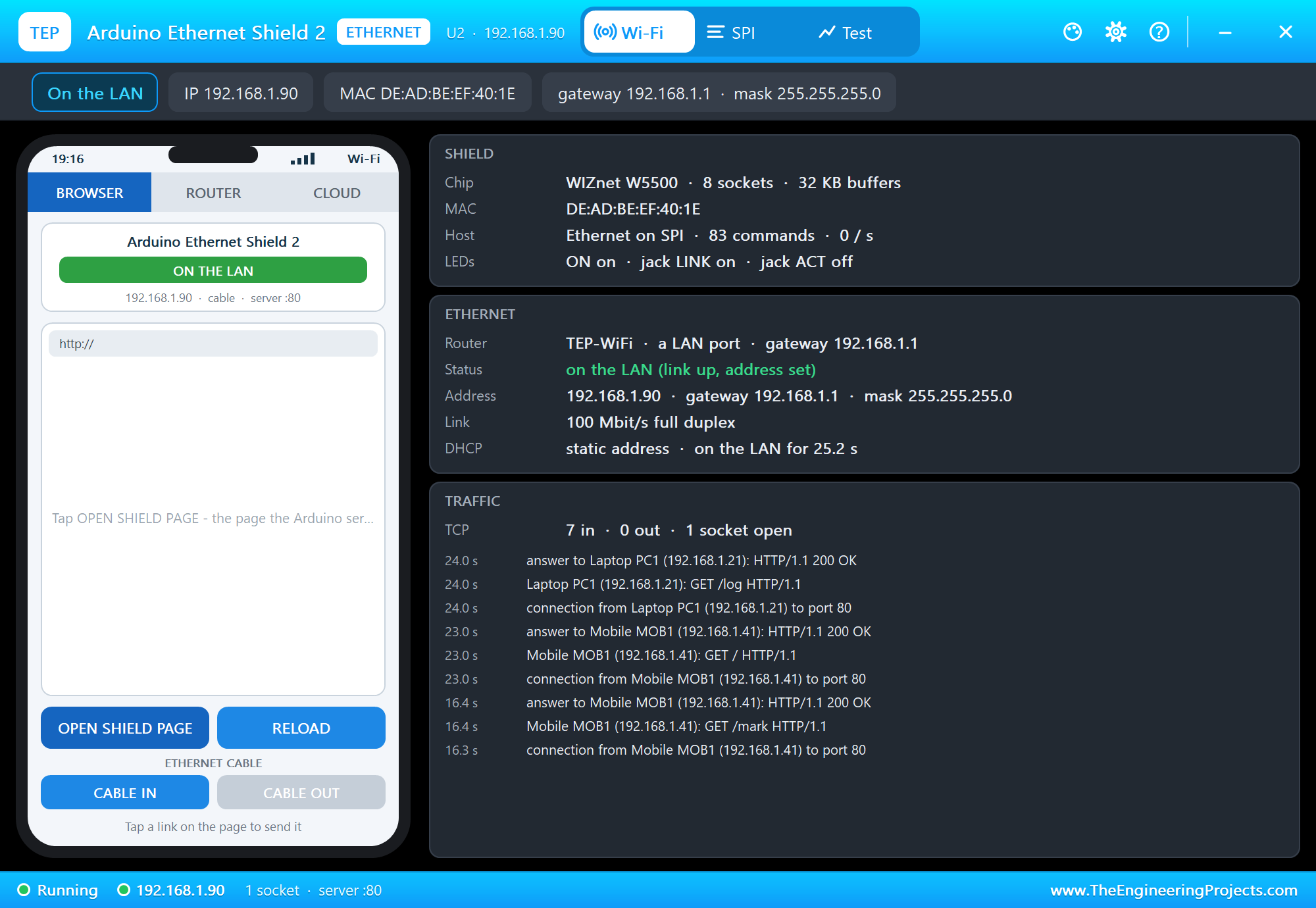
Try It Yourself
- Click 1 km or EVEREST on the BMP280: a falling pressure is also what climbing a hill looks like.
- Type
LOG,MARK,NEWorSTATUSin the monitor. - Set the clock with
TIME 2026-12-31 23:59:50and watch the date roll over in the log. - Change
TREND_HPAandTREND_SAMPLESand rebuild the sketch.
Ideas to Extend the Logger
- Log every 10 minutes and compare 3 hours for a real forecast, the way a weather station does.
- Start a new file every day (LOG0321.CSV) so the files stay small.
- Add a humidity sensor (an SHT31 or an AHT20) on the same I2C bus.
- Serve LOG.CSV as a download with its own content type, so the browser saves it.
Your Own Sketches
Write the sketch in the Arduino IDE with the board STM32 Nucleo-F401RE (TEP Proteus), use Sketch > Export Compiled Binary and set the board's PROGRAM property to the .hex. For a real Nucleo install STM32duino ("STM32 MCU based boards"), select Nucleo-64 with the part number Nucleo F401RE, and upload through the ST-LINK - the same sketch, with the same pin names.
Things to Know Before Using a Real Nucleo-F401RE
- Uploading: the ST-LINK shows up as a USB drive; copying a .bin onto it programs the board.
- D0 / D1: on the real board they are Serial's lines to the ST-LINK; leave them free or change the solder bridges.
- 3.3 V logic: most pins tolerate 5 V, the analog ones do not; shields made for 5 V boards usually work.
- Power: the ST-LINK's USB powers the board (JP5 on U5V); a shield with a big load needs E5V or VIN.
- LD2: it shares D13 with SPI's clock - choose another pin for a status LED when a shield uses SPI.
Properties of the STM32 Nucleo-F401RE
| Property | What it does |
|---|---|
| PROGRAM | the sketch: a .hex from TEP Boards for Proteus (board "STM32 Nucleo-F401RE") |
| MONITOR, BAUD, AUTOOPEN | the built-in serial monitor: on, its baud rate (115200), open at Run |
Troubleshooting
- "BMP280 NOT FOUND": SDA on D14, SCL on D15, CSB on VCC (LOW switches it to SPI), SDO on GND or VCC.
- "NO SD CARD": the shield's SDCS on D4 and its CS on D10 HIGH while SD.begin() runs; the shield's SDCARD must not be NONE.
- "link OFF": the shield's CABLE is OUT, or its VCC has no digital supply (the power terminal, as in the demo).
- The times show 2000-01-01: the DS3231's TIME is LOST or its BATTERY is OUT - set TIME or send TIME in the monitor.
- The page shows old values: use REFRESH; the monitors do not reload by themselves.
Limitations of the Simulation
- Your sketch gets 8 KB of RAM in the simulation and runs slower than on the STM32F401 at 84 MHz with 96 KB.
- Only the Arduino header pins are modelled; the other Morpho pins, the ST-LINK and the STM32's own peripherals (HAL, timers by register, DMA, the RTC) are not.
- The router, the addresses and the windows are TEP additions.
- STM32 and Nucleo are trademarks of STMicroelectronics; this library is not made or endorsed by STMicroelectronics or by Labcenter.
- Tested in Proteus 8.5 in October 2026 (the demo as shipped, about 32 s of simulation in 218 s on our PC with the three pop-ups, the monitor and both tools open). Proteus 7 is not supported.
So, that was all about the STM32 Nucleo-F401RE Library for Proteus. I hope it helps you build and test your STM32 projects before you touch the hardware - two sensors, an Arduino shield with a card and a network port, a button and a web page in one simulation. If you have any questions, ask in the comments and I will help you out. Till the next tutorial, take care and have fun!