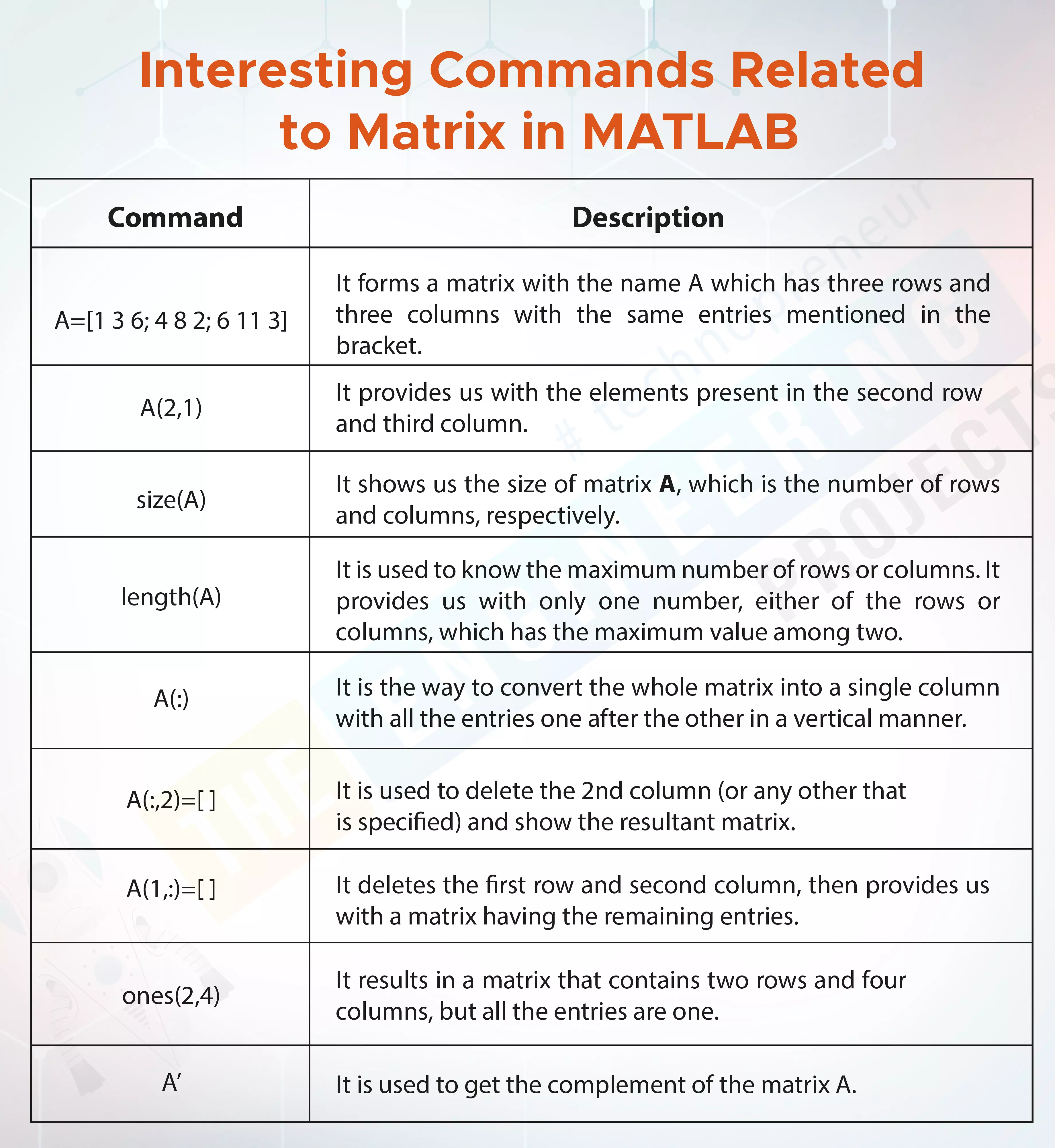
Hey peeps, welcome to The Engineering Projects. We are talking about matrices, and if you want to learn them from scratch, you must go to the introduction to matrices in MATLAB. Today, we are learning how to perform different arithmetic operations on matrices. You will also see some interesting commands that are only applicable to the matrices. Here, it is important to notice that in MATLAB, the matrices are performed in the command window and there is no need to have the programming skills to perform them. Even if you are new to programming, you can easily perform the operations in MATLAB. We’ll discuss different basic operations on the matrices and will also perform each of them in MATLAB. Most of them are urinary operations and some of them are binary. Here is a small glimpse of today’s ...
Hello everyone! I hope you all will be absolutely fine and having fun. In this tutorial, I am going to give you a detailed Introduction to MATLAB. I will explain in detail, step by step procedure of using MATLAB for the first time. First of all, I would like to tell you a bit about the MATLAB software. MATLAB basically works on matrices and it is an excellent software for different kinds of simulation based projects as well as hardware based projects and specially, it is good for the Engineering Projects.
MATLAB can be used for the manipulation purpose in order to obtain the proper results. It is very easy to use this software and most of the students prefer to use this software for their projects. So, this shows that MATLAB is a user friendly s ...
Hello friends! I hope you all will be absolutely fine and having fun. Today, I am going to share my knowledge with all of you guys about how to do the DC Motor Direction Control in Matlab using serial communication with Arduino UNO. Serial communication is a very common and fast mean of communication now a days. In almost every engineering related projects we need to continuously send and receive data from micro controller to the computer and vice versa. So, I used this type of communication between Matlab and Arduino UNO. You must have a look at my previous tutorial DC Motor Direction Control using Arduino because I am gonna use the same hardware and Arduino code and in today's tutorial I am gonna interface that hardware project with MATLAB so it ...
Hello friends! I hope you all will be absolutely fine and having fun. Today, I am going to tell you guys that how to design a simple algorithm for DC Motor Speed Control in MATLAB by simply sending different commands to the serial port from Matlab to Arduino. In my previous tutorials, DC Motor Direction Control using Arduino, we have seen the direction control of DC Motor via Arduino. So, I would suggest you to first have a look at that tutorial before reading this one. Moreover, you should also have a look at DC Motor Direction Control in Matlab and DC Motor Speed Control using Arduino in which I have discussed in detailed about how to make simple and easy programs to control the direction of DC motor in both clockwise and anti clockwise directi ...
Hello friends, I hope you all are fine and enjoying life. Today i am going to share a new project tutorial which is How to create a GUI in MATLAB ? First of all, lets have a little introduction that what is meant by GUI? How it is created and what are the uses and applications of GUI? GUI stands for Graphical User Interface. We all know the basics of MATLAB that it is used for creating complex algorithms and to create Simulink simulation, but we don't know that it aalso has another feature which is to create GUIs. The algorithms developed in MATLAB works on the background and do their tasks while MATLAB also emphasis on the user interaction that's why it has also provided us with GUI so that we can create a user friendly front end interface for ou ...
Hello friends, I hope you all are doing great. In today's tutorial, I am going to show you How to Convert m File into p File in MATLAB. Now the question arises that why we need to do that? & the answer is if you want to protect your code and don't want anyone to access it then you need to your Convert m File into p File. P File is like an encrypted file which performs the same functionality as your original m file but no one can get the code out of it.
Like me explain it with an example, suppose you are some sort of developer and you have created some code for a company and now you want to protect your code and just send the company some sort of software. MATLAB has a function in which you convert your m-file into p-file and no one can open ...
Hello everyone! I hope you all will be fine and having fun. Today, I am going to share my knowledge about How to use MATLAB input Function. In this tutorial I would like to tell you about the importance of getting data from the user in MATLAB. If you want to display the data to users, you need to get data from them as well according their requirements. I hope you have read How to use MATLAB ?
In this way the same source code written in MATLAB will give different result according to the requirements of the each user. So, in other words the source code becomes generic in this way. As we run the program, command window of the MATLAB asks user to enter the desired input. The results on this window are generated according to the Matlab input given by ...
Hello everyone! I hope you all will be absolutely fine and having fun. Today, I am going to share my knowledge about Generating Simple Signal in MATLAB. Signals are of great importance in our daily life. The signals are basically the graphical display of the analog values. We can estimate the severity level by the shape of the signals. The signals have a very wide range of applications in our daily lives. If we observe the shape of the AC voltages of 220V that is supplied in our homes, it is a sinusoidal signal. So, its an application of the signals.
Signals also play a vital role in the medical field. While performing ECG and EEG tests in hospitals, doctors visualize the signals displayed on the screen and they can estimate the severity of the ...
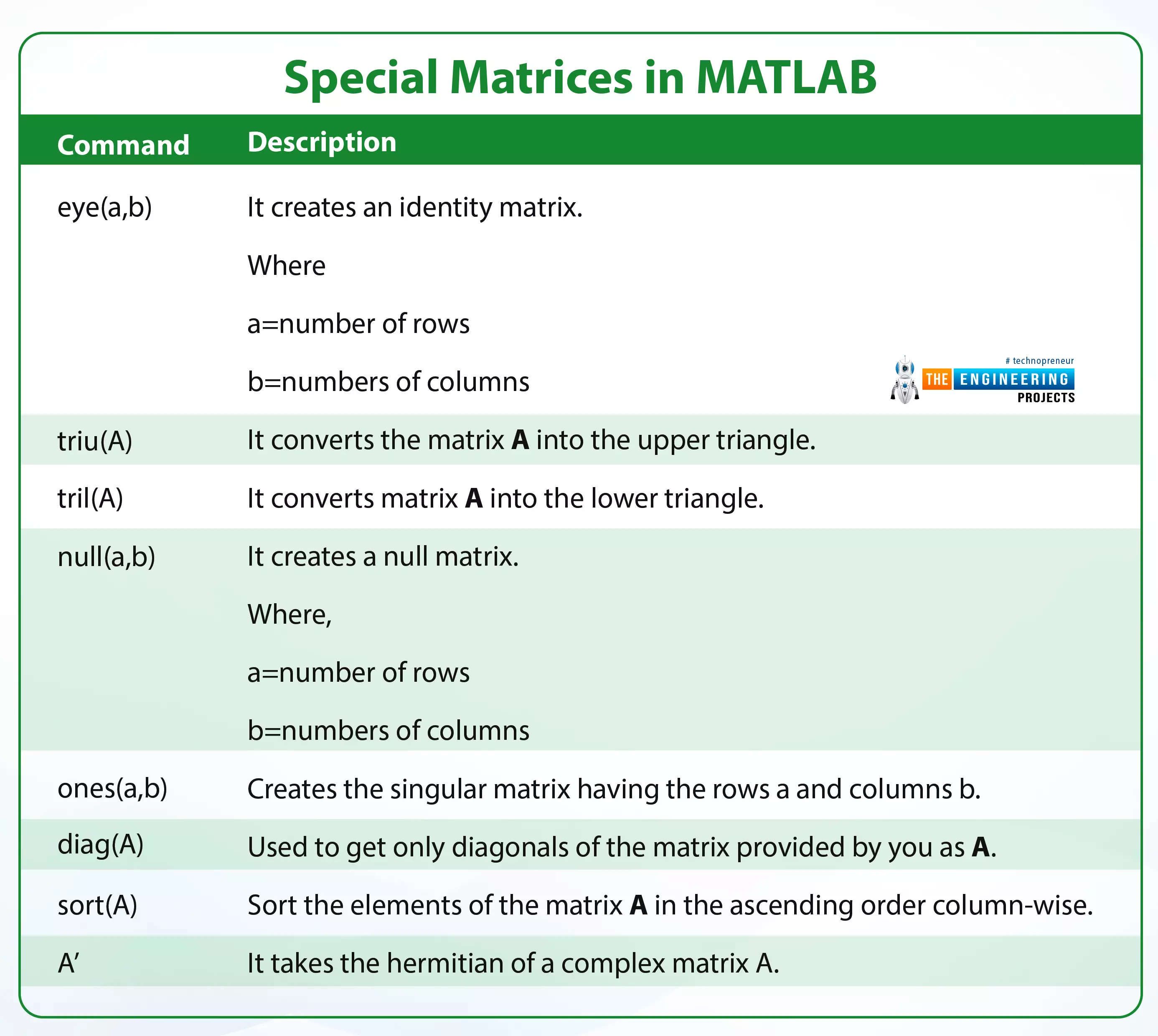
Hey students welcome to another tutorial in The Engineering Projects where we are going to learn a lot about matrices. If you are a beginner to the metrics, then you should go to learn the fundamentals of matrices. Yet, if you know the basic introduction, you are at the right lecture because we are learning about the special kinds of matrices and you are also going to see the matrices in action using MATLAB. So, here is a simple list of today’s topics.
What is a matrix?
How can we identify the matrix with the help of its general form?
What are the different types of matrices?
What is the concept of transpose while dealing with matrices?
How can we implement these types of matrices in MATLAB by different commands?
What is a Matrix?
A matrix is a type of array that stores da ...
Buy This Project
Hello friends, I hope you all are doing great. In today's tutorial, I am going to share Eye Ball Detection in MATLAB. I have designed this simulation in MATLAB and I have designed a GUI in which I am detection the Eye Balls from Images. Our team has worked quite hard in designing this project so we haven't shared the code for free. Instead we have placed a very small amount and you can buy it from our shop via PayPal. Click the above button in order to buy the project.
If you are having any difficulty in buying this project then you can also ask in comments and we will surely help you out. Moreover, this algorithm has a small restriction that the person's eyes must be open in the image and his/her eye balls must be clearly visibl ...