Hello everyone! I hope you all will be absolutely fine and having fun. Today, I am going to share my knowledge about Generating Simple Signal in MATLAB. Signals are of great importance in our daily life. The signals are basically the graphical display of the analog values. We can estimate the severity level by the shape of the signals. The signals have a very wide range of applications in our daily lives. If we observe the shape of the AC voltages of 220V that is supplied in our homes, it is a sinusoidal signal. So, its an application of the signals.
Signals also play a vital role in the medical field. While performing ECG and EEG tests in hospitals, doctors visualize the signals displayed on the screen and they can estimate the severity of the disease with the help of these signals. Depending upon the severity they suggest different medicines to the patients. Oscilloscope is a device to monitor the shape of the different signals usually present in engineering institutions. We can observe the shape of the voice, heat and a lot of other signals on it.
Generating Simple Signal in MATLAB
Here in the tutorial Generating Simple Signal in MATLAB, I will explain you the step by step procedure that how can you generate simple sinusoidal signal in MATLAB and how to visualize it.
First of all open your MATLAB software and open the editor.
Define a time duration at which the sinusoidal signal is completely defined.
Set the frequency of the sinusoidal signal.
Define the sinusoidal signal as the function of time and frequency.
Then at the end plot that sinusoidal signal across the time duration using the command
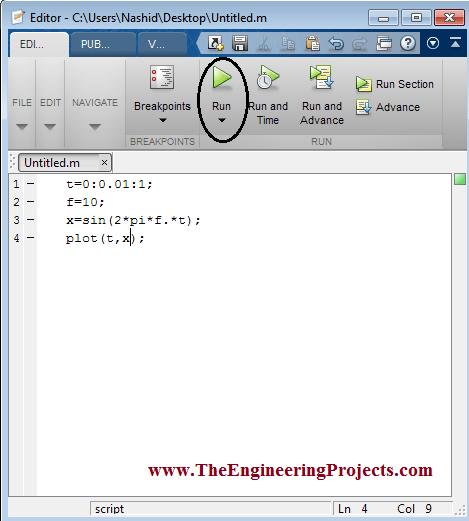
All of the above steps are shown in the figure below.
You can download the MATLAB simulation here by clicking on the button below.
Download .rar file, extract it and enjoy the complete simulation.
You can see that I have defined the time duration from 0 to
And adjusted the frequency of the signal as
Now press the Run button as encircled in the figure above.
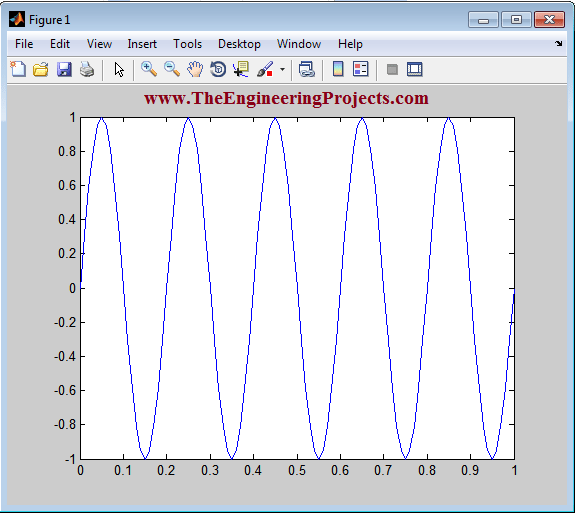
A new figure having a sinusoidal signal will be appeared on the screen.
The sinusoidal signal is shown in the figure below.
Now, I am going to reduce the frequency of the signal to observe that what will happen to the shape of the signal.
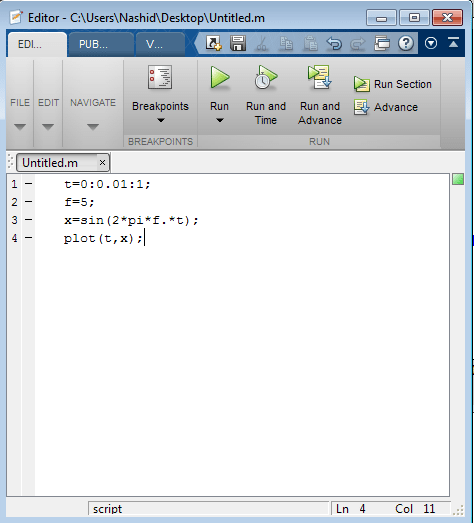
I am going to reduce the frequency from 10 to 5Hz and want to observe the new shape of the signal.
The new code with the updated frequency is shown in the figure below.
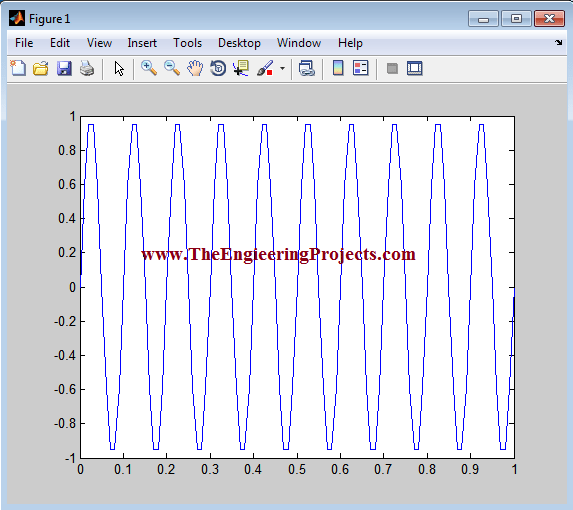
The new signal generated is shown in the figure below.
If we compare the both of the signals we can conclude that there is an inverse relation between the frequency and the width of the signal.
Smaller the frequency greater will be the width of the signal and vice versa.
So, that was the brief description of the signal generation in MATLAB.
So, that is all from the tutorial Generating Simple Signal in MATLAB. I hope you enjoyed this tutorial. If you face any sort of problem you can ask me in comments anytime without even feeling any kind of hesitation. I will try my level best to solve your issues in a better way, if possible. In my next tutorial I will explain you that how to Change the Properties of the Figure in MATLAB. I will explore MATLAB further in my later tutorials and will share all of them with all of you as well. So, till then, Take Care :)





Comments
0