


Modelling of DVB-T2 system using Consistent Channel Frequency MATLAB


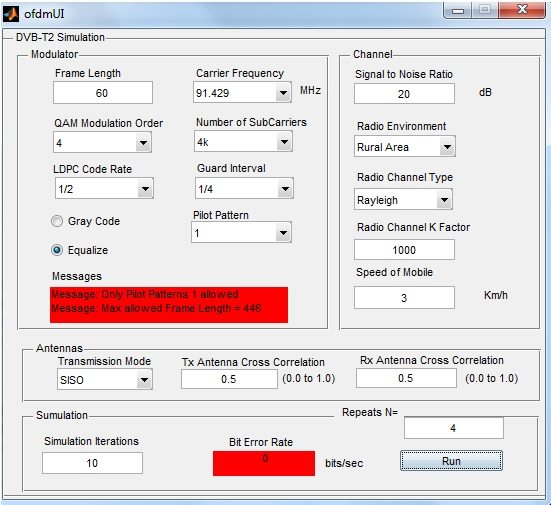
Hello friends! Today, we will study a MATLAB project for modelling a DVB-T2 transmission system using consistent channel frequency responses. The main question is simple: when we compare two transmitter configurations, how can we make sure that a different random channel has not decided the result for us?
We will follow the original project from its parameter-selection interface to its BER plots, then improve the experiment design through repeated trials and confidence intervals. Along the way, I will explain the difference between a channel realization and a received waveform, because confusing these two quantities makes a comparison unreliable.
The original screenshots are retained as historical project results. Some settings and statistical labels in the earlier report were inconsistent, so we will identify those limitations rather than treat the plots as independently verified measurements. Information about the original implementation remains available on the DVB-T2 MATLAB project page.
What Are We Modelling?
DVB-T2 is a digital terrestrial television transmission standard. Its physical layer includes framing, channel coding and modulation, with OFDM used to transmit information over many frequency-domain carriers. The ETSI EN 302 755 specification defines the actual system; a generic QAM and OFDM simulation does not establish compliance with that specification.
For this tutorial, we treat the historical implementation as a DVB-T2-oriented research model. Its description covers QAM, pilots, channel behaviour, demodulation and error measurements. Before calling an implementation complete, we would also need to establish which coding, interleaving, signalling and receiver functions it implements. A missing decoder changes the meaning of the reported BER.
The original write-up credited an initial MATLAB model developed by a student at Brunel University. It then described extensions for reusing channel conditions and repeating experiments. That development history explains the project direction, but the screenshots alone cannot verify the original source, every block or the accuracy of its numerical output.
Understanding the Signal Processing Chain
- Generate the information bits and apply the coding required by the selected model.
- Map groups of bits to constellation symbols and place data and pilots in their allocated carriers.
- Perform the IFFT and add the selected guard interval to produce transmitted samples.
- Pass those samples through the channel model and add noise with a documented power reference.
- Synchronize the receiver, remove the guard interval and perform the FFT.
- Estimate and equalize the channel, recover the data and compare aligned bits.
Each step has a distinct purpose. The FFT does not create propagation distortion; it changes the representation of a signal. Multipath, time variation and added noise cause the impairment. Channel estimation uses known information, such as pilots, to estimate how the transmitted symbols have been changed.
For an OFDM symbol with FFT length N and sampling frequency Fs, the useful symbol duration is Tu = N/Fs, and the carrier spacing is Fs/N. A guard interval adds time without adding new payload samples. Therefore, a comparison involving different guard intervals must account for the resulting difference in throughput.
Also distinguish FFT length from active carriers and payload carriers. A 4K FFT has 4096 points, but that does not mean 4096 independent user-data symbols are transmitted. Some positions are unused or allocated to pilots and signalling. The earlier description of approximately 4000 subcarriers should not be used as an exact payload count.
What Does a Consistent Channel Mean?
Imagine testing configuration A during a deep fade and configuration B during a favourable channel interval. B may appear better even if its receiver is less effective. To reduce this source of variation, apply both configurations to the same underlying channel realization within each comparison trial.
For a time-invariant discrete channel, the received signal can be written as y[n] = sum(h[l]x[n-l]) + w[n]. Here, h contains the channel taps, x is the transmitted waveform and w is added noise. Reusing h is meaningful; reusing y after changing x is generally not, because y already contains the first transmitter's signal.
With a time-varying channel, the taps also depend on time. Both systems need a consistent physical timeline, delay profile and fading process. If their sampling rates or frame durations differ, blindly copying a vector of frequency responses is insufficient. Evaluate the same physical channel on the appropriate sample grid and document the alignment.
MathWorks explains channel parameters and random-stream handling in its multipath fading channel documentation. A repeatable seed is useful for reproducing a trial. However, restarting every trial with the same seed and the same input simply repeats the same evidence.
Organize Randomness Before Running the Experiment
- Keep separate records for the data seed, channel seed and noise seed.
- Within a trial, share the intended channel conditions between the configurations.
- Between trials, select new independent realizations using a reproducible seed schedule.
- Save the settings alongside the error counts so an unusual result can be reproduced.
Sharing randomness can make paired comparisons more informative, but it does not remove all uncertainty. A receiver may react differently to a particular fade. We still need enough independent trials to judge whether the observed advantage persists across the channel population of interest.
Choose Channel Settings With Consistent Units
The original report mixed km/h and km/s, and its scenario lists did not always agree on speed. Those units differ by a factor of 3600. We cannot infer the actual Doppler setting from a plot caption when the parameter record is inconsistent.
| Setting | What to record |
|---|---|
| Speed | Numerical value and unit, converted to metres per second internally |
| Carrier frequency | RF frequency in hertz, distinguished from the sample rate |
| Fading model | Rayleigh or Rician, path delays, powers and Doppler assumptions |
| Antenna arrangement | SISO or the actual multiple-antenna configuration |
| Noise reference | Sample SNR, symbol energy ratio or information-bit energy ratio |
| Receiver | Synchronization, estimation, equalization and decoding choices |
The earlier settings described Rayleigh fading with a K-factor of 1000. A Rician K-factor describes the ratio between a dominant component and scattered power; it is not a Rayleigh tuning parameter. Similarly, transmit and receive antenna cross-correlation settings do not describe separate antenna branches in an ordinary SISO link. See the MathWorks fading-channel overview for these distinctions.
Calculate Doppler Frequency
A useful maximum-Doppler estimate is fD = vfc/c, where v is speed in metres per second, fc is carrier frequency and c is approximately 3 × 10⁸ metres per second. This expresses the largest shift for the corresponding relative-motion geometry.
For an illustrative 600 MHz carrier and a speed of 10 km/h, v = 10/3.6 = 2.778 m/s. The resulting maximum Doppler is approximately 5.56 Hz. At 5 km/h it is about 2.78 Hz, and at 0.1 km/h it is about 0.0556 Hz. These are new calculation examples, not recovered settings from the original screenshots.
The previous report listed 91.429 MHz as its carrier frequency. Before reproducing that experiment, confirm whether this was genuinely the RF carrier or a differently defined model parameter. Increasing speed affects channel time variation; it does not automatically make every impulse-response peak larger or force the average SNR to zero.
Measure BER and SNR Correctly
Bit error ratio is the number of erroneous compared bits divided by the total number of compared bits: BER = E/Nb. If 25 errors occur in 100,000 compared bits, the measured BER is 0.00025. Always specify whether these are coded bits before decoding or information bits after decoding.
Signal-to-noise ratio in decibels is 10 log10(Psignal/Pnoise). A 10 dB increase represents a tenfold increase in that power ratio. Sample SNR and Eb/N0 are not interchangeable labels: modulation, coding, oversampling and transmission overhead affect their relationship.
Be careful when adding noise relative to the measured power of each faded frame. That can normalize away power changes that another experiment intends to retain. Choose a reference, document it and apply it consistently. Otherwise, apparently identical SNR values may represent different physical experiments.
Before counting errors, correct receiver latency and compare matching payload positions. A one-bit shift can produce a large error count even without noise. Exclude deliberate training sequences only through an explicit rule; silently discarding difficult frames produces an overly optimistic result.
Reading the Original MATLAB Results
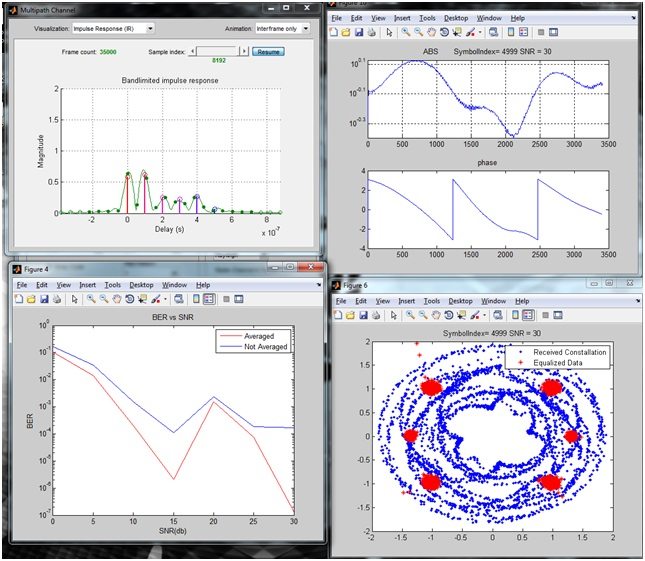
The next three figures belong to the initial model. They preserve the original record of the project, including its historical speed labels. Because those labels conflict with the accompanying parameter descriptions, use the figures to understand the workflow rather than to establish a quantitative mobility benchmark.
| SNR label | Reported BER |
|---|---|
| 0 | 0.103833 |
| 5 | 0.014366 |
| 10 | 0.000206 |
| 15 | 0.000002 |
| 20 | 0.001543 |
| 25 | 0.000076 |
| 30 | 0.000000 as printed |
The rise at the point labelled 20 deserves investigation. Possible explanations include finite sampling, different fading realizations, receiver behaviour or an implementation error. The table alone cannot distinguish them. Also, a printed zero may mean rounding; without the raw error and bit counts, its statistical meaning is unknown.
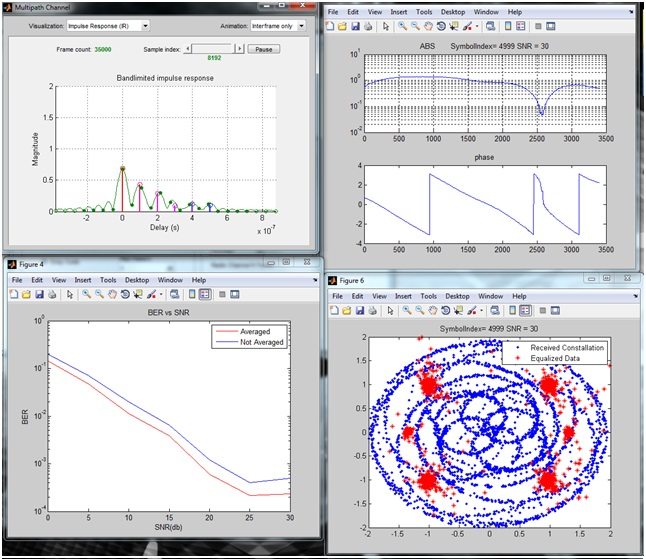
The previous tables also used a column named NoAvrg_BER. Its computation must be inspected before calling it an average, reference curve or independent estimate. A variable name is not a mathematical definition. Retaining a long unexplained table would not help you reproduce the experiment.
Extend the Model With Repeated Trials
The project's useful extension was to repeat the experiment instead of relying on a single run. Its interface allowed parameters and repetition counts to be selected before producing the results. Keep this separation between configuration, simulation and reporting when organizing your own MATLAB implementation.
For each SNR point, store an error count and a compared-bit count for every trial and configuration. If frame lengths vary, combine the counts before division: pooled BER = sum(Ei)/sum(Ni). An unweighted mean of frame BER values is a different statistic and gives short frames the same influence as long ones.
For example, one trial with 10 errors in 1000 bits and another with 10 errors in 9000 bits gives a pooled BER of 20/10000 = 0.002. Averaging 0.01 and approximately 0.00111 gives 0.00556, which does not represent the fraction of erroneous bits in the combined sample.
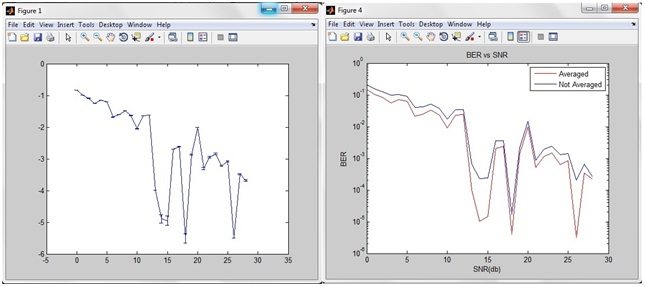
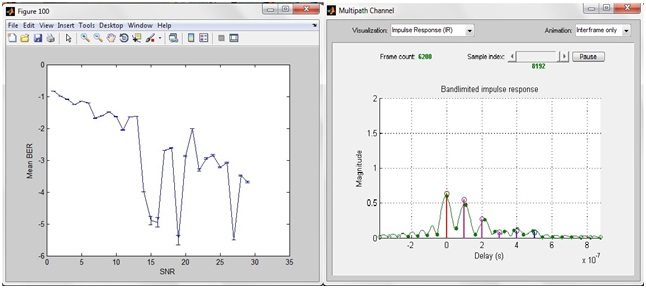
The modified model's first experiment is shown below. Its repeat count of two illustrates the mechanism, but two runs are not enough to establish that results are stable across a wide range of fading realizations.
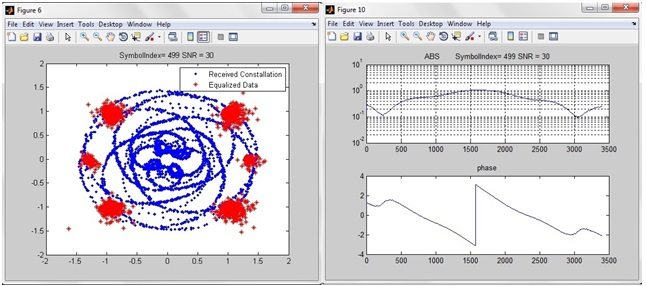
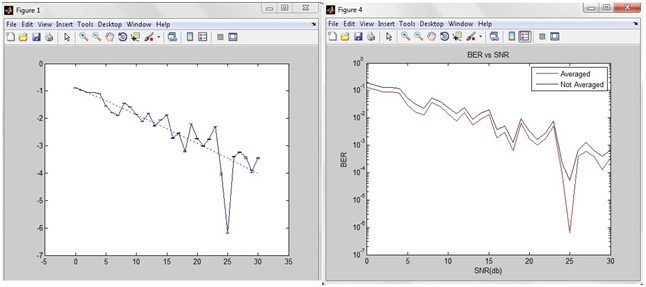
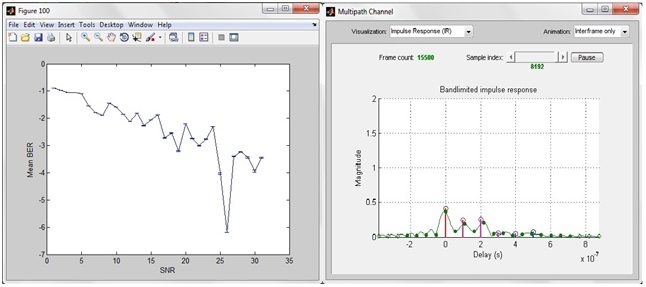
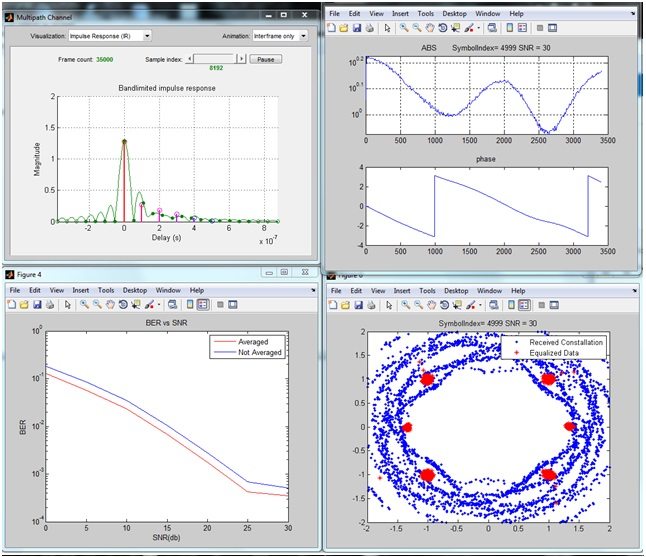
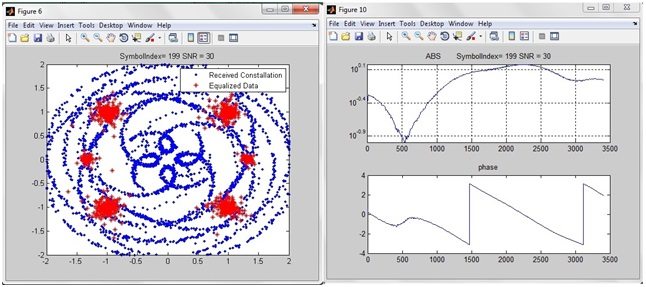
The second modified experiment is also preserved. Some earlier statistics were labelled as negative BER, values above one, infinity or NaN. A linear BER must lie between zero and one. A logarithmic transformation may be negative, but it must be identified explicitly; we cannot recover an undocumented transformation by guessing.
Add Confidence Intervals in MATLAB
A point estimate tells us what happened in the observed sample. A confidence interval expresses sampling uncertainty under the statistical assumptions of the calculation. MathWorks provides berconfint in Communications Toolbox for an error-probability estimate and confidence interval.
% Illustrative counts, not results from the historical project.
errorsPerRun = [10 10];
bitsPerRun = [1000 9000];
assert(all(errorsPerRun >= 0));
assert(all(errorsPerRun <= bitsPerRun));
[berEstimate, interval] = berconfint( ...
    sum(errorsPerRun), sum(bitsPerRun), 0.95);
fprintf('BER = %.6g, interval = [%.6g, %.6g]\n', ...
    berEstimate, interval(1), interval(2));
This example demonstrates aggregation and the function interface; it is not a complete DVB-T2 simulator. Bit errors in a fading channel can be correlated, so treating every bit as an independent Bernoulli trial may understate uncertainty. For such experiments, use independent channel runs and a statistical method that respects the dependence, such as appropriately grouped resampling.
Zero observed errors do not prove a zero underlying error probability. Under independent Bernoulli trials, a useful approximate one-sided 95% upper bound is 3/Nb. For one million error-free bits, this is about 3 × 10⁻⁶. State the assumptions and do not present that approximation as a measured BER.
Choose a Stopping Rule Before Looking at Results
Simulation time becomes important when errors are rare. A fixed number of frames is easy to reproduce, but it may produce many errors at low SNR and almost none at high SNR. An alternative is to stop after a chosen error target or a maximum bit budget, whichever is reached first. Record which limit ended every point and select an uncertainty method appropriate to that sampling plan.
For example, suppose the plan allows at most ten million compared bits at each SNR. A run that reaches that limit without enough errors should be reported as having limited statistical resolution. Increasing the number of displayed decimal places does not recover information that was never observed. Decide whether to allocate more computation or report the limitation.
When comparing two configurations, also store their trial-by-trial differences. A paired difference compares A and B under the same realization and can reveal whether an average advantage is broadly distributed or driven by a few unusual fades. Keep the sign convention explicit: BER of A minus BER of B is positive when B has fewer errors.
Finally, inspect throughput alongside reliability. A configuration using more pilots or a longer guard interval may improve a difficult receiver condition while reducing useful payload per second. A fair report should show that trade-off instead of declaring a winner from BER alone. State whether the comparison holds occupied bandwidth, average transmit power, information rate or some combination constant; those constraints determine the engineering question your experiment actually answers.
Practical Review Before Trusting a Curve
- Test a noiseless loopback and verify bit alignment.
- Use a simple noise-only baseline before adding fading.
- Confirm parameter units and power normalization.
- Retain raw counts, seeds and model version for every point.
- Repeat independent trials and inspect uncertainty, not just smoothness.
- Explain missing points and failures instead of quietly removing them.
A semilogarithmic BER plot is useful for showing several orders of magnitude. However, zero cannot be displayed on a logarithmic axis. Mark a justified upper bound or report the error-free sample size separately. Avoid replacing zeros with arbitrary tiny numbers, because readers may interpret them as actual measurements.
The main strength of this project is its focus on fair comparisons. Its historical limitations are inconsistent units and insufficiently defined statistics. Correcting those definitions is more valuable than drawing an apparently smoother curve. No new execution of the original simulator is claimed in this tutorial.
Frequently Asked Questions
Should the same channel seed be used for every run?
Use shared conditions for paired configurations within a trial, but new independent realizations across trials. Record the seed schedule so the whole experiment remains reproducible.
Can I call a negative number BER?
Not on a linear probability scale. If you report log10(BER), label that quantity explicitly and define how zero observations are handled.
Does lower BER always mean a better transmitter?
Only within a fair comparison. Also consider data rate, coding overhead, bandwidth, latency and receiver complexity. A system can reduce errors simply by sending less information.
Does this model prove packet loss?
BER alone does not provide packet error rate. Define packet boundaries and count failed packets separately, including the chosen decoding and acceptance rules.
Can I reproduce the screenshots from the article alone?
Not exactly. Reproduction requires the original implementation, dependencies and complete parameter records. The explanations here provide a sound experiment structure and identify the historical results that need revalidation.

Tags


how to calculate ber using all specified parameters using gui??
1 reply
You can buy this complete project and will know everything
1 reply
Hello I am interested in your project and can buy, as I do and you pay as you send me the project ..?
1 reply
You can buy it from shop using PayPal.
How can buy it , i need help in this proyect
1 reply
You can buy it from shop using PayPal.
Hello I am interested in your project and can buy, as I do and you pay as you send me the project ..? I am from Ecuador
1 reply
Hi, you can simply buy it from shop via PayPal. As you make the payment you will get the download link. If you wanna ask something let me know.
Thanks.
I do not have paypal, my uncle who lives in usa have paypal, I can tell that by paying me?
1 reply
Yeah you can send the payment through your uncle account as well. Add me on skype and we can discuss it.
I already made the payment with the name of montesdeoca edmundo now as I downloaded the project I can tell
1 reply
Hi,
You got the project? Having any trouble, let me know.
Thanks.
Sorry to annoy you again what happens is that I have to exhibit at the college on Wednesday and can not download the project and already paid on June 10 it please help
1 reply
I've sent the complete file to you , which includes all the m files as well as the complete report.
How to download the project? Order #34447.
1 reply
you have to buy it from the shop and the link will be given to it automatically for download. If you haven't got the link to download then dont worry and let us know and it will be emailed to you.
Thanks.
I can`t to find the link. Please, send it by e-mail !
1 reply
I have sent it to you by email. I hope you got it. Let me know if you have any trouble. Thanks.
I got project. Thank you very much!
1 reply
You are welcome bro .... :)
Dear Syed,
I just emailed you a message. I need to know the following
I) Does the matlab model consist of the complete chain from transmitter (including interleavers) to receiver
2) Is it compatible with latest Windows. I am having a problem with a DVB-T2 Matlab model as it is not compatible with new Windows .It uses Matlab 2013 and the version I am having is Matlab 2016aa
3) Can it use 32,000 carriers and 256 QAM
I do not know how to use Paypal . Is there any other method of payment?
V.Jeewa
Your mode of telling everything in this piece of writing
is actually pleasant, all be able to simply know it,
Thanks a lot.
Hi there, I wish for tto subscribe for this weboage to get most
recent updates, so where can i do it please help out.
Comments
26