


Project Files of Raspberry Pi Zero W Library for Proteus: HX711 Scale, Web Page
 Libraries
 Code
Code Projects
 Simulation
raspberry-pi-zero-w-tep-v1-0-dcb1ddfee85d4247a71519df61fc6d61.zip

Raspberry Pi Zero W Library for Proteus V1.0
Raspberry Pi Zero W Library for Proteus V1.0 comes as a ZIP archive of 111 files (12.8 MB, 24.7 MB unpacked) holding Proteus library files, simulation model DLLs, a Proteus simulation, source code and a nested archive.
- LIBProteus library
- DLLProteus model
- DSNProteus simulation
- SRCSource code
- ZIPNested archive
Description
Raspberry-Pi-Zero-W-Library-for-Proteus-v1.0.zip with the Raspberry Pi Zero W in Proteus (BCM2835 at 1 GHz, 512 MB, 2.4 GHz Wi-Fi, the 40-pin GPIO header, 65 x 30 mm; it runs your Python program with RPi.GPIO, gpiozero, smbus2, spidev, pyserial and sockets on wlan0, with the Pi Terminal; TEPRPI0W.LIB, TEPNET.DLL and the TEPPi folder with Python 3.11), the HX711 / load cell and TM1637 libraries, the Laptop / Mobile WiFi Monitor symbols, the Wi-Fi scale demo project with its program, blink.py and a README.

File Structure
 File Structure
90.7 KB39.5 KB13.1 KB49.4 KB84.8 KB3.3 MB34.3 KB620.8 KB36 KB169.8 KB628.1 KB99.3 KB65.3 KB4.8 MB4.1 MB80 B97.8 KB26.8 KB1.2 MB1.1 MB88.9 KB27.3 KB55.8 KB79.8 KB105.8 KB193.8 KB113.8 KB48.8 KB145.8 KB36.8 KB29.3 KB42.3 KB28.8 KB67.3 KB89.3 KB153.8 KB22.8 KB38.8 KB2.5 KB6.5 KB37.9 KB11.1 KB5.5 KB885 B13.6 KB9 KB878 B1.5 KB4 KB1004 B10 B110 B2.6 KB1.1 KB8.9 KB58.5 KB12.4 KB6.6 KB18.5 KB20.7 KB27.8 KB21.1 KB7.1 KB7.7 KB2.7 KB51.2 KB100.9 KB1.2 KB24.3 KB7.4 KB53.6 KB26.1 KB20.5 KB60.5 KB19.6 KB1.6 KB8.4 KB20.9 KB2.6 KB539 B1.4 KB9.7 KB2.8 KB21 B92 B17.4 KB257 B691 B14.1 KB12.7 KB3.6 KB1.7 KB37 KB418 B5.9 KB36.4 KB8.6 KB14 KB28.5 KB8.8 KB313.5 KB2.4 MB284 KB31.3 KB313.5 KB2.4 MB284 KB7.2 KB291 B7.2 KB19.8 KBGallery12 images from the tutorialOpen the tutorial
 Gallery12 images from the tutorial
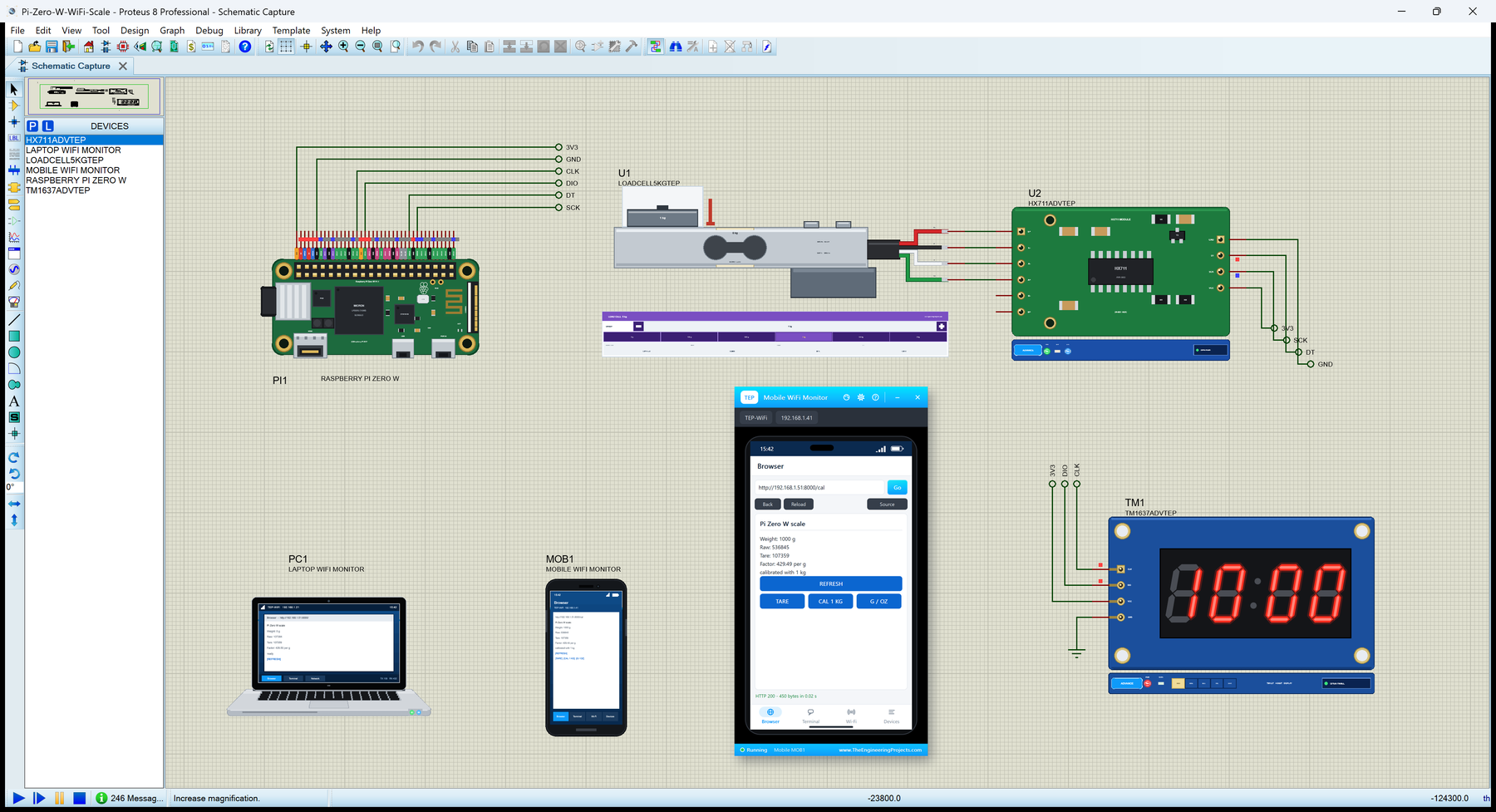
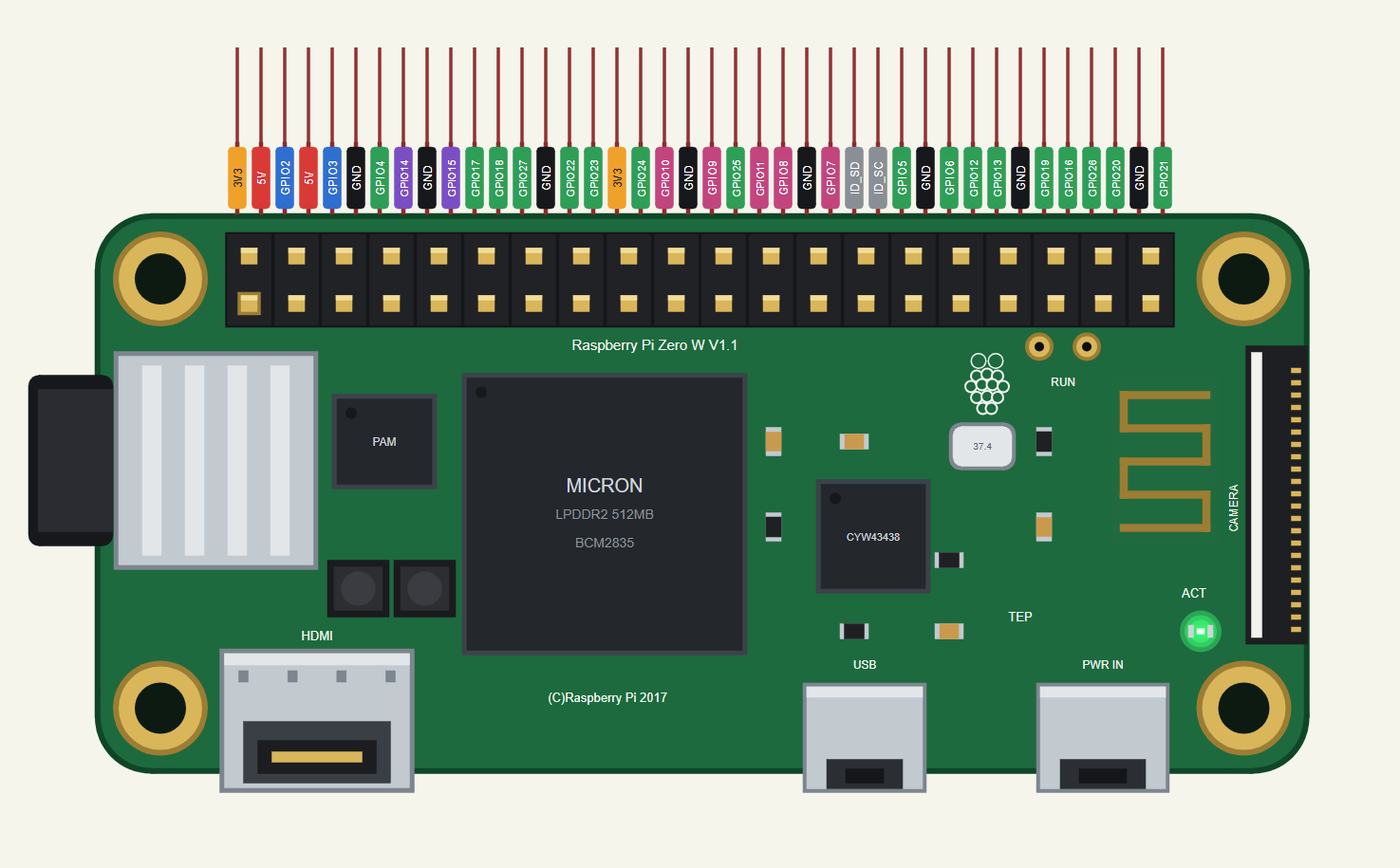
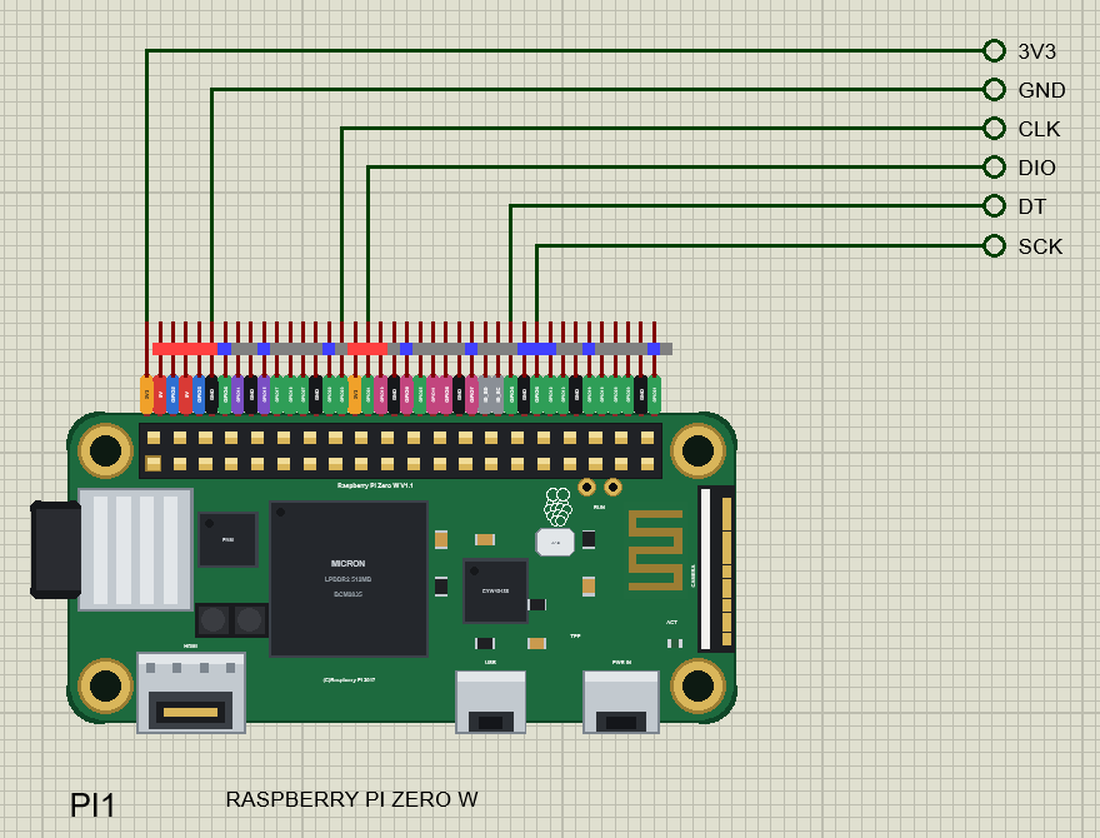
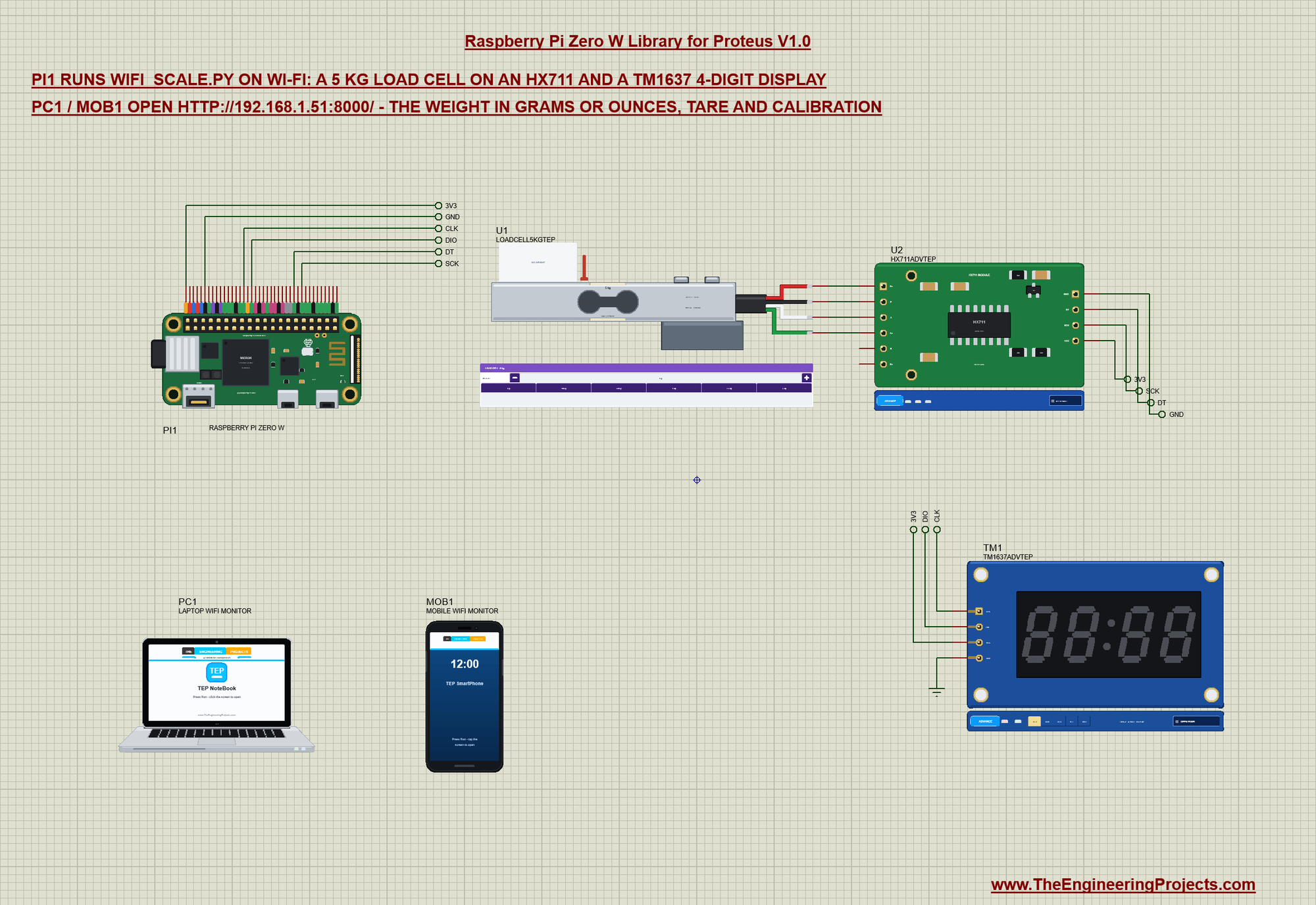
The circuit, the board and the results as they appear in Raspberry Pi Zero W Library for Proteus: HX711 Scale, Web Page. Open an image for its full size.
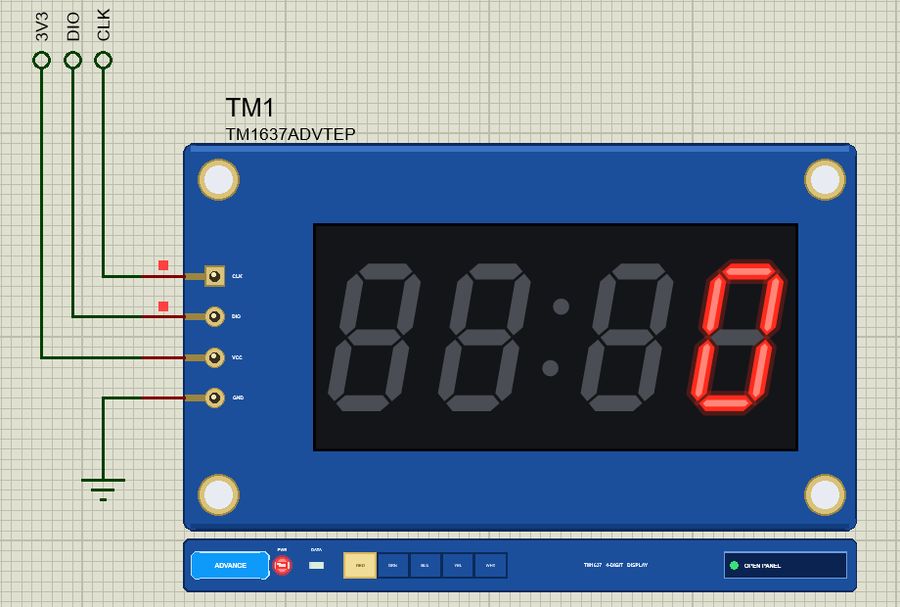
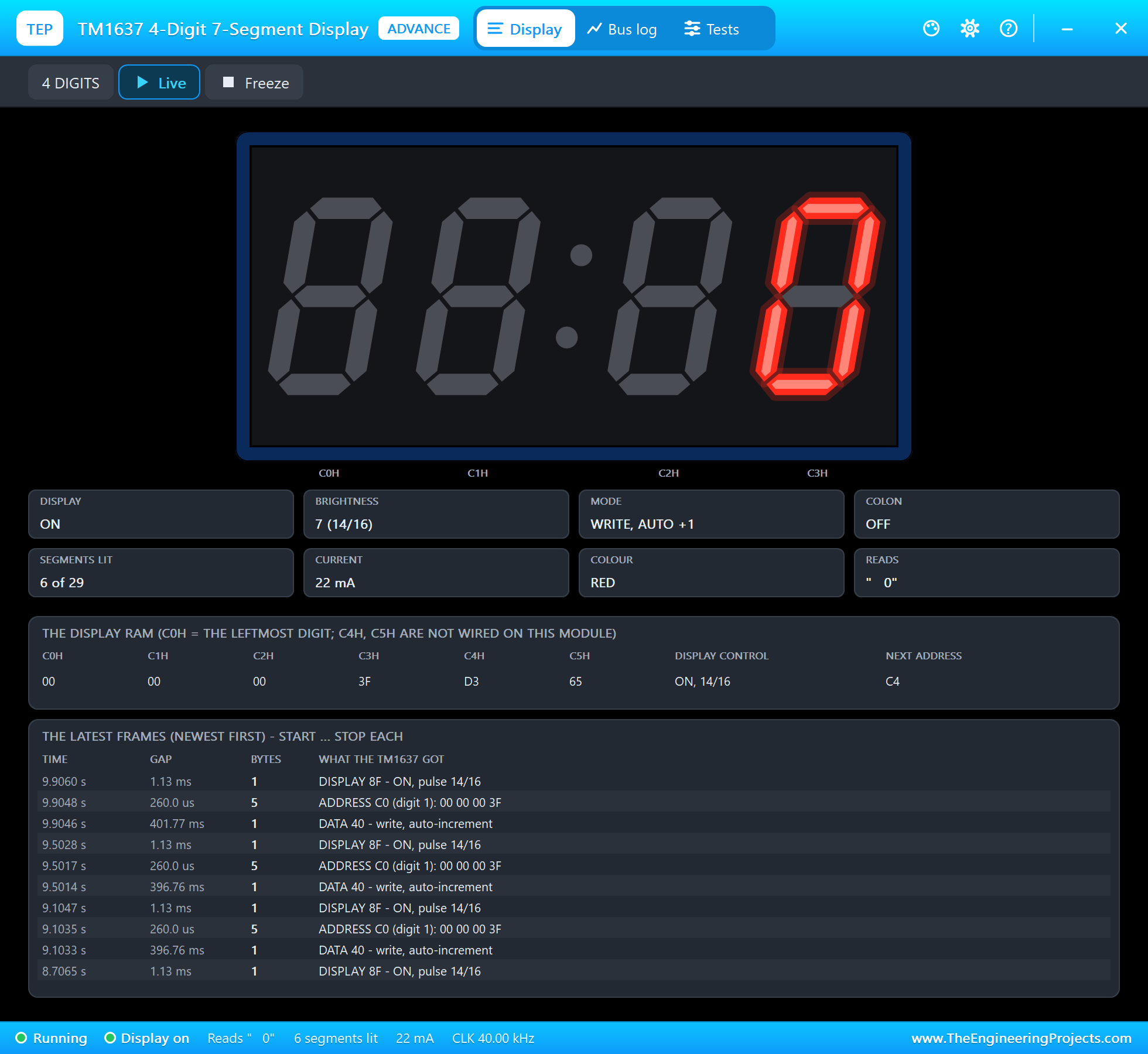
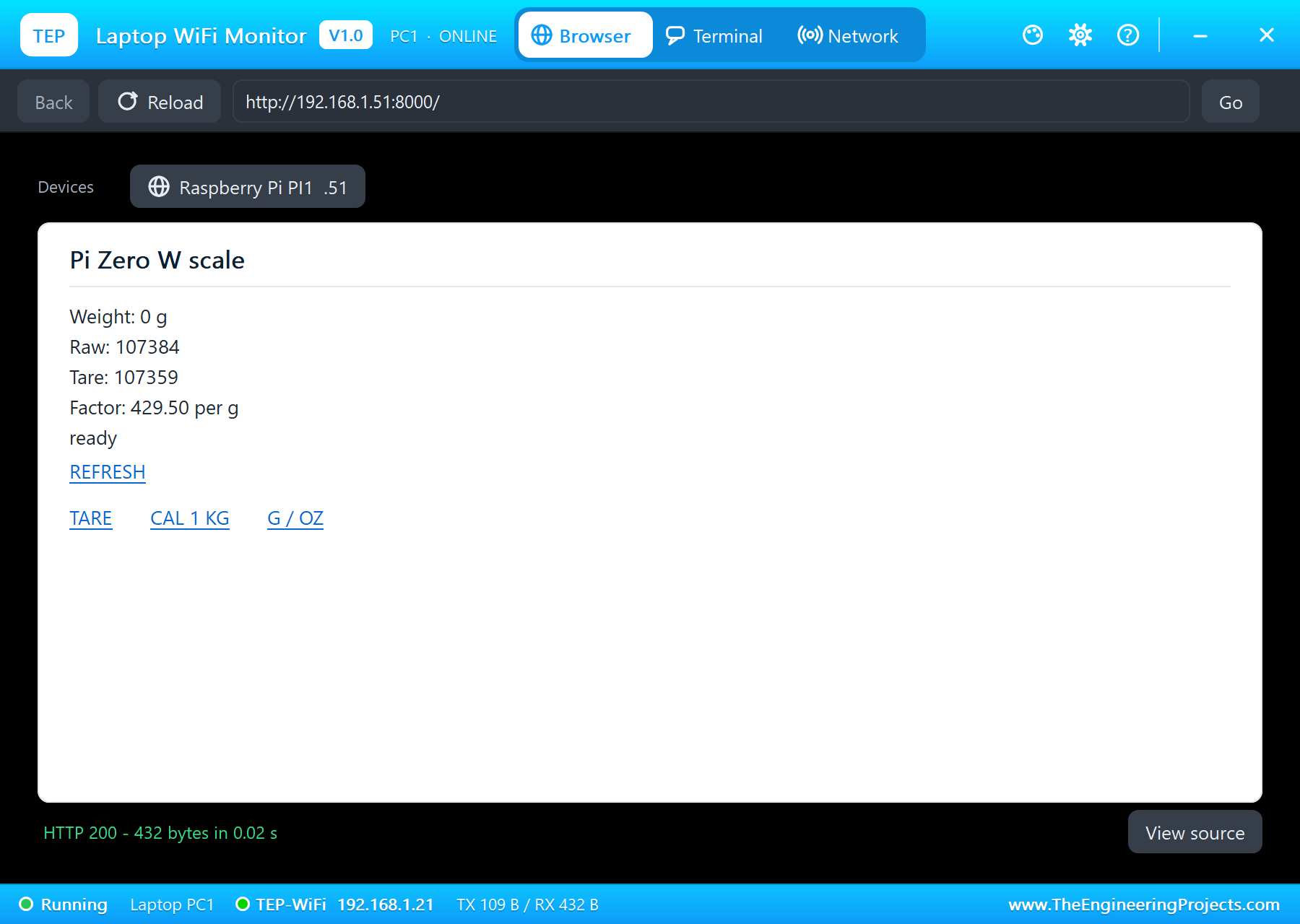
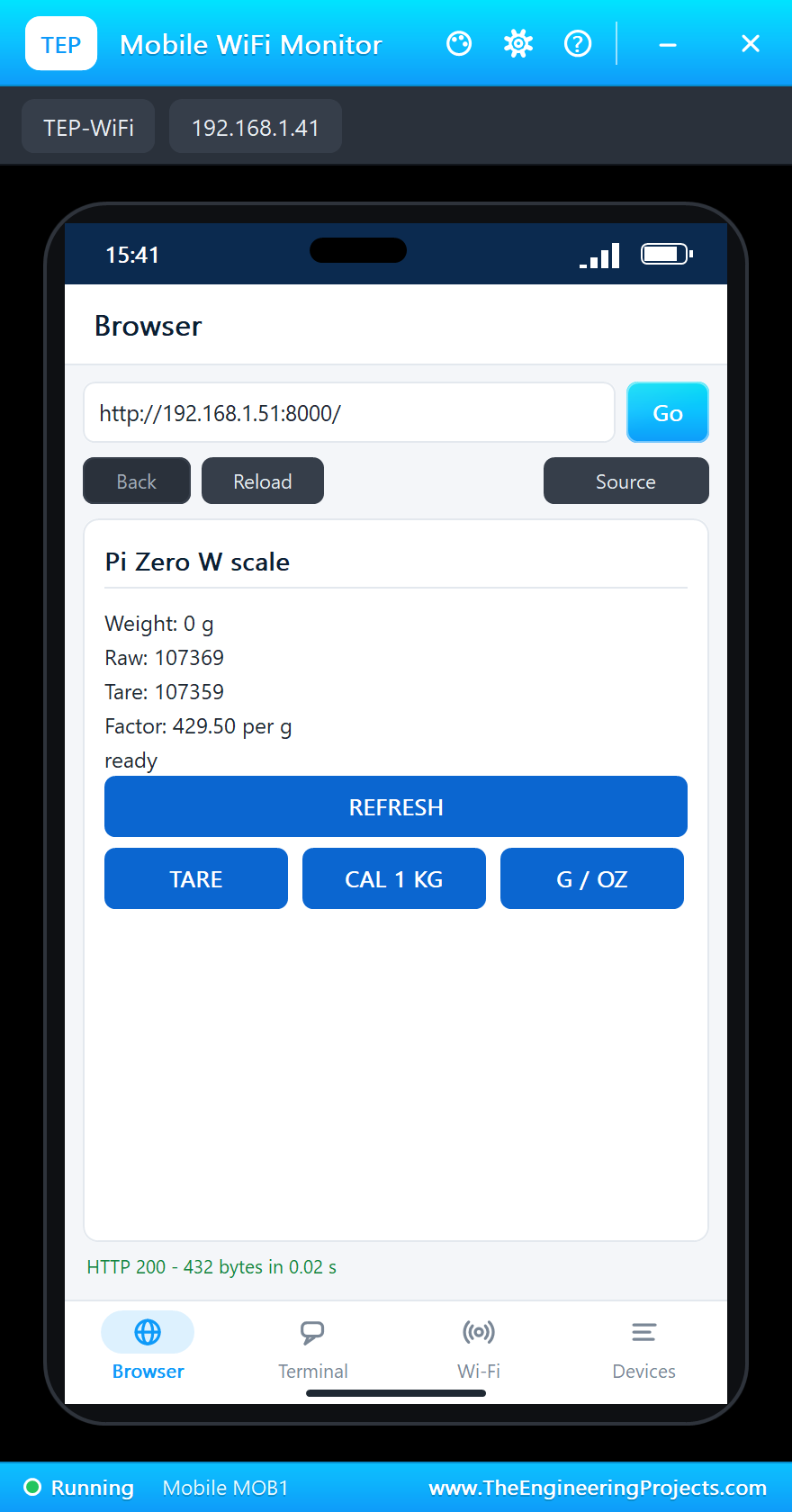
README
 README
RASPBERRY PI ZERO W LIBRARY FOR PROTEUS - V1.0 (BCM2835 1 GHZ, 512 MB, 2.4 GHZ WI-FI, 40-PIN HEADER, 65 X 30 MM)
YOUR PYTHON PROGRAM RUNS ON THE BOARD - DEMO: A WI-FI KITCHEN SCALE (HX711, 5 KG LOAD CELL, TM1637, A WEB PAGE)
Designed by The Engineering Projects www.TheEngineeringProjects.com
IMPORTANT LINKS
Article (read it first - pictures, step by step, every feature explained):
https://www.theengineeringprojects.com/2026/10/raspberry-pi-zero-w-library-for-proteus-v1-0.html
Report a bug or suggest a feature (our forum):
https://www.theengineeringprojects.com/forum/category/raspberry-pi-zero-w-proteus-library
The demo's parts are our libraries (included) - their articles:
HX711: https://www.theengineeringprojects.com/2026/10/hx711-load-cell-library-for-proteus-v1-0.html
TM1637: https://www.theengineeringprojects.com/2026/10/tm1637-7-segment-display-library-for-proteus-v1-0.html
Laptop: https://www.theengineeringprojects.com/2026/10/laptop-wifi-monitor-library-for-proteus.html
Phone: https://www.theengineeringprojects.com/2026/10/mobile-wifi-monitor-library-for-proteus.html
The earlier boards of this series:
https://www.theengineeringprojects.com/2026/10/raspberry-pi-model-b-library-for-proteus.html
https://www.theengineeringprojects.com/2026/10/raspberry-pi-1-model-b-plus-library-for-proteus.html
https://www.theengineeringprojects.com/2026/10/raspberry-pi-2-model-b-library-for-proteus.html
https://www.theengineeringprojects.com/2026/10/raspberry-pi-3-model-b-library-for-proteus.html
https://www.theengineeringprojects.com/2026/10/raspberry-pi-3-model-b-plus-library-for-proteus.html
https://www.theengineeringprojects.com/2026/10/raspberry-pi-3-model-a-plus-library-for-proteus.html
https://www.theengineeringprojects.com/2026/10/raspberry-pi-4-model-b-library-for-proteus.html
https://www.theengineeringprojects.com/2026/10/raspberry-pi-5-library-for-proteus.html
Support us (the libraries are free):
https://www.theengineeringprojects.com/donate
FILE STRUCTURE
Raspberry-Pi-Zero-W-TEP-v1.0/
|-- Proteus Library Files/
| |-- TEPHX711.LIB 90.7 KB the HX711 + load cells (demo), to LIBRARY
| |-- TEPLAPTOP.LIB 39.5 KB the laptop (demo), to LIBRARY
| |-- TEPMOBILE.LIB 13.1 KB the phone (demo), to LIBRARY
| |-- TEPRPI0W.LIB 49.4 KB the Raspberry Pi Zero W, to LIBRARY
| |-- TEPTM1637.LIB 84.8 KB the TM1637 display (demo), to LIBRARY
|-- Proteus Model Files/
| |-- TEPHX711.DLL 313.5 KB the HX711 + load cells, to MODELS
| |-- TEPNET.DLL 2.38 MB the Pi + monitors + network, to MODELS
| |-- TEPTM1637.DLL 284.0 KB the TM1637 display, to MODELS
| |-- TEPPi/python/ 17.54 MB Python 3.11.9 embeddable (33 files)
| |-- TEPPi/runtime/ 893.7 KB TEP Pi runtime, gpiozero (62 files)
|-- Python Code/
| |-- blink.py 0.3 KB an LED on GPIO17 (the default)
| |-- wifi_scale.py 7.2 KB the demo
|-- Proteus Simulation/
| |-- Pi-Zero-W-WiFi-Scale.pdsprj 31.3 KB the demo: Wi-Fi kitchen scale
| |-- TEPHX711.DLL 313.5 KB copy of the model
| |-- TEPNET.DLL 2.38 MB copy of the model
| |-- TEPTM1637.DLL 284.0 KB copy of the model
| |-- wifi_scale.py 7.2 KB the program of the demo
|-- README.txt ~18.5 KB this file
Total: 24.67 MB (unzipped). The source code of the models and of the TEP Pi runtime is not included.
WHAT IS IT?
The Raspberry Pi Zero W (2017) as one Proteus part - and a way to run Raspberry Pi programs in Proteus 8.5.
Proteus cannot run Raspberry Pi OS, so this library does not emulate Linux. It does what matters for electronics: the
board runs YOUR PYTHON PROGRAM (a .py file, the PROGRAM property) against the circuit on the sheet, with the Python
libraries a Pi uses for its pins, its I2C / SPI / UART buses and its Wi-Fi.
* At Run the board starts Python 3.11 (included: the TEPPi folder) with our TEP Pi runtime, then your program.
The program and Proteus work in lockstep: while the program runs, Proteus waits; while the program sleeps, waits
for a pin, a bus or the network, Proteus runs. So time.sleep(0.5) is 0.5 s of simulation, a busy loop still moves
the clock (about 5 us per GPIO call, as Python on the Zero W's 1 GHz ARM1176), and every edge is on time.
time.time(), time.monotonic(), time.strftime() and datetime.now() follow the simulation's clock too.
* Wi-Fi only (the Zero W has no Ethernet): wlan0 joins the network in the WIFISSID / WIFIPASS properties (default: our
router "TEP-WiFi", password 12345678 - the network of our ESP32 / Arduino Wi-Fi parts and the Laptop / Mobile WiFi
Monitors) as Raspberry Pi OS does at boot: 2.3 to 3.5 s after Run the Pi has 192.168.1.51 (192.168.1.(50 + the
part's number)), the name raspberrypi.local. Sockets, http.server and urllib work on it.
* Threads work (gpiozero's threads, your own threading.Thread, Timer, Queue, Lock): every wait is in simulation time;
an error in a thread is printed as Python prints it ("Exception in thread ...").
* The Python libraries for the pins (the same names, numbers and messages as on a Pi):
RPi.GPIO setmode, setup and output with one pin or a list (and a list of values), input, cleanup,
add_event_detect / event_detected / wait_for_edge with callbacks and bouncetime, PWM (software PWM
made by the board, steady while the program sleeps)
gpiozero LED, PWMLED, Button, OutputDevice, Buzzer, Servo, AngularServo, MotionSensor, DistanceSensor,
CPUTemperature and the rest (gpiozero 2.0.1, unchanged, on RPi.GPIO)
spidev SPI0 on GPIO11 (SCLK), GPIO10 (MOSI), GPIO9 (MISO), CE0 = GPIO8, CE1 = GPIO7, modes 0 to 3, up to
8 MHz; xfer / xfer2 take up to 4096 bytes (spidev's bufsiz), writebytes2 any length
smbus2 / smbus I2C bus 1 on GPIO2 (SDA) / GPIO3 (SCL) at 100 kHz, the Pi's 1.8 k pull-ups: read_byte,
write_byte, the byte / block reads and writes, write_quick, i2c_rdwr with i2c_msg; a device that
does not answer gives OSError [Errno 121] Remote I/O error
serial pyserial on /dev/serial0 (on a Zero W = /dev/ttyS0, the mini UART; /dev/ttyAMA0 is accepted too):
TXD GPIO14, RXD GPIO15, any baud rate, timeouts, back-to-back bytes
1-Wire the DS18B20's files under /sys/bus/w1/devices (w1-gpio on GPIO4), as the kernel makes them
Adafruit_DHT, adafruit_dht + board DHT11 / DHT22 on any GPIO
socket TCP and UDP on wlan0, http.server / socketserver, urllib.request, select
* The Pi's own files: /proc/cpuinfo (Revision 9000c1, one ARMv6 processor), /proc/device-tree/model ("Raspberry Pi
Zero W Rev 1.1"), the CPU temperature in /sys/class/thermal (gpiozero's CPUTemperature), /proc/loadavg,
/proc/meminfo (512 MB).
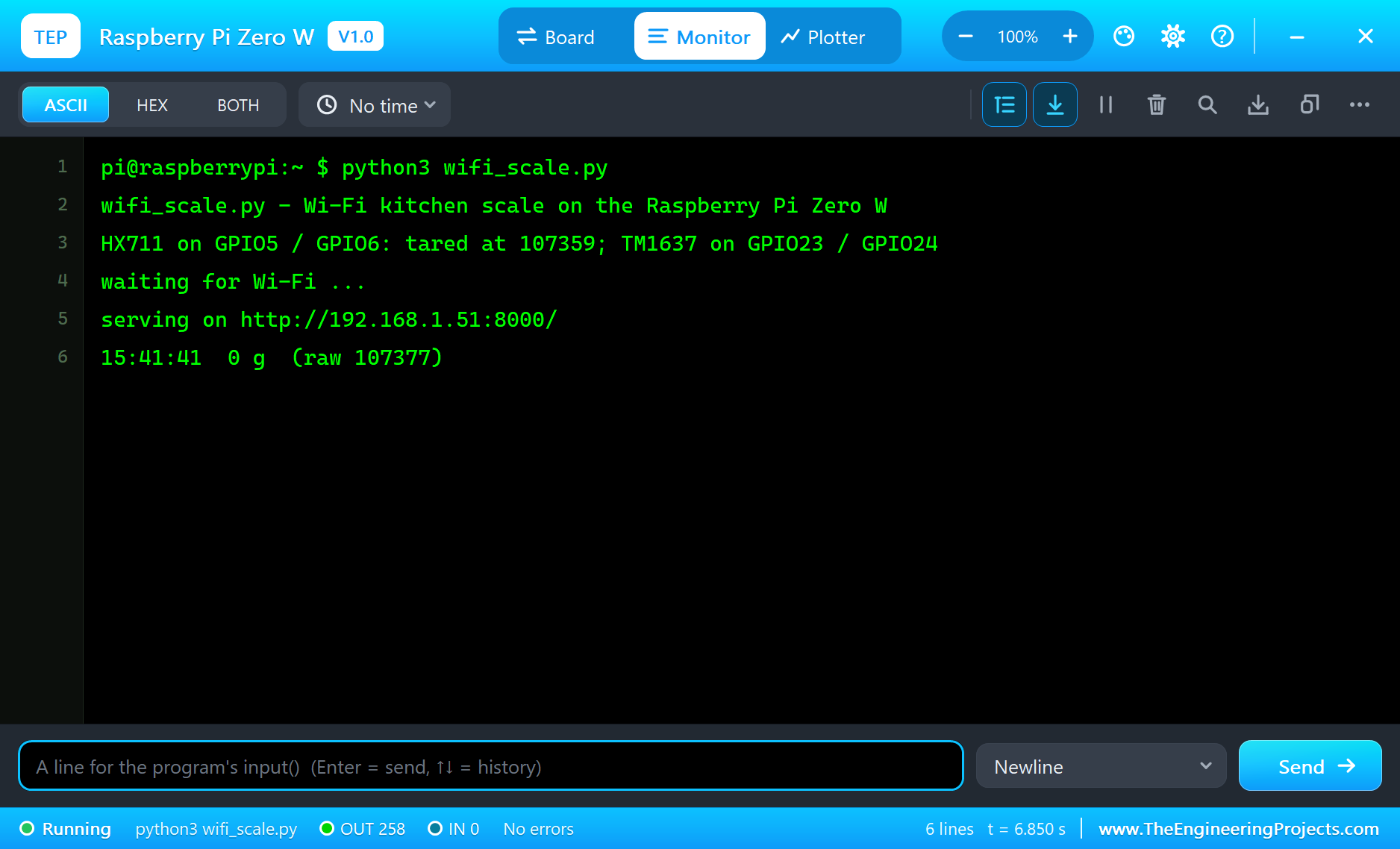
* The Pi Terminal (our TEP window, no Windows title bar): the shell prompt (pi@raspberrypi:~ $ python3 ...), the
program's output (OUT) and errors (ERR, as Python prints them on a Pi), a line for input() (IN); its Board tab
shows the GPIOs (BCM numbers), the LED, the supply pins and RESTART PROGRAM. Click the mini-HDMI socket or the
processor to open it.
* The LED: the green ACT LED by the power micro-USB (it flickers while the board boots and when the program prints);
the Zero W has no PWR LED.
* The header's supply pins power the modules wired to them, as on the bench: 5V, 3V3 and GND as logic levels (an
analog VCC reading sees 5 V on either rail).
The board is drawn our way at its real size (65 x 30 mm, rounded corners, four mounting holes 58 x 23 mm apart) from
the Raspberry Pi Zero drawing: the 40-pin header along the top edge (unpopulated on the real board - drawn with the
header soldered in), the microSD slot on the left with the card out of the edge, the power corner with two inductors
and the buck converter, the BCM2835 with its 512 MB of RAM stacked on top, the Cypress CYW43438 Wi-Fi / Bluetooth chip
with its crystal, the PCB antenna by the camera connector, the RUN pads, the ACT LED, and along the bottom the mini-HDMI
socket and the two micro-USB sockets (USB, PWR IN). The 40 pins leave the top edge as one comb 50 thou apart, each with
a colour-coded tag: 5V red, 3V3 orange, GND black, GPIO green, I2C blue, SPI pink, UART purple, ID_SD / ID_SC grey.
ONE DEVICE (search "RASPBERRY" in Pick Devices):
RASPBERRY PI ZERO W "Raspberry Pi Zero W" V1.0 (category Microprocessor ICs > Raspberry Pi), prefix PI, model
TEPNET.DLL (with the TEPPi folder)
The same TEPNET.DLL also runs our Raspberry Pi Model B, 1 Model B+, 2 Model B, 3 Model B, 3 Model B+, 3 Model A+,
4 Model B and 5, our Ethernet and Wi-Fi shields, modules and boards and the Laptop / Mobile WiFi Monitors; it replaces
any older TEPNET.DLL (keep only this newest one in MODELS).
TEST STATUS
V1.0: verified in Proteus 8.5 on 24 Oct 2026 with the demo project as shipped. What the Proteus runs showed:
* Pi-Zero-W-WiFi-Scale: the program tares the empty scale at 107359 (the 5 kg cell's zero balance of 0.05 mV/V at
AVDD 4.30 V), wlan0 joins TEP-WiFi and 2.9 s after Run it prints "serving on http://192.168.1.51:8000/"; the
TM1637 shows 0.
* The laptop and the phone open the page: 0 g, the raw reading, the tare, the factor 429.50 per g - text links on the
laptop, buttons on the phone.
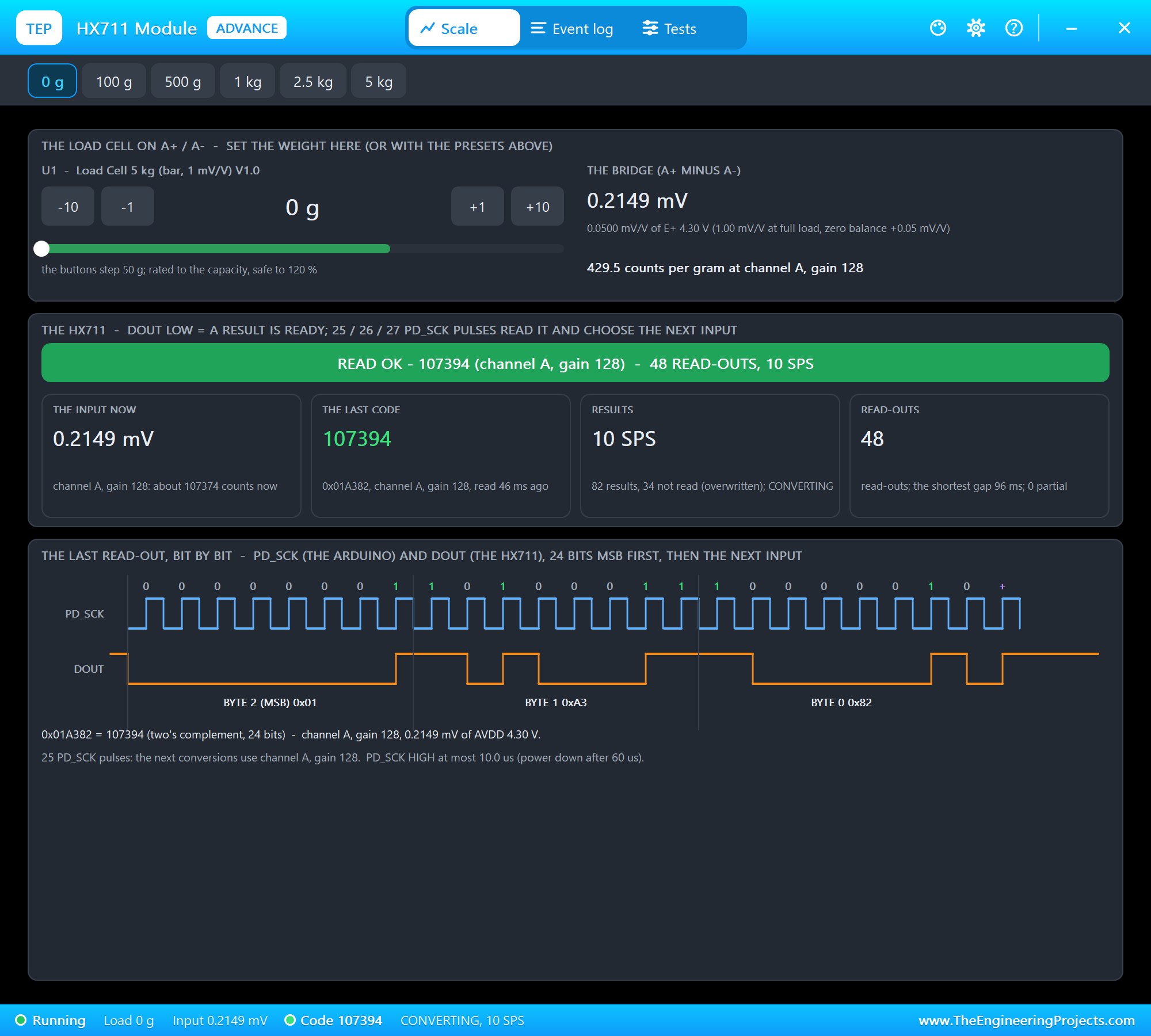
* The HX711 pop-up's 500 g preset: "500 g (raw 322108)" and the display reads 500; the pop-up shows READ OK, channel A
gain 128, 25 PD_SCK pulses, PD_SCK HIGH at most 10.0 us.
* The 1 kg preset: 1000 g; CAL 1 KG on the phone: "calibrated with 1 kg", the factor 429.49 per g; the TM1637's
pop-up reads "1000", brightness 7 (14/16), write with auto-increment.
* The 2.5 kg preset: 2500 g; G / OZ on the laptop: 88.19 oz; TARE on the laptop: 0.00 oz and the display back at 0.
* The Board tab: the BCM2835 at 1 GHz, GPIO2 / GPIO3 pulled up, GPIO5 (DT) HIGH between results, GPIO6 (SCK) LOW,
GPIO23 / GPIO24 let go to the module's pull-ups, 5V 5.00 V, 3V3 3.30 V, "No errors".
* Speed on our test PC: about 30 % of real time with the two pop-ups, the two monitors and the Pi Terminal open.
INSTALLATION (about 3 minutes)
1. Close Proteus. Extract the WHOLE ZIP to a normal folder (e.g. Desktop).
2. Copy everything in "Proteus Library Files" to the LIBRARY folder of Proteus, for example:
C:\Program Files (x86)\Labcenter Electronics\Proteus 8 Professional\LIBRARY
(on some PCs: C:\ProgramData\Labcenter Electronics\Proteus 8 Professional\LIBRARY - use the folder that already holds
Proteus's own .LIB files). TEPRPI0W.LIB is the Pi; TEPHX711.LIB (the HX711 and the load cells), TEPTM1637.LIB (the
display), TEPLAPTOP.LIB and TEPMOBILE.LIB are the demo's parts.
3. Copy everything in "Proteus Model Files" - the DLLs AND the TEPPi folder - to the MODELS folder:
C:\Program Files (x86)\Labcenter Electronics\Proteus 8 Professional\MODELS
TEPPi holds Python 3.11 and the TEP Pi runtime; the Pi finds it next to TEPNET.DLL, in MODELS or next to your
project. Replace an older TEPNET.DLL and TEPPi folder (these are the newest).
4. Delete TEPRPI0W.IDX (and the .IDX of a part library you replaced) from the LIBRARY folder if it is there.
5. Start Proteus. In Pick Devices (P) search "RASPBERRY".
Nothing else to install: Python is in TEPPi (no Python on the PC needed, none is changed).
RUN THE DEMO
Keep the .py file and the DLLs beside the project in "Proteus Simulation" (the TEPPi folder in MODELS).
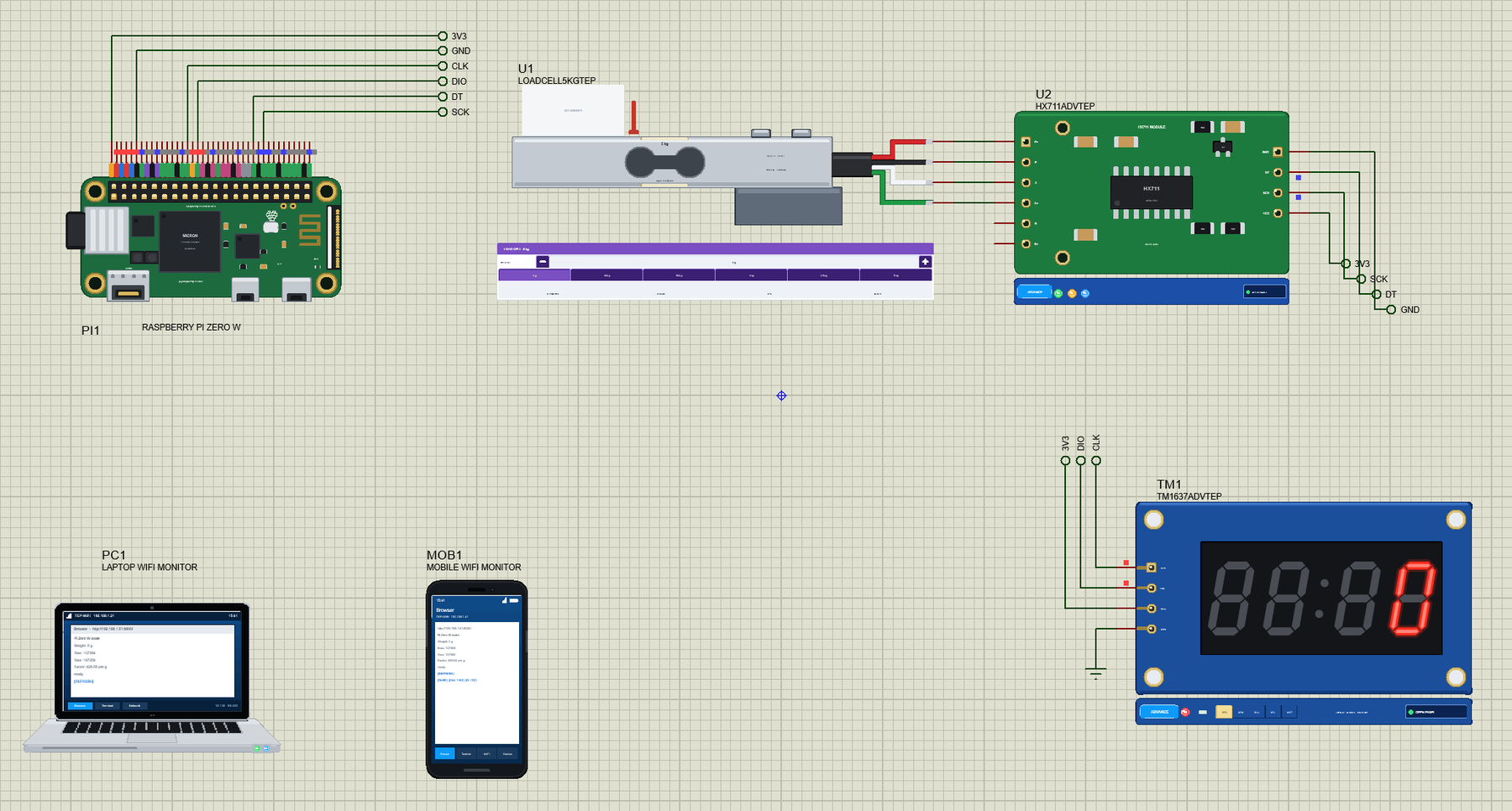
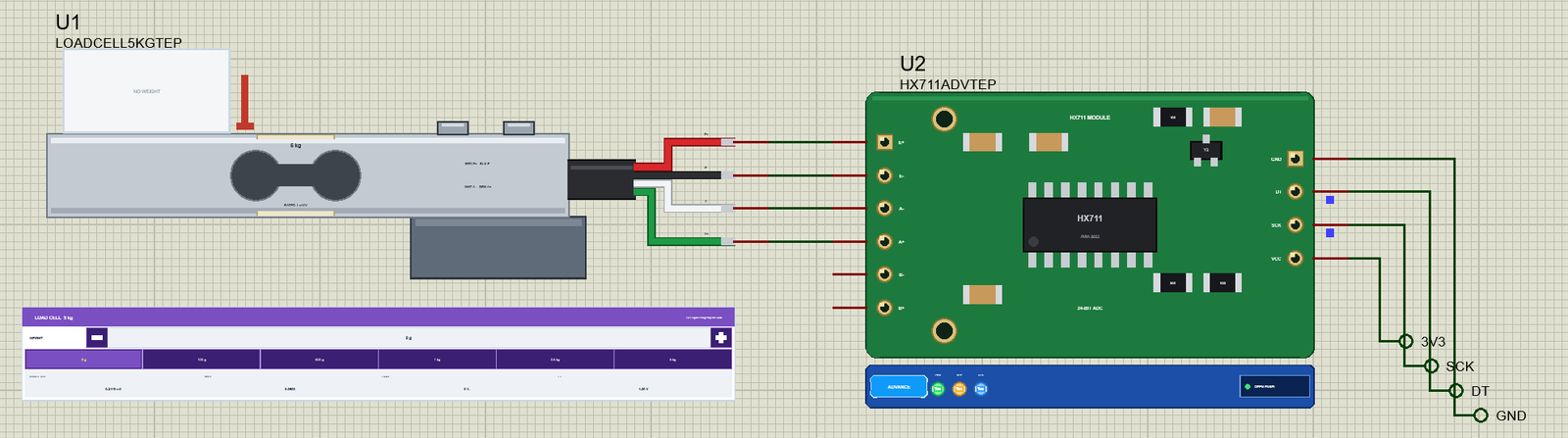
Pi-Zero-W-WiFi-Scale.pdsprj - PI1 runs wifi_scale.py on Wi-Fi: U1 = a 5 kg bar load cell wired to U2 = an HX711
module (red / black / white / green on E+ / E- / A- / A+; DT on GPIO5, SCK on GPIO6, VCC on 3V3), TM1 = a TM1637
4-digit display (CLK on GPIO23, DIO on GPIO24, VCC on 3V3); PC1 = the Laptop WiFi Monitor and MOB1 = the Mobile WiFi
Monitor on the same network. The HX711 and the display are the Advance parts: their pop-up windows open at Run.
Press Run: the display shows "----" while the program tares the empty scale (the average of 5 results), wlan0 joins
"TEP-WiFi" and the program serves its page; the display then shows the grams. Put a weight on the cell - the presets
0 g, 100 g, 500 g, 1 kg, 2.5 kg and 5 kg in the HX711's pop-up, or the load cell's WEIGHT panel on the sheet. On the
laptop or the phone open http://192.168.1.51:8000/ (Browser, the address, Go): the page shows the weight, the raw
reading, the tare and the factor, with REFRESH, TARE (zero with what is on it now), CAL 1 KG (with 1 kg on the cell:
the counts per gram are measured) and G / OZ (the page in grams or ounces). The display always shows grams, right-
aligned, "OL" beyond 9999.
The program is pure Python on RPi.GPIO: the HX711's read-out bit by bit (24 clocks + 1 for channel A, gain 128, SCK
HIGH only a few microseconds), the TM1637's 2-wire bus as open-drain lines (a line is pulled LOW or let go to the
module's pull-ups, the ACK read on the 9th clock), a weighing thread five times a second and http.server.
YOUR OWN PROGRAMS
Write the program with any editor, put the .py next to your project and set the Pi's PROGRAM property to its name (or
a full path). Start from Python Code\blink.py (an LED on GPIO17). Python's standard library is there; other
pure-Python packages work when you copy them next to your program. Use BCM numbers (GPIO.setmode(GPIO.BCM),
gpiozero's LED(17)) or GPIO.setmode(GPIO.BOARD) with the header's pin numbers.
A program that never sleeps and never touches a pin for 3 real seconds is left running on its own (the simulation
goes on); input() waits for a line typed in the Pi Terminal.
THE 40-PIN HEADER (BCM numbers - the tags on the board)
1 3V3 2 5V 3 GPIO2 SDA 4 5V 5 GPIO3 SCL 6 GND 7 GPIO4 (1-Wire)
8 GPIO14 TXD 9 GND 10 GPIO15 RXD 11 GPIO17 12 GPIO18 13 GPIO27 14 GND
15 GPIO22 16 GPIO23 17 3V3 18 GPIO24 19 GPIO10 MOSI 20 GND 21 GPIO9 MISO
22 GPIO25 23 GPIO11 SCLK 24 GPIO8 CE0 25 GND 26 GPIO7 CE1 27 ID_SD 28 ID_SC
29 GPIO5 30 GND 31 GPIO6 32 GPIO12 33 GPIO13 34 GND 35 GPIO19
36 GPIO16 37 GPIO26 38 GPIO20 39 GND 40 GPIO21
3.3 V logic: GPIO2 / GPIO3 have the Pi's 1.8 k pull-ups to 3.3 V; RPi.GPIO's pull-ups / pull-downs are weak drives.
ID_SD / ID_SC (27, 28, GPIO0 / GPIO1) are kept for a HAT's ID EEPROM; leave them free, as on a real Pi.
The RUN pads are drawn, not pins of the part.
PROPERTIES (double-click the Pi > Edit Properties)
PROGRAM the Python program (default blink.py; a name next to the project or a full path)
AUTOOPEN the Pi Terminal at Run: YES (default) or NO
WIFISSID the Wi-Fi network wlan0 joins (default TEP-WiFi)
WIFIPASS its password (default 12345678)
PYTHON a python.exe of your own (empty: TEPPi's)
RUNTIME the TEP Pi runtime folder (empty: TEPPi's)
TROUBLESHOOTING
* "TEP Pi: the TEPPi folder ... was not found": copy the TEPPi folder from "Proteus Model Files" into MODELS (or next
to the project).
* "python3: can't open file": the PROGRAM file is not next to the project - put it there or give a full path.
* ModuleNotFoundError for a package: only the libraries above are built in; copy a pure-Python package's folder next to
your program.
* The program waits for Wi-Fi forever: check WIFISSID / WIFIPASS (the simulation log says "not found" or "wrong
password").
* The HX711 never gets ready, or reads nonsense: DT on an input, SCK on an output and LOW between read-outs; SCK HIGH
for more than 60 us powers the chip down - the HX711's pop-up shows every read-out bit by bit.
* The display stays dark: the program must send the display-on command (0x88 + the brightness) after the digits;
CLK and DIO are open-drain - let a line go (input) for a 1, never drive it HIGH while the chip answers the ACK.
* The weight is off: calibrate with a known weight (CAL 1 KG), and TARE with the empty scale.
* The page does not open: the address is http://192.168.1.51:8000/ (the port the program serves), and the program must
have printed "serving on". A monitor sometimes needs Go a second time. Use the page's REFRESH link to see new
values (the monitors' Reload repeats the last link, e.g. TARE).
* A paused simulation shows the SIMULATION LOG: click the Schematic Capture tab.
BUG REPORTS AND FEATURE REQUESTS
Please post them in our forum with a screenshot, the program, the Pi Terminal's text and the simulation log:
https://www.theengineeringprojects.com/forum/category/raspberry-pi-zero-w-proteus-library
SUPPORT US
This library is free. If it saves you time, please support our work:
https://www.theengineeringprojects.com/donate
WEBSITE
https://www.theengineeringprojects.com/
LICENCES AND THIRD-PARTY NOTES
* The Raspberry Pi board model, the TEP Pi runtime, the Pi Terminal and the network (TEPNET.DLL, the compiled .pyc files
in TEPPi\runtime with the stand-ins lgpio, RPi, smbus2, smbus, spidev, serial, Adafruit_DHT, adafruit_dht, board), the
symbols and artwork (TEPRPI0W.LIB), the part models (TEPHX711 and TEPTM1637 .DLL / .LIB, the Laptop and Mobile WiFi
Monitors' TEPLAPTOP.LIB / TEPMOBILE.LIB in TEPNET.DLL) and the demo program are made by The Engineering Projects.
Our stand-ins follow the APIs of RPi.GPIO, lgpio, smbus2, py-spidev, pyserial, Adafruit_DHT and
adafruit-circuitpython-dht; none of their code is copied. The source code of the models is not included (nor the
runtime's: it ships compiled for the included Python 3.11).
* TEPPi\python is the official embeddable Python 3.11.9 for Windows (32-bit) from python.org, unchanged, under the
Python Software Foundation License (TEPPi\python\LICENSE.txt).
* TEPPi\runtime\gpiozero is gpiozero 2.0.1.post3 and TEPPi\runtime\colorzero is colorzero 2.0, unchanged, under the BSD
3-Clause licence (their LICENSE files in the dist-info folders).
* Proteus is a product of Labcenter Electronics and is not included. Raspberry Pi is a trademark of Raspberry Pi Ltd.
This library is not made or endorsed by Raspberry Pi Ltd or Labcenter.
MODEL SCOPE AND LIMITS
Modelled: the 26 GPIOs of the 40-pin header (inputs, outputs, RPi.GPIO's pull-ups / pull-downs, edges, software PWM),
the I2C, SPI, UART, 1-Wire and DHT buses as the Pi's drivers drive them, the supply pins, Wi-Fi (wlan0: the join, DHCP,
TCP and UDP to every TEP network part), the ACT LED, a 0.5 s boot before the program starts, the Pi's /proc and /sys
files above, the Pi Terminal. Not modelled: Raspberry Pi OS (no desktop, no shell commands, no apt, no os.system),
Bluetooth, Wi-Fi scanning from the program, the mini-HDMI output, the camera connector, USB and USB OTG gadget modes,
the microSD card's files, the RUN pads, hardware PWM (GPIO18 is software PWM here), a HAT's ID EEPROM, C programs and C
extensions, the real CPU's speed (each GPIO call takes about 5 us; pure Python code takes no simulation time),
real-time jitter. The model's own choices: the board's IP address (192.168.1.51 for PI1), the boot time, the router;
the simulation runs below real time.
VERSION
TEP Raspberry Pi Zero W library V1.0 (Oct 2026). Device RASPBERRY PI ZERO W (TEPRPI0W.LIB / TEPNET.DLL with TEPPi:
Python 3.11.9 and the TEP Pi runtime 0.2). Demo program wifi_scale.py V1.0, blink.py.Development1 release
 Development1 release
-
V1.0Raspberry Pi Zero W Library for Proteus V1.0this page
V1.0 is the only release in the Download Center so far. When a newer version is published, it appears above with its own download page.
Installation7 steps
 Installation7 steps
From the download to a working project, in order. The steps follow what the package contains.
You will need
- Proteus Design SuiteProteus 8 or newer (Labcenter), on Windows
- Pythonto build the source files into firmware
- Any archive toolWindows, macOS and Linux extract ZIP files on their own

Steps
- 1
Extract the archive
Right-click raspberry-pi-zero-w-tep-v1-0-dcb1ddfee85d4247a71519df61fc6d61.zip and choose Extract All (or open it with 7-Zip or WinRAR) into a folder you can find again. Keep its folder structure (Raspberry-Pi-Zero-W-TEP-v1.0) as it is.
- 2
Copy the library files into Proteus
Move TEPHX711.LIB, TEPLAPTOP.LIB and TEPMOBILE.LIB and 2 more and the files into the LIBRARY folder of your Proteus installation: C:\Program Files (x86)\Labcenter Electronics\Proteus 8 Professional\LIBRARY for Proteus 8, or the matching Proteus 7 folder. Older versions keep it under ProgramData\Labcenter Electronics. If Proteus is open, close it first.
- 3
Add the simulation model
Copy TEPHX711.DLL, TEPNET.DLL and TEPTM1637.DLL and 7 more into the MODELS folder next to LIBRARY, so the component can run, not only be drawn.
- 4
Restart Proteus and place the component
Start Proteus, open a schematic, press P (Pick Devices) and search for the component by the name used in the tutorial. It appears with its pins ready to wire.
- 5
Build the source code
Open wifi_scale.py, blink.py and attr.py and 29 more in the compiler named in the tutorial (MikroC, Keil, MPLAB, Code Composer or the Arduino IDE) and build it to get the firmware.
- 6
Open the example simulation
Open Pi-Zero-W-WiFi-Scale.pdsprj in Proteus to see the wiring exactly as in the tutorial. Check the controller's Program File path, then press Play.
- 7
Follow the tutorial
Raspberry Pi Zero W Library for Proteus: HX711 Scale, Web Page explains every connection and setting in order; keep it open beside the files while you build.
FAQs8 questionsContact TEP
 FAQs8 questions
How do I download Raspberry Pi Zero W Library for Proteus V1.0?
Wait for the 30-second guest countdown on this page, then press the download button; the file comes straight from our storage. Members who are logged in skip the wait. If the browser opens the file instead of saving it, use its Save as option.
What is inside the archive?
Raspberry Pi Zero W Library for Proteus V1.0 comes as a ZIP archive of 111 files (12.8 MB, 24.7 MB unpacked) holding Proteus library files, simulation model DLLs, a Proteus simulation, source code and a nested archive. Open the File Structure tab for the full list of 111 files.
What should I do if the download does not start?
Check the browser's download list first; an ad blocker or a company firewall can also hold it back, so try another browser or network. If the file arrives incomplete, download it again. For an installation problem, read the Install tab or tell us in the comments with your software version and the exact error message.
Is this file free?
Yes. Every file in the TEP Download Center is free for learning, personal and student projects. If you share it, link back to this page or the tutorial so others find the latest version.
How do I check that the file arrived complete?
Compare its SHA-256 with the one on this page, 50a3abd031188a558d86701a28a26b58f3dac6eae9bd4cb15f76a4a517a88acd. In PowerShell run Get-FileHash "raspberry-pi-zero-w-tep-v1-0-dcb1ddfee85d4247a71519df61fc6d61.zip"; on macOS or Linux run shasum -a 256 "raspberry-pi-zero-w-tep-v1-0-dcb1ddfee85d4247a71519df61fc6d61.zip". The same value means the file is exactly the one in our storage; a different one means the download broke off, so download it again.
Do I need WinRAR to open the ZIP file?
No. Windows, macOS and Linux open ZIP archives on their own (Extract All, or double-click). WinRAR and 7-Zip work too. Extract the whole archive before using the files.
Where do I put the LIB and IDX files?
Both files go into the LIBRARY folder of your Proteus installation (Proteus 8: C:\Program Files (x86)\Labcenter Electronics\Proteus 8 Professional\LIBRARY; Proteus 7 has the same folder under its own name). Restart Proteus afterwards and search for the component with P.
Which Proteus version does the library need?
The tutorial names the Proteus version the library was made and tested with. Most TEP libraries work in Proteus 7 and Proteus 8; if the component does not appear after a restart, check that both the LIB and the IDX file were copied and that Proteus was fully closed while copying.
Members skip the wait. Log in or join TEP.

- 0Total downloads
- 4%Popularity
- ProteusCategory
- 0Comments
- ssyedzainnasirUploaded by
- 25 Oct 2026Uploaded at


 SHA-256
50a3abd031188a558d86701a28a26b58f3dac6eae9bd4cb15f76a4a517a88acd


 Need help with this file?
 Tags
TagsRelated Proteus
All Proteus tutorials



More Raspberry Pi project files
All Raspberry Pi tutorials


Comments
0