TEP , The Engineering Projects , Tutorials
Introduction to LM339, getting started with LM339, how to use LM339 for the first time, how to start with L339, LM339 proteus, Proteus LM339, LM339 Proteus diagram
TEP , The Engineering Projects , Boxes

Introduction to LM339

TEP , THe Engineering Projects , Shares 2.5K Views
TEP , The ENgineering Projects , Reaction 40
TEP , The ENgineering Projects , Reaction 700
TEP , The ENgineering Projects , Reaction 60
TEP , The ENgineering Projects , Reaction 25
TEP , The ENgineering Projects , Reaction 60
TEP , The Engineering Projects , Pintrest TEP , The Engineering Projects , Pintrest TEP , The Engineering Projects , Pintrest TEP , The Engineering Projects , Pintrest TEP , The Engineering Projects , Pintrest TEP , The Engineering Projects , Pintrest TEP , The Engineering Projects , Pintrest TEP , The Engineering Projects , Pintrest
Shares: 691
TEP , The Engineering Projects , PCBWAY

Introduction to LM339, getting started with LM339, how to use LM339 for the first time, how to start with L339, LM339 proteus, Proteus LM339, LM339 Proteus diagram
Hello everyone! I hope you all will be absolutely fine and having fun. Today, I am going to share my knowledge about Introduction to LM339. LM339 belongs to the family of devices having 4 independent voltage comparators. Each comparator is designed in such a way that it is capable of operating from a single power source over a wide range of power supplies. It can also operate for split power supplies. There is a unique characteristic of comparators, Input Common-Mode Voltage Range (ICMR) includes a ground even when it is operating from a single power supply voltage.

Basically, LM339 is a comparator IC having four built-in comparators. The basic purpose of a comparator is to rotate the signal between analog and digital domains. At its input terminal, it compares the two different input voltages applied, gives digital output and indicates the larger input applied at the input terminal.

Introduction to LM339

LM 339 is a comparator IC having 4 builtin comparators. A comparator rotates a signal between digital and analog domain. First of all, it compares the 2 different inputs applied at the input terminal and then gives the output in digital form in order to indicate which of the input applied has a larger amplitude. It has a lot of real life applications e.g. basic comparator, driving CMOS, driving TTL, low frequency op-amp, Transducer amplifier etc. Further detail about the particular IC will be given later in this tutorial.

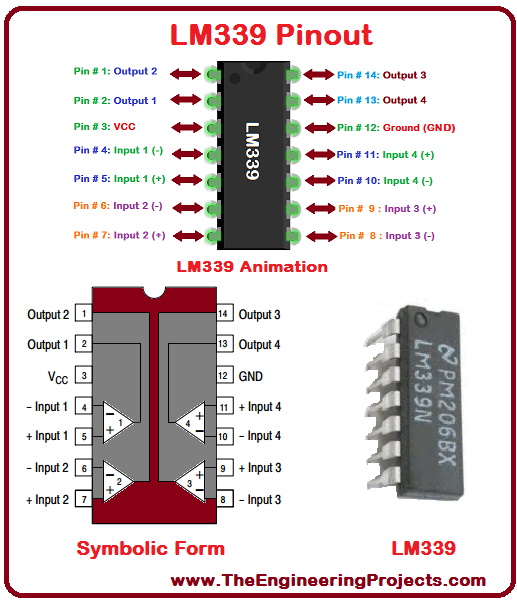
1. LM339 Pinout

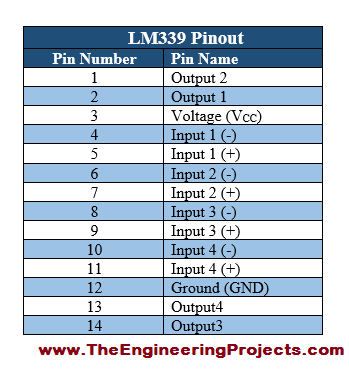
  • LM 339 has fourteen (14) pins in total including four inverting input pins, four non inverting pins, four output pins, voltage and ground pin.
  • All of the pins along with their sequence number are shown in the table given below.
Introduction to LM339, getting started with LM339, how to use LM339 for the first time, how to start with L339, LM339 proteus, Proteus LM339, LM339 Proteus diagram

2. LM339 Pins Configuration

  • The properly labeled LM 339 pin configuration diagram is shown in the figure below, for the better understanding of the reader (specially the students).
Introduction to LM339, getting started with LM339, how to use LM339 for the first time, how to start with L339, LM339 proteus, Proteus LM339, LM339 Proteus diagram

3. LM339 Packages

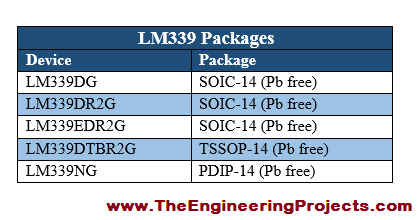
  • LM 339 has different packages including LM-339DG, LM-339NG etc.
  • A few of the packages are given in the table shown below.
Introduction to LM339, getting started with LM339, how to use LM339 for the first time, how to start with L339, LM339 proteus, Proteus LM339, LM339 Proteus diagram

4. LM339 Features

  • There are several different features associated with LM 339.
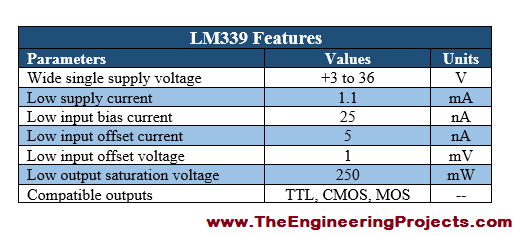
  • A few of the major features including low supply current, low input bias current, low input offset current, low output saturation voltage etc. are taken into account.
  • The major features along with their values and System International (SI) units are provided in the table shown below.
Introduction to LM339, getting started with LM339, how to use LM339 for the first time, how to start with L339, LM339 proteus, Proteus LM339, LM339 Proteus diagram

5. LM339 Ratings

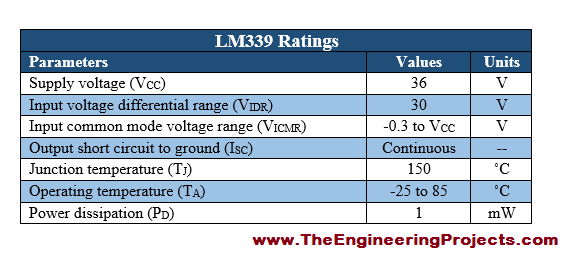
  • The current, voltage and power rating associated with LM 339 are given along with their typical values and SI units, in the table shown below.
Introduction to LM339, getting started with LM339, how to use LM339 for the first time, how to start with L339, LM339 proteus, Proteus LM339, LM339 Proteus diagram

LM339 Applications

There is a wide range of applications associated with LM 339 comparator IC. A few of the major applications along with their designed circuits are explained below.

Basic comparator

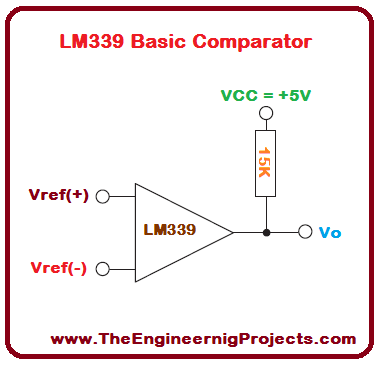
  • The circuit designed for Basic Comparator is shown in the figure below:
Introduction to LM339, getting started with LM339, how to use LM339 for the first time, how to start with L339, LM339 proteus, Proteus LM339, LM339 Proteus diagram
You can see from the above figure that the basic comparator consists of LM 339 with two different reference input voltages and a15K resistor.

Driving CMOS

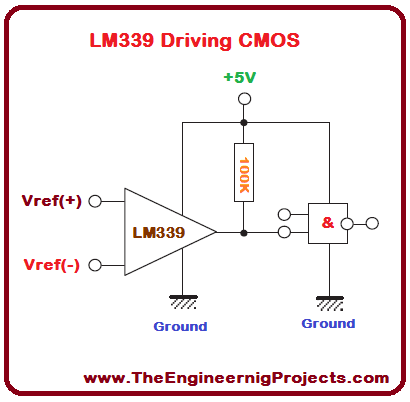
  • The circuit designed for Driving CMOS is shown in the figure below.
Introduction to LM339, getting started with LM339, how to use LM339 for the first time, how to start with L339, LM339 proteus, Proteus LM339, LM339 Proteus diagram
  • You can see from the above figure that the driving CMOS consists of LM 339 with two different reference input voltages and a 100K resistor.

Low frequency op-amp

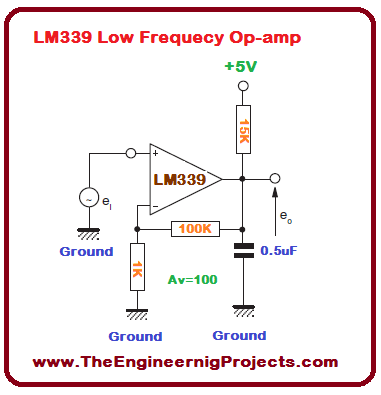
  • The circuit designed for Low Frequency Op-amp is shown in the figure below.
Introduction to LM339, getting started with LM339, how to use LM339 for the first time, how to start with L339, LM339 proteus, Proteus LM339, LM339 Proteus diagram
  • You can see from the above figure that the Low Frequency Op-amp consists of LM 339 with two different reference input voltages, a 15K resistor and a 100K resistor having voltage gain of around 100.

Transducer Amplifier

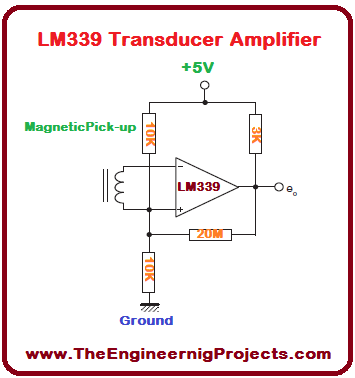
  • The circuit designed for Transducer Amplifier is shown in the figure below.
Introduction to LM339, getting started with LM339, how to use LM339 for the first time, how to start with L339, LM339 proteus, Proteus LM339, LM339 Proteus diagram
  • You can see from the above figure that the Transducer amplifier consists of LM 339 with two different reference input voltages, a 3K resistor, a 20M resistor and two 10K resistors.

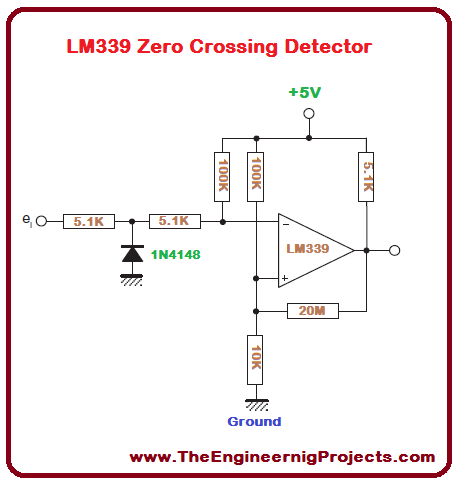
Zero crossing detector

  • The circuit designed for Zero Crossing Detector is shown in the figure below.
Introduction to LM339, getting started with LM339, how to use LM339 for the first time, how to start with L339, LM339 proteus, Proteus LM339, LM339 Proteus diagram
  • You can see from the above figure that the Transducer amplifier consists of LM 339 with two different reference input voltages, a 10K resistor, a 20M resistor, three 5.1K resistor, two 100K resistors and 1N4148 diode.
  • There are few other applications associated with LM 339 and are given below.
  • Limit comparator.
  • Crystal controlled oscillator.
  • Negative reference comparator.
  • Driving TTL

So, that is all from the tutorial Introduction to LM339. I hope you enjoyed this tutorial. If you are facing any kind of problem, you can freely ask me in comments anytime you want without even feeling any sort of hesitation. I will try my level best to solve your issues in a proper way, if possible. Moreover, our team is also available 24/7 for your guidance. I will explore different IC’s and transistors in my upcoming tutorial and will surely share them with you as well. So, till then Take Care :)

TEP , The Engineering Projects , TagsIntroduction to LM339
getting started with LM339
how to use LM339 for the first time
how to start with L339
LM339 proteus
Proteus LM339
LM339 Proteus diagram
TEP , The Engineering Projects , Calender Wednesday, June 21, 2017
Next Page TEP , The Engineering Projects , Arrow
TEP , The Engineering Projects , Comments

Write a Comment

TEP , The Engineering Projects , WordPress TEP , The Engineering Projects , Google TEP , The Engineering Projects , Twitter TEP , The Engineering Projects , Facebook TEP , The Engineering Projects , User
TEP , The Engineering Projects , Robot
TEP , The Engineering Projects , Comments Comments on ‘’ Introduction to LM339 ‘’ (0)
TEP , The Engineering Projects , Add

Top PCB Design Service

PCB
TEP , The Engineering Projects , PCB Online
TEP , The Engineering Projects , Add

Embedded Tools

ARDINO
TEP , The Engineering Projects , ARDUINO
TEP , The Engineering Projects , Subscribe

Subscribe Now !!!

Learn Free Pro Tricks

TEP , The Engineering Projects , Mail Receive Quality Tutorials Straight in your Inbox by Submitting your Email ID Below
TEP , The Engineering Projects , Mail
TEP , The Engineering Projects , Books

Engineering Books

TEP , The Engineering Projects , Arduino Programming Book
SALE $20
Text Book for arduino $20
TEP , The Engineering Proects , Star TEP , The Engineering Proects , Star TEP , The Engineering Proects , Star TEP , The Engineering Proects , Star TEP , The Engineering Proects , Star (5.0)
TEP , The Engineering Projects , Arduino Programming Book
SALE $20
Text Book for raspberry pi $20
TEP , The Engineering Proects , Star TEP , The Engineering Proects , Star TEP , The Engineering Proects , Star TEP , The Engineering Proects , Star TEP , The Engineering Proects , Star (3.0)
TEP , The Engineering Projects , Arduino Programming Book
SALE $20
Text Book for arduino $20
TEP , The Engineering Proects , Star TEP , The Engineering Proects , Star TEP , The Engineering Proects , Star TEP , The Engineering Proects , Star TEP , The Engineering Proects , Star (4.7)
TEP , The Engineering Projects , Arduino Programming Book
SALE $20
Text Book for raspberry pi $20
TEP , The Engineering Proects , Star TEP , The Engineering Proects , Star TEP , The Engineering Proects , Star TEP , The Engineering Proects , Star TEP , The Engineering Proects , Star (5.0)
TEP , The Engineering Projects , Category

Categories

TEP , The Engineering Projects , Arduino
TEP , The Engineering Projects , Notification 20K
TEP , The Engineering Projects , Tick 900
TEP , The Engineering Projects , Views 900
TEP , The Engineering Projects , Comments 20K
TEP , The Engineering Projects , Arduino
TEP , The Engineering Projects , Notification 20K
TEP , The Engineering Projects , Tick 900
TEP , The Engineering Projects , Views 900
TEP , The Engineering Projects , Comments 20K
TEP , The Engineering Projects , Arduino
TEP , The Engineering Projects , Notification 20K
TEP , The Engineering Projects , Tick 900
TEP , The Engineering Projects , Views 900
TEP , The Engineering Projects , Comments 20K
TEP , The Engineering Projects , Arduino
TEP , The Engineering Projects , Notification 20K
TEP , The Engineering Projects , Tick 900
TEP , The Engineering Projects , Views 900
TEP , The Engineering Projects , Comments 20K
TEP , The Engineering Projects , Arduino
TEP , The Engineering Projects , Notification 20K
TEP , The Engineering Projects , Tick 900
TEP , The Engineering Projects , Views 900
TEP , The Engineering Projects , Comments 20K
TEP , The Engineering Projects , Arduino
TEP , The Engineering Projects , Notification 20K
TEP , The Engineering Projects , Tick 900
TEP , The Engineering Projects , Views 900
TEP , The Engineering Projects , Comments 20K
TEP , The Engineering Projects , Arduino
TEP , The Engineering Projects , Notification 20K
TEP , The Engineering Projects , Tick 900
TEP , The Engineering Projects , Views 900
TEP , The Engineering Projects , Comments 20K
TEP , The Engineering Projects , Arduino
Matlab
200
TEP , The Engineering Projects , Notification 20K
TEP , The Engineering Projects , Tick 900
TEP , The Engineering Projects , Views 900
TEP , The Engineering Projects , Comments 20K
TEP , The Engineering Projects , Arduino
TEP , The Engineering Projects , Notification 20K
TEP , The Engineering Projects , Tick 900
TEP , The Engineering Projects , Views 900
TEP , The Engineering Projects , Comments 20K