


Project Files of Introduction to L298
 Libraries
 Code
 Projects
 Simulation
TEP_PowerSO20-TEP-SlugDown.kicad_mod

PowerSO20-TEP-SlugDown KiCad PCB Footprint
PowerSO20-TEP-SlugDown KiCad PCB Footprint is a single PCB / schematic (3.3 KB), ready to use as it is.
- PCBPCB / schematic
Description
Editable KiCad footprint with numbered copper pads, drill dimensions and package outlines.
Use in KiCad
- Download the .kicad_mod file.
- Create a folder named TEP.pretty and put the file inside.
- In KiCad, open Preferences → Manage Footprint Libraries and add that folder.
- Select the footprint in the Footprint Editor or assign it to your schematic symbol.
Dimensions are in millimeters. Confirm the package and pin mapping against your chosen part before fabrication. This is a footprint, not a complete PCB or 3D model.

File Structure
 File Structure

Gallery12 images from the tutorialOpen the tutorial
 Gallery12 images from the tutorial
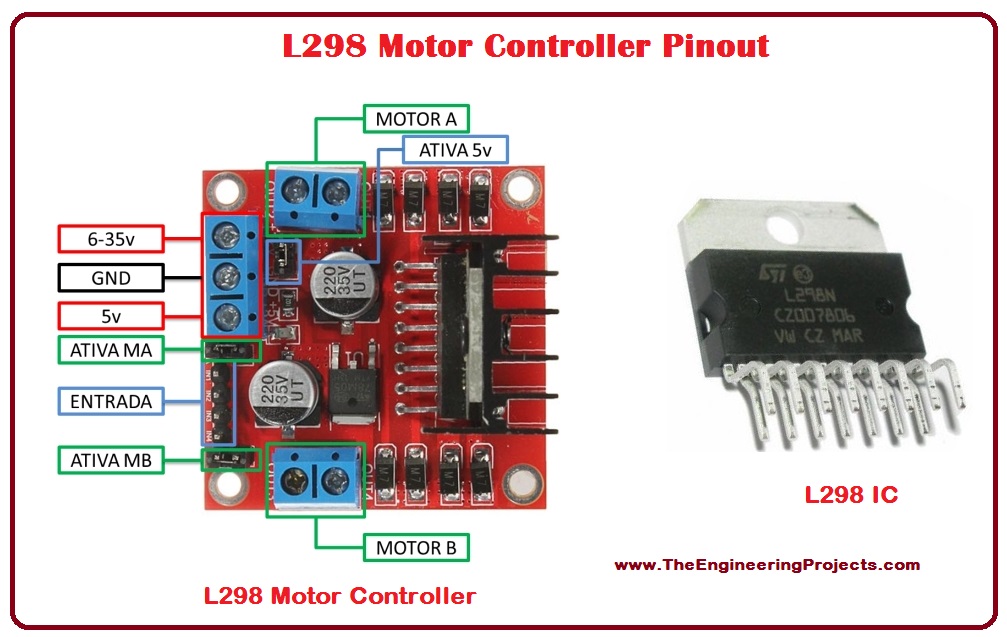
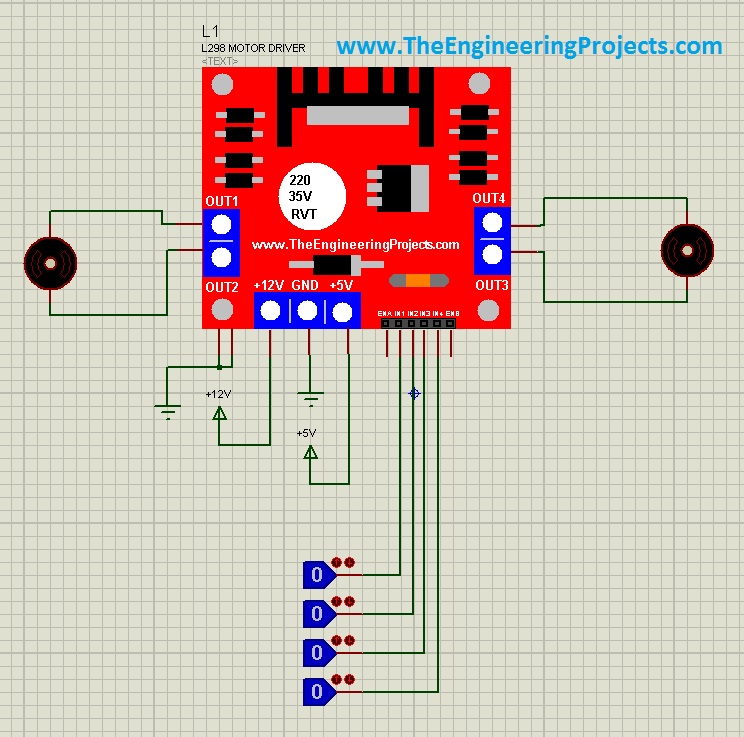
The circuit, the board and the results as they appear in Introduction to L298. Open an image for its full size.


Videofrom the tutorial
Watch the project run before you download. The player loads only when you press play.
Introduction to L298Watch on YouTube
README
 README
Development1 release
 Development1 release
-
PowerSO20-TEP-SlugDown KiCad PCB Footprintthis page
The only release of this package so far. When a newer version is published, it appears above with its own download page.
Installation4 steps
 Installation4 steps
From the download to a working project, in order. The steps follow what the package contains.
You will need
- KiCadFootprint Editor, to inspect and use the package in your PCB design
Steps
- 1
Create a footprint library
Create a folder named TEP.pretty and put the downloaded .kicad_mod file inside.
- 2
Add it to KiCad
Open Preferences → Manage Footprint Libraries and add the TEP.pretty folder. Open the footprint in the Footprint Editor or assign it to a schematic symbol.
- 3
Check your chosen package
Verify the pin mapping, pad dimensions and drill sizes against your component before fabricating the PCB. Dimensions are in millimeters.
- 4
Follow the tutorial
Introduction to L298 explains every connection and setting in order; keep it open beside the files while you build.
FAQs5 questionsContact TEP
 FAQs5 questions
How do I download PowerSO20-TEP-SlugDown KiCad PCB Footprint?
Wait for the 30-second guest countdown on this page, then press the download button; the file comes straight from our storage. Members who are logged in skip the wait. If the browser opens the file instead of saving it, use its Save as option. The download link is made for you when the countdown ends and works for 15 minutes; a saved or shared link stops working, so share this page instead.
What should I do if the download does not start?
Check the browser's download list first; an ad blocker or a company firewall can also hold it back, so try another browser or network. If the file arrives incomplete, download it again. For an installation problem, read the Install tab or tell us in the comments with your software version and the exact error message.
Is this file free?
Yes. Every file in the TEP Download Center is free for learning, personal and student projects. If you share it, link back to this page or the tutorial so others find the latest version.
How do I check that the file arrived complete?
Compare its SHA-256 with the one on this page, f56adcb1709d7af767225eabcadef465a638839015ec031eb24615957b2b159c. In PowerShell run Get-FileHash "TEP_PowerSO20-TEP-SlugDown.kicad_mod"; on macOS or Linux run shasum -a 256 "TEP_PowerSO20-TEP-SlugDown.kicad_mod". The same value means the file is exactly the one in our storage; a different one means the download broke off, so download it again.
Are there other files for this tutorial?
Yes, this tutorial has 3 downloads; the others are listed under the panel. Each has its own page and countdown.
Members skip the wait. Log in or join TEP.

- 0Total downloads
- 4%Popularity
- Electronic ComponentsCategory
- 0Comments
- ssyedzainnasirUploaded by
- 18 Jul 2017Uploaded at


 SHA-256
f56adcb1709d7af767225eabcadef465a638839015ec031eb24615957b2b159c


 Need help with this file?
 Tags
Related Electronic Components
All Electronic Components tutorials






Comments
0