Hello friends, I hope you all are doing great. Today, I am going to share the new Filament Bulb Library for Proteus. The incandescent bulb is the oldest electric light, and it is still everywhere: in the brake and indicator lights of millions of cars, in pilot lamps, in torches and in the hobby projects of anyone who wants a warm, simple light. It looks like the simplest load there is, just a piece of wire that glows, but it hides a surprise that destroys switches and fuses: when it is cold, it draws many times its rated current.
Filament Bulb Library for Proteus
Latest version: V1.0 (November 2026, this tutorial)
Other component libraries: C945 Transistor · PC817 Optocoupler · Relay Module · Resistor · 5 mm LED · Designer Colour LED · Push Button · Active Buzzer · Electrolytic Capacitor · Ceramic Capacitor · Tantalum Capacitor · Film Capacitor · 1N4007 Diode · Zener Diode · Schottky Diode · Supercapacitor · Photodiode · RGB LED · Bridge Rectifier · Flashing LED · Bi-Colour LED · SMD LED · Slide Switch · Toggle Switch · Rocker Switch · Micro Limit Switch · Emergency Stop Switch · SMD Resistor · Power Resistor · Resistor Network · Potentiometer · Trimmer Potentiometer · Slide Potentiometer · NTC Thermistor · DIP Switch · Fuse · Passive Buzzer · Mini Speaker · 7-Segment Display · LED Bar Graph · IR / UV LED · Small Transistors · TIP122 Darlington · N-MOSFET · P-MOSFET · PC817 Optocoupler · Power LED · Voltage Regulator · SCR and TRIAC · Inductor · Toroid Inductor · Crystal
Helping Tools
- Serial Monitor Advance: a serial terminal window for the UART of your board
- Serial Monitor Expert: the serial monitor with extra debugging tools
- LCD Library for Proteus V3.0: 16x2, 20x4 and I2C LCDs to show your readings
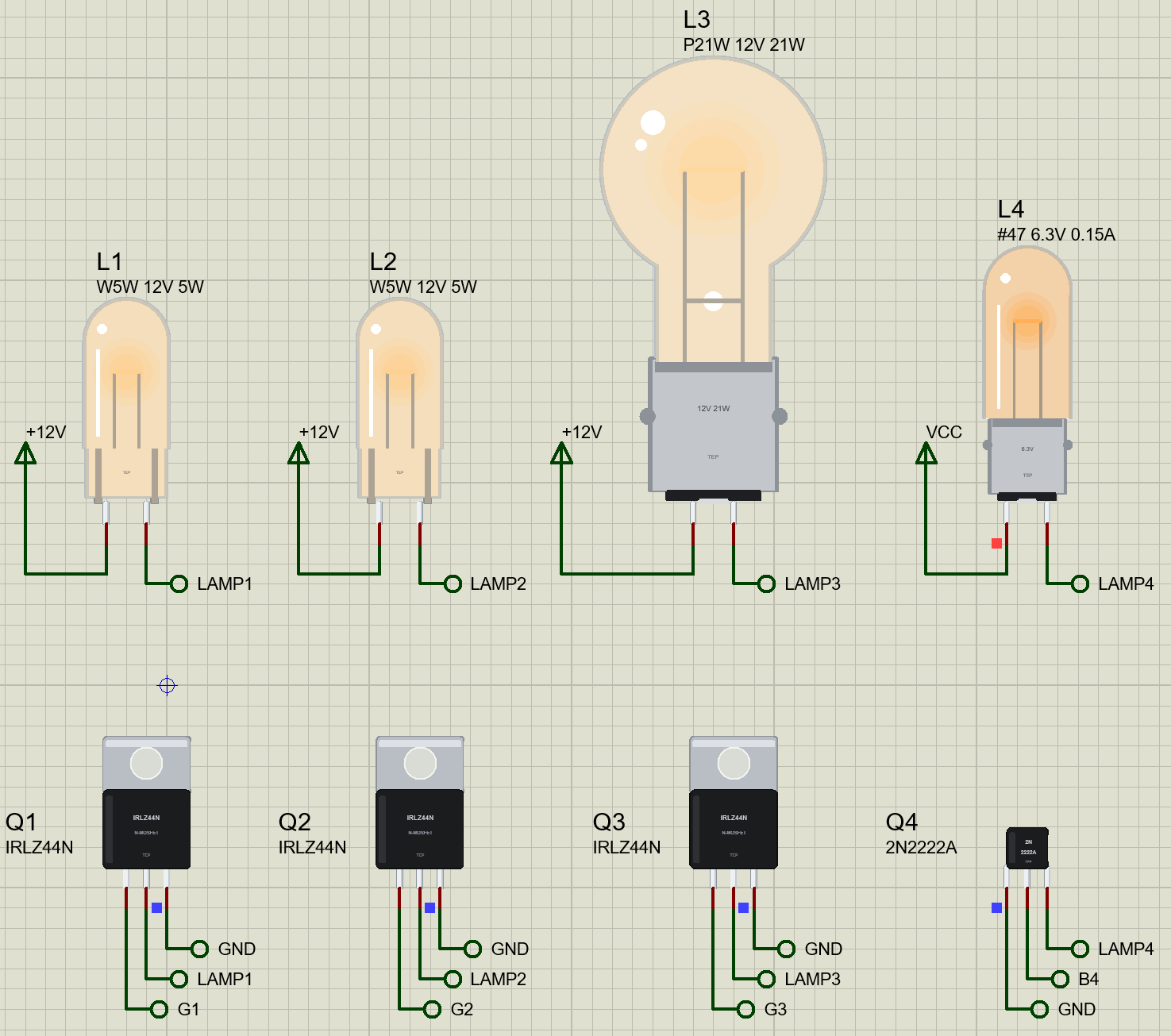
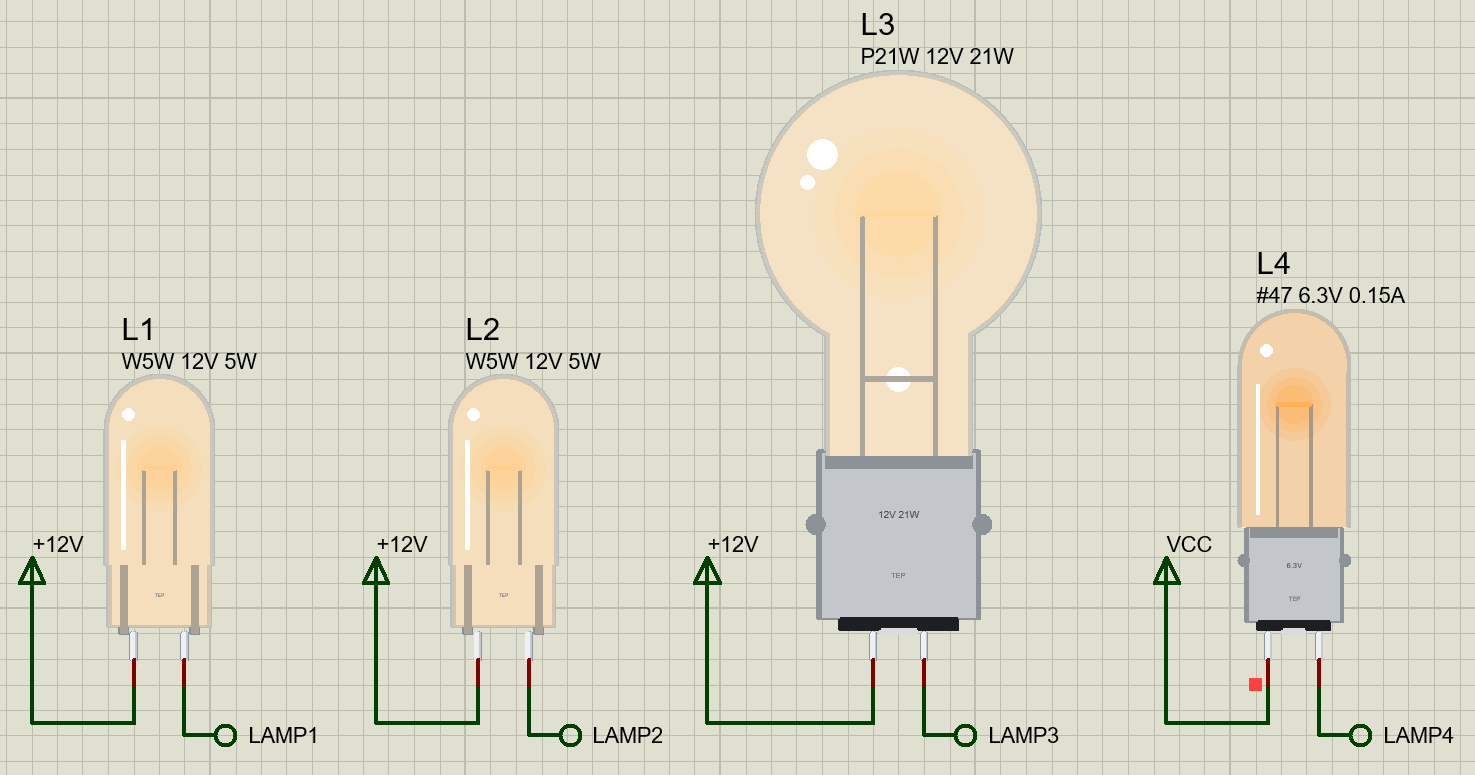
Our library has three bulbs at true scale: the W5W, a 12 V 5 W wedge bulb with no metal base; the P21W, the 12 V 21 W bulb of brake and indicator lights on its BA15s base; and the #47, the 6.3 V 0.15 A miniature pilot lamp. The model is a real tungsten filament: its resistance follows its temperature, it heats with its current and cools by radiation, and it has a heat capacity. So a switch-on draws a surge of 12 to 15 times the running current, the filament warms in tens of milliseconds, PWM dims it smoothly, and the light and life follow the lamp laws. On the sheet, the glass glows in the colour of the filament's temperature.
NOTICE: Our team has put a lot of effort into these small parts: the bodies, the animation and the pop-ups are all our own design, and you get them free. Your feedback is the fuel that keeps us going, so please tell us what you think in the comments below or in the Filament Bulb board of our forum. And if our free libraries help you, you can buy us a coffee. So, let's get started with the Filament Bulb Library for Proteus:
How Does a Filament Bulb Work?
An incandescent bulb is a thin coil of tungsten wire, the filament, in a glass bulb that holds a vacuum or an inert gas. Current through the filament heats it to between about 2400 and 2900 K, hot enough to glow white-yellow. Tungsten is used because it has the highest melting point of any metal, 3695 K, and because it evaporates slowly; the gas or vacuum keeps the oxygen of the air away, which would burn the filament in a moment. Only a few percent of the power comes out as visible light; the rest is heat and infrared.
| Bulb | Base, size | Rating | Cold / hot | Light |
|---|---|---|---|---|
| W5W | T10 wedge, 10 mm glass | 12 V 5 W, 0.42 A | 2.06 / 28.8 ohm | 50 lm |
| P21W | BA15s, 26.5 x 52.5 mm | 12 V 21 W, 1.75 A | 0.46 / 6.86 ohm | 460 lm |
| #47 | BA9s, T-3 1/4, 10 mm glass | 6.3 V 0.15 A | 3.38 / 42.0 ohm | about 6 lm |
The Cold Filament and the Surge
The resistance of tungsten rises steeply with temperature: between room temperature and its working temperature it climbs about fourteen times. A W5W measures about 2 Ω when cold, but runs at 28.8 Ω when hot. At the moment it is switched on, the 12 V supply sees the cold resistance, and the current is 12 V / 2 Ω, nearly 6 A, for a bulb that will run at 0.42 A. The filament then heats in a few tens of milliseconds, its resistance rises, and the current falls to its running value. This inrush or switch-on surge is the main reason bulbs blow at the moment they are switched on, and why a switch, a relay contact or a transistor rated for the running current alone can fail.
Heating and Cooling
How fast the filament warms depends on its mass. A small filament reaches full light in about a tenth of a second; a big one takes a little longer. When it is switched off, it cools by radiation and through its lead-in wires, so it keeps glowing for a moment, and a big bulb such as the P21W is still visibly orange well after it is switched off. If it is switched on again while still warm, its resistance is already higher, and the surge is much smaller.
The Lamp Laws
Engineers describe how a bulb responds to its voltage with a few simple power laws. The light rises with the voltage to the power 3.4, the current to the power 0.55, and the life falls with the voltage to the power -13. Run a bulb at 95 % of its voltage and it gives about 16 % less light but lives almost twice as long; run it at 105 % and it lives half as long. Run it at 80 % and it gives less than half its light but lives about seventeen times longer. That is why the pilot lamps of old equipment were often run deliberately under their voltage: they almost never needed replacing.
Dimming with PWM
A bulb is easy to dim with PWM. At a few hundred hertz, the filament's heat cannot follow the pulses, so its temperature stays almost steady and there is no flicker to see. But the light does not follow the duty cycle in a straight line: because light rises so steeply with temperature, 40 % of the time on gives far less than 40 % of the light. PWM is also the best way to tame the surge: a soft start raises the duty slowly from zero, so the filament warms gently and the average current never jumps.
Driving a Bulb from an Arduino
An Arduino pin can give only 20 mA, so a bulb needs a switch: a logic-level N-MOSFET such as the IRLZ44N for 12 V bulbs, or a small transistor such as the 2N2222A for a pilot lamp. The switch goes on the low side, between the bulb and ground, and it must be able to take the surge, not only the running current. A MOSFET rated for 47 A takes a 25 A surge in its stride. A small transistor with a modest base current cannot: it leaves saturation and limits the surge itself, which protects the bulb but heats the transistor for a moment.
Features of the Filament Bulb Library for Proteus
- The real look, at true scale: the all-glass W5W wedge, the P21W on its BA15s base and the #47 miniature, with our small TEP signature.
- A glowing filament: on the sheet, the glass and the coil glow in the colour of the filament's temperature, from dull red to white-yellow.
- A real tungsten filament: its resistance follows its temperature, so every switch-on draws a surge of 12 to 15 times the running current.
- Heat in and heat out: radiation and conduction cool it, its heat capacity sets the warm-up, the cooling and the smoothing of PWM.
- The lamp laws: the light and the life follow the voltage, and an over-run bulb burns out.
- The surge on record: the pop-up keeps the current of the last switch-on, its peak and when the light reached 90 %.
- A pop-up for each bulb: the bulb, the surge, eight live values, graphs, an event log and a check page.
- A complete package: about 2.2 MB with the library, our Arduino UNO V4.0, our MOSFETs, transistor and resistors and the demo, without the source code of the model.
The Bulbs in Proteus
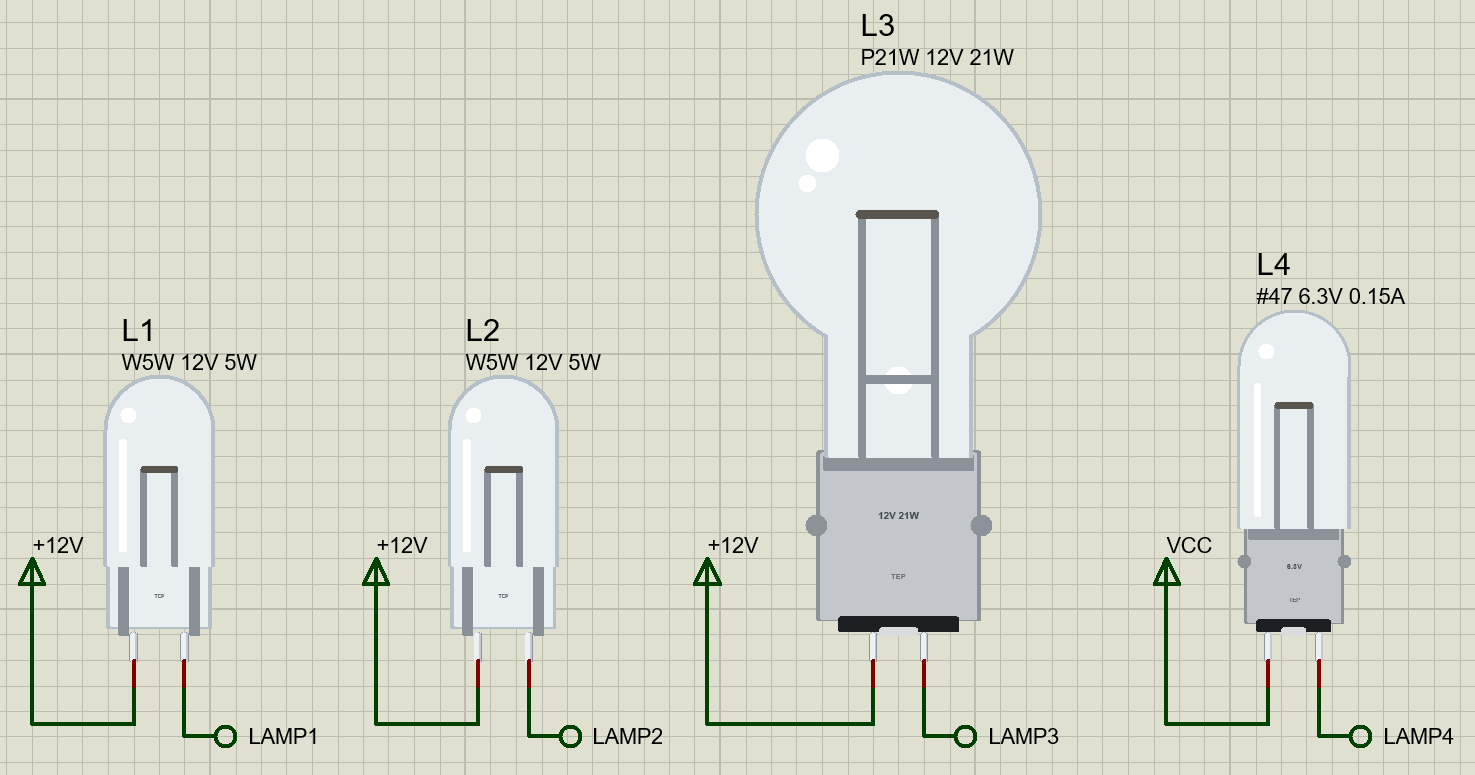
The devices are BULBW5WTEP, BULBP21WTEP and BULB47TEP in TEPBULB.LIB, under Optoelectronics, Lamps, with the prefix L and the model TEPBULB.DLL. Search BULB, W5W, P21W or #47 in Pick Devices. Each bulb stands on its base with its two contacts as pins 1 and 2 at the bottom; a bulb has no polarity, so either way round works.
The Properties
| Property | What it does |
|---|---|
| Part (VALUE) | the label beside the bulb: W5W 12V 5W, P21W 12V 21W or #47 6.3V 0.15A |
| Device | sets the bulb: its rating, its filament and its size |
Download Filament Bulb Library for Proteus
Click the button below to download Filament-Bulb-Library-for-Proteus-v1.0.zip (about 2.2 MB, without the source code of the models):
Filament Bulb Library for Proteus V1.0- README.txt: installation, the demo, wiring a bulb to an Arduino, the lamp laws, troubleshooting and the limits.
- Proteus Library Files:
TEPBULB.LIB, our resistor, N-MOSFET and small transistor libraries, and ourArduinoV4TEP.LIB. - Proteus Model Files:
TEPBULB.DLL, the DLLs of those parts andTEPARDUINO.DLL. - Arduino Code: the demo sketch.
- Proteus Simulation: the demo project, its HEX file and copies of the DLLs.
No Proteus yet? Read How to Download and Install Proteus 7 and 8. New to libraries? Follow How to Install a New Library in Proteus.
How to Install Filament Bulb Library for Proteus
- Close Proteus and extract the whole zip file, for example to your Desktop.
- Copy the files from Proteus Library Files into the LIBRARY folder of Proteus.
- Copy the files from Proteus Model Files into the MODELS folder.
- Delete
TEPBULB.IDXfrom the LIBRARY folder if it is there. - Start Proteus, press P and search for BULB.
Demo: Four Ways to Switch a Bulb
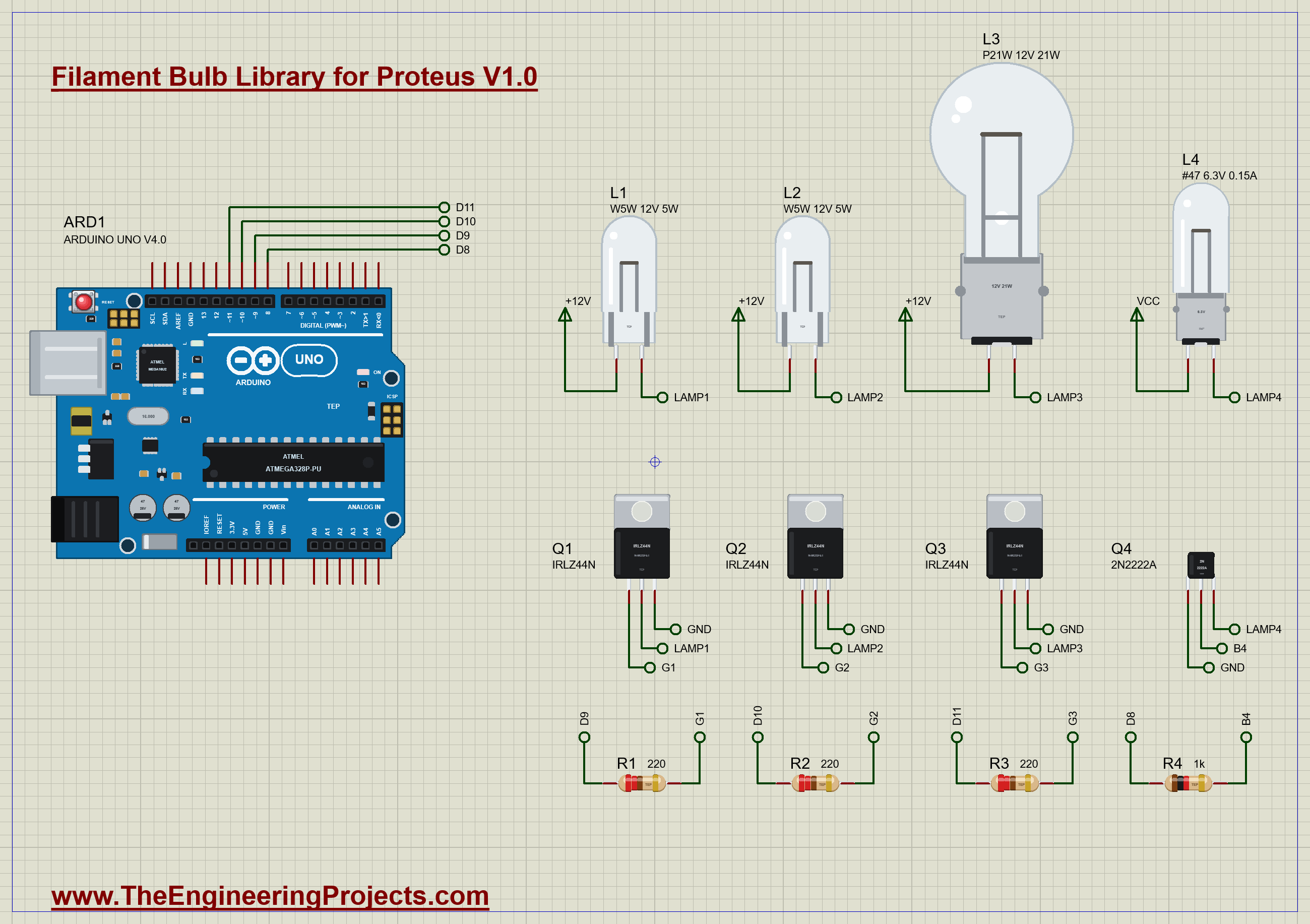
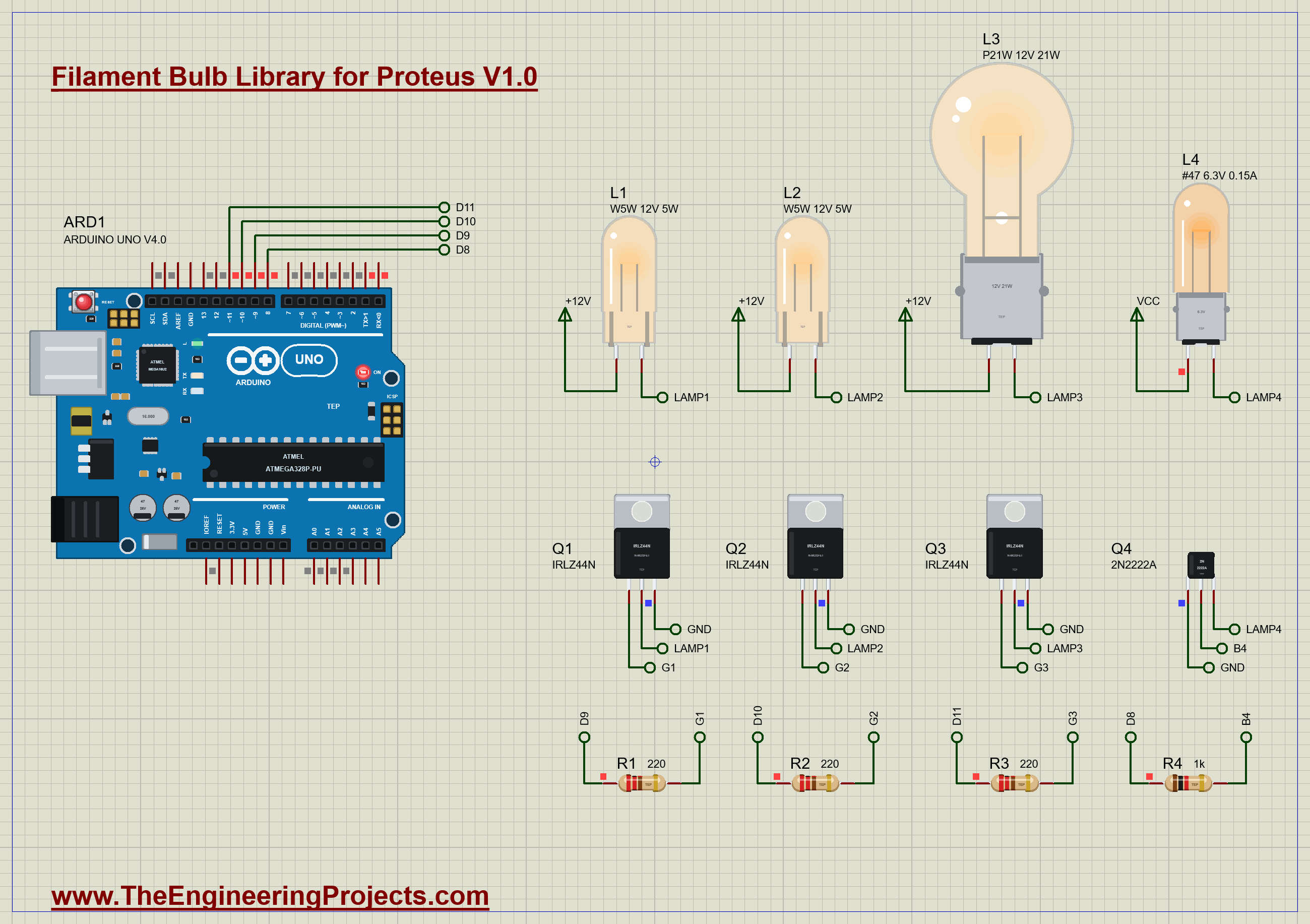
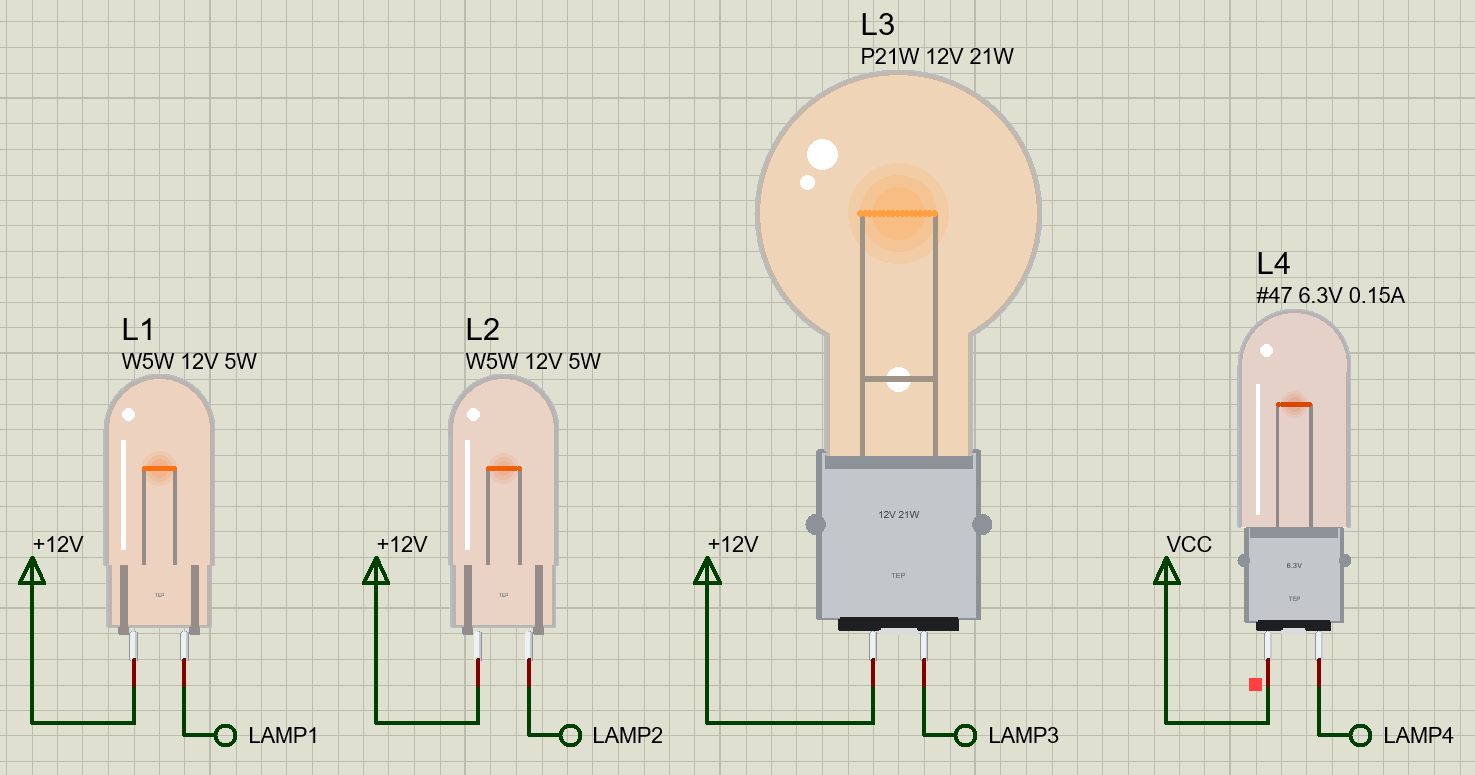
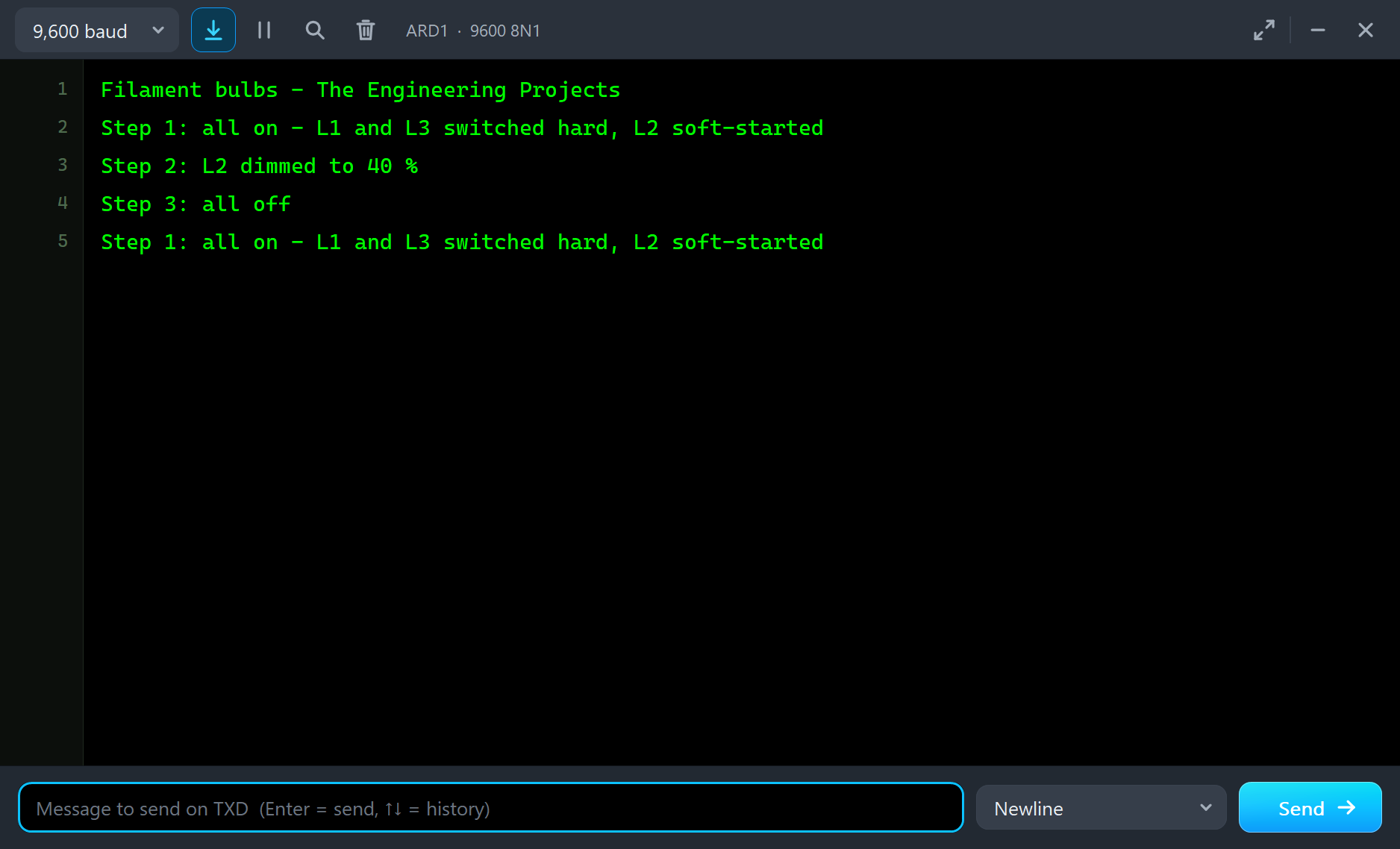
Each bulb is switched on its low side. L1, a W5W, is switched hard by Q1, an IRLZ44N on D9 through a 220 Ω gate resistor R1: the full surge. L2, an identical W5W on Q2 and D10, gets a PWM soft start over 300 ms and is later dimmed to 40 %. L3, the big P21W, is switched hard by Q3 on D11. L4, the #47, runs from the 5 V rail through Q4, a 2N2222A with a 1k base resistor on D8, so it is under-run at about 4.9 V. Every 4 s the sketch switches all four on, dims L2, and switches all off for a second.
Open Filament-Bulbs-ArduinoUnoV4.pdsprj. It runs on our Arduino UNO Library for Proteus V4.0, with its built-in monitor, the same window as our TEP Serial Monitor Advance for Proteus. The MOSFETs are from our N-MOSFET Library for Proteus and the transistor from our Small Transistors Library for Proteus.
| Part | Connection | Job |
|---|---|---|
| L1 W5W, Q1 IRLZ44N, R1 220 | +12V - L1 - Q1, gate from D9 | switched hard |
| L2 W5W, Q2 IRLZ44N, R2 220 | +12V - L2 - Q2, gate from D10 | soft start, then dimmed |
| L3 P21W, Q3 IRLZ44N, R3 220 | +12V - L3 - Q3, gate from D11 | a big bulb switched hard |
| L4 #47, Q4 2N2222A, R4 1k | +5V - L4 - Q4, base from D8 | under-run |
The Sketch
At the start of each cycle the sketch switches L1, L3 and L4 straight on with digitalWrite:
    if (step == 0) {
      digitalWrite(HARD_1, HIGH);
      digitalWrite(HARD_3, HIGH);
      digitalWrite(SMALL_4, HIGH);
L2 gets its soft start instead. For the first 300 ms of the cycle, the loop raises its PWM duty in proportion to the time:
  if (step == 0) {
    // the soft start: L2's duty rises from 0 to 255 over 300 ms, so its cold filament warms gently
    const unsigned long dt = millis() - stepAt;
    analogWrite(SOFT_2, dt >= RAMP_MS ? 255 : dt * 255 / RAMP_MS);
  }
Two seconds into the cycle, analogWrite(SOFT_2, DIM) dims L2 to 40 %, and a second later everything goes off to cool for a second.
Run the Demo
The Surge
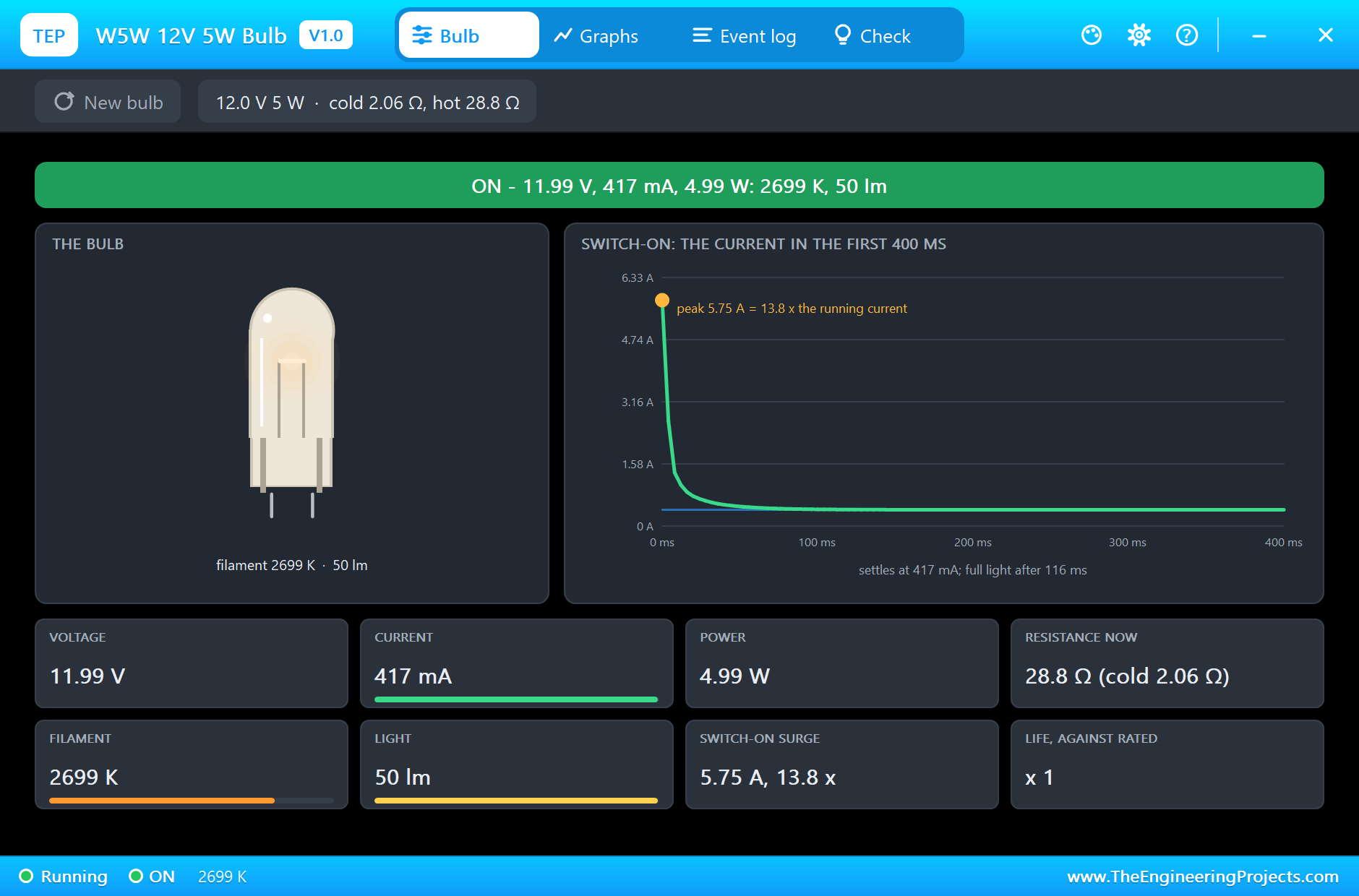
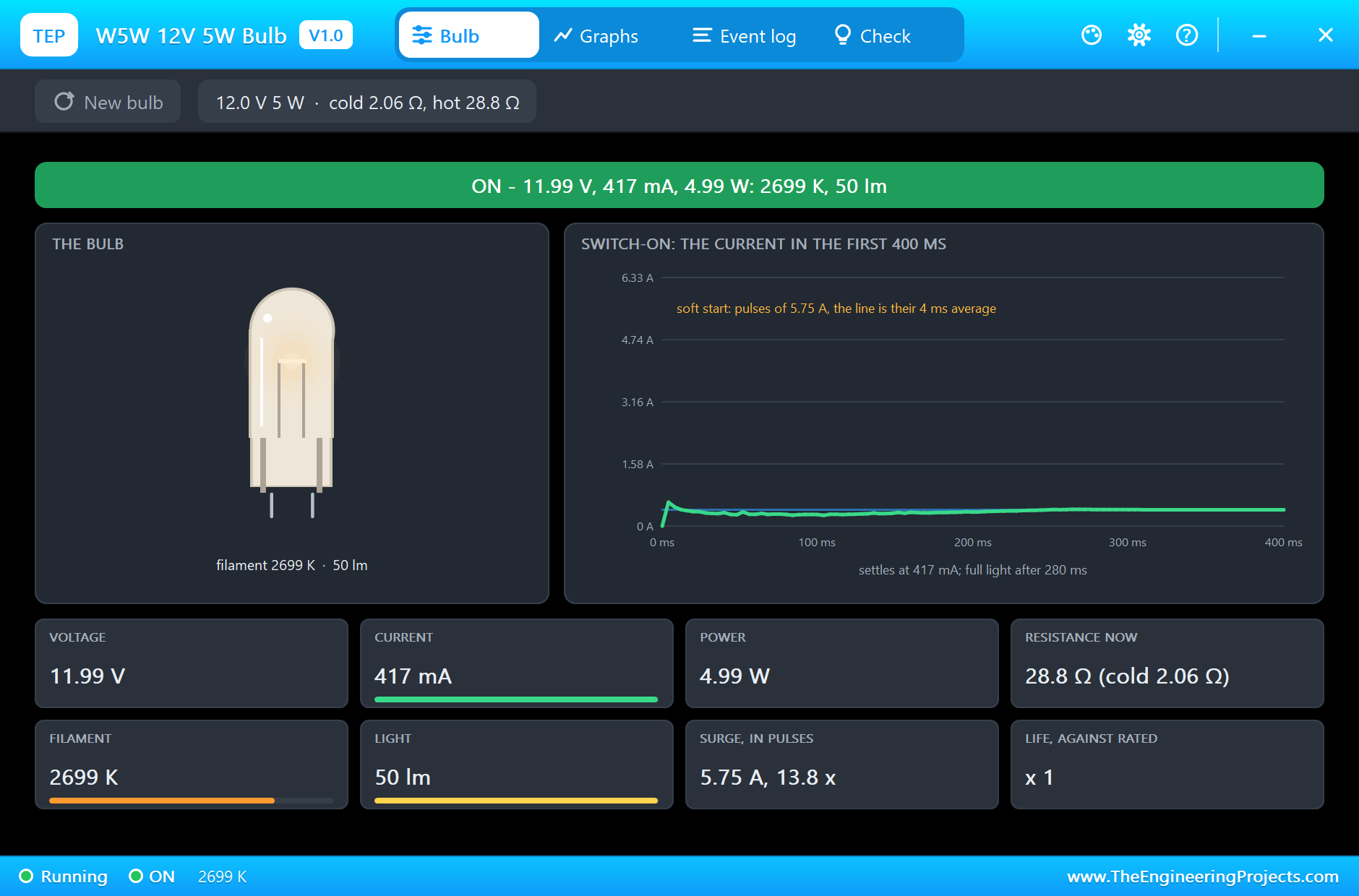
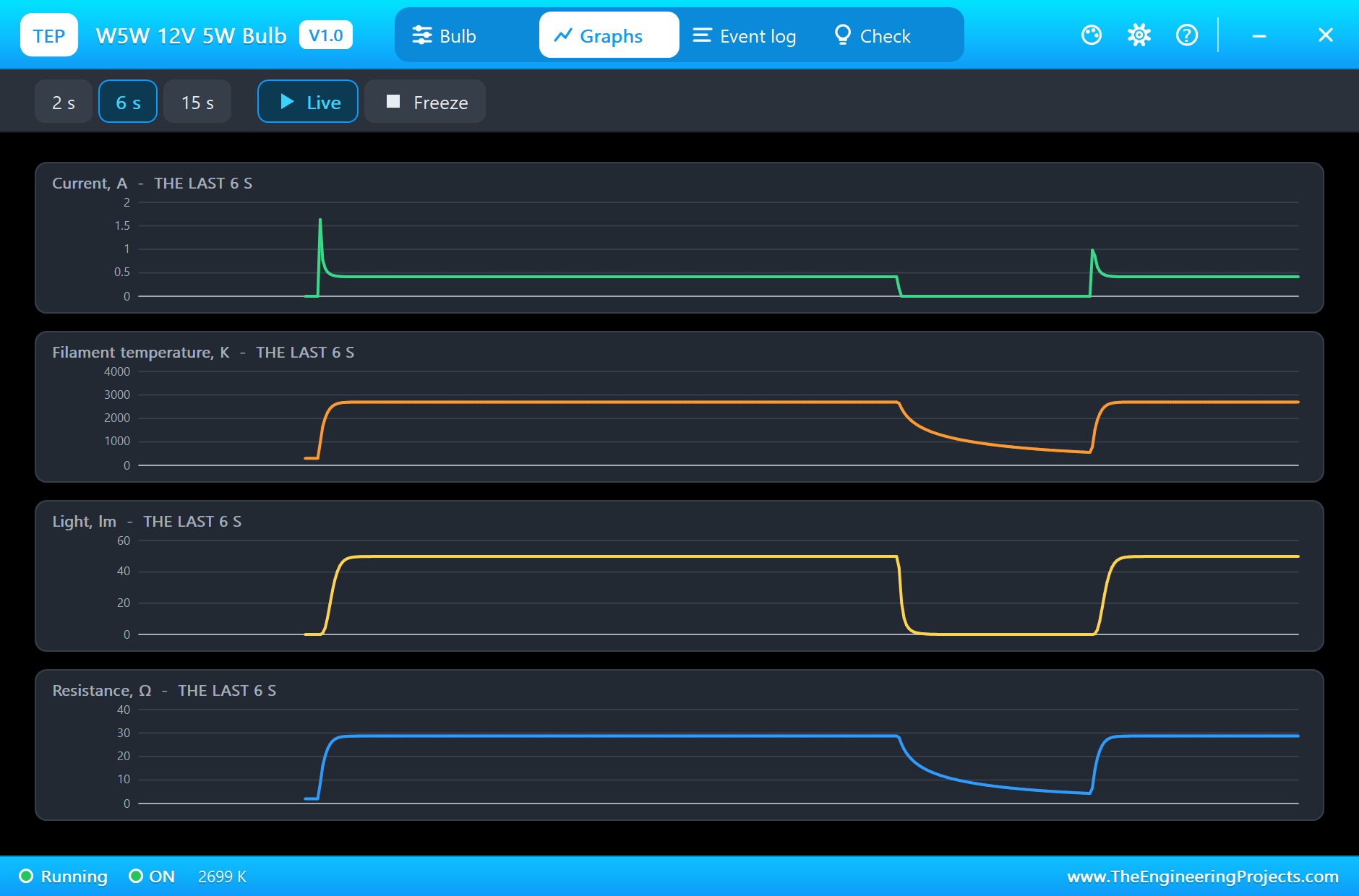
Press Run. At the first switch-on, L1's cold filament draws a surge of 5.75 A, 13.8 times the 0.417 A it settles at. The pop-up's chart shows the current falling steeply over the first 30 milliseconds as the filament heats, and the light reaches 90 % after 116 ms. The bulb then runs at 11.99 V and 4.99 W, with its filament at 2699 K giving 50 lm, exactly its rating. Cold, its resistance was 2.06 Ω; hot, it is 28.8 Ω:
Here is the complete circuit running, all four bulbs glowing:
The Soft Start
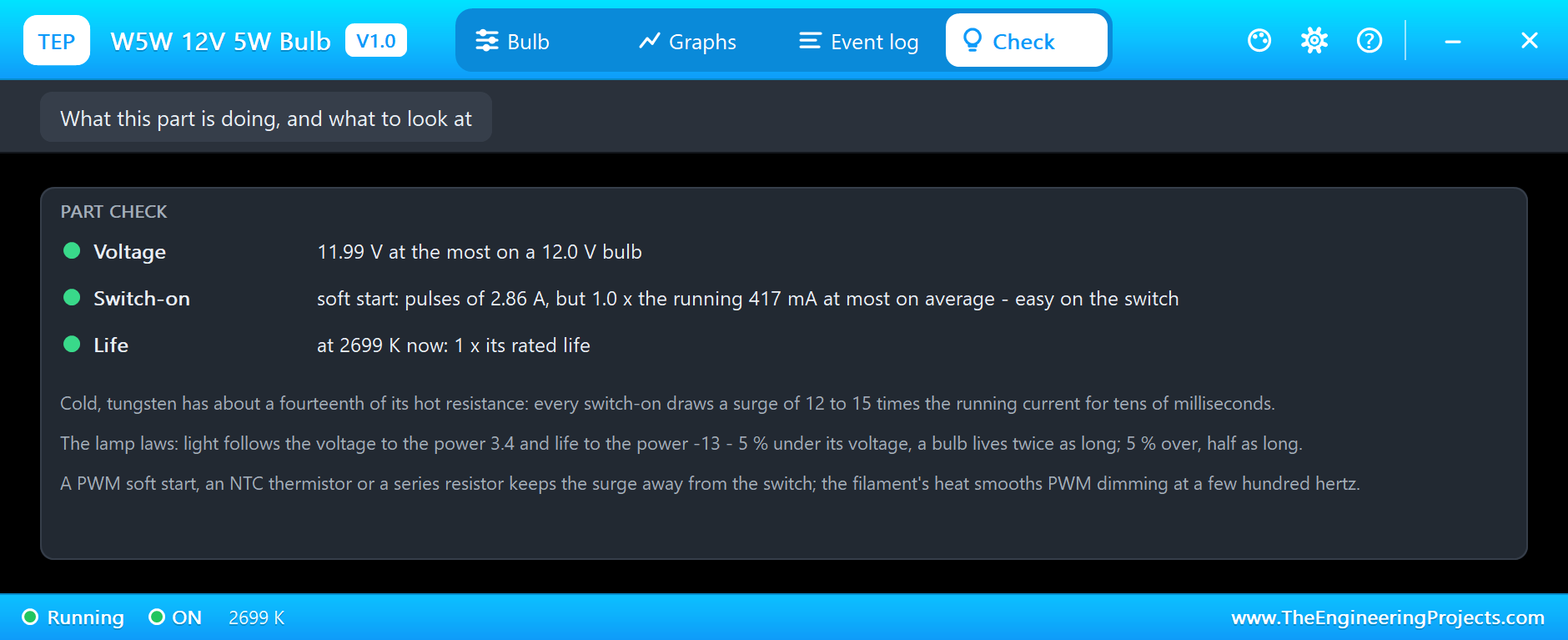
L2 is the same bulb, but its soft start changes everything. Each PWM pulse still meets the cold filament, so the instantaneous current in a pulse is the same 5.75 A, but only for microseconds. Averaged over 4 ms, the current never goes above 0.61 A, just 1.5 times the running current, and the filament warms gently, reaching full light after 280 ms. The MOSFET and the supply see a gentle ramp instead of a hammer blow:
The Big Bulb and the Small One
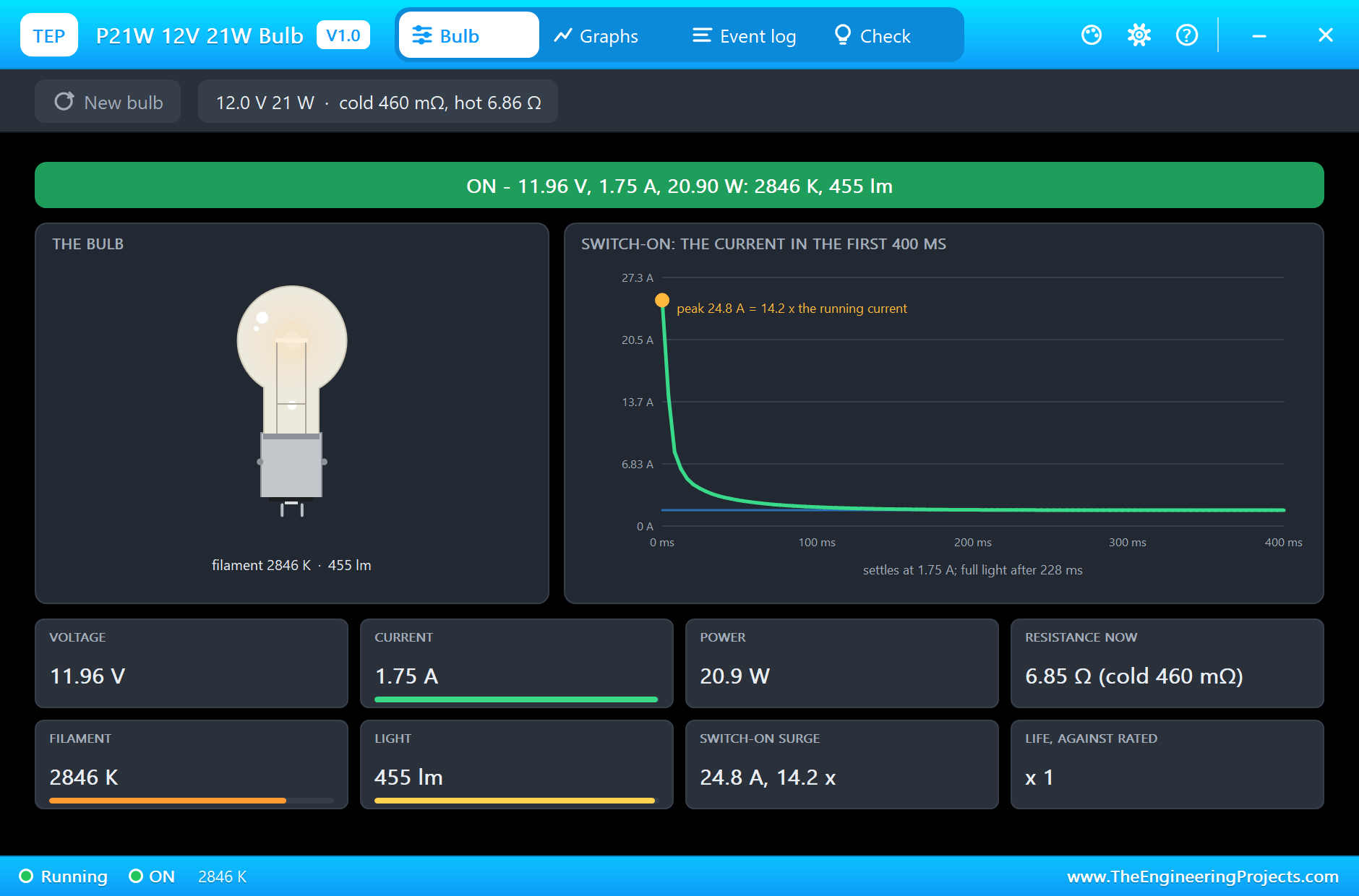
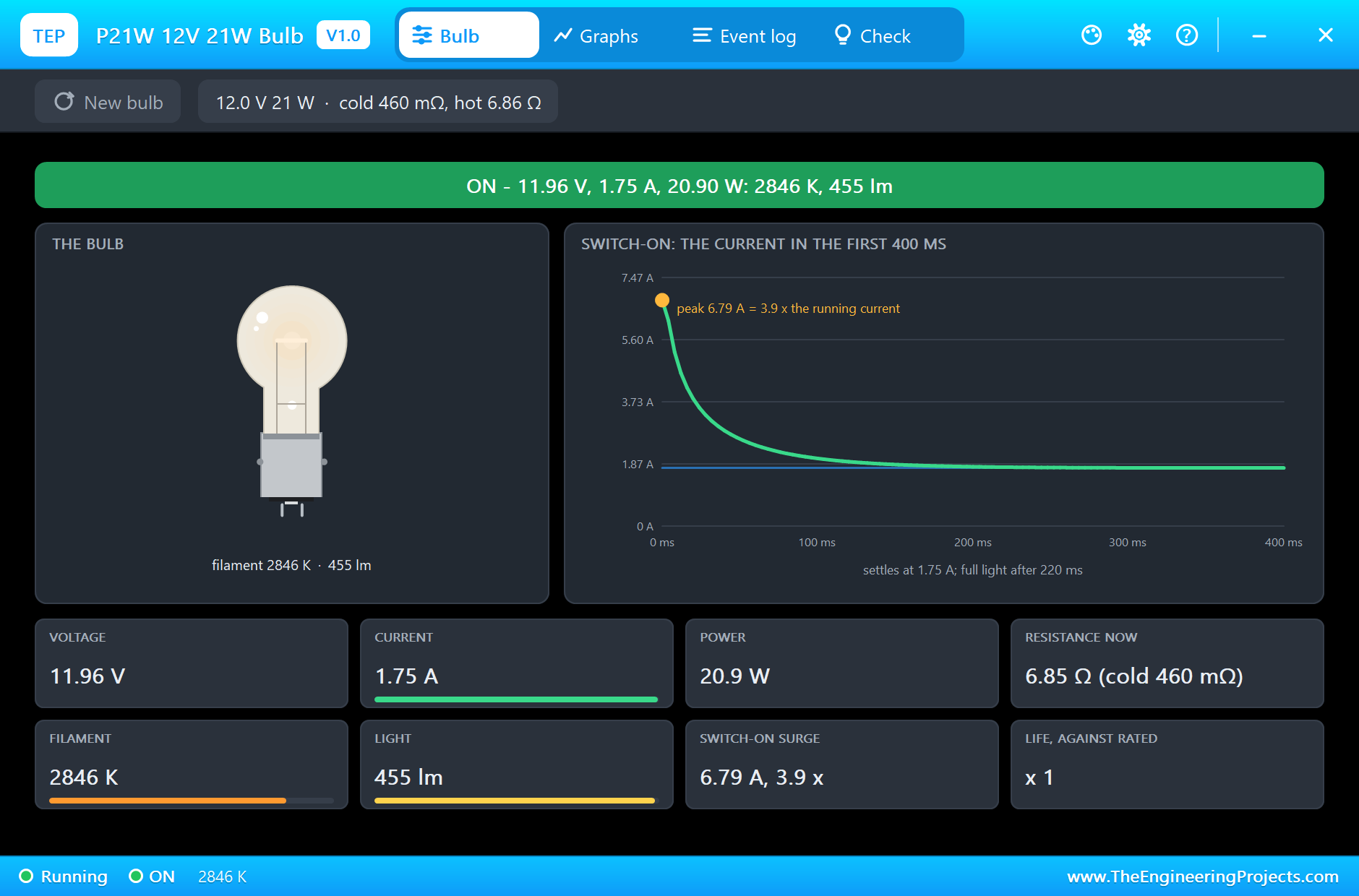
The P21W shows the surge at full scale: 24.8 A, 14.2 times its running 1.75 A, from a filament of only 0.46 Ω cold. It settles at 20.9 W, 2846 K and 455 lm, and its bigger filament needs 228 ms to reach full light. The IRLZ44N, rated for 47 A, takes the surge without trouble:
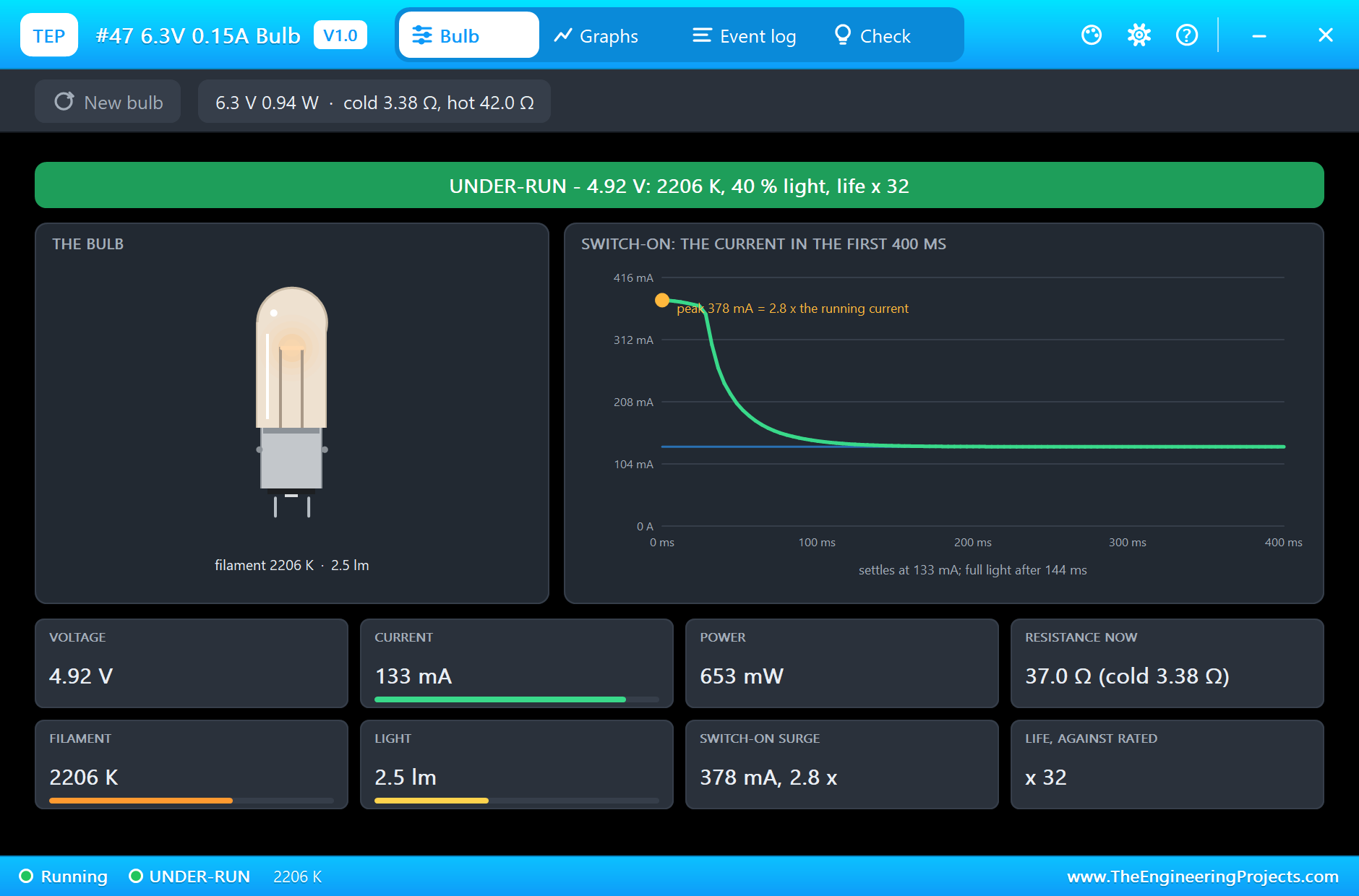
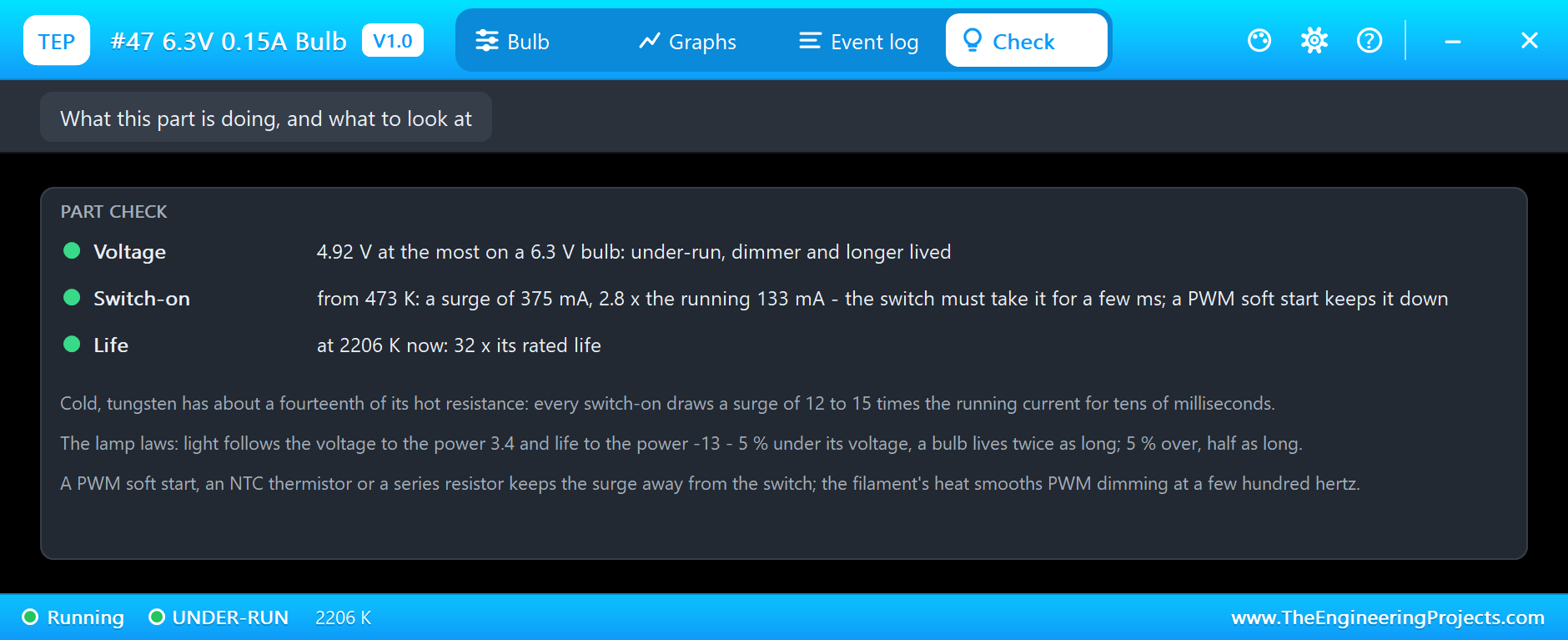
The #47 runs at 4.92 V instead of its 6.3 V. Its filament reaches only 2206 K and gives 2.5 lm, 40 % of its light, but the lamp laws give it about 32 times its rated life. Its surge chart has a flat top: the 2N2222A, with only about 4 mA of base current through its 1k resistor, cannot pass more than about 378 mA, so it limits the surge to 2.8 times instead of twelve:
PWM Dimming
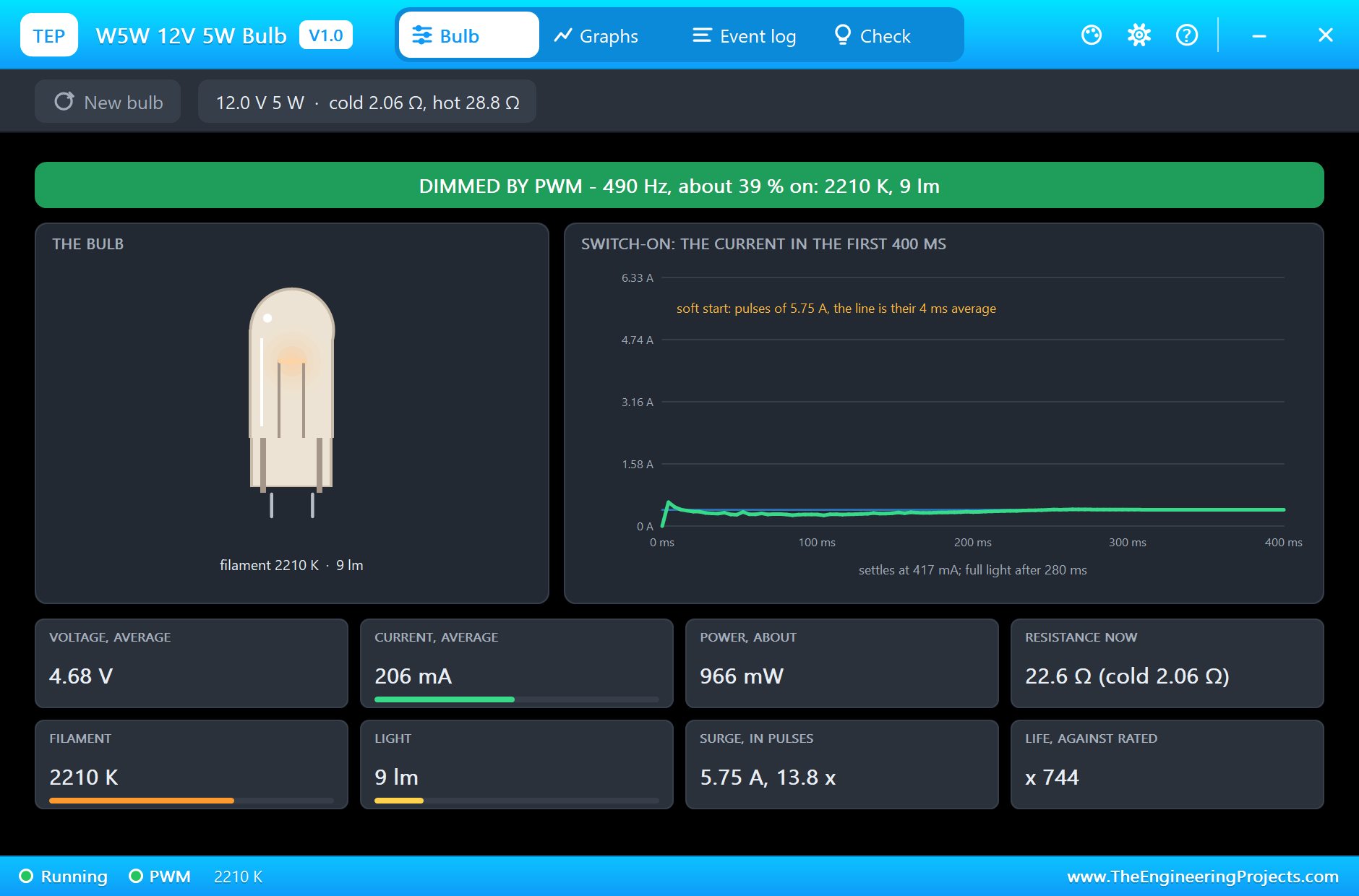
In the second step L2 is dimmed to 40 %. The pop-up recognises the PWM at 490 Hz and shows averages: 4.68 V and 206 mA, about 0.97 W. The filament settles at 2210 K and gives just 9 lm, 18 % of its light from 40 % of the time, the lamp laws again:
Cooling and the Warm Restart
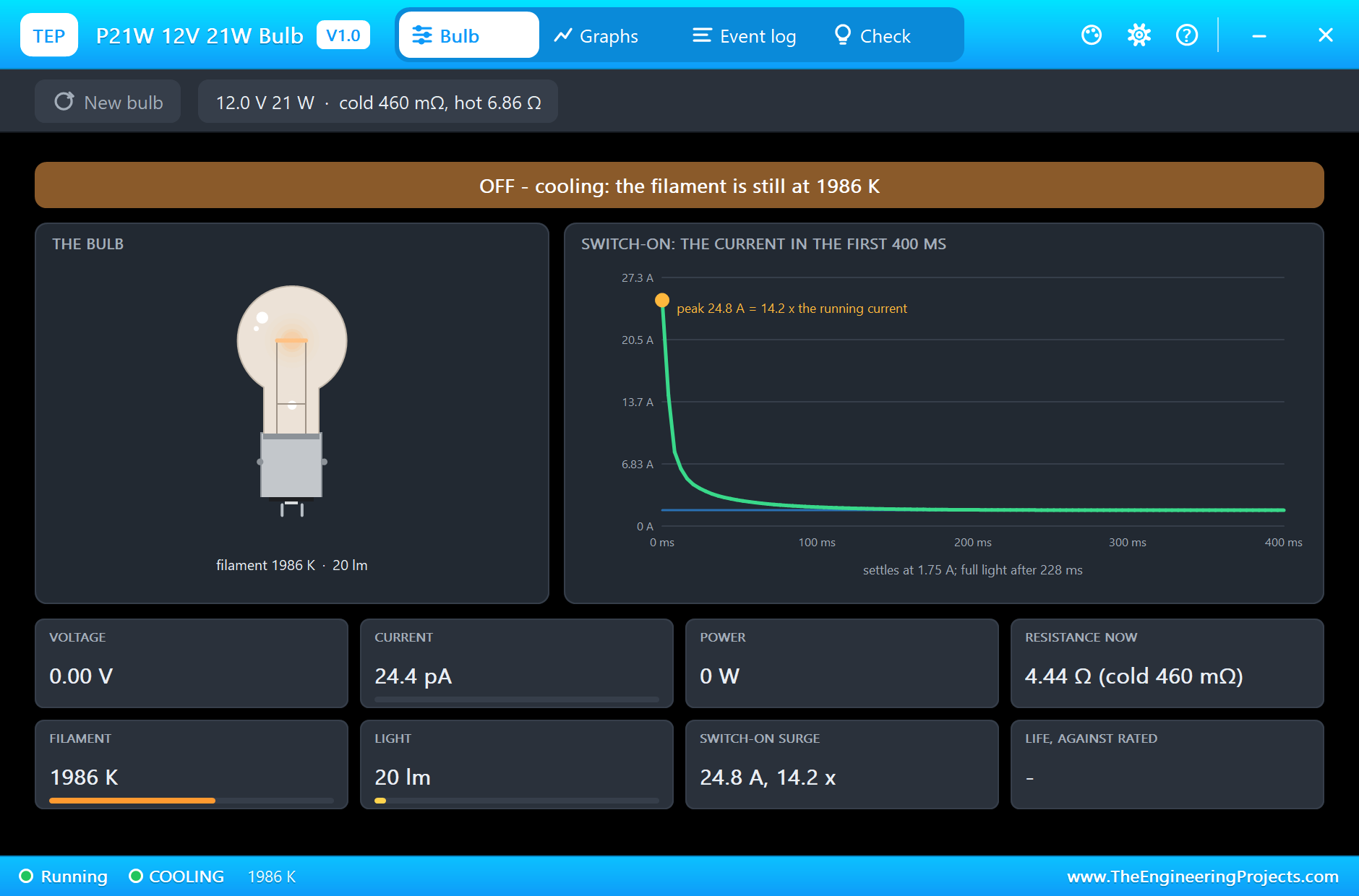
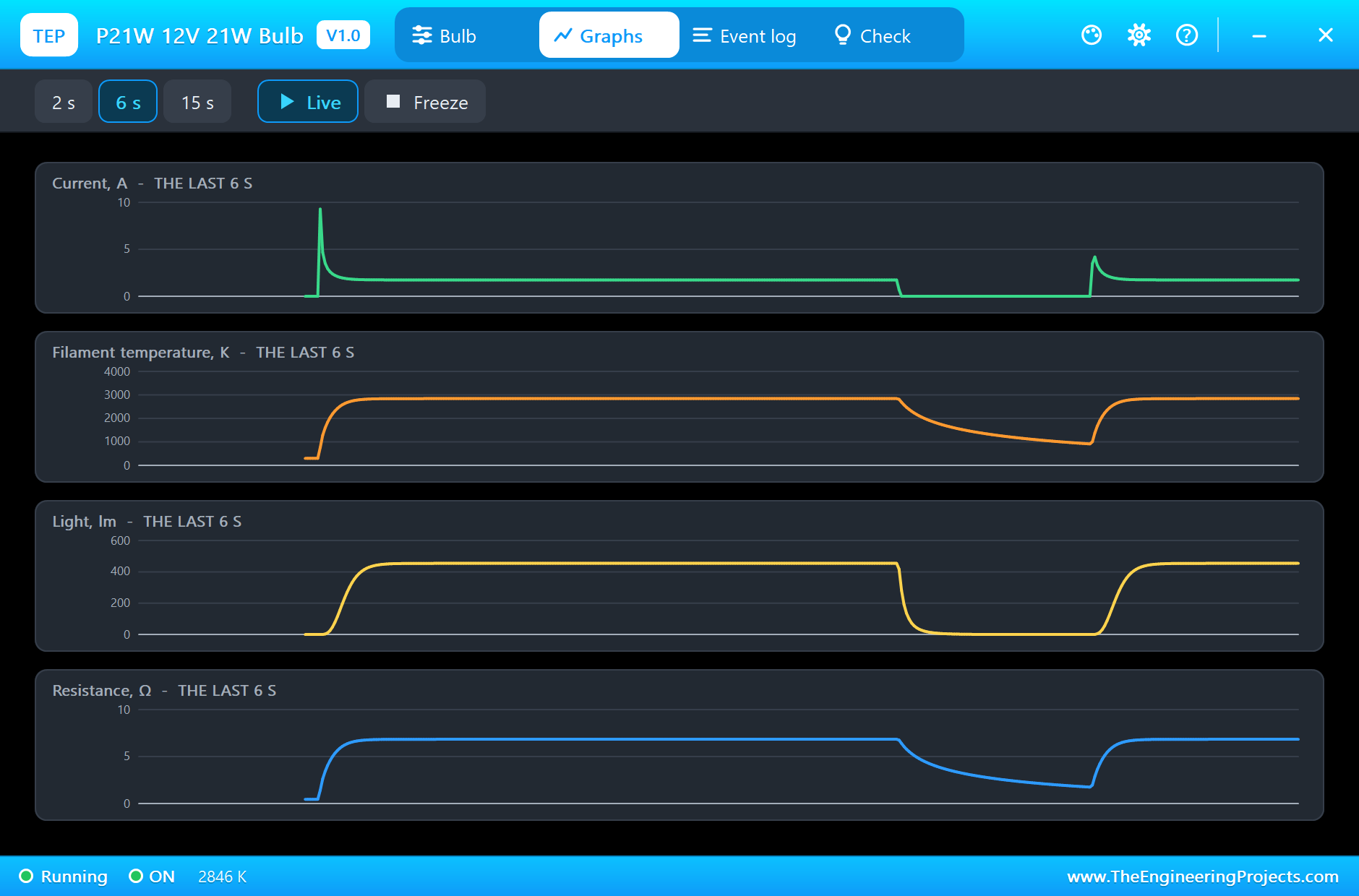
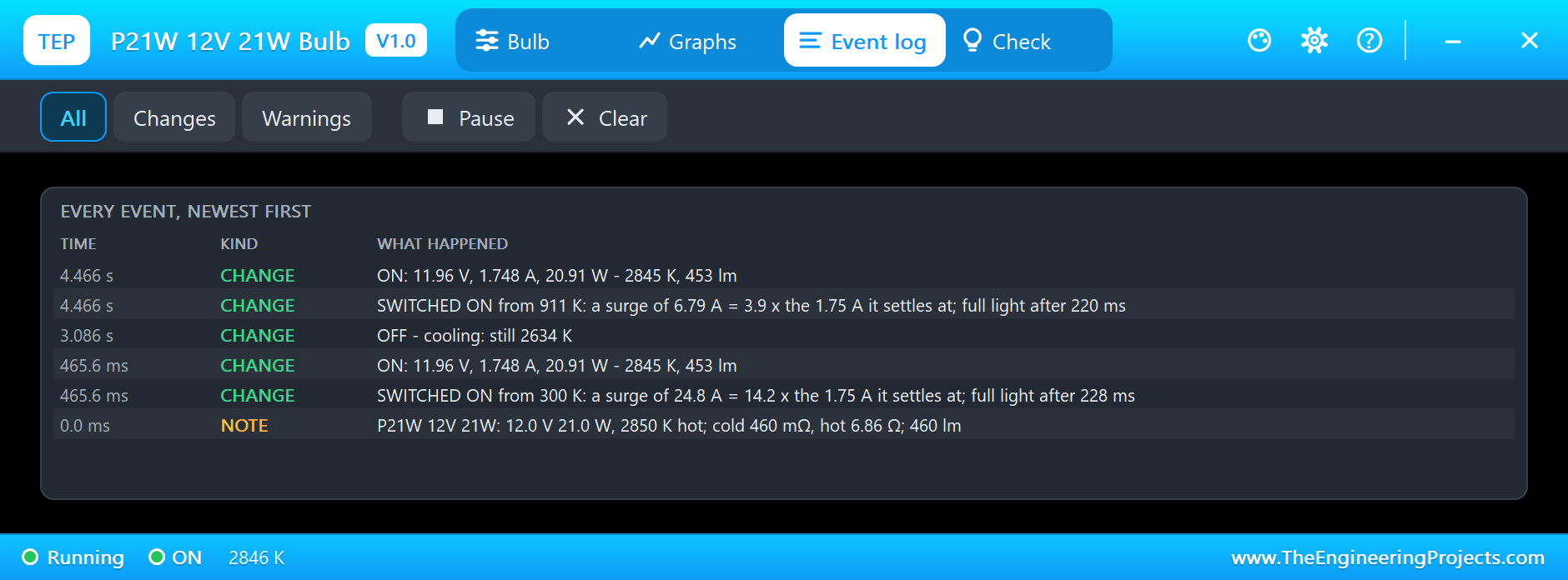
When everything switches off, the small filaments fade fast, but moments later the P21W is still at 1986 K, glowing orange with 20 lm. Switched on again at the start of the next cycle, it has cooled only to 911 K, so its resistance is already higher and its surge is only 6.79 A, 3.9 times the running current:
The Graphs page of the P21W shows both switch-ons side by side: the tall cold surge and the small warm one, the temperature rising in a fraction of a second, falling slowly when off, and the resistance following the temperature:
The Logs and the Check Pages
The Event log writes one line for each switch-on, with where the filament started, its surge and when the light came, and then one line for the steady state. The P21W's log shows a cold start from 300 K and the warm one from 911 K:
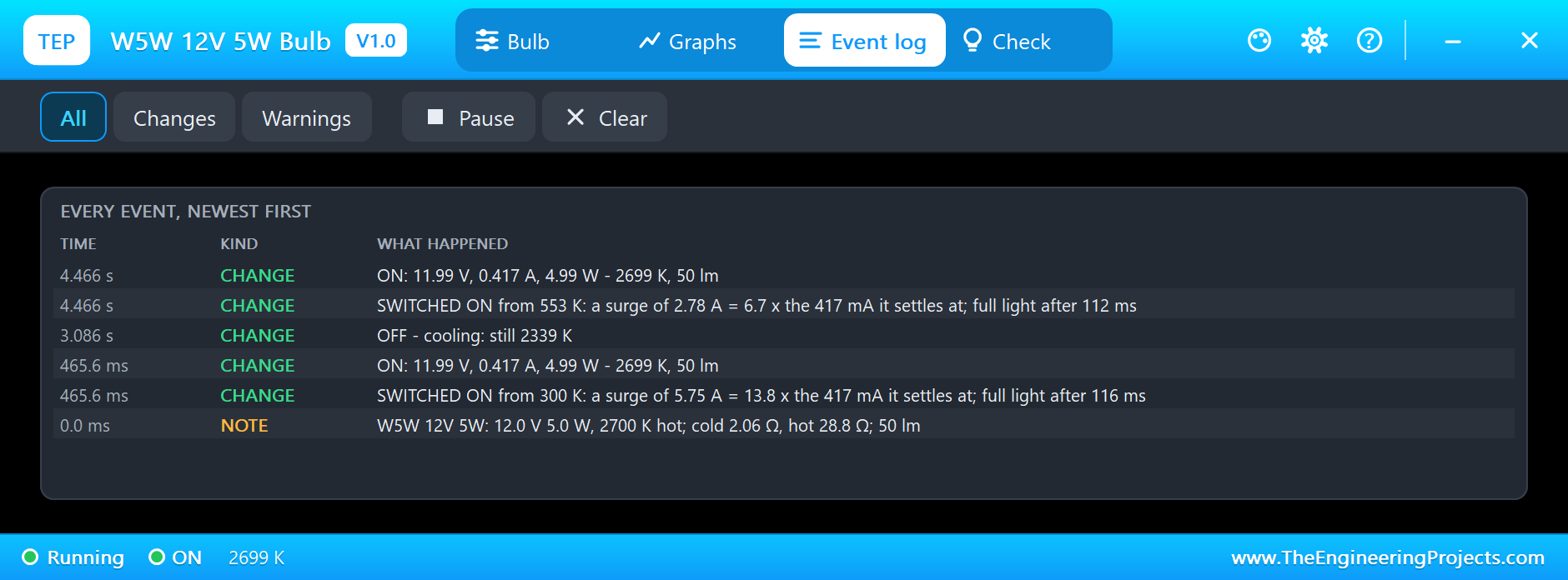
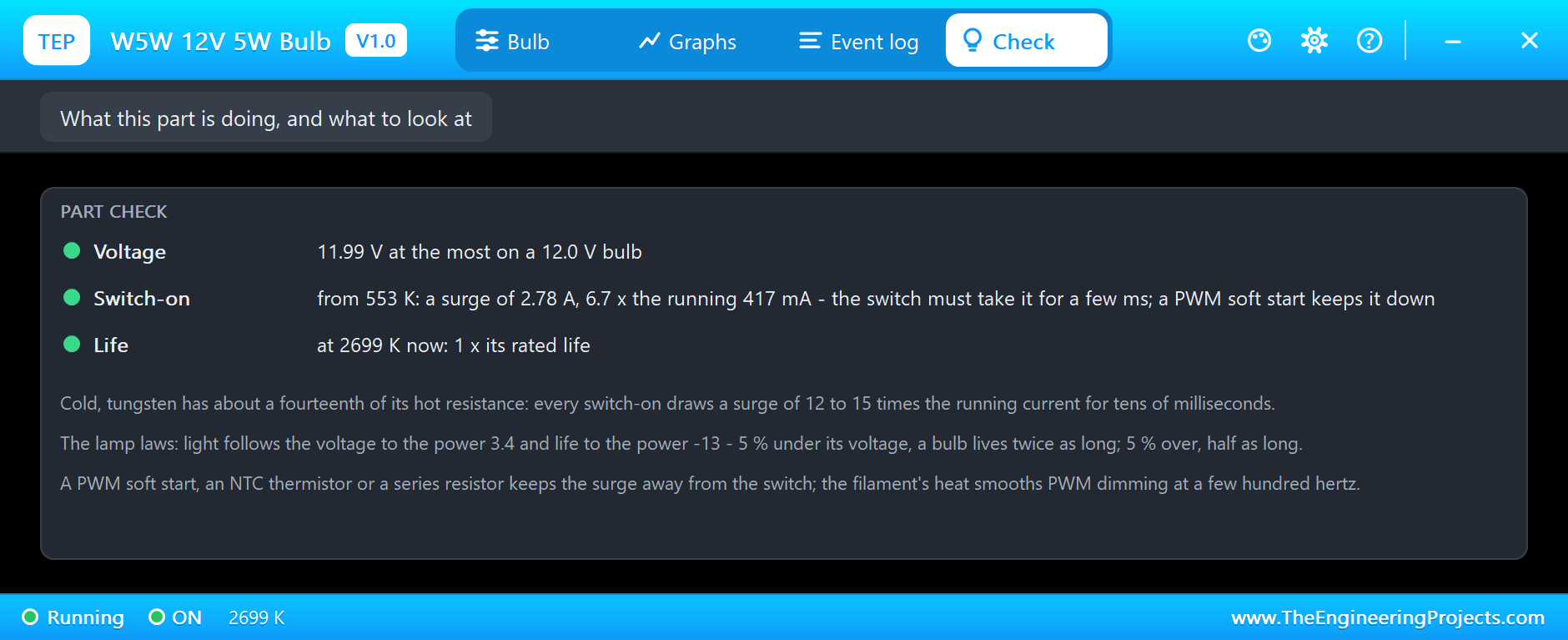
The Check pages turn this into advice. L1's reports its last surge and where the filament started, and reminds you that the switch must take it, or a PWM soft start keeps it down. L2's confirms the soft start. L4's confirms the under-run and its long life:
Try It Yourself
- Change R4 to 220 Ω, and see the 2N2222A pass the #47's full surge.
- Make the soft start shorter or longer, and watch the average surge on L2's pop-up.
- Dim L2 to 20 % and to 80 %, and compare the light with the duty.
- Shorten the off time to 200 ms, and see the warm restart cut every surge.
- Feed a W5W from 13.5 V, the voltage of a car with its engine running, and read its life.
Ideas to Extend the Demo
- Build a car indicator that flashes a P21W at 1.5 Hz.
- Add a soft start to every bulb with one timer.
- Make a dimmer with a potentiometer and PWM.
- Use a bulb as a current limiter: its resistance rises as the current grows.
Your Own Sketches
The demo sketch is in the zip file, and you can change it in the Arduino IDE. New to Arduino? Start with our Arduino Tutorial for Beginners. Export the compiled binary, and set the UNO's PROGRAM property to the new file. Our guide on How to get the HEX file from Arduino shows you where the file ends up.
Things to Know Before Using a Real Bulb
- Size the switch for the surge: 12 to 15 times the running current for a few milliseconds.
- Soft-start where you can: PWM, an NTC thermistor or a series resistor keeps the surge down.
- Mind the voltage: 5 % over halves the life; under-running makes bulbs last for years.
- Expect the heat: most of a bulb's power becomes heat; keep it clear of plastics.
- Fuse for the surge: a slow-blow fuse rides through it, a fast one may not.
Troubleshooting
- No light: the switch is not on, or the bulb has burnt out; its pop-up says BURNT OUT and New bulb fits another.
- The switch overheats at switch-on: the surge; use a bigger switch or a PWM soft start.
- Dim and long-lived: the bulb is under-run; check the supply against its rating.
- BURNT OUT: it was over-run; keep it at or under its voltage.
- The part is not simulated:
TEPBULB.DLLis missing from MODELS and from the project folder.
Limitations of the Simulation
- The warm-up times come from typical bulbs of each kind, not from a datasheet figure.
- The filament does not thin with age, and the gas inside the bulb is not modelled on its own.
- The light is given in lumens by the lamp laws; its colour beyond the glow on the sheet is not computed.
- Arduino is a name of Arduino; this library is not made or endorsed by Arduino or Labcenter.
- Tested in Proteus 8.5 in November 2026 (the demo as shipped). Proteus 7 is not supported.
So, that was all about the Filament Bulb Library for Proteus. I hope it helps you light your projects the old-fashioned way, and see the switch-on surge before it costs you a transistor or a fuse. If you have any questions, ask in the comments and I will help you out. Till the next tutorial, take care and have fun!