Hello friends! I hope you all will be absolutely and having fun. Today, I am going to share my knowledge with all of you on Area and Volume Calculation of different shapes with the given radius in NI LABVIEW. First of all I want to tell you that the area basically shows the space inside an object having two dimensions. Where as, Volume is the parameter which shows the space occupied by a three dimensional object.
So, we can roughly say that the volume is the area of a three dimensional object. For example you want to go for a trip and you have to pack your bags. So, in this case you have to make some space in your bag to put the clothes inside it. The space that you make for the clothes is basically an application of volume. We can also called i ...
Hello friends! Hope you’re well. In today’s tutorial, we’ll cover a detailed Introduction to BME280. BME280 is a digital environmental pressure, humidity, and temperature sensor mainly designed for mobile applications. This module comes with extremely compact metal-lid LGA packages. It has low power consumption (consumes only 5µA during idle and less than 1mA during measurements) and small dimensions that make it a perfect fit for battery-driven devices such as GPS, mobiles, and smartwatches. The BME280 working protocols are I2C and SPI which consist of separate pinouts. The module contains a built-in LM6260 regulator, allowing you to effortlessly use it with a 3.3V or 5V logic microcontroller or Raspberry Pi.
...
Hello everyone! I hope you all will be absolutely fine and having fun. Today, I am going to share my knowledge about Generating Simple Signal in MATLAB. Signals are of great importance in our daily life. The signals are basically the graphical display of the analog values. We can estimate the severity level by the shape of the signals. The signals have a very wide range of applications in our daily lives. If we observe the shape of the AC voltages of 220V that is supplied in our homes, it is a sinusoidal signal. So, its an application of the signals.
Signals also play a vital role in the medical field. While performing ECG and EEG tests in hospitals, doctors visualize the signals displayed on the screen and they can estimate the severity of the ...
Hey Fellas! Hope you are doing fine. Microcontrollers play an important role in the development of embedded systems. They are used where automation is an integral part of the system. Today, I am going to unlock the details on the Introduction to Atmega16.
It is a 40-pin low power 8-bit microcontroller which is developed using CMOS technology and based on AVR architecture. This is the most commonly used AVR microcontroller which belongs to Atmel Mega family.
You must have a look at microcontroller called Atmega328 that also belongs to the mega family.
Other microcontrollers that are readily available and fall under AVR category are Atmega 8 and Atmega 32. All these controllers perform similar tasks, however, they are only different in terms of ...
Hi Friends! Glad to have you on board. Thank you for clicking this read. In this post today, I’ll walk you through Edge Computing vs Cloud Computing.
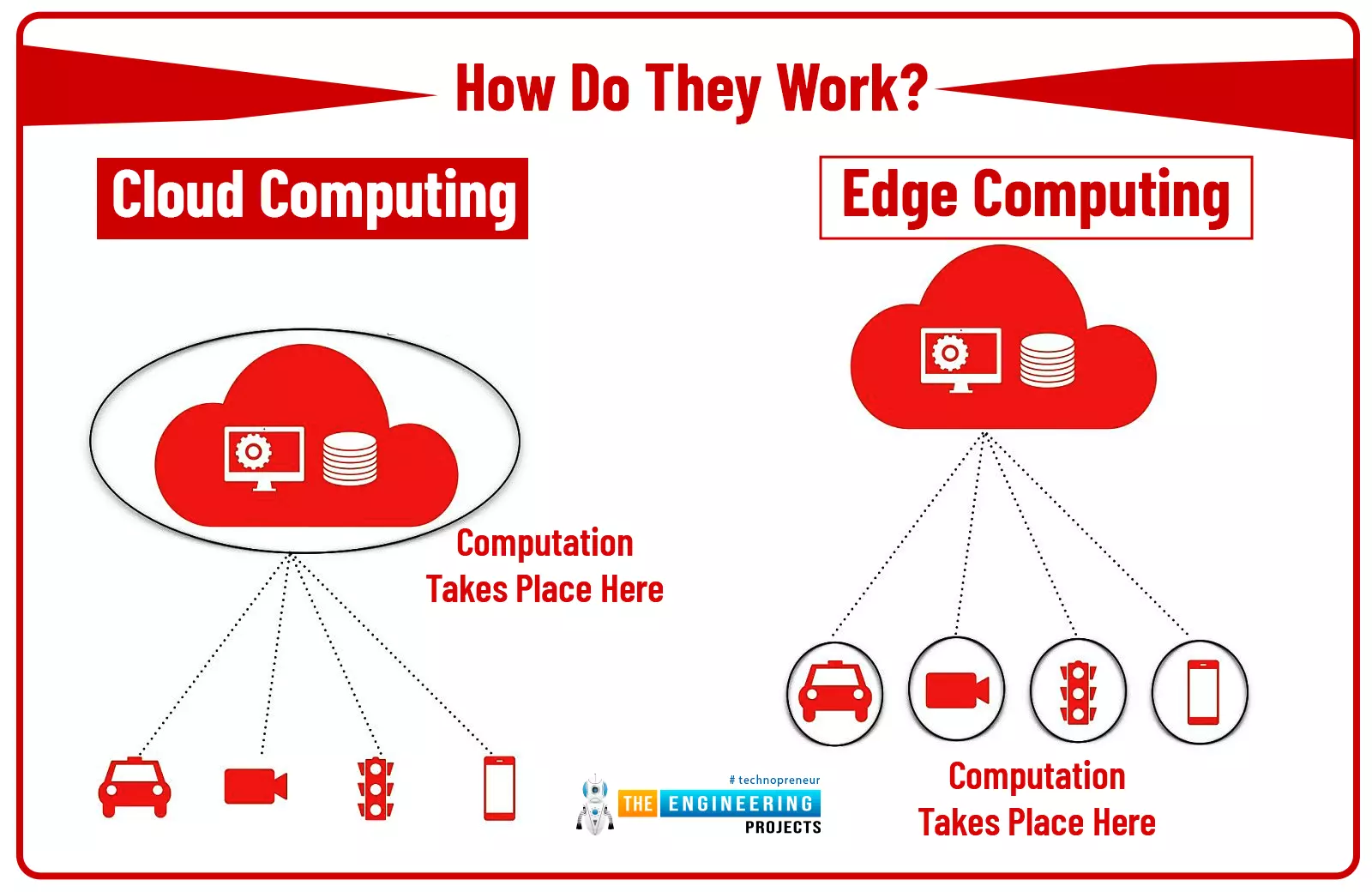
Cloud computing has been around for many years while edge computing, on the other hand, has just become the prime topic of mainstream organizations. But what is the key difference between both edge computing and cloud computing, how do they work, can we implement both in the IT model of any business? These are the main questions that arise every time someone tries to get a hold of these terms. Don’t worry. We’ll discuss them in detail so you know when to pick a cloud model and when to choose edge computing.
Keep reading.
Edge Computing vs Cloud Computing
Before we go further to describe the comparison between edge and cloud, know that, both ...
In the previous tutorial, we have discussed the basics of ESP8266 modules and have also had a look at the different WiFi modules based on ESP8266. In today's tutorial, we are going to set up Arduino Environment for NodeMCU Programming. Today we will prepare the development environment and build code to blink an LED and report status on the Serial Port (to validate the configuration). We will use the Arduino IDE for coding and the NodeMCU board (a module that works with an ESP8266). Simple integration. Zero hardware complexity.
The ESP8266 is an extremely robust and versatile microcontroller, which has proven to be a powerful tool in building Internet of Things solutions. What makes the ESP8266 such a popular tool is the perfect integration between ...
3D printing lets mechanical engineering students turn a sketch into a real object fast. It is perfect for learning because you see mistakes early and fix them while the idea is still cheap. The goal is not a pretty print, but a prototype that proves a function, fit, or mechanism. Read on to learn how to go from CAD to a functional part using a simple workflow.
CAD choices that save time and material
Begin with one clear requirement: fit, strength, weight, or appearance. In a reputable program, students learn to design with constraints and document decisions. Model with parameters so you can change clearances in seconds. Use fillets at junctions to reduce stress risers and help layers hold.
Additionally, keep walls practical, and aim for 1. ...
Hello friends , I hope you all are fine and having fun with your lives. Today, I am going to share a new project which is XBee Arduino Interfacing. In my previous tutorials in the XBee series, we have had first Introduction to XBee Module and after that we have also discussed How to Interface XBee Module with Computer. Now we are all well aware of XBee Module and can easily do the XBee Arduino Interfacing. We have seen in the previous tutorial that XBee Module works on Serial protocol so we have to use the Serial Pins of Arduino UNO board.
If you want to use any other microcontroller then you can its not a big issue, just see the way how the programming goes and convert it to the language of your microcontroller i.e. PIC Microcontrollers or 805 ...
Hello friends, I hope you all are doing great. Organizations are increasingly adopting cloud computing. It provides a number of benefits, including decreased cost and overhead and increased scalability and flexibility. However, the cloud is not an ideal solution for every organization and use case.
As companies continue to store sensitive data in the cloud, data security is becoming a significant concern. For many organizations who have moved to the cloud without implementing proper security controls, sensitive data is being leaked or stolen from their cloud environments.
Challenges of Cloud Security
While many organizations are moving to cloud deployments, they often struggle with securing their new investment. Each cloud represents a new environ ...
Hi reader! Hopefully, you are well and exploring technology daily. Today, the topic of our discourse is APDS-9930 Digital Ambient Light and Proximity Sensor. You might already know about it or something new and different. The APDS-9930 is a flexible sensor that integrates ambient light sensing with proximity detection into a compact, single package. It is designed to offer high precision and closely matches the spectral response of the human eye to light, ensuring very accurate ambient light measurements. This makes it an excellent choice for adaptive brightness applications, such as smartphones, tablets, or other smart devices.
Ambient light detection by the sensor gives a wide dynamic range. Therefore, it supports low-light and high-light conditions. The proximity sensor uses an integra ...