Hey, peps! Welcome to the new tutorial on the Jupyter notebook. As we are moving towards a higher level of Python, therefore, it is important to understand other ways of doing the same task. As we read in the previous lecture about 2D arrays, this time it is going to be done with the help of a famous library in Python. This time, you are going to learn different, engaging, and advanced-level concepts that not only help you deal with the 2D array but also the installation and working of the unique library of Python, which is NumPy. This lecture is going to be very useful and interesting, and therefore, we suggest you have a glance at all the goals of this lecture.
Getting the introduction to NumPy
Successfully installation of NumPy and knowing different methods for it
Using the arrays wi ...
Live streaming is the workload that exposes every weakness in a delivery architecture, and it does so in public. Traffic does not ramp; it arrives. Content cannot be pre-warmed at the moment it matters, because the segment a viewer needs was created two seconds ago. And the audience judges the result within a few seconds of pressing play, with no patience for an explanation about a congested peering point in one metro.
For most of the past decade, the answer was to buy a bigger network. That answer has weakened as live audiences have grown more global and more concurrent. No single content delivery network is the fastest everywhere at once; capacity is provisioned regionally rather than in infinite supply, and the failures that ruin live events are usually partial rather than total. What ...
Hello geeks, welcome to our new project. Here, we are going to make a very useful project which we can use for ourselves or we can use this as a product as well on an industry level.
In this project, we are going to make a water level indicator. We all know it is one of the most essential products because there are many water tanks in every house or office, and most of them are not easily accessible to check the level of water in it and I think most of us faced the problem such as shortage of water as we do not have anything to monitor the exact amount of water available in the tank and this causes many problems on our daily lives.
Software to install
As we are going to make this project in the simulation first, for that, we will use the Proteus ...
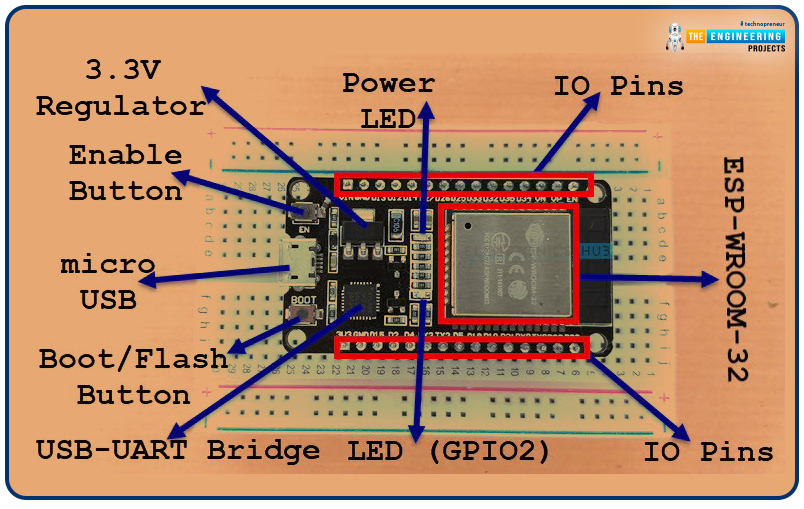
Welcome to the next tutorial of our raspberry pi 4 programming course. A previous article covered connecting a Remote Control Radio Frequency Module (433 MHz) to a Raspberry Pi 4. To turn things on and off wirelessly, we programmed a Raspberry Pi 4 to act as a radio-frequency (RF) remote control. However, this guide will study how to wirelessly pair a Raspberry Pi 4 and an ESP32. After reading this article, you'll get a good grounding in the fundamentals of Bluetooth module operation between two ESP32 and Pi 4 communication.
When it comes to sharing data over short distances using Ultra High-Frequency Radio Waves, Bluetooth is one of the most reliable and effective short-range wireless communication solutions. Since Bluetooth Technology was initially conceived as a cable substitution tech ...
Hi Guys! I welcome you on board. Glad to see you around. Thank you for clicking this read. In this post today, I’ll detail the Introduction to 1n5817.
The 1n5817 is a Schottky diode used in extremely fast switching applications and carries high forward surge capability and low forward drop voltage. It is available in the DO-201AD package and can do high-frequency operations.
Read this post till the end as I’ll discuss the complete introduction to 1n5817 covering the datasheet, pinout, features, and applications of this component.
Let’s get started.
Introduction to 1N5817
The 1n5817 is a Schottky diode, also known as a hot-carrier diode, used in extremely fast switching applications.
It comes in the DO-201AD package and contains low forward ...
Hello friends, hope you all are fine and enjoying your lives. Today, I am going to show you How to use comments in C++. In the previous tutorials, we first have a look at Introduction to C++ in which we have discussed a simple c++ program. After that we have discussed How to use Escape Sequence in C++, which is also essential because escape sequence is a very simple concept but is used quite a lot on C++ projects os you must have its knowledge.
Today, we are gonna discuss Comments in C++ i.e. how to use Comments in C++ and why to use Comments in C++. Just like escape sequence, comments in C++ is also very basic concept but its really important and a programmer must know How to use Comments because without it the code becomes really difficult and i ...
Hello friends, I hope you all are doing great. In today's tutorial, I am going to give you a detailed overview of How Scientific and Medical Animation is used. The use of scientific and medical animation is a growing trend that has a broad range of applications. Austin Visuals is a 3D and 2D animation company with a team of professionals with the technical skill and creativity to produce 3D medical animation, scientific animation, and forensic animations.
Doctor’s offices, hospitals, and medical schools are turning to 3D medical animation for instructional purposes. Animation companies can create animated video clips that explain surgical procedures, medical treatments, or pharmaceutical mechanisms to patients. Animated video is engaging and easy ...
Hi mentees, we are here with a new tutorial. I hope you all are fine. So far, we have been designing combinational circuits i.e. Adder, Subtractor, Multiplexer etc. using logic gates. But from today onward, we will design sequential circuits using logic gates i.e. Latches, Flip Flops etc. Let's quickly recall what's the difference between combinational & Sequential Circuits:
Combinational Circuits:
Combinational circuits only use the current state of the input values to generate the output.Examples of DLD Combinational Circuits are: Adders, Subtractors, Multiplexers etc.
Sequential Circuits
Sequential Circuits use both the current & previous states of the inputs to generate the output.Examples of DLD Sequential Circuits are: Latches, Flip Flops, Timers, Counters etc.
Digital M ...
Hi Friends! I hope you are enjoying your life and getting most out of it. We are here to give you daily dose of useful information so you can excel and grow in your relevant field and stand out from others. Today, I'm going to uncover the details on the Introduction to SG3525. It is a pulse width modulated control circuit that is used to control switching power supplies and particularly helps in providing lower external parts count and improved performance. I'll try to cover every aspect and properties related to this modulated control circuit so you get clear idea what is it about and what are its main applications. You can also have a look at Introduction to SG3524 which is mainly used in regulation power supplies and switching regulators.
Let' ...
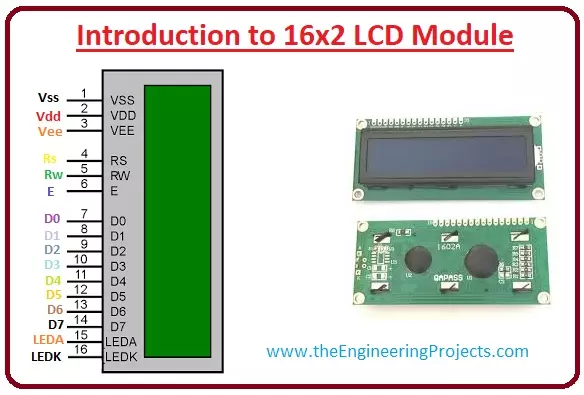
Hello friends, I hope you all are doing great. In today’s tutorial, we will have a look at Introduction to 16x2 LCD Module. LCD stands for liquid crystal display it is mostly used in different electronic projects and devices to display different values. LCD uses liquid crystals for the generation of visible images. 16 x 2 liquid crystal display is a basic LCD module used in DIY electronic projects and circuits. In this LCD module, there are two rows every row consists of sixteen numbers.
With the two rows in this module, there are sixteen columns. The VA dimensions of these modules are (66 x 16) millimeters and the thickness is 13.2 millimeters. Its operating voltage is plus five or plus three volts. In today's post, we will have a look at working, applications, circuits, features, adv ...