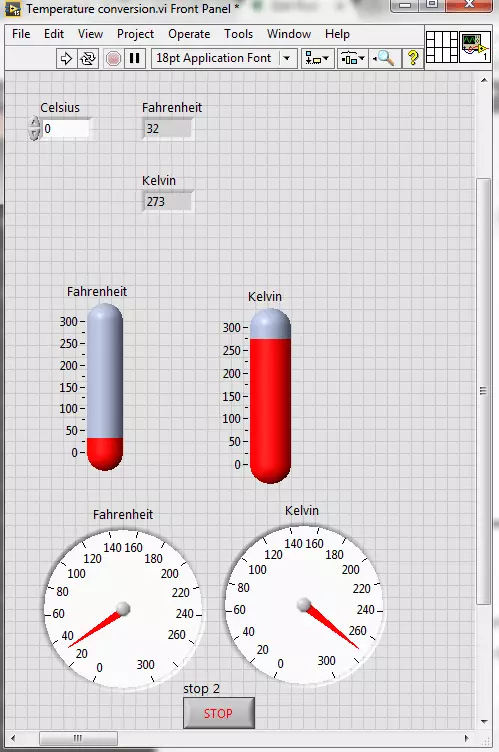
Hello friends! I hope you all will be absolutely fine. Today, I am going to share my knowledge with all of you guys, on how to make a Temperature Conversion in LabVIEW. Temperature is actually measured with different units at different places all across the world. However, there are three basic standard units for measuring the temperature i.e. Celsius, Fahrenheit and Kelvin. We can convert them in each other by performing some mathematical operations. In this tutorial I am going to elaborate only one of these conversions.
I would like to tell the standards of these scales with reference to the freezing and boiling point of water. "Celsius" scale is basically the scale based on 0 degrees for the freezing point of water and 100 degree for the boil ...
Hello friends, hope you all are fine and having fun with your lives. Today, I am going to share a project named as DTMF Decoder using MATLAB. In this project, I have designed a keypad in MATLAB using the GUI functionality of MATLAB. After designing the keypad, I have assigned a tune to each of these buttons. Obviously the tune attached to each button is different and when we press any of these buttons, then the MATLAB recognizes the respective button.
This project is designed in MATLAB and I have tested it on MATLAB 2009 and MATLAB 2014 and it works fine on both of them. Code is given below in this tutorial for download. f you got problem in it then ask in comments and I will try to resolve them. So, let's get started with DTMF decoder in MATLAB.
...
Hello friends, i hope you people are fine and enjoying. Proceeding to my previous tutorial, in which i explained Brushless DC motor in detail. Now in this tutorial i am going to explain in detail the second type of DC motor which is Brushed DC motor. In this tutorial, we will see what is in fact a Brushed DC motor, how it works and what are the advantages and practical application of this type of motor on some other type of motors.
Brushed DC motors are also known as commutated DC motors. Reason is that these motors contain commutator and carbon brushes for rotor excitation. I will explain all these terminologies in detail, later in tutorial. These are the most important type of motors designed to run directly on DC power supply. These were the ve ...
Hello friends hope you all are healthy and enjoying good health. In today's tutorial, I am going to share How to Protect Simulink Design in MATLAB and in order to do so I have used S Function method. In my previous post I have explained How to Protect your m-file Codes in MATLAB by converting it to p-file so that no one can reach to your code and now I am gonna explain how to protect your simulations in MATLAB which you create in Simulink so that your intellectual work wont go waste.There are many methods to protect the Simulink simulations and the easiest of them is using S-function. Now follow these simple steps and it won't be much difficult.
Protect Simulink Design in MATLAB
Open the simulation which you want to protect. Make sure you are ...
Hello friends! I hope you will be absolutely fine and having fun. Today, I am going to share that how to make a program for Stepper Motor Direction Control using Matlab. I am going to share this tutorial on demand. I have also make different programs for DC Motor Direction Control using Arduino, DC Motor Direction Control in Matlab, DC Motor Direction Control using LabVIEW, DC Motor Speed Control using Arduino, DC Motor Speed Control using Matlab and Stepper Motor Direction using Arduino in my previous tutorials. So before going into the detail of this tutorial you must have to go through these tutorial because I will use the same hardware and a bit changed Arduino source code. In this tutorial I will make an algorithm to send different commands ...
Hello everyone! I hope you all will be fine. Today, I am going to elaborate that how to create your First Project using NI LabVIEW Programming. This software is very easy to use in comparison to the other software. You do not have to write the complete source code for the desired output, like in other software e.g. Arduino, MATLAB, Dev C++, Eclipse etc. instead you have to just implement your logic using Field Programmable Gate Array (FPGA) blocks. The program is designed with the help of the FPGA blocks, is usually known as “Virtual Instruments”.
Normally we used to call it as VI’s. We create in “Block Diagram” window as described in our previous tutorial on Introduction to LabView. If you haven't read that tutorial then I owuld suggest you to ...
Hello friends! I hope you all will be absolutely fine and having fun. Today, I am going to share my knowledge with all of you about how to make a simple program for DC Motor Direction Control in LabVIEW. In my previous tutorials, I have also worked on DC Motor Direction Control using Arduino. You should go through these tutorials they will be helpful in better understanding of the tutorial DC Motor Direction control using NI LabVIEW. The word DC is basically an abbreviation of Direct current. So, a direct current motor is commonly used motor having two input terminals, one is positive and the other one is negative. If we connect these terminals with the voltage supply the motor will rotate. If you change the polarity then motor will rotate in oppo ...
Hello everyone! I hope you all will be absolutely fine and having fun. Today, I am going to share my knowledge about how to convolve the signals using an amazing software tool, MATLAB. MATLAB is an efficient tool for signal processing. MATLAB basically works on matrices. First of all I would like to tell you a bit about the convolution. In engineering terms, convolution describes the output of the Linear Time Invariant (LTI) systems.
Convolution is basically an integral which tells us about the overlapping of one function as it is shifted over another function. Convolution and cross correlation are similar. It has a wide range of applications e.g. computer vision, probability, statistics, engineering, differential equations, signal processing etc. ...
Hello friends! I hope you all will be absolutely fine and having fun. Today, I am going to tell you guys that how to design a simple algorithm for Stepper Motor Speed Control in MATLAB by simply sending different commands to the serial port from Matlab to Arduino. You should first read Stepper Motor Speed Control using Arduino because I am gonna take that tutorial further and will do the Stepper Motor Speed Control in Matlab. So, I would suggest you to first have a look at that tutorial before reading this one. Moreover, you should also have a look at DC Motor Direction Control in Matlab, DC Motor Speed Control using Arduino. Stepper Motor Direction Control Direction Control in Matlab, Stepper Motor Direction Control using NI LabVIEW and Stepper ...
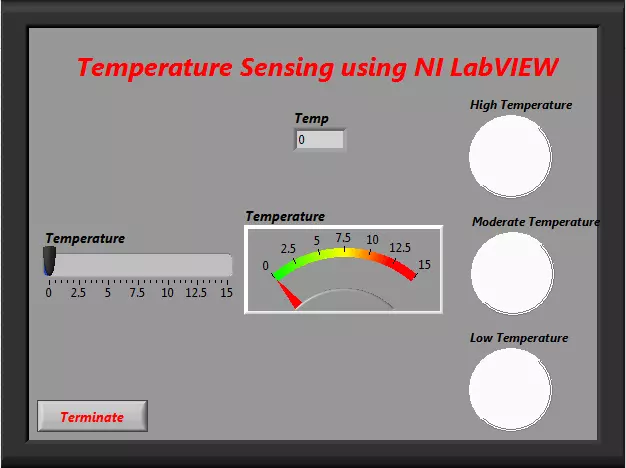
Hello friends! I hope you all will be absolutely fine and having fun. Today, I am going to share my knowledge about how to create program for "Temperature Sensing using NI LabVIEW". To sense the temperature is compulsory at a lot of the places e.g. refrigerators, air conditioners, storage rooms, kitchen etc. At these places to sense the temperature and its proper indication is compulsory because it can cause serious problems otherwise. For example, if the temperature in the food storage room is higher than an adjusted threshold, it will be harmful for all of the food items.
You can also consider "Fire Alarm" as an example of temperature sensor. First of all it measures the level of the temperature. If it founds that the temperature is higher tha ...