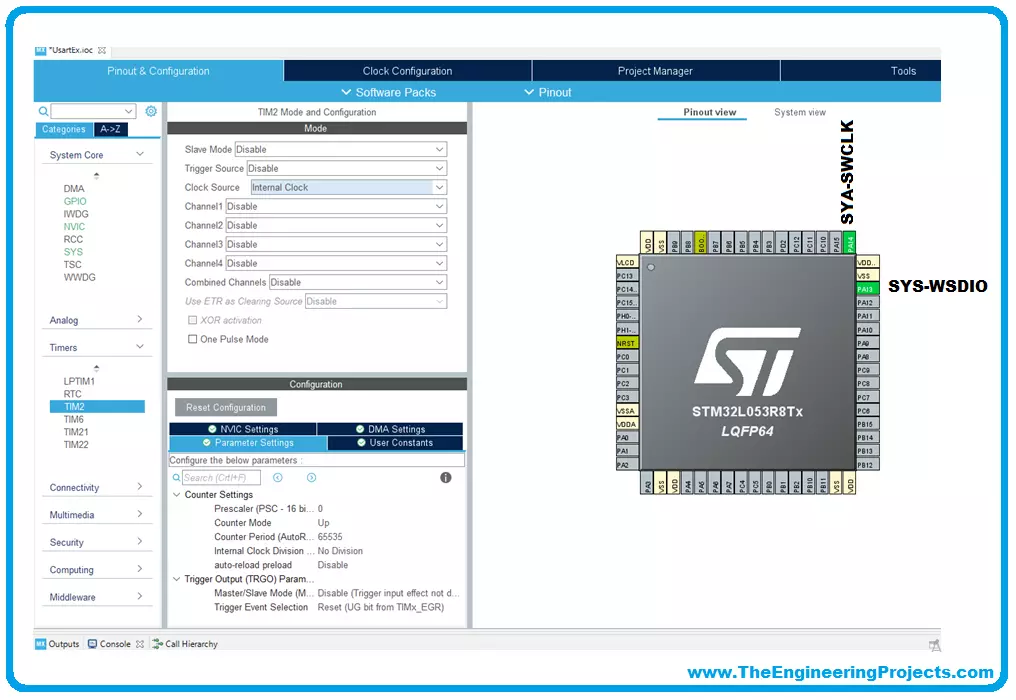
We will use for our examples STM32CubeIDE released by ST and completely free. STM32CubeIDE is a development tool and supports multi operative system (SO), which is part of the STM32Cube software ecosystem. STM32CubeIDE allows using a single platform to configure peripherals, to generate/compile/debug the code for STM32 microcontrollers and microprocessors. The framework used is Eclipse®/CDT, as tool-chain for the development is used GCC toolchain and GDB for the debugging.
To start the project, you must first select the MCU and then initialize and configure the peripherals the user wants to use. At this point, the initialization code is generated. At any time, the user can go back and change initializations and configurations, without affecting t ...
Targeting customers and niche demographics online continues to grow in relevance as more companies adopt telecommuting practices. For this purpose, mass emailing is superior to less extensive forms of advertising in terms of both obtaining prospects and reaching the intended customer base. Amid the growth of social networking sites and other promotional channels, email marketing efforts stay at the forefront of the industry.
Using mass emailing, businesses may find valuable and potential customers for their products and services. Promoting both products and services with the help of such a service increases the likelihood of generating leads and improving ROI.
To help our readers find the easiest options for this, we have compiled a list of easy ways to send a mass email in Gmail bel ...
Update: Few bugs were reported by some readers, which I have corrected and updated the code. Now, its fully tested and 100% working.
Hello friends, hope you all are enjoying the start of winter season. By the way, I really hate winter season and I just want to hibernate in this season . :) Well coming to our today's lecture, my today tutorial, serial port in VB 2010, is actually based on a request made by one of the member on my Facebook Page and as it is a really good topic so i thought to share it.
Today we will make a software on Microsoft Visual Basic 2010 in which we will send data through the serial port in VB 2010. In this software we will send the data and also receive it. Simply follow all the given steps carefully and you can easi ...
Hello friends, I hope you all are doing well. Today, I am going to share the 8th tutorial of Section-III in our Raspberry Pi Programming Series. In the previous tutorial, we interfaced the temperature sensor DS18B20 with Raspberry Pi 4. In today's guide, we'll discover another temperature sensor BMP180 and will interface it with Raspberry Pi 4.So, let's get started:
Project DescriptionIn today's tutorial, we will interface the BMP180 sensor with Raspberry Pi 4 and will display the values of temperature, barometric pressure and altitude in the Raspberry Pi Console Window.
Components Required
We will use the following components in today's project:Raspberry pi 4BMP180 sensorFemale-Female Jumper wiresBreadboard
BMP180 Air Pressure Sensor
BMP180 i ...
Hello everyone, I hope you all are doing great. In today's tutorial, we are gonna have a look at How to design a Smoke Detector with Arduino. Its quite a simple project but if you are working on any security project then you must add this feature in it. You should also download this Gas Sensor Library for Proteus, and design its simulation.
I will use gas sensor MQ2 for this project. I have purchased MQ2 Gas Sensor module as its quite easy to interface with Arduino. Arduino board I'm using is Arduino UNO. I have also designed an LPG Gas Leak Detect using Arduino using this MQ2 Sensor. So, let's get started with How to design Smoke Detector with Arduino & MQ2 Sensor.
Smoke Detector with Arduino & MQ2 Sensor
First of all, we need to conn ...
Hello friends, I hope you all are doing great. In today's tutorial, I am gonna give you a news of an amazing competition in which you need to Share Your Video Story with PCBWay. This video competition is organized by PCBWay. PCBWay is a PCB designing company where you can place your order online and can get quite cheap rates for your PCBs. You can read all of its details from this link: Share Your Video with PCBWay.
PCBWay is quite an wesome PCB manufacturer, they complete your order in 2 - 3 days and charge only $5. You should also visit their official site and try out their PCB services.
Share Your Video Story with PCBWay
In order to participate in this video competition, what you need to do is you have to design a video of your PCB Project.
...
Hello friends, I hope all are fine and having fun with your projects. We have covered enough Arduino commands in this Arduino Tutorial for Beginners series and now we are ready to create a simple project by interfacing an LED (Light Emitting Diode). Today, I am going to share a very Simple Arduino LED Example in Proteus ISIS. First I will blink single LED using Arduino UNO and then I will blink multiple LEDs in Proteus.
When you start working on Arduino then Arduino LED example is the first example which you must try because its the easiest one. Moreover, we all know that we have a small LED connected to pin # 13 on each Arduino so you can also check your Arduino as well that whether its working or not. So, let's get started with Simple Arduino LE ...
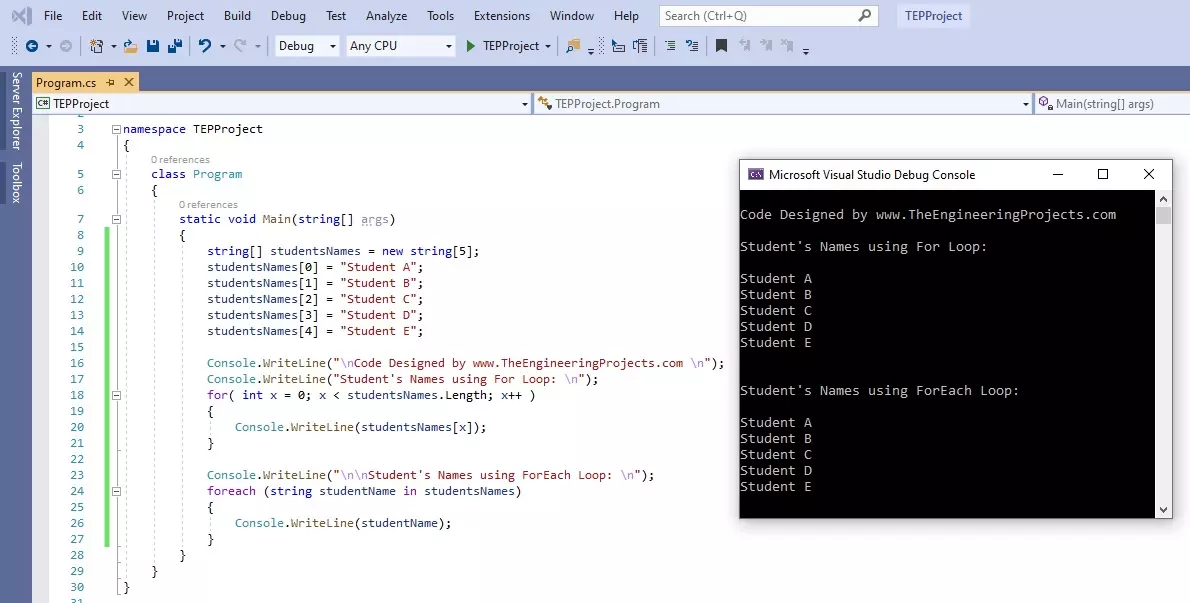
Hello friends, I hope you all are doing great. In today's tutorial, we are gonna have a look at How to use For Loop in C#. It's our 11th tutorial in C# series. Till now, we have seen two loops in C# which are IF Loop and while Loop and today we are gonna have a look at for Loop.
For Loop is most commonly used loop in any programming language and if you have worked on any other language then you must be aware of its syntax. It is used to create repeated loop with specified number. Let's have a look at it in detail:
How to use for Loop in C#
For loop in C# takes an integer variable as a Controlling agent, initialized at value V1 and ends at value V2, and the travel from value V1 to V2 depends on the Condition specified in () brackets.
In bot ...
Welcome to the next tutorial of our raspberry pi four programming course. Before, we saw how to connect a Raspberry Pi 4 to a relay with four independent channels. To complement the relay circuit, we programmed a python script to turn on and off a single bulb. However, in this tutorial, we'll show you how to connect a GPS module to a Raspberry Pi 4.
Raspberry Pi 4, one of the most popular embedded platforms, has made it simple for developers to obtain location data via a GPS module, allowing them to create devices with a greater reliance on precise positioning. Because of the Raspberry Pi's impressive processing capabilities, this essay focuses on the exciting prospect of creating GPS-based projects using the same inexpensive GPS chips.
Since thi ...
Welcome to today's article on our comprehensive Raspberry Pi 4 programming guide. As we saw in the previous article, the Raspberry Pi 4 may power a single seven-segment display. In addition, we also interfaced a Raspberry Pi with 4 Seven-Segment Display Modules to display the time. However, this guide will show you how to construct a Raspberry Pi 4 crypto miner that uses very little electricity.
Cryptocurrencies have been the subject of widespread conversation for some time now. It's possible to use your computer to create them, and they can be used as currency. Because of this, the Raspberry Pi can also be used for Bitcoin mining. It's also possible to mine other cryptocurrencies. One drawback of mining is that the cost of electricity often excee ...