Tag: DallasTemperature library

2 articles found.

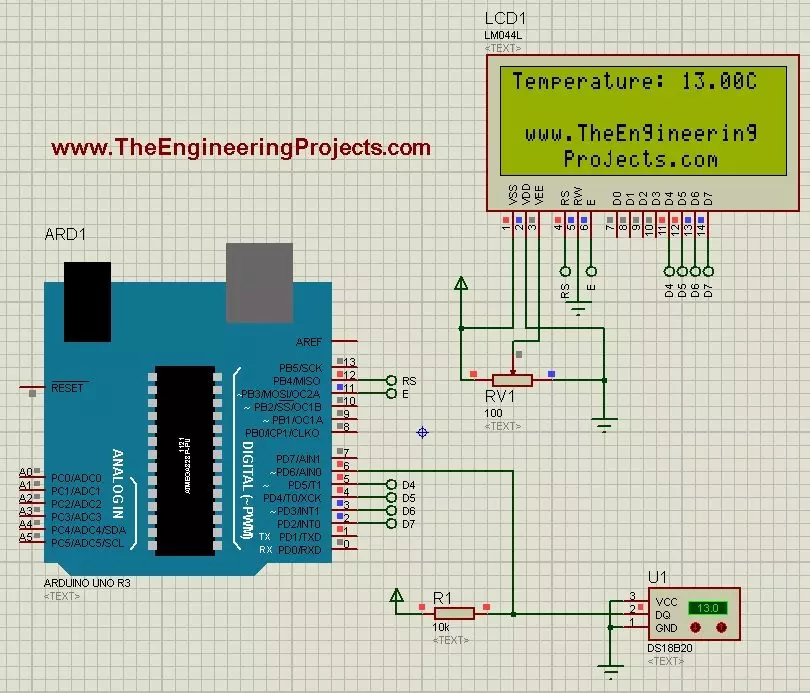
How to use 18B20 in Proteus ISIS

DS18B20 temperature displayed on an LCD in Proteus, DS18B20 sensor, Arduino Uno, LCD temperature display

Hello friends! Today we will use the DS18B20 temperature sensor with Arduino Uno in Proteus and display its reading on a character LCD. The sensor is sometimes shortened to 18B20 in project descriptions, but DS18B20 is the part name we will use when selecting the device and checking its specifications. We will begin with the sensor connections, add a 20-column by 4-row LCD, and write a sketch that requests a temperature conversion before displaying the result. We will also handle a missing sensor explicitly instead of presenting an error value as though it were a real temperature. The Proteus model lets us change the simulated temperature using its controls. It does not measure the room around your computer. This makes it useful for checking the program and display workflow before building ...

Temperature Sensor 18B20 with Arduino

DS18B20 temperature sensor and Arduino project overview, DS18B20 temperature sensor, Arduino Uno, LCD thermometer

Hello friends! Today we will connect a DS18B20 temperature sensor to an Arduino Uno and display its reading in the Serial Monitor and on a 20 x 4 LCD. This is a useful first project when you want a digital temperature measurement without building an analog amplifier or calculating an ADC reference voltage. The original project used the Dallas 18B20 name and demonstrated the result on real hardware. We will retain those photographs and the demonstration video while making the wiring, library installation and measurement handling clearer. In particular, we need to distinguish a sensor's resolution from its accuracy and explain why its power connection matters. We will begin with one externally powered sensor on Arduino pin D2. Once that works reliably, the same data line can support several ...