Hello friends, I hope you all are doing great. Today, I am going to share the new LCD 20x4 Library for Proteus V3.0 . The 20x4 character LCD, the big blue or yellow-green "2004" display with 16 pins, shows four rows of 20 characters, 80 characters in all, so it is the LCD to pick when a 16x2 is too small for your menu, your sensor readings or your status screen. With this LCD 20x4 Library for Proteus , your sketch writes to an LCD that behaves like the real one: the real HD44780 timing, the contrast pot, the backlight, your own characters, and the strange row order of every 20x4. Updates LCD 20x4 Library for Proteus Latest version: V3.0 (October 2026, this tutorial) Earlier versions: V2.0 (2023) · V1.0 (2016) Other LCDs: LCD 16x2 · I2C LCD 16x2 · I2C LCD 20x4 All four LCDs in one package: ...
Hello friends, I hope you all are doing great. Today, I am going to share the new I2C LCD 20x4 Library for Proteus V1.0 . The I2C LCD 20x4 is the big brother of the 16x2: four rows of 20 characters, 80 characters in all, on a 98 x 60 mm board, with the same small black I2C backpack on its back. It still needs only four wires, GND, VCC, SDA and SCL, so it is the LCD to pick when a 16x2 is too small for your menu, your sensor readings or your status screen. With this I2C LCD 20x4 Library for Proteus , your sketch talks to an LCD that behaves like the real module, including the strange row order of every 20x4. Updates I2C LCD 20x4 Library for Proteus Latest version: V1.0 (October 2026, this tutorial) Other LCDs: LCD 16x2 · LCD 20x4 · I2C LCD 16x2 All four LCDs in one package: LCD Library for ...
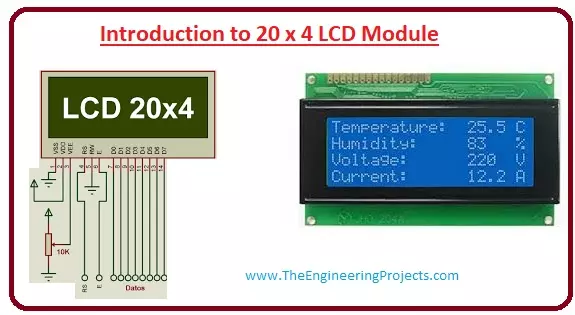
Hello friends, I hope you all are doing great. In today’s tutorial, we will have a look at the Introduction to 20x4 LCD Module. The LCD stands for liquid crystal display, which works on the light modulation features of liquid crystals. It is available in electronic visible display, video display and flat panel display. There are numerous categories and features are exist in markets of LCD and you can see it on your mobile, laptop, computer and television screen. Libraries LCD 20x4 Simulation Libraries Latest library: LCD 20x4 Library for Proteus V3.0 (October 2026) Other LCDs: LCD 16x2 · I2C LCD 16x2 · I2C LCD 20x4 All four LCDs in one package: LCD Library for Proteus V3.0 Helping Tools Serial Monitor Advance : a serial terminal window for the UART of your board Serial Monitor Expert : the ...
Hello friends! Today, we are going to interface a character LCD with an 8051 microcontroller in Proteus. We will use an AT89C51 to send commands and text to the display, then explain how the LCD decides where each character should appear. This is the next step after our 8051 serial communication tutorial . A serial terminal is useful during development, while an LCD lets a project present information directly to its user. Both are valuable when we need to observe values inside an embedded program. The original project actually uses an LM044L-style 20×4 display, so we will follow that arrangement throughout this lesson. A 20×4 LCD has twenty character positions on each of four rows. The same interface principles apply to many 16×2 modules, but their visible layout and row handling are diffe ...
Hello friends! In this tutorial, we will interface a matrix keypad with Arduino Uno and show each pressed key on a 20x4 LCD in Proteus. We will begin with the keypad's internal connections, then build the circuit and write a sketch that keeps the displayed text within a defined area. A keypad is useful when a project needs several related buttons, such as digits for a calculator or commands for a menu. A matrix arrangement reduces the number of controller connections compared with giving every button its own dedicated input. Our example uses twelve keys arranged in four rows and three columns. We will preserve the original circuit's pin assignments, explain how the Keypad library scans them, and check common mistakes such as reversed connector order, repeated characters and LCD overflow. F ...
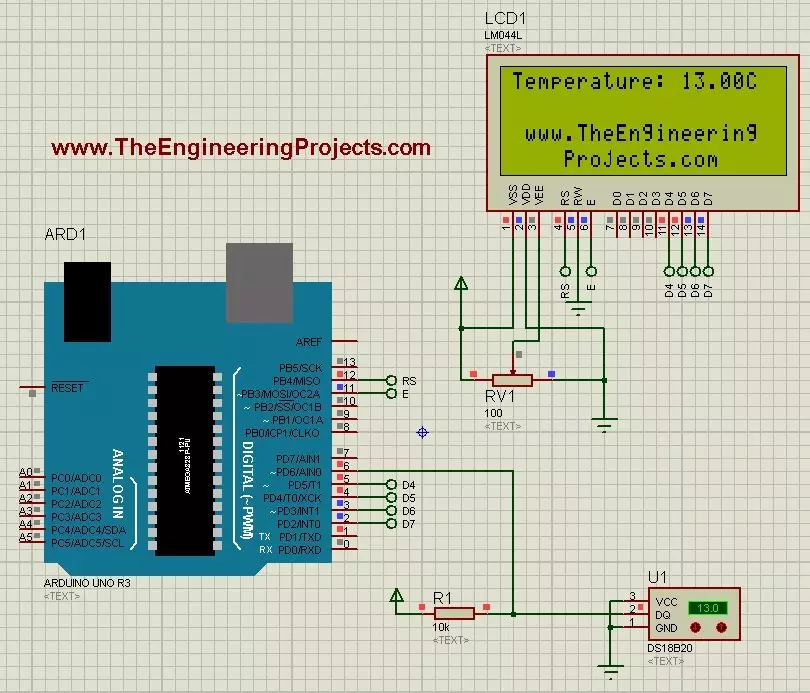
Hello friends! Today we will use the DS18B20 temperature sensor with Arduino Uno in Proteus and display its reading on a character LCD. The sensor is sometimes shortened to 18B20 in project descriptions, but DS18B20 is the part name we will use when selecting the device and checking its specifications. We will begin with the sensor connections, add a 20-column by 4-row LCD, and write a sketch that requests a temperature conversion before displaying the result. We will also handle a missing sensor explicitly instead of presenting an error value as though it were a real temperature. The Proteus model lets us change the simulated temperature using its controls. It does not measure the room around your computer. This makes it useful for checking the program and display workflow before building ...