uc: Arduino Lilypad

2 articles found.

Arduino Lilypad Simulation in Proteus

LilyPad simulation with three indicator LEDs, Arduino LilyPad, Proteus simulation, LED input control

Hello friends! In our previous tutorial, we installed the Arduino LilyPad library for Proteus . Now we will use that board in a small circuit with three LEDs and a pushbutton, then extend the same project to an analog level indicator. The basic behaviour is easy to observe: when the button is released, all three LEDs are on; when it is pressed, they turn off. This gives us a useful first exercise in input configuration, output arrays and the relationship between a circuit and its program. The original article described a button demonstration but supplied code that read an analog input and mapped it to an LED count. We will explain that difference and provide separate versions for the two behaviours. The original screenshots and project download are retained, with the revised wiring and cod ...
Arduino Lilypad Library for Proteus

Arduino LilyPad library for Proteus overview, Arduino LilyPad, Proteus library installation, AVR simulation

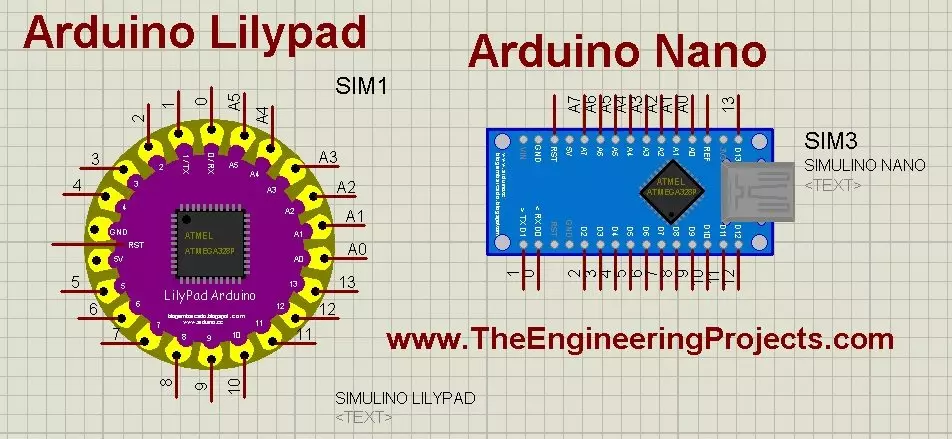
Hello friends! Today, we will install the Arduino LilyPad library for Proteus and prepare a small simulation to check the installation. This article continues our earlier Arduino library tutorial , with particular attention to the LilyPad and Nano parts included in this older library package. We will start by identifying the files, place the library in a directory that Proteus actually searches, select the board and load a compiled sketch. I will also explain the clock and processor settings, because finding a board in the component picker is only the first part of a working simulation. The original post credited this library to blogembarcado . That credit is retained: this particular archive was not created by The Engineering Projects. It is a historical library download, and the earlier ...