


Project Files of PEM Hydrogen Fuel Cell Library for Proteus Simulation
 Libraries
 Code
 Projects
 Simulation
99d1befbdf814c7ca9ec33813c217b73.zip

PEM Hydrogen Fuel Cell Library for Proteus V1.0
PEM Hydrogen Fuel Cell Library for Proteus V1.0 comes as a ZIP archive of 10 files (1.2 MB, 2.6 MB unpacked) holding Proteus library files, simulation model DLLs, a Proteus simulation, an Arduino sketch and compiled HEX firmware.
- LIBProteus library
- DLLProteus model
- DSNProteus simulation
- INOArduino sketch
- HEXHEX firmware
Description
PEM-Hydrogen-Fuel-Cell-Library-for-Proteus-v1.0.zip with the 12 W PEM hydrogen fuel cell stack for Proteus simulation (the polarisation curve, the hydrogen and the heat; TEPFUELCELL.LIB and TEPFUELCELL.DLL), our Arduino UNO V4.0, the A3 demo with its sketch and a README.

File Structure
 File Structure
5 KB201.9 KB13.9 KB883.5 KB329.5 KB24.9 KB22.4 KB883.5 KB329.5 KB15.6 KBGallery12 images from the tutorialOpen the tutorial
 Gallery12 images from the tutorial
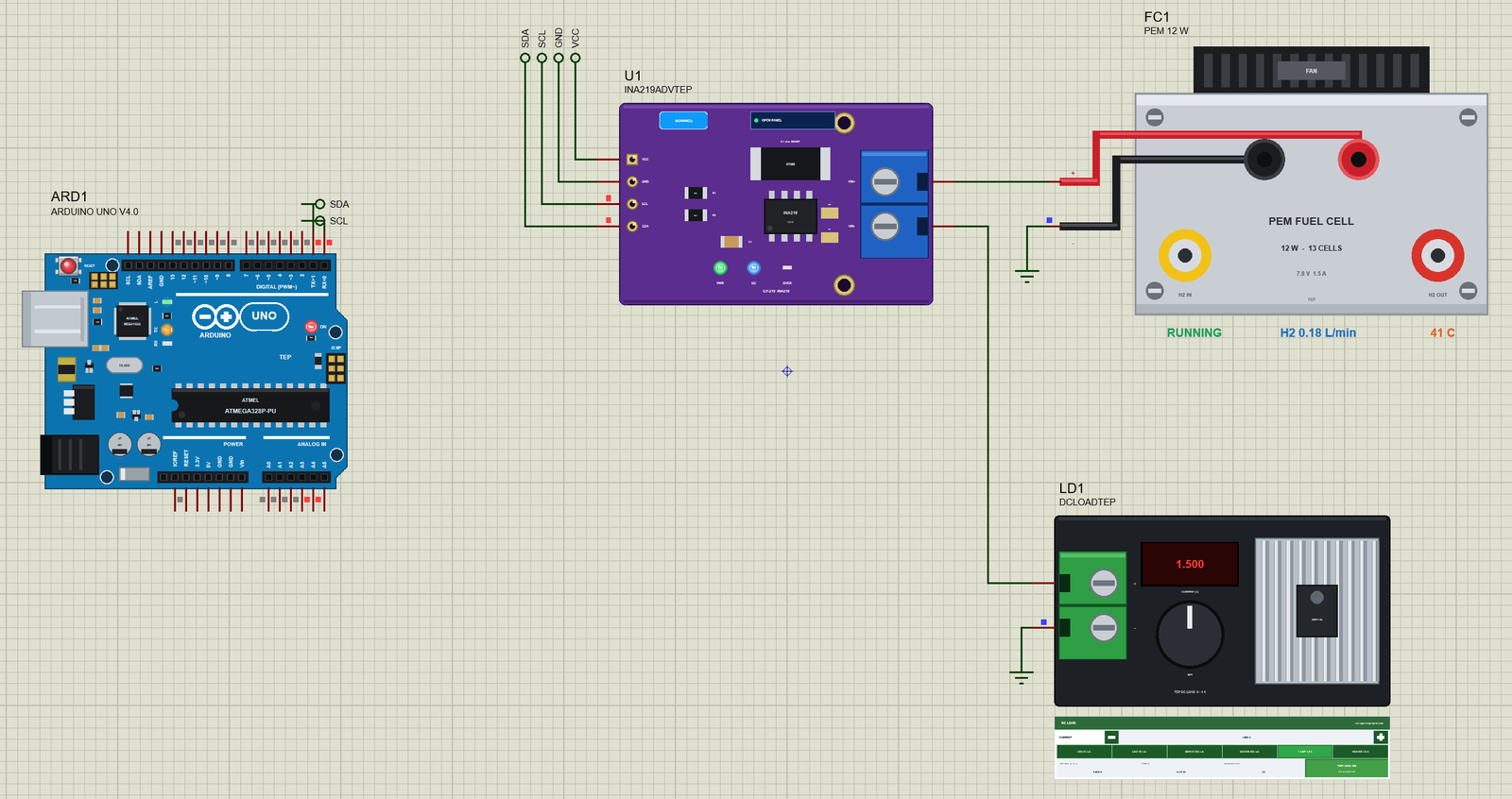
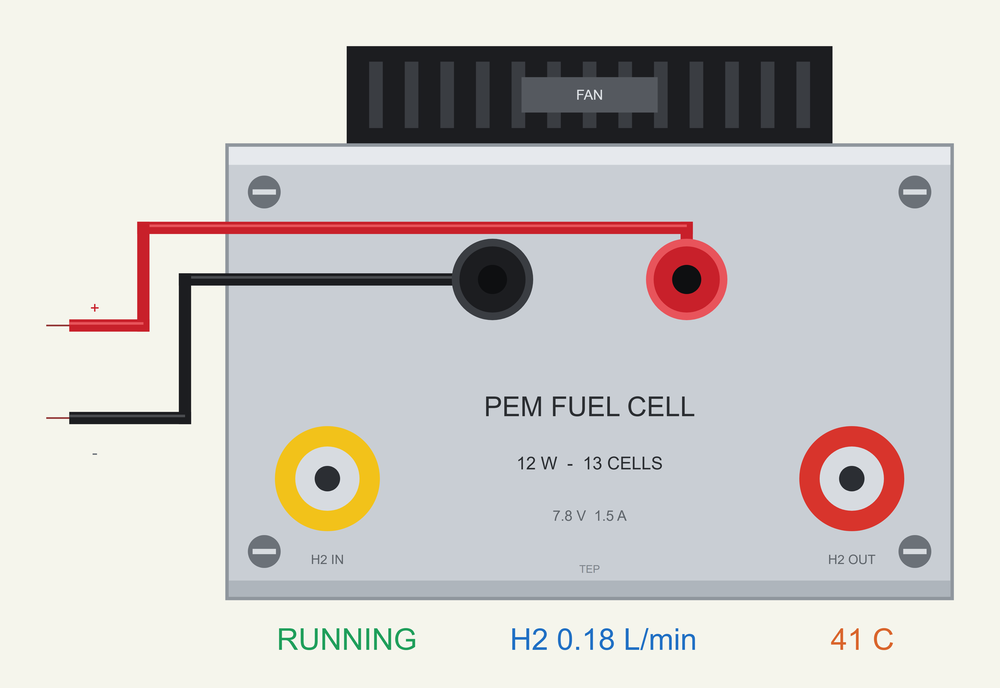
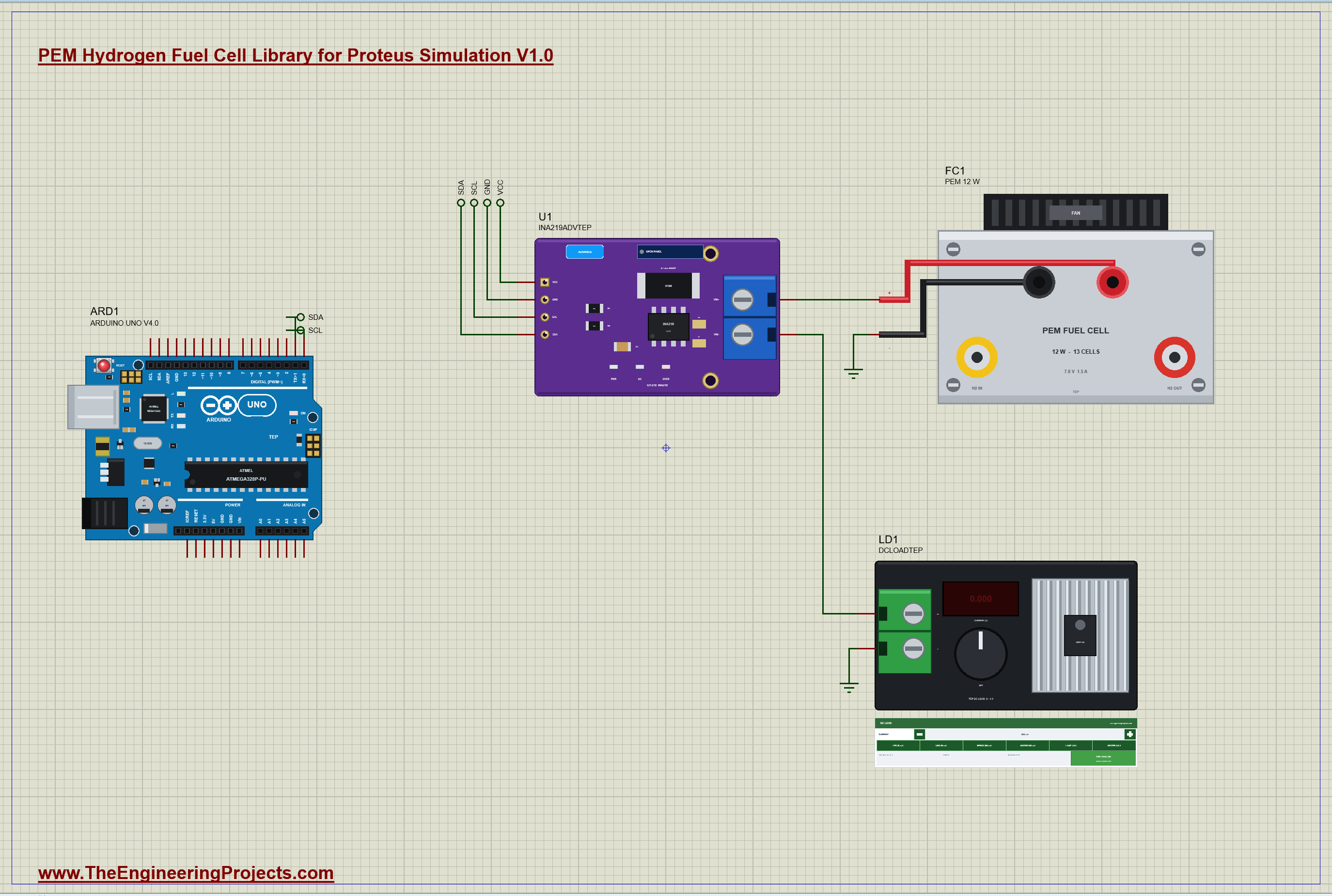
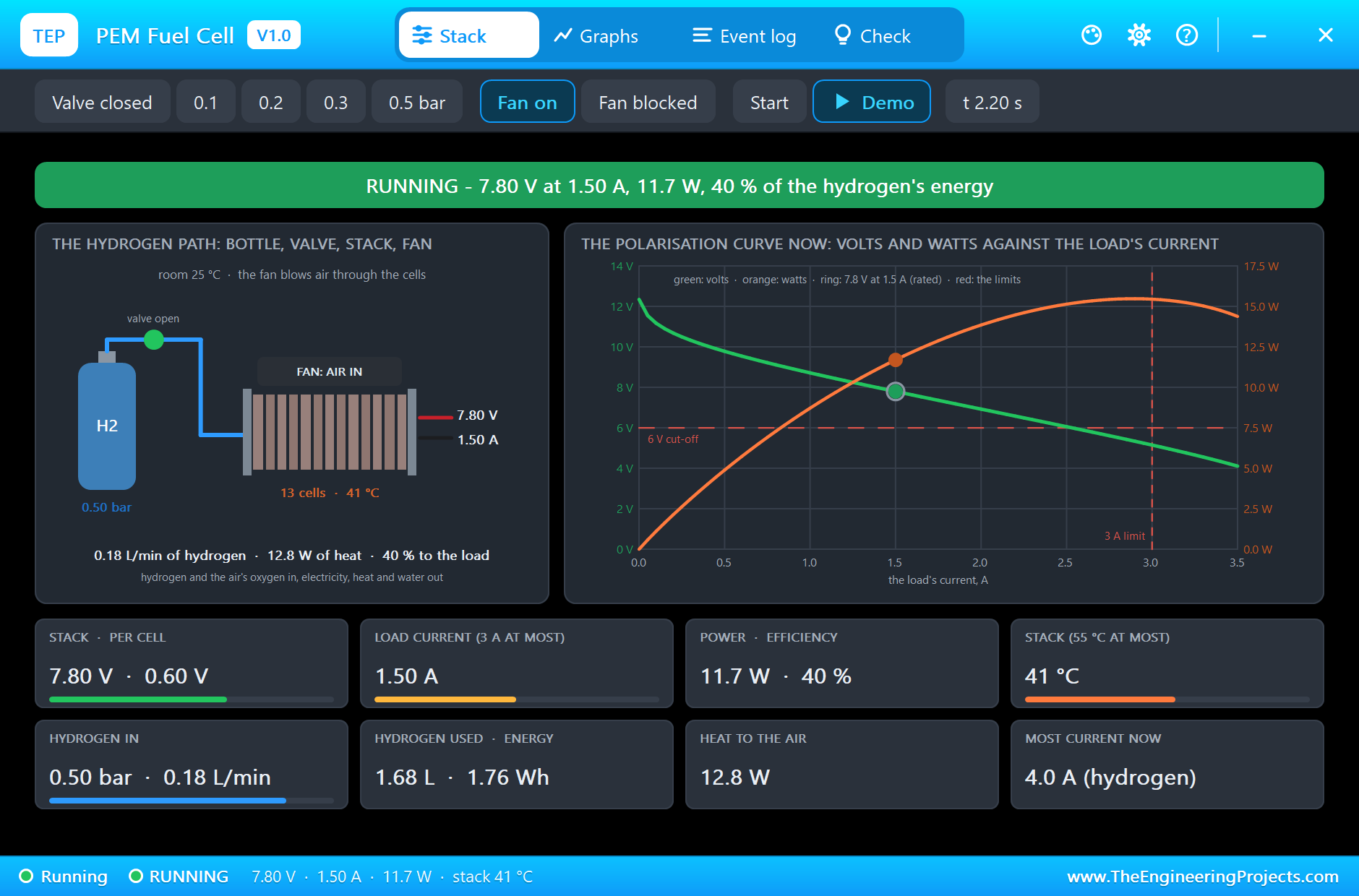
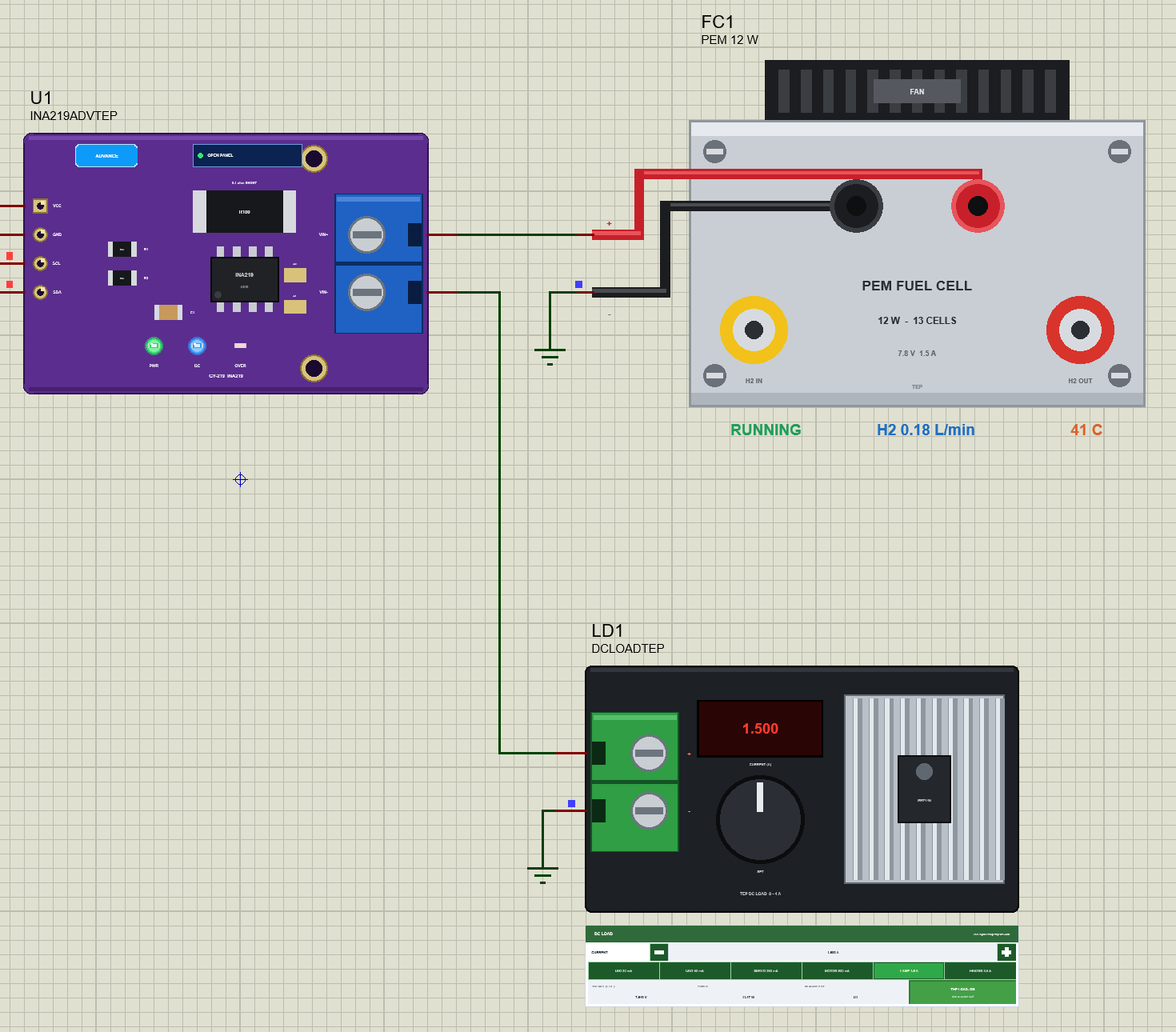
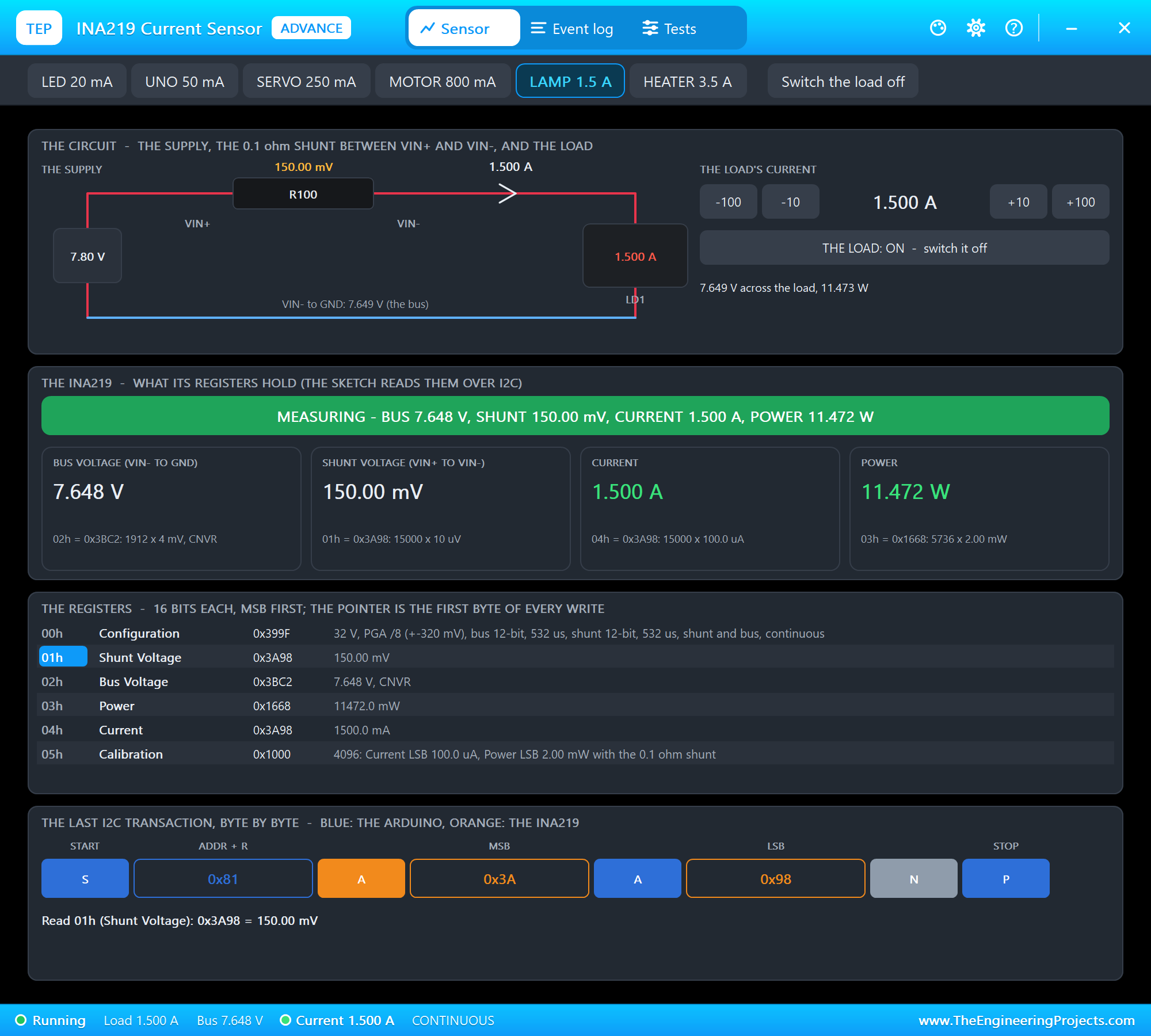
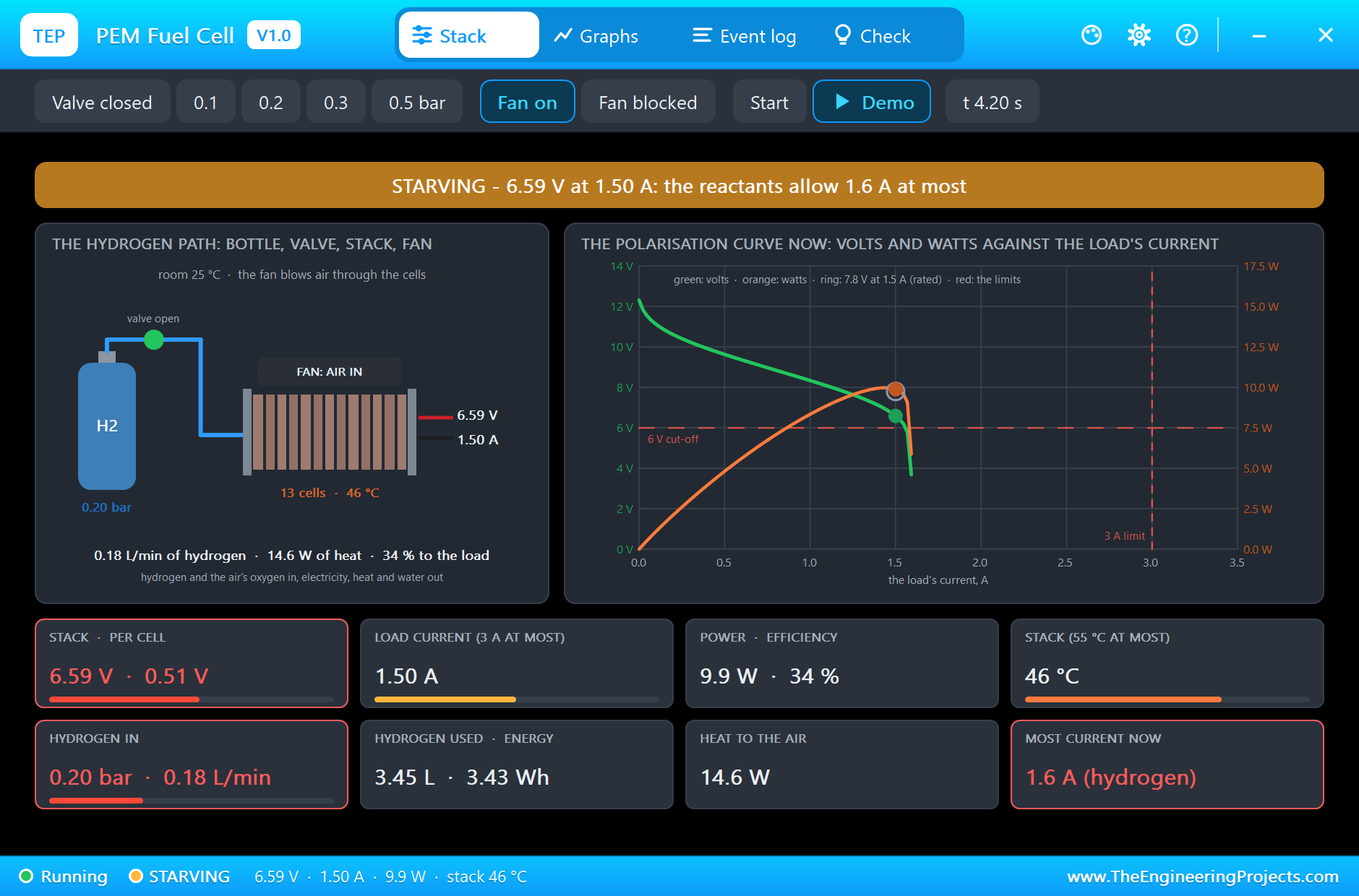
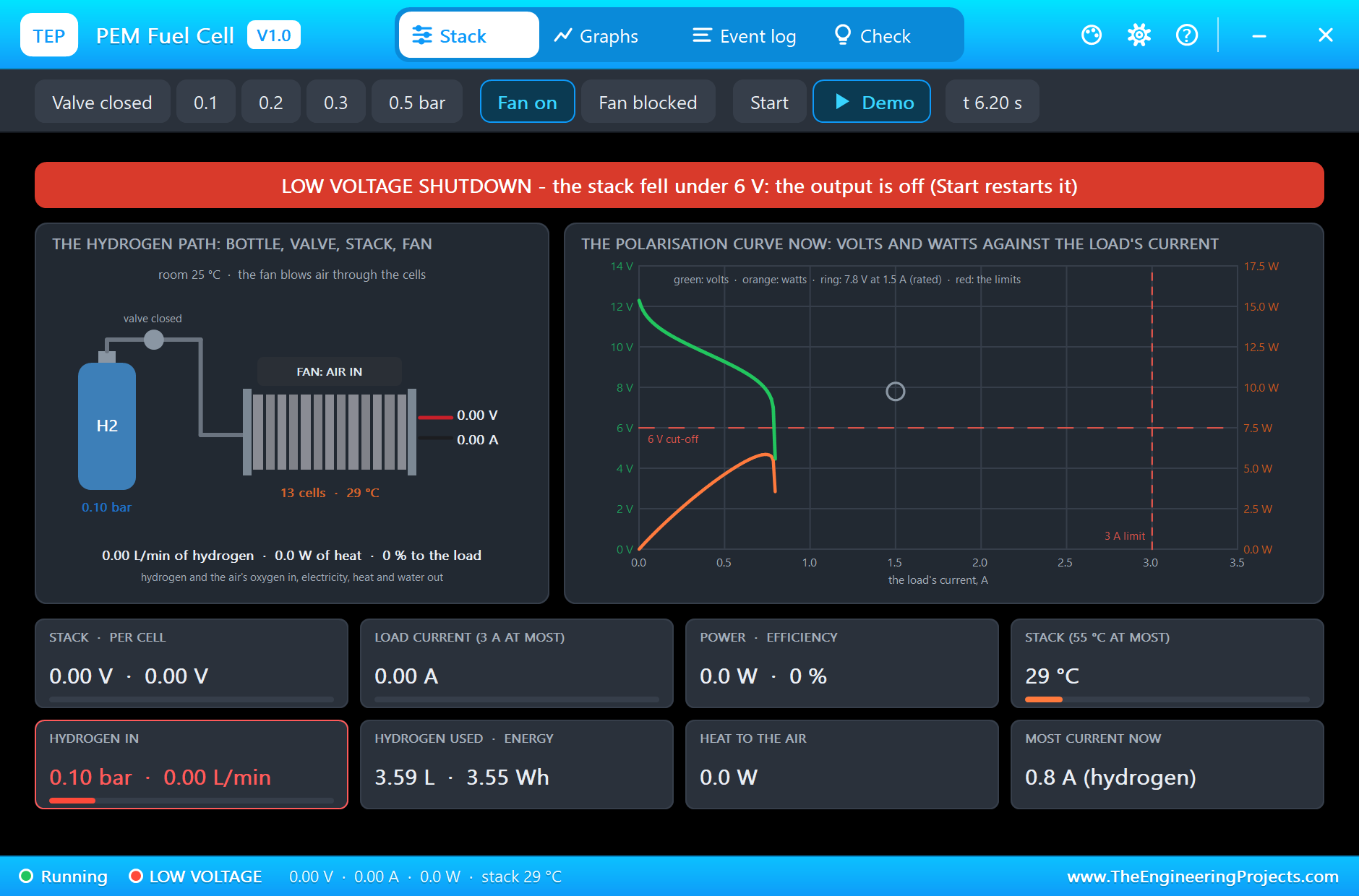
The circuit, the board and the results as they appear in PEM Hydrogen Fuel Cell Library for Proteus Simulation. Open an image for its full size.
README
 README
PEM HYDROGEN FUEL CELL LIBRARY FOR PROTEUS SIMULATION - V1.0 (a 12 W, 13-cell PEM stack, with a pop-up)
Designed by The Engineering Projects
www.TheEngineeringProjects.com

IMPORTANT LINKS
Article (read it first - pictures, step by step, every feature explained):
  https://www.theengineeringprojects.com/2026/11/pem-hydrogen-fuel-cell-library-for-proteus.html
Report a bug or suggest a feature (our forum):
  https://www.theengineeringprojects.com/forum/category/motor-driver-proteus-library
The demo runs on our Arduino UNO V4.0 (included) - working LEDs, RESET and a
built-in serial monitor, no Virtual Terminal to wire - its own article:
  https://www.theengineeringprojects.com/2026/10/arduino-uno-library-for-proteus-v40.html
The demo measures it with our INA219 library and its DC load (installed from its own package - not in this zip):
  https://www.theengineeringprojects.com/2026/10/ina219-current-sensor-library-for-proteus-v1-0.html
Support us (the libraries are free):
  https://www.theengineeringprojects.com/donate

FILE STRUCTURE
PEM-Fuel-Cell-TEP-v1.0/
|-- Proteus Library Files/
|   |-- ArduinoV4TEP.LIB                              201.9 KB   TEP Arduino boards V4.0 (UNO) -> LIBRARY
|   |-- TEPFUELCELL.LIB                                13.9 KB   the library -> LIBRARY folder
|-- Proteus Model Files/
|   |-- TEPARDUINO.DLL                                883.5 KB   the Arduino board model -> MODELS folder
|   |-- TEPFUELCELL.DLL                               329.5 KB   the model -> MODELS folder
|-- Proteus Simulation/
|   |-- FuelCell_Demo.hex                              24.9 KB   the demo firmware
|   |-- PEM-Fuel-Cell-INA219-ArduinoUnoV4.pdsprj       22.4 KB   the demo project
|   |-- TEPARDUINO.DLL                                883.5 KB   copy of the board model
|   |-- TEPFUELCELL.DLL                               329.5 KB   copy of the model
|-- Arduino Code/
|   |-- FuelCell_Demo/FuelCell_Demo.ino                 5.0 KB   the demo sketch (source of the .hex)
|-- README.txt                                        ~17.0 KB   this file
Total: 2.65 MB (unzipped). The C++ source code of the models is not included.

WHAT IS IT?
A 12 W PEM hydrogen fuel cell stack - the small 13-cell stack of the school and university benches -
drawn at true scale from the
front (the casing 75 x 47 mm, the fan on top, the black and red sockets with their two lines, the
hydrogen inlet and outlet; our own
drawing, no maker's mark). It makes electricity from hydrogen and the oxygen of the air; its only
exhaust is water:
  * The electrical side follows the polarisation curve of a PEM cell, times 13: about 12.4 V with no
    load, falling as the current
    rises (the activation loss, the membrane's resistance, the starvation loss near the limiting
    current), set so that the warm
    stack gives the maker's 7.8 V at 1.5 A (12 W). A fuel cell is no battery: every load finds its
    own point on that curve.
  * The hydrogen: the H2 property is the pressure at the inlet in bar (the stack wants 0.45 - 0.55
    bar). The current counts the
    hydrogen: 0.18 L/min at 1.5 A (the maker's figure); 40 % of its energy reaches the load at full
    power (the maker's figure).
    Less pressure lowers the most current the cells can give (4 A at 0.5 bar): near that limit the
    voltage sags, past it it collapses.
  * The air and the heat: the stack's own fan blows air through the cells and cools them. What is
    not electricity is heat (about
    13 W at full power): the stack warms up in minutes (SPEED runs that clock faster). With the fan
    blocked (FAN OFF) the cells
    starve of air above 0.8 A.
  * A small controller starts the stack (about 20 s) and protects it: it switches the output off
    under 6 V (LOW VOLTAGE), over
    3 A (OVER CURRENT) and over 55 C (OVER TEMPERATURE); a shutdown stays until Start in the pop-up.
  * On the sheet the stack writes its state, its hydrogen flow and its temperature under itself at
    Run. Click it at Run for the
    pop-up: the hydrogen path, the polarisation curve (volts and watts against current) with the
    working point, the rated point,
    the 6 V cut-off and the 3 A limit, eight live values; graphs, an event log and a check page.
The body is drawn as on the real part and to true scale against our Arduino.
The TEP signature and the pop-up are TEP additions.

ONE DEVICE (search "FUELCELL" in Pick Devices):
  FUELCELL12WTEP  "PEM Hydrogen Fuel Cell 12 W V1.0" in TEPFUELCELL.LIB (Electromechanical >
  Generators), prefix FC, model
                  TEPFUELCELL.DLL (analog). Pins + and - on the left (the red and black output
                  lines). The name starts with F so
                  that it sorts after the embedded ARDUINO UNO V4.0.

THE POP-UP
Click the part at Run. Tabs:
    Stack      chips: the hydrogen - valve closed, 0.1, 0.2, 0.3, 0.5 bar; fan on / fan blocked;
    Start (after a shutdown); Demo.
               The hydrogen path from the left: the bottle with its pressure, the valve, the 13
               cells with the fan on top, the
               output; the polarisation curve at the present pressure and temperature: volts (green)
               and watts (orange) against
               the load's current, the rated point (ring), the working point, the 6 V cut-off and
               the 3 A limit (red); eight live
               values: stack and cell voltage, load current, power and efficiency, the stack's
               temperature, the hydrogen's
               pressure and flow, the hydrogen used and the energy made, the heat, the most current
               the reactants allow now.
    Graphs     the live values over the last 2, 6 or 15 s. Live / Freeze.
    Event log  every change and warning; filters All / Changes / Warnings, Pause, Clear
    Check      what the part is doing and what to look at, each with a verdict (green = fine, amber
    = check, red = wrong)
    Settings   theme, text size, open at Run, window size
    Help       report a bug, suggest a feature, article, updates, donate, forum; Copy diagnostics
    for a bug report

TEST STATUS
V1.0: verified in Proteus 8.5 on 15 Nov 2026 (the demo project as shipped: an A3 sheet, an Arduino UNO V4.0).
What the runs showed (the model's own numbers and the sketch's monitor):
The demo as shipped (FuelCell_Demo, the DEMO hydrogen profile, FAN ON, SPEED 300, LD1 at 1.5 A), one
run (fcfinal1), the model's own pauses; from 8.2 s the DC load's presets were clicked in the
INA219's pop-up:
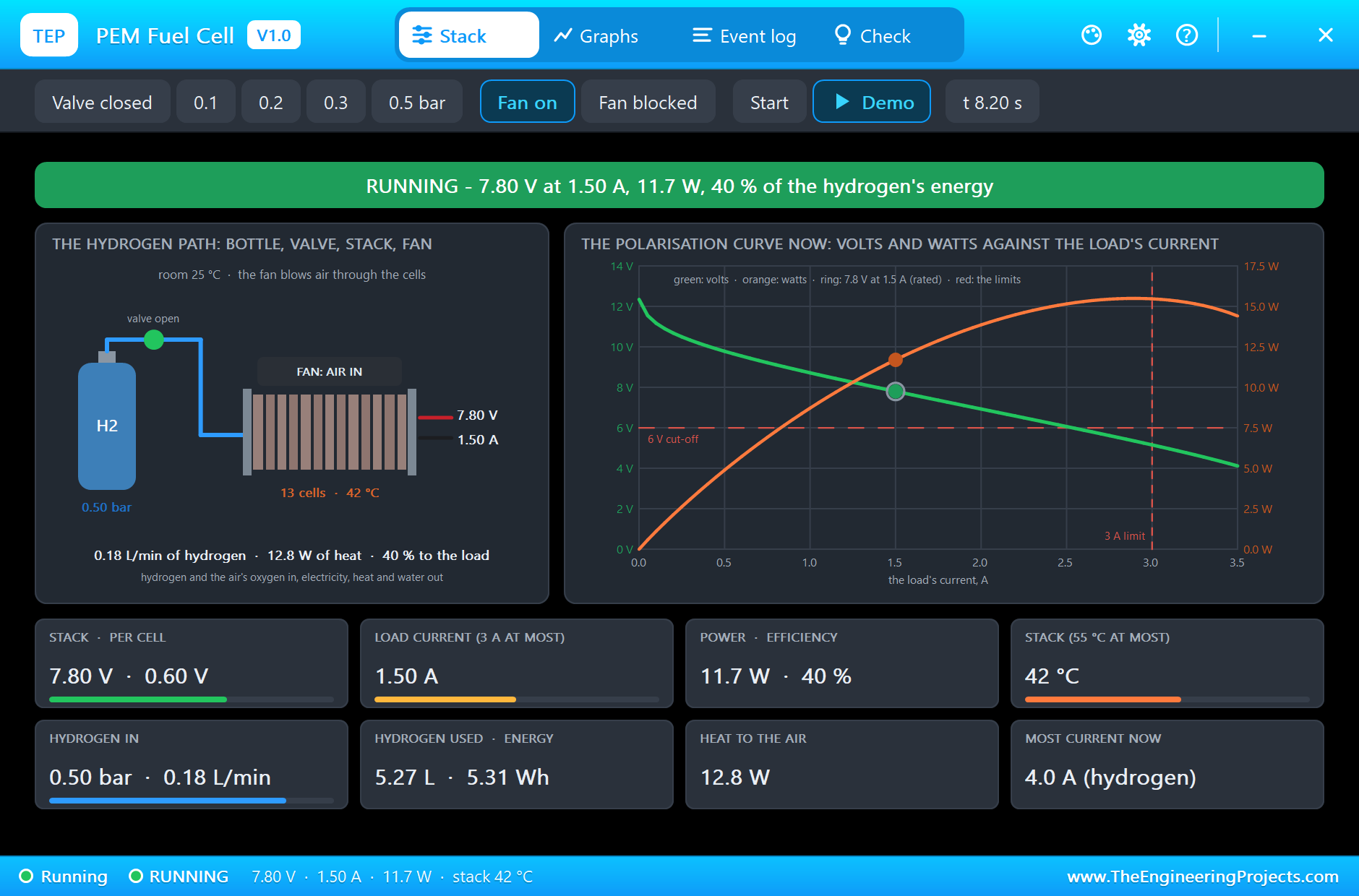
  * 0.5 bar: ready at 0.367 s (12.35 V with no load); at 2.2 s 7.80 V at 1.50 A = 11.7 W, 0.60 V per
    cell, 40 %, 0.18 L/min of hydrogen, 12.8 W of heat, the stack at 41 C (still warming).
  * 0.2 bar: STARVING at 2.351 s (the cells allow 1.6 A): 6.59 V at 1.50 A = 9.9 W, 0.51 V per cell,
    34 %, the stack at 46 C.
  * 0.1 bar (0.8 A at most): STARVING at 4.350 s, LOW VOLTAGE at 4.409 s - the output off. 0.5 bar
    and Start at 6.3 s: ready at 6.367 s, 7.80 V at 1.50 A again.
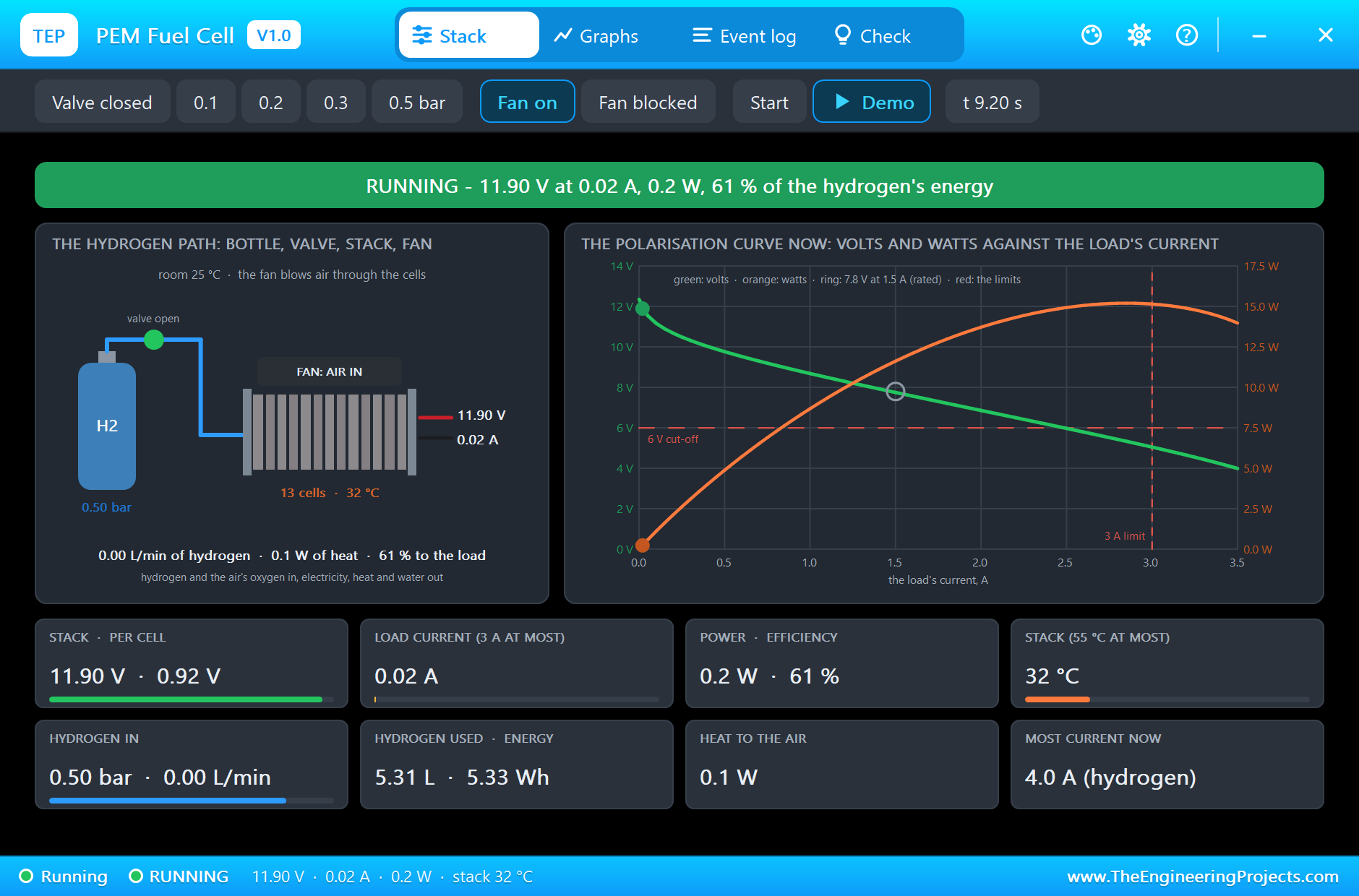
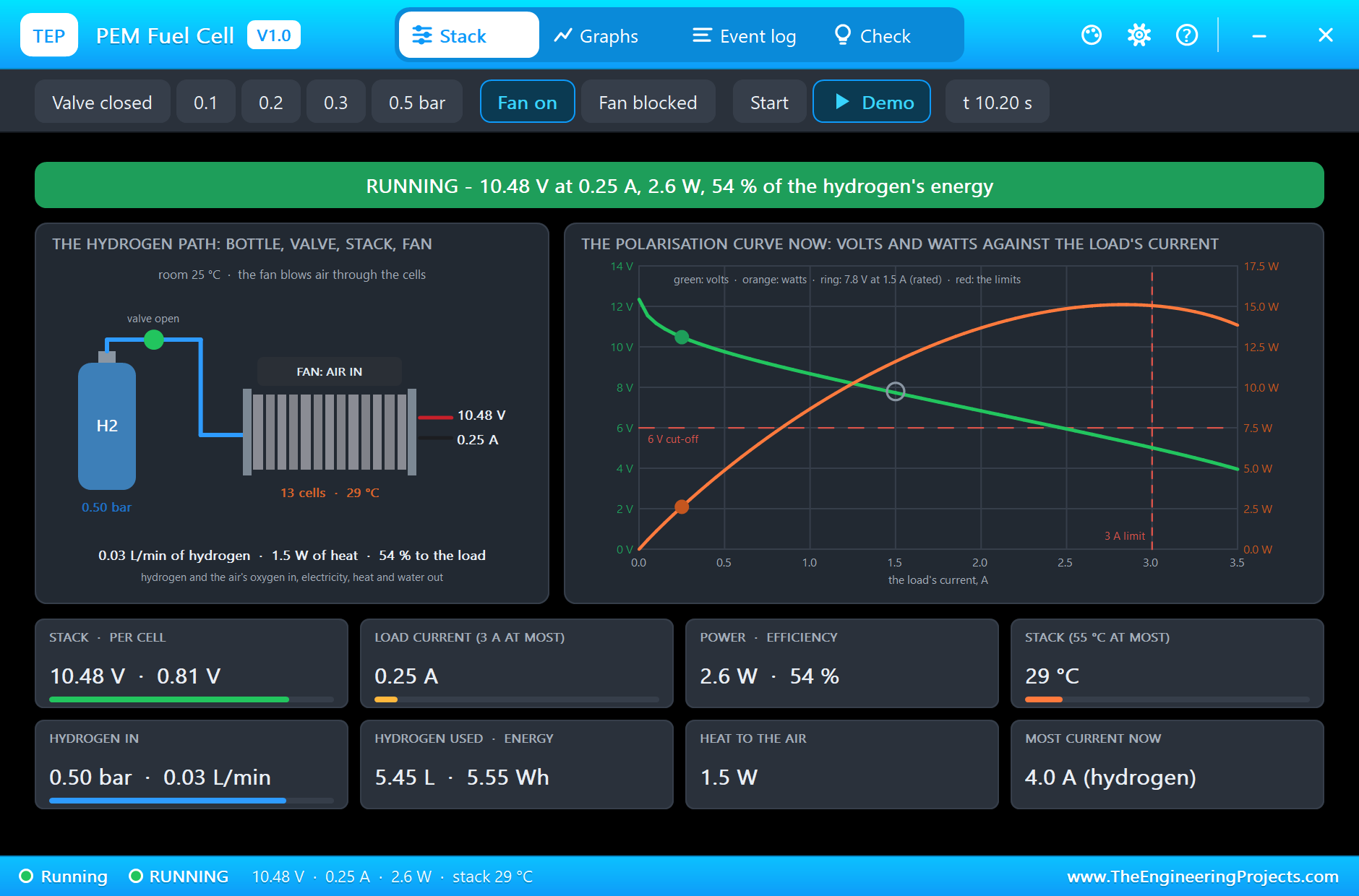
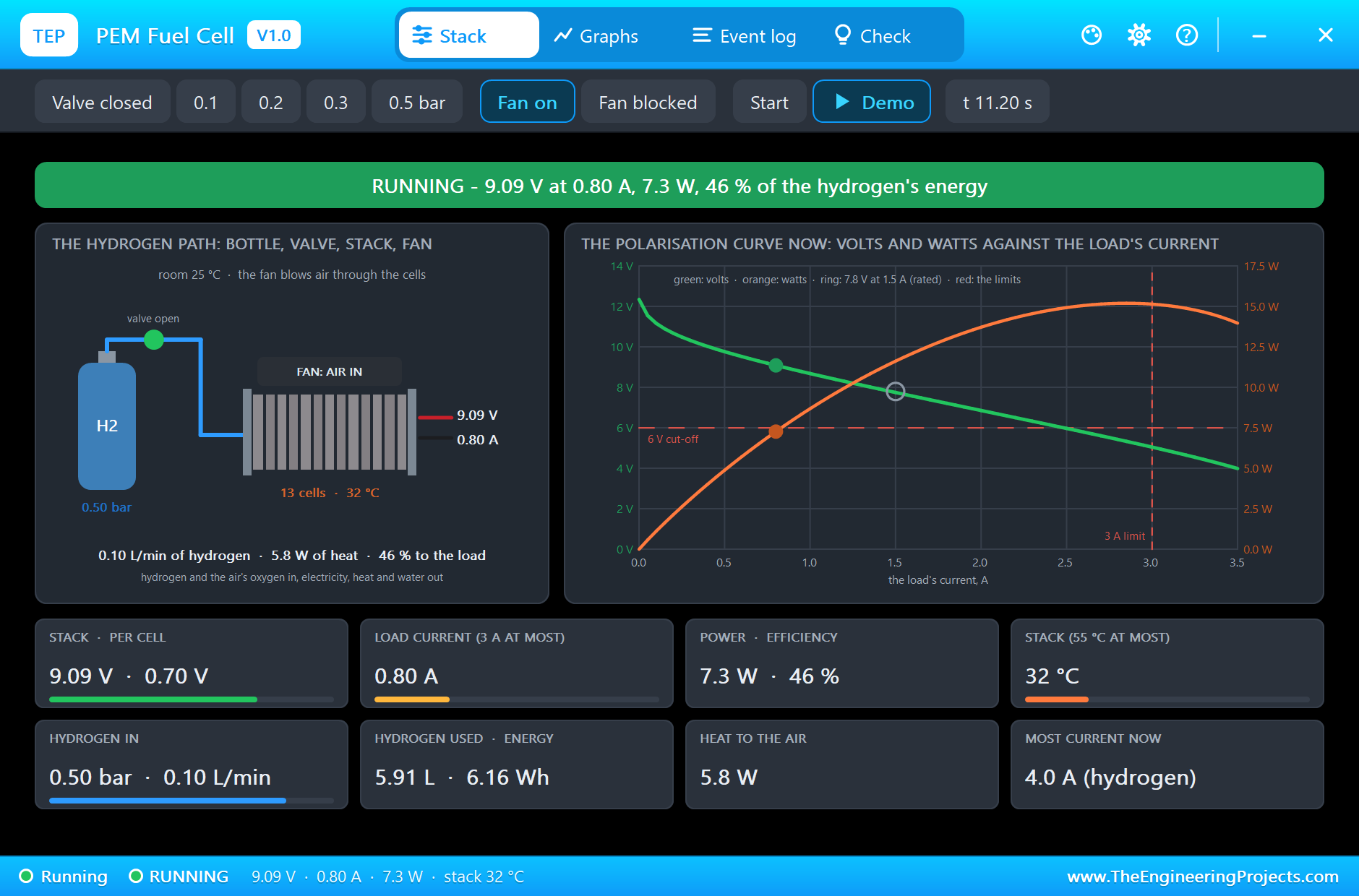
  * The load's presets: 20 mA 11.90 V (0.92 V per cell, 61 %); 250 mA 10.48 V = 2.6 W (0.81 V, 54
    %); 800 mA 9.09 V = 7.3 W (0.70 V, 46 %); 3.5 A: OVER CURRENT at 11.211 s - the output off.
  * The INA219 (U1) read 150.00 mV on the shunt, 7.648 V on the bus, 1.500 A, 11.472 W at the rated
    point; the monitor printed "FC 7.80 V  1.50 A  11.7 W  cell 0.60 V  eff 40 %  H2 180 mL/min".
    5.92 L of hydrogen for 6.20 Wh in all; the highest stack temperature 46 C. 221 s for the 12.4 s
    of the run (the extra pauses for the animated picture included).
  * Check run, FAN OFF (blocked): the cells allow 0.8 A in still air; with the 1.5 A load LOW
    VOLTAGE at 0.472 s.
  * Check run, H2 0.5, LD1 at 2.4 A, SPEED 600: 6.34 V at 2.40 A = 15.2 W, 0.49 V per cell, 32 %,
    0.29 L/min; OVER TEMPERATURE at 0.935 s (55 C).

INSTALLATION (about 2 minutes)
1. Close Proteus. Extract the WHOLE ZIP to a normal folder (e.g. Desktop).
2. Copy everything in "Proteus Library Files" (TEPFUELCELL.LIB and our Arduino library V4.0,
ArduinoV4TEP.LIB, with the ARDUINO UNO V4.0 used by the demo) to the LIBRARY folder of Proteus, for
example:
     C:\Program Files (x86)\Labcenter Electronics\Proteus 8 Professional\LIBRARY
   (use the folder that already holds Proteus's own .LIB files).
3. Copy TEPFUELCELL.DLL and TEPARDUINO.DLL from "Proteus Model Files" to the MODELS folder
(...\Proteus 8 Professional\MODELS).
4. Delete TEPFUELCELL.IDX from the LIBRARY folder if it is there (Proteus makes a new index).
5. Start Proteus. In Pick Devices (P) search "FUELCELL".

RUN THE DEMO
"Proteus Simulation\PEM-Fuel-Cell-INA219-ArduinoUnoV4.pdsprj" (an A3 sheet) - keep the .hex file and
the DLLs beside the project.
  ARD1:   Arduino UNO V4.0 running FuelCell_Demo.hex, its serial monitor built in (window "TEP
  Arduino UNO - ARD1").
  U1:     our INA219 (its pop-up version) - the stack's + through its 0.1 ohm shunt into the load;
  SDA A4, SCL A5.
  LD1:    the INA219 library's DC electronic load at 1.5 A, the stack's rated current. Its presets
  (20 mA ... 3.5 A) are chips
          in the INA219's pop-up: click them to walk along the polarisation curve.
  FC1:    the stack, H2 DEMO, FAN ON, SPEED 300 (five minutes of warming up each simulated second):
  the valve opens at 0.3 s
          (0.5 bar) and the stack starts; 0.2 bar at 2.3 s (the voltage sags); 0.1 bar at 4.3 s
          (starved: LOW VOLTAGE, the output
          off); 0.5 bar and Start at 6.3 s; the valve closes at 14.3 s.
          The monitor prints the volts, amps, watts, the voltage of one cell, the efficiency and the
          hydrogen flow every half second.
Closed the monitor? Click the UNO's USB port.

WIRING (the same in Proteus and on a real board)
  + to your load (here through the INA219's shunt), - to the load's ground. The stack gives 6 to 12
  V depending on the load:
  put a DC-DC converter after it for a fixed 5 V or 12 V rail.
REAL HARDWARE:
 * Hydrogen burns: work in a ventilated room, check every joint for leaks, keep flames and sparks
   away.
 * Feed it 0.45 - 0.55 bar through a pressure regulator - never straight from a bottle or a hydride
   canister.
 * Never block the fan: it is the stack's air supply and its cooling.
 * Keep the load under the rated 1.5 A for long runs; the stack may take 55 C at most and likes a
   room of 5 - 30 C.

THE DEMO SKETCH ON THE SERIAL MONITOR (FuelCell_Demo V1.0, 9600 baud)
The sketch reports every 500 ms. Type a command:
  best       the most power so far       reset      forget it       rate 1000      report every 1000
  ms       help
EXPECTED MONITOR OUTPUT
  PEM Fuel Cell (12 W, 13 cells) demo - The Engineering Projects
  FC 7.80 V  1.50 A  11.7 W  cell 0.60 V  eff 40 %  H2 180 mL/min
  FC 6.59 V  1.50 A  9.9 W  cell 0.51 V  eff 34 %  H2 180 mL/min  - near the 6 V cut-off
  FC 0.00 V  0.00 A  0.0 W  - no output: stopped, shut down or no hydrogen

PROPERTIES (double-click the part > Edit Properties)
  Hydrogen (H2)                        the pressure at the inlet in bar (0 - 0.8; the stack wants
  0.45 - 0.55), or DEMO (0.5)
  Fan (FAN)                            ON (air for the cells and cooling) or OFF (blocked: still air
  only) (ON)
  Room (AMBIENT)                       the room's temperature, C (25)
  Process clock (SPEED)                1 real time, 300 five minutes of warming up each simulated
  second, 1 - 600 (1)
Every run starts again from the properties.

LINKS.INI (OPTIONAL)
The Help page cards of the pop-up open web pages. To point them somewhere else without a new DLL,
put a text file named links.ini next to TEPFUELCELL.DLL with lines KEY=URL, for example:
  ARTICLE=https://www.theengineeringprojects.com/...
Keys: WEBSITE, FORUM, BUG_REPORT, FEATURE_REQUEST, ARTICLE, USER_GUIDE,
UPDATE_CHECK, DONATE. Only http:// and https:// links are used; lines starting
with # are comments.

TROUBLESHOOTING
* No output, OFF: there is no hydrogen (H2 under 0.05 bar or the valve closed in the pop-up).
* LOW VOLTAGE: the load pulled the stack under 6 V - too much current, too little hydrogen, or a
  blocked fan. Cure it, then Start.
* OVER CURRENT: the load took more than 3 A (a short circuit does). Lower the load, then Start.
* OVER TEMPERATURE: the stack passed 55 C - a long overload or a hot room. It restarts under 50 C.
* STARVING: the load is close to the most current the hydrogen or the air allows now - the voltage
  sags.
* Less than 7.8 V at 1.5 A: the stack is still cold (7.7 V at 25 C); it reaches 7.8 V warm (about 44
  C).
* The part is not simulated: TEPFUELCELL.DLL is missing from MODELS and from the project folder. No
  UNO / no monitor window: TEPARDUINO.DLL is missing, or click the UNO's USB port.

BUG REPORTS AND FEATURE REQUESTS
Please post them in our forum with a screenshot, the Serial Monitor text, the
simulation log and the pop-up's Copy diagnostics text:
  https://www.theengineeringprojects.com/forum/category/motor-driver-proteus-library

SUPPORT US
This library is free. If it saves you time, please support our work:
  https://www.theengineeringprojects.com/donate

WEBSITE
  https://www.theengineeringprojects.com/

LICENCES AND THIRD-PARTY NOTES
* The model (TEPFUELCELL.DLL), the symbols and artwork, the other parts of ours in the demo and the
  Arduino Library V4.0 (ArduinoV4TEP.LIB / TEPARDUINO.DLL, with its built-in TEP Serial Monitor
  Advance) are made by The Engineering Projects. The models use only standard Windows libraries; no
  Visual C++ redistributable is needed.
  The C++ source code is not included.
* Arduino UNO V4.0 (ArduinoV4TEP.LIB / TEPARDUINO.DLL, our Arduino Library V4.0 - its
  microcontroller is Proteus's own AVR model): The Engineering Projects,
  https://www.theengineeringprojects.com/2026/10/arduino-uno-library-for-proteus-v40.html
* The .hex file is built from the demo sketch and the Arduino AVR core 1.8.6, which includes
  LGPL-licensed code; its source code is available at
  https://github.com/arduino/ArduinoCore-avr/tree/1.8.6
* Proteus is a product of Labcenter Electronics and is not included. Arduino is a trademark of Arduino SA.
  This library is not made or endorsed by Arduino or Labcenter.

REBUILDING THE FIRMWARE (OPTIONAL)
The HEX file is supplied; Arduino IDE is not needed to run the demo. To edit the sketch, open
Arduino Code\FuelCell_Demo\FuelCell_Demo.ino, select Arduino Uno and use Sketch > Export Compiled
Binary. Replace the simulation's .hex with the exported HEX. The sketch needs 9,060 bytes of flash
and 496 bytes of RAM.

MODEL SCOPE AND LIMITS
Modelled: the polarisation curve (one cell: 0.95 V open, 0.045 V of activation loss per e-fold of
current above 20 mA, 0.095
ohm at 25 C falling 0.3 % per C, a starvation term near the limiting current - our constants, set to
the maker's 7.8 V at 1.5 A);
the limiting current by the hydrogen pressure (4 A at 0.5 bar) and the air (0.8 A with the fan
blocked - our figures); the
hydrogen flow (the current's own share plus 20 % purged: 0.18 L/min at 1.5 A, the maker's figure)
and the efficiency on the lower
heating value; the heat (220 J/K, 1.5 K/W with the fan, 6 K/W in still air - our figures); the
controller (start-up about 20 s,
6 V / 3 A / 55 C shutdowns - 55 C is the maker's, the others are ours).
Not modelled: the membranes drying out or flooding, the purge pulses themselves (their hydrogen is
counted as a steady share),
the cells' charge double layer (the voltage follows the current at once), ageing, the hydrogen
bottle running empty.

VERSION
TEP PEM Fuel Cell library V1.0 (Nov 2026). Device FUELCELL12WTEP (TEPFUELCELL.LIB /
TEPFUELCELL.DLL). Demo sketch FuelCell_Demo V1.0 (the INA219 read straight with Wire). Demo board:
ARDUINO UNO V4.0 (TEP Arduino Library V4.0) with its built-in serial monitor.Development1 release
 Development1 release
-
V1.0PEM Hydrogen Fuel Cell Library for Proteus V1.0this page
V1.0 is the only release in the Download Center so far. When a newer version is published, it appears above with its own download page.
Installation8 steps
 Installation8 steps
From the download to a working project, in order. The steps follow what the package contains.
You will need
- Proteus Design SuiteProteus 8 or newer (Labcenter), on Windows
- Arduino IDE1.8 or 2.x, with the board of the tutorial chosen under Tools → Board
- Any archive toolWindows, macOS and Linux extract ZIP files on their own
Steps
- 1
Extract the archive
Right-click 99d1befbdf814c7ca9ec33813c217b73.zip and choose Extract All (or open it with 7-Zip or WinRAR) into a folder you can find again. Keep its folder structure (PEM-Fuel-Cell-TEP-v1.0) as it is.
- 2
Copy the library files into Proteus
Move ArduinoV4TEP.LIB and TEPFUELCELL.LIB and the files into the LIBRARY folder of your Proteus installation: C:\Program Files (x86)\Labcenter Electronics\Proteus 8 Professional\LIBRARY for Proteus 8, or the matching Proteus 7 folder. Older versions keep it under ProgramData\Labcenter Electronics. If Proteus is open, close it first.
- 3
Add the simulation model
Copy TEPARDUINO.DLL and TEPFUELCELL.DLL into the MODELS folder next to LIBRARY, so the component can run, not only be drawn.
- 4
Restart Proteus and place the component
Start Proteus, open a schematic, press P (Pick Devices) and search for the component by the name used in the tutorial. It appears with its pins ready to wire.
- 5
Open the sketch in the Arduino IDE
Open FuelCell_Demo.ino, select your board and port under Tools, then Verify. Sketch → Export Compiled Binary writes the HEX file a simulation needs.
- 6
Load the HEX file
In Proteus double-click the microcontroller, set Program File to FuelCell_Demo.hex and run the simulation. For real hardware, flash the same file with your programmer.
- 7
Open the example simulation
Open PEM-Fuel-Cell-INA219-ArduinoUnoV4.pdsprj in Proteus to see the wiring exactly as in the tutorial. Check the controller's Program File path, then press Play.
- 8
Follow the tutorial
PEM Hydrogen Fuel Cell Library for Proteus Simulation explains every connection and setting in order; keep it open beside the files while you build.
FAQs9 questionsContact TEP
 FAQs9 questions
How do I download PEM Hydrogen Fuel Cell Library for Proteus V1.0?
Wait for the 30-second guest countdown on this page, then press the download button; the file comes straight from our storage. Members who are logged in skip the wait. If the browser opens the file instead of saving it, use its Save as option. The download link is made for you when the countdown ends and works for 15 minutes; a saved or shared link stops working, so share this page instead.
What is inside the archive?
PEM Hydrogen Fuel Cell Library for Proteus V1.0 comes as a ZIP archive of 10 files (1.2 MB, 2.6 MB unpacked) holding Proteus library files, simulation model DLLs, a Proteus simulation, an Arduino sketch and compiled HEX firmware. Open the File Structure tab for the full list of 10 files.
What should I do if the download does not start?
Check the browser's download list first; an ad blocker or a company firewall can also hold it back, so try another browser or network. If the file arrives incomplete, download it again. For an installation problem, read the Install tab or tell us in the comments with your software version and the exact error message.
Is this file free?
Yes. Every file in the TEP Download Center is free for learning, personal and student projects. If you share it, link back to this page or the tutorial so others find the latest version.
How do I check that the file arrived complete?
Compare its SHA-256 with the one on this page, 89985f58addf1c98c0f2238ccb4075601820e8e0dba7cec725d86e6f7397e7e2. In PowerShell run Get-FileHash "99d1befbdf814c7ca9ec33813c217b73.zip"; on macOS or Linux run shasum -a 256 "99d1befbdf814c7ca9ec33813c217b73.zip". The same value means the file is exactly the one in our storage; a different one means the download broke off, so download it again.
Do I need WinRAR to open the ZIP file?
No. Windows, macOS and Linux open ZIP archives on their own (Extract All, or double-click). WinRAR and 7-Zip work too. Extract the whole archive before using the files.
Where do I put the LIB and IDX files?
Both files go into the LIBRARY folder of your Proteus installation (Proteus 8: C:\Program Files (x86)\Labcenter Electronics\Proteus 8 Professional\LIBRARY; Proteus 7 has the same folder under its own name). Restart Proteus afterwards and search for the component with P.
Which Proteus version does the library need?
The tutorial names the Proteus version the library was made and tested with. Most TEP libraries work in Proteus 7 and Proteus 8; if the component does not appear after a restart, check that both the LIB and the IDX file were copied and that Proteus was fully closed while copying.
How do I get the HEX file into the simulation?
Compile the sketch in the Arduino IDE (Sketch → Export Compiled Binary gives you the HEX next to the sketch), then in Proteus double-click the board, set Program File to that HEX and run.
Members skip the wait. Log in or join TEP.

- 0Total downloads
- 4%Popularity
- ProteusCategory
- 0Comments
- ssyedzainnasirUploaded by
- 15 Nov 2026Uploaded at


 SHA-256
89985f58addf1c98c0f2238ccb4075601820e8e0dba7cec725d86e6f7397e7e2


 Need help with this file?
 Tags
Related Proteus
All Proteus tutorials



Comments
0