


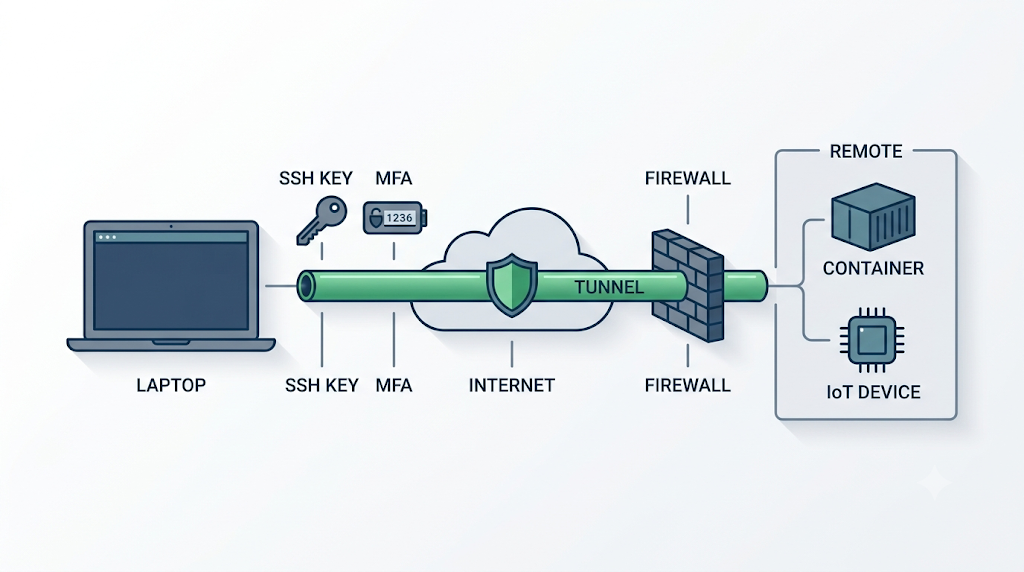
How Engineers Can Secure Remote Development Environments


Remote development used to be the exception. Now it is how most of us work. You SSH into a build server, push to a cloud VM, flash firmware on a device sitting in a lab three time zones away, or spin up a container that lives on someone else's hardware. It is convenient, and it is also a much larger attack surface than a laptop that never leaves your desk. The code you are writing, the credentials that code uses, and the machines it touches are all reachable over a network, and a network is something other people can reach too.
The good news is that securing a remote dev environment is mostly a matter of doing a handful of unglamorous things consistently. None of it is exotic. The problem is that under deadline pressure these are exactly the steps people skip, and attackers know it.
The parts of a remote setup that actually get attacked
Before hardening anything, it helps to be honest about where the risk sits. A remote development environment is not one thing. It is a chain, and each link fails differently.
- The connection itself. Anything you send over SSH, a VPN, or an API call can be intercepted if the transport is weak or misconfigured. Public and shared networks make this worse.
- Authentication. Reused passwords, keys with no passphrase, and long-lived tokens sitting in a config file are the most common way in. Once someone has your credentials, encryption does not matter.
- Secrets in the code. API keys, database passwords, and private tokens committed to a repo or baked into an environment variable get scraped constantly. Bots watch public commits for exactly this.
- The remote host. An exposed port, an unpatched service, or a default configuration turns your build server into an open door.
- Dependencies. A compromised package pulled into your project runs with your privileges. Supply-chain attacks target the remote build step specifically because that is where code executes with real access.
If you keep this chain in mind, the individual defenses stop feeling like a random checklist and start making sense as coverage for specific failure points.
Encrypt the connection, and mean it
Every remote session should run over an encrypted channel. SSH handles this for shell access, but the details matter. Use key-based authentication instead of passwords, protect the private key with a passphrase, and disable password login on the server entirely once keys are working. For anything that is not SSH, such as web dashboards, database connections, or internal APIs, do not assume the transport is safe just because it works.
This is also where a VPN earns its place, especially if you connect from cafes, coworking spaces, or any network you do not control. VPNOverview analysis shows that connection security is where remote setups most often leak, because engineers tend to trust networks that were never designed to be trusted. Routing your traffic through a tested, audited VPN closes off the easiest interception point, and it matters more the more you move between locations. If you want to compare which services actually hold up under testing rather than marketing claims, VPNOverview.com publishes leak and performance results that are worth reading before you commit to one.
Lock down authentication before anything else
Encryption protects data in transit. Authentication decides who gets in at all, and it is the higher-value target. A few habits cover most of the risk:
- Turn on multi-factor authentication everywhere it is offered, including your Git host, cloud console, and any admin panel.
- Use SSH keys with passphrases, and rotate them when someone leaves the team or a laptop goes missing.
- Give tokens the narrowest scope and the shortest life you can live with. A read-only, short-lived token that leaks is a smaller problem than a permanent admin key.
- Store secrets in a dedicated manager or your platform's secrets store, never in the repo and never hard-coded.
The recurring mistake here is convenience creep. People widen permissions to unblock a build and never narrow them again. Treat that temporary loosening as something you undo the same day.
Keep the remote host boring
A secure remote host is a boring one: few open ports, current patches, no services running that you do not actually use. Put the machine behind a firewall and expose only what the work requires. If you only need SSH, only SSH should be reachable. Keep the operating system and installed packages updated, because a known unpatched vulnerability on an internet-facing server is one of the easiest targets there is. For a broader reference on hardening practices, the OWASP project maintains guidance that applies well beyond web apps.
Containers deserve the same discipline. A container is not a security boundary by default. Do not run everything as root inside it, do not mount your whole home directory into it out of laziness, and pin your base images to versions you have actually checked.
Watch your dependencies
The last link is the one people forget because it does not feel like "security." Every package you pull into a remote build runs with whatever access that build has. Pin your dependencies to specific versions, review what a new package actually does before adding it, and use automated scanning to flag known vulnerabilities in your tree. On the embedded and IoT side, where this site's readers spend a lot of time, be extra careful with libraries flashed onto devices you cannot easily update later. A phone can install a patch tonight. A sensor in the field might run the same firmware for years.
The realistic version of all this
You are not going to do every one of these perfectly on every project, and pretending otherwise is how checklists get ignored. So rank them. Encrypt the connection, turn on multi-factor authentication, and get your secrets out of the repo. Those three cover the majority of real-world compromises and take an afternoon to set up properly. The rest is steady maintenance: patch the host, scope your tokens, check your dependencies, and undo the temporary shortcuts you took last week.
Remote development is not going back in the box, and honestly most of us would not want it to. The trade is that the safety you used to get for free from a machine on your own desk is now something you have to build yourself. It is not hard. It just has to be habit, because the one time you skip it is the time it matters.

Comments
0