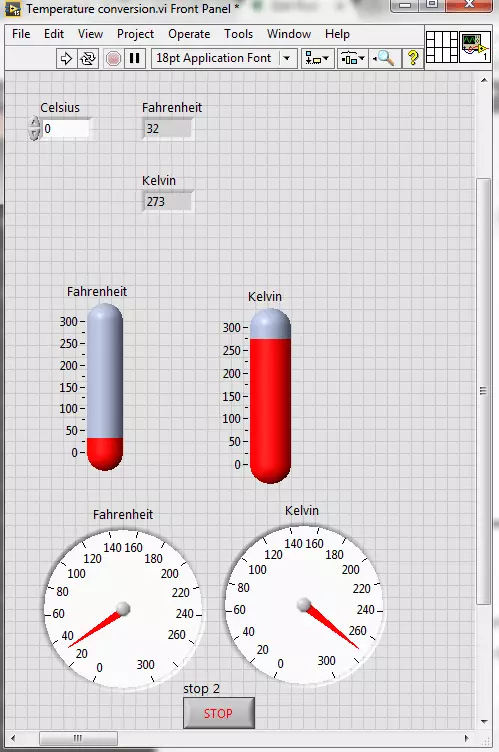
Hello friends! I hope you all will be absolutely fine. Today, I am going to share my knowledge with all of you guys, on how to make a Temperature Conversion in LabVIEW. Temperature is actually measured with different units at different places all across the world. However, there are three basic standard units for measuring the temperature i.e. Celsius, Fahrenheit and Kelvin. We can convert them in each other by performing some mathematical operations. In this tutorial I am going to elaborate only one of these conversions.
I would like to tell the standards of these scales with reference to the freezing and boiling point of water. "Celsius" scale is basically the scale based on 0 degrees for the freezing point of water and 100 degree for the boil ...
Hello friends, hope you all are fine and having fun with your lives. Today, I am going to share all the LabView Projects, posted on our blog. These LabView projects are entirely designed by the TEP team and I hope they will help you in some way. Rite now the list is quite small but I am gonna post more tutorials and projects related to LabView soon. So, keep visiting or subscribe us via email so that you get these exciting tutorials straight to your inbox.
Moreover, LabView is really a difficult software and it really took us a lot of time in designing these projects so other blogger are more than welcome to share our projects on their blog but do mention the respective link from where you copied as a favor. I am gonna share the complete list here ...
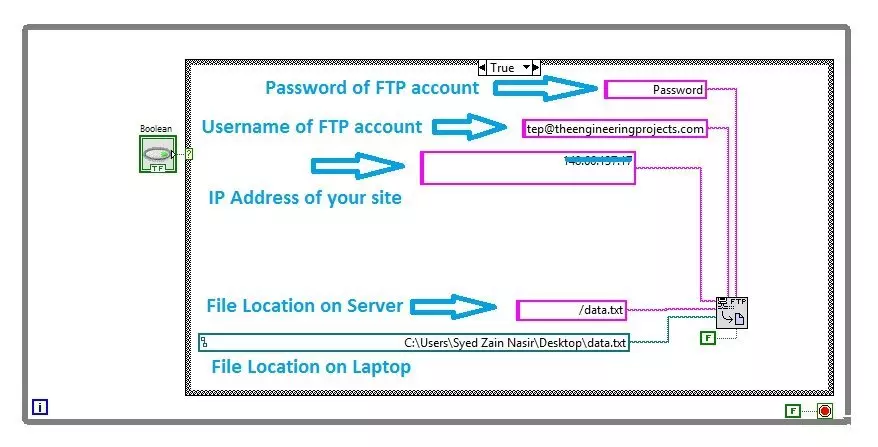
Hello friends, I hope you all are doing great. In today's tutorial, I am gonna show you How to upload Files using FTP in LabView. It's gonna be a quick tutorial as there's not much to do :) but you have to read and follow it carefully because if you made even a small mistake then it won't work.
FTP is an abbreviation of File Transfer Protocol and using FTP we can easily upload or download files from our web server. We can use different FTP clients like FileZilla in order to do it manually but today we are gonna have a look at How to upload files automatically using FTP in LabView. So, let's get started with FTP in LabView:
How to Upload Files using FTP in LabView
When you are working on some Embedded project where you need to upload your sensor ...
Hello everyone! I hope you all will be absolutely fine and having fun. Today, I would like to provide a complete discussion on DC Motor Control using myRIO. I will first provide you a bit information about DC motor then we will move forward towards DC motor control using myRIO. DC motor is an electronic instrument which is used to convert electrical energy into mechanical energy. It plays a vital role in industrial applications. It has also great importance for the engineers to to study about its working principle. DC motor has basically two input terminals. At one terminal we have to provide voltage supply and the other terminal will be attached to the ground (0V). And if we change the polarity, the direction of the motor will also be changed co ...
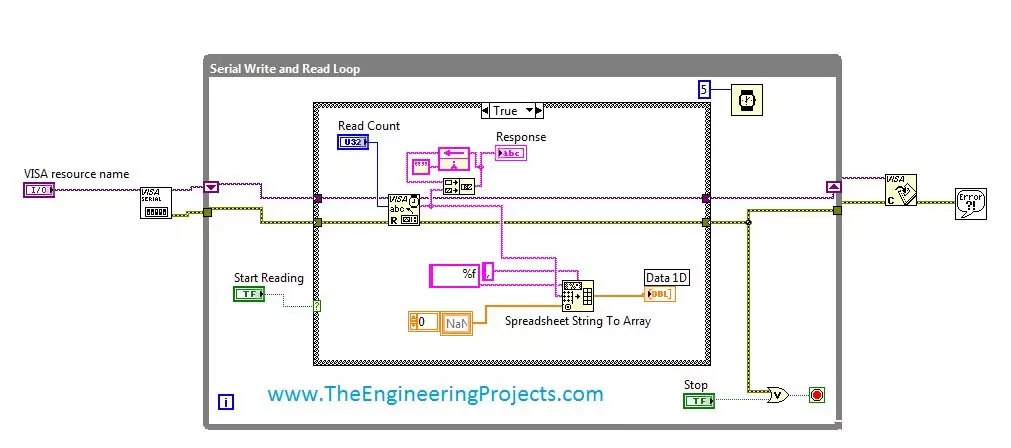
Hello friends, hope you all are fine and enjoying good health. Today's post is my first post on LabView Software. I have worked on LabView quite a lot in past but these days I am continuously working on LabvView so I thought to write some tutorials on it. In today's tutorial, I will explain in detail How to get continuous data from COM Port in LabView software. LabView is a very handy tool for the engineers. One can easily plot graphs and can work on different hardware modules with it. One of the best feature of LabView is its extensive help desk. There are many examples present in it which are ready to run and can help a lot, moreover their online is also very extensive. I got into many problems while working on it and I never get stuck, I just s ...
Hello friends, I hope you all are fine and having fun with your lives. Today, I am going to share a tutorial on new board and as you can see in the title, this new board is named as Myrio. So, today, we are gonna have a look at getting started with Myrio. NI myRIO is a combination of dual-core ARM Cortex™-A9 real-time processing and Xilinx FPGA customizable I/O. It is specially designed for engineering students by National Instruments and is a cheap as well as an awesome piece for building your dream projects.
Recently I got a chance to work on this NI Myrio board and I really enjoyed while working on them as they not only awesome but also easy in programming. Moreover, because of its awesome speed you can ask it to do any kind of embedded work. Y ...
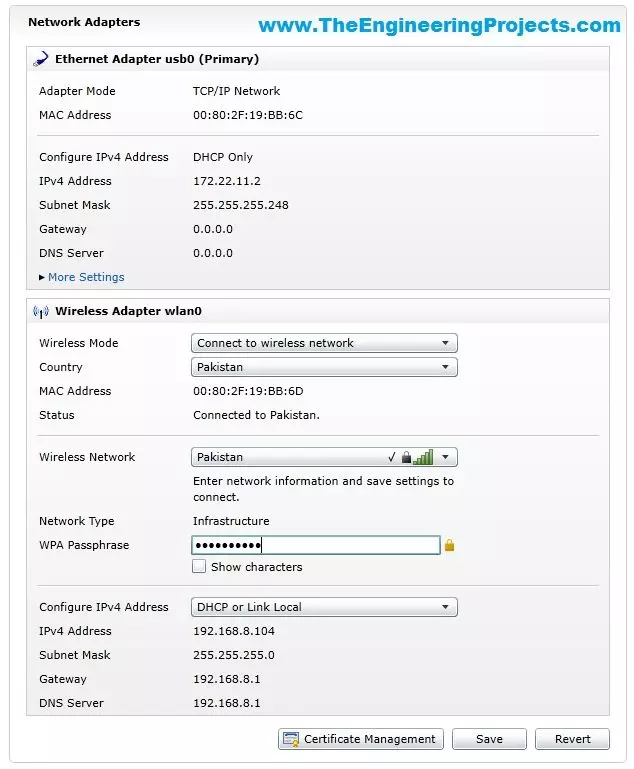
Hello friends, hope you all are fine and having fun with your lives. In today's tutorial, I am gonna show you How to Configure NI MyRio on Wifi. In our previous tutorial, Getting Started with NI MyRio I have show you how to get started with NI MyRio and control LEDs of NI MyRio but you have seen that we have done that over USB. In simple words, we have controlled the LEDs and gyroscope of MyRio over USB but in today's tutorial, first of all, we are gonna configure NI MyRio on Wifi and then we are gonna control all those things over Wifi instead of USB.
If you have a project on MyRio then its my recommendation to use Wifi instead of USB for upload and testing your codes because Wifi is quite flexible in use and you no more restricted to use the USB ...
Hello friends! Hope you all will be absolutely fine. Today I am going to share my knowledge with you about how to create an algorithm for Water Level Detector in LabVIEW 2015. LabVIEW is an excellent software for simulation purpose as well as for the hardware interfacing (interfacing with the external devices). I support the "Graphical Language" which is usually known as "Field Programmable Gate Array (FPGA) " based language. In other software we have to create logic first and then we need to write a complete syntax for the created logic. This software is very easy to use and is quite helpful. Because, we don't have to write the complete complex syntax, instead we have to just create our logic and implement this logic using FPGA blocks. In this t ...
Hello everyone! I hope you all will be absolutely fine and having fun. Today, I am going to share my knowledge about Creating First Program with myRIO. Before doing anything on NI myRIO you must know that how to configure this device. So, before going into the details of this tutorial I would like to suggest you to must visit Getting Started with myRIO and How to Configure myRIO on WiFi for the better understanding of this tutorial.
NI myRIO is an amazing processing tool that has a very high processing speed as compared to other microcontroller e.g. Arduino, raspberry pi, gellilio etc. So, it can be used for the real time projects where there is need to respond very quickly according to the assigned tasks. NI myRIO was launched by National Instr ...
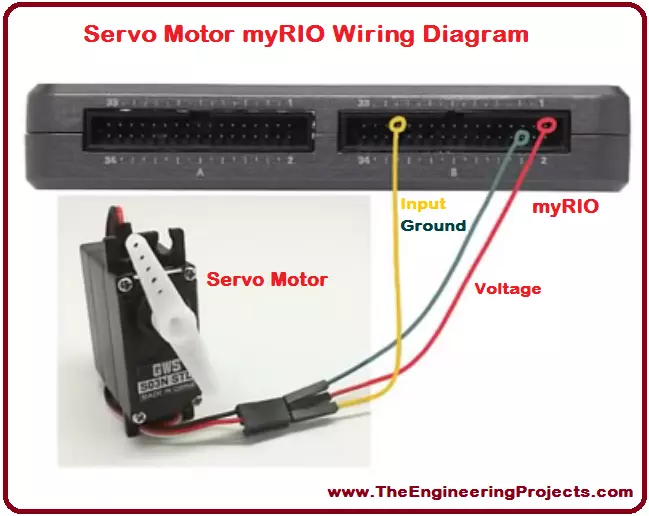
Hello everyone! I hope you all will be absolutely fine and having fun. Today, I would like to provide a complete discussion on Servo Motor Control using myRIO. In this tutorial I will tell you about the control of a servo motor using NI myRIO. First of all, I will give you a brief introduction on servo motors and then we will proceed towards their interfacing with myRIO. Servo motor is an electronic device with a small output shaft. This shaft can be adjusted at different angles for the different purposes. We can adjust this shaft by sending a signal usually known as servo coded signal. Servo motor is able maintain a particular angle as long as it has the servo coded signal at its input.
Servo motor changes the angular position of its shaft with ...