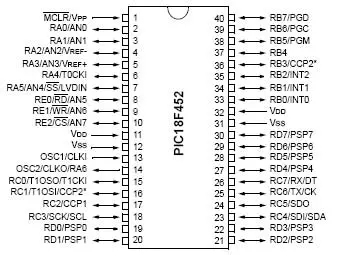
Hello friends! In the previous tutorial, we discussed getting started with PIC microcontrollers and the minimum circuit needed to run a PIC18F452. Today, we will examine its ports, timers, communication interfaces and other useful hardware functions. We will refer to the 40-pin PDIP package throughout this lesson. The signal names are more important than the physical pin numbers, because other packages can place those signals differently. Always match the package drawing to the component you actually have. The main goal is to help you allocate pins and select peripherals for a project. We will also work through timer, ADC, PWM and baud-rate calculations so the datasheet values become practical design tools rather than a list of unfamiliar abbreviations. Figure: PIC18F452 reference for port ...
Hello friends! In the previous lesson, we discussed microcontroller basics . Today, we will apply those ideas to a PIC18F452 and identify everything needed to make a simple program run on real hardware. We will use the 40-pin PDIP version of the PIC18F452, matching the original circuit in this tutorial. Our first output is an LED on RD0. Before writing the application, we will work through power, reset, the external clock, programming connections and the distinction between the IDE and compiler. The original lesson used older MPLAB tools and a socket-style programming workflow. Those are useful historical references, but a supported in-circuit programmer can program the PIC while it remains in the target circuit. The exact combination of device, programmer and software must be checked befo ...
Hello friends! Today, we are starting our microcontroller tutorial series from the basics. Before connecting a PIC, installing a compiler or writing an LED-blinking program, we need to understand what a microcontroller does and how its software interacts with an electrical circuit. Think of a project that reads a push button, changes a pattern of lights and reports its operating state. A microcontroller can coordinate those actions by repeatedly reading inputs, applying programmed rules and updating outputs. The same basic idea appears in sensor loggers, small robots, appliance controls and many other embedded systems. In this series, our detailed hardware example will be the PIC18F452. We will first learn the general ideas, then study that device's connections and development tools. You d ...