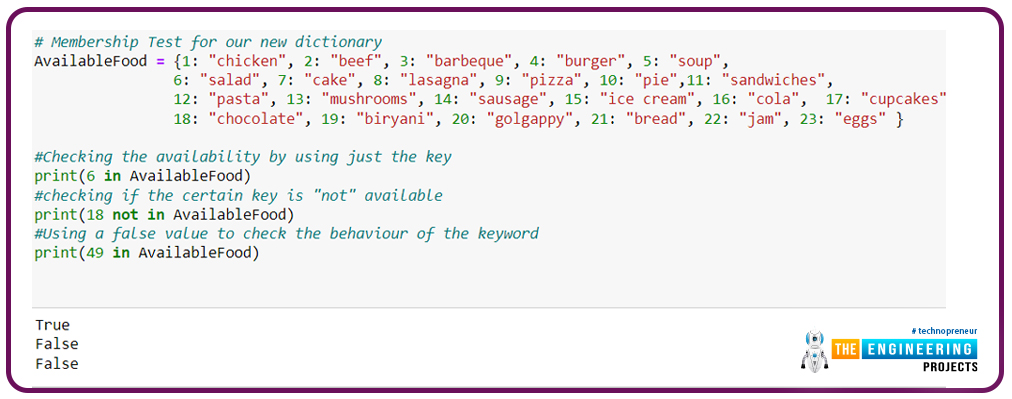
Hello peeps! Welcome to the new episode of the Python tutorial. We have been working with different types of data collection in Python, and it is amazing to see that there are several ways to store and retrieve data. In the previous lecture, our focus was on the basics of dictionaries. We observed that there are many important topics in the dictionaries, and we must know all of them to make our base of concepts solid. For this, we are now dealing with the dictionaries in different ways, and this tutorial is going to be very interesting because we will pay more heed to the practical work and, by choosing a few cases in our codes, we will apply multiple operations to them. So have the highlights of today’s learning, and then we will move forward with the concepts.
What are nested diction ...
Key TakeawaysStreaming data integration is becoming essential for Snowflake use cases that depend on current operational data.The strongest platforms support reliable change capture, low latency, schema evolution, backfills, delete handling, and efficient warehouse writes.Database replication, event streaming, SaaS ingestion, and pipeline orchestration are different integration patterns and should be evaluated separately.A good platform should reduce source database impact while keeping Snowflake tables trustworthy and up to date.Data teams should define latency, volume, ownership, transformation, and governance requirements before selecting a platform.The best choice is the platform that matches the workload, not the one with the longest connector list or the most impressive demo.Snowflak ...
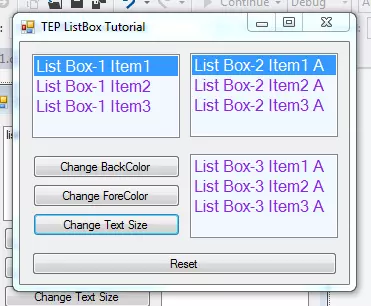
Hey, everyone, I hope you all are doing great. In this article, I am going to explain C# ListBox Control. In the previous article, we have discussed the C# ComboBox Control. C# ListBox is quite similar to ComboBox. C# ListBox is just a simple list, which is showing the data. The user can easily select an option from the list by clicking on any of its items. Some features are common in ComboBox and ListBox. Such as the data is inserted like items. Insertion, deletion, and selection are also same. We will insert the values, then after performing the selection, we will delete them. We will also focus on the text styling, colors and events handling etc. So, let's get started with C# ListBox Control:
C# ListBox Control
There are multiple functional ...
To become familiar with the world of microcontrollers it is necessary to have a development board (also known as a kit), which generally allows you to start working on it easily. Fortunately, the ST provides a wide portfolio of development boards. In this guide, we will describe and use the Nucleo board.
The Nucleo has been introduced a few years ago and its line is divided into three main groups:
Nucleo-32;
Nucleo-64;
Nucleo-144.
Nucleo-32 Development Board
The number of pins available, so the package, gives the name to the board: Nucleo-32 uses an LQFP-32 package; Nucleo-64 and LQFP-64; Nucleo-144 an LQFP-144. The Nucleo-64 was the first line introduced and counts 16 different boards.
The Nucleo boards have interesting advantages compa ...
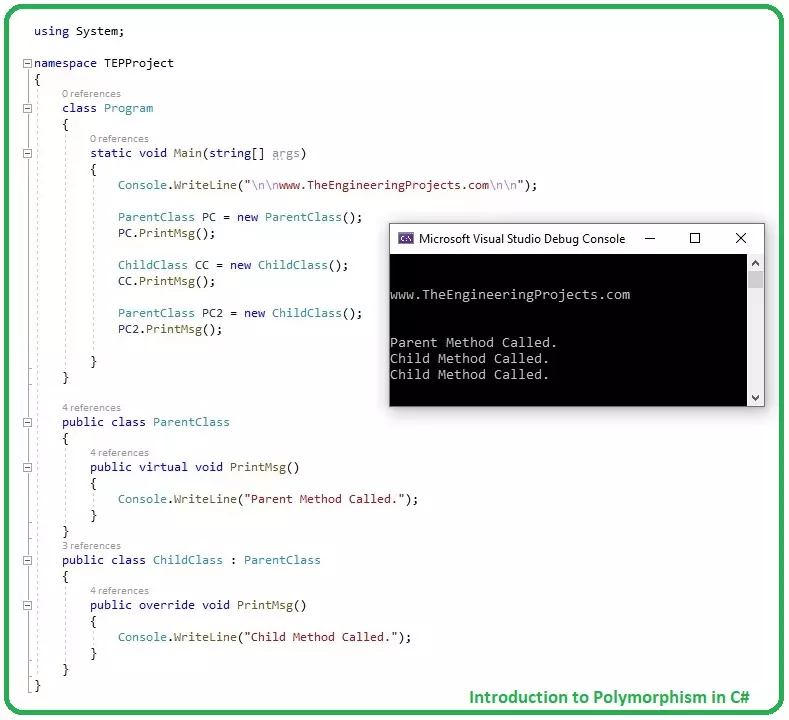
Hello friends, I hope you all are having fun. In today's tutorial, we will have a look at Introduction to Polymorphism in C#. It's our 16th tutorial in C# series and polymorphism is considered as a main pillar of object oriented programming.
In our previous tutorial, we have seen a detailed Introduction to Inheritance in C# and along with it, we have also discussed How to hide a Method in Parent Class, if the same method exists in Child class. This Method Hiding is actually the basis of Polymorphism, so let's discuss it out in detail:
Introduction to Polymorphism in C#
Polymorphism in C# enables the user to invoke a Child Class Method & override the Parent Class Method, using a Parent Class Reference variable.
In our previous lecture o ...
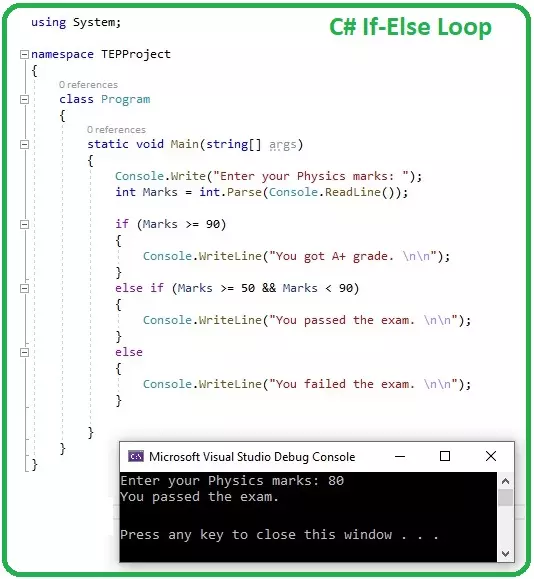
Hello everyone, I hope you all are doing great. Today, we are gonna have a look at IF Loops in C# and it's 8th tutorial in C# series. So far, we have discussed some basic concepts in C# and now we are ready to get our hands on Loops in C#.
C#, as any other programming language, supports a lot of loop structures, we will discuss each one of them separately in our coming tutorials. Today, we will discuss the simplest of them all, which is IF loop, so let's get started with How to use IF Loop in C#:
How to use IF Loop in C#
IF Loop in C# takes a Boolean expression as a condition and if this condition is TRUE, the compiler executes the code inside IF loop { } and if the condition is wrong, the compiler simply ignores the code.
Here's the syntax o ...
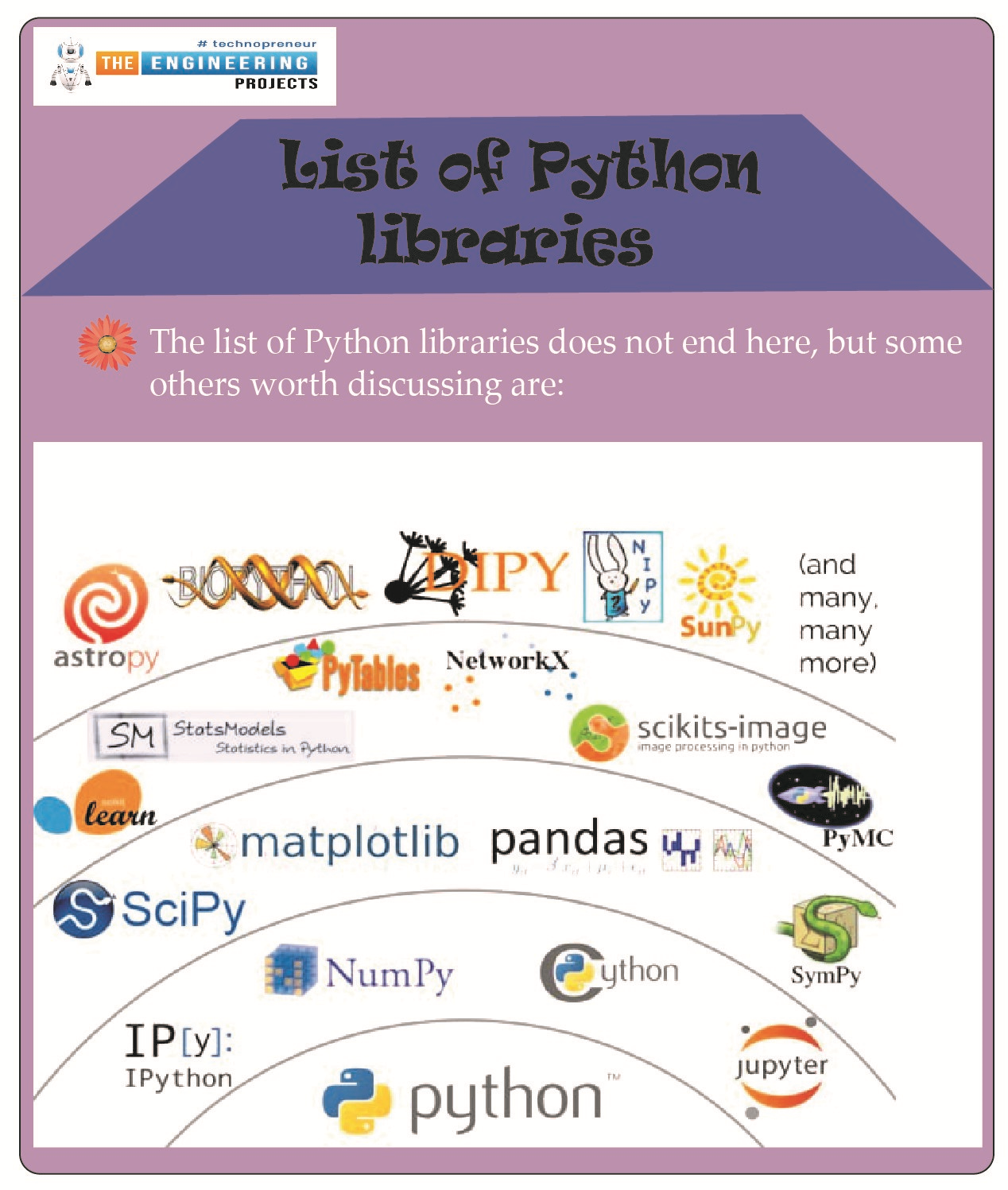
Hello students! We hope you are enjoying learning Python, and therefore, we are moving forward with the advanced level of Python. For this, you have to keep in mind that you are moving towards complex codes, and therefore, you have to get ready for expert-level problems. Do not worry, we are not going to leave you alone with these complex codes; rather, we are discussing the amazing and interesting libraries in Python so that your work may be done with the pre-defined codes and applications so you get amazing results by following simple operations and statements. If it is confusing for you right now, do not worry. Have a look at the topics that you will learn about today, and after that, we will move towards the details:
What is meant by a library in programming languages?
List some of t ...
Hello friends, I hope you all are doing great. In today's tutorial, we will have a look at How to Create ViewModels in ASP.NET Core. It's our 9th tutorial in ASP.Net Core series. We have already covered Controllers, Models & Views in our previous lectures and now it's time to understand this fourth pillar of MVC architecture.
ViewModel is not an integral part of MVC architecture and can be ignored in simple projects but in complex applications, we have to use ViewModel as it adds flexibility in the project. So, let's have a look at ViewModels in ASP.NET Core:
ViewModels in ASP.NET Core
ViewModels in ASP.NET Core ( also called Data Transfer Objects [DTO] ) are used to send Models data from Controll ...
Hey, peps! Welcome to the new tutorial on the Jupyter notebook. As we are moving towards a higher level of Python, therefore, it is important to understand other ways of doing the same task. As we read in the previous lecture about 2D arrays, this time it is going to be done with the help of a famous library in Python. This time, you are going to learn different, engaging, and advanced-level concepts that not only help you deal with the 2D array but also the installation and working of the unique library of Python, which is NumPy. This lecture is going to be very useful and interesting, and therefore, we suggest you have a glance at all the goals of this lecture.
Getting the introduction to NumPy
Successfully installation of NumPy and knowing different methods for it
Using the arrays wi ...
Thank you for joining us for yet another session of this series on Raspberry Pi programming. In the preceding tutorial, we created a pi-hole ad blocker for our home network using raspberry pi 4. We also learned how to install pi-hole on raspberry pi four and how to access it in any way with other devices. This tutorial will implement a speech recognition system using raspberry pi and use it in our project. First, we will learn the fundamentals of speech recognition, and then we will build a game that uses the user's voice to play it and discover how it all works with a speech recognition package.
Here, you'll learn:
The basics of voice recognition
On PyPI, what packages may be found?
Utilize the SpeechRecognition package with a wide range ...